Author: Security – Computerworld

WWDC 2026: How Apple can take a great leap in AI

Apple’s Worldwide Developer Conference (WWDC) takes place in just a few weeks. Everyone expects the company to explain its approach to AI deployment on its platforms. With that in mind, here’s what several months of speculation suggest Apple will announce, though the details remain to be disclosed.

Apple is investing billions of dollars in these plans; R&D spending reached 10.3% of revenue in the second quarter, up from 7.6% in Q1. Given Apple’s accelerating revenue, on a dollar basis this means the company’s R&D spend is up 34% from a year ago.

“We believe AI is a really important investment area for Apple, and we’re going to be doing that incrementally on top of what we normally invest in our product roadmap,” said Apple CFO Kevan Parekh during Apple’s latest fiscal call. (AI isn’t Apple’s only spending target, either.)

While the billions Apple is investing are dwarfed by the huge infrastructure investments made by pure AI players, Apple’s infrastructure already exists — in the form of 2.5 billion actively used devices, the vast majority of which can already run some AI models natively on device. So, how is Apple exploiting this deployment advantage?

BYO-AI

Only this week, Bloomberg once again confirmed Apple intends to permit its customers to select their choice of AI service on their device. You’ll be able to pick Gemini, ChatGPT, or Claude as your default supporting AI service. This means that while you might continue to use Apple Intelligence for most queries, you’ll also be able to use one of those server-based AI choices for more complex tasks. Y

ou will also be able to opt to use those services to provide all your AI needs, but not until iOS 27, which will be unveiled at WWDC. These services will be provided within a new Extension system, which I suspect will work with the apps those AI developers are already building for iPhones. That could lead to a new ‘App Store for AI’ approach, which the company may be able to monetize. So, you’ll be able to select between AI services for tasks such as text generation and editing and powering Siri.

Work with Gemini

While allowing users AI choice, Apple is also building out Apple Intelligence to be a competitive option. The company’s engineers have been working with Google Gemini to build their own Foundation Models for common tasks.

That work includes use of a customized version of Gemini to improve Siri’s conversational abilities and understanding of natural language as well as a degree of contextual intelligence. This should enable Siri to perform complex tasks across more than one app. “Apple Intelligence will continue to run on Apple devices and Private Cloud Compute, while maintaining Apple’s industry-leading privacy standards,” Apple and Google confirmed earlier this year.

Private by design

Apple is building privacy into these tools, meaning those Foundation Models and new Siri features will maintain user privacy by relying on Private Cloud Compute, Apple’s uniquely private infrastructure that lets you use powerful server-based AI to resolve complex tasks without eroding privacy. This is good for everyone, but particularly promising to enterprises seeking AI efficiency along with guaranteed data security. That provision of privacy should let Apple offer its services to businesses that might otherwise opt for sovereign or on-premises AI data services. A legal team might feel more confident to use AI to summarize confidential contracts on-device, for example, while a medical practitioner might be able to use AI to securely analyze patient notes. In many cases, IT will almost certainly gravitate towards Apple’s privacy posture.

The hardware thing

Apple Silicon, Unified Memory, the Neural Engine and so many additional hardware and software achievements available in Apple’s products mean the entire ecosystem is already resolutely AI ready. 

In an important statement, CEO Tim Cook recently explained how this all works together, and the extent to which Apple’s hardware advantage already translates into an experience advantage for AI users and developers:

“What truly sets Apple apart is how Apple Intelligence is woven into the core of our platforms, powered by Apple Silicon, and designed from the ground up to deliver intelligence that is fast, personal, and private. This is not AI as a standalone feature, but AI as an essential intuitive part of the experience across our devices. It builds on years of innovation, from the neural engine, to advanced on-device processing, enabling capabilities that are not only incredibly powerful but also respectful of user privacy.

“Increasingly, that same foundation is drawing developers and researchers to our products as powerful platforms for building and running agentic AI, thanks to the unique combination of performance, efficiency, and on-device capabilities. When you combine this level of integration with our relentless focus on the customer experience, it becomes clear why Apple platforms are the best place to experience AI.”

You don’t need an LLM to see which way the wind blows

In short, Apple’s platforms are already the best place to build AI and the best place to use AI. Apple has decided to lean into that advantage while adopting a multi-state approach to AI services; it recognizes the inevitable commoditization of those services, while also continuing to develop its own to compete with third parties. With Apple’s own ecosystem as the battleground, that approach means Apple wins, even if its AI services lose.

“With Apple Silicon and its powerful unified memory architecture, leading AI developers like Perplexity are choosing Mac as their preferred platform to build enterprise-grade AI assistants that power autonomous agents and boost workplace productivity,” Apple said.

Asymco’s Horace Dediu notes the significance of such a shift: “If foundation models are heading toward commodity status, then the strategic value shifts to whoever controls the integration layer and the user relationship,” he wrote. 

People, get ready

Expect to learn much more concerning Apple’s AI plans at WWDC in a few weeks. While Apple is doubtless still burning at the challenges it has encountered so far, like any marathon runner the company continues to race through those short-term pains. “We can’t wait to share what we’ve been working on, from AI advancements to exciting new software and developer tools. It’s going to be an incredible week,” Cook promised during Apple’s fiscal call.

We’ll all be watching.

You can follow me on social media! Join me on BlueSky,  LinkedIn, and Mastodon.

US government agency to safety test frontier AI models before release

The Center for AI Standards and Innovation (CAISI), a division of the US Department of Commerce, has signed agreements with Google DeepMind, Microsoft, and xAI that would give the agency the ability to vet AI models from these organizations and others prior to their being made publicly available.

According to a release from CAISI, which is part of the department’s National Institute of Standards and Technology (NIST), it will “conduct pre-deployment evaluations and targeted research to better assess frontier AI capabilities and advance the state of AI security.”

The three join Anthropic and OpenAI, which signed similar agreements almost two years ago during the Biden administration, when CAISI was known as the US Artificial Intelligence Safety Institute.

An August 2024 release about those agreements indicated that the institute planned to provide feedback to both companies on “potential safety improvements to their models, in close collaboration with its partners at the UK AI Safety Institute (AISI).”

Microsoft said Tuesday in a blog about the latest agreement that it, and others like it, are essential to building trust and confidence in advanced AI systems. As AI capabilities advance, it said, so too must the rigor of the testing and safeguards that underpin them.

A shift toward proactive security

Fritz Jean-Louis, principal cybersecurity advisor at Info-Tech Research Group, said the CAISI agreements signal a shift toward proactive security for agentic AI by enabling government-led testing of advanced models before and after deployment.

This should, he said, “help strengthen visibility into autonomous behaviors while accelerating the development of standards to mitigate risks. By combining early access, continuous evaluation, and cross-sector collaboration, the initiative pushes the industry toward security-by-design for increasingly autonomous AI systems.”  

However, added Jean-Louis, “there are a few potential hurdles to consider, for example: how would intellectual property be protected under this approach? Regardless, I believe this is a positive step for the industry.”

Executive order ‘taking shape’

Following the announcement from CAISI, a published report on Wednesday indicated that the White House is on the verge of preparing an executive order that would see the creation of a vetting system for all new artificial intelligence models, key among them Anthropic’s Mythos.

Bloomberg reported, “the directive is taking shape weeks after Anthropic revealed that its breakthrough Mythos model was adept at finding network vulnerabilities and could pose a global cybersecurity risk.”

Significant change in policy direction

Carmi Levy, an independent technology analyst, said, “it is patently obvious that this week’s announcement that establishes the Center for AI Standards and Innovation as the testing ground for frontier AI models is directly linked to the potential executive order that would lead to a vetting system for AI models.”

It isn’t coincidental, he said, “that the announcements were made in rapid succession, and it reinforces the growing urgency for governments in the US and elsewhere to tighten partnerships with key AI vendors to maximize AI-related security and minimize the potential for systemic risk.”

This latest flurry of activity from Washington marks a significant shift in policy direction from an administration that up until recently had been following a more laissez-faire approach to regulation, Levy pointed out.

Concerns around Anthropic’s Claude Mythos model, and the relative ease with which it could discover and exploit vulnerabilities in digital systems, “might have helped shift the federal government’s position on AI-related regulation, particularly around the renewed push to enforce standards for AI-related deployments across government infrastructure,” he said.

AI vendors like Google, Microsoft, and xAI, Levy added, “must walk a political highwire of sorts as they balance the need to release models into the marketplace in a timely, cost-effective manner with increasingly defined rules around AI-related cybersecurity and safety. The industry can’t afford a scenario where vendors themselves make up the rules as they go along.”

At the same time, he said, the recent showdown between Anthropic and the Pentagon illustrates why the vendors might be forgiven for viewing the federal government’s growing interest in AI testing and regulation with at least a certain degree of caution.

According  to Levy, “while the administration’s efforts to centralize testing and oversight should streamline the go-to-market process for vendors and accelerate the development of best practices around frontier model development, the political overtones of recent government-industry partnerships cannot be ignored.”

This article originally appeared on CIO.com.

Chrome’s AI features can take up to 4GB of space on your computer

Google Chrome can automatically download a local AI model that takes up to 4 gigabytes of hard drive space on a computer when certain AI features are enabled, according to The Verge.

The file, called weights.bin, is used by Google’s Gemini Nano AI model to provide writing assistance, autocomplete, and fraud protection directly on the device. (Nano has been around since Gemini was introduced in late 2023.)

Since the model runs locally, the AI data is stored on the computer instead of in the cloud, which can provide better privacy, but also takes up storage space. Users can check whether the file is present by looking for the OptGuideOnDeviceModel folder in Chrome’s system files.

To free up the space, users need to disable the on-device feature in Chrome’s settings under Settings > System.

ServiceNow continues its AI transformation with an integrated experience

ServiceNow has unveiled updates to its workflow management platform advancing its redefinition of itself as the “AI control tower for business reinvention” at its Knowledge customer event this week.

The AI Control Tower product itself, introduced at last year’s event, gets new integrations with Microsoft Azure, Amazon Web Services (AWS), Google Cloud Platform (GCP) and other LLM providers to extend governance and observability of enterprise infrastructure, adding to its existing links with OpenAI and Anthropic. The integrations also span applications such as SAP, Oracle, and Workday. In addition, Control Tower can now discover non-human identities and connected devices to bring OT and IoT under the same governance as AI agents and cloud services.

All this ties in to the ServiceNow Action Fabric, which opens the platform to any AI agent, whether built on ServiceNow or from another source, via a Model Context Protocol (MCP) server, the company said.

And thanks to the recent acquisition of Traceloop, Control Tower now provides more extensive observability into agent behavior at runtime. Five new risk frameworks aligned with NIST and EU Act standards offer compliance controls.

Autonomous workforce

To expand the reach of what ServiceNow calls the Autonomous Workforce, a group of specialist AI agents announced in February that began with a single L1 IT service desk agent, it has added “AI teammates” that work alongside humans in CRM, IT, employee services, and security and risk management.

The autonomous IT cohort includes an AIOps agent that detects anomalies, correlates events, and triggers remediation, and a specialist for site reliability engineering (SRE) that performs incident triage and postmortem documentation. Other new agents assist with asset lifecycle management and portfolio planning.

Autonomous CRM offers specialist agents for sales qualification and quoting, order fulfillment, managing invoice disputes, and service and renewal, and in the world of employee services, AI specialists act as digital employees with role-specific skills in HR, workplace services, legal, finance, procurement, supplier management, and health and safety.

To round out the offerings, ServiceNow announced Autonomous Security & Risk, designed to span the entire threat landscape from finding and remediating vulnerabilities through examining third party vendor risk.

Employee experience

ServiceNow EmployeeWorks, the previously announced “conversational front door for the enterprise”, is now generally available. In addition, ServiceNow announced Otto, an AI assistant that unifies Now Assist, Moveworks, and AI Experience, and operates across the enterprise.

“Rather than living inside a single application, ServiceNow Otto sits across the entire enterprise, understanding intent, routing work to the right agent, and executing it to completion,” the company said. “Employees, customers, and support teams talk, chat, search, browse, analyze, and build. ServiceNow Otto is designed to handle the rest, adapting to each employee’s role and location without requiring them to know which system handles their request. Actions are governed by AI Control Tower, which can log each AI interaction, enforce enterprise policies, and provide explainability for every decision.”

Otto is already available in EmployeeWorks and the AI Control Tower, and will be rolled out in all other products “in the year ahead.”

According to Nenshad Bardoliwalla, ServiceNow’s group VP of AI products, all this means that “together with a new commercial model that bundles everything customers need to deploy AI quickly, we’ve made it clear the era of sidecar AI is over.”

What technology analyst Carmi Levy finds most interesting in these announcements is how quickly we’re seeing AI-enabled workflows extend beyond their initial entry point in IT.

“What was once the exclusive domain of senior IT leaders and planners is now filtering across all operational areas of the typical organization, including CRM, HR, IT operations, security and risk,” he said. “AI is also deeply embedded in the average worker’s desktop and is rewriting their work experiences in the process. Likewise, it puts highly autonomous tools in the hands of organizations intent on improving productivity, sharpening customer responsiveness, and driving operational efficiencies.”

Stephen Elliot, group VP at IDC, added, “The agentic focus is critical as the company continues to expand its specialist agent library. Customers can adopt these across core workflows to realize business value and increase productivity. The recent commercial pricing model complements the agentic capabilities. It meets customers where they are in their AI maturity journey enabling a pragmatic approach to adoption.”

But, he added, “Customers should consider the combination of workflows, AI, data, governance, and security as they deploy AI capabilities. No one model can do it all.”

Indeed, he said, “We are hearing from some CIOs that they are pausing some AI use cases because of the security and governance risks.”

Charles Betz, VP principal analyst at Forrester, said that ServiceNow is on the right track, especially with its continued focus on data. “The data governance, provenance, and currency issues are not trivial. Agents reasoning at machine speed over a stale graph are going to produce wrong outputs, and it’ll be data-quality-based hallucination,” he said. In addition, “documenting decision traces within the AI domain is super important.”

Levy agreed. “ServiceNow’s offerings reflect a keen understanding of where AI can drive optimal benefit throughout all areas of the business, what those workflows might look like, and how the tools and supports need to evolve,” he said.

This story originally appeared on CIO.com.

Apple Intelligence hype cost the company $250M

The mishaps around Apple Intelligence have gone beyond denting Apple’s reputation – they have also cost the company $250 million in damages over smarter Siri delays.

Think back to the original introduction of Apple Intelligence and you might recall a promotional video that explained how a new and smarter Siri would act as your contextually-smart AI companion, helping you get things done. Almost two years later, that smarter Siri still hasn’t shipped — and while Apple has made major changes in management, AI strategy, and approach, this contextual companion isn’t now expected until later this year.

Hopefully.

Apple Intelligence can be seen as a Maps-launch style debacle on the part of the company. (Apple even had to deny that the video presentation for those features shown at WWDC 2024 (no longer officially available) was made up.)

Apple Intelligence’s $250M punishment

The entire affair left some iPhone users unhappy, so they launched a class action lawsuit against the company for delaying introduction of the “more personalized Siri.” Apple agreed to pay $250 million to settle the case last December – a figure that works out to between $25 and $95 per device, depending on how many iPhone customers submit claims. 

(Compensation is available to US customers who purchased an iPhone 15 Pro, 15 Pro Max or the iPhone 16 family of devices between June 2024 and March 2025.)

The case against the company claimed it “Promoted AI capabilities that did not exist at the time, do not exist, and will not exist for two or more years.” 

To make matters worse, Apple pushed these new features after their introduction at WWDC — even linking a later iPhone update to its AI. Looking back now, this wasn’t a great idea since it made things much more embarrassing once Apple failed to deliver. That’s why the class action succeeded.

Don’t promise too much

The lesson here is that, in general, even a snake oil salesman needs to kill a couple of snakes before putting the essence in a bottle; in this case, the snake hadn’t yet been located. Apple has not admitted any wrongdoing as part of the settlement, saying it acted in “good faith” and “reasonably” thought it had complied with all applicable rules and regulations.

Apple now appears committed to a new partner-based strategy in which it builds the very best hardware on which to run AI, allowing users to choose whichever brand of AI they want to use on-device. At the same time, Apple is focused on building Apple Intelligence as a viable alternative. This will take time, but Apple will no doubt press ahead until it gets Apple Intelligence right.

In a statement, the company told 9to5Mac: “Since the launch of Apple Intelligence, we have introduced dozens of features across many languages that are integrated across Apple’s platforms, relevant to what users do every day, and built with privacy protections at every step.”

The plot thickens (intelligently)

That statement also stressed Apple’s continued focus on building those Apple Intelligence features. You could see that claim as an inevitable reaction to the criticism the company faces. I prefer to see it as confirmation that Apple has adopted the AI+ strategy, (best hardware and a choice of AI, including its own increasingly competitive Apple Intelligence brand). During last week’s earnings call, Apple CEO Tim Cook described the sheer importance of AI to its ecosystem.

“What truly sets Apple apart is how Apple Intelligence is woven into the core of our platforms, powered by Apple Silicon, and designed from the ground up to deliver intelligence that is fast, personal, and private,” he said. “This is not AI as a standalone feature, but AI as an essential intuitive part of the experience across our devices.”

More importantly, in the long run, Apple believes that by providing the best development platform it can also attract the AI developers and services it needs on which to build its future. I think this approach will succeed.

Still, as the class action settlement shows, the original introduction of Apple Intelligence may enter the history books as a classic case of hype over substance. Under internal and external pressure to regain the initiative in AI development, the company abandoned its usual conservative approach to making big claims, in which it tends to under-promise then over-deliver. Customers like nice surprises more than they enjoy empty promises; Apple usually knows that.

You can follow me on social media! Join me on BlueSky,  LinkedIn, and Mastodon.

Give yourself an on-demand Android taskbar

Holy moly, I am flying around my phone this week.

It’s a wild feeling — especially since Google’s grand I/O gala, which is traditionally the time when shapeshifting new Android additions are supposed to command our attention, isn’t for another couple weeks yet.

These days, though, we’ve reached a point where many of the most interesting and non-AI-gobblydegook Android innovations aren’t even coming from Google itself but rather from third-party apps, add-ons, and crafty configuring (a fancy way of saying “good old-fashioned geeky tinkering”).

And that’s absolutely the case with this latest superpower I’ve just been granted. It’s an on-demand desktop-style taskbar that makes it delightfully swift ‘n’ simple to switch over to any other app on your favorite Android gadget without first having to head back to your home screen and then poke around to find it.

Instead, you just summon that taskbar — or even set it to be always visible, if you’d rather — and, exactly like on a desktop computer, you either tap a commonly accessed app that you’ve pinned to a specific position or you tap the app drawer icon within your newfound taskbar to find any app from a list, all without ever interrupting whatever else you were doing.

Android taskbar: Dsk Mode
Tap, tap, and bam: Your Android taskbar is there and ready to serve you.

JR Raphael, Foundry

It’s a serious time-saver and workflow-enhancer. And you can grant the same superpower to yourself this instant — no matter what Android device you’ve got in your greasy gibbon paws.

Best of all? It’ll take you all of two minutes to do.

Lemme show ya how.

[Keep the knowledge coming with my free Android Intelligence newsletter — three new things to try every Friday and my Android Notification Power-Pack as a special welcome bonus!]  

Your Android taskbar advantage

First, for a quick pinch of context: The feat at the center of this surprise is actually something that Google itself offers in certain extremely limited environments on Android — on foldable phones and tablets only, as of now — and that the company’s been rumored to be working on in a more universal manner for a while, though we’ve yet to see any concrete sign of such plans progressing in recent months and as far as the upcoming Android 17 update is concerned.

It’s also something I’ve been longing to see on the Android phone front for ages — and, to that end, something I’ve come up with wacky workarounds to accomplish a few different times now, both via official buried Android developer settings (which can work admirably well but that bring about some unavoidable awkward side effects) and via a wonderful third-party app called Panels (which is one of my favorite power-user tools but can be a bit unwieldy and overwhelming for mass consumption).

This new setup is by far the simplest, in terms of its initial setup and as far as how it works in day-to-day practice — particularly because of the instantly familiar nature of the interface it gives you, provided you’re spent at least seven seconds of your life looking at virtually any desktop computer operating system.

But enough blathering: The secret at the center of this is a clever little creation called Dsk Mode (which I’m assuming is short for Desk Mode and not Disk Mode, Dusk Mode, or Dad Socks and Knickerbockers Mode).

Vowel-challenged moniker aside, Dsk Mode does one thing and does it brilliantly well: It gives you that tantalizing taskbar we’ve been talking about — whenever you double-tap the bottom of your phone’s screen to summon it, in the setup I find most advantageous, or you opt to keep it perpetually present as an always-visible entity, if that sounds more enticing to ye.

Android taskbar: Dsk Mode app drawer
Dsk Mode’s taskbar includes full app drawer access for swift switching to anything you’ve got installed.

JR Raphael, Foundry

Either way you go, getting this going really is almost shockingly simple:

  • First, install the app from the Play Store (obviously, right?).
  • Open ‘er up and follow the steps the app shows you — which mostly just involves tapping through to allow the thing to act as an Android accessibility service.
    • That’s a level of access Dsk Mode legitimately needs in order to be summoned as an element on top of other active apps and processes.
    • The app is clear about the fact that it doesn’t store, save, or share any manner of personal data. And it doesn’t request any other permissions, either.
  • And — well, that’s about it!

At that point, you can officially start double-tapping the bottom-center of your screen to summon your snazzy new taskbar — no matter where else you are within Android or what else you happen to be doing.

Android taskbar: Dsk Mode switch apps
You can find and switch to anything quickly and intuitively with your new taskbar companion.

JR Raphael, Foundry

But you can — and certainly should — take a moment to review Dsk Mode’s various options while you’re there in its configuration tool.

Of particular note:

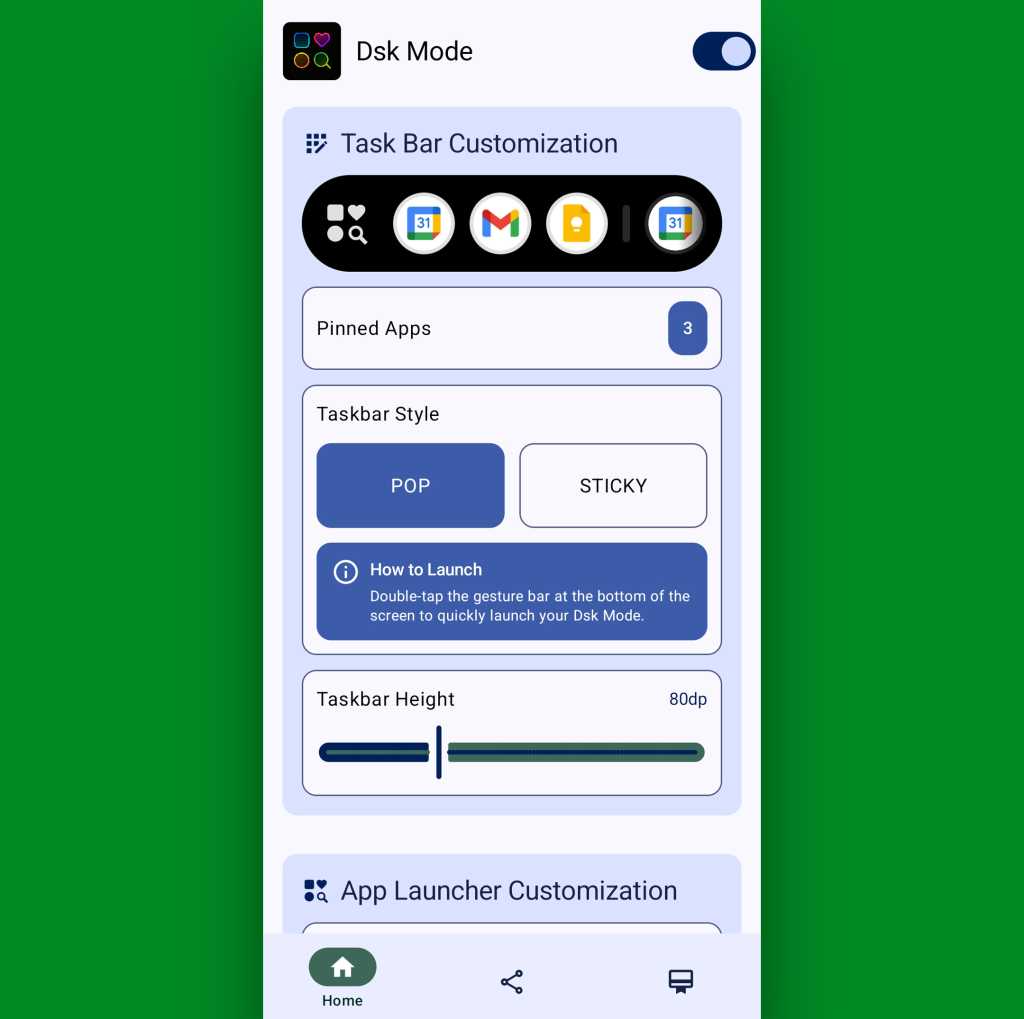
  • You can tap the “Pinned Apps” line to, y’know, pin apps to the taskbar and make ’em always visible and easy to access (in addition to just seeing recently used apps, as the taskbar displays by default).
  • You can change the “Taskbar Style” setting from “Pop” to “Sticky” if you want your taskbar to be permanently visible instead of being summoned by that bottom-screen tapping action.
  • And you can play around with the “Taskbar Height” setting to adjust exactly how large or small the taskbar is — something that’s well worth messing around with to get it how you like (and avoid having it be weirdly small and impossible to see without excessive squinting, as I had to do upon my own initial setup).
Android taskbar: Dsk Mode settings
Dsk Mode has some helpful options for making your taskbar look and work exactly the way you want.

JR Raphael, Foundry

Beyond that, if you scroll down a little within the Dsk Mode configuration interface, you’ll see settings for adjusting exactly how the taskbar’s app drawer looks and works as well as for tweaking your taskbar’s visual appearance and a couple other pertinent possibilities.

There really isn’t much more to it, and you’ll probably never need to come back into the app’s settings again (though if you ever decide you aren’t into the taskbar anymore for whatever reason, you can always go back in to flip the toggle at the top into the off position — or you can just uninstall it entirely).

The one other thing worth noting is the final tab at the bottom of Dsk Mode’s configuration interface, which contains a saucy little “Support” button. If you tap that, then tap the toggle at the top of the screen that comes up next to the words “This App,” you’ll find options for upgrading to the app’s premium version — at a cost of five bucks a year or, most sensibly, $10 for a lifetime, cross-device license.

The premium subscription unlocks a handful of otherwise limited options — like being able to set more than three pinned favorites for your taskbar and being able to use the taskbar’s app drawer search function. It also eliminates the mildly annoying full-screen ads that pop up occasionally throughout the configuration interface (though you won’t see those all that often, longer term, once you’ve finished configuring the app initially).

It supports the app’s independent developer, too, of course, which is always something worth considering in an era when everyone expects everything to be free and yet the people making stuff for us still need to make a living.

Whatever you decide, you can pat yourself on the back and embrace the newfound feeling of flying around your phone and enjoying desktop-style multitasking on mobile — in a way that only Android would ever allow.

Discover even more life-enhancing Android treasures with my free Android Intelligence newsletter — three new things to try every Friday and my free Android Notification Power-Pack today.

Edge browser leaves passwords exposed in plain text, says researcher

A Norwegian researcher has identified an issue with Microsoft Edge’s Password Manager that could be a serious concern for businesses.

Tom Jøran Sønstebyseter Rønning found that passwords are being saved within the browser in plain text, with the effect that any PC, particularly a shared machine, within an organization is a potential risk.

In a post on X, Rønning explained that when users save passwords in Edge, the browser decrypts every credential at startup and keeps it resident in process memory, regardless of whether the user visits the site.

Rønning’s finding was replicated by German IT publication Heise.de, which created and saved a password and found that, even after the browser had been closed and re-opened, the password could be found in plain text.

Microsoft has been nonchalant about the discovery. It said, “Design choices in this area involve balancing performance, usability, and security, and we continue to review it against evolving threats. Browsers access password data in memory to help users sign in quickly and securely — this is an expected feature of the application.”

Rønning published a simple tool on GitHub that enables people to see for themselves that passwords are stored in plain text in memory.

Microsoft dismissed the significance of the passwords’ visibility, saying, “Access to browser data as described in the reported scenario would require the device to already be compromised.”

David Shipley, CEO of Beauceron Security, is not impressed with Microsoft’s response. “No, it’s not a feature. That’s an easy way to cop out of responsibility. It’s almost as bad as when firms say ‘working as designed.’ The point here, as with similar shortcomings, is convenience, speed, and avoiding investing more effort into something that they feel isn’t worth mitigating,” he said.

The bug is an open invitation to cyber criminals, said Shipley. “The old argument is that if malware gains persistence then it doesn’t make a difference, you’re in trouble anyway. It’s waving the white flag at cybercriminals and turning that white flag into a blank check for info stealers.”

Other browsers don’t suffer from the issue. For example, Google Chrome, in line with security industry recommendations, offers a system called App Bound Encryption that encrypts browser data and ensures that it is not stored in process memory in plain text.

It is not a foolproof system; it has been broken in the past, but by determined hackers. The Microsoft bug, on the other hand, requires little skill to exploit.

Shipley said that if Google can do a better job of securing its browser, there is no reason why Microsoft couldn’t do so with Edge. “It’s clearly not a technical hurdle. It’s a motivational one, which shouldn’t surprise anyone because Microsoft is giving away the browser. You don’t pay for it, so why should they care about locking it down more than the bare minimum?“

Given Microsoft’s attitude, users may well want to look for another password manager, something that would be more secure.

This article has been updated with a response from Microsoft.

Ask Jeeves bites the dust

Ask Jeeves, the popular search engine where users could enter questions using natural language, launched on June 1, 1997. Nine years later, it was rebranded as Ask.com — and ever since, the number of users has declined with each passing year.

On Friday, the service shut down for a good — a move made necessary due to its inability to compete with new AI tools, according to Mashable.

“We are deeply grateful to the brilliant developers and designers who have built and supported Ask over the decades,” reads the final message on the now-defunct search site. “And to you — the millions of users who turned to us for answers in a rapidly changing world — thank you for your endless curiosity, your loyalty, and your trust. The spirit of Jeeves will live on.”

Apple can’t make chips fast enough, but that’s only part of the story

Apple has held “exploratory” talks about manufacturing processors for its devices in the US, Bloomberg reports. The move seems to reflect Apple’s need to secure additional chip supplies to meet growing demand for its products, but could also represent a contingency plan to reduce the company’s reliance on Taiwan Semiconductor Manufacturing Company (TSMC’s) advanced manufacturing facilities in Taiwan.

I doubt this means Apple doesn’t want to work with TSMC, nor does it mean TSMC is cooling on Apple. I suspect company management is far more concerned about what might happen in the event China attacks TSMC’s home nation. 

Contingency planning 

That concern seems legitimate in the context of unravelling of international relations and a recently-disclosed warning the CIA gave to tech leaders back in 2023. Executives from Apple, AMD, and Qualcomm were all warned that China might attack Taiwan. Such an attack would comprise a huge threat to the entire tech industry. Speaking at the World Economic Forum in January, US Treasury Secretary Scott Bessent warned of an “economic apocalypse” if Tawain were to be blockaded or its capacity destroyed.

Apple derives nearly every chip it uses in its devices from factories in Taiwan. To reduce that risk, it is investing in TSMC factories for this in the US, including at the Fab 21 site in Arizona where small-scale processor production has already begun.

Checks and limits

Setting up new processor production facilities is expensive, takes time, and requires teams of specialized tooling engineers and operators hard to find in the US. In the medium term, you should expect those missing skill sets to be served by robotics, though that will also take time. Apple is investing in AI-augmented manufacturing across its supply chain right now.

Manufacturing processors at the scale Apple requires is not yet possible in the US, so it makes sense for the company to explore other options to meet demand. These early talks appear to show the company is considering the options available to it.

But even if its chip manufacturing supply weren’t threatened by growing international tensions, Apple has another challenge. It can’t make enough chips to satisfy demand. This was a central thesis during the company’s recent financial call when Apple CEO Tim Cook confessed Apple couldn’t meet demand for MacBook Neo, Mac mini, or Mac Studio because it couldn’t get sufficient supply of the high-end nodes it uses in SoC production. 

“The constraints that we have are driven by the availability of the advanced nodes that our SoCs are produced on…,” Cook said. “We’re seeing less flexibility in the supply chain than normal.”

 Those high-end nodes are, of course, made in Taiwan. 

The scale of the problem

To get a sense of the scale of the Apple supply chain, the company confirmed that it sourced 19 billion chips from across a dozen US states in 2025. Most, though not all, of these processors are far less advanced than the main processor in Apple’s devices; they’re lower tier and used for things like power management, Wi-Fi, or display drivers. Apple is investing hundreds of billions of dollars to expand its manufacturing supply chain in the US, including a commitment to assemble Mac minis here. But it will take a very long time to completely replicate what it has already, particularly in China and Taiwan. 

Apple has a golden problem to further complicate the sum. Demand for its products is increasing. Apple confirmed this is across all its products. The company also saw growth in every market, including strong double-digit growth in Greater China and the rest of Asia-Pacific. People are flocking to its platforms, giving it an installed base of 2.5 billion devices — including “record numbers” of new Mac customers and record iPhone 17 sales. Meanwhile, demand for the MacBook Neo is “off the charts,” Cook said. This Apple adoption curve is real, and the challenge of meeting that demand is also real, which is why Cook warned that supply constraints would persist for months.

Apple needed to start somewhere

This is the background to Apple’s reported meetings with potential chip suppliers at Intel and Samsung, neither of which are likely to be able to match TSMC’s scale. Apple hasn’t made any decisions yet and these talks are described as preliminary. But they reflect the company’s need to protect its business against additional shocks while ramping its supply chain up to meet new demand. These discussions could go nowhere, of course. In the meantime, TSMC expects to make 100 million processors for Apple at its US factory this year.

That remains a drop in the ocean compared to the scale of demand Apple faces. It doesn’t meaningfully reduce Apple’s near-term risk, but is at least a start. The question for the rest of us will be if Apple, its partners, or the wider tech industry, can mitigate against these risks swiftly enough.

You can follow me on social media! Join me on BlueSky,  LinkedIn, and Mastodon.

AI-led job cuts don’t always mean stronger ROI — Gartner

Businesses tend to eye AI spending as a way to reduce headcount, but firms that cut staffers as a result of AI are doing no better than those who don’t, according to new Gartner research.

Gartner recently surveyed 350 global business leaders at large organizations already using AI agents and intelligent automation tools and found that 80% of them reported a lowered headcount as a result of AI initiatives — in some cases by up to 20%. 

But those layoffs appear to be less beneficial than senior leaders might assume. 

“There’s no connection or correlation between people who are achieving ROI and layoffs,” said Helen Poitevin, distinguished vice president analyst at Gartner, adding that labor reduction is “not the best” ROI metric. Other factors such as revenue, growth, and time to market are more effective in achieving a strong ROI. 

“Those who only look to the workforce tend to be the ‘laggards,’ because they’re not going after the broader set of value that they can get to,” she said. This approach can also be “very disruptive more broadly,” she said, noting that some organizations who cut staff were forced to quickly rehire employees soon after.

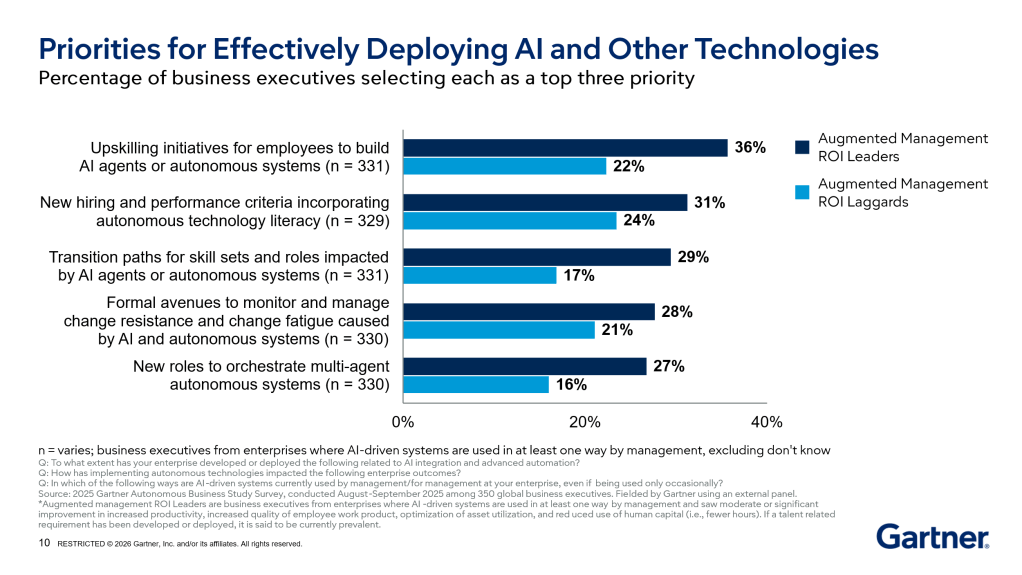
That’s not to say companies aren’t cutting jobs, said Poitevin, but doing so isn’t the main route to solid ROI. Instead, organizations with higher levels of return on their spending looked beyond workforce reductions and saw AI as a way to improve employee productivity.  

These organizations are more likely to upskill staff to use AI tools, link employee hiring and performance criteria to AI proficiency, and set “transition paths” for skill sets and roles that will be affected by automation plans, said Poitevin.

“You have to plan for layoffs where they happen, but, more importantly, you have to plan for workforce transformation, and you have to go after broader forms of value through your AI investment portfolio than just labor cost,” she said.

For those panicking at the prospect of an AI-led jobs apocalypse, Gartner offers some hope: The analyst firm predicts that by 2029 the number of jobs created by AI will outpace those that are lost. 

Between 2023 and 2029, approximately 6 million roles will be automated globally, as businesses deploy AI agents and other intelligent automation technologies, according to Gartner; that’s a small proportion of the roughly 2 billion jobs available to workers. 

The prediction adds to a growing expectation among industry watchers that AI will reshape the workplace rather than replace workers en masse, at least for the foreseeable future. “AI is not leading to a jobs apocalypse, but it’s unleashing job chaos, changing the shape of what people do,” said Poitevin.

That doesn’t mean disruption can be avoided entirely. A larger portion of the workforce — around 32 million workers each year — will see their roles transformed with the introduction of AI and intelligent automation, forcing them to “rethink what they do, how they do it, what ‘good’ looks like,” said Poitevin. 

At the same time, the deployment of AI is expected to generate new labor demand in 2027 and 2028, with that demand offsetting AI-related job cuts the following year.

The AI-led job gains will include higher demand for existing roles boosted by AI-driven productivity gains, as well as the creation of new roles related specifically to the deployment and management of AI systems – change management and business transformation, for example. 

Wider adoption of AI tools will also lead to the emergence of new business models, according to Gartner – similar to higher demand for logistics systems and delivery drivers after the e-commerce boom or the increase in financial analysts after Excel replaced old-fashioned bookkeeping.

AI deployment tips

Strategies for deploying AI technology.

Gartner