How many group chats are you involved in? For me, it varies. Right now, there are only two — and both are of a more private nature.
Group chats are something that’s not really discussed much; they represent a newer technical form of communication that perhaps is better understood as a way of organizing oneself socially. As such, it has emerged sort of organically.
It has never been a “trend” to start group chats and there is really no major innovation behind it. Despite that, almost everyone now participates in various forms of group chats. It can be with family or friends, for parents in a school class, the football team, different groups or project teams at work, and so on. The simplicity of setting them up and the immediacy of communication has allowed group chat to impact our society at all levels.
I’ve been thinking about this for a while, but it was, of course, brought to the fore by the news this week in the US of the “Signal Chat”, where Jeffrey Goldberg, editor-in-chief of The Atlantic magazine, was accidentally invited to a Trump administration war chat. Goldberg suddenly found himself in a group chat with the US Secretary of Defense, the Vice President, the National Security Advisor, the head of the CIA and a number of others; the purpose of the group was to plan bombings of Houthi rebels in Yemen.
That a group chat, even on a secure service like Signal, was used for this purpose — and that a journalist happened to be invited to it — became a major scandal that has put some unusual pressure on the Trump administration.
But this is far from the first time a group chat has taken the form of a corridor of power. Remember the UK government’s Whatsapp groups during the COVID-19 pandemic? They came under intense scrutiny when the handling of the pandemic was later investigated. And in Sweden, there is the “Gingänget” in Alingsås, where top political parties vied for power in a secret group chat that was revealed by the Göteborgs-Posten newspaper, resulting in resignations.
Over the years, it has also been revealed several times that Swedish police officers have communicated in group chats on Whatsapp and just the other week Dagens Nyheter reported that there is apparently a group chat for Swedish billionaires used to share private flights with each other.
As I said, group chats are not a new phenomenon and similar ways of communicating digitally have been around since the internet went mainstream. For a while, mailing lists were popular and more tech-savvy people had chats on IRC. But since Slack, Teams, Whatsapp, Messenger and Signal made group chats more accessible, their use has become a real grassroots movement, organizing everything from everyday tasks to world politics.
Is this a problem? Yes, sometimes it is. The exercise of power without transparency is always problematic, and there’s a reason why democratic countries have laws requiring that important communications be documented and preserved. The latest “Signal Chat” is probably illegal for several reasons, at least on paper, and it would be in Sweden, too.
At the same time, it should be remembered that it is not the group chat technology itself that is the culprit here. Technology has just made it much easier to achieve what used to be done in other forums. In the same way that group chats between classmates have replaced phone chains, chatting with those in power is essentially a modern version of the old gentlemen’s clubs — now in your pocket. And technology or not, it is still possible for people in power to meet over lunch without any transparency.
However, group chat as a phenomenon remains interesting and I think that when future sociologists study how society and people’s social interaction and decision-making changed with digitalization, group chats will actually play a central role.
This column is taken from CS Weekly, a personalized newsletter with reading tips, link tips and analysis sent directly from the desk of Editor-in-Chief Marcus Jerräng. Would you like to receive the newsletter on Fridays? Sign up for a free subscription here.
What if you could build a business-specific generative AI (genAI) solution that was hosted in the cloud? What if that cloud used the most energy-efficient systems in the world? And what if those services were also all running on the world’s most secure computing platform, the Mac?
We’ve talked about both companies before. MacStadium is a force to be reckoned with and offered the first major deployment of hosted Apple-as-a-service cloud solutions; webAI, meanwhile, has created quite a stir with its offering, which runs quite happily on a MacBook Air – and runs even better when hosted in the cloud. The two companies together now offer a service that lets you install and use webAI models on MacStadium-hosted racks of Macs. This delivers quite a lot to business users: it means they can run their own, self-trained genAI models to support their own unique business goals on Macs in the cloud, making those models available across their company as a hosted solution.
This beats other hosted approaches, as the service remains business-unique, protected by Mac security, and boosted by the lower energy costs Macs require. In other words, the combined solution should help businesses maintain their own data privacy and security policies by being hosted on a highly secure set of platforms. This isn’t for every company, of course — many will want to create their own Mac-based clusters. But the service does mean that companies of any size can now reasonably deploy and manage a bank of Macs to support their business with AI.
Et tu, Apple?
To my mind it also hints at a highly plausible future for Apple’s own server-based solution, Private Cloud Compute. It’s a reasonable next step to imagine Apple’s protected solutions offering up AI-as-a-service to enterprise customers, all protected by a low-energy, high-security promise. Even if Apple never does commence competing in the hosted cloud infra space, you now have the alliance between MacStadium and webAI.
“This collaboration with webAI represents a significant milestone in the evolution of AI for the enterprise,” MacStadium CEO Ken Tacelli said in a statement. “By combining our macOS cloud expertise with webAI’s interconnected model approach, we’re creating a platform that will fundamentally change how organizations develop and deploy advanced AI systems on Apple silicon.”
There are some significant advantages to what’s on offer — for example, the system supports up to 20,000 concurrent API requests per minute. In addition, the way webAI has been architected means you get an up to 30% reduction in model size with minimal loss of accuracy. It also makes it possible for enterprise customers to host and operate the world’s largest AI models natively on Apple Silicon.
That’s really important when you consider just how much more energy efficient Macs are at this level and should help cut a big chunk out of the environmental running costs of AI. That’s a good thing, not just in terms of the dollar per kWh, but also in terms of the wider impact of energy consumption. The service also makes use of AI inferencing, which helps reduce model size without undermining accuracy.
More affordable than Nvidia?
Cost is a positive force in these deployments. webAI co-founder and CEO David Stout told server-focused site, The New Stack, that on a cost-per-token basis, these Mac clusters are more affordable to run than Nvidia GPUs. “It’s more private than any other solution,” he said.
Working with MacStadium, Stout claims that the system should be seen as one of “the most secure systems for private processing off-site. And it’s going to be an AI-native solution, not something that we retrofitted to fit AI into the story.”
What this means to most businesses, of course, is that they can deploy powerful, cloud-hosted AI models on the world’s most secure platform at an affordable cost, which should enable even smaller business to securely deploy, and provision hosted AI solutions in order to compete. And all with a Mac.
New generative AI (genAI) models introduced this week by Google and OpenAI have put the companies’ data centers under stress — and both companies are trying to catch up to demand.
OpenAI’s CEO Sam Altman on Thursday tweeted that his company was temporarily restricting the use of GPUs after overwhelming demand for its image generation service on ChatGPT.
OpenAI primarily relies on Nvidia GPUs to power its ChatGPT service, and in the past has run into issues with its AI infrastructure being overwhelmed. Altman said OpenAI would introduce rate limits — which limits the use of AI creation on GPUs — until the system becomes more efficient.
“We are seeing a huge amount of demand for Gemini 2.5 Pro right now and are laser focused on getting higher rate limits into the hands of developers ASAP,” Logan Kilpatrick, product lead for Google’s AI Studio developer tools, said in a post on X.
Google has built its AI infrastructure on its homegrown TPUs (Tensor Processing Units) — custom-built chips tuned to run Gemini. The TPUs are different from GPUs, which can run a wide range of AI, graphics and scientific applications.
The problems with surging demand are a reminder for enterprises to secure stable computing capacity to prevent AI downtimes, said Jim McGregor, principal analyst at Tirias Research. “The shift to images, video, agents…, it’s going to drive the demand for more AI compute resources for the foreseeable future,” he said.
OpenAI and Google are widely used by individuals and enterprises. Typically, it takes time for the hardware to catch up to efficiently operate new AI software, and unintended interruptions can affect productivity of companies, analysts said.
OpenAI has always had capacity issues when new models are launched, said Dylan Patel, founder of semiconductor consulting firm SemiAnalysis. “The demand for AI is insatiable,” Patel said.
OpenAI’s image creation tool is more compute intensive than text creation, and it also demands more computing power from GPUs, said Bob O’Donnell, principal analyst at Technalysis. “That’s just classic system overload,” he said.
Nvidia’s GPUs consume massive amounts of power and can throttle down performance if overloaded or overheated. GPUs also operate at lower temperatures, which affects performance.
CentML, which provides AI services on Nvidia GPUs, has experienced significant spikes in demand, particularly when supporting new models, said Gennady Pekhimenko, CEO of the Toronto-based company.
The company saw a spike in sign-ups within the first few days after it started serving DeepSeek, which was released earlier this year.
CentML has plans in place that guarantee uptimes, reserved instances, and guaranteed outputs, all of which are part of its service-level agreements.
There are many things OpenAI could do to catch up with demand, including reducing the size of the model or optimizing code, said Pekhimenko, who is also an associate professor for computer science at the University of Toronto.
For some commercial use cases, the large language models (LLMs) used by OpenAI and Google Gemini may be too heavy; smaller or open-source language models that require fewer computing resources and cost less might be enough, Pekhimenko said.
Enterprises can also buy genAI computing capacity from different companies, which provides protection against downtime from industry behemoths, Pekhimenko said.
Altman’s evocative take on GPUs “burning” may have been a way to promote the new image-generation models. “Probably [OpenAI] also liked to generate a little bit more hype around it. So, they tried to frame it this way,” Pekhimenko said.
Major cloud providers are investing billions in new data centers to keep up with the growing demand. US President Donald J. Trump recently touted a private-sector investment of $500 billion to build out the AI infrastructure from companies including OpenAI, SoftBank, and Oracle.
But the release of the DeepSeek model from China proved AI could be done at a more reasonable cost with software optimizations. It undercut the notion that more hardware is always needed to scale AI.
Recent reports indicated that OpenAI may be looking to build its own data centers, as Microsoft pulls out of data center projects in the US and Europe. That indicates a potential oversupply of AI computing capacity.
Generative AI (genAI) companies are starting to do real damage to the internet.
One of the internet’s main purposes is to serve as a global network for free and open communication and information exchange between scientists, academics, and the public and to be an uncensorable place for the expression of free speech.
(One of the most dangerous threats to the internet is recent bipartisan support for repealing Section 230 of the Communications Decency Act, which, if actually repealed, would seriously harm free speech online. That’s an issue you can read about on the EFF website.)
The purest expression of the internet’s purpose is the world of Open Access (OA) websites. These are sites that provide free and unrestricted access to scholarly information such as research articles, books, data, and educational resources. Open Access allows users to get content without technical barriers. It provides legal permissions for reading, downloading, copying, distributing, and reusing content with proper attribution. And it’s part of the broader Open Science movement.
But now, OA sites are under attack. AI bots, or AI crawlers, constantly scanning for data to add to training data sets for genAI chatbots and related services, are overwhelming OA websites and others, straining resources and leading to outages.
Of course, there are many different kinds of bots, which collectively generate more traffic on the internet than humans. DesignRush says that bots now account for 80% of all web visits.
Bot types include search engine bots, SEO and analytics bots, social media bots, malicious bots, and web scraping bots.
But AI crawlers are by far the fastest-growing kind of bot. According to DesignRush, the crawlers from one company — OpenAI’s GPT bots — now account for about 13% of all web traffic and make hundreds of millions of requests per month.
Their mission is to take data and essentially replace the original source. For example, instead of using Google to find scientific articles on a subject, the AI crawlers seek to take those articles and present a new “article” for the user cobbled together from many articles and many sites, incentivizing the user to ignore the source sites and get their information from the chatbots.
To oversimplify the problem, harvesting more data from OA sites makes chatbots faster and more convenient to use. However, the harvesting itself makes the OA sites slower and harder to use.
While much digital ink has been spilled decrying the taking of content, it’s also important to know that the chatbot companies are overwhelming many of the sites they’re copying content from, much like a daily DDOS attack.
Different kinds of bots affect different types of websites indifferent ways, but they can have a huge impact on OA sites.
Fighting back
Cloudflare is now deliberately poisoning large language model (LLM) training data, fighting back against the AI companies that are taking data from websites without permission. (The company offers content delivery networks, cybersecurity, DDoS mitigation, and web performance optimization.)
Here’s the problem Cloudflare is trying to solve: Companies like OpenAI, Anthropic, and Perplexity have been accused of harvesting data from websites, ignoring robots.txt files on the sites (originally designed to tell search engines which files were off-limits for indexing), and taking data anyway. In addition to these big names, all kinds of smaller, less legitimate companies are capturing data without permission from the rightful owners.
Cloudflare’s solution is a feature available to all customers called “AI Labyrinth.” The program redirects incoming bots to its own special-purpose websites, which are filled with huge quantities of factually accurate but irrelevant (irrelevant to the target website) AI-generated information.
In addition to wasting the time of the companies in control of the bots, AI Labyrinth is also a honeypot, enabling Cloudflare to add those companies to a blacklist.
The idea is somewhat similar to the “Nightshade” project from the University of Chicago; it was designed to protect artists’ work by poisoning image data. The project enabled digital image artists to download Nightshade for free and convert the pixels of their artwork in a way that made people see the same image but AI models to completely misread what the pictures looked like.
One way to stop AI crawlers is via good old-fashioned robots.txt files, but as noted, they can and often do ignore those. That’s prompted many to call for penalties such as infringement lawsuits, for doing so.
Another approach is to use a Web Application Firewall (WAF), which can block unwanted traffic, including AI crawlers, while allowing legitimate users to access a site. By configuring the WAF to recognize and block specific AI bot signatures, websites can theoretically protect their content. More advanced AI crawlers might evade detection by mimicking legitimate traffic or using rotating IP addresses. Protecting against this is time-consuming, forcing the frequent updating of rules and IP reputation lists — another burden for the source sites.
Rate limiting is also used to prevent excessive data retrieval by AI bots. This involves setting limits on the number of requests a single IP can make within a certain timeframe, which helps reduce server load and data misuse risks.
Advanced bot management solutions are becoming more popular, too. These tools use machine learning and behavioral analysis to identify and block unwanted AI bots, offering more comprehensive protection than traditional methods.
Lastly, advocacy and policy changes are being developed to make sure content creators have more control over how their work is used.
In the meantime, something needs to be done about the impact of AI crawlers on OA websites, which offer some of the best sources of information on the internet both to people and to LLM-based chatbots.
While the legality or acceptability of simply taking content is argued online, in the courts and in government, we can’t let those same companies essentially sabotage, attack, and crush the same sites they’re taking from while the debate rages on.
Oh — hi there! Sorry for the slightly nonsensical greeting. I’ve been thinking a lot about keyboards this week, y’see, and how that trusty ol’ QWERTY surface has evolved in our lives.
Also, saying “QWERTY” over and over again is surprisingly fun to do. Go ahead and try it. I’ll wait.
Back? Cool. So, about that QWERTY contemplation: ‘Twas a time not so long ago that our QWERTY interactions on the mobile-tech front revolved almost entirely around actual physical keys. (Drooooooid, anyone?) Then, even when we started relying on on-screen QWERTY surfaces, we were hunting and pecking and doing an awful lot of correcting.
I remember when Google bought out a now-forgotten promising Android keyboard project called BlindType. BlindType’s entire premise was that it was smart enough to figure out what you were trying to type, even when your fingers didn’t hit all the right letters.
The concept seemed downright revolutionary at the time — which is funny now, of course, ’cause that feels like such a common and expected feature in the land o’ Android keyboards. But my goodness, have we come a long way.
These days, you can absolutely type like a clumsy caribou and still see your thoughts come out mostly the way you’d intended. You can seamlessly switch between tapping and swiping, too, and you can even speak what you want to write with surprisingly decent reliability (…most of the time).
But when it comes to Google’s Gboard keyboard, your options for intelligent text input don’t end there. In addition to its many useful shortcuts and shape-shifting form choices, Gboard has some out-of-sight options for advanced text interactions that’ll save you time and make your days significantly easier.
They aren’t things you’ll use all the time, in place of the now-standard sloppy-tappin’, wild-swipin’, and hopeful-speaking methods. Rather, they’re specific tools you’ll use alongside those other Android text input options — like smart supplements for the especially enlightened among us.
Check ’em out for yourself and see which of these Gboard goodies are either new to you or maybe just gems you’ve gotten out of the habit of using.
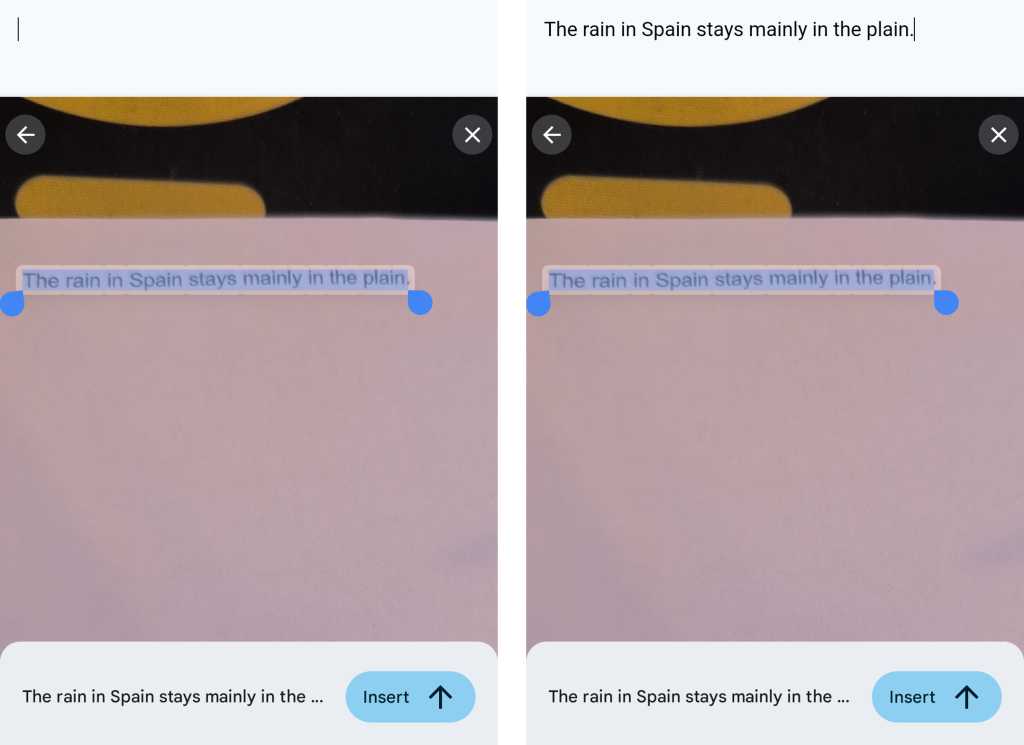
First up is a super-handy way to import text from the real world and then use it as a starting point for whatever it is you’re typing.
It’s all too easy to overlook or forget, but Gboard has a simple built-in trick for snagging text from a monitor, document, or anything else around you and then importing it directly into your current text field.
Just find the icon that looks like a document with arrows on its corners — either in Gboard’s top row or in the menu of options that comes up when you tap the four-square menu button in the keyboard’s upper-left corner. (And remember: You can always change what’s in that Gboard top row by touching and dragging any icons in that full menu area and placing ’em in whatever position you want.)
Tap that bad boy, point your phone at the text in question — and hey, how ’bout that?!
Scanned words, in a text field and ready — with precisely three taps in Google’s Gboard Android keyboard.
JR Raphael, IDG
You’ve got words from the real world right in front of you — ready to write around or edit as you see fit.
Gboard Android trick #2: Undo (whew!)
While we’re thinking about that bar at the top of your Google-scented Android keyboard, give your future self a gift that keeps giving by digging up the recently added Gboard Undo button.
The button does exactly what you’d expect: With a single swift tap, it empowers you to undo any keyboard-related action you’ve taken — be it an accidental backspace, an errant overwriting, or even just the unintentional typing of an unflattering sentence.
srcset="https://b2b-contenthub.com/wp-content/uploads/2025/03/android-typing-gboard-undo-keyboard.webp?quality=50&strip=all 800w, https://b2b-contenthub.com/wp-content/uploads/2025/03/android-typing-gboard-undo-keyboard.webp?resize=300%2C295&quality=50&strip=all 300w, https://b2b-contenthub.com/wp-content/uploads/2025/03/android-typing-gboard-undo-keyboard.webp?resize=768%2C755&quality=50&strip=all 768w, https://b2b-contenthub.com/wp-content/uploads/2025/03/android-typing-gboard-undo-keyboard.webp?resize=709%2C697&quality=50&strip=all 709w, https://b2b-contenthub.com/wp-content/uploads/2025/03/android-typing-gboard-undo-keyboard.webp?resize=171%2C168&quality=50&strip=all 171w, https://b2b-contenthub.com/wp-content/uploads/2025/03/android-typing-gboard-undo-keyboard.webp?resize=85%2C84&quality=50&strip=all 85w, https://b2b-contenthub.com/wp-content/uploads/2025/03/android-typing-gboard-undo-keyboard.webp?resize=489%2C480&quality=50&strip=all 489w, https://b2b-contenthub.com/wp-content/uploads/2025/03/android-typing-gboard-undo-keyboard.webp?resize=366%2C360&quality=50&strip=all 366w, https://b2b-contenthub.com/wp-content/uploads/2025/03/android-typing-gboard-undo-keyboard.webp?resize=254%2C250&quality=50&strip=all 254w" width="800" height="786" sizes="(max-width: 800px) 100vw, 800px">The new Gboard Undo button makes it laughably easy to undo and redo any keyboard-related action.
JR Raphael, Foundry
All you’ve gotta do is uncover that Undo option — then shift it into a prominent position for easy ongoing access. Just open up that main Gboard menu once more, by tapping the four-square button in the keyboard’s upper-left corner, then look for the newly present Undo button within the screen that comes up.
Undo? We do! (Woohoo.)
JR Raphael, Foundry
Press and hold your finger onto that button, then drag it up into one of the primary spots in the keyboard’s upper row.
It’ll then always be there and ready, one tap away — whenever the need arises.
Gboard Android trick #3: Write right
Few mere mortals realize it, but in addition to tapping, swiping, and talking, you can also enter text into any field on Android with some good old-fashioned handwriting on your fancy phone screen.
It’s an interesting option to keep in mind for moments when you feel like your own scribbly scrawling might be more efficient than any other text input method.
This one takes a little more legwork to get going the first time, but once you do that, it’ll never be more than a quick tap away:
First, head into Gboard’s settings by tapping the four-square menu icon in the keyboard’s upper-left corner and then tapping the gear-shaped Settings option in the full Gboard menu.
Select “Languages” followed by the Add Keyboard button. Type “English (US)” (or whatever language you prefer), then make sure “Handwriting” is active and highlighted at the top of the screen.
Tap the Done button to apply the changes.
Now, make your way to any open text field to pull up Gboard, and you should be able to either press and hold the space bar or hit the newly present globe icon next to it to toggle between the standard keyboard setup and your snazzy new handwriting recognition system.
And once you’ve got that handwriting canvas open, all that’s left is to write, write, write away and watch Google’s virtual genie translate your illegible squiggles into regular text almost instantly.
As you can see above, it works even if your handwriting resembles the harried scrawls of a clumsy caribou. (No offense intended to my caribou comrades.)
Gboard Android trick #4: Quick clips
One of my all-time favorite Gboard tricks is the keyboard’s intelligent integration of the Android system clipboard — and some incredibly helpful tricks that come along with that.
Look for the clipboard-shaped icon either in the keyboard’s top row or within the main Gboard menu to get started. The first time you tap it, you might have to activate the system (via the toggle in the upper-right corner of its interface) and also grant Gboard permission to access your system clipboard. You may also need to mosey back into the Gboard settings to find the “Clipboard” section and enable all the options there to get every piece of the puzzle up and running.
Once you do, though, good golly, is this thing amazing. It’ll automatically show every snippet of text and any images you’ve copied recently, for one-tap inserting into whatever text field you’re working in — and it’ll show your recently captured screenshots for the same purpose, too.
Gboard’s clipboard integration makes it easy to find anything you’ve copied and insert it anywhere.
JR Raphael, IDG
Perhaps most useful of all, though, is the Gboard clipboard’s capability to store commonly used items and then make ’em readily available for you to insert anytime, anywhere. You could use that for email addresses, physical addresses, Unicode symbols, snippets of code, or even just phrases you find yourself typing out often in Very Important Work-Related Emails™.
Whatever the case may be, just copy the item in question once, then pull up the Gboard clipboard and press and hold your finger onto the thing you copied. Tap the “Pin” option that pops up, and poof: That text (or image) will be permanently stored in the bottom area of your Gboard clipboard for easy retrieval whenever you need it.
Pinned items in the Gboard clipboard are like your own on-demand scratchpad for easy inserting anywhere.
JR Raphael, IDG
As an extra bonus, Gboard also now syncs your pinned clipboard data and continues to make any pinned items available on any Android device where you sign in.
Gboard Android trick #5: Your personal editor
When you’re banging out a Very Important Business Email And/Or Document™ on your phone, it’s all too easy to mix up a word or inadvertently accept an errant autocorrect. We’ve all been there — and all had the same ducking reaction — right?
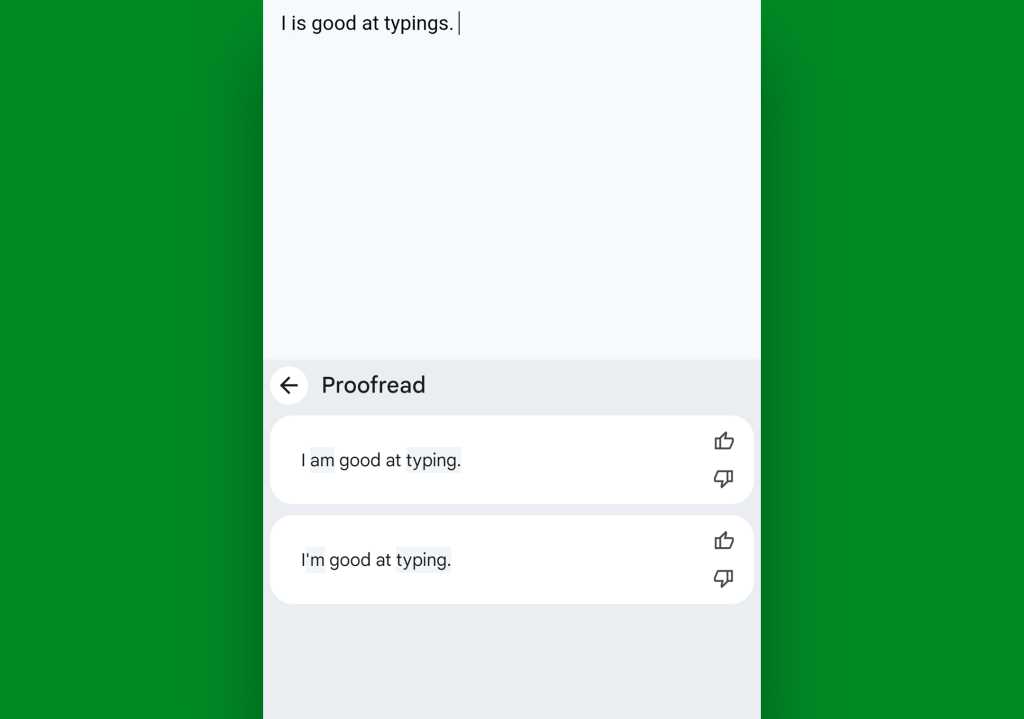
You may not always have a second set of human (or even caribou) eyes to look over your words whilst composing on the go, but Gboard’s recently added proofreading feature can at least give you some second layer of assurance before you hit that daunting Send button.
To find it, tap the four-square menu icon in Gboard’s upper-left corner and look for the Proofread button — with an “A” and a checkmark on it.
Tap that bad boy and tap it good, and in a split second, Gboard will analyze whatever text you’ve entered and offer up suggestions to improve it.
Need a quick confirmation that your text makes sense? Gboard’s proofreading feature’s got your back.
JR Raphael, IDG
Not bad, Gboard. Not bad. You is clearly the one who is gooder at typings today.
Gboard Android trick #6: The translation station
Last but not least in our text input improvement list is a serious time-saver and communication-booster, and that’s the Gboard Android app’s built-in translation engine.
Hit that four-square menu icon in your keyboard’s upper-left corner once more, find the Translate button, and tap it — then select whatever languages you want and type directly into the Gboard translate box.
Gboard will translate your text in real-time and insert the result, in whatever language you selected, directly into whatever text field you had selected.
Any language, anytime, with Gboard’s on-demand translation system.
JR Raphael, IDG
Pas mal, eh?
Keep all these advanced input tricks in mind, and you’ll be flyin’ around your phone’s keyboard like a total typing pro — with or without a caribou at your side.
Get six full days of advanced Android knowledge with my free Android Shortcut Supercourse. You’ll learn tons of time-saving tricks for your phone!
A team that included researchers at a US bank says it has created a protocol that can generate certified truly random numbers, opening the possibility that current generation quantum computers can be used for secure applications in finance, cryptography, cybersecurity, and privacy.
However, an industry analyst is cautious.
“The JPMorgan team’s findings are interesting, but won’t be applicable in the near term for most CSOs, unless they are responsible for high security environments,” said Sandy Carielli, a principal analyst at Forrester Research.
“Quantum random number generation has been around for a while,” she pointed out, “and some CSOs may already be using products in that area. The certification could be a nice extra for highly regulated environments.”
Apple’s Safari browser has a really useful password management feature, which is now also available as a standalone app called Passwords. If you’ve ever taken a look at it, you may have seen a section called Security Recommendations where you’ll find a collection of all the accounts and passwords that might have been compromised.
If you haven’t already, it’s time to take those collections seriously, because generative AI (genAI) adoption means the scale and nature of the threats posed by purloined passwords and broken IDs is about to grow far greater. That’s because, armed with stolen emails and passwords, criminals will find it relatively easy to throw those credentials at the most popular online services.
If they know you, they know, you
They do this already, of course. If you have a known email address and password you still use that is now being sold on the dark web (for about $10 a collection), it’s a no brainer for attackers to try it out on a range of different services. Sometimes they may get lucky.
Augmented efficiency just means that using genAI, those same attackers can plough through more of these credentials even more swiftly, enabling them to trundle through huge collections of stolen accounts and passwords fast. Stolen credentials were the big attack vector last year, according to Verizon, and were used in around 80% of exploits.
The vast majority of these are useless, which means credential stuffing attacks might not generate much of a success rate. When they do succeed, most victim learn from the experience and secure everything pretty quickly, meaning a very small number of that 15 billion are truly vulnerable. All the same, from time to time they get lucky. And getting lucky now and then is what makes that part of the account login exploitation industry tick.
Money in the middle
These attacks generate millions of dollars of losses every year. With billions on the planet, there’s probably another fool coming in a minute or two, and you don’t want it to be you. That’s why you should spend a little time and audit Apple’s Security Recommendations regularly, as you don’t want a service you use that happens to have its hooks on your personal, payment, health, or other valuable data to be abused.
That’s true for everyone, but for enterprise users there’s a dual challenge. We all know that employees (including business owners) are and will always be the biggest security weakness in the system. The phishing industry has evolved to exploit this.
But that tendency is equally threatening when it comes to account IDs, and together poses a double-whammy threat once empowered by AI. How many company-related accounts have slipped and to what extent do these two vulnerabilities work together?
If someone at Iworkatthisbusiness.com foolishly used their work email and complex work password to secure their access to trivialbuthackedwebsite.com, how long might it be until someone figures that out and sees if they can use this data to crack your corporate systems?
Phisherman’s blues
These attacks don’t even need to be that smart; they can simply be used to analyze personal patterns to help craft super-effective phishing attacks against specific targets. Really sophisticated attackers could turn to a little agentic AI to gather any available social media data on entities they designate as ripe for attack, helping them create really effective phishing emails — Spear AI, as it may one day be recognized.
Artificial intelligence will help with all of this. It’s really good at identifying patterns in disparate data sets, and analyzing the data that’s already been exfiltrated into the world will be a relatively trivial task — it all just comes down to the questions the machines are asked to answer. They can even use identified patterns in passwords to predict likely password patterns based on user data for brute force attacks. I could go on.
Passwords are not the only fruit, of course.
If you are wise you’ll be using 2FA security and/or Passkeys on all your most important websites, and certainly to protect any with access to your financial details or payment information.
Along with different forms of biometric ID, the industry is shifting to adopt more resilient access control systems — though, of course, subverting those systems is just a new challenge in the cat-and-mouse security game. Only recently, we learned of a new AI attack designed to compromise Google Chrome’s Password Manager, and there will be more attacks of this kind. That’s even before you consider the significance of attacks made against enterprise AI in their own right.
Death to security complacency
The main takeaway is this: You should act on the warnings given to you by Apple’s Security Recommendations tool. You should avoid re-using passwords, no matter where it is. You should use a Password Manager and other forms of security, such as 2FA, and you should very much beware if you receive an email from a trusted source that contains a link to something that sounds like it was made for you; chances are, it was.
Most of all, I want you to check the credentials that have been leaked, change them, close accounts, and delete payment information from any service you don’t intend to use again. As a person or enterprise, you certainly need to build a response plan for what to do if an account is compromised, or suspected to be compromised; security training even for your most experienced employees is almost certainly going to be of value. Most of all, never, ever use one of these passwords.
Alternatively, ignore Safari’s friendly warning and leave yourself open to having your genuine account credentials being sold online for up to $45 a time.
Why not take the time to secure your accounts? The tools are right there in your browser. What are you waiting for?
The UK government’s grand plan for AI in the public sector is struggling in the face of growing technological challenges, a report by the Parliamentary Public Accounts Committee (PAC), a bipartisan group of elected members of parliament, has found.
Many of these problems will be familiar to anyone who has tried to make AI work inside an organization: the dead hand of obsolete systems, poor quality data, and a chronic lack of skilled people to implement the technology.
But beyond these issues lies another problem that could prove just as difficult: the monopolistic power of tech vendors that control the AI technology the government so badly desires.
Coming only weeks after the Government Digital Service (GDS) was created to drive AI, the committee’s initial assessment in the AI in Government report is a sobering reality check.
For the birds
The committee’s report identifies several areas of concern, starting with poor-quality data “locked away in out-of-date legacy IT systems.” Of the 72 systems previously identified as being legacy barriers, 21 hadn’t even yet received remediation funding to overcome these problems, it found.
It also noted a lack of transparency in government data use in AI, which risked creating public mistrust and a future withdrawal by citizens of their consent for its use. Other problems included the perennial shortage of AI and digital skills, an issue mentioned by 70% of government bodies responding to a 2024 National Audit Office (NAO) survey.
Additionally, government departments were running AI test pilots in a siloed way, making it difficult to learn wider lessons, said the committee.
“The government has said it wants to mainline AI into the veins of the nation, but our report raises questions over whether the public sector is ready for such a procedure,” said committee chair, Sir Geoffrey Clifton-Brown.
“Unfortunately, those familiar with our committee’s past scrutiny of the government’s frankly sclerotic digital architecture will know that any promises of sudden transformation are for the birds,” he added.
AI oligopoly
There’s a lot at stake here. AI is often talked up by the ministers as the key to overhauling the state, getting it to work more efficiently and cheaply. It’s a story that has become hugely important in many countries. If progress slows, that promise will be questioned.
In its report, the committee drew attention to the market power of a small band of AI companies. The tech industry has a tendency towards monopolies over time, it said, but with AI it was starting from this position, which might lead to technological lock-in and higher costs, hindering development in the long term.
According to the Open Cloud Coalition (OCC), a recently formed lobby group of smaller cloud providers backed by Google, the UK government’s struggles with AI mirror what happened with cloud deployment from the 2010s onwards, which included the lack of competition.
“This report shows that the dominance of a few large technology suppliers in the public procurement of AI risks stifling competition and innovation, while also hampering growth, exactly the same problems we’ve seen with cloud contracts,” commented Nicky Stewart, senior advisor to the OCC.
Cloud and AI are symbiotic, she noted, and the domination of one or both by a small group of mostly US tech companies risks building monopolies it might be difficult to escape from.
“Without reform, the government will remain over-reliant on a handful of major providers, limiting flexibility and access to innovative, leading edge technology, whilst locking taxpayers into expensive, restrictive agreements,” she said.
SylvesterKaczmarek, CTO at OrbiSky Systems, a UK company specializing in integrating AI into aerospace applications, agreed that supplier dominance could stifle innovation, but remained just as skeptical of AI’s projected cost savings. Implementation was always where technologies proved themselves, he pointed out.
“Are savings over-sold? Most likely, in the short run,” said Kaczmarek. “There is a lot of groundwork to be laid before large-scale, reliable AI deployment can safely deliver meaningful savings. [governments need to] prioritize realistic roadmaps and more comprehensive value.”
Researchers at the University of Cambridge, together with the Alan Turing Institute, Microsoft Research, and the European Center for Medium Range Weather Forecasts, have developed a new AI-based weather forecasting system — Aardvark Weather — that could revolutionize the field of meteorology.
Aardvark Weather can apparently provide weather forecasts that are tens of times more accurate, while requiring dramatically less computing power than modern systems. “Aardvark is thousands of times faster than all previous methods of weather forecasting,” Professor Richard Turner of Cambridge’s Department of Engineering, who led the research, said in a statement.
The AI system achieved this by replacing the entire process of weather forecasting with a single machine-learning model; it can take in observations from satellites, weather stations and other sensors and then generate both global and local forecasts.
In the past, a forecast required several different models, each of which relies on a supercomputer and a support team to run. With Aardvark Weather, the same work can be completed in just a few minutes and with a standard desktop computer.
We’re now in the century sci-fi writers made their fortunes writing about — and hardware manufacturers seem keen to explore new products and processes that make some of those predictions a reality. Just as Minority Report comes pretty close to predicting visionOS and Spatial Computing, so too will a whisper of Ringworld be reflected in the hard but soft metal substance Apple might use in future devices, principally the folding iPhone.
Liquid Metal has been around in the Apple-verse for a long time. It’s a zirconium- and titanium-based alloy stronger than steel and more flexible than aluminium; the company has licensed it since around 2010 for use as the SIM card removal tool that looks like it wants to be a paper clip and once found in the box with iPhones. While it doesn’t share all the same qualities as Larry Niven’s “Unobtanium” used to make the Ringworld space station, it does at least deliver resilience and flexibility and it’s the latter that matters according to Apple analyst, Ming-Chi Kuo.
He says Apple will use liquid metal to make the foldable hinge in the so-far-unannounced or confirmed folding iPhone it hopes to introduce next year.
Pour me another
Kuo explains that Apple wants to use the substance to build a folding device that is flatter and more durable than existing devices of its type, as well as having a hardly discernible crease. Bloomberg’s Mark Gurman has previously told us that Apple really wants to build a fold mechanism that isn’t visible when unfolded and does not deteriorate in use.
To achieve this, key iPhone fold components including hinges will be crafted from liquid metal. The analyst predicts Android device makers will soon follow suit, which is good news for exclusive liquid metal supplier, Dongguan EonTec, the analyst said. Apple’s 21st-century take on a folding device is likely to be thin, like the iPhone 16e, and almost certainly built to the high-end design aesthetic Apple maintains across its product range. It will also have a high-end price to match, which implies this will be the device to slam ostentatiously on the table during board meetings.
Et tu, Siri?
While the hardware seems to be coming into view, it’s clear that one essential component isn’t yet in place, and that’s Siri. Only two weeks ago, Kuo told us Apple wants to position the device as a true AI-driven iPhone, with the power of artificial intelligence artfully combined with the large display. The snag? Siri isn’t ready yet, which has made for big staffing changes within Apple’s Siri team. Reflecting the strategic importance of AI to Apple, CEO Tim Cook has put Apple’s best product designers in to sort Siri out, moving former Siri boss John Giannandrea aside to make way for genius engineer Mike Rockwell, who led Vision Pro development. (Giannandrea hasn’t left the company, incidentally, but seems to have been given a more limited sphere of responsibility and is no longer reporting directly to Cook, who has lost confidence in his ability to execute on product development.)
Apple’s Game Of Thrones is interesting, but what it truly represents is the importance the company attaches to Siri on iPhones — and not just iPhones. Apple has a number of additional products in the pipeline, including a home control device, some of which have allegedly also been delayed due to contextual Siri’s no-show. In that light, the fact that a folding iPhone is expected to become a poster child for AI on a mobile device depends on what the new Siri team can build.
No pressure, then.
What else do we know about the folding iPhone? In development intermittently since at least 2014, Apple’s hardware engineers now seem to feel the tech and the time is right for the device. Kuo tells us to expect a 7.8-in. display when unfolded and a 5.5-inch display at rest. You’ll have rear and front camera, eSIM, Apple’s C2 5G modem, and Touch ID as a side button. The device should be as slim as 9mm when closed but isn’t expected to appear until next year’s main iPhone refresh cycle in late 2026. Final specifications will be set in stone later this year. Apple will likely follow this up by developing and optimizing the manufacturing process in preparation for mass production next year.
But a lot depends on getting those Siri improvements in place.