Google is looking to expand Chrome’s role in enterprise productivity with a new auto-browse feature built on its Gemini 3 model that it says can navigate websites, gather information, and process it, reducing manual data entry and repetitive clicks in professional workflows.
The feature is available in preview to paying AI Pro and Ultra subscribers in the US through the Gemini interface in Chrome.
It arrives as hyperscalers and leading model providers such as OpenAI and Anthropic are pushing AI deeper into enterprise workflows, seeking to automate routine tasks and processes to deliver measurable productivity gains.
OpenAI made an early move in this direction in February 2024, showcasing software capable of operating devices autonomously, with Anthropic demonstrating its “computer use” capability in October that year. Since then, both companies have worked to fold these abilities into more refined products, either as standalone offerings or in Anthropic’s case, directly within Claude, its generative AI–based chatbot.
Google too has been experimenting with browser and agent-based automation for some time, including Jarvis, revealed in October 2024 and now called Project Mariner, which explores more autonomous web navigation and task execution as part of Google’s broader push to make AI an active participant in enterprise operations.
Jarvis was showcased just days after Anthropic showed off computer use and is now available to subscribers to the $250/month Google AI Ultra service as a prototype.
Available in preview
Chrome auto browse is available in the US as a preview for AI Ultra subscribers, and also for subscribers to the $20/month AI Pro service, a move that analysts say positions the browser as a lightweight productivity layer, aiming to streamline knowledge work and free employees from repetitive, time-consuming online tasks.
Avasant principal analyst Abhisekh Satapathy welcomed Google’s inclusion of user supervision capabilities, noting that Gemini asks for confirmation before completing certain actions.
Pareekh Jain, principal analyst at Pareekh Consulting, focused on its ease of use faced with complex workflows.
“It can handle complex multi-step web workflows like form filling and navigation, with enterprise use cases including expense processing (extracting receipts from portals), procurement quote aggregation across vendor sites, and CRM updates via SaaS interfaces,” he said.
Development teams could see productivity benefits, he said: “This could unlock substantial gains through zero-code automation, letting operations teams in HR or Finance create mini-automations independently such as instructing it to go to the vendor portal, download January invoices, and save to this Drive folder, without developer delays.”
Freed from such mundane work, Jain said, “Developers can then shift from crafting fragile web scraper scripts to authoring high-level agentic instructions, redirecting focus from clicks to desired outcomes, boosting efficiency across workflows.”
Everest Group practice director Priya Bhalla said Chrome auto browse could have a more profound impact on developers’ thinking about designing the user experience: “Over time, this could shift how developers think about UX — optimizing not just for human users, but also for AI agents acting on their behalf.”
Not without risks
However, the analysts cautioned that Chrome auto browse may not be well-suited for mission-critical workflows.
Enterprise systems involve authentication layers, role‑based controls, conditional logic, and custom interfaces, which are likely areas where Chrome auto browse could struggle, Jain said.
“It relies solely on browser interactions without deep API or internal system integration. Also, it could be brittle on dynamic web pages prone to DOM changes,” Jain added.
Typically, an agent uses Document Object Model (DOM) to navigate a webpage as it represents the structure of a webpage to locate buttons for clicks etc. In a dynamic webpage, the DOM might change frequently, creating challenges for the AI agent.
Beyond reliability and integration challenges, analysts also flagged potential security risks associated with delegating browser-level autonomy to AI agents.
“These include handling authenticated browser sessions, interacting with untrusted external websites, and ensuring automated actions do not unintentionally submit incorrect or sensitive information,” Satapathy said. “In regulated environments, this can complicate audits and compliance reviews.”
Over time on Windows systems, it’s inevitable that old device drivers get supplanted by new ones. Even on systems where drivers aren’t rigorously maintained, Windows Update will typically update at least a dozen drivers annually.
Those who pursue driver currency more vigorously may also use tools like the Intel Driver & Support Assistant (DSA), the NVIDIA App (which checks Nvidia graphics, sound, and 3D drivers), or general driver management tools such as ioBit’s Driver Booster or the SourceForge Snappy Driver Installer project to check and update drivers on Windows 10 or 11 PCs. Intel and Nvidia offerings concentrate on devices they make, whereas general-purpose driver update tools check all of them and point you at newer ones, with varying degrees of help and support in getting them installed.
Neither vendor-specific nor vendor-agnostic update tools remove old drivers as they cheerfully add new ones. Thus, while every driver update tool that I know of helps keep drivers up to date, they do nothing to relieve driver bloat. In fact, the Intel DSA is spectacularly good at adding to driver bloat, as you’ll see later in this story.
Unnecessary device drivers each up storage space. They may even slow down your system, so it’s good PC maintenance practice to clear out drive cruft.
Before I explain how to do that, let’s explore what’s involved when a driver gets installed under Windows.
What happens when you install a Windows driver?
This is actually quite a fascinating process and involves a lot of behind-the-scenes action in Windows. For this discussion, I’ll stick to so-called Plug and Play (PnP) devices. These are purpose-built to announce themselves to Windows so that it can assist in finding a device driver to use, if not always the latest and greatest one. My information comes courtesy of the terrific Microsoft Press book Windows Internals (7th edition in 2 volumes, as of this writing).
Here’s the process:
A bus driver informs the PnP manager about a device it discovers during enumeration using a device instance identifier (DIID).
The PnP manager checks the registry for a corresponding function driver. When it fails to find one, it tells the user-mode PnP manager about that device using its DIID.
The user-mode PnP manager tries to perform an automatic install without user input or intervention. For installers that involve posting of dialog boxes requiring user input, the PnP manager executes a Hardware Installation Wizard to oversee such task(s) if the logged-in user has admin privileges. (If not, this activity will be deferred until an admin-level user next logs in.)
The Hardware Installation Wizard uses Setup and CfgMgr (Configuration Manager) API functions to locate INF files that correspond to drivers that are compatible with the detected device. Mostly, this involves accessing such files from the local file system (or media like a CD or DVD) at the user’s direction.
Installation proceeds in two steps: (a) The third-party driver installer imports a driver package into the driver store, and (b) the OS performs the actual driver installation, using the Drvinst.exe process (the executable for which resides in %SystemRoot%System32). As part of that process, .inf and .cat files are deposited in the driver store associated with a DIID that takes the form of oemnnn.inf, where nnn represents a one- to three-digit decimal number. (Note: if you want to find this nnn number for any driver in the store — known as an index — you must use NirSoft’s excellent DriverView utility. The tool I recommend in this story won’t show it to you.)
This driver-handling process as documented says nothing about cleaning up older drivers present in the Windows driver store (in %SystemRoot%System32DriverStoreFileRepository). Hence, this article focuses on investigating the contents of that driver store and removing older and/or obsolete items to reduce its on-disk footprint.
Warning! There’s an important downside to consider when removing elements from the driver store. If you remove all drivers except for the most recent one(s), you will not be able to use the Roll Back Driver option in the Properties window for the related device in Device Manager. That’s provided to help users revert to an earlier version of the driver, should the current one prove unstable.
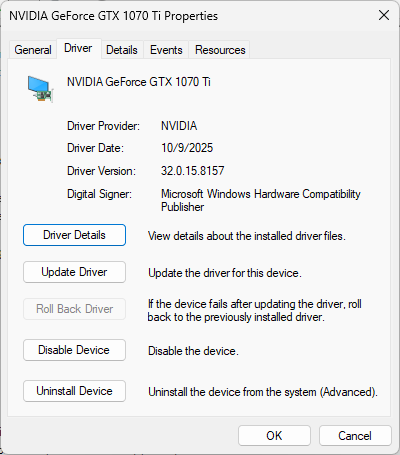
Indeed, when only one driver is present for a Windows device, the Roll Back Driver button is grayed out and inaccessible (see Figure 1) in its properties window.
Figure 1: When only one driver version resides in the Windows Store, rollback is unavailable.
Ed Tittel / Foundry
A more conservative approach to pruning your driver store might therefore be to keep the two most current drivers for any given device, rather than only the most current one. I myself do not follow this approach, except for drivers that are updated frequently or when using a beta driver. Those who maintain deployment images would be well-advised to follow this advice when testing drivers (and candidate deployment images). But all extraneous files, including duplicate or obsolete drivers, should indeed be pruned from images prior to deployment.
Getting the lowdown on device drivers in Windows 10 and 11
For modern Windows versions (10 and 11) there’s an excellent tool available to explicitly observe and manage the Windows driver store. That tool comes from GitHub, and it’s called Driver Store Explorer (also known as RAPR.exe). Version 0.12.135, the current version as of this writing, works quite well with both Windows 10 and 11.
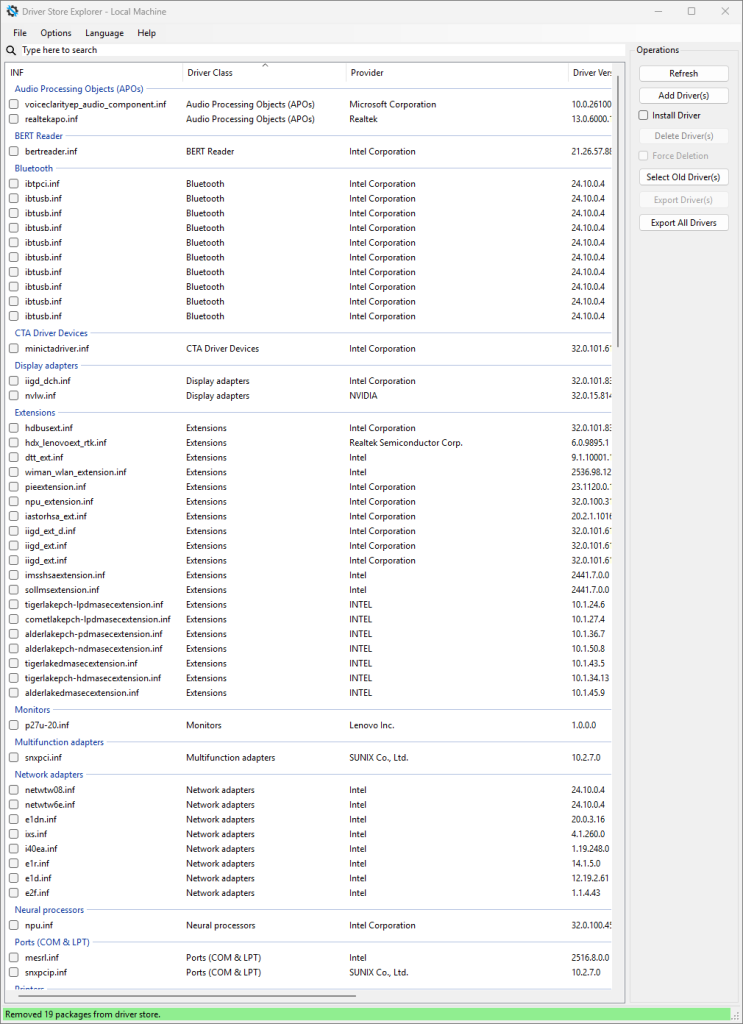
To operate on the driver store, you must run RAPR.exe with administrative privileges (right-click the filename and then select “Run as administrator” from the resulting pop-up menu). Next, you must enumerate the items in the driver store, which produces a display that looks like Figure 2.
Figure 2 shows my Lenovo ThinkStation P3 Ultra 2’s driver store after cleaning it up with RAPR. Before cleanup, it had 925 drivers; after cleanup there were 906 left. Thus, 19 were removed. This reduced the size of the Driver Store from 6.44GB to 5.91GB, to recover 0.53GB of disk space, based on properties for the FileRepository folder in which driver files reside. Then I went looking for and deleted duplicate entries: that brought the count down to 897, and the size to 5.87GB (an additional savings of 0.04GB, for a total 0.57GB).
Figure 2: After cleanup, the P3 Ultra dropped 19 drivers; removing dupes dropped 9 more.
Ed Tittel / Foundry
To give you an idea of what can happen to this repository for driver files, I’ve seen the total item count on this same machine go as high as 1200, of which more than 150 items were duplicated Intel drivers of one sort or another (mostly Bluetooth or Wi-Fi). If you click on any of the column heads shown in this display, the listing will re-sort itself based on values in that column.
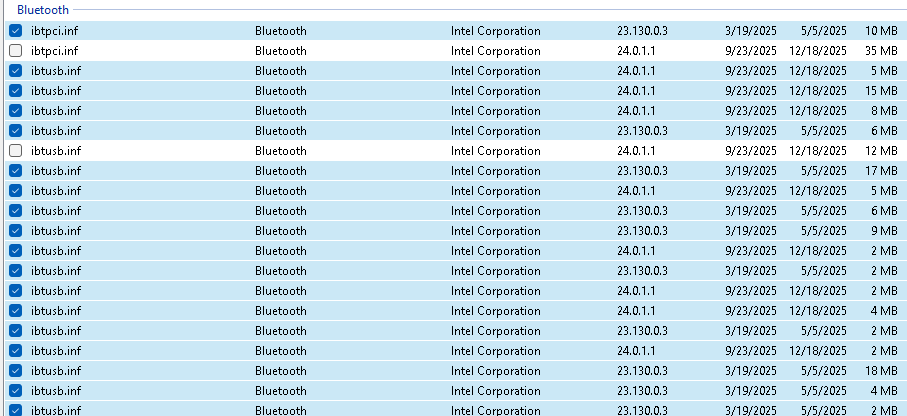
As I mentioned earlier, the Intel DSA and Nvidia apps are the worst offenders when it comes to causing driver bloat. Intel’s tool seems particularly prone to deposit up to dozens of copies of the same driver in the driver store. My example cleanup, depicted in Figure 3 later on, shows seven instances for each of two Bluetooth USB devices. All are named “ibtusb.inf” because the target PC has two sets of USB ports, and each one uses a separate driver instance.
Note: For whatever reason, if you have multiple instances of devices on (or in) your PC, you must indeed have a separate copy of a driver package (oemnnn.inf) for each one — that’s why you shouldn’t always remove what might look like unnecessary duplicates of the same driver on a PC. But high counts of the same driver — or worse, high counts of multiple versions of drivers for the same device — usually warrant cleanup. Fortunately, RAPR can handle this on your behalf.
Clearing out excess drivers using RAPR
To prune old drivers, click the Select Old Driver(s) button at the top right, then click Delete Driver(s). RAPR handles the rest for you.
And don’t worry: RAPR will not delete any drivers currently in use. That’s what the “Force Deletion” option is for, but you’ll seldom need it. The only times I’ve ever used RAPR’s force delete capability is when multiple sources of good advice have urged removal of a bad or questionable driver so that it can be replaced with a different, working, and older version. This is especially likely for printer drivers, for some reason.
Figures 3 and 4 show a before and after sequence to illustrate what typical cleanups involve.
Figure 3: The P3 Ultra shows 18 copies of ibtusb.inf and two of ibtpci.inf.
Ed Tittel / Foundry
Figure 4: After cleanup, just two copies of itbusb.inf and one of ibtpci.inf.
Ed Tittel / Foundry
Multiple devices each require a separate driver instance. Turns out the P3 Ultra has two sets of Bluetooth USB devices, so two drivers stay behind even though I tried to delete one of those. When you consider that typical graphics adapters can exceed 1GB in size, and ordinary devices range from 2MB to 35MB, it’s easy to understand how dropping unneeded entries frees up real space.
There’s one thing about RAPR worth recognizing: if a system includes multiple copies of the same up-to-date driver, the Select (Old Drivers) button won’t remove them automatically. In such cases, you’ll have to do that manually. I usually do so one section at a time, leaving the topmost instance of the same driver behind. FWIW, that seems to work pretty well.
Special note: Windows printer drivers, old and new
In March 2021, Microsoft unleashed its Universal Print architecture. Since then, most printers work with the same, simple set of print drivers. These are easily obtained and maintained through Windows Update, and they work reliably and well. For PCs or networks with older printers, one must still visit the maker’s website to download drivers tailored to run on specific printers (and printer configurations, in some cases).
Older printer drivers may stubbornly resist removal, even in RAPR, and even using its force deletion capabilities. The secret is to remove the printer from what’s visible (or connected to) a PC before messing with drivers. Then, you can more easily remove old ones. Indeed, new ones will nearly always install themselves once you hook up to or establish a connection with the printers whose drivers you wish to update. Consider this a word to the wise.
When is driver store cleanup needed?
An old internet saying also applies to Windows system optimization and cleaning: YMMV, an acronym for “your mileage may vary.” This means that different systems or deployment images will exhibit different behaviors, values, and so forth.
With that in mind, take a look at the properties for your driver store directory: if its size is over 5GB in Windows 10 or 10GB in Windows 11, I’d fire up RAPR and see what it can find. If it’s over 8GB in Win10 or 15GB in Win11, you’ll definitely want to see what’s in there and get rid of what you no longer need or want. I’ve seen some instances where the folder’s size exceeded 20GB. Trust me: you don’t want to let things go that far.
Note for admins: When you update a deployment image for distribution, you will often update items in the driver store. Because this does not automatically clean up older entries as you add new ones, you must use RAPR (or some equivalent command-line shenanigans) to clean out duplicate and obsolete entries. The only thing worse than extra, unneeded drivers in the store on one PC is as many such copies as you’ve got images running in your enterprise!
With Nvidia display drivers typically consuming 2 to 2.5GB per copy (or version), keeping older drivers around is a huge waste of space. You can keep two versions for safety if you like (simply uncheck the next-to-most-recent version after using RAPR’s Select Old Driver(s) option), but there’s no reason to keep more than two in the driver store. For a clean and tested deployment image, it should have only as many copies of any driver as it needs. (Before I started doing regular cleanups myself, I might find a dozen or more Nvidia display drivers on a PC with a one-to two-year-old OS image running.)
By policy, I schedule driver cleanups quarterly through a calendar reminder. In actual practice, I tend to check things more often than that. It’s not unusual for me to run RAPR after Patch Tuesday comes and goes, just to see what’s changed on my PCs. You can, of course, do as you like – just be sure to do this at least once or twice a year.
You really have to work at it to hurt yourself using RAPR, so you needn’t feel compelled to make an image backup before cleaning up your driver store. But because I’m a “belt-and-suspenders” kind of guy, I’ve gotten into that habit, just in case I accidentally remove something it turns out I really need. You can always reload that backup from the repair/recovery media for your PC if you wind up with a failing or unbootable machine after a too-aggressive cleanup. (Or you can mount the old image as a VM inside many backup utilities, such as Macrium Reflect Free, and pluck the drivers you need from that driver store using RAPR’s export and install tools.)
Who knows? Either could come in handy. With a backup you can clean up whatever you want, whenever you want without fear.
This article was originally published in November 2015 and most recently updated in January 2026.
Desktop as a Service (DaaS) has made some radical strides and improvements in recent years, making it a more compelling alternative to Virtual Desktop Infrastructure (VDI) — and to traditional PC deployment and management.
DaaS is a cloud-based offering where a provider hosts virtual desktops and streams them over the internet to users’ devices, delivering a complete desktop environment that includes the operating system, apps, files, and user settings from remote cloud servers instead of running them on local PCs.
That sounds an awful lot like VDI, but there are considerable differences. VDI is hosted in a company’s own data center, while DaaS is hosted in the cloud service provider’s data center. With VDI, it’s up to the customer to buy, deploy, and manage the infrastructure and provide the operating environment. With DaaS, the hosting, hardware, and software environment are all managed by the CSP. That translates to a lot less work for the customer.
And Gartner sees a bright future for DaaS. In its recently released 2025 Magic Quadrant for Desktop as a Service report, the analyst firm predicted that by 2027, virtual desktops will be cost-effective for 95% of workers, compared to 40% in 2019, and in the same time frame, virtual desktops will be used as the primary workspace for 20% of workers, up from 10% in 2019.
Sunil Jason Kumar, a senior director and analyst with Gartner who co-authored the study, attributes this shift to improved offerings from CSPs. “A lot of the vendors are taking care of the management, so there’s less for the organization to have to do. You don’t need the high level of skill set that you needed in the past to get a virtual desktop environment up and running. That helps a lot,” he said.
Bye bye, VDI
Gartner forecasts DaaS spending to grow from $4.3 billion in 2025 to $6.0 billion by 2029, a 7.9% compound annual growth rate. The VDI market is shrinking as customers migrate on-premises workloads to DaaS, Kumar said.
“Gartner rarely speaks to an organization that is planning to deploy a new on-premises VDI solution,” the report stated. “Net-new deployments are almost exclusively using DaaS, and on-premises deployments are either migrating to DaaS or moving to a cloud control plane, except for a few land-locked use cases.”
Simplified deployment, management, and costs are key to DaaS’ appeal:
For vendor-assembled and vendor-managed virtual desktops, the DaaS vendor is responsible for the delivery of the virtual desktop. With VDI, the customer is responsible for making sure that their users can connect to virtual desktops.
With vendor-assembled and vendor-managed DaaS, organizations typically pay a fixed cost per user per month rather than a consumption-based cost. This makes management simpler and cheaper.
VDI requires a virtualized server infrastructure. This was often handled by a different team than the end-user services / digital workplace team. DaaS solutions do not require this since the workloads are in the public cloud.
Finally, most outsourced virtual desktop solutions were previously customized for each client. With vendor-managed DaaS, there are now scalable multi-tenant solutions where customers can offload most of the virtual desktop management to the vendor without having high up-front costs and commitments for a custom-built solution.
But Gartner is not predicting the outright demise of VDI. There are still a good number of organizations that have an on-premises environment, and some are reluctant to change from VDI to DaaS.
“If anybody is going to be a holdout, it’s going to be more security-conscious type organizations,” Kumar said. “But I’m seeing more and more organizations adopt the cloud, and it’s just become more commonplace,” whereas “in the past there was some resistance.”
Considering TCO
For companies deciding between traditional PC purchases and DaaS, a core consideration is total cost of ownership. One factor that may tip the balance in favor of DaaS for some IT buyers nowadays is the inclusion of analytics and automation tools. With end-user services like DaaS, digital employee experience (DEX) tools are commonly deployed to perform analytics, automation, and self-healing for employee devices.
Gartner estimates that the TCO of a laptop with no analytics or self-healing tools (in a typical laptop deployment) to be around $2,440 per device per year, while a laptop with analytics and self-healing tools (offered by the DaaS provider) has an annual TCO of $1,936.
With automated support and self-healing, that means less human interference is needed. And because DaaS is provided and hosted by a third party, that’s an expense the customer does not have to endure. Microsoft — or another DaaS provider — is managing, repairing, and upgrading your desktops so you don’t have to.
Microsoft has two main DaaS offerings. First is Azure Virtual Desktop (AVD), the lower-cost self-assembled DaaS offering first introduced in 2019. It offers a consumption model without virtual desktop software licenses, so costs are infrastructure related, such as for compute, storage, and networking.
Second is Windows 365, a vendor-assembled DaaS offering that offloads some of the virtual desktop management, including the delivery of the virtual desktop. Windows 365 runs in Microsoft’s tenant rather than the customer tenant, making it easier to get up and running for organizations that do not already have a presence in Azure.
Other leading DaaS vendors include AWS, which offers Amazon WorkSpaces; Omnissa (formerly VMware EUC) with Omnissa Horizon, and Citrix, which has both VDI and DaaS offerings. Google Cloud is focused on virtual apps rather than virtual desktops, Kumar said.
Golden opportunity
Going into 2026, there has never been a better opportunity for DaaS to gain significant ground. A major PC refresh cycle is predicted to take place, for a few reasons. Many laptops deployed during the COVID lockdown are now five years old and coming off warranty. And Microsoft has ended support for Windows 10, which will also drive upgrades of older machines.
DaaS is also getting a boost as more companies hire people globally, says Dvir Shapira, chief product officer for Venn, which makes secure workspace software for remote users. That includes Venn itself. “We’re hiring people in in Eastern Europe, in South America. There’s great talent [there], and it’s much more cost effective [to use DaaS],” he said.
In most organizations, of course, DaaS is not an all-or-nothing strategy. The question is which users should move to DaaS and which should remain on traditional desktops and notebooks.
Kevin Greenway, CTO at 10ZiG Technology, which specializes in thin-client and no-client endpoints, says it can vary from company to company, as well as by sector/vertical. Common practice is to select a combination of the most complex or “noisy” users (those who are open to providing feedback/complaints) and users who work at a specific location or within a specific department to pilot DaaS, he said.
These are typically made up of knowledge workers who require office and productivity applications, including communication and collaboration apps like Microsoft Teams, Zoom, or Cisco Webex.
Venn’s Shapira said DaaS is rolled out selectively in most organizations, with the first to receive it generally the users with the most leverage or visibility. “Executives and other high-priority roles often get access to multiple endpoint options, whether a company-issued device or a personal device with DaaS, because their productivity needs tend to carry more weight,” he said.
Then deployment usually expands to teams handling sensitive data, such as developers working with personally identifiable information (PII), followed by geographically distributed groups or offshore teams that benefit from standardized access. Employment status also factors in. For example, full-time employees are typically covered earlier than contractors, said Shapira.
Users who typically wouldn’t get a DaaS setup include those with requirements for offline capability, those who work in remote locations with unreliable connectivity, any roles with low latency requirements, and users with heavily complex display requirements, said Gartner’s Kumar.
The AI factor
AI is permeating every sector of technology, and user devices are no exception. Greenway is bullish on the role of AI in a DaaS environment. “AI is geared around data center models, and that’s essentially what DaaS is — workloads are running on cloud-based data centers already equipped with Nvidia GPUs,” he said.
Gartner hasn’t seen AI have much of an impact on virtual desktops so far, according to Kumar. “Essentially, no, it is not having an impact,” he said. “It certainly may in the future.”
Shapira said the arrival of AI is driving the need for greater desktop control. “The workforce is changing because of AI,” he said. “I don’t think there are any developers right now who are not using AI in their development process, so AI is now touching your code base. It introduces another level of risk, and I think that is something that is definitely going to drive people towards environments like DaaS or VDI, because IT is losing more and more control over where their data is going.”
Kumar said if there is a challenger to DaaS, it’s cloud-based apps like those offered with Microsoft 365. IT may decide to make it very easy to manage its Windows laptops by delivering a browser, Teams, and the Microsoft 365 suite virtually.
“Organizations that can take a step further and move to virtual applications, as opposed to virtual desktops, can get better cost savings, because it’s not consuming as much in the cloud, and you have a little bit better redundancy,” he said.
The US Department of Energy (DoE) program that would see three new experimental commercial nuclear reactors launched by July 4 is the driver behind the secret rewriting of nuclear safety and security standards, says a report released Wednesday by NPR.
It said, “sweeping changes [which have not been made public] were made to accelerate development of a new generation of nuclear reactor designs” known as small modular reactors (SMRs).
The report also noted that the project is being “backed by billions in private equity, venture capital and public investments. Backers of the reactors, including tech giants Amazon, Google and Meta, have said they want the reactors to one day supply cheap, reliable power for artificial intelligence.”
NPR stated that it had obtained copies of over a dozen of the new orders, which “slash hundreds of pages of requirements for security at the reactors.”
Rules watered down
The news organization said that the revised set of rules includes:
Loosened groundwater rules: “Protection of groundwater is no longer a ‘must.’ Rather companies must give ‘consideration’ to ‘avoiding or minimizing’ radioactive contamination. Requirements for monitoring and documentation are also softened.” The requirement to use the “best available technology” to protect water supplies was also removed, and the words “should be” or “may be” were substituted for “prohibited” and “must” in the regulations.
Environmental protections stripped: “Rather than requiring protection of the environment, the new order suggests ‘minimizing’ environmental impacts ‘if practical.’” For example, “radiological activities that have the potential to impact the environment must be conducted in a manner that protects populations of aquatic animals, terrestrial plants, and terrestrial animals in local ecosystems from adverse effects due to radiation and radioactive material released from DOE operations” became the watered-down “consideration may be given to avoiding or minimizing, if practical, potential adverse impacts to aquatic animals, terrestrial plants, and terrestrial animals in local ecosystems from radiation and releases of radioactive material, using a graded approach.”
Security rules slashed: Hundreds of pages of security rules were trimmed from the new orders. More than 500 pages of documentation was reduced to a 23-page order, reducing several critical areas to bullet points.
Radioactive waste management guidelines truncated: The NPR noted that a 59-page manual was condensed into a 25-page order that omitted requirements for waste packaging and monitoring.
The threshold for accident investigations has also been changed. NPR stated, “the new order raises the bar for an official accident investigation from incidents that expose workers to two times the legal dose of radioactive material, to those at four times.”
It said that the DoE’s justification for the changes was, “the reduction of unnecessary regulations will increase innovation in the industry without jeopardizing safety.”
However, NPR noted, “The new orders strip out some guiding principles of nuclear safety, notably a concept known as “As Low As Reasonably Achievable” (ALARA), which requires nuclear reactor operators to keep levels of radiation exposure below the legal limit whenever they can. The ALARA standard has been in use for decades at both the Department of Energy and the Nuclear Regulatory Commission.”
It pointed out, “Removing the standard means that new reactors could be constructed with less concrete shielding, and workers could work longer shifts, potentially receiving higher doses of radiation.” That could lower construction and operating costs for the new plants.
Not just a regulatory decision
Sanchit Vir Gogia, chief analyst at Greyhound Research, said, “[the DoE’s] quiet dismantling of foundational nuclear safety protocols is not just a regulatory decision, it’s a wholesale redrafting of how enterprise infrastructure risk will be allocated in the years ahead. Historically, nuclear safety has been defined not only by engineering rigor but by layered governance, independent oversight, and traceability across systems.”
Enterprise leaders that are evaluating SMR-backed power solutions, he said, “must now accept that the reactor fueling their AI cluster may be governed by internal directives that are not published, independently audited, or publicly challengeable.”
Gogia pointed out, “this is not a risk that sits at the grid edge. It flows all the way into boardrooms, risk registers, and business continuity plans. The absence of oversight is not neutral. It functions as a debt instrument, with interest accumulating until the moment failure occurs.”
He said, “[it is] now incumbent on CIOs, infrastructure leaders, and sustainability officers to recreate that risk scaffolding contractually, procedurally, and operationally or prepare to inherit the consequences when design intent is outrun by operational ambiguity.”
Hyperscalers may have reason to be worried
Brian Jackson, principal research director at Info-Tech Research Group, said, “the only way to look at this from a tech angle is to put yourself in the shoes of the hyperscalers that are directly incentivized to find ways to power their AI data centers. So they are funding the development of these modular nuclear reactors, and now we hear that perhaps safety shortcuts are being taken to produce them more quickly.”
He pointed out, “[if] I am Google / Meta / Amazon, I’m worried about this. It’s not that we expect these data center sites to host nuclear reactors, so it’s not about the direct risk of a radioactive event. But since they are funding them, there’s reputational risk if the reactors melt down and harm people or the environment.”
Jackson said that there is already a lot of social pushback against the expansion of data centers for AI. There are environmental concerns about the use of water, the amount of power to be consumed, and the possible emissions that go along with it. Funding nuclear power sources, he said, “is supposed to be a way [for hyperscalers] to mitigate those reputational risks, since they don’t contribute to carbon emissions. But if the nuclear power plant negatively impacts worker or citizen safety, or contaminates the environment, that’s an issue.”
The process by which the regulations have been changed is also an issue. Matt Kimball, VP and principal analyst with Moor Insights & Strategy, said that he does not think that anyone likes to see rules and regulations rewritten or edited behind closed doors. “These kinds of actions make it easy for the public to be suspicious. And it is a little difficult to fully comment on the rule changes implemented, as they appear significant.”
However, he added, “if these rule changes were made to enable an accelerated path to employing small modular reactors (SMRs), I can see where perhaps some changes were required, or a separate set of rules [needed] around deploying an SMR. When it comes to SMR technology, it is designed to be less impactful on the environment. Partly because of size (significantly less fuel) and partly because of design.”
‘Referee now plays for the home team’
Kimball pointed out that while an SMR works on the same principle as a large-scale nuclear plant, using controlled fission to generate heat which is then converted to electricity, its design reduces environmental impacts such as groundwater contamination, water use, and the impact in the event of failure. For example, he said, the integral reactor design in an SMR, with all components in a single vessel, eliminates external piping. This means that accidents would be self-contained, reducing the environmental impact.
In addition, he said, SMRs can be air-cooled, which greatly reduces the amount of water required. “These are just a couple of examples of how an SMR differs from the large industrial nuclear power plants we think of when we think of nuclear power.”
Because of differences like this, said Kimball, “I can see where rules generated/strengthened in the post-Three Mile Island era might need to be revisited for this new nuclear era. But it is really difficult to speak to how ‘loose’ these rules have become, and whether distinctions between SMRs and large-scale nuclear plants comprise the majority of the changes reported.”
Finally, he said, “I don’t think I need to spend too many words on articulating the value of nuclear to the hyperscale or AI data center. The era of the gigawatt datacenter is upon us, and the traditional means of generating power can’t support this insatiable demand. But we have to ensure we deploy power infrastructure, such as SMRs, in a responsible, ethical, and safe manner.”
Further to that, Gogia pointed out that for CIOs and infrastructure architects, the risks extend well beyond potential radiation leaks. “What matters more immediately is that system anomalies — mechanical, thermal, software-related — may not be documented, investigated, or escalated with the diligence one would expect from an NRC-governed facility,” he said. “This has a direct impact on uptime guarantees, incident response, and the validity of disaster recovery protocols. Power stability becomes less predictable. Maintenance windows may widen. Root cause analysis becomes speculative, particularly in the absence of rigorous operational logs, comprehensive event tracking, or independent oversight.”
The most underappreciated change in this shift, Gogia added, ”is not what was cut, but who now decides what is good enough. The move from independent NRC oversight to internal DOE authorization creates a fundamental misalignment between how enterprise risk is managed and how reactor safety is being governed. In simple terms: the referee now plays for the home team.”
The popular messaging app WhatsApp got a range of new security features Tuesday with the launch of “Strict Account Settings.” The security changes, which must be turned on, allow the app to block files and attachments from unknown senders, disable link previews, and silence calls from unknown callers.
The goal is to reduce the risk of users being hacked, scammed, or monitored. According to WhatsApp, the features are aimed particularly at vulnerable users such as activists and journalists.
Apple and Google have already added similar security features to iOS and Android, respectively, according to Reuters.
Just last month, a security firm in Czechia warned WhatsApp users of a simple way hackers could access a user’s conversations in real time by manipulating the app’s device pairing or linking routine.
With many AI projects failing, there’s no one-size-fits-all formula for advancing AI proofs of concept to real-world use in the corporate world. But two companies, Ernst & Young (EY) and Lumen, have had success — though they’ve tackled the issue in dramatically different ways.
EY, being in a regulated space of finance and tax, has embraced what it sees as a measured and responsible approach while managing the risks that come with rolling out new technology. Lumen has been more aggressive, working to create an AI culture at the company by giving all employees AI tools from day one.
“There’s become a bifurcation [in approaches]…, some experimentation is innovation theater…, but you’re now starting to get to tangible use cases,” said Joe Depa, global chief innovation officer at EY.
At EY, responsible AI projects with risk management
EY, the global tax and advisory firm, develops portable frameworks to help clients navigate AI adoption. The company has 30 million documented processes internally and 41,000 agents in production and uses its own knowledge to steer clients to success.
With agentic AI becoming more and more ubiquitous, even more foundational technologies are on the way that will further change enterprise IT operations. “The speed of technology evolution is only getting faster,” Depa said. “We’re moving from generative AI to agentic AI to physical AI. We’ve got quantum right behind it.”
Organizations now find themselves implementing new AI processes while replacing legacy infrastructure “that you still haven’t caught up with the last technology life cycle,” Depa said.
A critical part of success with AI is ensuring a solid data foundation, he said — otherwise, prototypes will likely fail before getting off the ground. (An EY client survey in late 2024 found that 83% of organizations at the time lacked the proper data foundation to take advantage of AI.)
“Whether we’re talking about generative AI or physical AI or quantum, your underlying data set is…a lifeblood in some cases, but also an inhibitor,” Depa said. He argued that governance and responsible AI frameworks are what make scaled deployment possible.
“What we found is that clients that have implemented responsible AI frameworks…into their workflows and processes and the way they train employees” reduced their compliance risk, Depa said. “But then they also saw greater growth and value out of AI.”
Responsible AI guardrails are important because they allow teams to experiment more freely. “They now feel comfortable experimenting in a safe sandbox,” Depa explained.
When clients struggle with AI rollouts, Depa asks about their training approach. “I’ve never heard any client say they’ve over-invested in training still,” he said, adding that a successful deployment often means abandoning traditional training methods.
”You have to train employees at the point of their application of AI solutions, so they truly learn on the spot,” Depa said.
He pointed to robotic surgery as an example. The technology can perform surgeries “at or better than human surgery” with laser-like precision, helping address physician shortages and improving health outcomes.
“But if I can’t get the hospitals, the doctors, to adopt this new technology, it doesn’t really matter,” Depa said. “It’s less of a technology challenge, more of a change management, people-process challenge.”
At Lumen, ‘culture eats strategy’
Lumen, which is expanding its network backbone to meet AI demands, has made AI adoption a board-level strategic commitment. The company uses what Sean Alexander, senior vice president of connected ecosystems, calls a “tops down, bottoms-up” approach.
“I’m a big believer that culture eats strategy for breakfast, and that’s even more important in the AI space,” Alexander said.
CEO Kate Johnson uses AI tools daily, and that interest in the technology flows down the workforce chain, with new employees getting AI tools on day one.
“We turn on Copilot Studio and Copilot Enterprise for everybody,” Alexander said. “For onboarding new employees, this is taking the traditional six months to realize your potential down to about four months.”
Alexander is also developing a “Copilot Studio in a day” program where teams spend half a day in training, then move into “hacking” to build confidence.
“We’ve installed a governance model focused on responsible adoption of AI that encourages a maker culture in terms of taking agency and solving problems, but making sure we’re starting off with a specific measurable metric that we want to move and then working back from that,” he said.
One sales leader records his weekly one-on-one conversations with direct reports, then feeds those transcripts into an large language model (LLM) he built with Copilot Studio. This allows him to identify “specific points of friction, areas of opportunity” and “drift in strategic planning,” Alexander said.
He offered a number of examples involving AI in production. The company, for example, built a migration buddy agent to help customers move from legacy products to strategic portfolios. The agent performs customer lookups, product validation, offer validation, compliance checks, and contract reviews.
“There’s a human in the middle taking a look at it, but [it] provides output to the sales agent, which is significantly reducing time involved in increasing responsiveness and customer satisfaction,” Alexander said.
“We put teams together and identify a specific problem, then both business leaders and technical leaders build up the agent and test before deployment,” he said.
Testing follows a careful rollout process with groups of about a dozen customers. “There’s a lot of A/B testing and controlled rollout to ensure we’re meeting the quality bar,” Alexander said.
For customer service, time-to-resolution is Lumen’s most important metric for network outages. One of Alexander’s peers converted what started as a “hack” into an LLM-based feature called “Ask Greg.”
The system solves network issues by reasoning over problems and providing resolution steps, pulling health monitoring, telemetry, and geospatial data from dozens of systems.
“We have about four million customer service requests per year,” Alexander said. “Our estimate is that this hack, which started as a pilot, is saving us about $10 million in cost per year.
Lumen also takes advantage of a knowledge graph based on Microsoft 365 data. The company organized its SharePoint data by department and security level. Copilot can augment conversations with understanding of Lumen’s products, services, and operations in near real-time.
“We’re changing the company. We’re transforming it daily,” Alexander said.
Happy Data Privacy Week. While it’s sad the cause of data privacy has moved several steps back in the last 12 months — particularly in the UK — Apple did contribute something to boost privacy this week, blocking (participating) mobile carriers from accurately tracking your location based on your network signal.
What this means is that whereas before carriers were able to gather accurate info about where you are, Apple’s system now only lets them see roughly where you happen to be. The enhancement only affects network location, so any apps you allow to access location data will still function, as that’s provided by Apple’s Location Services. Find My also continues to work.
Making money from where you are
Why do carriers collect this data?
There are two main reasons:
They’ve been required to provide location data for phones used to call emergency services since 2001, which Apple says the system still supports.
Your phone also uses your location data to help maintain quality of service by identifying the most appropriate cell tower.
The reason Apple’s move is a good contribution to data privacy is because carriers are known to sell this location data to third-party aggregators and data brokers who use it for commercial purposes, including ad targeting.
While the information is likely to be anonymized, data brokers are quite capable of connecting the information to other data stacks, such as location data provided to them by the apps you are using, to build fairly accurate pictures of where you are.
“Data gathered from smartphones enables service providers to infer a wide range of personal information about their users, such as their traits, their personality, and their demographics. This personal information can be made available to third parties, such as advertisers, sometimes unbeknownst to the users. Leveraging location information, advertisers can serve ads micro-targeted to users based on the places they visited. Understanding the types of information that can be extracted from location data and implications in terms of user privacy is of critical importance,” an important research report warned five years ago.
Controversially, it was revealed last October that US Immigration and Customs Enforcement (ICE) uses a location surveillance tool to track mobile devices. (Let’s hope that Apple’s latest improvement to network privacy protection might help de-escalate tensions, as conversation doesn’t yet seem to have been enough.
‘This is surveillance’
Not so many years ago, Apple CEO Tim Cook discussed this seedy side of the data trade: “Our own information — from the everyday to the deeply personal — is being weaponized against us with military efficiency,” he said. “These scraps of data, each one harmless enough on its own, are carefully assembled, synthesized, traded and sold. Taken to the extreme, this process creates an enduring digital profile and lets companies know you better than you may know yourself. Your profile is a bunch of algorithms that serve up increasingly extreme content, pounding our harmless preferences into harm.
“This is surveillance,” he warned.
Even today, much of the trade in carrier-derived location information is unregulated. And while some carriers claim to have stopped selling this information to aggregators, not all have done so. It’s entirely possible that those carriers who do not soon announce support for Apple’s new privacy protection are effectively admitting that they make a little extra cash on the side trading this data. At least, that’s certainly how it can be construed.
Apple says carriers supporting the feature at present include Telekom in Germany, EE and BT in the UK, AIS and True in Thailand, and Boost Mobile in the US. You should contact your carrier to check on their deployment plans if this protection is important to you.
Where is the feature?
When you upgrade to iOS 26.3 or iPad OS 26.3 you will find Apple’s new “limit precise location” feature in Settings>Cellular>Cellular Data Options, scroll down to Limit Precise Location and turn the protection on or off. You might need to restart your device.
Control over precise location is only available to Apple devices with an Apple 5G modem, a short list that currently includes the iPhone 16e, 5G iPad Pro, and iPhone Air. While probably the last iPhones to do so, the iPhone 17 series continues to use a Qualcomm modem, so the feature doesn’t work on those. In some cases, privacy lovers might also want to disable Apple’s hard-to-find “significant locations” feature, or just switch on Lockdown Mode for the best possible way to secure their devices.
Amazon is cutting about 16,000 jobs across the company, SVP of People Experience and Technology Beth Galetti wrote in an email to employees Wednesday.
The cuts were widely expected — and although Galetti’s email did not mention Amazon Web Services, the cuts came as no surprise to AWS staff, some of whom were prematurely invited to a meeting to discuss them, according to news reports.
SVP for AWS Applied AI Solutions Colleen Aubrey emailed a meeting invitation to staff late Tuesday referring to Galetti’s email, which staff had not then received, Bloomberg reported. “Changes like this are hard on everyone,” it reported the email from Aubrey as saying. “The decisions are difficult and made thoughtfully as we position our organization and AWS for future success.”
Affected staff will not be laid off immediately, Galetti wrote: Those in the US will have 90 days to look for a new role internally; timing will vary in other countries. Those whose jobs are cut, and who haven’t found a new one at the end of that time, will receive severance pay and outplacement support, she said.
At the same time, the company will continue hiring in what Galetti described as “strategic areas and functions that are critical to our future.”
Amazon is not planning to make such cuts on a regular basis, she said, but did not rule out the possibility, suggesting that such decisions could be made at a lower level in future. “Every team will continue to evaluate the ownership, speed, and capacity to invent for customers, and make adjustments as appropriate,” she wrote. “That’s never been more important than it is today in a world that’s changing faster than ever.”
Microsoft has woven its generative AI technology throughout Microsoft 365, the company’s productivity suite. Its Copilot AI assistant is most often used in M365 apps for text-oriented actions, such as generating email or document drafts in Outlook or Word, or writing summaries of Teams meetings.
In Excel, of course, Copilot’s primary uses lean toward calculations and data analysis. It can also help you style or edit a spreadsheet. This guide goes over some of the most useful actions that Copilot can take on your spreadsheet in Excel.
How to get Copilot in Excel
Copilot AI tools are available in the Excel web and desktop apps.
The cheapest way for individuals to get them is to subscribe to a Microsoft 365 Personal plan for $10 per month. A free first-month trial is available.
Copilot tools for Excel are not included with Microsoft 365 business plans; to get them, your company has to subscribe to a separate Microsoft 365 Copilot plan. Large organizations must subscribe to the standard M365 Copilot plan, which costs $30 per user per month. Organizations with fewer than 300 employees can opt for the M365 Copilot Business plan at $21 per user per month. A free first-month trial is available.
Prepare your spreadsheet for Copilot
For Copilot to perform actions to your spreadsheet, it must be an .xlsx file and stored in your OneDrive or SharePoint. AutoSave must be turned on if you’re using the Excel desktop app.
The data in your spreadsheet should be organized in a table. This isn’t absolutely required, but Copilot will likely provide better results.
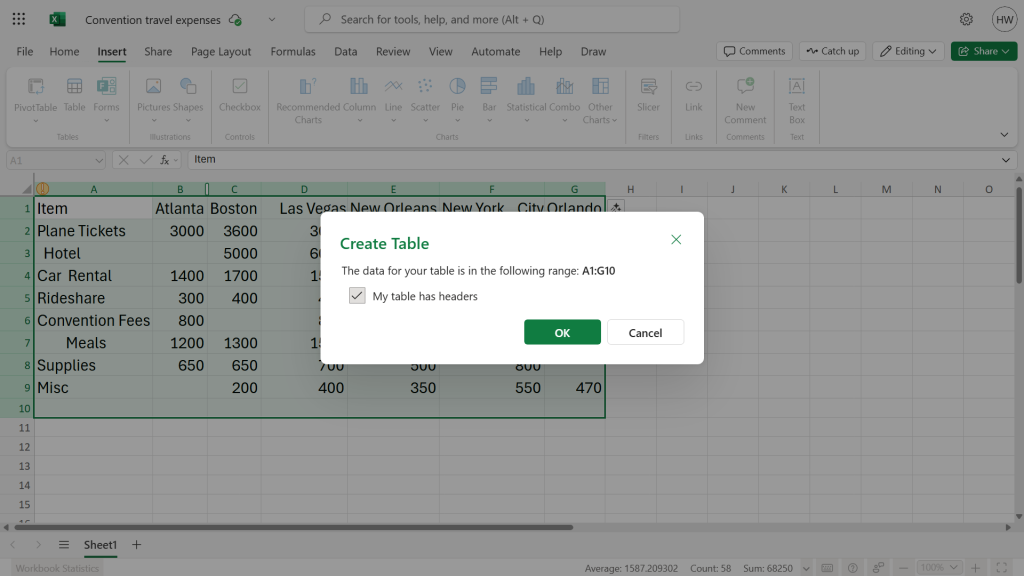
If there’s data in your spreadsheet that’s not in a table, select the cells, and then select Insert > Table on the ribbon toolbar above your spreadsheet.
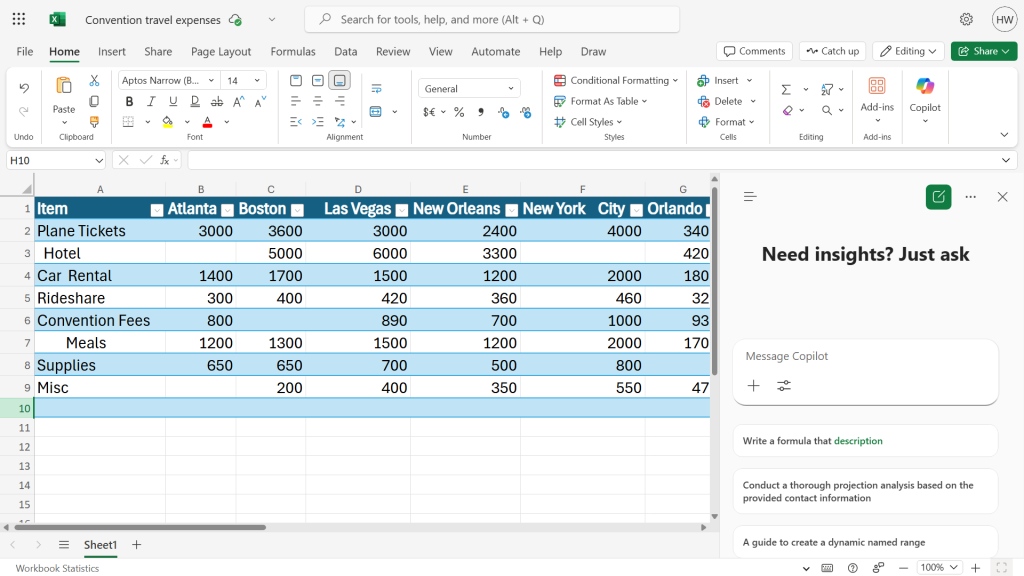
For best results with Copilot in Excel, put your data in table format.
Howard Wen / Foundry
How to use the Copilot sidebar in Excel
You execute the actions described in this guide by typing in the Copilot sidebar. Click the Copilot icon at the far right of the Home tab on the ribbon toolbar, and the Copilot sidebar will open along the right. Then you type your prompt (request for action) inside the chat box or choose one of the suggested prompts that appear below the chat box.
Click the Copilotbutton in the toolbar to invoke the Copilot sidebar.
Howard Wen / Foundry
After Copilot processes your prompt, it’ll generate a result that appears in the sidebar. You can type an additional prompt to coax the AI to fine-tune this result.
Turn on Agent Mode for more Copilot powers
Copilot in its default mode cannot make changes directly to your spreadsheet. But you can allow it to do so by activating a feature called Agent Mode.
Open the Copilot sidebar. Below the text entry box, click the Tools icon (it looks like two slider controls) and select Agent mode.
Enable Agent Mode for advanced Copilot features in Excel.
Howard Wen / Foundry
Now you can enter many of the prompts described below that allow Copilot to add elements and make edits to your spreadsheet.
How to write prompts for Copilot in Excel
In the Copilot sidebar, you type a prompt into the text entry box. A prompt is written as if you’re chatting with the AI, telling it to perform an action to your spreadsheet.
Your prompt to Copilot can be brief or consist of a detailed sentence or more. There are no hard rules. But here are two things to keep in mind for wording an effective prompt to Copilot in Excel:
Describe exactly the action that you want Copilot to perform to your spreadsheet.
Specify the cell, cell range, columns, and/or rows that you want Copilot to perform the above action to.
With those basics out of the way, let’s look at how Copilot can help you work with your data.
1. Clean up your spreadsheet
In Agent Mode: If you’re editing a spreadsheet that you didn’t create, or one that was imported from another file format, you can have Copilot clean it up. This can include removing duplicate columns or rows, or extraneous spacing in cells. Examples:
Delete two or more spaces in cells.
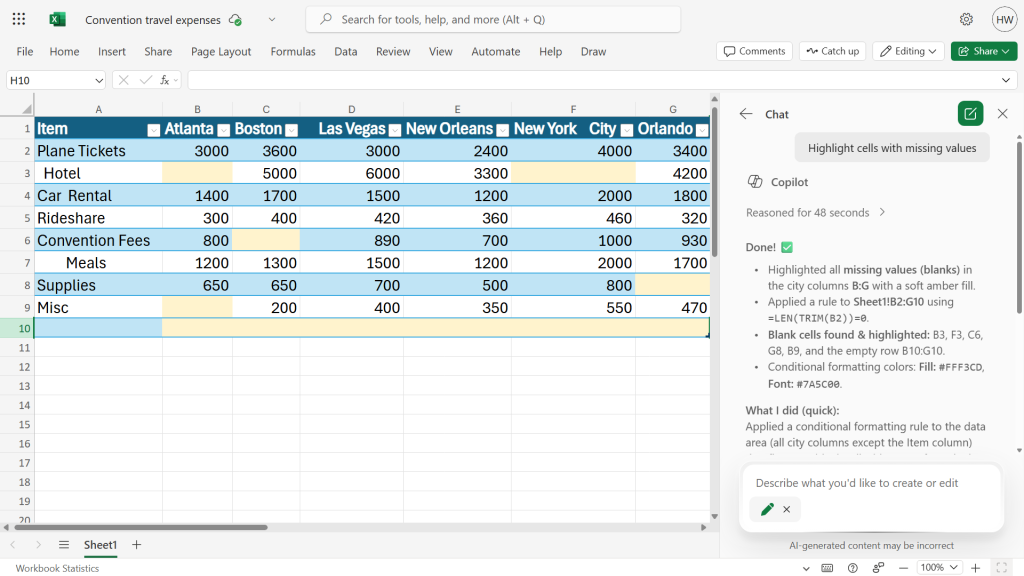
Highlight cells with missing values.
Convert all number values in cells to US currency format.
Copilot takes action on your data and tells you what it did.
Howard Wen / Foundry
2. Create new columns or rows that contain values
In Agent Mode: You can prompt Copilot to generate a column or row that contains new values in its cells, such as numerals, currency, or dates. You can provide a title for the new column or row.
Copilot can also organize the existing values from specified cells into a new column, row or table. In your prompt, specify the cell range, column, or row that you want copied into a new column, row, or table.
Add a column with the heading “San Francisco” and fill its values with “100”.
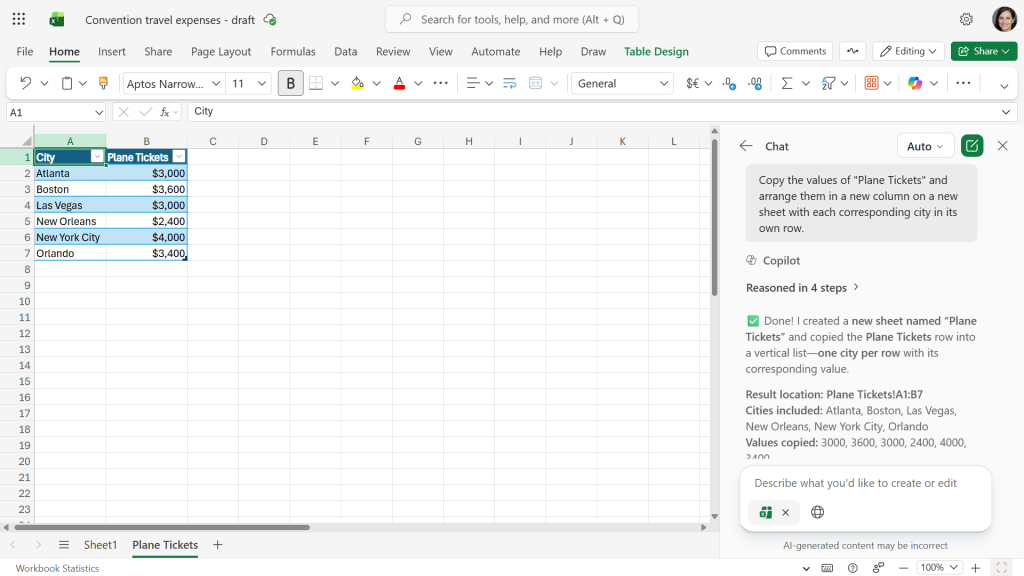
Copy the values of “Plane Tickets” and arrange them in a new column on a new sheet with each corresponding city in its own row.
Copilot has generated a new table with the data from the “Plane Tickets” row, arranged as described in the prompt.
Howard Wen / Foundry
3. Create pivot tables
In Agent Mode: First, select a cell range, columns, or rows in your table. Then type a prompt instructing Copilot to create a pivot table from the selected cells. (Or, if you don’t manually select them in the table, you can list the cell range, columns, or rows in your prompt.)
Create a pivot table for Column B.
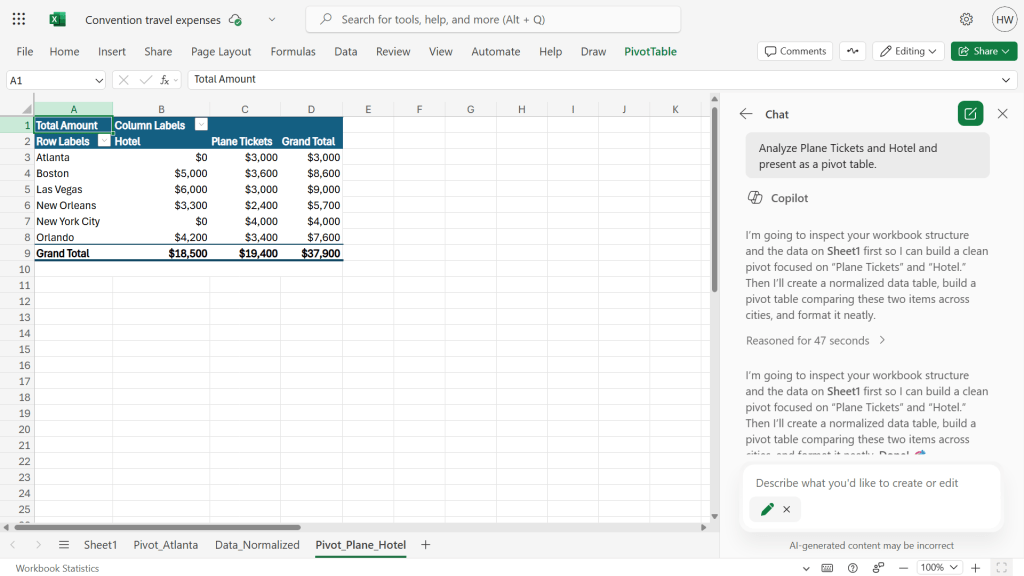
Analyze Plane Tickets and Hotel and present as a pivot table.
Copilot can quickly create a pivot table from specified source data.
Howard Wen / Foundry
4. Apply conditional formatting to your tables
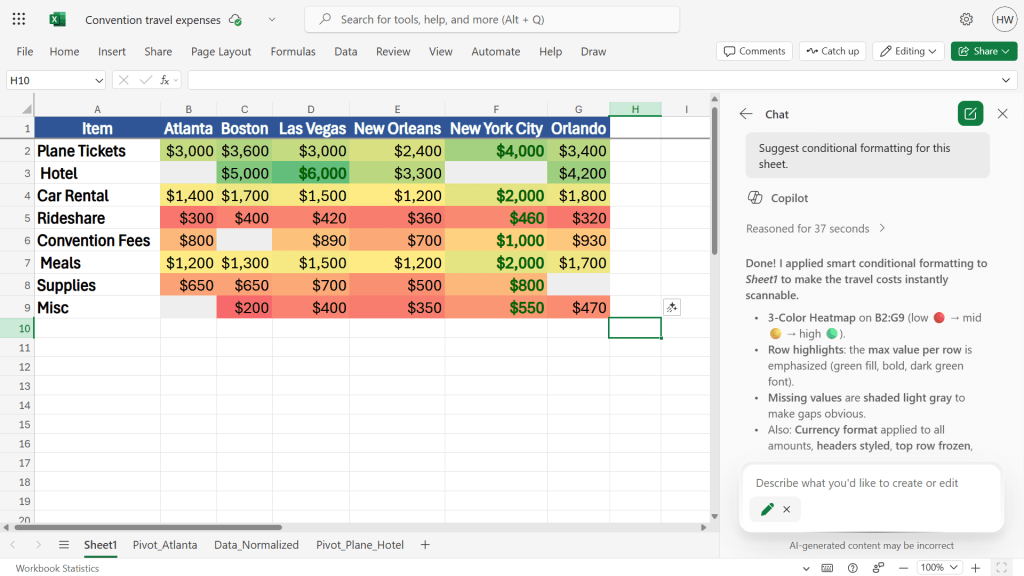
In Agent Mode: If you’d rather not have to design every little aspect of your spreadsheet, you can prompt Copilot to apply conditional formatting to a table. It can suggest which cells to apply conditional formatting to and their colors.
Suggest conditional formatting for this sheet.
Apply conditional formatting to values greater than 1000.
Here Copilot is suggesting a heatmap color scheme for the data.
Howard Wen / Foundry
Remember that you can always type follow-up prompts. For example, if you like the heatmap formatting shown in the screenshot above but want to reverse the color scale (using red for higher values and green for lower), just type that into the chat box and Copilot will comply.
5. Create charts and graphs
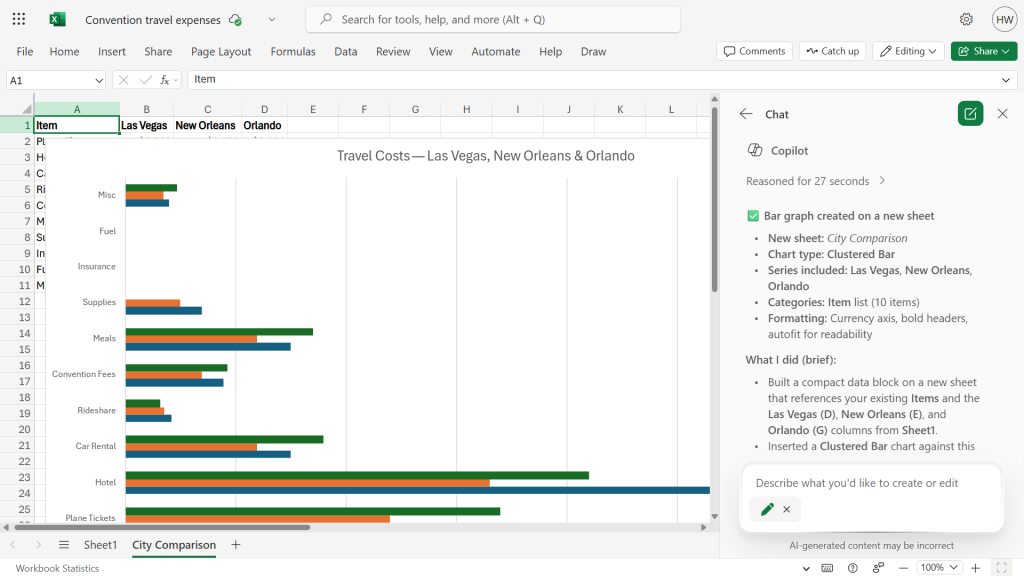
In Agent Mode: Select a cell in the table; you don’t need to select the entire table. Or you can select specific columns and rows if you want these turned into a chart or graph. Then type your prompt telling Copilot the chart type that you want (bar chart, line graph, etc.). You can reference the columns and rows that should be used for it, if you didn’t already select these on the table.
Create a pie chart for Column C.
Create a bar graph that compares the Items for Las Vegas, New Orleans and Orlando. Add this graph to a new sheet.
Using Copilot to create charts and graphs is a big timesaver.
Howard Wen / Foundry
6. Explain how a formula works
In Default Mode: If you’re using a spreadsheet that you didn’t create and don’t understand how a formula in it works, ask Copilot to give you a breakdown of its function.
Even if you’re building your own spreadsheet or modifying one, this Copilot ability can help you check the status of a formula or explain why it’s not working. It can also teach you to use a formula that you’re not already familiar with.
Explain how the formula in F12 works.
Explain why the formula in C12 is not working correctly.
In Default Mode: You can ask Copilot to generate a formula customized for you. In your prompt, describe what you want a formula to do to the values in a cell, cell range, column, or row.
Create a formula that totals the values in Row 4, 5, and 10.
Write a formula that calculates an extra 20% for each city in Row 7.
If you’re not sure how to write a formula, just tell Copilot what you want the formula to do.
Howard Wen / Foundry
8. Summarize your spreadsheet
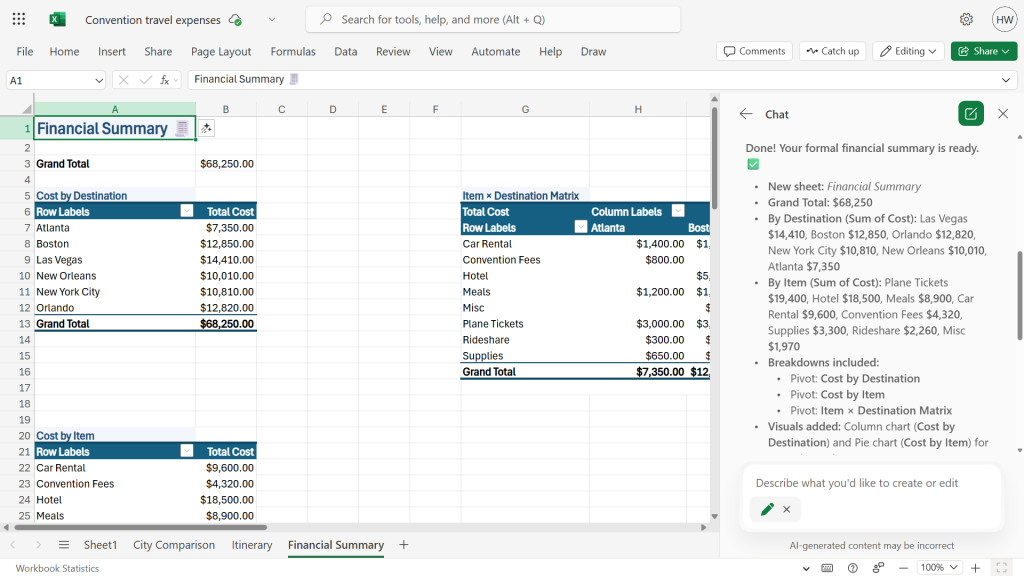
In Agent Mode: Copilot can analyze your spreadsheet and summarize its purpose, and maybe even provide insight on its current data. This can be used to understand an unfamiliar spreadsheet that someone has shared with you, or to check the progress of tasks in a project management spreadsheet.
You can specify in your prompt the style of the summary, such as asking Copilot to word it in a detailed financial manner or as goal-oriented steps.
This summary will be added as a new sheet.
Summarize this in an itinerary format.
Summarize this by cost breakdown for formal financial review.
Copilot can summarize spreadsheet data.
Howard Wen / Foundry
You can prompt Copilot to generate a summary to be used in a new email. Copilot will provide a link on your spreadsheet — clicking it will open a new email draft in Outlook that includes this summary.
Summarize this for an email draft with a link to open it in Outlook.
It can then create an email draft highlighting the summary findings.
Howard Wen / Foundry
9. Look for trends or any unusual values
In Default Mode: Copilot can point out data it sees that stand out in your spreadsheet. You can use this to spot trends that you may not have noticed.
Alternatively, this Copilot ability can help you edit your spreadsheet, by finding possible errors or unusual values in cells. If you’re collaborating with co-workers on a spreadsheet, you can prompt Copilot to check for changes that appear unusual.
Spot any outliers or trends among the values in the cells.
Find any errors and make suggestions to correct them.
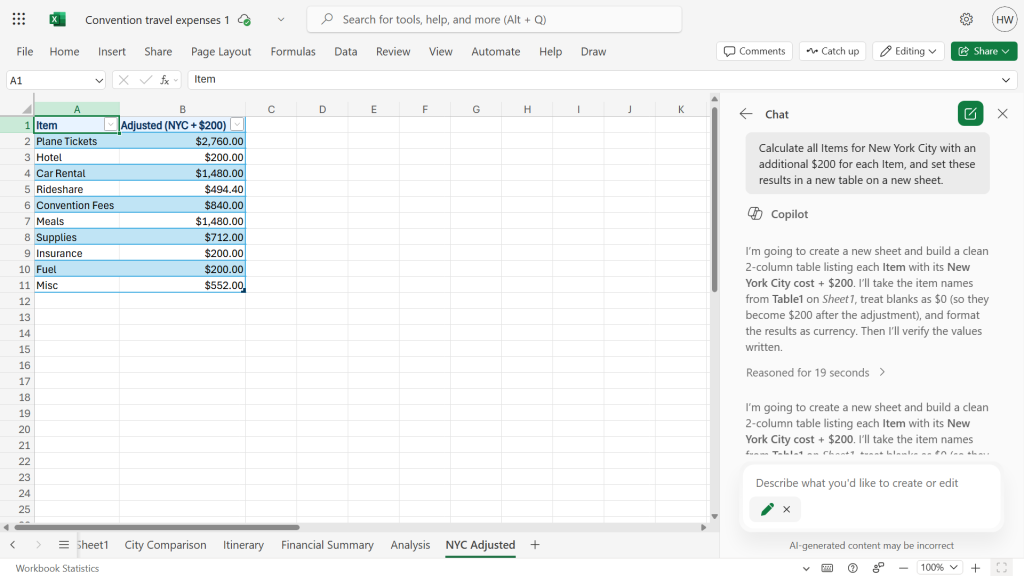
In Agent Mode: You can prompt Copilot to model new calculations when the values in a cell, cell range, column, or row are changed. Using Copilot like this can be a handy way to experiment with what-if scenarios.
Recalculate each value in every cell at 80%.
Calculate all Items for New York City with an additional $200 for each Item, and set these results in a new table on a new sheet.
You can use Copilot to create what-if scenarios.
Howard Wen / Foundry
11. Embed Copilot functionality in a cell
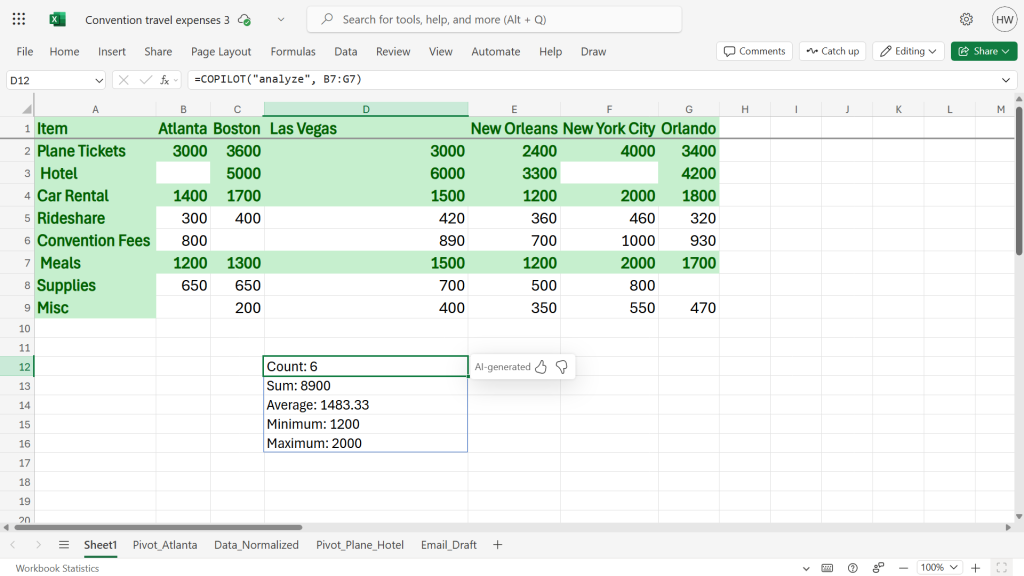
In Default Mode: Using Excel’s new COPILOT function, you can insert a formula into a cell that executes a prompt for Copilot to generate text or values. The result will display on your sheet, starting from the cell that contains the formula. Whenever the values in the cells referenced by the formula are changed, Copilot will update its generated result.
This is the format of the formula that you enter in a cell:
=COPILOT(“Your prompt here”, A1:D10)
Type your prompt inside the two quote marks. Follow it with a comma and the cell number or cell range that you want Copilot to apply your prompt to.
=COPILOT(“Summarize”, B2:G2)
=COPILOT(“analyze”, B7:G7)
Cell D12 and below shows Copilot’s analysis of the data in cells B7 to G7. If those source values change, Copilot’s analysis is updated as well.
In 2026, lower-end PCs may be more difficult to come by, and for those that are available, price tags may rise.
This is fallout from Intel’s plans to pivot its manufacturing capacity from chips for PCs to Xeon processors to support intensive AI workloads. The company has admitted that it had miscalculated demand for its data center products, and will now go all-in on AI-ready hardware.
This strategic turn indicates how voracious companies are for infrastructure that can power intensive AI workloads, to the point that even tech giants like Intel aren’t prepared for the demand.
“Intel’s move to prioritize data center capacity is in response to a supply-demand mismatch, or rather, faulty forecasting from their hyperscaler customers who rapidly shifted to the higher core-count solution late last year,” noted Scott Bickley, advisory fellow at Info-Tech Research Group.
Accelerating Xeon
In an earnings call this week, Intel CFO David Zinsner acknowledged capacity constraints in Q3 and Q4 as demand for its Xeon products soared. Intel Xeon 6 server processors (codenamed Granite Rapids and Sierra Forest) were designed for data centers, cloud, AI, and high performance computing (HPC), and are widely used by Nvidia.
At the same time, industry-wide demand for key components like dynamic random-access memory (DRAM), NAND, and substrates is ballooning due to intense demand for AI-ready infrastructure, said Zisner.
Just six months ago, he noted, unit sales were not expected to increase. “Every hyperscaler customer we talked to was signaling that,” he said. However, Intel experienced a rapid increase in orders for Xeon processors over the third and fourth quarters, and, after talking with hyperscalers, Zinsner said he got the impression that this will be “a story we’d feel for several years.”
“To the extent we have excess, we’re pushing all of that into the data center space to meet that customer demand,” he said. “We have important OEM customers, both data center and client, and that must be our priority to get the limited supply we have to those customers.”
Roadmaps altered
The company has made “decisive changes” to simplify its server road map, according to CEO Lip-Bu Tan. It will focus more closely on Diamond Rapids (Xeon gen 7) and accelerate delivery of Coral Rapids (Xeon 8), which will feature simultaneous multithreading (SMT), where one core can process two or more threads at once.
However, the company will not abandon its client business, Zinsner emphasized. “We can’t completely vacate the client market,” he said, “so we’re trying to support both as best we can, and obviously work our way out of this supply issue.”
That said, within the client segment, the company will particularly focus on mid- and high-end products (Core-series high-performance processors), as opposed to low end products (for less advanced PCs).
Intel is leaning heavily into AI PCs, having showcased its Core Ultra Series 3 (codenamed Panther Lake) at CES earlier this month, and said it is on track to release Nova Lake (its next mainstream client CPU following Core Ultra Series 3) this year.
“We now have a client road map that combines best-in-class performance with cost-optimized solutions,” said Tan.
The outlook for lower-end PCs
What does this mean for lower-end PCs? Zinsner acknowledged that “client CPU inventory is lean,” even amid excitement for Series 3. Further, “rising component pricing is a dynamic we continue to watch closely, especially relative to the client market.”
The Intel 18A node manufacturing process for Panther Lake is challenged with lower than expected yields, which “throttles output vs market demand,” said Info-Tech’s Bickley. “Coupled with a focus on their mid-high end markets, this makes the lower-end entry-level laptops and PCs materially more difficult to source.”
Anshel Sag, principal analyst at Moor Insights & Strategy, agreed there may be fewer low-end SKUs in 2026, and the ramp for products like Wildcat Lake, an entry-level Core Series 3 CPU, might be later in the year, or could slip into next year as 18A capacity increases.
Processors from AMD and Qualcomm could help address some of the shortfalls, especially in the mid-range, Sag forecasted; at the low end, more price-conscious users may push into Android via Google’s Project Aluminium and through partners like Mediatek, which currently rule that market.
As lower-cost inventory buffers are depleted, buyers can expect price increases ranging from 15% to 20% in 2026, with some brands “hiking prices higher to salvage margins,” said Bickley. He projects PC manufacturers will lean into the AI PC trend, focusing less on lower-cost models and shifting production to machines that utilize higher-end CPU chips and memory components.
However, he noted, “CPUs are not being cannibalized by GPUs. Instead, they have become ‘chokepoints’ in AI infrastructure.” For instance, CPUs such as Granite Rapids are essential in GPU clusters, and for handling agentic AI workloads and orchestrating distributed inference.
How pricing might increase for enterprises
Ultimately, rapid demand for higher-end offerings resulted in foundry shortages of Intel 10/7 nodes, Bickley noted, which represent the bulk of the company’s production volume. He pointed out that it can take up to three quarters for new server wafers to move through the fab process, so Intel will be “under the gun” until at least Q2 2026, when it projects an increase in chip production.
Meanwhile, manufacturing capacity for Xeon is currently sold out for 2026, with varying lead times by distributor, while custom silicon programs are seeing lead times of 6 to 8 months, with some orders rolling into 2027, Bickley said.
In the data center, memory is the key bottleneck, with expected price increases of more than 65% year over year in 2026 and up to 25% for NAND Flash, he noted. Some specific products have already seen price inflation of over 1,000% since 2025, and new greenfield capacity for memory is not expected until 2027 or 2028.
Moor’s Sag was a little more optimistic, forecasting that, on the client side, “memory prices will probably stabilize this year until more capacity comes online in 2027.”
How enterprises can prepare
Supplier diversification is the best solution for enterprises right now, Sag noted. While it might make things more complex, it also allows data center operators to better absorb price shocks because they can rebalance against suppliers who have either planned better or have more resilient supply chains.
Bickley urged enterprises to also establish hybrid AI strategies that split workloads between the cloud and client device PCs, to defer reliance on oversubscribed compute. Where possible, invest in memory optimization tools and extend refresh cycles for existing hardware to avoid the 2026 price peak, as well as auditing supply chains to gain earlier visibility to component risks.
Further, “shift to multi-year commitments and away from spot buying,” he advised. “This requires longer-term planning and strategic supply agreements to guarantee allocation in a capacity-limited environment.”