Month: January 2026

After criticism, Microsoft promises big improvements for Windows 11

Windows developers are now focusing on improving the core experience in Windows 11, with Microsoft reportedly redirecting resources to address the operating system’s performance and reliability issues, according to The Verge.

The move follows criticism of Windows 11 over recurring bugs and performance issues. Many users have also reacted to what they perceive as intrusive ads, bloatware, and unwanted AI initiatives.

“The feedback we’ve received from our community of engaged customers and Windows Insiders has been clear. We need to improve Windows in ways that actually matter to people,” Pavan Davuluri, head of Windows and devices, told The Verge.

“This year, you’ll see us focus on addressing the pain points we hear repeatedly from customers: improving system performance, reliability, and the overall Windows experience.”

Do you have an eye for software?

It’s easy to fall down the rabbit hole that is the hype surrounding Anthropic’s code agent Claude Code, a hype that really took off during the Christmas holidays and — at least in tech circles — is reminiscent of ChatGPT’s arrival three years ago. Claude Code, already being called both “the new ChatGPT” and “the end of SaaS,” and is considered by many to be the next big step in AI development and AI use.

If, like me, you spend a little too much time online, Claude Code has started to completely dominate your feeds lately. Of course, it “helps” that the algorithms give me “more of what I want,” but both LinkedIn and TikTok are overflowing with people talking about the excellence of Claude Code. AI influencers, ordinary developers, curious IT professionals, and, of course, a steady stream of obscure individuals who want to cash in on all the buzz.

People are vibe-coding everything from entire websites to small personal apps and finding new solutions for their workflows. Ethan Mollick, a professor at the Wharton School of the University of Pennsylvania, wrote about how he had Claude Code build an entire startup. In other circles, there’s talk of Gas Town, an orchestration solution that allows 20 to 30 agents to work in parallel. In San Francisco, it is said, people are letting “Claude swarms control their lives.”

In the last week, Clawdbot (now Moltbot) also jumped on the hype train; it’s a Claude Code-like AI assistant that you give full access to your digital life, if you dare.

It’s all fascinating and often incredibly impressive. Code is seen as the primary use case for generative AI (genAI), and when you see what Claude Code can do, it’s not hard to understand why. I haven’t tested Claude Code myself, even though more than one person has told me that I simply “must.” And I’m not particularly keen to do so (though I will probably get around to it later for purely educational purposes). Let me explain my thinking.

For starters, I’m not a developer and I can’t write code. Now, the point is that Claude Code is supposed to write the code for you, but it’s not quite that simple. The entry barrier is still too high for me, and the road to the really cool stuff is too long. I have a basic understanding of the processes and functions involved in software development, but my knowledge is far from enough.

Anthropic has begun to address this by releasing Claude Cowork, which is described as Claude Code for people who are not developers. That sounds interesting. But here’s the problem: what I’m being asked to do with it, how it’s being sold — it just sounds…boring. For some reason, the first example often highlighted for tools like this is that they can “sort your files on your computer.” That might be a good thing to do, once, if you have a lot of unsorted files on your computer. But it’s hardly a use case that’s worth buying and learning a new tool for.

If you look at what enthusiasts are doing with Claude Code, a lot of it focuses on personal productivity and “optimization,” both at work and in everyday life. That’s something I’m completely uninterested in. Sure, I also read “Getting Things Done” and “The 4-Hour Workweek” 20 years ago, but what I learned above all else was that the deeper you sink into that self-help swamp, the greater the risk you’ll end up spending all your time finding new ways to optimize things. (It’s also sad, but perhaps telling of modern working life, that people need to come up with “hacks” to be able to do their jobs.)

The main reason I’m meh about Claude Code is this: I lack the software perspective. This realization occurred to me recently when I read tech writer Jasmine Sun’s experiences with Claude Code. She points out how people who do parkour over time learn to see a city in ways that the rest of us don’t; they develop a “parkour perspective” where walls and stairs become something completely different from walls and stairs. In the same way, she suggests developers develop a kind of software perspective where all problems can be translated into, and solved by, software.

An ordinary user like me does not have software-related problems. I do not automatically see how something I do can be automated or optimized by a bot. So when I hear that Claude Code can solve my problems, I cannot think of a single one.

I think this perspective says a lot about the use of AI in general and isuseful to keep in mind. That’s true for both super users who hype the new solutions for people who “can’t keep up,” and for companies that are feverishly trying to get their staffers to embrace AI. I don’t think anyone is against a new tool that makes them more productive and facilitates their work, as long as they know what to use it for.

Perhaps companies’ AI training courses should focus less on learning specific tools and more on learning to identify the problems they’re supposed to solve, perhaps even developing a software perspective.

This column is taken from CS Veckobrev, a personal newsletter with reading tips, link tips, and analyses sent directly from editor-in-chief Marcus Jerräng’s desk, each Friday. Sign up for a free subscription here.

Apple’s Siri future is hybrid, integrated — and already here

Apple covered a lot of ground Thursday when it announced record Q1 results, but perhaps what mattered most were the insights into how the company now thinks about artificial intelligence, Siri, and Google Gemini.

Apple’s forthcoming, existentially significant and much smarter Siri will be powered by Apple’s collaboration with Google Gemini and the company told us a little about how it will work: it will work on-device or use Apple’s Private Cloud Compute (PCC) system. (Apple also confirmed PCC servers are already being manufactured and shipped from a US factory.)

Private, integrated, relevant

“These AI experiences are personal, private, integrated across our platforms, and relevant to what our users do every day,” said Apple CEO Tim Cook.

The hybrid approach reflects Apple’s decision to broaden its AI capabilities by partnering with Google. For a fee, the company will help Apple by providing frontier model capacity, though Cook and company remain in command of execution — including where the AI calculations take place and ensuring privacy. 

You can easily see this as a rejection of the hyperscaler dependency visible across the entire industry, one that means future Apple Intelligence tools will work on the device nearly all the time, or in the cloud on highly secure server systems otherwise. In the future, will users even need to outsource requests to other firms, or will the combined tech do everything they need?

We don’t yet know.

What we do know

But what we do know is that this approach to AI deployment should be water in the desert to enterprises in regulated industries, who will need things like auditability, data minimization and jurisdiction control. 

It won’t be a perfect answer – many will still seek self-hosted AI, sovereign data solutions, and tightly constrained service selection. A second consideration might be that processors for Private Cloud Compute are manufactured in the US, which suggests defense-adjacent, infrastructure, and public sector entities will look positively at Apple’s solutions during future buying cycles.

Apple cited two deployment stories that show us the road to come:

  • Astra Zeneca: The company has deployed 5,000 M5-powered iPad Pros across its pharmaceutical sales team to take advantage of AI capabilities, including Apple Intelligence.
  • Snowflake: The move to standardize around Mac has led to a reduction in support costs. (The Mac deployment story is significant in the quarter, with platform shipments far surpassing the industry average, confirming the switch from Windows is intensifying, worldwide.)

Supported by its Google Gemini partnership, Apple will now be able to build and deploy additional Apple Intelligence features to help people get things done more efficiently. “We believe that we can unlock a lot of experiences and innovate in a key way through the collaboration,” said Cook.

Apple’s customers are ready for private AI

With that in mind, it is also important to reflect on Apple’s admission that the majority of users on enabled iPhones are actively using Apple Intelligence. This bodes well, as those features scale across its now 2.5 billion customers.

To expand on this initial adoption, Apple only needs to build a deeper catalog of AI features, which it is now working on with Google.

Will it attempt to monetize its AI features? That’s a tough call. Apple refused to say, suggesting it sees its approach as a platform-enabling tech, probably to the detriment of some, not all, the third-party AI services elsewhere available.

For enterprise purchasers, this also means Apple products now compete as platforms for AI-enabled workflow acceleration. That’s a new arrow for the company bow, one that joins other enterprise-focused competitive edges in its quiver, including TCO, power/performance, employee choice, and endpoint security.  

But challenges remain

It is not unusual that Apple’s management spelled out a super-optimistic vision of what’s coming next in AI, but significant challenges remain, and not just the dangers of political upheaval, tariffs, and the impact of war on the company supply chain.

When it comes to hardware, two of the most significant challenges include memory and processor manufacture. The first problem could affect Apple’s margins, somewhat, but the challenge most likely to put a brake on the company’s continued market expansion is perhaps more profound: Apple confirmed iPhone supply is currently constrained by processor availability. 

“To be specific, it’s the advanced nodes like 3-nanometer where our latest SoCs are produced that are gating the Q2 supply,” Cook said. “We are currently constrained, and at this point, it’s difficult to predict when supply and demand will balance.”

With Apple Silicon inside every Apple device at this point, the inference here is clear: Demand for Apple products has grown so high it can’t make them fast enough. While that’s a good problem to have, it might also contribute to Apple’s purported decision to split the iPhone release cadence into two significant launch windows, since doing so might help manage immediate demand for this precious component.

It might also form a kind of warning to enterprise purchasers planning large-scale Apple deployments, as it suggests those orders could take longer than usual to fulfill. Though it seems certain at this point that reports of Apple’s demise in AI may have been overexaggerated.

Please follow me on Mastodon, or join me in the AppleHolic’s bar & grill and Apple Discussions groups on MeWe.

How to print and scan with Android

We may live in an increasingly digital world, but sometimes — love it or hate it — good old-fashioned pulp-based paper is still a necessity.

No matter what type of work you do, you’re bound to encounter the occasional page that needs to be printed or document that needs to be scanned. With your Android phone in hand, though, such scenarios don’t have to be a hassle. In fact, printing and scanning from Android is surprisingly simple these days — if you know where to look.

Follow this guide, and you’ll never be caught off guard again.

Printing from Android: The basic method

‘Twas a time when transforming a document from pixels on your smartphone’s screen into actual ink and paper required a cumbersome third-party plugin — or, worse yet, the daunting and unreliable (and mercifully no longer with us) Google Cloud Print service (gasp!).

Well, take a deep breath and smooth down those metaphorical hackles: Such horrific complications are no longer needed. At this point, provided you have a reasonably up-to-date Android device, the ability to print from your phone or tablet is built right into Android itself and as easy as can be.

Ever since 2017’s Android 8 release, Google’s been partnering with the Mopria Alliance — a nonprofit mobile printing standards organization — to bring a native and no-thought-requiring printing function to all Android devices. There’s really nothing to it: So long as you’re connected to the same Wi-Fi network as a Mopria-certified printer (and odds are, any printer in your office or home has that designation), all you have to do is find the print command in any app that offers it and then tap away with that pretty little finger of yours.

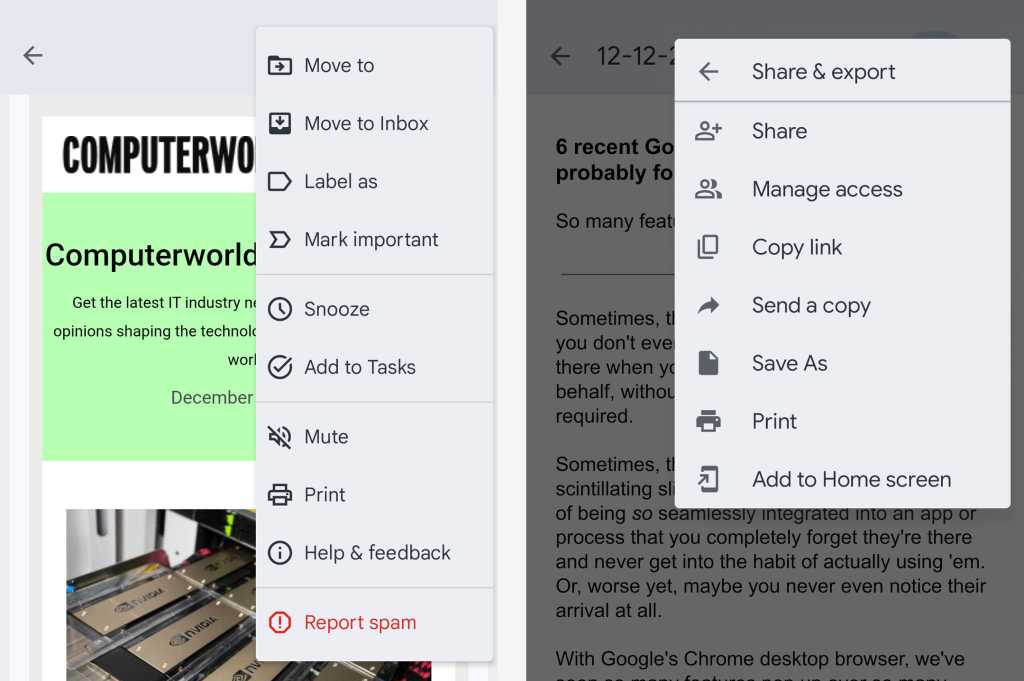
In Gmail or Outlook, for instance, you’d tap the three-dot menu icon directly above any email you’re viewing and then look for the “Print” command in the list of options that appears. The same is true with Microsoft Word, while in Google Docs, you’d open that same menu but first tap “Share & export” and then select “Print.”

menus with print option in gmail and google docs apps on android

On any reasonably recent Android phone, you can look for the print command within any app that supports it — such as Gmail and Google Docs, shown here — and then print away without any further thought or configuration.

JR Raphael / Foundry

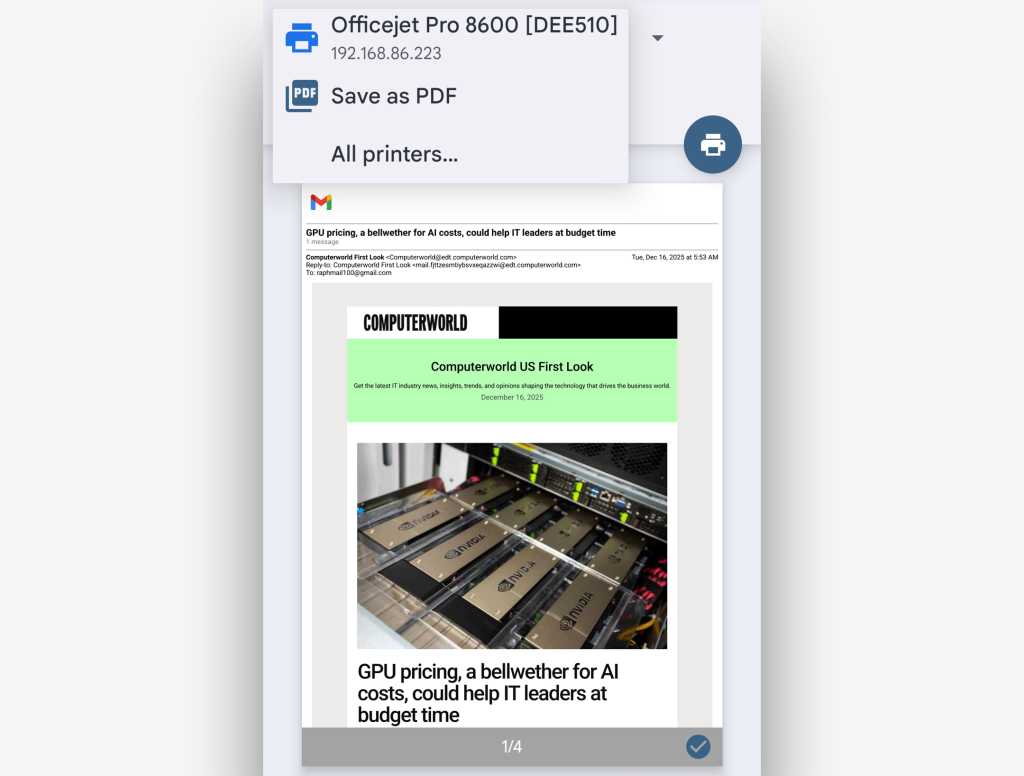
Regardless of where you find it, once you start the printing process, your phone will automatically detect any printer’s presence on your network and list it as an option — and you can then print away to your heart’s content (or discontent, whichever the case may be).

menu with printer list and save as pdf option in gmail on android

Any available printers on your network should show up as options with the system-level Android print dialog, alongside the option to virtually “print” something as a document.

JR Raphael / Foundry

Printing from Android: The advanced path

The built-in system we just walked through works fine for most basic printing needs — but if you require more intricate forms of mobile printing authentication (and if you’re working in an enterprise environment, there’s a decent chance you do) or if your printing demands other advanced work-oriented features (such as folding, stapling, or accounting-related input), you’ll need something a bit more robust.

The easiest answer comes from the same aforementioned Mopria Alliance, which has a free Mopria Print Service app that enables those sorts of next-level options. Once you’ve installed the app, accepted its terms, and granted it the necessary permissions to operate, you’ll follow the same steps described above to print from any print-supporting program on your phone. The Mopria Print Service will automatically take over as your device’s default print service and provide you with any advanced possibilities available on the printer you’re using.

(You could also opt to install your printer manufacturer’s own print service plugin — like the one offered by HP, for instance — but the Mopria app has the advantage of working seamlessly with practically any printer and preventing you from having to change apps or install additional apps whenever a new printer makes its way into your life.)

The Mopria Print Service app is a viable option for any devices still stuck on now-ancient outdated software as well — since it’ll work with practically any phone and Android version — and it has the side perk of empowering you to print from anywhere on your device, regardless of whether a proper print command is present: Simply use the standard Android share command from any app or process and then select “Mopria Print” from the menu that appears. You could even use that capability to select a chunk of text from an email, a web page, or anywhere else imaginable and then send only that specific text to a printer.

loading="lazy" width="400px">

The Mopria Print Service app makes it super-simple to find and manage any nearby printers and then print to them with more advanced, enterprise-oriented options.

JR Raphael / Foundry

Scanning with Android via a physical scanner

If you’re near a physical scanner or multifunction printer, capturing a document and saving it onto your phone is a cinch: Just grab the free Mopria Scan app, created and maintained by that very same organization we talked about in the last two sections (how ’bout that?!).

Open the app up, accept the necessary terms and permissions, and make sure you’re connected to the same Wi-Fi network as the scanner you want to use — then look for your scanner in the list the app spits out. If you don’t see the scanner you need, look for the button to manually add a scanner by entering its name (whatever you want to call it) and IP address (usually listed somewhere within a scanner’s front-screen menu).

Once your scanner shows up, just tap its name to initiate a scan.

loading="lazy" width="400px">

Mopria Scan lets you initiate a scan remotely and then have the results appear right on your Android phone.

JR Raphael / Foundry

Scanning with Android via your phone’s camera

Maybe you don’t have or want to fuss with a standalone scanner and would rather just capture something using the camera that’s already in your purse, pocket, or pantaloons anyway. Believe it or not, you can actually get reasonably high-quality scans that way nowadays, and most people won’t even know the difference.

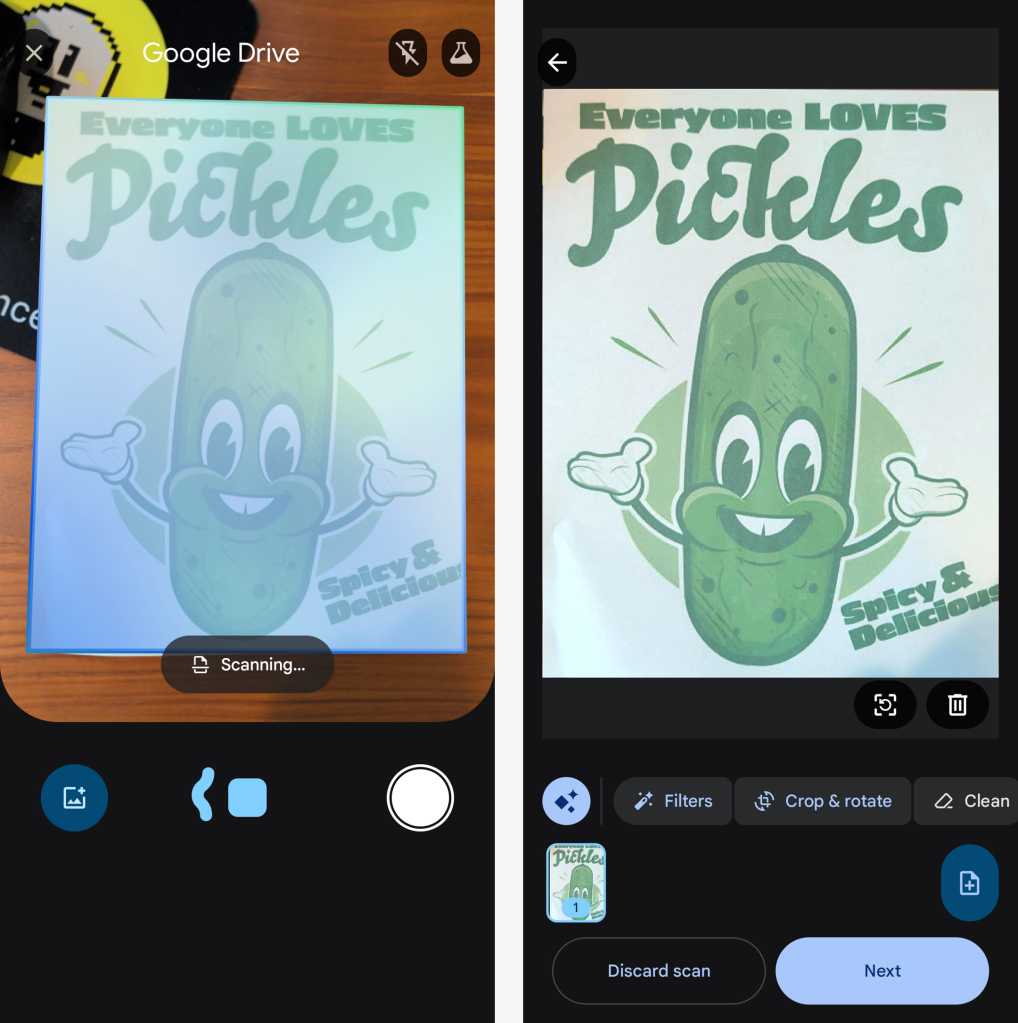
The Google Play Store houses a variety of apps that are up to the task, but the most powerful and versatile option for documents and other text-centric scanning is the free Google Drive app that’s probably already on your phone. Just open it up and tap the camera icon in its lower-right corner — or, if you want to save yourself a step, press and hold the Drive icon on your home screen or in your app drawer and then tap (or even save!) the “Scan” shortcut that pops up in that area — and, if necessary, look for the prompt to try out the new and improved Drive scanner.

This recently released version of the Drive scanner will automatically identify any documents in your camera’s view and almost instantly find their edges and capture a clean, tidy scan of them for you. It’ll keep looking for more documents or pages without any extra actions, too, which makes it delightfully easy to handle a slew of scans without wanting to gouge your eyes out.

Once you’re finished, tap the arrow button at the bottom of the Drive scanner’s screen to see what you’ve captured and optionally make adjustments. There, too, Drive makes things as simple as can be: You can tap an “Enhance” option to let the app figure out what’d make your scan look best and apply any and all adjustments for you, or you can use its built-in manual tools for cropping and rotating, cleaning, and applying filters to finesse whatever it is you’ve captured.

scanning and editing a document in google drive app on android

Google Drive makes both capturing a physical document and improving its quality exceptionally easy.

JR Raphael / Foundry

All that’s left is to tap the “Next” command to wrap things up and save your final file directly into your Drive storage — as a PDF or optionally also as a JPG, if you’d rather.

Last but not least, take note: If you’d prefer to have this same capability without the cloud storage connection, the same exact scanner interface also exists in the Google Files app — only there, everything you do is saved to your device’s own internal storage by default instead of going to Drive to start.

With technology like this, the line between physical and digital has never been easier to straddle.

This article was originally published in August 2019 and most recently updated in January 2026.

Connecting the dots on the ‘attachment economy’

For decades, we’ve all been paying attention to the attention economy. 

That economic concept and business model sees online content as an unlimited resource. Its consumption is limited only by people’s mental capacity, implying a global contest for the finite and valuable resource of human attention. 

The attention economy idea explains why companies like Meta sees itself not only competing with other social sites like TikTok, X or YouTube, but also with books, plays and nature walks — anything that grabs people’s attention. 

Because attention is limited, the only way to grow is to be better at attracting attention. And that simple model is the reason why social networks are filled with rage bait, AI slop, memes, pornography and hate speech. The social media business isn’t incentivized to prioritize “good” content, only attention-grabbing content. 

In the attention economy paradigm, human attention is a currency with monetary value that people “spend.” The more a company like Meta can get people to “spend” their attention on Instagram or Facebook, the more successful that company will be. So the algorithms are deliberately designed (and constantly redesigned) to maximize how much time people pay attention to social networks. New features are specifically designed to increase the time users spend on Meta services instead of other things. For example, the average time spent on Instagram grew by 24% after Reels launched, making it a huge success for the company. 

Meta grabs an average of 18 hours and 44 minutes of attention per month due to its relentless tweaks for capturing attention. But that’s nowhere near the attention economy leader, TikTok, which gets an average of 34 hours and 15 minutes of attention per month. 

That’s why Meta is so obsessed now with AI on its social platforms. 

Rise of the attachment economy

Tristan Harris at the Center for Humane Technology coined the phrase “attachment economy,” which he criticizes as the “next evolution” of the extractive-tech model; that’s  where companies use advanced technologies to commodify the human capacity to form attached bonds with other people and pets. 

In August, the idea began to gain traction in business and academic circles with a London School of Economics and Political Science blog post entitled, “Humans emotionally dependent on AI? Welcome to the attachment economy” by Dr. Aurélie Jean and Dr. Mark Esposito. 

Meta has introduced fully AI-generated accounts designed to exist alongside the personal accounts created by real people. The company launched “AI Studio” to let influencers clone themselves with AI versions of themselves. (Tellingly, Meta is temporarily pausing access to AI characters for teens on its platforms, including Instagram and WhatsApp, in advance of a trial that will look at the harms and addiction social media sites can cause.)

The company’s embrace of AI can be explained by the emerging attachment economy. While social posts, memes, reels and stories attract attention, AI can get users to form emotional attachments. 

A recent German study found people can develop more emotional closeness with AI than with other people — but only if they don’t know they’re interacting with a chatbot Still, even when people know chatbots aren’t human, they can get unhealthily attached.

Late last year, a Virginia man named Jon Ganz went missing in a high-profile case attributed to “AI psychosis,” where his life unraveled after an obsession with a chatbot led to his disappearance. Also in 2025, a 16-year-old California boy’s parents sued OpenAI after he killed himself following conversations with a chatbot about suicide. 

Some people claim to be in relationships or marriages with AI chatbots. 

Now, AI chatbot vendors don’t aim to cause “AI psychosis,” suicide, or human-software marriages, but they do aim to cause attachment. That’s why these companies use psychological strategies, technical adjustments, and design choices to make their products feel more “human.” They give chatbots distinct personalities and identities, human-like voices and speech patterns, senses of humor and playfulness, and unlimited capacity for flattery and sycophancy. 

Starting around 2 million years ago until this millennium, interaction with speech and language was the exclusive province of people. Our brains are optimized for perceiving, understanding, and responding to human speech. So when we converse with appliances or apps, our Paleolithic brains think we’re interacting with another human. 

And that’s a business model. A category of AI products and services has emerged advertising “relationships” with chatbots, including Replika, Kindroid, Nomi.ai, EVA AI, and Candy AI. 

Other offerings promise friendship, but not necessarily “romantic” engagement. This list includes Kuki, Character.ai, Anima, and Replika’s “friend” mode. 

Our survival as a species has always depended on our sociability. This includes our care for others, sharing food, forming of friendships, loving relationships, empathy, and — you guessed it! — attachment.

This is the reason why chatbots talk and interact like people: Because the goal is attachment. 

I believe this is also the unspoken justification for humanoid robots, as I’ve written before in this space. (The spoken justification is that humanoid robots can operate in spaces designed for people.)

As in that piece, I detailed how humanoid robot makers deliberately trick people into falsely assuming that these products have human-like cognition. Studies show that eye contact and emotional cues from robots can trigger bonding responses and empathy in humans that are similar to those that come from interacting with people.

The core benefit (to the companies selling them) or problem (for humanity) with humanoid robots is their psychological impact on people. They are engineered to “hack” human brains and deceive users into treating machines as sentient beings and forming attachments. 

The same goes for AI-based pets. Casio’s Moflin robot is an AI companion that develops a unique personality and simulates affection. It offers the gratification of pet ownership without the actual pet.

The rise of attachment-forming tech is similar to the rise in subscriptions. While posting an article or YouTube video may get attention, getting people to subscribe to a channel or newsletter is better. It’s “sticky,” assuring not only attention now, but attention in the future as well. 

Likewise, the attachment economy is the “sticky” version of the attention economy. 

Unlike content subscription models, the attachment idea causes real harm. It threatens genuine human connection by providing an easier alternative, fostering addictive emotional dependencies on AI, and exploiting the vulnerabilities of people with mental health issues. 

While the attention economy is still with us, a far more potent and dangerous trend is emerging where companies aim to hijack our humanity so that we’ll keep using their products. 

AI disclosures: I used Gemini 3 Pro via Kagi Assistant (disclosure: my son works at Kagi) as well as both Kagi Search and Google Search to fact-check this article. I used a word processing product called Lex, which has AI tools, and after writing the column, I used Lex’s grammar checking tools to hunt for typos and errors and suggest word changes.

Who profits from AI? Not OpenAI, says think tank

Findings from a new study by Epoch AI, a non-profit research institute, appear to poke major holes in the notion that AI firms, and specifically OpenAI, will eventually become profitable.

The research paper  written by Jaime Sevilla, Hannah Petrovic and Anson Ho, suggests that while running an AI model may generate enough revenue to cover its own operating costs, any profit is outweighed by the cost of developing the next big model. So, it said, “despite making money on each model, companies can lose money each year.”

The paper seeks to answer three questions: How profitable is running AI models? Are models profitable over their lifecycle? Will AI models become profitable?

To answer question one, researchers created a case study they called the GPT-5 bundle, which they said included all of OpenAI’s offerings available during GPT-5’s lifetime as the flagship model, including GPT-5 and GPT-5.1, GPT-4o, ChatGPT, and the API, and estimated the revenue from and costs of running the bundle. All numbers gathered were based on sources of information that included claims by OpenAI and its staff, and reporting by media outlets, primarily The Information, CNBC, and the Wall Street Journal.

The revenue estimate, they said, “is relatively straightforward”. Since the bundle included all of OpenAI’s models, it was the company’s total revenue over GPT-5’s lifetime from August to December last year: $6.1 billion.

And, they pointed out, “at first glance, $6.1 billion sounds healthy, until you juxtapose it with the costs of running the GPT-5 bundle.” These costs come from four main sources, the report said, the first of which is inference compute at a cost of $3.2 billion. That number is based on public estimates of OpenAI’s total inference compute spend in 2025, and assumes that the allocation of compute during GPT-5’s tenure was proportional to the fraction of the year’s revenue generated in that period.

The other costs are staff compensation ($1.2 billion), sales and marketing ($2.2 billion) and legal, office, and administrative costs: $0.2 billion.

It’s all in the calculation

As for options for calculating profit, the paper stated, “one option is to look at gross profits. This only counts the direct cost of running a model, which in this case is just the inference compute cost of $3.2 billion. Since the revenue was $6.1 billion, this leads to a profit of $2.9 billion, or gross profit margin of 48%, and in line with other estimates. This is lower than other software businesses, but high enough to eventually build a business on.”

In short, they stated, “running AI models is likely profitable in the sense of having decent gross margins.”

However, that’s not the full story.

The paper stated that by buying the argument that gross margins only should be considered when looking at profitability, “on those terms, it was profitable to run the GPT-5 bundle. But was it profitable enough to recoup the costs of developing it? In theory, yes — you just have to keep running them, and sooner or later you’ll earn enough revenue to recoup these costs. But in practice, models might have too short a lifetime to make enough revenue. For example, they could be outcompeted by products from rival labs, forcing them to be replaced.”

The trick, the authors stated, revolves around comparing gross profits and comparing the nearly $3 billion to the firm’s R&D costs: “To evaluate AI products, we need to look at both profit margins in inference as well as the time it takes for users to migrate to something better. In the case of the GPT-5 bundle, we find that it’s decidedly unprofitable over its full lifecycle, even from a gross margin perspective.”

As for the big question of whether AI models will become profitable, the paper stated, “the most crucial point is that these model lifecycle losses aren’t necessarily cause for alarm. AI models don’t need to be profitable today, as long as companies can convince investors that they will be in the future. That’s standard for fast-growing tech companies.”

The bottom line, said the trio of authors, is that profitability is very possible because “compute margins are falling, enterprise deals are stickier, and models can stay relevant longer than the GPT-5 cycle suggests.”

Asked whether the markets will stay irrational for long enough for OpenAI to become solvent, Jason Andersen, VP and principal analyst at Moor Insights & Strategy, said, “it’s possible, but there is no guarantee. I believe in 2026 you will see refinements in strategy from these firms. In my brain, there are three levers that OpenAI and other general-purpose AIs can use to improve their financial position (or at least slow the burn).” 

The first, he said, is pacing, “and I think that is happening already. We saw major model drops at a slower pace last year. So, by slowing down a bit, they can reduce some of their costs or at the very least spread them out better. Frankly, customers need to catch up anyway, so they can plausibly slow down, so the market can catch up to what they already have.”

The second, said Andersen, is to diversify their offerings, and the third involves capturing revenue from other software vendors.

As to whether OpenAI and others can keep going long enough for AI to become truly effective, he said, “OpenAI and Anthropic have the best chance of going long and staying independent. But, that said, I also want to be cautious about what ‘truly effective’ means. If you mean truly effective means achieving AGI, it’s theoretical, so probably not without major breakthroughs in hardware and energy. But if ‘effective’ means reaching profitability over a period of years, then yes, those two have a shot.”

The trick on the road to profits, he said, “will be finding a way to compete and win against companies that have welded their future to AI. Notably, Google, Microsoft, and X have now made their models inextricable to their other products and offerings. So, is there enough time and diversification opportunities to compete with them? My guess is that a couple pure plays will do well and maybe even disrupt the market, but many others won’t make it.”

Describing the paper’s findings as “very linear” and based on short-term analysis,  Scott Bickley, advisory fellow at Info-Tech Research Group, said that OpenAI has been “pretty open about the fact they are not profitable currently. What they pivot to is this staggering chart of how revenues are going to grow exponentially over the next three plus years, and that’s why they are trying to raise $200 billion now to build up infrastructure that’s going to support hundreds of billions of dollars of business a year.”

Many fortunes tied to OpenAI

He estimated that OpenAI’s overall financial commitments, as a result of agreements with Nvidia and hyperscalers as well as data center buildouts, now total $1.4 trillion, and said, “They’re trying to make themselves too big to fail, to buy the long runway they’re going to need for these investments to hopefully pay off over the course of years, or even decades.”

Right now, he said, the company is “shoring up the balance sheet. They’re trying to build everything they can to buy runway ahead. But either they wildly succeed beyond any of our imagination, and they come up with applications that I can’t envision are realistic today, or they fail miserably, and they’re guaranteed that everyone can buy a chunk of the empire for pennies on the dollar or something to that effect. But I think it’s either boom or bust. I don’t see a middle road.”

As it currently stands, said Bickley, all major vendors have “tied their fortunes to OpenAI, which is exactly what Sam Altman wanted to have happen. He’s going to force the biggest players in the space to help him be successful.”

In the event the company did end up failing, he predicted the impact on companies buying AI initiatives developed by it will be minimal. “Regardless of what happens to the commercial entity of OpenAI, the intellectual property that’s been developed, the models that are there, are going to be there. They’ll fall under someone’s control and continue to be used. They’re not in any danger of not being available.”

New PDF compression filter will save space, need software updates

Brotli is one of the most widely used but least-known compression formats ever devised, long incorporated into all major browsers and web content delivery networks (CDNs). Despite that, it isn’t yet used in the creation and display of PDF documents, which since version 1.2 in 1996 have relied on the FlateDecode filter also used to compress .zip and .png files.

That is about to change, though, with the PDF Association moving closer to publishing a specification this summer that developers can use to add Brotli to their PDF processors. The hope is that Brotli will then quickly be incorporated in an update of the official PDF 2.0 standard, ISO 32000-2, maintained by the International Organization for Standardization.

With PDF file sizes steadily increasing, and the number stored in enterprise data lakes ballooning by billions each year, the need for a more efficient compression method has never been more pressing.

The pay-off for using Brotli compression will be smaller PDFs. This will translate into an average of 10% to 25% reduction in file size, depending on the type of content being encoded, according to a 2025 test by PDF Association member Artifex Software.

Unfortunately, for enterprises this is where the work begins. As PDFs written using Brotli compression start to circulate, anyone who hasn’t updated their applications and library dependencies to support it will be unable to decompress and open the new-format files. For PDFs, this would be a first: While the format has added numerous features since becoming an ISO standard in 2008, none have stopped users from opening PDFs.

The most visible software requiring an upgrade to support Brotli includes proprietary PDF creators and readers such as Adobe Acrobat, Foxit PDF Editor, and Nitro PDF. PDF readers integrated into browsers also fall into this category.

Beyond this, however, lies a sizable ecosystem of less-visible open-source utilities, libraries, and SDKs which are used inside enterprises as part of PDF workflows and automated batch processing. Finding and updating these components, often buried deep inside third-party libraries, promises to be time consuming.

If enterprises delay updating, then they risk encountering PDFs created using newer software supporting Brotli that will no longer open on their older, non-updated programs. IT teams will most likely come face to face with this when users contact them to report that they can’t open a file.

Building Brotli support

To kick off adoption, developers need encouragement, said Guust Ysebie, a software engineer with document processing developer Apryse. “Somebody has to jump first and make some noise so other products jump on the bandwagon,” he said.

It’s a challenge because, as he explained in a post about the move to Brotli on the PDF Association’s website, Brotli’s adoption has been slowed because the PDF specification requires consensus across hundreds of stakeholders.

The transition can be eased in three ways, he suggested, the simplest of which is to publicize the need to upgrade across multiple information sources as part of an awareness campaign.

A more radical suggestion is that Brotli-enabled PDFs could be formatted such that, rather than cause older readers to crash, they could show a “not supported” error message encouraging customers to upgrade as a placeholder for the compressed content.

A final tactic is for likeminded developers to take it upon themselves to upgrade open-source libraries. Ysebie said he’s added Brotli support to several libraries, including the iText SDK from Apryse.

“This is how adoption works in real life: Create the feature unofficially, then early adopters implement it, and this causes bigger products to also adopt it,” said Ysebie. The critical moment for adoption of Brotli-enabled software would be its appearance in Adobe Reader. This will happen at some point, but when is still unclear, he said.

The good news is that because there are only a limited number of software libraries to upgrade, adding support to this software should be straightforward, said Ysebie. However, organizations will still have to apply those updated images to their current applications.

As to when Brotli will be added to the ISO PDF 2.0 specification (ongoing since 2015), Ysebie agreed this has a way to go. But the industry had to move on from old technology at some point. “We need to push the ecosystem forward. It will be a little chaotic in the beginning but with a lot of potential for the future.”

Microsoft touts M365 Copilot momentum, claims 15M paid users

Microsoft has for the first time reported Microsoft 365 Copilot adoption stats, boasting this week of 15 million paid seats (individual user licenses). There are “multiples more enterprise chat users” Microsoft CEO Satya Nadella said during the company’s earnings call Wednesday — a reference to Copilot Chat, a simplified version of the AI assistant available to Microsoft 365 customers at no extra cost. (Microsoft did not provide specific figures.)

Analysts said the number of paid user seats lags expectations at this stage, given the company’s efforts to market Microsoft 365 Copilot and position it as central to its AI strategy.

“Microsoft’s disclosure of 15 million Microsoft 365 Copilot paid users represents disappointing uptake of the tool — just 3.3% of the 450 million-strong Microsoft 365 user base, despite reorganizing the Microsoft 365 product and go-to-market around Copilot,” said J.P. Gownder, vice president and principal analyst at Forrester.

“My take is that businesses are still trying to figure out the best way to use Microsoft 365 Copilot, and are hesitant to take on another expense without knowing how it will help their worker productivity,” said Jack Gold, principal analyst at J. Gold Associates. 

He expects adoption to increase significantly over the next couple of years, though this will likely be tied to “contractual renewals and obligations that enterprises have to navigate, rather than simply adding on to existing contracts with Microsoft. It’s a similar situation to how enterprises viewed the migration to Microsoft 365 originally,” Gold said.

Microsoft 365 Copilot launched in late 2023 as a paid add-on for Microsoft 365 customers. It’s embedded into productivity applications such as Word, Teams, and Outlook, and is increasingly pitched as an AI agent that can perform tasks autonomously. 

Despite significant business interest in the Microsoft 365 Copilot and its potential to boost employee productivity, adoption has been sluggish. This is due to a range of factors, including a perceived lack of value and concerns about data security and governance.

In its earnings call, Microsoft reported a three-fold increase in the number of customers with more than 35,000 seats, compared to last year. (The total number was not provided.) That rise included deals with Fiserv, ING, NAST, the University of Kentucky, the University of Manchester, the US Department of Interior, and Westpac. “Publicis alone purchased over 95,000 seats for nearly all its employees,” said Nadella. 

In most cases, companies pay for a limited number of Microsoft 365 licenses, assigned to small groups within their workforce “due to the cost and lack of proven, measurable ROI,” said Gownder. 

“So, while a lot of organizations have a few licenses, few organizations hold a lot of licenses,” he said.

Microsoft also announced figures about individual usage. Microsoft 365 Copilot is becoming a “daily habit” for those with access to the AI assistant, Nadella said on the earnings call, with a 10-fold increase in daily active users compared to the previous year. In addition, the average number of user conversations with the AI assistant has doubled in the past year. In neither instance did Microsoft provide specific numbers.

In the medium term, Gownder said, Microsoft is repositioning the value proposition of the Microsoft 365 Copilot paid product. While it’s mostly considered an AI personal assistant inside Office apps, it also offers license holders a “powerful cost-containment promise in a world of growing agentic AI,” he said.

That’s because Microsoft 365 Copilot license holders gain unmetered access to Copilot Agents. “As organizations deploy more and more Copilot Agents, the value proposition of the license will broaden to include unmetered access to agents,” he said. 

The company still needs to prove the tools’ worth to businesses — and users. “Unless Microsoft can improve the Microsoft 365 Copilot product, both as a personal assistant and as an enabler of agentic AI, it might continue to struggle with adoption,” said Gownder.

During the earnings call, Microsoft highlighted increased revenue for its Microsoft 365 productivity suite, up 17%. The number of paid seats increased 6% year-on-year to 450 million, boosted by increased adoption among small and medium businesses. 

Microsoft recently announced price increases for Microsoft 365 customers that will begin July 1.

Apple touts ‘unparalleled’ protection for M5 Macs

Apple overnight updated the Apple Platform Security guide, its Bible for everyone involved in Apple security. The new edition confirms that M5 Macs now benefit from rock solid protection that should protect them against some of the most sophisticated attacks. 

The guide confirms that Memory Integrity Enforcement (MIE) is now available for M5 Macs, as well as iPhones running A19 chips. First discussed in a blog post last September, MIE will “completely redefine the landscape of memory safety for Apple products,” the company said at the time. “We believe Memory Integrity Enforcement represents the most significant upgrade to memory safety in the history of consumer operating systems.”

Unparalleled, always-on memory safety protection

Last fall, Ivan Krstić, Apple’s head of security engineering and architecture, explained that MIE represents the culmination of half a decade of design and engineering work on Apple’s part. He also said MIE has been successfully tested against some of the most sophisticated mercenary spyware attacks Apple has encountered. 

What this means is that people attempting to attack iPhones and M5 Macs will find it even more challenging than it already is, making it far more expensive and difficult to do so. That’s not to say the prevention is foolproof — there are always new vulnerabilities in any form of protection. But raising the cost of creating these exploits is one way to reduce the number of potential attacks that can be made. 

“MIE is built in to Apple Silicon and offers unparalleled, always-on memory safety protection for key attack surfaces including the kernel, while maintaining the power and performance that users expect,” the updated guide explains. 

The idea behind the technology is that it dramatically constrains an attacker’s ability to exploit memory corruption vulnerabilities on Apple devices, which is a Very Good Thing (VGT)

What else is new in the Apple Platform Security Guide?

MIE isn’t the only security improvement included in the guide. Among other additions, it features new topic sections concerning quantum security, single sign-on (SSO), and satellite communications:

  • Quantum Security: Another VGT, Apple deployed postquantum cryptographic protection (PQ3) in iMessage in iOS 17.4 and macOS 14.4. This protection against future quantum-based attacks has now been extended in iOS 26, iPadOS 26, macOS 26, tvOS 26, and watchOS 26, including the introduction of CryptoKit, which developers can use to help protect the software they offer on the platforms. 
  • Platform SSO: This new section explains the different authentication mechanisms now in place for SSO, how they work, and how its systems interact with identity service providers;
  • Satellite: In addition to describing the core security architecture in place to protect satellite-based communications using Apple’s systems and an iPhone, the company also confirms its use of encryption and pseudonyms to secure those messages.

Apple also expanded a range of existing sections in the document, which ends with the customary set of links and contacts to security bounties and researchers and a table that effectively represents the extent to which the company continues to secure its platforms. Apple has also updated its platform security website.

“For software to be secure, it needs to rest on hardware that has security built in,” the report says. “That’s why Apple devices — with iOS, iPadOS, macOS, tvOS, visionOS, and watchOS — have security capabilities designed into silicon. These capabilities include a CPU that powers system security features, as well as additional silicon that’s dedicated to security functions.” 

This end-to-end approach to security is evident in that Apple’s platforms remain far more inherently secure than rivals’. That’s not everything, of course; no matter how secure the platform happens to be, security can still be undermined by the weakest link in the food chain, which is now and always has been the users of these devices. Apple’s commitment to security should not be seen as a rationale for complacency — though it is good to know the M5 Mac you’re about to upgrade to should be more secure than ever before against surveillance-as-a-service attackers.

You can follow me on social media! Join me on BlueSky,  LinkedIn, and Mastodon.

Chrome auto browse can help with work, says Google

Google is looking to expand Chrome’s role in enterprise productivity with a new auto-browse feature built on its Gemini 3 model that it says can navigate websites, gather information, and process it, reducing manual data entry and repetitive clicks in professional workflows.

The feature is available in preview to paying AI Pro and Ultra subscribers in the US through the Gemini interface in Chrome.

It arrives as hyperscalers and leading model providers such as OpenAI and Anthropic are pushing AI deeper into enterprise workflows, seeking to automate routine tasks and processes to deliver measurable productivity gains.

OpenAI made an early move in this direction in February 2024, showcasing software capable of operating devices autonomously, with Anthropic demonstrating its “computer use” capability in October that year. Since then, both companies have worked to fold these abilities into more refined products, either as standalone offerings or in Anthropic’s case, directly within Claude, its generative AI–based chatbot.

Google too has been experimenting with browser and agent-based automation for some time, including Jarvis, revealed in October 2024 and now called Project Mariner, which explores more autonomous web navigation and task execution as part of Google’s broader push to make AI an active participant in enterprise operations.

Jarvis was showcased just days after Anthropic showed off computer use and is now available to subscribers to the $250/month Google AI Ultra service as a prototype.

Available in preview

Chrome auto browse is available in the US as a preview for AI Ultra subscribers, and also for subscribers to the $20/month AI Pro service, a move that analysts say positions the browser as a lightweight productivity layer, aiming to streamline knowledge work and free employees from repetitive, time-consuming online tasks.

Avasant principal analyst Abhisekh Satapathy welcomed Google’s inclusion of user supervision capabilities, noting that Gemini asks for confirmation before completing certain actions.

Pareekh Jain, principal analyst at Pareekh Consulting, focused on its ease of use faced with complex workflows.

“It can handle complex multi-step web workflows like form filling and navigation, with enterprise use cases including expense processing (extracting receipts from portals), procurement quote aggregation across vendor sites, and CRM updates via SaaS interfaces,” he said.

Development teams could see productivity benefits, he said: “This could unlock substantial gains through zero-code automation, letting operations teams in HR or Finance create mini-automations independently such as instructing it to go to the vendor portal, download January invoices, and save to this Drive folder, without developer delays.”

Freed from such mundane work, Jain said, “Developers can then shift from crafting fragile web scraper scripts to authoring high-level agentic instructions, redirecting focus from clicks to desired outcomes, boosting efficiency across workflows.”

Everest Group practice director Priya Bhalla said Chrome auto browse could have a more profound impact on developers’ thinking about designing the user experience: “Over time, this could shift how developers think about UX — optimizing not just for human users, but also for AI agents acting on their behalf.”

Not without risks

However, the analysts cautioned that Chrome auto browse may not be well-suited for mission-critical workflows.

Enterprise systems involve authentication layers, role‑based controls, conditional logic, and custom interfaces, which are likely areas where Chrome auto browse could struggle, Jain said.

“It relies solely on browser interactions without deep API or internal system integration. Also, it could be brittle on dynamic web pages prone to DOM changes,” Jain added.

Typically, an agent uses Document Object Model (DOM) to navigate a webpage as it represents the structure of a webpage to locate buttons for clicks etc. In a dynamic webpage, the DOM might change frequently, creating challenges for the AI agent.  

Beyond reliability and integration challenges, analysts also flagged potential security risks associated with delegating browser-level autonomy to AI agents.

“These include handling authenticated browser sessions, interacting with untrusted external websites, and ensuring automated actions do not unintentionally submit incorrect or sensitive information,” Satapathy said. “In regulated environments, this can complicate audits and compliance reviews.”