According to Wired, OpenAI’s management reportedly told employees they will not stand by and watch this happen. In a Slack message to staff, OpenAI’s chief scientist, Mark Chen, reportedly wrote: “I feel a strong, instinctive feeling right now, as if someone has broken into our home and stolen something”.
Chen said he, OpenAI CEO Sam Altman and others in the company’s leadership are working “around the clock to talk to those who have received offers,” as well as “adjusting compensation and exploring creative ways to recognize and reward top talent.”
Ten years ago, Apple introduced the MacBook, a lower-end, more affordable 12-in. Mac the company called “the notebook redefined.”
At only 0.5 inches thick at its thickest point, the compact computer was the thinnest Mac ever at the time, and while the chip was relatively low-powered, it was a popular device until it was discontinued in 2018. Apple may be preparing to introduce something similar.
Ming-Chi Kuo, the widely-cited Apple analyst who seemingly secretively occupies an adjacent pocket to Mark Gurman somewhere in Apple’s boardroom, tells us Apple wants to introduce a new and lower-priced entry-level laptop, probably next year. In order to reach this low price, Apple will allegedly put its A18 Pro iPhone processor inside the Mac.
Doing so is not quite the trade off in performance you might imagine, as 9to5Mac points out the A18 Pro chip’s performance puts it at least on par with an M1 Mac mini, millions of which continue to be used quite happily today. (I use one.)
Compromise or opportunity?
What this means is that in exchange for using a processor that is produced in huge quantities (and therefore likely a little cheaper), Apple gets to offer up an entry-level Mac with enough performance for basic tasks at a low price and likely in a very, very thin chassis due to the low energy of the processor.
This all sounds grand so far, especially budget-holders and particularly those in the education sector who will be seeking an economical route to deploy thousands of Macs. If the speculation is correct, it also underlines two critical realities: Apple Silicon is enabling hardware designs Apple could not have introduced before, and it is becoming increasingly possible to run macOS on an A-series chip — assuming the speculated system is a Mac at all.
Could Kuo have caught half a rumor that leads toward a new hybrid device?
Only time, and probably Mark Gurman, can tell.
A little history
Apple replaced the popular iBook range with the first MacBook in 2006 during the Mac transition to Intel processors and continued to sell these systems into 2011 to make way for MacBook Air. Four years later, in 2015, the company returned with a new MacBook model — the “thinnest and lightest Mac ever.” It was once again updated in 2017 before being discontinued in 2019.
What these Macs did well is likely what Apple envisions for the speculated upon new model. Think web browsing, casual Mac use, access to web services, writing, reading, Apple Music and iCloud. It also likely means Apple Intelligence, access to cloud-based AI and almost certainly movies, light image editing, and so forth.
It won’t be the Mac you use for anything more sophisticated, but for a lot of people it is likely to be all the Mac they need. Thin, light and underpowered in contrast to MacBook Pro, it’s a model that could prove popular, particularly as the A-series chip means battery life should at least compete with other Macs.
Building the business
Will Apple be cannibalizing its existing notebook markets with a system of this kind?
Perhaps, but perhaps not: You see, while it might lose some entry-level MacBook Air customers to the new product, most professional and aspirational customers will continue to get the best Mac they can afford.
These systems might also compensate for any diverted sales by boosting orders in large-scale markets, such as education, even as the prospect of a lower-cost Apple notebook could help the company secure gains in the all-important emerging markets; that’s where future economic prosperity might emerge as established economies collapse from their own internal moral/economic/political contradictions.
Any gains generated by these new Macs matter quite a lot, especially when seen through the lens of recent Canalys data showing Apple is now the second-biggest notebook maker in the US. (Apple has 18% of that market to HP’s 24%, with Lenovo and Dell sharing third position with 17% and others far behind. Apple is also the fourth largest desktop PC maker in the US, though by wider margins.)
That almost one in five notebooks sold in America comes from Apple shows the tremendous momentum the company once left for dead has built since the beginning of this century. Macs right now are powering a PC market recovery. A move to make some of its products more affordable (while also remaining satisfyingly profitable) can only consolidate these gains and set the scene for a much deeper push at the mid-range PC market. It’s amusing to think this push will in part be driven by an iPhone chip, a processor which with its own existence shows Apple’s growing industry leadership in processor design.
Finally, while it is unsatisfactory to end an article with a question, it is hard to avoid wondering whether Apple will finally put its own 5G modems inside these Macs? Use of an iPhone chip in a low power system does, after all, suggest it could.
The days of taking care of business exclusively in an office are over. You’ve got a powerful productivity system in your pocket practically 24/7, after all — and with the right set of apps, you can stay synced with the same spreadsheets, documents, and presentations that are on your desktop and work with ’em seamlessly from anywhere.
Best of all? These days, achieving that level of connectivity on Android doesn’t require any kind of compromise. The bar’s really been raised when it comes to office app quality in the Play Store over the past several years, particularly compared to the limited landscape we saw in the platform’s earlier days. The question at this point isn’t if you can find a worthwhile set of office apps for your phone but rather which set of commendable offerings makes the most sense for you.
And to be clear: We’re talkin’ traditional office apps here, not their more contemporary AI-centric cousins. Generative AI apps can certainly be useful in the right sort of scenario — from web-based AI apps that offer a helping hand with presentation creation to Android-specific AI apps that assist in all sorts of interesting ways — but sometimes, you just need a solid tool for standard work that fits in naturally with everything else you’re using. And, of course, many of these apps do now offer some manner of AI elements, too, if and when you want ’em.
I’ve spent time testing all the current contenders, ranging from the small-name efforts that used to dominate my recommendations to the big-name products from prominent productivity players. Focusing on factors such as feature availability, ease of use, ecosystem integration, and overall user experience, these are the best office apps on Android today.
Microsoft was embarrassingly late to the Android app party, but since the company started taking the world’s most popular operating system seriously some years back, its Android productivity services have been among the best around.
That remains true today with its core Microsoft 365, a.k.a. Microsoft Office, offerings: Word, for word processing; Excel, for spreadsheet editing; and PowerPoint, for presentation work. If you’re used to using the equivalent Microsoft 365/Office 365 products on the desktop — or if you just need fully featured mobile office apps with all the bells and whistles — Microsoft’s trio of Android apps is going to be your best all-around option for on-the-go productivity.
If you’re planning to use all three apps, you can also now download them in a space-saving and easier-to-manage all-in-one Microsoft 365 bundle (which is confusingly branded as “Microsoft 365 Copilot,” not to be mixed up with the other non-Office-associated Microsoft Copilot chatbot app — insert over-the-top facepalming here).
Perhaps the greatest strength of Microsoft’s Android apps is their effortless cross-platform compatibility and consistency: First, as you’d expect, all three apps handle standard Office file formats flawlessly and with pristine formatting fidelity. And beyond that, if you’re already using Word, Excel, or PowerPoint in any other setting, you’ll have little to no learning curve with the matching Android versions. The apps’ interfaces and interaction styles aren’t identical to their desktop and web environments, but they’re similar enough to make sense and be quite easy to master.
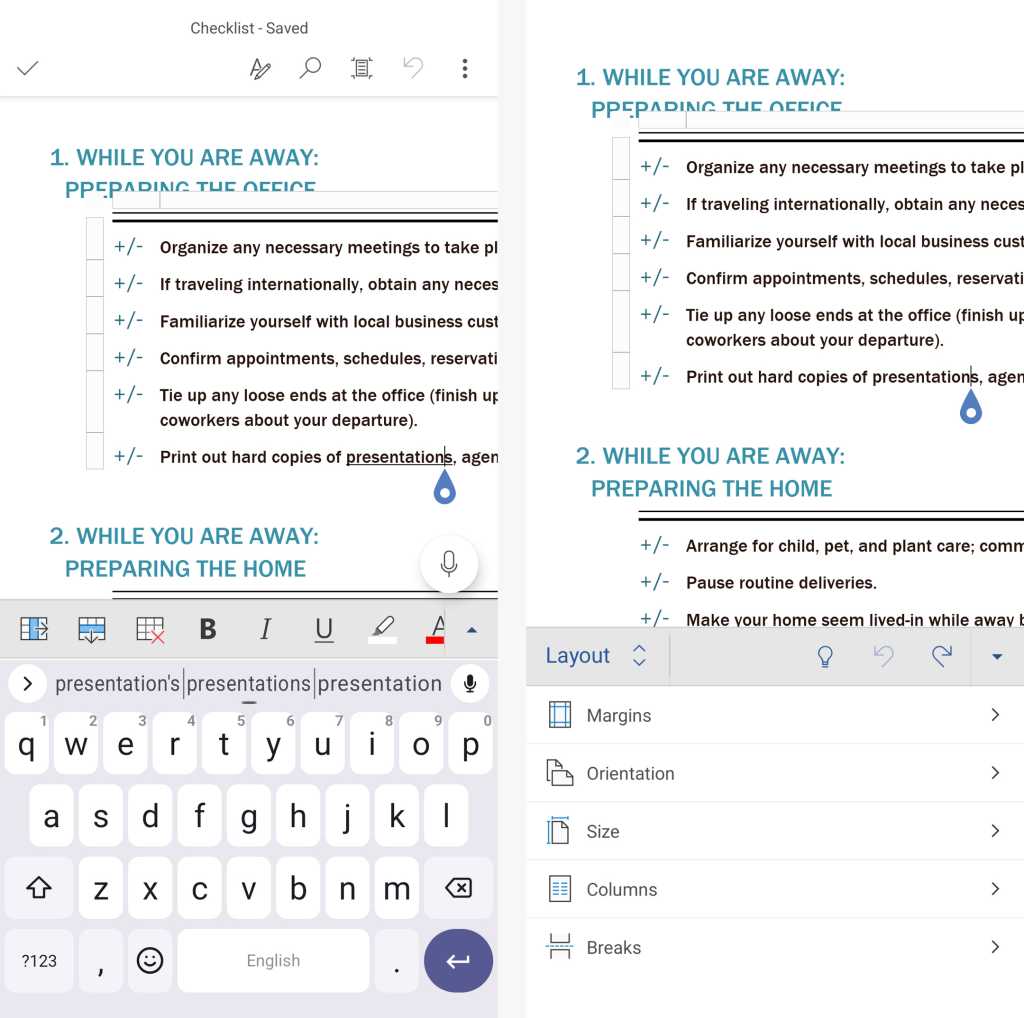
When you’re actively working on a document in the Word Android app, for instance, you see a small, scrollable toolbar at the bottom of the screen — a sized-down version of the traditional Office Ribbon at the top of a document in a desktop view. It’s a smart way to conserve space and allow you to have a large working area (especially when a virtual keyboard is present and taking up a significant portion of your screen).
Tapping an arrow at the toolbar’s right side, meanwhile, expands the toolbar into a larger form with menu sections corresponding to most of the Ribbon tabs you see in Word’s desktop or web app: Home, with common commands for basic text formatting; Insert, with the standard full range of options; Layout, with commands for adjusting your document’s margins, orientation, column configuration, and so on; Review, for checking spelling or word count, managing comments, and activating Track Changes mode; and View, for moving between different layouts and zoom settings.
Microsoft Word’s toolbar in its sized-down, scrollable form (at left) and when fully expanded (at right).
JR Raphael / Foundry
The Word app’s toolbar also has a Draw section, which is present in the desktop version only if your device has a touchscreen. It allows you to select from a variety of tools for drawing or highlighting directly on your document with your finger or a stylus. (The standard Word References section is curiously missing in this context, though most of the associated options are just scattered across other appropriate-seeming areas.)
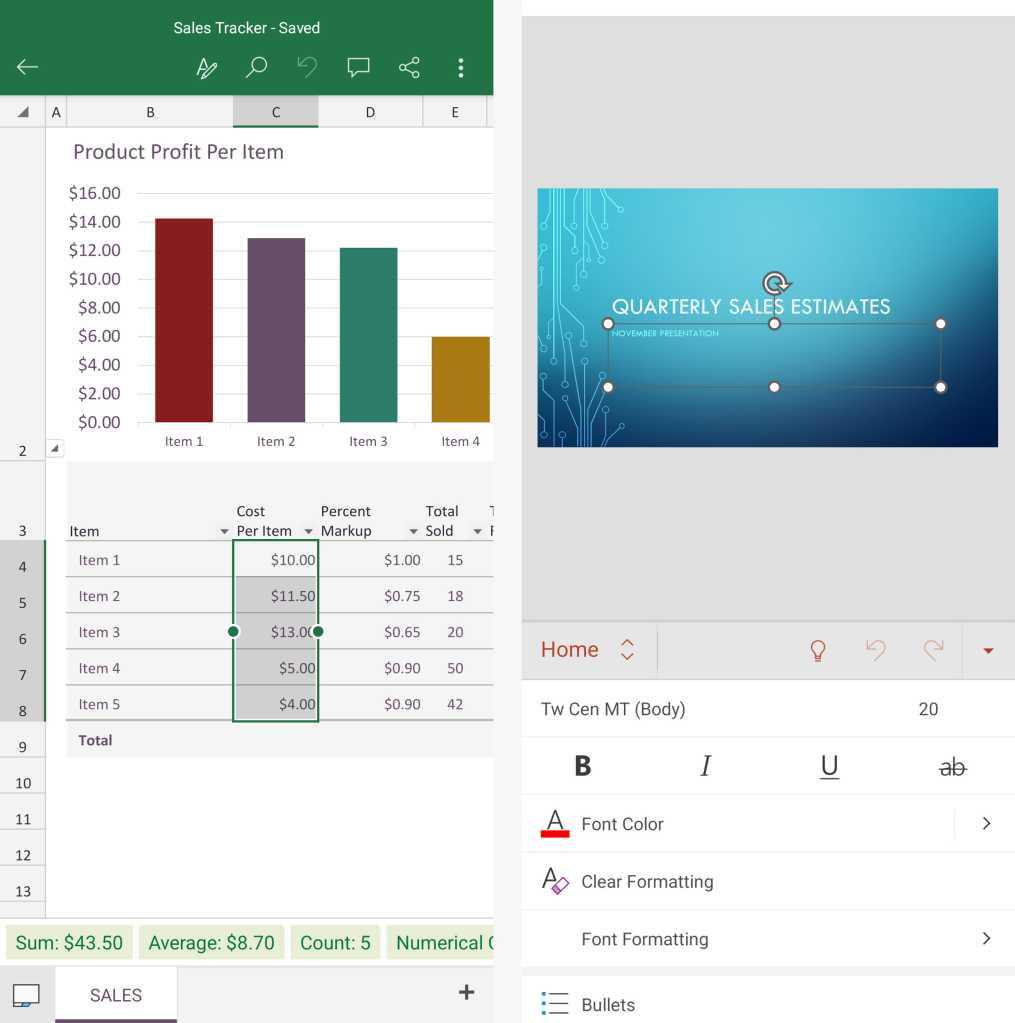
The same approach and expansive feature set applies to Excel and PowerPoint as well. There’s really not much you can’t do with Microsoft’s Office apps on Android — including collaboration (as long as your co-workers are also in the Microsoft ecosystem) and cloud synchronization: Out of the box, the apps support both local device storage and cloud-based storage with Microsoft OneDrive, and if you dig around enough, you’ll even find options for connecting cloud-based accounts from Dropbox, Google Drive, and other providers for seamless in-app access.
Microsoft Excel and PowerPoint provide familiar and feature-packed interfaces on Android.
JR Raphael / Foundry
The one asterisk to all of this: In order to get the apps’ complete set of features — or to use the apps at all on tablet-sized devices — you’ll have to pay for a Microsoft 365 subscription, which runs $100 per year for individuals, $130 per year for families (with up to six users), or $72 to $264 per user per year for businesses. Those subscriptions include a bunch of Copilot AI features, though with a suspiciously vague description of exactlyhow much you’re able to use the features within any given month. (Officially, Microsoft says you get a monthly allotment of credits that “should be enough for most subscribers.” Riiiiiiiight.)
All AI ambiguity aside, assuming you already have such a subscription for desktop access, going with Word, Excel, and PowerPoint on Android is pretty much a no-brainer. If you aren’t already subscribed and don’t necessarily need office apps with oodles of advanced features, though, our next option might be the better fit for you.
‘Twas a time when Google’s mobile office apps were barely usable, bare-bones affairs. Make no mistake about it: Those days are no more.
Nowadays, Google Docs, Sheets, and Slides are thoroughly polished and impressively capable on-the-go productivity tools. They boast tight integration with the broader Google ecosystem, along with a first-class system for syncing, collaboration, and effortless cross-device access.
That last item is a critical part of the apps’ appeal. If you’re already invested in the Google ecosystem, personally or professionally — using Google Drive for storage, Gmail for email, and so on — Docs, Sheets, and Slides will fit naturally into your existing setup. You’ll use your same Google account to access them (and you won’t even have to sign in at all from your phone, since your account is already connected at the operating system level). You’ll be able to work on colleagues’ shared files right from your regular interface. And everything you do will be connected to your Drive storage and easily accessible from most any Google app on any device or platform.
The Docs, Sheets, and Slides Android apps are easy to navigate and have all the basic features you’d expect for their respective categories. In Docs, for instance, you can style text, insert tables, adjust alignment, and insert a variety of different types of bulleted lists. In Sheets, you can style and merge cells, create charts, and find and use all sorts of common spreadsheet functions. And in Slides, you can use rich formatting tools, add speaker notes, and insert your own custom backgrounds.
Google Docs and Sheets have easy-to-use interfaces with all the basic features you’d expect.
JR Raphael / Foundry
It’s with the more advanced word processing, spreadsheet, and presentation commands that Google’s apps lag a bit behind Microsoft’s — not being able to style tables within documents from the Docs app, for example, or not being able to sort rows within a spreadsheet in Sheets. If you need those sorts of beyond-the-basics capabilities, Google’s apps won’t be right for you.
In addition, the mobile apps surprisingly don’t sport many AI elements as of yet, which is slightly shocking, really, given how aggressively Google is shoving Gemini into our faces everywhere else thesedays — including within the browser-based Docs, Sheets, and Slides apps. For now, the Docs Android app does have certain limited Gemini functions available for organizations on the $168-per-user-per-year Workplace Business Standard plan and higher, including an AI-provided document summary command, the ability to create an AI-generated draft based on a prompt, and the option to ask Gemini questions about the document you’re viewing.
Other Gemini features are not yet present, and Sheets and Slides are still free from any and all Gemini-related elements — for now. Whether that’s a drawback or a positive, of course, is completely up to your interpretation.
Last but not least, Docs, Sheets, and Slides also use proprietary Google file formats instead of the typical Microsoft formats — but practically speaking, that really isn’t a big deal anymore. Google makes it incredibly easy to import and open any common file format, and it makes it equally painless to export and share your files in any format you need.
Google’s apps are completely free for individual use, without any restrictions. For companies and organizations that require a fully managed setup, the Google Workspace suite ranges from $84 per user per year for a basic setup to $264 per user per year for the fully featured “Business Plus” plan — and onward from there for customized enterprise-level arrangements.
The best Android app for creating, editing, and annotating PDFs
The one function all of these apps are missing is the ability to manage PDFs from your phone. For that, Adobe’s Acrobat Reader Android app is the tool you need to round out your mobile office suite setup. The free (for these purposes) utility has everything you could possibly require for mobile PDF management — and it’s by far the easiest way to view, sign, and edit PDFs on Android.
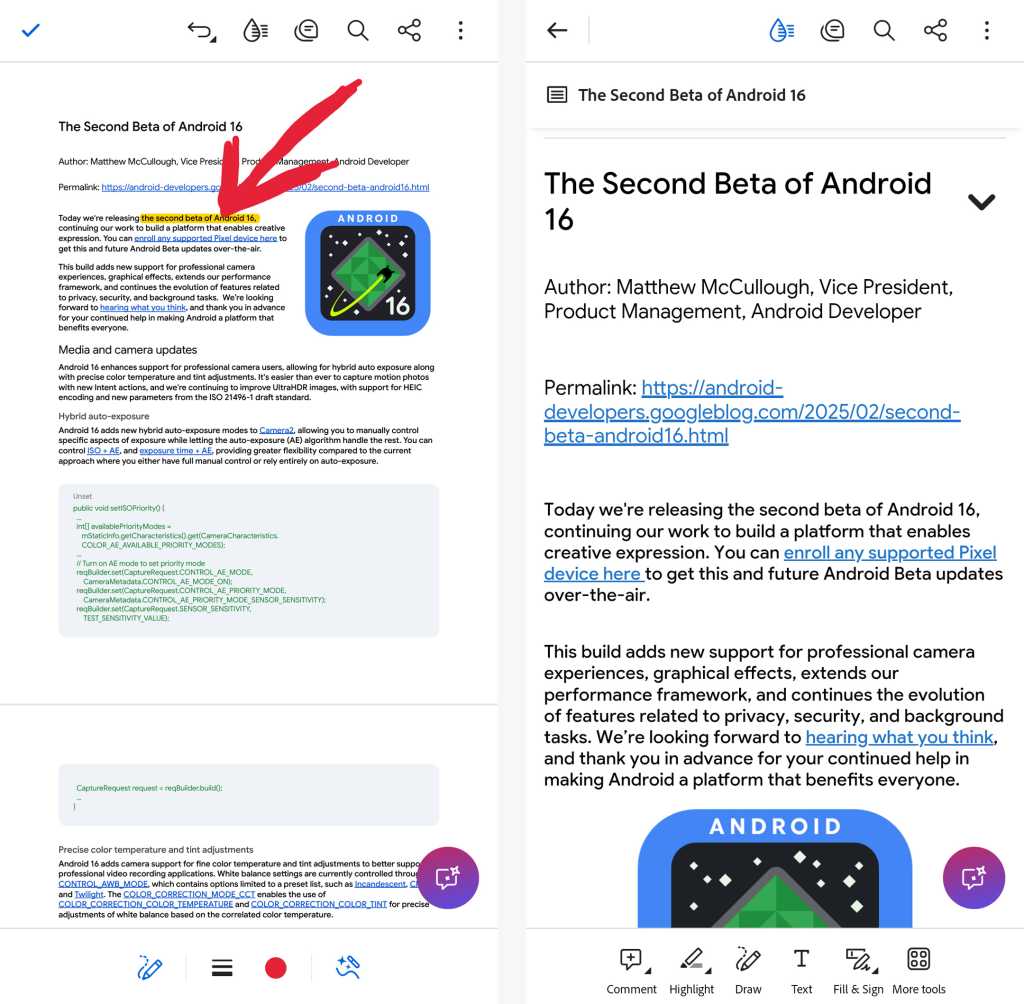
Even just for basic reading of a PDF, Reader’s one-tap “liquid” function forces a document’s typically static text into an adaptive format that actually makes it legible on a small screen without any awkward zooming. And when you need to sign or mark up a PDF in any way, Reader’s got you covered with an array of options for scribbling directly on your screen or inserting a variety of ready-to-roll elements — including your own saved signatures, if you have (or create) an Adobe account where those are stored.
Adobe’s Acrobat Reader app takes the pain out of editing and viewing PDFs on Android.
JR Raphael / Foundry
Acrobat Reader does offer a premium subscription with a variety of advanced options, including AI elements — but for most typical on-the-go PDF purposes, you really won’t need it. The app’s regular, free tier will handle everything you require.
Available on this website, on YouTube, and wherever you find your podcasts, First Person is the show where we meet the most interesting people in IT, and learn from them what makes them tick by focusing only on their firsts. First job, first great boss, first time they realized IT was the industry for them – first failure or first pet. It’s amazing what we can learn from interesting people talking about serious things in a not-too-serious way.
To get you started we are launching with no fewer than five great episodes, available to watch below, as a video series, on YouTube, and as a podcast.
New episodes drop every Monday, so subscribe now on your preferred platform. And if you are one of the most interesting people in IT, let us know by signing up for the Computerworld Contributor Network, or emailing me at matt_egan@foundryco.com.
(And if you like unvarnished truths and real-world lived experience from IT professionals and leaders, check out our First Person blog on CIO.com).
First Person: Dr CJ Meadows – Executive Chairman – The Tiger Centre
We meet Dr CJ Meadows – from the US, based in Singapore, having worked around the world from Japan to India and beyond. An accountant by training and IT pro by practice, CJ is an entrepreneur, consultant, and educator who runs a not-for-profit using tech to bring access to education to excluded folks. We spoke about how her career (and life) path has never been linear or conventional. We discussed how the future of work will require leaders who can use design thinking to focus on solving new and real problems rather than building the shiniest tech. She explained how her best bosses showed empathy and support, and that those same skills are useful in family and personal life make for great business success. CJ ends with some great lessons for life: follow your own path, and try not to kill each other. Words to live by.
First Person meets Dr CJ Meadows
First Person Meets… Paul Preiss – CEO and Founder of the Iasa
We meet Paul Preiss, the CEO and founder of the IASA, the not-for-profit professional association for all business technology architects. In our conversation Paul describes himself as unbelievably passionate person about everything he does, personal and professional, and how that helped him steer and build a storied career in technology. He describes how he went from doing a degree in Japanese, to what he describes as his calling: IT. His first roles in development, moving to become an architect with Dell, and on to great success. Paul tells us some of the things he learnt along the way, outlines his failures and what he learnt from them, as well as introducing us to some of the great leaders who helped shape him and his career.
First Person meets Paul Preiss
First Person Meets… Jim Wilt – CTO | Chief Architect | Distinguished Architect – WVE
We meet Jim Wilt, a voraciously curious CTO, distinguished chief architect and engineering advocate. Jim’s enjoying a stellar career with roles as CTO, CDO and chief architect across a multitude of enterprise organizations. In this conversation we learn about his success and failures, and how he may have learnt more from the latter. He takes us from being inspired by a Disney movie to learn to code on paper because he couldn’t afford access to a computer, to working in medical research and winning prestigious awards for huge organizations. He describes a great boss in McDonalds who taught him the value of giving your best to everything you do, including the story of the janitor at NASA who sent a man to the Moon. Jim shares how he needed to be convinced of his own expertise, and shares the view that material success follows passion and focus – don’t waste your time being safe.
First Person meets Jim Wilt
First Person Meets… Arno Schilperoord – Director Global Architecture & Digital Innovation at The HEINEKEN Company
We meet Arno Schilperoord, a global leader for Heineken who believes that coding is magic and poetry, offering the opportunity to create something from nothing and infinite possibility. Arno tells us how studying physics and using computer models and writing computer code to help in the analysis was his way into IT. He says that in IT everybody was learning things for the first time, and explains how designing resilient high-performance solutions was just a small step from his current practice of architecture. Arno tells us that great bosses are able to spot and resolve problems early, and that great leadership isn’t just about technical expertise, it’s about awareness, timing, and creating a culture of high performance and creating an environment where people feel safe and feel supported.
First Person meets Arno Schilperoord
First Person: David Jones – Chief Architect – WVE
We meet David Jones – a chief architect, CTO and CIO who describes his work as elevating business technology strategy through architectural excellence. David introduces himself as someone who loves collaborating, doesn’t do politics and is always honest. He tells us how he got started by choosing to study electrical engineering inspired by his brother and a French pen pal, and espouses the value of practical, in-industry training over academic learning (although he returned to his own school to teach). David tells us how he was supported to accelerate his career by studying bleeding edge tech whilst he was working in an operational business, and how that taught him a valuable architectural lesson: the best solution for the organization you are in may not always be the most current technical solution. David’s message to those starting out is to follow your passions, learn, and be open and curious – you never know where life will take you.
It was that fragility that caught the attention of Computerworld readers, who rushed to ask Smart Answers about one potential cause. We know that IT skills are in short supply even as lots of IT pros are being laid off. But the chat tends to focus on AI skills: we don’t often hear about how hard it is to get data center staff. But it’s a real factor, both in the public cloud sector, and maybe especially for those who are repatriating data back to their own data centers. We hear reports of understaffing in areas such as operations, electrical engineering, and cloud architecture.
And it’s a problem. According to Smart Answers, being short staffed increases the risk of human error. It leads to maintenance being delayed, less effective remote monitoring, and longer response times when things do go wrong.
This week Computerworld broke the stunning news that – alongside all the generative-AI silliness – Google’s Gemini has some genuinely practical purposes on Android — if you know what to ask. Our readers latched on to one in particular. Now which one was it..?
Oh yes: ‘Remember that’.
‘Remember that’ is a genuinely useful feature, and Smart Answers has an outline of how to use it. Activation, Information Storage, Information Retrieval, and Note Creation. But you don’t need to remember that list – just ask our own useful AI assistant.
Of interest to readers of CIO.com was one risk factor for all operators of large scale IT projects: shadow IT. They asked Smart Answers how shadow IT introduces risks such as vulnerabilities to be exploited by bad actors. There are more – but you’ll have to ask Smart Answers to find out.
Smart Answers is an AI-based chatbot tool designed to help you discover content, answer questions, and go deep on the topics that matter to you. Each week we send you the three most popular questions asked by our readers, and the answers Smart Answers provides.
Developed in partnership with Miso.ai, Smart Answers draws only on editorial content from our network of trusted media brands—CIO, Computerworld, CSO, InfoWorld, and Network World—and was trained on questions that a savvy enterprise IT audience would ask. The result is a fast, efficient way for you to get more value from our content.
The fireworks that could soon go off across the US have nothing to do with July 4 celebrations, but are reaction to a double hit that every state in the union may soon face relating to a potential reduction of connectivity capabilities and a proposed 10-year ban on its ability to regulate AI.
Drastic legislative changes around both issues are contained in the Trump administration’s Reconciliation Tax Bill, which is now before the Senate.
In early June, 260 state lawmakers from both parties in all 50 states sent a letter to Congress voicing strong opposition to the AI regulation ban. The letter, which was spearheaded by Americans for Responsible Innovation (ARI), a nonprofit policy advocacy organization, stated, “the proposed 10-year freeze of state and local regulation of AI and automated decision systems would cut short democratic discussion of AI policy in the states with a sweeping moratorium that threatens to halt a broad array of laws and restrict policymakers from responding to emerging issues.”
ARI president Brad Carson said, “lawmakers from every state in the country are sending a clear message that the proposed ban on state AI laws would freeze a whole range of common-sense laws that voters depend on.”
There is, he said, “room for a debate on pre-emption of a targeted set of state AI laws with the passage of a federal framework for AI governance. But this proposal fails on all counts, with an overbroad scope and nothing to offer when it comes to federal governance.”
Moratorium would be ‘a historic mistake’
On Thursday, lawmakers from Utah, South Carolina, Ohio, Tennessee, Wisconsin and Montana held a press conference organized by the ARI to ask Congress to remove the moratorium. There has also been a major new twist since Trump’s so-called One Big Beautiful Bill moved to the Senate for final approval, in that Senator Ted Cruz, chair of the Senate Committee on Commerce, Science, and Transportation, inserted a clause that would preclude any state receiving funding under the Broadband, Equity, Access and Deployment (BEAD) program if they refused to introduce an AI law moratorium.
Satya Thallam, senior advisor with ARI, said in a release following the press conference, “state lawmakers are sending a clear message to Congress: the moratorium threatens a range of state laws, from kids’ online safety to pro-innovation measures, and it needs to be struck from the bill.”
He added, “preventing lawmakers back home from doing the hard work of legislating on AI issues for the next decade would be a historic mistake. Congress shouldn’t be working in opposition to state lawmakers, but hand-in-hand with state legislators to get AI policy right.”
Amba Kak, co-executive director of AI Now Institute, said Thursday in an email to Computerworld, “simply put, this ban on state AI law would leave American consumers and workers with even less protections than we have today against some of the worst forms of AI-related abuse and exploitation. The moratorium rolls back the clock on the protections that are in place, and prevents new rules from coming into place. Essentially [it’s] forcing state lawmakers to turn a deaf ear to their constituents.”
‘AI being used on us, not just by us’
Who might be most at risk? “It’s all of us, any of us, that will be at the receiving end of AI mediating our life and work, whether we choose to opt in or not,” she said. “AI is routinely being used on us, not just by us. But it is most unconscionable to unleash these risks on those least well positioned to fend for ourselves — children, seniors more susceptible to AI scams and manipulation, low income people subject to faulty and error ridden AI-mediated social services systems, and those working jobs that are being aggressively devalued or replaced.”
Kak added, “I’d also flip that question to say: who has most to gain here? Big Tech: The same industry that, by increasingly bipartisan consensus, has gotten too big for its boots. And have proven themselves to be reckless custodians of this power. This moratorium drives that impunity further, in ways that send a truly dangerous message to the Big Tech AI firms: they’re in charge, no questions asked.”
On Wednesday, Cruz issued a release which said that he had published updated text for the Commerce Committee’s portion of the budget reconciliation bill.
A backgrounder accompanying the release states that the update involves the appropriation of “$500 million to the National Telecommunications and Information Administration (NTIA) to support deployment of AI models or systems and underlying infrastructure. The proposal uses the administrative structure of the Broadband, Equity, Access, and Deployment (BEAD) program to streamline allocation of new funding.”
It goes on to say that, in order to receive “a portion of this new $500 million federal investment to deploy AI,” states must agree to several conditions, one of which is the temporary pause of “any enforcement of any state restrictions, as specified, related to AI models, AI systems, or automated decision systems for 10 years.”
US Senator Maria Cantwell, a Democrat and Ranking Member of the committee, reacted by saying, “the newly released language by Chair Cruz continues to hold $42 billion in BEAD funding hostage, forcing states to choose between protecting consumers and expanding critical broadband infrastructure to rural communities.”
Cementing the digital divide
Drew Garner, director of policy engagement at Benton Institute for Broadband & Society, a nonprofit organization whose focus is ensuring all people in the US have access to competitive, high-performance broadband, sided with Cantwell, saying, “[it] sounds insane even not tied to BEAD, but tied to BEAD is doubly insane.”
The Trump administration and Cruz, he said, are “treating [BEAD] like a piñata right now and it’s crazy. It is an awful time to be in a state broadband office.”
This new threat worsens an already bad situation. In March, US Department of Commerce secretary Howard Lutnick announced that he had launched a “rigorous review of the BEAD program. The Department is ripping out the Biden administration’s pointless requirements. It is revamping the BEAD program to take a tech-neutral approach that is rigorously driven by outcomes, so states can provide internet access for the lowest cost.”
And following the release of revised rules earlier this month, Garner wrote, “[Lutnick’s] actions will cement the digital divide for decades. He is hurting our economic competitiveness, our healthcare and education … Secretary Lutnick wants to invest in the ‘cheapest’ broadband infrastructure, not the best infrastructure. It’s a self-inflicted wound to American competitiveness.”
Brother Industries is grappling with a critical authentication bypass vulnerability affecting hundreds of different printer models, many of them used in enterprises, allowing unauthenticated remote code execution (RCE) on the devices when chained with another flaw.
The admin password bypass stems from a manufacturing issue and cannot be fixed through firmware according to Rapid7, the cybersecurity firm that discovered the vulnerability — along with seven others — affecting 689 different device models.
One of those vulnerabilities enables attackers to extract the serial number of a printer, and that’s at the root of Brother’s problems.
Critics might argue that Apple at the 11th hour stepped forward with new rules for developers in Europe that might be acceptable to the region’s anti-trust regulators — but that’s not how Apple sees it. That company, which is appealing the rules Europe has applied to directly constrain its business, says regulators have not been transparent throughout the process, making arbitrary decisions despite constant communication between both sides on the matter.
Apple does, however, hope the changes it has now introduced to its steering arrangements for developers in will bring its business in line with Europe’s Digital Markets Act. It certainly has reasons to think so; Apple said it worked with the regulators on the arrangements and believes they bring it into harmony there.
Apple announced the latest rounds of EU DMA-inspired changes via a Thursday note on its developer’s website.
Malicious compliance
But there is still a problem; Apple says that even though it’s been meeting intensively with European Commission regulators for more than a year, the experience has been a frustrating one. Regulators have continuously moved the goalposts on what compliance looks like. The company complains that they have even prevented Apple from implementing new solutions to bring its business into compliance and then fined the company for not making changes.
This has placed a big burden on the company, which has had to invest thousands of hours in attempting to meet the Commission’s ever-changing demands. From what I hear, it’s akin to throwing darts at a board attached to a rope, allowing the board to move out the way once the dart is fired. It’s an unequal, opaque process seemingly designed for Apple to lose and perhaps in itself an articulation of malicious compliance — with malice from the regulators.
We’ll have to wait and see whether the changes Apple announced do actually meet European regulators’ demands. They should, as Apple is very much giving the impression they were introduced in collaboration with EC authorities.
Apple will appeal
That doesn’t mean Apple accepts the changes it’s been forced to make. The company has until July 7 to appeal and will do so. Apple is quite open that it opposes the demands Europe has made of it and continues to warn that the patchwork of changes it introduced will erode security and privacy, dent the user experience, and make it harder for the company to innovate.
Apple’s enemies, typically, remain critical of the changes. Epic Games CEO Tim Sweeney, who has spent millions on his assault on Apple business practices, slams the new terms as “blatantly unlawful,” calling them a “mockery of fair competition.”
I imagine Apple might suggest that they are inherently lawful and support Europe’s view of fair competition. The changes can loosely be grouped as changes in the way steering is supported on the platform, and changes in business terms.
What steering changes did Apple introduce?
In short, the changes comprise policy and payment tweaks and the removal of some restrictions.
One of the biggest alterations concerns the warning notice Apple provides users to warn them when they tap on external links. Critics had complained this mandatory warning got in the way of consumer choice and wanted it removed. It looks as if Apple partially won that argument, in that the warning will now appear the first time a user taps on an external link, but there is now an option to opt out of seeing the warning later when tapping external links in the same app.
In other words, you’ll be warned the first time you tap out from an app but can override future warnings if you trust the developer. Apple had wanted a warning to appear each time you tap an external link.
Additionally:
Changes apply to all developers, whether or not they have wanted to use alternative business terms in Europe.
Developers can use URLs in their apps that direct traffic to external websites, other apps, and alternative app marketplaces. They can also link to in-app promotions — and they can use multiple URLs inside their app, not just one as before.
The links developers put inside their apps can collect additional user information through tracking parameters, redirects, and intermediate links. This will increase the burden on consumers to verify the security and privacy of a link they find in an app before they use it.
Apple had originally insisted developers use its own templates for interfaces to links and promotions; under the new rules, developers can freely design these.
What business changes has Apple made?
The company also changed its business terms in the EU. These do not apply to apps sold via third-party app stores, and they are not applied against offers directed from inside an app. But they do apply to links that direct users to the web, as well as in-app alternative payment service providers.
The deal is that Apple charges an Initial Acquisition Fee, a Store Services Fee and Core Technology charges.
In brief, these consist of:
Initial Acquisition Fee
This is designed to recognize Apple’s role in connecting users to developers.
A 2% fee on the sale of digital goods and services to new users.
The fee applies for the first six months after the user first downloads an app from the app store.
The fee is waived for developers in Apple’s Small Business Program
There is no fee for existing users.
Store Services Fee
Apple’s App Store offers a range of services to developers, who can now choose between a basic set of mandatory services, or the full collection of services:
Tier One Store Services: A 5% fee in exchange for which developers get trust and safety features, app management, and app distribution and delivery services. The fee does not extend to automatic app updates or automatic downloads across devices.
Tier Two Store Services: Set at 13% (or 10% for Small Business Program members), this fee gives developers access to all the services the App Store presently provides, including promotions, search suggestions, discovery, automatic downloads and automatic updates.
Core Technology charges
Developers signed up to Apple’s alternative terms in the EU will pay the previously announced Core Technology Fee of €0.50 per install for each first annual install over 1 million.
Developers on Apple’s standard business terms will now pay a Core Technology Commission of 5% on sales made through in-app promotion of alternate payments.
Apple will migrate all its European developers to the new fee structure by Jan. 1, 2026.
Where can I find out more about Apple’s European changes?
I remain concerned about the dilution of warnings on the store and the lack of implicit control over what links developers use to direct their audiences to external traffic. I’m in no doubt whatsoever that these openings will be abused to form new attack surfaces over which Apple has little control. Enterprise users will no doubt use device management policy to forbid use of third-party payment services and installs in an attempt to protect corporate data.
Even more concerning: Apple’s accusations concerning its negotiations with the EC as if that body has been deliberately opaque, meaning enforcement of the DMA has very swiftly become a political weapon, perhaps in some unspoken European economic battle against the US. I doubt we’ve heard the last of this ongoing battle, which will likely last longer than the game that kicked it off.
Mu lets people control their computers using plain language. For example, you can type or say, “turn on dark mode” or “make my mouse pointer bigger,” and the computer will do it. The first place Mu appears is in the Windows 11 Settings app. You say or type how you want a specific setting to change, and the genAI tool figures out what you want and makes the change for you.
Crucially, this isn’t a large language model (LLM) running in the cloud. Mu is a small language model (SLM) with a comparatively paltry 330 million parameters, built to run on a specialized AI chip called a neural processing unit, or NPU. (This chip is found in the latest Copilot+ PCs from Microsoft, Dell, HP, Lenovo, Samsung, and Acer. These new PCs started shipping in June 2024 and are the only computers that can use Mu and other advanced AI features in Windows 11.)
It’s not an LLM-based chatbot that lives in the cloud. It’s an SLM that runs entirely on the PC, even when disconnected from the internet.
Microsoft Copilot+ PCs can run Mu because they have an NPU that can handle at least 40 trillion operations per second. Microsoft collaborated with Qualcomm, AMD, and Intel to ensure Mu runs smoothly on their NPUs, which are now standard in all Copilot+ PCs.
Mu uses a transformer encoder-decoder design, which means it splits the work into two parts. The encoder takes your words and turns them into a compressed form. The decoder takes that form and produces the correct command or answer.
This design is more efficient than older models, especially for tasks such as changing settings. Mu has 32 encoder layers and 12 decoder layers, a setup chosen to fit the NPU’s memory and speed limits. The model utilizes rotary positional embeddings to maintain word order, dual-layer normalization to maintain stability, and grouped-query attention to use memory more efficiently. These technical choices let Mu process more than 100 tokens per second and respond in less than 500 milliseconds.
Compared with LLM-based chatbots like OpenAI’s ChatGPT, Mu is super fast.
Microsoft trained Mu on 3.6 million examples focused on Windows settings and related tasks. The training happened on Azure using NVIDIA A100 GPUs. After training, Microsoft fine-tuned Mu and used quantization to shrink its memory needs, so it would run well on NPUs from all three chipmakers. As a result, Mu is about one-tenth the size of Microsoft’s Phi-3.5-mini model, but performs almost as well for the tasks it was built to do.
Mu is truly groundbreaking because it is the first SLM built to let users control system settings using natural language, running entirely on a mainstream shipping device. Apple’s iPhones, iPads, and Macs all have a Neural Engine NPU and run on-device AI for features like Siri and Apple Intelligence. But Apple does not have a small language model as deeply integrated with system settings as Mu. Siri and Apple Intelligence can change some settings, but not with the same range or flexibility.
Samsung’s Galaxy S25 and other recent flagship phones feature a custom NPU and Galaxy AI, which can perform various device control and personal assistant tasks. However, they too lack an SLM for comprehensive system settings control.
Google’s Chromebook Plus devices have an NPU and support on-device AI, but it don’t use an SLM for system settings in the way Mu does.
By processing data directly on the device, Mu keeps personal information private and responds instantly. This shift also makes it easier to comply with privacy laws in places like Europe and the US since no data leaves your computer.
The industry is moving in this direction for obvious reasons. SLMs are now powerful enough to handle focused tasks on par with larger cloud-based models. They are cheaper to run, use less energy, and can be tailored for specific jobs or languages.
Note that NPUs are not rare. They’re currently available in new phones, tablets, and even home appliances. These chips are designed to run neural networks efficiently and with low power, making it possible to offer smart features that work anywhere, even without a reliable internet connection.
Most importantly, SLMs running on NPUs are a BFD — not just for PCs, phones, and tablets, but for everything. As the power and capabilities go up and the costs come down, we can expect car dashboards, thermostats, washing machines, tractors, and everything else (including toasters) to eschew nested menus for user control in favor of voice-controlled settings.
You’ll walk into the kitchen and tell the toaster to toast your bagel lightly in about 20 minutes before telling the coffee maker to make you a flat white. After breakfast, you’ll go into your home office and remotely control all manner of IoT devices and other objects by talking to an SLM dedicated to each device.
Note that these SLMs for device control will also work directly with LLMs for information and other actions, like writing code, building websites and apps, and facilitating all your business communications. That SLM you’ll be talking to will mainly live and execute locally on your smart glasses.
You may never own or use a Copilot+ PC. But you will definitely use something like Mu every day for most of your professional and personal life on many devices. It’s a true glimpse of the future of how we interact with machines.
I don’t know how my brain would even function at this point if it weren’t for reminders.
No joke: This rusty ol’ noggin of mine is overloaded with info these days (and, as I’ve noted before, it ran out of internal storage space approximately 12 years ago — and I’ve yet to find an affordable hippocampus RAM upgrade). So more and more, I find myself relying on a complex web of reminders both physical and digital to make sure I manage everything from day-to-day chores to Very Important Business Matters.
One area where such a need seems to come up constantly is on my Android device — when I see something in a text message, a Slack message, an email, or maybe even a website that makes me think, “Hey, you handsome but mushy-brained miscreant, you’d better not forget to come back to this later!”
It couldn’t be much easier to use: Anytime you see anything reminder-worthy, you snag a screenshot — by pressing your device’s physical power and volume-down buttons at the same time — then look for the handy little bell icon that pops up as a part of the standard screenshot confirmation in the lower-left corner of the screen.
It’s incredibly handy. But it’s also, unfortunately, available only on the very latest Google Pixel devices — which means the vast majority of Android-appreciating animals are unable to take advantage of it.
But fear not, my fellow memory-challenged manatee: I’ve got an awesomely effective new way to bring a similar sort of superpower onto any Android device this instant — no matter who made it or how old it may be.
Now, first things first: If you’re a regular reader of this increasingly crusty column, you might be thinking to yourself: “Uh, Mr. Memory Man? You’ve written this same story before.”
And, well, you’re kinda right — with the key word being kinda. Shortly after the Pixel 9’s debut, whilst I was first basking in the beauty of its underappreciated and barely-mentioned on-demand reminder brilliance, I came up with a rather convoluted way to emulate something similar on any Android device, with the help of a third-party task app and some other optional elements.
It got the job done, all right, but it wasn’t exactly easy — and it required you to rely on an external app for storing and managing your reminders, too, which isn’t exactly optimal.
Today, inspired by the crafty thinking of one of my Intelligence Insider community members, I’ve got an even better way to rev up your reminders while remaining well within Google’s core apps and services.
But enough blathering — here’s the trick to try out on your own:
The next time you see something you need to remember anywhere on Android, snag a screenshot — just like you would with the Pixel 9 approach we went over a minute ago. (Again, power button and volume-down button together.)
Then, when you see the little screenshot confirmation pop-up, tap the share icon within it and select Gemini from the list of options.
Gemini now comes preinstalled on most current devices, and many older devices have also been updated to include it. If your device doesn’t yet show Gemini as an option, you can manually download the official Gemini app and then open it once to get things going.
Also, bonus tip: If you want to make this even more convenient moving forward, you can use Android’s oft-forgotten share menu pinning option to stick Gemini to the top of the list for especially easy ongoing access.
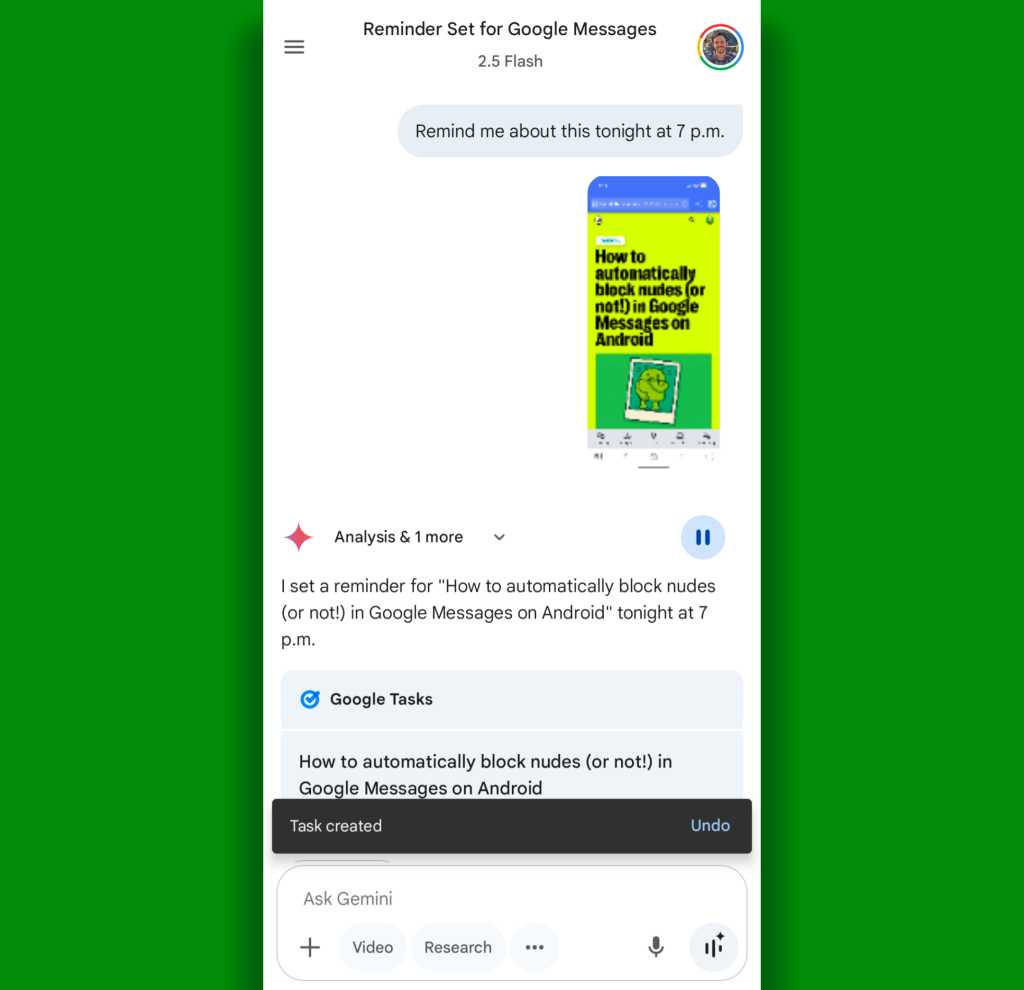
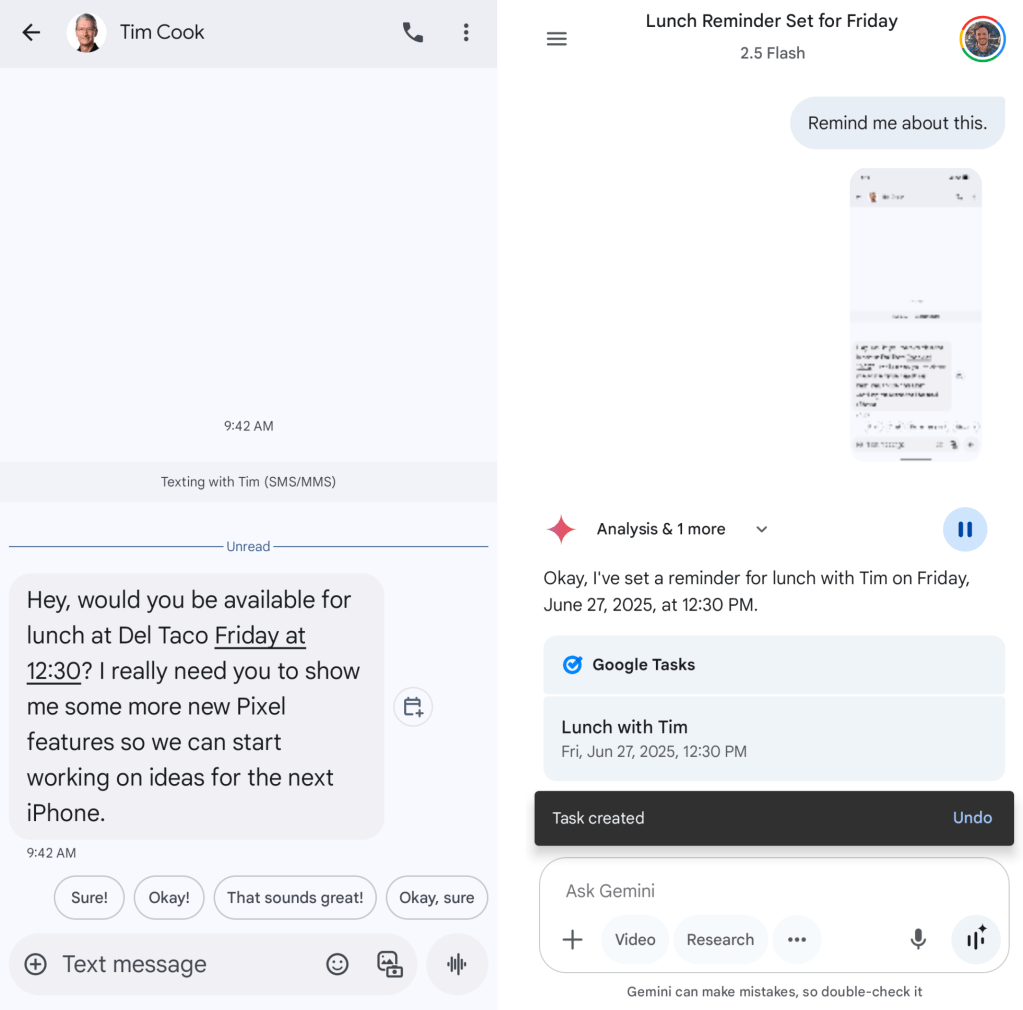
Now, once Gemini comes up — with your screenshot already in place within its prompt box — either type in the text or tap the microphone button and then speak the command to remind me about this, optionally with a specific day and time at the end.
Take a screenshot, share it to Gemini, then ask it to creator a reminder — and poof: The deed is done.
JR Raphael, Foundry
You can follow this pattern for practically anything, but where it’s especially handy is when the underlying info on the screen was already about a specific task or activity you need to remember.
In that sort of scenario, Gemini will automatically extract and implement all the details from within the screenshot — including the nature of the task and, if present, even the date and time it mentions.
Instant extraction and intelligent reminder creation, all thanks to Gemini on Android.
JR Raphael, Foundry
You get the idea.
In the right sort of situation and with the right thinking around it, it’s yet another way Gemini can actually be useful on Android — without any of the asterisks or eye-rolling that accompany its most publicly promoted possibilities.