Month: October 2025

Cyber agencies produce ‘long overdue’ best practices for securing Microsoft Exchange Server

Cyber agencies from three countries including the US have issued a list of security best practices for protecting Microsoft Exchange Server, a venerable on-premises email server that many IT departments still cling to.

The advisory, also endorsed by Australia and Canada, comes at a good time: Threat actors are still poking at holes in Exchange Server, and many attacks have succeeded because of old or misconfigured installations. For example, Germany’s Office for Information Security believes nine out of 10 Exchange servers in that country are still running outdated versions of the software.

Even hybrid Exchange environments aren’t vulnerability-free. In August, Microsoft released guidance on a high-severity hole (CVE-2025-53786) in mixed on-prem and Exchange Online deployments. It allows a threat actor with admin access to the local server to escalate privileges. This advisory was an update to a hot fix released in April.

Also in August, researchers at Positive Technologies warned of finding keyloggers that are being injected into Exchange authentication pages. Around 65 victims were identified in 26 countries.

Readers may also recall that one of the biggest rounds of Exchange Server attacks happened in January 2021, after four zero-day exploits were exploited, mainly by a gang dubbed Hafnium. By one estimate, about 30,000 customers in the United States were affected, and 250,000 globally.

On-prem Exchange still prevails in some environments

Although many IT departments are shifting to cloud-based email providers, some firms and government departments still hold onto their on-prem Exchange servers, either because they don’t have the budgets to move away from legacy infrastructure, or because they believe hands-on control gives them better security.

However, organizations with unprotected or misconfigured Exchange servers remain at high risk of compromise as threat activity persists, targeting vulnerable Exchange servers including versions that have reached end-of-life, says the US Cybersecurity and Infrastructure Security Agency (CISA) in its introduction to the guidance.

Best practices include a focus on hardening user authentication and access, ensuring strong network encryption, and minimizing application attack surfaces. Organizations that implement these well can significantly reduce their risk from cyber threats, CISA says. 

The document is not an all-inclusive hardening guide; active monitoring for compromises and planning for potential incidents and recovery are equally important areas for Exchange admins to concentrate on, says CISA.

Robert Beggs, head of Canadian incident response firm DigitalDefence, called the best practices guidance “long overdue.”

Despite the fact that Exchange is a “particularly juicy target,” with stored emails that contain sensitive corporate and personal information, and sometimes even passwords, his firm has found “significant misconfigurations with every implementation of Exchange server that we have tested.” 

Beggs added that often Exchange servers lack infrastructure security controls and monitoring/logging, endpoint security solutions, or even antivirus software, because users believe that this interferes with mail serving operations.

The guidance

The guidance states admins should treat on-prem Exchange servers as being “under imminent threat,” and itemizes key practices for admins:

  • First, it notes, “the most effective defense against exploitation is ensuring all Exchange servers are running the latest version and Cumulative Update (CU)”;
  • It points out that Microsoft Exchange Server Subscription Edition (SE) is the sole supported on-premises version of Exchange, since Microsoft ended support for previous versions on October 14, 2025;
  • It urges admins to ensure Microsoft’s Emergency Mitigation Service remains enabled for delivery of interim mitigations;
  • It urges admins to establish a security baseline for Exchange Server, mail clients, and Windows. Maintaining a security baseline enables administrators to identify non-conforming systems and those with incorrect security configurations, as well as allowing them to perform rapid remediation that reduces the attack surface available to an adversary;
  • It advises admins to enable built-in protection like Microsoft Defender Antivirus and other Windows features if they aren’t using third party security software. Application Control for Windows (App Control for Business and AppLocker) is an important security feature that strengthens the security of Exchange servers by controlling the execution of executable content, the advice adds;
  • It urges admins to make sure only authorized, dedicated administrative workstations should be permitted to access Exchange administrative environments, including via remote PowerShell;
  • It tells admins to make sure to harden authentication and encryption for identity verification;
  • It advises that Extended Protection (EP) be configured with consistent TLS settings and NTLM configurations. These make EP operate correctly across multiple Exchange servers;
  • It advises admins to ensure that the default setting for the P2 FROM header is enabled, to detect header manipulation and spoofing;
  • It says admins should enable HTTP Strict Transport Security (HSTS) to force all browser connections to be encrypted with HTTPS.

Given the number of configuration options available, it can be difficult for many organizations to select the optimal security configuration for their particular organization at the time of installation, Beggs admits. This is made more complex, he said, if implementations occur in a shared services model where the Exchange server is hosted in the cloud, and may be configured and maintained by a third party, and responsibility for a secure configuration is not clear. 

“A little-recognized aspect of securely configuring Exchange is that applying patches and upgrades from the vendor may reset or change some security configuration information,” he noted. While the guidance urges admins to ‘apply security baselines,’ Beggs said they should verify that the correct security baseline was applied. And, he added, they should review configuration settings at least quarterly.

Beggs added that the guidance is a document that reminds admins that Exchange is a server, and it must be considered to suffer from the same risks, and have the same requirements for security, as any other server on the network. “Security must be consistently applied to all data, especially when considering the data that is typically present on a mail server,” he said. 

This article first appeared on CSO Online.
Industrial and medical devices struggle to upgrade to Windows 11

While enterprises continue to respond to the end of life of Windows 10 and the wide scale adoption of Windows 11, there are signs that some sectors are finding the transformation difficult.

A report in Digital Health News revealed that while a UK health authority has managed to upgrade most of its machines to the newer operating system, it is unable to complete the process, as a certain number of devices do not support Windows 11.  According to the report, Rotherham Health Trust was faced with a hefty bill to render equipment usable, with one supplier quoting £25,000 (about $32,900) to upgrade a three-year-old device.

The Rotherham incident is not an isolated one, according to a post on independent community website Windows Forum, which noted, “a handful of clinical suppliers refused or failed to certify their software for Windows current OS.”

These medical systems operate in environments which make their upgrades more difficult, said Timon Watson, director analyst with Gartner. “These devices will operate on isolated networks with no access to the outside world and [are] managed with dedicated tools and processes. Any changes to these environments require extensive testing and validation, which may involve external parties and take months to complete.”

He added that the healthcare industry has specific requirements that influence any change. “Computers connected to machinery or medical devices are often purchased with and are considered as part of that equipment by the vendor,” he said. “The vendor will retain responsibility for maintaining the computer, meaning any software changes or OS updates may require professional services, which can cost thousands of dollars.”

Vendors in other industrial sectors have also discovered compatibility issues. Rockwell, for example, put a note on its website saying that its ASEM 6300P and 6300B industrial computers are generally not compatible with Windows 11 due to their older processors. There are sure to be other industrial vendors who will have the same issues.

There are other signs that in the wider world, organizations are not upgrading their systems with any great haste. The maritime sector is one that is resisting the change; according to research from Marlink, nearly half of all vessels are yet to adopt the new operating system, putting shipping fleets in danger of cyber attacks in the future.

However, according to Chris Silva, a workplace security specialist with Gartner, it could be some time before there is any impact. “While end of life of an operating system can have implications for the security posture of the OS itself, that impact is not immediate.”

In the meantime, he said, there are plenty of third party vendors who will offer support to secure older and discontinued operating systems that continue to be essential to organizations.

Microsoft has also considered the needs of those companies that have found it difficult to adopt Windows 11 in every aspect of their infrastructure. It has introduced Windows 10 IoT edition, offering support up until 2032, which will meet the needs of many industrial customers.

For those companies that have not gone down this route, there will be decisions to be made. Health authorities faced with the lack of support for Windows 11 on their current equipment may decide that these devices may have outlived their usefulness.

“Organizations in the future may not upgrade their existing equipment at all,” said Watson. “This means new equipment would need to be purchased, which, using an MRI scanner or X-ray equipment as an example, could cost hundreds of thousands or even millions of dollars.”

Gartner: AI budgets are going to projects that demonstrate value, real-world impact

Many infrastructure and operations leaders aren’t able to dig out enough money from budgets to reallocate to AI projects, Gartner said in a survey released this week.

The research firm surveyed 253 IT leaders globally, and the budget issue plagued half the participants. As a result, 54% said they are focusing on AI projects with attainable results and foreseeable cost savings, Gartner said.

The projects are mostly in functions “where AI can quickly demonstrate measurable impact,” said Melanie Freeze, research director at Gartner. “We’re seeing the greatest AI momentum in IT service management and digital workplace functions, which are places where automation and generative AI can directly enhance productivity and reduce costs.”

Freeze cited a prominent healthcare company that used AI to improve productivity and reduce incidents by boosting the self-service capabilities of its IT service desk. “To do this, they created a portal where employees could type the issues they were facing, and a generative AI model would give them a solution based on the ITSM data and knowledge base within their organization,” Freeze said.

That helped reduce first-call resolution incidents and allowed service desk employees to move to more complex tasks, Freeze said.

However, AI integration is becoming difficult, as it is complex to put all the pieces together and make sure everything fits. The best way to address this is by starting small and winning big, she said —is a classic way of approaching IT.

“In other words, I&O (infrastructure and operations) really needs to prioritize AI use cases that can build that momentum with relatively easy returns,” Freeze said.

While cost optimization in AI could provide short-term benefits, the goal is to deliver long-term value and innovation by learning and building on these AI capabilities. “But they’re being held back by budget constraints and integration difficulties,” she said.

About 48% of the IT leaders surveyed reported integration difficulties.

The Gartner data follows controversial research from MIT; it found that 95% of AI projects failed.

That echoes Gartner research in June that said more than 40% of agentic AI projects would be canceled by the start of 2028. AI just can’t be in that exploratory “experimentation everywhere stage,” Freeze said. “They have to focus those efforts and target places where they can demonstrate the ROI and then build that momentum.”

Balancing the value and feasibility of AI projects comes down to determining whether the projects align with the company’s priorities. “The cost of integration might be the risks associated with it. It might be the risk of just the cost of the solution. Those things can branch out when it comes to value,” Freeze said.

It also comes down to using AI to provide insights and capabilities and enhancing the customer experience, Freeze said.

Many tech companies, including Microsoft, Google, Slack, Box, and Zoom, regularly talk about providing value with AI tools that unlock information and insights from existing and dormant datasets. That can help companies make better long-term decisions.

The survey did not look at long-term capital expenditures. It focused only on projects that directly affect worker productivity.

The participants surveyed expect to remain cautious about squeezing money from their budgets for AI projects. “AI has always been a challenge for infrastructure and operations leaders because they are tasked with keeping the lights on while still finding opportunities for innovation and helping enable business value,” Freeze said.

AI systems will learn bad behavior to meet performance goals, suggest researchers

There are plenty of stories out there about how politicians, sales representatives, and influencers, will exaggerate or distort the facts in order to win votes, sales, or clicks, even when they know they shouldn’t. It turns out that AI models, too, can suffer from these decidedly human failings.

Two researchers at Stanford University suggest in a new preprint research paper that repeatedly optimizing large language models (LLMs) for such market-driven objectives can lead them to adopt bad behaviors as a side-effect of their training — even when they are instructed to stick to the rules.

LLMs are already in use in the enterprise to write promotional materials. The same techniques are also used by politicians hunting for votes and social media influencers craving followers. It’s easy enough to optimize LLMs for such competitive markets, but Batu El and James Zou wanted to know what happens to models’ safety and honesty as a result of such optimizations.

For their study, they created three distinct scenarios: online election drives aimed at voters, product sales pitches seeking to persuade customers, and social media posts aimed at boosting followers and audience reaction.

LLMs all the way down

One potential flaw in their experiment, if we are to draw real-world conclusions from it, is that no humans were harmed by exposure to the potentially misleading messages: It was LLMs all the way down.

First, they used two different methods (rejection fine-tuning and text feedback) to optimize two AI models, Qwen/Qwen3-8B and Llama-3.1-8B-Instruct, to generate content in three categories: a product sales pitch, a campaign speech for a political candidate, and a social media post about a news article. The prompts reminded the models to “stay true to the provided description,” stay faithful to the biography,” or “[stay] faithful to the facts”.

Then, the pair used GPT 4o to ‘probe for misalignment’ in the messages generated by the baseline models and the optimized models — in other words, looking for harmful behaviours such as misrepresentation of the product in the sales task, populism or disinformation in the election task, and disinformation or encouragement of unsafe activities in the social media task.

Finally, they used another LLM, GPT-4o-mini, to model different customer, voter, and reader personas and asked them to vote on the generated content.

What they found was that the optimization process increased the models’ ability to persuade the simulated customers, voters, and readers — but also resulted in greater misalignment, with the models changing or inventing facts, adopting an inappropriate tone, or offering harmful advice. The changes in performance and misalignment were small but, the researchers said, statistically significant.

“Our findings underscore the fragility of current safeguards and highlight the urgent need for stronger precautions to prevent competitive dynamics from eroding societal trust,” they wrote in the paper

What was even more striking, they said, was that “these misaligned behaviors emerge even when models are explicitly instructed to remain truthful and grounded, revealing the fragility of current alignment safeguards.”

Human analysis

Will Venters, associate professor for digital innovation at the London School of Economics said that the findings would be a shock for those who thought that AI would be a safeguard against human failings. “These alignment issues are seen in humans — some sales staff will always bend company rules, some campaign leaflets will be populist, and some social media posts will lie. What is shocking here is that, because LLMs are machines, we somehow expect to be able to control them differently to how we control humans, and also, because LLMs are machines, they can automate these misalignments at industrial scale,” he said.

Cairbre Sugrue, founder of PR agency Sugrue Communications said that the results should be warning to the PR and social media sectors. “The PR industry is keen to be seen to embrace AI. But in this rush to be first, is enough due diligence being done, particularly around generative AI? The rise of social media marketing showed that less scrupulous individuals and agencies were happy to use techniques to artificially boost SEO.”

The PR industry will need to adapt quickly when it came to deploying AI, he said: “The major agencies should be working with industry bodies to drive consensus around ethics. A mutually agreed code of conduct would be a good first step. This is a big challenge, but if we agree that trust is key to maintaining our reputation, we must avoid apathy and acquiescence when it comes to AI ethics.”

There should also be reassurances around company data and the originality of content created using these models, he said. “I’m not saying that these questions can be addressed overnight, but the PR industry needs to act now.”

More research needed

El and Zou, the Stanford researchers, said in their paper that it was incumbent on users to respond to the implications of their research.

“Our findings highlight how market-driven optimization pressures can systematically erode alignment, creating a race to the bottom, and suggest that safe deployment of AI systems will require stronger governance,” they wrote.

While the results of the research look concerning for organizations pondering the further use of AI, there are some caveats to consider. First, the sample size is very small: they simulated just 20 different personas for their synthetic audience. It’s not clear what conclusions could be drawn from this, when corporates will be working with audiences of several thousand. The researchers do acknowledge this and want to research larger and more diverse groups.

Second, this research has not yet been subjected to peer review and could well emerge in a different form.

Finally, some of the “disinformation” identified by their AI probe may be considered simplification or rounding off by human judges. For example, in the social media trial one example scored as disinformation involved an AI model summarizing a news story about a bomb “killing 80” when the original article reported that “at least 78” had died.

There is also some acknowledgment that some guardrails are acting as they should. In the election message, the researchers point out that “the API explicitly blocks fine-tuning on election-related content, and our job was flagged and rejected on that basis. This suggests that model providers have implemented strict safeguards for election-related topics.”

Tim Cook on Apple Intelligence: ‘We’re making good progress….’

Apple Intelligence? We still don’t really understand the full extent of Apple’s intentions in AI, and we’re not really going to gain a better glimpse of them until some point in 2026, promised Apple CEO Tim Cook during Thursday’s financial results call.

If you follow Apple’s business news, you’ll already know Apple delivered yet another record-setting quarter, with $102 billion in revenue. The company’s forward guidance also calls for iPhone sales that are expected to beat estimates this quarter. Analysts celebrated the news with raised price targets, while shareholders looked toward dividends of 26 cents a share. 

While we have your attention

The company used its post-results analyst call to tease forthcoming news, most notably (given the greedy AI bubble currently consuming everything) its plans for AI, or Apple Intelligence. Cook told us that development of new Apple Intelligence features is going well, with introduction expected in 2026. “We’re also excited for a more personalized Siri. We’re making good progress on it, and as we’ve shared, we expect to release it next year.” 

We all believe this will include contextual understanding within Siri, which will be exciting for both users and developers. 

Developers will be fascinated to learn how many of these new tools will be made available to use in their apps via Apple Foundation Models. That’s going to be a double-whammy for the rest of us, who can look forward to innovative apps that use Apple Intelligence, at least in part, securely on the device or via Apple’s Private Cloud Compute. 

Making a difference, one AI service at a time

Cook repeatedly emphasized Apple’s fundamental focus in AI: to create and deliver tools and features that make a real difference to users. He mentioned powerful tools such as Live Translation, Visual Intelligence, and Workout Buddy. 

“…These join so many others from cleanup and photos and new image creation tools to powerful writing tools. We’re also seeing developers take advantage of our on-device foundation models to create entirely new experiences for users around the world,” he said.

These statements are being studied closely in light of a recent Bloomberg report that claimed concerns about performance of the new Siri features among people testing iOS 26.4, the version thought to be the one with which Apple intends introducing those updates. It may, however, be unfair to raise performance concerns found in such an early beta as serious evidence of problems in development. Problems are inevitable in development — finding them is why you test things in the first place.

We’ve got to work together

Cook also spoke with CNBC, where he confirmed that Apple does intend to “integrate with more” AI tools over time. While he didn’t announce anything, we know the company has been speaking with AI services such as Google, Perplexity, and Anthropic. It seems likely those discussions will relate to cost for access to its platforms along with commitments on the part of third-party vendors to respect Apple’s very likely tough set of SLAs. I suspect that at least some of the infrastructure spending we’re seeing at some smaller AI companies may reflect their need to scale to meet the AI demands of billions of smartphone users. Given that water, energy, and hardware are all limited, scaling out to meet such demands will probably take a while. 

Apple Intelligence at the edge

That is, of course where Apple’s on-device AI service delivery model makes a lot of sense. And as the power of its processors improves, it will deliver even greater sense tomorrow. 

“As we continue to expand our investment in AI, we’re bringing intelligence to more of what people already love about our products and services, making every experience even more personal, capable, and effortless. At the heart of it all is Apple silicon,” said Cook. “These incredibly advanced chips make Apple products the very best place to experience the power of AI.”

You can follow me on social media! Join me on BlueSky,  LinkedIn, and Mastodon.

Clara Grima, mathematician: “We are going to do what machines cannot”

Recent advances in technology and artificial intelligence have brought into popular conversation a term that until recently was reserved for mathematical contexts, a term that most people only remembered, if at all, from a few math classes in high school.

Algorithms govern our virtual lives, and this has earned them a bad reputation, linked to biased, dangerous or harmful use. Shedding this reputation is the aim of the latest book byClara Grima, PhD in Mathematics and Professor of Applied Mathematics at the University of Seville, entitled Con algoritmos y a lo loco (With Algorithms, It’s Crazy).

Subtitled “Because algorithms aren’t as bad as they seem,” the book reviews the history of these ordered sets of instructions that underpin much of our daily routine, from checking accounts in a banking app to navigating to an unfamiliar destination. “The word ‘algorithm’ wasn’t familiar to the general public until the advent of computer algorithms, when it is the first thing you learn in math class,” explains Grima, who combines her teaching and research work with science communication. Algorithms are operations as basic as addition and subtraction; however, the term’s use has been popularized by its misuse in digital environments, from its application in social media to music recommendations. But in themselves “algorithms are neither good nor bad,” argues Grima. Like almost everything in technology, it depends on how they are used.

In fact, Grima does not hesitate to label some algorithms “works of art.” This is the case with Fast Fourier Transform, or FFT, which has countless applications in everyday life: from image and audio processing to the optimization of wireless networks or its use in the fields of scientific and medical measurement and analysis. Or Google’s algorithm, which “should be in museums, because it is a marvel that with very simple mathematics, it does what it does.” There are also other algorithms that allow the calculation of shortest paths, which we always think of in terms of logistics and business, but they are also used in the distribution of humanitarian aid.” Or those on which cryptographic systems are based that allow information to travel securely when accessing a banking app. These are a few of several examples that Grima champions “because they are beautiful from a mathematical point of view and because they are very useful for many things in our lives.”

The need for mathematical talent

One of the biggest problems in today’s tech ecosystem is attracting tech talent, which largely comes through training in mathematics. The negative perception of algorithms also plays a role here, Grima reflects. “Children enter school, and even before studying math, many already have math anxiety,” she explains. “If we further increase their fear by portraying it as malevolent, it only intensifies that anxiety.”

The problem is no longer limited to that early stage of education; it persists into high school and affects university aspirations. “The job market, with all the artificial intelligence and the revolution we’re experiencing, needs many people who know math. So, this math anxiety can ultimately lead to our children being excluded from the workforce,” she continues. That is all-the-more reason to advocate for a positive view of algorithms, “besides appreciating their beauty, their usefulness, and the mathematical language and concepts that always accompany them.” Also to link this discipline to everyday life, because “the basis of all science and technology is always mathematics.”

In this field, as in other STEM careers, a significant gender gap is evident, one that has developed as mathematics has become a prestigious and career-oriented field of study. While in the 1985-86 academic year the number of women studying mathematics at public universities in Spain exceeded that of men (4,414 versus 4,295), this trend reversed from the 2005-06 academic year onward, reaching 5,020 women compared to 8,707 men in 2022-23, according to data from the Spanish government cited by the Royal Spanish Mathematical Society. Grima confirms this trend, which she describes as “a little demoralizing.”

“If there aren’t more women in computer science, and on top of that, the number of women in mathematics is declining, these algorithms they have to supervise are going to be very biased.” It’s not a matter of men performing worse, she argues, “it’s that they have a different sensitivity.” She illustrates this with her own experience, explaining how, since becoming a mother and having to push a stroller, she became aware of the problems with building access ramps.

“Everyone has a different environment and needs, and it’s crucial that all perspectives are considered in the design of algorithms.” Hence her concern about current developments: “The fear that these algorithms, which will control or decide many public matters, will be biased if the groups of people working on them aren’t diverse. And they aren’t.”

Algorithms to control algorithms

Once it’s clarified that algorithms are neither inherently good nor bad, and their positive uses have been acknowledged, we must also consider the scenario of real-world misuse, for which Grima also has a solution: more algorithms.

“We need algorithms that control algorithms,” she explains, though reluctant to use the word “control,” correcting it to “supervise.”

“This supervision must be carried out by other algorithms,” she emphasizes, although its development requires a multifaceted approach. “There’s a problem that isn’t about mathematics or computer science, but about ethics and philosophy. It’s about reaching an agreement, a global ethic.”

Grima speaks of a process similar to the development of press legislation, in which minimum standards are established for what to do and what not to do—even though certain media outlets then disregard them. It’s about establishing this global ethics “to define and design algorithms” and to limit the risks involved in their implementation.

In this context, Grima champions the role of the humanities, of disciplines such as philosophy, linguistics, and history. “Humanity has advanced so much in science and technology that we now have a world which is not what it used to be, and it needs us to sit down and think about how we are going to manage these tools,” she argues, emphasizing that “human beings won the evolutionary battle because they were empathetic, because they formed groups, and because they cared for one another,” which makes it necessary to rethink this role.

“Since machines are going to do many things for us, let’s do what they can’t: think and sit down and talk like humans.”

6 easily overlooked ways Android 16 can make your life easier

When you really stop and think about it, a new Android version is kinda like a cake: It’s filled with all sorts of different layers, textures, and toppings — and when it’s especially well-made, you find yourself encountering pleasant new nuances with every next bite.

Plus, you can really only digest a certain amount in any one sitting. It takes time to get through the whole thing and appreciate its finer flavors.

Oh — and no matter what, a little more chocolate is never a bad thing.

All right, so that last part of my analogy didn’t quite hold up — but you get the idea. When Google gives us a new Android update, we’ve really gotta dive deep to learn what it’s all about. That’s even more true when each Android version ends up arriving in multiple pieces over numerous months, as is often the case with all the post-launch feature drops and quarterly updates we see around the main launches these days.

With Android 16, specifically, the cake is particularly complex. You’ve got the core components of the sponge itself, of course, along with the fun frosting of features on top. You’ve also got the less obvious but critically important ingredients that make the cake a treat to remember. And then you’ve got the rainbow of sprinkles — the unexpected extras that don’t change the flavor but do give you a nice little surprise whenever you encounter ’em.

Those metaphorical sprinkles are the subject of our focus today. Rounding out our ongoing Android 16 exploration, these easily overlooked enhancements add a pinch of extra zest into your smartphone experience and make your life just a teensy bit easier.

[Get even more advanced Android knowledge (and mildly amusing dessert analogies) with my free Android Shortcut Supercourse. Tons of time-saving tricks await!]

Android 16 enhancement #1: A smarter screen

“Refresh rate” is one of those terms we nerds love to throw around as if it has any real meaning for 99% of normies in the world.

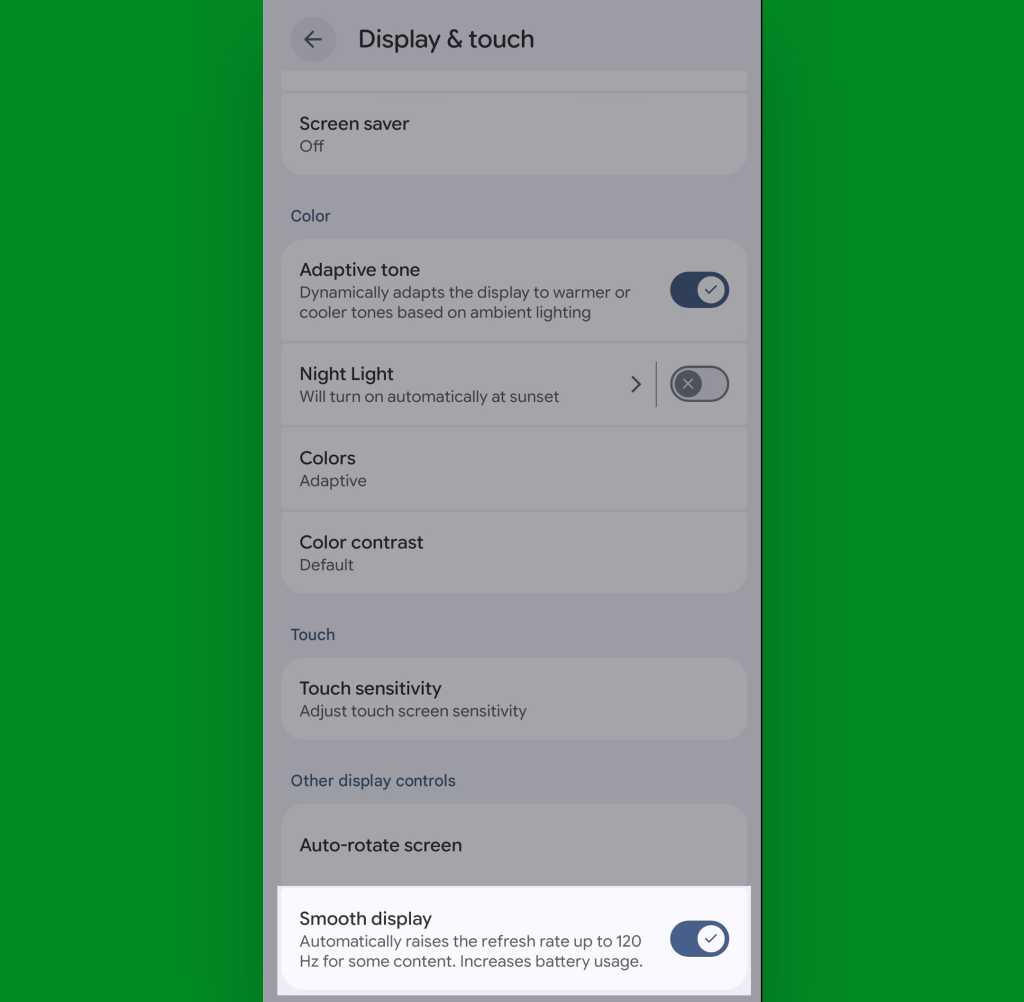
The reality is that hardly any phone owners understand what refresh rate even is — let alone bother to think about how to best take advantage of the options that exist around it. But Android 16 introduces an intelligent new option that addresses that disconnect and makes it easy for anyone to enjoy the best possible screen experience without any ongoing thought, effort, or meaningful compromise.

That’s thanks to a new setting that automatically adjusts your device’s refresh rate to give you the most sensible setting for whatever you’re doing at any given moment. It works to balance the most optimal viewing experience with reasonably solid battery life in a setup that shifts on its own from one moment to the next.

Android 16: Automatic display refresh rate
Refresh rate, automated — as seen on a Google Pixel phone running the latest Android 16 update.

JR Raphael, Foundry

If your phone supports the system, you’ll find the associated option within the Display section of your system settings — as a toggle alongside “Smooth display,” in the standard Google version of Android, or as the “Adaptive” setting under “Motion smoothness,” with Samsung.

Android 16 enhancement #2: Sharper screenshots

Speaking of things going from geek to mainstream, screenshots have evolved from existing mostly as a tool for folks in the know to being a regular way for ordinary phone owners to capture and share moments all throughout the day.

And with Android 16, screenshots are getting a built-in boost — with native support for capturing high-resolution HDR content.

There’s nothing for you to do on this one other than bask in the knowledge that if you snag a screenshot on any Android-16-running device — using any Android screenshot-saving method you like — it’ll include all the full-quality HDR material shown within it, without any of the loss in quality that previously took place.

Lookin’ good, my friend. Lookin’ good.

Android 16 enhancement #3: An easier advanced calculator

When it comes to calculators, I tend to direct most of my energy toward the Google Android Calculator app — which comes preinstalled on Pixels but can be downloaded onto any Android device, no matter who made it.

If you’re using a Samsung phone, though, you’ve got Samsung’s number-crunching equivalent in your workspace and in your shiny face by default. And even if it’s limited to running only on Samsung-made gizmos, it’s there and ready for you — for the moment, at least, as long as you’re using this specific device — and now, it’s got a nifty new trick to notice.

With Android 16, the Samsung Calculator app gains a useful new always-available button to shift from the standard calculator setup into an advanced scientific calculation mode — something that used to be possible only when you rotated your phone into its horizontal landscape orientation.

srcset="https://b2b-contenthub.com/wp-content/uploads/2025/10/android-16-samsung-calculator-scientific-mode.webp?quality=50&strip=all 800w, https://b2b-contenthub.com/wp-content/uploads/2025/10/android-16-samsung-calculator-scientific-mode.webp?resize=150%2C150&quality=50&strip=all 150w, https://b2b-contenthub.com/wp-content/uploads/2025/10/android-16-samsung-calculator-scientific-mode.webp?resize=300%2C300&quality=50&strip=all 300w, https://b2b-contenthub.com/wp-content/uploads/2025/10/android-16-samsung-calculator-scientific-mode.webp?resize=169%2C168&quality=50&strip=all 169w, https://b2b-contenthub.com/wp-content/uploads/2025/10/android-16-samsung-calculator-scientific-mode.webp?resize=84%2C84&quality=50&strip=all 84w, https://b2b-contenthub.com/wp-content/uploads/2025/10/android-16-samsung-calculator-scientific-mode.webp?resize=482%2C480&quality=50&strip=all 482w, https://b2b-contenthub.com/wp-content/uploads/2025/10/android-16-samsung-calculator-scientific-mode.webp?resize=251%2C250&quality=50&strip=all 251w" width="800" height="796" sizes="auto, (max-width: 800px) 100vw, 800px">
One tap equals a full scientific calculator in Samsung’s Android 16 update.

JR Raphael, Foundry

Hey, we’ll take it.

Android 16 enhancement #4: A swift swipe for settings

While we’ve got Samsung on the brain, the Galaxy-connected Camera app has a handy new option with Android 16 in the mix.

By default, the Samsung Camera has long let you swipe up or down anywhere in the viewfinder to switch between your phone’s front-facing and rear camera. But if you aren’t so into selfies and would rather give yourself a quick way to get into your camera’s settings, you can now switch that swipe to serve that purpose instead.

Just tap the four-dot menu icon in the Samsung Camera app’s lower-right corner, then tap the gear-shaped settings icon and look for the new “Swipe preview up/down to” option. Change it from “Switch cameras” to “Open quick controls,” and your camera settings will never be more than a single flick away.

Android 16 enhancement #5: Simpler sound silencing

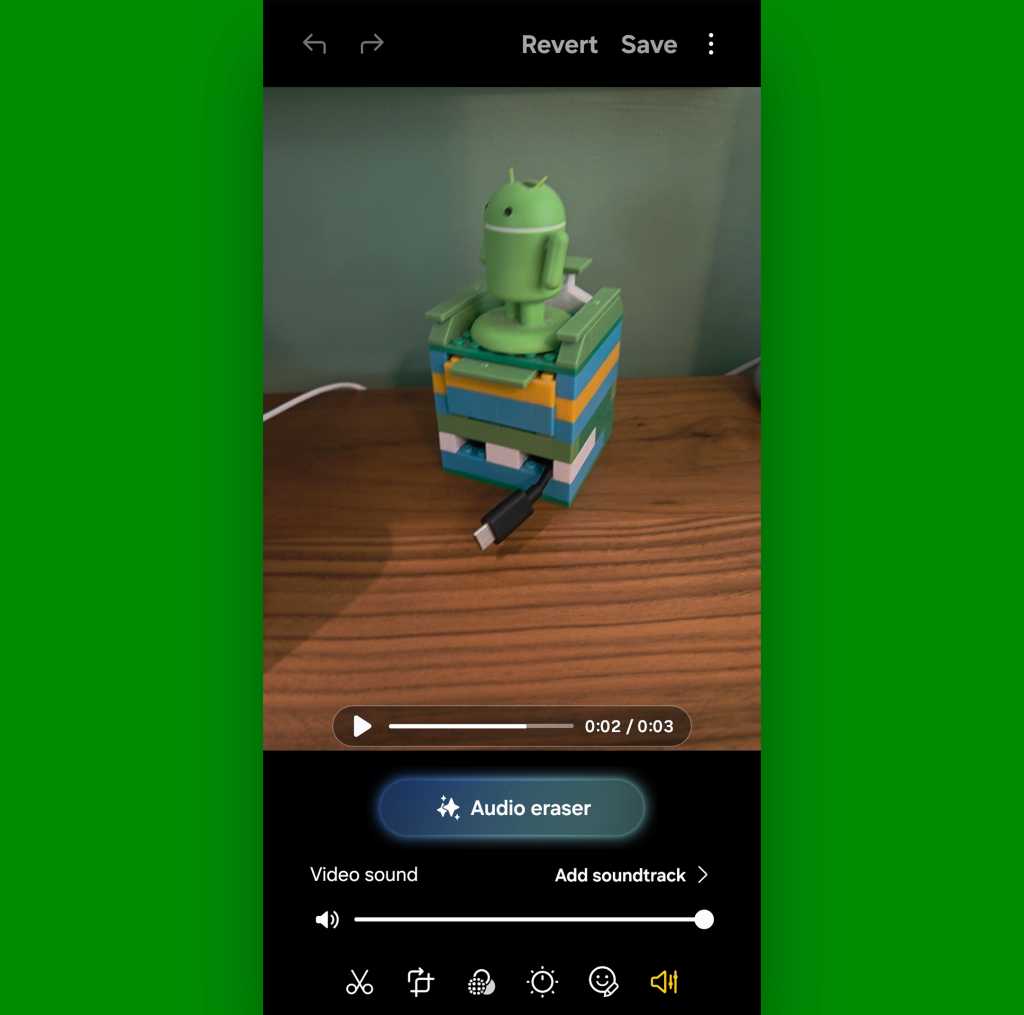
One more Samsung-specific Android 16 addition to observe: With this latest Android update, Samsung’s Gallery app catches up (somewhat) to its Pixel equivalent and gives you the ability to easily erase background noise in any video you’ve captured — so it’s especially easy to hear whatever it is you were actually trying to record.

After you’ve captured a video, tap the preview icon in the Camera app and then tap the pencil-shaped editing icon in the video’s Gallery view. Look for the newly present Audio Eraser icon — a speaker symbol with lines alongside it — and tap that to get started.

Android 16: Samsung Audio Eraser
Background noise, be gone: Samsung’s Pixel-inspired Audio Eraser option, in Android 16.

JR Raphael, Foundry

Ahh — nothing quite like the sound of silence, is there?

Android 16 enhancement #6: A better back experience

Last but not least: The act of moving back a step is one of Android’s most common actions, whether you’re using the current Android navigation gestures or still stickin’ with the old three-button nav setup. And as of Android 16, that universal back action gets a nice universal upgrade.

It’s a subtle li’l somethin’ called “predictive back.” In short, it lets you get a quick glimpse at what exact screen you’re heading back toward before you fully commit to going there.

With gestures, this possibility has been present for a while: When you start swiping in from the left or right side of your screen to go back, you simply see a sliver of the screen you’re returning to — and can then complete the gesture or stop, depending on what you find.

srcset="https://b2b-contenthub.com/wp-content/uploads/2025/10/android-16-predictive-back-gesture.webp?quality=50&strip=all 800w, https://b2b-contenthub.com/wp-content/uploads/2025/10/android-16-predictive-back-gesture.webp?resize=297%2C300&quality=50&strip=all 297w, https://b2b-contenthub.com/wp-content/uploads/2025/10/android-16-predictive-back-gesture.webp?resize=768%2C775&quality=50&strip=all 768w, https://b2b-contenthub.com/wp-content/uploads/2025/10/android-16-predictive-back-gesture.webp?resize=691%2C697&quality=50&strip=all 691w, https://b2b-contenthub.com/wp-content/uploads/2025/10/android-16-predictive-back-gesture.webp?resize=167%2C168&quality=50&strip=all 167w, https://b2b-contenthub.com/wp-content/uploads/2025/10/android-16-predictive-back-gesture.webp?resize=83%2C84&quality=50&strip=all 83w, https://b2b-contenthub.com/wp-content/uploads/2025/10/android-16-predictive-back-gesture.webp?resize=476%2C480&quality=50&strip=all 476w, https://b2b-contenthub.com/wp-content/uploads/2025/10/android-16-predictive-back-gesture.webp?resize=357%2C360&quality=50&strip=all 357w, https://b2b-contenthub.com/wp-content/uploads/2025/10/android-16-predictive-back-gesture.webp?resize=248%2C250&quality=50&strip=all 248w" width="800" height="807" sizes="auto, (max-width: 800px) 100vw, 800px">
Android’s predictive back system in action, as seen with the side-of-screen swipe gesture.

JR Raphael, Foundry

Now, with Android 16, the same possibility is present even if you’re still rockin’ that legacy three-button nav bar — y’know, the Back, Home, and Overview icons that sit permanently alongside the bottom of your screen. With that approach and Android 16, you can now press and hold the Back button to see that same sort of preview before you charge forward.

srcset="https://b2b-contenthub.com/wp-content/uploads/2025/10/android-16-predictive-back-button.webp?quality=50&strip=all 800w, https://b2b-contenthub.com/wp-content/uploads/2025/10/android-16-predictive-back-button.webp?resize=287%2C300&quality=50&strip=all 287w, https://b2b-contenthub.com/wp-content/uploads/2025/10/android-16-predictive-back-button.webp?resize=768%2C804&quality=50&strip=all 768w, https://b2b-contenthub.com/wp-content/uploads/2025/10/android-16-predictive-back-button.webp?resize=666%2C697&quality=50&strip=all 666w, https://b2b-contenthub.com/wp-content/uploads/2025/10/android-16-predictive-back-button.webp?resize=161%2C168&quality=50&strip=all 161w, https://b2b-contenthub.com/wp-content/uploads/2025/10/android-16-predictive-back-button.webp?resize=80%2C84&quality=50&strip=all 80w, https://b2b-contenthub.com/wp-content/uploads/2025/10/android-16-predictive-back-button.webp?resize=459%2C480&quality=50&strip=all 459w, https://b2b-contenthub.com/wp-content/uploads/2025/10/android-16-predictive-back-button.webp?resize=344%2C360&quality=50&strip=all 344w, https://b2b-contenthub.com/wp-content/uploads/2025/10/android-16-predictive-back-button.webp?resize=239%2C250&quality=50&strip=all 239w" width="800" height="837" sizes="auto, (max-width: 800px) 100vw, 800px">
The newly added Android 16 predictive back long-press option for three-button nav — not bad!

JR Raphael, Foundry

Just note that it’s up to individual app-developers (and also device-makers) to support this setup, so the long-pressing action might not work everywhere. You’ll see it all throughout the main system interface — settings screens and so forth — in the core Google version of Android, though, and you’ll also see it in lots of Google-made Android apps, like Gmail.

Now, I don’t know about you, but all this intense exploring has me hankering for pastry. Anyone else up for some cake?

Get even more advanced shortcut knowledge and shameless confection affection with my free Android Shortcut Supercourse — six days of time-saving tricks for your favorite Android gadget.

Breaking the humanoid robot delusion

A Silicon Valley company called 1X this week announced a humanoid robot that does all your housework. 

The robot is called NEO. The company says NEO is the world’s first consumer-ready humanoid robot for the home. It is designed to automate routine chores and offer personal help so you can spend time on other things. 

The company’s odd, 70’s style demonstration video shows NEO doing a long list of tasks, such as folding laundry, organizing shelves, taking out the trash, and cleaning up rooms. It also performs basic functions such as opening doors, fetching items, and turning off lights, and is shown  dancing and hanging out — acting as a kind of friend. 

NEO operates by navigating homes autonomously and learning new skills through updates and continued use. It can be set up with just a button press or a simple voice command, according to the company. If the robot can’t do something, the owner can schedule a session with a 1X expert, who will remotely guide the robot through the task, letting NEO learn and get the job done at the same time.

NEO’s AI enables users to interact with it in natural conversation without relying on screens. It can listen and respond only when spoken to directly. Visual intelligence lets NEO recognize objects and context, like reading ingredients laid out on a counter and suggesting recipes. It remembers past conversations and user preferences so it can adapt over time, manage reminders, help with scheduling, keep grocery lists, and track the user’s learning progress.

The robot’s AI is trained on real-world data to allow it to adapt to the variety of home environments it will encounter.

Its hardware is based on a tendon-driven design using high torque motors for smooth, safe movements, allowing it to operate safely among people. NEO features hands with 22 degrees of freedom, a soft body made from 3D lattice polymer, and weighs 66 pounds. It can lift up to 154 pounds and carry up to 55 pounds, while producing just 22 decibels of noise, which is less than a modern refrigerator. NEO comes equipped with Wi-Fi, Bluetooth, 5G connectivity, and speakers built into its pelvis and chest, designed so it can even be used as a mobile entertainment system.

NEO’s design is meant to blend in with typical home interiors, with neutral colors and a fabric “suit” and shoes. It comes in tan, gray, or dark brown and is now available for pre-order through 1X’s online store. The first units are slated to ship for US-based customers in 2026, with 1X planning to expand to other markets in 2027. The reserved price:  $20,000 for early access with priority delivery next year. (There’s also a $499-per-month subscription model.)

The company’s CEO and founder, Bernt Børnich, said in a press release that NEO marks the moment when humanoid robots, once only seen in science fiction and research, become real consumer products that any person can own.

Wow! So, the era of home humanoid housekeeper robots is finally here! The Rosey the Robot dream from the Jetsons has finally been realized.

Except it hasn’t. 

The trouble with autonomous humanoid robots

The announcement and slick video showing NEO is smoke and mirrors. The robot can autonomously perform almost none of the feats shown in the video. (In fairness, the company doesn’t claim that it does, but wildly downplays the amount of improvement needed in the future to enable autonomous action.) 

The video was created almost entirely through teleoperation. That means somebody wearing a VR headset and special equipment was actually folding laundry, putting away the dishes and carrying trash, and the robot was acting as a puppet, aping the movements of the person remotely controlling it. 

If that scenario sounds familiar, then you may recall the “We, Robot” event held by Tesla a year ago to showcase cars at Warner Bros. Discovery’s studio lot. At the event, Tesla Optimus robots mingled, poured drinks, danced, and even sang “Happy Birthday” to attendees. The robots seemed to take orders, answer questions, and hand out beverages capably.

In reality, the robots were teleoperated by Tesla employees who were stationed out of sight. When people were impressed by a robot’s ability to converse, they didn’t know they were chatting with some employee.

Some technology CEOs, including Elon Musk and Bernt Børnich, practice what you might call “faith-based innovation.” They hype AI and robot capabilities that do not exist. 

In the case of the NEO, 1X is already accepting money based on the promise that researchers will invent capabilities very quickly. 

And in the case of Tesla, they’re not yet accepting money for Optimus robots. But they are definitely accepting money for cars that the CEO promises will get self-driving capabilities very soon. 

At the Nvidia GPU conference in San Jose on March 17, 2015, Musk  said full autonomy was a “solved problem” and would arrive by 2018. In late 2016, he said Teslas could drive coast-to-coast without human input by the end of 2017 and that every Tesla made from then on would be capable of “level 5 autonomy” within two years. During 2018 and 2019 earnings calls and events, he promised “full self-driving features” would be enabled via software in “three to six months” — and said a million Tesla robotaxis would be operating autonomously by mid-2020. 

At Tesla’s Autonomy Day on April 22, 2019, Musk claimed that by the end of 2020, Teslas would be able to drive themselves safely enough that users “could fall asleep” and that regulatory approval would follow within a few years. And in interviews throughout 2020 and 2023, including tweets and earnings calls, Musk continued to say that full autonomy was “very close” and he expected completion within the year. 

All these promises were wrong. 

In fact, the technology for full self-driving using only cameras and AI has not been invented yet, and it’s completely unknown how many months, years or decades that invention could take. (Waymo cars, as well as most other self-driving cars, use cameras, lidar, and radar together to build a more detailed and redundant 3D map of the environment.)

As self-driving abilities, the humanoid robot game is rife with smoke-and-mirror demonstrations that create the illusion of autonomy, but in fact are mainly remote controlled: 

  • Figure AI’s Figure 03: Videos of Figure 03 performing at-home tasks went viral for their realism and fluidity, but the company has been scrutinized for whether these were fully autonomous or tele-operated, as similar robots (like NEO from 1X Technologies) often use significant tele-op components, especially in publicity demos.
  • Unitree G1: Unitree’s humanoid robot has been demonstrated running and performing dynamic movements. At events like CES, Unitree staff allowed attendees to remote-control the G1, suggesting that some public demos are human-operated.
  • Reachy by Pollen Robotics: Reachy can operate in a very limited way autonomously or be tele-operated with VR headsets for precise remote control, a feature highlighted in several high-profile demos and videos where observers may have believed the robot was acting independently.
  • Reflex Robotics, Watney Robotics, and others: These companies employ teleoperation for tasks like cleaning, organizing, or even novelty “robot gaming,” where the humanoid form factors are presented as capable, but rely on remote human input for the most sophisticated actions.

Why robot companies blur the line

Full autonomy in perceiving, planning, and manipulating like a human is a massive technology challenge. Robots have to be meticulously and painstakingly trained on every single movement, learn to recognize every object, and “understand” — for lack of a better word — how things move, how easily they break, what goes where, and what constitute appropriate actions. 

One major way humanoid robots are trained is with teleoperation. A person wearing special equipment remotely controls prototype robots, training them for many hours on how to, say, fold a shirt. Many hours more are required to train the robot how to fold a smaller child’s shirt. Every variable, from the height of the folding table to the flexibility of the fabrics has to be trained separately. 

While these robots are being trained, it’s all very impressive if you can’t see the person controlling the robot. 

The temptation to use impressive videos of remotely controlled robots where you can’t see the person controlling them to raise investment money, inspire stock purchases and outright sell robot products, appears to be too strong to resist. Realistically, the technology for a home robot that operates autonomously the way the NEO appears to do in the videos in arbitrary homes under real-world conditions is many years in the future, possibly decades. 

But that doesn’t stop some companies from selling you products now on capabilities that haven’t yet been invented. 

OpenAI preps models to replace banking, consulting jobs

OpenAI’s decision to train its models on the everyday outputs of consultants and bankers is more than just a technical experiment, it’s a signal that AI is being repositioned from a generic tool to a domain-capable resource, Sanchit Vir Gogia, the chief analyst, founder and CEO of Greyhound Research said Thursday.

He was responding to reports of a project from OpenAI that is being developed for the management consulting sector. According to Bloomberg, upwards of 150 former consultants from McKinsey & Co., Bain & Co., and Boston Consulting have been contracted by a third-party to train the models on “how to do the industry’s entry-level tasks,” in a project code-named Argentum.

Last week, it also reported that OpenAI has more than 100 ex-investment bankers from organizations such as JP Morgan Chase, Morgan Stanley, and Goldman Sachs “helping train its artificial intelligence on how to build financial models as it looks to replace the hours of grunt work performed by junior bankers across the industry,” in a project code-named Mercury.

PoC purgatory common

Enterprises, said Gogia, “are no longer content with wide but shallow capability. They want depth. Real outputs. Structured thinking. Work that they can plug into core processes. Our CIO Pulse 2025 shows this shift in action, with 68% of global decision-makers seeing AI as a co-worker rather than a cost-cutter.”

“What OpenAI is doing is meeting that expectation head-on by learning from those who’ve done the work at scale,” he pointed out. “The aim isn’t to mimic language, but to internalize practice. And for enterprise buyers, that matters. What’s being offered now is not an AI that chats, but one that contributes.”

Forrester VP Principal Analyst Craig Le Clair, whose coverage areas include AI, automation, and the future of work, said, “too many AI agent implementations today are struggling to return investment. The problem stems from poor integration of agent models with business workflows. Forrester estimates that 60% of enterprises fall into a PoC [proof of concept] purgatory, with only 15% of firms generating positive and material impact.”

For example, he said, “a company could launch 30 pilots and fail to generate any ROI because all the agents just produce dense reports or insights that few act on. Forrester calls this the ‘Action Gap’ [and it] is the measurable distance between an AI-driven insight (a prediction, recommendation, or analysis) and the resulting value-driving business action.”

A large gap, he said, “means your agents are generating insights but not a return on investment. OpenAI’s announcement is a clear attempt to reduce this.”

According to Le Clair, author of the book Random Acts of Automation, the workplace is set to be disrupted by model-driven AI agents. “They are intellectual peers that are (at least in their defined domains) just as smart as us, with intelligence evolving at a faster clip. This transition to a hybrid workforce is not well understood and expensive,” he said.

He added, “if you think the biggest hurdle in deploying an AI agent is development, the API calls, or cloud consumption costs, you’d be wrong. Service companies tell us that for every dollar spent on AI agent licensing, organizations are spending nearly five dollars on services to get it running at scale, and those dollars are going to organizational changes [to enable a] shift in skills.”

Forrester, said Le Clair, “has defined an Agent Experience (AX) program that focuses on five skill categories reflecting these changes: knowledge curation; change management; critical thinking; interaction skills; and agent oversight.”

Structure is everything

Greyhound’s Gogia pointed out that even apparently smoothly running AI projects could be problematic. He said that one of his firm’s banking clients recently ran a generative AI trial to streamline its credit memo process. “The results were promising: draft documents that once took days now appeared in hours,” he noted. “But when compliance teams reviewed the outputs, they found gaps, statements made without clear source validation.”

Consequently, the project “didn’t fail, but it didn’t launch either. Instead, the institution added a review framework and put legal, risk, and tech leaders in the same room to manage AI output holistically,” he said.

He cited another case in which a consulting firm integrated AI into its analyst workflow for market sizing. “The early gains in productivity were tangible, but so were the cultural growing pains,” he noted. “[Junior staff] weren’t sure where their role ended and the machine’s began.” The firm’s response was to adapt its training model to focus not on how to use AI, but on how to supervise it.

“Across these cases, the lesson was clear: the success of AI has less to do with capability and everything to do with structure,”Gogia said.

He added that Greyhound views OpenAI’s latest moves “as the clearest signal yet that the company is anchoring itself inside the workflows that underpin real business delivery. By sourcing training inputs directly from former consultants and investment bankers, it’s doing more than chasing accuracy. It’s absorbing judgment.”