Hackers from the ransomware group World Leaks managed to penetrate systems belonging to Apple’s most important manufacturing partner in India to exfiltrate hundreds of documents, including drop test videos, schematics, design details — even specifics about Apple’s C2 modem design.
Reuters confirmed last week’s Apple Insider scoop that the leaked documents also included the purported board layouts for the iPhone 18 Pro and 18 Pro Max, as well as data sheets for the rumored A20 Pro chip.
The data reveals some of this year’s colors, including a red, dark cherry, and gray, and indicate that the basic design remains the same, albeit with a slightly wider camera bump. They also suggest the upcoming high-end iPhone is a little thicker than current models and hint at a smaller Dynamic Island.
A brand new processor design
But the leaks also show something far more interesting: Apple is adopting a new processor design in the A20, a design that promises up to 20% additional performance and even more effective battery management.
That’s thanks to Apple’s adoption of TSMC’s new Wafer-Level Multi-Chip Module (WMCM) packaging technology. What’s good about this tech is that it places the RAM alongside the SoC within the same package.
The current design sees the RAM placed on top of the SoC, which is slightly less efficient and runs hotter. This informative image helps explain the difference between the two designs; essentially, the new architecture should reduce heat dissipation and speed up communication between the two components.
That results in better performance and power efficiency and also means the vapor cooling system inside Apple’s upcoming pro iPhones can work more efficiently to reduce heat dissipation. While no one knows for sure, some estimates claim this new WMCM packaging should enable 15-20% performance boost, even before we consider the improved efficiency inherent in the new A20 chip.
A huge data heist
All of this information is carried within the 200,000+ files (630GB) World Leaks published on its dark web site. The data also includes confidential Apple supplier list info, detailed information concerning the circuit board, battery parts, and camera modules – even confidential information about which suppliers are competing to supply specific components. These are all confidential trade secrets the company is unlikely to want public, as they give rivals rare insight into how the company’s supply chain is structured.
Apple’s own crack team of security specialists is now involved in investigation of the attack, while Tata Electronics says it has restricted internal access and is engaged in a forensic investigation of the attack.
Manufacturing is under attack
The scale of the attack is significant — so much so that it suggests the attackers engaged in extensive work to compromise the systems at Tata. This might have involved targeted attacks on employees, phishing, exploitation of weak access controls, the use of stolen credentials, and more. The attack point is unlikely to have been via Apple, but through a less protected supplier.
There’s no doubt this leak is one of the worst to have hit the company, including the pre-release iPhone 4 left in a Redwood, CA nightclub that was then sold to a tech website. About the best thing to say about both leaks is that they help stoke up pre-release interest in an upcoming iPhone.
Today’s sophisticated attackers are very accustomed to crafting multi-stop attack chains to get what they want, and World Leaks successfully attacked several larger enterprises, including Dell and Nike in recent months.
Did this attack rely on AI? It’s not impossible, given Apple’s rush release of a security update designed to patch numerous vulnerabilities covering maliciously crafted web content and malicious web extensions, data exfiltration and sensitive data leakage, hijacked clipboard data, and more.
“It cuts both ways. The same AI helping researchers find these flaws is helping attackers exploit them faster, so expect more frequent updates, not fewer bugs, and the advantage shifts to whoever deploys the fix fastest,” said Adam Boynton, senior enterprise strategy manager for Jamf.
With AI agents increasingly expected to remember conversations, preferences, and decisions over extended periods, Microsoft Research has developed Memora, a memory system designed to provide more scalable and reliable long-term recall than existing approaches.
AI agents are increasingly expected to retain context across weeks or months rather than individual chat sessions. Memory can become fragmented, leading to duplicate information and slower retrieval as knowledge grows.
According to Microsoft, Memora can solve this problem by decoupling what the AI remembers from how it looks up that information, ultimately reducing context token usage by up to 98% while matching or exceeding full-context accuracy, Microsoft Research claimed in a blog post.
Limitations of today’s memory architectures
As AI assistants and autonomous agents move into long-horizon deployments, the absence of a principled memory system has become a critical bottleneck. While modern LLMs are powerful reasoners, they still start every session from scratch.
Long conversations require models to repeatedly re-read their entire history, while new information is either stored as raw text or compressed into summaries where important details may be lost.
Solutions to address these are available, but they too have limitations. For instance, systems like Mem0 extract atomic facts from conversations, retrieval-augmented (RAG) approaches index raw text fragments for later recall, and graph-based memory systems such as Zep and GraphRAG impose structure through entity relations. But these mostly fall into two extremes.
Content-fragmentation systems, such as RAG and Mem0, embed extracted facts or text fragments directly. This preserves detail but produces brittle, isolated entries that lose narrative coherence.
Coarse-abstraction systems compress experience into compact summaries but strip away the constraints, edge cases, and numeric details that make memory useful in the first place.
Graph-based systems add structure on top of content but still rely on the content itself for retrieval and typically require rigid ontologies that don’t generalize across domains.
Decoupling memory from retrieval
Memora architecture claims to address this by decoupling what is stored from how it is retrieved. For this, each memory entry will have two components.
The first will be a primary abstraction, which is a short phrase (6–8 words) that will capture what the memory is fundamentally about. The second will be a memory value, which will hold the rich content itself. As a result of this separation, new information about an evolving topic will be merged into the existing memory entry under the same primary abstraction and will not be fragmented into a chain of partial duplicates.
Complementing primary abstractions, cue anchors are short, context-aware tags extracted from each memory’s value, providing alternative access paths to the same memory. They will function as flexible, organically-generated metadata, claimed the post.
Memora also introduces a policy-guided retriever that, rather than returning the top-k semantically similar items in a single shot, iteratively refines its query, expands through cue anchors to surface related-but-not-similar memories, and decides when to stop.
“The deepest flaw in current agent memory is that it mistakes retrieval for memory. A vector store is superb at finding text that looks relevant. An enterprise agent needs more than resemblance. It needs to know what has changed, what still holds true, and what should never be recalled in the task at hand,” said Sanchit Vir Gogia, chief analyst at Greyhound Research.
Memora is interesting precisely because it refuses that shortcut, Gogia noted. It separates the rich detail of a memory from the handle used to find it, indexing a stable abstraction and a set of cue anchors while keeping the full content intact beneath them. Retrieval then becomes an act of navigation rather than a single hopeful guess, as the system re-queries, widens its search, or stops once it has enough, he added.
Benchmarking Memora
Microsoft evaluated Memora on two long-context benchmarks. LoCoMo, where dialogues average 600 turns, and LongMemEval, which uses 115,000-token contexts. According to the company, Memora achieved 86.3% LLM-judge accuracy on LoCoMo and 87.4% on LongMemEval, outperforming RAG, Mem0, Nemori, Zep, LangMem, and even full-context inference.
It also stored nearly half as many memory entries per conversation as Mem0 (344 versus 651) while reducing token consumption by up to 98% compared with full-context inference.
While the benchmark results suggest significant efficiency gains, enterprises should not assume lower token consumption will automatically translate into lower infrastructure costs.
Gogia cautioned against taking the token reduction number at face value. It is a benchmark context reduction, not a promise that an enterprise bill will fall by 98%, he said. “Real cost also includes memory construction, indexing, storage, and the audit logging that governance demands.”
He warned that Memora’s strongest retrieval mode is also its slowest. Its policy retriever runs at between roughly five and six seconds per query across several model-calling steps, against under a second for the simpler semantic mode.
The saving in prompt tokens is partly repaid as retrieval latency and extra inference. So the memory crunch does not disappear but moves. Instead of paying only for longer prompts, enterprises must now manage what is written, updated, and forgotten, and the indexing and testing that govern it.
Enterprise implications
Memora is currently an active Microsoft Research project, but the company has made the research code available on GitHub, enabling developers to experiment with the architecture and adapt it for their own AI applications.
However, portability on paper should not be confused with production readiness. While a memory layer of this design can, in principle, sit above models from any major provider, Gogia suggests that until the code is fully verifiable, maintained, and supportable under enterprise controls, the prudent posture for IT leaders is to study Memora as an architecture rather than operationalize it as software.
Beyond the technology, organizations will need governance and compliance policies to ensure AI memories are managed securely and remain auditable. He noted an enterprise must decide who may write to memory, who may read it, how long it persists, and how an auditor reconstructs why a memory shaped an action.
“An enterprise must decide who may write to memory, who may read it, how long it persists, and how an auditor reconstructs why a memory shaped an action. ‘The agent remembered it’ will not satisfy a regulator under the European Union’s AI Act traceability duties, nor a customer under India’s Digital Personal Data Protection Act,” Gogia said.
There are a variety of security concerns about artificial intelligence (AI), especially when it comes to the behavior of agentic AI. But until recently, the concept of locking down the models to prevent tampering hasn’t gotten a lot of attention.
Now, a security technology called “confidential computing” has emerged that could help solve that problem: it protects AI models from hackers by restricting models to authorized users. (It also protects data wherever it is — in storage, when moving between systems, and when it is accessed.)
With many top cloud and hardware providers championing confidential computing for AI, Computerworld talked with Dion Harris, Nvidia’s senior director of high-performance computing and AI factory solutions, about what the technology does and how it works.
Dion Harris, Nvidia’s senior director of high-performance computing and AI factory solutions.
Nvidia
Why should organizations care about confidential computing now? “Seventy percent of data exists outside the cloud, in on-premise data centers and data lakes. To deliver AI on this data while maintaining security, you need confidential computing to unlock that use case for enterprise AI.”
Why is confidential computing suddenly important in the AI age? “Enterprises want AI on sensitive data — customer records, medical information, financial data — without exposing it in cloud environments where they lose control.
“Traditional encryption protects data at rest and in transit, but not during computation. When you run an AI model, you must decrypt data. It sits in plain text in memory, accessible to administrators and cloud operators. Confidential computing creates a hardware-rooted trusted zone where data is decrypted only when computation needs it, then immediately re-encrypted.
“This lets enterprises get AI value without compromising security. Financial services, healthcare, government, and regulated industries are adopting it.”
How is confidential computing changing with agentic AI? “We’ve gone from generative to agentic AI being deployed and used to solve real business problems. To deliver agentic capabilities with required privacy, security and performance in enterprise, confidential computing provides the unlock.
“We can spawn agents, access data, leverage tools and generate real useful work. With agentic AI, confidential computing helps in two ways: protecting the data and helping design implementation and workloads. It’s deployment, implementation, and use combined.”
How does confidential computing work? “Encryption at rest protects stored data. Encryption in transit protects data moving over networks. Encryption in use is the problem — when you compute on data, you must decrypt it in memory.
“Confidential computing encrypts data in memory and between CPUs and GPUs. A dedicated element in the GPU decrypts information only when needed for computation, 100% inline, with minimal performance impact.”
Can you walk through a real-world example? “Apple’s standard operating policy for years has been to keep private information on device to avoid having access to private data. However, to leverage advanced AI models, they no longer fit on the device. Apple instituted their Private Compute Cloud, and now they’re extending that to Google Cloud.
“Let me give a hypothetical and hopefully describe how it works. If you have a user who wants to upload a medical transcript from their doctor, their system creates a secure, attested environment. It sends a request to the server: validate yourself. That attestation says: ‘I am a Nvidia GPU. This environment is secure. It hasn’t been tampered with.’ Now, it’s okay for you to send your information over that secure line. Remote attestation allows the edge device to ensure it’s sending to a trusted environment.
“The medical data comes over encrypted and remains encrypted until it lands in the GPU memory. Specific compute engines in the processor decrypt that information only to use it. The LLM dissects and summarizes it. Then it re-encrypts and sends it back over the wire.
“They get the capabilities of data center AI mode — larger, more advanced, delivering more services. But they also get the security and privacy from Apple’s [Private Cloud Compute] platform. It’s the best of both worlds: efficiencies and intelligence from data center AI with Apple’s PCC security.
What prevented confidential computing adoption? “The main challenge in the past was significant performance impact. When you adopted confidential computing, you had to trade off performance for privacy. A 30% to 40% throughput reduction undermined the economic viability of the entire solution. If you sacrifice that much performance, it reduces the ability to get full utilization out of the hardware you’re deploying to deliver tokens or deliver a service in an economical fashion.”
How was that solved? “With Blackwell and newer GPU architecture, you can deploy confidential computing without impact to performance. You get both privacy and performance, a win-win scenario.
“Performance now translates directly into economics. You get full utilization of the hardware, which matters for delivering tokens or services at scale. When we built Blackwell, we made confidential computing a first-class system feature to deliver not just the security, but also the performance the market requires.”
Where is adoption accelerating? “Companies are thinking about the cloud. Model builders can’t expose APIs, enterprises customize for their business. Hybrid on-prem and cloud models — where builders deliver services behind enterprise walls — require zero trust. We’re no longer in fully owned infrastructure.
“By 2030, [billions of dollars] is expected in confidential computing use cases. It’s emerging as essential infrastructure for AI adoption across the industry. For organizations using cloud infrastructure, deploying AI on sensitive data, or operating under regulatory requirements, confidential computing is becoming essential.”
What should organizations do? ”The performance problem is solved. The technology is ready, ecosystems are built, partners enable it. If you want to deploy agentic AI on sensitive data, protect customer privacy, meet regulatory requirements, and maintain security across hybrid environments, you need confidential computing in your strategy.
“Most customers start with a developer license, validate performance and security, then migrate to a commercial license. Partners like Red Hat and Fortanix integrate these mechanisms within their platforms. Google Cloud offers it through their services.
“Start with a proof of concept. Validate it works. Plan deployment. Organizations gain competitive advantage securing AI on sensitive data.”
Ford has rehired approximately 350 experienced engineers after the company’s investment in AI and automated quality control systems failed to meet expectations, according to Bloomberg. In short, the technology did not detect enough problems.
“We mistakenly believed that we could create a high-quality product simply by introducing artificial intelligence and inputting our design requirements,” Charles Poon, head of Ford’s hardware development, told Bloomberg.
The rehired quality inspectors — known internally as “gray beard” engineers for their experience and years with the company — are now working to identify defects before components reach the factories.
Still, Ford is not abandoning AI completely; the experienced engineers will be asked to help train younger employees and improve the company’s AI tools.
Apple’s ongoing problems with RAM shortages and higher prices won’t be solved anytime soon, because rapidly accelerating demand for high-end AI memory is devouring the consumer electronics industry.
The whole issue might get worse. Noted Apple analyst Ming-Chi Kuo believes the supply/demand crisis will deepen through 2027. He expects up to 20% of the remaining memory manufacturing capacity currently going to consumer electronics could be diverted to feed data centers in the coming year. That’s a message of doom to smaller firms, and the Android market will be eaten up.
It’s lazy thinking to see Apple as a villain in this scenario. The company might have been charging more for add-on memory than market rates, but there were real technical reasons to do so. And while critics might be castigating Cupertino for those past practices, they’ll still find themselves now paying more for whatever brand of electronic devices they use to write their screeds on in future.
It’s all about supply and demand. Memory manufacturers see the opportunity to feed AI need, even if it means sacrificing consumer markets as they do.
Cash through chaos
You can argue that the consequences of that decision are unethical. Should memory makers have considered the consequence of curtailed supply on their existing markets? After all, every business, every school, and almost every consumer is now a digital entity, and the massive increase in PC, smartphone, and other consumer electronics prices will have a consequential impact across all layers of society.
It generates yet another inflationary pressure (as if more is needed) on the global economy, and the decision to further limit supply of consumer electronics memory could be seen as corporate irresponsibility. That’s partly why a class action against the big three memory makers (Samsung, SK Hynix, and Micron) has been filed in California. Between them, those three firms control around 90% of global memory supply, giving the trio colossal market power.
It’s a real power imbalance.
This is market power
GoPro is typical; as a smaller vendor, there isn’t much it can do to save itself. Apple has more clout, so it might be able to forge a way forward. But even then, it’s rowing against what CEO Tim Cook has already called “a hundred-year flood.”
So even if the company can convince the Trump Administration to let it secure memory from currently embargoed Chinese manufacturer ChangXin Memory Technologies, the move is unlikely to ease the pressure much at all. “Tim Cook is one of the few tech leaders who can still navigate both Washington and Beijing, so this is better handled before he steps down as CEO,” wrote Ming-Chi Kuo. That’s true, though Cook will continue “engaging with policy makers” once he takes on his new role as executive chairman of Apple’s board of directors in September.
Apple will likely also be speaking with partners to explore the possibility of investing in additional fabrication plants together (or building its own, given it has its own stable of experts quite capable of doing so). But even if those talks come to something, it will be years before they enter operation. Sadly, manufacturing investment from the existing big memory firms seems focused on data centers.
The shortage will continue until morale improves
What happens now? Short of any direct intervention to change the situation, memory prices will continue to accelerate. Jefferies Equity Research warns they will rise up to 50% in Q3 and an additional 30% to 40% by the end of 2026. They’ll also continue to increase next year, by which time some new production capacity might begin to come on stream.
The scale of these price increases means no one can know whether Apple’s most recent product price increases (and the looming iPhone price increases in fall) will cover the full extent of the anticipated memory price hike.
Will we see prices fall if memory price inflation eases off? History says we’re unlikely to see AI-flation go in reverse, but it’s not completely impossible. Meanwhile, businesses everywhere will struggle with unexpected hardware cost increases that are impossible to plan for. You can also anticipate some smaller vendors exiting the market, leaving companies who might have deployed those products across their business exposed, as software updates and hardware repairs will cease.
Yes, AI has already changed the world – it’s more expensive
They told us AI would change the world. It appears to be doing so by making everything more expensive.
While there will still be opportunity to generate cash through this chaos, it’s far from delivering the kind of stable, business-friendly environment most governments rely on to balance their books. In the end, all of this calls to mind the 2002 DRAM price fixing scandal, the only difference being that the consequences are much greater in this digital-everything age.
Italy’s competition watchdog has opened an investigation into Microsoft over concerns it may not have clearly informed consumers about the integration of Copilot and Designer into Microsoft 365 subscriptions, associated price increases, and automatic upgrades to higher-cost plans.
The Italian Competition Authority (AGCM), in a statement to the press, said it had opened an investigation into Microsoft S.r.l., the vendor’s Italian subsidiary, and Microsoft Ireland Operations Ltd. to assess whether the way the changes to M365 pricing were communicated may have unduly restricted consumers’ freedom of choice.
Although the AGCM’s announcement does not explicitly identify the pricing event under investigation, its description aligns with Microsoft’s January 2025 rollout of Copilot and Designer for Microsoft 365 Personal and Family subscribers.
At the time, Microsoft announced its first price increase for the consumer subscriptions since the launch of Copilot and Designer, stating that existing subscribers would pay the higher price at their next renewal after the AI features were added.
Could scrutiny spread beyond Italy?
The Italian probe is not the first time Microsoft’s communication around AI-related Microsoft 365 pricing has drawn regulatory attention.
The investigation follows earlier scrutiny of Microsoft’s consumer pricing communications in Australia and New Zealand, where Microsoft apologized and revised some of its messaging after regulators raised concerns over how AI-enabled Microsoft 365 subscriptions were presented to customers.
That episode could prove relevant for the current investigation, even though the legal frameworks differ, said Pareekh Jain, principal analyst at Pareekh Consulting.
“Microsoft’s apology and revised communications show similar concerns were raised before,” the analyst said.
“While the legal cases differ, Italian regulators may see it as evidence that clearer customer communication was already known to be necessary,” he added.
Jain also expects regulators elsewhere to watch the outcome of the Italian investigation: “Regulators in the EU, UK, Australia, New Zealand, and Canada are likely to watch closely, especially where AI is bundled into existing subscriptions with higher prices or automatic renewals.”
Enterprise buyers are likely to scrutinize AI pricing more closely
Whether the Italian investigation ultimately results in penalties against Microsoft remains to be seen, but analysts say the probe could have an impact on M365 commercial plans, which are separate and set to take effect on July 1.
The investigation serves as a reminder for enterprises to examine AI-related price changes even if Microsoft’s commercial licensing process seems more transparent than its consumer subscription model, Jain said. “CIOs should still verify what is changing at renewal and whether AI features are optional.”
Enterprise procurement teams should ask tougher questions during negotiations, said Bhupendra Chopra, chief revenue officer at IT consulting firm Kanerika.
“Procurement teams should ask questions, such as what AI am I paying for, can I see it itemized, and can I decline it without losing the rest? Buyers would be right to want AI pricing written into renewal terms with clear opt-outs and price protection,” Chopra said.
These questions, according to Jain, could provide additional leverage during licensing discussions to negotiate flexible terms.
However, Chopra pointed out that the investigation is symptomatic of a broader tension between software vendors’ efforts to integrate AI into existing products and regulators’ expectations around transparency and customer choice.
“Building AI into existing products and pricing it in is becoming standard across software, not unique to one vendor. Regulators are testing an old question against a new feature — whether buyers were given clear information and a real choice,” the analyst said.
For enterprises, the analyst added, the practical takeaway is straightforward: “Expect AI to show up inside the tools you already own, expect it to carry a cost, and review what each renewal actually includes. Treated as routine cost discipline, it stops being a surprise.”
Microsoft said it is committed to complying with Italian consumer law and will cooperate with the Italian Competition Authority in its preliminary investigation.
That’s all well and good, but the reality is that most of us mere mortals are never gonna mess with anything that daunting. That doesn’t, however, mean we can’t enjoy a slice of the custom-coding pie and the productivity advantages it offers — on a much simpler but still supremely useful level.
The average-worker answer lies in an oft-overlooked middle-ground possibility these AI chatbots possess to help us create relatively basic but extremely high-potential custom browser extensions. As their name suggests, these simple little programs run entirely in your browser — the same exact sorts of add-ons you’d typically find and install in a marketplace like Google’s Chrome Web Store.
But with Gemini or any other similar genAI platform, you can dream up your own web-improving extension and turn it into reality in a matter of minutes — simply by describing your goal and then guiding the AI gently along the way. And given how much time most of us spend on the web these days, that opens up a tantalizing series of doors for taking total control of your work environment.
Hate all the extraneous bells and whistles gunking up the Google Docs interface? Gemini can create a Chrome extension that removes them. Annoyed by a glitchy web app? Ask Gemini for an extension that makes some under-the-hood improvements. The possibilities are endless.
Let me show you how exactly it works, how easy it is to approach and master, and how many work-enhancing possibilities are out there just waiting to be created.
The ins and outs of Gemini’s custom Chrome extensions
First things first: You don’t need any special tools or subscriptions to make this happen. For the purposes of this article, we’ll focus on Google’s Gemini for the creation and the standard desktop Chrome browser for the installation — but the same basic process would work with most any AI chatbot, if you happen to prefer ChatGPT or Claude, as well as with any extension-supporting, Chromium-compatible browser (a list that includes everything from Microsoft Edge to Brave, Vivaldi, and beyond).
Google offers a dizzying array of Gemini modes and options and an equally overwhelming series of AI subscription plans that control how much you can use those capabilities, but you don’t need to worry about any of that to create custom Chrome extensions. You might sometimes see better results if you switch your Gemini model to “Pro” or your Gemini thinking level to “Extended” — designations that even Gemini itself has trouble deciphering (believe me, I asked!) — but just using the default Gemini settings with a free Google account will generally work quite well.
Getting going with a custom Chrome extension is as simple as opening up a new Gemini chat and telling the system what you want it to cook up for you. The hardest part is deciding what you want and what’d be helpful for you — something we’ll explore more in a moment, via specific examples and suggestions. Once you’ve got that, you can just ask Gemini to create a Chrome extension that’ll accomplish what you’re envisioning, with as much specificity as possible about what it’ll do and how it’ll look.
Gemini will spit back a series of plain-text code chunks with instructions to copy each cluster and paste it into a new plain text file with a certain specific name — things like “manifest.json,” “content.js,” and “styles.css.” All you’ll do is use the on-screen button to copy each segment, then open up any simple text editor (like Windows Notepad, macOS TextEdit, or any number of simple online text editors) and paste the text in, then save it under the name Gemini gives you.
You’ll need to put all the files into a single isolated folder on your computer, and then you can go into Chrome, type chrome:extensions into its address bar, and install your shiny new creation by:
Flipping the toggle next to “Developer mode” in the upper-right corner of the screen into the on and active position, if it isn’t already
Clicking the “Load unpacked” button
And selecting the folder you just created in the pop-up that appears
Chrome’s “Developer Mode” toggle and “Load unpacked” button are the keys to importing any extension you create.
JR Raphael / Foundry
And that’s pretty much it: No complicated compiling or program publishing — the extension you envisioned will be alive and working right in your browser and ready to use.
Now, odds are, it won’t be exactly what you wanted in its first iteration, and you’ll have to go back to Gemini to request several rounds of updates and corrections. Each time, Gemini will create a new set of code chunks, and you simply overwrite the text in each file with its corresponding new code chunk.
It’s still a bit of a process. But you’ll rarely spend more than an hour on something simple and maybe a few hours on something especially multifaceted and specific, and whatever you create will then work to your advantage indefinitely from that point onward, on any computer where you install it.
Before we dive into specific slivers of inspiration, let’s just note the hopefully obvious asterisk that this’ll work only if you’re either (a) using a personal computer that isn’t associated with an organization or (b) using a work-connected computer where custom Chrome extensions are permitted. In either scenario, you’ll want to use your own best judgment to ensure that whatever you’re adding into your browser won’t expose any corporate data or cause your IT comrades any alarm if they see you using it in your workday.
With most common examples, though — including all the ones we’re about to go over — you shouldn’t have any problem or cause for concern.
Capisce? Capisce. Let’s get into it.
Custom extension category #1: The interface fixer
Our first custom Chrome extension category is the one that won me over to this practice initially and has been the most shapeshifting for my own browser-based workflow — and that’s the simple-seeming but transformational ability to have AI remake any web app you rely on to remove unneeded elements and redesign the interface to your exact specifications.
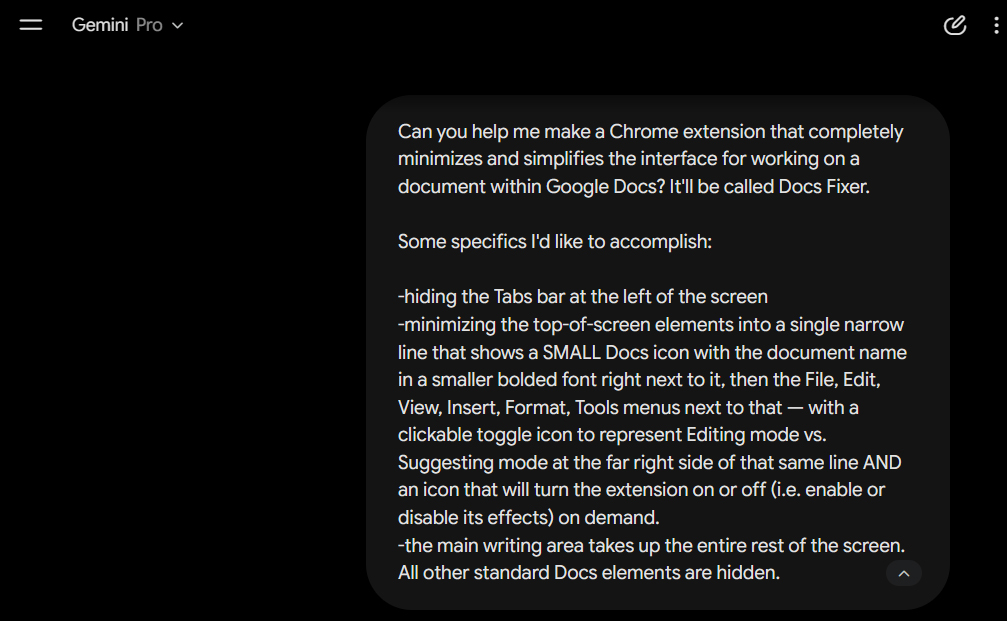
The best example I can show you is what I did with my completely homemade, Gemini-created Docs Zen extension. Google Docs, to put it mildly, has devolved into a cluttered mess. There are so many on-screen elements I never use and, ironically enough, irrelevant AI elements I’d rather not have in my hair. I just want a calm, simple, minimalist environment for writing — with Google’s second-to-none syncing, universal access, and collaboration systems beneath it.
So rather than try to reinvent the wheel, I described to Gemini all the elements I wanted to remove from Docs and all the ways I wanted to rethink how its interface appeared for me.
My original request to Gemini, followed by rounds of expansions and revisions (and eventually also a more poetic name).
JR Raphael / Foundry
I went back and forth with numerous iterations and kept coming up with interesting new additions to further flesh out and improve the experience — and I ended up with a delightful setup that gives me a distraction-free view of my writing space with a simple toggle to reveal the main Docs menus and a palette icon that allows me to switch from one eye-pleasing theme to another.
Google Docs with my custom Docs Zen extension — a true delight for daily writing.
JR Raphael / Foundry
My setup deliberately doesn’t include comments or other collaborative elements, as I’m mostly writing by myself these days — but when I do need those elements, the eye icon in the upper-right corner of the screen disables my custom adjustments and takes me back to the standard Docs interface. I can then click the eye icon again in that environment to switch back.
My custom extension includes a simple on-off toggle for times when I need the full Docs setup.
JR Raphael / Foundry
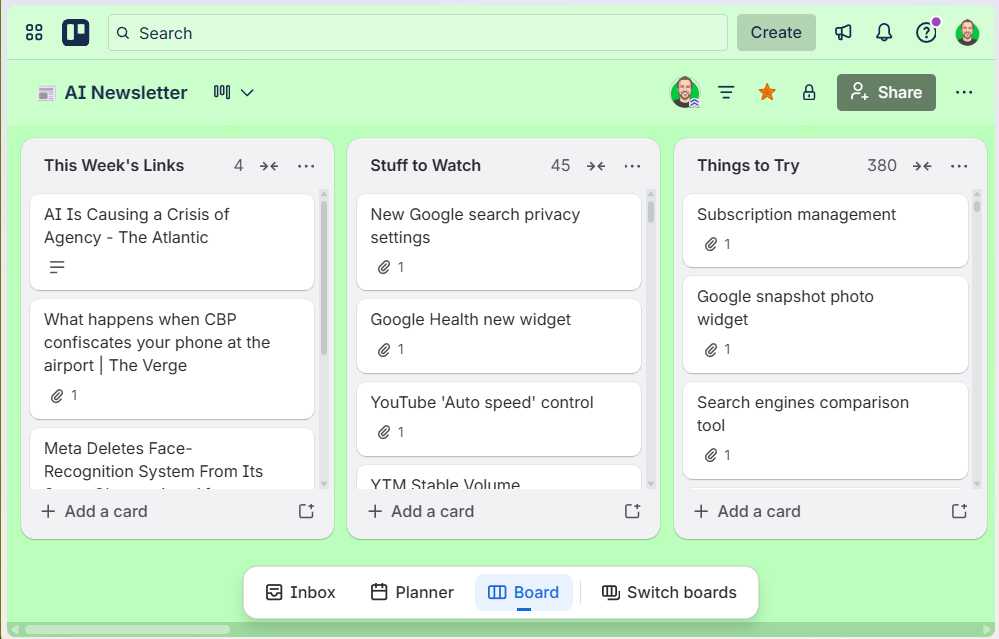
I used Gemini to create something similar for Trello, with which I also have a love-hate relationship — loving the foundational functions and easy access everywhere but hating the interface that’s lost focus, gained bloat, and gotten noticeably clunky and slow over time.
With the same sort of step-by-step, plain-English guidance, I was able to transform Trello from this…
Trello, in its typical current-day state.
JR Raphael / Foundry
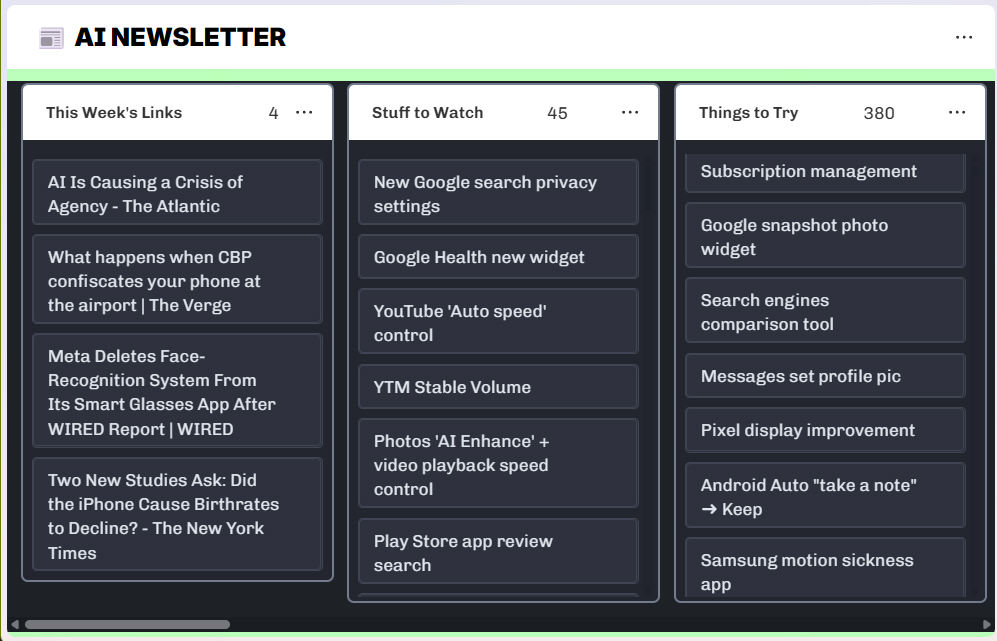
…into this:
Trello, with my custom modifications in place.
JR Raphael / Foundry
I couldn’t even begin to recount the number of superfluous features and elements I’ve removed, along with revamping the overall interface to make it both more efficient and more visually pleasing to my eye.
Whether it’s a web app you rely on regularly or even just a website you open often, the possibilities are practically endless for the ways you can reshape it and mold it to make it work better for you.
Speaking of which…
Custom extension category #2: The feature creator
In addition to the surface-level adjustments and feature removals in my aforementioned Trello-enhancing extension, I also added in several components — such as one-click buttons for archiving or moving cards — and I managed to speed up the site by making some under-the-hood adjustments Gemini suggested when I asked about its choppy performance. The same sort of concept can apply to any web-based interface you’re using, if there are any options that are annoyingly buried within menus, shortcuts that’d make your life easier, or other improvements you’ve longed to see.
You can also consider some simple standalone extensions for giving yourself on-demand features that aren’t necessarily associated with any one specific website but could be useful in plenty of productivity scenarios. For instance:
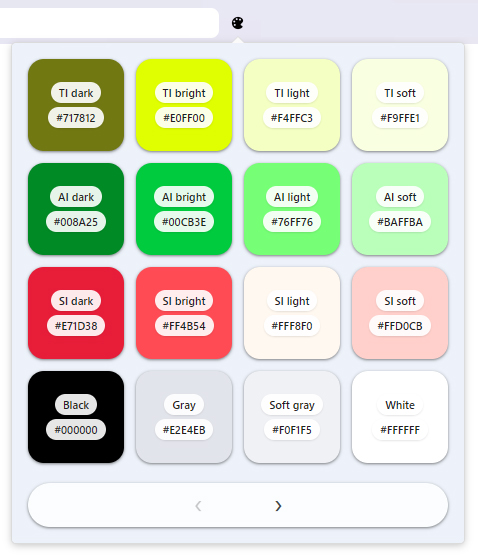
I do a fair amount of basic image editing and frequently find myself needing to reference a hex color code that corresponds with a particular brand color, and I always end up having to open up a new tab and look in a note somewhere to find the code I need. Well, no more: I used Gemini to create a super-simple custom color code pop-up where I can store all the colors I need and then copy any of ’em onto my clipboard with a single click. Major time-saver.
All the color codes I need are now never more than a couple clicks away.
JR Raphael / Foundry
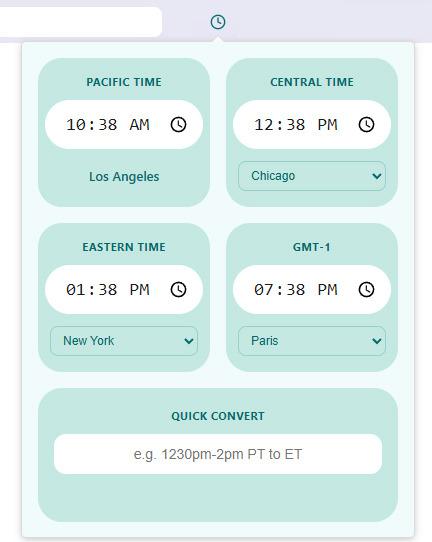
I’m also constantly converting time zones, either for meetings with clients or colleagues or for trying to wrap my head around publishing systems that insist on using random time zones with no meaning to me. It’s infinitely easier for me to manage now, thanks to the custom Chrome extension I made that shows the current time in all the zones I need most often — as well as allowing me to put any other time into any field and have all the other zones instantly adjust to match. It also offers a brilliant plain-text conversion box where I can just type things like “1pm-3pm PT in MT” and have it cough back up an instant answer for any conversion I need.
My custom time zone conversion extension comes in handy countless times a day.
JR Raphael / Foundry
Maybe what you want is the ability to interact with data on different websites more easily — to be able to save any table on a page in front of you as a CSV file, mayhap, or even to save any text you highlight on a page into a new Google Docs document. Whatever the case may be, Gemini can handle it — and that superpower that you’ve always wished for but never found the right tool to make possible can actually now be yours.
Custom extension category #3: The browser expander
Our final category of custom Chrome extensions to consider moves beyond the web itself and into your actual browser. The browser is essentially the modern-day desktop, after all — and for the first time now, you can expand and enhance it in all sorts of interesting ways.
Some specific examples, to get your brain-motor whirring:
You could walk Gemini through creating a smart auto-snooze system for your open browser tabs, both to clear clutter and help with Chrome’s performance. It could save any tab that hasn’t been touched in a certain amount of time to your local storage and then give you a simple searchable “Archive Dashboard” where you can find all those auto-closed tabs and re-open ’em as needed.
With the right guidance, Gemini could give you a custom browser research panel — where any info you highlight on a page gets beamed over into a sidebar-style panel that serves as a running scratchpad of notes from the day.
Or, if you find yourself often needing to see two tabs together side by side, you could have Gemini cook up a custom extension that instantly detaches any tab in front of you and puts it into a new tab window in a perfectly sized and spaced pattern. One keyboard shortcut could make that move happen, while another keyboard shortcut could recombine the two tabs into a single centered window.
As with all the other ideas we’ve gone over, all you’ve gotta do is ask — and now, with the right inspiration in mind, you’re ready to get your custom extension adventures going and start bending the web to your will.
Microsoft is continuing its push to bring generative AI (genAI) into Excel, with new Microsoft 365 Copilot skills designed to automate common processes and a “plan” mode to provide more control over Copilot’s outputs when handling financial data.
On Thursday, Microsoft unveiled a skills feature that lets users define processes Copilot can perform in Excel — such as building a discounted cash flow, Microsoft suggested, preparing a variance analysis, or refreshing a monthly reporting model.
“Instead of starting from scratch each time, a skill guides Copilot through the steps, applying the right structure and formatting, and helping produce an output that is easier to review, reuse, and trust,” Brian Jones, vice president for Excel at Microsoft, said in a blog post.
Users can access a library of pre-built finance skills or create their own custom skills and save them as a SKILL.md in OneDrive, where the Copilot assistant can access them. Microsoft’s partners are also building their own skills, including finance software vendors such as LSEG, Ramp and Velixo — these are “coming soon,” Microsoft said. Custom skills are available today via the Insider channel and generally available next month.
A new “plan” feature is aimed at giving users greater oversight of the AI assistant’s proposed actions before it starts interacting with spreadsheet data. The Copilot assistant can now draft a list of planned interactions — such as changing a formula — and, before it gets to work, ask the user to “approve, edit, or answer clarifying questions,” said Jones.
After it has completed the list of actions, the Copilot assistant will post a link to any changes in the chat window. Edits made by the AI assistant will then appear alongside other those from human users in the Show Changes pane.
Copilot can connect to third-party platforms now, pulling in data from sources such as Moody’s, CB Insights, Morningstar, and PitchBook.
The features will roll out “progressively” for customers, Microsoft said, and are available to paid Microsoft 365 Copilot users. Microsoft offers two payment options: $30 per user each month for larger customers, or the Microsoft 365 Copilot Business plan, which costs $21 per user a month for organizations with fewer than 300 employees.
US authorities are getting decidedly twitchy about frontier AI models. Just a couple of weeks after ordering Anthropic to prevent foreign companies from getting hold of its latest release, Mythos/Fable 5, it’s been putting the squeeze on another AI company..
Now, the Trump administration is asking OpenAI to hold back on the general release of GPT-5.6, according to a report from Bloomberg.
OpenAI CEO Sam Altman reportedly told employees that the government is asking that the model be released only to a short list of trusted partners, initially 20, before being more widely disseminated.
Altman reportedly told staffers that the administration was getting nervous about the capabilities of the latest AI tools. It didn’t go as far as forbidding access to foreign users but it’s clear that the White House is looking to act as the power of the new models becomes more apparent.
The administration’s actions will undoubtedly cause some anxiety among AI companies, particularly in light of OpenAI’s and Anthropic’s upcoming IPOs. There will be concerns that new software developments could be postponed or even halted. However, it should also be noted that the administration was already displeased with Anthropic over its moral stance on defense issues, so the action against Mythos should be placed in context.
Indeed, the government is trying to play down such fears. Bloomberg quoted a White House official as saying that the Trump administration continues to collaborate with frontier AI labs to develop shared approaches for addressing the challenges of scaling the technology.
Chinese tech giant Tencent is set to launch an AI assistant inside WeCom, its Slack-like collaboration tool for enterprises. The new tool, Dayuan, is built on the latest large language models from Chinese AI developer DeepSeek.
Tencent announced the news in a post on Chinese messaging platform Weibo by Tencent’s public relations manager Zhang Jun. Dayuan will automatically understand user requests and will respond according to the demands of the user, he wrote, according to a translation by Bloomberg. “At any time within WeCom, simply swipe left to summon Dayuan. It can intelligently recognize the interface you’re on, understand what you’re asking, and help you resolve issues more effectively,” he wrote, according to the report.
In addressing the Chinese enterprise market, Tencent has an advantage over other companies in the AI space because it has a vast reservoir of customers who use WeCom. Earlier this month, it announced a range of AI productivity agents to address the demand for more AI tools across enterprises.
Tencent has been intensifying its efforts in the AI space in an attempt to beat US competition. In April, it launched an updated version of its Hunyuan model to catch up with more established AI companies such as ByteDance, Alibaba and DeepSeek.
The launch of Dayuan with its vast supply of user data will provide a step-up for Tencent and will reinforce Chinese efforts to establish serious AI competition to US products.