Google is adding more features to its NotebookLM software — the targeted workspace where users can gather information on specific subjects, understand it, and use generative AI (genAI) to analyze reference documents, brainstorm ideas and generate summaries.
Users can load complex reference documents into Google’s NotebookLM and now generate AI video summaries from documents. Before, users could only create audio or text summaries. The new feature is targeted at those who prefer viewing slideshows or video snippets.
“You can think of these as a visual alternative to Audio Overviews: the AI host creates new visuals to help illustrate points while also pulling in images, diagrams, quotes and numbers from your documents,” Google said in a blog post detailing the new feature.
The initial video summaries will yield narrated slides and only in the English language. Google said it plans to continue adding new forms of video generation beyond slideshows.
NotebookLM, which Google introduced in 2023, also has a new user interface designed to make it easier to generate multiple types of summaries from reference files. Previously, only one summary was allowed.
Google isn’t the only company working to beef up its notebook platform. Microsoft last month added Copilot Notebooks to OneNote, the company’s popular note-taking tool. With Copilot Notebooks, users can “gather content easily, understand complex topics with context, and create smarter content based on the context of your notebook,” Microsoft said in a blog post at the time.
The Copilot Notebook feature is available to users with Copilot licenses.
In what will later be seen as a highly significant move to unlock Apple’s ambitions in digital health, the Trump Administration has created a voluntary industry network of companies to make health data more interoperable.
What this should mean is that data from different health providers will be more easily assimilated within any single trusted app or service. The idea is that you’ll be able to take your chosen app (such as Apple’s Health) and find data, test results, and other information collected by different US health providers.
The problem that exists is that much of this data is held in proprietary systems, so it’s not easily shared across app and services.
The digital disruption of health
“We have the tools and information available now to empower patients to improve their outcomes and their healthcare experience,” Centers for Medicare & Medicaid Services Administrator Mehmet Oz said in a statement. “For too long, patients in this country have been burdened with a healthcare system that has not kept pace with the disruptive innovations that have transformed nearly every other sector of our economy. With the commitments made by these entrepreneurial companies today, we stand ready for a paradigm shift in the US healthcare system for the benefit of patients and providers.”
The intention is to make all this data more interoperable, which should also make it more actionable, as well as more available to patients and caregivers. The initiative sees Apple, Amazon, Alphabet, Anthropic, and OpenAI promising to work with health systems and the administration to bring all the fragmented data together.
The barrier toward better interoperability seems to have been the need to keep that data secure; with this agreement government and tech firms now hope to improve data sharing and expand the kinds of apps patients can use.
A Bloomberg reportparticularly cites apps designed to help people manage obesity and diabetes with help from artificial intelligence, both of which could easily be on the Apple health services radar.
What are the benefits?
The devil’s in the detail with all partners, including 60 companies and 11 health systems, committing to deliver results (though no specifically agreed upon outcome) by Q1 2026.
That’s all good. But the need to maintain privacy with health data remains a big sticking point, particularly as rogue nations such as the UK push for backdoors into data encryption, while competition regulators become increasingly insistent that system services — presumably including health services — should have access to platform-specific features to drive their own apps and services.
In both cases, these missions look like large vehicles advancing at pace down a one-way country track toward an also speeding car of privacy. In the end, we may see the right to personal privacy being shunted off the track by the demands of corporate enterprise, which is concerning to me.
There are benefits in that the introduction of better interoperability will make it far more possible to create next-generation systems and services within the digital health sector. Caregivers will have improved access to information about patients and their condition, while self-care will be improved with the introduction of AI-driven personal health coaches that apply cutting-edge health science to actual biometric and health condition data.
Undiscovered chances
These systems should eventually become very capable of optimizing management of existing health conditions while also accurately warning of, and mitigating against, hitherto undiagnosed conditions.
You can also widen the benefits out; assuming privacy is protected, it should become possible for health authorities to access fast and immediate real-world data on a local/regional basis as key health statistics are shared with them.
This may be of particular use if we experience another pandemic, as information of this kind should help authorities focus healthcare resources more effectively to prevent disease spread. While that won’t actually solve the worldwide funding crisis in public health, it might enable those resources that do exist to be used more effectively.
Calling Project Mulberry
Returning to Apple, CEO Tim Cook has been evangelizing Apple’s mission in digital health for a very long time and Apple has itself gone some way toward opening up digital health systems within its own Health app. News that this initiative has become a government/industry partnership should be welcome in Cupertino, as it could unlock opportunities in health the company might now intend to exploit next year, when its true “Project Mulberry” plans for the sector seem likely to come on stream.
Microsoft OneNote is a robust note-taking tool in its own right, but the integration of Copilot, Microsoft’s AI assistant, takes it to a whole new level. In this guide, we highlight a handful of Copilot functions in OneNote that speed up and enhance how you work with your notes, from summarizing the contents of a notebook to creating visual materials from its data.
To use Copilot in OneNote, you need a subscription to a Microsoft 365 Personal or Family plan, a Copilot Pro plan, or a Microsoft 365 Copilot business plan. Users with a Copilot Pro plan or a consumer Microsoft 365 plan can only use Copilot in the OneNote desktop app for Windows; business users under a Microsoft 365 Copilot plan can also use it in the web, Mac, and iPad apps.
Caution: Like all generative AI tools, Copilot can make mistakes, so you should always check its output for accuracy.
In this article:
Using the Copilot sidebar
Summarize your notes or meetings
Organize your notes
Create templates for meetings, outlines, tables, and task lists
Create study materials
Create charts, diagrams, mind maps, and other visuals
Find and cite sources
Transform your notes to Excel, PowerPoint, or Word
Brainstorm with you
Translate your notes into other languages
More actions with the Copilot pop-up menu
Using the Copilot sidebar
For most of the tips in this story, you’ll interact with Copilot via a sidebar to the right of the main OneNote pane. To get started, open a notebook in OneNote, then select a page in the notebook to open it in the main window.
Next, click the Home tab at the upper left of the screen. Click the Copilot icon toward the right of the Home toolbar; the Copilot pane will open along the right.
When you first open the sidebar, you’ll see a few cards with suggested prompts for Copilot. They guide you through how to use Copilot’s main features. You can customize one of these prompts, or write your own prompt inside the chat box at the bottom of the sidebar.
Icons at the bottom of the chat box allow you to clear previous prompts you’ve entered and results generated by Copilot, list suggested prompts and templates to have Copilot work from, and turn on your PC microphone so you can prompt or chat with Copilot by speaking aloud.
Once you’ve entered a prompt, Copilot generates a result for you. Depending on the kind of content that you requested, the generated text may have citation numbers throughout it. Clicking a number will show the source that Copilot used to create the corresponding passage, which is based on pages in your notebook, or from the internet.
Copilot generates results in the sidebar and provides follow-up prompts.
Howard Wen / Foundry
You can copy Copilot’s result to your PC clipboard (click the Copy button at the end of the result) and/or click the thumbs up or thumbs down icon to rate it.
There may also be one or more suggested prompts that appear above the text entry box, and a circular arrow icon below these prompts. You can click any of these to have Copilot generate another result.
Or you can enter a new prompt in the chat box, such as asking Copilot a follow-up question to the initial result it generated.
Here are some of the most useful things you can have Copilot do in OneNote:
1. Summarize your notes or meetings
As you add text, images, tables, and more to your pages, and add more pages to your notebooks, you may find that your notebooks become lengthy, disorganized, and hard to follow. This can be a particular problem in a shared notebook with multiple people creating and adding to pages. Copilot can generate a summary of a notebook’s contents to help you get a sense of what’s in it.
Or say different co-workers took notes in a shared notebook during the same meeting. Copilot can synthesize these disparate notes into a single meeting summary.
To get started, select the item(s) you want Copilot to summarize:
To summarize the notes on a single page, open the page.
To summarize part of a page, select a passage of text on the page. Ideally, you should select a good chunk of text, perhaps a few hundred words.
To summarize more than one page in the same section of a notebook, hold the Shift key and, in the panel to the left of the main window, select the pages you want summarized.
To summarize all the pages in that section, select the section title in the far left panel.
Once you’ve selected your page, pages, section, or text passages, type a prompt into the Copilot side panel that instructs it to generate a summary.
In your request, you can include specific ways you want the summary to be formatted. For example, if it’s a summary of a meeting, you can ask it to try to extract the agenda highlights and issues that were discussed during it.
Examples:
Summarize my notes
Summarize my notes and highlight key points in them
Summarize these meeting notes, highlighting agenda items and issues
It’s important to keep your pages organized, especially as you create more of them and make changes to them.
You can prompt Copilot to organize the pages in a section, such as ordering them by the date they were created. To do this, select the section, then type a prompt in the Copilot sidebar instructing the AI to organize the pages in it.
Examples:
Organize this section
Organize this section by date
Copilot will analyze the pages and present its suggested organizational outline for the section. If you like what you see, click the Apply button, and the pages in the section will be reorganized.
You can also prompt Copilot to organize the notes on a page. Select the page so that it appears in the main window. Then in the Copilot sidebar, enter a prompt instructing Copilot to organize it.
Examples:
Organize my notes
Organize these notes into categories
Organize these notes by their tags
Copilot will present its suggested outline for the page. Click the Apply button, and the notes on the page will be reorganized.
Copilot can analyze a OneNote page and suggest how to organize it.
Howard Wen / Foundry
3. Create templates for meetings, outlines, tables, and task lists
Let’s say you have a regular monthly meeting. Having a template for it that you can simply fill out each time would be convenient. Just tell Copilot to create a template for a meeting — and list the headings that it should contain.
Example:
Create a meeting template with these sections: attendees, minutes, agenda, points discussed, action items
Likewise, you can tell Copilot to generate an outline and specify what the section titles should be.
If you want a table, describe how many columns and rows it should have, and list the text that certain cells should have inside them.
Example:
Create a table that’s 4 by 6 with the words Atlanta, Boston, Charlotte, Orlando in the first row
For task (to-do) lists, tell Copilot to generate a task list and list the to-do items on it.
Examples:
Create a to-do list with the following tasks: Research the market, Interview clients, Book plane tickets, Renew app license
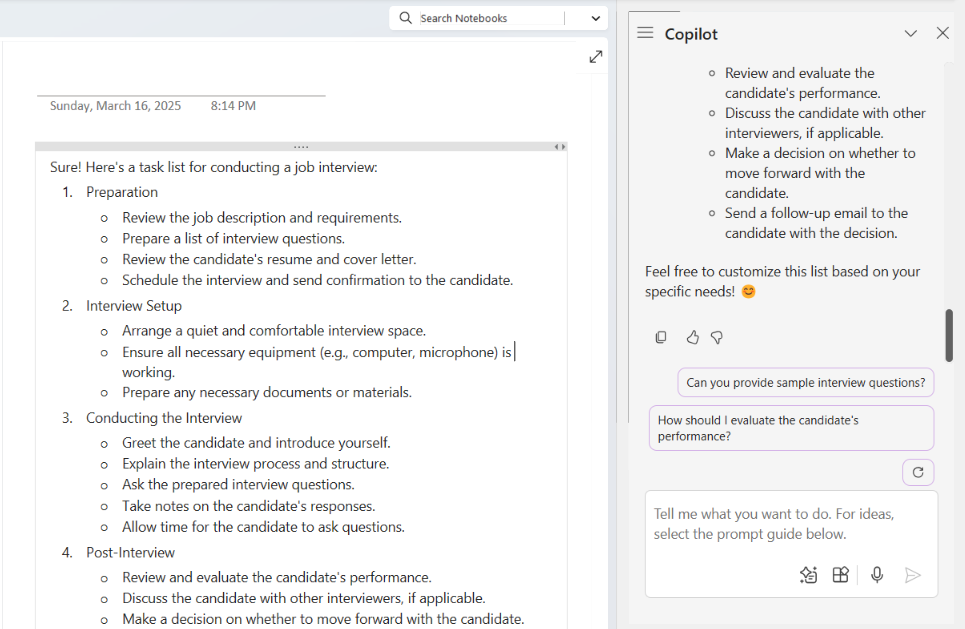
Create a task list for conducting a job interview
A task list generated by Copilot.
Howard Wen / Foundry
Once Copilot generates a result that you’re happy with, copy and paste it onto a page.
To save this page as a template to reuse later: Click Insert on the toolbar and select Page Templates. On the Templates side panel that opens along the right, click Save current page as a template at the bottom. You’ll be prompted to enter a name for your custom template.
To insert your customized template onto a page: Click Insert on the toolbar and select the down arrow to the right of Page Templates to open a dropdown. Your new custom template should appear on the list. Click it to insert it onto the page.
Alternatively, open the Templates side panel as described above. Below “Always use a specific template,” click to open the dropdown. Scroll through the listing of templates to find and select your custom template.
Tip: As you add notes to a page, Copilot may see that you’re entering information that can be formatted as a task list. For example, references to an assignment that you or a co-worker should do may trigger Copilot to set up a to-do list that you can track on the page.
4. Create study materials
If you need to study information in your notes for an upcoming meeting or presentation, Copilot can determine the key points you should know. You can also ask Copilot to create flashcards, a quiz, or a study guide based on the notes in your pages.
Examples:
Create flashcards based on the contents of this page
Create a study guide from my notes
5. Create charts, diagrams, mind maps, and other visuals
By looking for patterns, relationships, trends, and so on in your notes, Copilot may be able to generate appropriate charts or diagrams. Or if a page contains a list of ideas that you wrote, it may create a mind map that visualizes the relationships among them.
Depending on the information in your notes, Copilot may be able to generate charts or other visualizations from it.
Howard Wen / Foundry
This can work the other way around too: Copilot can analyze the data in charts, graphs, and tables that you’ve added to a page. Then it can summarize any insights, patterns or trends that it finds in them.
Example:
Summarize the table on this page
6. Find and cite sources
You can ask Copilot to search the internet for specific information — such as facts, sources, and statistics — or to define complex concepts or technical terms. This can be helpful if you need to look up more information about the topic you’re writing about, add sources to support the content on your page, or get some fresh ideas. Copilot can generate citations in APA, Chicago, or MLA style.
Example:
Find a statistic about the adoption rate of gen AI in business, and cite the source in MLA style
Copilot web search results with MLA-style citation.
Howard Wen / Foundry
7. Transform your notes to Excel, PowerPoint, or Word
Copilot can convert the content in a OneNote page into other Microsoft 365 file formats. Try instructing it to turn the page that’s open in the main pane into an Excel spreadsheet, PowerPoint presentation, or Word document.
Example:
Turn this page into a document for Word
8. Brainstorm with you
Copilot can act as your brainstorming partner. Try chatting with it as you would with a co-worker where you’re bouncing ideas off each other. During these sessions, Copilot can offer suggestions and may provide a mind map.
Examples:
What are some things I should consider when holding an online meeting with 8 people who are spread across 3 time zones
Give me ideas for an online marketing campaign for a new coffeehouse
9. Translate your notes into other languages
Copilot can translate the text on a page into another language.
As you add content to, edit, or otherwise work on a page, you can apply a few Copilot actions to it without invoking the Copilot sidebar.
Click the cursor somewhere on the page; if Copilot is available to do an action, its icon will appear to the left of the cursor. Or you can right-click somewhere on the page, and from the menu that opens, select Copilot.
In either instance, a small menu presents you with three actions that Copilot can do: Summarize page, Create a task list, and Rewrite page.
This mini menu appears when you click the Copilot icon next to your cursor in the main OneNote window.
Howard Wen / Foundry
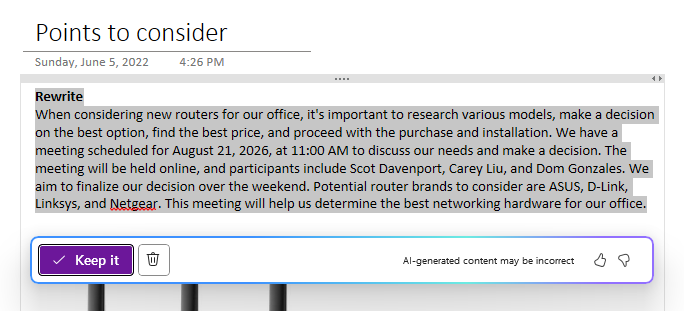
Summarizing a page and creating a task list are the same as described above. Rewrite page is just what it sounds like: asking Copilot to come up with alternate text for the page. (For more details, see our guide to using Copilot for writing tasks in Word, Outlook, and OneNote.)
Copilot can rewrite the text on a page — but its output is often generic and bland.
Howard Wen / Foundry
In the OneNote Windows app, you may see one additional option in this Copilot mini menu: Take notes with Copilot. This feature is gradually rolling out to users, so you might not have it yet.
We have not been able to test it, but according to Microsoft, you’ll be able to type in a prompt to have Copilot pull in information from other Microsoft 365 apps such as Outlook, Word, and Teams and turn it into a note. For instance, you could ask Copilot to create a task list for a project from documents, emails, and Teams chats about the project.
Google has said it will adopt the EU’s voluntary code of practice for general-purpose AI, despite expressing concerns that the AI Act and accompanying code could hinder Europe’s progress in developing and deploying AI technologies.
The code of practice is a voluntary framework designed to guide AI developers in setting up processes and systems that support compliance with the AI Act. The Act’s rules for General Purpose AI models, deemed to carry systemic risk, will come into force on August 2.
Tech firms, including OpenAI, Google, Meta, and Anthropic, are expected to fall under the scope of the rules, which give affected companies a two-year window to achieve full compliance with the AI Act.
Many in the industry have been increasingly apprehensive about the potential impact of the EU’s AI rules, raising concerns over compliance costs, operational hurdles, and possible constraints on innovation.
“We remain concerned that the AI Act and Code risk slowing Europe’s development and deployment of AI,” Kent Walker, president of global affairs at Google, wrote in a blog post. “In particular, departures from EU copyright law, steps that slow approvals, or requirements that expose trade secrets could chill European model development and deployment, harming Europe’s competitiveness.”
Earlier this month, Meta said it would not endorse the code, criticizing the bloc’s regulatory efforts as excessive and warning that the region was taking a misguided approach to overseeing AI.
New AI compliance era
Google’s decision to adopt the code could offer its customers greater clarity on data handling, safety measures, and transparency requirements, particularly when operating across international markets.
“While it may require some adjustments in how AI is deployed or integrated, it also provides greater confidence that the tools being used are built with ethical and regulatory standards in mind,” said Tulika Sheel, senior VP at Kadence International. “Over time, this can help build more trust with customers, partners, and regulators, both in the US and globally. For enterprise users, it’s a signal that aligning with responsible AI practices isn’t just about compliance but becoming a key part of staying competitive and future-ready.”
Google’s move may also reshape the competitive environment by raising the bar for responsible AI development.
As more firms align with the framework, pressure is expected to grow around transparency, fairness, and data accountability, particularly in regions with strong regulatory or ethical standards.
“This decision is likely to put added pressure on other providers, such as Meta and Anthropic, to align with similar standards — as both businesses and consumers grow more discerning about the AI platforms they rely on,” Sheel added. “Over time, companies that demonstrate greater openness and accountability in their AI development are likely to gain a competitive advantage, earning stronger reputations and deeper customer trust.”
Compliance challenges
The new rules set stricter requirements for transparency, accountability, and risk management, particularly for major AI developers.
For firms like Google, the challenge goes beyond meeting compliance deadlines. It involves building long-term processes to ensure their AI systems remain safe, reliable, and aligned with regulatory expectations as they evolve.
“One key difficulty is the scale at which these systems operate,” Sheel said. “Explaining how large AI models work, ensuring the data they’re trained on is appropriate, and regularly monitoring their impact are all complex tasks that require major internal alignment across teams.”
That said, companies like Google are better positioned than many to handle the new requirements, Sheel said. The tech giant has invested significantly in responsible AI practices and has the resources to adapt within the two-year compliance period.
In the end time, you should not ask what you can do for artificial intelligence (AI), but what it can do for you. To me, that means creatives retaining their own copyright in the AI data-sucking era, rather than signing off their own ideas to machinery. And it means the AI tools we use shouldn’t compromise privacy, usability, or security. At best, AI should simply augment what humans can do alone.
That may not be where the AI industry seems to be going at the moment, but I do think there will come a time when it has no choice but to take that direction — even if it takes a few election cycles until regulation kicks in. That’s why today’s early movers don’t necessarily have the strongest foundations, despite the hype.
Searching for ideas
What’s that got to do with Apple? On the surface, not much. Apple isn’t playing the same search intelligence game. Its problems with AI, while widely reported, aren’t necessarily the problems we think we see. Apple doesn’t need to build an AI search engine or chatbot; it can play nice with others to deliver those kinds of features.
What it does need is to design operating systems that make use of AI and machine intelligence to help people with their lives. At the same time, those age-old problems with Siri seriously damaged the company’s reputation, though they haven’t undermined user loyalty to any great extent. That’s in part because the vast majority of its customers (roughly 80%) aren’t yet using devices capable of running AI.
While almost everyone on the planet seems to have made some use of ChatGPT, most are not using systems with ChatGPT built inside the operating system. (Though you see fragments of it when you use Office products; each time you try to open a document yet another set of unwanted Copilot UI elements appear — just where you don’t really want them.)
Apple’s playing a different game
What I’m saying is that despite all the hype and hoopla, AI’s true impact hasn’t yet been felt, and given that some of its more negative effects have yet to be felt, there will be a backlash. People tend to take umbrage when AI destroys their livelihoods or erodes their salaries.
That’s going to make most people more interested in finding AI that is good for them, solutions that are truly useful, and services that don’t diminish their lives while pretending to help them on their way.
Those are precisely the kind of services Apple should bring to the field.
In a recent client report seen by Computerworld, Morgan Stanley analyst Erik Woodring puts it well, noting that “investors do not fully appreciate Apple’s AI intentions.” His argument is that Apple doesn’t need to do what Meta, Google or Amazon are doing in terms of chatbots and search. That path is expensive, the market well-served, and the reward less clear.
“We acknowledge that Apple might not have fully finalized their own approach to AI, but we also believe that anyone thinking Apple will acquire an AI-powered search engine to ‘solve their AI shortfalls’ is misguided,” Woodring said. “Apple almost certainly is not, and does not, want to compete directly in search, regardless of what happens in the DOJ v. GOOGL remedy ruling.”
Where is Apple going?
The analyst, instead, believes Apple’s approach will be to build a broad ecosystem of new virtual-assistant-like features embedded into their OS, “some of which run on homegrown LLMs with Siri acting as central command, and others (arguably more) leveraging white-labeled technology from leading AI labs (Perplexity, Google, Grok, Anthropic, Mistral, etc.) — that make their products and services better…”
If that’s true — that Apple wants to create its own unique family of AI tools and services to make life better for its customers, while integrating services from others for those tasks it does not provide — then getting there will take time.
Does Apple have that time?
I’ve argued for a while that it has time; user satisfaction across its ecosystem remains far deeper than anyone else, meaning its hardware sales aren’t really feeling any pain due to a perceived lack of AI. (Morgan Stanley actually sees growth in hardware sales across the current quarter.)
Combine happy users with the compelling nature of the hardware Apple already creates and you can see that Apple still has some time to develop its approach to AI. Woodring has the same analysis but does argue that Apple needs to make sure it does not squander this breathing space.
“The rapid pace of AI innovation means we need to start seeing more tangible progress from Apple in the coming months,” he told his clients.
While we wait…
Despite appearances, AI isn’t really the sum total of the tech industry. While it develops its own approach to integrating the tech within its hardware, Apple will maintain momentum with a flotilla of fresh new hardware designs, including super-thin, folding iPhones and new Mac families. And, of course, what’s nice about all this new hardware is that all of it will run whatever additional AI services the company intends to roll out in the future, along with existing Apple Intelligence tools.
And what that means, of course, is that two years down the line, hardware people already own or are about to acquire will become even more compelling as those new services ship in a move that again keeps Apple’s customers engaged. Apple’s moat runs deep.
Among a range of factors leading to a wave of tech sector layoffs in 2025 is the rapid rise of artificial Intelligence (AI) and automation. Companies are reconfiguring their workforces to leverage AI for increased efficiency and reduced operating costs. This realignment and reduction is in redundancy is often implemented even by companies reporting strong financial performance.
But it’s not just AI leading to workforce cuts. Complementing this technological shift are ongoing economic uncertainty, inflation, and higher interest rates. This combo is driving companies to cut costs and streamline operations for increased efficiency.
As we hit the mid-point of 2025, this combination of AI-driven restructuring, economic uncertainty, and market normalization is shifting the tech employment landscape, indicating a shift to leaner, more AI-centric operations.
According to data compiled by Layoffs.fyi, an online tracker keeping tabs on job losses in the technology sector, 63,823 employees were laid off at 150 tech companies in first half of 2025, In 2024, 152,104 employees laid off by 547 companies, The site is also now tracking tech layoffs at U.S. federal government employees laid off by the U.S. DOGE. To date in 2024, it’s tracked 61,296 government employees laid at 171,843 total federal departures.
Here is a list — to be updated regularly — of some of the most prominent technology layoffs the industry has experienced recently.
Tech layoffs in 2025
Intel
Microsoft
Crowdstrike
HPE
Autodesk
HPE
CISA
Workday
Salesforce
Meta
July 25, 2025, Intel to lay off 22% of workforce, CEO Tan signals ‘no more blank checks’
July 8, 2025, Intel layoffs begin: Chipmaker is cutting many thousands of jobs
Intel has begun laying off employees across the company. CEO Lip-Bu Tan told workers back in April to expect major layoffs at Intel in the coming months as the chipmaker slashes costs and overhauls its organization after years of technical setbacks and falling sales.
July 2, 2025: Microsoft will cut 9,000 workers
Microsoft will lay off about 9,000 employees, a source familiar with the workforce cut told CNBC. The cuts will reportedly affect less than 4% of Microsoft’s global workforce and will impact different teams, geographies and levels of experience. This is the latest in a string of cuts the tech giant has made this year.
June 17, 2025: Intel looks to factory layoffs to return to profitability
Intel will lay off up to 20% of its manufacturing sector employees starting in July, according to media reports, as the company looks for options as it seeks a return to profitability. The cuts reportedly will be made around the world, but some of the layoffs will be closer to home, according to a report in The Oregonian citing an internal company memo from Intel manufacturing Vice President Naga Chandrasekaran.
May 7, 2025: CrowdStrike to lay off 5% of staff
CrowdStrike announced a plan to cut about 500 roles, roughly 5% of its workforce, to streamline operations and reduce costs. The cybersecurity company will incur about $36 million to $53 million in charges related to the layoffs
March 6, 2025: HPE cuts 2,500 jobs, remains committed to Juniper buy
Feb. 27, 2025: Autodesk to lay off 9% of workforce
Software maker Autodesk is laying off 1,350 staff. With the rise of subscription and multi-year contracts billed annually, and self-service enablement, it finds it needs fewer sales staff, CEO Andrew Anagnost said in a message to employees. And with its cloud, platform, and AI products proving most profitable, it’s concentrating its staff and investments there.
Feb. 27, 2025: HP to lay off 2,000 more
As part of an ongoing restructuring, HP plans to lay off up to another 2,000 workers. In recent weeks, the company has tried — unsuccessfully — to do away with telephone support staff by forcing callers to wait for at least 15 minutes if they refuse to use self-service support resources online. The company swiftly backtracked, but wider job cuts are still on.
Government employees get laid off too: In this case, 130 workers at the US Cybersecurity and Infrastructure Security Agency are being shown the door as a result of a DOGE decision. Cybersecurity experts are concerned that the cuts will harm the international collaborations that CISA has fostered, quite apart from their concerns about the security of the DOGE layoff process itself.
As it moves to invest more in AI and international growth, Workday is laying off 8.5% of its workforce and disposing of unused office space. Some analysts fear the cutbacks will affect the company’s customer service — unless AI can pick up the slack.
Feb. 4, 2025: Salesforce lays off over 1,000
At the same time as it’s hiring sales staff for its new artificial intelligence products, Salesforce is laying off over 1,000 workers across the company, according to Bloomberg. As of June, 2024, the company had over 72,000 employees, according to its website. Salesforce did not comment on the report. In 2024 the company reportedly laid off around 1,000 staff too, in two waves: January and July.
Jan. 14, 2025: Meta will lay off 5% of workforce
Mark Zuckerberg told Meta employees he intended to “move out the low performers faster” in an internal memo reported by Bloomberg. The memo announced that the company will lay off 5% of its staff, or around 3,600 staff, beginning Feb. 10. The company had already reduced its headcount by 5% in 2024 through natural attrition, the memo said. Among those leaving the company will be staff previously responsible for fact checking of posts on its social media platforms in the US, as the company begins relying on its users to police content.
Despite intense demand for its data center capacity, Equinix is planning to lay off 3% of its workforce, or around 400 employees. The announcement followed the appointment of Adaire Fox-Martin to replace Charles Meyers as CEO and the departures of two other senior executives, CIO Milind Wagle and CISO Michael Montoya.
AMD will lay off around 1,000 employees as it pivots towards developing AI-focused chips, it said. The move came as a surprise to staff, as the company also reported strong quarterly earnings.
Enterprise software vendor Freshworks laid off around 660 staff, or around 13% of its headcount, despite reporting increased revenue and profits in its fourth fiscal quarter. The company described the layoffs as a realignment of its global workforce.
After laying off around 4,200 staff in February, Cisco is at it again, laying off another 6,000 or around 7% of its workforce. Among the divisions affected were its threat intelligence unit, Talos Security.
More than 1,000 software and services staff are on the way out at General Motors, signalling that it could be rethinking its digital transformation strategy. In an internal memo, the company said that it was moving resources to its highest-priority work and flattening hierarchies.
Intel plans to cut its workforce by around 15% to reduce costs after a disastrous second quarter. Revenue for the three months to June 29 stagnated at around $12.8 billion, but net income fell 85% to $83 million, prompting CEO Pat Gelsinger to bring forward a company-wide meeting in order to announce that 15,000 staff would lose their jobs. “This is an incredibly hard day for Intel as we are making some of the most consequential changes in our company’s history,” Gelsinger wrote in an email to staff, continuing: “Our revenues have not grown as expected — and we’ve yet to fully benefit from powerful trends, like AI. Our costs are too high, our margins are too low. We need bolder actions to address both — particularly given our financial results and outlook for the second half of 2024, which is tougher than previously expected.”
OpenText said it will lay off 1,200 staff, or about 1.7% of its workforce, in a bid to save around $100 million annually. It plans to hire new sales and engineering staff in other areas in 2025, it said.
Microsoft laid off staff in several teams supporting its cloud services, including Azure for Operations and Mission Engineering. The company didn’t say exactly how many staff were leaving.
Amazon announced hundreds of layoffs in the sales and marketing teams of its AWS cloud services division — and also in the technology development teams for its physical retail stores, as it stepped back from efforts to generalize the “Just Walk Out” technology built for its Amazon Fresh grocery stores.
Dell Technologies’ latest 10K filing with the US Securities and Exchange Commission disclosed that the company had laid off 13,000 employees over the course of the 2023 fiscal year; it characterized the layoffs and other reorganizational moves as cost-cutting measures. “These actions resulted in a reduction in our overall headcount,” the company said. A comparison to the previous year’s 10K filing, performed by The Register, found that Dell employed 133,000 people at that point, compared to 120,000 as of February 2024. Dell announced layoffs of 6,650 staffers on Feb. 6, but it is unclear whether those cuts were reflected in the numbers from this year’s 10K statement.
Intel will reduce its workforce by 22% to 75,000 employees by the end of 2025 as new CEO Lip-Bu Tan implements sweeping changes designed to transform the struggling chipmaker into a more disciplined, cost-conscious organization, the company said during its second-quarter earnings call Thursday.
The Santa Clara-based semiconductor giant will cut 21,400 positions from its current workforce of 96,400 employees reported as of June 28, according to the company’s Q2 earnings report. While CEO Tan described the reduction as “approximately 15%” in his letter to employees, the actual mathematics of reducing from 96,400 to 75,000 employees represents a 22% workforce cut.
The cuts represent the culmination of a restructuring effort that began when Tan took the helm in March, replacing interim co-CEOs following Pat Gelsinger’s abrupt retirement in December.
In a letter to employees following the earnings announcement, Tan signaled a fundamental shift in Intel’s operational philosophy. “There are no more blank checks,” he wrote. “Every investment must make economic sense. We will build what our customers need, when they need it, and earn their trust through consistent execution.”
Mixed financial results drive strategic pivot
The workforce reduction comes as Intel reported mixed second-quarter results that beat revenue expectations but fell short on profitability. Second-quarter revenue was $12.9 billion, flat year-over-year, while the company posted a net loss of $2.9 billion, nearly double its loss during the same period last year.
Looking ahead, Intel forecast third-quarter losses that exceed Wall Street estimates. The company expects a third-quarter loss of 24 cents per share, steeper than estimates of losses of 18 cents per share, according to LSEG data.
“This afternoon, we reported our Q2 2025 results. We delivered revenue above the high end of our guidance, reflecting solid demand and execution across the business,” Tan wrote to employees. However, he acknowledged the challenges ahead: “I know the past few months have not been easy.”
‘Surgical’ approach targets management layers
Intel’s latest job cuts follow what the company describes as a strategic approach to organizational restructuring. “We completed a significant amount of our workforce reductions in Q2, streamlining the number of management layers by about 50% in the process,” Tan told employees.
The restructuring builds on earlier workforce reductions announced in 2024, when Intel cut 15,000 jobs under former CEO Pat Gelsinger. Intel recognized $1.9 billion in restructuring charges during the second quarter, which were excluded from its non-GAAP results.
“We are making hard but necessary decisions to streamline the organization, drive greater efficiency and increase accountability at every level of the company,” Tan wrote, adding that the changes are “designed to drive organizational effectiveness and transform our culture.”
Foundry strategy undergoes major revision
Tan’s leadership marks a significant departure from his predecessor’s ambitious foundry expansion plans. In his letter, he outlined a “fundamentally different approach” to building Intel’s foundry business, criticizing past investments as excessive and premature.
“Over the past several years, the company invested too much, too soon – without adequate demand. In the process, our factory footprint became needlessly fragmented and underutilized,” Tan wrote. “We must correct our course.”
The strategic shift includes concrete changes to Intel’s global manufacturing footprint. The company “decided not to move forward with previously planned projects in Germany and Poland” and will “consolidate our assembly and test operations in Costa Rica to our larger sites in Vietnam and Malaysia.”
For US operations, Intel is “further slowing construction in Ohio to ensure our spending is aligned with demand – while maintaining flexibility to accelerate based on new customer wins.”
Technology development gets sharper focus
Tan also outlined a more disciplined approach to technology development, with “job number one is ramping Intel 18A at scale” for both Intel’s own products and select customers like the US government.
Looking ahead, the company is developing Intel 14A as a foundry node specifically for external customers, but with an important caveat. “Going forward, our investment in Intel 14A will be based on confirmed customer commitments,” Tan wrote, reinforcing his “no blank checks” philosophy.
The CEO has also instituted new oversight procedures, writing that “every major chip design is reviewed and approved by me before tape-out. This discipline will improve our execution and reduce development costs.”
AI strategy refinement
Beyond manufacturing changes, Tan outlined plans to revitalize Intel’s traditional x86 processor business and refine its AI strategy. In client computing, Tan said, “Panther Lake is our top priority as it will reinforce our strength in notebooks across consumer and enterprise,” while the company works on Nova Lake for high-end desktop markets.
For data centers, Intel is making a notable technical reversal by “reintroducing simultaneous multi-threading (SMT). Moving away from SMT put us at a competitive disadvantage. Bringing it back will help us close performance gaps.”
In AI, Tan signaled a strategic shift from traditional approaches, writing that “we will concentrate our efforts on areas we can disrupt and differentiate, like inference and agentic AI.”
Cost-cutting across the industry
Intel’s workforce reduction reflects broader trends across the technology sector, where companies continue implementing cost-cutting measures despite improving economic fundamentals. ComputerWorld’s 2025 tech layoffs timeline shows Intel among numerous tech companies reducing headcount this year, including Microsoft, Cisco, and AMD.
The company has also announced plans to implement a return-to-office policy in September, with “sites completing necessary improvements to operate at full capacity.”
Tan framed the restructuring as essential to cultural change at Intel. “We will become a faster, more agile, and more vibrant company. We will eliminate bureaucracy and empower engineers to innovate with greater speed and focus,” he wrote.
The CEO emphasized urgency in his closing remarks: “The future of Intel is ours to build, but we have no time to waste. We must continue acting with urgency, discipline and focus in everything we do.”
Privacy-focused DuckDuckGo rolled out a new feature this month that lets users hide AI-generated images in search results. When I posted this news on social networks, my followers lit up, and a consensus quickly formed that this was the most welcome new search feature of the year.
Here’s how it works. When you use DuckDuckGo to search, then click on “Images,” you’ll see a prominent “AI Images: show” menu. Click on it to choose “Hide,” and AI slop will mostly vanish from the results. To make the change permanent, find a “Hide AI-Generated Images” switch in DuckDuckGo’s search settings, or save noai.duckduckgo.com as your main search link.
The ad-free paid-search service Kagi, which costs $5 or $10 per month depending on the plan, also offers AI filtering. (Full disclosure: My son works at Kagi.)
After searching in Kagi “Images,” users should see an “AI Images” drop-down menu with “Any,” “None,” and “Only” options (the “Only” option excludes most non-AI-generated images). Users can manage AI images by opening Settings, going to the Search tab, then AI tab, and toggling “Exclude AI-generated images.” That setting blocks or down-ranks images from sites known to flood the web with machine-made content. As of this month, however, the filter is the default.
You can use operators like “ai:none” or “ai:only” in the search bar. Kagi labels AI images with a small badge.
DuckDuckGo uses open-source blocklists from uBlockOrigin and uBlacklist to identify AI images, while Kagi bases its identification on the source website, flagging images from sites known to produce or post AI images.
Neither catches all AI.
AI-generated ‘user’ reviews kill the value of reviews
AI slop is quickly taking over just about every kind of site that offers content, including supposed user-generated content. Last year, for example, the number of fake user reviews written by AI exploded in app stores and online retailers.
The digital ad fraud detection company DoubleVerify found more than three times as many fake, AI-generated app reviews in 2024 as the year before. Its investigation uncovered that over half of all reviews on a popular streaming app were AI fakes.
Apps with thousands of five-star reviews showed repetitive phrasing, usually a sign of machine-generated text. The problem was not limited to a single platform. These fake reviews appeared across mobile stores and smart TV app platforms, too.
In 2024, a fake AI-generated review cost as little as $2.23. Some AI-written reviews revealed their origin, like when a reviewer wrote “I’m sorry but as an AI language model…,” copying a standard generative AI reply. But most relied on vague or highly positive phrases repeated in dozens or hundreds of posts.
Two things are obvious. First, the number of fake reviews this year will be much higher than last year and keep growing. Second, when (not if) AI-generated fake reviews overwhelm human reviews, user reviews become worthless.
Sites can either kill reviews altogether or weed out fakes. There is no third option.
Content consumers — people who read things, watch videos and listen to music — may one day not care whether people make the stuff of our culture or machines do. But for now, I suspect, they do care.
The songs were AI-generated but remained public for days before being removed after complaints. Foley’s label, Lost Art Records, called the incident “harmful” and said it could have been stopped easily if Spotify wanted to do so. But the only reason Spotify removed them at all is that Foley has fans and a company invested in the singer’s catalog.
Velvet Sundown, an act made entirely by software, crossed one million monthly listeners in July after climbing Spotify’s charts with tracks like “Dust on the Wind.” Velvet Sundown’s debut album came out in June. The band has no members, just a text bio describing them as a “synthetic music project.” Fake bands are rising in the charts on Spotify — made using tools like Suno and Udio, which can churn out new songs in less than a minute from a simple prompt.
On Deezer, which tracks AI-generated song numbers openly, more than 20,000 new fully AI-generated tracks were uploaded per day by spring 2025, making up more than 18% of all new content. It’s less than 1% on Spotify, which tries to remove AI content, especially when it impersonates the music of real people.
Needless to say, AI-generated songs will continue to increase in both number and sophistication.
Music is a powerful and universal element of human culture that can deeply influence emotions, mental well-being, identity, and personal growth. Who wants to turn this powerful art over to machines?
I think it’s clear that music services need to prepare for a future where AI-generated uploads overwhelm music made by people.
AI slop is everywhere
In 2025, fully AI-generated content is growing fast and reshaping how we get information and entertainment. Entire articles, blog posts, product descriptions, and video scripts come straight from AI models like ChatGPT, Jasper, and Gemini, producing polished text in dozens of languages within seconds.
Video creation can be almost fully automated on platforms like Runway, Synthesia, Pika Labs, and D-ID. Users input a text prompt or script, and the AI builds videos with virtual actors, stock scenes, or animations.
Social media is being overwhelmed with AI-made images and short videos from platforms like MidJourney and DALL-E, creating memes, GIFs, and visuals without any human artist involved.
While banning all AI content is probably undesirable (and impossible), the sites and services that curate or host content need to help users discern the real from the fake, the human-generated from the machine-generated. I think people will demand it.
Imagine driving to a business meeting while conversing with a voice-enabled AI agent, and asking it to open a lead for a prospect in Salesforce. Or strolling in the park, asking your AI assistant whether you have enough laptops in inventory, and if not, to order what you need. Or even, while waiting at the airport, asking the AI agent to put in a request on your behalf for personal time off (PTO).
That is the promise of voice AI, according to startup Leena AI, which Thursday launched agentic AI “virtual colleagues” that can actively listen and speak in natural language. Workers get AI assistance simply by talking, anytime and anywhere, via mobile and desktop apps and through Slack and Teams integrations.
“If you think about the future of AI in the enterprise, collaboration is a key, and collaboration has to happen over not just text, but voice,” Leena CEO and co-founder Adit Jain told Computerworld.
‘Extremely personified’ AI connecting employees and systems
Leena’s agentic AI colleagues can handle domain-specific and cross-domain requests, serving as go-betweens for employees and enterprise systems. However, the human is always in the loop; the agent must request approval before taking action.
Powered by Gemini and two orchestrator large language models (LLMs) fine-tuned on GPT-4.1, with ServiceNow, Workday, SAP, Oracle, ADP, Salesforce, and other integrations, the AI colleagues understand context and past conversations, and update themselves regularly to provide human-like discussions.
In one product demo, a worker sitting in a busy lobby interacted with Leena on his mobile phone, saying “Hi Leena, I just spilled a drink on my laptop. Can you order me another one?”
Leena, in a female voice, advised him to shut down his laptop and unplug it to stop further damage, then told him he needed to fill out a quick form to have a replacement ordered, and dropped a link into the chat. Leena then told him the appropriate department would handle things from there, and signed off, saying “Need help after that? Just give me a shout.”
Jain said a big debate within the company has been around how much personification the models should have; the consensus was the more the better, so Leena’s AI colleagues are “extremely personified,” with names, email addresses, phone numbers, and Slack and Teams profiles. Some even have favorite sports teams.
Jain noted that the more human and conversational an AI system is, the more quickly it will be adopted. This is particularly important in enterprises that need AI tools “because the applications are so broken, the experience is so bad, systems don’t talk to each other, data is everywhere.”
A ‘two-way street’
The company initially began working with text-based AI, but quickly realized the importance of the conversational element. Jain pointed out that 30% to 35% of usage among early customers is via voice. There is particularly high usage during transit times, as well as “high excitement” among field employees, salespeople, plant workers, and retail store employees, Jain noted.
Use cases span IT, HR, finance, marketing, sales, and procurement, Jain said, noting that the company serves customers across industries including finance, manufacturing, pharmaceuticals, and consumer and packaged goods. Jain said one chief experience officer (CXO) at a major industrial company predicted that incorporating voice-enabled AI colleagues could boost the productivity of IT and HR teams by 50%.
The goal is to ultimately make the AI colleagues even more autonomous. Jain imagines a future where an agent can be added to a Zoom, Slack, or Teams call not just to take notes, but to collaborate, exchange ideas and “actually do multiple layers of work.” In future releases, Leena’s AI will even be able to see users’ screens to assist with these tasks.
But, Jain emphasized: “It’s a two way street: It’s not just there for me, it can also reach out to me for help.” Agents will be able to make and receive calls, send and receive texts, and proactively work alongside humans. “They can just ping you and say ‘Hey, how do I handle this?’ And you tell them, and they go handle it for you.”
Voice AI is ‘closing the uncanny valley gap’
Voice AI has advanced significantly in the past year, with Leena competing in a crowded space with the likes of Workai, Bloomfire, Elium, Sociabble, Glean, Assembly, and others.
“We’ve seen the power of this type of voice experience when paired with LLM interaction,” said Brian Jackson, principal research director at Info-Tech Research Group. For instance, OpenAI’s voice mode has become a rapidly adopted feature of the ChatGPT mobile app.
There are many workflows that can benefit from the technology, Jackson noted. “Workers who are most often in front of a computer may still prefer text interactions with AI, but many workers are on the go and their hands are busy,” said Jackson.
For instance, a construction site inspector could use a headset and smartphone to connect to an AI agent, and make an oral report while walking a site. They could ask the agent to share information on standards, and generate a report that’s logged directly into the system of record. Desk workers, for their part, may get tired of staring at a screen, and at times switch modes to use a voice AI assistant.
Jackson noted that AI voice is now closing the “uncanny valley gap” where humans are initially put off when confronted with a technology that purports to be, but is not quite, lifelike. AI voices are sounding more natural and fluid, and human voices can be emulated with just a few seconds of recorded audio. Realistic, unique AI voices that don’t imitate real people are commonplace and easy to create, and platforms that allow users to create content with AI voices provide a “nuanced set of controls to tweak emphasis, tone, warmth, fluidity, and other factors” that can create different vocal effects.
“It’s proven that it’s possible to listen to speech, process a response, and generate it with a realistic voice in almost real-time,” he said. “Now, vendors like Leena AI are looking to bring that experience to the workplace.”
Using OpenAI’s ChatGPT instead of Google’s search engine is becoming more common in the US, according to a new survey of 1,000 people by Adobe Express. More than three-quarters (77%) of respondents say they use ChatGPT for searches — and 25% have it as their first choice.
Not surprisingly, children and young people in particular prefer ChatGPT to Google. What attracts them most: getting answers to everyday questions or getting creative inspiration. Users said they also appreciate the ability to get summaries of complicated topics and to avoid having to click on a lot of links.
Three in 10 people surveyed said they trust ChatGPT over other search engines, and 47% of marketers and business owners use ChatGPT to promote their business.