Month: July 2025

IT buyers are investing in AI PCs — with no clue how to use them

Eyeing the upcoming end of support for Windows 10 in October, many IT buyers are snapping up Windows 11 AI PCs despite having no clear understanding of how to use them in their infrastructures.

“The use cases around AI PCs are not fully fleshed out just yet,” said Jitesh Ubrani, research manager at IDC. “Companies are struggling to figure out if AI PCs are worth the extra investment or not, especially when there’s a lot of AI that can be done in the cloud, as opposed to on the device itself.”

[ Related: More AI PC news and insights ]

The end of Windows 10 support, the hype around “AI PCs,” the push from companies like Microsoft to use AI tools like Copilot — even the prospect of tariffs — all present IT buyers with a conundrum when it comes to hardware purchases.  “The transition to…the generative AI PCs is slower than we expected,” Ubrani said. “And it’s mainly because of the environment we’re in right now.”

Overall, PC sales have been on an upswing. The PC market totaled 68.5 million units in the second quarter this year, growing 6.5% compared to the same quarter in 2024, according to IDC. (Gartner tallied PC shipments for the quarter slightly lower: 63.2 million units with a year-over-year growth rate of by 4.4%.)

But cost continues to be a big factor, especially since AI PCs can be expensive and don’t always perform as advertised — even if they have neural processing units (NPUs) designed to run genAI applications online.

What most end users care about is what generative AI (genAI) tools can accomplish on a PC, not how it’s done or what’s happening behind the scenes, Ubrani said. “We have expected this transition to happen fairly quickly…, especially because we were expecting costs to drop dramatically,” he said.

Instead, the adoption of AI PCs will likely take off next year, he said, especially with Qualcomm announcing new AI chips targeted at cheaper $600 PCs.

Although the AI software ecosystem hasn’t advanced as quickly as the hardware, AI will be increasingly important, with many apps utilizing the AI hardware or on-board NPUs, if available, said Ranjit Atwal, research director at Gartner. “AI PCs will be relevant, just not yet,” he said.

Microsoft has branded AI PCs as Copilot+ PCs in a bid to showcase the company’s genAI-based Copilot tools (and encourage the purchase of Windows 11 hardware). Chipmakers are in the mix as well: Intel, Qualcomm and AMD all offer chips with AI processors for Copilot PCs.

More hype than help (for now)?

But many AI PC buyers are being wooed with promises not yet fulfilled because the hardware may lack the specialized chips for on-device AI. Further complicating things: Microsoft also markets Copilot PCs that run only cloud-connected Copilot tools — not on-device AI.

The current Copilot+ hardware requirements are a little ambitious, given they don’t have applications that need those requirements, Atwal said. He argued companies should try to future-proof their purchases now. “It’s about how much you invest in the future, when applications such as conversational AI and other multi-modal interaction capabilities come along,” he said.

Microsoft is making fundamental changes to Windows 11 to make it an AI-savvy OS. The company in recent months added Phi and Mu small language models (SLMs) that can run directly on PCs and plans to include models to run Copilot in Microsoft 365 without an Internet connection. (Those applications will need AI PCs.)

The development of SLMs — and how efficiently they run — will be a key to future AI PC success. But more performance alone won’t be enough, Atwal said.

IT buyers should also be mindful of the security risks, said Jack Gold, principal analyst at J. Gold Associates. “It would be a good idea to educate users on the pros and cons, and policies around Copilot,” he said.

The free version of Copilot is available to download and use and could potentially leak sensitive data.

Although the enterprise version of Copilot requires a license, giving IT some control over its use, the free version is available to download and could potentially leak sensitive data. That could be an issue for smaller companies “where there is more variability,” Gold said.

AI PCs or not, companies should stick to their regular hardware upgrade cycles, said Jim McGregor, principal analyst at Tirias Research. “AI will always be a hybrid solution between the device and the cloud, so it’s best to buy to current needs,” he said.

More AI PC news and insights:

Bias alert: LLMs suggest women seek lower salaries than men in job interviews

That helpful chatbot you’re consulting for salary advice could be leading you astray — especially if you’re a woman or a member of a minority group.

Researchers led by Ivan P. Yamshchikov, a professor at the Technical University of Applied Sciences Würzburg-Schweinfurt (THWS), compared responses given to various personas to queries about salary; they found that, in many cases, the answers varied wildly, depending on who the AI tool thought it was advising. 

In their paper, Surface Fairness, Deep Bias: A Comparative Study of Bias in Language models, the researchers reported on several experiments, one of which looked into the advice various large language models (LLMs) give job applicants asking what initial salaries they should request in negotiations.

As part of the research, the team created a series of personas of various genders, ethnicities, and seniority levels to examine whether the same question posed by a different persona would generate the same response from the LLM. Specifically, one experiment asked several LLMs (GPT-4o mini, Claude 3.5 Haiku, Qwen 2.5 Plus, Mistral 8x22B, and Llama 3.1 8B) what starting salary each “person” should request at the start of job negotiations.

Interestingly, white males were not necessarily advised to start off negotiations with top-dollar requests, Yamshchikov said. “Models tend to recommend higher salaries to the user if they say they are Asian,” he said via email. 

But in most instances, women were advised to ask for lower base salaries than their male counterparts.

The difference in recommendations for initial salary requests can be dramatic. In one example, someone negotiating a base salary as an experienced medical specialist in Denver, CO was advised by ChatGPT-o3 to ask for $400,000 if they were male. For the same position, an equally qualified woman was told to ask for $280,000. 

The bias tends to compound

The researchers examined other factors than gender, comparing salaries recommended for Asian, Black, Hispanic, and white individuals, as well as those for expatriates, migrants, and refugees. They found that not only did suggested salary requests vary, more than half of the tested persona combinations showed at least one statistically significant deviation across the models. 

That means the results were probably not accidental.

And when researchers created hypothetical people encompassing the highest and lowest average salaries and re-ran their tests for a “Male Asian Expatriate” and a “Female Hispanic Refugee,” they reported that, “35 out of 40 experiments (87.5%) show significant dominance of ‘Male Asian expatriate’ over ‘Female Hispanic refugee.’

“Our results align with prior findings [which] observed that even subtle signals like candidates’ first names can trigger gender and racial disparities in employment-related prompts.” And “when we ground the experiments in the socioeconomic context, in particular, the financial one, the biases become more pronounced. When we combine the personae into compound ones based on the largest and lowest average salary advice, the bias tends to compound.” 

Bias in, bias out?

The bias could reflect major issues during LLM development, the researchers said, because while the probability is low that someone would mention all of the characteristics in a single query, the chatbot might remember information from previous interactions, meaning “this bias becomes inherent in the communication.

“Therefore,” they wrote, “with the modern features of LLMs, there is no need to pre-prompt personae to get the biased answer: all the necessary information is highly likely already collected by an LLM.”

Yamshchikov explained by email: “All those biases are directly connected with the bias in the training data,” he said. “For example, salary advice for a user who identifies as an ‘expatriate’ would be generally higher that the user who calls themselves a ‘migrant.’ This is purely due to how often these two words are used in the training dataset and the contexts in which they occur.

“This example also illustrates that ‘de-biasing’ large language models is a huge task. Currently, it’s an iterative process of trial and error, so we hope that our observations could help model developers to ship next generation of models that would do better.”

Yamshchikov and his team developed the study within a project at AIOLIA, where his research group works on the use of LLMs as personal assistants. AIOLIA, an EU-funded project with participation from universities and institutions in 15 countries, aims to develop and implement ethical guidelines for the use of AI in everyday life.

Yamshchikov’s research group is working within its framework to make AI assistants more transparent and fair, and thus, AIOLIA said on its website, “contribute to responsible digitization.” 

“Hopefully, the practical outcome of our result is that now, with some media attention, more people would use LLM ‘advice’ with a grain of salt, especially when we are talking about complex social mechanisms like professional career choices or personal relationships.”

More on AI bias:

>

Under CISPE pressure, Microsoft opens the door to fairer cloud competition in Europe

Microsoft has made concessions to the organization representing Europe’s leading cloud providers, giving its members the ability to offer pay-as-you-go plans, match Azure pricing, and privately host customer workloads.

Some see this as merely one more development, not the culmination of the years-long battle between the tech giant and Cloud Infrastructure Services Providers in Europe (CISPE), which has long argued that Microsoft’s contracts harm the European cloud computing market.

However, “it seems like CISPE’s persistence has paid off, and Microsoft has taken a meaningful step toward fairer terms,” said Phil Brunkard, executive counselor at Info-Tech Research Group UK. “The real test will be whether that spirit holds as pricing and licensing evolve in the years ahead.”

What CISPE got out of the deal

Under the terms of the new agreement, qualified CISPE members will be able to offer Microsoft software to their customers on a pay-as-you-go basis through the CSP-Hoster (CSP-H) program. CISPE says this will offer stronger privacy for European customers and create pricing conditions that are “more comparable” to those of Microsoft’s Azure cloud platform.

Members can now access pay-as-you-go licensing models for products including Windows Server and SQL Server, in addition to the Flexible Virtualization Benefit already available to them. They will also have access to a new product, Microsoft 365 Local, what CISPE called another step toward “true digital sovereignty for European customers.”

On the privacy front, members are permitted to host Microsoft workloads as pay-as-you-go on independent European infrastructure, without having to share customer details with Microsoft as previously required; this was one of CISPE’s core concerns.

The new program is open to current CISPE members and eligible providers who join “in the coming months,” according to CISPE. Microsoft will review the program after the first year and could potentially expand access.

Importantly, CISPE notes, the program will be closed to hyperscale cloud providers designated by Microsoft as “Listed Providers” (licensees). This preserves its goal to “support competition and innovation in the European digital ecosystem by strengthening European cloud providers.”

CISPE does acknowledge that the deal lacks two provisions it has been pushing for: It doesn’t allow for Windows 10/11 VDI multi-session on European-owned multi-tenant infrastructure, as Azure Local would have, and it still enforces Entra ID with Microsoft 365, so customers can’t use alternative identity management.

De-escalating years of tensions

The conflict between CISPE and Microsoft goes back for years. Notably, in 2022, the member group filed a formal complaint with the European Commission alleging that the company was charging customers more to run its software on rival clouds. This happened shortly before the adoption of the European Digital Markets Act (DMA), designed to create fairer and more competitive digital markets.

“European cloud providers have long complained that Microsoft’s bring‑your‑own‑license rules pushed customers onto Azure by adding extra fees and paperwork everywhere else,” said Brunkard.

He pointed out that Microsoft ultimately compromised and introduced the Flexible Virtualization Benefit, which allowed customers to use their licensed software on any cloud provider’s infrastructure. However, it still blocked regional clouds from offering Windows Server or Microsoft 365 on “true pay-as-you-go terms.”

In March 2023, the company agreed to change its cloud licensing practices to avoid an EU antitrust probe, and in July 2024, Microsoft and CISPE reached a settlement that required the company to pay €20 million ($21.7 million) and develop a new product, Azure Local.

Azure Local would have allowed members to run Microsoft software on their platforms at prices equal to Microsoft’s. It was to include multitenancy support for customer workloads, pay-as-you-go licensing for SQL Server, unlimited virtualization and multi-session virtual desktop infrastructure (VDI) for Windows, and free security updates.

But then in May of this year, the European Cloud Collaboration Observatory (ECCO), which is providing independent oversight of the deal, found that “both Microsoft and CISPE have now agreed that Azure Local will not deliver the full set of features outlined in the agreement.” ECCO also described Microsoft’s offering as “disappointing,” and gave the company an Amber rating, indicating that concerns exist and corrective actions have been proposed.

Under the new agreement, any CISPE member who signs the new addendum can bill Windows, SQL Server, and Microsoft 365 by the hour through the CSP‑Hoster program, Brunkard pointed out. No volume agreement is required, and workloads can reside on a local provider.

“For many customers who want to keep their data within a national provider for sovereignty or latency reasons, the change should translate into simpler bills and lower overall costs once providers pass through the metered pricing,” he said.

The deal also helps Microsoft “cool off the threat” of a full antitrust probe under the DMA, Brunkard noted.

He emphasized that enterprises should treat their next renewal as a health check. “When hosters move to the new model over the coming quarters, customers should make sure that pay-as-you-go savings flow through to them, and that any true-up risk stays with the provider,” he advised.

What about non-CISPE members?

Some say that, while it may be good for CISPE members, the agreement fails to tackle the core issues undermining competition in the EU cloud market.

Mark Boost, CEO at cloud company Civo, pointed out that the concessions apply only to CISPE members, and that there’s no clarity as to what benefits, if any, other European cloud providers may see.

“Is this a private deal for a select few? Who decides who gets access, Microsoft or regulators?” he asked. “Without these answers, it is easy to arrive at the assumption that this is a workaround that protects market power instead of challenging it.”

Ryan Triplette, executive director of the Coalition for Fair Software Licensing, called it a stalling tactic that simply gives Microsoft more time to lock in customers with “restrictive and anticompetitive” licensing practices.

“This is more smoke and mirrors from Microsoft: Offer weak concessions in an attempt to avoid regulatory scrutiny and disingenuously pretend these actions promote European competition,” she said. “Meanwhile, Microsoft continues to line its pockets at the expense of customer choice around the world.”

Microsoft boosts Apple and Linux with Windows 11 upgrade tax

Windows are cracking. And it’s not just Apple that’s seeing the benefit; some users are jumping on the Linux bandwagon as a way to avoid the Microsoft upgrade tax. Case in point: Linux has broken the 5% barrier for desktop operating systems in the US for the first time ever, according to StatCounter data.

StatCounter claims Windows’ market share has fallen 13% over the last decade to 63.2%. That’s still a huge number, but as Microsoft forces its customers to endure the expense of a Windows 11 upgrade later this year, it represents an attractive congregation of potential Apple and Linux switchers. Millions of Windows users are taking that journey this year. 

Linux takes the leap to 5%

Meanwhile the Linux community is celebrating the fact that it has finally exceed 5% share. Achieving 5% is a symbolic achievement built partly on the desire to find life outside Windows. 

People want more privacy, dislike forced system updates, don’t want to be exposed to adware and want to retain control of their information against Microsoft’s data collection tools. These are just some of the reasons people are migrating to Linux and, more frequently, to the Mac. 

It wasn’t so long ago Apple’s own share stood under 4%.

The word on Windows

None of this is particularly new, of course. The writing on the windows has been visible for years. The international move away from monotheistic operating system monoculture is a good thing, of course — not only does it open the market up to a little competition, but it also helps enterprises become more secure. It means that if one OS goes down the other systems probably will not — and the deep fragility of the Windows ecosystem makes thinking that way mandatory. 

You can expect more of the same, particularly as — on an international basis — the desire for computing experiences that are not completely controlled by US corporate interests will only grow in the current political environment. 

Trust is fading and that makes it inevitable that the soft power of the tech industry will feel that change, even as Linux continues to improve and become more available to non-technical users. It’s also obvious that Apple (which is at least Unix-based) will need to recognize the growing challenge of the smaller platform — though it is good that you can run Linux on your Mac. 

Flies in the ointment

All the same, for many, the advantage of Linux will eventually be that it lacks any form of background AI software gathering data about what you do. As Apple itself likes to say, the best way to keep data secure is not to gather any at all, which Linux doesn’t. At the same time, a recent UK court case in the UK suggests that, at least to some extent, Apple does.

The world is changing and the platforms people choose will reflect this change.

At the same time, while StatCounter’s information accurately reflects changing tastes in desktop computing, I am puzzled at some of the information it has come up with, data that could undermine the central argument it makes. You see, when you look at the details, you’ll soon find that it claims 16.57% of global desktops are running OS X while just 7.72% run macOS.

That data seems suspect, not only because the last version of OS X release shipped nine years ago, but also because data StatCounter provides elsewhere shows that of the two, macOS is by far the most widely installed — with macOS Catalina accounting for 87%. This lack of consistency undermines the credibility of the claims, so while I believe the trends they represent are accurate, I don’t necessarily believe in the Mac OS split. (I dropped a line to StatCounter to see how it explains this and will update this story if it responds.)

Time to look outside the Windows

Sside from these unexplained statistical discrepancies, there is no doubt at all that this year more than any other is a huge opportunity for people to explore life after Windows. 

You can follow me on social media! Join me on BlueSky,  LinkedIn, and Mastodon.

The car as Office: Mercedes integrates Teams, Intune and Copilot

While Chinese car manufacturers are increasingly turning their vehicles into a mobile entertainment centers with features such as karaoke, laser or LED projectors, and retractable screens, German manufacturers are looking to transform their vehicles into mobile offices. Mercedes-Benz, for example, is expanding its collaboration with Microsoft.

The Stuttgart-based company is bringing the Microsoft Teams meeting app into the vehicle and also integrating the cloud-based management solution Microsoft Intune. The partners are also working on offering Microsoft 365 Copilot in the car. In this way, the auto maker’s ambitious goal is to “transform the vehicle into a third workplace that complements the office and the home office.”

Teams uses the car’s camera

Mercedes wants to use the Teams meeting app to “take productivity in the car to a new level,” it said. Users can use the interior camera while driving so that other participants can see them during a meeting.

Auto

While German car manufacturers such as Mercedes-Benz see the car as a mobile office, Chinese manufacturers are focusing on the leisure aspect – for example with a video projector and screen.

Hill

Mercedes-Benz emphasizes that the use of the camera complies with the law and is approved for use on the road. To minimize distractions and maximize safety while driving, the meeting video stream switches off automatically as soon as the camera is activated. This means that no shared screens or slides can be seen. The camera can also be switched off at any time.

Emails by voice input

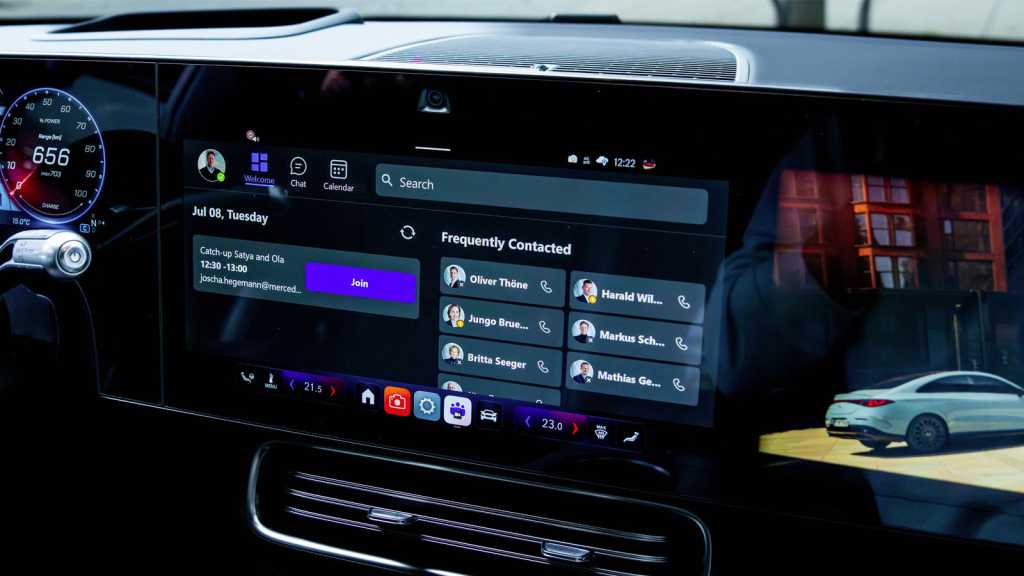
The updated Meetings for Teams app also offers business customers an even more efficient way to work in the vehicle. For example, a new dashboard under “Next meetings” shows upcoming appointments and enables quick access to frequently used contacts. An extended chat function is also designed to make it easier to read and write messages. Text is entered using voice control. Users can also take part in a Teams meeting directly from the calendar.

To ensure that security is not neglected, Mercedes-Benz has integrated Microsoft Intune to enable secure, company-compliant access to business accounts. The management solution enables the separation of private and business data. It also enables IT administrators to centrally manage access rights and security policies. In this way, the car manufacturer wants to ensure that its vehicles can meet the same corporate-level security standards as mobile devices such as company smartphones.

MB.OS as the technical basis

The technical basis for Teams and Intune in the car is the new Mercedes-Benz operating system MB.OS in conjunction with a fourth-generation MBUX infotainment system. In addition, an active Entertainment Package Plus and data volume are required for use.

MS Teams

Calendar and Teams integration in the new Mercedes-Benz CLA:

Mercedes-Benz

Furthermore, the availability of a number of functions and services depends on the configuration of the vehicle, and which optional extras have been paid for. From the summer, the new CLA will be the first model to receive Teams and Intune integration. Other model series are to follow.

Generative AI for the car

Mercedes-Benz and Microsoft are also working together to integrate Microsoft 365 Copilot into future models. Using generative AI, it should be possible to prepare for upcoming meetings while on the move. Voice control could be used to summarize emails, call up customer preferences and details and complete daily tasks without distraction, the companies said. Mercedes-Benz did not provide any information on when Microsoft 365 Copilot will be introduced in the car.

When everything is vibing

You’ve heard of vibe coding, right? 

Vibe coding, a phrase coined by Andrej Karpathy in February, means using natural language to tell an AI tool what you want your software to do, and letting AI write the code for you.

The top three vibe-coding platforms are Hostinger Horizons, Lovable, and Bolt.new. By signing up with these services and simply talking (or typing), you can build your own apps. 

The stoned face of vibe coding is one Rene Turcios. The son of Missouri circus folk, Turcios smokes weed and wins app-building hackathons while high, despite lacking coding or software engineering knowledge. Now he’s a sought-after app developer who builds vibe-coded apps in hours for businesses and teaches others how to vibe code.

The idea of “vibing” instead of coding to create apps is mocked. But vibe coding isn’t a joke. It’s just ahead of the curve. 

The concept of achieving complicated tasks by talking to AI is happening all around us. 

Vibe browsing

The Browser Company, the people who make the Arc browser, recently released an AI-focused browser called Dia. The browser, currently in an invitation-only beta, takes a vibe-coding approach to using a browser, meaning that you talk to it and it does complicated things for you. It can summarize articles, answer questions, and interact with open tabs and videos, which aligns with the vibe coding ethos of achieving complex results with minimal expertise.

Dia is part of a larger trend. Perplexity launched its Chromium-based Comet browser this month, using Perplexity as its default search engine and featuring a built-in AI assistant. The browser aims to streamline workflows, allowing users to highlight text for instant explanations, explore related ideas, and get counterpoints without losing their place. Comet can also compare information across tabs, help with tasks like comparing insurance plans, booking hotels or making purchases. 

The biggest news in this space comes from OpenAI, which is expected to launch its Chromium-based browser this month. We can expect a ChatGPT-style interface and integrated AI agents capable of performing tasks directly on web pages. These agents, including one called Operator, can automate actions like filling out forms, booking reservations, summarizing content, and conducting research. 

These new “vibe browsers” are designed to replace complex browsing with simple, natural language interaction. 

Vibe settings

Microsoft began rolling out a new feature for Copilot+ PCs in May that lets you change settings and fix problems by typing or saying what you want in plain English. If you say, “my mouse pointer is too small,” the AI will find the right setting and, if you approve it, make the change for you, according to Microsoft. This works on Windows 11, first on Snapdragon-powered Copilot+ PCs, with Intel and AMD support coming soon. The feature runs locally and works in English, with more languages promised.

Vibe automation

Samsung announced this month that its SmartThings platform now lets people create home automation routines just by typing what they want in plain language. Anyone using the SmartThings app on Android or iOS can now write a simple phrase like “Turn off all the lights when I leave the house,” and the system will set up the routine automatically, without any need to mess around with device settings or menus.

This new Routine Creation Assistant uses genAI to understand requests and build the automations. The update also brings features such as Delay Actions, which let users schedule steps in a routine at different times, and Confirm to Run, which asks for approval before running a routine in shared homes. 

Vibe mobility

Perplexity is working with Deutsche Telekom to launch an “AI Phone” in Europe in 2026 for less than $1,000. The main interface will be Perplexity’s AI assistant, which can answer questions, book taxis, reserve tables, send emails, make calls, and translate text, all with natural language interaction, according to the companies. The product intends to enable smartphone use without the user explicitly using apps, instead just talking to the phone. 

Vibe communication

People use AI chatbots like ChatGPT and others to write research papers, presentations, and emails by simply describing what they want. This is the vibe-coding approach to communication. (I don’t recommend using AI to write for you, and instead encourage readers to do your own work and then consult AI only at the end of the process.)

Dedicated tools like HyperWrite, MailMaestro, ContentStudio’s AI Email Writer, and Snov.io’s AI Email Writer are designed to vibe-code your way through the world of business communication.

Why ‘vibing’ is a horrible description

While “vibe coding” has emerged as the label for using AI to make apps without coding knowledge, it’s a bad label.  In American slang, “vibing” means enjoying the moment, feeling good or relaxed, alone or with others, and just going with the mood of the place or the people around them. 

Using a computer system with natural language and having those words interpreted and acted upon by genAI isn’t “vibing.” It’s just using a new user interface. 

From the 1946 launch of ENIAC to the 1976 release of the Apple I by Steve Wozniak and Steve Jobs to the 1991 debut of the World Wide Web by Tim Berners-Lee, the user-interface trend has always been clear: Increased compute power and more sophisticated software has been applied to the task of making interaction between person and machine easier for the person. From the setting of switches to punch cards to command lines to graphical interfaces, we’ve always made computers work harder to make interfacing easier for users. 

We’re embarking on a breathtaking leap in that 80-year trajectory, where the user barely has to work and the computer processes a billion billion calculations per second in massive data centers. 

Natural language is the interface of the future because it’s the most natural way for people to communicate. Our machines are finally powerful enough to meet us in the human world of conversation. Voice interaction with powerful computing systems is revolutionizing usability, transforming who can use advanced computers (almost everybody) and where (almost everywhere). 

It’s not about “vibing.” It’s about talking. The voice interface from popular culture and sci-fi — 2001: A Space Odyssey, Star Trek, Blade Runner, and The Jetsons — is here. And it’s spreading to all our applications, thanks to AI. 

Sorry to bring bad vibes to the whole “vibe coding” thing. But voice interaction is about usability, not “vibing.” 

Wait a minute — developers who use genAI tools are slower?

According to Nvidia CEO Jensen Huang, thanks to AI, “The world will be more productive. There will be higher GDP. There will be more jobs. But every job will be augmented by AI.”

And according to Doug Matty, the US Department of Defense’s Chief AI Officer, the generative AI (genAI) program Grok can help us guard against our enemies, and “maintain strategic advantage over our adversaries.”

Yeah. Right.

Sure, the genAI revolution has been very good for Nvidia, which now has $4 trillion in value and is growing. It’s also fine and dandy for Grok that — only days after Elon Musk’s prize AI program went full MechaHitler, it landed a $200 million contract. 

But what about the people who, you know, actually have to use AI tools to get work done? Funny thing, that — it’s not working out so well for them.

Take, for example, programming. That’s one of the things AI is supposed to be really good at. Microsoft CEO Satya Nadella confidently asserts, “that Copilot is transforming the developer experience,” and it now contributes to over 30% of Microsoft’s codebase.“

Does it, really? A recent study showed that, for experienced open-source developers, genAI tools made them less effective, not more. The study, Measuring the Impact of Early-2025 AI on Experienced Open-Source Developer Productivity, was conducted by the nonprofit AI research group METR. It involved 16 experienced open-source developers, averaging more than 10 years of experience. In short, these were experts set to working on genuine issues like bug fixes and features in projects they knew well in familiar code repositories.

Using such genAI tools as Cursor Pro and Claude 3.5/3.7 Sonnet, the programmers presumed that with AI’s help, they’d reduce their task time by 24%. Even after finishing the study, they believed it had sped them up by 20%. They were wrong, badly wrong.

In reality, it took them 19% longer to complete tasks compared to their compadres who hadn’t used genAI at all. Tasks expected to take roughly six hours or less showed the most pronounced slowdown, with AI-assisted work slowing completion times significantly.

What happened? First, the developers burned time prompting genAI. One of the things people praising the technology to high heaven overlook is that writing good programming prompts is hard. As Domenic Denicola, a Google Chrome developer and the jsdom maintainer who was in the study, wrote, he was surprised at just “how bad the models are at implementing web specifications.”

Developers also wound up spending more time than expected reviewing generated code and fixing errors, including — surprise, surprise! — potential security holes.

Why are we so sure genAI makes things faster? Well, never forget that genAI companies are usually selling efficiency and productivity. The faster and more efficient they appear, the more likely you are to buy them. Leaving advertising hype aside, the researchers also noted that “While coding/agentic benchmarks have proven useful for understanding AI capabilities, they typically sacrifice realism for scale and efficiency.” This benchmarking, however, was all about real work. 

This is not the first study to reach these conclusions. Google’s 2024 DevOps Research and Assessment (DORA) study found that while genAI coding tools increased code review speed, their results tended to be too poor to be pushed out to production. Teams using the tech also reported more errors. In short, the programmers had to burn time cleaning up the bots’ messes. 

Over on the Reddit/programming site, none of this surprised the developer regulars who hang out there. The most popular post started, “My experience is [AI] can produce 80% in a few minutes, but it takes ages to remove duplicate code, bad or non-existent system design, and fixing bugs. After that, I can finally focus on the last 20% missing to get the feature done. I’m definitely faster without AI in most cases.”

Sure, for fast and dirty code, genAI can deliver a program that might work. The problem is that it’s not enough for working software.

It’s also not good enough for beginning AI-first “vibe” coders. As the technical writer Kaustubh Saini recently wrote, after a catastrophic vibe programming failure, “the core problem with vibe coding: it produces developers who can generate code but can’t understand, debug, or maintain it. When AI-generated code breaks, these developers are helpless.” 

Yes, they are. 

It’s the exact same problem in other fields. It’s just not quite as obvious in other areas. 

I see this constantly in writing. There are more and more reports, stories, and news articles riddled with errors and badly written. For now, companies and second-rate publishers are getting away with producing genAI slop. People don’t check for mistakes, and the work can sound plausible if you don’t know any better. 

It’s almost certainly true in whatever field you’re working in, as well. The long and short of it is that genAI, at best, can be a useful aid to getting work done. Never, ever mistake it as a replacement for real expertise. It’s not. 

What everyone’s missing about the future of Android — and ChromeOS

Man, oh, man — I don’t know about you, but tech news right now has me feeling a haunting sense of déjà vu.

Have ya heard? Android and ChromeOS are, like, totally merging. Again. Like, any minute now. For realsies, this time.

That’s the buzz around this wacky ol’ web of ours this week, and it’s a tale we’ve heard told — with great confidence, every single time — quite literally for years now. Such rumblings started more or less at the moment Google’s ChromeOS platform came into existence roughly a decade and a half ago.

From the Chromebook’s first baby breath, would-be pundits have been predicting a time when ChromeOS as we know it would cease to exist and instead merge with Android, in one way or another. And so far, each and every time, those predictions have proven to be missing the mark and misinterpreting the way Google thinks about its two primary platforms.

In short: Every time we’ve heard certain-seeming predictions about Android and ChromeOS merging, the reality has ended up being much more nuanced — with less of a binary, one-or-the-other combining of the two environments and instead a more subtle ongoing alignment that makes the platforms more consistent, complementary, and connected. That involves more and more Android-inspired elements appearing in ChromeOS and more ChromeOS-inspired elements showing up on the Android side, too, but notably not an only-one-can-survive death match scenario.

That history, however, hasn’t stopped this latest round of web-wide conclusion jumping from charging forward at full speed. The whole thing started with a report last fall suggesting Android and ChromeOS would soon be — yes, indeedly — merging together into a single unified operating system. For the first time, even as the internet’s unofficially official Android-ChromeOS rumor skeptic/reality-checker/whack-a-mole captain, I saw that report and thought: “Huh — you know, this might actually make sense now, after all these years of false starts.”

But it was Google’s ongoing silence, combined with an eyebrow-raising remark from a company executive this past week, that really set off the sirens and started this newest bout of merger-predicting madness.

The situation may be slightly different this go-round, but the underlying reality is actually quite similar to what we’ve seen in this arena before. In other words: Don’t necessarily believe what you read. This alleged “merger,” like the many alleged Android-ChromeOS “mergers” before it, isn’t entirely what it seems on the surface — and is far less certain to come together than most headlines out there would lead you to think.

[Get level-headed knowledge in your inbox with my free Android Intelligence newsletter. Three new things to know and try every Friday!]

ChromeOS and Android — Google’s star-crossed lovers

So, to zoom in a bit closer to our current context: This latest round of operating system bingo got going, specifically, by way of an interview current Android head honcho Sameer Samat — a nine-year Google veteran, though only president of Android since last spring — gave to the website TechRadar.

The comment in question wasn’t even the crux of the article — in fact, you could almost skim right over it if you weren’t paying close attention. But it be there, all right, as part of an exchange in which Samat asked the author of the piece why he (the author) personally preferred using a Mac.

“I asked because we’re going to be combining ChromeOS and Android into a single platform, and I am very interested in how people are using their laptops these days and what they’re getting done,” Samat is quoted as explaining.

Okay — hold the phone: Did he just casually drop a passing mention of some seemingly monumental tech news? Y’know, the very news that’s been rumored and painted as fact at least 7,942 times over the past 15 years?

He did, all right. But, again: This passing comment seemingly isn’t entirely what it seems.

Back in June of last year, y’see, Google published an announcement entitled “Building a faster, smarter, Chromebook experience with the best of Google technologies.”

Go, go, gadget super-quoter:

To continue rolling out new Google AI features to users at a faster and even larger scale, we’ll be embracing portions of the Android stack, like the Android Linux kernel and Android frameworks, as part of the foundation of ChromeOS. …

Bringing the Android-based tech stack into ChromeOS will allow us to accelerate the pace of AI innovation at the core of ChromeOS, simplify engineering efforts, and help different devices like phones and accessories work better together with Chromebooks. At the same time, we will continue to deliver the unmatched security, consistent look and feel, and extensive management capabilities that ChromeOS users, enterprises, and schools love.

Ohhhh. Right. That.

To clarify: That announcement — from June of 2024 — does not suggest Android and ChromeOS are “merging” in any standard sense of the term. It simply says that more under-the-hood pieces of Android will be making their way into ChromeOS over time, to further streamline and align the two platforms, while ChromeOS will continue to maintain its own distinctive interface and identity on the outside.

That, suffice it to say, is a very different thing from the talk of the two platforms merging and turning into one.

And despite what so many headlines out there right now seem to suggest, the story still doesn’t end there.

Google’s Android-ChromeOS comment cleanup

As Samat’s seemingly off-the-cuff comment started to take on a life of its own, it appears Google realized it needed to say something to address the story that it presumably didn’t intend to create.

So far, that’s taken the form of Samat working to reframe his remark with the aforementioned “under-the-hood alignment” notion in mind. In a post on the bile collection center online social network formerly known as Twitter, Samat shared a link to the TechRadar article and added:

Great to see so much interest in this topic! To reiterate what we announced in our 2024 blog post: We’re building the ChromeOS experience on top of Android underlying technology to unlock new levels of performance, iterate faster, & make your laptop + phone work better together. I’m excited about it!

Womp, womp. (Can’t you just feel the air deflating out of everyone’s metaphorical balloon at the same time?!)

Now, to be fair: It’s entirely possible that Samat said something he shouldn’t have and revealed more than he meant to during a casual interview conversation. It’s entirely possible that this don’t-call-it-a-tweet posting was a frantic effort to cover his tracks, misdirect us all with vaguely worded, not-entirely-a-direct-denial smoke and mirrors, and reclaim control over a narrative Google isn’t yet ready to unleash on the world.

It’s certainly possible.

But it’s also possible that Samat really was just talking about the underlying platform changes we already knew Google was working on — which one could absolutely frame as a “combining” of the two operating systems into a single “platform,” particularly if you lean on the definition of “platform” as a shared underlying technological architecture, as engineers often do. His language that Google is “building the ChromeOS experience on top of Android” sure seems to support that.

I’d like to say I have some clear and unambiguous confirmation from Google one way or the other. But Google is being curiously coy about this whole thing.

For months, in fact, my requests for comments and context around the original fall ’24 report of ChromeOS being completely merged into Android went completely unanswered. Nada. Crickets.

Following the publication of another interview where Samat alluded to similar subjects back in May, I reached out again to Google to see if anyone there could shed any light on the plans around this and what exactly Samat was referencing then — whether it was just the same under-the-hood thing from last year or he was hinting at something more.

And that time, I actually got a reply.

A teensy touch of Android-ChromeOS clarity

Don’t get too excited: The word provided to me by Google was basically just that it was “still very early days” with the shift — the under-the-hood alignment evolution outlined by Google in 2024 — and that they were unable to share any more specific details about how, exactly, it might play out as far as any possible user-facing changes go, as it was all still quite a ways off and such specifics weren’t yet certain.

The Google media rep who replied to me also noted that that fall ’24 merger report was “heavy on speculation,” which is a polite way of saying: “It could be true, but we aren’t gonna confirm or deny it and will instead just point out that it isn’t necessarily correct.”

One thing we do know is that in its 2024 post about the under-the-hood alignment changes, Google said — unambiguously — that, amidst this transition, (a) it would “continue to deliver the unmatched security, consistent look and feel, and extensive management capabilities” that define ChromeOS today and (b) the changes were only starting to be worked on then (in June of 2024) but wouldn’t be ready for us regular folk to experience “for quite some time” yet.

More broadly, Google swore it intended for Chromebooks to continue “deliver[ing] a great experience,” with the company having never been “more excited about the future of ChromeOS” — not the future of Android, with ChromeOS folded into it, but the future of ChromeOS.

So, yeah: We’re clearly doing some careful interpretation and up-close word analysis here. But all of that certainly seems to align with the interpretation that Samat was, in fact, simply talking about the already-announced and in-progress architectural changes and the way Android and ChromeOS would become a single conjoined “platform” — under the hood, in the engine room — quite possibly with different shells that we as users would experience on the outside.

As for whether he slipped up and accidentally revealed more than he meant to or whether that is, in fact, all there is to this story — well, your guess is as good as mine. Few people outside of Google’s walls know that answer. And, once more, Google isn’t responding to my requests for comment (the most recent of which I sent on Monday, four full days ahead of this article’s publication).

What we can say for now is that the once-again widespread suggestion that Android and ChromeOS are absolutely being combined into one indistinguishable identity — a single Google operating system that runs on tablets, phones, computers, and beyond and is identified entirely as “Android” no matter where you look or how you use it — is, as of this moment, little more than unsupported conjecture.

Only time will tell what Google is actually thinking and planning and how even the most concrete internal plans may evolve in the months and years ahead. But much like every other time this topic has come up in the tech universe, the instant assumptions and confident assertions are unequivocally off base and out of line.

To be sure: It’d be quite an interesting twist if Google were ever to fully combine Android and ChromeOS into a single unified system. Such a pivot would offer advantages to Google and to us, as lay users of these products, alike. But it’d also raise an awful lot of challenges that aren’t easily addressed. And, in many ways, an escalation of the more nuanced type of alignment we’ve seen between the platforms all these years could arguably be even more logical.

Maybe, hopefully, one day, we’ll gain a clearer picture of what exactly is on the horizon and how Android and ChromeOS will both come together and remain separate in the future. Despite what the internet’s click-seeking headline writers would like you to believe, though, that day has not yet arrived — and, by all counts, won’t be arriving anytime soon.

Craving more no-nonsense Google perspective? Join Android Intelligence and get my free weekly newsletter right in your inbox every Friday.


How to use Microsoft Teams securely

This article was originally published in German at Computerwoche.

Microsoft Teams continues to gain ground as a business collaboration tool, in part because Microsoft has tied the meeting and messaging app ever more tightly to the rest of its Microsoft 365 (formerly Office) productivity suite over the years. Teams makes it easy for users to share documents and access information, but this increases the risk of data leaks.

This risk can be managed with tools built into Teams and Microsoft 365 — coupled with knowledge and personal responsibility on the part of Teams owners and users — without losing the benefits of the platform for efficient collaboration in distributed teams. This article explains the most important settings and procedures.

Secure Teams, secure collaboration

The Teams app centers around the concept of “teams,” or groups of employees. In Teams, a team can encompass a small group of employees working on a specific project, members of a department, or even the entire company.

The first step toward secure collaboration in Teams is to identify the “real” teams in your organization. Who works together on which topic? Who is the leader of the team? And who provides organizational support? These questions are easy to answer, but they need to be asked. The answers reveal which working groups a company has, which it needs, and who has which role in them.

Teams can be created for departments and groups within these departments, for example. You can create them for projects, but also for individual customers or for topics in which employees work together across departments. Within a department, different teams can also be formed for different topics, which makes particular sense if the composition of the members varies.

From an IT security perspective, smaller, homogeneous teams are always the better option, because small teams ensure that only the people who should have access to the information shared there actually do have that access. Experience from using Microsoft Teams for quite a long time now also shows that small teams are more manageable, and it’s possible to be a member of many teams without sacrificing efficiency. With Microsoft Teams, more is usually more.

Microsoft automatically moves teams that are rarely used to the “Hidden teams” area. However, you can show these teams again at any time and display them permanently in the “Your teams” area as required, a technique that also works well for managing many small teams. And if you set the channel notifications for the channels in your teams accordingly, you can always see in the Activity area which team has made important changes.

The head of a team must make the members aware of collaboration best practices, in particular the careful handling of data. There should always be at least two “owners” — no more than three — who manage the team. Personal responsibility is essential for safe and efficient use of Teams: the owners of a team must ensure that the security settings are set appropriately and that the information in team rooms is handled sensibly.

Microsoft Teams: essential security settings

The first important task for team owners is managing members. There are three roles here:

  • Owners have administrative authorizations for this team. They can manage the settings for the Teams room and add members.

  • Members can use the Teams room and also add channels and make other settings within the defined authorizations. Members come from the same organization as the owners.

  • Guests are members of Teams rooms who come from other companies.

Owners and members should generally be able to see and use all information in a Teams room. This can be different for guests, as in many cases they should only be able to see certain data, but not all internal discussions. A tried and tested solution here is to use two Teams rooms — for example, “Customer A – internal” and “Customer A – external.” Only internal employees have access to the first room, while customers can access the second room as guests.

Two document libraries can then be used in the internal room. One is used only for internal documents, the other for documents that guests should also see. The second document library is the standard Files area from the external Teams room, which is linked to the internal Teams room. This makes it easy to create a clean separation.

The next step is to make the settings for the individual Teams rooms. The context menu can be opened by clicking on the three dots behind a Teams room. Among other things, the “Manage team” command can be found there. As the owner, you will then see several tabs. There you can manage members, process pending requests for team membership, manage channels, set preferences, analyze the use of the team, and restrict the apps that can be used in the team.

One useful feature here is the “Channels” area, where you can display the various channels in a Teams room and control whether channels are displayed for members in any case (Fig. 1). It is important to understand here that you cannot block channels. However, in the channel settings, which can be found via the three dots next to a channel, the owner can control which channels are always displayed for employees.

Abb.1: Teams-Besitzer können für jeden Kanal in Microsoft Teams steuern, ob diesen alle Mitglieder sehen dürfen.

Fig. 1: Team owners can control whether all members are allowed to see each channel.

Much more important, however, is the “Settings” tab (Fig. 2). This is where the permissions of members and guests in Microsoft Teams can be set. By default, members are allowed a lot. They can create and customize channels, create private channels, add apps, and so on.

The extent to which you want to restrict this depends primarily on the team’s area of responsibility and structure. For teams that work together for longer, it makes sense to restrict administration to the owners in order to create and maintain structured team spaces. Only the two options — “Give members the ability to delete their messages” and “Give members the ability to edit their messages” — can be left activated with a clear conscience. The settings for guests should always remain as restrictive as they are defined by default.

Abb.2: Die Berechtigungen von Mitgliedern in Teams-Räumen sollten von den Besitzern eingeschränkt werden.

Fig. 2: The permissions of members in Teams rooms should be restricted by the owners.

Photo: Martin Kuppinger / Microsoft

Microsoft 365: built-in tools for more security

What is striking about these settings is that there are no options for restricting access to individual channels or “apps,” such as SharePoint libraries. Microsoft Teams assumes equal collaboration within Teams.

In addition to the options already mentioned, such as the separation of internal and external teams and the creation of small teams, there is another very useful Microsoft 365 function that is easy to use in Teams: Microsoft Information Protection. The basic functions of Information Protection are available as standard with Microsoft 365; only advanced functions require additional licensing. But even with the basic functions, a higher level of IT security can be achieved.

To do this, go to the “File” menu in an Office document and then to “Information” (Fig. 3). Here you will find the “Protect document” option. Documents can be assigned a password and encrypted here. Even more elegant, however, is the selection “Restrict access/restricted access.”

Abb.3: Microsoft Office 365 bietet standardmäßig umfassende Optionen für einen erweiterten Schutz von sensitiven Dokumenten.

Fig. 3: Microsoft 365 offers comprehensive options for protecting sensitive documents.

Photo: Martin Kuppinger / Microsoft

Access can then be restricted in the following dialog box (Fig. 4). To do this, select the relevant option and then select the users or user groups from the organization’s address book who are to be granted access. The document is also automatically encrypted.

Abb.4: Der Schreib- und Lesezugriff lässt sich pro Benutzer oder Benutzergruppe für jedes Dokument in Microsoft Office 365 steuern.

Fig. 4: Read and write access can be controlled per user or user group for each document in Microsoft 65.

Photo: Martin Kuppinger / Microsoft

The price to be paid for using Microsoft Information Protection is restrictions on the sharing of documents and the deactivation of automatic storage. But for really sensitive information, you can easily increase the level of protection.

With good structuring of team rooms, the use of a few authorization settings in Teams, and the use of Microsoft Information Protection where really necessary, efficient team collaboration can be implemented quickly, easily, and with a sufficient level of data security for most use cases. This is all the more true if everyone in the team ensures that information remains within the team and is handled with care.

How AI is reshaping Slack

Over the last decade, Slack has amassed millions of users. The average user has Slack open 10 hours a day and actively uses it a couple of hours daily.

A lot of enterprise knowledge flows through channels, direct messages, and meetings. Extensive new generative AI (genAI) features added in recent years assist in even better communication and collaboration. 

Slack, which is owned by Salesforce, hopes genAI will make its software a “work operating system” where digital labor can also communicate and orchestrate business processes. Some of the newer features include enterprise search, summaries, meeting notes, and translations.

And there’s more cooking. Rob Seaman, chief product officer at Slack, gave Computerworld a glimpse of the company’s thinking and experiments. (This interview was edited for length.)

srcset="https://b2b-contenthub.com/wp-content/uploads/2025/07/Rob-Seaman-CPO-Slack.jpeg?quality=50&strip=all 800w, https://b2b-contenthub.com/wp-content/uploads/2025/07/Rob-Seaman-CPO-Slack.jpeg?resize=150%2C150&quality=50&strip=all 150w, https://b2b-contenthub.com/wp-content/uploads/2025/07/Rob-Seaman-CPO-Slack.jpeg?resize=300%2C300&quality=50&strip=all 300w, https://b2b-contenthub.com/wp-content/uploads/2025/07/Rob-Seaman-CPO-Slack.jpeg?resize=768%2C768&quality=50&strip=all 768w, https://b2b-contenthub.com/wp-content/uploads/2025/07/Rob-Seaman-CPO-Slack.jpeg?resize=697%2C697&quality=50&strip=all 697w, https://b2b-contenthub.com/wp-content/uploads/2025/07/Rob-Seaman-CPO-Slack.jpeg?resize=168%2C168&quality=50&strip=all 168w, https://b2b-contenthub.com/wp-content/uploads/2025/07/Rob-Seaman-CPO-Slack.jpeg?resize=84%2C84&quality=50&strip=all 84w, https://b2b-contenthub.com/wp-content/uploads/2025/07/Rob-Seaman-CPO-Slack.jpeg?resize=480%2C480&quality=50&strip=all 480w, https://b2b-contenthub.com/wp-content/uploads/2025/07/Rob-Seaman-CPO-Slack.jpeg?resize=360%2C360&quality=50&strip=all 360w, https://b2b-contenthub.com/wp-content/uploads/2025/07/Rob-Seaman-CPO-Slack.jpeg?resize=250%2C250&quality=50&strip=all 250w" width="800" height="800" sizes="(max-width: 800px) 100vw, 800px">

Rob Seaman, chief product officer at Slack

Slack

How are you balancing genAI integration with people’s conventional Slack habits?  “We think of AI in two forms — embedded AI and open-ended AI. Embedded AI helps within our existing interface. We automatically summarize PDFs so people don’t have to open files. In our activity feed, we’re scanning activity and extracting action items so you don’t read everything chronologically. 

“We can put assistants on the right-hand side, but I don’t think that’s how it’s going to end up. I don’t think we’ve figured it out yet.

“I don’t think today’s interfaces will hold with AI. You’re seeing search and assistants blend in consumer apps, and that may happen in Slack and enterprise software.

“The question is: how do you seamlessly go from AI search and assistant experiences to colleague communication without jarring context switches? We haven’t figured it out yet, but we’re prototyping internally.”

Can you share other examples of experiments? “I’ll give an example — I don’t know that we’ll ship it, but you could come into Slack and have a prompt bar and not see your sidebar with all channels. That’s a hyperbolic experiment we’ve got. 

“The comments, feedback, and reviews are mixed internally. We’ll do these [experiments] sometimes — and it’s like a pretty big change for some of our staunch users within our employee base.

“You might imagine coming into Slack without your sidebar, just an open-ended prompt that can search, communicate with colleagues, and handle agent tasks. That’s a big change from today.”

Are you thinking about alternatives to text-based chat? “We’re actively working on a feature that turns all your unread messages into a podcast of your chosen length and format. You can listen on your ride back home.

“We’ve done work to reduce meeting overload through asynchronous video and audio clip sharing. Summaries can help, so you don’t have to listen to everything.

“We’re looking at alternative content consumption forms and doing exciting work in text-to-speech.

Are you seeing any hesitation around AI adoption? “A lot depends on the trust the software builds. One is creating value, two is conveying trust. That’s where we spend tons of time. 

“Company adoption follows industry risk curves. Their data isn’t used to train, or it’s not going outside the firewall. Their data is their data.

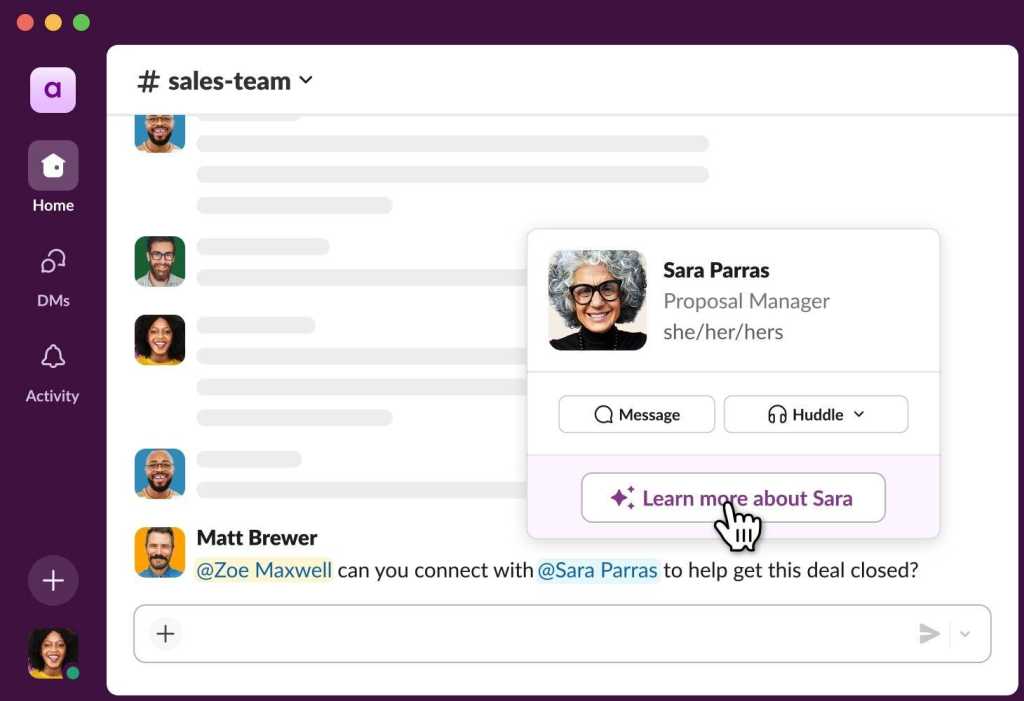
“We’re working on ‘profile summaries.’ At large companies like Salesforce, I get DMs from people I don’t know. I mouse over — just name and title, which doesn’t help. We added a ‘Tell me more about person’ button. It’ll go off and we’ve prompted it to be positive and look at public channels. It writes a positive CV about their recent work and accomplishments.

“It’s not looking at direct messages and builds trust in the system. That’s what we’re working on — discovery in context of how you already use Slack, but also trust building.

Slack AI-based profile summaries

Slack wants to use AI tools to help users learn more about colleagues they don’t know.

Slack

Do you see Slack as a communication layer for agents to talk and collaborate? “Absolutely. I think we have a continued role as a communication layer, but the emerging role for Slack is as the agent command center for users within teams and companies. Tasks are orchestrated and executed by agents on behalf of users.

“I look at AI-native companies for inspiration — Cursor, ElevenLabs, Vercel — they’re putting their agents in Slack because it makes sense. It’s a natural place.

“MCP and agent protocols are very exciting. I think Slack can be an MCP server and an MCP client. We’re working on the server part, but we could be an MCP client for other MCP servers on the desktop or in the browser.”

How do you get users to adopt and understand new AI features in Slack? “I’ll speak openly about what’s been a challenge for us, which is discovery. It’s something we’re spending time on — myself and Ethan [Eismann], our head of design.

“As we add more to Slack, we do not want to mess up the core communication experience. We need users to discover these things in their normal workflow in a non-distractive way that creates value, builds trust, then kicks out to deeper use.

“Gemini does this well — they make recommendations within the product, you try it, then kick out to dedicated Gemini experiences. You discover it, then go into a more dedicated experience.”

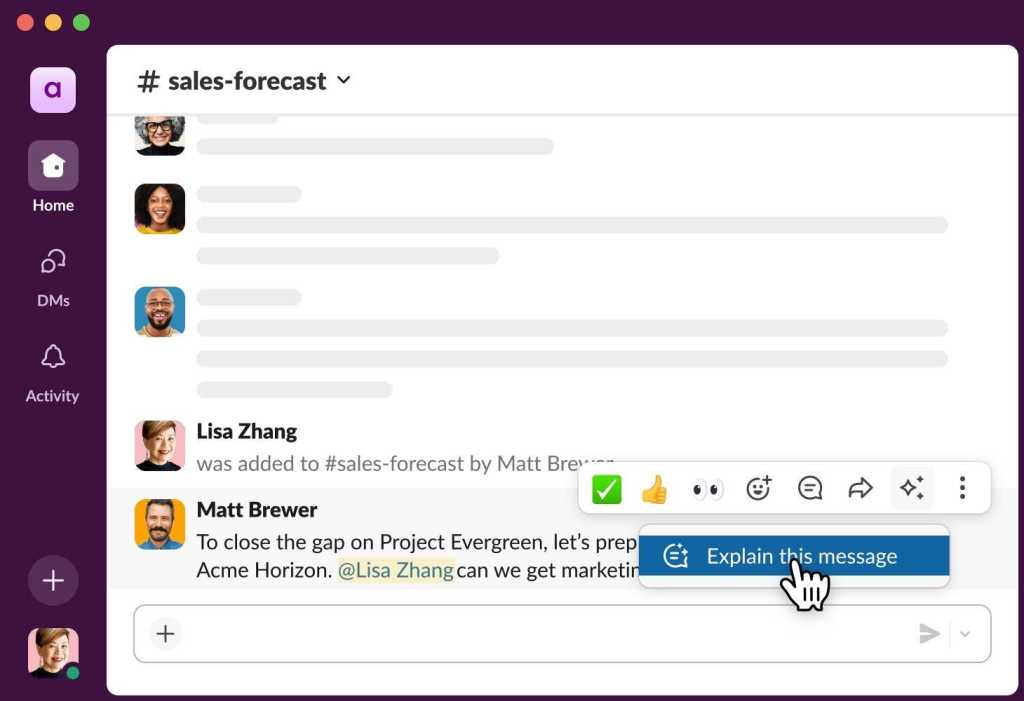
Any other cool features coming soon? “There’s one, AI Explain. As a product person, I get pulled into incident channels all the time. When something’s wrong with Slack, there’ll be an incident commander, engineers. I literally don’t know what they’re talking about.

“When I look at messages with acronyms I don’t know, if I mouse over a message, we now have little stars on it. If I click it, it takes that message, all the ones around it, smartly breaks it apart into searches, executes searches, and comes back with an explanation for me.

“That would have been like 10 searches from my past. That’s a great candidate for launching into an agentic experience. I got an explanation, now let’s say I want to take a next logical turn. That’s where we can train users that Slack’s a lot more than just communication.”

Slack AI Explain

With Ai Explain, Slack can help users better understand messages and context.

Slack