
Category: Artificial Intelligence, Browsers, Generative AI

Atlassian staking a claim in the AI browser space with acquisition of a developer of AI-powered browsers

Industry interest has been piqued by AI browsers, which promote the idea that users can organize everything all in one place, instead of in multiple disparate tabs, and call on the assistance of AI agents to help.

Atlassian is making a play in this nascent space, with plans to acquire The Browser Company of New York, developer of AI browsers Dia and Arc, for $610 million. Other early entrants in this space include Perplexity’s Comet, Andi, Bagoodex, Komo, and You.com; OpenAI is also rumored to be working on an AI browser.

It’s an interesting move by a major player, analysts say, since many still struggle to understand just what AI browsers are and what they can do.

“They’re going for a niche here, but it’s a valuable niche, because there’s a lot of value in delivering productivity improvements to enterprise workflows,” said Brian Jackson, principal research director at Info-Tech Research Group.

Transforming browsers from ‘bystanders’ to AI-packed assistants

From Atlassian’s perspective, today’s browsers weren’t built for work, but rather for browsing, and each open tab “represents a task that needs to get done.” This results in a “forest of tabs,” Atlassian CEO Mike Cannon-Brookes wrote in a blog post. Those tabs, he said, are “overwhelmingly” SaaS applications and documents.

“Your current browser wasn’t designed to help you with anything,” he noted. “It was designed in an era before SaaS and well before the current AI revolution.”

He called the traditional browser a “bystander” in workflow, with no awareness or understanding of context and priorities, treating every tab the same without connecting tools.

On the other hand, he said, the Arc browser has “reimagined” work with SaaS apps, while Dia has made AI, chat, skills, and memory a “core part” of the browsing experience.

Dia, which is now in early access, essentially allows users to chat with their tabs, write with the help of in-line copy editors, and consult with tutors, personal assistants, and customized shopping agents. Arc, which is available for download for Windows and Mac, adjusts to how users browse, allows them to customize their dashboards, and organizes everything they do online in one space.

As Cannon-Brookes noted, by bringing Dia and Arc into Atlassian, “we have the potential to change how one billion knowledge workers use AI to get work done in their browser.”

AI browsers have more context awareness

Info-Tech’s Jackson pointed out that, traditionally, users open Salesforce in one browser tab, an ERP in another tab, and a Microsoft Teams video conference in yet another. “The browser isn’t aware of that,” he said. “It’s just sort of serving as this blank slate.”

That’s the “magic” that AI browsers can bring, he said: it could be able to connect the data between email and various applications and workflows, and save users time dealing with all the tedious things they need to do between various systems.

“Now suddenly you’re looking at the browser as an operating system, and you’re launching all these different applications hosted within it, and you start to see that this is really an area where a lot of work is done,” said Jackson.

These types of browser could potentially direct users to the next steps in workflows and enable agents to talk to enterprise software systems and automate tasks involving multiple systems. Also, Jackson posited, it could filter out distractions (such as nudging you when you’ve visited Bluesky for the fifth time that day).

“You can think about all the managerial data that we can get out of that browser interaction,” he added.

But are there real enterprise use cases for AI browsers?

Still, this is very early, experimental days for AI browsers, analysts note.

“For me, they’re still a little bit of a head scratcher,” said Jason Andersen, VP and principal analyst at Moor Insights & Strategy. “There are just certain tasks in a browser that people are so used to now.”

For instance, you could ask agents to organize your numerous open tabs, “but you can probably do that quicker yourself,” he noted.

Also, many current browsers are built on the free, open-source Chromium project from Google, and Chrome has a lot of “really cool extensions” and critical security integrations.

“[With AI browsers] you’re losing some of the cooler functionality of the Microsoft Edge browsers, Safari or Chrome,” said Andersen. AI browsers are “neat, you can see potential, an interesting proof of technology, but are they going to get wide adoption? Probably not — now.”

Jackson agreed that it is a “greener technology.” Also, he added, “let’s be honest, the Chromes and Edges of the world, they have their market, there’s not really too many compelling reasons to go and use other things.”

Generalist and traditional players will continue to be the norm, and it will likely be a “big challenge” for Atlassian to break into this type of market and sell customers on the value of changing web browsers from whatever free option they’re already using, he added.

“It’s not really a convention that exists right now,” said Jackson, “so they have that uphill battle of change management and getting everybody aware of this new approach to work.”

Atlassian and others trying to see what sticks

So in the grand scheme of things, the question is: Why fix something (the traditional browser) that isn’t broken?

“Natural language is a very powerful concept to users,” said Andersen. “It’s prompting a lot of vendors to look at ‘How can we inject more natural language into different types of interfaces?’”

For instance, with command line interface (CLI) tools, with natural language inputs users don’t need to have intimate knowledge of command syntax; they can simply type in directions.

Whatever Atlassian and others come up with could be a “killer app for an agentic browser” for very specific groups or niche users, Andersen acknowledged. But ultimately, he said, “[we’re] still in an age of experimentation and seeing what works and what sticks.”
Hands on: An early look at Comet — and how AI browsers could change the internet

The next browser revolution — this time with an AI interface — is just around the corner. At least, that’s how OpenAI, The Browser Company, and Perplexity see it. 

These companies are all developing AI browsers designed to do an even better job of presenting information available on the web.

Perplexity’s Comet is among the earliest such browsers. And once users latch onto it, using Google’s Chrome will feel like using a Walkman. (That’s how Perplexity sees it, anyway.)

To cut through the hype, Computerworld tested an early version of Comet to understand how AI could change browsing in much the same way Netscape shift the online landscape three decades ago.

Comet, which is only available for now by invitation only, uses AI’s best attributes to cut down the manual slog of clicking through links, creating tabs, finding files, and completing web-based work. The centerpiece is a built-in assistant, where users can type in search queries or ask the browser to complete tasks. A chatbot pops up in a side panel of the browser, while the main window shows web pages.

The goal was to compare how an AI-powered web browser and a generic browser would complete the same task. I tested an early version of Comet, with Perplexity promising to  add more functionality over time.

Writing emails

First, I connected Comet to my Gmail account; that allowed the browser chatbot to list and summarize my latest emails. The chatbot was also able to auto-compose and send an email from the Gmail account and it could search through emails by broadening the context beyond just keywords. (Typical Gmail searches look for specific words.)

The AI browser saved time and effort from the conventional click-through process of composing and sending email.

Automatically create tabs

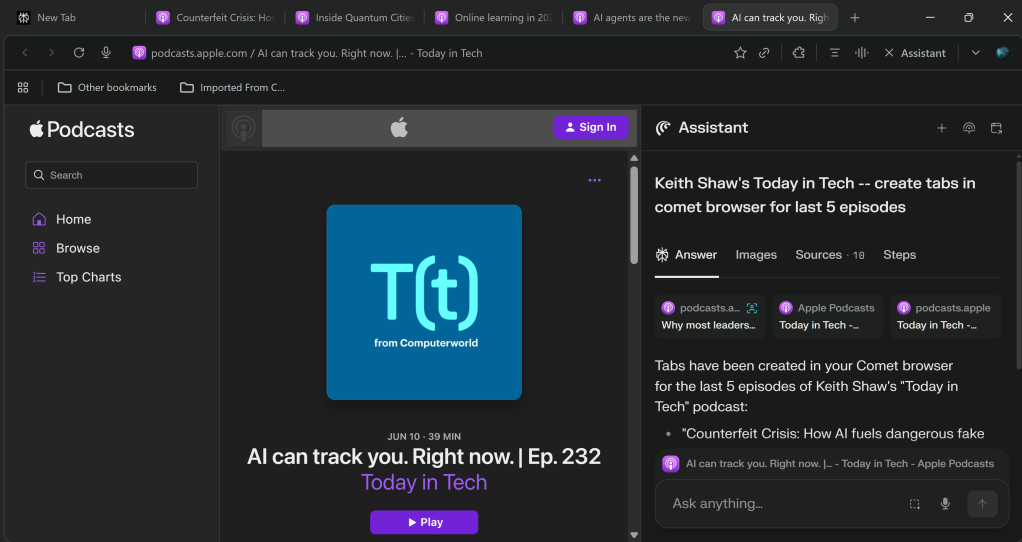
Even better was Comet’s ability to automatically create multiple tabs based on queries to the AI assistant.

Using this query, “Keith Shaw’s Today in Tech — create tabs in Comet browser for last 5 episodes” delivered as promised. It automatically created five tabs linking to Apple Podcasts of the most recent Today in Tech episodes, which is hosted by my Foundry colleague Keith Shaw.

Comet browser tabs

Comet browser used AI to create five browser tabs linking to five recent episodes of Today in Tech.

Agam Shah/Foundry

The AI assistant used reasoning to determine the most recent episodes and browsed the web to find them. The automation saved time compared to the conventional browsing experience of manually determining the last five episodes and finding links via Google search.

Create a shopping cart with one click

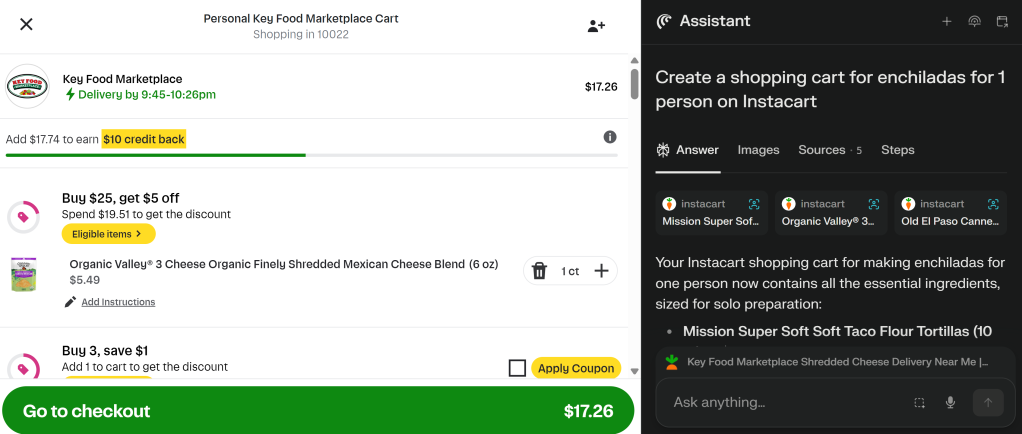
Similarly, the query “Create a shopping cart for enchiladas for 1 person on Instacart” automated the creation of a shopping cart on Instacart. It determined that the enchilada was for one person, identified six ingredients, browsed nearby stores, and automatically created a shopping cart. (The checkout and use of coupons required a manual process.)

The AI assistant also followed up by providing directions on how to make enchiladas with the ingredients purchased on Instacart. A typical browsing experience would require knowing the ingredients and browsing through multiple stores to see whether the items were in stock. The automated experience using Comet was a real time saver.

Comet browser AI and Instacart shopping cart

The Comet browser AI assistant filled up an Instacart shopping cart with ingredients for enchiladas.

Agam Shah/Foundry

Automating productivity

Comet’s AI features can also summarize, edit, and suggest improvements to documents. A few weeks ago, my martial arts instructor asked me to document the belt syllabus of Nintai, an eclectic martial art with cross-training in Korean and Japanese styles. 

Creating the syllabus is proving to be a highly involved manual task and includes putting together information scattered through different files. I wanted to see whether Comet would help me automate the process.

I loaded the brown-belt syllabus from a document in Google Drive in the browser. The AI was able to summarize the text and provide suggestions to modify the document. 

Furthermore, the suggestions drew context from references to Nintai and my instructor in my browsing and email history. The AI also summarized videos about the style, which improved the document even further. 

I also asked the Comet chatbot to find documents related to Nintai in my Google Drive. Comet made an attempt, and it was fascinating to see how AI automated the entire browsing process.

The browser window showed in real-time Comet trying multiple ways to access and open files to determine the content, which would help locate files related to Nintai’s syllabus. It couldn’t open the files, but it provided a hint at how AI browsers in the future could understand documents and boost productivity.

Final thoughts

Comet isn’t perfect and retains the traditional manual browsing experience (because it’s built on Chromium). It did take me a while to get used to a AI-assisted browsing and filling up shopping carts, much like the first time I sat in a Waymo. But Comet is still in beta and will likely mature.

OpenAI has teased a possible web browser of its own (the latest speculation is it’ll be called “Aura” and arrive this summer), and is already planning an AI-powered productivity suite.

Meanwhile, The Browser Company’s Dia is available for download for Mac users on a waitlist. Dia was introduced after the company ditched its conventional Arc browser, which was known for its slick design but deemed irrelevant in the AI era.

Who knows what will happen with Apple’s Safari, given the company’s slow start on AI? A Gemini add-on isn’t available for Chrome, and Firefox, Chrome and Opera will also need AI extensions. But it seems likely that conventional browsers without AI features won’t survive what’s coming.