
Month: March 2025

Android versions: A living history from 1.0 to 16

What a long, strange trip it’s been.

From its inaugural release to today, Android has transformed visually, conceptually and functionally — time and time again. Google’s mobile operating system may have started out scrappy, but holy moly, has it ever evolved.

Here’s a fast-paced tour of Android version highlights from the platform’s birth to present. (Feel free to skip ahead if you just want to see what’s new in the most recent Android 15 update and the still-under-development Android 16 release.)

[ Download our editors’ PDF Android business smartphones enterprise buyer’s guide today! ]

Android versions 1.0 to 1.1: The early days

Android made its official public debut in 2008 with Android 1.0 — a release so ancient it didn’t even have a cute codename.

Things were pretty basic back then, but the software did include a suite of early Google apps like Gmail, Maps, Calendar, and YouTube, all of which were integrated into the operating system — a stark contrast to the more easily updatable standalone-app model employed today.

width="700" height="358" sizes="(max-width: 700px) 100vw, 700px">

The Android 1.0 home screen and its rudimentary web browser (not yet called Chrome).

T-Mobile

Android version 1.5: Cupcake

With early 2009’s Android 1.5 Cupcake release, the tradition of Android version names was born. Cupcake introduced numerous refinements to the Android interface, including the first on-screen keyboard — something that’d be necessary as phones moved away from the once-ubiquitous physical keyboard model.

Cupcake also brought about the framework for third-party app widgets, which would quickly turn into one of Android’s most distinguishing elements, and it provided the platform’s first-ever option for video recording.

width="700" height="480" sizes="(max-width: 700px) 100vw, 700px">

Cupcake was all about the widgets.

Android Police

Android version 1.6: Donut

Android 1.6, Donut, rolled into the world in the fall of 2009. Donut filled in some important holes in Android’s center, including the ability for the OS to operate on a variety of different screen sizes and resolutions — a factor that’d be critical in the years to come. It also added support for CDMA networks like Verizon, which would play a key role in Android’s imminent explosion.

width="720" height="491" sizes="(max-width: 720px) 100vw, 720px">

Android’s universal search box made its first appearance in Android 1.6.

Google

Android versions 2.0 to 2.1: Eclair

Keeping up the breakneck release pace of Android’s early years, Android 2.0, Eclair, emerged just six weeks after Donut; its “point-one” update, also called Eclair, came out a couple months later. Eclair was the first Android release to enter mainstream consciousness thanks to the original Motorola Droid phone and the massive Verizon-led marketing campaign surrounding it.

Verizon’s “iDon’t” ad for the Droid.

The release’s most transformative element was the addition of voice-guided turn-by-turn navigation and real-time traffic info — something previously unheard of (and still essentially unmatched) in the smartphone world. Navigation aside, Eclair brought live wallpapers to Android as well as the platform’s first speech-to-text function. And it made waves for injecting the once-iOS-exclusive pinch-to-zoom capability into Android — a move often seen as the spark that ignited Apple’s long-lasting “thermonuclear war” against Google.

width="700" height="494" sizes="(max-width: 700px) 100vw, 700px">

The first versions of turn-by-turn navigation and speech-to-text, in Eclair.

Google

Android version 2.2: Froyo

Just four months after Android 2.1 arrived, Google served up Android 2.2, Froyo, which revolved largely around under-the-hood performance improvements.

Froyo did deliver some important front-facing features, though, including the addition of the now-standard dock at the bottom of the home screen as well as the first incarnation of Voice Actions, which allowed you to perform basic functions like getting directions and making notes by tapping an icon and then speaking a command.

width="700" height="532" sizes="(max-width: 700px) 100vw, 700px">

Google’s first real attempt at voice control, in Froyo.

Google

Notably, Froyo also brought support for Flash to Android’s web browser — an option that was significant both because of the widespread use of Flash at the time and because of Apple’s adamant stance against supporting it on its own mobile devices. Apple would eventually win, of course, and Flash would become far less common. But back when it was still everywhere, being able to access the full web without any black holes was a genuine advantage only Android could offer.

Android version 2.3: Gingerbread

Android’s first true visual identity started coming into focus with 2010’s Gingerbread release. Bright green had long been the color of Android’s robot mascot, and with Gingerbread, it became an integral part of the operating system’s appearance. Black and green seeped all over the UI as Android started its slow march toward distinctive design.

width="700" height="400" sizes="(max-width: 700px) 100vw, 700px">

It was easy being green back in the Gingerbread days.

JR Raphael / IDG

Android 3.0 to 3.2: Honeycomb

2011’s Honeycomb period was a weird time for Android. Android 3.0 came into the world as a tablet-only release to accompany the launch of the Motorola Xoom, and through the subsequent 3.1 and 3.2 updates, it remained a tablet-exclusive (and closed-source) entity.

Under the guidance of newly arrived design chief Matias Duarte, Honeycomb introduced a dramatically reimagined UI for Android. It had a space-like “holographic” design that traded the platform’s trademark green for blue and placed an emphasis on making the most of a tablet’s screen space.

width="700" height="638" sizes="(max-width: 700px) 100vw, 700px">

Honeycomb: When Android got a case of the holographic blues.

JR Raphael / IDG

While the concept of a tablet-specific interface didn’t last long, many of Honeycomb’s ideas laid the groundwork for the Android we know today. The software was the first to use on-screen buttons for Android’s main navigational commands; it marked the beginning of the end for the permanent overflow-menu button; and it introduced the concept of a card-like UI with its take on the Recent Apps list.

Android version 4.0: Ice Cream Sandwich

With Honeycomb acting as the bridge from old to new, Ice Cream Sandwich — also released in 2011 — served as the platform’s official entry into the era of modern design. The release refined the visual concepts introduced with Honeycomb and reunited tablets and phones with a single, unified UI vision.

ICS dropped much of Honeycomb’s “holographic” appearance but kept its use of blue as a system-wide highlight. And it carried over core system elements like on-screen buttons and a card-like appearance for app-switching.

width="700" height="533" sizes="(max-width: 700px) 100vw, 700px">

The ICS home screen and app-switching interface.

JR Raphael / IDG

Android 4.0 also made swiping a more integral method of getting around the operating system, with the then-revolutionary-feeling ability to swipe away things like notifications and recent apps. And it started the slow process of bringing a standardized design framework — known as “Holo” — all throughout the OS and into Android’s app ecosystem.

Android versions 4.1 to 4.3: Jelly Bean

Spread across three impactful Android versions, 2012 and 2013’s Jelly Bean releases took ICS’s fresh foundation and made meaningful strides in fine-tuning and building upon it. The releases added plenty of poise and polish into the operating system and went a long way in making Android more inviting for the average user.

Visuals aside, Jelly Bean brought about our first taste of Google Now — the spectacular predictive-intelligence utility that’s sadly since devolved into a glorified news feed. It gave us expandable and interactive notifications, an expanded voice search system, and a more advanced system for displaying search results in general, with a focus on card-based results that attempted to answer questions directly.

Multiuser support also came into play, albeit on tablets only at this point, and an early version of Android’s Quick Settings panel made its first appearance. Jelly Bean ushered in a heavily hyped system for placing widgets on your lock screen, too — one that, like so many Android features over the years, quietly disappeared a couple years later.

width="700" height="533" sizes="(max-width: 700px) 100vw, 700px">

Jelly Bean’s Quick Settings panel and short-lived lock screen widget feature.

JR Raphael / IDG

Android version 4.4: KitKat

Late-2013’s KitKat release marked the end of Android’s dark era, as the blacks of Gingerbread and the blues of Honeycomb finally made their way out of the operating system. Lighter backgrounds and more neutral highlights took their places, with a transparent status bar and white icons giving the OS a more contemporary appearance.

Android 4.4 also saw the first version of “OK, Google” support — but in KitKat, the hands-free activation prompt worked only when your screen was already on and you were either at your home screen or inside the Google app.

The release was Google’s first foray into claiming a full panel of the home screen for its services, too — at least, for users of its own Nexus phones and those who chose to download its first-ever standalone launcher.

width="700" height="579" sizes="(max-width: 700px) 100vw, 700px">

The lightened KitKat home screen and its dedicated Google Now panel.

JR Raphael / IDG

Android versions 5.0 and 5.1: Lollipop

Google essentially reinvented Android — again — with its Android 5.0 Lollipop release in the fall of 2014. Lollipop launched the still-present-today Material Design standard, which brought a whole new look that extended across all of Android, its apps and even other Google products.

The card-based concept that had been scattered throughout Android became a core UI pattern — one that would guide the appearance of everything from notifications, which now showed up on the lock screen for at-a-glance access, to the Recent Apps list, which took on an unabashedly card-based appearance.

width="700" height="578" sizes="(max-width: 700px) 100vw, 700px">

Lollipop and the onset of Material Design.

JR Raphael / IDG

Lollipop introduced a slew of new features into Android, including truly hands-free voice control via the “OK, Google” command, support for multiple users on phones and a priority mode for better notification management. It changed so much, unfortunately, that it also introduced a bunch of troubling bugs, many of which wouldn’t be fully ironed out until the following year’s 5.1 release.

Android version 6.0: Marshmallow

In the grand scheme of things, 2015’s Marshmallow was a fairly minor Android release — one that seemed more like a 0.1-level update than anything deserving of a full number bump. But it started the trend of Google releasing one major Android version per year and that version always receiving its own whole number.

Marshmallow’s most attention-grabbing element was a screen-search feature called Now On Tap — something that, as I said at the time, had tons of potential that wasn’t fully tapped. Google never quite perfected the system and ended up quietly retiring its brand and moving it out of the forefront the following year.

width="700" height="605" sizes="(max-width: 700px) 100vw, 700px">

Marshmallow and the almost-brilliance of Google Now on Tap.

JR Raphael / IDG

Android 6.0 did introduce some stuff with lasting impact, though, including more granular app permissions, support for fingerprint readers, and support for USB-C.

Android versions 7.0 and 7.1: Nougat

Google’s 2016 Android Nougat releases provided Android with a native split-screen mode, a new bundled-by-app system for organizing notifications, and a Data Saver feature. Nougat added some smaller but still significant features, too, like an Alt-Tab-like shortcut for snapping between apps.

width="700" height="460" sizes="(max-width: 700px) 100vw, 700px">

Android 7.0 Nougat and its new native split-screen mode.

JR Raphael / IDG

Perhaps most pivotal among Nougat’s enhancements, however, was the launch of the Google Assistant — which came alongside the announcement of Google’s first fully self-made phone, the Pixel, about two months after Nougat’s debut. The Assistant would go on to become a critical component of Android and most other Google products and is arguably the company’s foremost effort today.

Android version 8.0 and 8.1: Oreo

Android Oreo added a variety of niceties to the platform, including a native picture-in-picture mode, a notification snoozing option, and notification channels that offer fine control over how apps can alert you.

width="700" height="613" sizes="(max-width: 700px) 100vw, 700px">

Oreo adds several significant features to the operating system, including a new picture-in-picture mode.

JR Raphael / IDG

The 2017 release also included some noteworthy elements that furthered Google’s goal of aligning Android and Chrome OS and improving the experience of using Android apps on Chromebooks, and it was the first Android version to feature Project Treble — an ambitious effort to create a modular base for Android’s code with the hope of making it easier for device-makers to provide timely software updates.

Android version 9: Pie

The freshly baked scent of Android Pie, a.k.a. Android 9, wafted into the Android ecosystem in August of 2018. Pie’s most transformative change was its hybrid gesture/button navigation system, which traded Android’s traditional Back, Home, and Overview keys for a large, multifunctional Home button and a small Back button that appeared alongside it as needed.
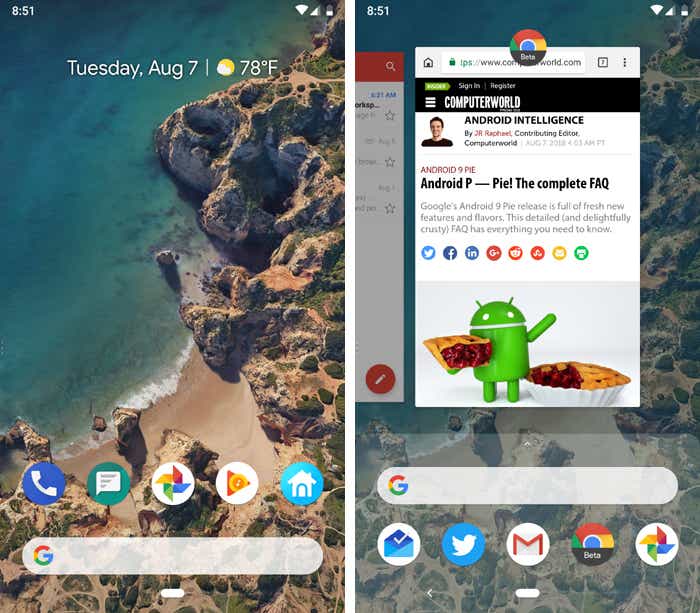
android versions pie

Android 9 introduced a new gesture-driven system for getting around phones, with an elongated Home button and a small Back button that appears as needed.

JR Raphael / IDG

Pie included some noteworthy productivity features, too, such as a universal suggested-reply system for messaging notifications, a new dashboard of Digital Wellbeing controls, and more intelligent systems for power and screen brightness management. And, of course, there was no shortage of smaller but still-significant advancements hidden throughout Pie’s filling, including a smarter way to handle Wi-Fi hotspots, a welcome twist to Android’s Battery Saver mode, and a variety of privacy and security enhancements.

Android version 10

Google released Android 10 — the first Android version to shed its letter and be known simply by a number, with no dessert-themed moniker attached — in September of 2019. Most noticeably, the software brought about a totally reimagined interface for Android gestures, this time doing away with the tappable Back button altogether and relying on a completely swipe-driven approach to system navigation.

Android 10 packed plenty of other quietly important improvements, including an updated permissions system with more granular control over location data along with a new system-wide dark theme, a new distraction-limiting Focus Mode, and a new on-demand live captioning system for any actively playing media.
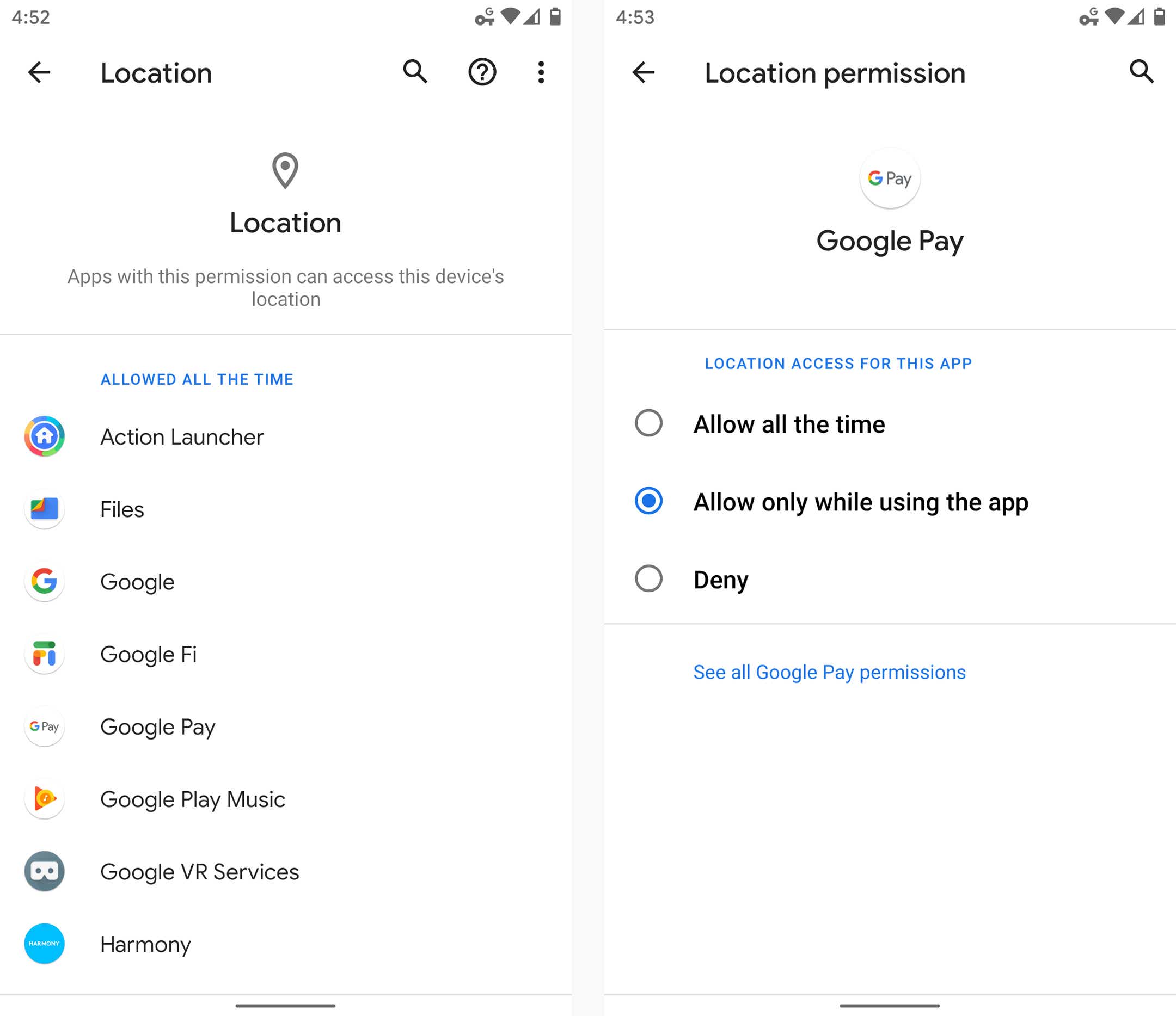
android versions 10 privacy

Android 10’s new privacy permissions model adds some much-needed nuance into the realm of location data.

JR Raphael / IDG

Android version 11

Android 11, launched at the start of September 2020, was a pretty substantial Android update both under the hood and on the surface. The version’s most significant changes revolve around privacy: The update built upon the expanded permissions system introduced in Android 10 and added in the option to grant apps location, camera, and microphone permissions only on a limited, single-use basis.

Android 11 also made it more difficult for apps to request the ability to detect your location in the background, and it introduced a feature that automatically revokes permissions from any apps you haven’t opened lately. On the interface level, Android 11 included a refined approach to conversation-related notifications along with a new streamlined media player, a new Notification History section, a native screen-recording feature, and a system-level menu of connected-device controls.
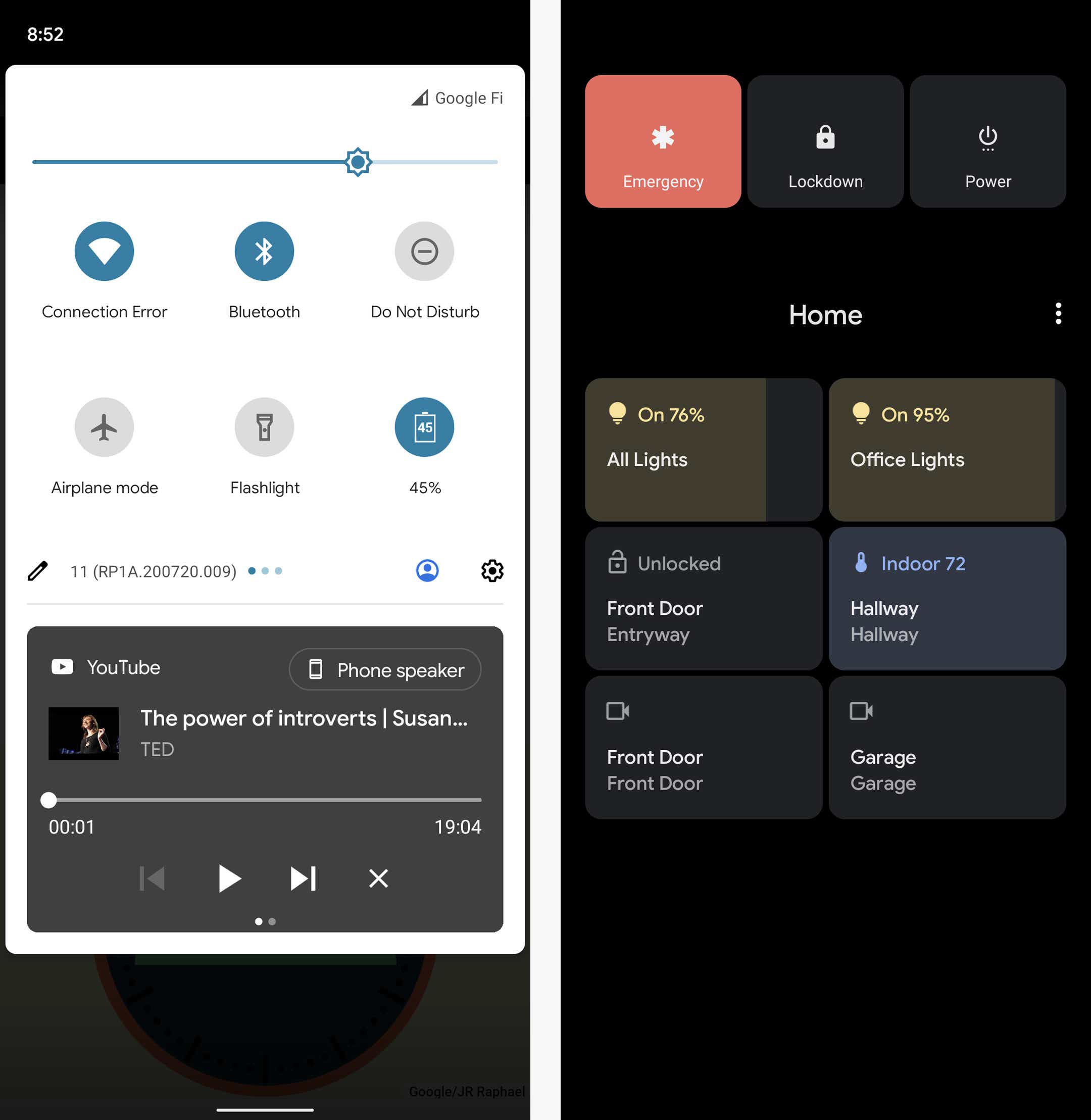
android versions android 11 media player connected controls

Android 11’s new media player appears as part of the system Quick Settings panel, while the new connected-device control screen comes up whenever you press and hold your phone’s physical power button.

JR Raphael / IDG

Android version 12

Google officially launched the final version of Android 12 in October 2021, alongside the launch of its Pixel 6 and Pixel 6 Pro phones.

In a twist from the previous several Android versions, the most significant progressions with Android 12 were mostly on the surface. Android 12 featured the biggest reimagining of Android’s interface since 2014’s Android 5.0 (Lollipop) version, with an updated design standard known as Material You — which revolves around the idea of you customizing the appearance of your device with dynamically generated themes based on your current wallpaper colors. Those themes automatically change anytime your wallpaper changes, and they extend throughout the entire operating system interface and even into the interfaces of apps that support the standard.
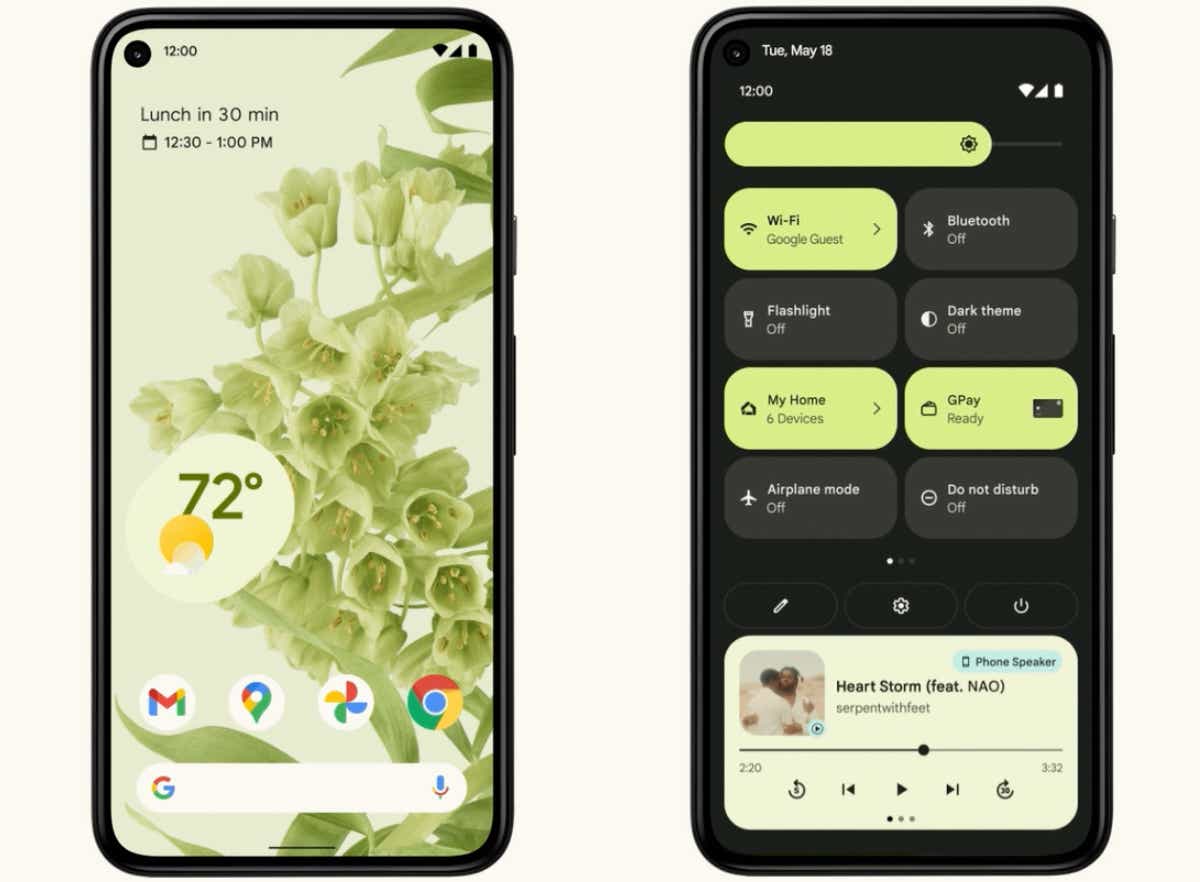
android versions android 12 material you

Android 12 ushered in a whole new look and feel for the operating system, with an emphasis on simple color customization.

Google

Surface-level elements aside, Android 12 brought a (long overdue) renewed focus to Android’s widget system along with a host of important foundational enhancements in the areas of performance, security, and privacy. The update provided more powerful and accessible controls over how different apps are using your data and how much information you allow apps to access, for instance, and it included a new isolated section of the operating system that allows AI features to operate entirely on a device, without any potential for network access or data exposure.

Android version 13

Android 13, launched in August 2022, was simultaneously one of the most ambitious updates in Android history and one of the most subtle version changes to date.

On tablets and foldable phones, Android 13 introduced a slew of significant interface updates and additions aimed at improving the large-screen Android experience — including an enhanced split-screen mode for multitasking and a ChromeOS-like taskbar for easy app access from anywhere.

Android 13 Multitasking
The new Android-13-introduced taskbar, as seen on a Google Pixel Fold phone.

Google

On regular phones, Android 13 brought about far less noticeable changes — mostly just some enhancements to the system clipboard interface, a new native QR code scanning function within the Android Quick Settings area, and a smattering of under-the-hood improvements.

Android version 14

Following a full eight months of out-in-the-open refinement, Google’s 14th Android version landed at the start of October 2023, in the midst of the company’s Pixel 8 and Pixel 8 Pro launch event.

Like the version before it, Android 14 didn’t look like much on the surface. That’s in part because of the trend of Google moving more and more toward a development cycle that revolves around smaller ongoing updates to individual system-level elements year-round — something that’s actually a significant advantage for Android users, even if it does have an awkward effect on people’s perception of progress.

But despite the subtle nature of its first impression, Android 14 delivered a fair amount of noteworthy new goodies. The software introduced a new system for dragging and dropping text between apps, for instance, as well as a number of new improvements to privacy and security — including a new settings-integrated dashboard for managing health and fitness data and a more info-rich and context-requiring system for seeing exactly why apps want access to your location. And it brought about a new set of native customization options for the Android lock screen.
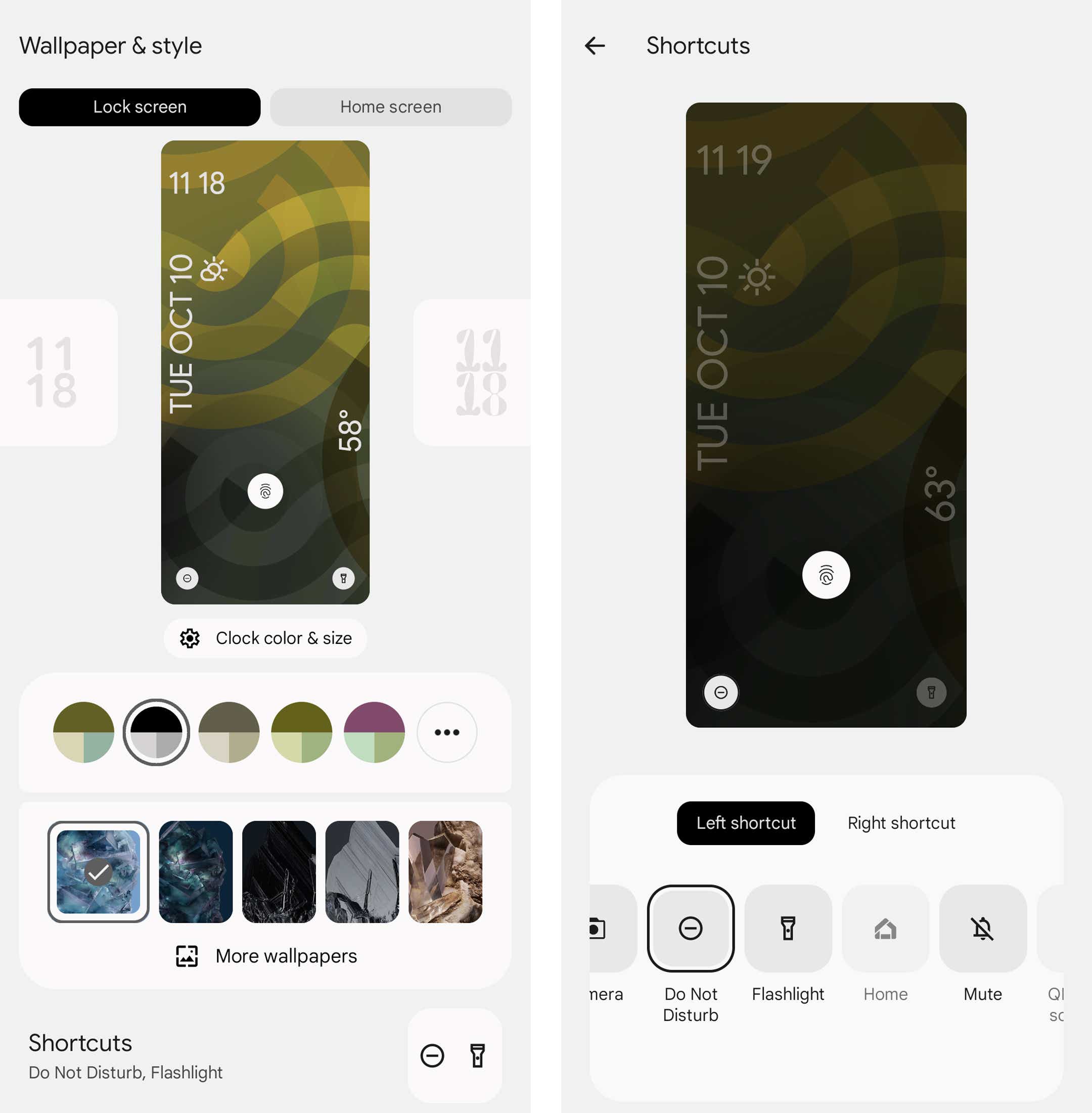
android versions android 14 lock screen

Android 14 includes options for completely changing the appearance of the lock screen as well as for customizing which shortcuts show up on it.

JR Raphael / IDG

Android version 15

Google technically released Android 15 in September 2024, but in an unusual twist, that was only the launch of the software’s raw source code. The new Android version didn’t show up even on the company’s own Pixel devices until just over a month later, in mid-October.

With Google increasingly offering Android enhancements outside of the formal operating system context, some of the more interesting updates in recent months are not connected directly to Android 15 itself. For instance, the Android Circle to Search system and new theft protection features have shown up throughout 2024 for devices running even older Android versions.

As for Android 15 itself, though, the update introduces a number of noteworthy new features — including a system-level Private Space option that lets you keep sensitive apps out of sight and accessible only with authentication. The software also further enhances the multitasking systems introduced in Android 13 with the new option to keep the large-screen-exclusive Android taskbar present at all times and the new ability to launch specific pairs of apps together into a side-by-side split-screen with a single tap.
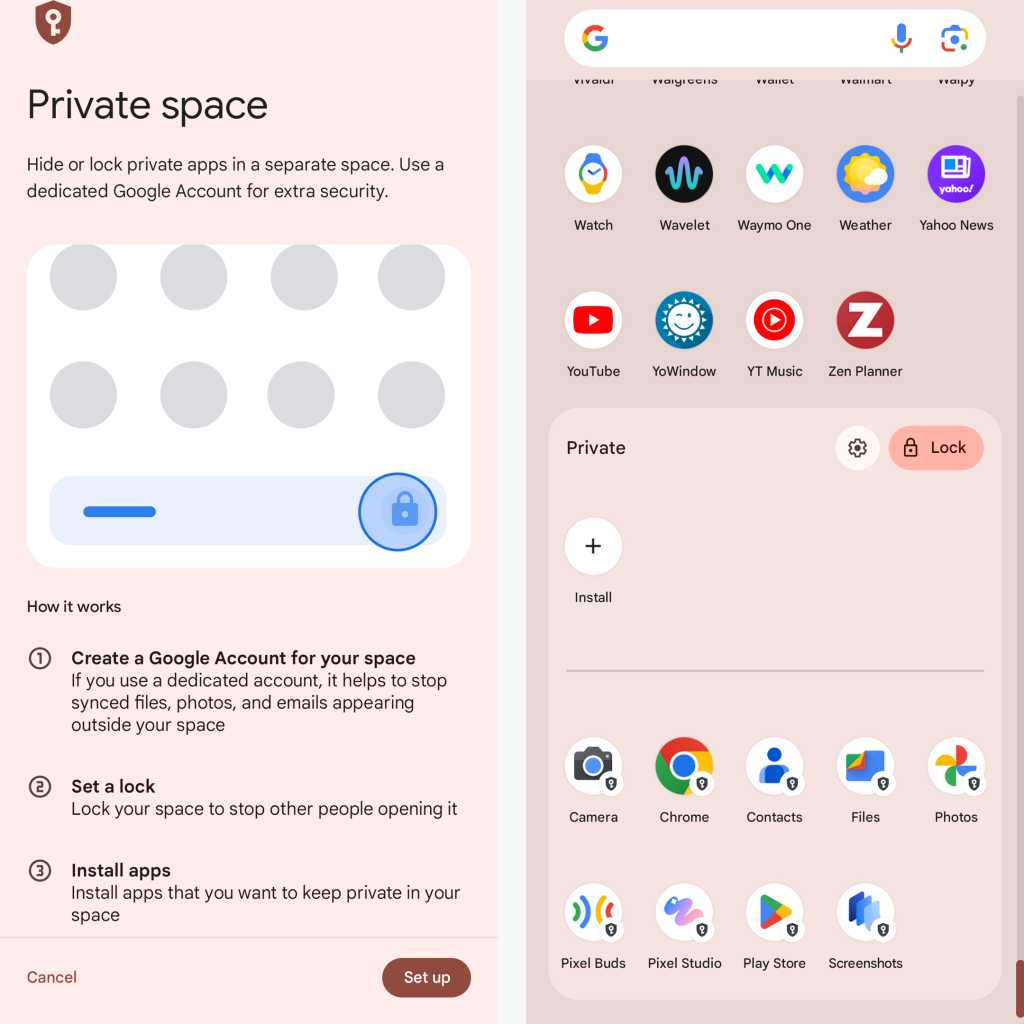
android 15 private space feature

Once you set up Android 15’s new Private Space feature, certain apps appear in a special protected — and optionally hidden — area of your app drawer.

JR Raphael / IDG

Beyond that, Android 15 includes a redesigned system volume panel, a new option to automatically reenable a device’s Bluetooth radio a day after it’s been disabled, and a Pixel-specific Adaptive Vibration feature that intelligently adjusts a phone’s vibration intensity based on the environment.
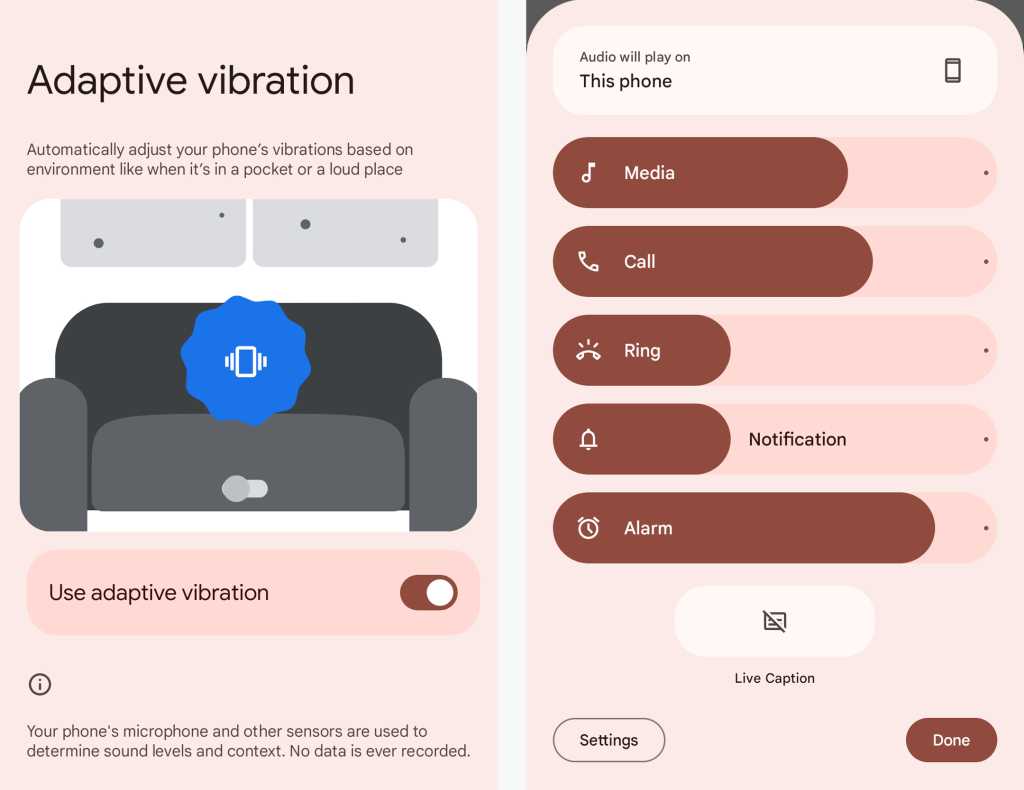
android 15 adaptive vibration controls

Adaptive Vibration and a redesigned volume panel provide welcome upgrades to the Android audio experience.

JR Raphael / IDG

Add in a new charging-time connected-device-control screen saver, a space-saving app archiving option for infrequently used apps, and a long-under-development predictive back visual that lets you see a peek at where you’re headed before you get there — and this small-seeming update is actually shaping up to be a pretty hefty update progression.

Android version 16

In a marked change from recent Android upgrade cycles, Google decided to go with two new Android versions per year as of 2025 — starting with Android 16 in the spring and then following that with another release in the fall. (It’s not entirely clear yet if the second annual update will get its own full number or act as an extension of the Android 16 moniker, but Google says it’ll be a “major” release.)

True to that promise, Android 16 catapulted into the world in early June, just before the start of summer. Somewhat confusingly, while Google has shown off or in some cases been quietly developing a slew of new features that add up to create Android’s most dramatic reinvention in ages — including a bold new design language, a smart new system for multitasking, and an ambitious desktop mode that lets you plug your phone into a monitor and use it like a computer — most of those elements aren’t included in the initial Android 16 release and will instead show up later this year.

Aside from serving as a foundation for those advances, Android 16 marks the start of Live Updates — a new type of notification designed to support persistent, ongoing alerts, similar to what Apple does with iOS’s Live Activities.
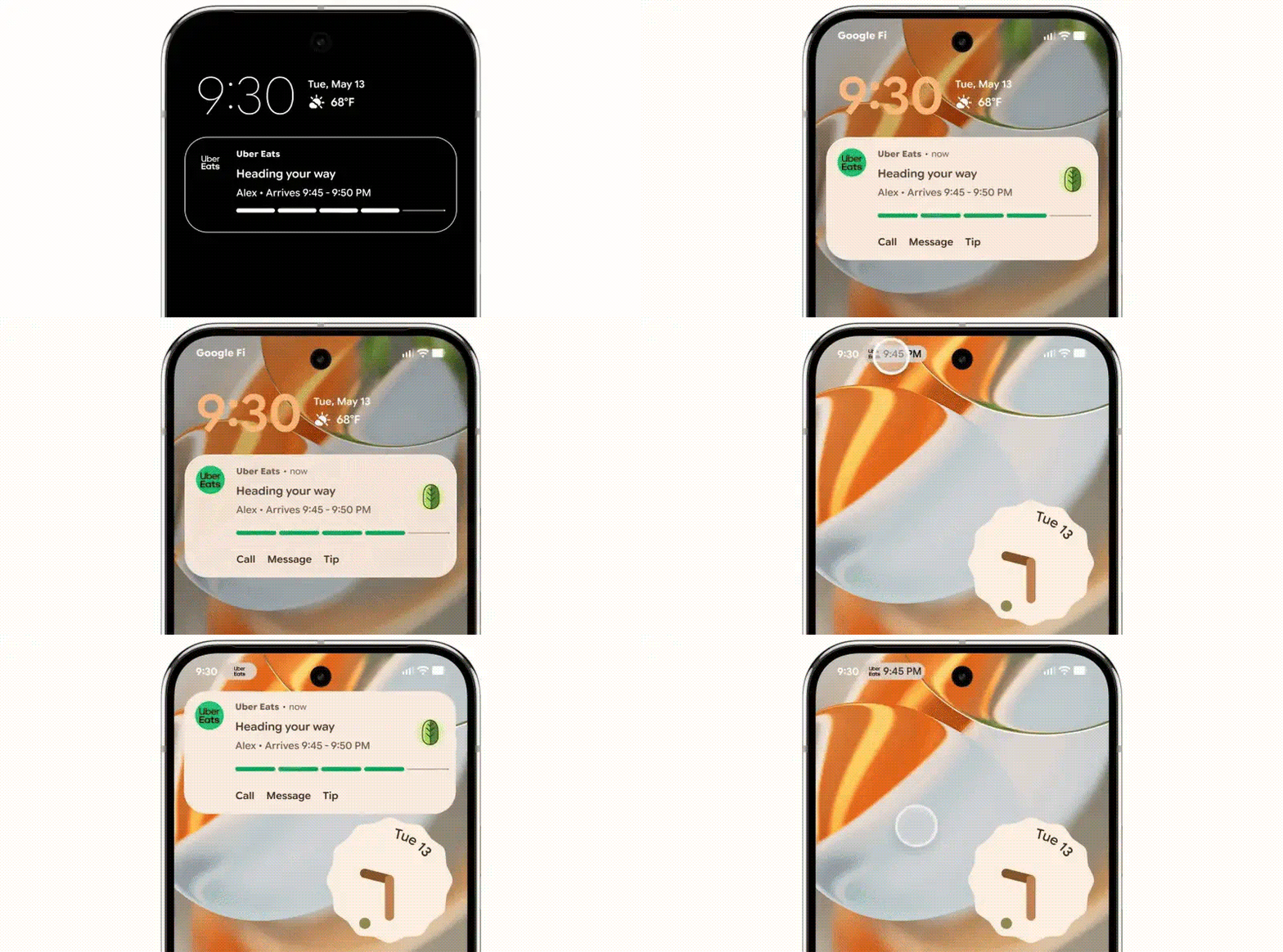
phone with animation showing live updates feature in android 16

Android 16’s Live Updates system makes it easier to keep tabs on persistent, ongoing alerts such as those from delivery apps — at least, once all of those apps begin to support it.

Google

It also adds in a more advanced standard of hearing aid support that should make a meaningful difference for anyone relying on such devices. And, perhaps most significantly, it debuts a new Advanced Protection security supermode that provides a simple new single-switch way to activate a whole slew of advisable Android security settings in one fell swoop.

Google Android 16 Advanced Protection security

The Android 16 Advanced Security control panel, as seen on a Google Pixel phone.

JR Raphael, Foundry

Combined with a sprawling series of other new security strengtheners, that makes protection seem like the true centerpiece of Android 16 — for now, at least, before the rest of Google’s still-bubbling-beneath-the-surface surprises arrive.

This article was originally published in November 2017 and most recently updated in June 2025.

Nvidia launches research center to accelerate quantum computing breakthrough

In a strategic move that could reshape the future of computing, Nvidia is establishing the Nvidia Accelerated Quantum Research Center (NVAQC) in Boston, where the worlds of quantum hardware and AI supercomputing will converge to tackle what many consider computing’s final frontier.

The initiative represents one of the most significant corporate investments in quantum computing to date, potentially accelerating the timeline to practical, real-world quantum applications.

The complete IT toolbox you need to manage Macs in the enterprise

When it comes to managing and supporting Apple devices in business and enterprise environments, the most common tool or service that comes to mind is mobile device management (MDM). While MDM is one of the most powerful and necessary tools Apple IT pros need — and getting even more powerful with the addition of generative AI — it should never be thought of as the only tool.

That’s because supporting a fleet of Macs is more complex than doing so with iPhones or iPads.

The Mac has been around a lot longer and has traditionally been a much more open device/platform. Users can install software without relying on Apple’s App Store; it’s possible to work with the underlying technology with access to tools and the command line; macOS supports scripting and automation in multiple forms; deploying content and apps to Macs can be done in multiple ways, depending on specific needs; and macOS supports multiple user accounts (network user accounts, in particular).

In a nutshell, that’s a lot to manage. With that in mind, I’ve compiled a list of 60 tools — yes, 60 — across all parts of the Mac environment that could be useful for IT admins, depending on their environment and needs.

Apple’s tools

Apple provides a number of important tools for enterprise IT, so let’s start with them. 

Support App — Support is an iOS app that walks you through troubleshooting steps for a variety of issues. It also lets you speak or chat with AppleCare. This is aimed mostly at consumers, but still has a place as a worthwhile troubleshooting tool.

AppleCare for Enterprise — As the name suggests, this is a business focused version of Apple’s standard AppleCare support and warranty extension service.

Disk Utility — Built into macOS, Disk Utility lets you view the various volumes and partitions and drives (internal and external) connected to a given Mac. It allows you to edit, reformat and attempt to repair them if there’s an issue with a particular device or volume. It’s a real workhorse and the first tool to reach for to deal with storage issues.

Apple Business Manager — Apple Business Manager is the hub for creating and managing users based on an external directory like Microsoft Entra ID (formerly Azure Active Directory) or Google Workspace. It also is a hub for deploying and managing devices (including for zero-touch deployment), implementing MDM, and managing other deployment tasks. Its use is essentially mandatory.

Apple Business Essentials — A stripped down version of Apple Business Manager that provides similar user and device management; it’s intended for smaller organizations.

AppleCare Enterprise — Is another one where the name says it all. This is a subscription that allows you to get business and enterprise level support, including priority on-site service and next-day device replacement. 

Activity Manager — Preinstalled on all Macs, this app does exactly what it says: it shows you real-time information on the apps and service running on Mac, and allows you to kill processes if necessary.

Pkgbuild, productbuild (and hdiutil ) — Pkgbuild is a command line utility for creating package files that can be used to deploy apps, settings and content to Apple devices. Similarly, productbuild can create installers focused on a single app with no extraneous content. Hdiutil, on the other hand, allows you to manipulate disk images.

Apple Configurator — There are two versions of this tool. One runs on Macs and configures multiple Apple device simultaneously, the other is an iPhone version that allows you to quickly enroll Macs in an MDM service.

Feedback Assistant — As you’d expect, this allows you to send feedback to Apple. It also serves a source of major news about new releases, including the full release notes for software updates.

Network and directory tools

One of the chief realities of supporting Apple devices in the enterprise is that they will need to integrate well with tools designed around a Windows-centric mindset. Apple does an excellent job making its products good multi-platform enterprise citizens, but these tools can help fill some gaps.

Parallels Mac Management/Microsoft SCCM — Parallels Mac Management is a software plug-in that allows users to manage Mac and Windows computers using Microsoft System Center Configuration Manager (SCCM). It can also be used to manage Parallels Desktop virtual machines (VMs).

NoMAD — Short for “No More Active Directory,” it describes itself as a project to create a “macOS menu bar application that provides all the functionality of being bound to AD, and more, without having to be bound.”

UMAD — UMAD (Universal MDM Approval Dialog) is open-source software that provides a custom interface to simplify migrating from one Mac MDM to another

Xcreds — XCreds enhances the Mac login window to allow users to login with Azure, Google Cloud, Okta, or any OpenID Connect passwords. XCreds verifies the user identity provider and saves tokens to the user keychain for validation that the cloud password is in sync with the local password. 

Certificate Request — Certificate Request is a utility for macOS that allows you to request and install digital certificates directly from Active Directory. It makes requesting and managing certificates a one-touch process for use in configuring wireless, Mail, VPN, and other services on macOS that require certificates issued by Active Directory.

Signing Manager — Signing Manager  provides a system for securing code and package-signing certificates, including iOS, macOS, watchOS, and iPadOS app signing without disrupting the current workflow. 

Diagnostic, maintenance, repair and optimization tools

Like most hardware, Macs and other Apple devices require periodic maintenance to perform at their best and to troubleshoot any  problems.

Atomic — This is a tool for examining a Mac’s on-board RAM and identifying problems with installed memory. Since Apple Silicon uses a unified SOC, this is more often a useful tool for Intel-based Macs. 

Techtool Pro — This is a comprehensive set of tools that support disk/volume repair and testing for underlying hardware problems.

Parallels Toolbox is a suite of 50 diagnostic tools for the Mac created by Parallels as an independent product separate from the company’s  virtualization and SCCM-integration tools. 

Disk Drill — Disk Drill is a data recovery solution for macOS and iOS.

Paragon — This is a set of suites/apps designed to detect hardware-induced problems on Apple devices and provide comprehensive disk/volume management beyond what’s available in Disk Utility. It also provides for secure data removal as well as iOS device storage management.

DiskWarrior — For decades, Disk Warrior has remained arguably the best disk and data recovery tool available for techs to use in repair and recovery efforts.

Drive Genius — Prosoft’s Drive Genius provides disk monitoring tools as well as storage management and recover options; it can also automate problem and malware detection.

DaisyDisk — DaisyDisk is a tool for visualizing the current disk usage on Macs; it can help determine what’s taking up shard drive pace and what can be removed to reclaim disk space.

Clean My Mac — MacPaw’s Clean My Mac is useful for performing all manner of maintenance tasks and fully removing unneeded apps and data to keep a Mac running at its best. It can also be used to troubleshoot problems and prevent some security threats.

Clean My Mac for Business — The enterprise version of Clean My Mac is designed to accomplish the same tasks as its consumer counterpart but for an entire fleet of Macs. It can be an adjunct to MDM or, for smaller organizations without dedicated IT staff, it can perform several key functions of MDM.

Clean My Phone — MacPaw’s Clean My Phone does the same kinds of tasks as Clean My Mac, except on the iPhone.

CCleaner — CCleaner provides a range of maintenance and support tools that are available for macOS, iOS, and other computing platforms.

Disk Clean Pro — Available in the macOS App Store, this utility provides automated monitoring and management of storage, file, and image use on a Mac. 

Mac Cleaner Pro — This tool helps visualize, manage and free up storage space on a Mac. Pear Cleaner is the companion app that allows you to do the same on an iOS device.

Malware/Threat detection tools

Cybersecurity is one of the biggest challenges IT departments face. There was a time (when Apple devices commanded so little market share) that they had “security by obscurity” because it wasn’t worth the effort for malicious actors to target them. That’s no longer the case.

Pareto Security — Pareto focuses on the small-business market with a non-invasive malware and security threat monitoring where traditional MDM might not be an available option for your small business.

Suspicious Package — A package management solution that allows you to create, edit and inspect packages. 

Intego — Intego provides a number of different security tools, including malware detection, secure device wipe, network traffic content monitoring, and VPN service.

AVG Security — AVG is a well-known player in the device and data security management. For Macs, it provides malware-detection tools and additional security features to block potential phising attacks, content blocking and firewall features.

Avast — Like others on this list, Avast provides malware detection, content filtering, accessory (webcam) blocking, and ad blocking. 

Norton 360 — Norton is a veteran of the cybersecurity battle. One of the most respected enterprise security vendors, it sports a wide range of personal, small business and enterprise security solutions for Apple and other devices. 

Bit Defender — Bit Defender is an anti-malware company focused on the small business (and consumer) markets. 

Sophos — Another veteran of the security crusade, Sophos provides enterprise malware detection.

Kanji EDR — Kandji is one of the top Apple-specific MDM providers; it’s developed a solution that uses AI to monitor device traffic for patterns of malware or a device-based security threat. It can proactively take corrective action, if possible.

Remote support tools

Remote access tools are essential in today’s IT landscape, particularly as we’re still in a time when remote work remains at relatively high levels. These tools offer various levels of remote support: Putty; Apple Remote Desktop; HelpWise; TeamViewer; GetScreen; and Apple’s Face Time. 

Deployment tools

Munki — Munki and its related tools are excellent options for deploying software and packages to Macs in an enterprise environment.

MIST — Mist is a Mac utility that automatically downloads macOS firmwares and installers.

Payload-free Package Creator — A tool for creating, inspecting and managing macOS packages.

ProfileCreator — An open-source macOS app, Profile Creator offers a way to create standard or customized configuration profiles.

InstallApplications — InstallApplications is an open-source tool that can dynamically download packages for use with InstallApplication. This is handy for DEP bootstraps, allowing you to have a significantly reduced initial package that can easily be updated without repackaging the original.

S.U.P.E.R.M.A.N. — S.U.P.E.R.M.A.N. optimizes the macOS update experience for businesses.

Onboarding tools

DFU Blaster — This tool from TwoCanoes can be used to put a Mac into DFU mode with the press of a single button and restore any version of macOS the Mac system can support.

DEP Notify — DEPNotify is a small, light-weight notification app that was designed to let your users know what’s going on during a DEP enrollment.

MDS — Also from TwoCanoes, this tool can set up and provision Macs out of the box; it sports zero-touch configuration, similar to what’s available with MDM or Apple Business Essentials. It can also manage local storage and Recovery mode/volumes. 

Backup and restore 

Erase-install — This open -ource script automates downloading macOS installers and optionally erasing or upgrading macOS in a single process.

Carbon Copy Cloner — The grandaddy of back up, restore and disk cloning, Carbon Copy Cloner from Bombich has been a trusted Mac support tools for decades. CCC Mobile Backup is the iOS sister to Carbon Copy Cloner; it the handles volume management, encryption, verification, and backup versioning.

User self-service options

Self-service options that allow users to find the answers they need on their own (and that allow IT to communicate directly with users), have become key tools as users have grown more technically literate. Responding this way saves a lot of overhead, and it gives users a safe/curated resource instead of something random they might find by searching Google or asking ChatGPT for help.

Hello-IT — Hello-IT is a set of self-support apps that can be provided by IT services to end users.

swiftDialog — Another open-source tool, swiftDialog creates user-focused messaging and notifications.

Virtualization tools

Virtualization is at a crossroads on macOS at the moment. Intel Macs could easily virtualize Windows to run Mac and Windows apps side by side. But Apple Silicon Macs, since they aren’t x86-based, pose problems. It’s possible to virtualize the ARM version of Windows and Parallels has announced an emulation feature to run x86 Windows versions, but the feature is in an early beta state at the moment. 

Virtualization can also be used to create macOS VMs for testing and related purposes. This ability continues on Apple Silicon, but there are some limitations, particularly if you need to virtualize older macOS versions.

VirtualBox — VirtualBox is Oracle’s free virtualization tool. It isn’t anywhere nearly as full featured as other options, but it avoids potential costs. There are preview builds of the software for Apple Silicon, but they currently only support running ARM-based Linux distributions. 

Parallels Desktop — Parallels makes the premier virtualization software for macOS and has even been named an authorized and trusted solution by Microsoft. The company offers various versions of Parallels Desktop, including Pro, Business and Enterprise editions that deliver varying feature sets and remote deployment and management of VMs in a business or enterprise environment. You can use Parallels to virtualize ARM versions of Windows with, as mentioned, support for x86 versions a work in progress.

VMWare Fusion — Fusions feels like the forgotten middle child of virtualization. It gets more updates than VirtualBox and can run ARM-based versions of Windows and Linux (though not macOS), but its feature set isn’t as robust as Parallels — particularly for enterprise environments.

I’ll admit that this list is quite long (and took a while to compile), but every tool here will be useful in some way to many enterprise operations, big and small. The key is to find the tools that you need as an Apple IT Pro and decide which works best in your specific environment.

Adobe is developing an agent to integrate Adobe Express with Microsoft 365

Adobe is working with Microsoft to develop an AI agent that can generate graphics and design content from within the Microsoft 365 interface.

The Adobe Express Agent, still under development, will allow users to create and embed graphics directly within productivity applications such as Word and PowerPoint, according to Aubrey Cattell, vice president for Adobe’s Creative Cloud Developer Platform and Partner Ecosystem.

The company touted the move during this week’s Adobe Summit, but has not said when the generative AI (genAI) tool would be released; it will ultimately be available to Microsoft 365 customers as a Copilot plugin. 

“We’re building it in partnership with [Microsoft] as they kind of build out their strategy for all third-party agents,” Cattell said.

The agent can create an image for the document, suggest options to generate images, or ask questions. Users can specify within the 365 chatbot interface what images they want  to embed in documents, and the tool will then generate them.

Adobe already has a cloud-based Adobe Express app, which uses generative AI (genAI) to create content for documents, flyers, social media posts and resumes. The tool runs in browsers and mobile devices. 

The Adobe Express Agent is different, as it takes cues from a Word or PowerPoint document and can understand user intent, allowing it to create “something that’s more visual here to express ideas,” Cattell said in an interview.

“You can draw the context from what’s in the document to help you generate something that’s more germane,” Cattell said.

Once users request an image, the agent relies on Adobe’s Firefly text-to-image and text-to-design generative AI model to create content. For example, users might have a concept of a social media post or an ad campaign, which can be described to the Adobe Express Agent.

“It would generate that image and you could just drag it right into your document or into your PowerPoint presentation,” Cattell said.

A basic version of Adobe Express is already available for free. (Adobe has also integrated it  into Wix for website creation, and in Box to store and edit images.)

Adobe has also shipped an Adobe Express custom GPT for ChatGPT where users can request a template using the conversational interface. But there’s an advantage to integrating the agent with the Microsoft 365 interface.

“It’s literally a Copilot to the artifacts that knowledge workers are creating — [it] is super powerful and definitely levels us up,” Cattell said.

He stressed that Adobe’s platform strategy is to “be where our users are in the places where they’re getting work done.”

Besides creating more engaging content, Adobe’s tools are designed to be safe, understanding that organizations or creators can’t afford “oops” moments, said Liz Miller, vice president and principal analyst at Constellation Research.

“These are truly agentic additions to a worker’s day,” Miller said. “For Adobe, agents are interactive, they reason, they are autonomous, they take action. This definition is wildly important, not just for Adobe but for their customers as well.”

Signal threatens to leave France if encryption backdoor required

Signal is standing its ground to protect its app’s security, threatening on Wednesday to leave France if encryption backdoor requirements are enacted, just as it said it would do in Sweden.

“Those hyping this bad law have rushed to assure French politicians that the proposal isn’t breaking encryption. Their arguments are as tedious as they are stale, as they are laughable. For those catching up, let’s review the basics: end to end encryption must only have two ends—sender and recipients. Otherwise, it is backdoored,” wrote Signal CEO Meredith Whittaker in a post on X.

“Whatever method is devised to add a third end—from a perverted PRNG in a cryptographic protocol, to vendor-provided government software grafted onto the side of secure communications that allow said government to add themselves to your chats—it rips a hole in the hull of private communications and is a backdoor.”

The Signal CEO added: “This is why, as always, Signal would exit the French market before it would comply with this law as written. At this moment especially, there is simply too much riding on Signal, on our being able to forge a future in which private communication persists, to allow such pernicious undermining.”

Whittaker shared similar thoughts when government officials in Sweden last month attempted a similar end run around encryption. 

Like all legislative bodies, the French legislators are debating various approaches to encryption and it’s not yet clear whether they will end up demanding an encryption backdoor. 

But even setting aside the French authorities’ ultimate decision, Whittaker’s argument about the cybersecurity disaster that will result from undermining encryption is valid.

“Communications don’t stay within jurisdictional boundaries, which means a hole created in France becomes a vector for anyone wanting to undermine Signal’s robust privacy guarantees anywhere,” Whittaker wrote. “Instead of contending with unbreakable math, they only have to compromise a French government employee, or the vendor-provided software used to sideload government operatives into your private chats.”

This encryption backdoor argument is also hitting many other governments globally. Apple, for example, is currently appealing an encryption backdoor demand from the UK, and the United States is chiding those same UK officials for even trying to demand an encryption backdoor. 

The underlying issue here is not limited to government encryption backdoors. If either side of an encrypted conversation is intercepted, the same problem occurs. The Ukrainian military, for example, is now fighting an aggressive phishing campaign that plants malware, oftentimes a keylogger, that bypasses the encryption even more effectively than would a backdoor.

Endpoint interception has also turned around and bitten the cyber crooks themselves. Europol officials in December stumbled on a cyberthief that cleverly used an app that made messages disappear a few minutes after being read. But, given that experienced thieves know enough to not trust other thieves, one of the recipients screen-captured a discussion about money-sharing with his colleagues. That act made all of his encrypted messages readable for law enforcement. 

Many issues with backdoors, say analysts

Analysts are concerned about the growing demands for backdoors. Aisling Dawson, digital security industry analyst at ABI Research, saw Whittaker’s post and said that many government encryption proposals “fail to display an understanding of the technical implications of such a backdoor” and that these governments “face the prospect of increasing numbers of organizations exiting their marketspace, triggering economic losses and reducing the number of security vendors within the ecosystem, or creating the potential for legal and judicial challenges to proposed regulatory action.”

Dawson also saw the encryption backdoor attempts as dangerous. 

“The use of terms like ‘side-client scanning’ within these proposals are complicating and perhaps deliberately obfuscating governments’ intentions with regard to these new proposals which is, at its core, a desire for more backdoors into vendors’ secure communications,” Dawson said. “Piercing through vendors’ cryptographic wall to create a governmental backdoor creates a hole, and it seems fantastical to believe cybercriminals and malicious attackers won’t also attempt to exploit that hole.”

Dawson also argued that there are legal issues raised by backdoors, above and beyond cybersecurity and privacy concerns.

“France’s proposal raises challenges when it comes to prospective defendants challenging any evidence obtained via surveillance through an encryption backdoor, given that the bill inhibits disclosure of any surveillance operations to defendants,” Dawson said. “This fundamentally runs against defendants’ right to hear and challenge evidence placed against them per their ECHR [European Convention on Human Rights] Article 6 fair trial rights.”

Other analysts shared similar concerns.

Fred Chagnon, principal research director at Info-Tech Research Group, said the encryption backdoor approach being debated by the legislators in France is somewhat different than what some other governments are considering.

“France wants to take a different approach with a ‘ghost participant,’ which would allow government entities to silently join encrypted conversations, basically creating a backdoor in real time,” Chagnon said. “Governments need to engage with these [encryption] providers to find a solution that doesn’t fundamentally weaken security instead of pushing for regulations that force companies to break their own encryption.”

And Anshel Sag, a principal analyst with Moor Insights & Strategy, has more general concerns about the government activities throughout Europe around encryption.

“I think this is an unsettling trend we’re starting to see from European governments, the UK’s request of Apple being a similar issue. Backdoors are inherently problematic because they simply give bad actors opportunities to take advantage of those backdoors as well,” Sag said. “Additionally, they create a false sense of security and safety that is no longer there because of the backdoor. Backdoors are simply antithetical to the security and safety that so many of these companies have built their reputations on.”

EU cracks down on Google’s search service

The European Commission has concluded that Google’s search service violates the EU Digital Markets Act (DMA) by favoring its own products and services at the expense of competitors.

The commission also considers the Google Play app store to be in breach of the DMA, partly because fees are too high and partly because developers are not allowed to steer consumers to other distribution channels.

Oliver Berthell, Google’s competition director, fired back after the decision by writing a post — “EU competition rules hurt consumers and businesses” — on the official blog The Keyword.

Google’s parent company Alphabet now risks fines of up to 10% of its global turnover, equivalent to nearly $35 billion.

EU regulators also hit out at Apple in the second of Wednesday’s two rulings.

Why you’ll speak 20 languages by Christmas

I live in the future, at least as far as language translation technology is concerned. 

During the past couple of months, I’ve spent most of my time in Italy and Mexico. During all that time, I understood Italian and Spanish — thanks to the Live Translation feature of my Ray-Ban Meta glasses.

Announced in September, “Live Translation” is based on Meta’s Llama 3.2 AI model and is currently limited to US and Canada users enrolled in Meta’s Early Access Program. 

The feature translates audible French, Spanish, and Italian into audible English in the glasses and typed English on the app — and shows the wearer’s English translated into the selected language. 

When I first arrived at the Catania airport in Sicily, I turned on Live Translation by saying, “Hey, Meta: Start Live Translation.”

The first thing I heard using this feature was airport employees directing travelers. They spoke in Sicilian-accented Italian, but I heard: “European passport holders please enter this line; all others go here.” 

From that point on, I turned on Live Translation from time to time and was able to understand simple things people might be telling me. In a few cases, I translated my own words into Italian (first speaking in English, then reading the translation in the app in Italian).

It’s not perfect. It also translates English into English (and sometimes mistranslates English to English). It can fail to translate words spoken nearby. At other times, it will translate words spoken across the room when people are talking to each other, not to me. 

Ray-Ban Meta glasses also do another neat translation trick. While using Live AI, another Early Access feature, you can look at a sign in a foreign language and ask what it means in English, and it will speak the English translation. 

Despite the language glitches, this is a clear glimpse of the future for all of us — the very near future. 

Apple AirPods

Bloomberg reported on March 13 that Apple will add live language translation to iOS 19 for AirPod users. 

According to the report, the user’s AirPods capture foreign language speech and speak the English translation into the ears of the AirPod wearer. Then, when the user speaks English, the iPhone speaker plays the translation into the foreign language via Apple’s Translate app. 

The feature is expected to be announced at Apple’s Worldwide Developers Conference (WWDC) in June and released in the fall.

The languages to be supported have not been reported, but Apple’s Translate app supports 20. And Apple is by no means first to market with language translation earbuds. 

Google Pixel Buds

Google has included live translation through its Pixel Buds and Pixel Buds Pro earbuds since October 2017. 

The feature does what I described for the Apple AirPods: It delivers translated foreign-language speech through the Pixel Buds while outputting translated English words through the phone speaker. That’s what happens in Conversation Mode. When users switch to Transcribe Mode, they can get a live transcription of the translated foreign language, which is useful for listening to business presentations, attending speeches, or watching movies. 

The Pixel Buds’ language translation feature works via the excellent Google Translate app. In Conversation Mode, it supports more than 100 languages; Transcribe Mode, however, only supports four languages: French, German, Italian, and Spanish. 

Language translation requires an Android device running Android 6.0 or later that’s Google Assistant-enabled, including non-Pixel phones. However, if you do have an advanced Pixel phone, the translation gets much better. 

Compatible Pixel phones (especially models with a Tensor processor) offer Live Translate with text messages, through the camera, in videos, and even during phone calls. 

A world of translation products

Language translation features that go in the ears come in many varieties. 

The TimeKettle WT2 Edge/W3 is highly rated. It supports 40 online languages and 13 pairs of offline languages, enabling two-way simultaneous translation that eliminates the need for alternating speech patterns. The system achieves up to 95% translation accuracy through its AI platform, according to the company. 

The Vasco Translator E1 supports an impressive 51 languages and uses 10 different AI-powered translation engines. The system allows up to 10 people to join conversations using the mobile app. 

The Pilot by Waverly Labs translates the wearer’s words to others and also translates replies back to the wearer’s language.

Smart glasses that translate are also available. 

  • The Solos AirGo 3 Smart Glasses perform real-time language translation via the SolosTranslate platform and OpenAI’s ChatGPT. 
  • Brilliant Labs’ Frame AI Glasses are open-source AR glasses that can translate languages seen in the environment, recognize images and provide information about them, and search the internet for results. The glasses use augmented reality to display translations directly in the user’s field of vision. They integrate with OpenAI, Whisper, and Perplexity technologies. 
  • TCL AR Glasses can live-translate conversations, offering an integrated heads-up display for showing the translation. 

Other form-factors exist, too, including the TimeKettle X1, K&F Concept Language Translator Device, ili Wearable Translator, Vasco Translator E1, TimeKettle WT2 Edge, and Timekettle ZERO Language Translator.

All these products demonstrate that the technology for traveling the world and being able to hold conversations, read signs and understand people in foreign languages is already here, and has been for a while. 

Going mainstream

What’s about to change is the arrival of this feature in totally mainstream products. Something like 100 million people use their Apple AirPods almost every day. Meta expects to sell more than 10 million Ray-Ban Meta glasses by the end of 2026, by which time Live Translation and Live AI will be offered to all users globally. 

What’s really happening is that we’re heading for a world in which every wearable speaker — earbuds, headphones, smart glasses, and more — will give us live language translation on command or even automatically.

The worst thing about this emerging trend is that, in the future, far fewer people will bother to learn foreign languages, relying instead on AI. 

But the upside is that language barriers between people on our planet will be essentially erased, and people will more easily understand one another. That’s got to be a good thing. 

In the meantime, live translation tech has been a radical and welcome game-changer for me as I travel the world as a digital nomad. Partnering with AI, I can speak foreign languages I never learned. 

Nvidia, xAI and two energy giants join genAI infrastructure initiative

An industry generative artificial intelligence (genAI) alliance, the AI Infrastructure Partnership (AIP), on Wednesday announced that xAI, Nvidia, GE Vernova, and NextEra Energy were joining BlackRock, Microsoft, and Global Infrastructure Partners as members. But given that the announcement specified no financial commitments or any other details, analysts doubted it would make much of a difference.

Still, even though the massive global momentum behind genAI is unlikely to be changed by the announcement, the addition of the two energy companies to the group was an implicit acknowledgement that the ever-increasing power requirements of genAI data centers need serious attention.

Scott Bickley, advisory fellow at Info-Tech Research Group, said that the massive resources behind this initiative, including Blackrock, which reported in January that it held assets worth $11.6 trillion, making it the world’s largest money manager, can make the difference.

Demand for VR headsets remains low

Sales of virtual reality (VR) headsets fell by 12% in 2024 compared to the previous year, according to a new report from analyst firm Counterpoint. The decline markers the third year in a row sales have fallen — and it is mainly on the consumer side that demand is low.

The best performer is Meta, which has a 77% market share, followed by Sony, Pico, DPVR, and Apple.

When it comes to Apple, interest in the pricey Vision Pro has increased among business users. But the headset, which went on sale just over a year ago, is still only available in 13 countries and territories.

Counterpoint expects demand for VR headsets to remain low this year, though interest in smart glasses with augmented reality (AR) capabilities is expected to increase significantly.

Europe slams the brakes on Apple innovation in the EU

With its latest Digital Markets Act (DMA) action against Apple, the European Commission (EC) proves it is bad for competition, bad for consumers, and bad for business. It also threatens Europeans with a hitherto unseen degree of data insecurity and weaponized exploitation. The information Apple is being forced to make available to competitors with cynical interest in data exfiltration will threaten regional democracy, opening doors to new Cambridge Analytica scandals.

This may sound histrionic. And certainly, if you read the EC’s statement detailing its guidance to “facilitate development of innovative products on Apple’s platforms” you’d almost believe it was a positive thing. Gee, you might think, now those no-mark, cheap not-so-smart watches will offer some of the features Apple invented. But the positive spin of a press release puts a gloss over a tide of darkness.

What Europe wants

  • Device manufacturers and app developers will be provided with improved access to iPhone features that interact with connected devices (e.g. displaying notifications on smartwatches), faster data transfers (e.g. peer-to-peer Wi-Fi connections, and near-field communication) and easier device set-up (e.g. pairing). 
  • To force this interoperability, developers will gain “improved access to technical documentation on features not yet available to third parties, timely communication and updates, and a more predictable timeline for the review of interoperability requests.”

The words, “not yet available” do a lot of heavy lifting in the above. They basically require that, when developing new features, Apple must also develop those features to be compatible with competitive system for no cost. That’s going to raise the cost of development and slow the introduction of new features in the EU.

The specification decisions are legally binding. Apple is required to implement them in accordance with the conditions set out in the decisions, European regulators explained, adding that Apple still has the right to independent judicial scrutiny.

I don’t know whether Apple will exercise that right, but it should. Seriously, if commissioners really believe this will be good for tech, innovation, or competition across the region, their hallucination shows the extent to which our political classes are utterly disconnected from the reality most of us endure. It is also noteworthy that Apple is the only tech firm these demands are being made of.

Europe gives your privacy away

I’m not just talking about the notion that Apple must permit sideloading on iPhones and offer support for app services outside of the App Store. I’ve almost accepted there’s merits to that. There might even be solutions to the dangers it also provides. But in this case, I’m looking at a reprehensible set of additional demands being levied against the company in the region.

One of the worst of these is that notifications, until now end-to-end encrypted on your devices, will be shared with manufacturers of “connected devices” in unencrypted form. Ostensibly, that is so manufacturers can work with those notifications and weave them into their own product experiences. But in practice, it means your notifications can be exfiltrated from your device and transported to servers beyond your control.

Once that information is out there, it is no longer protected and will give those with access to it (likely including data-mining firms) even closer insight into what you do, where you go, and who you are.

It’s a measure that absolutely conflicts with GDPR rules, which is why companies with an at-best questionable record on respecting customer privacy such as Meta have been requesting such access. Apple also claims some companies are making interoperability requests that abuse the DMA system.

A threat to security?

You won’t need to dig deep to see how this kind of data was abused before. Now it will be again, this time using more powerful generative AI (genAI) technology to generate insights, results, plans, personalized posts and highly targeted ads.

Don’t even get me started on how the exfiltration of data could also be used by foreign intelligence services. I’m sure the Commission spent time considering that before it decided to carve a massive hole at the heart of privacy and security on the world’s most trusted and secure mobile platform.

Why wouldn’t the kind of information gathered by data brokers using these “connected devices” be of use to, say, a hostile intelligence service attempting to track troop or munitions movements? 

Apple can protect us against this kind of threat, you say? Not under the DMA. Because when it comes to security patches for services/on-device features used by competitors, Apple will need to not only test its patches on its own devices, but on theirs (at its own expense).

In some cases, such as when attempting to put a stop to hostile data extraction, third-party developers may complain, Apple will have to investigate, and the complaint may end up on the desk of some European mandarin for final adjudication. As a result, sometimes essential software updates might take days, weeks, or even months to gain approval, leaving customers exposed to abuse in the meantime.

Is that what you call security? 

That’s not Apple’s fault, either, it’s how this part of the DMA implementation has been designed.

What Apple said

Apple isn’t at all happy. In a statement, it said: “Today’s decisions wrap us in red tape, slowing down Apple’s ability to innovate for users in Europe and forcing us to give away our new features for free to companies who don’t have to play by the same rules. It’s bad for our products and for our European users. We will continue to work with the European Commission to help them understand our concerns on behalf of our users.” 

There are several other iniquitous measures contained in Europe’s flawed judgement. For example, Apple will be forced to hand over access to innovations to competitors for free from day one, slowing innovation. This is going to make product introductions in Europe much slower. The implementation also gives unqualified European officials the power to micromanage what Apple does and what software it gets to release.

It’s a field day for Apple’s biggest competitors.  It is noteworthy that Apple is the only company to have such demands made of it under so called ‘Specification Tools’ provided to European regulators under the DMA.

What makes this weird is that even though other companies are also subject to the DMA’s interoperability requirements, it is only Apple that is being forced to share its innovations. It means Apple must give away its intellectual property to competitors for free — even though those competitors are not obliged to follow the same rules. That seems to be an incredibly one-sided application of process that ignores the 250,000+ APIs Apple already offers developers so they can build products on its platforms.

Who pays for all of this? 

You — users worldwide — will pay for Europe’s folly. You see, while Apple will now be forced to pay staffers to test software changes across all its own devices and across third-party and competing services and products in Europe, it will not be able to pass on that charge to those competitors.

To get some scale to this, Apple already has 500 engineers in Europe working on DMA compliance.  The new DMA findings mean it will need to hire even more, and if the competitors aren’t paying for those people, and Europe is not paying for those people, then it will be you paying for those people. 

This likely means more expensive Apple products, as Apple users globally are forced to pay to support rules that actually make their digital lives less secure, while also opening up access to their personal information to some of the worst companies in the world.

What about business?

This affects enterprise users as well. Sure, some companies (particularly one household name) will make billions exploiting this personal information. But others will immediately find themselves struggling with a newly inflated threat environment that means they’ll have to, among other things, limit what employees do with the devices they use and put policies and protections in place against casual data exfiltration.

Endpoint security, already a challenging space, will become even more difficult to guarantee, as that harmless seeming smart home device with seemingly benign access to your notifications turns out to be sending your notifications and location data to rogue nation states. 

How does that protect your business? It doesn’t. How does that help your business grow? It won’t. 

Better use Lockdown Mode — until Europe bans it.

State-sponsored failure

I’ve always been pro-Europe. The freedom to move between member states and the opportunity to settle in them was an important benefit for most of my life, until it was thrown away with Brexit. But this new set of European rules absolutely illustrates the dumb decision-making that drove so many in my country to vote to leave the bloc. It’s yet another chink in the battle-weary armor of privacy and security. It’s yet another in what seems an unyielding series of state-mandated enshitifications that erode platform security, damage personal privacy, and threaten business and commerce globally, not just in Europe.

The effect of this mass data exfiltration is a threat to democracy. The only beneficiaries will be dodgy AI firms trying to monetize your data for their advantage. None of this is good. All of it is wrong. And globally, we are all poorer for it. 

You can follow me on social media! Join me on BlueSky,  LinkedIn, and Mastodon.