
Month: June 2025

How Google is integrating Gemini into Workspace

In January, Google made Gemini — previously an add-on — a standard feature for business users in Google Workspace. That move made a point: generative AI (genAI) isn’t an add-on, it’s a fundamental capability that should fit naturally in the flow of work. 

GenAI is now more visible (and doing a lot more) in Workspace, including suggesting document drafts, automating workflows, analyzing documents and even adding videos and avatars to presentations.  Many new features were added at the recent Google IO and Cloud Next shows.

Google’s cloud-first Workspace AI differs from Microsoft’s approach of building a family of models and agents that excel at specific tasks or workloads.

srcset="https://b2b-contenthub.com/wp-content/uploads/2025/06/Kristina_headshot-1.jpeg?quality=50&strip=all 512w, https://b2b-contenthub.com/wp-content/uploads/2025/06/Kristina_headshot-1.jpeg?resize=150%2C150&quality=50&strip=all 150w, https://b2b-contenthub.com/wp-content/uploads/2025/06/Kristina_headshot-1.jpeg?resize=300%2C300&quality=50&strip=all 300w, https://b2b-contenthub.com/wp-content/uploads/2025/06/Kristina_headshot-1.jpeg?resize=168%2C168&quality=50&strip=all 168w, https://b2b-contenthub.com/wp-content/uploads/2025/06/Kristina_headshot-1.jpeg?resize=84%2C84&quality=50&strip=all 84w, https://b2b-contenthub.com/wp-content/uploads/2025/06/Kristina_headshot-1.jpeg?resize=480%2C480&quality=50&strip=all 480w, https://b2b-contenthub.com/wp-content/uploads/2025/06/Kristina_headshot-1.jpeg?resize=360%2C360&quality=50&strip=all 360w, https://b2b-contenthub.com/wp-content/uploads/2025/06/Kristina_headshot-1.jpeg?resize=250%2C250&quality=50&strip=all 250w" width="512" height="512" sizes="(max-width: 512px) 100vw, 512px">

Kristina Behr, Google’s vice president of product management for Google Workspace.

Google

Computerworld sat down with Google’s Kristina Behr, vice president of product management for Google Workspace, to explore where Workspace is headed with AI.

How are you making it easier for users to access AI in Workspace?  “A big UX paradigm that we’re driving is — how do we bring Gemini thoughtfully into the places that users are already working? So, no switching apps, no disrupting their rhythm, just practical help in the moments that matter.

“I’ll go back to some OG examples. Smart Reply and Smart Compose or malware and phishing protections in Gmail are pre-LLM examples of things that were just helpful. People didn’t care if it was AI or not; they just wanted to respond to their email faster.

“It’s that same thinking that makes Google AI and Gemini inside of Workspace so accessible. We want to get to this place where we understand what your pain points are, sort of like the drudgery in your work, and it’s just going to help you knock it down.

“It may not look like a personified AI agent. It may look like an easy tab forward in order to get that suggested reply. It’s like killing two birds with one stone, really helping users decrease the fear and hesitancy around AI by just making it so useful that people will use it every day.”

Right now, Workspace entry points are Docs or Sheets or other apps. Will AI change the interface or will integration be within the apps as we know them? “Users can access AI in Workspace apps in two different ways. One is a more prompt-driven experience in the side panel available across about seven different products in Workspace. It’s a little bit more user-driven. The prompt box is very powerful in that you could add specific files to ground the response.

“The AI that we’re investing in…the interface will be accessible in the main canvas. We want to be in the flow of work. 

“Imagine you’re writing a document, and then you ask Gemini to suggest some refinements. It suggests you can make something punchier, and help you like a buddy would. We’re taking advantage of current user experience paradigms, but it’s an AI instead of a friend.  Some of it will be auto-suggested, like the Gmail experience, and some of it will maintain that side panel experience.”

Do you see the lines blurring between Sheets and Docs as data comes together? At some point, can users just say create a document as opposed to saying create a Doc or Sheet? “You’re bringing up an awesome point. Workspace is a suite, not a point solution. We’re a platform creating tools that work really well together.

“Docs, Sheets, and Slides are the primary ones. We’ve been making collaboration easier, and now it’s better because of AI. AI doesn’t change this. It amplifies our thesis that tools are stronger together.

“One of the examples is…take notes for me in Meet. Those are based off of a Doc. Instead of having Meet go create its own thing and then have meeting notes in a siloed experience, it’s just using Docs. How do we make that accessible in Drive and automatically linked to your calendar? Those synergies showcase our secure cloud-first strategy.

“Will all these converge into some uber app? I don’t think so, near term. There’s utility in a fantastic spreadsheet tool. You can draft emails based off Docs. Write Docs based off Slides. Those are the types of things we’re enabling.”

Google is cloud-first, but is there any value for you to have offline AI models for Workspace users? “We are a cloud-first product. Users collaborate with Gemini when they are connected to the Internet. Users can use our tools without an Internet connection — you can view, edit, create.

“We are constantly re-evaluating and thinking about how we make this powerful technology genuinely useful. But for now, Gemini users need to be connected to the internet.”

Right now, it’s Gemini. Are you looking to make smaller models available, like Gemma 3N, for customers who might need it in Workspace but don’t want Gemini or prefer a custom model that can be built off their own data? ”To serve users across the globe, we want to simplify this as much as possible. We think in terms of what are folks trying to do? What’s the critical user journey? What’s the job to be done? How do we match the model for that use case?

“So instead of like a manual transmission car where our customers need to pick the model based on what we’re trying to do, let’s just skip that step for them. And if what they’re trying to do is analyze a spreadsheet, what’s the best thing for us to do so that we can focus on helping them analyze the data, surfacing the key insights, and not worry about specific models?

“This is particularly true considering the breadth of our customer base. That very specific model selection capability is generally a thing that Vertex and our Google Cloud folks focus on, which is giving their users more control since their user base is different.”

Google recently introduced “AI Mode” for Search. It doesn’t seem related to Google Workspace, but is there an idea of how Google will merge or integrate it?  “At a fundamental layer, we’re all based off the same cool models and tech that Google DeepMind is creating. What every product in Workspace is thinking about is how they take those best-in-class large language models and make really great experiences for those particular products.

“Is there going to be, some day, a potential grand unification? I don’t know — maybe. We’re focused on making Gemini in Workspace genuinely useful. There will oftentimes be alignment at the core tech level, because we’re all based off the same capabilities. There will be natural alignment, even if it’s not the exact same product.”

I feel I need to use my data in Google Drive to make Gemini in Workspace more effective. How can people take advantage of their own data in Google Workspace? “You’re hitting on one of the best value props for Workspace. It is a suite. By having Drive and Gmail and Docs together, you can imagine powerful user experiences in a privacy-compliant way.

“So, you’re drafting that response in Gmail, the fact that it knows all the dates on the project that you’re working on from a file stored in Drive, that is super powerful.”

Gems is really interesting. Could you talk about its functionality? “Gems is just very plainly a way to customize or personalize Gemini’s responses. We have folks creating Gems that are interview prep guides or various different things.

“Right now, you create a Gem through tips using natural language. We have lots of tips and tricks to help people create these Gems.

“We have users that love it. Examples that come out of the box include a brainstorming partner, coding partner. Then people can write their own.

“We see it most popular in large organizations where they want to help employees get more standard capabilities out of Gemini by giving it more instruction.”

I tried Gems — it’s menu and text-driven. Can I just tell it what I want and it’ll figure it out automatically? ”It’s text-based. But you can just use natural language. We’re not expecting people to be developers or need to know how to code to create it.

“When you write your instructions, you do have to type it. The audio input is a great idea. We can keep you updated as different input things come in. But just normal natural language, no command prompt needed.”

With Gems, I also felt I needed to know more about company processes and procedures. “We thought about workflows by going back to what’s time consuming in people’s day. How can we be really useful?

“There are some traditional automation tools that handle simple triggers, like if-then logic. One of the things we’ve been noodling on is what if work requires context and reasoning? That’s where Google Workspace Flows comes in. It’s a new way to automate those multi-step processes that can use AI to actually research, analyze, and generate content.

“What’s powerful is today we have customers getting feedback from their own customers, then they need to respond and coordinate with colleagues. We start with a real customer problem and span out from there versus taking a cool new piece of tech, shipping it, then backing into utility.”

How do you ensure data security? “Data security, confidentiality, compliance are top priorities for business leaders adopting AI. We’re committed to keeping your data safe. Your data is your data. We don’t use your data, prompts, or responses to train Gemini models outside your domain without permission. We don’t sell data or use it for ad targeting.

“You’re always in control. We built Google Workspace with Gemini with enterprise-grade controls to roll out Gemini while protecting sensitive data. Gemini only retrieves data the user has access to. Your existing Workspace security controls are automatically applied.

“You stay compliant. Gemini is the first generative AI solution to attain comprehensive safety, privacy, and security certification.”
LinkedIn CEO to now also oversee Microsoft Office and M365 Copilot

Microsoft has tapped LinkedIn CEO Ryan Roslansky for a dual role leading Microsoft Office and M365 Copilot as the tech company looks to dominate in the enterprise productivity space.

Roslansky will continue to serve as LinkedIn CEO, reporting to Microsoft CEO Satya Nadella, as he takes on his new role as EVP of Office under EVP Rajesh Jha. He announced the promotion on LinkedIn.

The popular social and recruiting platform for enterprise professionals has steadily increased its revenues and launched new AI-powered products under Roslansky’s leadership, and Microsoft’s move reflects its intent to go all-in on AI.

“LinkedIn has been especially successful at building and extending products over time,” said Hyoun Park, CEO and chief analyst at Amalgam Insights. “There is no doubt that Microsoft wants to bring that expertise to  Microsoft 365, especially in the adoption of Copilot.”

Successful product leader turned CEO

Roslansky will now oversee Office M365 productivity software, which includes Word, Excel, PowerPoint, Outlook, and Teams. Microsoft’s AI assistant, M365 Copilot, which launched in 2020, will also be under his purview.

Roslansky has spent 16 years at LinkedIn, five of those as its CEO. Previously, he was SVP of products and content at Glam Media, and general manager and product manager at Yahoo.

Microsoft bought LinkedIn for $27 billion in 2016, and in his LinkedIn post, Roslansky called it “one of Microsoft’s most successful acquisitions.” The platform for connecting business professionals achieved $16.37 billion in revenues in 2024, up from $14.9 billion in 2022. LinkedIn has launched numerous AI products in recent years, including AI-assisted messaging, search, and projects, automated follow-ups, gauging candidate likelihood of interest, and resumé search.

“Roslansky is a successful product leader turned CEO of a subsidiary company,” said Jeremy Roberts, senior director of research and content at Info-Tech Research Group. “He has a good track record of growing LinkedIn’s revenue year-over-year and largely keeping the platform out of trouble.”

Roberts noted that his product bona fides will be “especially useful” as Microsoft figures out how to fit Copilot into its broader product offerings and consolidate its AI strategy between divisions.

Amalgam Insights’ Park pointed out that every enterprise application vendor “desperately” wants to own the business AI usage market, and Microsoft is looking to increase the amount of screen time users have with Office 365.

“Roslansky‘s success in building LinkedIn as a platform demonstrates the potential to have similar success with 365,” he said.

Redefining Microsoft and LinkedIn

In his LinkedIn post, Roslansky called Microsoft Office “one of the most iconic product suites in history” that has “shaped how the world works, literally.” He noted that he is coming into the role in “a new, exciting era where productivity, connection, and AI are converging at scale.”

“Both Office and LinkedIn are used daily by professionals globally, and I’m looking forward to redefining ourselves in this new world,” he wrote.

Roberts noted that pushing deeper integration between its product lines and de-duplicating development efforts is probably also part of Microsoft’s motive for the hire. However, it doesn’t necessarily mean that there will be all sorts of Microsoft Office features natively built into LinkedIn, such as the ability to ask Copilot to build a slideshow in PowerPoint from within LinkedIn, but he believes we could see some rationalization of back-end platforms and services.

“LinkedIn has operated quite independently, so this could be part of a broader effort to fold it in, realize some efficiencies, and further Microsoft’s AI ambitions,” said Roberts. On the other hand, it could also be a circumstance where Microsoft had a product in need of a leader, and a successful product leader looking to expand his portfolio.

Roberts also emphasized that being in charge of Microsoft Office and M365 Copilot is not the same as being in charge of Microsoft 365, which includes enterprise mobility and security, Windows 11, and a number of other applications.

“So it’s both big news and a relatively minor shakeup, depending on what Nadella intends with this move,” said Roberts.

Now you can download Photoshop for Android — and it’s free to use

Adobe Photoshop was released for iOS in February, and now the popular image editing program is available in a beta version for Android. Users will have access to most of the features in the desktop version, though some tools are hidden until you might need them, according to Ars Technica.

Notably, filters are absent, but users do get a number of AI features that make it easy to delete unwanted objects from an image or create content from a text prompt.

To use the app, a user must first create an Adobe account and have a mobile phone running Android 11 or later. As long as the app is classified as a beta version, it’s free to use; expect some features to go behind a paywall eventually.

WWDC: Apple is about to unlock international business

The world is full of languages — more than 7,000 in all. Apple supports dozens of these in iOS, which among them reach the vast majority of people. But with so many languages in use, not everyone can communicate well, and that can cause problems doing business across borders. 

It looks as if Apple is preparing to make language problems go away.

One of the more exciting pre-WWDC rumors is that Apple will do this by implementing focused artificial intelligence in Messages, which will apparently be able to translate incoming and outgoing messages on the fly. This amazing technology means that as you write a message it will automatically be translated into your selected language; ditto, as people write back to you, their responses will be translated into your own language. 

Got the message? J’ai eu votre message…

This really has to be a notable enhancement to the on-request translation tools that already exist in iOS, which require you to select the message and then tap to translate. The automation means you can focus on saying what you want to say, rather than working hard to get your message across within the limits of what you know how to say.

Secondly, while this is being leaked as a feature for Messages, it isn’t much of a stretch to dream of it being introduced into Mail.

If that happens, you’ll be able to write business correspondence to your international network of partners much more fluidly — and it should enable them to be just as swift and accurate in their responses to you.

Removing language barriers

Earlier this year a second rumor emerged, and it speaks to this latest iOS 26 claim. That supporting speculation was that Apple plans to build automatic translation tools inside AirPods. The concept is that your AirPods will be able to provide you with instant, real-time translation of what is being said.

How this is meant to work is that your iPhone does the actual heavy lifting of processing the audio and translating what’s said in real-time, and you’ll hear that translated talk through your AirPods. Then, when you respond in your own language your iPhone will translate what you say into the destination language and play it to your interlocutor, also in real-time.

Together, these improvements could help tear down language barriers, enabling closer communication between people and nations, or at least, between those still on speaking terms as international consensus continues to unravel.

What about developers?

I think Apple could take this further. After all, having built an effective core translation technology, the company could conceivably open access to the tech as an API for third-party developers. That could enable a multitude of new app experiences, though it’s important to note this is only my speculation. 

It’s also nice to imagine a translation engine inside Xcode, enabling developers to swifty and easily create versions of their apps for multiple languages. I imagine Apple already understands how real-time translation could make for really astonishing experiences in spatial reality, enabling long distance, multi-lingual conference calls in Vision Pro devices. Think how this might transform news reporting.

Imagination is, of course the enemy of certainty, and right now there is no certainty about what Apple will introduce at next week’s developers event. But if it does bring translation to AirPods, it will effectively realize the Babel Fish vision of Hitchhiker’s Guide to the Galaxy author Douglas Adams, the man who purchased the first Macintosh sold in Europe. That book, incidentally, was published just eight years before Apple imagined its Knowledge Navigator system, a product some say is about to be reborn as HomePad.

You can follow me on social media! Join me on BlueSky,  LinkedIn, and Mastodon.

Cornelis brings Intel Omni-Path networking tech back from dead

More than a decade after it was invented and then abandoned, a network interconnect technology called Omni-Path, developed by Intel, is making a comeback. Startup Cornelis Networks, which acquired the technology from Intel in 2020, has rebuilt the product into a modern architecture designed for large-scale AI workloads.

The company on Tuesday introduced the CN5000 product family, which includes network interface cards, switches, cabling, and software. It is an alternative to Ethernet and InfiniBand, which are the most dominant networking interconnects today.

The CN5000 family is a 400G product, which is a four times bandwidth jump over the original legacy 100G product. The company plans a quick jump to 800G next year, and a 1.6T product in 2027.

“It’s a combination of enhancements of the existing features that were already there… and pulled forward capabilities like collective performance that are more important for AI,” said Lisa Spelman, CEO of Cornelis Networks.

The company is targeting enterprises, high performance computing (HPC) centers, academia, government, and cloud providers looking to create their own data centers and bring workloads on-premises. Many companies are looking to build their own AI infrastructure for cost and security reasons, Spelman said.

“A lot of enterprises we see are planning to do their inference and they’re fine-tuning on-prem simply because of the cost economics of a fully utilized cloud model,” Spelman said.

The networking gear can plug into a wide range of CPUs, AI accelerators, and GPUs that include chips from Nvidia, Intel, and AMD. The goal is to drive up compute utilization and lower cost.

“You can do more with less… within my budget, I can now tackle a bigger problem, I can train a larger model, or deliver that on a smaller budget,” Spelman said.

From Top 500 to AI

In the mid-2010s, Intel made Omni-Path the centerpiece of its strategy to put its hardware in the world’s fastest supercomputers.

In 2016, the interconnect gained momentum by appearing in 28 of the world’s fastest computers and peaked at 51 systems in 2020, after which its adoption dwindled. Intel stopped developing Omni-Path technologies in 2019, after which it was bought by Cornelis.

“We used that time over the last four years to drive … conversations and requirements with not only the existing HPC customer base, but also the AI customer base,” Spelman said.

Cornelis reworked Omni-Path’s silicon, interface, and workload management, with enhancements targeted at AI and high-performance computing. The focus is on better load-balancing and utilization rates to keep hardware occupied, which translates to better performance per watt for customers.

The idea of introducing a new networking interconnect to challenge Ethernet and Nvidia’s InfiniBand, which dominate the world’s largest AI installations, isn’t fazing Spelman.

The company claims some performance benefits for Omni-Path over other networking technologies with the same bandwidth. Optimizations of the software and hardware stacks deliver 35% lower latency, 30% higher application performance, and two times higher message rates.

“A dollar invested in the network will always have a higher payoff than another dollar invested into a GPU that’s going to sit underutilized,” Spelman said.

Analysts remain dubious

Analysts, however, have their doubts that Omni-Path can capture the industry’s interest.

“It’s hard to see Omni-Path gaining much market share, if Cornelis is targeting AI specifically,” said Jack Gold, principal analyst at J. Gold Associates. “There is room for high speed Ethernet switching, which is coming, to compete with InfiniBand, especially at a lower cost, but having another proprietary solution at this point is probably not a mass market capability,” he said, noting that Omni-Path will likely be a niche product that takes minor market share.

Dylan Patel, founder of SemiAnalysis, a semiconductor research firm, agreed. “Omni-Path technology is not yet proven for AI, which creates an adoption challenge for enterprises.”

However, Spelman argued, “When you deliver performance that customers just can’t turn away from at a great economic value, that’s how you create opportunity to break in even in a market that has strong incumbents.”

France’s Qwant accuses Microsoft of search result degradation

French search engine Qwant has filed a formal complaint with France’s antitrust regulator alleging that Microsoft deliberately degraded the quality of search results delivered through its Bing platform.

The privacy-focused search company is seeking interim action against the US tech giant while the regulator investigates the complaint, Reuters reported, citing sources with direct knowledge of the matter. Qwant, which relies on Microsoft’s Bing platform for its search services, wants the regulator to take interim action against the US tech giant while investigating its complaint.

The complaint represents the latest challenge to Microsoft’s search syndication business model, coming amid heightened scrutiny of Big Tech platforms across Europe. The timing appears critical for Qwant, as competition enforcers only take interim action if there is evidence that a company abuses its market power and has caused serious and immediate harm to the complainant.

Microsoft has dismissed the allegations outright, according to the report.

The French competition authority, known as the Autorité de la concurrence, is now gathering input from the broader industry. The regulator has sought feedback from other search engines and will likely decide by September whether to take interim action and also whether to open a formal investigation into Microsoft.

Autorité de la concurrence, Qwant, and Microsoft did not respond to a request for comment on the development.

The hidden power of search infrastructure

While Microsoft’s consumer search market share hovers around just 3-4% globally, its influence runs much deeper through the syndication model that powers alternative search engines across Europe.

“Microsoft’s role in B2B search syndication presents a critical but underregulated point of leverage,” said Sanchit Vir Gogia, chief analyst and CEO at Greyhound Research. “Through Bing APIs and Microsoft Advertising, it becomes the spine of monetisation and results delivery for privacy-focused rivals. This is not classical consumer market dominance — it’s infrastructural gatekeeping.”

The complaint highlights how smaller European search engines typically rely on their bigger rivals’ back-end technology to deliver search and news results, creating dependencies that can be exploited.

The technical nature of the allegations makes proving wrongdoing particularly challenging. “Microsoft can modulate the quality of search results it delivers to syndication partners via Bing APIs — through result latency, index scope, or algorithmic relevance. But proving such selective degradation is a regulatory minefield,” Gogia noted.

A pattern of regulatory trouble

This isn’t Microsoft’s first encounter with European regulators. Just last month, the company offered to make its Office product without Teams cheaper than when sold with Teams, attempting to resolve a long-running EU antitrust case that could have resulted in massive fines. The Teams investigation, triggered by a 2020 complaint by Slack, has been a persistent challenge for Microsoft.

Microsoft, which has accrued $2.3 billion in EU antitrust fines in the past years, then said it would align the options and pricing for its suites and Teams service globally if the EU regulator accepts its offer. But the challenges aren’t limited to Europe. In November, the FTC opened a broad antitrust investigation into Microsoft, including its software licensing and cloud computing businesses.

Microsoft isn’t alone in facing intensified antitrust scrutiny. Google, too, has faced similar allegations about browser dominance and market manipulation, both in the EU and the US.

The Department of Justice is calling for Google to divest its Chrome browser, following a ruling in August calling the company a monopolist in the search market. In April, the US District Court for the Eastern District of Virginia held that Google violated antitrust law by monopolizing open-web digital advertising markets.

Europe’s digital sovereignty push

The case reflects broader European efforts to reduce dependence on US tech platforms. “As the world becomes more geopolitically fragmented and technology increasingly seems like it can be used for leverage, it’s reasonable to see many countries looking to develop independent stacks — be it in search or in other technology areas,” said Abhishek Sengupta, practice director at Everest Group.

“For example, Germany wants to focus on creating native applications to ensure they are not overly dependent on US big tech,” Sengupta added, highlighting the growing trend toward digital sovereignty across Europe.

Qwant’s efforts to build independence are already underway. In November 2024, the company announced a partnership with Ecosia to build the European Search Index, designed to provide more localized search results in French and German while reducing reliance on Bing and Google. However, this initiative is still in early stages.

“The Qwant–Ecosia index is less about competitive parity and more about narrative control,” Gogia observed. “Until the index is robust enough to fully replace Bing and Google results—both technically and commercially—the initiative functions as a complement rather than a replacement.”

High stakes and uncertain outcomes

For Qwant and other European search engines, this case could determine their long-term survival. Companies risk fines of as much as 10% of their global annual turnover for breaching French antitrust rules, creating significant pressure for compliance. For Microsoft, that could translate to billions in potential penalties.

However, the complex technical nature of the allegations presents unique challenges for regulators. “The evidentiary bar remains high,” Gogia noted. “Unlike pricing abuse, degradation of service in digital syndication manifests in subtler ways—reduced index depth, slower query responses, or unexplainable result variance. These are difficult to benchmark externally, and even harder to attribute with certainty.”

The September decision deadline will be closely watched by other European search engines, regulators, and Microsoft’s competitors. If France’s antitrust authority decides to take interim action, it could provide immediate relief to Qwant while setting a precedent for how search syndication disputes are handled across Europe.

Microsoft is finally fixing app updates on Windows

Windows 8 might have made waves for its short-lived removal of the beloved Start button, but the platform’s launch of an ill-fated storefront for streamlined app management was arguably Microsoft’s biggest blunder of all.

With the Windows 8 Store, the company attempted to shrug off traditional Windows desktop software and leap toward an overly ambitious vision that almost immediately collapsed. But at its Build 2025 developers’ conference this year, Microsoft circled back to correct that mistake — and to announce something the company should have debuted decades ago.

Microsoft had a chance to fix Windows’ long-messy application update process with the launch of that Store app alongside Windows 8 in 2012. Instead, it spent more than a decade flailing — training PC users to ignore the Store experience and forcing application developers to keep updating their apps the painful old-fashioned way.

Thankfully, that’s all about to change — assuming, that is, that app developers actually sign on this time.

Interested in the future — and present — of Windows? Sign up for my free Windows Intelligence newsletter. I’ll send you free copies of Paul Thurrott’s Windows Field Guides as a bonus, too!

The Windows app updating nightmare

The application updating experience has long been one of the worst-designed parts of Windows. Each application has to update itself — or not. In the best-case scenario, each application quietly installs its own security updates, but even then, you’re wasting system resources by running a mess of different updaters just to try to keep up.

In the worst-case scenario, an app might not check for updates at all — or it could check for updates and then prompt you to install them manually. One of the worst things about using a Windows PC you haven’t used in a while isn’t just the Windows Update experience — it’s that each application you use prompts you for its own individual updates and requires clicking and clicking and waiting, often after you’re ready to start using it.

For businesses, things are even worse. How does a business manage application updates on a fleet of PCs and ensure each application has the latest ones installed? There’s nothing built into Windows for that — and no single place a Windows user can go to check whether their PC’s software is all secure, either.

How Windows 8 botched the dream

When Microsoft put together Windows 8, it created the Windows Store. It was meant to be an app-store-style experience for installing and updating software on Windows. But it only worked with Windows 8’s Metro apps — later called Modern apps or Store-style apps. (Microsoft never even nailed down an enduring name for them.)

That meant traditional desktop apps were left out in the cold. Microsoft eventually let desktop apps into the Store with Windows 11, but by then, many users were well-trained to ignore the store — and many desktop apps in the Store were deeply set in using their own updater mechanisms, even when you installed them from the Store.

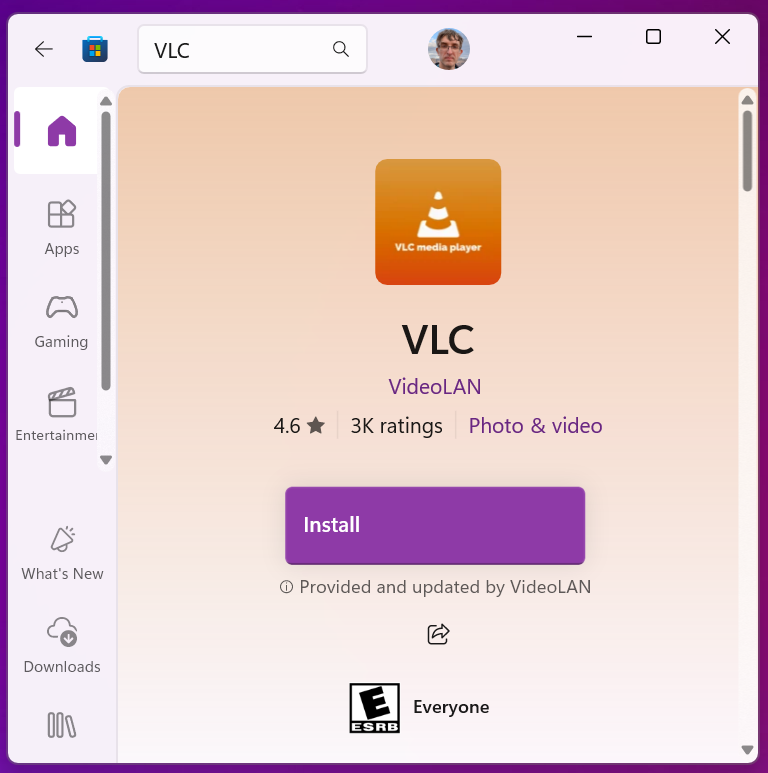
VLC in Store
When the Store says an app is “Provided and updated” by the developer, that means the Store won’t help update it.

Chris Hoffman, Foundry

It didn’t have to be this way. The goal shouldn’t have been about creating an “app store” on Windows — it should have been about providing a unified app update experience. Linux figured this out decades ago with package managers like apt-get. The unified app installation and update experience was always one of the best things about the Linux desktop, even back in the days of Windows XP.

Microsoft itself figured this out with a little-known package manager and software installation tool called Winget, but it never managed to bring it to the mainstream PC-using masses. Winget is hidden and designed only for power users — but it does actually provide a single place where you can update installed applications.

How Windows 11 will finally fix it

While everyone was talking about AI after Microsoft Build 2025, one absolutely historic change to Windows didn’t get much press: “a unified future for app updates on Windows.”

In a blog post, Microsoft’s Angie Chen explains that Windows Update will soon handle not only operating system updates but also any update, including application updates and hardware drivers. Application developers will be able to “plug into” the Windows Update experience.

Notably, that doesn’t mean that all app updates will be uploaded to Windows Update and distributed from Microsoft’s servers. Rather, it means an application like Google Chrome can stop using its own updater and use the built-in Windows frameworks to offer updates for Chrome. You could get updates for all your installed apps in a single spot, and the Windows Update user experience would provide that elusive unified user experience. Under the hood, though, Windows would actually still download and install an update for Google Chrome from Google’s own servers.

Microsoft is calling this the “Windows Update orchestration platform,” and it’s in a private preview mode for developers to experiment with ahead of a wider release.

Businesses managing fleets of PCs and home users with a single PC will all benefit from that approach. As an individual PC user, you’ll be able to check whether all your apps are up to date and update them in a single click — or maybe even no clicks. You won’t have a mess of updaters running in the background, wasting resources and requiring extra work.

And businesses will be able to manage updates for apps in a similarly streamlined way.

Of course, developers aren’t being forced to use this system, so even when the feature becomes more widely available, not every app on Windows 11 will work this way. But it’s a start. And it could represent a huge upgrade.

Better ways to update apps today

Until this new feature rolls out more widely and app developers embrace it, it’ll be the same old app updating experience on Windows 11. But there are still ways to make it less obnoxious. For example, you can use the aforementioned Winget — and not just the Winget command, but the swanky UniGetUI interface for the tool (previously named WingetUI) — to update the apps on a Windows PC.

There’s also the Microsoft Store app on Windows: If you do install an app from the Store, the Store will then automatically keep it updated. But many desktop apps are only distributed through the Store on Windows 11 the first time you install them — in other words, you can download them through the Store, but that’s it. The Store won’t update them, and the application is in charge of updating itself.

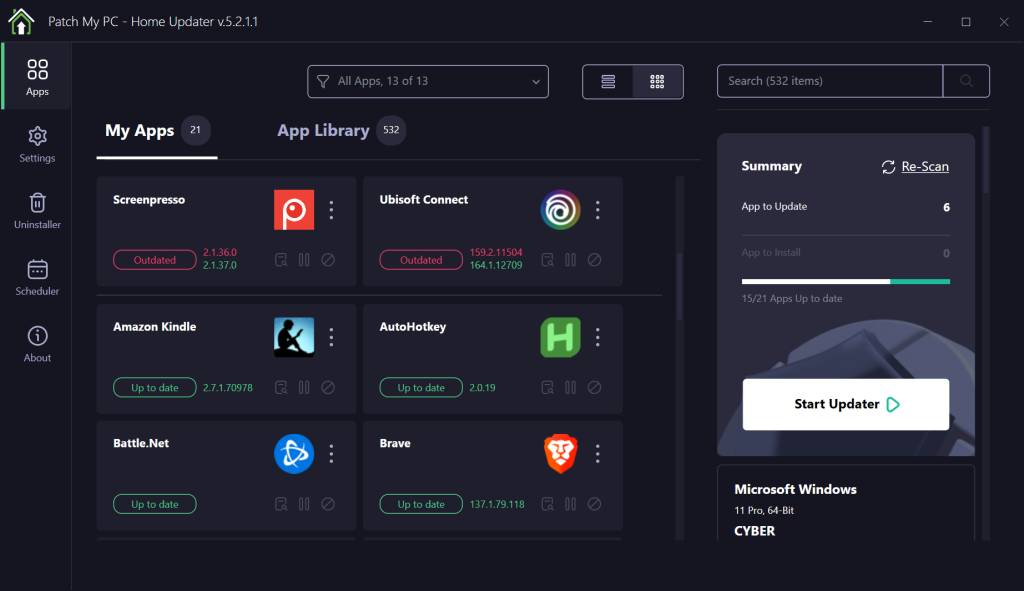
Outside of tools included with Windows, there is a collection of third-party update-checkers. Patch My PC Home Updater is free — the company also sells a solution for businesses — and it’s probably the best third-party option outside of UniGetUI. But even this tool isn’t perfect: For example, it can update “over 500 applications,” but that’s not everything on your PC.

Patch my PC Home Updater
Solutions like Patch My PC’s update tools plug a serious hole Microsoft left in Windows for decades.

Chris Hoffman, Foundry

Businesses could use software such as Microsoft Intune to manage their fleet of PCs, but application updates on those PCs are a mess because there’s not one standardized way to handle the process — which is why Microsoft is changing it.

For example, with Intune, Microsoft offers its own Enterprise Application Management feature — but it only works with a specific list of apps. Businesses might also turn to manual configuration or tools like Patch My PC’s enterprise solution.

Will Windows application updates ever really be fixed?

While the new Windows Update orchestration platform seems like a big step forward, it won’t change everything overnight. Even when it is available to the wider world of Windows app developers, not everyone will plug into it immediately. Many applications may never use it at all — perhaps some app developers will prefer to do things their own way.

Does Google really want to abandon its own Chrome updater and embrace Microsoft’s built-in update experience, for example? Companies such as Google and Adobe have invested in their own updaters, which likely allow them to gather telemetry as well as handle everything in house. They’re probably not itching to abandon their proven solutions for a first-version Microsoft product. Why hand over critical infrastructure to Microsoft? At the very least, companies might wait and see for a while. And, if developer interest is low, Microsoft could axe it. However, at least those companies are already updating their own software.

Other applications (like WinRAR and 7-Zip) don’t have built-in updaters at all — although that’s a huge security concern. Will they rush to embrace a new updater? They don’t even deliver updates directly, so why take a risk? For some developers, updates represent a way to get additional page views and ad revenue from their websites.

In the future, it’s possible it’ll still be unclear which apps on your PC are even getting updated through Windows Update, which are getting updated through their own updaters, and which aren’t even bothering to check for updates at all.

Let’s hope Microsoft creates a clear user interface where Windows Update tells you which apps it’s updating — and which it isn’t. Without that, even PC geeks won’t have to worry about what’s happening on their systems.

Until then, one thing you can do is be smart about the applications you install. For example, when I wrote up my list of free downloadable upgrades to built-in Windows apps, I recommended NanaZip over 7-Zip and WinRAR because NanaZip is automatically updated through the Store. It’s a good idea to stick to a trusted list of applications that actually update themselves.

Want more in-depth Windows analysis and useful PC tips? Sign up for my free Windows Intelligence newsletter today. I’ll send you three new things to try each Friday.

3 ambitious Android advances still on the horizon

It’s a weird time for Android-watching.

Already, we live in a world where Android upgrade availability varies wildly from one phone to the next — thanks to certain device-makers’ less-than-commendable commitments in that area. A new Android version might show up on a Google-made Pixel phone at the time of its launch, as you’d expect, but not make its way to a Samsung Galaxy gizmo ’til more than six months later (and let’s spare ourselves the embarrassment of even acknowledging Motorola).

That makes it tricky enough to talk about new Android features without including an awful lot of asterisks. And now, on top of that, Google’s (a) moving to a twice-annual cadence for new Android versions and (b) putting an ever-increasing emphasis on the quarterly feature drops it sends out in between those releases.

If even just reading that paragraph has your shiny head a-spinnin’, believe me, you aren’t alone. (I’m frankly not even sure where I am or why I seem to be surrounded by suspiciously savvy squirrels following that dizzying description.) And, for better or for worse, things aren’t gonna get any less confusing anytime soon.

To wit: As we speak, El Googeloo’s on the brink of wrapping up and rolling out its latest and greatest Android version, Android 16. The software — set to show up sometime this month — is no small update, either: It marks a dramatic reinvention of the operating system, with a whole new design style, a slew of new security enhancements, and, of course, all the usual bits of Gemini this-and-that crammed into every possible corner.

But at the same time, Google’s also working on a quarterly update that’ll follow the initial Android 16 release and add even more intriguing elements into the equation. Between the ongoing beta testing of those quarterly drops and the already-upcoming next full-fledged Android release slated for the fall (!), it’s tough to even know which features might end up where or what official Android version any given element is associated with.

Here, however, are three especially titillating improvements we know are under development and don’t expect to see appear with this month’s Android 16 update.

[Want advanced Android knowledge you can put to use this second? Check out my free Android Shortcut Supercourse to learn tons of time-saving tricks!]

Android advancement #1: Desktop mode

First and foremost is a feature that’s familiar to some citizens of the Android universe, and that’s a fully fleshed-out desktop mode for mobile devices.

The long-anticipated native Android desktop mode would let you plug your phone into an external monitor to reveal a somewhat ChromeOS-reminiscent interface (hmmm….), optimized for a PC-sized screen and keyboard-mouse use.

The possibility was first discovered by noted Android code-comber Mishaal Rahman earlier this year. More recently, Rahman was able to activate the still-in-progress addition via Android’s open source code set to see how it’s shaping up.

Google officially confirmed the existence of the feature at its I/O conference last month and said it was working closely with Samsung to “build on the foundation” of that company’s DeX system, which has offered a similar sort of feature for users of select Galaxy devices for some time now.

Expanding on that concept and bringing it into Android itself, at the operating system level, would mark a significant step in making the feature more broadly available, more standardized, and also more actively developed and supported.

I still wonder how many people would actually take advantage of it — how often do you have a monitor, keyboard, and mouse but not a laptop? — but it’s certainly a very cool addition that’ll add plenty of fresh productivity potential into the platform, at whatever point it actually ends up appearing.

Android advancement #2: Hub mode

Keeping the mode motif going, our next noteworthy Android addition under development but seemingly not on the way with the initial Android 16 update is something similar to the Standby Mode Apple introduced to its iPhones a year and a half back.

It’s an option that’d let you see and interact with widgets on your lock screen while your phone is charging — almost turning it into a Nest-Hub-style smart display, in other words, but built right into your existing device and without the need for any extra gadgets.

According to an early reading of the tea leaves, Android’s interpretation could empower you to seamlessly switch between a standard Android screen saver and that interactive canvas for widgets anytime your phone is plugged in or on a wireless charging surface. It’d make every phone instantly more useful while idle and unlock an entire new purpose for our devices at a time when they’re typically dormant.

If a casual survey of Android superfans is any indication, it could be quite a transformation for lots of folks, too. I recently asked the exceptionally smart and aromatic readers of my Android Intelligence newsletter what they do with their phones while they’re charging these days, and a staggering 74% of ’em said absolutely nothing — they leave ’em on but don’t actively use ’em in any way. Another 7% turn their phones off entirely while topping off. Only 19% reported relying on their devices for any manner of activity while plugged in, and that was mostly just to rely on an always-on display to tell the time.

Once more, it’s not yet clear when, exactly, this feature could arrive or in which Android version (or between-versions update). 

If you don’t feel like waiting, though, you can bring a vaguely similar concept to any device this instant with a quick pinch of creative thinking.

Android advancement #3: A taskbar for everyone

Our final Android advancement might be the one I’m personally most excited to see — and that’s because I’ve had the pleasure of using it already, albeit only in a specific and still-quite-limited scenario.

I’m talkin’ about a taskbar. Yes, a taskbar. That may not sound especially exciting on the surface, I realize, but stick with ‘me — ’cause it really has the potential to be one of the most transformative changes Android’s ever seen.

As to why it’s not entirely new for some of us, the same sort of system showed up with 2023’s Pixel Fold — but only in a limited capacity, when the phone is in its fully unfolded state. It went on to appear in last year’s Pixel 9 Pro Fold, too, and also on the seemingly one-and-done Pixel Tablet.

And lemme tell ya: I’ve been in love with the concept ever since I first laid fingers on it, and I’ve been begging Google to bring the thing to all Android environments. The bar just makes it so splendidly simple to move from one app to another — with a swift swipe up from the bottom-center of your screen — and also puts Android’s split-screen system front and center in a way it’s never been before.

srcset="https://b2b-contenthub.com/wp-content/uploads/2024/09/google-pixel-9-pro-fold-taskbar.webp?quality=50&strip=all 600w, https://b2b-contenthub.com/wp-content/uploads/2024/09/google-pixel-9-pro-fold-taskbar.webp?resize=289%2C300&quality=50&strip=all 289w, https://b2b-contenthub.com/wp-content/uploads/2024/09/google-pixel-9-pro-fold-taskbar.webp?resize=162%2C168&quality=50&strip=all 162w, https://b2b-contenthub.com/wp-content/uploads/2024/09/google-pixel-9-pro-fold-taskbar.webp?resize=81%2C84&quality=50&strip=all 81w, https://b2b-contenthub.com/wp-content/uploads/2024/09/google-pixel-9-pro-fold-taskbar.webp?resize=463%2C480&quality=50&strip=all 463w, https://b2b-contenthub.com/wp-content/uploads/2024/09/google-pixel-9-pro-fold-taskbar.webp?resize=347%2C360&quality=50&strip=all 347w, https://b2b-contenthub.com/wp-content/uploads/2024/09/google-pixel-9-pro-fold-taskbar.webp?resize=241%2C250&quality=50&strip=all 241w" width="600" height="622" sizes="(max-width: 600px) 100vw, 600px">
The always-available Android taskbar, as seen in its current limited form on a folding Pixel phone.

JR Raphael, IDG

Its development as a universal, available-everywhere Android feature still seems to be early and nowhere near close to complete, but it sure seems like something we can look forward to seeing sometime in the months (and the melange of confusingly overlapping Android releases) ahead.

And, yet again, you can actually get a taste of it now — if you’re feeling ambitious and don’t mind a teensy touch of advanced tinkering.

Amidst all of this, one thing’s for sure: It’s shaping up to be quite a year for Android’s ever-advancing evolution — and what we see with the initial Android 16 rollout this summer will almost certainly just be scratching the surface.

Get six full days of practical Android knowledge with my free Android Shortcut Supercourse. You’ll learn tons of time-saving tricks you can put to use today!

WWDC: Apple’s Shortcuts makes a grab at AI

Next week, we should have a clear view of what Apple already knows it is rolling out at this year’s Worldwide Developer’s Conference (WWDC). At the moment, expectations are low, but one updated feature could make a major difference to some people’s workflow: Shortcuts are expected to get much smarter.

Shortcuts to AI? Not really, but helpful all the same

Shortcuts help you automate tasks on Apple devices. Created inside the Shortcuts app, they let you mix and match different actions from across your applications and services. These things can work across all your devices, be combined together, automated, or initiated through Siri. While these arguably do some of the same things you’d get from within Automator on the Mac (thanks to Sal Soghoian’s decades of work), they have the advantage of also working across iPhones and iPads.

The disadvantage? Many still find the process of stringing together these shortcut scripts a little logically challenging, partly because the nature of these scripts is expressed in a language different than the one people use. 

This is, I think, how Apple intends to improve Shortcuts at WWDC, when we’re told it will finally introduce something it’s been working on to make things more approachable through use of artificial intelligence. Specifically, the company could place more focus on its plans to make the Apple Intelligence features it already provides available within Shortcuts. 

The latter might mean (and remember, this is speculation) you would be able to do more than simply send a website link to someone using the command, “Send this website to Sandra.” You might also be able to send a nice summary of what that site contains, perhaps with a relevant Genmoji to make your email punchy. 

Towards a new user interface

We’ll learn next week how Apple intends to do this integration. It is possible the company will only be able to navigate part of the journey, given all the insider reports detailing problems connecting its new AI systems with Apple’s legacy ones. All the same, the general idea seems to be that rather than figuring out how to describe your desired effect in an unfamiliar Shortcuts language, you should be able to string the services together using natural speech. 

Apple’s not unique in this; Microsoft Copilot does something similar. But in tandem with Apple’s extensive accessibility tools, smarter Shortcuts might deliver something profound for a lot of users.

It’s not just about accessibility, either. The promise of being able to combine Shortcuts using natural language, and for those Shortcuts to be able to levy a sequence of features from across Apple’s operating system and compatible apps (including third parties that support Shortcuts), is huge. 

It means that the applications and tools you use become things that can be selected and combined together using voice, text, or even conceivably gesture. Think about how this could change someone’s life who needs to use voice control on their Mac. Then think on how it makes for Mac-style features on visionOS. 

Dramatically, there is a missing piece.

Where’s the context?

One thing we’re not hearing much about so far is how and when Apple finally hopes to deploy contextual awareness in Apple Intelligence. The company announced this last year, but as we all know, hasn’t yet brought this to market. All the best informed Apple speculators predict Apple won’t introduce much that’s new in Apple Intelligence at WWDC, and previous claims have said the contextual part may not emerge until next year. Apple hasn’t said much at all. 

However, if you use your imagination, breath deeply, close your eyes just a little and squint a bit, you might be able to glimpse at how contextually-savvy Apple Intelligence could combine with Siri Shortcuts to give you the ability to do amazing work on any screen.

While working on a document, you might summarize it and send it as a PDF to a collaborator for review with a few spoken words, for example – just by staring at what you want to send. You might even request an alert once your collaborator is next online, so you can follow this up. 

We’ll wait and see how this is all eventually applied, but it seems that the WWDC-souped-up-Shortcuts in combination with contextual Siri (whenever that ships) could together unleash a whole set of new ways of working. In doing so, they also unleash a more flexible user interface suitable for deployment across a multitude of devices, including visionOS devices. 

That is, of course, where the confluence of all these technologies is really going: Macs you wear like sunglasses that enable you to wrap tech augmentation deep within your day.

Sounds great, but you’ll probably have to wait

All of which would be more interesting if it were what we’re going to get at WWDC. All the same, that doesn’t mean we’ll get nothing, and with the direction of travel visible we must look deeply at what we do get, as it will reveal just where Apple is on this journey. Solarium may come across as little more than eye candy, but perhaps vision is going to be the most important component to the future of every operating system, not just the Mac.

In the end, the jam we are promised is coming might well taste better for the wait.

You can follow me on social media! Join me on BlueSky,  LinkedIn, and Mastodon.