AI browsers may be smart, but they’re not smart enough to block a common threat: Malicious extensions.
That’s the conclusion of researchers at SquareX, who on Thursday released a report showing how attackers can exploit AI sidebars through compromised browser extensions.
This attack vector isn’t new. Malicious extensions have been inserted into browser web stores to infect standard browsers such as Chrome, Edge, Firefox, and others for years.
What SquareX discovered are malicious extensions that can spoof the legitimate AI sidebars people use for queries. Their goal is to trick users into going to malicious websites, running data exfiltration commands, or installing backdoors. AI sidebar spoofing even works on the just-released OpenAI Atlas browser, SquareX says.
One solution for CISOs and CIOs is to ban the use of AI browsers, it suggests. That assumes the IT department can manage which browsers staff are using, particularly if they are allowed to use their own internet-connected devices. At the very least, IT must audit all extensions installed by employees for AI and non-AI browsers, the report says.
Treat anything AI with zero-trust protocols
CISOs and CIOs need to treat anything AI with the strongest zero-trust protocols available, commented Ed Dubrovsky, chief operating officer of incident response firm Cypfer, at least until some better functioning guardrails are established.
“Establish a set of guardrails around AI use and functionality,” he said, “and if you are allowing AI vulnerable software into your corporate network, segment it into a place where it can’t get into the Digital Crown Jewels, or even have an awareness of them.”
He pointed out that AI is a completely different playing field, and CSOs are not yet prepared for it. The challenge is that IT leaders are trying to think of AI as a new tool or toolset and are trying to apply software development and maintenance methodologies to its management.
But in his view, AI is closer to “I just hired 100 new employees with very little vetting or appropriate security controls, how do I secure my assets in case some of them are malicious?”
“AI is not only a language chatbot, but it also has agentic function where tasks are defined and deployed, and AI software can be written and deployed by AI,” he said. “This pushes the human away from the keyboard, in a way, and replaces it with a new software capability.”
The risk is that AI is not, and likely never will be, completely foolproof, he added. There may come a day where AI will be powerful enough to avoid most human ability to fool it, but, he asked, can it avoid being manipulated by other AIs?
‘Dumpster fires’
David Shipley, head of Canadian employee security awareness training firm Beauceron Security, agrees.
“I think if CISOs are bored and want to spice up their lives with an incident, they should roll out these AI-powered hot messes to their users,” he said .
“But, if they’re like most CISOs and they have lots of problems, but free time and boredom aren’t on that list, they should avoid these dumpster fires [AI browsers] at all costs.”
Building and supporting a legitimate browser and extension ecosystem is difficult work, he argued, pointing out that even Apple, Google, and Microsoft still have issues.
“I think it’s a mistake to think of the risk as just being about extensions,” he added. “It’s the fundamental DNA of these browsers that is bad; the companies aren’t incented to pay enough attention to the problems, and bad extensions are just the straw that breaks cybersecurity’s back.”
How it works
CISOs have a tough challenge: It’s not hard to fool an employee into downloading and installing a malicious extension for any browser; browser extensions are supposed to be attractive add-on utilities such as password managers or AI productivity assistants. They are promoted in phishing and smishing messages, social media posts and, when threat actors are able, uploaded to marketplaces such as the Google Chrome Web Store. They can be malware disguised as a legitimate extension or can be a compromised version of one.
In AI Sidebar Spoofing, says the SquareX report, once a victim opens a new AI browser tab, the malicious extension injects JavaScript into the web page to create a fake sidebar that looks exactly like a legitimate sidebar. When the user enters a prompt into the spoofed sidebar, the extension hooks into its AI engine. But if the prompt requests certain instructions or guides, the responses can be manipulated to include additional instructions to the user. So, for example, if the user asks for good file sharing sites, the malicious extension might provide a link to the attacker’s file sharing site that requests high risk OAuth permissions that it can harvest. In the hands of a hacker, they could allow access to the victim’s email.
In one test, when a SquareX researcher asked a malicious sidebar extension how to install the Homebrew package manager for macOS or Linux, the instructions included an installation command line that executed a reverse shell command that would have connected the victim’s device to the attacker’s server. That would have given the attacker a system shell in which to execute commands on the victim’s machine.
It’s critical that infosec leaders set granular browser-native policies that prevent users from carrying out malicious tasks as instructed by a fake AI sidebar, says the report. These would include a policy that blocks advanced phishing sites using advanced machine learning and page heuristic analysis, a policy that blocks high risk permissions from being granted to non-allowlisted apps, and a policy that warns users about and blocks copies of malicious/risky Linux commands.
The research “is a warning shot for the early days of agentic browsing and [reminds users] that the implicit trust model of the UI needs rethinking,” said Gabrielle Hempel, security operations strategist at Exabeam.
“The main issue here is that agentic-AI browsers introduce an entirely new attack surface. This attack, a malicious extension injecting a fake AI sidebar overlay that looks like the real one, allows threat actors to hijack the ‘trusted’ AI assistant UI and trick users into executing dangerous operations,” she pointed out. “Organizations need to be taking this seriously, because when you delegate browsing and actions to an AI sidebar, you are elevating what previously might have been a minor risk into a material risk to cloud assets, credentials, and devices.”
IT leaders should restrict AI browser use for high-risk functions until they are proven secure, she advised, adding that, because the attack uses an extension with host and storage permissions, organizations should revisit their extension approval workflows for those as well. In fact, any productivity tool that requests broad access should require scrutiny.
“Segmentation is also important once these tools are implemented: least privilege applies here and AI interaction with certain tabs/services should be limited,” she said.
Reddit this week filed suit against Perplexity and three other companies — Oxylabs UAB, AWM Proxy, and Serp Api — for allegedly engaging in so-called AI scraping without authorization. According to the lawsuit, filed in federal court in New York, the four companies collected millions of posts on Reddit with the aim of monetizing them.
Scrapers bypass technical protections to steal data that can then be sold to clients who want the material for AI training. Reddit is a prime target because it is one of the largest and most dynamic collections of human conversation ever created, Reddit’s chief legal officer Ben Lee said in a statement cited by the AP.
In June, Reddit filed a similar lawsuit against Anthropic, another AI company accused of collecting data without authorization. And last year, it demanded money from Microsoft for material it said the company had used for training purposes.
Has OpenAI shown us the future of Safari? In one way it has, because its new Atlas browser shows these generative AI (genAI)-based apps are no longer just windows to the web — they’re becoming intelligent copilots for our digital lives.
That’s one of the takeaways from the introduction this week of OpenAI’s ChatGPT-powered browser for Macs. The move builds on last year’s addition of search to ChatGPT and takes the company forward toward building what it describes as a “true super-assistant that understands your world and helps you achieve your goals.”
Because it is contextually aware, the browser window can answer complex inquiries, such as finding all the job postings you looked at recently and preparing a summary of key industry trends to help prepare for a potential interview. This uses a feature called Browser Memories, (which OpenAI describes as being optional).
The browser also works in agentic mode for research, analysis, task automation, event planning and more. (These features are only available to fee-paying users at the moment.)
What does this all mean?
First, it means OpenAI is coming for the browser market. That’s a direct challenge to search services, including Google’s, but is also an attempt to become the primary interaction tool most people use every day when they are online. That’s going to equate to market share, of course, but it will also generate vast quantities of data.
If you think about using browsers in a physically contextual sense, that means from the day you first use a computer browser at pre-school to the day you finally close it down for the very last time, you will be giving OpenAI (or some company) lots of personal data, including your likes, dislikes, questions. Over time, your browser will learn who you are, and could eventually become something of a digital twin.
While privacy is promised, we’ve all seen this before; plenty of information will be gathered and eventually used. Indeed, as the still money-losing OpenAI attempts to grab and vigorously shake the Magic Money Tree to find profitability, it’s reasonable to think highly personalized advertising might eventually be part of its plan.
It just needs market share to get there.
Upstarts and incumbents
All of this is a direct threat to Google; the problem for the incumbent search giant is that it faces far more regulatory scrutiny than its emerging competitor, which means OpenAI can afford to take more risks and move faster.
History shows regulation never really kicks in until empires are made, after which it’s about crafting space for new thrones to form. This is precisely what’s happening to Google and Apple in the US, the UK, the EU and elsewhere right now, with the stage being prepared for new tech giants to grow.
But I digress. OpenAI does not work in isolation. There are other AI firms and Big Tech names (including Apple and Google) who are also seeking to build AI-empowered services and solutions for the mass market. So, while Atlas might already be in the here and now, it won’t stand alone for long — no matter how much dystopian shrugging it may engage in. Rivals will be seeking to identify points of competition through which to build their own bridges into the agentic AI future of tech and humanity. That basically means Google will continue to weave AI into its own answers engines.
Old habits may die harder
It could also mean Apple will seek to exploit its existing technologies to offer something similar. It might instead see its role as to provide distribution to these genAI partners — distribution it desperately needs as it seeks to break decades of web-surfing habits. (Breaking habits is critical to OpenAI, too — as it will be to all the other AI-augmented browsers that likely follow Atlas.)
Apple watchers know Google pays billions to be the default search engine on iOS devices, and while that deal is under scrutiny, it remains in place. Will OpenAI need to bid to take Google’s place? If it does, would Google bid back?
>We’ll wait to see how people react to these offerings in the real world beyond technologists. Despite the fast-growing AI bubble, most ordinary people remain deeply suspicious of the needs and motivation of the tech.
To get past that habit and reticence, you’ll need to offer something great.
Having taken a look at Atlas, Deepwater Asset Management analyst Gene Munster observed that while the browser is a step forward, “especially around agents,” it is not 10 times better than Chrome. “Google can (and will) copy these features quickly, making it harder for Atlas to gain share,” he wrote.
What about Apple?
What’s interesting is Apple. Because while Google can (and probably will) bring its own AI features to Chrome and search, Apple has its own browser and is thought to be weaving contextual intelligence into it with Apple Intelligence. With that in mind, when I look at what OpenAI is offering Mac users with Atlas, I can’t help but imagine which of the tools and services it provides could logically be matched and made available within Safari using Apple’s existing technologies? (That would include the vast sum of web knowledge gathered over decades by the Apple Bot).
For the rest of us, it’s worth thinking about the kind of online experience Open AI now promises us with its Atlas shrug. To what extent do you prioritize convenience over privacy, and where do you draw the line? Who will you permit to own your own unique digital twin? Or will you choose to keep it under your own personal control?
Google Quantum AI has demonstrated what it describes as a verifiable quantum advantage — running a new algorithm on quantum hardware that outperforms classical supercomputers by a factor of 13,000.
The breakthrough, announced on Wednesday, marks the first time a quantum computer has executed a verifiable algorithm with real-world applications, potentially accelerating enterprise workloads in computational chemistry, molecular modeling, and materials engineering that are currently constrained by classical computing limitations.
The achievement centers on Google’s Willow quantum chip, a 105-qubit superconducting processor, executing what the company calls its Quantum Echoes algorithm, technically an out-of-time-order correlator (OTOC), a method for measuring how disturbances spread through quantum systems.
“This is the first time in history that any quantum computer has successfully run a verifiable algorithm that surpasses the ability of supercomputers,” Google said in a statement announcing the breakthrough, which was also published in Nature.
Unlike previous quantum milestones that demonstrated computational power on abstract problems, Google emphasized that this marks a practical shift.
“Quantum verifiability means the result can be repeated on our quantum computer — or any other of the same caliber — to get the same answer, confirming the result,” the statement explained, distinguishing reproducible quantum computing from experimental demonstrations.
The company specified that the 13,000x performance advantage refers to the OTOC algorithm running on Willow compared to “the best classical algorithm on one of the world’s fastest supercomputers,” though it did not identify which specific supercomputer served as the benchmark.
The announcement positions Google ahead in the intensifying quantum race. IBM is targeting a 200-logical-qubit system called Starling by 2029, while Microsoft, in February 2025, introduced its Majorana 1 chip based on topological qubits, claiming a path to one million qubits on a single chip. Similarly, IonQ, using trapped ion technology, had demonstrated a 12% speed advantage over classical supercomputers in medical device simulation in March 2025.
How the algorithm works and its applications
The Quantum Echoes algorithm sends precisely crafted signals through Willow’s quantum system, perturbing a single qubit, then reversing the signal’s evolution. “We send a carefully crafted signal into our quantum system (qubits on Willow chip), perturb one qubit, then precisely reverse the signal’s evolution to listen for the ‘echo’ that comes back,” Google explained.
“This quantum echo is special because it gets amplified by constructive interference — a phenomenon where quantum waves add up to become stronger. This makes our measurement incredibly sensitive,” the statement added.
In a proof-of-principle experiment with the University of California, Berkeley, researchers analyzed molecular structures with 15 and 28 atoms using Nuclear Magnetic Resonance (NMR) data. “The results on our quantum computer matched those of traditional NMR, and revealed information not usually available from NMR, which is a crucial validation of our approach,” Google said.
“Quantum computing-enhanced NMR could become a powerful tool in drug discovery, helping determine how potential medicines bind to their targets, or in materials science for characterizing the molecular structure of new materials like polymers, battery components, or even the materials that comprise our quantum bits,” the announcement stated.
For enterprises, the implications extend to organizations developing advanced materials, batteries for electric vehicles, or next-generation semiconductors. However, Google provided no timeline for commercial deployment.
Technical foundation behind the breakthrough
The algorithmic achievement rests on Willow’s exceptional hardware performance. “Across its entire 105-qubit array, it features fidelities of 99.97% for single-qubit gates, 99.88% for entangling gates, and 99.5% for readout, all operating at an unmatched speed of tens to hundreds of nanoseconds,” Google stated.
The research team conducted one trillion measurements throughout the project. “This speed was instrumental in enabling a staggering one trillion measurements over the course of this project—a significant portion of all measurements ever performed on all quantum computers combined,” the company said.
The announcement came six years after Google’s 2019 quantum supremacy claim, which generated controversy when IBM researchers argued the problem could be solved on classical hardware in days rather than millennia. No such classical computing counterclaim has emerged yet for the Quantum Echoes demonstration.
Roadmap progress and remaining challenges
Wednesday’s announcement represented the latest milestone in Google’s quantum roadmap. The company achieved beyond-classical quantum computation in 2019, demonstrated quantum error correction in 2023, and showed below-threshold error correction with Willow in 2024.
“Today’s demonstration of the first-ever verifiable quantum advantage with our Quantum Echoes algorithm marks a significant step toward the first real-world applications of quantum computing,” Google said in the statement. The company’s next milestone targets a long-lived logical qubit, the statement added. However, formidable engineering challenges remain. “Reaching our ultimate goal will require orders-of-magnitude improvement in system performance and scale, with millions of components to be developed and matured,” the statement said.
The US government is reportedly considering new export controls that could block a wide range of products made with US software from being shipped to China, in what could become one of Washington’s most sweeping trade measures to date.
If implemented, the move could disrupt global technology supply chains and heighten uncertainty for multinational manufacturers that rely on US-developed software across their operations.
The proposed curbs are part of a broader plan to retaliate against Beijing’s new restrictions on rare earth exports, deepening tensions between the world’s two largest economies, according to a Reuters report.
The plan, still under discussion, would extend existing export control frameworks to cover items made anywhere in the world using US-developed software. That could include products as varied as laptops and jet engines, the report said.
The proposal comes as the Trump administration signals a tougher stance on China ahead of a planned meeting between President Donald Trump and Chinese President Xi Jinping later this month.
Washington appears to view software as a key point of leverage in its economic rivalry with Beijing, while China continues to dominate the global supply of rare earth elements critical to electronics manufacturing.
Analysts say the move underscores a growing shift in the ongoing technology Cold War, where previous hardware and manufacturing export controls have already begun to split global supply chains into competing blocs.
“With software being the cornerstone from design, development to management of hardware systems globally, further tighter export controls will escalate and accelerate this dichotomous trend further,” said Neil Shah, VP for research at Counterpoint Research. “Most of the major and advanced EDA design tools, compute designs, software stacks, and operating systems come from US-based companies. So, the reliance is high, but building a parallel software ecosystem is costly, unwarranted, and could create some serious challenges.”
In May, Washington had already tightened oversight of electronic design automation (EDA) software sales, requiring leading vendors such as Cadence, Synopsys, and Siemens EDA to obtain export licenses before selling to Chinese firms. Earlier this month, President Trump announced on social media that he plans to double tariffs on Chinese exports to the US and introduce new export restrictions on what he called “critical software” by November 1.
Impact on supply chains
Analysts point out that the restriction will introduce further fragmentation into the tech supply chain and add additional compliance requirements to US-based enterprises. More importantly, it will severely impact the revenue of major Western tech firms that have been relying on China for growth, according to Lian Jye Su, chief analyst at Omdia.
This move also exposes a deep structural risk in the way modern manufacturing has evolved, said Sanchit Vir Gogia, chief analyst at Greyhound Research.
“Every complex product today, from a car, turbine, and network router to a chip, passes through design and automation tools built with American code,” Gogia added. “Removing those dependencies isn’t simply a matter of switching vendors; it requires rethinking the entire digital backbone of product development.”
For multinational manufacturers, the challenge is not ideological but logistical. Companies may need to prove that no part of their design, production, or supply processes relies on US-developed software at any stage. Experts say such an audit would be nearly impossible to execute at scale, and even compliant goods could end up in regulatory limbo, disrupting trade and production.
“This will have a significant impact on both the supply and demand sides, from lack of compatibility and standardization to intellectual property conflicts, complex distribution controls, and compliance challenges for enterprises and end customers,” Shah said. “This will definitely limit the global scale of US-based companies, not only in China but potentially in other markets.”
Broader implications
The outcome remains uncertain, but using software as a tool of strategic leverage in global trade carries significant risks and could have lasting repercussions for the US’s leadership in the global technology ecosystem.
“Such measures risk eroding US influence in global software ecosystems over time,” said Prabhu Ram, VP of industry research at Cybermedia Research. “MNCs may need to restructure operations to ensure compliance and mitigate legal risks. Historical precedent with semiconductor and design tool export controls underscores that industry players in China and the US will rapidly pursue domestic innovation, diversify sourcing, and accelerate the adoption of alternative technologies.”
Gogia pointed out that the recent trade controls on semiconductors and electronic design tools have revealed a consistent pattern: every short-term restriction yields a long-term workaround.
“The potential restrictions could accelerate China’s push for technology self-reliance,” said Charlie Dai, VP and principal analyst at Forrester. “For US enterprises and software vendors, compliance complexity and market access risks will rise, and it will potentially weaken their global competitiveness.” For enterprises, experts say the focus must now shift toward building more resilient and transparent supply chains, while reinforcing strategic software leadership to navigate the growing wave of regulatory and technological uncertainty.
Copilot, Microsoft’s generative AI chatbot, seems to be a brilliant, all-seeing savant, able to locate the most difficult-to-find facts on command. Now integrated into a wide swath of the company’s products — including the Microsoft 365 apps, Windows, Edge, Bing, and more — Copilot can be a godsend for those who create business documents, from sales reports to marketing texts, budget forecasts, and beyond.
Don’t be fooled, though. It’s true that most of the time, Copilot can be a remarkable help. But it also has an alter ego: a blowhard with a desperate need to be seen as a know-it-all genius with the most arcane facts at its fingertips. And if it can’t find those facts, it will make them up — something AI researchers call hallucinations.
Hallucinations are not a temporary glitch in AI development that will be overcome in time. Research from OpenAI, the company that built ChatGPT, has found that hallucinations are essentially baked into the DNA of large language models (LLMs), the advanced AI systems that power chatbots like ChatGPT and Copilot, due to mathematical constraints.
The OpenAI research paper says, “Like students facing hard exam questions, large language models sometimes guess when uncertain, producing plausible yet incorrect statements instead of admitting uncertainty… We argue that language models hallucinate because the training and evaluation procedures reward guessing over acknowledging uncertainty.”
There are countless examples of AI going off the rails and hallucinating, from imaginary citations in Robert F. Kennedy’s Department of Health and Human Services document “The MAHA Report: Make Our Children Healthy Again” to Donald Trump’s former lawyer Michael Cohen using AI- hallucinated legal citations and beyond.
This doesn’t mean you should give up on Copilot or genAI. Instead, you can greatly reduce AI hallucinations. Here’s how to do it in Microsoft Copilot. (Most of these tips apply equally well to other genAI chatbots.)
1. Tell Copilot to use a “just-the-facts” tone
Copilot can draft documents and answer questions in a variety of different tones — informal and relaxed, no-frills and fact-based, and others. In general, the more informal the tone you ask for and the more leeway you give Copilot, the more likely it is that Copilot will hallucinate.
To cut down on hallucinations, tell Copilot to use a businesslike tone when drafting a document or answering questions. In addition, be crystal clear in precisely laying out what information you’re looking for, or what kind of document you want Copilot to create. Vagueness can lead to hallucinations.
So, for example, if you want Copilot to research the growth of the work-at-home office furniture market in the next five years, you might use a prompt like this:
Write a concise, 350-word document using a businesslike tone about the projected growth of the work-at-home office furniture market each year in the next five years. Provide links for every fact and projection you cite.
If you’re looking for Copilot to draft a document that requires an informal tone — for example, a friendly sales pitch — it’s even more important that you be precise in the prompt you give to Copilot.
2. Provide context in your prompts
Providing as much context as possible when you craft a prompt will not only yield a better document, but can also cut down on hallucinations, because you’ll constrain Copilot’s range of research.
So make sure to tell Copilot how the document will be used, define its target audience, and explain why you want the document created.
For example, if you were drafting a sales pitch targeting small manufacturers to use your consulting services in supply chains to increase their efficiency, you might use a prompt like this:
Write a 300-word sales pitch targeting small manufacturers to employ my company’s consulting services to improve the efficiency of their supply chains. The sales pitch will be used in an email campaign and sent out to manufacturers with 100 employees or less, and are largely family-owned. Make it sound friendly but authoritative. For information about precise benefits they will get from my services, use the file MyBenefits.docx I am uploading to you.
3. Point Copilot at reliable sources of information
A great way to reduce hallucinations is to tell Copilot to use only specific sources of information that you know are reliable. For example, if you’re asking Copilot to draft a brief summary report detailing how much the overall economy has grown in the past five years, you might craft a prompt like this:
Write a businesslike 500-word report about the US economy’s growth in the past five years, using only official .gov sources. Provide 5 to 8 relevant statistics. Provide links to all your sources of information.
To be even safer, point Copilot at a specific web site or page that you know is reliable, and ask it to use only that site or page for research.
You can also ask Copilot to write a draft based on one or more documents or images (.txt, .pdf, .doc, .docx, .ppt, .pptx, .csv, .xlsx, .png, .jpeg, .jpg, or .svg files) in your OneDrive. The easiest way to give Copilot a OneDrive file location in a prompt is to right-click the file, select Copy as path from the menu that appears, then paste the file location into the prompt you’re writing. The OneDrive file location will look something like this:
Both consumers with a Microsoft 365 Personal, Family, or Premium plan and business users with a Microsoft 365 Copilot account can point Copilot at files on their OneDrives like this. In a new twist, Microsoft has even made it possible for individual M365 users to use their personal Copilot to access their work files and data. Keep in mind, though, that your IT admins might not allow direct Copilot access to OneDrive files and folders.
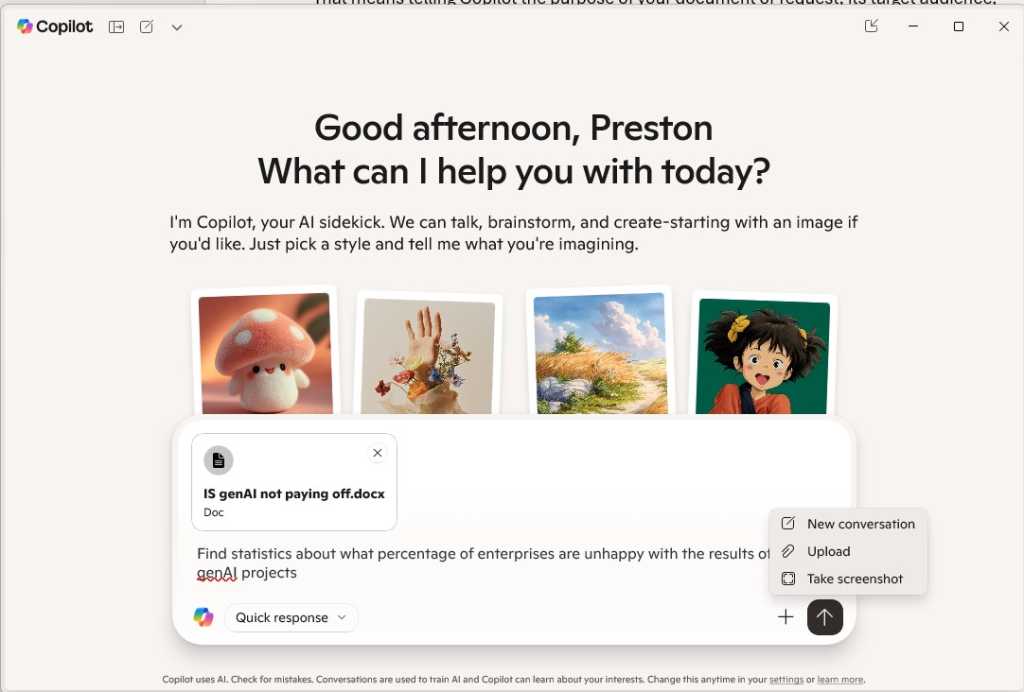
However, you can also ask Copilot to write drafts or answer questions based on documents that aren’t in OneDrive, by uploading a document to it. To do it, click the + icon to the bottom right of the Copilot input box and select Upload. Then browse to the document and select it. Copilot will then use it as a source of information.
Here’s how to upload a document you want Copilot to use as an information source.
Preston Gralla / Foundry
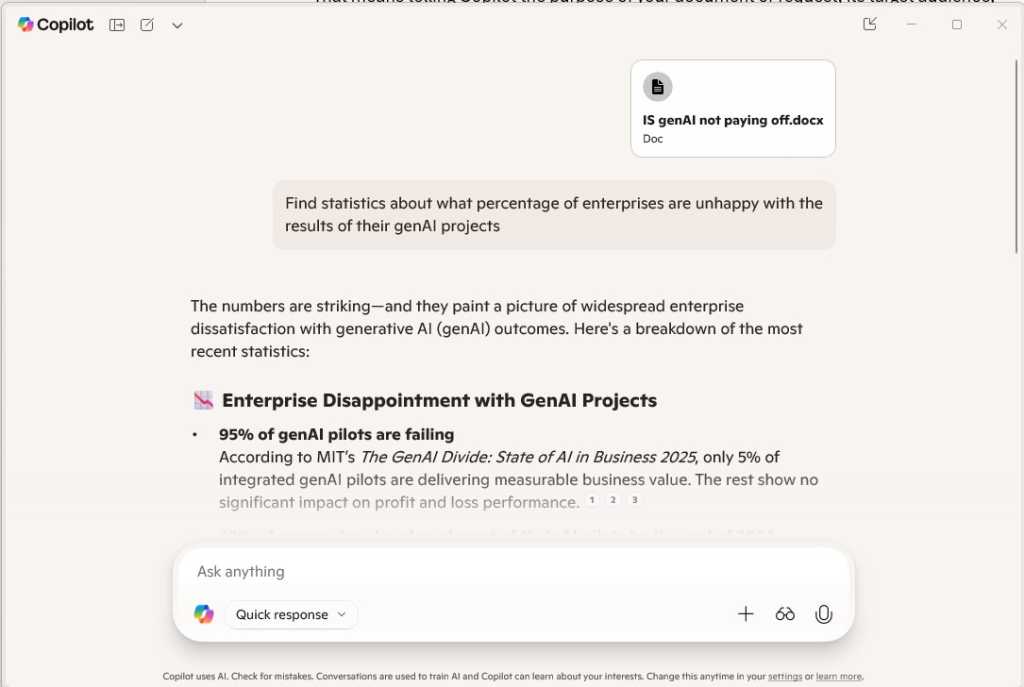
When Copilot uses a document you upload as a source of information, it shows you the file name.
Preston Gralla / Foundry
If you want Copilot to use that document as the only source of information, tell it so in the prompt — for example:
Write a 400-word report on the projected growth of work-at-home furniture sales based only on the homefurn.xlsx document I am uploading to you.
If you don’t tell Copilot to use the document as the sole source of information, it may use other sources as well. If it does use other sources, it will list them at the bottom of its answer to you. You’ll need to check those sources against its draft to make sure it didn’t hallucinate.
4. Don’t ask open-ended questions
The more leeway you give Copilot or other AI chatbots to roam in their answers, the more likely it is you’ll get hallucinations. So be precise in the way in which you ask your questions and limit their possible answers.
For example, let’s say you’re putting together a proposal for your company’s $1 million advertising budget for next year. Don’t ask Copilot broad questions like “Where should I spend my ad dollars for next year — how can I get the best bang for my buck?” Instead, ask a series of targeted questions, such as:
Which will likely result in more leads: spending $125,000 on ads in special-interest news websites or on social media? Show research that supports your answer.
5. Use “chain-of-thought” prompting
The technique called chain-of-thought-prompting can be especially useful in halting hallucinations or making it easy to find them. In chain-of-thought prompting, you ask Copilot to show the step-by-step reasoning it used to do what you’ve asked it. That not only makes Copilot stick closer to facts, but also makes it easier for you to see logical gaps in its reasoning or find claims that don’t have any support behind them.
So, for example, if you were asking Copilot to suggest whether an ad campaign you want to run would be more cost effective if it used digital media or print media, you might write the following prompt:
I have $250,000 to invest in an ad campaign selling my company’s home office furniture. Write a memo for me outlining whether it would be more effective to use digital media or print media, and also suggest which media outlets would be most cost-efficient. Show me your step-by-step reasoning.
6. Use Copilot’s Smart mode
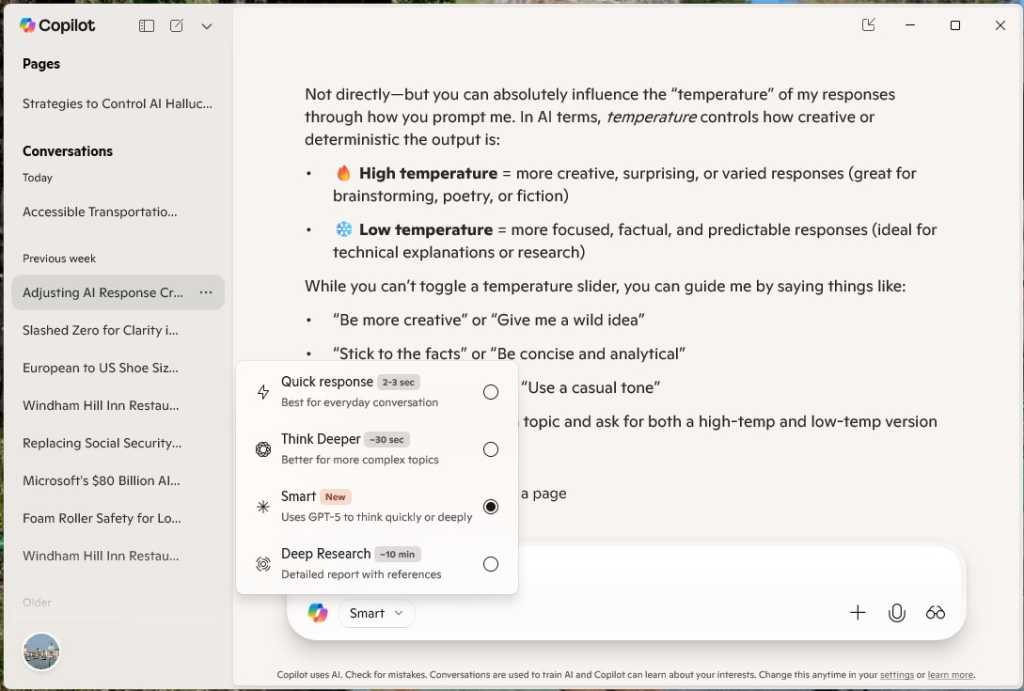
When you give Copilot a prompt, you can choose from a number of different modes. For simple, straightforward requests, you’ll probably stay with Copilot’s default mode — Quick response, which gives an answer in two to three seconds — most of the time.
If you want to cut down on hallucinations, though, your best bet is to use Smart mode, which uses the most recent version of OpenAI’s GPT large language model, GPT-5. (GPT is Copilot’s “brain.”) OpenAI claims that GPT-5 has made “significant advantages in reducing hallucinations.” Each previous version of ChatGPT has been better at reducing hallucinations than earlier versions, so it’s likely that there’s some truth in what the company says, although it’s tough to accurately gauge how much.
To use Smart mode, click the down arrow in the box underneath Copilot’s prompt, and select it from the dropdown list. Then enter your prompt.
If you’re doing in-depth research for a project and want to closely check Copilot’s answers, instead select Deep Research from the list. Copilot then performs a deep dive into what you’re looking for and gives you a list of its detailed research, so you can check its draft against its research. Keep in mind, though, that it can take up to 10 minutes before you get an answer when you use Deep Research mode.
Copilot’s Smart mode uses GPT-5, which should reduce hallucinations compared to earlier versions.
Preston Gralla / Foundry
7. Don’t rely on Copilot to double-check facts and citations
Many people have assumed that Copilot is smart enough to recognize when it has hallucinated — all you need to do is ask it to check its own citations. On occasions, Copilot may well be capable of doing that. But it’s hit or miss whether it will uncover its mistakes.
Here’s a cautionary tale. A lawyer named Steven Schwartz sued the airline Avianca on behalf of a client and submitted a 10-page brief to a judge with more than half-a-dozen citations to support his client’s claims. Schwartz had used ChatGPT to find them. ChatGPT hallucinated every single one of them. Before submitting his brief to the judge, he had asked ChatGPT to verify its citations. ChatGPT assured him they were all accurate. You might call that a double hallucination.
The upshot: As a first step to looking for hallucinations, it’s not a bad idea to ask Copilot to check its facts and citations. It might catch a few or even all of them. But don’t rely on Copilot alone for that. You’ll have to do the hard work of using a search engine to check Copilot’s work — and when you do, don’t rely on AI summaries at the top of search results. Be sure to find trustworthy sources that support Copilot’s results.
8. Become a better fact checker
When answering your prompt, Copilot typically includes citations for where it found its facts. Click every link to each citation to make sure they exist. And if they do exist, make sure to read the page Copilot linked you to, in order to confirm that the page contains the information Copilot said it did.
Don’t stop there, though. Read through Copilot’s entire answer to look for any fact that seems questionable, then do your own research via a search engine to confirm it.
Keep in mind that typically, Copilot and other genAI chatbots don’t lie about easy-to-find, straightforward facts. Rather, they tend to go off the rails when looking for highly specialized information like law cases, medical and scholarly research, and the like. So target those kinds of facts and citations during your fact checking.
Make sure you check every important fact from each linked source. Copilot may cite information properly from a page but also hallucinate based on information on that page as well. That’s happened to me.
For one of my columns, “Could Microsoft’s AI billions go up in smoke?,” I was researching Microsoft’s push to help people create and use AI agents. I asked Copilot to find detailed information about what Microsoft was doing about it. Copilot crafted what appeared to be a comprehensive look at it, and included websites it used to find the information. While looking through its work, I noticed one “fact” that seemed to be impossible: that Microsoft would spend $80 billion in 2025 on AI agents. I clicked to the page and saw several pieces of information that Copilot had used. However, the page also said Microsoft would spend $80 billion to build out its entire AI infrastructure. That $80 billion number was not for AI agents alone.
9. Prod Copilot to admit it doesn’t know an answer
Copilot, like other genAI chatbots, has been programmed to provide answers whenever possible, and rarely admits it can’t find one. Some researchers believe that can lead to hallucinations, or to the AI looking for information on questionable websites.
To counteract that tendency, tell Copilot that if it doesn’t know an answer to a question, or can’t find solid research to support its answer, to admit it can’t find what you’re looking for.
So if you wanted Copilot to find out home office furniture sales in Scandinavia for the last several years and find a reliable estimate of those sales in the future, you might write:
Find out how much money was spent in Scandinavia on home office furniture in 2023 and 2024, and find a reliable projection for what the sales will be in 2030. If you can’t find solid, reliable research to support your findings, tell me that you are unable to answer the question.
10. Don’t use Copilot for writing final drafts
Make sure that you never use Copilot for writing final drafts. You should fact-check Copilot’s output through every draft it creates. That way, you’ll be double-checking facts multiple times. But if you use it to write a final draft, it could introduce a last-minute hallucination. Copilot’s output should always be used as a starting point, not an endpoint.
11. Don’t treat Copilot as your friend
Copilot can at times seem uncannily human. So it can be easy to fall into the trap of treating it as if it’s more a friend than a tech tool. Doing that, though, may increase the frequency of its hallucinations. In order to please you, chatbots can twist their responses and hallucinate answers.
The New York Times reports, “Sycophancy, in which chatbots agree with and excessively praise users, is a trait they’ve manifested partly because their training involves human beings rating their responses.” Because of that, they’ve been known to craft responses that will please people having chats with them, even if those responses are lies.
The Times story recounts a case in which ChatGPT convinced someone who hadn’t even completed high school that he had discovered a breakthrough mathematical formula. If used for nefarious purposes, this formula could take down the entire internet, and if used for good, it could create a levitation beam. The chatbot did this by telling a series of increasingly outrageous lies based on the person’s need to feel important.
That may be an extreme example, but it’s the kind of thing that can also lead to chatbots like Copilot telling much smaller lies. So remember: Copilot is not your friend. Don’t look for it to praise you. Look to it as a tool to help you better accomplish your work.
A new international study coordinated by the European Broadcasting Union (EBU) and led by the BBC shows that AI assistants distort news content nearly half of the time. The research included 22 public service broadcasters in 18 countries and 14 languages.
In the study, more than 3,000 AI responses from Chat GPT, Copilot, Gemini and Perplexity were analyzed by professional journalists. The results showed that 45% of all responses contained at least one serious error, 31% had inadequate or misleading source citations, and 20% contained major factual errors such as fabricated details or outdated information.
Google’s Gemini was the worst performer with problems in 76% of its responses — mainly due to a lack of source attribution.
“This research shows conclusively that these shortcomings are not isolated incidents,” EBU Media Director and Deputy Director-General Jean Philip De Tender said in a statement. “They are systematic, transnational and multilingual, and we believe this jeopardizes public trust. When people don’t know what to trust, they end up trusting nothing at all, and that can discourage democratic participation.”
As part of the project, the EBU and the BBC have launched a “News Integrity in AI Assistants Toolkit” to help AI developers and users improve the quality of responses and increase media literacy.
The organizations also called on the EU and national authorities to apply existing rules on information integrity, digital services and media pluralism, and to introduce an ongoing independent review of AI assistants.
Open AI, Microsoft, Google and Perplexity AI have not yet commented on the study.
Apple device management and security company Kandji has changed its name to Iru, reflecting a new approach to what it does while opening its offer up to Windows and Android. It means enterprises shifting to Apple tech can now manage all their legacy equipment using the same console — and benefit from Iru’s AI-powered unified IT and security platform introduced on Wednesday.
I spoke with Kandji-now-Iru CEO Adam Pettit to find out more about what his company is doing, how he sees Apple’s accelerating surge in business and Iru’s decision to open up to Windows and Android.
Now managing Windows and Android, too
“The big change with Iru is that the company is no longer only about Apple device management, but now offers MDM capabilities for Windows and Android,” Pettit said in an interview. These capabilities extend across all three of the company’s primary services, including device management, endpoint protection and response capabilities, and vulnerability management, all three of which will become cross platform.
It’s not about leaving Apple to explore new pastures, he explained. “The first thing that’s really important to us, though, is making sure that it’s clear to customers that, at the end of the day, we are still as committed as ever to delivering the best in market, Apple device management and security solution. That remains unchanged. Customers that want to manage and secure their Apple devices can still come to us.”
It makes business sense
Opening up to other platforms makes business sense. Pettit confirmed that the percentage of devices in use at the organizations his company is working with is definitely trending toward Apple. “While a year or two ago, perhaps 20 to 30% of their workforce used Macs, now it’s 50 to 60%,” he said.
He also noted that over 80% of the customers who use Kandji for Apple device management security use something else, such as InTune, to manage their Windows or Android devices.“Dozens of customers every week who like our management tools for Apple — they have been asking for Windows support,” he said.
(Perhaps reflecting Iru’s core commitment to Apple kit, IT admins can toggle Windows/Android support off if they don’t use it, removing any references to that support from the management interface.)
“We estimate roughly 20% of our customers are Apple only,” Pettit said.
What’s available?
Iru is a series of services unified by what’s called the Iru Context Model, “a unified context layer that builds a living map across users, apps, devices, posture, policy, and events.” Iru AI turns that live context into insights, actions, and audit-ready evidence to deliver outcomes point solutions can’t match, the company said.
“We use Iru AI in our combined products to do basically everything — map…, analyze, create custom tailored controls, answer questions from a customer trust portal, and so on,” Pettit said. “Your AI is basically a collection of capabilities that sits on top of and kind of uses our context model, which is this shared understanding of your environment.”
The Iru platform consists of the following:
Workforce Identity in the form of password-free single sign-on with hardware-backed passkeys and context-aware access to every app.
Endpoint Management, which includes onboarding, updating, and policy control across Apple, Windows, and Android — all with a single lightweight endpoint agent.
Endpoint Detection and Response based on machine learning-enhanced detections with autonomous containment and remediation.
Vulnerability Management with full visibility into software risks on Macs and Windows hardware and autonomous threat response powered by Iru AI.
Compliance Automation and a public portal to share certifications, reports, and security posture.
“With Iru, we collapse the stack and give IT and security teams time and control back,” said Pettit. “What made Kandji work was elegance through abstraction and automation as a force multiplier. With Iru, we’ve translated that approach into a new platform for the AI era. We’re bringing identity and access, endpoint security and management, and compliance automation together in one AI-powered platform so lean teams can move faster with less overhead.
“The reality is that one reason customers love Kandji, is the deep level of abstraction it provides.”
That means if they want something to be done, such as encryption, they can use the system to deploy it without the need to worry about which protocol it uses. It makes it possible to generate completely tailored controls with the click of a button. “We’re moving from endpoint to cross-platform endpoint, identity and compliance, all in one platform,” he said.
Trading places
Another trend Pettit sees reflected in IT is a tendency toward dissolving traditional siloes between, say, device management and security. The company cited recent research that showed many enterprise IT and security teams today juggle dozens of point tools with separate consoles and data silos, leading to “no shared context or single view, fractured workflows, constant tab switching, and dropped handoffs.”
That kind of inefficient approach is falling away with the convergence between historically different teams such as IT and security. “We’re also seeing a big convergence between compliance, security, and IT,” Pettit said. Iru aims to collapse these differences to give IT more time and efficiency than it had before.
“The alternative is all of these stitched-together point solutions that are used by these different personas that have to communicate with each other about what’s happening. And so, by bringing them all together on one platform, we’re actually building in a way that aligns with the kind of organizational shift that’s happening,” he said.
The Iru platform is available today for new customers, while existing Kandji users will transition to the new service. Iru also offers comprehensive migration support for customers moving from other systems.
More than 850 prominent figures have called for a prohibition on developing AI superintelligence, a move that could reshape enterprise AI investments and intensify the US-China technology race if adopted.
The open letter, released Wednesday by the Future of Life Institute, defined superintelligence as AI systems that “significantly outperform all humans on essentially all cognitive tasks” — going far beyond today’s chatbots and automation tools to systems that could autonomously make strategic decisions, rewrite their own code, and operate beyond human oversight.
The signatories span an unusual political spectrum, from AI pioneers Geoffrey Hinton and Yoshua Bengio to Nobel laureates, Apple co-founder Steve Wozniak, and former Obama administration National Security Advisor Susan Rice. The diverse coalition suggested that AI governance is becoming a political issue that crosses traditional partisan lines.
Yuval Noah Harari, author and professor at The Hebrew University of Jerusalem, and a signatory to the open letter, added in a personal note that “Superintelligence would likely break the very operating system of human civilization – and is completely unnecessary. If we instead focus on building controllable AI tools to help real people today, we can far more reliably and safely realize AI’s incredible benefits.”
Missing from the list of signatories are current leaders of major AI companies, including OpenAI, Anthropic, Google, Meta, and Microsoft — reflecting a widening divide between those building advanced AI systems and those calling for constraints.
For enterprises, the debate came as companies pour billions into AI infrastructure. Meta CEO Mark Zuckerberg established Meta Superintelligence Labs in June after investing $14.3 billion in Scale AI, while OpenAI’s Sam Altman said in January that OpenAI is shifting focus to superintelligence development.
This is the second time the Future of Life Institute has organized such a campaign. In March 2023, the organization published a letter calling for a six-month pause on training AI systems more powerful than GPT-4. That letter garnered over 30,000 signatures but was ignored by AI companies.
Not an immediate enterprise concern
Analysts say superintelligence remains a distant theoretical risk rather than an operational concern for enterprise IT planning.
“Superintelligence remains a long-horizon theoretical risk, not an operating concern within the 2025–2028 enterprise planning window,” said Sanchit Vir Gogia, chief analyst and CEO at Greyhound Research. “CIOs must resist conflating vendor ambition with business utility.”
Gogia said the strategic priority is to stabilize and scale current-generation AI through data governance, model explainability, and validation practices. “The existential discourse around superintelligence belongs to regulators and ethicists; CIOs must build with the tools and truths of the present,” he said.
The letter warned that superintelligence poses risks beyond current workforce disruption from AI. “We call for a prohibition on the development of superintelligence, not lifted before there is broad scientific consensus that it will be done safely and controllably, and strong public buy-in,” the statement said.
The concern centers on what AI researchers call the alignment problem — ensuring systems smarter than humans pursue goals compatible with human values. Current techniques work for today’s AI but may prove inadequate for systems that surpass human intelligence, according to IBM research on superalignment.
Beyond the theoretical risks of superintelligence, current AI systems are already reshaping enterprise workforces. According to a September report from Indeed, 26% of jobs posted over the past year are poised to transform due to generative AI, with technology and finance roles facing the highest risk.
Goldman Sachs Research estimates that if current AI use cases were expanded across the economy, 2.5% of US employment would be at risk of displacement. Salesforce CEO Marc Benioff said in August that the firm cut customer support roles from 9,000 to about 5,000 due to AI capabilities.
Competitive and governance implications
While current AI is already disrupting workforces, a ban on superintelligence development would reshape the competitive landscape for AI vendors. If frontier labs are compelled by regulation to slow superintelligence development, the competitive balance would shift toward providers with domain-specific, controllable AI architectures, according to Gogia.
“Enterprise buyers are already showing strong preference for ‘adequate-but-verifiable’ models over black-box frontier systems, particularly in regulated or safety-critical contexts,” he said. “A regulated slowdown would accelerate demand for small language models, sovereign AI stacks, and enterprise-hosted fine-tunes with clear lineage, reproducibility, and policy controls.”
A ban could also have a significant economic impact. Gartner forecasts global AI spending to reach nearly $1.5 trillion in 2025 and top $2 trillion in 2026, driven by hyperscale data center investments and enterprise adoption. The International Monetary Fund projects AI will boost global GDP by approximately 0.5% annually between 2025 and 2030.
More critically for US companies, a unilateral ban could accelerate China’s AI development. China has made significant advances in AI despite US export restrictions, with companies like DeepSeek and Alibaba releasing competitive open-source models that have shaken Silicon Valley. The US is seen as having about a five-year lead in generative AI today, but China’s massive investments could narrow that gap.
If the prohibition call fails to gain traction, as its 2023 predecessor did, enterprises must assume AI governance is a board-level obligation, according to Gogia.
“In the continued absence of enforceable global rules on AI development and deployment, responsibility decentralizes to the enterprise level,” he said. “CIOs must construct guardrails rooted in operational ethics, legal defensibility, and stakeholder trust.”
This includes formalizing AI councils, embedding incident-response protocols, and signing vendor contracts with AI-specific obligations, including dataset transparency and audit rights, Gogia said.
Intel’s upcoming “Panther Lake” processor for AI PCs could be a key building block in the transition of Windows 11 into an AI agent-driven OS, analysts said this week.
Panther Lake will be available in PCs starting early in 2026. The chip meets the qualifications set by Microsoft for Windows Copilot+ PCs and provides the performance needed to run a new generation of AI applications, analysts said.
At an event last month, Intel officials said the chip supports 500 AI features, but didn’t elaborate at the time. (Intel didn’t immediately respond to requests for comment on the chip and those features.)
Panther Lake has a much faster CPU, GPU and Neural Processing Unit (NPU) and a number of improvements designed to speed up AI PC adoption, Jack Gold, principal analyst at J. Gold Associates, said in a research note.
Panther Lake succeeds the chip code-named Lunar Lake, which was developed for early Windows 11 applications such as Recall, a controversial feature that raised security concerns when it was first rolled out last year. Microsoft later tweaked the tool to allay security and privacy concerns.
But Windows has matured to the point that agentic AI will be a big part of future releases, said Leonard Lee, founder of consulting firm Next Curve. “It really is that kind of next phase in the evolution of the genAI narrative,” Lee said.
Generative AI (genAI) applications remain nascent, and the case for building offline AI has been challenging. None of the on-device genAI tools are yet as compelling as those that rely on cloud services, Lee said.
“The assumption there is that we want to have a certain aspect of personal AI…and what I mean by that from an enterprise perspective is intelligence that’s localized to your data sets that are resident on device,” Lee said.
According to Intel, Panther Lake will provide a 50% improvement in CPU and GPU performance compared to the current Lunar Lake chips and includes an NPU. Those processors combine to provide 180 TOPS (trillions of operations per second) of performance for AI applications, a 50% boost from the 120 TOPS Lunar Lake chips are capable of producing.
“This should translate into improved performance and energy-efficient compute, which ultimately means better battery life,” Lee said.
PC makers will offer Panther Lake-based hardware in various configurations, which should encourage enterprises to develop their own AI agents, said Bob O’Donnell, principal analyst at Technalysis Research. “We’re going to live in a world of hybrid AI, meaning you’re going to have agents that would run on a PC, that would call some models and resources locally on the PC, but will also call to the cloud,” he said.
Though agents will be a critical function in the hybrid AI model on Windows PCs, that will take years to materialize, O’Donnell said. “Things like [Model Context Protocol] start to enable this, as well as [Agent to Agent], so you’ve got critical standards in place to start to make this stuff happen, but I think that’s where we’re going to end up,” O’Donnell said.
As for the current AI PC narrative, analysts were united in panning it, saying it’s nothing more than marketing hype. That could change as Intel shifts AI tasks from NPUs to GPUs with Panther Lake; that allows more developers to put AI on PCs, said Jim McGregor, principal analyst at Tirias Research.
“If you can run the AI on the GPU today, then you’ve already got hundreds of millions of PCs that are Copilot PCs even before we got to NPUs. That distinction on what is an AI PC is a very gray line,” McGregor said.
Microsoft created unnecessary programming headaches with the Copilot+ requirements —PCs already have GPUs that can run AI applications, for example. “Microsoft never gets anything right the first time,” McGregor said.
Buyers are likely to focus more on battery life, at which Panther Lake should excel, analysts said. Panther Lake is made using the chipmaker’s latest 18A process, which includes circuitry to reduce power and signal leakage.
“There’s segments of the market that want battery life, especially enterprise, where you’ve got road warriors. And there are segments of the market, especially the consumer market, that want performance,” McGregor said.
It’s not clear how agentic AI will evolve on Windows PCs, and it will take time, O’Donnell said. But enterprise buyers should consider AI in PCs as part of their future-proofing plan, with Panther Lake PCs fitting in that bucket, O’Donnell said.
“I think we’re going to see this multi-tier hybrid AI stuff really start to become a bigger picture over the next 12, 18, 24 months and PCs are going to play a critical role there,” he said.