Google is recasting its enterprise AI roadmap around autonomous systems and artificial general intelligence (AGI), with DeepMind CEO Demis Hassabis telling I/O attendees the industry now sits at the “foothills of the singularity.”
“When we look back at this time, I think we all realise that we were standing in the foothills of the singularity,” Hassabis said in his speech at Google I/O. “It will be a profound moment for humanity.”
The remarks capped a keynote spanning AI agents, cybersecurity systems, scientific research tools, coding platforms, and simulations — suggesting Google increasingly views AI not as standalone enterprise features, but as a broader operational platform capable of executing complex tasks across environments.
“AGI is now on the horizon, and it will be the most profound and impactful technology ever invented,” Hassabis said. “If built right, it could propel human progress and flourishing beyond our imaginations.”
While terms such as AGI and singularity have historically remained largely confined to AI research circles, Google’s keynote suggests those concepts are increasingly shaping how major vendors position long-term enterprise AI strategy.
Google pushes an agentic enterprise vision
Much of the enterprise AI market over the past two years has centered on copilots designed to assist employees with coding, productivity, and search tasks.
At I/O, however, Google repeatedly emphasized autonomous agents and long-running AI systems capable of orchestrating workflows, generating code, executing background tasks, and interacting across applications and environments.
Neil Shah, vice president for research and partner at Counterpoint Research, said Google is increasingly positioning its AI offerings as a unified enterprise platform rather than isolated AI tools.
“Google’s positioning to CIOs highlights its full AI stack capability powering a comprehensive enterprise-ready AI platform to build autonomous agent factories,” Shah said.
“Demis emphasizes that CIOs should look at this as a platform rather than singular AI tools to build their AI strategy,” he added.
That broader positioning was also reflected in Hassabis’ comments around AI safety and governance.
“It’s important that we are clear-eyed about the potential challenges and use all the tools at our disposal to ensure the safety of our agentic systems — and ultimately AGI itself,” Hassabis said.
Enterprise buyers face architecture and lock-in questions
For enterprise technology leaders, Google’s keynote may signal a broader shift from AI-assisted workflows toward increasingly autonomous enterprise architectures built around long-running agents and reasoning infrastructure.
Yugal Joshi, partner at Everest Group, said CIOs should interpret Google’s announcements less as a literal AGI prediction and more as a push toward “autonomous enterprise” architecture.
“Google wants them to use its platform not just for productivity and agents for specific tasks but to build end-to-end, well-orchestrated and governed agentic enterprise,” Joshi said.
The broader AGI framing could also reshape procurement and infrastructure decisions as enterprises commit more deeply to AI-native platforms.
“When a vendor positions their tech as a path to AGI, it is designing its AI strategy, which is future-proof but can introduce vendor lock-in, and that changes the math completely,” Shah said.
Cybersecurity and scientific AI emerge as proof points
Capabilities of AI models in cybersecurity are rapidly improving, with many now able to perform end-to-end, multi-stage penetration tests. These performance levels are doubling every five months or less.
Google sees a big opportunity here. “One area of risk that’s gained a lot of attention recently is cybersecurity,” Hassabis said in his speech, adding that Google is applying its “frontier capabilities and deep expertise to help secure the world’s code bases.”
Google introduced CodeMender, which Hassabis said can “automatically find and fix critical software vulnerabilities,” alongside a new CodeMender API for a select group of testers.
At the same time, Google heavily emphasized scientific discovery and simulation systems, areas Hassabis described as core long-term applications for AI.
“The whole reason I’ve worked on AI my entire career was because I saw it as the ultimate tool to advance science and our understanding of the world,” Hassabis said.
Hassabis also introduced Gemini for Science, a collection of AI tools designed to help researchers analyze papers, generate hypotheses, produce code, and accelerate scientific workflows. Google also highlighted simulation systems such as AlphaEarth Foundations and WeatherNext, which the company said improved hurricane prediction capabilities during the 2025 hurricane season.
The company further pointed to Isomorphic Labs, the Google-backed AI drug discovery company now working on treatments for immune disorders and cancer.
“Our mission is to reimagine the drug discovery process with the goal of one day solving all diseases,” Hassabis said.
While timelines surrounding AGI remain heavily debated, Google’s keynote suggests the company increasingly sees autonomous reasoning systems, rather than productivity copilots alone, as the long-term direction of enterprise AI.
Many years ago, Microsoft created a handy hub for its Office suite: type office.com into your browser, and you’d see a web page where you could launch the various Office apps — Word, Excel, PowerPoint, and so on — or access recently used documents in those apps. This hub’s appearance changed a bit over time as the Office suite was rebranded as Office 365 and then Microsoft 365, but it still served as a launch pad for your M365 files and apps.
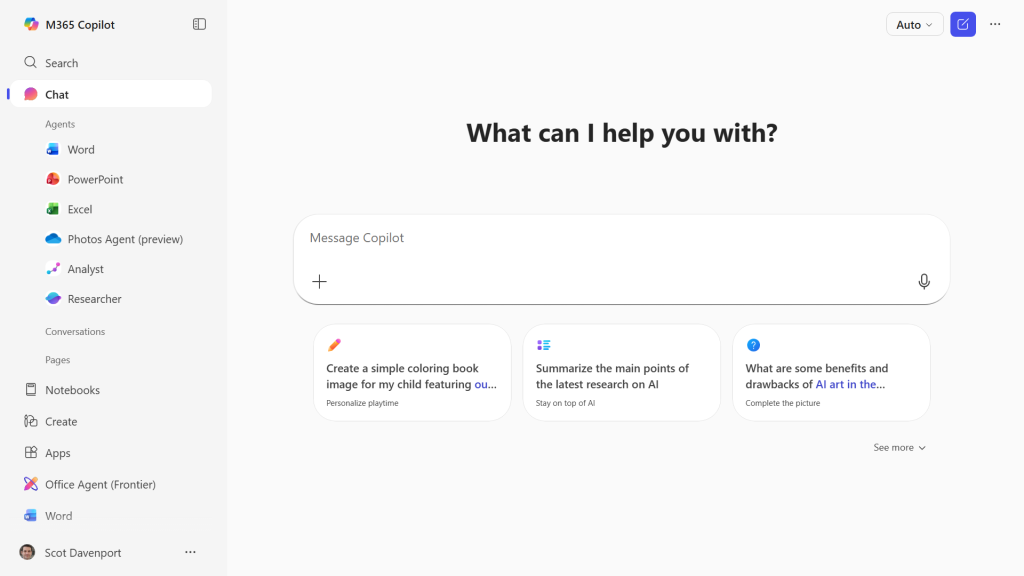
Now, however, Microsoft has deeply integrated its Copilot generative AI assistant throughout Microsoft 365, and the hub has been transformed. Currently called the M365 Copilot app, the page puts the Copilot Chat interface front and center. You can still get to your M365 files or apps by clicking Search or Apps in the sidebar on the left, but the main purpose of the hub these days is to let you chat with Copilot.
The old Microsoft Office hub has been taken over by Copilot Chat.
Howard Wen / Foundry
With the rollout of new Word, Excel, and PowerPoint AI agents, you can use Copilot Chat in the M365 Copilot app to generate first-draft Word documents, Excel spreadsheets, and PowerPoint presentations. If you have a qualifying Microsoft subscription, you can also use the advanced Analyst agent in Copilot Chat to analyze M365 files in various ways. We’ll show you how.
In this article:
Who can use Copilot Chat in the M365 Copilot app
Create a document, spreadsheet, or presentation with Copilot Chat
Analyze your M365 documents in Copilot Chat
Get collaboration insights using Copilot Chat
Who can use Copilot Chat in the M365 Copilot app
As of mid-2026, Microsoft has integrated Copilot Chat into most M365 plans, which include:
Microsoft 365 for individuals: Personal, Family, and Premium plans. Note that only the subscriber account has access to Copilot tools. They cannot be shared with other users on a Family or Premium plan.
Microsoft 365 for business users: A basic version of Copilot Chat is included with the small-business M365 Business Basic, Standard, and Premium plans as well as enterprise-level Office 365 E1/E3/E5 and Microsoft 365 E3/E5/E7 plans. Add-on M365 Copilot licenses for small business and enterprise offer advanced Copilot features (these are included with the top-level M365 E7 plan).
Microsoft recently removed access to Copilot Chat from within Word and other M365 apps for large enterprise users who don’t have an add-on M365 Copilot license. That means the M365 Copilot app is now the only way for those users to access Copilot Chat.
If you don’t have a Microsoft 365 plan, you don’t have access to Copilot Chat. You can still use the M365 Copilot app to get to your Office files and apps, but if you click New chat, you’ll see a message saying that Copilot Chat requires an upgraded account.
In this guide, we’ll focus on using Copilot Chat in the M365 Copilot web app. There are also downloadable M365 Copilot apps for Windows, macOS, iOS, and Android. Depending on your M365 plan and computing environment, your interface may not exactly match the screenshots you see here, but it should work similarly.
Create a document, spreadsheet, or presentation with Copilot Chat
Using the M365 agents in Copilot Chat works mostly the same whether you’re creating a new Word document, Excel spreadsheet, or PowerPoint presentation.
1. Add the AI agents (if needed)
Depending on your Microsoft 365 plan and how it’s configured, you may or may not have the Word, Excel, and PowerPoint AI agents installed by default in Copilot Chat. If you don’t see them listed under “Agents” in the left sidebar, you’ll need to add them.
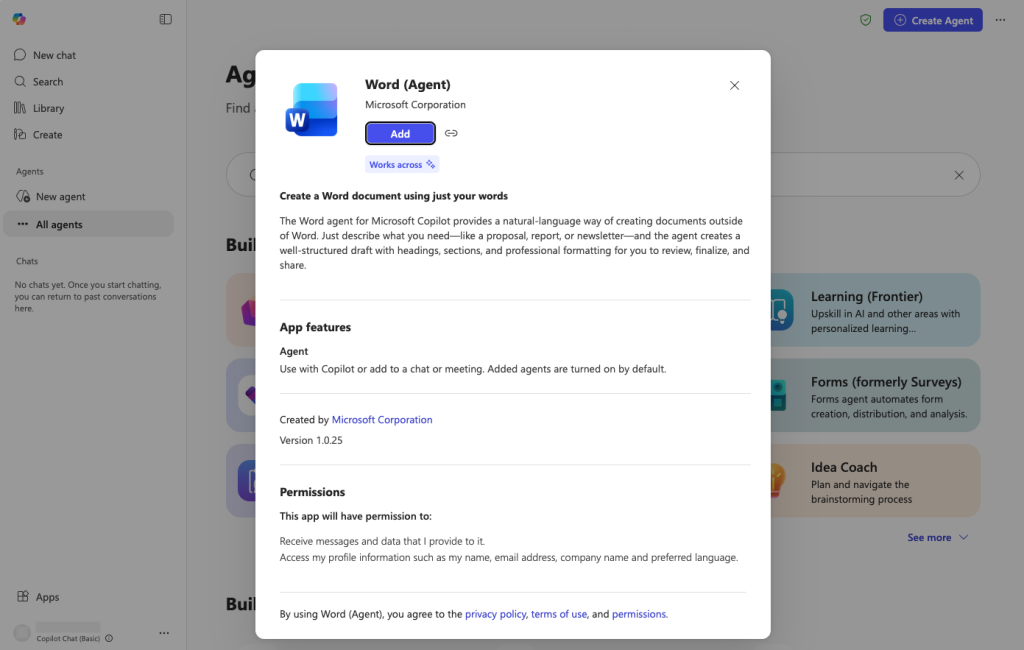
Click All agents in the left sidebar. You’ll be taken to the Agent Store, where you can browse through available agents built by Microsoft, third-party vendors, and/or your own organization. Type word into the search bar and select the Word (Agent) result that appears. A panel pops up with information about the agent.
Adding the Word agent to Copilot Chat.
Howard Wen / Foundry
Click Add to install the agent in Copilot Chat. It will appear in your Agents list in the left sidebar. Repeat the process for the Excel and PowerPoint agents.
2. Select the AI agent
On the Copilot Chat page, you first need to invoke a specific AI agent: In the left sidebar, select Word, PowerPoint, or Excel from the Agents list. (If you don’t see the agent you want, select All agents and then click on it.)
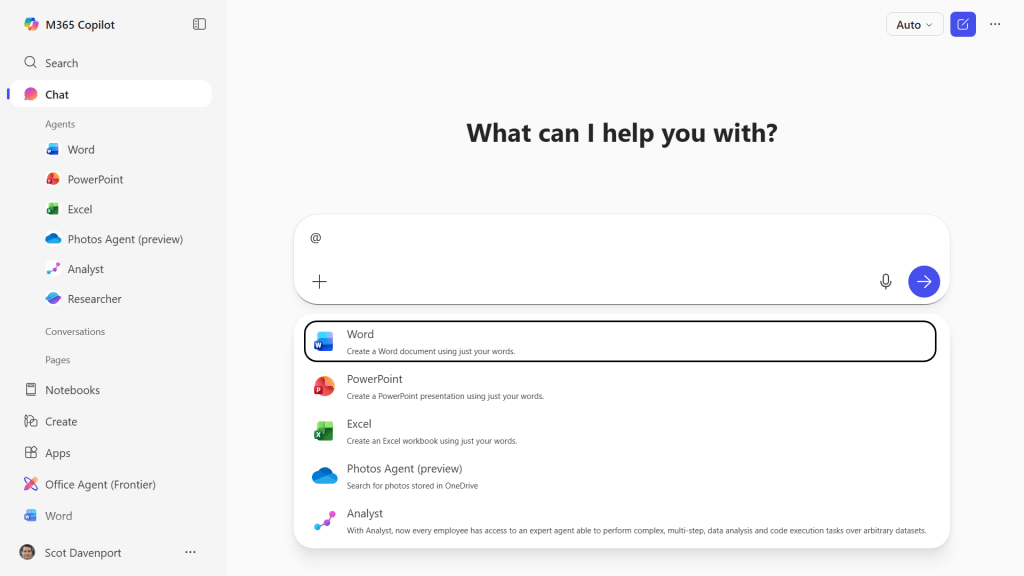
Alternatively, inside the Copilot chat box, type @ and select Word (or whichever agent you want) from the results that appear below the chat box.
Select the Word, PowerPoint, or Excel agent to get started.
Howard Wen / Foundry
3. Enter your prompt
Enter your prompt in the chat box, describing the details about the document, spreadsheet, or presentation that you want.
Example to generate a Word document:
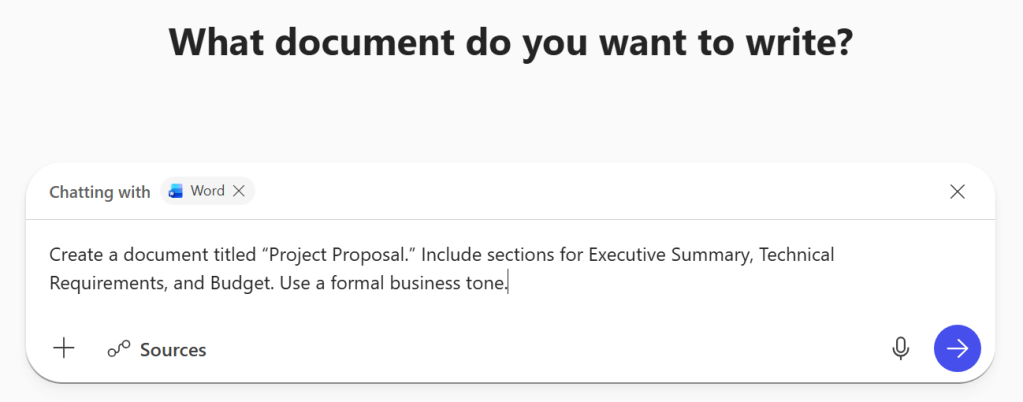
Create a document titled “Project Proposal.” Include sections for Executive Summary, Technical Requirements, and Budget. Use a formal business tone.
After invoking the agent, type in your prompt.
Howard Wen / Foundry
To generate an Excel spreadsheet, describe its structure. Example:
Generate a sales report for Q4 2026. Include columns for Date, Product Name, Units Sold, and Total Revenue. Format the Revenue column as currency.
To generate a PowerPoint presentation, specify important aspects of the presentation, such as its topic, audience, number of slides, etc. Example:
Build a presentation with 10 slides for a meeting announcing our new sustainability initiative. Include a slide for the timeline. Use an enthusiastic but professional tone.
4. Attach a file for reference (optional)
You can attach one or more files to the chat box for Copilot to use as reference when generating your request. For example, you can attach a Word document and prompt the PowerPoint agent to create a presentation based on it:
Create a presentation from this document.
or have the Word agent create a document based on an Excel spreadsheet:
Create a summary report based on the attached spreadsheet.
To attach a file, click the + icon on the chat box and select Add content (to attach a file in your OneDrive) or Upload files (to attach a file that’s on your local PC drive).
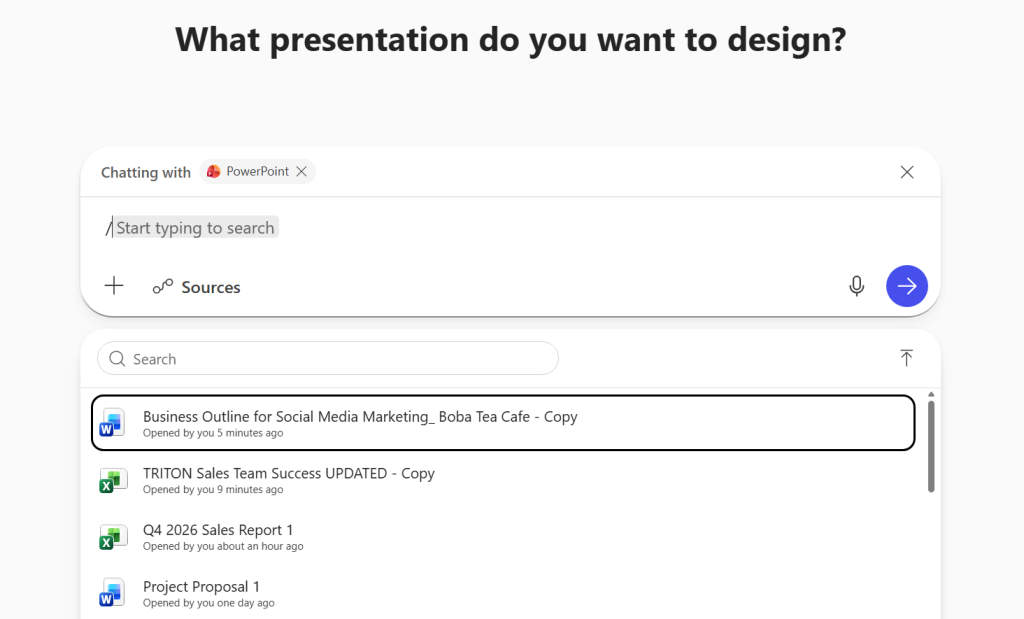
Alternatively, if the file is stored in your OneDrive, you can type / (forward slash) in the chat box and start typing its filename. This also pulls up a list of files recently added to your OneDrive that you can select from, and there’s also a search box you can use to find the file.
Adding a document to use as a source for a PowerPoint agent prompt.
Howard Wen / Foundry
5. Review the generated result
When you’ve finished typing your prompt and optionally uploading a source file, press Enter or click the right-arrow button at the bottom right of the chat box.
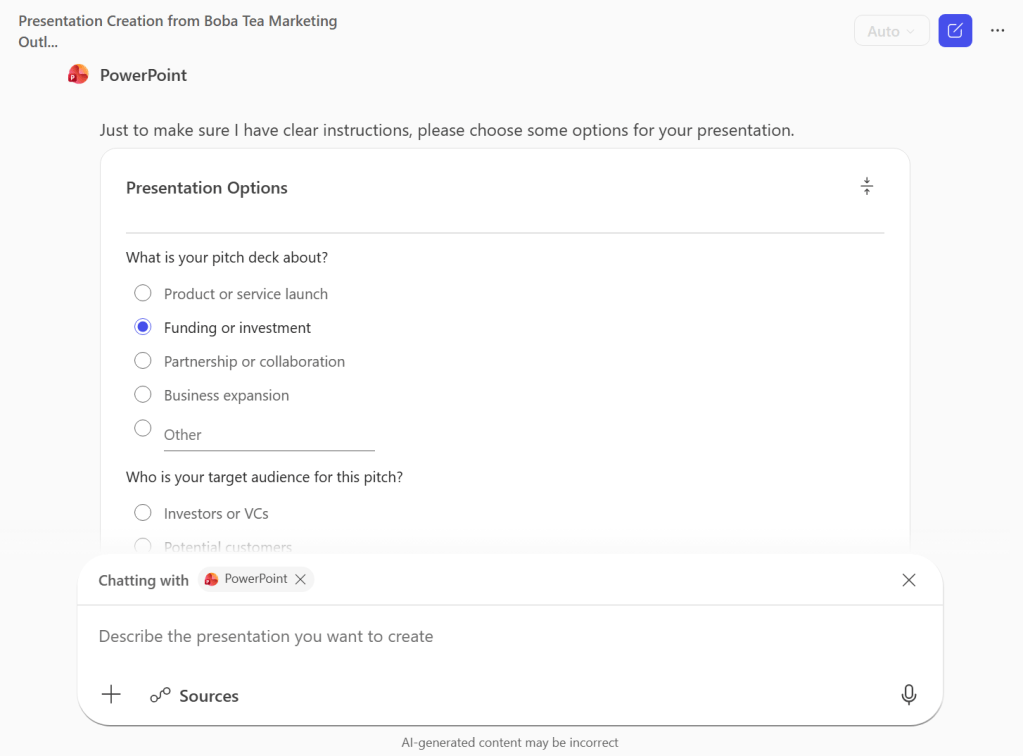
The agent may ask you a few questions, mostly presented as options you select, before generating a result.
The PowerPoint agent typically asks a few questions about the presentation before it starts creating it.
Howard Wen / Foundry
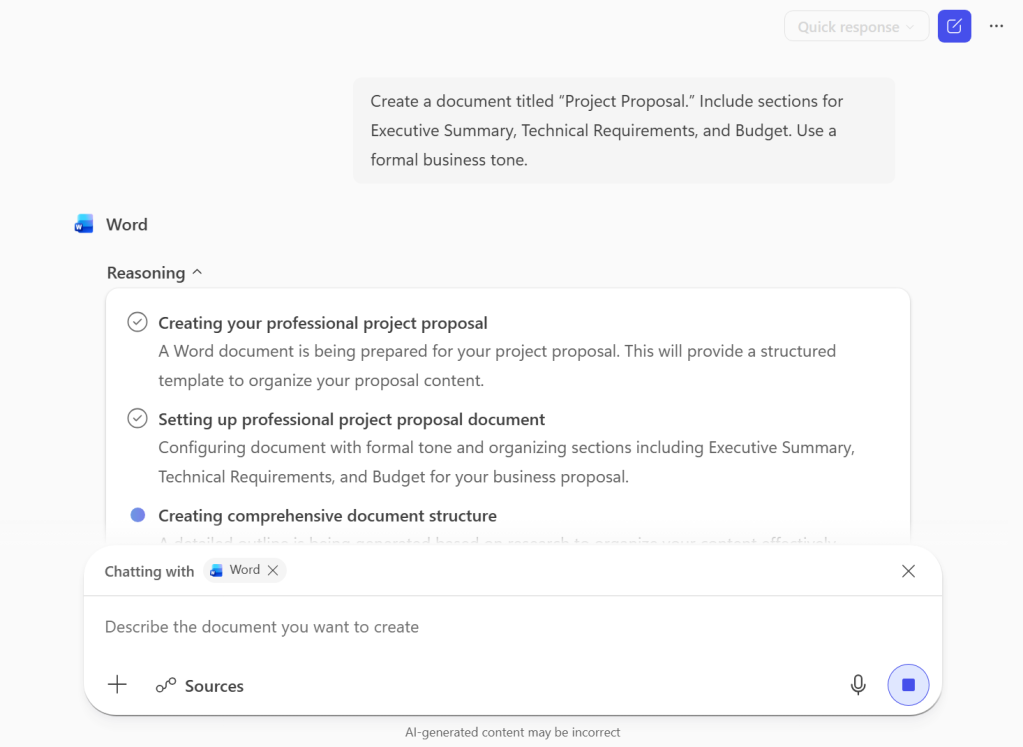
Depending on the complexity of your prompt, Copilot will take several seconds to several minutes to generate a result. As it works, it will notify you of its progress.
Copilot will tell you what it’s doing as it prepares a result.
Howard Wen / Foundry
When it’s done, it will automatically save the document, spreadsheet, or presentation that it generated to the Documents folder in your OneDrive.
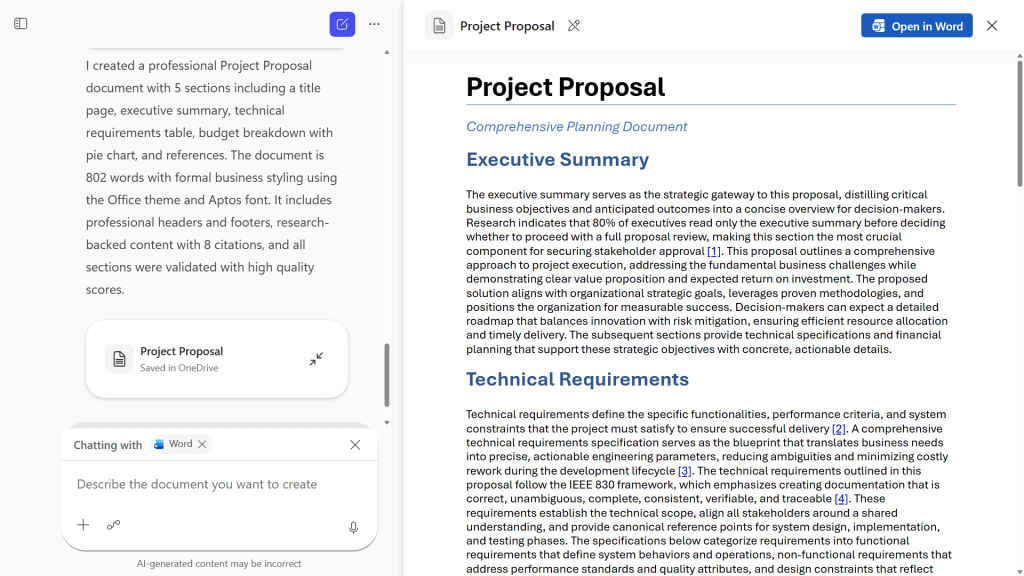
A large pane will also open in the right half of the screen, displaying the full document, spreadsheet, or presentation that Copilot generated. You can scroll vertically through it to review it.
The generated document appears in pane on the right.
Howard Wen / Foundry
Important: As always when using generative AI tools, check all results carefully for errors or fabrications. (See “How to curb hallucinations in Copilot” for tips on minimizing such errors.)
6. Refine the generated result
You can refine the generated result by entering a follow-up prompt in the chat box.
Example to refine a Word document:
Add a section on Network Security, and make the tone more casual.
To refine a generated Excel spreadsheet or PowerPoint presentation, you have to first attach it to the chat box: Type the forward slash (“/”) in the chat box. This will pull up a list of files recently added to your OneDrive, including the generated spreadsheet or presentation. Select it and then enter your prompt to refine it.
Example to refine an Excel spreadsheet:
Add a column titled Price Per Unit and calculate this value for every row.
To refine a generated Excel spreadsheet, attach the file and say how you want it changed.
Howard Wen / Foundry
Example to refine a PowerPoint presentation:
Remove Slide 4. Add a blank slide at the end.
Copilot will generate a revised version. This will be saved as a new file in the Documents folder in your OneDrive.
7. Edit the generated result in a Microsoft 365 app
It’s best to think of genAI output as a template or first draft that you will update, add to, and otherwise tailor for your own needs. To do so, it’s easiest to open the generated file in the appropriate M365 app.
At the upper right, click Open in Word, Open in Excel, or Open in PowerPoint to launch the web version of that app in a new browser tab. The generated document, spreadsheet, or presentation will appear inside the app so you can do further work on it.
Analyze your M365 documents in Copilot Chat
You can use Copilot Chat to analyze your M365 documents in various ways by invoking the Analyst agent. This agent is available only if you have a Microsoft 365 Premium plan or, in a business environment, if you have an add-on M365 Copilot license. (That said, there is a workaround for the third tip below for those who don’t have an advanced license.)
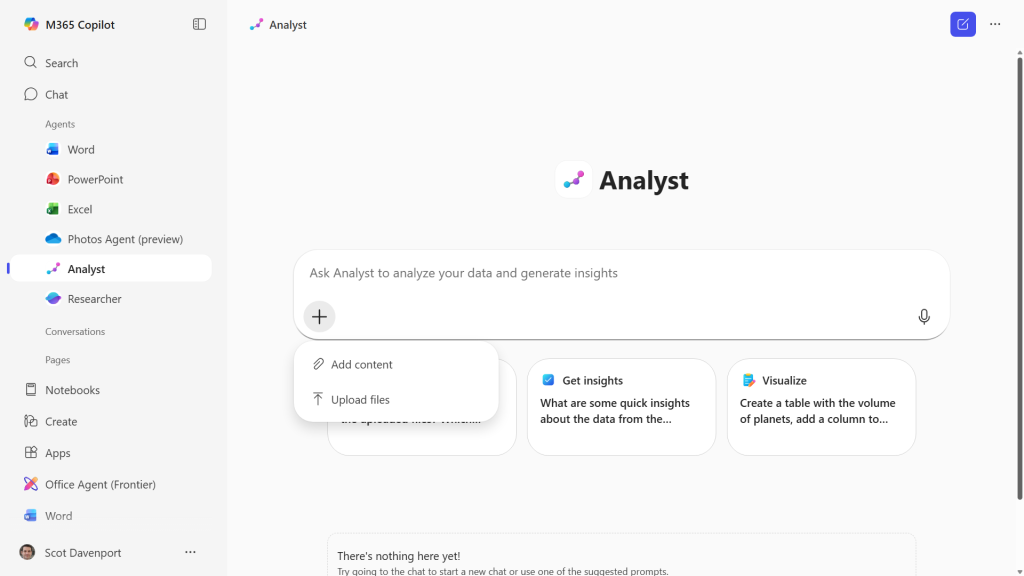
In the left sidebar, select Analyst in the Agents list. (If you don’t see it, follow the instructions in step 1 above to add it.) Or, inside the Copilot chat box, type @analyst and press the Enter key.
Next, attach the file or files that you want Copilot to analyze. Click the + icon on the chat box and select Add content (to attach a file in your OneDrive) or Upload files (to attach a file that’s on your local PC drive).
Call up the Analyst agent and upload the files you want it to analyze.
Howard Wen / Foundry
Notes for Excel and PowerPoint files:
Ensure that the data in an attached Excel file is formatted as a table. In this way, Copilot can better identify the range of values in it for analysis.
For PowerPoint, the Analyst agent works best if your slide deck is text-heavy.
Here are a few ways you can have Copilot analyze your files:
Identify trends in data sets or presentations
Using the Analyst agent, Copilot can act as a data analyst, spotting patterns and anomalies in your Excel or PowerPoint files. It can also identify missing data that would provide a more complete picture.
Tip: For the most accurate results, describe a specific source (such as the name of a table or slide numbers) and the timeframe to give the agent boundaries for its analysis.
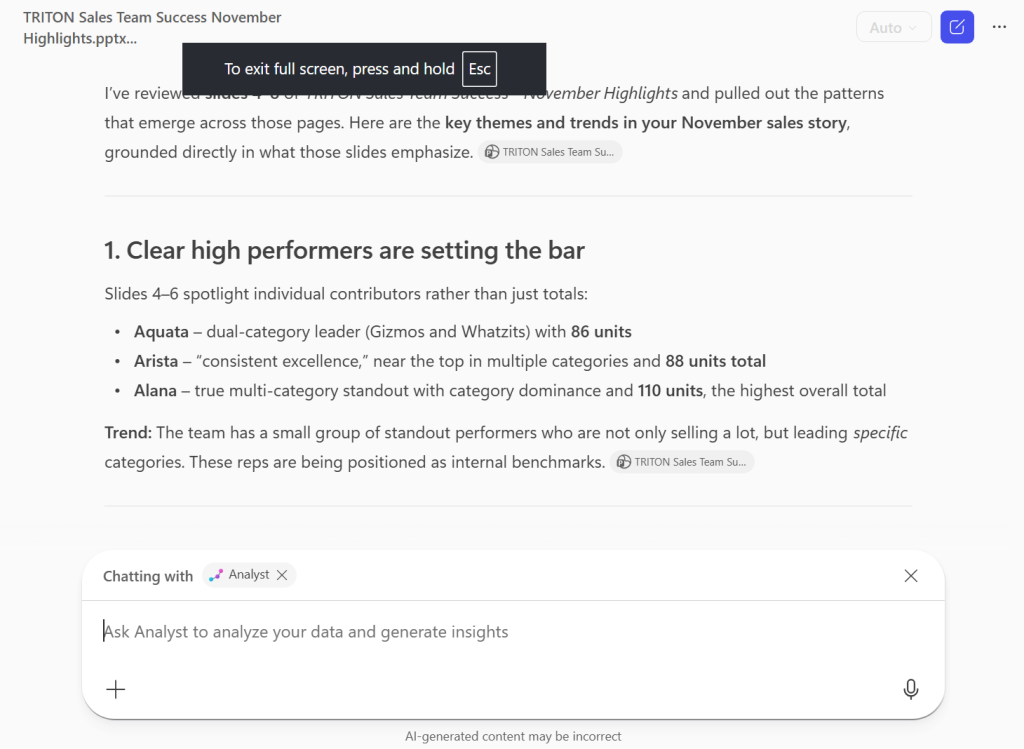
PowerPoint example:
Look at slides 4 through 8. What are the themes or trends in our sales?
Copilot Chat’s Analyst agent can surface key themes in a PowerPoint presentation.
Howard Wen / Foundry
Excel example:
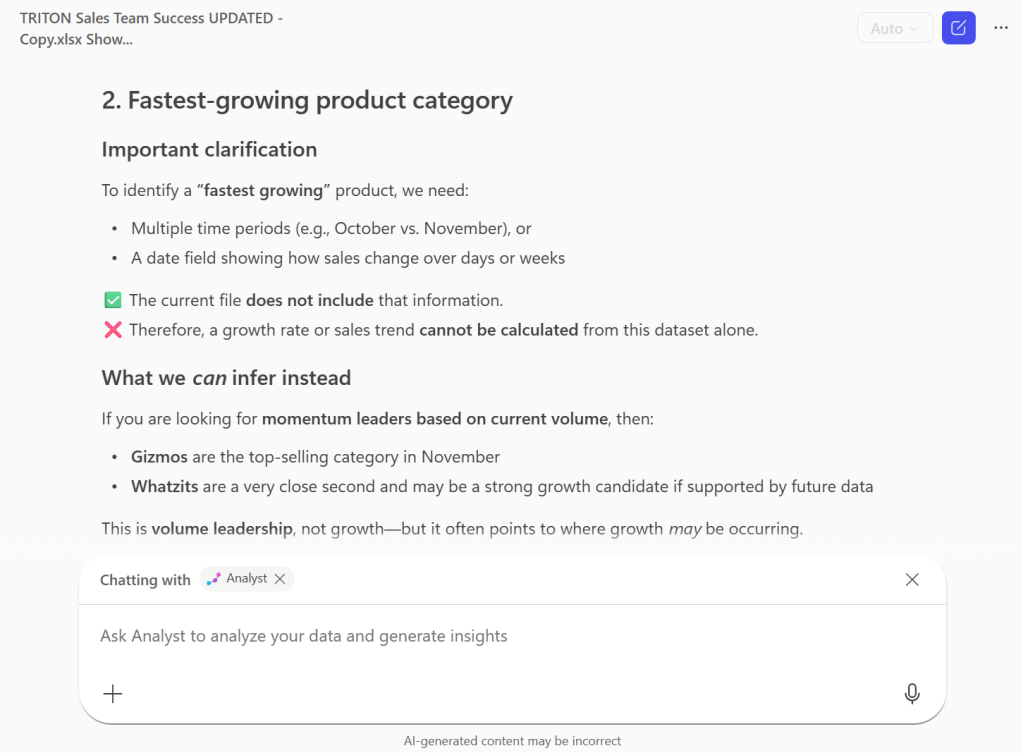
Show me the sales trends over the last month. Identify which product category is growing the fastest.
If your source file is missing the data Copilot needs for the trend analysis you’ve asked for, it will tell you so. It may instead provide a summary of the data the file does include and/or what can be inferred from the file’s data.
Copilot correctly says it can’t provide the requested analysis from the source data.
Howard Wen / Foundry
Project forecasts
The Analyst agent can use statistical models to project future values based on historical data in an Excel file. (These are simple projections and should not be presented as official forecasts.) Your source spreadsheet must include a time-based column, such as dates, and a numerical column for the values you want Copilot to forecast.
Example:
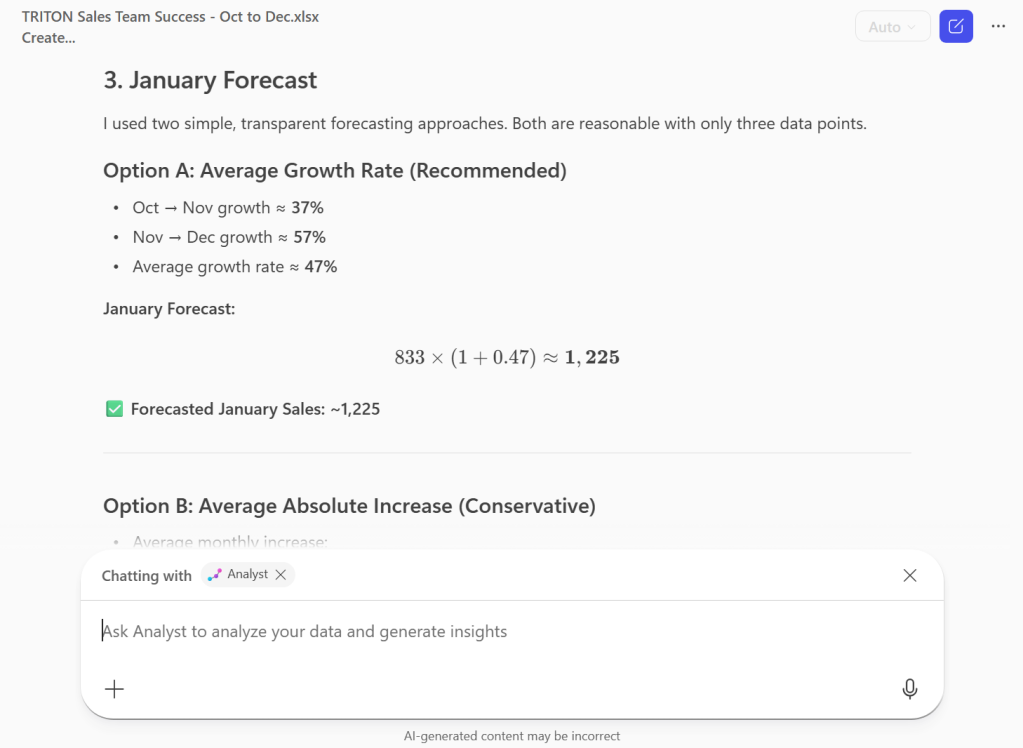
Create a forecast for January based on the months of October, November, December in this spreadsheet.
Copilot has projected January sales based on the average growth rate from October to December.
Howard Wen / Foundry
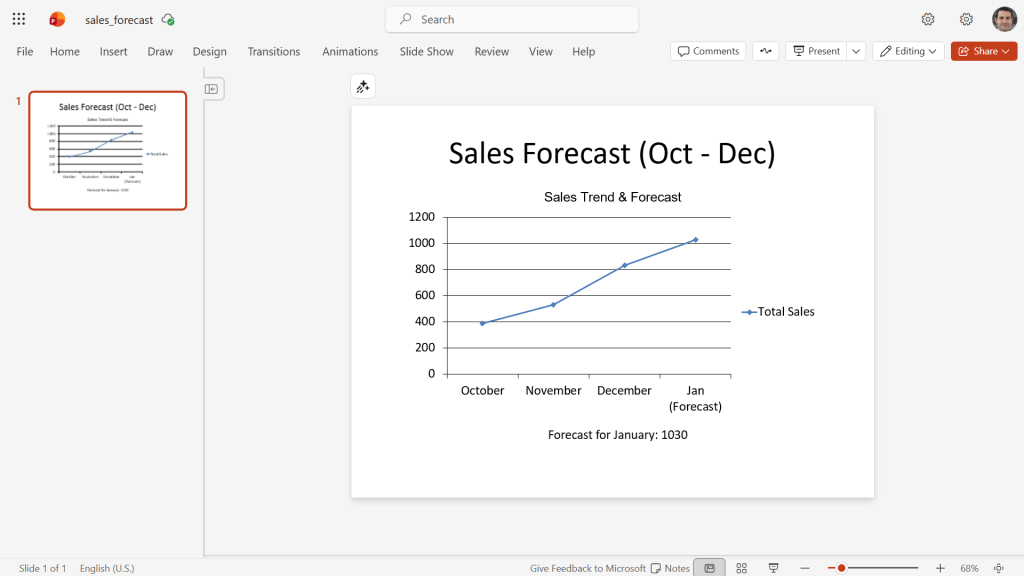
You can also prompt the Analyst agent to create a projection based on an Excel spreadsheet and output it on a PowerPoint slide that you can download. Example:
Create one slide that shows a sales forecast based on the months of October, November, December in this spreadsheet.
A sales forecast slide generated by Copilot.
Howard Wen / Foundry
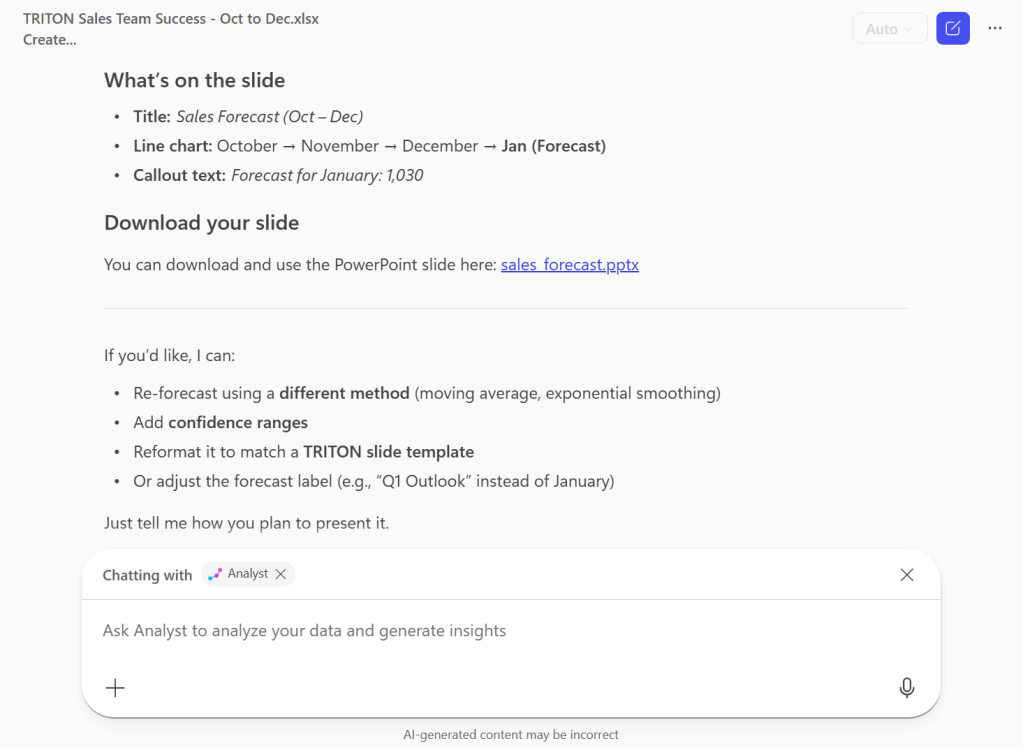
The agent explains how it calculated the forecast and offers suggestions for tweaking the result. Type whatever changes you want to make into the chat box, and Copilot will generate a new version of the slide.
Copilot explains what it did and suggests possible changes.
Howard Wen / Foundry
Compare document versions
Documents often go through multiple revisions, especially in a collaborative work environment. Unlike a basic versioning feature that lists literal differences, Copilot can provide contextual understanding and explain why a change is significant.
After you’ve attached two files to the chat box, enter a prompt, such as:
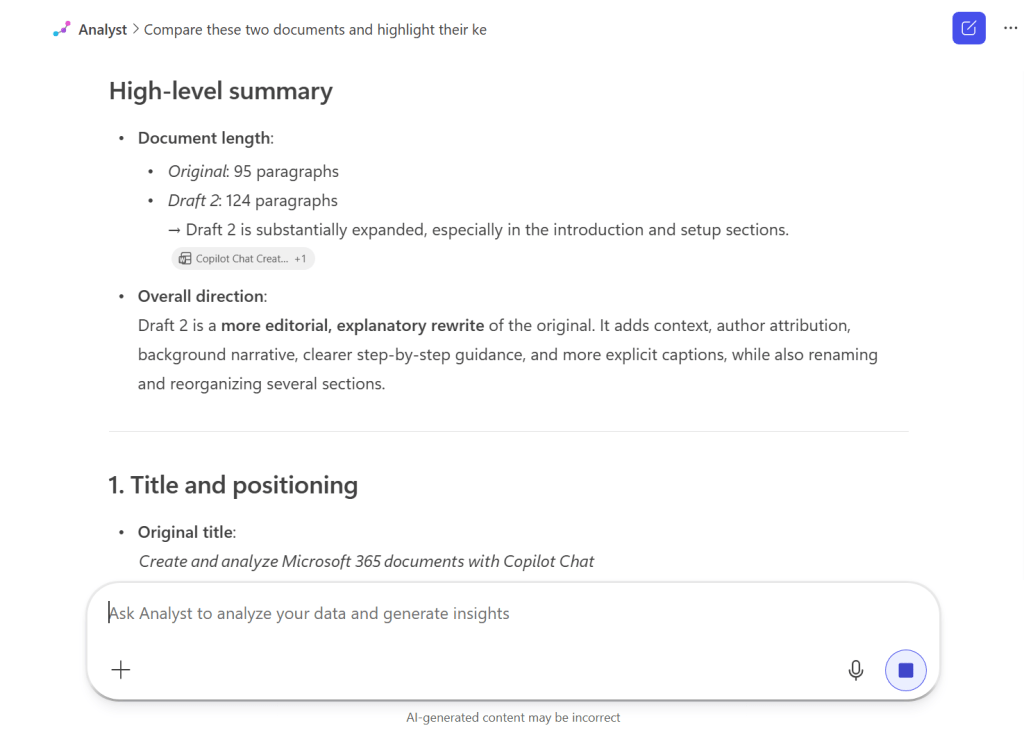
Compare these two documents and highlight their key differences.
The Analyst agent summarizes the changes in the document’s overall direction and details the main differences in specific aspects of the document.
The Analyst agent explains how a document has changed overall, then cites key differences in areas such as title and positioning.
Howard Wen / Foundry
Note: If you don’t have access to the Analyst agent, you can alternatively try using the Word agent or the main Copilot Chat interface to compare two document versions. Like the Analyst agent, Copilot Chat presents its results in the chat window. If you use the Word agent, it creates a detailed comparison document after asking a series of questions about purpose, audience, and style.
Get collaboration insights using Copilot Chat
When working on a project with your co-workers, it can be a challenge to keep up with who did what to a file. You can prompt Copilot to list edits and comments to a file. This allows you to catch up on the context of changes without having to open it.
You don’t need to invoke the Analyst agent to do this. This works better if you use the main Copilot Chat. Click the + icon to attach the file (document, spreadsheet, presentation).
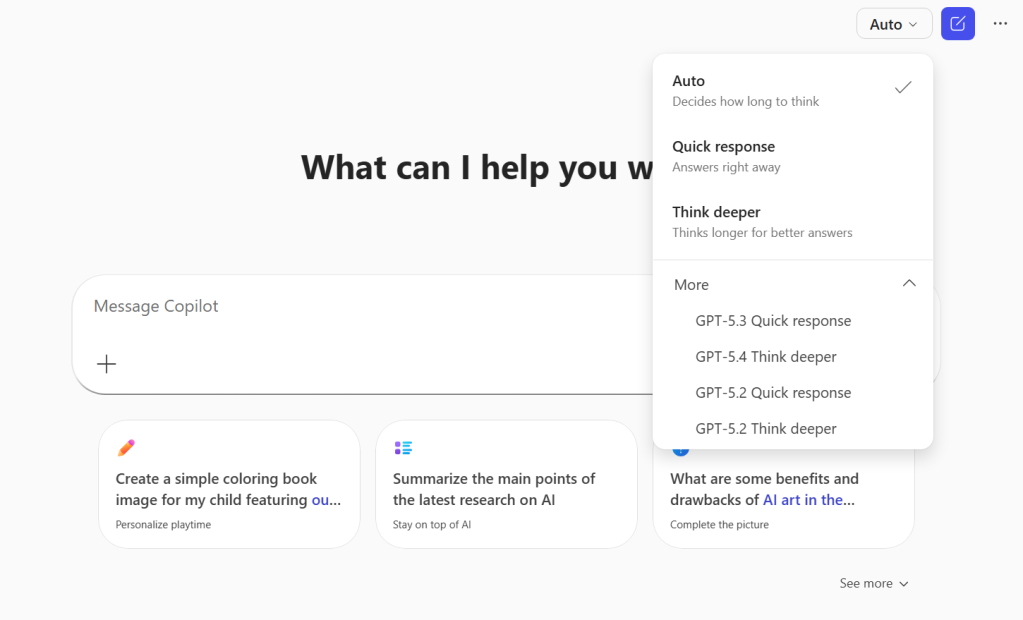
Optionally: At the upper-right corner, click Auto, which will open a dropdown. Here you can select an AI model that gives you results faster, or one that spends more time “thinking” in order to give you better-quality results. A second dropdown at the bottom lets you select a specific AI model by name, such as GPT-5.3 or GPT-5.4. We recommend picking a “think deeper” model for insights retrieval.
You can optionally pick a model for Copilot to use when it generates results.
Howard Wen / Foundry
Example prompts to extract collaboration insights:
What has [CO-WORKER NAME] updated or commented on in this document?
Summarize the comments and feedback left by everyone in this attached document.
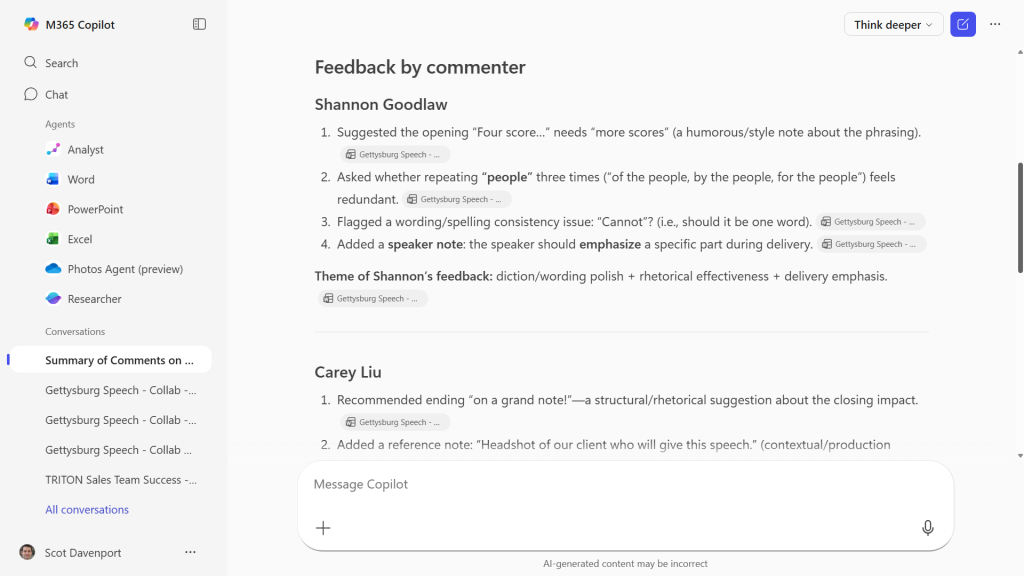
Copilot will generate a detailed response based on your prompt.
Copilot can summarize who did what to a shared document.
Here in the land of Android, though, Gemini’s been quietly competing for attention with another relatively youthful on-demand assistant — and that’s a far less in-your-face feature called Circle to Search.
Circle to Search is essentially an instant portal to the even less widely known Android Google Lens setup, which has been serving up genuinely practical real-world advantages for Android device-owners in the know for years now — since way back before the word “Gemini” had any Googley meaning.
And whether you also adore Gemini or find it to be more hype than help, it’s well worth your while to dig into Circle to Search — or maybe just revisit its potential, if you’d perhaps explored it briefly early on and then forgotten about it — to see what it can do for you.
Here, specifically, are 10 simple but supremely useful ways Circle to Search can make your day-to-day life easier without allowing any Gemini AI avalanches to overtake you.
Real quick, first, a fast primer on where Circle to Search lives and how you can access it:
At this point, Circle to Search is available on a bunch of Android devices beyond just the latest high-end flagships. But it isn’t available everywhere. And there’s no clear, up-to-date list of exactly which devices have it and which still don’t.
To see if it’s present on your current phone, try going into your system settings and searching for the word circle. If you see “Circle to Search” show up as an option, tap it and then make sure the toggle next to the “Circle to Search” line is in in the on and active position.
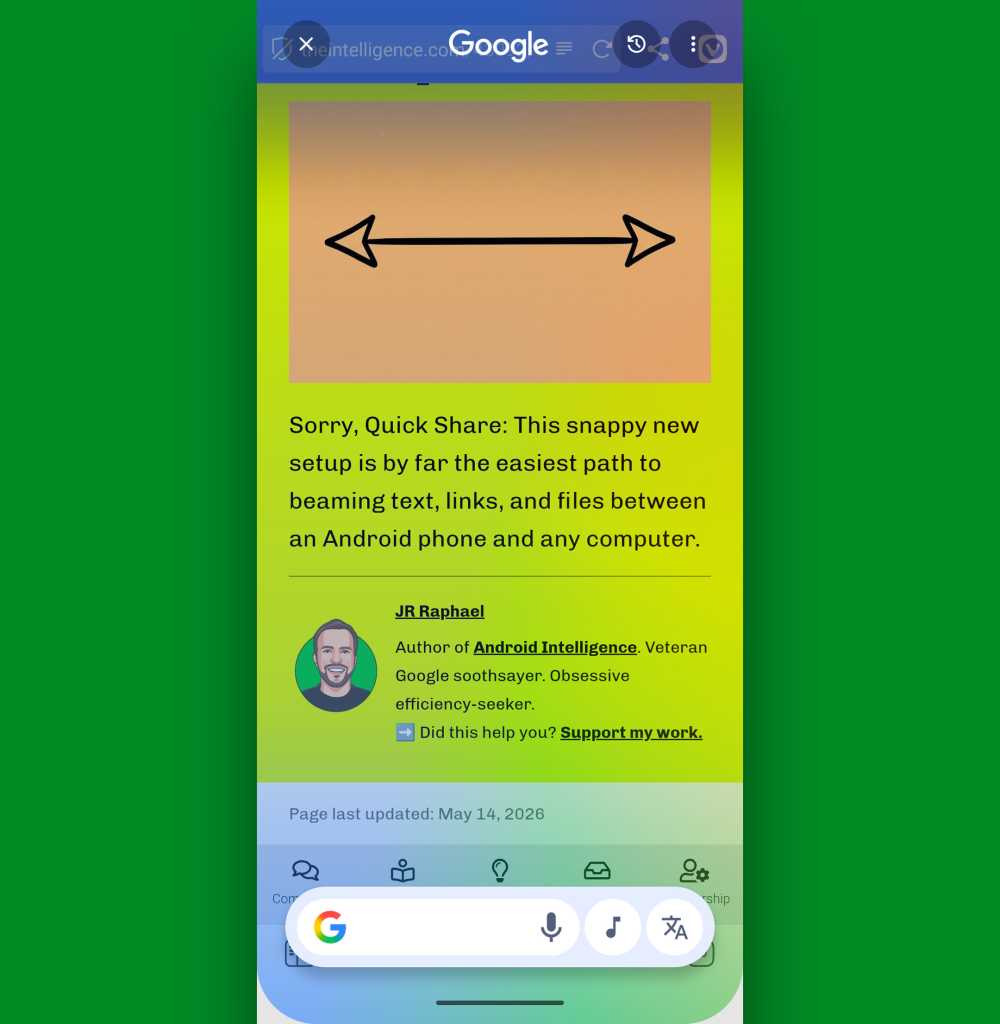
Then, to summon Circle to Search, press and hold the bottom-center area of your screen — either the thin navigation bar line, if you’re using the current Android navigation gestures, or the Home button, if you’re still stickin’ with the old legacy three-button nav approach — and you should see an overlay appear on top of whatever else you were viewing with a Google logo at its top and a search bar at its bottom.
Google’s Circle to Search in action, atop a regular ol’ Android browser window.
JR Raphael, Foundry
From there, you can use your favorite fingie to circle any image, text, or broad area on your screen to highlight it. You can also tap any area to select it (and then have the opportunity to refine your selection) or scribble over any area to mark it, too.
And whatever you select will become the subject of a search for additional info.
If you don’t seem to have Circle to Search available on your device, download the Google Lens Android app — then try taking a screenshot of anything in front of you and sharing it directly into the Lens app. It won’t feel quite as interactive or instantaneous as what you’d get with Circle to Search present, but you’ll be able to accomplish most of the same feats we’re about to go over in that environment, with just a couple of extra steps needed to get there.
Capisce? Capisce. Now, let’s get to the good stuff.
Circle to Search superpower #1: Instant searching
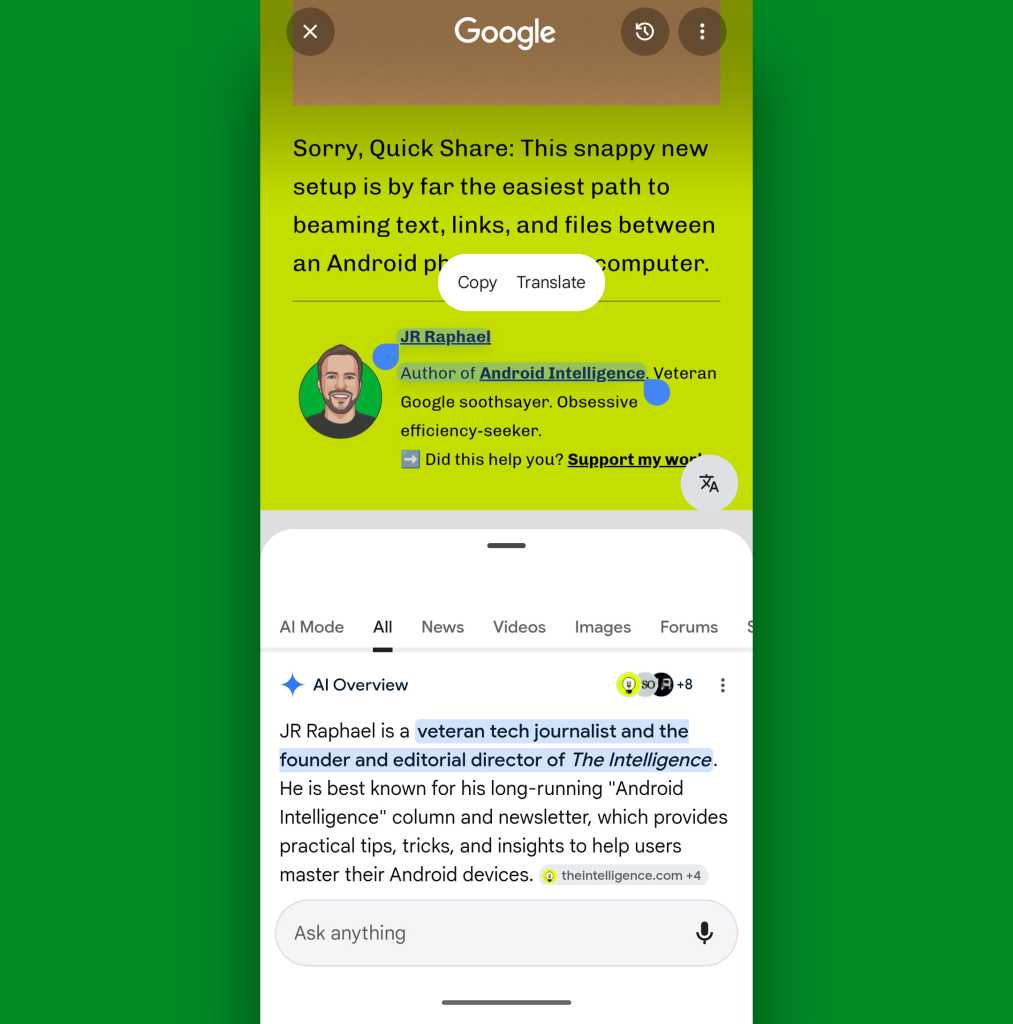
As I often say, it’s the simplest stuff that frequently proves to be the most useful. For all the complex feats Gemini may be able to perform (at least in theory), the action I actually find myself relying on more than anything is the refreshingly routine ability of Circle to Search to look up any word or phrase on my screen, anytime, and give me more information about it — without interrupting anything I’m doing or forcing me to switch apps.
That might mean coughing up a quick definition, at the simplest possible level. Or it might mean dousing me with details about a person, place, or product I’ve seen within an email, a web page, a document, you name it.
Whatever the case may be, all I’ve gotta do is summon Circle to Search from wherever I happen to be on my device at that moment, tap my finger onto the term in question, and boom: I’ve got the info I need right in front of me — no complicated commands, frustrating back-and-forth dialogue, or effort-wasting app switching required.
Circle to Search makes it seamless to search for anything, anytime — even lowly tech writers.
JR Raphael, Foundry
Easy peasy, no? And there’s lots more where that came from.
Circle to Search superpower #2: Fast text actions
In addition to surfacing basic info, Circle to Search can help you take a variety of actions on text you highlight with just one more tap and no awkward multistep pasting or other clunky mechanics.
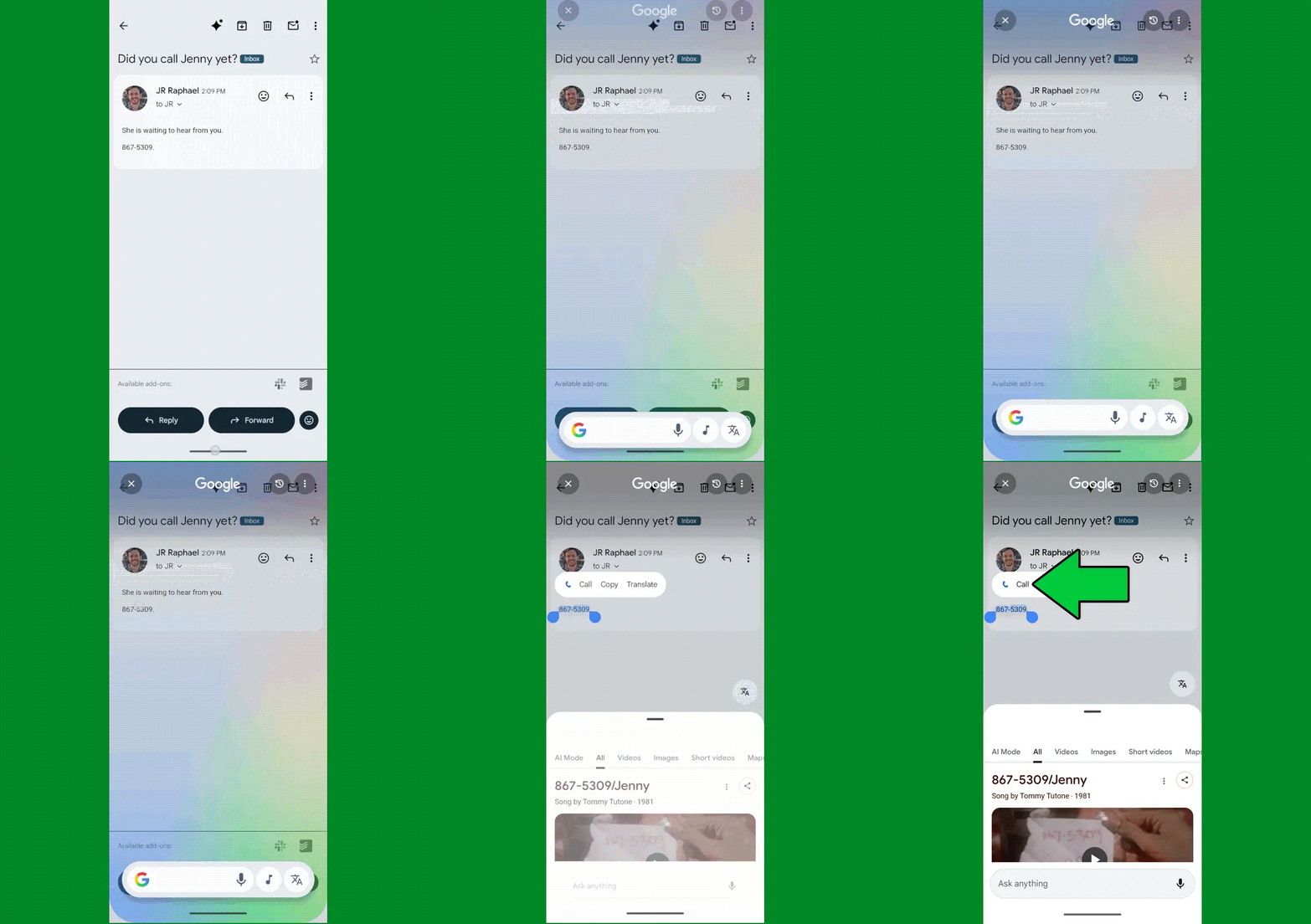
The next time you see a phone number you want to call, text, or save to your contacts; an email address you want to save or send a message to; a physical address you want to look up or navigate to; or a URL you want to open when it isn’t set to be a tappable link on its own, call up Circle to Search and tap the text in question.
So long as the item is the only text selected, Circle to Search should recognize its format and offer up the logical associated action for you to caress next.
Take actions on text in a snap by summoning Circle to Search first.
JR Raphael, Foundry
Speaking of which…
Circle to Search superpower #3: Quick copy
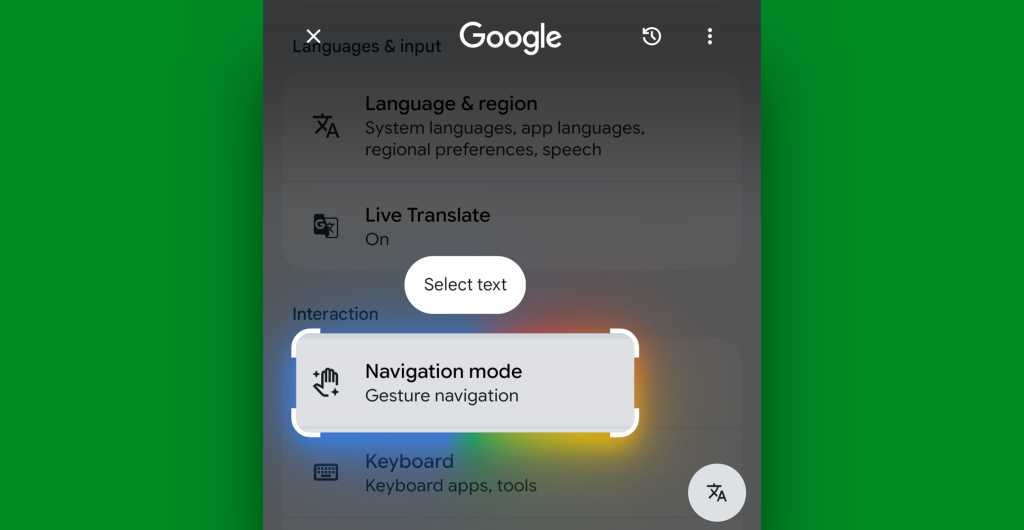
Back to the idea of simplicity, one of the ways I find Circle to Search to be most useful is in its ability to let me copy text from anything, anytime — even when it isn’t text you could typically copy.
From phrases in my Android settings to words appearing within images, Circle to Search converts everything it sees into standard copy-ready dialog, and it takes just one tap on anything to highlight it in that environment and then beam it to your Android system clipboard from there.
You can copy anything with Circle to Search active — even if it’s in area where copying normally isn’t possible.
Text aside, Circle to Search integrates the long-Lens-offered ability to identify any image in front of ye and then allow you to interact with it in all sorts of interesting ways.
This can range from telling you the name of a person, place, or product to giving you specific identifying info for a plant, flower, tree, animal, or even type of screw or computer component.
Just tap or circle any image on your screen — whether it’s in a web page, an email, a document, or anywhere else imaginable — and you’ll see the results right away.
You’ll be a full-fledged image-analyzing gumshoe with Circle to Search at your side.
JR Raphael, Foundry
And from there…
Circle to Search superpower #5: Deeper context
Once you’ve gotten an initial result from Circle to Search — with an image, with text, or with most anything you’ve highlighted and selected — you can tap the microphone icon at the bottom of the Circle to Search popup and ask additional questions.
Depending on what you’re seeing and what you want to know, the possibilities are practically endless:
Can you use this word in a sentence?
Where can I find this?
How much does this cost?
You get the idea. And while we’re thinking about products…
Circle to Search superpower #6: Intelligent comparisons
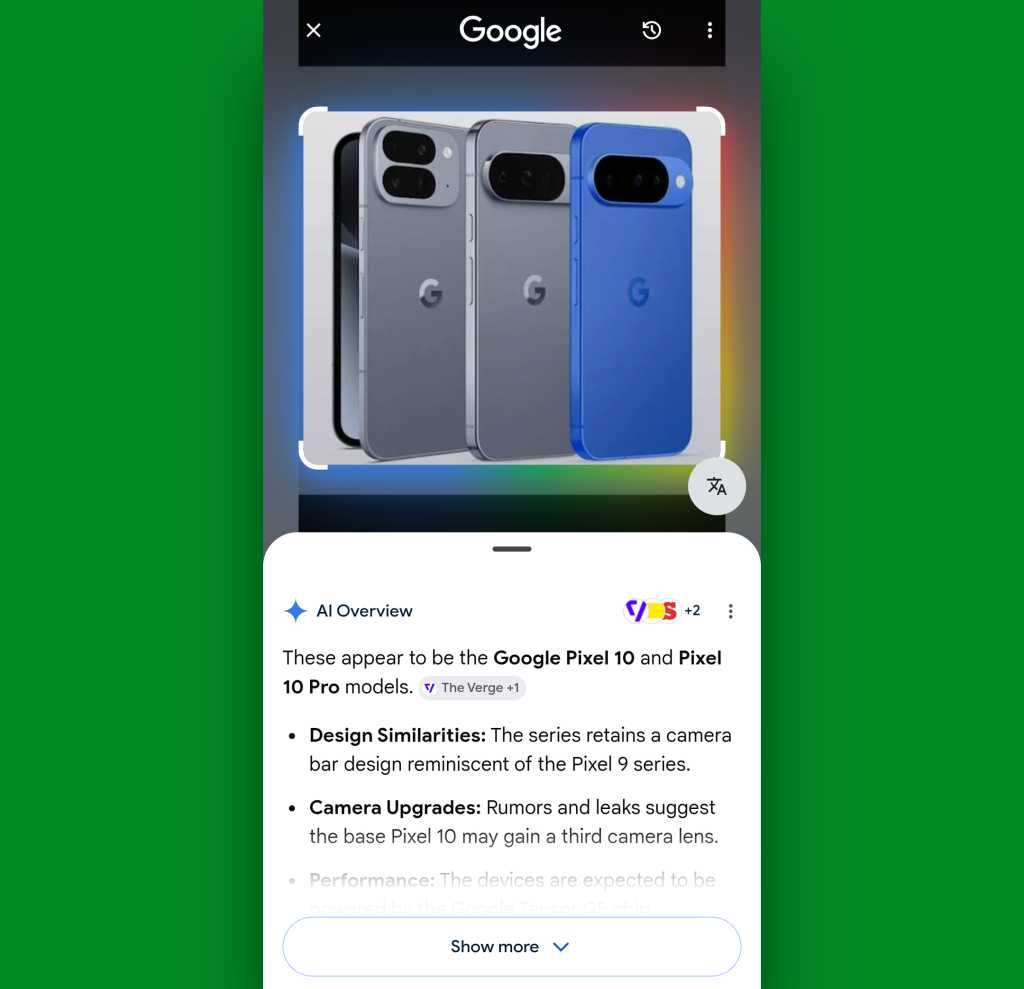
The next time you see something that strikes your interest anywhere in your Android adventures — be it a new phone within an image somewhere, some software or service mentioned in an email, or whatever else the case may — fire up Circle to Search, select the thing you’re ogling, and then use the Circle to Search search prompt or microphone icon to ask for comparisons:
How does this phone compare to the Pixel 9?
Does this cost more or less than a MacBook Pro?
Is this app basically like Notion?
Once you’ve selected something, all you’ve gotta do is ask.
Circle to Search superpower #7: Split smarts
Speaking of comparisons, here’s a really cool Circle to Search trick few mere mortals realize is possible:
You can start up a split-screen of any two apps together, side by side, then activate Circle to Search and use it to analyze things across the two processes.
Let’s all summon our strongest inner Keanus and say it together now: Whoaaaa…..
And — oh, yes — there’s more yet.
Circle to Search superpower #8: Your translation station
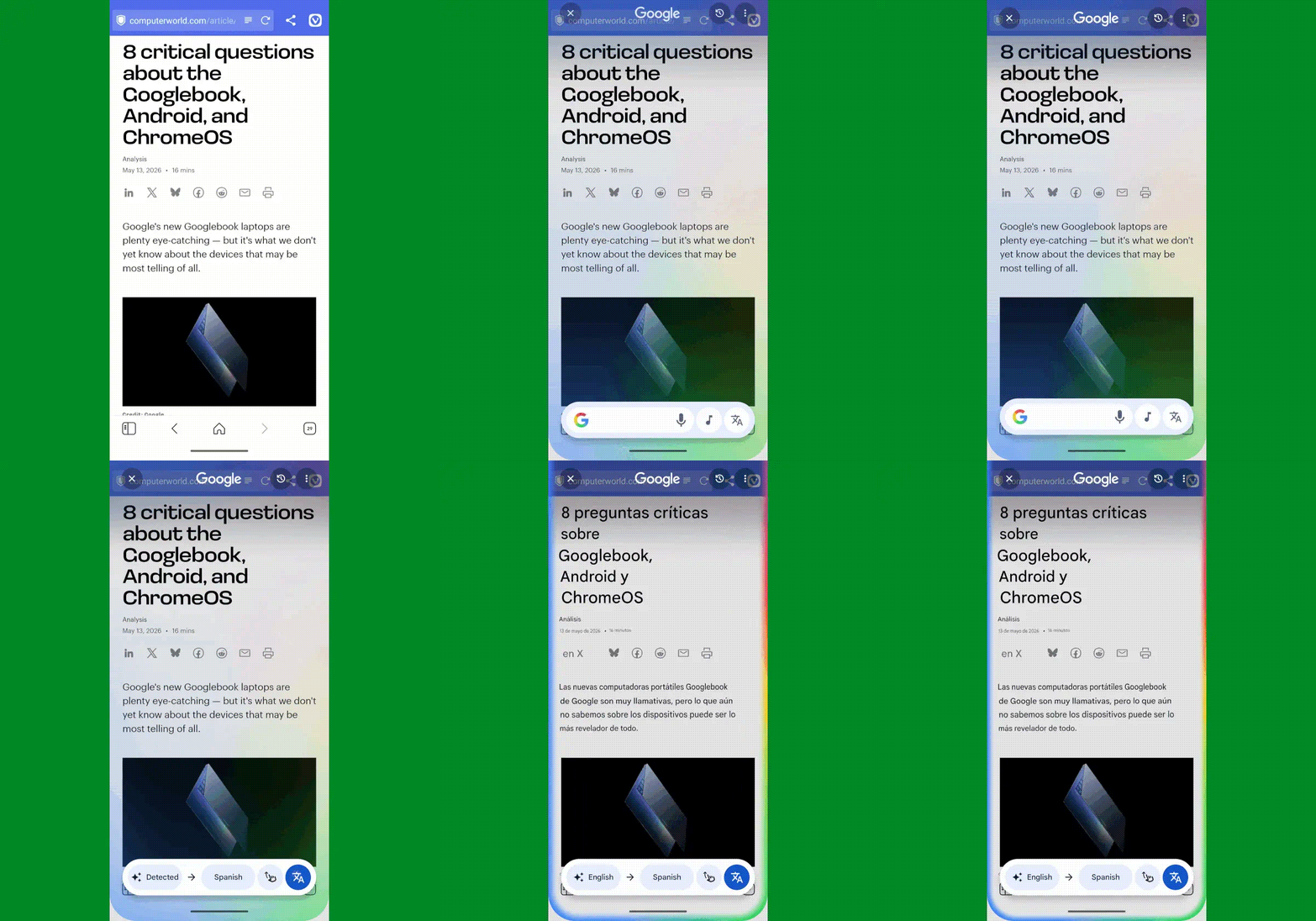
When the need to translate anything between languages arises, skip your usual multistep process and just summon Circle to Search instead. Tap the translate icon — the “A” inside a circle, at the right end of the bottom-of-screen search bar — and you can then select any two languages and have everything on your screen translated on the fly.
Instant translations, Circle-to-Search-style — pas mal, eh?!
JR Raphael, Foundry
If you tap the icon that appears next to the “A” — the one showing a hand alongside an upward-pointing arrow — you can keep the instant translation mode active as you scroll around and even move between apps.
That, suffice it to say, is insanely powerful.
Circle to Search superpower #9: Zoom without borders
Back to simplicity again, one surprising way Circle to Search can be helpful is by unlocking the ability to zoom into anything, anytime — even when it’s part of an area that you can’t ordinarily enlarge.
Press and hold that bottom-center area of your device’s display, then just pinch two fingers apart or together. You’ll be able to zoom in, no matter where you are or what you’re viewing.
And finally…
Circle to Search superpower #10: Song Search, Circle-style
All right, so this last Circle to Search superpower isn’t exactly productivity-related. But it is useful, in the right sort of scenario. (And sometimes, you need to satisfy a non-work-related itch before you can get back to Getting Stuff Done™!)
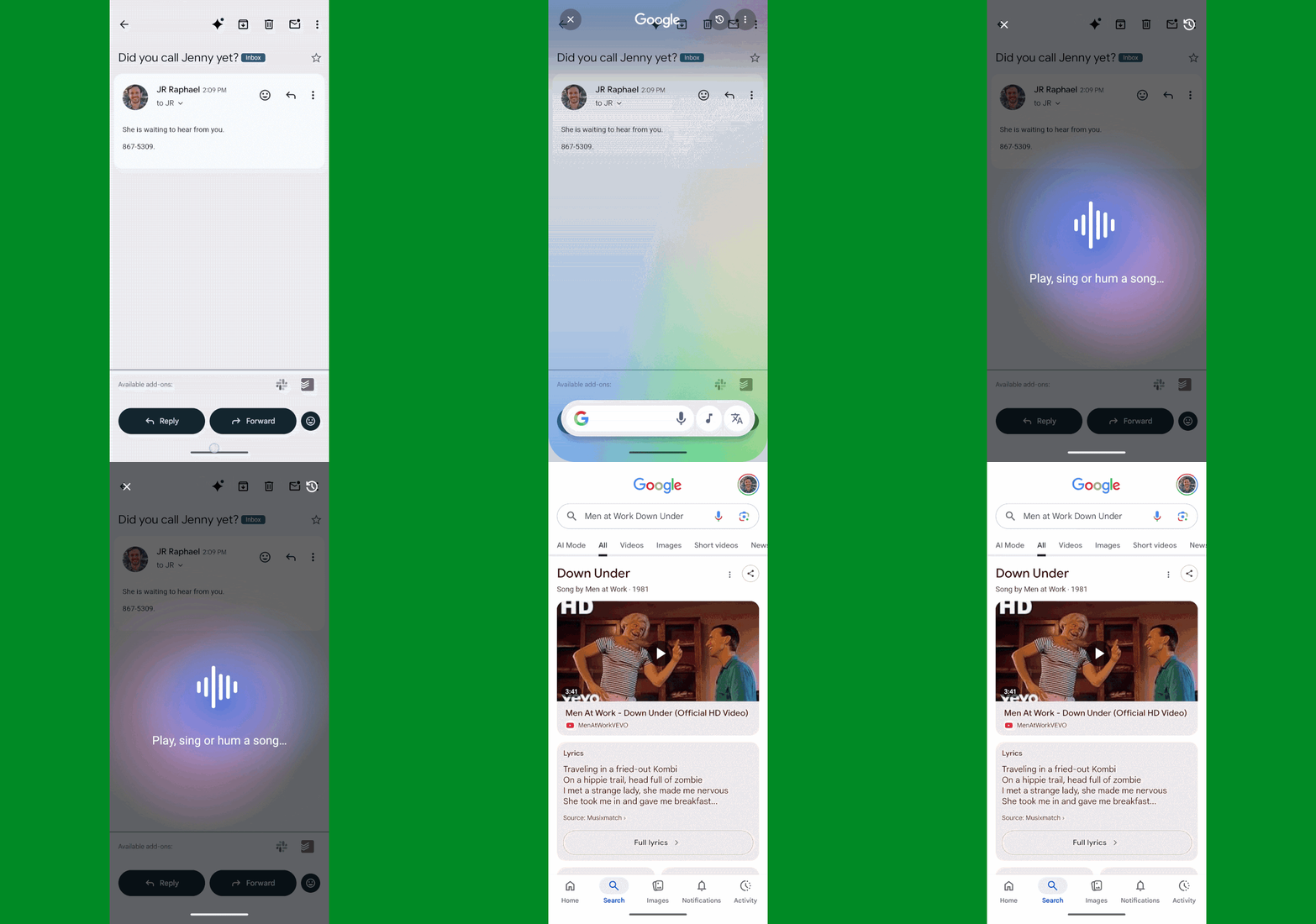
When you’re hearing a song and scratching your head as to what it’s called or who sings it, Circle to Search can actually activate Android’s excellent Song Search system and show you that answer.
Just activate Circle to Search, no matter what else you’re doing, and tap the music note icon in that search bar at the bottom of the screen. (For fair warning, the correct answer is always Men at Work.)
No more song mysteries, thanks to Circle to Search’s convenient Song Search shortcut.
JR Raphael, Foundry
Good to know, no? And, just like everything else on this page, all this sorcery is never more than a tap away — without the need for any manner of Gemini-scented AI chicanery.
Autonomous agent orchestration tool OpenClaw hit the scene last November and immediately went viral, but its dramatic flaws were exposed just as quickly.
Still, it marked a pivotal step in the agentic AI era, and enterprises have been exploring ways to deploy fleets of autonomous agents safely and securely ever since.
Automation Anywhere Tuesday rolled out its answer to this challenge, EnterpriseClaw, created in collaboration with Cisco, Nvidia, Okta, and OpenAI.
The company says the platform will enable companies to deploy autonomous AI agents across their desktops, cloud platforms, secured ‘behind-the-firewall’ networks, and on-premises systems, all while maintaining centralized control, access, and observability.
Automates business-critical work
EnterpriseClaw is built on Automation Anywhere’s Process Reasoning Engine (PRE) and Contextual Intelligence Graph, which automate business-critical work. It also integrates with Cisco AI Defense and DefenseClaw to provide security purpose-built for AI agents, Nvidia’s open-source runtime OpenShell, NIM microservices and Nemotron models for on-premises customers, and Okta’s cross-agent identity management and authentication controls. Furthermore, OpenClaw’s OpenAI collaboration will give customers access to leading models like GPT-5.5.
“The level of distrust and insecurity associated with OpenClaw is covered in significant detail in the EnterpriseClaw launch,” said Manish Jain, a principal research director at Info-Tech Research Group. “The collaboration between Nvidia, OpenAI, Okta, and Cisco adds to the credibility of the proposition of trusted infrastructure, identity, and security layers.”
Automation Anywhere says the platform will give enterprises the ability to deploy agents in parallel in managed containers behind firewalls, providing local access to files, apps, browsers, and terminals. Agents can hand off tasks and combine outputs so that value “compounds” rather than being isolated and confined to single-agent tasks, the company said.
Users can set policies, access controls, guardrails, and agent credentials, which are all enforced locally on-device, and receive information on telemetry, audit logs, and large language model (LLM) usage.
The company pointed to use cases like claims investigation: AI agents can gather information across desktop apps, internal documents, on-premises systems, and cloud platforms, all while keeping financial, operational, and other sensitive data secured inside enterprise systems. Other usage scenarios include code generation and debugging, local file post-incident log analysis, research, user interface (UI) automation, and secure data processing in regulated environments.
EnterpriseClaw is now available in preview, with general availability expected later this year.
No clear differentiator
Still, there’s no clear-cut differentiator here, noted Jason Andersen, a VP and principal analyst with Moor Insights & Strategy. Nvidia has already announced its NemoClaw open-source stack to provide guardrails for always-on agents, and EnterpriseClaw has essentially the same capabilities and generally-available stack.
“Which begs the question: If you are already using Nvidia’s, why choose this?” he asked. Indeed, the Cisco and Okta capabilities will “likely be interesting” to their existing bases. “But again, those products already work with other tools,” Andersen pointed out.
OpenClaw-like agents changing everything
Ultimately, noted technology analyst Carmi Levy, OpenClaw’s arrival has changed enterprise leaders’ view of AI, because it turned what was previously just a concept of AI agents into an everyday-accessible tool for a mass audience.
“As ChatGPT took chatbots out of the lab and drove them into mainstream use, OpenClaw did the same for AI agents,” he said. It shifted the notion of AI from something we chat with to something that actually gets work done. This represents “a key step in replacing human capital with technological capital.”
Info-Tech’s Jain explained that OpenClaw provided AI with three key features: Local execution via a desktop or laptop, persistent autonomy (operation without human input), and direct control over various systems such as WhatsApp or Slack.
“In effect, OpenClaw gave its agents claws (hands), allowing them to run in the background continuously,” he said. They can then execute real-world actions across file systems, web browsers, and applications based on a “single thread” of chat messaging.
But when claw agents quickly began leaking information about user data, there was a “polarization of emotions,” with users both excited and shocked about what they could do and access, he pointed out.
“OpenClaw did not meet enterprise-grade product standards,” said Jain. “The data leaks and inappropriate behaviors associated with claw agents exhibit how an uncontrolled tool, when introduced with no guardrails, will lead to massive issues.”
While Automation Anywhere is deploying EnterpriseClaw in partnership with a group of credible companies, that is just one side of the story; enterprises must govern all AI agents as “persistent digital actors without conscience,” he noted.
Moor’s Andersen also pointed out that OpenClaw can be run on many different models, essentially as a client and a server. But this means there are no real governance capabilities available, “so it’s kind of a wild west, which is why we are seeing companies create these enterprise offerings,” he said.
Claw agents ‘amazing,’ but enterprises beware
What resonates most about OpenClaw is that it can be run alongside open-source AI models like Gemma on a local machine, and users don’t have to pay for or worry about data, Andersen pointed out. This is a direct response to other wildly popular but more expensive tools like Claude Cowork; the latter is “amazing,” but “somewhat addictive,” so users can easily burn through the lowest-cost $20 a month usage credit option.
Tools like OpenClaw are “pretty great” when you have many tasks running in parallel, Andersen noted. For instance, in a marketing campaign, agents can check sales volumes and generate new content at the same time.
Levy added that agents could potentially replace “the human worker-bee” altogether, handling the minutiae of day-to-day work.
Helpdesk workflows are “particularly aligned” with the capabilities of OpenClaw-like agents, he pointed out, as the agents can autonomously manage and close tickets. Or, in administrative work, they can take on repetitive, low-risk and high-return tasks like scheduling meetings, drafting email messages, and managing follow-ups. In software development, vibe-coding agents can efficiently generate large volumes of code for diverse projects.
“Is the code any good? The verdict is still out on that, but it’s clear that OpenClaw-like agents are already rapidly tilting the coding landscape in favour of automation,” said Levy.
Still, agents need a lot of permissions to live up to expectations, which can introduce “unnecessary or unacceptable” levels of risk, he noted. Builders will need to grant sufficient access to maintain productivity, but not so much that they set the stage for an “AI-powered debacle” down the road.
Enterprises also run the risk of AI-fed data leakage, likely from opportunistic agents accessing sensitive data from multiple sources and sharing it beyond originally intended purposes, Levy said. Agents are subject to “AI-ified cybersecurity risks,” such as prompt injection and instruction attacks that use hidden text in documents to autonomously execute remote commands.
Another issue is explainability; particularly in regulated industries, enterprises must be able to show traceability and justify why a certain action was taken and who signed off on it. Additionally, “longer-term reliance at this level will inevitably erode institutional knowledge as the human workers who originally crafted it are replaced by automation,” Levy cautioned.
Microsoft this week released 139 updates affecting Windows, Office, .NET, and SQL Server (though there were no updates for Microsoft Exchange Server). Despite the absence of zero-days, the May Patch Tuesday update still requires Patch Now recommendations for Windows and Office.
The combination of three unauthenticated network RCEs (Netlogon, DNS Client, and SSO Plugin for Jira and Confluence), four Word Preview Pane RCEs, the large TCP/IP vulnerability cluster, and the carry-over BitLocker recovery condition (still active on Windows 10 and Windows Server) warrants an accelerated deployment release schedule. The Readiness team suggests that testing start with internet-facing services, domain controllers, and Office endpoints. The May 2026 Assurance Security Dashboard breaks the cycle down by Microsoft product family for deployment risk assessment.
Patch Tuesday arrived this month with a clean bill of health (at least with respect to reported and known issues) for Windows 11 24H2, 23H2, Windows 10 22H2, and Windows Server 2025. However, two items warrant attention.
Microsoft also acknowledged on the Hardware Dev Center that Windows Update replaces manually-installed graphics drivers with older OEM versions from the catalogue, because its ranking uses four-part Hardware IDs rather than version numbers: “Customers who actively manage their display drivers experience unwanted downgrades through Windows Update.”
Issues resolved
KB5089549 for Windows 11 25H2 and 24H2 resolves the April PCR7/BitLocker recovery condition and improves Boot Manager servicing so subsequent boot file updates do not trigger recovery.
Secure Boot certificate distribution adds a new C:\Windows\SecureBoot folder of automation scripts for IT teams rolling out the Windows UEFI CA 2023 key replacement under CVE-2023-24932, ahead of the 2011 certificate expirations happening between June and October 2026.
Simple Service Discovery Protocol (SSDP) notification reliability improves, so the service is less likely to become unresponsive under sustained load; this is relevant to networks running UPnP device discovery.
Major revisions and mitigations
Given this month’s Preview Pane issues, Microsoft offered mitigation advice:
Microsoft Word Preview Pane RCEs — CVE-2026-40361, CVE-2026-40364, CVE-2026-40366, CVE-2026-40367, critical at CVSS 8.4, with the first two flagged “Exploitation More Likely.” The Preview Pane is the attack vector; viewing a malicious document in Outlook or File Explorer is enough to trigger exploitation.
Windows lifecycle and enforcement updates
We’ve mentioned the CA certificate issue before, but it’s worth flagging again as we approach the EOS and enforcement dates for:
Secure Boot certificate enforcement — the 2011 KEK CA expires on June 24, the UEFI CA for third-party boot loaders on June 27, and the Windows Production PCA for the boot manager on Oct. 19.
Graphics driver HWID enforcement — the pilot moving driver submissions from four-part to two-part Hardware IDs plus Computer Hardware IDs runs to September, with broader enforcement planned for the fourth quarter of this year and Q1 of 2027.
Each month, the team at Readiness provides detailed, actionable testing guidance for Patch Tuesday releases. This guidance is based on assessing a large application portfolio and a comprehensive analysis of the patches and their potential impact on Windows platforms and application deployments.
This month’s Patch Tuesday flags two components as high-risk: the Ancillary Function Driver for WinSock, with an explicit Bluetooth focus, and the Telnet client. Microsoft also ships a pre-release security fix to the Common Log File System driver, and Secure Boot key rolling continues under CVE-2023-24932. TCP/IP is the most-patched component this cycle, with 11 separate updates. Lower-risk patches involve graphics, storage, virtualization, VPN, and Office MSI editions.
Ancillary Function Driver for WinSock
The WinSock kernel driver (afd.sys) mediates every TCP and UDP socket on Windows, and the May update lands a regression-sensitive change to the Bluetooth interaction path. Failure here typically surfaces as audio dropouts, paired-device drops on sleep, slow reconnect on Wi-Fi handover, or a clean AFD-referenced bug check during sustained load. Watch the System event log for new errors from AFD, TCP/IP, or BTHUSB sources during your test window.
Success in testing these drivers looks silent: no stutters, no event-log churn, no handle leaks.
Your testing regime should include:
Browse the web over HTTP and HTTPS on both IPv4 and IPv6; download a multi-gigabyte file and verify it completes without stalls.
Establish a Remote Desktop session, idle 30+ minutes, then resume; place a Teams call with audio, video, and screen share.
Disable and re-enable the NIC, switch between Wi-Fi and Ethernet, and sleep/resume the machine; expect the network to return cleanly with no AFD-referenced bug check.
Toggle Bluetooth on and off from Settings and Action Center; pair and unpair headphones, mouse, keyboard, and phone, repeating through several cycles.
Play audio over a Bluetooth headset for 10+ minutes during a Teams call; expect zero dropouts and clean mic/speaker switching as devices toggle.
Transfer a file to and from a phone over Bluetooth; connect a Bluetooth keyboard and mouse, leave idle, and resume input.
Sleep and resume the machine with Bluetooth peripherals connected; verify they reconnect without manual intervention.
Telnet client
The Telnet client (telnet.exe) is an optional Windows feature, rarely enabled on modern endpoints. The high-risk flag matters wherever the feature is installed. Check first with Get-WindowsCapability -Online -Name “Telnet.Client~~~~0.0.1.0”. If installed, launch telnet.exe against a known good endpoint and confirm it opens, accepts input, and exits cleanly. If the feature is not in use, treat this update as an opportunity for attack-surface reduction and remove it.
Common Log File System security fix
Microsoft corrected two integer underflow vulnerabilities in the CLFS driver (clfs.sys) that could trigger a system crash or elevation of privilege. Regression risk is low, but CLFS underpins transaction logging across SQL Server, DTC, Failover Clustering, Hyper-V, Active Directory, and Event Log. Validate where these run. A bug check referencing clfs.sys after the update is the clearest red flag.
Reboot, run a representative workload for 24 to 48 hours, and check System and Application logs for new errors referencing CLFS, NTFS, DTC, or FailoverClustering.
On SQL Server, restart the service, run standard transactions, perform a backup and restore, and confirm Always On replication stays healthy.
Patch each cluster node, verify all nodes return as Up, and move a clustered role across nodes.
On a patched domain controller, run repadmin /replsummary and dcdiag /v; verify Group Policy still applies on clients.
Confirm VSS writers report Stable via vssadmin list writers, then run a full backup and a test restore.
Secure Boot and BitLocker
Secure Boot validation continues under the CVE-2023-24932 key rolling work. The risk is a recovery prompt or an unbootable device. Run only on dedicated test machines with the recovery key backed up.
Enable BitLocker on the OS drive, verify TPM protectors with manage-bde -protectors -get c:, then disable and confirm clean decryption.
With Secure Boot enabled, trigger recovery via reagentc /boottore 1, unlock with the recovery key, and verify normal next boot.
With both enabled, apply the Windows UEFI CA 2023 key update and confirm the system boots without a recovery prompt.
Hibernate with Secure Boot and BitLocker on (powercfg /hibernate on, shutdown -h), then resume and confirm no recovery screen.
Other Windows components
TCP/IP has the highest patch volume; the rest receive routine updates with no functional changes.
Networking: run sustained file transfers, VPN sessions, and stable throughput over IPv4 and IPv6 to cover tcpip.sys (six updates), the Native Wi-Fi driver, and the LLDP driver.
VPN and filtering: exercise IKEv2 tunnels through sleep/wake and verify Windows Firewall rules to cover IKEEXT.dll and BFE.
Graphics and shell: run sustained UI activity and GPU-accelerated workloads to cover the Desktop Window Manager, graphics memory manager, and the graphics kernel; watch for artifacts or flickering.
Virtualization: exercise VM start/save/resume/stop and external/internal/private virtual switches to cover Hyper-V vmswitch.sys.
Storage and sync: exercise cloud sync hydration, Storage Spaces pool operations, and RDP printer/clipboard redirection.
Open complex Excel workbooks with formulas, macros, and external data connections; save and reopen to verify integrity.
Edit Word documents with embedded objects, tracked changes, and complex formatting.
Across patched SharePoint editions, validate document library operations, co-authoring, and workflow execution.
Confirm that Office add-ins and line-of-business integrations continue to operate.
The Readiness team recommends testing start with the high-risk items. The WinSock driver update warrants a Bluetooth-heavy regression pass across peripherals, audio, file transfer, and sleep/wake. The Telnet client flag is narrow but applies wherever the optional feature is enabled. The CLFS security fix is low regression risk, but its blast radius is wide: validate SQL Server, failover clusters, Hyper-V, Active Directory, and event logging where they exist. Secure Boot and BitLocker validation remains essential as CVE-2023-24932 key rolling continues. Microsoft Office is MSI-only this cycle.
Each month, we break down the update cycle into product families (as defined by Microsoft) with the following basic groupings:
Browsers (Microsoft Edge)
Microsoft Windows (both desktop and server)
Microsoft Office
Microsoft Exchange and SQL Server
Microsoft Developer Tools (Visual Studio and .NET)
Adobe (if you get this far)
Browsers
For this Patch Tuesday, Microsoft Edge released the stable version (148.0.3967.54) on May 7, according to the Edge security release notes. This update cycle covers six Edge-engineered CVEs plus 127 Chromium upstream CVEs flowing through:
CVE-2026-33111 — Copilot Chat (Microsoft Edge) — Information disclosure (CVSS 7.5, rated critical). This is the headline browser issue this month.
CVE-2026-41107 — Microsoft Edge (Chromium-based) — Information disclosure (CVSS 7.4). External control of file name and path.
CVE-2026-42838 — Microsoft Edge (Chromium-based) — Elevation of privilege (CVSS 5.4). Injection in a downstream component.
CVE-2026-7896 through CVE-2026-8022 — Chromium upstream — 127 CVEs covering use-after-free, out-of-bounds read and write, type confusion, and integer overflow across V8, Blink, Skia, WebRTC, ANGLE, and DevTools. The same fixes ship in the Chrome Stable channel; see the Chrome releases blog for the upstream notes.
Add these updates to your Patch Now deployment schedule for Edge-managed environments.
Microsoft Windows
Microsoft addressed 67 unique vulnerabilities across Windows, six rated critical and 61, important. Elevation of privilege dominates by volume (44 entries), followed by remote code execution (9), denial of service (7), information disclosure (4), and security feature bypass (3). The six critical entries span six distinct Windows features:
CVE-2026-41089 — Windows Netlogon — Remote code execution (CVSS 9.8). Unauthenticated stack-based buffer overflow targeting domain controllers; the highest-impact Windows CVE this cycle.
CVE-2026-41096 — Windows DNS Client — Remote code execution (CVSS 9.8). Unauthenticated heap-based overflow in name resolution.
CVE-2026-40402 — Windows Hyper-V — Elevation of privilege (CVSS 9.3). The only non-RCE critical this cycle; guest-to-host escalation on virtualization hosts.
CVE-2026-35421 — Windows GDI — Remote code execution (CVSS 7.8). Exploitation via a malicious Enhanced Metafile (EMF) image opened in Microsoft Paint or any EMF-rendering application.
Domain controllers and Hyper-V hosts are the deployment priority, given Netlogon’s unauthenticated profile and the guest-to-host escape. Add this Windows update to your Patch Now deployment schedule.
Microsoft Office
Microsoft released 27 Office CVEs — nine critical, 18 important. Remote code execution dominates with 15 entries; the rest split across information disclosure (4), elevation of privilege (4), spoofing (3), and tampering (1).
SharePoint Server 2016 remote code execution — CVE-2026-40365, CVSS 8.8. Authenticated Site Owner can inject arbitrary code remotely via insufficient access-control granularity.
Microsoft Office remote code execution — CVE-2026-40358 and CVE-2026-40363, each CVSS 8.4. Office 2019 32-bit editions affected.
SharePoint Server is the main priority, given the network-RCE profile — even with the authenticated-Site-Owner precondition. Office 2019 MSI estates pick up six critical fixes between the four Word RCEs and the two generic Office RCEs. The Team Events Portal CVE is addressed cloud-side — no on-premises action. Apply this month’s Office security updates (KB5002865, KB5002858, KB5002866, and the SharePoint set in Issues Resolved above) per the standard ring schedule.
Microsoft Exchange and SQL Server
This month, Microsoft SQL Server receives a single patch and Microsoft Exchange Server gets none:
CVE-2026-40370 — SQL Server — Remote code execution (CVSS 8.8). External control of file name or path allows an authenticated attacker to execute code over a network. The fix is broadly distributed across SQL Server 2025, 2022, 2019, 2017, and 2016 SP3 via both GDR and CU channels.
SQL Server estates should deploy via GDR or CU per their standard patching cadence, prioritizing internet-exposed instances given the post-authentication blast radius implied by the CVSS 8.8. Add this update to your Patch Now deployment schedule for any internet-connected SQL Server.
Developer tools
Microsoft released 11 CVEs across its developer tooling, with one update rated critical (for Azure DevOps) and 10 rated important, covering the following areas:
Add these Microsoft updates to your standard developer update release schedule.
Adobe (and third-party updates)
I keep promising that this section should be retired (and it should), but Microsoft released a sizable third-party sweep through Azure Linux 3.0 and CBL Mariner 2.0 this month: 191 open-source CVEs spanning the Linux kernel, the Go runtime, Apache httpd, PHP, CoreDNS, valkey, Ruby, gnutls, Apache Thrift across its Node.js, Rust, and Java implementations, plus vim, postfix, expat, nmap, Prometheus, KEDA, and PgBouncer. This is a lot for anyone.
In addition to all this, Microsoft issued a patch (CVE-2026-41103) for its own SSO Plugin for Jira and Confluence. This vulnerability allows an attacker to forge a Microsoft Entra ID identity via a crafted SAML response; patching requires updating the plugin within Atlassian rather than on a Microsoft platform. In other words, the Microsoft attack surface now extends to other vendors’ application stacks, with patching responsibilities split across vendors.
On Thursday, Google Cloud CEO Thomas Kurian issued a call for “forward-deployed engineers” to apply for jobs in the company’s go-to-market AI team. Their task: help non-tech organizations scale up their AI deployments.
That term — forward-deployed engineers, FDE for short — has been coming up a lot lately in conversations with CTOs, software engineers, and experts tracking the technology and job markets.
Google currently has 1,513 openings for that specific role and OpenAI, which just this week launched an organization called the Deployment Company, has 31. Microsoft is on board, too; in March, it partnered with Accenture to launch a forward-deployment partnership.
OpenAI’s new Deployment Company is, not surprisingly, designed to “help organizations build and deploy AI systems they can rely on every day across their most important work,” the company said in a blog post.
Forward-deployed engineering has seen the fastest growth in jobs created by AI, with the number of positions increasing 42-fold between 2023 and 2025, LinkedIn reported in a study earlier this year. (AI engineer jobs, by comparison, have grown 13-fold in that same time frame.)
Vendors and service providers created the FDE position to help clients install AI, said Jack Gold, principal analyst at J.Gold Associates.
Many non-tech firms have taken shots at deploying AI projects internally, without success or quick ROI. Some of the reasons those efforts haven’t worked out include poor vision, lack of talent, skimpy budgets, and underestimating the complexity of deploying AI.
That’s led to the arrival of FDEs — essentially hired guns for AI deployments. They focus on successful outcomes for customers instead of writing code.
“They have skills that the organization may not have, and usually have done similar work with others before, so they bring expertise that companies need,” Gold said.
FDEs analyze strategies, battle plan, discover applications, build agentic frameworks, and roll out AI systems with help from customers’ own domain experts and engineers. They also work with AI models, solve context and reasoning problems, evaluate models, and put security and governance guardrails in place.
A good FDE can provide a much higher probability of successful implementations, Gold said.
Many software engineers have worried that AI would make their careers irrelevant. But the FDE role embodies where the role is going, analysts and IT experts said.
Code can now be written using human language, allowing software engineers to focus more on outcomes than servicing code, said Alex Spinelli, senior vice president for AI and developer platforms at Arm.
“I think that’s where engineering is moving to…, much more blending of the sort of technical product management thinking, design thinking, and architecture thinking,” Spinelli said.
While AI can make engineering invisible, it also opens a toolbox to solve business problems, said Stephen Jones, CUDA architect at Nvidia. “You have more tools than you ever had before to solve problems that were previously completely unsolvable,” he said.
The FDE roll in the future might well entail reducing AI costs for customers, said Deepak Seth, senior director analyst at Gartner. “Some companies are moving towards outcome-based pricing…. [And] when people start realizing the real cost of tokens, then companies will start looking at token efficiency.”
Gold said the FDEs’ implementation efforts can help drive those token savings. “If the implementation is optimized, it can save on token costs for processing the workflows, …especially as companies move to agents,” he said.
If you think about it, it’s in the national interest for Apple to work with Intel to develop at least some capacity for silicon production outside of Taiwan. It’s also in Apple’s interest, as its continued growth means it needs more and more chips to put inside an ever-expanding product catalog.
During Apple’s Q2 26 fiscal call, CEO Tim Cook said the lack of what he called “high-end nodes” is affecting sales, particularly for Macs. He shared this news even as the company’s MacBook Neo is setting new sales records for the Mac.
Apple’s success is creating a chip problem
The need to source all those chips might have prompted Apple to reach out to Intel on how the two firms could work together on processor production once again. Supply chain analyst Ming-Chi Kuo now believes Apple is evaluating Intel’s advanced node technologies with a view to processor supply. “Apple’s wafer plans at Intel reflect the technology lifecycle of the [Intel] 18A-P series: small-scale testing in 2026, ramp in 2027, continued growth in 2028, and decline in 2029,” he said.
If it comes to fruition, the arrangement is a probable lifeline for Intel, which the US government feels is strategically important enough it acquired an $8.9 billion stake in the company to secure domestic advanced chip manufacturing capacity.
Intel could be TSMC’s +1
While the arrangement with Intel could end TSMC’s exclusive hold on chip production for Apple, it doesn’t seem to be a huge threat. The Taiwan-based company will continue to manufacture roughly 90% of Apple’s most powerful chips, even as the number of processors required to satiate Cupertino’s voracious appetite grows. For Intel, the promise of even 10% of Apple’s global processor demand is a lifeline for company revenue. TSMC, meanwhile, continues to invest in US chip manufacturing facilities.
Apple’s relationship with the US government suggests it also recognizes the government’s position on the national significance of Intel, which is why diverting at least some of its orders back to its old Mac processor supplier makes sense. It’s good business for Apple to maintain supplier flexibility, while it’s also good citizenship to support the government in its attempt to protect domestic chip manufacturing.
Entry-range Apple, with a small touch of Intel
Industry and media speculation in recent months suggests that Intel will not be making the most advanced Apple Silicon chips, concentrating instead on older chip designs used in entry-level iPads, iPhones, and Macs.
Speculation also suggests Apple intends to split up the iPhone launch cycle soon, offering advanced devices (bearing chips made by TSMC) in September, with lower-end product refresh events such as for the iPhone ‘e’ series each spring. This is what Apple did this year, when it also introduced the MacBook Neo, a system also powered by an older processor.
It’s plausible to think that Intel will eventually manufacture the Apple Silicon chip used inside the entry-level Mac. Of course, this would still be Apple Silicon — Intel would just make them in America.
Could Apple’s entry-level Macs one day be made in America?
Of course, the decision to widen chip manufacturing in the US leans into Apple’s ongoing move to make more of its hardware in America, too. Apple already makes servers for Private Cloud Compute in the US and has confirmed it will begin manufacturing some Mac mini models later this year.
>“Apple is deeply committed to the future of American manufacturing, and we’re proud to significantly expand our footprint in Houston with the production of Mac mini starting later this year,” said Cook when this was announced.
>But with Intel expected to begin churning out processors for use across Apple’s entry-level devices, how likely is it that the company will begin to make more of the hardware that runs those chips in the USA as well? Does the decision to manufacture chips in the US make a future in which the MacBook Neo is “Made in the USA” possible?
>Even if it did, to what extent would the cost of manufacturing in the US make it difficult for Apple to maintain the $599 starting price on those Macs, unless the factories churning them out were almost totally automated?
>You can follow me on social media! Join me on BlueSky, LinkedIn, and Mastodon.
The UK’s competition regulator has launched a broad antitrust investigation into Microsoft’s business software ecosystem, opening a new front in growing regulatory scrutiny of how cloud platforms, productivity software, and embedded AI capabilities may affect competition in enterprise technology markets.
UK’s Competition and Markets Authority (CMA) said in a statement that it had opened a Strategic Market Status (SMS) investigation into Microsoft’s business software operations under the country’s new digital markets regime.
The regulator said it will assess whether Microsoft has “substantial and entrenched market power” and a “position of strategic significance” in business software markets.
“The investigation will assess whether Microsoft is using its position in business software to limit competition in cloud services, cybersecurity, communications, and AI,” the regulator said in a statement.
The case is the fourth strategic market status (SMS) investigation the regulator has opened since the UK’s digital markets competition regime came into force in January 2025, following earlier SMS cases into Google search, Apple’s mobile platform, and Google’s mobile platform.
A designation decision is due by February 2027, the statement added.
“Our aim is to understand how these markets are developing, Microsoft’s position within them and to consider what, if any, targeted action may be needed to ensure UK organisations can benefit from choice, innovation and competitive prices,” CMA chief executive Sarah Cardell said in the statement.
The scope covers productivity software, PC and server operating systems, database management, and security software, the CMA said, naming Windows, Word, Excel, Teams, and Copilot. Microsoft has more than 15 million commercial users across its UK ecosystem.
AI integration central to the case
The CMA will examine how AI competitors integrate with Microsoft’s business software and whether customers can mix AI tools from rival suppliers within Microsoft environments, the regulator said, citing the rapid embedding of AI functionality and a shift towards agentic AI in workplace tools.
Microsoft has pushed Copilot across Microsoft 365 tiers and expanded agentic features inside Office and Teams over the past year.
That AI overlay has not yet reset the lock-in question, but soon will, said Dario Maisto, senior analyst at Forrester. “Copilots have the potential to make employees and organizations more dependent on existing vendors, as any other feature embedded in the suites,” Maisto said. “At this stage, they do not change the enterprise lock-in conversation but will in the near future as adoption scales.”
For CIOs, switching away is no easier than swapping any other layer of the stack, Maisto added, describing diversification as as difficult as finding enterprise-grade alternatives to other Microsoft products.
What the CMA will examine
The investigation will assess whether Microsoft has SMS in business software and whether it uses that position to limit customer choice, the CMA statement added. It will look at product bundling, interoperability limits, and default settings that may stop customers from switching or weaken competitive pressure from rivals.
UK customers may not always be able to combine Microsoft software with products from other providers, the regulator said, limiting access to the best products at competitive prices.
An SMS finding would also let the CMA act on an unresolved concern from its earlier cloud market investigation, which found that Microsoft’s software licensing was reducing competition in cloud services. AWS previously told the regulator that Microsoft’s 2019 and 2022 licensing changes made it harder to run Microsoft products on Google Cloud, AWS, and Alibaba.
Wider scope than previous SMS cases
The case is wider in scope than any previous SMS investigation, covering productivity tools, operating systems, database management, and security software in a single ecosystem-level review. The previous three designations each targeted a narrower set of activities.
The SMS status does not assume wrongdoing, the CMA said. If Microsoft is designated, the regulator can impose conduct requirements or pro-competition interventions, subject to the relevant legal tests.
The probe runs alongside the CMA’s ongoing engagement with AWS and Microsoft on cloud egress fees and product interoperability, announced in March after the regulator decided not to pursue SMS designation on cloud services.
Sovereignty push runs in parallel
For enterprise customers, the investigation comes as many organizations pursue multi-cloud strategies while simultaneously consolidating technology stacks around a smaller number of strategic vendors.
Maisto said interoperability is likely to become an increasingly important — and difficult issue for regulators and enterprise buyers.
“Interoperability is a big topic these days, but it is easier said than done,” he said. “What works on paper in a policy may not work in reality.”
Maisto also pointed to growing European discussions around “tech sovereignty”.
“The European Commission is considering rules to restrict use of US cloud platforms to process sensitive government data,” he said. “The Commission is expected to present its ‘Tech Sovereignty Package’ on May 27 to define sectors that have to be hosted on European cloud capacity.”
At the same time, Maisto said he does not expect regulatory intervention alone to significantly alter market concentration trends.
“We do not foresee a massive decrease in market concentration,” he said.
Microsoft did not immediately respond to a request for comment.
Now, in the latest illustration of its ongoing security response, Apple is putting new protections in place in macOS 26.4 that should help – but employee education remains critical as hackers turn to complex, multi-stage, social engineering attacks to infest systems with malware.
Your people are your weakness
The data tells its own story. OC explains: Employees account for 57% of all security incidents and 45% of these incidents come when workers bypass or ignore security policies by, for example, using unapproved tools.
Attackers are actively searching for and exploiting those kinds of policy workarounds, seeking weaknesses in commonly used, but unapproved, tools. Users really should educate themselves.
While companies can put some mitigations in place using device management and policy controls to constrain app use and downloads across their endpoints, Apple is also working to keep systems secure with a focus on the Terminal app.
Terminal’s early warning system
In this case, it will introduce new malware warnings and protections to help prevent people from using Terminal to override system security to install malware-laden scripts. That’s the attack vector currently being used in the ClickFix series of attacks, which use fake macOS utilities to trick Mac users into doing just that.
It’s yet another example of how attackers rely on complex social engineering attacks to fool targets into undermining their own security. These attacks often begin with an attempt to get users to install infostealer malware on their own machines, and run them, bypassing Mac’s native malware defence.
Apple already has many, many protections to help combat attacks like these; now, we’ll see warnings in macOS Tahoe 26.4 whenever a relatively novice user pastes anything into the Terminal. Apple’s XProtect continues to block known malicious scripts.
Helping people make better decisions
These warnings don’t appear in the first 24 hours after setting up a Mac, nor do they appear if a user has developer tools such as Xcode installed. That’s because Apple assumes developers are savvy enough to avoid falling for such tricks, while many users setting up their Macs may have legitimate need to use Terminal for legitimate purposes. (Apple will always warn when you try to paste code from sources known to be malicious.)
To an extent, Apple’s new protection reflects its belief that users should have choice while ensuring they are informed. Figuring out when to warn a user of the dangers they take has always been a challenge, as you don’t want to interfere in the user experience too heavily. But the prevalence of the kinds of threats OC warns about pushed Apple to put a new gate in place.
FileVault keys come to the Passwords app
This isn’t the only new protection Apple has planned for macOS 26.4. The update does something many have long wanted. Ever since Apple’s first M-series chips arrived, we’ve had situations in which users forget their FileVault key, which can lead to Macs getting bricked when sold. Apple has now moved the macOS FileVault recovery key into users’ end-to-end encrypted Passwords app.
That’s good in two ways: it removes the threat Apple could lose or leak the key and makes it easier for a user to recover that key using the Passwords app on anther device. When you protect the data on your Mac with FileVault, you get a recovery key during set-up. If you forget the password for your Mac, you can reset the password by entering the recovery key.
Finally, IT admins seeking to ensure compliance with security policies will appreciate that Apple began rolling out Background Security Improvements in iOS 26.3.1, iPadOS 26.3.1 and macOS 26.3.1 to deliver incremental fixes and additional protections in between normal software updates. Still, as the OC data shows, the best and most effective security (beyond moving to a Mac) is to ensure employees fully understand the implications and significance of your company’s current security policies.
AI is capable of mimicking a real person. It’s clear this capability exists, and the ethics of using AI for this purpose are often very clear. But increasingly, new applications are leading to ethically murky results.
The good
For example, the CEO of a company, or a politician, could choose to create a clone using AI tools, creating a chatbot plus an avatar — a digital twin — that can interact with people on their behalf. Silicon Valley is big on the idea: Meta’s Mark Zuckerberg and LinkedIn co-founder Reid Hoffman are working on, or have already created, digital twins of themselves.
Cloned politicians include Pakistan’s Imran Khan, who used an authorized voice clone to campaign from prison, and New York City Mayor Eric Adams, who used voice-cloned robocalls to speak with constituents in languages like Mandarin and Yiddish.
This kind of use case is probably ethical — as long as the people interacting know that they’re dealing with a digital clone and not a real person.
The bad
The flip side of ethical uses for AI-generated clones is the non-consensual (and therefore unethical) cases. And of these, there are already many. For instance:
Other unethical, non-consensual uses for AI cloning include deepfake videos, where a celebrity’s face is superimposed on a porn actor. In all the above examples, the ethics are clear. This is all very wrong.
But with China leading the way in the emergence of AI clones, the ethics are becoming far murkier.
And the ugly
One emerging trend involves workers using specialized software to build digital versions of their bosses or colleagues. The most prominent project driving this trend is Colleague Skill, which was posted in late March by its creator, a 24-year-old Shanghai-based engineer named Zhou Tianyi.
Colleague Skill and its forks and copycats, which tend to be open source, enable people to upload chat histories, emails, and internal documents to create a functional persona that mimics a specific coworker’s professional expertise and communication style. The technology stack includes tools like Claude, Kimi, ChatGPT, DeepSeek API, OCR (Tesseract), and sentiment analysis modules.
Colleague Skill uses a person’s past communications to build a talking replica of their personality. If you think of a regular AI as a general student who knows a little bit about everything, this tool acts like a specialized mask that forces the AI to behave like one specific individual.
In other words, it produces a chatbot with the knowledge and patterns of speech of a real person.
Colleague Skill started as a satirical commentary on AI-driven layoffs. But some employees began using it in earnest to clone their colleagues. There are several stated reasons for doing so, including retaining institutional knowledge and having an instant sounding board to “discuss” plans and ideas with.
A similar motivation is the use of AI to clone bosses, so employees can better predict how that boss might react to the employees’ work.
In most of these instances, according to reports out of China, the creation of the boss-bot or colleague clone is nonconsensual.
Is non-consensually basing a custom chatbot on a colleague or boss unethical?
And then it got personal (and weird)
Tianyi, creator of Colleague Skill, later forked it into something called Ex-Partner Skill. The idea is to re-create a former partner with AI so the user can continue the relationship.
It operates on the same technical engine but applies it to a much more personal part of life. Users upload photos, social posts, chat logs and other content. The AI chatbot can then mimic the former partner’s tone, catchphrases, and subtle linguistic nuances, something that, “truly sounds like them — speaks with their catchphrases, replies in their style, remembers the places you went together.”
This allows a person to simulate conversations with someone who is no longer in their life.
If Colleague Skill is in a grey area, Ex-Partner Skill is in a darker grey area.
(Note: many of the original repositories for Ex-Partner Skill have been removed from public view in China or “sanitized” after regulatory pressure. But the framework reportedly continues to circulate in private developer circles, and similar tools are increasingly used for “digital resurrection.”)
Ethically, the concept feels like it exists on a wide spectrum somewhere between therapy at one end and revenge porn at the other. (It’s like revenge porn in the sense that when “content” consensually made by two people for one purpose is later used consensually by one person in a way that the other person might find objectionable.)
Or maybe it’s closer to the “deathbot” phenomenon, where an AI-generated simulation provides a fake version of the dearly departed. (In both cases, the user interacts with a digital twin of someone who is no longer present in one’s life.) In fact, some people in China are using Ex-Partner Skill as a deathbot for a deceased loved one.
The lack of consent feels like an ethical lapse. But we don’t consider it unethical to think about, remember, imagine conversations with, or journal about ex-partners — or dead family members.
Boosters of the Ex-Partner Skill idea say that conversations with digital exes are therapeutic. They point out that because it’s private, it’s not harassment or stalking or an invasion of privacy. Instead, they argue, it helps with personal reflection and emotional healing.
As for people who have died, according to Chinese media reports, some users say the tool gives them a sense of closure and allows them to say the things they wish they could have said to the real person. But is it really closure if one person is still obsessively trying to interact — or pretend to interact — with the other person?
It’s healthy to communicate. But it’s not communication when a person is by themselves talking to no one and sending messages to a person who never gets those messages.
While ex-bots are a thing these days in China, the trend is showing up elsewhere. Some Character.AI users outside of China have created chatbots based on ex-partners, even though the company has changed its Terms of Service to explicitly ban the creation of bots using the likenesses of private individuals without their permission.
The emergence of nonconsensual cloning of coworkers, bosses and ex-partners is a new challenge to our sense of right and wrong, and yet another way AI is challenging us to step up and figure out how to respond.