The nature of security threats is changing. AI hasn’t just driven up energy prices and consumer electronics costs, it’s also ushering in a new era of AI-augmented cyberattacks, one where the time between a flaw being discovered and being exploited is shrinking fast.
Apple is already signaling that it sees this coming.
The logic is simple. If an AI system can find a flaw for one user, it can identify vulnerabilities for other users; that’s a benefit for well-resourced attackers prepared to move fast once a vulnerability becomes public. Hackers are, after all, one group in tech that really doesn’t worry much about moving fast and breaking things.
Apple said it has no evidence any of the patched vulnerabilities were actively exploited before the fix shipped, but that’s not a reason for complacency — especially in business and education, where deployment tends to lag.
Caution has become risk
That lag is a vulnerability. Traditionally, some industries — particularly, regulated ones — have delayed the installation of system upgrades. That was sensible because it enabled them to identify compatibility problems before a company-wide deployment took place.
The new problem is that AI-accelerated attackers can specifically target organizations that haven’t yet patched, turning a cautious rollout window into a viable attack surface.
IT must now think deeply about company security policy. The old playbook needs rethinking, and Apple’s new approach to fast and swift security upgrades shows the way. You only need to review some of the data from a Kandji (now Iru) report to see the extent to which business is vulnerable to time itself.
Legacy hardware? A gift to attackers
There’s another big problem for most enterprises: legacy hardware. Old, unsupported devices that can’t run the latest security protection must be replaced fast. That old hardware is a viable and attractive launch point for any wise cybercriminal.
That’s not just an Apple issue; those firms still running Windows 10 systems are very much at risk. That risk is wide, given estimates that around 35% of US business systems are still running Windows 10.
Manufacturing is particularly exposed to the specter of an AI-attack. Apple and Tata Electronics are still reeling from the consequences of the recent attack at Apple’s India iPhone maker, which saw vast troves of confidential data stolen. (We don’t know whether AI was used in that attack, but we do know it is being used in attacks.)
Manufacturing is a target
Manufacturing has emerged as the most heavily targeted sector. Attackers have identified structural vulnerabilities that beset the market, including legacy infrastructure, sprawling supplier networks with inconsistent security postures, and tight margins that limit how fast companies can modernize.
None of that is likely to change anytime soon, so attackers will continue to make extensive use of artificial intelligence to probe for weak links in manufacturing tech infrastructure. Combined with rapid increases in tech hardware prices and continued constraints on renewal budgets, companies are likely to find themselves even more exposed before things improve.
What does this mean for the industry?
In general, the manufacturing industry will likely need to invest in more effective security protection, potentially amplifying ongoing inflationary pressure.
At Apple, it means the company must now intensify its race to secure its vast endpoint perimeter as AI weapons are applied by a variety of entities, including the nation state-adjacent hackers who want to subvert platform security in service of authoritarian control and surveillance.
For business, it means IT — and regulators — must swiftly review best-practice approaches to account for a fast-moving security environment in which failure to swiftly deploy updates can leave a company open to attack. For platform providers, it implies an imperative moral obligation to widen the security support windows for older devices.
And for the rest of us, it means we must be even more conscious of the need to follow good security practices, including timely installation of security updates. And it may be time to retire some of the old devices, or at least take them offline. This is all unfolding at the same time the economy seems ready to call a time-out on affordable consumer electronics everywhere. Good times, indeed.
It was one of the biggest tech headlines in June: Amid the race leading up to the initial public offerings (IPOs) of artificial intelligence (AI) giants, the United States used its “blocking card” to disable Anthropic’s latest models. Citing national security concerns, the Trump Administration forced the company to prevent non-U.S. citizens (even in the US) from using its most advanced models — the very ones it had just unveiled. Speculation suggests the same thing could happen to OpenAI.
The ban on Anthropic was not lifted until June 30. The US administration said that, in the intervening weeks, it had worked with the company to “review and approve Fable5 to ensure it aligns with the US government and strengthens US leadership in AI.” For its part, OpenAI confirmed that its next major launch would begin with a preview for “trusted partners ”—a list it has shared with the US government.
Are these companies falling victim to their own marketing — having touted that their models are becoming increasingly intelligent and potentially more dangerous? Or are they collateral damage in an uncertain geopolitical world? Whatever the rationale, the recent moves raise questions in Europe, where digital sovereignty movements are on the rise.
The sudden shutdown of Fable 5 and Mythos 5 for European companies had a limited direct impact, because the models were so new. As Fernando Maldonado, senior analyst at Foundry Spain, noted: “Hardly anyone here had even started using them yet.” The indirect impact is more far-reaching, because it shows that a forced technological blackout is possible and that Europe has a limited margin for response.
The doomsday scenarios warn that Europe could be headed for a future tech disaster that will have a domino effect on the economy and society. That’s the conclusion of the “Europe 2031” report, prepared by a group of European AI researchers, analysts, and investors. “The current trajectory of AI calls for the most ambitious political agenda in the history of postwar Europe,” the report concludes. They argue that Europe has failed to grasp the scale of AI ‘s spread and warn that Europe couldl fall into irrelevance. (The group estimates that, in that scenario, the continent would control only 5% of AI computing by 2031, compared to 80% for the US). There is much talk of sovereignty, but little real-world action so far.
That dystopian vision of the future coexists with other, more nuanced perspectives. But analysts and political scientists point out that AI could yet become an economic and political lever that will shape the future balance of power.
The ‘kill switch’ scenario
The total shutdown “kill switch” option, deemed impossible not so long ago, has established itself as one of the real potential fears in geopolitical risk: it was on the agenda at the recent G7 meeting. The Anthropic case was seen as a warning. “Technology is increasingly a strategic asset. Europe must be able to act on its own terms,” European Commission spokesperson Thomas Regnier told Euronews. Speaking to Reuters, he added, “This event is further proof that Europe must strengthen its technological sovereignty.”
The Anthropic outage “has given ammunition to those who have been calling for investment in technological sovereignty and highlights this geopolitical situation,” said Beatriz Arias, director of digital transformation at DigitalES. Arias believes the incident shows that today’s reality requires work in more areas; it is no longer enough to manage telecommunications or standards. Other issues such as interoperability and intellectual property are on the table, as well as “the need to invest more in our own capabilities, without prejudice to our continued commitment to an open model of cooperation and alliances.”
That said, Darío García de Viedma, a researcher in Technology and Digital Policy at the Elcano Royal Institute, does not believe the feared kill switch will be used, “because the US technology export model depends on companies. Companies are the strong arm of US diplomacy in the technological sphere.” For them to play that tole, they need a global presence. But he does agree that what happened with Anthropic helps “explain this risk to the public” — and incidentally showcase what technological sovereignty is.
Even if a catastrophic blackout doesn’t occur, other problems could still hinder access. Political scientist Amélie Férey explained on France Culture how license prices could gradually rise and drive up costs. Or access to certain features could be gradually restricted. As García de Viedma put it, a moratorium on model access would create a “temporal asymmetry.” Disruptions can occur in “the complex supply chain behind all our technology,” through export controls (something now happening in the chip market) or through the degradation of essential services (such as what could happen with Starlink coverage).
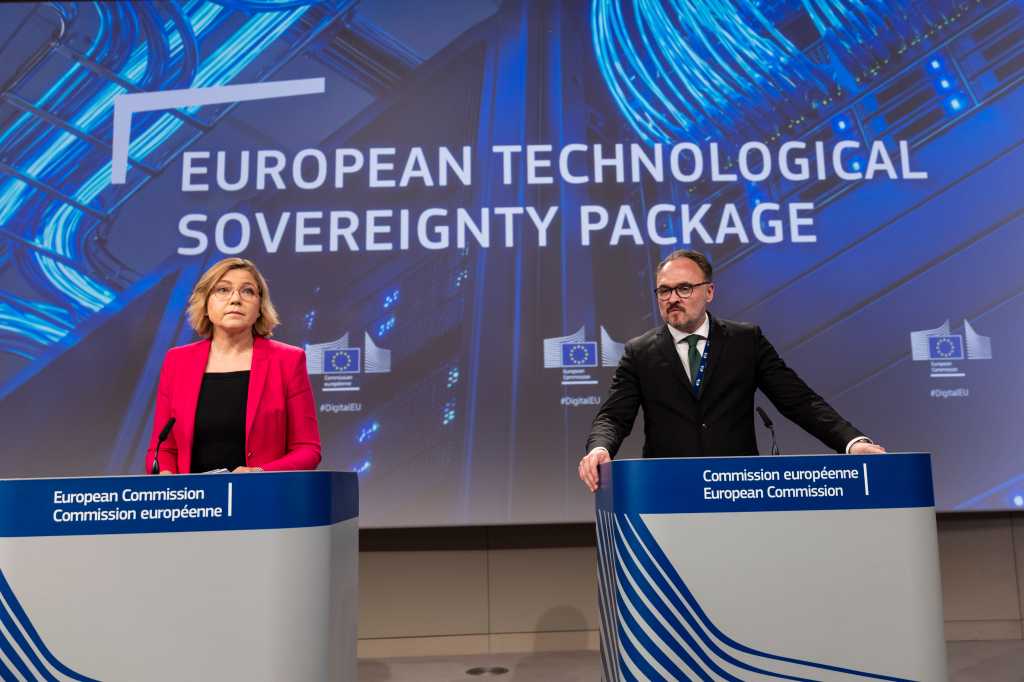
In recent years, the European Union has entered a race in that arena, one that involves symbolic measures well as practical legislative moves. The European Parliament has dropped Google as its default search engine and replaced it with the French Qwant. And in early June, the Commission presented its European Technology Sovereignty Package, which addresses, among other issues, AI. They aim to ensure that Europe becomes “a continent of AI, strengthen its digital autonomy, and help build a more sustainable digital future,” while also acknowledging Europe’s technological dependence.
“We cannot afford to depend on others for the technologies that keep our hospitals running, our energy grids stable, and our services secure,” said Commission President Ursula von der Leyen. Specifically, Europe aims to triple the capacity of its data centers over the next five to seven years, boost the adoption of AI, enhance research and innovation, and work on its own development and deployment efforts. The package will now have to go through an approval process to become law and take effect.
Henna Virkkunen and Dan Jørgensen at the presentation of the EU’s technological sovereignty package on June 3.
UE
Has Europe done enough?
The big question is whether what Europe has done — and what it plans to do — will be enough. Are the sovereignty packages sufficient, or are they vague and lacking in concrete details? The Europe 2031 group accuses Europe of making empty promises that don’t translate into tangible results.
García de Viedma said the latest package represents “good progress, which is defining technological sovereignty as risk mitigation.” In this case, risk has three aspects: technological dependence could be used as a coercive measure; tech operations could be disrupted “if at any point our alliances deteriorate;” and IT could be used as a tool for surveillance.
“Not to sound like conspiracy theorists, but the fact is that there is a possibility that whoever controls the communication nodes and software has the ability to see, if not everything, then at least some things,” he said. “That gives them an advantage.” Therefore, sovereignty is not so much “that identity-based vision” but rather one of “risk avoidance.” It’s not about using European technology simply because it’s European, but about understanding the risks of not using it.
Viedma believes the Commission has accurately identified today’s problems (such as governance or the digitization of the power grid, “the main bottleneck for AI”) but wonders about the future. Added to this is the issue of money: investment is a key piece in this chess game.
DigitalES views the efforts currently under way — such as those regarding European chips — favorably. “What’s needed is more determination and focus,” said Arias. Incidents like the Anthropic case can “help move in that direction.” While European investment plans in AI may seem less grandiose than those of the sector’s major companies, Arias warned against defeatist rhetoric.
“The EU is doing what it needs to do,” he said, and is creating “a more geopolitically stable environment for investors. Ultimately, this is about the market and who creates the most value.” European regulations can eventually become global standards, with Europe positioning itself “as an attractive partner for investment” — one that is “reliable and more predictable.”
Arias said the key lies not in complete autonomy, but in finding a balance. “We don’t have to produce 100% of what we use, and we shouldn’t depend 100% on a single supplier or jurisdiction.” What’s needed is technological diplomacy, being able to navigate complex waters and safeguard interests.
Playing by different rules in the global AI market is not feasible. “You must be aware of your strengths and weaknesses.” And she insists: “Europe is by no means a long shot — quite the opposite, because it offers certain guarantees.”
The next great revolution
Europe is late to the AI race, but it can still “assume a certain leadership role,” depending on how the sector evolves, as García de Viedma notes. Europe can carve out its own niche and investments are being made and efforts are under way to do so. In AI, this involves identifying areas of European specialization.
There remains a lot of work to be done and, possibly, lessons learned from past experiences to face what lies ahead. AI issues are part of a very complex reality. Arias warned of the need to prepare for “the convergence of artificial intelligence with the computing power that quantum computing will provide” featuring “dual-use technology that will be employed for both military and civilian purposes.” These will be more powerful tools that “require a more solid foundation.
“Such technological diplomacy will be necessary to negotiate global quantum standards, protect intellectual property, and address the potential impact on national security.”
The quantum revolution is imminent, but has yet to unfold, and Europe can capitalize on it. “Europe is jumping on this bandwagon,” argued Arias, highlighting the investments and work on quantum capabilities. “We’re in a very different situation than we were with the cloud and artificial intelligence.” The EU is “acting quickly” and opening the door to “positioning ourselves country by country.”
The US government has reversed export restrictions on Anthropic’s frontier AI models Fable 5 and Mythos 5, allowing the company to resume global access after nearly three weeks of disruption triggered by concerns over the models’ cybersecurity capabilities.
“As of today, June 30, the export controls on Fable 5 and Mythos 5 have been lifted,” Anthropic said in a blog post. The company said Fable 5 will begin rolling out globally on July 1 across Claude Platform, Claude.ai, Claude Code and Claude Cowork, while access on Amazon Web Services, Google Cloud, and Microsoft Foundry will be restored “as quickly as possible.”
Commerce Secretary Howard Lutnick said the administration had worked with Anthropic before reversing the restrictions.
“Over the past two weeks, we have worked closely with Anthropic to analyze and approve Fable 5 to ensure alignment across the US Government and strengthen America’s leadership in AI,” Lutnick wrote in a post on X.
Anthropic had launched Fable 5 and Mythos 5 on June 9, and the US authorities restricted their export on June 12.
The Anthropic decision comes as other frontier AI developers are also operating under closer government scrutiny.
In announcing GPT-5.6 Sol, Terra, and Luna last week, OpenAI said it had previewed both its rollout plans and the model’s capabilities to the US government before launch and, “at their request,” was initially making the model available only to “a small group of trusted partners” whose participation had been shared with the government.
OpenAI said it would continue coordinating with government partners before expanding availability, but added that it did not believe “this kind of government access process should become the long-term default” because it keeps advanced AI tools from “users, developers, enterprises, cyber defenders, and global partners who need them.”
Analysts say the Anthropic decision reflects a broader shift in how frontier AI models are governed.
“The reversal is not the story; the instrument beneath it is,” said Sanchit Vir Gogia, chief analyst at Greyhound Research. Washington, he said, has applied the long-standing “deemed export” doctrine to frontier AI models, signalling “negotiated oversight, conditional and monitored, rather than blanket prohibition.”
Immediate order created global disruption
Anthropic said the June 12 export controls required it to restrict access to foreign nationals.
“Because the order took effect immediately and we had no reliable way to verify nationality in real-time, we suspended access to both models for all users,” it added. The company partially restored Mythos 5 last week for a limited group of US organizations.
Anthropic said the restrictions followed a report from Amazon researchers describing a technique that bypassed one of Fable 5’s cybersecurity safeguards. After reviewing the findings with Amazon and the US government, the company concluded the technique “did not expose any unique Mythos-level cyber capabilities” and instead represented “a borderline case for Fable 5’s safeguards.”
It subsequently retrained its safety classifier, saying the reported technique is now blocked in more than 99% of cases, while acknowledging that the stronger protections would increase false positives for some legitimate coding requests. Researchers at the US Department of Commerce’s Center for AI Standards and Innovation also evaluated the updated safeguards, Anthropic said.
Enterprises face a new continuity risk
Experts say the episode demonstrates that frontier AI’s availability can now be shaped by policy decisions as much as technical capability.
“Frontier access has become conditional infrastructure,” Gogia said. “The models went dark globally because nationality could not be verified in real time, so a control aimed at foreign nationals became an outage for everyone.”
He said enterprises should also not assume that deploying models across multiple cloud providers insulates them from regulatory actions affecting the underlying model provider.
According to Gogia, organizations should begin evaluating frontier AI platforms for regulatory interruption, cross-border identity restrictions, channel restoration delays, and trusted-partner eligibility alongside traditional security, commercial, and technical considerations.
Anthropic proposes a common jailbreak framework
Anthropic used the announcement to call for an industry-wide framework to assess AI jailbreaks, saying developers and governments currently lack a common standard for evaluating newly discovered techniques.
“There’s currently no consensus in the AI industry on how to describe, in objective terms, the severity of an AI jailbreak,” the company said. Anthropic said it is working with Amazon, Microsoft, Google, and other Project Glasswing partners on a framework for evaluating jailbreaks, while also expanding collaboration with the US government through pre-release testing of future frontier models, information sharing, and joint AI security research.
“Government involvement in AI releases requires a durable, transparent process that gives cyber defenders and others the certainty they need about access to powerful models,” Anthropic said. “These rules should be codified in strong regulation and applied equally across frontier model developers.”
Gogia said the broader lesson extends beyond Anthropic’s restored access. “Restored access is not restored certainty,” Gogia said. “Build for the detour, because the road now runs through policy.”
Few apps are as essential to mobile productivity as the humble word processor. I think I’ve probably spent a solid seven years of my life staring at Google Docs on one device or another at this point, and those minutes only keep ticking up with practically every passing day.
While we can’t do much about the need to gaze at that word-filled white screen, what we can do is learn how to make every moment spent within Docs count — and in the Docs Android app, specifically, there are some pretty spectacular tucked-away time-savers just waiting to be discovered.
Make a mental note of these advanced shortcuts and options, and put ’em to good use the next time you find yourself staring at Docs on your own device.
Google Docs Android feature #1: Smarter document organization
We’ll save the best for, erm, first — ’cause the easily overlooked feature we’re kickin’ things off with can save you some serious time and make your mobile editing experience significantly easier.
After all, dealing with a complex document from your phone can be a real hassle. Who wants to waste time scrolling through endless-seeming screens to find the section of info you need to read, edit, or work on at any given moment?
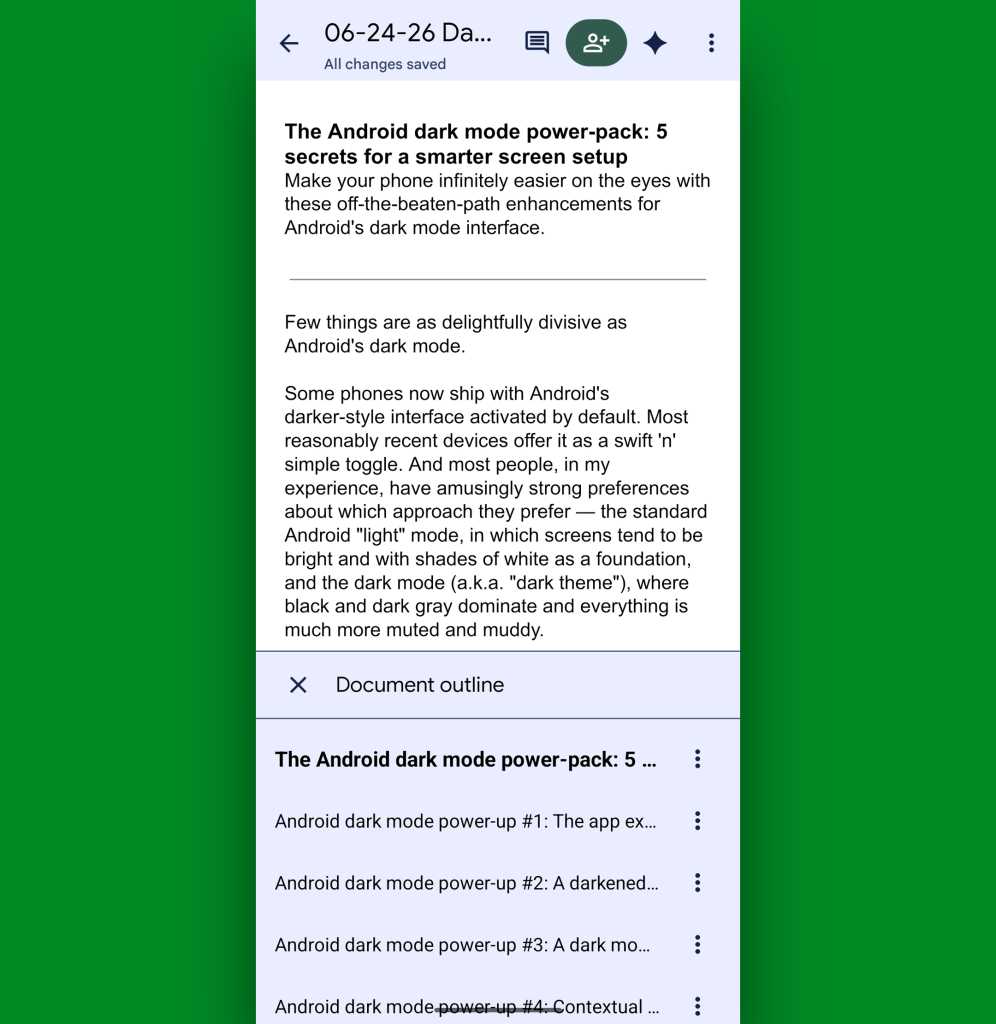
I sure as heckfire don’t — and if you remember to use Docs’ out-of-the-way Outline option, you’ll never have to do it again, either. While viewing or editing any document with any sort of headers in it (be they actual header-formatted text or even just bolded section titles), tap the three-dot menu icon in Docs’ upper-right corner and then select “Document Outline.”
And by golly, wouldya look at that?
An automatic document outline is never out of reach in the Docs Android app.
JR Raphael, Foundry
Jumping to any part of the document is now just a single tap away.
Google Docs Android feature #2: Instant tab access
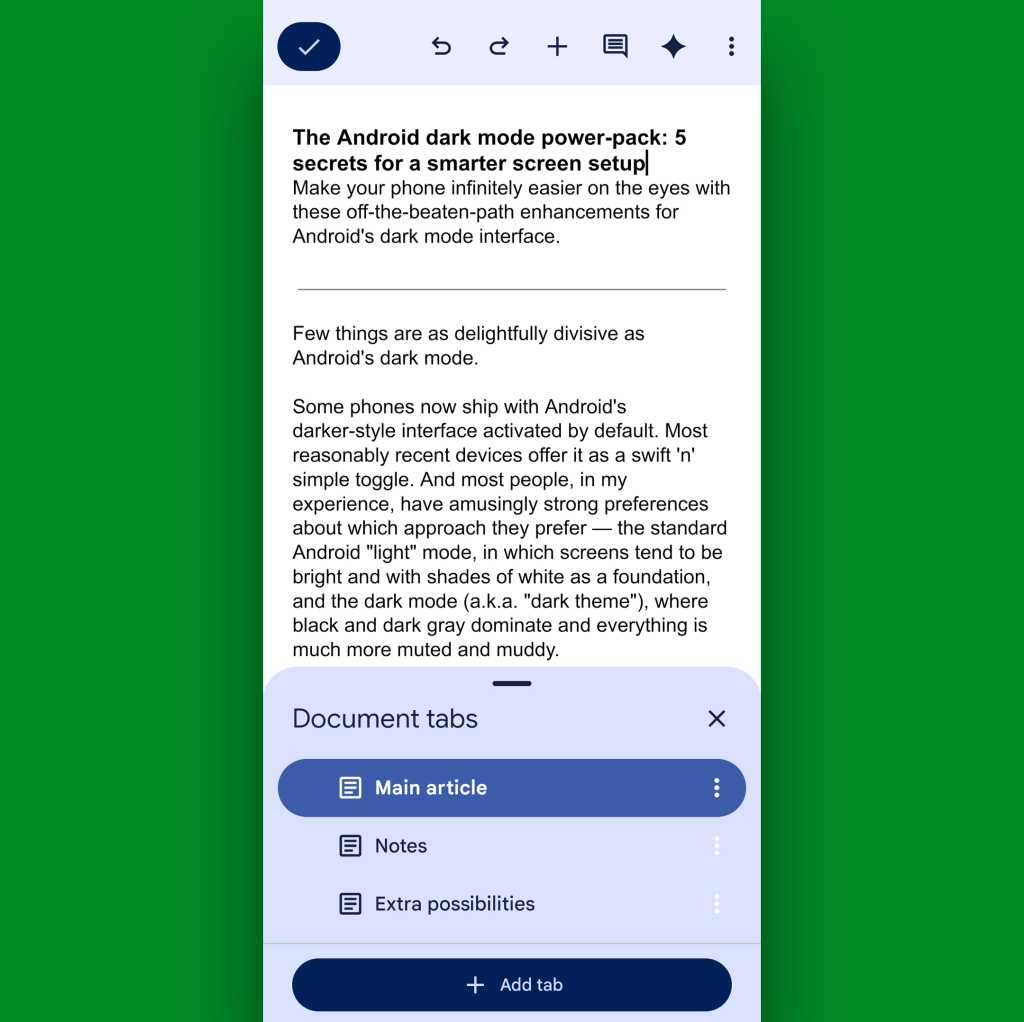
Speaking of organization, in that same section of the in-document three-dot menu resides an easily overlooked option called “Document tabs.”
Tap it, and you can then see, manage, and move among any tabs created within the document for added organization — just like in the Docs desktop interface.
Who knew?! Your Google Docs tabs are now accessible within the Docs Android app as well.
JR Raphael, Foundry
Yes, please — and thank you.
Google Docs Android feature #3: Easier Word integration
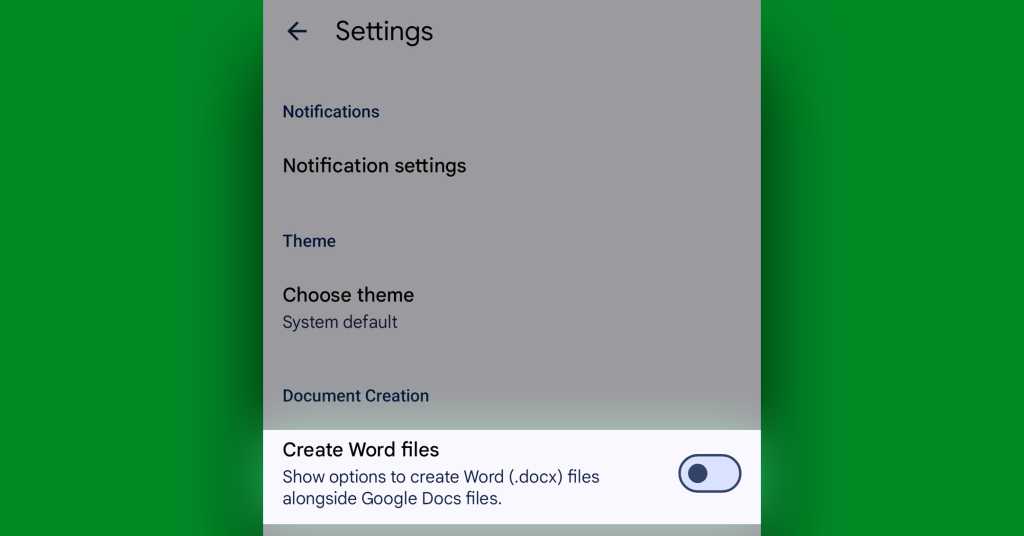
When you’re working with clients, colleagues, or even camels who for some reason prefer the Microsoft editing ecosystem, you don’t have to do much to bridge that gap. The Docs Android app can already open and allow you to edit Word files, without any work — and with one simple flip of a switch, you can create new files in the .DOCX format just as easily.
To find the feature, you’ve gotta back out of any actual documents and get onto the main Docs screen — the screen with the search box at the top and all your documents listed out beneath it. Tap the three-line menu icon in the upper-left corner of that screen and head into the Settings section of that main menu. There, you should see the very switch we need:
Tick one toggle, and you can then create native Word files within the Docs Android app anytime.
JR Raphael, Foundry
Flip that into the on position, then back yourself out to the main Docs screen. The next time you tap the plus icon in that area’s lower-right corner, you should see “New Word file” show up as an option right above the default “New Docs file” command.
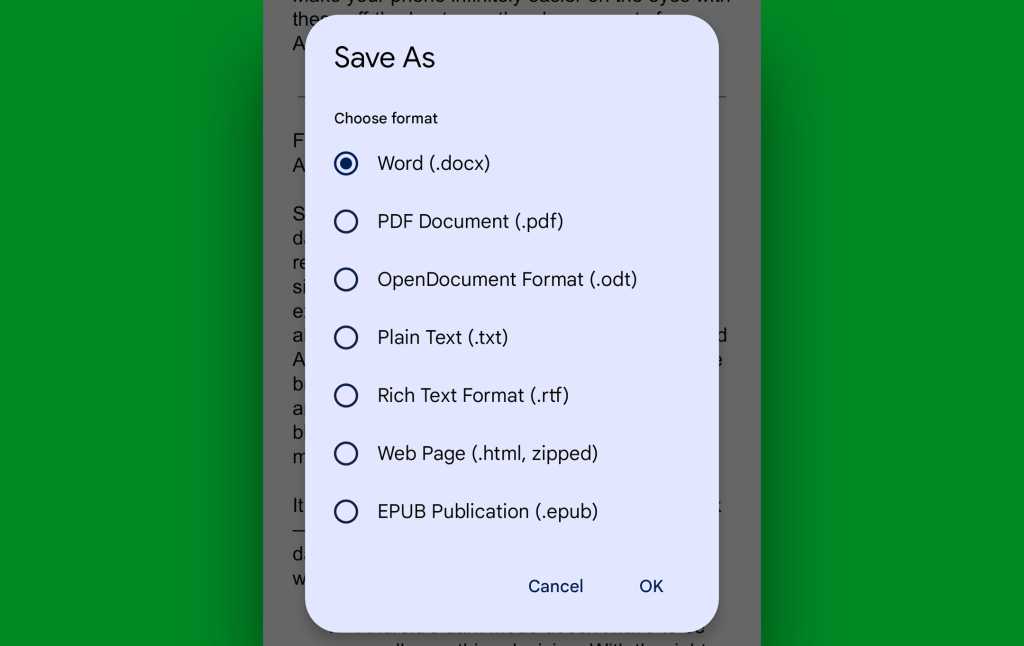
And just as a reminder, if you ever want to save an existing Docs file into the .DOCX format, you can do that, too: Tap the three-dot menu icon while editing a document, select “Share & export,” then select “Save As” and choose the “Word (.docx)” option.
Saving any document as a Word file is also easy, once you know where to look.
JR Raphael, Foundry
You can also save the file as a PDF or other common document format from that same menu.
Google Docs Android feature #4: The swift sender
While we’re thinkin’ about dealing with different document formats, download this into your long-term memory: The next time you need to save or send a document as an actual file — as opposed to an in-app, collaboration-ready Google Docs share — you can save yourself the trouble of downloading and then reuploading the thing and simply send it directly from the Docs Android app.
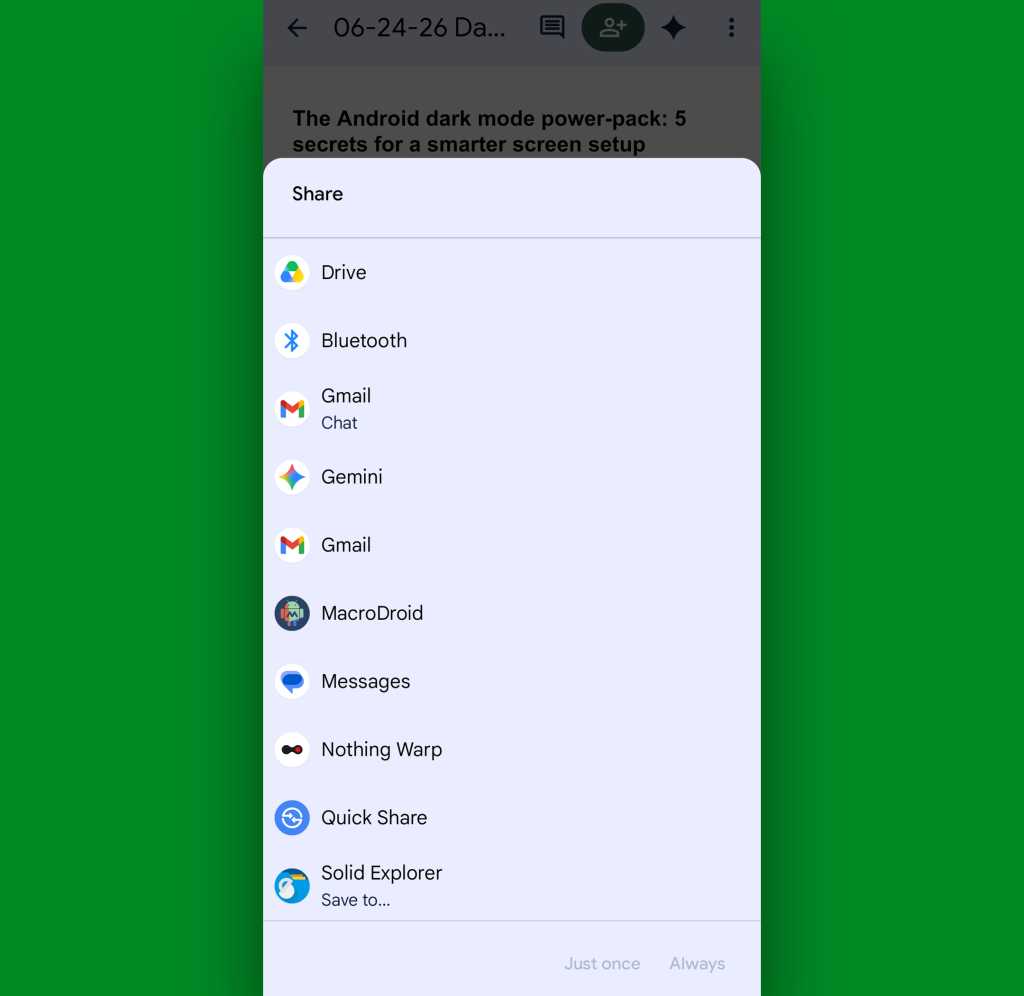
The trick is to once again tap that three-dot menu icon whilst editing a file and then select that same “Share & export” menu we just went over. But this time, instead of going with the “Save As” option, select “Send a copy.”
You can then pick from the same set of format choices we just finished exploring. And from there, Docs will allow you to choose from any compatible app on your device — everything from Android email and messaging apps to note-storing services like Notion and Trello.
Send any document into any other compatible app on your phone for a simplified sharing setup.
JR Raphael, Foundry
All it takes is one more tap from there, and your document will be on its way to the appropriate place in the format you requested — just like that.
Google Docs Android feature #5: The local file finder
Ever download a document onto your phone — be it from an email, a Slack channel, a website, or any other such source — and then later find yourself struggling to find it? Well, get this: Google’s got its own simple file finder ready and waiting for you right within the regular Docs app. Who woulda thunk, right?!
But oh, it be there, all righty. It’s that innocuous little folder icon within the search bar on the main Docs screen — something I must’ve seen about a thousand times before I ever thought to actually tap it.
Whoa — a built-in Docs file finder?!
JR Raphael, Foundry
When you do, the app will prompt you to find a saved file from either your local phone storage or from your online Drive storage. And once you select either option, you can browse through the associated place to see what’s there or search to find exactly what you’re after — no hopping over to a separate Android file manager required.
Google Docs Android feature #6: The Drive detour
Speaking of Google Drive, if you ever find yourself needing to mosey over to the full Drive interface to dig around more deeply or pull up a file that isn’t text-related, here’s a handy little secret:
You can actually fly from Docs directly to Drive without going through all the usual steps — y’know, heading back to your home screen, finding the Drive icon, and opening it up anew from there.
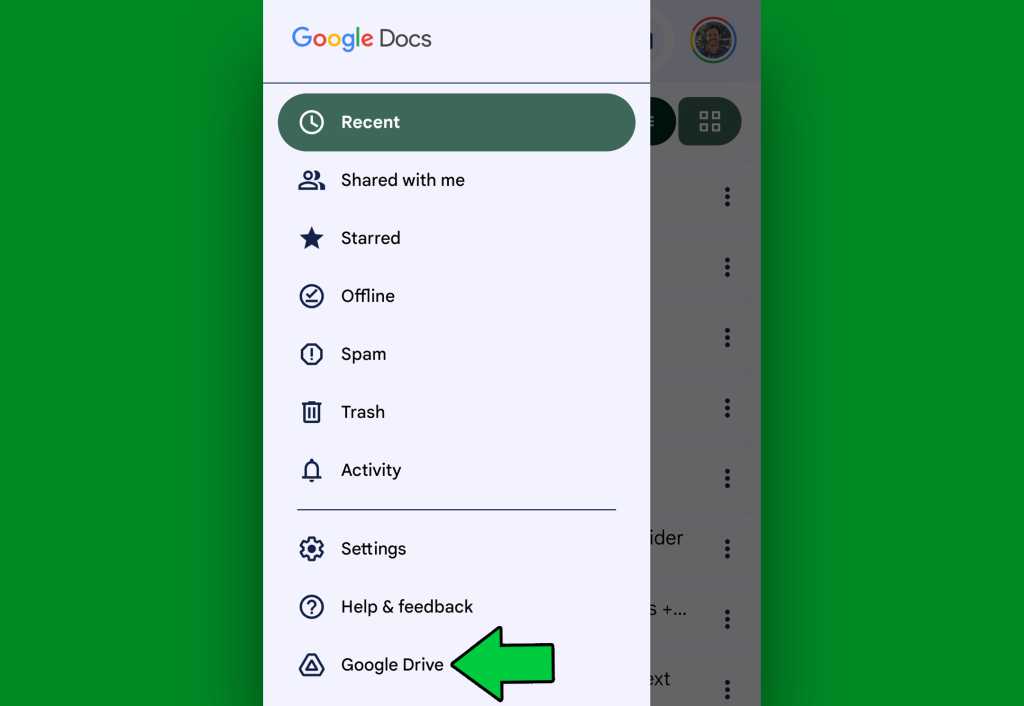
Just rely on the Docs app’s artfully hidden Drive shortcut to slash steps and zip straight between the two related interfaces. The option is quietly waiting for you within the three-line menu icon on the main Docs screen.
Docs and Drive — BFFs forever.
JR Raphael, Foundry
And now you know.
Google Docs Android feature #7: The account adjuster
Keep that overly moist eyeball of yours in that same area of the Docs app interface for a minute, ’cause we’ve got one more sneaky shortcut worth unearthing there.
It’s a shortcut baked into your face — or whatever sort of image you’ve got in place for your Google account profile photo, up in the app’s upper-right corner.
As is the case with most Google-made apps on Android these days, you can swipe up or down on that image to flip through any additional accounts you’ve got connected on your phone. If you only have a single account set up, this obviously won’t apply to you. But if you have, say, a personal Google account and a work address or even a few different situation-specific personal or work identities, it’s a splendid way to move between ’em with next to no effort and just a single swift swipe.
Google Docs Android feature #8: The direct document shortcut
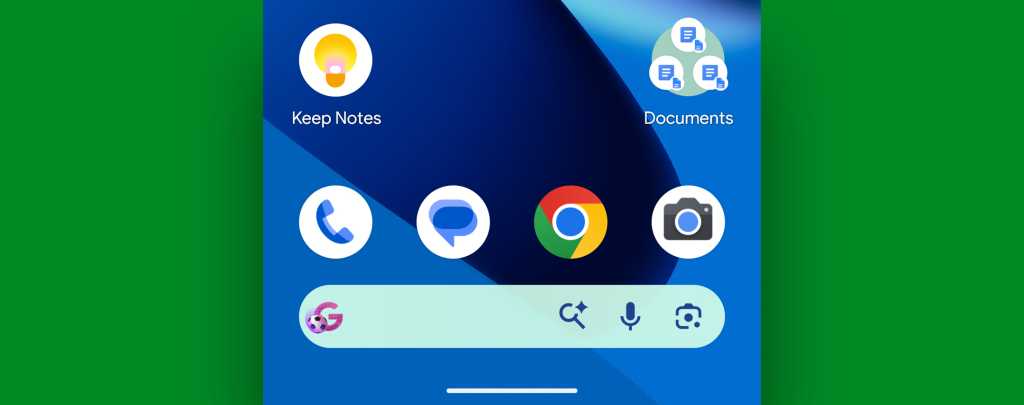
Another shortcut worth burning into your brainspace: If you find yourself working on a specific document or set of documents frequently — whether they’re evolving documents you access all the time or just specific projects on your radar at one particular moment — save yourself the steps of opening the Docs app, finding ’em there, and then tapping their titles to get into ’em and instead give yourself one-tap shortcuts to open the files directly from your home screen.
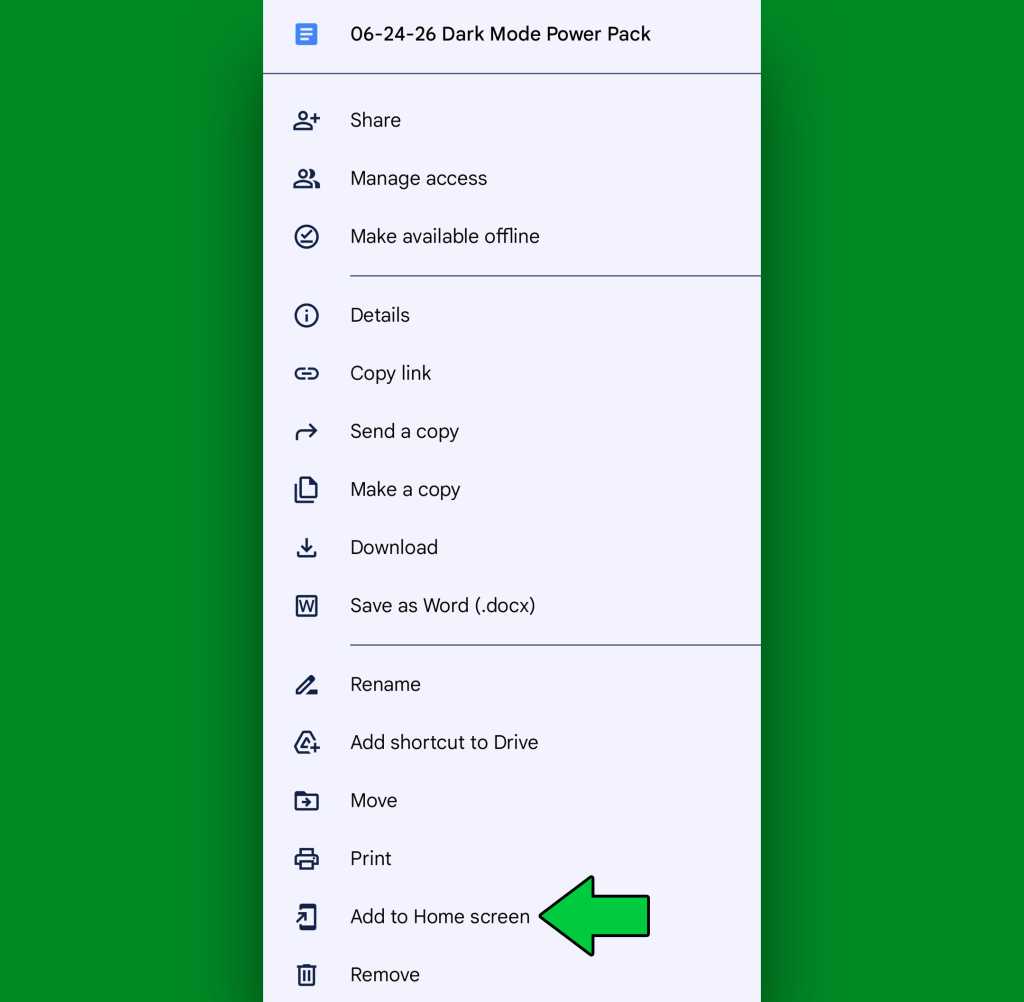
The option to do that is pretty buried, but it’s well worth digging up. Start by finding the document in question on the main Docs screen. Long-press it, and then look way down on the menu that pops up for the “Add to home screen” command. (Depending on the size of your phone, you might have to scroll down that menu a bit before you’ll see it appear.)
You’ve usually gotta scroll to find it, but Docs’ “Add to home screen” option is there and ready to save you time.
JR Raphael, Foundry
Tap that bad boy and follow the prompt to place the shortcut wherever you want it — and say “hocus pocus” for good measure, if you’re feelin’ merry — and before you know it, you’ll have an app-like icon sitting right on your home screen. Tapping it will take you directly into the document you selected, without any extra steps required.
You could even get ambitious and create an entire folder on your home screen where you store a variety of high-priority or in-progress documents.
What’s up, Docs?
JR Raphael, Foundry
Three cheers for seconds saved!
Google Docs Android feature #9: Quick function shortcuts
Let’s keep our shortcut mojo goin’ for one more minute, shall we? You can actually follow that same pattern we just went over and and put shortcuts for common Docs commands like creating a new document or searching your existing documents right on your home screen, too. That way, you can perform the associated commands quickly and without any wasted effort opening up the app and hunting around for ’em — and what’s not to love about added efficiency?
These are actually part of Android’s oft-forgotten App Shortcuts system — the thing that came around way back with 2016’s Android 7.1 Nougat release and that’s still vexingly out of sight and out of mind for most of us.
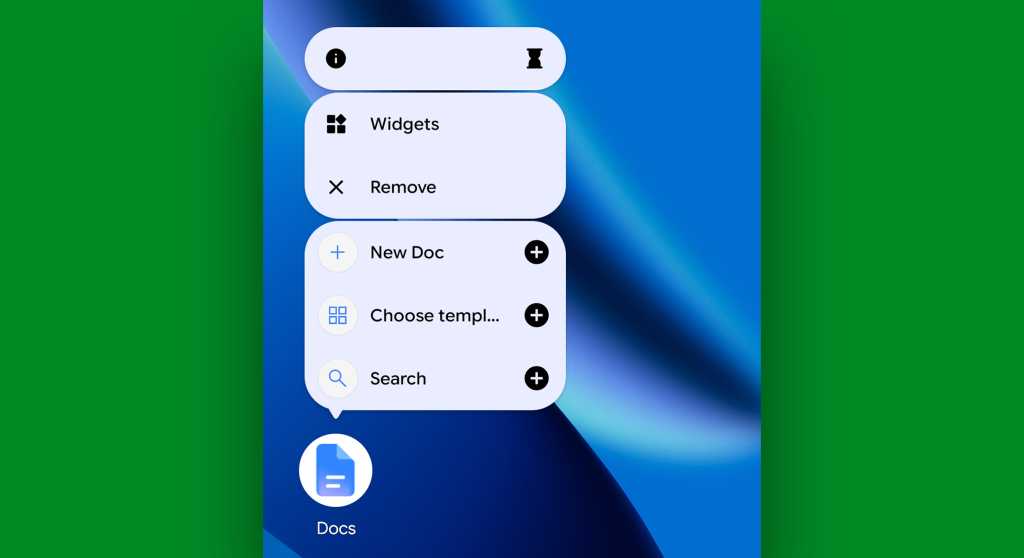
Open up your app drawer, though, and find the Docs icon — or find the Docs icon on your home screen, if it’s there. Press and hold it, and you should see a series of options for direct shortcuts to actions within the app appear.
All sorts of helpful Docs options are accessible right from your home screen.
JR Raphael, Foundry
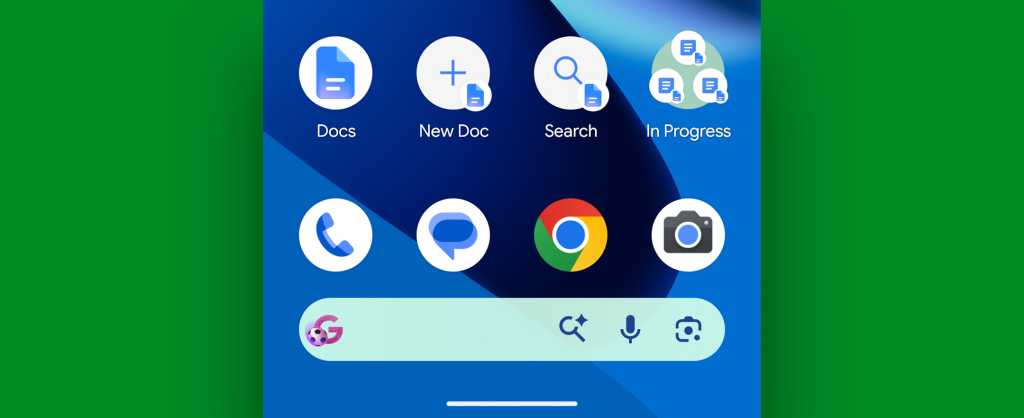
You can always get to those by long-pressing the Docs icon, but if you find yourself using the functions often, you can make it even easier by pressing and holding one of ’em within that pop-up menu and then dragging it directly onto your home screen for one-touch access.
You could even build yourself a nifty little Docs command center for super-fast access to all the stuff you use the most:
Docs, Docs, everywhere — so many options, never more than a tap away.
JR Raphael, Foundry
And while we’ve got easy access on our minds…
Google Docs Android feature #10: The offline on switch
By default, the Docs Android app will make any files you actively work within the app available for offline use for a while — but if you’re getting ready to travel or expecting any other connectivity-challenged moments, you don’t have to rely on its judgment to make sure your stuff is accessible even without internet access.
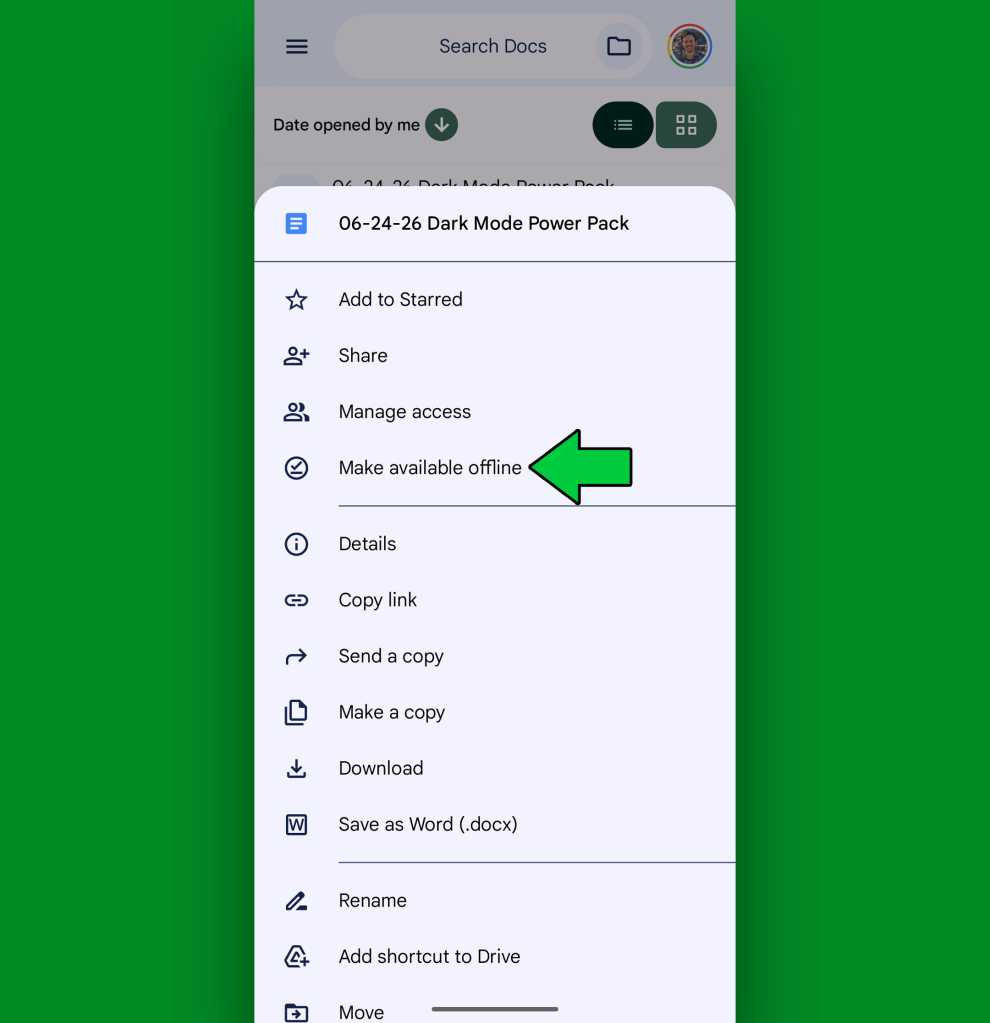
From the main Docs screen, tap the three-dot icon alongside any document name and then look for the “Make available offline” option within the menu that pops up.
Pro tip: Turn offline access on before the need actually arises.
JR Raphael, Foundry
Tap that for any document that you expect to need and then rest easy knowing it’ll be there and available for you — no matter your current connection status.
Google Docs Android feature #11: Wordless reactions
Sometimes, a picture really is worth a thousand words. Or at least a couple hundred.
That’s especially true when collaborating on a document and expressing your opinions — which, let’s be honest, often come down to simple reactions like 👍 or maybe 💩.
Docs has allowed emoji reactions as a part of its editing process for a while now, and at some point along the way, the Android app gained the same ability. It’s just weirdly tucked away in a place where few word-minded mammals would ever find it.
So do this: The next time you’re working on a shared doc, try pressing and holding your finger onto any word to highlight it. (You can then use the selector icons that pop up to expand or shift your selection, if needed.)
Now for the tricky part: In the menu that appears alongside your selection — the one that contains “Copy” and other such commands — look for the three-line icon at its far right side.
See that little three-line icon within the text actions pop-up?
JR Raphael, Foundry
Tap that — and lookie what we have here: the awkwardly hidden option to add an emoji reaction! 🥳
Emojis for everyone — hip, hip, hoorah!
JR Raphael, Foundry
Hit that sneaky little thing with all your might, then select the most appropriate reaction and move on with a satisfied 😊 in your mind.
Google Docs Android feature #12: Your in-doc AI
Generative AI these days is a bit of a mixed bag, to put it politely. Google’s Gemini and other such services are arguably causing more harm than good, on numerous levels, and also just creating paths for lazy, low-quality and accuracy-challenged work.
But in the right scenario and with the right sort of framing, Gemini-style AI canactually be useful. The onus just falls squarely on you to determine how to most effectively use it and avoid falling into the traps of unoriginality or, worse, inaccuracy.
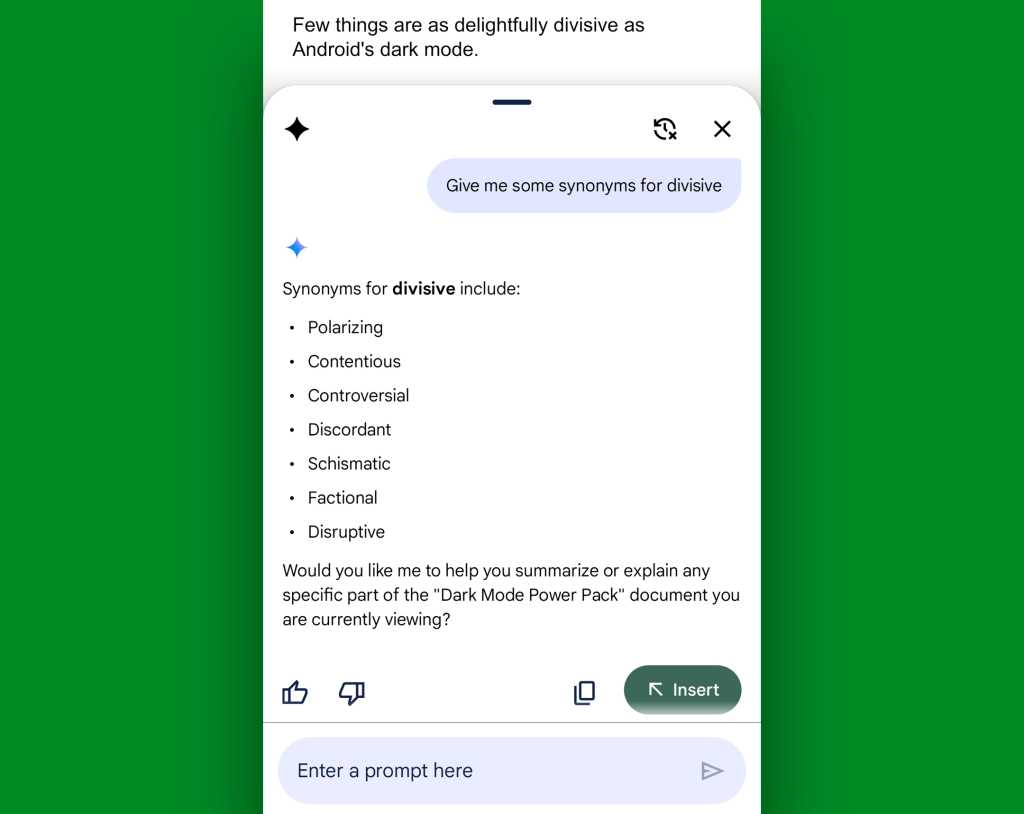
The Docs Android app now offers a direct shortcut to Gemini within its editing interface — via the starburst-shaped icon in the toolbar at the top of the screen — and with some careful considering, it might just end up being a helpful reading or editing tool for you.
A few suggestions that notably don’t involve having AI write lazy, uninspired copy on your behalf:
You can use the Gemini in Docs system as a quick ‘n’ easy way to get a definition or list of synonyms for any word in front of you.
You can also use it to ask for context or related information — like an integrated research aide. (Just remember that AI doesn’t always get things right, so treat it as more of a starting point than a final quote-ready answer.)
And you can lean on it to perform tasks like summarizing or outlining a long document or helping you reorganize a document into a more logical state.
Gemini is now available directly within Docs. Please, use it wisely.
JR Raphael, Foundry
You may still end up spending a ton of time in Docs, but at least now you’ll make the most of every second there and avoid wasting your effort on piddly little tasks that can be made more efficient. And that, as far as I’m concerned, warrants an enthusiastic 🥂 reaction — maybe even followed by a well-earned 🍪.
Get six full days of advanced Android knowledge with my free Android Shortcut Supercourse. You’ll learn tons of time-saving tricks for your phone!