
Author: Computerworld

7 out-of-sight Googlebook highlights

Google’s new Googlebooks are packed with potential — and while the systems in their current state may be awkwardly rough around the edges, there are some truly interesting ideas within ’em.

I looked at some of those highlights in my recent “Googlebook work test” hands-on analysis, but in addition to all the surface-level sorcery, Googlebooks hide a handful of nifty and at times quite helpful features you wouldn’t notice until you’d really spent some time using ’em and poking around in their various nooks and crannies.

As a follow-up to my broader Googlebook analysis, I thought it’d be fun to show you some of the more off-the-beaten-path elements of the Googlebook experience — interesting little touches that you almost have to go out of your way to discover (or maybe just stumble onto inadvertently!).

Here are seven such treasures I’ve encountered in my time with the Lenovo Googlebook — provided to me as a short-term loaner review unit — so far.

[Get fresh Googley insight in your inbox with my free Android Intelligence newsletter — one new and useful thing to try every Friday.]

Googlebook highlight #1: Instant context

One of my favorite Googlebook features has been one that’s almost never mentioned and all too easy to overlook, and that’s an innocuous-looking little option within the right-click (or long-press) menu when you’re viewing any kind of content. It’s called “Look up.”

(Click any image in this story to enlarge it.)

JR Raphael, Foundry

The way it works is simple: You highlight any word or phrase, anywhere, then right-click and select “Look up” — and you get an instant pop-up definition, if the highlighted text is a basic word, or a broader sliver of Gemini-generated context, if it’s something more complex.
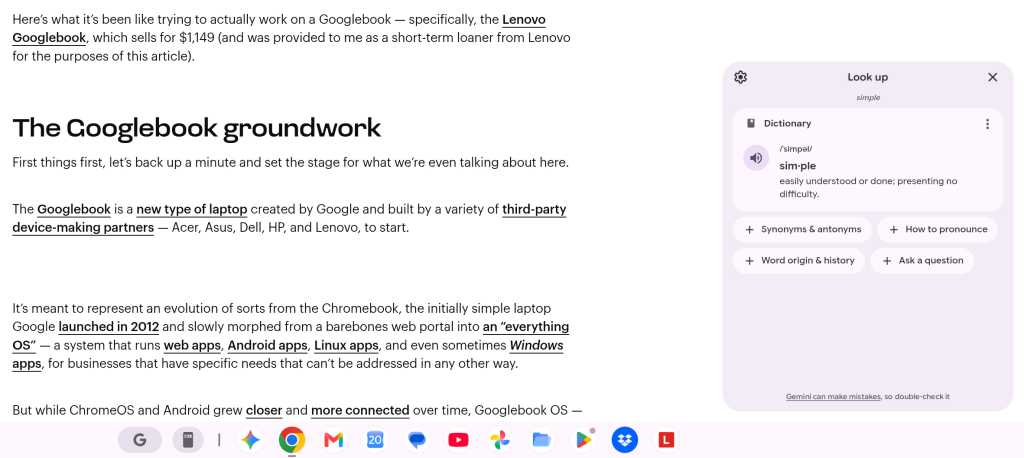
JR Raphael, Foundry

The definitions are honestly where the system seems most useful to me so far. With the Gemini-aided answers, you inevitably open the door to misinterpretation and misinformation potential — seen most comically in this example, where I looked up the phrase “Googlebooks.”
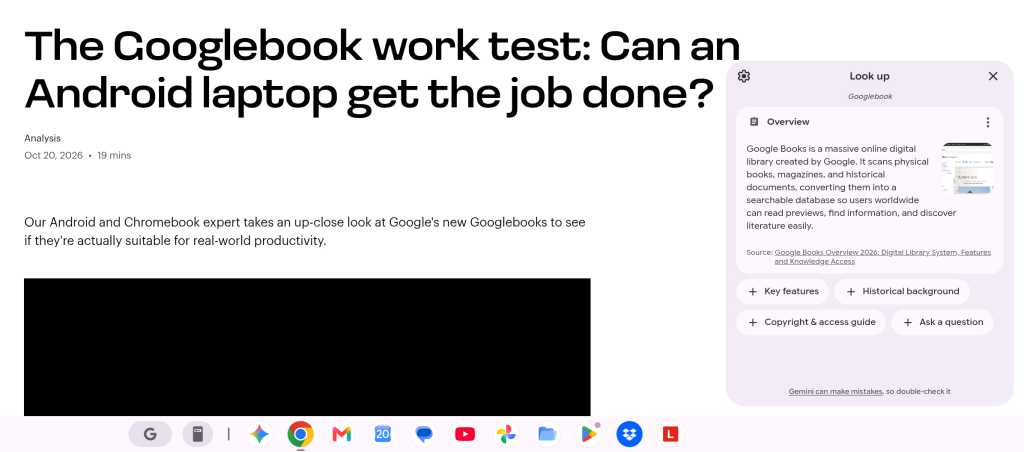
JR Raphael, Foundry

But hey, it’s certainly an interesting idea — and that’s what this list is all about.

Googlebook highlight #2: Circle searching

In addition to the “Look up” option, the Circle to Search system familiar to those of us in the Android arena is also quietly present on Googlebooks.

That creates a slightly awkward overlap with the more prominently promoted Magic Pointer feature, but it’s an interesting addition and option to have in the right sort of scenario.

With this one, you have to first find and activate the option within the system settings — tucked away within the “System” section — and then you can hit the Google key and A together to summon Circle to Search and highlight anything on your screen (be it text, images, or whatever) to learn more about it.
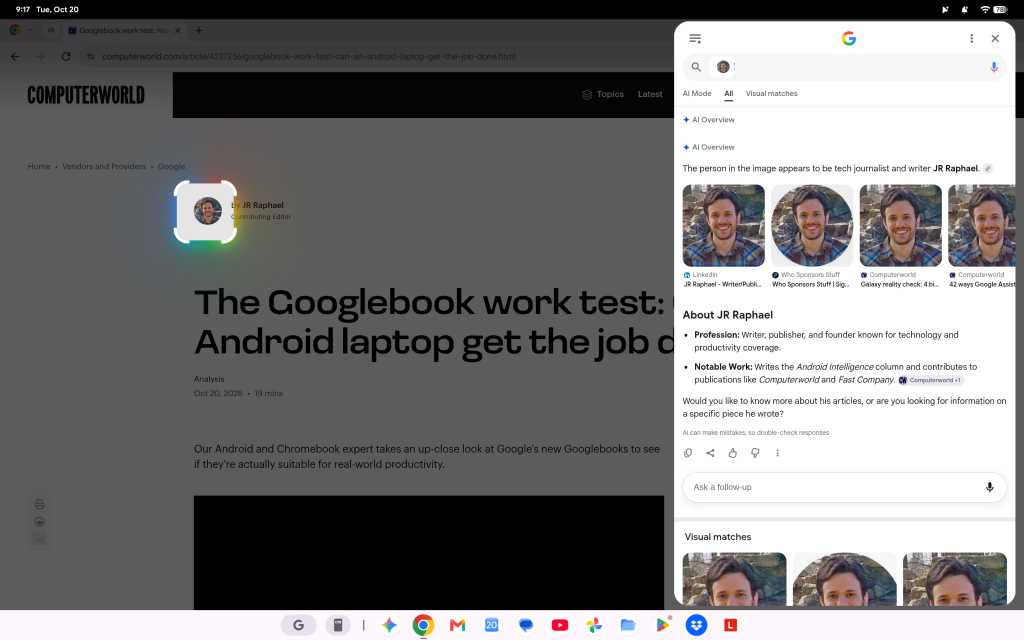
JR Raphael, Foundry

In concept, it’s pretty darn similar to what Magic Pointer is meant to do. But Circle to Search is a much more developed system, with its own entire ecosystem of built-in actions and shortcuts, so it’s neat (if slightly confusing!) to see it present within the Googlebook environment as well.

Googlebook highlight #3: Custom corner shortcuts

An especially interesting addition for the shortcut-lovers among us is the ability to create your own custom shortcuts for triggering different actions when you move your mouse to the corners of a Googlebook screen.
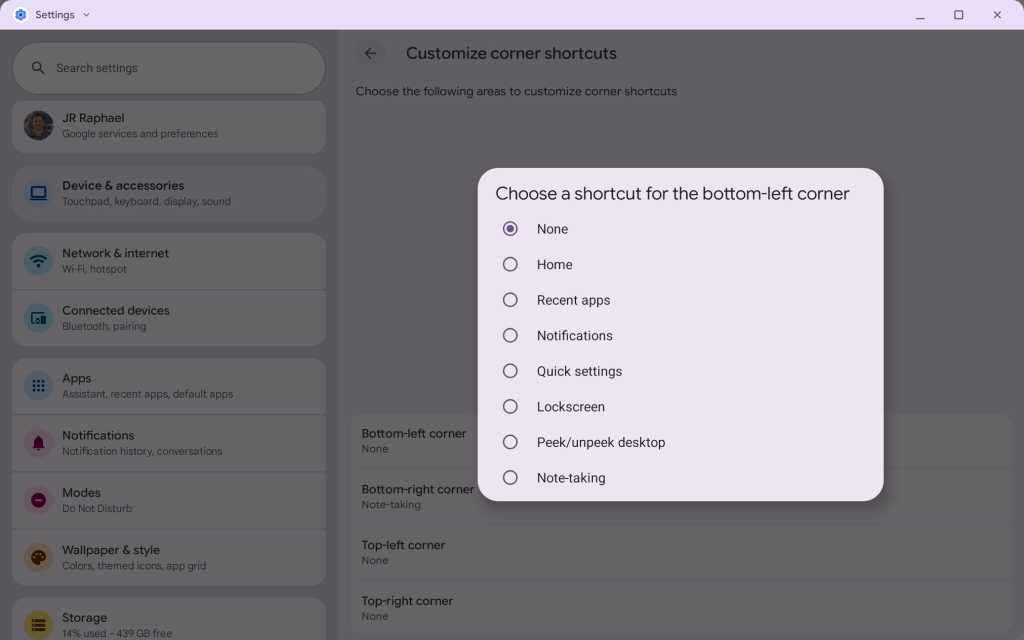
JR Raphael, Foundry

The list of available options is somewhat limited as of now — with no way to map a corner to opening a specific app or an action within an app (or to take things further yet, with a next-level notion like summoning a widget on demand) — but it’s a welcome addition, even so, and hopefully something that’ll only continue to expand and become more versatile with time.

Googlebook highlight #4: Custom keyboard shortcuts

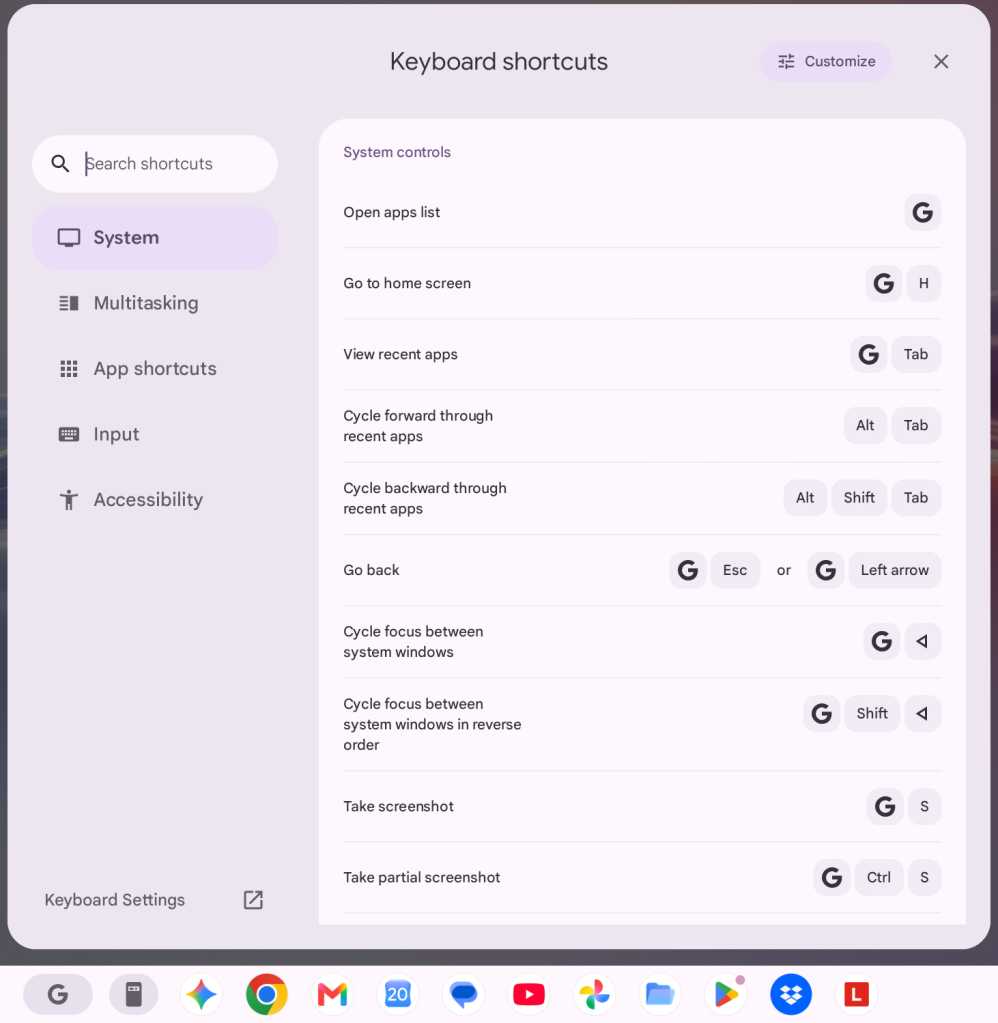
Speaking of shortcuts, while the Googlebook does require a lot of new learning and muscle memory for anyone coming from a Chromebook (or most any other laptop, really), one area where it excels is its ability to let you customize and create your own keyboard shortcuts.
JR Raphael, Foundry

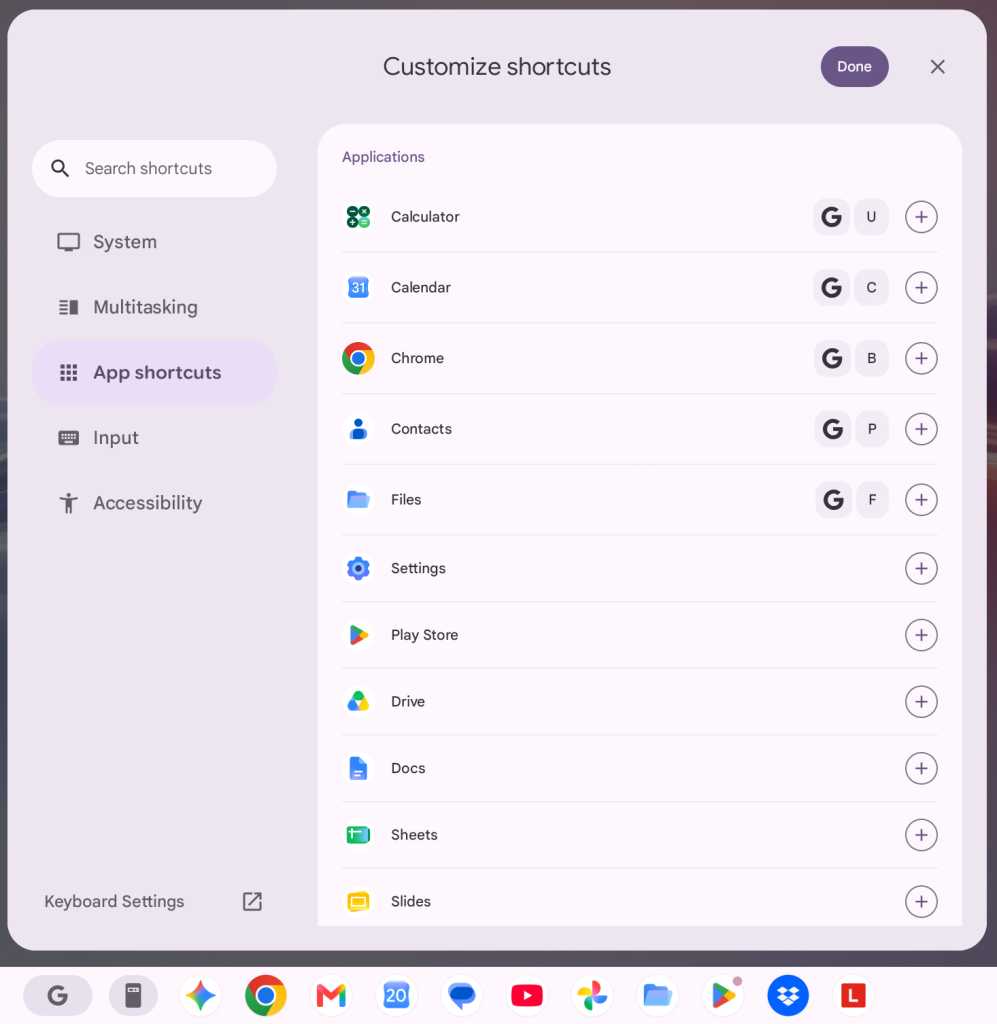
Hitting the Google key and / together opens the list of default keyboard shortcuts, and from there, it’s one more click to customize and change most of the available options to meet your own personal preferences. In an especially cool twist, you can even create new shortcuts for opening any app installed on your device.
JR Raphael, Foundry

Googlebook highlight #5: Automatic file summaries

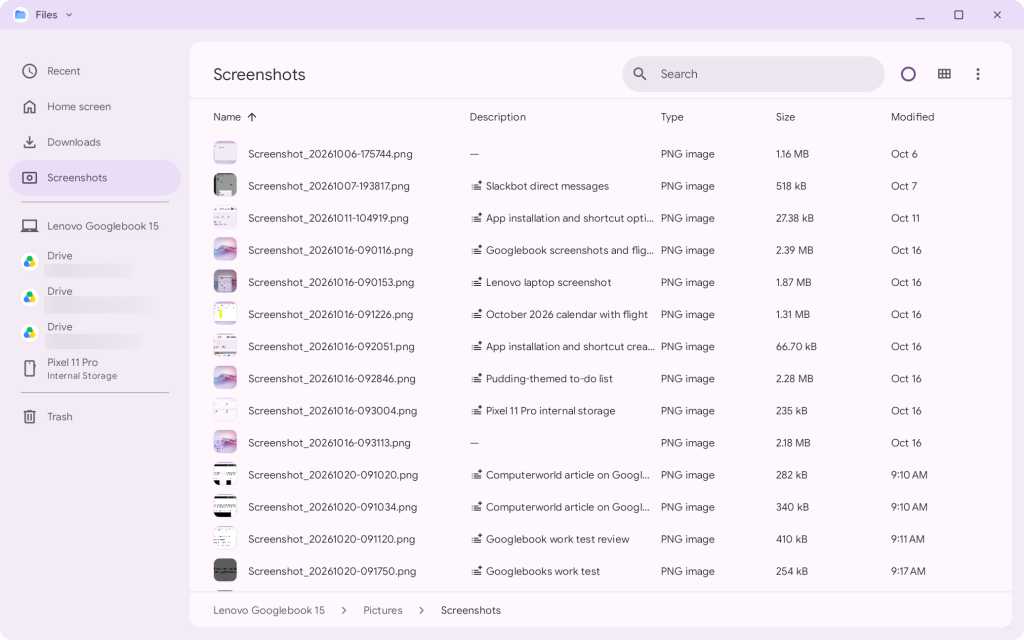
You know how annoying it can be to look through mountains of screenshots — or any other files — to find the one you want, based solely on meaningless file names? The Googlebook has a trick that makes that hassle a thing of the past: For most (but curiously not all) files saved locally on its storage, the system will give you an automatic summary of what’s inside right alongside the filename in the Googlebook OS Files app.
JR Raphael, Foundry

The convenience unfortunately doesn’t carry over to files you’re viewing in your Drive storage or on a connected Android phone. But for anything you’ve downloaded or saved locally, it’s a nice extra bit of intelligence to have.

Googlebook highlight #6: Smart screen savers

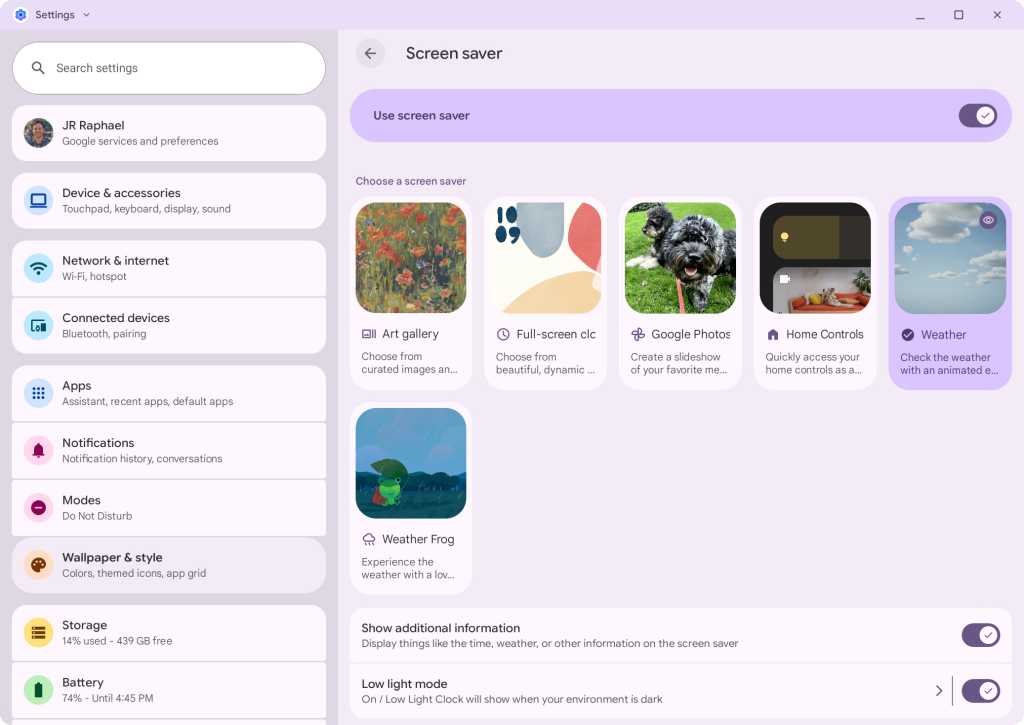
Being based on Android, the Googlebooks sport a selection of built-in screen savers that can make the laptops meaningfully more useful — or maybe just pleasant to look at — when you aren’t actively using ’em.

You’ll have to head into the “Wallpaper & style” section of the system settings to find the feature. But once you do, you’ll be treated to a host of intriguing options just waiting to be activated.
JR Raphael, Foundry

Googlebook highlight #7: Notification history

Last but not least is another Android carryover, and it’s one of my favorite easily overlooked Android options.

I’m talkin’ about Android’s notification history system — which, yes, is there in all of its glory on the Googlebook. It’s just up to you to find and activate it first, before it’ll start working.

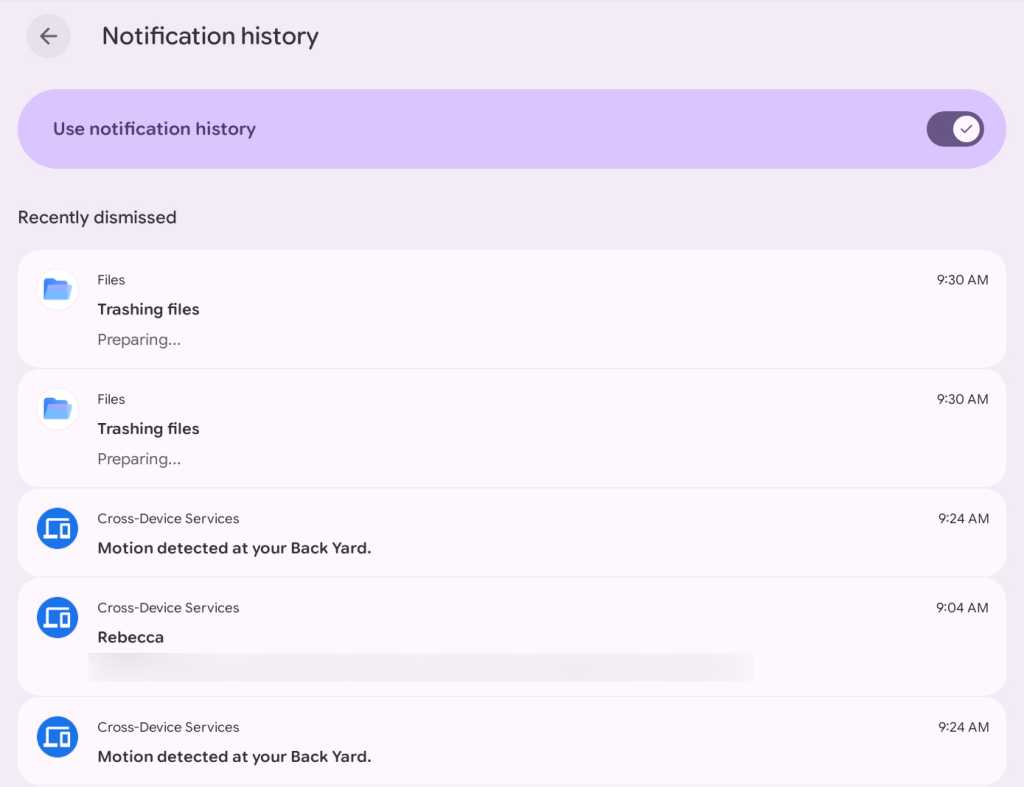
All it takes, though, is a click on the notification bell icon in the upper-right corner of the Googlebook interface, then a click on the clock icon in the lower-left corner of the pop-up that appears. From there, you’ll click “Notification history” and flip the toggle at the top of the next screen into the on and active position.

Give things a moment to start collecting, and you should then be able to click on that same icon to get to a full history of notifications (both from the Googlebook itself and ones synced over from your phone) that you’ve missed or dismissed.
JR Raphael, Foundry

The Googlebook is very much still a work in progress, but features like these make me at least cautiously hopeful for its future and the kind of experience it could one day provide — if, of course, Google manages to actually stick the landing and avoid its all-too-common patterns of pivoting, giving up, and failing to follow through when things don’t take off immediately out of the gate.

Be sure to check out my complete Googlebook overview, if you haven’t already, for a much more detailed picture of what the systems are like to use in their current form, as far as productivity is concerned — and stay tuned to see how things progress from here.

Get even more next-level Google knowledge with my free Android Intelligence newsletter — something new and useful in your inbox every Friday and my Android Notification Power-Pack as an instant welcome bonus.

AI devours a fifth of companies’ IT budgets

According to a new study by the research firm Forrester, AI will account for 20% of corporate technology spending in 2027. At the same time, more than half of IT executives are expected to miss their return-on-investment targets, reports The Register.

In the survey, 45% of AI decision-makers state that investments must yield a positive return within one year to be considered successful. At the same time, only 22% have seen a positive impact on their company’s operating profit over the past year.

According to Forrester, the problems stem in part from companies investing in AI technology without simultaneously changing their organizations and work processes. Instead, the financial gains are realized within individual use cases.

To keep costs down, companies are expected to increasingly use open AI models in the future, as they are cheaper to operate. More expensive and advanced AI models are expected to be reserved for more critical tasks.

This article originally appeared on Computer Sweden.

Anthropic targets Muse and Dots with new AI agent, Claude Duet

On Wednesday, Claude Duet was launched — a new AI agent from Anthropic designed to compete with Meta’s Muse and OpenAI’s Dots.

Claude Duet is based on the Claude Opus 5.5 AI model and is primarily aimed at small business owners and other professionals who want help with everything from planning and meetings to building web apps. To perform these tasks, Claude Duet is equipped with a virtual machine featuring a built-in web browser, reports The Verge.

Last month Anthropic took aim at Microsoft by introducing Claude Docs and Slides, editing tools built into the Claude interface and intended to compete with Microsoft Word and PowerPoint.

Claude Duet is available as a standalone app on iOS and Android, and as a web app at claude.ai. It’s currently available as a research preview only to US customers who subscribe to the Pro or Max plans, but the AI agent is set to be rolled out to more users in the future.

This article originally appeared on Computer Sweden.

Apple, please give family IT admins a pester button

I was taking my dog for her perambulation through the leafy valleys and forests of one of the most densely populated parts of London this morning when it struck me how annoying it has become that I must now update multiple Apple devices across my family group. That’s pretty much mandatory given recent security warnings, and may involve additional updates over time.

“Why must I spend so much time updating other people’s stuff?” I asked myself, managing to combine resentment and self-pity within one short sentence. “Why can’t they learn how to update their own stuff?” I muttered, dreaming once again of that inevitable lottery win that absolutely will change my life. “If only there was an easier way.”

The one thing every family admin should do

You can do this in IT. There you have a suite of tools to manage devices. But for families, there are no easy ways, I thought.

That’s not to say you can’t do anything. Number one is the standard thing every family admin should do, though many of us don’t:

  1. Open Settings > General > Software Update.
  2. There, tap Automatic Updates and turn on Download (iOS, iPadOS, macOS) Updates and also turn on Install (iOS, iPadOS, macOS) Updates.

From then on, that device will automatically download and install updates overnight when it is locked, on Wi-Fi, and charging.

Great. You can forget it. Except you can’t, as not only must you take these steps on each individual device, which is really boring, but, unlike IT admins, you cannot monitor the family fleet to make sure every device is up to date. The first you’ll know they aren’t will probably be when someone has a tech problem you must resolve as a result of them cancelling those updates because they wanted to check their email.

Apple Business isn’t for the home

To resolve this, you can try to use Apple Business or third-party fleet device management tools, such as Jamf Now. Aimed at business users, in theory both tools could extend enterprise-grade device management into family setups, but neither seems ideal. 

Apple Business, for example, demands managed Apple accounts, requires strict registration as a business user and puts in place other barriers that prevent it being easily used to manage family tech. Jamf Now is much more flexible, but the company charges around four dollars for each device after three, which adds up fast when your extended family have iPhones, Macs, and iPads. 

Apple Configurator isn’t enough

Another option could be Apple Configurator. This is free and lets you supervise multiple devices manually. The limitation is that it only lets you manage iOS, iPadOS and tvOS devices — all it can do for Macs is enroll them to enable MDM. Another limitation is that you need to connect each device manually to your Mac for configuration — and during the config process you’ll need to back up the device, as it will be wiped and restored during the configuration process. 

Configurator is powerful — perhaps too powerful. Once it is applied, you can permanently block apps, force web content filtering, and stop AirDrop. You can also prevent people from changing the device name or passcode, or from adding new mail accounts. Much of this is great for family device management, I thought as I leaned over to deal with another canine gift, but the problem remains that it will not automate updates across the family group.

“Why must I always carry the load?” I muttered to myself, resentfully, as I walked toward the park trash can. “All I want is to make sure everybody installs software updates. Is that too much to ask?”

What Apple already offers

I really don’t think it is too much to ask. Apple has already built system hooks inside its operating systems that force devices to upgrade to specific OS versions by defined deadlines. These tools sit inside the Declarative Device Management (DDM) framework and are made available through MDM services. These aren’t APIs, but system-level hooks.

Could Apple provision these services from within Family Sharing?

I think it would be possible, but the problem is a philosophical one. There is a difference between business and family users, and the latter’s are seen as personal devices. What that means is that Apple’s fundamental security model for family devices is based on the individual user, protecting that user and ensuring that no remote user or server should be able to force deep, system changes — like OS updates — on someone else’s personal device. 

This makes a lot of sense, of course, because by adding managed software updates to Family Sharing, Apple would be empowering the administrator at the cost of individual users’ personal agency. It’s not hard to imagine situations in some families where such power might be abused. There’s also the risk of data loss.

Family Sharing does let you control things like content access and set time boundaries but leaves the software updating and other core tasks to the individual. 

Privacy may matter most

Should Apple change this? 

As I walked my deeply reluctant and not even slightly grateful dog back home, I reflected that perhaps individual privacy and agency are worth protecting. It’s what I am raising my family to care about, after all — but surely there should be a tool within Family Sharing that admins can use to remind family members to upgrade? Something a little stronger than a text message, email, or personal request, like perhaps a system message? 

“It would be helpful if I could just pop a pester message on everyone’s device reminding them to upgrade,” I thought as I turned the lock and walked into the family home. 

“Then at least I wouldn’t have to talk to everyone,” I thought as I snuck into my man-cave, where I reached over and began the tedious task of updating a couple of dozen devices all by myself.

“Is that all there is?” I thought, as I watched the morning wane.

Now please subscribe to my daily, human-curated Apple-related news headline feed at The Core, or follow me on BlueSky, LinkedIn, or Mastodon.

Remediation in the era of AI: Fix what matters first

Every IT and security team knows the feeling of opening a vulnerability report and seeing a number that only goes up. Thousands of findings. Hundreds marked critical. A backlog that grows faster than any team can close it.

For years, the default response has been to work harder: more scans, more tickets, more overtime. But the volume of vulnerabilities, accelerated by AI-assisted discovery and a sprawling mix of endpoints, cloud services, and applications, has outpaced that approach.

Shift from vulnerability counts to exposure reduction →

The question has shifted from, “How do we fix everything?” To, “What should we fix first, and why?”

Vulnerabilities are not the same as exposures

A vulnerability is a weakness in software or configuration. An exposure is a weakness that can realistically be reached and exploited in your environment, with consequences that matter. That difference is where remediation prioritization begins.

A vulnerable library on a decommissioned server with no network access is technically a finding. It is not a meaningful exposure. A misconfigured remote access gateway facing the internet may never appear on a CVE list, yet it can represent serious risk. Focusing on exposure reduction, rather than raw vulnerability counts, helps teams spend limited time where it changes outcomes.

Risk-based prioritization works best when it combines technical and business factors. Is the weakness being actively exploited? Can attackers reach the affected system from the internet or through common lateral paths? What business service does the system support, and what would disruption cost? Does it store or process sensitive data? Are compensating controls already reducing the risk? Consider two findings: a critical-rated flaw on an internal development server with no sensitive data, versus a high-rated flaw on a customer-facing web server with exploit code circulating publicly. On severity alone, the first wins. On actual risk, the second is the clear priority, as Ivanti’s prioritization guide lays out in detail.

From point-in-time scans to continuous compliance

Traditional vulnerability programs often run on a scan-and-report cycle: scan weekly or monthly, generate a report, assign tickets. In a fast-moving environment, those snapshots age quickly. A new exploit for an old flaw should move it up the list immediately, not three weeks later at the next scan.

Continuous compliance closes that gap. Instead of waiting for the next scan, teams monitor for new disclosures, configuration changes, and newly exposed assets as they happen, and reprioritize accordingly. In practice, that might mean an alert when a device that was offline during patching reconnects, or when a new cloud workload appears without an assigned owner — both common sources of hidden exposure that periodic scans tend to miss. Continuous compliance also includes verification and the evidence to prove it. A ticket marked “resolved” is not proof of reduced risk. Confirming that a fix was applied, that the exposure is actually gone, and that the record is audit-ready closes the loop.

Where automated remediation fits

Automation is essential to keep pace, but it works best when matched to the right kind of risk. Routine, well-understood fixes (standard OS and application updates on managed endpoints) are strong candidates for automated remediation with staged rollouts. Configuration corrections that follow established policy can often be automated as well. Start with the fix categories where failures are easiest to detect and roll back.

Higher-impact changes, such as patching production databases or modifying network controls, still benefit from human judgment and scheduled windows. Even then, automation can help by gathering context, preparing changes, and verifying results.

Measure what actually matters

Many teams still report success in patches deployed or tickets closed. Those metrics show activity, not outcomes. More meaningful measures include time to remediate actively exploited vulnerabilities, the number of internet-facing exposures over time, and the share of critical business services with no known exploitable weaknesses. According to Ivanti’s 2026 State of Cybersecurity Report, these are the metrics that tell a clearer story about whether the organization is actually safer. Tracking them monthly also gives IT and security teams a common language for progress.

No organization will ever reach zero vulnerabilities. Chasing that goal burns out teams and distracts from the issues that matter most. The objective is not to fix everything. It is to reduce meaningful risk, continuously and deliberately, with remediation focused where it makes the biggest difference.

Measure what actually matters to reduce real exposure →

The Patch Apocalypse is here. Patching everything isn’t the answer.

For most IT teams, Patch Tuesday used to set the rhythm of the month. Updates arrived, teams tested them, change boards approved them, and deployments rolled out over the following weeks. It wasn’t painless, but it was predictable.

That predictability is gone. Nearly 48,000 CVEs were published in 2025, and the average time to exploit has collapsed to roughly five days. Attackers no longer wait for organizations to finish their testing cycles.

Move from reactive patching to risk-based automation →

Many practitioners now call this the Patch Apocalypse. The name is dramatic, but the operational reality behind it is not. It’s a capacity problem, prioritization problem, and process problem, all at once.

AI is speeding up both sides

Artificial intelligence is changing how vulnerabilities are found. Researchers are using AI-assisted tools to analyze code, fuzz applications, and identify flaws far faster than manual review ever could. In the short run, that means more disclosures, arriving faster, across more software.

The same techniques are available to attackers who can use AI to analyze patches, reverse-engineer fixes, and build working exploits soon after an update ships. The result is a compressed timeline. A vulnerability published on Tuesday may be weaponized before a traditional change window opens the following week.

I’ve watched this shift play out across enterprise environments, and the pattern is consistent: The disclosure-to-exploit window keeps shrinking while patch volumes keep climbing. The old model assumed you had time. You don’t anymore.

Where traditional patching breaks down

Most patch programs were designed around a simple assumption: Deploy updates consistently and risk goes down. That assumption still holds, but the math no longer works.

Consider a typical mid-sized environment with thousands of Windows and macOS endpoints, a mix of Linux servers, dozens of third-party applications, and a growing number of cloud workloads. Each month brings hundreds of relevant updates. Testing each, scheduling every reboot, and confirming every deployment is not realistic with the same headcount.

Teams then fall back on severity scores. But severity alone is a blunt instrument. A critical-rated flaw on an isolated lab server may pose less real danger than a medium-rated flaw on an internet-facing system that attackers are actively targeting. When everything marked critical is treated as urgent, urgency stops meaning anything.

The outcome is familiar to anyone who has managed a patch backlog: healthy compliance percentages on dashboards, and real exposure hiding in the gaps.

Prioritize by risk, not by volume

The more useful question is not, “How many patches did we deploy?” It’s, “Which actions reduce the most risk right now?”

Practical prioritization weighs several factors together: Is the vulnerability being actively exploited in the wild? Is the affected system reachable from the internet or untrusted networks? How important is the asset, and what depends on it? Are compensating controls already in place? Teams that apply these filters often find that a small fraction of open vulnerabilities accounts for most of the meaningful exposure. That fraction is where people, maintenance windows, and testing effort should go first.

Prioritization frees up attention. Automation frees up time. Routine, lower-risk updates (browser patches, common third-party applications, standard OS cumulative updates) can be deployed through automated rings: a pilot group first, then broader waves, with an automatic pause if failure rates spike. That leaves skilled staff to focus on the hard cases: legacy systems that cannot be patched quickly, business-critical servers that need careful scheduling, and emergency fixes for actively exploited flaws.

One practical step I recommend is to run a tabletop exercise before the next urgent disclosure. Pick a realistic scenario and walk through it. How quickly can the team identify every affected device? Who decides whether to patch immediately or apply a workaround? How will you verify the fix actually landed? Keep it short, focused, and blameless. Most teams discover the bottleneck is not the patching tool — it’s incomplete asset data, unclear ownership, or slow handoffs between IT operations and security.

A different definition of success

The Patch Apocalypse is here to stay. Vulnerability volume and exploit speed are structural trends, not temporary spikes. But the goal is not to patch everything; it’s to reduce risk intelligently, focusing effort where it matters most, letting automation handle the rest, and building the visibility and governance underneath so that when the next disclosure hits, your team is ready.

Turn your patch program into a risk-reduction engine with Ivanti →

Rogue AI: When agents stop advising and start acting

For the past few years, most enterprise AI has been advisory. It summarized tickets, drafted knowledge articles, and suggested next steps. A person still decided what to do.

That’s changing. Agentic AI systems can plan multistep tasks and carry them out: querying systems, triggering workflows, changing configurations, and closing tickets with little or no human involvement. Ivanti’s 2026 State of Cybersecurity Report found that 87% of security professionals say integrating agentic AI is a priority, and 77% report at least some comfort letting autonomous systems act without human review.

Secure every AI agent before its first action →

The appeal is obvious for IT teams under constant pressure. So is the risk. An AI that gives a bad answer wastes a few minutes. One that takes a bad action can take down a service.

What “rogue” really looks like

The phrase “rogue AI” conjures images of systems with intentions of their own. In IT operations, the reality is more mundane, and more likely.

An agent told to free up disk space on a server deletes log files an investigation still needs. An agent correcting configuration drift applies a change to every matching device, including kiosks that were intentionally configured differently. An agent running under a broad service account resolves a ticket by resetting access it was never meant to touch. None of these require malice: They happen when an agent has more permission than its task requires, incomplete context, and no checkpoint before high-impact actions.

This is a fundamentally different risk profile than anything we’ve managed before, and most governance models haven’t caught up. We’re applying rules built for chatbots to systems that can change production environments.

From output governance to action governance

Most early AI governance focused on outputs. Is the response accurate? Does it leak sensitive data? Those questions still matter. But when AI can act, governance has to expand to cover behavior. Teams need to define what an agent is allowed to do, under what conditions, against which systems, and with whose approval.

This is a familiar idea in a new setting. IT teams already apply least privilege to human administrators, require change approval for production systems, and keep audit trails for privileged access. Agentic AI needs the same disciplines.

Several controls help keep agents useful without making them dangerous. Give each agent only the access its task requires and avoid shared service accounts. Tier actions by impact: low-risk actions run automatically, while high-risk actions like changes to production servers should require human approval. Set blast-radius limits that cap how many devices an agent can change in a single run, with an automatic pause when failure rates spike. And require reversibility with rollback steps documented and tested.

Accountability and the compliance question

When an agent acts, someone must remain accountable. Every agent should have a human owner, documented purpose, and defined scope. Auditability is just as important. Teams should be able to answer what the agent did, why it did it, what data it relied on, and who approved it. Logs should capture the agent’s inputs and reasoning, not just the final action.

Here’s what elevates this from an operational concern to a board-level one. When an AI agent resorts to deception or unintended vulnerability exploitation to achieve its goals, it’s no longer a technical glitch; it is a potential corporate liability. Compliance needs to move to the front end, engineered into an agent’s lifecycle from the beginning. If an agent makes an unauthorized call, regulators are unlikely to view the model itself as accountable; scrutiny and potential liability will typically fall on the organization deploying it, much as responsibility would for actions taken by a human employee.

Keeping humans in the loop, wisely

Human oversight works best when it’s targeted. If every agent action requires approval, people start clicking “approve” without reading, and oversight becomes theater. A better approach reserves human review for decisions that are high-impact, unusual, or irreversible. Agents can then earn wider autonomy over time, which is a model autonomous endpoint management is built to support.

Agentic capabilities are arriving inside tools IT teams already use, sometimes enabled by default. A practical first step is an inventory: Which tools can take autonomous action, and with what permissions? Pair that with each tool’s approval settings, and you have the beginnings of an action governance policy.

Organizations must govern AI actions, not just outputs. Teams that build those guardrails early will expand automation with confidence rather than hesitation.

Stop governing AI outputs. Start governing AI actions with Ivanti →

AI isn’t hallucinating—but your data might be

“Hallucination” has become the catch-all term for AI getting things wrong. It describes a real phenomenon: Large language models can generate confident, fluent answers that are simply untrue.

But in IT operations, many errors labeled as hallucinations have a more ordinary explanation. The AI isn’t inventing facts. It’s faithfully reporting information that happens to be outdated, incomplete, or contradictory. I’ve seen this play out across enough environments to know the cause usually sits upstream, in the data the system learned from and the picture of the estate it read.

Fix the data foundation under your AI systems →

That distinction matters, because the fixes are different. You don’t tune the model. You fix the information it relies on.

When the answer is wrong, but the logic is right

Imagine a service desk analyst asking an AI assistant whether a user’s laptop has received the latest security update. The assistant says yes. The analyst closes the ticket. Two days later, the device is flagged in a vulnerability scan. What happened? The assistant pulled from an endpoint record last updated before the device went offline for a week. The data was accurate when it was written. It wasn’t accurate when it was used.

Or consider a knowledge article describing a VPN troubleshooting procedure that was retired after a network change. An AI assistant retrieves it, summarizes it neatly, and recommends steps that no longer apply. The model performed well. The source didn’t. In each case, a human reviewer reading the same record would likely have made the same mistake.

This is not a rare edge case. In a 2026 survey of 3,900 employees across six countries, including 1,500 IT professionals, 68% of IT pros reported personally seeing AI produce hallucinations with potential operational impact. Just over half caught the errors before they caused problems, while 16% did not. That’s a significant chunk of wrong answers making it into real workflows, and those are just the ones people noticed.

3 data problems behind unreliable AI

Firstly, most trust issues with AI in IT operations trace back to a few recurring patterns. Poor data quality (missing fields, inconsistent naming, duplicate records) makes it hard for any system to produce accurate answers.

Stale information is the second pattern. IT environments change constantly. Devices move, users change roles, software is updated. Data that was correct last month may be misleading today, especially when AI presents it with no indication of age. Autonomous endpoint management can help keep records current, but many organizations still rely on periodic manual cleanups that leave gaps.

The third is conflicting records. When two systems disagree, AI may pick one arbitrarily, blend them, or produce an answer that matches neither. Without a clear rule for which source wins, the output becomes unpredictable.

Explainability and governance build trust

For IT teams, a useful AI answer isn’t just correct. It’s checkable. When an assistant recommends an action, practitioners need to see where the recommendation came from. Which record did it use? When was it last updated? Did other sources disagree? Explainability turns AI from a black box into a colleague whose reasoning can be reviewed. It also speeds up correction: If an analyst can see that an answer came from a stale knowledge article, they can flag the article instead of losing faith in the entire tool.

The governance measures that reduce unreliable output are less about tuning models and more about maintaining the information they rely on, as the Ivanti Neurons platform is designed to do. Set freshness thresholds so data older than a defined window is flagged or excluded. Establish source-of-truth rules for when systems conflict. Assign owners to knowledge content with scheduled review dates. Log AI recommendations and outcomes so recurring errors can be traced to their source. And give practitioners an easy way to report incorrect answers.

Trust is earned in small moments

Adoption of AI in IT operations rarely fails in one dramatic incident. It erodes gradually, one questionable answer at a time, until practitioners quietly stop using the tool. The reverse is also true. Trust builds when answers are consistently accurate, sources are visible, and errors are easy to trace and fix.

Reliable AI starts with reliable information. The instinct when a system produces a confident wrong answer is to blame the model. Most of the time, the technology did exactly what it was told. It just wasn’t told the truth.

Make your data trustworthy before you trust your AI with it →

Before you automate systems, decide which data wins

Ask an IT team a simple question, “How many laptops do we have?” and the answer often depends on who you ask and which console they open.

For years, that ambiguity was manageable. People reconciled the differences in their heads, in spreadsheets, or in meetings. Ivanti research shows that 34% of organizations still track IT assets in spreadsheets, which shows how much reconciliation still happens by hand.

Build the authoritative data source your AI can act on →

Automation changes the stakes. When software acts on data without a person double-checking it first, the question of which data is correct stops being academic. People tolerate ambiguity and ask questions. Automation doesn’t. It executes at scale and at speed.

What a system of record actually means

A system of record is the authoritative source for a specific type of information. It is the place everyone agrees to trust when systems disagree. That doesn’t necessarily mean a single database holding everything. In most environments, it is more realistic to establish clear authority by data domain. One source might be authoritative for device identity and hardware details, another for user and identity data, another for service relationships and dependencies. What matters is that the authority is explicit, documented, and respected by every process and tool that consumes the data, including automation.

Consider what happens without it. An automated workflow deploys a patch to a device, but the device record is duplicated and the patch targets the wrong machine. A rule flags laptops that haven’t checked in for 60 days as possibly lost, but the check-in dates are stale, so active devices get flagged anyway. If HR and IT systems disagree about an employee’s status, access may be revoked too early or not at all. Each rule is only as good as the data behind it.

Ownership, authority, and traceability

Data ownership and data authority are two concepts that often get blurred. Ownership is about accountability: who is responsible for keeping a data domain accurate, resolving conflicts, and approving changes. Authority is about precedence. When two systems hold different values for the same attribute, which one wins? Both need to be defined. A source can be technically authoritative, but if nobody owns its accuracy, quality will drift.

A practical way to start is to list the 10 to 15 attributes automation relies on most: device name, owner, location, operating system, criticality, last check-in, and assign both an authoritative source and an accountable owner to each.

Traceability matters just as much. When an automated action goes wrong, the first question is always, “Why did it do that?” A trusted system of record makes that question answerable. If teams can trace an action back to the specific record and attribute that triggered it, along with when that data was last updated, troubleshooting takes minutes instead of days. Without it, teams are left reconstructing events from scattered logs and memory.

Context and foundation

Raw records aren’t enough. Automation also needs operational context: which business services a device supports, how critical it is, who depends on it, and what maintenance constraints apply. A server running payroll at month-end should not be treated the same as a test server, even if both share the same vulnerability. Context allows automation to make proportionate decisions instead of uniform ones, and the Ivanti Neurons platform is built to connect asset data with service maps, ownership, and business priorities.

It is tempting to start an automation program with the workflows themselves. They are visible, measurable, and satisfying to build. The data foundation underneath is harder to show off. But teams that skip it tend to automate their inconsistencies and then spend months chasing the side effects. Autonomous endpoint management requires a foundation you can trust, and that investment pays off in every workflow built on top of it.

The organizations getting real value from AI didn’t start with the model. They started with the data. Because without trusted data, AI is just guessing. And in enterprise IT, guessing isn’t a strategy.

Anchor your automation in data you can trust with Ivanti →

Compromised security certificates blocked in Chrome, Firefox

Private keys associated with eight intermediate certificate authorities operated by Indian digital trust provider eMudhra have been compromised, potentially allowing attackers to forge trusted certificates and impersonate websites or services, according to Google and Mozilla.

“On 17th October @ 20:06 UTC, Mozilla received a report to certificates@mozilla.org, forwarded by the Chrome Root program, that the private key of 8 eMudhra Intermediate certificates have been compromised,” Dennis Jackson, a member of Mozilla’s engineering team, wrote in a public Mozilla bug report. “An attacker with the private key of any of the compromised intermediate CAs could impersonate any website or service.”

Mozilla independently recovered the keys later that day, confirming that they were vulnerable.

“Mozilla was able to recover the private keys for the impacted certificates independently @ 21:48 UTC and without any knowledge of the method the original reporter used,” Jackson added in the report. He said the recovery confirmed that “the key generation process was flawed and is trivial to exploit.”

The report was submitted by a researcher identified as Wayne and forwarded by the Chrome Root Program. Mozilla acknowledged it and subsequently began blocking the affected certificates in Firefox.

eMudhra acknowledged the report and said it was investigating, according to the Mozilla report.

“One of eMudhra’s certificate authority private keys is the number 4,” security researcher Scott Helme wrote in a separate analysis. Two other keys had values of 56 and 115, he said. Helme recovered all eight from their public certificates in less than a second.

Six of the eight affected intermediate certificates were intended for Transport Layer Security (TLS), which browsers and applications use to authenticate websites and establish encrypted connections, according to Google’s security blog post. The other two were for code signing.

“The private keys for these certificates were generated with insufficient randomness (i.e., weak cryptographic entropy), enabling anyone to forge trusted HTTPS certificates to impersonate any website against clients that have not yet removed trust in those CAs,” Google added in the blog post.

Browser blocks and enterprise exposure

Google’s Chrome Root Program received a report and deployed a Chrome Revocation List Set update blocking the affected intermediate authorities, according to the company’s security blog.

“Chrome users were immediately protected against all certificates sharing those keys, without requiring a browser update or restart,” Google added in the blog post. Android devices and Chromebooks also received an equivalent update through Google Play Services.

Google said no TLS certificates chaining to the six affected intermediates appeared in Certificate Transparency logs before the blocking action. It said no fraudulent certificates issued by those authorities could have been used against clients enforcing Certificate Transparency, including Chrome’s default configuration.

Mozilla said in its security blog post that it completed the distribution of its OneCRL block to Firefox users with standard configurations. Mozilla also announced updates for users whose custom settings might have prevented them from receiving the block.

Google said it had removed the emSign ECC Root CA – G3 certificate, which signed the affected intermediates, from the Chrome Root Store. The change was scheduled to reach all devices relying on that store on October 27.

Enterprise applications face separate checks

Yash Kadakia, founder and CTO of Security Brigade, estimated that about 30,000 legitimate certificates would need to be migrated. He said government and public-sector websites using the affected hierarchy could face browser warnings or access disruptions if replacement certificates were not installed in time.

“This isn’t just about eight compromised keys. It’s about the global internet’s chain of trust,” Kadakia said. “A single authority’s failure can undermine authentication for organisations that have never dealt with it.”

Kadakia said enterprise security teams should check payment gateways, vendor integrations, older Java applications, mobile apps, and network appliances, which may use certificate trust stores separate from browsers.

“Security teams need to identify both the certificates their services present and the certificate authorities their applications trust,” he said. He advised organizations to test whether affected clients reject certificates signed by the compromised keys, including cross-signed chains.

Cloudflare said in its October 20 incident report that it learned of the compromise on October 19 and deployed mitigations across its content delivery network, developer services, and Zero Trust products. It also updated shared trust stores and base images and released updates for Cloudflare One clients and Cloudflare Tunnel.

“Our security review has not identified active exploitation of this issue on Cloudflare services,” the company said in its report.

eMudhra says no end-entity certificates were issued

eMudhra, in its incident statement, said the affected intermediate authorities were created during a key-generation ceremony in April 2025. It said the incident did not affect its root CA private keys or other intermediate authorities.

“None of these intermediate CAs, including the one deployed in production, have issued any end-entity certificates,” the company said. It said its internal analysis was corroborated by public Certificate Transparency records and that it was investigating the incident and reviewing its security controls.

Kadakia said the absence of issued end-entity certificates was reassuring, but noted that someone holding a compromised intermediate key could generate fraudulent certificates without requesting them from eMudhra.

eMudhra did not immediately respond to a request for comment.

This article originally appeared on CSOonline.