Author: Computerworld

LibreOffice touts ‘no AI’ as a feature

The lack of artificial intelligence features in LibreOffice should be considered a feature in and of itself, according to the free office suite’s creators. The Document Foundation, the organization behind the free office suite. The Document Foundation, the organization behind the free office suite project, writes in a blog post that, for the time being, the software will not include any AI in the standard installation.

The decision is not motivated by any principled opposition to AI, the post states, but rather by the fact that the technology doesn’t currently meet the project’s requirements for privacy, user control, and open standards.

For example, users must be able to decide for themselves where the AI model runs. The Document Foundation also requires that any future AI solution not collect telemetry or lock users into a single vendor. AI-generated content must also use the open document format ODF, and AI features must be entirely optional.

However, if an AI solution emerges in the future that can meet all these requirements, The Document Foundation will consider it.

This article originally appeared on Computer Sweden.

More on LibreOffice:

How to navigate the Windows Insider Program

Are you a Windows fan? Do you like getting sneak peeks at features before they’re released to the public? Microsoft created its Windows Insider Program for you.

The program made its debut in October 2014 with the release of the Windows 10 technical preview. It provided a way for enthusiastic users, developers, and IT admins to test out — and, notably, give feedback on — the upcoming OS. After Windows 10 shipped, Microsoft kept the program going, and Insiders have had early access to new features being developed for all subsequent Windows 10 and Windows 11 versions, via releases known as Insider Preview Builds.

The Insider program has gone through numerous changes since those early days, with an increasingly complex array of options (“channels”) to designate what types of preview builds you want to get your hands on. But the purpose has remained the same: to give you a way to see upcoming features (or ones that Microsoft is experimenting with, anyway), and to report bugs, share your thoughts, and make suggestions for how to improve those features while they’re still being developed.

Earlier this year, the company gave the Insider program its biggest overhaul ever, with the stated goal of making it less confusing for participants. (Did they succeed? We’re not so sure.) So even if you think you know about Insider channels and how to handle them, if you haven’t checked recently, you’re out of date.

We’re here to help. In this article, we’ll explain how to handle Windows 11 previews and how to choose the right Insider channel(s) for you. (Note that you must be running Windows 11 to participate in the Insider program; there is no longer an Insider program for Windows 10.)

We’ve divided the piece into two sections, one for individuals and one for IT admins. So hunker down and get ready to master the ins and outs of Windows previews.

Individuals: From joining the program to testing new features

A word of warning: Before you join Insider, think long and hard about it — and about where you can safely install preview software. Preview builds can be buggy and can harm your system. The features they introduce may not work properly, or may not work at all. The overall operating system itself could become unstable, as could any applications running under it. Windows may freeze or crash.

So it’s best not to install Insider preview builds on your primary PC. You’d be safer using a second or third PC, or even running Windows 11 as a virtual machine and updating it there.

That being said, here’s how to enroll if you want to go ahead.

Join the Windows Insider Program

First, go to the Windows Insider Program page and sign up by clicking the Join Windows Insider button, then clicking Register now on the page that appears. It’s free to participate. (To join, you must have a Microsoft account.) Once you do that and follow the instructions, you’re part of the Windows Insider Program.

Configure your PC and choose a channel

But signing up is only the first step in the process. That just registers you. Next you’ll need to individually configure each PC on which you want to get Insider builds. That way, you can get the builds on some of your PCs but not others. You can even configure different PCs to get updates on different “channels” than others. (More on channels in a moment.)

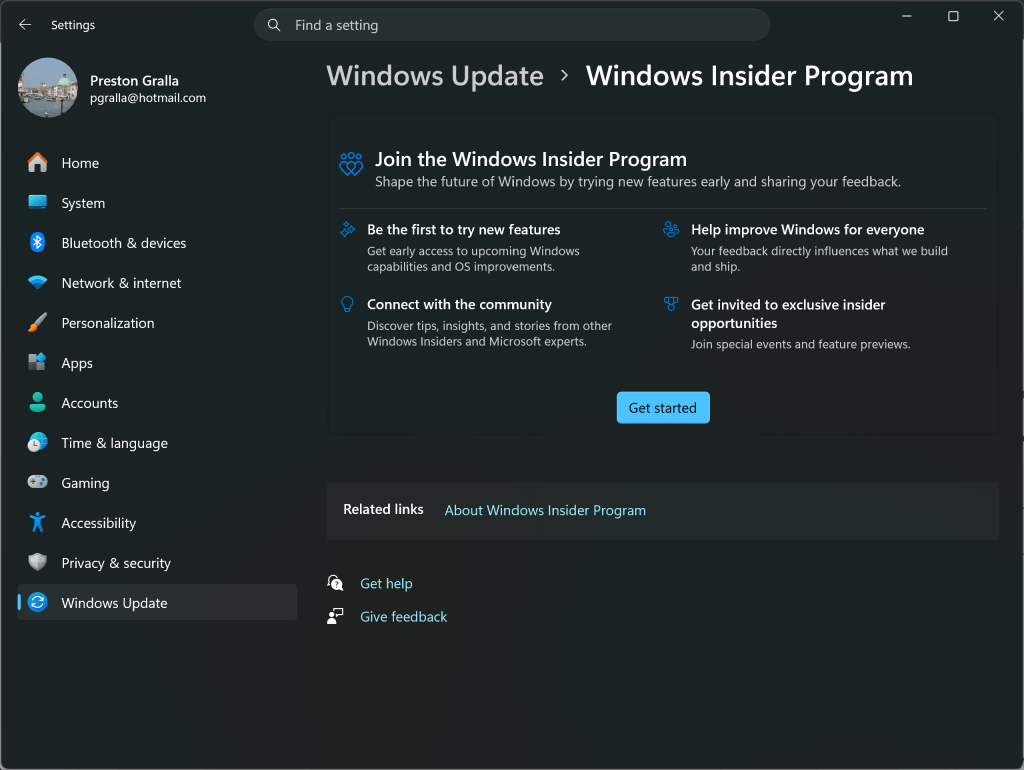
To configure a PC to receive Insider updates, open its Settings app, choose Windows Insider Program > Get started, and follow the instructions. (When you click the button, you may get a message saying you need to link your Microsoft account to the Windows Insider program. Follow the simple instructions to do it.)

Preston Gralla / Foundry

Note: Microsoft requires that you allow your PC to send specific diagnostic data to Microsoft if you want to test Insider builds. To do it, go to Settings > Privacy & security > Diagnostics & feedback. Then in the “Send optional diagnostic data” section, move the slider from Off to On.

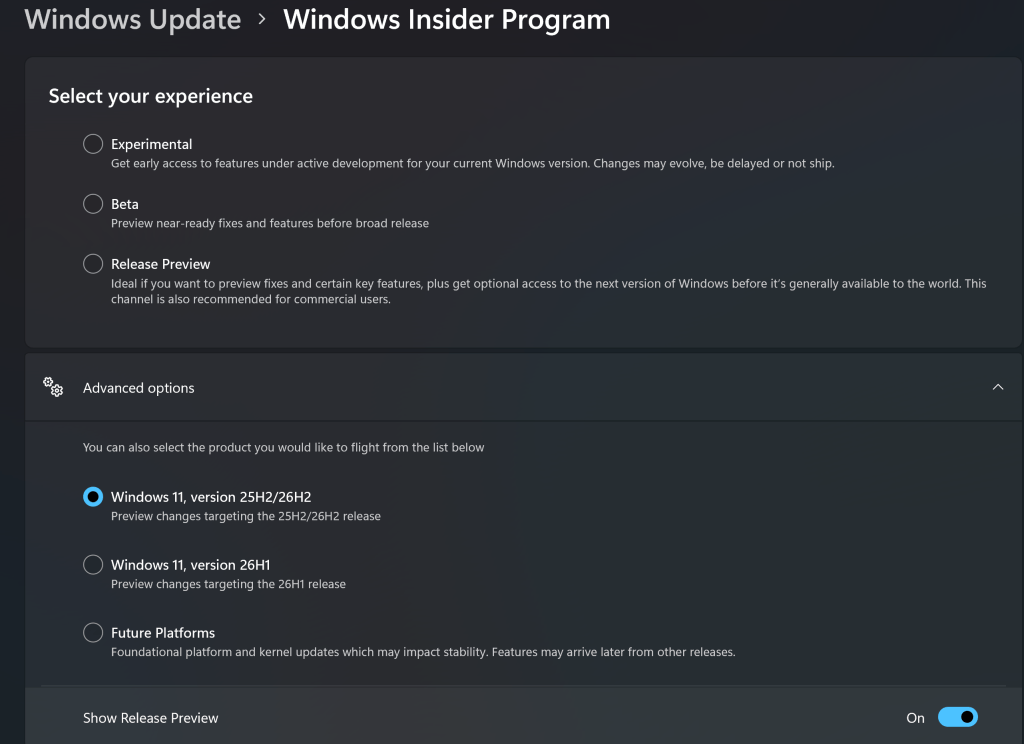
When you’ve done that, go back to Settings > Windows Update > Windows Insider Program and you’ll have several choices to make. First, choose which Insider channel you want to use. There are three of them:

  • Experimental channel: Here’s where Microsoft first releases new features and ideas, which frequently have long lead times and won’t soon end up in Windows. Many features it tries out here never make their way into Windows. Microsoft says this channel is best for “tech enthusiasts.” The company warns: “You should expect some rough edges and variable stability in this channel.”
  • Beta channel: If you don’t like the risks of living in the fast lane but still want to see updates before the general public, choose the Beta channel. This channel gives you a preview of fixes and new features that have been tested are not quite ready for prime time. Microsoft describes the channel this way: “The Beta channel is for early adopters and IT professionals who want to see what we plan to ship in the coming weeks and validate the latest Windows updates and features, but still need reliable updates.”
  • Release Preview channel: This channel gives you (and IT admins) a chance to preview an upcoming Windows update before it’s released to the general public. It’s basically the final version of the update that will go out to the public in a few days. Note that by default, the Release Preview channel doesn’t appear as an option when you’re choosing a channel. To make it appear, click the down arrow next to “Advanced options,” and in the “Show Release Preview” section, move the slider to On.

Preston Gralla / Foundry

Once you’ve chosen a channel, make sure you’re choosing updates for the right version of Windows 11. To do it, click the down arrow next to “Advanced options” and choose a version. These are the options available as I’m writing this, which will change as new versions of Windows roll out:

  • Windows 11, version 25H2/26H2: This option covers Windows 11 25H2, the standard version of Windows 11 that most people have now, and its successor, Windows 11 26H2, which is beginning to roll out now. This is the selection that most people will likely make.
  • Windows 11, version 26H1: This is a separate branch of Windows 11 from the mainstream 25H2/26H2. It’s only for people who have PCs with Qualcomm Snapdragon X2 Series processors purchased in 2026. People with 25H2 or 26H2 can’t switch to version 26H1, because their hardware won’t support it. Those with 26H1 can’t switch to 25H2 or 26H2.
  • Future Platforms: This option is available for Windows 11 25H2/26H2 and 26H1, but only if you’re in the Experimental channel. Aimed solely at developers and extremely sophisticated technical users, it’s the bleeding edge of Windows and can be highly unstable. Microsoft notes, “This build core version is aimed at highly technical users who want to preview platform changes that require a longer lead time before release. Examples include major changes to the Windows kernel and new APIs. The builds released to Future Platforms represent platform changes early in the development cycle and should not be seen as connected to any specific retail release of Windows.”

If you choose one of the latter two options, you’ll be placed in a specialized channel. For example, choosing Experimental and the standard Windows 11 version (currently 25H2/26H2) puts you in the main Experimental channel, but choosing Experimental and Future Platforms puts you in a channel called Experimental (Future Platforms).

What was that about making the channel system less confusing, Microsoft?

Test builds, provide feedback

Whichever channel you choose, you’ll begin receiving updates for that channel in Windows Update. Each build is documented with release notes in the Insider Flight Hub. Microsoft’s Windows Insider Blog typically announces each batch of new builds as they roll out, with direct links to the release notes for each channel’s latest build.

You’ll be invited to provide feedback on the preview builds you test via Microsoft’s Feedback Hub. For details, see Microsoft’s “Deeper look at feedback” info page.

A word about features in the Experimental channel

Perhaps the biggest source of confusion about Insider builds has been that you might not see all the features discussed in the documentation for a given build. That’s because Microsoft rolls some features out to different users gradually — a process it calls controlled feature rollouts (CFRs).

The idea is to test the features on a subset of devices that the system deems best able to handle them, monitor them to see how they perform, tweak them if needed, and eventually deliver them to everyone in the channel. This technique makes sense from Microsoft’s perspective, but it’s confusing and frustrating for Insiders who don’t know when they’ll get a feature that’s been announced.

The good news is that Microsoft no longer uses CFRs in the Beta channel. If you’re in the Beta channel, you’ll have access to all the features mentioned in the release notes for a build.

The Experimental channel, though, still uses CFRs. There is one possible workaround: you may be able to turn these delayed features on manually using a setting called feature flags. Feature flags also provide a way to turn off some experimental features that you don’t want to test. Here’s how it works.

Before installing a new Experimental channel update, go to Settings > Windows Update > Windows Insider Program > Feature flags. You’ll see a list of features that you can turn on or off. (By default, new features are turned on in the Experimental channel, except if they’re under controlled feature rollout.) You can use the available flags to manually turn the features on and off, “even if CFR is being used to gradually roll out that feature,” Microsoft says.

Microsoft

Note that feature flags are not available for all of a build’s features — only those that Microsoft allows. Bug fixes and overall system improvements, for instance, often don’t have feature flags that you can turn off or on.

If you turn a feature on or off, you can later change it back from the same page.

Switching between Insider channels

To a limited extent, you can switch from one Insider channel to another. You can only switch between channels for your specific Windows version — as I write this, either Windows 11 25H2/26H2 or 26H1. You also can’t switch in and out of the Experimental (Future Platforms) channel.

So you can go directly from the Release Preview channel to the Beta or Experimental channel, for instance, or from the Beta (26H1) channel to Experimental (26H1) or Release Preview (26H1). To do it:

  1. Go to Settings > Windows Update > Windows Insider Program.
  2. Select Choose your Insider settings.
  3. Choose the button next to the channel to which you’d like to switch. You’ll get the update for your new channel the next time one is ready.

You can’t move directly out of the Experimental channel to another channel. If you want to switch to another channel if you’re in Experimental, you’ll first have to wipe your PC, then re-install Windows, and then enroll in another channel.

IT administrators: Joining Insider and choosing the right channel

IT administrators need to know what changes are being made to Windows before they happen so they can prepare to support them. To help them, Microsoft offers a separate Windows Insider Program for Business, which has additional features and tools geared toward enterprise needs. Admins can choose to install Insider preview builds on individual PCs or virtual machines for testing, or they can centrally manage Insider builds on multiple devices across an organization using a variety of management tools.

To get started, head to the Windows Insider Program for Business page, click Register, and follow the instructions. Microsoft’s “Start running Windows Insider Preview Builds as a business” documentation page walks you through how to set up individual PCs or virtual machines to test Insider builds, and “Manage Insider Preview builds across your organization” provides in-depth information on registering your Entra ID domain and managing test devices through Group Policy, Intune, and other management tools.

When it comes to choosing Insider channels for test devices, IT has the same options as individuals. For more details about each, see the channel descriptions in the previous section of this article. However, there are a few additional things IT admins need to know about each channel:

  • Experimental channel: This may not be the best channel for IT administrators to use, and not just because it’s the buggiest. Microsoft introduces features and settings in this channel that it eventually discards, which means that IT admins will be wasting their time checking out and preparing for features they’ll never use.
  • Beta channel: This channel may be the best choice for IT admins. Not only does it tend to be fairly stable, but by the time a feature reaches the Beta channel, it is intended for the next Windows release, not some nebulous future date. Choosing this channel, admins can get a heads up about what’s coming in Windows in the near future without wasting their time testing capabilities that may never make it into the operating system. And they will also have the most influence over the direction of Windows, because they’ll be commenting on features or bugs at a time when they can be changed or fixed.
  • Release Preview channel: This is the most conservative choice for IT. It’s the most stable version, and what’s here ends up in the next Windows update. IT professionals can use the Release Preview channel to make sure their applications and infrastructure will be ready for new Windows updates when they ship. Go to Microsoft’s “Validate upcoming releases in the Release Preview Channel” documentation for details.

One last resource admins should know about is the Windows Insider Program Tech Community forum, where IT pros from around the world post feedback, share tips, and discuss problems and workarounds for the Insider builds they’re testing.

This story was originally published in September 2017 and most recently updated in October 2026.

See more Microsoft tips and tutorials

Atlassian’s critical flaw turns eight enterprise products into one big security problem

A newly-disclosed critical flaw in Atlassian’s data center software has a remarkably wide reach, affecting eight core products across the company’s enterprise portfolio.

CVE-2026-21589, rated 9.3 (critical) in severity, is an arbitrary file access vulnerability that could allow an attacker with no login access to read files in web app root directories that they should not otherwise see, and potentially use them for nefarious purposes.

The impacted products require “immediate attention,” Atlassian said in a security advisory. Customers should patch to the latest fixed versions. The company said it has not yet found evidence of exploitation in its cloud offerings, which are already patched.

What is particularly concerning about this vulnerability is that it doesn’t require authentication or user interaction, and it impacts a broad set of Atlassian products that many organizations rely on for development, collaboration, and IT operations.

“On the surface, arbitrary file access might not sound as serious as remote code execution, but the real issue is what an attacker could potentially get access to,” said Erik Avakian, technical counselor at Info-Tech Research Group. “The business risk isn’t simply someone reading a file; it’s what that information could potentially allow them to do next.”

Patch now or isolate exposed instances.

The arbitrary file access vulnerability is present in all versions of Bamboo Data Center, Bitbucket Data Center, Confluence Data Center, Crowd Data Center, Crucible, Fisheye, Jira Service Management Data Center, and Jira Software Data Center.

It allows unauthenticated attackers to access the web application root directory, the base folder on a web server that contains its core structure and required files. In some configurations, there may be sensitive files present that increase risk.

“If sensitive files are present in that location, the information exposed could potentially help enable a much broader attack,” Info-Tech’s Avakian explained.

Using path traversal techniques, attackers could potentially access restricted files and directories outside the web root folder, Atlassian said. One mitigating circumstance: The attacker must already know a file’s exact name and path, and cannot do a directory listing.

For those who can’t patch right away, the company advised removing affected instances from the internet and restricting internet-accessible instances from external network access. This includes instances that require authentication. This is because “a login page does nothing against an unauthenticated flaw,” Dickson noted.

Atlassian outlined three temporary mitigations to block attackers:

Customers using any of the eight listed products could apply a rule on a Web Application Firewall (WAF) or proxy layer.

Another option is blocking requests using a Tomcat RewriteValve rule on each node in their data center cluster for Bamboo, Confluence, Crowd, Jira Software, and Jira Service Management. Each node should then be shut down and restarted. And Bitbucket users could back up their instances, write a rule in urlrewrite.xml, apply it to every node, mirror, and mirror farm node, and then restart.

But Atlassian called the mitigations “limited and not a replacement for patching your instance,” adding that it cannot confirm whether a particular enterprise’s instances have been affected by this vulnerability. “Engage your local security team to check all affected instances for evidence of compromise,” the company advised.

“The vendor cannot tell you whether you were visited. Only your logs can,” Dickson observed.

Files that could unlock sensitive secrets

The list of impacted products is particularly notable, Dickson pointed out: Bamboo builds and ships software. Bitbucket holds source code. Crowd manages identity and single sign-on. Jira and Confluence hold the company’s plans, service desk tickets, and documentation.

“These are the keys to the kingdom,” he said. “Attackers know it.” And to access them, they need no login, no user click, and no special conditions.

The patch path explains why some customer updating lags; Atlassian no longer ships binary patches, so fixing this means moving to a new maintenance release, he pointed out. That is an upgrade project rather than a quick fix, and every “we cannot update yet” is a risk acceptance.

But the most telling detail may be the flaw’s scoring vector, Dickson noted. It is rated as having no impact on the vulnerable server’s own integrity and availability, but assesses high impact on subsequent systems across confidentiality, integrity, and availability. In other words, the Jira or Confluence server survives untouched, but the systems its files unlock may not.

Essentially, “it is a burglar who takes nothing but the key ring by the front door,” Dickson said.

Exploitation requires a target file’s exact name and path, is limited to the web application root, and cannot do directory listings. “That sounds like a high bar,” he said. But “it is lower than it looks.”

Anyone can download these products and learn exactly where files live, he pointed out, and attackers also have the installation guide.

Additionally, configurations containing sensitive files increase an enterprise’s risk. “After years in production, a web root may collect configuration files, backups, and credentials nobody remembers putting there,” Dickson noted. “One readable secret becomes the first step in a much larger attack.”

Bottom line: The flaw “only” reads files, but the files it reads may open everything else, he said. “Patch, and if you cannot patch today, unplug it from the internet today.” Then, he advised, filter, search access logs for the published traversal pattern, and decode each line. If you find hits, assume the file was read. From there, rotate every credential, token, and key that could have lived in the web root.

Going forward, enterprises should focus on reducing their external exposure as much as possible and restrict access using VPNs, trusted networks, segmentation, or other controls, Info-Tech’s Avakian advised. Rotate sensitive credentials or secrets if exposure is suspected.

However, he noted: “These are compensating controls and they can certainly buy you time, but they shouldn’t be viewed as a replacement for getting to a tested and validated fixed version.”

This article originally appeared on CSOonline.

Tech jobs decline as US hit with rising costs and economic instability

A number of studies reported a decline in tech jobs in September as the US continues to get squeezed by geopolitical and economic instability.

Tech consortium CompTIA said 10,350 positions in the technology sector were lost in September, lower than the 14,700 positions cut in August.

But economy-wide, tech jobs — which include IT roles not associated with tech sector — took a bigger hit. Tech jobs across all industries fell by about 6,000, a sharp reversal from the 86,000 added in August.

CompTIA’s report is based on an analysis of the US Bureau of Labor Statistics’ September jobs report, which found that only 29,000 nonfarm jobs were added in the US in September, lower than expectations. The US added 133,000 jobs in August.

Tech worker unemployment ticked up to 3.3%, but that was below the 4.2% national rate, according to CompTIA. The strong August numbers raised hopes that tech jobs were stabilizing, but September’s numbers dashed that hope.

Separately, tech companies announced 10,799 job cuts in September, a 77% rise from the 6,103 announced in August, according to numbers from Challenger, Gray & Christmas.

The tech sector has cut 165,925 jobs this year, up 54% compared to the same period in 2025. US employers cut 43,281 jobs across all sectors in September, compared to 52,881 in August.

Employers are taking a wait-and-see approach in hiring due to rising costs and political uncertainty, despite fewer jobs getting cut compared to August, said Andy Challenger, chief revenue officer at Challenger, Gray & Christmas.

“Employers are facing high energy costs, an uncertain war in Iran, a rate hike that could make hiring more expensive, plus the likelihood of surging healthcare costs,” Challenger said.

Amid the uncertain environment, employers are hiring cautiously, as jobs are tied directly to strategic business priorities, said Ger Doyle, ManpowerGroup’s regional president in North America.

“The market is no longer defined simply by how many people employers hire, but by how precisely they hire,” Doyle said.

Earlier this year, AI was often cited as a main reason for job losses. But that wasn’t the case in September. AI was cited for only 3,961 of the 43,281 job cuts, or about 9% of the month’s total, Challenger, Gray & Christmas said.

Overall, AI was cited for 120,136 job cuts so far in 2026, which is 21% of all cuts.

Even as tech jobs decreased overall, CompTIA noted, Lightcast job posting data showed that US employers posted 272,040 new IT job openings in September, an increase of 16% from September 2025. That mismatch indicates a search for specific skills.

ManpowerGroup said AI skills are the most in demand. “The roles that matter most also take the longest to fill,” Doyle said.

Job postings typically stay open for 61 days, while filling engineer roles typically takes 77 days, Doyle said.

Active job postings requiring AI-related skills totaled 349,821 in September, an increase of 32,327 postings from August, CompTIA said.

Apple’s AI privacy trick could be the compromise the EU needs

When it comes to consumer protections, Europe is following its own path. That may be visible in its quixotic-seeming decisions that allegedly prevent Apple from introducing Siri AI in the European Union. It’s time to begin to grapple with what those decisions mean.

I think the EU has got it wrong in how it has chosen to enforce its Digital Markets Act against Apple. The refusal to figure out a mutually satisfactory way to apply the intent of the DMA on Apple’s business practices while protecting its stated values around privacy is a failure of imagination and diplomacy. Apple and Japan previously reached an agreement that achieved positive impacts for third-party developers while protecting the product design integrity and customer privacy the company and its customers care about.

Prevention is not cure

That lack of deal-finding in the EU is preventing the introduction of Apple Intelligence and Siri AI to customers in the trading bloc. 

When it announced these AI features, Apple told us it had proposed some kind of technological fix that would provide third-party product makers, including AI product makers, with user information to drive their products while also protecting user privacy. Europe declined to work with Apple on those terms, which is why the company has not introduced Siri AI there. 

European regulators would, of course, disagree with that account, but this is what has been suggested.

What Apple’s privacy fix could look like

More recently we got the chance to see what that kind of AI-enabling tech privacy protection might look like when Apple introduced Audio Intelligence, particularly Siri Recap. This relies on a semi-magical selection of complementary technologies that enable the feature while protecting personal privacy.

It does this by analyzing audio in real time, summarizing it, removing personally identifiable data from it, and sending a vastly reduced and anonymized data set to the cloud for final processing. The idea here is that your data for the most part is only ever handled by your device, is not saved, and only just enough information is passed down the line. 

I believe this hints at the technical approach Apple had hoped to build to protect Siri AI in the EU. Distilling and anonymizing personal data while still making it possible to run effective AI tools is the name of that game. Extending that approach to third parties and other domains — including video — will take time, which is what Apple asked Europe to provide.

The EU, we’re told, didn’t budge. That’s a shame, in part because European customers won’t get to use Apple’s more private take on AI, but also because they will continue to find their data exposed to AI firms that are not focusing on privacy. 

Europe wants its own AI

I suspect Europe doesn’t mind that too much, because it is hoping to foster the evolution of its own AI solutions, rather than becoming even more reliant on US technology firms. 

The EU is already investing heavily in tech sovereignty. Its TESTA-EIRIS system, for example, may have a silly name but is an attempt to build a regional, localized, sovereign communications infrastructure for European governments and institutions. This infrastructure will no doubt be used within the implementation of localized AI systems and services. 

You cannot underestimate the drive to sovereign tech solutions; it’s an international movement and all about building national resilience and crisis independence. A 2025 McKinsey report showed that 71% of executives, investors, and government officials worldwide now see sovereign AI as an existential concern. That means many nations will be looking to deploy their own region-specific solutions. It also means Big Tech firms like Apple — or US frontier AI firms, given their market share — must identify new business practices that respect international differences.

Surely there’s a middle ground?

This inward-focused drive toward sovereign tech reflects a wider malaise in international relations. Ironically, it is one that might benefit from the kind of “private by design” approach Apple is pioneering with Audio Intelligence. 

Will it be possible for Apple’s systems to use a tech like this to empower third-party systems while protecting personal privacy? If Apple achieves this, it should help sovereign tech deployment, as it builds in privacy at the end-user layer, which can then be picked up by whatever national AI solutions eventually emerge. 

It probably isn’t enough for the EU sovereign vision, of course, but could be a positive compromise pending the creation of a viable European hardware solutions manufacturer, which seems a very, very, very long way away. But positive compromise doesn’t appear to have been the hallmark of Europe’s DMA dealings with Apple so far, which may well be why the latest word from Mark Gurman is that Europeans must expect to wait at least five more months, and potentially much longer, before they even hear a hint that the two sides have reached a rapprochement. 

In the meantime, European users on mobile devices remain more likely to use Claude or ChatGPT than less popular EU-made AI services, such as Mistral. All without the kind of privacy protections in place Apple aspires to deliver. 

Surely there’s a middle ground? 

Surely Apple’s promised technology to enable AI while protecting privacy is something the EU would benefit from? Maybe the two sides should try to figure something out. 

Now please subscribe to my daily, human-curated Apple-related news headline feed at The Core, or follow me on BlueSky, LinkedIn, or Mastodon.

Windows 11 gains ground as price hike looms for Windows 10 security updates

According to new figures from Statcounter, Windows 11 continues to gain users at the expense of Windows 10. The newer operating system is now estimated to account for 71.5% of all Windows computers globally, while Windows 10 has dropped to 27.8%, reports The Register.

Microsoft itself does not publish any user figures. Statcounter’s estimates are based on tracking code installed on websites globally. These figures are not broken out by consumer and business use.

A major shift to Windows 11 occurred when mainstream support for Windows 10 ended on October 14, 2025. Just a month before that transition, about half of PCs still ran Windows 10, according to executives from Dell and HP.

Since then, businesses and consumers have been able to continue receiving security updates through Microsoft’s Windows 10 Extended Security Updates (ESU) program. Consumers can enroll in the program for free. After saying these updates would be available for only a year, Microsoft extended the consumer ESU program for another year, until October 12, 2027.

Business customers must pay to enroll user devices in the Windows 10 ESU program. The first year of updates cost $61 per device. As the second year begins, the price doubles to $122 per computer. The price will double once more, to $244 per device, for the third and final year. These price increases are expected to further accelerate the transition to Windows 11.

Related:

OpenAI to begin watermarking AI-generated text

OpenAI has announced that within a few weeks it will introduce a digital watermark for text generated using the company’s AI tools, ChatGPT and Codex.

This move comes in response to the EU’s new AI regulations, introduced two months ago, which stipulate that AI-generated content must be identifiable. Competitor Anthropic introduced a similar feature for its AI tools in August.

OpenAI’s new watermark will be available worldwide, but it is enabled by default only within the EU. In other words, users in other parts of the world can ignore it.

According to TechCrunch, it appears possible to edit out the watermark, so it remains to be seen whether it serves any significant purpose.

This article originally appeared on Computer Sweden.

How to build a ‘safe-to-fail’ culture for IT teams — and why you should

Companies continue to invest in AI, automation, developer tools, and other new technologies. But they may not get the results they expect if IT workers don’t have the time, resources, or freedom to learn how to use them.

IT workers may be afraid to try new tools if they think a failed experiment could hurt their performance reviews. They may also be unsure which tools and data they can use or how to test new technology without creating security problems or disrupting the business.

A safe-to-fail culture can help remove those barriers. It gives IT workers room to try new ideas while limiting the risks to the company. Although employees still have to follow rules, they’re given the time, approved tools, and secure environments they need to test new ideas. Even if the company decides not to adopt a new technology, it can still learn from the experience.

“To me, a safe-to-fail culture is not a safe-to-be-careless culture,” said Michael Morris, global head of platform and talent at Randstad Digital. “It means designing experiments so that a failure is contained, reversible, and useful.”

1. Make experimentation part of the job

“Fear of failure is a major barrier, especially when people believe every experiment will be measured against short-term productivity,” said Daniel Burrus, founder and CEO at Burrus Research. “Leaders need to separate experimentation from day-to-day performance reviews and give teams permission to test ideas without career risk.”

One way IT leaders can encourage experimentation is to set aside time for employees to do it during the workday. If it becomes one more task added to an already busy schedule, workers may put it off or have to do it on their own time.

Typeform, an AI engagement platform vendor, gives employees time during the workday to try AI and other new technologies, said Aleks Bass, the company’s chief product and technology officer. Each employee also receives $1,000 for training, certifications, specialized tools, or other resources that can help them in their job.

That flexibility is important, because employees in different roles may need different tools and training, she said. Typeform provides some tools to everyone, while the individual budget lets workers try other tools the company hasn’t yet approved for wider use.

“So if we’re telling people that we want them to experiment with AI … but we’re saying, ‘Oh, do that in your own time, with your own money, or your own personal accounts,’ then you haven’t really created that safe environment to experiment,” Bass said.

Morris from Randstad Digital said each experiment should focus on a specific business problem and have a clear goal. For example, rather than simply telling employees to learn AI, managers could ask them to find out whether it can speed up writing test cases, improve technical documents, or automate routine support tasks.

“The key word is ‘disciplined,’” he said. “Every pilot should have a business owner, a clear hypothesis, a measurable outcome, a time limit, and an explicit decision at the end: scale it, revise it, or stop it.”

Leaders also need to recognize what employees learn, not just what they successfully deploy, Morris said.

“Small, disciplined pilots expose integration, security, quality, and adoption problems while they are still inexpensive to fix,” he said. “They also reveal where AI performs well and where human judgment is still required. That allows leaders to redesign the process around the technology rather than simply bolt a new tool onto an old workflow.”

One barrier to experimentation is the stigma attached to stopping a project, said Jeremy Koppen, chief information security officer at Equifax.

“To change this, my leadership team and I actively commend our people for shutting down projects that no longer make sense,” he said. “When we go out of our way to appreciate a team for bringing that to our attention, it shifts the dynamic. People know we value their transparency, and they quickly realize they just freed up their talent to do work that actually matters.”

2. Replace uncertainty with clear boundaries

IT workers may also avoid trying new tools because they aren’t sure what the company allows or how much risk it is willing to accept, said Dom Profico, CTO at digital consultancy Bridgenext.

Creating a safe-to-fail culture starts with training employees and ensuring they know what they can and can’t do, he said. As new AI tools emerge, employees need to understand the company’s rules and whether a new tool can do something its existing technology can’t.

Those conversations can keep companies from chasing every new “shiny penny” while still encouraging employees to share ideas that could be useful, Profico said.

Organizations should clearly explain the security and operational rules employees need to follow and put safeguards in place to keep mistakes from affecting customers or users, he said. Knowing those protections are in place may make employees more comfortable trying new things.

Companies can’t eliminate every risk, Profico said. If they want employees to try new ideas, they have to give them some freedom, accept that things may go wrong, and apply company policies consistently.

“If you want to run an innovative organization, you’ve got to really give a little bit more freedom and accept some of that risk,” he said.

Ravi Soin, CIO and CISO at Smartsheet, described the approach as creating a culture of “yes, but safely.”

IT leaders have to let workers know which systems they can access, how they can use company data, and when they need to involve IT or security, according to Soin.

“Within those boundaries, people should be able to try new technologies without having to go back to IT or security for permission every time,” he said.

For example, Smartsheet lets employees in different departments pursue citizen-development projects in preapproved sandboxes.

“If someone in sales wants to use Claude Code for a customer demo, they can do so in a pre-approved sandbox with DLP [data loss prevention] and access controls already configured,” Soin said. “So instead of waiting on a security review, they can start the same day.”

3. Limit the potential damage

The safeguards should depend on how much damage a mistake could cause, said Arthur Hu, Lenovo’s global CIO and CTO of its Solutions & Services Group. An employee testing an AI coding tool, for example, doesn’t need as much oversight as an AI agent working in a critical customer system.

“This starts with analyzing the potential blast radius of a project — meaning the scope of the potential impact to systems and users — and designing the controls accordingly, where a human needs to stay in the loop, what the audit trail needs to look like, and how quickly you can regain control,” he said.

Randstad’s Morris recommended testing new technologies in stages. Employees could start with approved tools and synthetic or nonsensitive data in a sandbox, then move to a test environment and, finally, a small pilot. Access should be limited to what employees need, and the company should monitor and review the pilot and have a plan to stop it or reverse any changes if something goes wrong.

“Security should be a design constraint from the beginning, not a veto that appears at the end,” Morris said. “Only after the team meets agreed performance and security thresholds should the capability reach production.”

Typeform employees can test tools that haven’t been approved for companywide use in sandboxes with mock company and customer data, Bass said. This lets them see whether a tool could help them without putting customers or the company’s platform at risk.

4. Turn experiments into business results

Testing technology early can uncover problems before a company makes a large investment in it, Lenovo’s Hu said. It can also show whether employees trust the technology and whether it fits into the way they work.

“We built a governed AI sandbox on top of our enterprise AI OS. Teams can pull in a new model, tool, or agent framework, stand up a working prototype, and find out whether it earns its place, all without going near production,” he said.

“Things that prove out move onto the enterprise platform and inherit our security, reliability, and compliance controls by default,” he added.

Typeform took a different approach when it put a small team in charge of developing Research Flow, a product that uses an AI interviewer to collect detailed customer feedback. The company gave the team access to AI tools, set clear goals, and allowed employees to try new ways of working. The team could also earn bonuses for reaching each of three goals, Bass said.

The team, which started work in December, was asked to build a working prototype by the end of February. Without AI tools, the project would normally have taken nine months to a year, Bass said. The company believed the bonuses were worth it because finishing the product faster meant it could bring it to market quicker and begin generating revenue sooner.

“At the beginning, I have to be honest, I don’t think the team believed that they could do it,” Bass said. But by early January, the team thought the goals were within reach. They ultimately achieved all three and received the bonuses, she said.

Related:

Tech execs are getting wise about ROI from AI

Most organizations have been largely unable to measure financial returns from AI, but analysts say new ways to calculate return on investment are emerging.

“There’s a delay between the development of technology, even the investment in the technology, and the value that an organization can capture from it,” said Michael Chui, a senior fellow at McKinsey.

But more executives are asking questions. “The CFOs are asking CIOs, investors are asking CEOs: ‘Where’s the ROI from this stuff, already?’” he said.

In McKinsey’s “State of AI” survey released in August, about 80% of respondents said AI improved their productivity. But only 37% said AI’s impact showed up in profits, about the same as last year. An even smaller number — only 6% — said AI delivered significant value and accounted for at least 5% of their operating profit.

In other words, there’s a drop-off between the value that individual workers are getting from AI and the value that organizations are getting from AI, Chui said.

The biggest gains will come from redesigning workflows and processes in which humans and AI agents work together, according to McKinsey’s Technology Trends Outlook. Layering agents onto existing processes isn’t enough.

“Usually an end-to-end workflow involves multiple individuals, and completely redesigning that with the use of AI… is characteristic of high-performing companies,” Chui said.

Controlling costs

Managing token costs and applying the right model for a task is part of realizing better returns, Chui said. “In many cases, there just isn’t transparency… Which workloads are actually driving your costs?” he said.

Three out of five IT leaders are worried about AI agents running up unexpected costs, and this is already happening, said Gareth Herschel, a vice president analyst at Gartner, during a keynote at Gartner’s Data & Analytics Summit in Mumbai.

“Some organizations have already discovered that the cost of tokens for coding assistance is much higher than the cost of human software developers,” Herschel said.

As more agents work together, “your financial risk only grows. It’s like giving your teenager your credit card… I’m sure you will learn a lot, but mostly from the bill,” said Robert Thanaraj, a senior director analyst at Gartner and a co-speaker at the Mumbai keynote.

Companies should track costs in prototyping, such as finding the cost of an individual agent per completed task, Thanaraj said. “It’ll help you to evaluate different large language models or help you to go with a more affordable option, such as smaller language models or open weights model.”

A wider lens for ROI

Analysts highlight numerous challenges in calculating AI ROI, such as unexpected costs, poor data quality, failure to scale, and slow adoption among users.

But executives are skilling up in tracking what they spend on AI and the returns, said McKinsey’s Chui. “Between the CFO and the CIO, we’re starting to see these disciplines emerge.”

In 2025, the odds of an AI initiative achieving ROI were one in five, the Gartner analysts said in their keynote.

“ROI matters, but to achieve it, we must think of it not just as a financial metric, because value isn’t always just about money,” Thanaraj said.

Companies should tie AI projects to both financial and non-financial outcomes, part of what Gartner calls a “return on intelligence.”

“We need to shift the emphasis from cost to value,” Herschel said. “The outcomes can be financial, such as revenue, but they can also be non-financial, such as citizen experience.”

The right foundation: context, infrastructure, governance

The Gartner analysts said achieving ROI on AI requires a strong technical and contextual foundation.

“Governance adds trust. Context adds meaning. Without strong foundations, AI may well stand for amplified ignorance,” Thanaraj said.

For example, data quality can be a roadblock. “Without clear context, LLMs are just guessing,” Thanaraj said, and that amplifies misunderstanding. Poor data and poor AI design mean more hallucinations and bad output.

“You can’t buy this context layer off the shelf. It has to be built to fit your needs,” Herschel said.

A strong technical foundation, such as a robust networking backbone for data movement, is critical, said Jack Gold, principal analyst at J. Gold Associates.

“Agent-to-agent interactions will become commonplace and mission-critical, even as the number and distribution of agents expands dramatically to include interactions across remote agent locations and devices,” Gold wrote in a research note.

A majority of organizations are establishing harnesses — the software layer that controls and coordinates models, tools, and workflows — to govern AI use in business. According to a global KPMG survey released last month, 55% of organizations have a formal AI harness layer. That rises to 86% among organizations reporting established ROI.

Organizations that “combine clear accountability, coordinated governance, resilience, and reliable value measurement will likely be best placed to turn broad adoption into sustained performance,” KPMG said.

Apple locks down Full Disk Access, and AI agents are the reason

Apple has been forced to make macOS even more locked down, to the dismay of some developers. It has announced plans to introduce more user-facing control over the process of giving apps Full Disk Access.

Some developers are upset, believing this will put more barriers in place to those creating apps outside the App Store. Endpoint security vendors voiced some concern but understand the cause: “poorly written/insecure/greedy AI agents/assistants insisting on Full Disk Access, and then once granted/obtained, abusing that, to access ,” as Objective-See co-founder Patrick Wardle wrote on X.

Explaining its plans, Apple says it will still make it possible for customers to choose to enable Full Disk Access; it’s just going to make the decision much more intentional, with additional steps to ensure that users know what they are signing up for.

Why is Apple doing this?

It may or may not be in reaction to Meta’s Muse AI agent, which was accused of reading a journalist’s private messages without permission — a claim Meta denies. 

But even if it is not a reaction to that, the move attempts to put additional obstacles in place to prevent users from casually giving AI agents the power to ransack their private data when they give them Full Disk Access without fully understanding the consequences of doing so.

What Apple said

Here’s what Apple said in a note on its developer website:

“We give developers powerful APIs to build incredible capabilities into their apps for Apple products, backed by a set of controls designed to protect users’ private data. Full Disk Access largely sidesteps these controls in order to allow backup apps to function properly on the Mac. Some developers are using Full Disk Access in ways that could put users at risk, exposing everything on their systems—including files, mail, messages, and even browsing history—without users’ full knowledge and understanding. For communication apps, this can also compromise the privacy of the people users are communicating with.

“Going forward, we will introduce additional controls to ensure that users who genuinely wish to grant an app this extraordinary level of access can only do so with very explicit user action. Addressing this is critical. As AI agents become increasingly capable and autonomous, the risks associated with this level of access will grow substantially. We are committed to ensuring users clearly understand these risks before granting such access, so they can make informed decisions about their own data and privacy.”

The note makes it quite clear that Apple is doing this in reaction to the real and present danger that unconstrained AI places on security systems everywhere. 

Accident, or design?

After all, for every denied instance in which Meta’s Muse may, or may not, have surveyed private messages, there are now many incidents in which some “rogue” AI has “escaped” to do some kind of harm.

Except it’s quite easy to think these incidents are not really escapes, isn’t it? 

If you do, then this is AI doing precisely what it’s designed to do. 

Rather than railing at Apple, developers and critics should focus on why this change has been put in place. It should be recognized as another of the huge “benefits” most humans are already experiencing at this stage of AI disruption.

It’s a benefit to accompany hyper-inflated memory prices on consumer electronics costs. It’s a benefit that flows with the energy and water price increases we are seeing as AI data centers consume more of both, even as inventors of this tech warn that what they have invested hundreds of billions of dollars in poses an “existential threat” to humanity.

Sure, AI can and does release positive consequences, and I celebrate that, but that doesn’t give it a pass on its damage and risk, particularly existential risk.

Obsolete software

“Redefining” that risk is perhaps why Anthropic co-founder Christopher Olah visited Pope Leo XIV to convince people around the head of the Catholic church that AI can be considered conscious. 

One way to see that argument is that AI is not really an existential threat to humanity if you redefine it as some kind of evolution toward a new super race. It becomes a painful but necessary step toward the next phase of humanity, even if that does sound rather messianic (some say fascistic, as Gil Duran explains).

Thankfully, the Pope didn’t buy it. “Algorithms lack the spark of humanity. For this reason, the Church wishes to renew an alliance with artists and cultural institutions to safeguard our humanity,” he wrote in a recent declaration concerning the impact of AI on creative arts.

If I’m honest, and I do try to be, developers and critics attacking Apple for its decision to lock down this aspect of the Mac experience are focused on the wrong target. You need to reconsider who to blame.

For the many

It’s time, urgently time, for people in tech to get back on the road to what makes it great, which is now and always has been what results from the marriage of technology and liberal arts. AI is not conscious. AI has no moral soul. 

With that in mind, it’s appropriate to ensure that humans have informed agency before they provide AI with access to their data. Religions claim that divinity gave us free will. Do you think AI and the billionaires who own it want us to keep that gift? 

Now please subscribe to my daily, human-curated Apple-related news headline feed at The Core, or follow me on BlueSky, LinkedIn, or Mastodon.