Author: Computerworld

Jamf in the age of agentic IT: An interview with CEO Beth Tschida

Jamf was a pioneer in Apple device management when it began in 2002. The company was ahead of its time: its founders could see that Apple had a future in the enterprise, but not many others saw it. Jamf now runs 35.2 million devices from 78,000 organizations. And it’s still looking to the future.

I spoke with Jamf CEO Beth Tschida, who joined me for a chat directly after her keynote speech at JNUC, Jamf’s big event for Mac admins, on September 23. 

The AI-driven ecosystem

Tschida wasn’t there to rehash Jamf’s past for relevance in the present, but to share the company’s deep commitment to being where its customers are going to go. That means artificial intelligence, which in Jamf’s case involves weaving AI across its ecosystem of products, from setup to tech support, security, and beyond.

It’s not a new vision — you could argue that some early signs of its intention were visible when the company acquired ZecOps in 2022 — but time moves forward and the company has coalesced around a firm philosophy of how to use AI, where to use AI, and how AI should be deployed in a human-centric way for the benefit of its customers.

“AI runs better on Apple, and Apple runs better on Jamf,” Tschida told me. The next piece to that statement is to consider how AI can be effectively managed by IT, she added. “You have to be able to see it. You have to be able to govern it, and then you want to be able to harness it.”

This points directly to shadow AI, one of the big-picture problems IT has with AI at the moment as employees feed confidential data to the cloud-based AI models. Jamf’s response has been to create new frameworks IT can use to monitor use of AI across their managed fleets. These tools let IT identify use, manage use, or even stop use altogether.

“How can we look at that, see it, govern it, and harness it in the ways that AI is providing that opportunity, right at the endpoint?” Tschida said. 

Precision modeling

The other component is pricing. Even when data is legitimately shared to AI, the cost of inferencing is high and getting higher. Jamf now offers tools to let IT monitor this use and the cost of it, enabling management to suggest lower cost or on-prem AI solutions for tasks where appropriate. After all, why would you pay for Fable when you can get your Apple device to help write that letter?

Tschida explained that part of Jamf’s response to AI costs is the inclusion of granular model controls, which let admins assign different teams access to different models, the idea being to prevent what she called “overmodeling” — the use of expensive high-reasoning models for tasks that lightweight models can handle.

“You have to understand what the need is. You must lay it out there in a governed way. Human in the loop and then you harness it,” she said.

The Mac advantage

But the Jamf vision doesn’t end with AI management; it extends to making active use of the tech. In this case the company has introduced AI-powered tech support for routine problems to free up staff time. There are two strands to this approach: More obviously, easy to access tech support should reduce time spent on routine problem solving, but another compelling aspect of this evolution is the move toward proactive device health.

Traditionally, IT has been reactive: a user experiences slowness, they eventually file a ticket, and IT fixes it. But many users simply “endure” suboptimal performance without ever reporting it, Tschida explained. “A lot of times, users don’t even raise a ticket. They just endure.”

That was then, but the future looks different. “We believe that we now have the right telemetry to look at device health,” Tschida said. “You’re really moving ahead of problems. Users don’t even raise a ticket… you can help them optimize it without them knowing it.”

With over 35 million devices now managed using Jamf, the origin story of the company seems further ahead of its time now than ever. Apple’s enterprise product marketing lead, Jeremy Butcher, appeared at one point during Tschida’s keynote to talk about where Apple now is in the enterprise. He pointed to data that Macs generate 55% fewer help tickets than Windows systems. He confirmed that the MacBook Neo has accelerated enterprise growth for the platform, and pointed out that more Apple devices are purchased in enterprise than any other brand.

With so much energy behind Apple’s platforms, what has Tschida been seeing?

“We know that Anthropic and other companies, they tend to deploy for Mac first. The developers are mostly running Macs. That’s what they prefer to be on, and they’re at the forefront of agentic AI.”

The thing about the growing enterprise Apple ecosystem is that no single company can build the perfect set of solutions for every enterprise. Part of Jamf’s response to this has been the creation of platform APIs, which customers and partners can use to extend the platform to meet their needs. “I love a good API because it allows you to run a road map way faster,” Tschida said.

Former Jamf CEO Dean Hager used to say, “When Apple innovates, Jamf celebrates.” 

His successor echoes his point, with a focus on what Jamf can do for its customers. “Our job is to make sure that Apple runs better with Jamf,” she said. “We’re scaling it, we’re securing it, and we’re making sure that you can… first see it, and govern it, and then harness what you can get from it in a way that’s helpful for our customers.”

Local intelligence, global scale

A second aspect to governance is around sovereign, private, and/or on-premises AI. I asked Tschida what her customers are saying. “There will be some that look at the benefit if you can run at least some of your workflows locally,” she said. “There’s a tokenomics piece of it. There’s a privacy piece of it. There’s a sovereignty piece of it.”

Whatever the motivation, for Jamf the question remains, “How can you determine what we can do and help you do, locally on device, and build that so you can run it at scale? That’s where we’re focused.”

I walked away from the interview feeling a vision for Apple in the enterprise in which IT is augmented by smart tech infrastructure: Macs that request support before users know they need it, systems that self-identify bottlenecks or wasted resources such as over-generous token consumption and let IT take steps. A more intelligent enterprise infrastructure, equipped with real-time awareness, self-reliant with little to no cloud exposure.

For Apple, Jamf, and certainly for the Mac, that seems like several giant steps since the foundation of Jamf in 2002. AI in IT is an accelerant, and Jamf is working with it. “We are doing our best to run at the speed of AI,” said Tschida. 

Now please subscribe to my daily, human-curated Apple-related news headline feed at The Core, or follow me on BlueSky, LinkedIn, or Mastodon.
Five years later, you can finally buy Google Beam

It’s been five years since Google first offered a glimpse of Project Starline, a three-dimensional videoconferencing platform billed at the time as as a “magic window” that enables realistic and immersive calls.

On Wednesday, Google announced that Google Beam — as the software element of the product is now called — is generally available for purchase, built into HP’s Dimension video meeting hardware. The Dimension hardware reportedly costs around $25,000 per unit; Google did not provide details for costs related to hardware or additional software licenses. The combined products will be sold in six countries at first: Canada, France, Germany, Japan, UK, and US.

Google has also partnered with co-working space provider Industrious to make Beam available to try at its locations across the US, including Atlanta, Chicago, New York City, and Palo Alto.

Beam “offers the potential for immersive, 3D engagement, without the challenge of wearables,” said Irwin Lazar, principal analyst at Metrigy.

“This is one of those ‘you have to try it’ experiences to understand the value proposition,” said Avi Greengart, president and founder of Techsponential. “It really does feel like you’re talking to someone a half a world away, with all your micro-expressions and nonverbal cues intact.

“This doesn’t just save you travel time and budget, it enables closer collaboration throughout a project or working relationship that provides different value than occasional live visits, which you may still need.”

Google began developing the Beam technology several years before it was unveiled amidst the COVID-19 pandemic and shift to remote working as offices were shuttered. It combines AI-generated 3D images of participants with spatial audio to create the sense of being in the same room.

The hardware has evolved considerably since then, with Google and HP shrinking the original large video booth into a smaller system that more closely resembles a conventional videoconferencing setup.

The 65-inch Dimension display renders meeting participants in their full size, and includes the cameras, 12-microphone array, and LED lighting required for the Beam software. Google Meet and Zoom video meeting apps are supported.

While Beam currently enables one-to-one meetings, Google recently highlighted its efforts to enable group calls, too. This is currently at an experimental stage.

Google claimed that an internal study showed 50% of Google staffers who used Beam felt more connected, resulting in a 21% drop in the need for follow-up meetings.

Select customers were granted early access last year, ahead of today’s full launch. One of them, management consulting firm Bain, uses Beam to interview job candidates remotely, reporting that it helps interviewers pick up on nuances of body language and eye contact without needing to meet in person. This also saved on travel costs, the company said in a promotional video.

It remains to be seen whether the technology will gain a wider audience. The price tag will “present somewhat of a barrier to adoption,” said Lazar. He expects early adopters will target specific use cases such as “executive meetings, hiring interviews, product demos, and high-stakes engagement.”

Greentgart described Beam as a “network-effect system,” as the technology is required on both ends of a Beam call. “That makes the expansion of Google Beam on HP Dimension to more locations crucial,” he said. “I expect that some companies will try it at a conference center before investing in endpoints inside their own companies.”

Microsoft adds pay-as-you-go pricing for extra OneDrive storage

Microsoft has added a “pay-as-you-go” option for OneDrive storage, providing an additional way for Microsoft 365 commercial customers to buy extra cloud storage capacity for users.

Previously, increasing storage capacity for OneDrive users meant purchasing capacity “packs” for individual accounts, available in 100GB, 500GB, and 1TB through 6TB sizes.

With the new consumption-based billing, Microsoft 365 admins can select which users’ accounts are eligible for additional capacity, with any usage above the licensed storage quota then automatically billed.  

The new billing option is currently in public preview for Microsoft 365 business customers, ahead of general availability starting November.

Pay-as-you-go billing is turned off by default: Admins can set it up via the Microsoft 365 admin center, with options to set budget limits and alerts. The existing overall 25TB per-user limit for OneDrive remains in place.

Additional OneDrive storage costs $0.20/GB/month. Microsoft does not publish the pricing for the OneDrive capacity “packs.”

The OneDrive update follows a similar move with SharePoint, with a public preview of pay-as-you-go pricing for extra storage starting June, ahead of wider availability for GCC, GCC High, and DoD customers in November.

Microsoft will host a OneDrive + Copilot digital event on Oct 20 with updates on AI features coming to the cloud storage application.

UiPath’s new tool could unlock a much bigger wave of automated business processes

A decade ago, UiPath built its business on watching people work, recording keystrokes and clicks to automate tasks employees already did by hand. This week, amid an industry consumed by autonomous agents, the company’s newest product suggests that same instinct still has a place.

UiPath used its Fusion conference in Las Vegas to launch Cartographer, a tool for building what the company calls a Map of Work: a living, governed record of the informal, undocumented knowledge that keeps enterprise processes running, the exceptions, workarounds, and judgment calls that never make it into an official workflow document.

Existing automation tools capture the click-by-click steps of a task. Cartographer works at the process level instead, documenting how work actually gets done versus how it’s designed to run. From the main stage, CEO Daniel Dines described this information as a missing manual enterprises need before trusting agents with real work. “A process map tells you how work is designed to run,” he said. “UiPath Cartographer is the key to uncovering the operational knowledge of how that work actually runs.”

Even with Cartographer, the first drafts of a Map of Work “will be incomplete for sure,” Dines admitted on stage.

That missing knowledge has kept enterprises’ most complex, exception-heavy processes out of automation’s reach, said Mark Geene, UiPath’s group senior vice president of agentic solutions. He characterized Cartographer as the next stage in a five-year push to extend the automation platform into messier enterprise areas. Capturing that knowledge, if it works, opens the door to automating processes once too undocumented and judgment-dependent to hand over to machines at all.

How well it will work is a different question. Analysts and customers on the ground described a tool that’s promising on paper, but whose real test comes later, in whether enterprises do the disciplined work of capturing and maintaining what Cartographer helps them uncover.

What’s different

That capture process has a real limit, said Amy Loomis, a research director at IDC, one that depends on whether people actually share what they know. “That step will only be as strong as the tribal knowledge of teams and the ability to capture it accurately,” she said.

Pairing deterministic guardrails with the inherently unpredictable behavior of large language models (LLMs) differentiates UiPath’s approach, Loomis said. She pointed to the spectrum of options UiPath will offer: prebuilt maps ready out of the box at one end, a curated Process Atlas in the middle, and Cartographer itself handling processes requiring full customization. A human “cartographer” role, an existing business analyst repositioned to own a Map of Work, is the other new piece, she said.

Getting a full picture of a process has been a persistent problem, one that often doesn’t surface until well after a bot is live, said Andrea Simpson, IT manager of automation at USI Insurance Services. “So much knowledge is in a person’s head, and it can be hard to get it out of our subject matter experts,” she said.

Knowledge management — a problem enterprises have been dealing with since the cold war — is the pain point UiPath aims to ease. But there are limits. Some knowledge will likely stay out of reach, Simpson said.

USI is an early adopter of Maestro, UiPath’s orchestration tool, to automate its marketing processes, tying together producer meetings, carrier submissions, and client communication. But the biggest hole is what happens off the record: a phone call, a conversation at someone’s desk. “We wouldn’t want that automated,” she said. “We want to keep that human.” That knowledge never touches a company system until a producer chooses to report it.

On-the-job training for agents

Perfection won’t be required to get started. “The goal isn’t to understand all the rules and processes from all the years you’ve been doing a process,” said UiPath’s Geene. “The goal is to capture enough information to get agents executing the process. The key is to get live early.”

Typically, once an LLM is built and deployed, “their brains freeze,” said Doug Marcey, CTO of Coronis Health, a healthcare revenue-cycle-management company that has used UiPath for about a year and a half. Cartographer’s promise, he said, is closer to on-the-job training for agents, gaining institutional knowledge the way a new hire gradually would, with each new exception routed through a “Decision Ledger” for a human owner to approve before feeding back into the map. That trail matters as much as the automation itself in a regulated industry. “The difficulty in healthcare is that compliance is all about vibes,” Marcey said. “The Decision Ledger would be very helpful for us.”

Coronis’s denial-management work shows what captured judgment can do. Agents draw on claims data, orchestration coordinates the workflow, and generative AI drafts appeal letters, a combination that’s made it financially viable to contest denials on smaller claims that previously would have been written off, Marcey said. Another UiPath healthcare customer was losing money on tens of millions of denied claims because generating an appeal could take 45 to 75 minutes, so it often wouldn’t happen despite a 50%-to-60% overturn rate on filed appeals, Geene said. With agents built on a Cartographer-style Map of Work, that process now takes four to five minutes.

The human factor

UiPath’s human cartographer role suggests the tool is meant to reshape jobs, not eliminate them. “This isn’t about replacing people,” said IDC’s Loomis.

At USI, much of a business analyst’s time today goes into repetitive work, translating what a stakeholder describes into documentation a developer can build from, work Simpson is eager to hand off. “It’s going to save so much time,” she said. “It’ll grow my team’s knowledge and improve the outcome of our processes.”

How it all shakes out will come down to people, as with any tech-driven transformation. “The hard problem is the change management at the organizational level,” said Marcey of Coronis Health.

And the accountability will remain with humans as well. “We can’t go to clients and say, ‘Hey, the bots screwed up,’” Marcey said.

This article first appeared on CIO.

8 cool things Copilot can do in Word

We all know by now that Copilot can help you write and rewrite text in Word, often with mediocre results. But there’s more to Microsoft’s generative AI tool than just slopping out words.

In fact, Copilot’s most useful features in Word have more to do with editing, formatting, and research assistance than with writing per se. In this guide you’ll learn several ways Copilot can save you time and improve your documents.

Who can use Copilot in Word

Individuals with a Microsoft 365 Personal, Family, or Premium subscription have access to Copilot from inside Word and other M365 apps. For business users, it’s a bit more complicated and depends on your M365 subscription, your company size, and whether you have an add-on M365 Copilot subscription. See our M365 Copilot explainer for details.

Working with Copilot in Word

First, let’s quickly go over the notable settings of the Copilot sidebar.

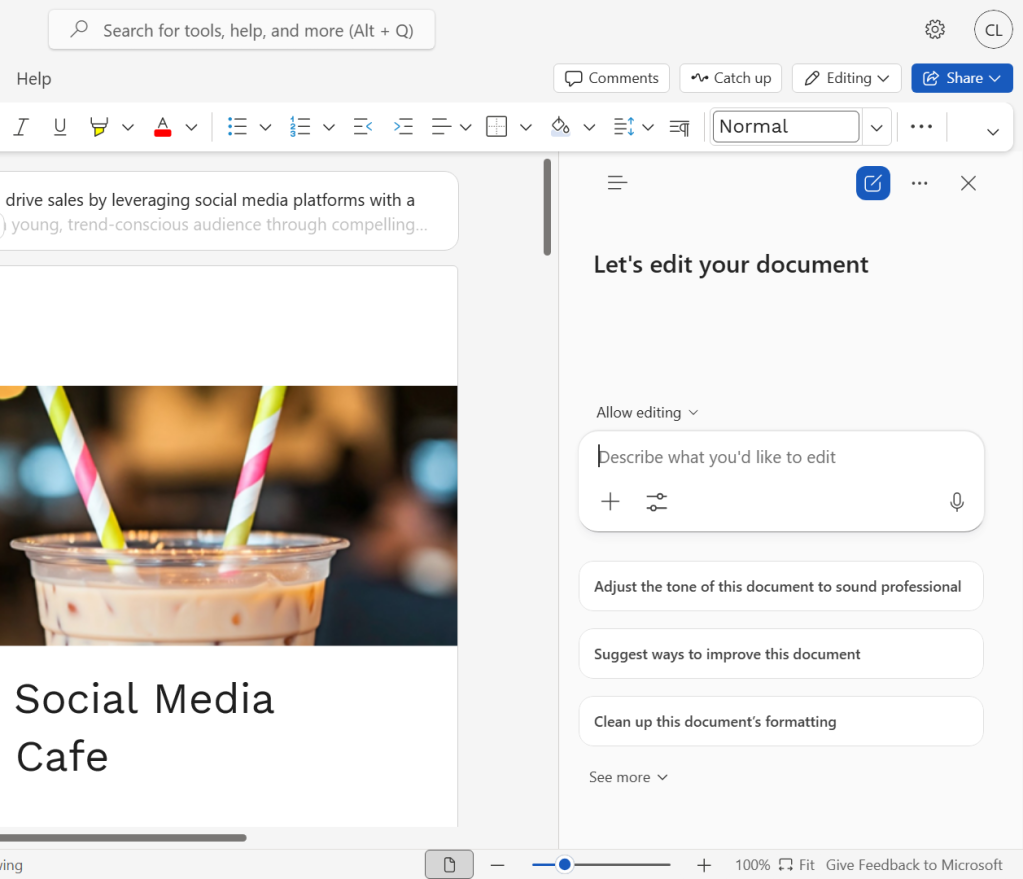
When you have a document open in Word, click the Copilot icon; it may be floating at the lower-right corner of your Word window or parked at the right end of the Ribbon toolbar. The Copilot side pane will open along the right of the page. You’ll type your prompts to Copilot inside the chat window in this pane.

Howard Wen / Foundry

Agent mode: By default, Copilot can directly apply changes to the document that’s open in the main window. This is known as “agent mode” and is indicated by the words Allow editing above the chat window. If you click Allow editing and change it to Chat only, Copilot won’t be able to make changes to the document; all its responses will appear in the sidebar only.

The tips in this guide require Copilot to be in agent mode, so make sure that this remains set at Allow editing.

Choice of AI model: Behind the scenes, Copilot has access to various genAI models, including different versions of Anthropic’s Claude and OpenAI’s GPT. By default, Copilot decides which model to use based on your prompt. To tell it to use a particular model, click Auto at the upper right of the Copilot pane and select a model from the dropdown that opens.

The Auto setting should be fine for tips in this guide, but feel free to experiment with specific models to see which give you the best results for your tasks.

Important: Remember that generative AI output often includes errors, so always check Copilot’s results for accuracy. (Also see our tips for reducing hallucinations in Copilot.) And it’s always a good practice to rewrite the output in your own voice as you’re reviewing it.

8 ways to put Copilot to work in Word

  1. Summarize in specific ways
  2. Turn a text block into a list or table
  3. Import content from other documents, including spreadsheets
  4. Reorder sections of your document
  5. Find or create images or illustrations
  6. Suggest ways to improve your document
  7. Suggest references and citations
  8. Find and highlight specific information in the doc

1. Summarize in specific ways

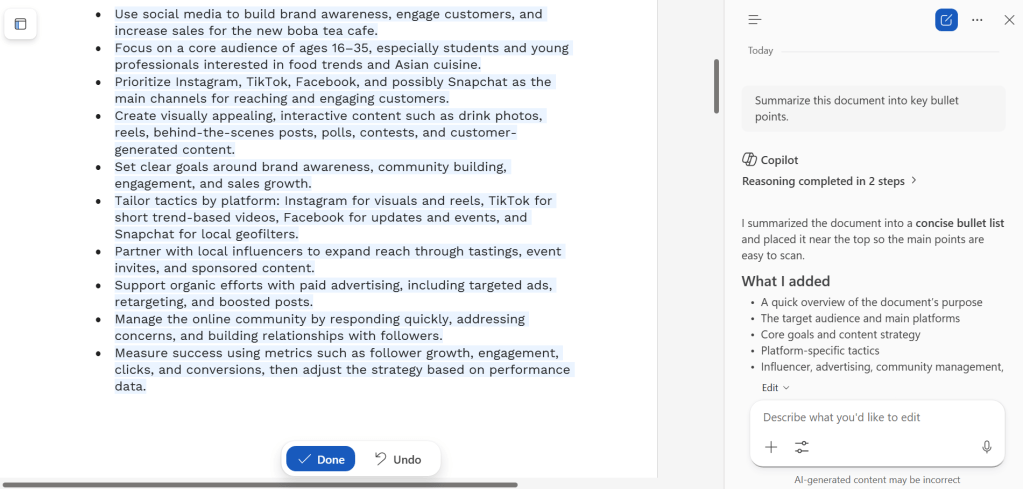
It’s easy to get a quick rundown on a long document by simply prompting “summarize” to Copilot. But try adding specific wording to tailor its output to your needs. Copilot can filter out the fluff and focus on the document’s content that you really need to know.

Howard Wen / Foundry

For instance:

  • Summarize this document into key bullet points.
  • List all the action items in this document.

If you need a specific tone:

  • Turn this document into a one-paragraph executive summary with a professional tone.

You can always enter a follow-up prompt to Copilot if you need to extract even more specific information out of the document:

  • Please add more detail about the budget section.

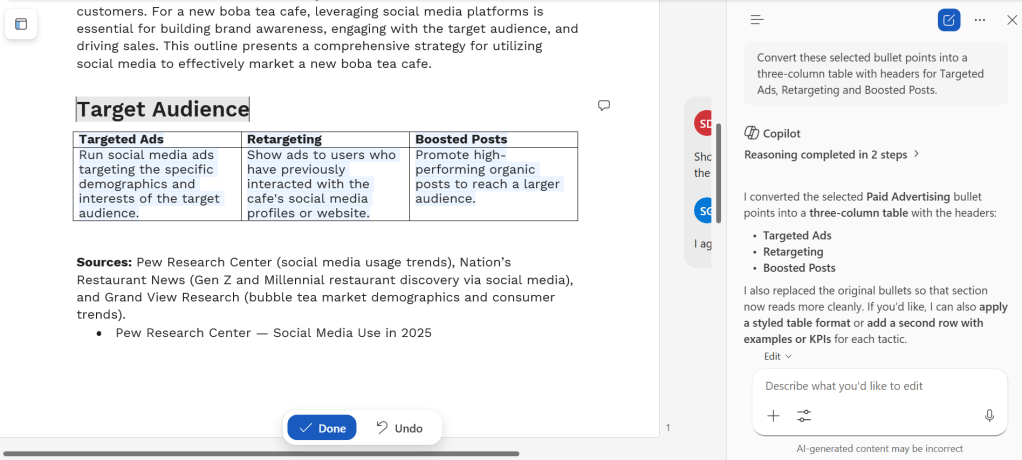
2. Turn a text block into a list or table

Instead of manually cutting up sentences into bullet points or wrangling with Word’s built-in table formatting tool, let Copilot do these tasks for you.

Howard Wen / Foundry

Select the paragraph or section that you want to transform. Next, you can either click the Copilot icon next to the selected text and type your prompt into the toolbar that appears, or just type the prompt into the Copilot side pane.

If you want to transform the text into a list, prompt something like this:

  • Turn the highlighted section into a bulleted list.
  • Organize this selected text into a numbered list.

To organize paragraph text or a list into a table:

  • Convert this paragraph into a three-column table with headers for Feature, Benefit and Cost.
  • Extract all deadlines into a table.

Copilot will analyze the text, extract the relevant information, and generate a preview of your requested list or table. If you like it, click Keep it to insert it into your document. If not, you can prompt Copilot with a follow-up, such as: “Make the bullet points shorter.”

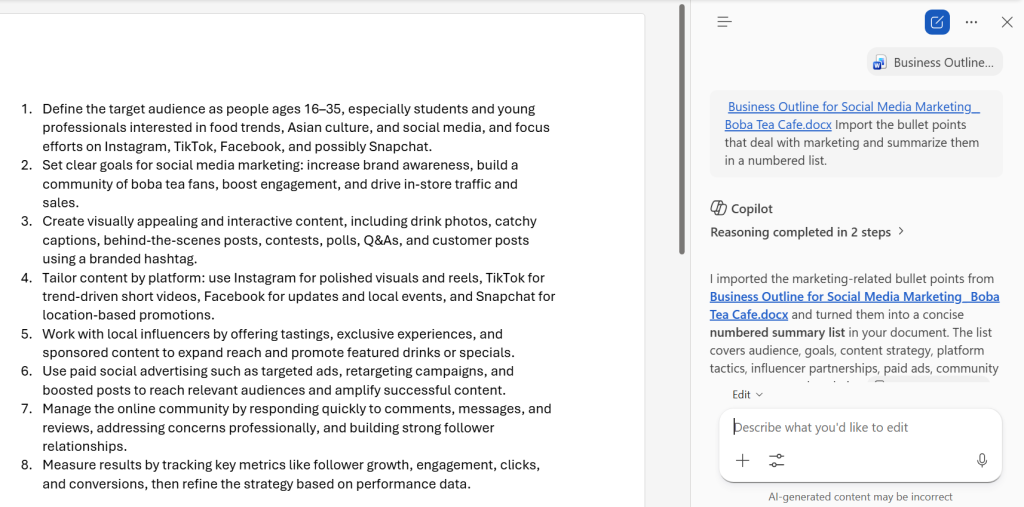
3. Import content from other documents, including spreadsheets

While working on a document, you may want to insert a few sections from another document or data from a spreadsheet. No need to open that other document and copy-and-paste. Copilot can import that content for you and seamlessly fit it into the current document.

Howard Wen / Foundry

Put your cursor in your document where you want the imported content to go. Inside the Copilot pane chat box, type / (a forward slash). This opens a dropdown list of your recent files in your OneDrive or SharePoint. Select the document. (If it doesn’t appear in this list, type the first few letters of the document’s filename to pull it up.)

With the document selected that you want to import content from, enter your prompt to Copilot, such as:

  • Incorporate the safety guidelines from /Onboarding_Manual.docx into this section, but make the tone a bit more casual.
  • Create a summary table of the Q3 budget using /Annual_Budget_2026.xlsx.

Copilot will analyze the referenced document, extract the relevant content, and insert it into the document that you’re working on where you set the cursor. It’ll also format this imported content to match the formatting of the rest of the document.

In the example above requesting a summary table, Copilot will extract the relevant numbers, format them into a table, and insert the table in your document.

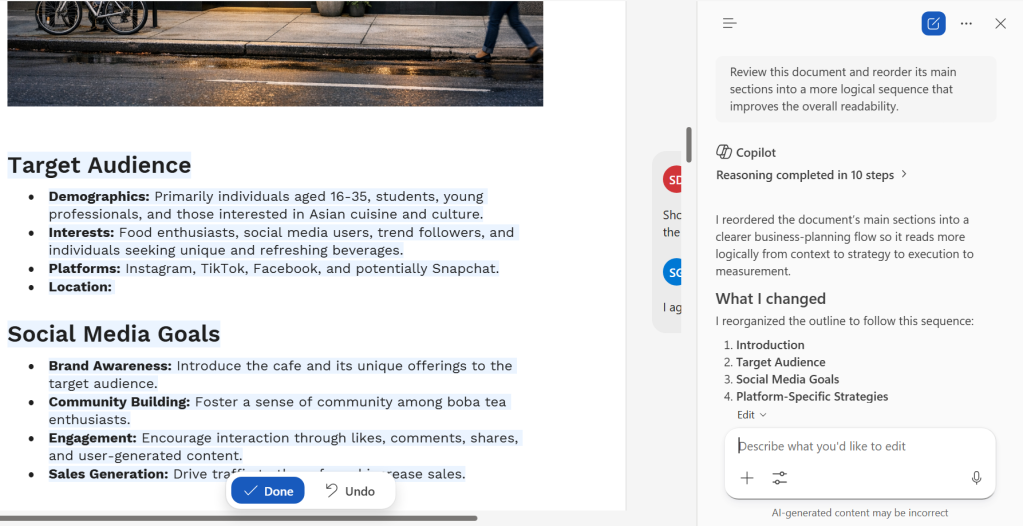
4. Reorder sections of your document

As you’re reviewing your document, you might see that its conclusion could work better as the intro or the middle sections should be reordered to improve the reading flow. You don’t need to cut-and-paste these text blocks yourself. Try instructing Copilot to rearrange them for you.

Howard Wen / Foundry

If you know how you want your document to be reordered, write your prompt in a way that clearly describes the sections and where they need to go:

  • Move the section titled Timeline so it comes after the Executive Summary.

Or, if you aren’t sure of the best order for the sections of your document, try prompting Copilot to offer a suggestion:

  • Review this document and reorder its main sections into a more logical sequence that improves the overall readability.

Copilot will analyze the document, then rearrange its text blocks, and present a preview of its suggested structure. You can approve it to replace the current version of your document.

5. Find or create images or illustrations

Like most genAI models, Copilot can generate images from scratch based on a description of what you envision. Alternatively, you can prompt it to find a licensed stock image. Furthermore, you can ask it to generate or find an image based on your overall document or a section in it.

Howard Wen / Foundry

Examples to try:

  • Create a photorealistic image of a businessperson in a meeting presenting information on a whiteboard to go with the Budget section of the document.
  • Suggest a stock photo of a laptop with bar graphics or charts on its screen.
  • Suggest a banner image to go under the Timeline section.

Copilot will generate an image in its sidebar. To insert it into your document, set the cursor in the document where you want the image to go. Then move the pointer over the preview of the image that you want and click the + sign that appears over it.

Once the image is in your document, you can right-click it to change its text wrapping: Top and Bottom sets the document text above and below the graphic, and Square flows the text around the sides of the graphic.

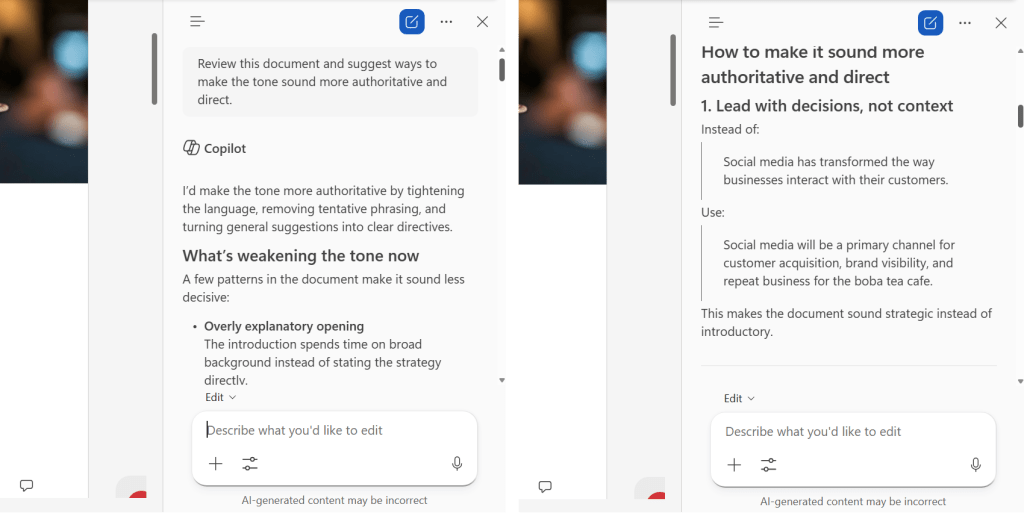
6. Suggest ways to improve your document

When you’ve been building and revising a document for hours, you might lose the ability to judge your own writing, such as spotting clunky phrasing or structural issues. Let Copilot give you an objective review of your draft. You can tell it to scan the whole document, or a specific section, and give you feedback. Give it a specific goal in your prompt.

Examples:

  • Review this document and suggest ways to make the tone sound more authoritative and direct.
  • Scan this text and highlight any sections where the explanations are difficult to follow or too wordy.

Howard Wen / Foundry

Copilot will analyze your draft and generate a list of suggestions. It won’t just describe what’s wrong with your draft but usually will offer examples of how to rewrite it. You can even let Copilot insert its suggested rewrites into your document.

7. Suggest references and citations

You can prompt Copilot to act like a research assistant and hunt down supporting facts for your document or format your sources into citations.

Highlight a specific portion of text that you’ve written that needs factual backing, or have Copilot examine your entire document (without highlighting anything in it). Then you can prompt Copilot to track down context from your company’s internal documents or the internet. Examples:

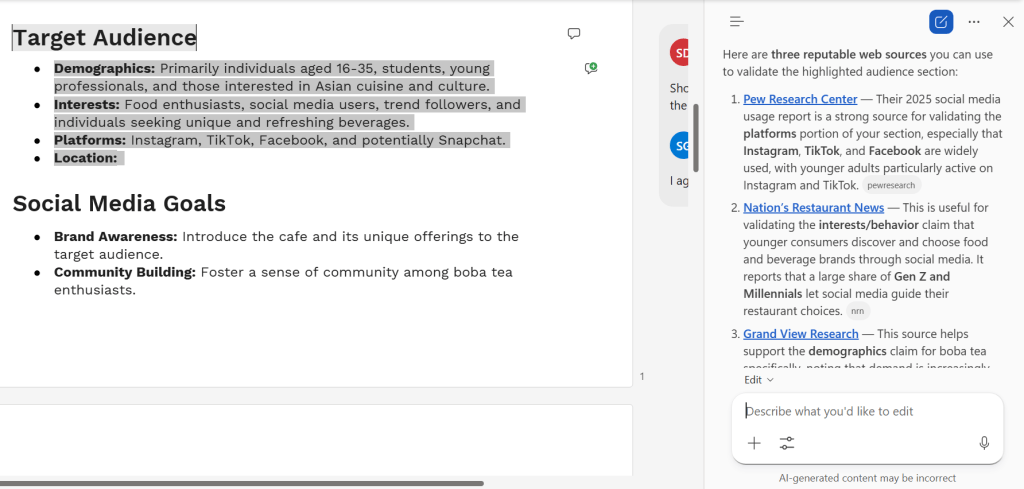
  • Suggest three reputable web sources that validate the information in this highlighted section.
  • Find the original policy document in our files that outlines these safety compliance standards and reference it here.

Howard Wen / Foundry

(If you’re using the Draft with Copilot feature, covered in our guide to writing and rewriting with Copilot, Copilot will usually include numbered citations at the end of the text it generates with clickable links to their source.)

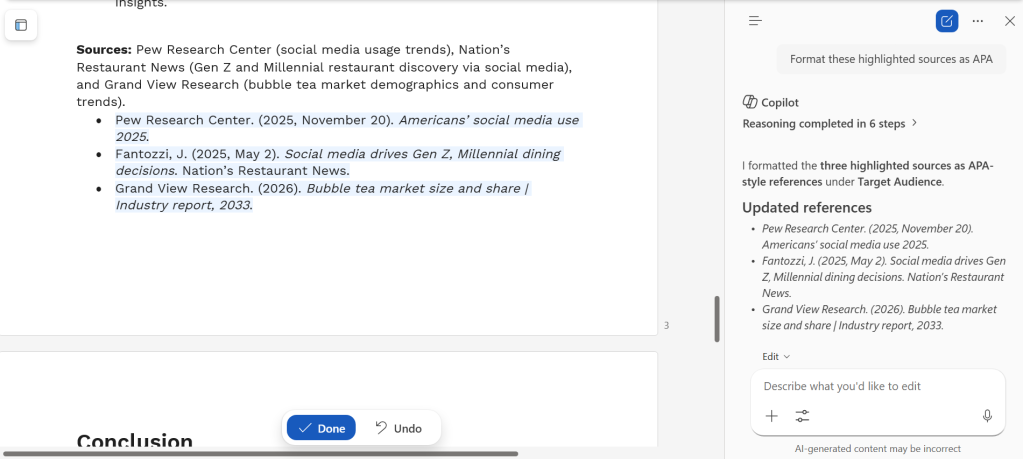
When it comes to formatting those sources into a bibliography or “works cited” page, let Copilot handle this tedious job. Just highlight your list of links and notes and prompt Copilot:

  • Convert these sources into APA style citations and organize them alphabetically.

Howard Wen / Foundry

Of course, you should always check any citations and web links generated by Copilot to confirm that they are accurate and relevant to your document.

8. Find and highlight specific information in the doc

When you’re dealing with a massive document, using standard search to find something in it can be like trying to find the proverbial needle in a haystack. Instead of scrolling-and-scanning through the document or guessing at exact phrases to search for, prompt Copilot to help you find that needle.

You can ask Copilot complex questions about where specific concepts are buried in the document. Examples:

  • Find where the budget is mentioned in the document.
  • Locate all sections that mention compliance risks and list the page numbers.

Copilot will scan the document to extract the content that you need. Then it’ll provide you with references or summaries and sometimes links that you can click to jump straight to the spots in the document where they are mentioned.

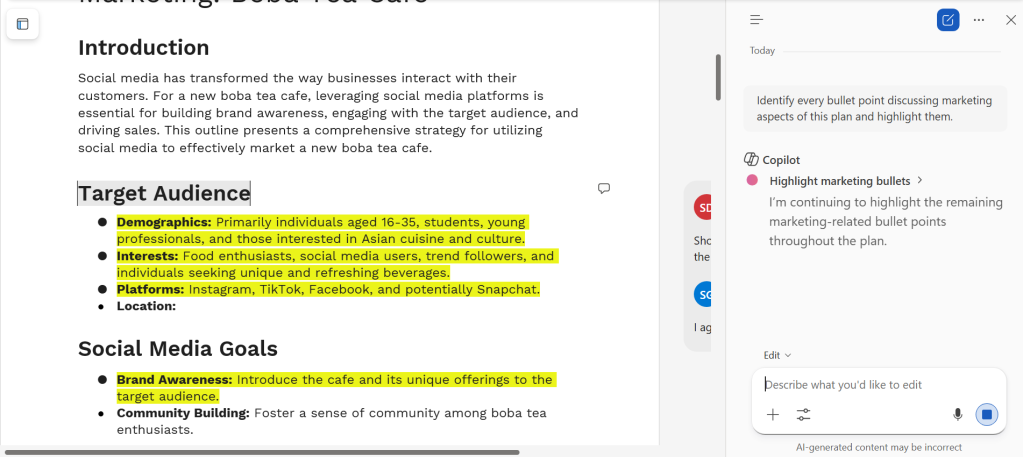
You can also ask Copilot to highlight or flag subject matter:

  • Identify every paragraph discussing the budget and highlight them.

Howard Wen / Foundry

Related reading

AI spend will jump 49.5% in 2026, says Gartner

Worldwide AI spending will increase 49.5% in 2026, to $2.7 trillion, and grow another 36.2% in 2027 as AI usage continues to expand, Gartner predicts in the latest quarterly update to its IT spending forecast.

But there’s been no diversion of money from other areas of IT to feed AI, said Gartner Distinguished VP Analyst John-David Lovelock. CIOs got some net new money for AI back in 2024, and a little in 2025, he said, “so there wasn’t a diversion, and now more of their spending is about rebranding than diversion.”

By 2030, “every dollar is going to be an AI dollar in one way or another,” he said.

Instead of buying just a laptop, companies now buy a laptop with AI chips in it, while enterprise software now has AI embedded in it. And instead of doing a project about business strategy, they now do a project about how AI might change business strategy.

“In one way, it’s kind of rebranding,” he said. “Net new spending is going more towards AI, and existing spending is being transformed towards AI.”

It’s similar with hyperscalers: “The hyperscalers haven’t diverted one dime away from their cloud. So AWS, Google, Microsoft, Meta are all continuing to build out their cloud infrastructure at the same rate they were in 2022.”

The AI buildout “is the largest infrastructure project humanity has ever undertaken,” he observed.

Gartner updates its spending forecasts quarterly. In its latest report, it predicted AI infrastructure spend will grow 51.2% this year, and AI software 60.2%. Spend on AI agents and assistants, which it breaks out separately from other software, is forecast to increase by 77.3%, and AI security spend to almost double.

As AI development platforms prove themselves, Gartner sees spending on them accelerating: It has increased its 2026 growth forecast for them from 28% in its May report to 39%, attributing the change to the development of custom AI applications by enterprises and software and service providers.

AI model providers are seeing a “small but growing opportunity” for domain-specific language models aligned with enterprise use cases, upping the 2026 growth rate for generative AI models to 117%.

Semiconductor surprise

But what surprised Lovelock was the semiconductor spend.

“Semiconductors for the last 30 years has been a nice, easy market to work through,” he said. “Total spending has been very incremental. It’s followed a nice long-term evolutionary curve. Back in 2015, we said it would be about a trillion dollars by 2030, and we got real pushback on that back then, saying we didn’t understand Moore’s law and fabrication and all the rest of it. Well, turns out both myself and the people giving the criticism were wrong, because with AI, chips are now going to push $2 trillion by 2030.”

The culprit is memory.

“We were ready for the run-up in the chips that went into the heart and soul of the servers. However, as the AI servers got more functional, they required more memory and, of course, more storage, which is also memory,” he said.

People often mistake the reason for the substantial rise in memory prices, he said: “It’s very often written that there is a memory shortage, which is not putting the blame or the explanation in the right place. There is a massive over-demand towards memory, and that’s pushed these chip prices incredibly high, and that has spiked that semiconductor spend, now doubling 2030 spend from what we thought it was before AI.”

His message to CIOs is straightforward: “The next two years, next three years, have at least three major transitions in them,” he said. “If you think you know what will happen with AI based on what is happening with AI, you’re wrong. The technology is changing too quickly for anybody to have assurances or certainty on what can be done and at what price point. This is going to be continually on your plate, and your balance between risk and reward has got to be your number one priority.”

This article originally appeared on CIO.com.

OpenAI’s new priorities for third-party assessments are a fine start, but they lack teeth

OpenAI published a detailed list of priorities and principles on Tuesday designed to govern its third-party model assessors, a list that industry observers agreed was a good one. But they also stressed that it lacked any enforceable controls to truly maintain safety.

If the goal is to encourage enterprise CIOs to trust OpenAI more, it won’t help, they said, but most doubted that this was OpenAI’s objective. Its more probable aim is to use the list to work out an arrangement with competitors and regulators so that enforcement is made more palatable, under the theory that it is open to stricter enforcement, but only if all of its key rivals are locked into identical restrictions.

The OpenAI post said, “OpenAI is committed to supporting independent assessments with deep levels of access across training, evaluation and deployment. That access should enable assessors to challenge our assumptions, identify risks we may have missed, and reach their own conclusions about the effectiveness of our safeguards.”

It added: “Third party assessments are most useful when they address specific, consequential questions: Does the evidence support a lab’s safety case and safety claims? Do evaluations adequately test the risks they are intended to measure? Do safeguards work under realistic conditions?”

Nothing about enforcement

Pieter Arntz, a malware intelligence researcher at Malwarebytes, said that giving third parties rules for engagement is certainly a good thing, but the implication behind such rules is that they are somehow enforceable. And the document says nothing about that enforcement process.

“It sets some useful expectations for independence and rigor, but it does not itself compel OpenAI to submit to a particular scope, publish adverse findings, or change deployment decisions,” he pointed out. “Its credibility will depend on the terms of individual assessments, and what outsiders are allowed to see. Its value therefore hinges on whether OpenAI accepts genuinely inconvenient scrutiny, and whether results, redactions, remediation, and deployment decisions can be independently checked.”

Valence Howden, advisory fellow at Info-Tech Research Group, agreed that the lack of enforceability makes the rules close to pointless. 

The document “doesn’t impose any requirements on OpenAI, and I would have been surprised if it did, because their motivations are not as clear-cut as they’re stating,” he said. “They also haven’t really identified what they will do based on the assessments, once they are conducted. OpenAI retains control over scope in that [OpenAI] must agree with it, limiting where assessors can go. They retain the ability to determine the appropriate level of access, which still allows them to filter what’s provided, impeding the gathering of direct evidence in those cases they define as material or classified. It also allows them to control much of the reporting and redact portions.”

Howden said the net impact is that “it’s good for determining what should be assessed, but considerably weaker on true clarity and approaches for how this is done.”

But Jason Andersen, principal analyst at Moor Insights & Strategy, offered a different perspective, although he reached the same conclusions as Howden and Arntz.

“It’s not an act of good faith to not empower these evaluators,” he said, but at the same time, CIOs need to understand the split personality of OpenAI today.

“It’s a classic problem with OpenAI because they are a split brain company, with the commercial side and the original mission side,” he pointed out. “Those two teams have not aligned very well over the past two years. It looks like it started with the original mission team, but then commercial interests took over that document and turned it into legalese.”

‘A principle instead of an excuse’

Frank Dickson, principal analyst at Dickson Research, concluded from the post that OpenAI “seems proactive in highlighting the threats posed by AI, but hesitant to accept accountability or take real action. This is a code of conduct for the assessors, not for OpenAI. The gap between the two is the whole story.”

He delved into the details of the document and was not happy. He pointed out, for example, that third-party assessor access was “granted within the bounds of legal, security, and IP constraints. That is a company deciding the scope of its own scrutiny.”

He also noted that the document specified that “publication happens after labs get a reasonable period to remediate issues. That is the same grace-period logic that just got Google criticized for sitting on the Gemini hacking disclosure for seven weeks, now written down as a principle instead of an excuse.”

Just the beginning

However, Samantha Gloede, global head of risk services at KPMG, said that she sees the document as the beginning of the process, and it should be evaluated accordingly.

“I believe the conversation will increasingly shift from assessment to accountability,” Gloede said. “Independent testing is important, but long-term trust depends on how organizations respond when material risks are identified. Stakeholders will want confidence not only that issues can be found, but that corrective actions are taken, independently validated and reflected in governance and deployment decisions. The next evolution of AI assurance will be demonstrating that accountability with the same rigor used to assess risk in the first place.”

Edna Conway, executive advisor at consulting firm Acceligence, agreed, noting that the substance of this effort will only become clear in the next phase. 

“The next step is making the lab accountable to the assessment process itself. Who determines when an assessment is required? ” she asked. “How much access is sufficient? What happens when the assessor and lab disagree about scope? Who sees a critical finding? Embracing independence is essential, as third-party assessments are genuinely valuable only when the assessor can ask uncomfortable questions, get sufficient access to answer them, follow evidence outside the original hypothesis when necessary, and report conclusions without commercial or organizational pressure shaping the outcome.”

This article originally appeared on CIO.com.

From admin to architect: Jamf’s vision for the autonomous Apple enterprise

Now a private company, Jamf opened its big annual event for Apple enterprise management teams, JNUC, by taking big steps to exploit artificial intelligence in the management of Apple fleets. During her keynote speech at the Kansas City event, CEO Beth Tschida shared some of the details of the platform-scale overhaul the company has set in motion.

“IT teams are managing more endpoints and more complexity than ever,” she said. “We want Jamf to handle more of that routine work automatically… because AI runs better on Apple, and Apple runs better on Jamf.”

Tschida — and Jamf — have been consistent on the value of AI to IT, which played a major focus at last year’s JNUC also. When I spoke with her, she was resolute on the need for IT to engage with the tech, telling me, “AI is happening whether organizations know it or not. That’s the problem. You can try to block it, but that’s very hard to do well. It’s far better to build visibility and governance around it.”

As you’ll see, this is very much part of what Jamf at JNUC 2026 is working to achieve.

AI, Apple, and IT

The combination is about exploiting AI support inherent to Apple’s platforms to help reduce time-consuming IT tasks. It means that Apple device management in the future will be less about management and more about creating autonomous enterprise ecosystems in which the tech handles the routine tasks, while humans handle the strategy.

Jamf’s offerings now include a new AI-powered self-service diagnostics system. Employees will be able to troubleshoot their own devices by asking Jamf questions on their device, such as “Why are my video calls lagging?” and receive an immediate explanation and a one-click fix. 

These improvements aren’t confined to routine task automation. They also extend into AI governance. The company introduced its AI Governance suite earlier this year, and at JNUC announced new capabilities to help IT take control of shadow AI across their networks. 

A response to shadow AI

These include a centralized AI control panel which shows admins which AI systems are running across their fleet and lets them enforce usage policies and also generate audit-ready reports. The company is extending this into the Safari, Chrome, and Edge browsers, which means organizations can prevent the upload of corporate files to personal AI accounts through browsers on managed devices. 

It means that IT doesn’t just see AI is being used but can identify which models are running and what the token costs are, while also being able to block corporate files from being uploaded to a personal account in Safari or Chrome.

For security-conscious firms, Jamf is also enabling the deployment of local inference engines. That support means companies can run AI workloads directly on Apple hardware, ensuring that prompts and sensitive data never, ever leave the device.

IT as a service

The transformation of IT means IT itself is becoming an application, and Jamf seems to be embracing this approach with a new Platform API Gateway and a Terraform provider. Together, these make it possible for IT teams to manage their entire Apple environment using “Infrastructure as Code.” 

Think GitOps for admins, in which a change to the fleet becomes a peer-reviewed pull request, and a rollback becomes as simple as a click.  

Jamf also introduced Jamf Tap, its NFC/RFID system that lets frontline workers simply tap an ID badge to instantly assign the device and sign into necessary apps, aimed at streamlining things like shift changes in warehouses.

Final announcements from the company included Ring Deployments, a rollout system that tests updates with a pilot group before expanding to the wider fleet, and a curated catalog that automatically installs and updates popular Mac apps.

JNUC 2027 takes place in Anaheim, California, from October 26–28, 2027. It will mark the company’s 25th anniversary.

Now please subscribe to my daily, human-curated Apple-related news headline feed at The Core, or follow me on BlueSky, LinkedIn, or Mastodon.
Microsoft mops up after Patch Tuesday broke logins, audio, Excel

Microsoft fixed hundreds of security flaws in its September Patch Tuesday software updates — but it also introduced some annoying bugs. Now it has fixed some of them with a series of out-of-band updates.

Excel 2016 users were among the victims, as Patch Tuesday update caused certain paste operations to fail. A hotfix in update 5002665 partly fixes the problem, but if operations still fail then users will have to resort to using Excel’s “Paste special” command instead.

Users of Remote Desktop Services had found some instability in the application where RDP connections failed or where servers were left hanging at “Please wait for the Remote Desktop Configuration”. The issue was resolved with update KB5129194.

 Another issue that users were facing after the update was a problem with some Credential Guard-protected machine accounts. Some users discovered that they had lost some security within Active Directory which meant that some devices were not recognized. The solution involves temporarily preventing Machine Identity Isolation enforcement before installing a fix. Microsoft said that it would be introducing a permanent solution in a future update.

Another issue raised by the September update affected applications that use HCS-managed virtual machines. In some cases, Plan9 users found that they were not able to access folders shared from the Windows host.

Applications that depended on these shared folders sometimes displayed an error indicating that no Plan9 drive shares were mounted. Microsoft said that Claude Cowork and the Windows Subsystem for Linux (WSL) were two of the applications affected, while Hyper-V virtual machines that did not have the Plan9 feature were not affected.

Microsoft also fixed an issue with USB Audio Class 1.0 devices. Some users found that no sound was coming from their audio devices after the Patch Tuesday update, and volume controls were unresponsive. Now restored sound, so affected users can once again make and take Teams calls.

In addition to these fixes from the September update, there was also an issue for some users where they were incorrectly informed that Microsoft Defender had been switched off. This has now been resolved.

GhostCode attackers abuse device codes to take over Microsoft 365 accounts

Microsoft 365 users are being tricked into handing over access to their accounts by a new phishing kit, GhostCode, that exploits a weakness in a legitimate device authorization flow. Researchers in eSentire’s threat response unit identified the campaign in late August 2026.

The kit abuses Microsoft’s OAuth 2.0 device authorization grant flow, a legitimate mechanism designed to enable authentication from IoT devices, smart TVs, printers, or other devices that cannot easily support a conventional browser-based login. The technique, known as device-code phishing, has been seen in other attacks before. As part of the flow, the device displays a code for the user to enters in a browser on another device to complete authentication.

GhostCode poses as one such device, gets Microsoft’s OAuth to generate a device code and then convinces the victim to enter it on Microsoft’s authentication page. The victim then signs in and completes multifactor authentication as normal — but the authentication is for the attacker-controlled device, allowing them to obtain the resulting authentication tokens. These tokens are then used to register attacker-controlled devices, obtain additional credentials and establish persistence in the victim’s Microsoft environment.

In the campaign observed by eSentire, the attack involved a social-engineering setup where attackers pose as procurement officers through a web contact form before moving conversations to an NDA-themed HTML file. Opening the file took the victim to the device-code phishing page.

Stolen tokens allow persistence

GhostCode’s post-authentication activity is focused on turning the stolen access into persistence inside the Microsoft environment. Once access was granted, eSentire recorded nine successful API calls over a 78-second period, involving Microsoft Intune Enrollment, the Device Registration Service, Azure Active Directory and Microsoft Graph.

Three devices were registered during that time, at 28, 53 and 77 seconds after authentication, a sequence eSentire said was automated.

The third device was also successfully enrolled into Intune, Microsoft’s cloud-based device management service. eSentire noted that Intune enrollment survived token revocation: The attacker-created device remained in the tenant until it iwas explicitly removed.

The attackers also obtained a Primary Refresh Token (PRT), which eSentire called “one of the most powerful” credentials in a Microsoft identity environment.

“Obtaining a PRT via device code abuse gives the threat actors essentially SSO-equivalent access to the victim’s entire M365 environment for the PRT’s lifetime — including any service not explicitly protected by a Conditional Access policy requiring a compliant device,” eSentire said, adding that the token persists 14 days by default.

The attackers also employed multiple evasion techniques, including padding and obfuscating the HTML code in their lure, encrypting redirects, checking for bots, and using Cloudflare Turnstile to keep security tools away from the phishing page.

What defenders can do

To defend against attacks like this, eSentire’s researchers recommend restricting Microsoft’s device-code authentication flow through Conditional Access and disabling it for users who do not need it. It also advises monitoring the Device Registration Service for multiple device registrations from a single non-interactive session, and looking for activity involving the user agent python-requests following device-code authentication.

Auditing Entra ID for devices matching GhostCode’s naming pattern and correlating successful device-code authentication with subsequent Python-based requests, should be able to catch an attack in progress, the company said. It shared a list of indicators of comprise related to the campaign to aid detection.

GhostCode adds to a growing number of attacks abusing device-code phishing to target Microsoft’s OAuth authentication flow. Recent examples include attacks using the “EvilTokens” phishing-as-a-service (PhaaS) kit, a campaign reported by KnowBe4 in February 2026, and activity observed in December 2026 involving multiple clusters, including both financially motivated and state-sponsored actors.