The company said in its statement that it is looking to augment its platform, which it boasts is already used by almost two-thirds of Fortune 500 companies.
Headquartered in Stockholm, Lovable plans to grow its team to 450 people this year, hiring most heavily in machine learning, product, infrastructure, and security roles, and is looking to expand operations from its home base to include locations in London and three US cities: Boston, San Francisco, and New York City.
The planned growth is made possible by the latest infusion of venture capital, which follows a $330 million Series B funding round last December. Lovable now has a $13.3 billion valuation.
The Series C funding was led by Menlo Ventures and the Scaleup Europe Fund and includes US-based Regent. (Regent is the parent company of Foundry.)
Earlier this month, Lovable announced a partnership with Cerebras Systems, the chipmaker that builds processors the size of dinner plates (the Wafer-Scale Engine) and supercomputing systems built for AI inference and training. Cerebras systems are designed to keep an entire AI model’s weights on a single, super-sized WSE chip, rather than split across many GPUs, to avoid GPU memory bottlenecks.
That partnership calls for Lovable to run some of its latency-sensitive workloads on dedicated Cerebras capacity.
“Fast AI is more valuable than slow AI,” said Cerebras CEO and Cofounder Andrew Feldman said in a statement when the partnership was unveiled. “When AI responds in real-time, users do more with it, stay longer, and run higher value workloads. Software creation is one of the clearest examples of the importance of speed. Creators don’t want to wait.”
In its statement today, Lovable said that since its launch in November 2024, people have created more than 60 million projects with its tools, with Lovable-built apps seeing more than 900 million visits a month.
Computerworld is part of Foundry, which is owned by Regent.
Just weeks after Microsoft patched a critical hole in Microsoft Defender, a cybersecurity researcher has posted an apparent bypass that provides system-level control to attackers once they gain any level of access.
Nightmare Eclipse has not provided the further details we requested, however Microsoft sent a brief statement, saying, “Microsoft is aware of the reported vulnerability and is actively investigating the validity and potential applicability of these claims,” and reiterating its commitment to investigating issues and supporting coordinated disclosure.
But the proof of concept (PoC) security bypass, ShieldBreak, described by Nightmare Eclipse in a series of public posts, potentially threatens to be more damaging than earlier bypasses.
Like other recently reported vulnerabilities, ShieldBreak requires an attacker to first somehow gain system access, typically via a successful phishing scam. Once in, however, the attacker can gain full admin/root access.
But there is a troubling psychological component to ShieldBreak, in that it is a bypass for a recently posted security patch from Microsoft, noted Justin Greis, CEO of consulting firm Acceligence. The problem is that CISOs who have already deployed that patch might feel protected when they are not.
“This one is concerning because the patch bypass directly calls the integrity of the remediation into question,” he said. “ShieldBreak appears to demonstrate that an attacker can bypass the fix Microsoft shipped for CVE-2026-50656 and ultimately obtain system-level privileges on the endpoint. That is an important distinction for enterprise defenders, because organizations may believe they have already remediated the underlying vulnerability. A successful patch bypass means the exposure can persist even after the normal vulnerability-management process says the system is protected.”
Greis added that such bypass can reduce overall trust in official patches.
“When public proof of concept code can bypass it, the CISO’s question becomes ‘have we actually removed the exposure?’ rather than simply ‘have we deployed the patch?’,” he said. “From an architecture perspective, organizations should be very careful about allowing the same security product to become both the control being relied upon and the only source of evidence that the control is working.”
Flavio Villanustre, CISO for the LexisNexis Risk Solutions Group, said he was especially concerned about the timing of the PoC’s release, given that it seemed to be intended to put the most pressure on Microsoft, given its typical timing for security patches.
“This vulnerability, if valid, would need a fix from Microsoft, but because those patches are usually only released on the second Tuesday of the month and the security researcher seems to have carefully timed the release of the PoC, we may have this exposure for another 4 weeks unless Microsoft deems this a very high severity risk, which is unlikely,” he pointed out.
Cybersecurity consultant Brian Levine, executive director of FormerGov, agreed that CISOs should not underestimate the damage potential if this PoC proves valid.
“What makes it dangerous is what it does once they’re in: it turns an ordinary low-privilege account into full system control by abusing Defender itself, the security tool running at the highest privilege on the box,” he said. “An exploit that lives inside your antivirus is quiet, it’s trusted, and it can be used to blind or disable the very thing you’re counting on to catch the intruder. It’s not a worm, but it’s a near-ideal second stage for ransomware crews and anyone doing hands-on-keyboard intrusion.”
Levine suggested that CISOs not wait for a Microsoft fix, but immediately take an aggressive defensive stance.
“Assume it’s live and lean on defense in depth, because this is exactly the scenario where treating Defender as your only line fails you. Application allowlisting, such as WDAC or AppLocker in enforced mode, is the strongest hardening available and can stop the payload even if the race succeeds,” Levine said.
“Tighten local admin rights and least privilege so a foothold has less to escalate from. And give your hunters one very specific thing to watch for: an interactive shell or scripting host running as system whose parent process is Defender’s engine, MsMpEng.exe. That should never happen in a healthy environment and it’s a high-fidelity sign someone is running this.”
But he also suggested that CISOs not assume that the PoC necessarily works as advertised.
“This is a single researcher’s proof of concept. It hasn’t been independently verified, and it’s coming from someone in the middle of a very public and very bitter fight with Microsoft, so perhaps some of the theater around it should be discounted,” Levine said. “But you can’t wave it away either. Patch bypasses are extremely common, and the claim that Microsoft’s fix for RoguePlanet didn’t fully close the door is entirely plausible. Defenders should treat it as credible until proven otherwise, not the reverse.”
Although Levine and other analysts were initially dubious, there are now indications that the PoC’s effectiveness has been independently verified.
Cybersecurity and risk advisor Steven Eric Fisher, a former cybersecurity risk specialist at Walmart, said, “I’ve seen independent confirmation that ShieldBreak works, although its exploitation method differs materially from the original RoguePlanet exploit. RoguePlanet relied on a filesystem race condition, while ShieldBreak appears to use a different Defender/Cloud Filter API path,” Fisher said. “So while it is being characterized as a bypass of Microsoft’s CVE-2026-50656 fix, it is not simply a replay of the original exploit.”
He added that cybersecurity researcher Kevin Beaumont has already published Microsoft Defender Advanced Hunting detections for ShieldBreak that organizations can incorporate into monitoring while evaluating their exposure.
And Pieter Arntz, malware intelligence researcher at Malwarebytes, also said he has seen confirmation from a researcher he tracks, Will Dormann.
This article originally appeared on CSOonline. It has been updated with a statement from Microsoft and further confirmation of the exploit.
Lead times of nine to 12 or even 18 months. Costs rising by 35%, 45%, even 50% to 200%. More than halfway through 2026, the market for IT infrastructure that’s crucial for enterprise projects, including those involving artificial intelligence, is strapped.
Memory is at the root of the shortages. Memory prices “have risen by 50% to 200%, resulting in PC prices increasing by 35% to 45% and some server prices rising over 125%,” according to Jon Forest, VP analyst at Gartner. Network switches also need memory, albeit in lesser amounts than servers, so they are not immune, with prices and lead times likewise rising dramatically.
Industry experts agree that most of the issues stem from hyperscalers gobbling up memory capacity, which trickles down to servers, storage systems, and networking devices. But while the source of the problem may be new, supply chain disruptions are far from unprecedented.
As a result, industry insiders are not short on advice on how best to deal with the situation, with tips including making better use of what you have, considering options beyond your usual scope, and lots of planning with your vendors and internal finance teams.
State of the problem
Just how bad is the current supply chain problem? “It’s pretty bad,” says Matt Kimball, vice president and principal analyst with Moor Insights & Strategy. Companies accustomed to 30- to 45-day lead times for various infrastructure are now looking at 6, 12, or even 18 months.
“It’s real, and I’m hearing it from companies of all sizes, from the 1000-server to the 10,000-server shops,” Kimball says.
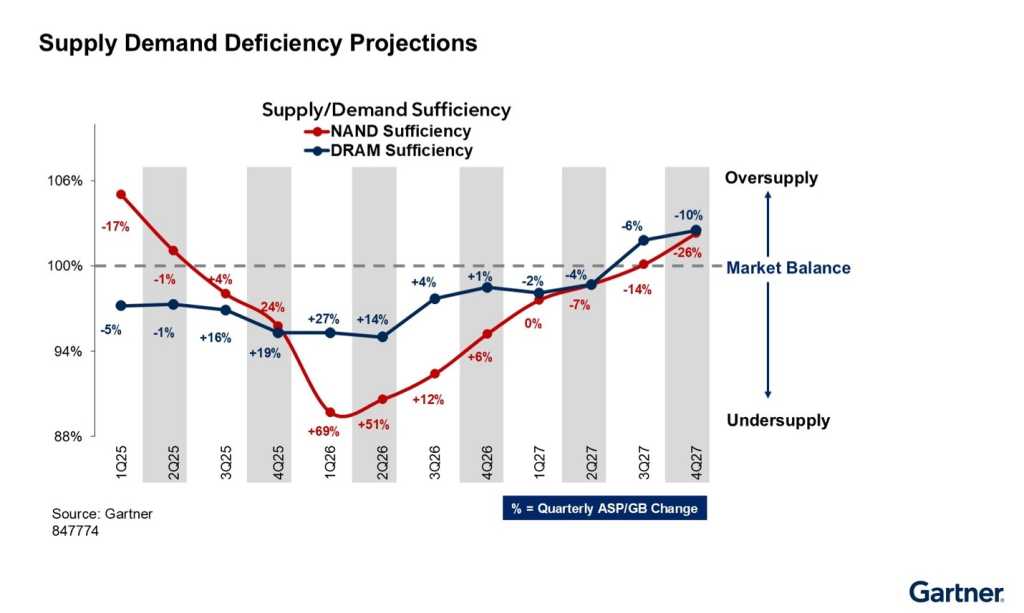
“Memory costs are expected to rise sharply well into 2027 and will reach up to 25% of network hardware expenses by the end of 2027,” according to an email Gartner’s Forest sent to Network World. The figure below shows the timeline Gartner expects for memory prices, and Forest notes that the same timing applies across networking, storage, and compute infrastructure.
Gartner
“Enterprise network equipment pricing is projected to increase by over 20% in 2026. This upward trend is anticipated to continue with a further rise of 3% to 5% entering 2027, with no signs of price reduction until the end of 2027.”
But “reduction” will likely look more like “stabilization.”
“That’s something a lot of people don’t like to talk about. But let’s say prices went up 40%, they may come down five,” says Phillip Privett, senior vice president of vendor management with the global distributor and value-added reseller TD SYNNEX. “They’re not going to come down 40%.”
Perhaps worse, compared with past disruptions caused by issues such as fires in chip fabrication factories or the Covid pandemic, Kimball says this one is “durable” because its cause—the AI wave—is more long-lasting and just getting started.
“This AI inference wave we’re hitting is just beginning. It’s going to be longer and bigger than the training wave,” he says. “It’s impacting everything, from AI infrastructure to the traditional stuff that’s standing up your virtualization and cloud infrastructure.”
No vendors seem to be immune, not even the likes of Cisco, which makes its own Cisco Silicon One chips. Or, at least, it designs the chips; they’re actually manufactured by the Taiwan Semiconductor Manufacturing Company (TSMC), the same company that makes many of the other chips that are in such demand. And that’s only one component of many that comprise a switch.
On the other hand, the margins Cisco gets from enterprise sales are far greater than those from hyperscalers because Cisco sells mainly just hardware to hyperscalers, whereas enterprise sales generally include software and services as well. So, Cisco has incentive to keep enterprise customers happy and maintain the 66% margins it reported in Q3, its latest quarter.
Still, Cisco must deal with the same shortages as other vendors.
“I wouldn’t say any company is faring better than others,” says Neil Anderson, vice president and CTO for cloud, infrastructure, and AI solutions at World Wide Technology (WWT). “There may be nuances that some suppliers are employing to balance it to some extent, but I fail to recognize a supplier that’s not having almost the same issue.”
Cloud storage vendor Backblaze is one company that’s facing equipment cost and availability issues. “There are different types of shortages occurring in multiple places, all driven by unusual market demands, really by just a handful of very large buyers,” says James Rowell, senior vice president of operations with Backblaze.
Backblaze is constantly forecasting and monitoring demand triggers, Rowell says. That involves close alignment with the sales team to forecast client needs, as well as paying attention to historical trendlines to predict upcoming demand from new deals and growth with existing clients. But the company also looks for “unnatural market-related triggers” that would cause a spike in utilization.
With hyperscalers buying up vast amounts of capacity, “This is definitely an unnatural phase,” Rowell says. “For about for the last 12 months, I would say there’s been somewhere between a 15% and 30% uptick in costs,” especially in terms of servers and compute disks.
On the positive side, at least for Backblaze, the company is also seeing an uptick in business from an interesting source: AI companies. “We reported in the last earnings period a 70% increase in AI companies using our platform,” says Patrick Thomas, vice president of marketing at Backblaze. “That’s massive.”
On top of that, the company is seeing an uptick in deals from enterprises that can’t get the storage capacity they need or want on-prem. “There’s a general market nervousness where we’ve got potential deals coming our way because those organizations are concerned about being able to do it themselves,” Rowell says.
While some expect new chip fabrication plants currently under construction will ease memory supply constraints, Privett doesn’t buy it. “I don’t see it getting better anytime soon,” he says. “Building a new fab is a two-year process.”
Advice: Start with the basics
Enterprises, then, must play the cards they’re dealt. For Moore Insights’ Kimball, who did stints as an IT exec with the states of Florida and Oregon, that starts with making the most of what you have.
Such a strategy is “shockingly not implemented much” across the companies he sees. “A simple capacity planning exercise can free up a lot of resources.” That includes virtualized servers running at just 20% to 30% utilization as well as extending the life of existing servers. While 15 or 20 years ago it was common to refresh every four years or so, companies can often get six or seven years out of today’s servers.
While such strategies won’t solve your AI compute challenges, they can certainly help support your ongoing operations and free up budget for AI and other modernization projects, he says.
“Sweat your assets,” agrees Privett of TD SYNNEX. “Work them as much as you can, add only what you need, get extensions on your licensing, renewals on your services agreements and things like that. Just sweat it out a little longer.”
If you have budget to spend but can’t get the hardware you’re after, buy something else, says WWT’s Anderson. “Look at things that are not tied to those components, like software projects or SaaS licensing,” he says.
Get friendly with finance teams
Numerous experts recommend regular meetings with your CFO or finance teams to keep them apprised of what you’re up against so the company can plan accordingly.
Gartner’s Forest advises using rolling 12- to 24‑month forecasts and engaging early with suppliers to identify constrained components and SKUs. Committing to quarterly or monthly buys can help you avoid long-term agreements that extend past the rapid increases we’re seeing in 2026, he says.
Also engage with the financing arm of your equipment vendors, some of which are offering financing incentives, Privett says. Compute vendors in particular are offering subsidized financing, deferred payments, and low-cost financing for the first year or so. “Those are huge opportunities to take advantage of,” he says.
By engaging with finance teams, IT groups can conduct budget allocation exercises and try to come up with ways to make the financials work. The last thing you want to do is surprise them with additional budget requests out of the blue.
Kimball recalls his days with the state of Florida, when all budget requests were examined by a technical review working group—which was designed to be hostile.
“I can’t imagine going to them and saying, ‘Oh, did I say that was a million dollars? It’s actually $2 million. I need you to write me a bigger check,’” he says. “I would walk into one of the swamps in Tallahassee and get eaten by the alligators instead of doing that.”
Work with your vendors and VARs
As you put plans together, lean on your vendors for help, including channel partners such as value-added resellers (VAR) and national resellers. “Work with them to map things out and understand what your workloads will look like,” Kimball says.
That’s what Backblaze’s Rowell regularly does with his suppliers. He lays out his forecast for the year, with commitments on what Backblaze will definitely buy, as well as scenarios that account for rapid growth, say, 2x. “And they’ll come back with, ‘Well, okay, no problem,’ or maybe they say we need to put in an allocation right away, or we won’t be able to get what we may need,” he says.
Similarly, he sits down with his CFO regularly to map out predictive models that factor in inflation, price hikes, and the like. The idea is to plan out multiple scenarios, so you don’t get blindsided.
“If you don’t do that, you’ll get caught with your pants down, on the upside-down end of spectrum,” he said – meaning not having the capacity to take advantage of market opportunities.
Acquiring the capacity you need to meet project demand may also mean being flexible in terms of your equipment choices. If you’re a Dell shop but can’t get Dell servers, maybe you go with Lenovo, Kimball says.
“You’ve got to figure out how to use all this silicon and infrastructure in a heterogenous way to serve your needs,” he says. That’s especially true when it comes to AI infrastructure. “If you think you’re going to go with 100% Nvidia for everything from RAG [retrieval augmented generation] to inferencing at the edge, you’re kind of crazy, not because of cost but because of availability.”
Look at alternatives, including AMD and cloud solutions, while staying mindful of how it all plays together. You may not be able to get Nvidia GPUs, but AWS, Azure, and Oracle Cloud have them, Kimball notes.
That’s good advice, says Backblaze’s Thomas. When it comes to AI, think about performance tiers and the range of use cases you have. They don’t all need top-tier performance.
“People get wrapped around axle of needing the top end. There’s a lot of flexibility in the edges, innovation in different hardware and software,” Thomas says.
Gartner likewise advises companies to increase configuration flexibility and expand sourcing paths. That may include buying from secondary markets and lease-return programs to preserve continuity with existing infrastructure until the shortages pass, Forest says.
Get started somewhere
Even if you can’t acquire or have to wait for the infrastructure you need, don’t let that keep you from getting started with AI or other modernization projects.
Options include public cloud and neocloud providers, Anderson says. WWT also provides capacity in its own lab so customers can get started with proof-of-concept projects. “Don’t just throw your hands up. We can help you find access to capacity,” Anderson says. “Production-scale AI may be delayed, but don’t let that derail your strategy.”
Colocation providers may likewise be an option, especially if enterprises are struggling to acquire high-end networking equipment. Networking is a key value proposition for colocation providers, in that they have built-in connections to various cloud providers and other ecosystem players.
Equinix, for example, has 280 data centers in 77 metropolitan areas, says Phil Read, senior director, colocation product management for the company. If you have the compute infrastructure, Equinix can help you with the high-end connectivity required both intra- data center and at edge facilities.
It also has partnerships with the likes of Cisco and Nvidia for “ready-to-go AI connectivity,” Read says. That means Equinix offers the right infrastructure to meet the requirements of high-end compute solutions in terms of power density and cooling. Such power densities are significant, requiring 120k VA per rack and up. “There’s plenty of talk about a megawatt rack,” he says.
Power is a significant issue in this entire discussion, Privett says. Older installed computing infrastructure likely consumes far more power than newer systems, which is an argument for upgrading as soon as possible.
“If you modernize today, you could substantially reduce the number of servers needed to support the same applications at a much lower power consumption rate,” Privett says. He advises sitting down with folks from the OT side of the house to make sure power is available for whatever you want to do. In many areas, power is at a premium.
If your plans include installing GPU environments in your own data center, WWT advises you not to delay. “We’re telling customers, you need to talk with us and get that designed, get that ordered, because it will take quite a bit of time until it actually ships and we’re able to install it,” Anderson says.
Apple is in the process of tweaking its business models to cope with the unyielding memory price and availability crisis. Its response is now emerging across multiple fronts.
Finance or lease
The company’s recently-introduced Apple Upgrade scheme in partnership with Klarna is a smart response to the reality that as devices inevitably become more expensive, consumers will shift from outright ownership to flexible lease and financing arrangements. With its partnership, Apple continues to generate revenue while also maximizing the likelihood customers will return the product at EOL, more about which later.
Samsung and Google have introduced similar schemes. “Financing models already dominant in India and Africa are now poised to reshape the US and European markets,” said CCS Insight in a presentation exploring the consequences of the memory shortage.
Downgrade
Apple has seen a lot of success with the iPhone 17 this year. That success wasn’t entirely because it’s such a good smartphone; it also reflects consumers making the decision to purchase lower-specced devices to stay within budget. Apple continues to see strong sales of its Pro range, which represents the power of its reach into more affluent consumer groups. It’s also important to note that at the moment, the iPhone 16e is the biggest-selling device on the US pre-paid market.
People still want the best, but are being more cautious in how they acquire it.
Refurbished
The trade in refurbished devices is fundamentally built on two things: A large installed base of originally-sold devices resilient enough to be refurbished in the first place and buy-back deals attractive enough to encourage consumers to trade those devices in at all. That’s why it matters that Apple recently increased the value of its trade-in scheme: you’ll get up to $480 for an iPhone 16 or up to $720 for an iPhone 16 Pro Max under Apple’s new deal. It’s also important because Apple has its own growing refurbished business in Apple Refurb, and also because devices that really have reached end-of-life can be broken up for parts, taking a little pain out of Apple’s ongoing component crisis.
As prices rise, consumers will keep their devices longer and are far more willing to repair existing hardware than upgrade. It’s well-known that iPhones are the most durable smartphones and ship with extensive future system support, so these devices can be successfully used for five years — sometimes more. Apple offers its own service and support package to keep your devices in good shape, and its recent decision to extend AppleCare One support to new nations reflects consumer sentiment. Those who want Apple’s trusted support for up to three devices can now get it for just a few dollars each month.
Not just about iPhones
All these initiatives are important in their own right, of course, and while I’ve focused on iPhone here, Apple is implementing these changes and services across all its product lines. It knows that in the face of AI-flation, consumer habits will change. Demand for new devices — assuming Apple can even get enough components to make them — will fall. “Demand for refurbished models and financing will grow — fast,” said CCS.
The other transformation concerns price. The hyperinflation driven by decisions made by the effective cartel of the big three memory vendors (who could have continued to support the consumer memory industry while providing less support for data centers) is driving low-tier smartphone manufacturers to exit markets or raise prices. CCS expects smartphone prices to increase by 25%. Counterpoint says DRAM prices have risen 70% since 2025, while Gartner and others expect price inflation to remain into next year.
As Intel’s CEO said, “There’s no relief until 2028.”
Price increases leave a huge gap in the sub-$500 device market; that’s a vacuum the second-user market in refurbished smartphones will fill. As the value of that tier increases, it becomes a more strategically important market for both Apple and Samsung, who make the vast majority of smartphones. For both vendors, ongoing market changes mean the second-user market is becoming a primary channel for both companies; you can expect continued business pivots from both as they seek to capture business revenue.
Incoming structural challenges
Even there, there’s a structural challenge to overcome. That is that as memory prices surge, sales of new devices decline. Down the road, there will be fewer devices to trade in, meaning the supply of used devices will fall, creating a future supply-and-demand imbalance in the second-user market. I predict this could get quite bitter, with manufacturers grabbing larger chunks of available devices to the detriment of the small renew-and-refurbish retailers. CCS Insight expects the market for second-user smartphones to grow by 9% in 2026 as cost-and-supply challenges bite.
Making the circle
There is opportunity within the chaos. Apple has committed to building a circular manufacturing ecosystem by 2030, which is only four years away.
We don’t know how far along the company is on that road, or the extent to which changing market conditions have undermined its attempt to reach that goal. But the company will have spent time developing new manufacturing and production processes to enable more extensive use of recycled and renewable raw materials in that attempt.
The signs are positive — the recently introduced MacBook Neo has a 90% recycled aluminium enclosure and 100% recycled cobalt battery.
Distorted loop
There is a reality in which any slowdown in new device manufacturing — or, indeed, the cadence of new device introductions — gives Apple and its partners a little breathing space in which to develop and deploy new manufacturing process technologies.
In that narrative, it does perhaps matter that under its new iPhone release schedule, there will be an 18-month gap between the launch of the best-selling iPhone 17 and the spring 2027 release of the iPhone 18. With a 20th anniversary iPhone and new iPhone Ultra range, along with some talk of a future flip phone, Apple may soon be in position to maintain the marketing buzz with new iPhones every six months while actually crafting an 18-month wait between major device improvements.
Doing so will likely reduce initial unit shipments while also flattening sales revenue for more predictable income. It also builds in extra time to retool the production lines for each device family.
Leading with the new
When it comes to the deployment of new circular manufacturing tech, that potential 18-month gap buys that most precious of resources, time. Which means that while memory price inflation has caused huge problems, raised prices and forced Apple to change business practices, it could also give the company an opportunity to introduce one of the most profound changes in manufacturing of the 21st Century: circular manufacturing. To some extent, this transition in the nature of Apple’s business is reflected at board level, as the company is itself transitioning to new leadership under incoming CEO John Ternus.
You can follow me on social media! Join me onBlueSky,LinkedIn,Mastodonand subscribe toThe Core to keep pace with daily Apple news in one email.
It’s likely that many enterprises have created — or are at least considering — AI policies that clearly lay out approved AI tools and their uses, set up training programs for employees to help them use the tools in their jobs, and establish guardrails around those systems to avoid issues such as security vulnerabilities and data bias.
But how many of these policies have received the blessing of employees? It’s a key question, because many workers are highly wary of AI.
They worry that it will cost them their jobs, either by taking over their work or because companies will cut jobs and use the savings to fund investments in AI research and infrastructure. They worry about AI-powered performance tracking software impacting raises and promotions. They worry about AI screening of job applications for future roles.
Even employees who have embraced AI to assist their work have reason to worry. Many say that using generative AI tools saves them time, but the time savings are eroded by “botsitting” — having to check and recheck output, provide missing context, fix errors, and go through multiple iterations before the desired outcome is achieved. They may also have to wade through “workslop,” low-quality genAI output that hasn’t been properly vetted by co-workers.
Additionally, workers say that as AI makes them more productive, their workload keeps increasing. All of this can add up to “prompt fatigue” or “AI brain fry,” mental exhaustion that affects heavy genAI users, particularly when they bounce between multiple AI tools.
AI policies that don’t take these factors into account are apt to be problematic. Employees may even organize to protect themselves from AI in the workplace. Indeed, tech pros are increasingly interested in unionizing, driven in part by the incursion of AI.
It doesn’t have to come to that. Company leaders can proactively work with their employees to develop AI policies that take employee well-being into account. The result might be stronger AI adoption, better business outcomes, and a happier, more productive workforce.
The 2026 Tech Sentiment Report by technology career marketplace Dice found that professionals are generally not resisting AI itself, “but rather, they’re looking for clarity around how it will affect their jobs, careers, and workplace decisions,” says Paul Farnsworth, president of the firm. “The research suggests that employee buy-in comes from making AI feel like something being done with workers rather than to them.”
In many cases, IT management runs the deployment of AI, and this can ultimately result in employees being left out of any decision making.
“When IT leaders drive deployment, they ask questions about integration, security, and capability,” says Amy Loomis, group vice president, Workplace Solutions at IDC. “That is not the same as asking workers how AI could actually improve their day, where they waste time on tasks that add no value, and where a well-designed tool would make a real difference.”
Following are some key steps to building an AI policy everyone can agree on. Bear in mind that any worker protection items should be in addition to the usual corporate governance, risk, and compliance AI policies, not a replacement for them.
Invite input from everyone involved
It might sound obvious but can’t be overstated: the only real way to produce an AI policy that employees will accept is to get their input.
“We started by surveying our employees through SurveyMonkey to see what they were already using and why,” says Monica Washington Rothbaum, COO and senior attorney at law firm J&Y Law. “Then we sat down with every department, and involved operations, IT, HR, and leadership from the beginning. We wanted to understand the opportunities, but we also wanted to understand the risks” of AI.
Most AI policies “fail when they’re created in a conference room and handed down from the top,” Rothbaum says. “The people using these tools every day need to be part of the conversation. That’s why transparency became a major focus for us” in creating an AI policy.
Organizations should include employees in policy development, pilot programs, and feedback processes, Farnsworth says. This is especially important because Dice research found that only 48% of organizations have formal AI policies, while nearly one quarter of professionals surveyed said they’ve used AI without manager approval.
Keep the lines of communication open
Creating an AI policy is not a one-and-done proposition. Organizations need to keep communicating with employees as AI and tools evolve.
“We communicated updates during company all-hands meetings, through email, in Microsoft Teams, and through department-level discussions,” Rothbaum says. “We even designated a member of our marketing team to oversee communications around AI adoption so there was clear ownership and accountability.”
The biggest mistake organizations make is treating AI like standard software, Rothbaum says. “It’s not. It’s an operational change,” she says. “It’s a communication challenge. It’s a governance challenge. The technology itself is often the easy part. The hard part is deciding what data can be used, who has access, how outputs are reviewed, and how the organization remains compliant while the technology continues evolving.”
Address fears about employment
One of the biggest drawbacks to AI adoption, from the standpoint of many employees, is the worry that AI tools will ultimately take away their jobs or many of their responsibilities.
Indeed, this has already been the case at some tech companies. A majority of non-AI technology professionals think AI eliminates more jobs than it creates, according to the Dice report, and three quarters think
junior-level workers are most at risk of displacement.
“Reassurances that no jobs will be lost ring hollow when workers can see reorganizations happening around them,” Loomis says. “The organizations that sustain worker trust communicate specifically about what is changing, what it means for individual roles, and what the organization is committing to in return.”
One way to get around these concerns is to include provisions in policies that require any decisions around individual workers’ employment to be made by a human. That way no one can be dismissed from their job at the discretion of a machine.
Ensure access to training programs
Another way to gain workers’ support for AI policies is to include provisions about access to ongoing training and educational programs designed to build on their existing knowledge and provide them with valuable new skills.
“Employees are more likely to embrace AI when they see opportunities to grow alongside it,” Farnsworth says. “As AI becomes increasingly embedded in daily work, organizations should invest in AI literacy, upskilling, and career development programs to help employees adapt to changing job requirements.”
And those programs should be codified in AI policies. Guaranteeing workers access to training that evolves with the technology and enterprise workflows “requires treating training as a policy commitment with defined standards, timelines, and completion tracking,” Loomis says.
“Effective AI training does two things: it teaches workers how to use specific tools in the context of their specific roles, and it builds the human skills, judgment, critical thinking, and adaptability that determine whether workers can use AI well rather than just technically. Both are necessary,” she says.
When training is treated as a one-time event rather than a continuous policy commitment, Loomis says, adoption stalls and distrust grows. Ongoing “human skills training is gaining explicit recognition as core to effective AI use,” she says.
Adopt guardrails against harmful uses of AI
This needs to be a standard component of any AI policy. But the language of proper and improper uses of AI tools and data must be clear for everyone in the workforce.
Such guardrails not only address cybersecurity and regulatory concerns, but can help prevent uses of AI that result in discrimination.
“The organizations that get the most value from AI won’t be the ones that adopt it the fastest,” Rothbaum says. “They’ll be the ones that communicate clearly, train consistently, and build the right guardrails before they need them.”
Confidential, client, firm, or employee information may not be entered into any AI tool unless explicitly authorized and approved, according to the J&Y Law policy.
Emphasize the positives of AI
Policies will of course include restrictions on the use of AI and rules around avoiding risks, but they also need to share how workers can leverage tools to help make their jobs easier or more fulfilling.
“One thing we’ve seen is that effective AI policies aren’t just lists of restrictions,” Farnsworth says. “Instead, they provide employees with clear guidance on how to use AI responsibly and confidently in their work. At Dice, our AI policy encourages employees to use AI when it can improve productivity, while establishing guardrails around data security, confidentiality, and human oversight.”
A good policy will help employees better understand that AI presents not just risks, but opportunities as well.
Anthropic will begin labeling AI-generated content created by Claude, Claude Code, and the company’s API, as well as Claude models via third-party services, according to The Register.
Text generated by future Claude models will be given an invisible watermark. According to Anthropic, the watermark is embedded directly into the generated text without affecting its meaning or readability. For files, Anthropic will instead use signed metadata in accordance with the C2PA standard.
The effort is part of the company’s plan to comply with the EU’s AI Regulation and transparency requirements regarding AI-generated material. However, the labeling will be implemented globally for all users.
At the same time, Anthropic noted that the technology has its limitations. A label does not guarantee that material was created by Claude. Similarly, the absence of a label is not necessarily proof that the material is not AI-generated.
IT purchasing is being hit by a double-whammy: Enterprises want to ensure their hardware is good enough to support AI, even as memory shortages caused by AI deployments are driving steep price increases for Macs, iPhones, iPads, tablets, Android devices and Windows PCs.
The root cause is widely known. JP Morgan estimates DRAM prices have risen more than 400% since the beginning of 2024 as data center construction and hyperscaler demand consumed a gargantuan chunk of global memory production capacity.
More pain is coming
“It is not a secret that the industry will stay in shortage for multiple years,” warned analyst Jay Kwon. IDC analysis expects DRAM manufacturing capacity to fall short of demand, while SK Hynix believes demand will exceed supply well into the next decade. AI data centers are absorbing around 70% of output.
This tough provisioning juggling act plays out as economic insecurity continues and the supply of key materials beyond memory also remains constrained. It makes for a perfect storm of shrinking purchasing budgets, rapid price increases, and competitive pressure to accelerate ongoing patterns of digital transformation.
To some extent, business leasing schemes will probably become more popular, while IaaS and SaaS vendors will widen their offerings to also include the kind of AI services businesses need. But the scale of the problem is pretty clear:
Huawei Executive Director and Consumer Business Group Chair Richard Yu warned that rising memory costs will force his company to hike prices to “relieve the ever-increasing cost pressure.”
Despite making memory itself, Samsung has also implemented rolling price increases across multiple smartphone and tablet ranges, up to $120 more in some cases.
Google is expected to raise prices across the Pixel line, probably when it introduces its new devices on Aug. 12.
These price increases are not isolated; they reflect the global memory price challenge. Gartner expects memory prices will increase roughly 130% by the end of the year, while TrendForce’s recent survey sees further DRAM price increases ahead.
No one will be spared
This is a global challenge affecting businesses and consumers everywhere in real time. What’s important about these price hikes is their unpredictability; in most cases, business leaders will not have known the increases were coming, which means existing, pre-determined purchasing budgets do not reflect this new reality.
“The IT landscape faces a seismic shift, and its epicenter is memory,” according to Insight. “The market dynamics have fundamentally changed.” In other words, this challenge is long-term, structural, and here to stay.
As a result, every device that contains memory or a processor will get more expensive; this is already particularly visible in networking equipment, the cost of which climbed up to seven-fold in some cases this year. Games consoles, smart TVs and streaming boxes — including Apple TV — have not been spared.
IT purchasers are looking at these trends and wondering what to do. When it comes to PCs, price unpredictability means that lower cost isn’t necessarily an advantage. It makes more sense to spend a little more today to end up with a system that can continue working for your business for five years or more. Purchasers want longer hardware life cycles and are more willing than they once were to look at refurbished devices, which is driving growth in reconditioned markets.
(Apple sees this, which is why it recently raised trade-in prices for its kit as it seeks to recondition and resell its own products where possible.)
Reliability, resale value, and recycling and energy costs need to be considered, concerns that are in part driving businesses toward Macs. Regular readers will recognize the numbers often add up. Forrester’s Total Economic Impact research says lower support costs mean Macs save hundreds of dollars per seat in comparison to PCs over just three years, while Cisco has reported significant cost savings.
So, what should IT purchasers do?
Waiting for prices to stabilize isn’t a strategy. All the analyses show there will be no change for some time. Seeking some resilience, purchasers are seeking multi-year leasing agreements and bulk purchase deals even while vendors become more resistant to them.
Three-year replacement cycles are being extended, prompting purchasers to make better buying decisions in the first place, and canny buyers should already be auditing what roles need what kind of machine. Does every computer need to be AI-ready? Probably not, so it’s important not to over-spec the whole fleet.
Many purchasers will likely be investing more in Macs as they seek to diversify vendor exposure, while total cost of ownership over time is becoming a far more significant concern than before. It really matters that Macs are cheaper to run over time than PCs, particularly when costs have become so unpredictable. The same logic applies to tablets and smartphones, too.
None of these steps take the problem away. But sensible decision making now could help manage what is likely to be a highly uncertain period in IT purchasing, reiterating the need for resilience, so anticipated price shocks don’t blow your budgets apart.