The new year will see a new CEO for HP, which after a nine-month search has named Emma Walmsley to lead the company from January 4, 2027.
Walmsley was previously CEO of drug company GSK, where she turned around its finances and spun off its consumer healthcare business into a new company, Haleon. She has a reputation for courting confrontation rather than yes-men in the boardroom. HP needs a shake-up as revenue from printing declines and AI-driven demand for components is forcing up PC prices.
She will take over from HP’s interim CEO Bruce Broussard, who stepped in in February when former CEO Enrique Lores left the company after more than 25 years to become president and CEO at PayPal. There’s a consolation prize for Broussard, who will become chair of HP’s board, succeeding Chip Bergh who remains a board member.
Although Walmsley has been on Microsoft’s board for seven years (she is stepping down in December), this is her first foray into leading a tech company. Her almost 16-year tenure at GSK included more than eight years as CEO, and earlier in her career, she spent 17 years at L’Oréal.
Bergh said that during the executive search, she stood out “for the strength of her leadership experience across multiple industries, the clarity of her strategic thinking and her ability to translate customer insights into new growth.” He particularly cited her people-first leadership approach.
Walmsley reiterated her commitment to the philosophy in a post on LinkedIn. “HP has an extraordinary innovation heritage, an inspiring purpose and an incredible opportunity ahead as AI reshapes technology and what customers need from it. I’m excited to build on those strengths and help translate innovation into impact,” she wrote. “Behind every innovation are the people who work to make someone’s day a little easier, their work more productive, their ideas possible. In an age of AI, I believe human leadership has never mattered more. It’s a privilege to be joining this team.”
Announcing Walmsley’s appointment Broussard said, “We need a leader who can build on our innovation heritage and strengths to boldly shape the company’s future. Emma is a proven CEO with a track record of leading organizations at scale and guiding them through significant change. She has the experience and skills to bring HP’s businesses, capabilities, and people together to capture the opportunities ahead as AI moves to the edge, transforming how we work and live in a more connected world.”
When it comes to Android security, we’ve got three main types of threats to contend with as informed phone-owners determined to keep our data safe.
First, there are the theft-related worries — the breaches that happen when someone physically takes possession of your device and manages to get past its virtual gates. (Setting up Android’s native theft protection options and enabling all the right Android security settings in advance makes a massive difference in terms of proactive protection.)
And finally, every single one of us faces the most worrisome threats of all — the ones related to good old-fashioned trickery and our own occasional lapses in judgment. From phishing to smishing and vishing and now even quishing (I swear I’m not making these up), there’s no shortage of shenanigans trying to trick us into willingly giving up our information without even realizing it. And all the easily accessible AI these days only makes matters worse.
Suffice it to say, that last category is generally the most pressing — ’cause it’s our own very human shortcomings that make it possible. And even the most savvy and cautious creatures among us can be convinced to click a thoroughly cloaked questionable link in the right moment.
With that kind of threat, your best bet is simply having as many layers of protection as possible in front of you — so if your own guard is ever down and a particularly convincing scam attempt appears in front of you, there’ll be something standing between it and you that says: “Hey buddy: You sure you want to do this?”
That’s precisely what’s popping up as an easily overlooked new option on Android right now — in one of the places where you’re most likely to encounter scam attempts on your phone. And as a smart and sensible Android Intelligence reader, you don’t have to wait for Google to officially give it to you to start embracing its power.
The arena at the center of our attention this week is none other than texting and the de facto default Google Messages app for Android.
Google Messages has long had a simple spam protection option among its many buried features, but Google’s in the midst of expanding that to include an even meatier Enhanced Protection mode for all of your incoming messages.
Specifically, Enhanced Protection includes three new forms of in-message scam defense:
An AI-powered analysis that puts messages from new, unknown senders under an especially strong microscope to seek out signs of “novel and sophisticated attacks” — a trend that Google says increasingly gets hidden within “slow-burn conversations” designed to get you to give up innocuous-seeming but potentially problematic slivers of personal info along the way.
An even stronger form of link scanning that looks at real-time signals to see if any link you’ve received contains scammy elements or signs of phishing within — even if the site itself isn’t immediately known to be shady.
More prominent warnings anytime you’re about to open a link from a potentially questionable sender — to confirm you actually want to proceed and make sure you didn’t tap something inadvertently.
All these new features work from a privacy-first perspective, according to Google, with either on-device processing or cloud-based computing that occurs only in an encrypted, secure dedicated space that makes all the related info inaccessible to anyone else (including even Google itself).
The Messages Enhanced Protection options are available for anyone to opt into as of this moment — but, as is so often the case with these kinds of updates, it’s up to you to realize they’re available and then take the steps to activate ’em on any device(s) you’re using.
Your 3-step Android security upgrade
If you want to step up your Android messaging protection this instant, you need to manually apply a couple of pertinent under-the-hood updates that’ll enable all the new options and let you activate ’em without any delay or potential for forgetting.
1️⃣ First, bump yourself up to the beta version of the Google Messages app. This gives you early access to incoming features like these before they reach everyone and lets you skip the line of uncertain waiting. Joining an app’s beta channel is completely free and takes about a minute to do. Just follow these instructions, if you aren’t already familiar with the process, then move on our next step.
2️⃣ Once you’re in the Google Messages beta channel and with the latest available app version in front of you, we need to update a typically invisible Android element called Google Play Services to make sure you’re on the most recent version of that as well. Google Play Services powers a lot of important processes and works hand in hand with apps like Messages to make certain features, including this new Enhanced Protection option, available.
To manually apply the latest Google Play Services update, head into your system settings and search for the word play. Find the item in the results labeled “Google Play system update” — then tap it, tap the line that says “Google Play system update” on the screen that comes up next, and wait for the system to find and apply any available updates. You’ll probably be prompted to restart your device after any updates are made.
Now take a deep breath: You’ve got all the related elements up to date and ready, and all that’s left is to find and opt in to the actual Messages Enhanced Protection feature.
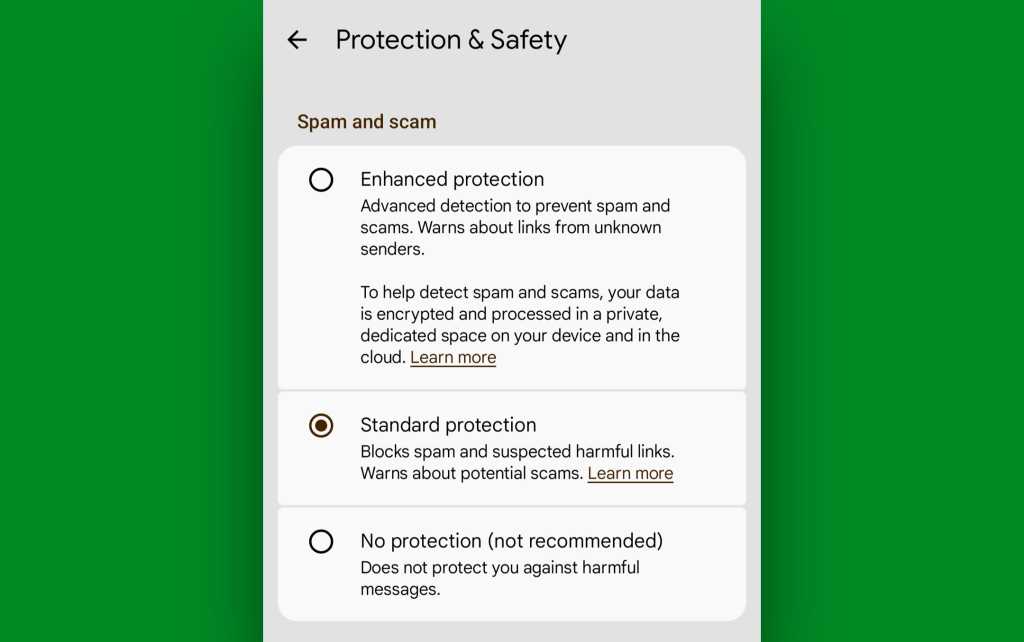
3️⃣ This last step is especially easy: Just open up the Google Messages app, tap your profile picture in its upper-right corner, and select “Messages settings.” Find and tap “Protection & Safety” in the settings menu that shows up next, and you should then see the newly expanded series of options in front of you.
With all the early-access updates in place, you’ll see Messages’ newly expanded security options.
JR Raphael, Foundry
Tap “Enhanced Protection” to select it, and that’s it: You’re now opted in to the full new Enhanced Protection option for all of your incoming texting activity.
All that’s left is to keep your common sense defenses up and rest a little easier knowing that if your own judgment ever falters — even just for a second — you’ve got another layer of protection in place to fall back on and help you avoid falling into a truly troubling trap.
Keep the helpful knowledge coming with my free Android Intelligence newsletter— one useful new thing to try every Friday and my Android Notification Power-Pack as an instant welcome bonus.
Almost everyone in tech already knows about Apple’s new MacBook Pro with PROLED XDR Display, a light, bright, thin pro Mac notebook with a reference-grade touch responsive display, adding a touch of iPad to the Mac. It’s already being talked about as the future, at least of the company’s pro laptops.
I spoke with Apple’s Vice President of Mac and iPad Product Marketing, Tom Boger, to find out more. The specs of the new MacBook Pro are written about everywhere — including here — so I wanted to get a feel for how Apple thought about building the system. We looked at the weight the team took out, the restraint behind its design choices, the illuminated logo it brought back, and why the Mac makes so much sense for the enterprise.
Weight: a thousand small decisions
The first thing people notice about the new MacBook Pro, Boger said, is how much lighter it has become. The 14-inch model is about half a pound lighter, and the 16-inch about 0.7 pounds lighter. This weight loss was not easy to achieve.
The team looked at every single component used in the Mac to find opportunities to reduce its weight, Boger said. “It’s not one thing here, one thing there. It’s a thousand things.”
The challenge is to reduce the weight of individual components while leaving each part as functional as it was. “You have to make sure you’re not compromising the integrity of whatever component you’re taking the weight out of.”
I pictured engineers shaving away microns, milligrams, and grams from all the components used. “That’s literally what it takes,” Boger said. Of all the things Apple did with this product, he said, this was probably the one where “you really have to sweat every little detail.”
Design: raise the bar, don’t change the Mac
The display is the headline feature of this MacBook Pro, Boger said. It did not appear overnight. Apple’s display engineering team is “one of, if not the best in the world,” he said. Building a panel like this “takes years of development.” The technology is only half the job, manufacturing it at scale is another.
He was blunt about the result: “There’s literally nothing else in the industry like this,” he said, pointing to the display’s 10,000,000:1 contrast ratio. In working on the project, the question the team kept asking was simple: “If this is the world’s best pro notebook, how do we make it even better?”
Apple made it better with an astonishing display. The tandem OLED panel combines two stacked electroluminescent-emitting layers to deliver that extraordinary contrast ratio, up to 2,000 nits of brightness, and self-emissive pixels to eliminate the blooming and halo artifacts you see on other displays.
I’ve been lucky enough to see one of these Macs in action alongside a higher-end Windows laptop with touch, and you can very quickly see the difference. Apple has published a helpful white paper to explain more on its display tech.
The touch functionality supported by the display follows a similar logic of adding without disrupting.
Drawing inspiration from the iPad and iPhone, which almost every MacBook Pro owner already has, the intention was to ensure that the expanded user interface did not fundamentally change the nature of the laptop. “The MacBook Pro is still first and foremost about a trackpad and keyboard interaction,” Boger said.
The aim is familiarity from one device to the next. What is new, he said, is pairing touch with a far more powerful system than an iPad Pro, which “opens doors” for creative applications. He pointed out that Apple’s touch is more responsive than on other laptops. You’ll also be impressed at how little the display wobbles when you touch it.
The new Mac comes as a new generation of professionals who have used touch all their lives graduate into employment. These digital natives use touch every day, and now they can do so with their Mac.
The logo
I recalled a conversation with Jony Ive many years ago about the care that went into a single component used in a previous MacBook Pro. Ive explained how simplicity reflects the care behind a product: making it not obvious how hard it was to build. I asked Boger if there was a small feature on Apple’s brand-new MacBook Pro in which the team who created it takes similar pride.
“In fact, there is,” Boger smiled, twisting his demo Mac around to so we could both see the illuminated Apple logo that now sits once again on its lid following a decade-long absence. I’d already heard there were gasps and applause when Apple first revealed the glowing logo to the media on launch. “Reception so far has been great,” Boger confirmed.
The magic this time, he said, is that the logo is also reflective, with the mirror-like finish intact. What that means is that when you close the Mac, the logo appears as a shiny mirror black logo. He would not explain how. “That’s something we’re going to let be the mystery and the magic of this implementation,” he told me. Pressed a second time, he said only that Apple has fantastic engineers and “it’s just magic.”
He framed it as a gesture to the customer. “People’s lives are on their Mac,” he said, and they take great pride in it. Bringing the glowing logo back is one way to honor that relationship. Apple wanted to revive in “a much more elevated way.”
The picture he gave me was of countless small design decisions like these made in pursuit of this product.
Macs have never been more popular
Analyst Horace Dediu this week shared analysis based on recent financial results that implied Apple may have outsold Dell in the last quarter. Boger declined to speak directly on that but told me the Mac has never been more popular than it is today and has never had a higher market share across its history.
“We’re bringing the greatest number of new-to-Mac customers than we ever have in the 42 years that the Mac has been around,” he said. He credited the MacBook Neo as “a huge momentum creator.”
In the enterprise, Boger pointed to the Mac being cheaper to support, more reliable, and better liked by the people using it. “It can save an enterprise money if they put a Mac in the hands of their employees,” he said. When you give employees Macs, they become happier and more productive, and support costs shrink.
Those traditional advantages have been boosted by something new — the power of Apple Silicon. “One of the things that differentiates Apple Silicon from any other platform is the incredibly fast and low-latency unified memory and the capacity that it has.”
“The Mac is, from our perspective, the best platform for running AI in an enterprise,” he said. “There’s now this concept of tokenomics, where if you’re using AI more and more, if you use cloud-based AI, you’re going to be paying for tokens, where if you can run those models on device, it’s essentially free.”
For enterprise users, that cost savings delivers real benefits. Run a model locally instead of paying for cloud tokens, and “a Mac can pay for itself in a matter of months.”
For creative people doing creative things
What Apple has done is pair its real-world tested implementation of touch with a far more powerful system in the form of the MacBook Pro.
For people using Macs, this means “higher-end applications and use cases can be combined with touch in ways that it hasn’t been combined before,” Boger said. This opens the doors to new creative possibilities.
Why does that matter? “People literally change the world” with MacBook Pros, Boger said. The hope is that touch on the new MacBook Pro will help creative people do even more creative things, maintaining the platform’s long-held ethos once characterized by founder Steve Jobs as “a bicycle for the mind.”
Until now, Microsoft Excel has followed a strict structural rule: each cell on a worksheet can hold only a single scalar value. While you can string together text using commas or write dynamic array formulas to spill values across adjacent rows and columns, the cell itself remains a single-item container.
But Excel has evolved. A feature currently in preview lets you store multiple distinct, structured values within a single cell.
Three new data structures can now be put inside a cell:
A list maintains a sequence of independent values arranged in a single column. Unlike a plain text string separated by commas, an in-cell list treats each entry as a distinct data element. A list cell can hold a mix of text, numbers, dates, and Boolean values while preserving the native data type of each item.
An array stores a grid of rows and columns inside one cell.
A nested array allows formulas to generate and return arrays inside other arrays. This allows complex outputs to be confined within individual cells instead of trying to spill them across adjacent worksheet rows and columns.
These in-cell data structures can simplify complex formula processing and reduce clutter on the worksheet.
Availability: These in-cell data structures are available in Excel for Windows and Mac to members of the Microsoft 365 Insider program who are on the Beta Channel. Microsoft has not yet said when the features will begin rolling out to all M365 subscribers, and they are not supported in perpetual license versions (such as Office 2021 or Office 2024) or Excel for the web.
Use cases
Here are examples of how these three in-cell structures can be used.
Multi-item categorizing
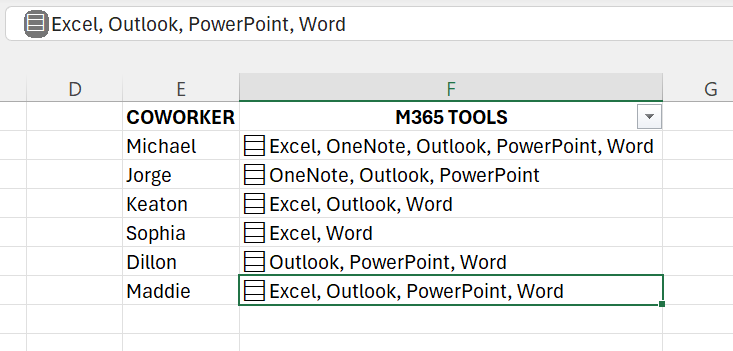
Imagine categorizing your co-workers, who each have expertise in using up to five M365 software tools: Excel, OneNote, Outlook, PowerPoint, and Word. Or they specialize in selling any number of categories of products.
To store this information on a spreadsheet, you could designate a column for each software tool or product category. This of course can take up a lot of columns on the spreadsheet, especially if you have additional columns containing more information about each person.
Instead, with an in-cell list, you can store all this information in one column. Excel will recognize each list item individually.
These in-cell lists eliminate the need for multiple columns.
Howard Wen / Foundry
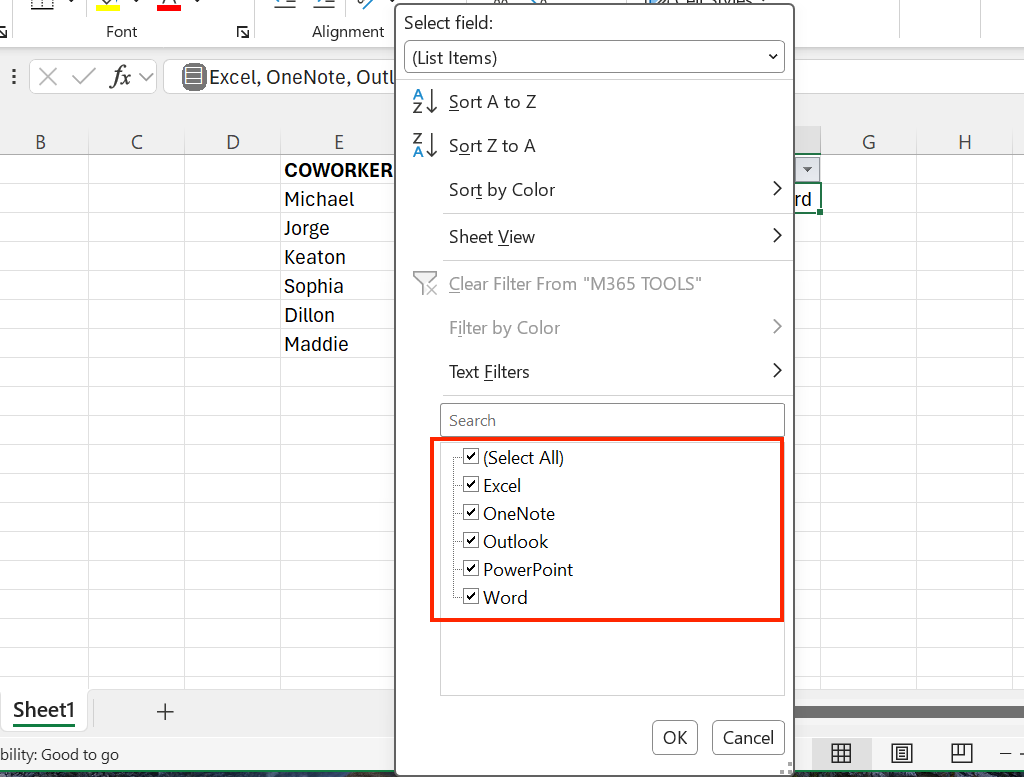
This allows you to filter for one or a combination of these items by clicking the drop-down arrow at the top of the column containing the in-cell list.
Because Excel recognizes each item in an in-cell list individually, you can filter the results by the individual items.
Howard Wen / Foundry
Survey responses contained
Say your co-workers or customers are filling out a survey where they rate questions on a numerical scale. Instead of allocating separate columns for each survey question per person, you can store all responses within a single designated cell per respondent. This helps keep the rest of the spreadsheet look cleaner, especially if you’ve designed it with other columns to store additional data about each person.
Mitigating #SPILL! errors
When using array-processing functions like TEXTSPLIT across an entire column, standard dynamic arrays attempt to spill output values sideways across multiple columns for every row simultaneously. If any blocking data exists in adjacent cells, Excel triggers a #SPILL! error.
The array in cell G1 is trying to spill into cell G2, which already has a value.
Howard Wen / Foundry
Instead, Excel can pack the split outputs inside each respective row’s cell as a nested array. This produces a single-column result that holds all detailed split values internally without spilling across adjacent grid cells or causing formula collisions.
The array is now contained in a single cell, eliminating the spill error.
Howard Wen / Foundry
How to insert and edit in-cell structures
You can create and interact with in-cell data structures using manual shortcuts or dynamic formulas:
List: Select a cell and press Ctrl + J to open the in-cell list editor, or navigate to Insert > List on the ribbon toolbar. Then type or paste items separated by commas or line breaks.
Array: You can create an array using curly braces {} and semicolons or commas. For example, ={1;2;3} creates a standard array that spills across cells. Wrapping it in a second set of braces as in ={{1;2;3}} keeps it contained in a single cell. Likewise, wrapping a formula like =TEXTSPLIT(B3,, “, “) in extra braces as in ={TEXTSPLIT(B3,, “, “)} will contain the entire resulting array inside a 1×1 container in the cell, suppressing spilling.
Nested Array: You can create nested arrays by enclosing multiple arrays within curly braces, such as ={{1,2,3};{4,5,6}}. This builds more complex data structures with multiple rows and columns.
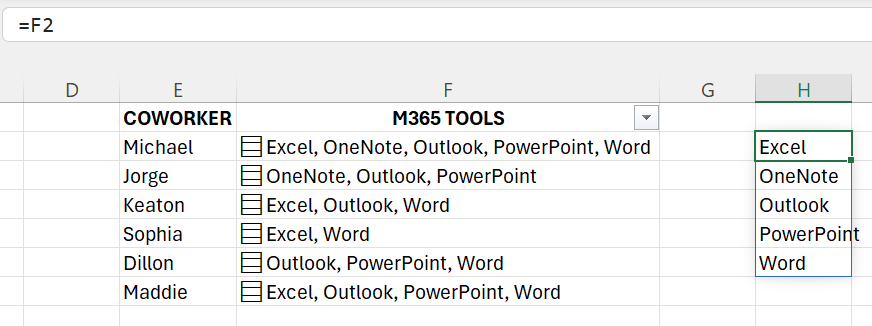
Unpacking and referencing: When standard formulas reference an in-cell structure directly (for example, =B6 where cell B6 contains a list or array), Excel spills the internal array into adjacent cells on the worksheet grid. To extract specific elements without spilling, use array manipulation functions like INDEX or field access operators.
Typing =F2 in cell H2 references all the individual items in cell F2.
Howard Wen / Foundry
Caveats, new functions, and tips
Things consider when using these new in-cell data structures:
Reduced visual transparency: Traditional spreadsheet grids display all data directly, which makes them efficient to analyze. Implementing these structures inside cells requires users to interact with them in order to view full details, which can slow auditing.
Performance, storage, and memory: Memory consumption of in-cell arrays is somewhat higher and calculation performance can be slower compared to storing single-value data.
Backward compatibility: A worksheet that contains these new in-cell structures will show formula errors when opened in older desktop, perpetual license, or other unsupported versions of Excel.
Collaboration: To prevent confusion, make sure anyone collaborating on a worksheet knows that you’ve implemented in-cell lists or arrays in it, especially if they are likely to encounter compatibility issues with their version of Excel.
Compatibility Version 3 and new functions: Compatibility Version 3 is required for most calculations involving nested arrays. (Set via Formulas > Calculation Options.) Additionally, four new functions have been added for array evaluation: FLATTEN unpacks nested arrays into grid rows/columns, and HAS, HASANY, and HASALL check whether specific values exist within an array.
Legacy function limitations: Traditional aggregation and lookup functions like SUMIF, COUNTIF, and VLOOKUP may not inspect or evaluate values stored inside multi-value cells without array-handling wrappers or modern replacement functions such as XLOOKUP or BYROW.
Finally, because these features are in preview, Microsoft warns that their behavior may change based on feedback from M365 Insiders before general release.
Microsoft has filed a patent application for a new AI technology that can alter what people say during live broadcasts. The technology is designed to automatically identify what is being said and can remove or replace words, as well as adjust the speaker’s mouth movements to match the edited audio, reports Futurism.
According to Microsoft, the technology could be used to translate live broadcasts into other languages, remove filler words, and correct slip-ups. It would also be possible to customize the system to individual viewers’ preferences and, for example, remove profanity, offensive language, or certain phrases.
Microsoft states that the technology could be used for lectures, award ceremonies, sporting events, and live TV programs, among other things. It is also possible to save the original recordings as documentation of what was actually said.
Since this is a patent application (spotted by patent-tracker Patentlyze), it is unclear when — or if — Microsoft will launch the technology.
Investors back Journify’s push into the US and Europe
Journify, the ad signal infrastructure company, today announced a $12 million Series A at four times its previous valuation. Al Mada Ventures led the round, co-led by returning investor Silicon Badia, with Shorooq and Bunat Ventures increasing their investment and Du Ventures and Oraseya Capital joining as new investors. The funding will take Journify into the US and Europe and expand the AI behind its platform.
Global ad spend will exceed $1 trillion in 2026, with algorithms expected to place three quarters by 2028, according to dentsu. These systems learn from the customer outcomes brands send back. Browser restrictions, broken tracking, and disconnected offline sales leave them with an incomplete picture of who buys.
Journify makes sure ad platforms such as Google, Meta, TikTok, Snap and Amazon Ads see the purchases, sign-ups and store sales a brand’s customers actually make. More than 100 businesses use Journify today, from fast-growing ecommerce brands to some of the region’s largest retailers, representing hundreds of millions of dollars in annual ad spend.
Customers include Jarir Bookstore, one of Saudi Arabia’s largest retailers, which increased its return on ad spend on Meta by 182%, and Saudi ecommerce brand Baytonia, which grew its return on ad spend on TikTok by 80% while cutting cost per purchase by 44%.
“AI is transforming advertising, but the intelligence behind it is only as good as the signals it receives,” said Taoufik El Jamali, Co-Founder and CEO of Journify. “Businesses know who buys, who comes back and what creates lasting customer value. Too little of that knowledge reaches the ad platforms driving their growth. Our vision is to close that gap, turning real customer outcomes into intelligence ad platforms can learn from. We’re building toward a future where advertising AI understands what makes a customer valuable to each business, not just what makes them click.”“As AI takes on a greater role in marketing, we believe the connection between reliable customer data and the decisions built on it will become increasingly valuable,” said Omar Laalej, Managing Director at Al Mada Ventures. “What interests us about Journify is its approach to building that connection from the data layer up: a privacy-first foundation that can evolve into intelligence and action. The founders’ understanding of that opportunity gives us confidence in their ability to build a platform that marketers can increasingly rely on, both to understand their customers and to act on that understanding.”Hossam Shafick, Partner at Silicon Badia, Seed Lead and returning investor, added, “Since our initial investment, Journify has grown its valuation by more than 4x, and its revenues more than 5x, validating both the strength of its technology and the team’s ability to execute at scale. That performance has deepened our conviction that Journify can become a global leader in ad signal infrastructure. We are proud to double down and co-lead this round as the company expands into the world’s largest advertising markets.”
Journify already uses AI to monitor every connection continuously, detect signal-quality issues and fix them. The new funding will grow those capabilities as Journify expands beyond the GCC. In the US alone, digital advertising revenue reached $294.6 billion in 2025, according to IAB and PwC.
“I’m excited to help Journify scale in the biggest ad market in the world,” said Ryan Burke, a newly appointed member of Journify’s board and three-time Chief Revenue Officer. “I’ve known Taoufik since our InVision days, and I’ve seen his product execution in action. Based on the success they’re already seeing in the Middle East, it’s not a question whether it works in the US, but how fast we can scale.”
About Journify
Journify builds ad signal infrastructure for performance marketers. Its privacy-first, real-time data layer helps brands improve the quality and reliability of the first-party signals used in advertising and measurement.
Journify connects data across web, mobile, offline sales, CRM, ecommerce platforms, backend systems and data warehouses. It validates and enriches conversion events and activates consented signals server-side across Google, Meta, TikTok, Snap, Amazon Ads and other platforms.
Founded in 2022 by Taoufik El Jamali, Amine Chouki and Omar Al Shoubaki, Journify is headquartered in San Francisco with offices in Dubai and Riyadh. Learn more at journify.io.
Journify has obtained a SOC 2 Type II report and is committed to GDPR compliance.
The results also showed something that threatens those same data center investments — a sea change in how enterprises are approaching AI. Inference costs, security, and data governance concerns may finally be dampening enthusiasm for cloud-based AI services.
Enterprises go local
Apple revealed several major enterprise clients who are turning to its products as solutions for local inference. The company told us that Gap Inc. is running AI loss-prevention models entirely on Mac minis to eliminate cloud token costs, while world-famous auction house Christie’s is using Mac Studio to run local pricing estimate models.
Apple’s wider enterprise wins matter too. It told analysts and investors that as well as purchasing 25,000 iPads for pilots and mechanics, American Airlines is deploying over 37,000 iPhone 17 devices to flight attendants for in-flight purchases with Tap-to-Pay. In education, it revealed a huge deal with the Department of Education in the Philippines, which will deploy 170,000 MacBook Neos to teachers and staff.
All these deployments help the company build up its mindshare, which should translate into future customer success and help it stay relevant in fast-changing times. But it’s really Apple’s pivot into AI that is tempting business users to make these purchases.
The hardware and the economics
It’s not trivial that the company’s M-series and A-series processors are highly performant. It matters that you can patch together four Macs to create a powerful on-premises AI system more than capable of handling even highly complex AI calculations.
“From Mac to iPhone to iPad, we are proud that our products are the best platforms in the industry for AI for both first-party and third-party applications, and we’re excited about the opportunities that creates,” CEO John Ternus said.
Look at it this way: If a Mac costs a few thousand bucks but can deliver the equivalent of tens of thousands of dollars of inferencing tokens during its lifespan, then it’s a bargain, not a cost. What Apple confirmed is that at least some enterprise purchasers are paying attention to this.
Monetizing both ends
Of course, the other side to AI is the need to build it, so it also matters that when it comes to the deployment of its AI APIs from within applications created by third-party developers, Apple is providing a lot more clarity. It is giving developers building apps with under two million downloads direct access to its powerful server-side LLMs completely free of token costs, it said.
It has also introduced a three-tiered system for developers needing to use its Private Cloud Compute infrastructure. The company is also putting a little more flesh on its plans to charge end user customers for heavy access to its server-side queries through iCloud+.
What that means is that while delivering hardware capable of running on-device AI, Apple is also building an end user market for AI inferencing the Apple way, and equipping developers with the tools they need to attract end users to make use of its inferencing capacity in the first place. It is monetizing both ends of the story, while also enabling all parties to build success.
That’s not just about building and maintaining AI relevance for Apple. It’s also about building up new business opportunity. Ternus pretty much confirmed this, telling analysts during the Q4 financial call, “in the beginning, iCloud tiers were largely about storage, but we’ve been adding more capabilities and features to it.”
Siri agentic AI
Ternus also talked up Siri AI. “With Siri AI, we really have the kind of the Siri that we always wanted,” he said. “It’s primarily request-based today, but as we talked about at WWDC, it’s built on a modern orchestrator-driven architecture that gives us real room to expand its capabilities over time. As far as agentic capabilities, we think these are promising tools for users. We just want to make sure that users are aware of what they’re giving access to.”
Now please subscribe to my daily, human-curated Apple-related news headline feed at The Core, or follow me on BlueSky, LinkedIn, or Mastodon.
Google’s first experimental data center satellite as part of the Suncatcher project is now operational. The satellite was launched in October, and after several weeks of testing, it has begun communicating with Earth.
On board are four of Google’s AI chips, Tensor Processing Units (TPUs), which are used to run AI models. The satellite can generate up to one kilowatt of electricity, which is enough to keep an AI chip active for about 20 minutes, TechCrunch reports.
In the first test, the AI model Gemma 4 from Google DeepMind was tasked with writing a haiku about life in space. The satellite has also reported on conditions in its orbit.
Google will now test how the chip handles temperatures and radiation in space. If the tests go well, Google plans to launch two more satellites in 2027. The long-term goal is to create a network of satellites capable of performing advanced AI computations.
“Zoom Got It Done” is the tagline for the company’s new Zoom Ahead campaign, with the focus being how Zoom’s AI-first capabilities take conversations to completion. This one features Kate McKinnon and builds on their “I Use Zoom!” spot with Bowen Yang that kicked off this consumer-friendly campaign late last year.
For the record, I’m not a fan of their comedic approach here, but the ads hold your attention, and it’s great seeing SNL favorites playing over-the-top corporate tropes. Am just not so sure the messaging gets it done.
Wearing my Marketing hat, I’ll note that B2C marketing campaigns from tech companies are really hard to do well, especially when the audience is not the economic buyer. The Zoom ads are aimed at workers – end users – while the buyers – IT and CEOs – are caricatured as the worker’s worst nightmare.
This is a topic I’d love to explore further, but I need to stay on script and tie their Got It Done tagline to the main topic, namely my review of the recent Zoomtopia event. While the event is mainly for customers and partners, I was part of the small cohort of analysts who attended as well.
Since Zoomtopia caters primarily to those economic buyers, it wasn’t surprising that the Got It Done message was the opening theme for the event, capped by a local choir that went full gospel to celebrate the uplifting power of AI to get work done and relieve us of so many tedious tasks that undermine our productivity. Am not sure if everyday workers get that euphoria when using Zoom, but that’s the aspiration – nothing wrong with that, amen.
Choir singing the praises of ‘Got It Done’
Jon Arnold
More importantly, I think Zoom is trying to communicate how AI is transforming their platform into something bigger than video calls and meetings. On that count, I think Zoomtopia succeeded, perhaps in ways that most people don’t realize. In that context (pun intended), I’ve distilled my takeaways into three big ideas.
1. Unified Context Layer
This was the big story at the event, so let’s start there.
I’m never the first analyst to post about industry events, but I’m going with flow here, as this was the lede most of my peers went with for their write-ups. What I haven’t seen so far, though, is connecting the dots to the last time most of our group was at a Zoom event. That would be Perspectives, their analyst-only event, and back in April we got the deep dive on their go-to-market vision, “from conversation to completion”.
The overall reception was positive, and it marked a new chapter in Zoom’s evolution to align more closely with AI’s transformative potential and get beyond being a meetings platform. Building on the premise that all interactions start with some form of conversation, AI does all the hard work of taking those conversational inputs, identifying next-best actions and closing with intelligent task completion.
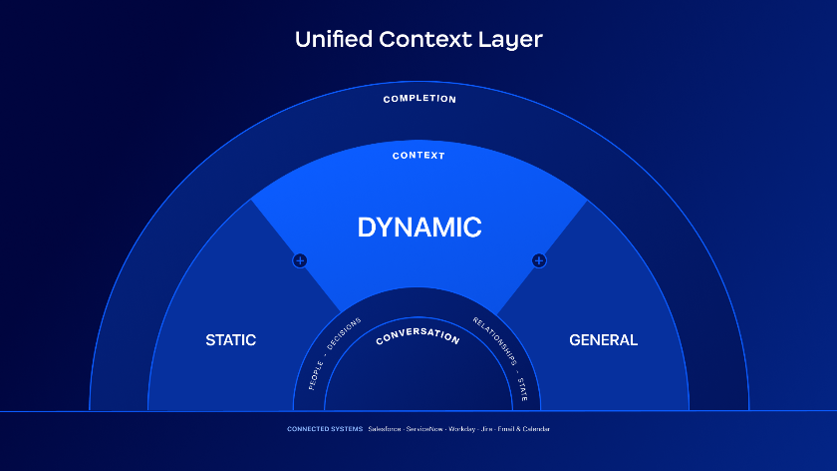
At Zoomtopia 2026, the big story was Unified Context Layer, which takes that vision one step further. The missing piece was context, where AI is now better able to understand intent, sentiment, urgency, etc., and connect all that to memory across the entire lifecycle of an interaction. Humans simply cannot do this at scale and in real time, so this is where the AI story becomes next level.
On a more basic level, this is no longer about human-to-human communication, the foundation upon which all UCaaS platforms are built. Communication remains the cornerstone for how work gets done, but now it’s just as much about P2P as it is about P2A, A2P, A2A and B2B. Translation – people need to communicate among themselves, but increasingly it’s also agent-to-agent, bot-to-bot and everything in between. Getting context right is more challenging when AI agents are involved, and that point will tie into my second big theme.
Zoom’s new Unified Context Layer
Zoom
To make all this work, the vision needs to be broader, so now it’s “conversation to context to completion”, and that’s what the Unified Context Layer brings to the Zoom platform. You can read more about it here, and I’ll just add some key points to show why the context piece is so important.
This new layer takes conversations to completion “by linking conversation history with relevant documents and data”. Nothing really new here – other vendors are doing similar things in an effort to become the central hub through which all workflows go. What is new is how these capabilities are framed to support both actual workers – humans – and AI agents. Not only are these agents doing work and completing tasks on behalf of human workers, but as they become more “agentic”, they’ll be doing these things independently. Definitely not something the founding fathers of UCaaS had in mind.
To become an enterprise-wide “system of action”, this new layer works across all of Zoom as well as third-party applications. This is necessary for agents to pull context from everywhere and every interaction – humans cannot do this on their own, and when all the integrations are in place, data no longer stays in siloes. Their update notes that with MCP connectors and APIs, Zoom can search across over 40 third-party applications, such as ServiceNow, Workday and MSFT OneDrive. Drawing from such a wide range of sources, workers and the workplace become more productive, and makes Zoom Got It Done more than a marketing slogan.
It’s worth noting how Zoom identifies two forms of data to understand context at a deeper level– dynamic and static. Dynamic would be human-based, real-time interactions in the workplace – calls, chats, meetings, etc. Since all of these are in digital form now, AI can process them as conversational intelligence inputs to drive task completion. Static data represents what’s on record and documented – also in digital form, so it can easily be mined by AI. Together, this presents a more complete picture for automating workflows.
The emphasis on AI is hard to overstate, as agentic search capabilities serve to get more complete information – and context – to surface answers faster, so tasks can be completed in less time. For example, one of the new features, My Notes, turns meetings into workflows automatically – something that human workers would have spent a lot of time doing manually. Not only that, but Zoom now has prebuilt templates for specific functions, namely sales, marketing and IT. These workflows can now be created directly in My Notes, without human effort to do this with a workflow builder.
Another sign of where this is going is the distinction between general and specialized AI agents. Why stop at each worker having one AI agent? Never mind the workers – ZoomMate’s AI Agent Teams now can have a general AI agent manage teams of specialized AI agents, further accelerating the time to task completion. Each agent can be assigned a specific task, so you can now have subagents working in parallel to support the overall task. Humans may think they can multitask effectively – it’s a myth – but this approach is next-level. AI magic aside, it’s important to note that all of this task automation is subject to human review, so it’s too early to think about using this to replace human workers. Sidebar – this is exactly what Kate McKinnon was getting so worked up about in the ad – let’s just call it misplaced Zoom Rage, where Zoom gets it done in ways her workers simply cannot do.
Zoom Ahead campaign featuring actress and comedian Kate McKinnon.
Zoom
2. AI update – aka, the Anthropic effect
I may be going out on a limb here, but Anthropic was barely mentioned at Zoomtopia, and it seems to me this is driving a lot of Zoom’s evolution, perhaps more than we realize.
If you don’t know, Zoom took a small stake in the company in 2025, and has since added to its position. Financially, it’s been a huge windfall for Zoom, but that’s really beside the point. Zoom and all the other cloud players in their orbit cannot afford to not be close to all the AI players in Anthropic’s orbit – that’s just how Big Tech works.
For Zoom in particular, this is about helping transform the company into an AI-first platform, and what better way to do that than by leveraging their small stake with one of the top three players creating the AI economy? In that context – there’s that word again – their “system of action” vision makes more sense. Yes, human workers will use these tools to take conversations to completion, but longer term, this system will be about AI taking the action.
I’ll call this the “Anthropic Effect” because Claude is now deeply embedded in everything Zoom touches – collaboration and meetings with UCaaS, customer interactions with CCaaS and more recently, ZRA for sales automation – Zoom Revenue Accelerator. All of these data flows cross Zoom’s platform, and this is where AI agents need to be to tap into the data that takes conversations to completion.
Memories can be short, but AI Companion was a cornerstone for how workers engaged with the Zoom platform. Yes, all platforms evolve, and AI Companion was quietly retired, replaced – augmented, really – by ZoomMate. AI Companion hasn’t really gone away; it’s just been subsumed by something bigger and more agentic. Perhaps to make room for Claude, or at least get hooks into what their system of action is trying to do.
On a technology level, this is perfectly reasonable. Zoom has actually been at the forefront of innovation in our space, and they have succeeded at just about everything they’ve taken on internally. However, I think it’s fair to say that even Zoom cannot replicate what Anthropic, OpenAI, Meta, et al have been doing with AI.
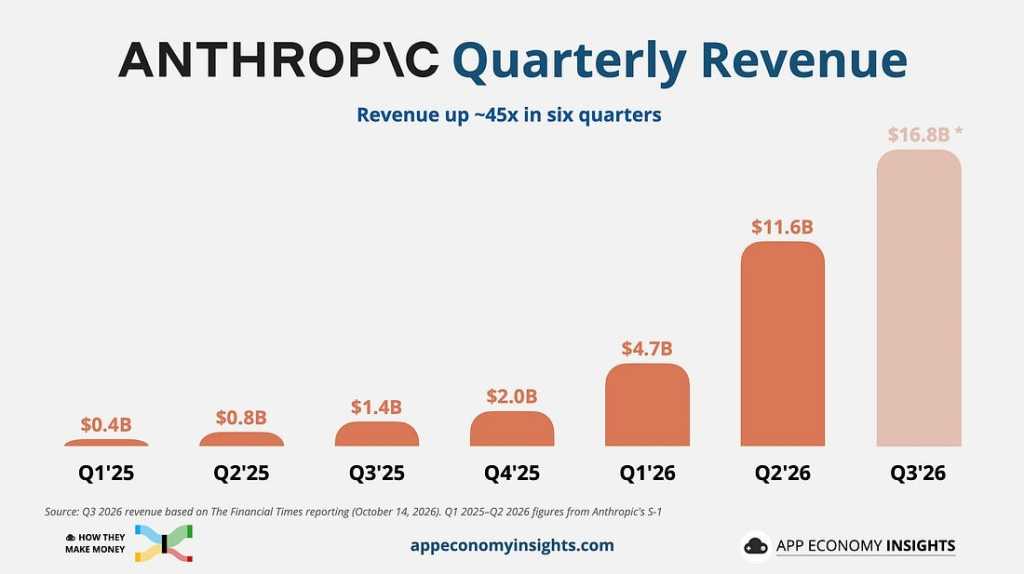
Depending on how you look at things, I think the business rationale for riding with Anthropic is even stronger. Consider the chart below, from App Economy Insights. They publish a newsletter that breaks down how tech companies make money, and Anthropic’s revenues are up 45-fold over the last six quarters.
Of greater interest, as their newsletter reports, Anthropic has almost 12,000 enterprise customers spending $100k+ annually – exactly the kind of customers Zoom covets. To whatever extent these customers rely on Claude, this sure dovetails nicely with Zoom’s value proposition. Going from conversation to context to completion at scale requires a lot of AI horsepower, and the more tightly Claude integrates with ZoomMate, the more successful both companies will be.
Of course, Claude could fall out of favor, and all of this will be moot, and every other cloud platform player is partnering with Anthropic, so nothing is for sure. That aside, though, this looks like a good way for Zoom to build a moat they can defend, especially as AI gains trust and is used to automate more workflows and tasks. That makes for a good growth story to become an AI-first system of action that truly takes them out of the UCaaS milieu that is going sideways at best.
Anthropic’s revenue growth
App Economy Insights
3. New management controls for AI
Finally, I wanted to note this focus, as it says a lot about how Zoom wants to be positioned, and how they want to be perceived by enterprise IT leaders.
This is a core piece of the story in terms of Zoom becoming an AI-first platform and truly evolving beyond video calls, meetings and UCaaS. Their new management controls are coming soon, but this signals where and how Zoom intends to play.
With Anthropic now in their DNA, these are the capabilities Zoom will need to become a centralized system of action for enterprises. Not siloed for workplace productivity or in the contact center, but to be the hub for all communications flows.
Again, this is no longer a UCaaS story – one could argue that Teams holds court there, along with other leading UCaaS players – and Zoom is looking beyond this and wants to be positioned on a higher, more strategic plane.
In this – yes, context – the Zoomtopia updates were about the things that IT really cares about when managing these do-it-all platforms. This is about enterprise-wide policy and governance, not updating permissions to edit transcripts, configuring new endpoints for meeting rooms or updating CRM integrations.
These are the bigger picture controls that IT needs to be comfortable and confident that Zoom can really be this system of action for the entire organization. To illustrate, here are three examples for how Zoom intends to earn their trust.
AI guardrails. Allows IT to customize account-level rules for what AI agents can use or generate. These rules can be highly specific for a team, job function, line of business, etc., but always subject to human review (HITL) to keep AI in check.
Deepfake risk detection. Not a new idea, but as agentic AI proliferates, and as personal AI agents start clogging your digital channels, the threats become very real. When synthetic data is paired with bad actors, deepfakes can find their way into workflows and customer interactions, making this an enterprise-wide challenge to address, and not just limited to the contact center.
Compliance Manager. With AI-driven outputs turning up everywhere, there’s a need for centralized visibility to remain compliant. Different platforms track communications in different ways, and when it comes to archiving, data retention, search, retrieval, etc., Zoom will soon be adding more compliance tools to support IT at an organizational level.
Conclusion
Zoom executive Q&A with analysts
Jon Arnold
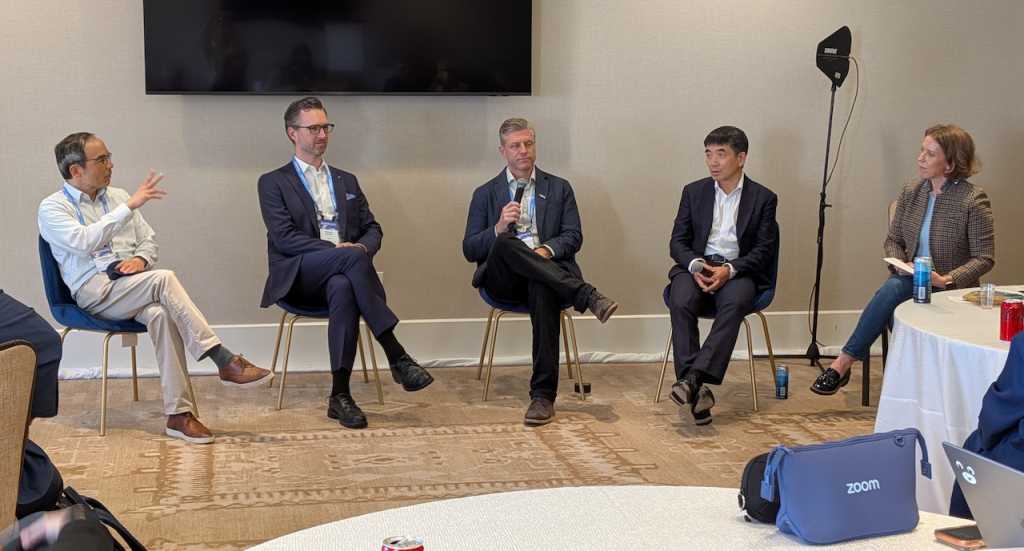
During the executive Q&A with analysts, Eric Yuan was asked where Zoom would like to be in the future, and I think his three-word response sums up everything I’ve been trying say here. He envisions Zoom as a “work operating system”. Not a UCaaS platform, not a meetings app, but something bigger, and more of a hub that enterprises can organize workflows around.
Conversations to context to completion is the path for getting there, but this puts them up against hyperscalers who are all-in with AI, and not terribly interested in the communications layer that got Zoom this far in relatively little time.
Is Zoom ready for this? Will their customers be ready to view Zoom this way? With much of this data residing with third-party apps, who will ultimately control all the data needed to be a work operating system? What role will the hyperscalers and AI majors play? How will their working relationship with Anthropic evolve to support this vision?
These are just a few leading questions to consider following Zoomtopia. Prediction markets aside, I’m more inclined to bet on Zoom than against Zoom, as their track record for making moves has been pretty good.
The management team has both vision and confidence – they know what they have, where they’ve been and where they need to be going – and I’ll try to answer those what’s-next questions as things progress. As with everything AI, they will progress, and Zoom just might get it done; in which case Kate McKinnon’s Zoom Rage will turn up to 11. Can’t wait to see that!
It’s early days for AI-assisted work, and sentiments are mixed about its benefits: Does AI actually bring value and save employees time, or does it bog them down and add unnecessary activities?
Data from ActivTrak seems to vacillate between those two potential realities: The latest research from the productivity tracking software company says employees who use AI most heavily are working up to 90 minutes longer each day, yet its previous research, published earlier this year, found that they are actually working less.
The discrepancy may be due in part to the timespan and sample sizes of the data collection for the two reports, but it indicates that enterprises should still be wary of vendor claims about AI-related productivity gains. Measuring them remains incredibly difficult.
AI use compared
ActivTrak’s current findings are based on behavioral work data gathered from 9,140 knowledge workers across 467 enterprises over a five month period (April 1 to September 25, 2026). This sample is much smaller than that of its previous report based on 443 million hours of work performed by 163,638 employees across 1,111 organizations over a three year period (January 1, 2023 through December 31, 2025).
According to the latest findings, heavy AI users are working between 8.42 and 9.08 hours per day, compared to 7.58 hours for those not using AI. This contradicts ActivTrak’s previous finding that average workdays had decreased by roughly 9 minutes (a 2% decline) thanks to AI.
On the productivity front, heavy AI users have 22% shorter focus sessions than light users (37.8 minutes versus 48.2), suggesting their work is more fragmented due to AI use; further, they switch apps 15% more frequently.
“Over time, those interruptions add friction to high-value work that requires concentration, critical thinking, and sustained attention,” Sarah Altemus, manager of the ActivTrak Productivity Lab, said in a blog post describing the latest findings.
ActivTrak’s previous report had found that over the period of the earlier study, focus efficiency, the percentage of work time spent in focused, uninterrupted activity, fell to a three year low of 60% with AI use, and average focused session time in 2025 declined by 9% from 2023. However, that same report found that daily productive time increased by 19 minutes, or 5%, to 6 hours and 36 minutes, with AI in the workplace. Furthermore, productive sessions grew by 13%.
The company’s latest report also tracked the productivity differences between users of tools with embedded AI and users of web-based AI tools. Those using embedded AI switched apps 0.6 times an hour, while those using AI on the web switched between 1.7 and 4.2 times per hour. That’s up to 4x more switching than by employees who don’t make use of AI at all, which creates what ActivTrak describes as a “swivel-chair tax” — the additional effort spent by employees due to the movement between apps.
Similarly, in its previous report, ActivTrak had found that this multitasking rose 12%, or 10-plus minutes, with AI.
Interestingly, according to the latest research, light users spend more active work time in core job-specific apps (81.4% compared to 78%). “In other words, more frequent AI engagement doesn’t necessarily translate into more focused work,” Altemus pointed out.
The larger issue is the way organizations manage the additional capacity that AI may create, Altemus noted. “When employees complete tasks faster, managers may assume they have room for more responsibilities,” she said. Without clear workload boundaries, time savings may be redirected into additional work that can be taxing.
The numbers often don’t tell the full story
ActivTrak has a useful view of how work moves across applications, noted Sanchit Vir Gogia, chief analyst at Greyhound Research, but he also pointed out that it sells the capability that produces these measurements.
Recorded use depends on what the instrumentation can detect, he observed. For example, an employee can use AI at work and still appear in the non-user group, and work on an unmanaged personal device sits outside the measured estate. In addition, an API or a background agent can finish work without producing a desktop session, and passive screen time, an offline meeting captured through a calendar, and paid hours are also different measures. Furthermore, switching apps is easier to observe than switching attention within an application.
Ultimately, he noted, those judging the value of AI need to establish what happened after the first task became faster. “An improvement per paid hour can conceal effort left off the timesheet,” said Gogia. “The [enterprise] board should be able to say whose day improved and whose work made that improvement possible.”