Author: Security – Computerworld

Mistral CEO: AI could replace more than half of companies’ software

>More than half of the software purchased by companies today could eventually be replaced by AI, Mistral AI CEO Arthur Mensch said in an interview with CNBC. The statement comes at a time when software stocks are under pressure due to concerns that AI will undermine SaaS business models.

According to Mensch, a major shift is already happening, with companies increasingly choosing to build their own AI-based applications instead of purchasing traditional SaaS services. He estimated that more than 50% of today’s SaaS spending could shift to AI solutions.

“We are also seeing with our customers that we can create fully customized applications within a few days to run a workflow — for example, a purchasing workflow or supply chain workflows — in a way that, five years ago, would have required a vertical SaaS solution,” Mensch said. “This platform change is a great opportunity for us, as we now have more than 100 corporate customers who are also turning to us with a desire to perhaps change and modernize their IT systems — for example, getting rid of things they bought 20 years ago and which are starting to become quite expensive.”

Even so, Mensch believes that basic business systems that store and structure company data will remain in place and become an important basis for AI applications.

Mistral AI recently purchased Koyeb, a Paris-based cloud startup.

5 reasons the enterprise data center will never die

In 2019, Gartner analyst Dave Cappuccio issued the headline-grabbing prediction that by 2025, 80% of enterprises will have shut down their traditional data centers and moved everything to the cloud.

A lot has gone down since 2019, and Gartner’s latest guidance on the topic comes from John-David Lovelock, vice president analyst,who says, “It’s not as though the data center is going away. The enterprise data center is here to stay. There’s still enough spending by enterprises on servers, licensed software, and the skill sets they need to maintain and operate the environment that currently exists.”

Continue reading on CIO.com

Apple to kill app support for Intel-based Macs next year

IT admins and decision-makers take note: Apple has confirmed it will terminate Rosetta support for Intel-based apps starting with macOS 28 in 2027. That means any remaining Intel apps your company relies on must be replaced to maintain business continuity and security. It’s also important to note that macOS 26 will be the last OS upgrade to support any existing Intel-based Macs, so both Intel-based Macs and apps should now be replaced to avoid problems down the road.

Rosetta has enabled Apple Silicon Macs to run Intel-based apps during the transition to Apple’s own chips. This was useful when the first M-series Macs appeared, as it enabled us to continue running most Intel-based apps, giving developers time to create updated versions — something most good developers have done, at least in the retail section of the app economy.

However, some businesses might still depend on proprietary software that hasn’t been updated. The good news is there are still 12 to 18 months to revise or replace these apps and upgrade any remaining Intel-based Macs. Apple is making a couple of exceptions. It will continue to provide security updates for some Mac models for another two years after support ends; and Rosetta functionality will be available only for certain older, unmaintained games that rely on Intel-based frameworks with macOS 28. 

A long time coming

Apple seems to have been quite reasonable in its support plans. The first Apple Silicon Macs appeared six years ago in late 2020, which means the company continued to support Intel Macs for six more years. When it comes to application support, Apple’s move means developers will have enjoyed seven years during which they could have made the transition. This was all perfectly predictable and the company has made every attempt to warn developers and customers of its intentions.

The number of affected Macs and applications is likely to be small, as Apple Silicon Macs are selling in vast quantities. Mac market share continues to increase and Macs now dominate the AI PC market, with perhaps a 54% share of all AI-capable computers.

The urgent and visible drive to Apple Silicon has not escaped the attention of developers, most of whom have now made the transition. Still, some edge cases remain; those users should take steps now to protect themselves as the support windows close.

So, are you running any Intel apps?

Are you concerned that you or your company may be affected by this switch? Rather than checking each one individually, the easiest way to identify any Intel-based apps running on your Mac is as follows:

  • Open System Information (Option+Apple Menu > System Information).
  • Select Applications under Software.
  • Explore the Kind column to identify any apps marked as being Intel. 
  • Apps marked as Apple Silicon or Universal will continue to work fine — it’s only the Intel apps that need to be replaced.

If you manage a fleet of devices using Mobile Device Management (MDM) software such as Jamf Pro, you will use commands such as mdfind, or third-party tools such as those from iMazing to identify any apps that need replacing. 

Time to hit the switch

If we’re honest, Apple’s decision to force the final few customers who have not yet upgraded to Apple Silicon is a good one. Apple’s newest Macs have been universally praised for their price, performance, resilience, computational power, and more. They perform significantly better than the Intel Macs they replaced, and the next-generation M5 Macs now coming on stream offer ample performance and productivity benefits.

While it might be different for proprietary applications, most commercial apps that haven’t yet been updated to work natively on Apple Silicon probably never will be, so it makes complete sense to migrate to other solutions. Decision makers should also use the termination of support for Intel as an argument to secure additional budget to have those pesky proprietary apps updated.

With just months to go before Apple completely abandons Intel support, there is no time left for further prevarication. It is time to invest in Apple Silicon.

You can follow me on social media! Join me on BlueSky,  LinkedIn, and Mastodon.

Mistral AI deepens compute ambitions with Koyeb acquisition

Mistral AI has acquired Paris-based cloud startup Koyeb, marking the model-maker’s first acquisition and entry into the enterprise infrastructure market.

This suggests a strategic shift for the French company, which has built its reputation on frontier models but is now investing heavily in compute capabilities and expanded deployment options.

The acquisition folds Koyeb’s serverless deployment platform into Mistral Compute, the company’s AI cloud offering launched last year, as Mistral shapes up to be a sovereign European alternative for enterprises running AI workloads at scale. Mistral has been betting on its “open weight” large language models as a point of differentiation. In a recent interview with Bloomberg, Mistral CEO Arthur Mensch said Europe is betting “actively and heavily” on open source.

Mistral recently pledged to invest 1.2 billion euros in AI data center infrastructure in Sweden, underscoring its broader push into compute and digital infrastructure.

In a LinkedIn post, the company said the move “strengthens our Compute capabilities and accelerates our mission to build a full-stack AI champion.”

The move also signals a wider market trend of model providers racing to control more of the stack, from infrastructure and inference to deployment and optimization, to lock in enterprise customers and capture higher margins.

For enterprise IT leaders, the question is whether this marks the emergence of a viable alternative to US cloud giants for AI workloads, or simply a tighter vertical integration play aimed at improving margins and performance.

Full-stack AI push

Analysts say the acquisition reflects a deliberate shift toward vertical integration, with Mistral seeking greater control over key layers of the AI stack, from infrastructure and middleware to models. That positioning brings the company closer to what some of them describe as an “AI hyperscaler,” though with a narrower focus.

“Mistral gets a step-up in its progress toward full-stack capabilities,” said Prabhu Ram, VP of the industry research group at Cybermedia Research. “The Koyeb acquisition bolsters Mistral Compute, enabling better on-premises deployments, GPU optimization, and AI inference scaling. Koyeb elevates Mistral’s hybrid support, appealing to regulated US and European enterprises.”

For enterprise buyers, hybrid and on-premises flexibility is increasingly important, particularly in regulated sectors where data residency and latency requirements limit full reliance on public cloud providers.

Still, analysts caution that Mistral remains more specialized than general-purpose cloud providers such as Microsoft, Google, or Amazon Web Services. Its infrastructure footprint and capital expenditure profile are significantly smaller, shaping how it competes.

“Mistral AI’s modest CAPEX compared with the big AI hyperscalers makes Koyeb’s acquisition important, as it adds the capability to offer more efficient and cost-effective inference scaling for enterprises focused on specialized AI tasks,” said Neil Shah, VP for research at Counterpoint Research. “Whether Mistral AI can expand this capability to compete with general-purpose AI inference from hyperscale providers across enterprise and consumer markets seems unlikely at this point.”

Shah added that Mistral’s European roots position it strongly in sovereign AI deployments for enterprises and public sector organizations, where serverless architecture and localized control can be differentiators.

At the same time, structural challenges also remain. Ram noted that ecosystem maturity, GPU access, execution depth, and cost efficiency are still areas where Mistral trails larger hyperscalers. For CIOs evaluating long-term AI infrastructure bets, those factors may weigh as heavily as model performance.

Your instant Android annoyance eliminator

Oh, hello. Did you call for an exterminator — one that’s ready and raring to help swat away unwanted virtual pests of the Android variety?

Look, Android’s absolutely overflowing with options to take control of your notifications and make ’em work better for you. But no matter how many tools we’ve got at our disposal, it sometimes seems like annoying alerts still manage to make their way through and disrupt our days. (Don’tcha just love overly aggressive app noise?!)

Today, I want to introduce you to a smart new Android add-on I just recently encountered that can give you even more nuanced and easily achieved control. It’s a simple app that does one thing and one thing only. And Goog almighty, does it ever do it well.

So grab the nearest mask and metaphorical can of bug spray: It’s time to eliminate your Android notification annoyances once and for all.

[Don’t stop here: Come check out my free Android Intelligence newsletter for three new things to try in your inbox every Friday — and my Android Notification Power-Pack as a special welcome bonus!]

Android notification pest control

All right — first things first: You know about Android notification channels, right?

Notification channels are a feature that first came into Android way back in 2017’s Android 8 (Oreo) era, many Android versions ago. Certain device-makers (cough, cough, Samsung) for some reason still insist on disabling it by default and making you go out of your way to find and activate it — but it’s there and available, even so.

And once you figure out how to put those notification channels to use, you can opt in or out of specific types of notifications from an app — or just change how different types of alerts demand your attention — without having to flip any all-or-nothing alert-affecting switches. It’s an incredibly powerful way to stop certain categories of notifications from annoying you while still allowing the notifications you actually want to get through as they arrive.

That being said, notification channels aren’t always enough. Sometimes, apps don’t provide particularly nuanced channels for all the different types of alerts they create — and sometimes, you might need to narrow things down even further than a channel allows in order to effectively prevent certain notifications from buggin’ ya while leaving others from the same category alone.

That’s precisely where a new and completely free tool called DoNotNotify comes into play. DoNotNotify lets you look at your recent notification history and use it to create quick ‘n’ simple rules that block specific sorts of unwanted notifications from ever interrupting you again.

So, for instance:

  • You might tell DoNotNotify that you never want to see another notification that says “Upload finished” again.
  • Or maybe you’d ask it to keep alerts with the phrase “USB accessory connected” out of your hair henceforth.
  • Or perhaps you want to go a bit broader and put the kibosh on any notifications from (ahem) certain streaming apps that include words like “discount,” “sale,” “new release,” or “recommended.”

You get the idea. The sky’s the limit, and the best way to get going and figure out what sorts of notification nuisances you want to exterminate is simply to fire up DoNotNotify and see what it finds.

Time to start spraying

I’m tellin’ ya: There really isn’t much to this.

First, go grab DoNotNotify from the Play Store, if you haven’t already. It’s free, without any asterisks or limitations — just an optional mechanism to donate to its developer, if you’re ever so inspired — and it should run without issue on any reasonably recent device.

Then:

  • Open the app up and follow the prompt to grant it access to your system notifications.
    • An app like this obviously can’t function without being able to read and manage your notifications, so this level of access is perfectly sensible for the purpose. It’s also worth noting that the app doesn’t request any permissions whatsoever beyond that — including even access to the internet — so it couldn’t possibly share your data with anyone else, even if it wanted to. (Its developer is also emphatic about the fact that the app processes everything locally and offline, doesn’t collect or share any information, and doesn’t use any sort of tracking technology.)

Now, if you can muster up the patience, let the thing sit for a few hours or even a couple days so it can build up a decent history of the types of notifications you tend to receive. That’ll make it much easier to first figure out what rules you need and then to actually create ’em.

Once some time has passed — and a variety of different types of notifications have come in to your device — go back into DoNotNotify, and:

  • Tap the “History” tab at the top.
  • Look through your recent notifications, and find one that exemplifies a type of alert you want to avoid receiving in the future. (You may have to tap the name of an app in the list to expand it and see all the individuals notifications within.)
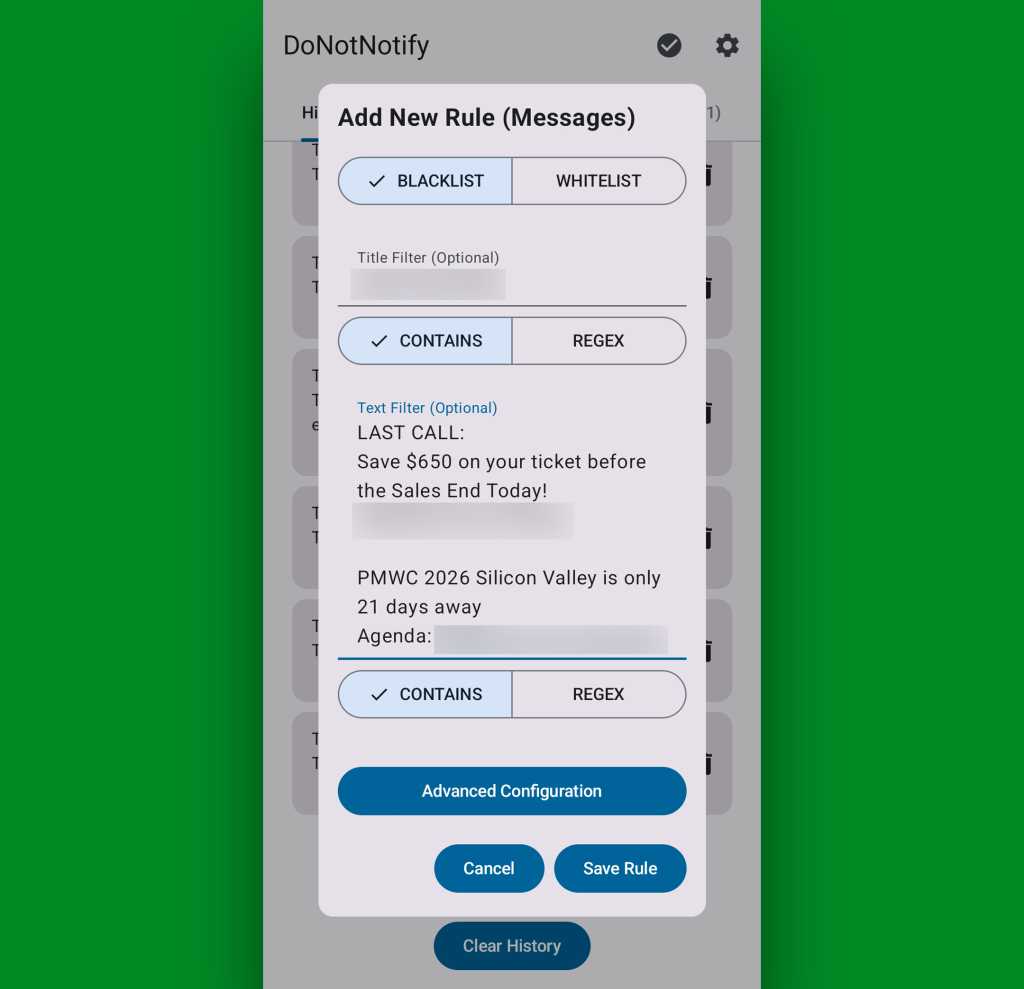
  • Tap the notification in question, then tap “Create Rule” and consider the fields you see.
Android notification blocking — DoNotNotify: Setup
DoNotNotify has just two main fields, for a notification’s title and its text.

JR Raphael, Foundry

  • For most people and purposes, you’ll want to leave the buttons exactly as they are and just focus on the “Title Filter” and “Text Filter” fields.
    • “Title Filter” means any notification that has the listed word or words anywhere within its title — as in, the bolded text at its top — won’t ever be shown again.
    • “Text Filter,” as you may have guessed, means any notification with the listed word or words anywhere within its main contents, regardless of title, won’t be shown.

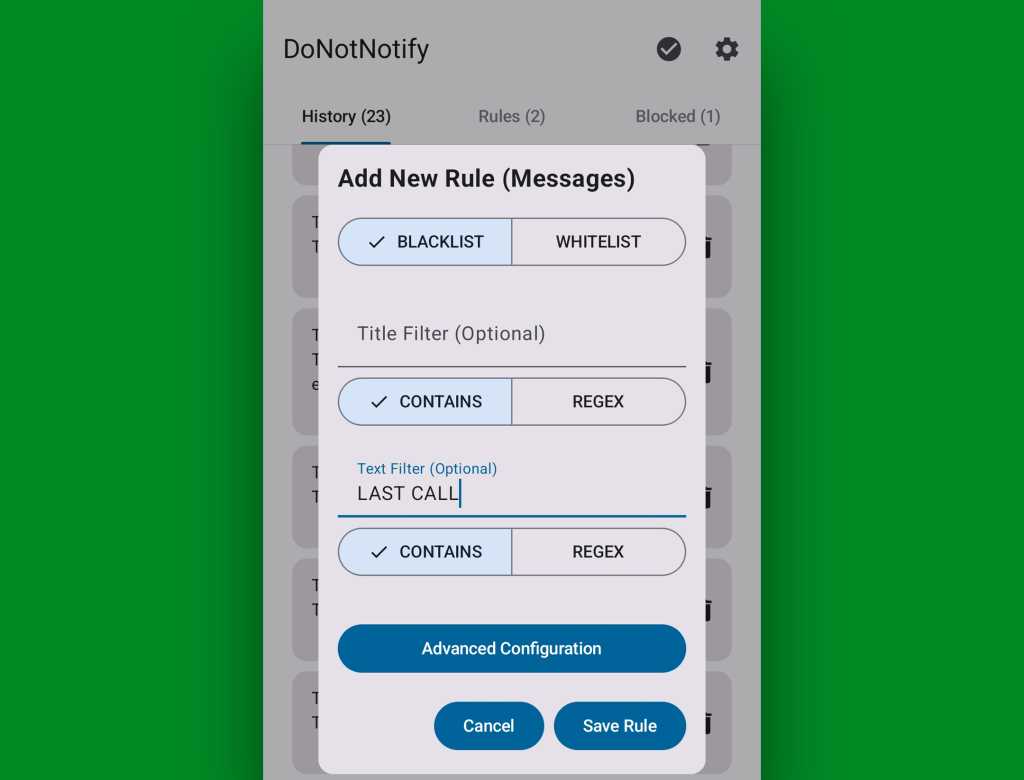
By default, DoNotNotify will simply pull over the complete title and text from the notification you used as a starting point. But you can — and may well want to — edit and adjust it to make it less narrow.

Android notification blocking — DoNotNotify: Setup (2)
Making the “Title” and “Text” fields slightly less narrow can make a rule much more effective for the future.

JR Raphael, Foundry

When you’ve got everything how you want it, tap “Save Rule” — and that’s it: The next time you receive a notification that meets the conditions you specified, it won’t beep, buzz, or appear in any way on your screen. DoNotNotify will instantly and automatically muffle it, and the only way you’ll know it even appeared is to look in DoNotNotify’s “Blocked” tab to see it.

Android notification blocking — DoNotNotify: Blocked list
Any blocked notifications are always visible within DoNotNotify’s “Blocked” tab.

JR Raphael, Foundry

Now, fair warning: This will work exactly as described above — and it could create problems if you aren’t careful. If, for instance, you ask DoNotNotify to block all notifications from Google Messages that contain the word “the,” it will do it. And that means any notification you receive from Messages that has “the” anywhere within its text won’t notify you, and you’ll never notice its arrival.

It’s a powerful tool, in other words, and it’s up to you to wield that power wisely and think through the complete consequences of any rules you create. The good news, of course, is that it’s quite easy to revisit your rules, see exactly what messages DoNotNotify is blocking, and adjust or remove things as needed anytime.

Last but not least, one point worth making: If you’ve read my musings for long and you find yourself thinking, “Huh, this sounds an awful lot like the notification-enhancing app we were talking about last week” — by golly, Gertrude, you’re right.

That app, BuzzKill, is a much broader and more versatile notification filtering power-tool. While it can accomplish feats similar to what we’ve just gone over, if that’s all you’re looking to do, it’s arguably overkill. It also isn’t free, which — let’s be real — means a sizable chunk of Android-appreciating animals are never gonna experience it.

DoNotNotify is brilliant in its simplicity and in how easily accessible it makes this level of intelligent notification blocking, at absolutely no cost. Whether you use it by itself or in conjunction with BuzzKill — as well as with Android’s own native notification channel possibilities — it’s a resource well worth being aware of and keeping around as a part of your personal pest-zapping toolkit.

Now, if you’ll excuse me, I’ve got some more webs to spray.

Spray your face with geeky Googley goodness with my Android Intelligence newsletter — three new things to try every Friday and my free Android Notification Power-Pack today.

With physical AI, gunslingers and risk takers need not apply

Agentic AI came on like a storm over the past year or so, but blazed a trail littered with failed projects and cutting-edge high-tech junk that companies are still trying to sort out. So it’s perhaps no surprise that tech industry execs are urging enterprises to move cautiously with physical AI, where mistakes can have far-reaching business and societal consequences.

“We need clear boundaries…, definitions, and rules,” said Tianlan Shao, CEO of Mech-Mind Robotics, which makes industrial robots.

Companies can’t afford to experiment with something like a chainsaw-wielding robot, unless it’s in a controlled environment and monitored by humans to avoid mistakes, Shao said at a panel session at the recent World Economic Forum (WEF).

More than half of companies globally already use physical AI in some form, and that figure will grow to 80% in the coming years, Deloitte said in its State of AI in the Enterprise study, published last month. Uses include robots, drones, inspection devices, intelligent security cameras, forklifts, and other industrial applications.

“Physical AI use cases…in controlled domains such as factories and warehouses tend to progress much faster than use cases in open, real-world environments, where the challenges and risks are far greater,” Deloitte said in its study.

Physical AI discussions have been more focused on actual pilots and outcomes rather than “Jetsons-like” futuristic robots, said Francisco Martin-Rayo, CEO of Helios AI, who tracked conversations about the technology at WEF in Davos. “The emphasis has been on deployment in constrained environments: logistics, agriculture, energy, and manufacturing, where labor shortages and efficiency gains are very real problems today,” Martin-Rayo said.

Physical AI is expected to advance more slowly than software AI, but with deeper, longer-lasting consequences for how societies function once it does, Martin-Rayo said.

Physical AI has challenges outside of trials that could also slow progress, said Nacho De Marco, CEO of BairesDev, who also tracked the hot topics of conversation at WEF. There’s no “ChatGPT for robots” yet, and hardware challenges such as power consumption, mobility, and cost hinder development of the technology.

“Many believe we’re still in the floppy disk stage of [physical] AI,” De Marco said.

Though potential use cases are emerging in eldercare, logistics, and industrial automation, the chatter at WEF was “more foundational than flashy, which, frankly, is a good sign,” De Marco said. “We’re missing a standardized development layer for physical AI. Everyone’s building their own ecosystem, which slows adoption.”

Questions also remain about how well software in a virtual world marries with the  physical world, said Jinsook Han, chief agentic AI officer at Genpact. “I think it’s that layer that will take time for us to define,” Han said. “The question is more about what we are willing to let physical AI do and how much.

“I’m not a futurist to say seven years out or five years out. I think we are very much getting closer,” Han said.

The building blocks for physical AI were laid more than a decade ago, said Beena Ammanath, global head of Deloitte AI Institute. It started with IoT and sensors, followed by robotic process automation and data science, and most recently autonomous execution through agents.

“The underlying foundation was laid…12, 13 years ago, which is now enabling us to push more of this intelligence to that foundation,” Ammanath said.

Physical AI is becoming especially prominent in monitoring and security systems, where intelligence cameras can handle alarms by injecting intelligence into the devices. Beyond that, many collaborative robots can now communicate with each other and make decisions. And there are increasing instances of physical AI use in retail stores.

“In consumer shops…, there is more push towards having your returns or point of sales being automated and being able to have conversations. There’s always some form of LLM in the back powering it,” Ammanath said.

AI has been driving industrial processes for years, and productivity gains are showing, said Deepak Seth, director analyst at Gartner. Newer automobile plants, for instance,  are totally dark inside because robots work all day and don’t need to see each other, saving on electricity bills.

“The next step would be making it more humanoid and more part of our daily lives, like an AI-based robot that figures out what you want to eat and cooks it for you,” Seth said.

Genpact, which is well established in agents, is also looking to advance in physical AI, Jinsook Han said. “Our heritage is GE. From supply chain to manufacturing, we are absolutely vested in physical AI and it has been in our thoughts for a long time,” Han said.

Swedish AI browser Strawberry is now available to everyone

Stockholm-based Strawberry is launching its “self-driving” AI-powered browser in open beta after a year in closed testing. Strawberry is a browser with built-in AI agents that can surf, click, and perform real tasks on behalf of the user, even on login-protected sites.

The idea is to make AI agents available to non-technical users such as salespeople, recruiters, and analysts, without them needing to be able to write advanced prompts or code. A key new feature is a personalized onboarding process that maps the user’s role and workflow. With the user’s consent, the system builds a profile and then suggests relevant tasks to reduce the barrier to getting started.

According to Strawberry’s own tests, the browser outperforms competing AI tools, including Perplexity’s Comet and Open AI’s ChatGPT Atlas, in practical workflows. The browser also scores around 78% in the GAIA agent benchmark.

Strawberry is free to download and try. Access to its full functionality costs $20 per month.

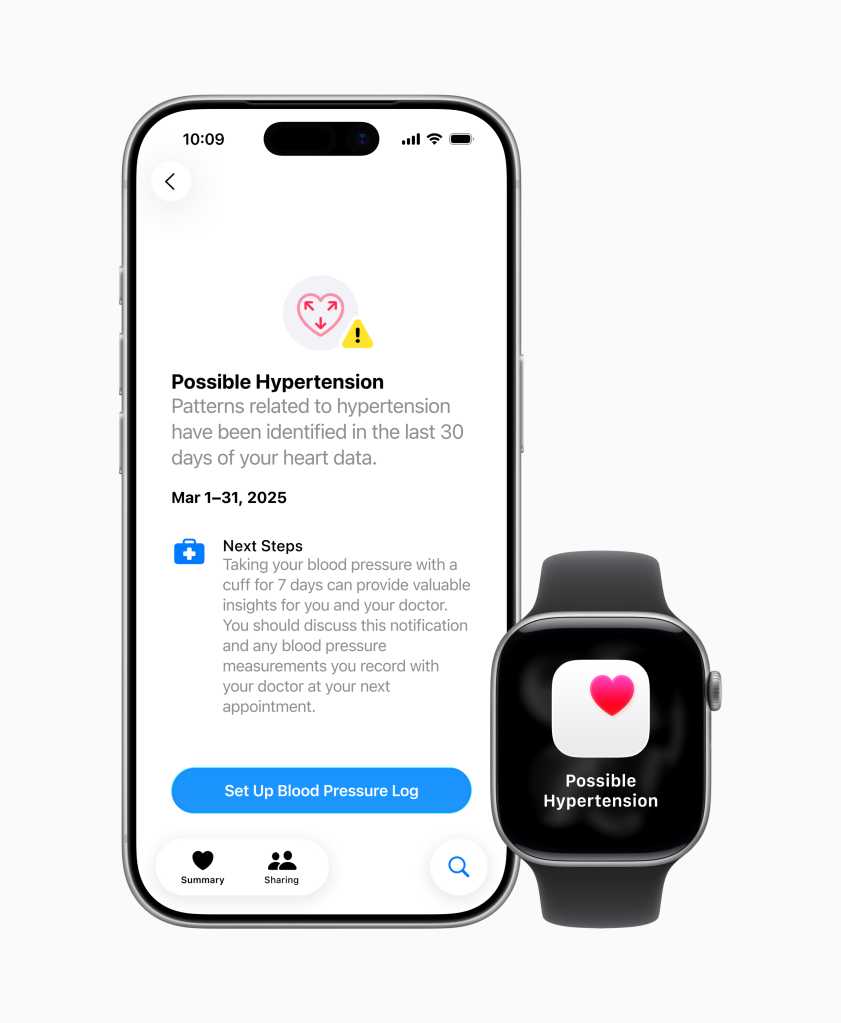
How Apple built hypertension notifications for Apple Watch

February is Heart Month, so it’s appropriate to speak with the team that built the recently introduced hypertension notifications system for watchOS 26 and Apple Watch. 

I spoke with Apple’s Steve Waydo, director for health sensing, and Dr. Rajiv Kumar, physician-researcher, who offered a glimpse into the science and decisions behind their lengthy project to give smartwatch users an actionable and reliable tool to track this aspect of heart health.

Waydo led the long development of the hypertension notification feature. “The idea goes way back to not all that long after we launched the first Apple Watch,” he said. “We had this device collecting physiological data on users all the time. This hadn’t existed before. We saw it as a new and unique opportunity.”

But first, Apple needed to develop new sensor capabilities, assemble world-class technical and clinical expertise, and build accurate and effective machine learning tools. Apple wanted its solutions to be grounded in science, so it also launched a large-scale heart health study with the University of Michigan. 

Understanding Hypertension

Hypertension is a state of chronic high blood pressure. Each time your heart beats, it moves blood out of the heart and into your blood vessels. When blood pressure is high, there’s a lot of back pressure so the heart must beat harder than usual to get the blood out. That, over time, is called hypertension. The problem with this condition is that it’s totally asymptomatic, which is why it is seen as a silent killer. 

More than 1 billion people have this condition, and nearly half of all US adults suffer from it. Yet, around half of them don’t know they have it. 

That’s why Apple’s tool is important; it could help people identify the condition and take steps to manage it. “So much of our health is invisible even to ourselves, and one of the biggest barriers to better health is just simply not knowing what’s going on,” said Waydo.

Apple’s plan is to harness the power of wearable data to help surface conditions such as this one, which otherwise might not be easily managed by any of us.

Machine learning, data, and context

The data an Apple Watch provides differs from most test data because the device is worn all day, almost daily. That means the information it gathers changes over time, which helps identify deep health insights. What makes the information more actionable is artificial intelligence, which helps the device itself surface useful insights based on the data it can track. 

Kumar explained how Apple developed a machine learning system to combine that personal data with real world information drawn from the Apple Heart study. The latter helped Apple understand, “what the signals look like, what they look like across a person’s life and in a variety of circumstances and break the raw sensor data down into thousands of independent factors that we can quantify.”

Apple also leaned into supervised learning data, in this case information derived from both sensor data and ground truth. This is the kind of information generated by Apple’s work with the University of Michigan. The beauty of the combination is that Apple can see how sensor data correlates with scientific data. Machine learning models can then analyze the personal data and contrast it with sensor data across thousands of factors to identify a person’s hypertensive status.

You can learn more about how Apple’s system works by reading the company’s extensive white paper on the topic.

Apple Watch, a wearable doctor

“These machine learning tools are a key enabling technology, because with something like hypertension, the way it manifests in our signals is extremely subtle,” said Waydo. “It’s really subtle features of the actual shape of the signal that we get off the sensors…. We’re looking at much more subtle signals that correlate with high blood pressure, because those signals tell us something about how your blood vessels respond every time your heart beats. So, we apply these machine learning techniques to millions of data segments.”

“I’ve been at Apple for 13 years, so I’ve been here along this whole journey,” says Waydo. “And these same kinds of tools make it possible for your watch to track your activity, understand if you’re walking, or swimming in a pool, estimate how long you spend in any sleep stage, identify when you take a fall, so that it can connect you with emergency services. So, we’re using machine learning tools all over the place.”

In each case, Apple finds that it is important to look at how a person’s data evolves over a long period of time, as opposed to just giving a notification based on one moment.

The art of noise

The phrase “garbage in, garbage out” does a lot of work in the AI age, but Apple’s experts had interesting insights into the nature of data noise. “You know, we are processing vast amounts of data to develop these features,” says Waydo. That means the algorithms must figure out how to grade the data they pick up. 

Apple, which supplements the data with research acquired from large-scale, real-world studies, found that building in support for “messiness” can make for better results. “Having that data set that actually that has messiness and realism to it is very important for coming up with signals that are more than a research curiosity and can really apply to, you know, actual people using our devices in the world,” Waydo said.

In AI, failure builds success

Getting the system to work was a long process of iteration and repetition. Apple’s teams built bigger and better data sets, revised their algorithms, and kept improving what they had built until it became ready to roll it out into the world.  “We rinse and repeat that process for weeks or months or years until we have something we’re happy with,” said Waydo.

The team also gets excited when things don’t work. “We may find use cases or particular kinds of users or particular scenarios where we get a lot of false positives or where we get no true positives. And that tells us where to go in order to improve the algorithm and iterate on the algorithm, and usually that means getting more data that captures those use cases that we can incorporate into our machine learning training.”

As part of the work, Apple’s teams also looked closely at demographics. The intention is to ensure that age, sex, or race don’t impact the performance of the systems Apple provides. Apple is a global company that ships products to a lot of people. It’s solutions have to work for everyone.

What it isn’t

The feature isn’t intended to be a complete replacement for regular check-ups. Recent reporting that not every case of hypertension will be picked up is correct, and reflects the balance the developers had to reach to create a system they could ship. That’s because the team realized that training the algorithm to be more sensitive would diagnose more cases, but at the cost of more false positives. 

The danger of false positives is that people stop listening. After all, if you are given health notifications by your device you must be able to trust its accuracy. No one wants to be given false information.

Waydo explained the conundrum: Should Apple aim for 100% sensitivity when it means the system will have a lot of false positives? Or should it aim to build a system that minimizes those? That’s why Apple had to achieve a balance.

“We weigh our work very heavily towards trying to manage false positives and trying to make sure that when we do notify someone of a potential issue, whether it’s hypertension or a regular rhythm or any of these other things, that notification is really trustworthy. And sometimes that means that there are cases that we can’t catch, because if we catch this additional set of cases, we’re also going to end up catching a bunch of people who don’t need the notification. And that undermines the utility of the whole thing,” Waydo said.

Apple recommends that any Apple Watch user receiving a hypertension notification check and log their blood pressure and visit their doctor.

Fan mail

Apple’s rock solid commitment to privacy means its teams can’t track how successful its systems are in the field because it never sees that kind of information coming from personal devices. But the team does get letters from users, medical practitioners, and others who have been affected

“I love hearing from clinicians who say they met someone who otherwise wouldn’t have known or who wouldn’t have come in, and it’s really changed their lives,” said Dr. Kumar. “Each of our features, whether it be in women’s health, hearing health, or heart health — they’re all based on science, must be actionable and absolutely built with privacy at the core.”

And each time someone gains better insight into their own health, they become better equipped to improve the health decisions they take in the future.

Please follow me on Twitter, or join me in the AppleHolic’s bar & grill and Apple Discussions groups on MeWe. Also, now on Mastodon.

Why are AI leaders fleeing?

Normally, when big-name talent leaves Silicon Valley giants, the PR language is vanilla: they’re headed for a “new chapter” or “grateful for the journey” — or maybe there’s some vague hints about a stealth startup. In the world of AI, though, recent exits read more like whistleblower warnings.

Over the past couple of weeks, a stream of senior researchers and safety leads from OpenAI, Anthropic, xAI, and others have resigned in public, and there’s nothing quiet or vanilla about it. 

Take, for example, OpenAI researcher Zoë Hitzig. She chose not to quietly flip her LinkedIn profile but to announce her resignation in a New York Times guest essay entitled, “OpenAI Is Making the Mistakes Facebook Made. I Quit.”  

Who resigns that way — in the Times? 

What ticked her off was OpenAI’s decision to start testing ads inside ChatGPT. Ironically, in 2024 Sam Altman, OpenAI’s CEO, had said, “I hate ads,” arguing that “ads plus AI” … are “uniquely unsettling” because people are forced to figure out who is paying to influence them with the answers. But, hey, when even OpenAI’s internal bean counters expect the company to lose $14 billion in 2026 alone, Altman managed to get over his qualms.

Not so, Hitzig. She wrote, “People tell chatbots about their medical fears, their relationship problems, their beliefs about God and the afterlife. Advertising built on that archive creates a potential for manipulating users in ways we don’t have the tools to understand, let alone prevent.” (She’s right, of course.)

But, I’m sorry, that’s naive. Facebook didn’t make a mistake. It made billions of dollars by exploiting people who shared things online with families and friends. It’s been a truism in internet business models since the late 2000s that, “If you’re not paying for the service, you are the product.”

Sure, intimate disclosures married to an ad business via AI is a creepy construct. So is Facebook and X’s ability to profit from getting people to fall down the rabbit hole of engagement, outrage, and behavior profiling. But no one’s stopping them. Heck, back in 2016, Facebook shared its data with Cambridge Analytica, allowing the Trump campaign to customize ads at an almost individual level, helping Donald Trump win the 2016 election. 

That eventually cost Facebook about $6 billion dollars in fines and lawsuits. That sounds like serious money until you consider that Facebook’s parent company, Meta, had GAAP revenue in  2025 over $200 billion, almost all of it from advertising. 

I have a feeling Altman will get over his queasy feeling about that kind of revenue.

Meanwhile, over at Anthropic, the departing head of the Safeguards research team, Mrinank Sharma, was even more direct. In a resignation letter shared with the world on X, he wrote that “the world is in peril.” He described, in the sort of polite but pointed language that sets off lawyers, how hard it is in practice for a company to “let our values govern our actions” when the money, the market, and the internal prestige all point toward shipping more capable models, faster. Here, again, we see ethics taking a back seat to profits. 

Mind you, Anthropic is the AI company that branded itself around “constitutional AI” and careful deployment. If senior safety leaders there feel they can no longer put morality ahead of cash, that’s a red flag.

If this were just about two idealistic researchers taking a stand, you could write it off as personality and politics. It isn’t. OpenAI recently disbanded its “mission alignment” team, which was to work on making AI safe. (Don’t forget, OpenAI started as a nonprofit funded by donations and pledges rather than equity investment and dedicated to ensuring artificial general intelligence (AGI) would benefit “all of humanity.”)

Today, OpenAI and Anthropic are positioning themselves for IPOs to realize billions for their owners and eventual shareholders. As anyone who pays attention to the stock market since ChatGPT 3.5 exploded on the scene in 2023 knows, the market is dominated by the AI-driven Magnificent Seven with its $20.2 trillion in market cap. And  you wonder why people are worried about an AI bubble popping!?   

There are other AI leaders headed for the door. At Elon Musk’s xAI — now freshly folded into SpaceX via an all‑stock deal — xAI co‑founders Tony Wu and Jimmy Ba headed to the lifeboats while Musk talked about “reorgs” and how “some people who are better suited for the early stages of a company and less suited for the later stages.” Sure, Elon, sure. 

Meanwhile, VERSES AI’s founders and CEO are out as the board installs an interim leader and pushes a sharper commercial pivot. Even Apple is suffering an “AI brain drain.” There, Senior Vice President John Giannandrea and Siri leader Robby Walker have left for Meta.

Each individual story is different, but I see a thread here. The AI people who were concerned about “what should we build and how to do it safely?” are leaving. They’ll be  replaced by people whose first, if not only, priority is “how fast can we turn this into a profitable business?” Oh, and not just profitable; not even a unicorn with a valuation of $1 billion is enough for these people. If the business isn’t a “decacorn,” a privately held startup company valued at more than $10 billion, they don’t want to hear about it.

I think it’s very telling that Peter Steinberger, the creator of the insanely — in every sense of the word — hot OpenClaw AI bot, has already been hired by OpenAI. Altman calls him a “genius” and says his ideas “will quickly become core to our product offerings.” 

Actually, OpenClaw is a security disaster waiting to happen. Someday soon, some foolhardy people or companies will lose their shirts because they trusted valuable information with it. And, its inventor is who Altman wants at the heart of OpenAI!?

Gartner needs to redo its hype cycle. With AI, we’re past the “Peak of Inflated Expectations” and charging toward the “Pinnacle of Hysterical Financial Fantasies.”

The people leaving before it all goes to hell? They’re the wise ones. 

Google Workspace tips and tutorials

From its humble origins as a collection of cloud apps known as Gmail for Your Domain, Google’s office suite has greatly expanded and matured over the years. Rebranded multiple times as Google Apps, G Suite, and finally Google Workspace, it’s now a full-scope productivity and collaboration suite with subscription plans for organizations ranging from the smallest businesses through the largest enterprises.

If you’re new to Google Workspace or want to get more out of its apps, our collection of step-by-step tutorials can help.

Google Workspace: Get started

Updated: Google Docs cheat sheet

How to use Google Docs to create, edit, and collaborate on documents online — with or without help from Gemini, Google’s AI assistant.

Updated: Google Sheets cheat sheet

How to use Google Sheets to create, work with, and collaborate on spreadsheets — and how Gemini, Google’s AI assistant, can give you a head start.

Updated: Google Slides cheat sheet

How to use Google Slides to create, collaborate on, and lead business presentations— and how Gemini, Google’s AI assistant, can help you on the way.

The business user’s guide to Gmail

Whether you’re new to Gmail or just want to make the most of its many layers, this in-depth guide will turn you into a Google email pro in no time.

Updated: How to use Google Drive for collaboration

Sharing Google Docs, Sheets, and Slides files makes it easy to collaborate with colleagues on documents, presentations, and spreadsheets. Here’s how.

Google Meet cheat sheet

Need to get up and running with Google’s online meeting app quickly? We’ve got you covered.

Updated: Google NotebookLM cheat sheet: Get fast insights into your docs

Feed your documents and other research resources into NotebookLM, and its genAI will analyze them, create new materials from them — even turn them into a spoken podcast with human-sounding AI hosts.

Google Forms cheat sheet

You can use Google Forms to create online surveys, quizzes, and feedback pages. Here’s how.

Google Keep cheat sheet

Get up and running with Google’s powerful note-taking app.

Google Tasks cheat sheet

Use Google Workspace’s built-in task manager to build to-do lists and get reminders about upcoming tasks.

How Google Tables can turn up your productivity

If you haven’t taken the time to explore Google’s Tables tool for teams, you’re really missing out.

The business user’s guide to Google Voice

Google Voice can add a whole new layer of power into your professional phone setup — once you figure out how to use it. Here’s help.

Google Workspace: Level up

New: 5 ways Gemini can help you make Google Slides presentations

You can use Google’s generative AI tool to create slides, generate or edit images, refine text, and even create whole presentations. Here’s how.

New: Google Workspace: 7 great ways to use the Gemini AI sidebar

Google Docs, Drive, Gmail, and other Workspace apps have a handy side panel where you can use Google’s Gemini AI assistant. Here’s how to work with it and 7 example uses that’ll boost your productivity.

Updated: How to use Gemini AI to write (and rewrite) in Google Docs and Gmail

Powered by Gemini, Help Me Write is the generative AI writing tool built into Google Docs and Gmail. Here’s how to get the most out of it while avoiding its pitfalls.

New: 6 quick tips for Google Sheets

Google Sheets packs a lot of powerful features under its simple interface. Try these intermediate tips to take your spreadsheet use to the next level.

New: 5 quick tips for Google Slides

Ready to step up your Slides use? Try these intermediate tips for creating and presenting slideshows.

New: How to use timeline view in Google Sheets

Adding a timeline to a project tracking spreadsheet gives you a visual overview of your project’s major stages, including how they overlap. Here’s how to use this handy Google Workspace feature.

How to use smart chips in Google Docs and Sheets

Smart chips are interactive elements you embed in Google documents and spreadsheets. Learn about the different types of smart chips and how to use them for enhanced collaboration.

4 advanced ‘smart chip’ tips for Google Docs and Sheets

Use these advanced tips to take smart chips to the next level.

Google Workspace: Tap into cross-app productivity

The apps that make up Google Workspace are powerful on their own — and even more potent when used together.

How to use Google Sheets for project management

Google Sheets is great for calculations and data analysis, but it also offers several built-in tools for basic tracking of team projects.

Make your own business templates in Google Docs

Give your team a head start on business documents by creating a set of custom templates they can use over and over again.

Gmail for business: The best tips, time-savers, and advanced advice

Ready to become a certified Gmail master? This collection of expert Google knowledge has everything you need. Learn how to tame your inbox with labels, save time with templates, maximize collaboration in Gmail’s interface, and much more.

Google Docs: How to add charts, citations, and more

In Google Docs, you can easily enhance your documents with professional elements like a table of contents, a watermark, charts, and citations. We show you how.

Google Sheets: How to use dropdown lists

Embedding dropdown lists in a spreadsheet saves time and ensures accuracy. Here’s how to make the most of them in Google Sheets.

Google Sheets: How to use filters and slicers

Filters and slicers help you highlight key data in a spreadsheet by hiding less relevant data. Here’s how to make them work for you in Google Sheets.

Google Sheets: How to use pivot tables

Pivot tables let you parse raw spreadsheet data to display specific information in a concise, easy-to-digest format. Here’s how to use them in Google Sheets.

How Gmail filters can help organize your inbox

Automate your inbox and enhance your organization by taking full advantage of what Gmail filters have to offer.

Google Sheets: How to create an automatically updating spreadsheet

Tired of finding, copying, and pasting data into spreadsheets? With just a few lines of code, you can set up a self-updating spreadsheet in Google Sheets that fetches and stores data for you.

3 clever new tricks to turn Google Docs into a collaboration superhub

These out-of-sight options connect Docs to Gmail and Google Calendar and make all of those services infinitely more useful.

5 smart secrets for a better Google Tasks experience

If you aren’t yet using these Google Tasks power tools, good golly: You’re missing out.

9 handy hidden features in Google Docs on Android

Boost your mobile productivity with these power-packed, time-saving features in the Docs Android app.

14 handy hidden tricks for Google Calendar on Android

Upgrade your agenda with these tucked-away time-savers in the Android Calendar app.

26 note-perfecting tips for Google Keep on Android

Turn Google’s note-taking app into a powerful mobile productivity tool with these easy-to-follow tips.

Google Workspace: More useful info

Update: 9 fast fixes for common Google Docs problems

Knock down distressing Docs issues in no time with these easy-to-implement, expert-approved solutions.

Updated: 6 fast fixes for common Google Drive problems

Eliminate annoyances and say sayonara to storage struggles with these easy-to-implement, expert-approved solutions.

9 Chrome extensions that supercharge Google Drive

Add these extensions for Chrome to work faster and smarter with Google Drive and Google’s productivity apps, Docs, Sheets, and Slides.