OpenAI’s overdraft continued its upward trajectory on Monday when the company signed a multi-year $38 billion contract with AWS to have it run its AI workloads.
The latest spending spree adds to the incremental $250 billion of Azure services it pledged to buy last week, and, of course, to the commitment it has made towards building Stargate data centers with Oracle and other partners.
According to a release from OpenAI, the dollars heading to AWS from the organization, whose annual revenues are projected to be a mere $13 billion, will be used to “run and scale” its AI workloads, beginning immediately.
The release went on to say that AWS will provide the company with “Amazon EC2 UltraServers, featuring hundreds of thousands of chips, and the ability to scale to tens of millions of CPUs for its advanced generative AI workloads.”
Deals based on ‘unproven growth’
In reacting to the announcement, Sanchit Vir Gogia, the chief analyst, founder, and CEO of Greyhound Research, said, “OpenAI’s cloud investments have reached a level that no longer correlates with its revenue profile. Despite claims of scaling for future demand, these multi-cloud arrangements are best understood as a form of insurance rather than expansion.”
The business case here, he said, is not grounded in present usage or profitability, but rather in the anticipation of massive, yet unproven, growth. “OpenAI is distributing its infrastructure load across AWS, Microsoft, Oracle, and Google,” he explained. “This is not about optimizing workloads; it is about ensuring that no single failure point can threaten its ability to operate.”
The aim, said Gogia, “is continuity, not cost efficiency. These deals are forward leaning, relying on revenue forecasts that remain speculative. In that context, OpenAI must continue to draw heavily on outside capital, whether through venture rounds, debt, or a future public offering.”
He pointed out, “the company’s recent legal and corporate restructuring was designed to open the doors to that capital. Removing Microsoft’s exclusivity makes room for more vendors but also signals that no one provider can meet OpenAI’s demands. In several cases, suppliers are stepping in with financing arrangements that link product sales to future performance. While these strategies help close funding gaps, they introduce fragility. What looks like revenue is often pre-paid consumption, not realized margin.”
Execution risks, he said, add to the concern. “Building and energizing enough data centers to meet OpenAI’s projected needs is not a function of ambition alone. It requires grid access, cooling capacity, and regional stability. Microsoft has acknowledged that it lacks the power infrastructure to fully deploy the GPUs it owns. Without physical readiness, all of these agreements sit on shaky ground.”
Lots of equity swapping going on
Scott Bickley, advisory fellow at Info-Tech Research Group, said he has not only been astounded by the funding announcements over the last few months, but is also appalled, primarily, he said, “because of the disconnect to what this does to the underlying technology stocks and their market prices versus where the technology is at from a development and ROI perspective … and from a boots on the ground perspective.”
He added that while the financial pledges involve “huge, staggering numbers, most of them are tied up in ways that are not necessarily going to require all the cash to come from OpenAI. In a lot of cases, there is equity swapping. You have these highly discounted exchanges going on with the hyperscalers, with capacity and this whole circular financing loop taking place.”
The organization’s vision, said Bickley, “is huge, and to me, it’s either they go big or they go bust, because they are not going to make this money back off ChatGPT.”
OpenAI, he said, is “going to make [it] back if they become the new web browser, the new vehicle for search, the new vehicle for ad revenues where AI agents may be able to handle sophisticated purchase requests.”
Another theory, he said, is that OpenAI is also “building a vertical distribution network where they want to control everything — the infrastructure, the application layer, the interface layer, and ironically, the hyperscalers may be funding a company that wants to take them out over time. If they buy enough time to realize that grand vision, then the revenues can get big enough to start paying back on these investments, but those are a lot of big ‘ifs’.”
In addition, said Gogia, “as OpenAI secures early access to large shares of advanced GPUs, other organizations are being forced to adjust. Some are shifting their cloud workloads to alternative vendors, while others are rebalancing infrastructure across regions in search of availability. The vision of cloud as an open, flexible resource is becoming harder to realize, especially for businesses without the scale or capital to compete.”
This shift, he said, “signals a new phase for AI development. What began as a software-driven movement is becoming increasingly shaped by infrastructure and capital. OpenAI’s role is no longer limited to innovation at the application layer. It now serves as a major force in how the physical backbone of AI is being built.”
That level of involvement, said Gogia, “brings weight and responsibility. If the assumptions supporting these expansive projects do not convert into stable revenue, the strain will not stop at OpenAI. It could disrupt suppliers, unsettle financing structures, and affect how enterprises access computing resources.”
Maintaining balance across the ecosystem, he said, “requires more than technical advancement. It will depend on steady execution, practical delivery timelines, and the financial strength to support what has been promised. Ambition alone will not carry this model forward.”
Keeping personal data private in an online world can feel like a Sisyphean task, but that doesn’t mean you shouldn’t try. While Microsoft has gradually backed off some of the Windows data collection practices that alarmed privacy advocates when they were introduced about a decade ago, some remain to this day in Windows 11.
Whether you think Windows 11 crosses the privacy line or just want to safeguard as much of your personal life as possible, we’re here to help. Here’s how to protect your privacy in just a few minutes.
Note: This story covers Windows 11 version 25H2. If you have an earlier release of Windows 11, some things may be different. If you have Windows 10, see “How to protect your privacy in Windows 10.”
Turn off ad tracking
At the top of many people’s privacy concerns is what data is being gathered about them as they browse the web. That information creates a profile of a person’s interests that is used by a variety of companies to target ads.
Windows 11 does this with the use of an advertising ID. The ID doesn’t just gather information about you when you browse the web, but also when you use Windows 11 apps. Your advertising ID isn’t synced to other computers, and it operates independently of your Microsoft account, if you’re using one.
You can turn that advertising ID off if you want.
Launch the Windows 11 Settings app (by searching for settings and then clicking the Settings icon, which looks like a gear) and go to Privacy & security > Recommendations & offers.
On the screen that appears, move the slider to Off for “Advertising ID” near the bottom of the screen.
You’ll still get ads delivered to you, but they’ll be generic ones rather than targeted ones, and your interests won’t be tracked.
You can turn off Windows 11’s advertising ID if you want.
Preston Gralla / Foundry
While you’re here, find “Personalized offers” at the top of the same list. This setting allows Microsoft to present you with “ads and recommendations for Microsoft and third-party products and services, features, apps, and hardware to enhance your Windows experiences” based on your Windows usage and account info. If it’s not off already, move the slider to Off.
To make absolutely sure you’re not tracked online when you use Windows 11, and to turn off any other ways Microsoft will use information about you to target ads:
Then go to the “See ads that interest you” section at the top of the page and move the slider from On to Off.
While you’re there, move the slider to Off in the “Share my data with third parties for personalized ads” section below it.
Turn off location tracking
Wherever you go, Windows 11 knows you’re there. Some people don’t mind this, because it helps the operating system give you relevant information, such as your local weather. But if you don’t want Windows 11 to track your location, you can tell it to stop.
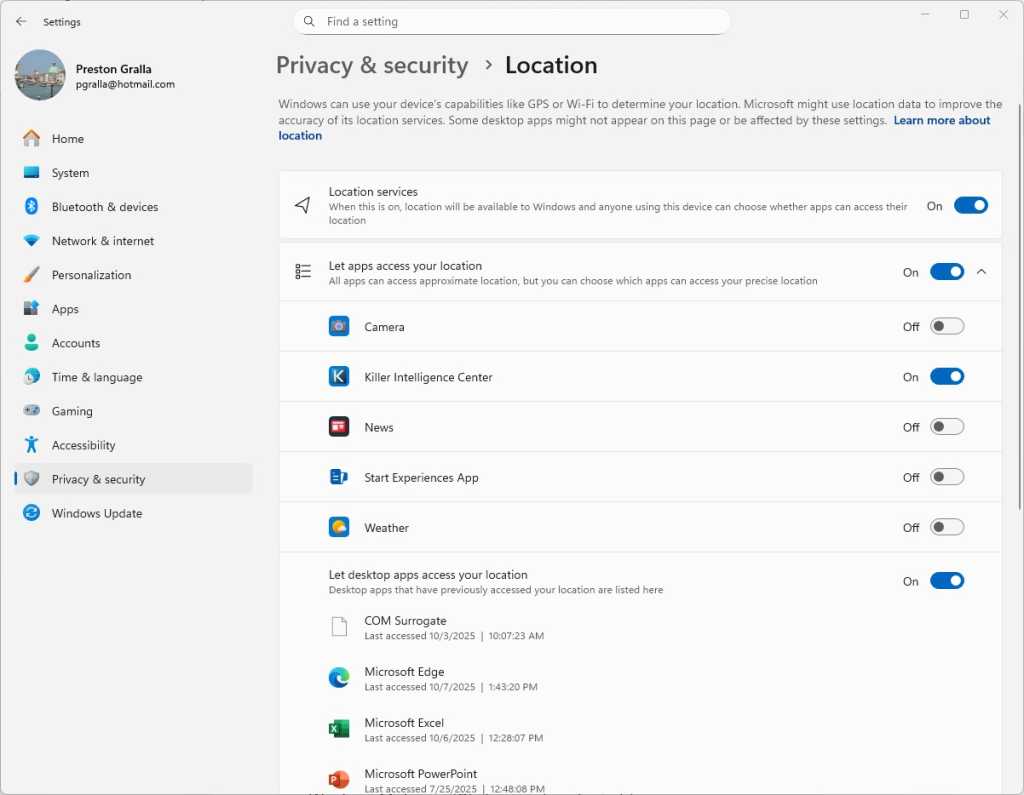
Launch the Settings app and go to Privacy & security > Location.
In the main pane next to Location services, move the slider from On to Off. Doing that turns off all location tracking for every user on the PC.
This doesn’t have to be all-or-nothing affair — you can turn off location tracking on an app-by-app basis. If you want your location to be used only for some apps and not others:
Make sure location tracking is turned on, then look at the “Let apps access your location” section. You’ll see a list of every Windows 11 app that can use your location.
Move the slider to On for the apps you want to allow to use your location — for example, Weather — and to Off for the apps you don’t.
You can turn off location tracking altogether or set permissions on an app-by-app basis.
Preston Gralla / Foundry
That doesn’t cover desktop apps, though. So after you turn on location tracking:
Go to “Let desktop apps access your location” and turn the slider to On. When you do that, a list of desktop apps that use location tracking appears.
Move the slider to On for each of the apps you want to use your location and Off for each app you don’t.
Turn off Shared Experiences
Windows 11’s Shared Experiences feature syncs your app activity on all the PCs you’re signed into. In that way, when you move from one device to another, you can immediately start working where you left on another device.
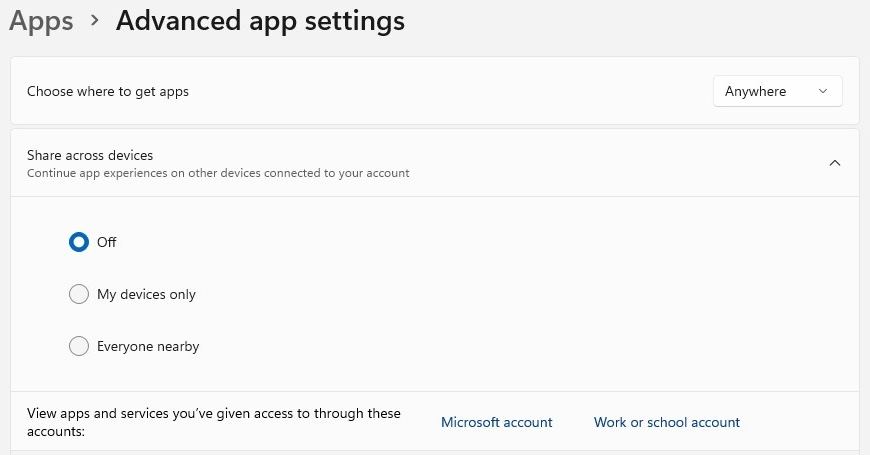
If you don’t like the idea of letting Microsoft gather that data, you can turn it off. Go to Settings > Apps > Advanced app settings, and in the “Share across devices” area, select the Off button.
Turning off Windows 11’s Shared Experiences.
Preston Gralla / Foundry
Change your app permissions
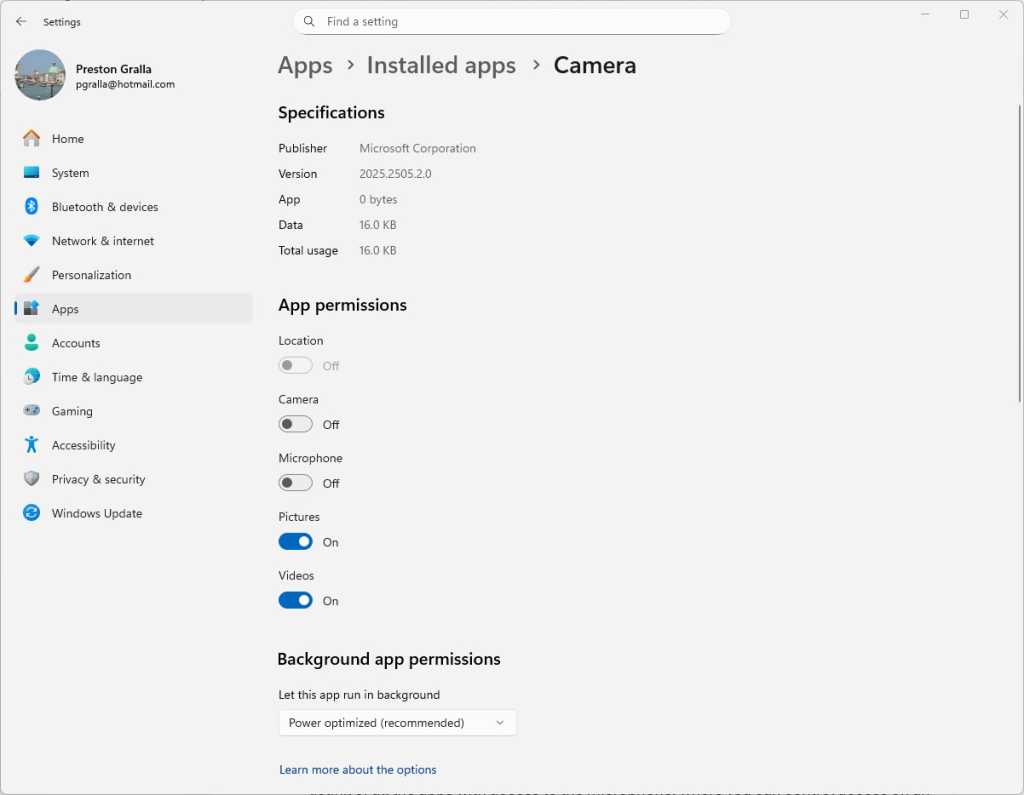
Windows apps have the potential to invade your privacy — they can have access to your camera, microphone, location, pictures, and videos.
But you can decide, in a very granular way, what kind of access each app can have:
Go to Settings > Apps > Installed apps. You’ll see a list of your installed apps.
Click the three-dot icon to the right of the app whose permissions you want to control, then select Advanced options and set the app’s permissions individually by toggling them on or off. For example, you can turn off location permissions for an app but leave microphone access on.
Setting permissions for Microsoft’s Camera app.
Preston Gralla / Foundry
Note, though, that not all apps have an “Advanced options” menu choice. And of those that do, not all let you customize your app permissions.
However, there’s another way to change app permissions:
Go to Settings > Privacy & Security and scroll down to the “App permissions” section. You’ll see a list of all of Windows’ hardware, capabilities, and features that apps can access if they’re given permission — location, camera, microphone, notifications, account info, contacts, and so on.
Click any of the listed items — for example, Microphone. At the top of the page that appears, you can turn off access to the microphone for all apps. Below that you’ll see a listing of all the apps with access to the microphone, where you can control access on an app-by-app basis. Any app with access has a slider that is set to On. To stop any app from having access, move the slider to Off.
Control and delete diagnostic data
As you use Windows 11, data is gathered about your hardware and what you do when you use Windows. Microsoft says that it collects this data as a way to continually improve Windows and to offer you customized advice on how to best use Windows.
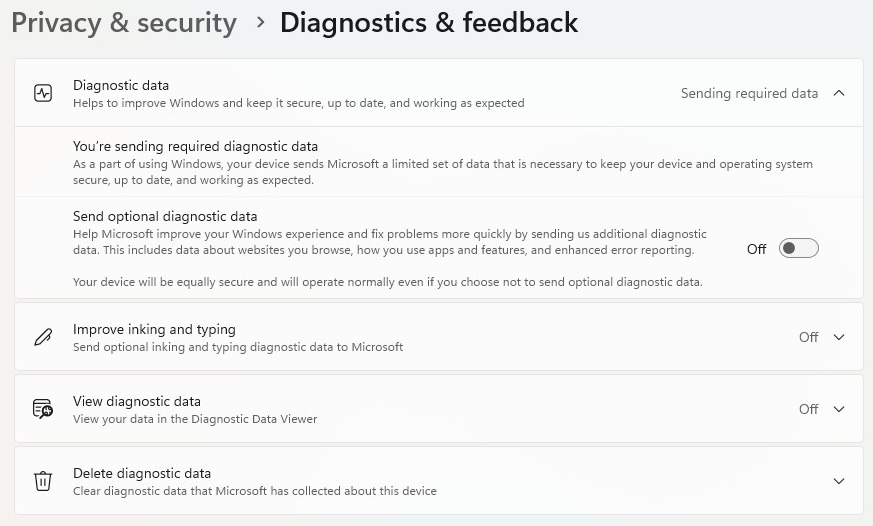
That makes plenty of people uncomfortable. If you’re one of them, you can to a certain extent control what kind of diagnostic data is gathered about you. To do it, head to Settings > Privacy & security > Diagnostics & feedback. In the “Diagnostic data” section, you can customize the diagnostic data to be gathered. Note that there’s no way to stop Microsoft from gathering diagnostic data entirely.
When you use Windows 11, information is sent to Microsoft about your device, its settings and capabilities, and whether it is performing properly. That’s the information referred to near the top of the screen in the section “You’re sending required diagnostic data.” There’s nothing you can do about that.
Just below that is another setting, “Send optional diagnostic data.” If that’s turned on, you’re sending the whole nine yards to Microsoft: info about the websites you browse and how you use apps and features, plus additional info about device health, device usage, and enhanced error reporting. If you’re worried about your privacy, turn this slider to Off.
Go here to control what diagnostic data Windows 11 gathers.
Preston Gralla / Foundry
(Note that if you’re a Windows Insider and get preview builds, you are required to send this data. If you turn it off, you won’t be able to participate in the Insider program.)
Now scroll a bit further down and in the “Delete diagnostic data” section, click the down arrow and then Delete. That will delete all the diagnostic data Microsoft has gathered about you. However, after you delete it, Microsoft will start gathering the data again.
Finally on this screen, consider scrolling up to the “Improve inking and typing” section, clicking the down arrow, and moving the slider to Off. That will stop Windows 11 from sending to Microsoft the words you input using the keyboard and inking.
One final note about diagnostic data: You may have heard about a tool Microsoft has been hyping, called the Diagnostic Data Viewer, which you can download from the Microsoft Store. Microsoft claims it lets you see exactly what kind of diagnostic data Microsoft gathers about you. Don’t believe it. It’s something only a programmer could love — or understand.
You won’t be able to use it to clearly see the diagnostic data Microsoft collects. Instead, you’ll scroll or search through incomprehensible headings such as “TelClientSynthetic.PdcNetworkActivation_4” and “Microsoft.Windows.App.Browser.IEFrameProcessAttached” with no explanation of what it means. Click any heading, and you’ll find even more incomprehensible data.
Use Microsoft’s Privacy Dashboard
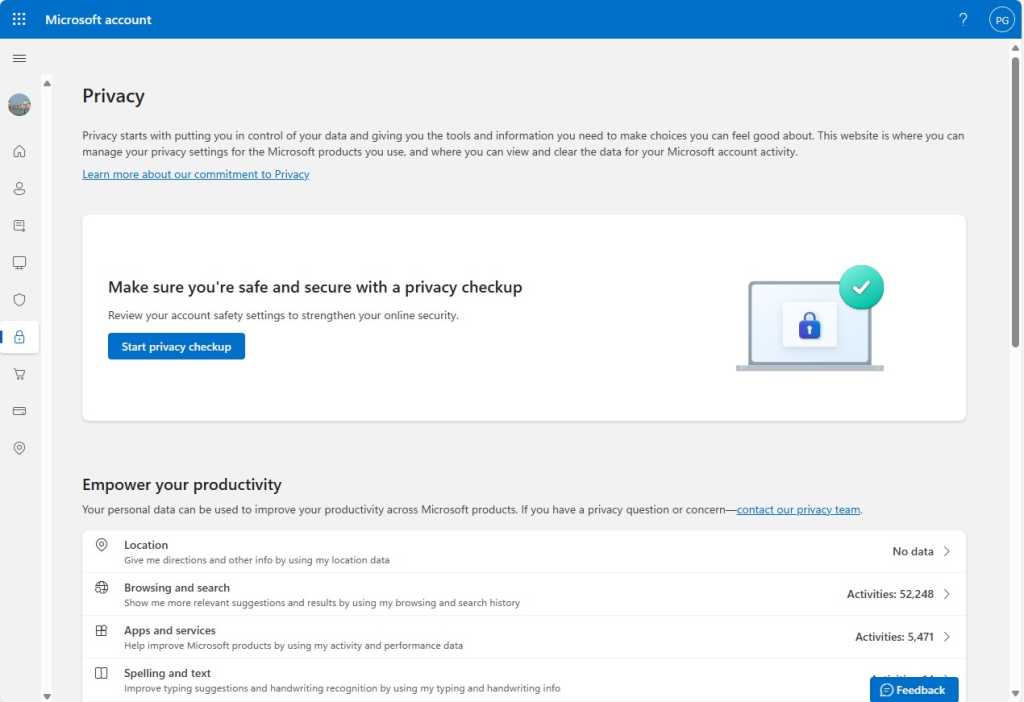
Microsoft has built an excellent, little-known web tool called the Privacy Dashboard that lets you track and delete a lot of information Microsoft gathers about you. As covered earlier in this story, here you can turn off ad targeting. You can also view and delete your browsing history, search history, location activity, voice activity, media activity, and more.
(Note that for your browsing and search history, it only tracks your activity when you use Microsoft Edge. It doesn’t track data when you use other browsers, like Chrome or Firefox. And it only tracks your location history when you’re using a Windows device.)
Microsoft’s Privacy Dashboard is a great place to delete much of the information Microsoft gathers about you.
Preston Gralla / Foundry
To use it, head to the information you want to view and clear, then click the appropriate link — for example, Browsing and search. You’ll see a list of recent activities. You can delete items individually by clicking the trash can icon next to each one or, to delete them all, click the Clear all activities link at the lower right of the list, then click Clear on the screen that appears. Note that in some instances, you won’t have full control over deleting and managing data.
In the dashboard you can also customize privacy settings for other Microsoft products, including Xbox, Microsoft 365, Edge, and Microsoft Teams. Scroll down to the “Find privacy settings in Microsoft products” section and click the product you’re interested in.
Get granular in the Settings app
All this shouldn’t take that long and will do a great deal to protect your privacy. If you want to dig even deeper into privacy protections, launch the Settings app and click Privacy & security > Recommendations & offers.
Above the switch to turn off your advertising ID are more privacy settings you can disable:
Allow websites to access my language list. The list of languages you have enabled on your machine is your own business.
Improve Start and search results. This is used to build the “Most used” list on the Start menu and influences search result order — likely not a must-have for the privacy minded.
Recommendations and offers in Settings. This is used, in Microsoft’s words, to “suggest new content and apps you might find interesting.” Trust me, it’s unlikely you’ll find them interesting.
And there’s a lot more beyond the “Recommendations & offers” pane. On the main “Privacy & security” screen you’ll see additional areas where you can get even more granular about privacy — for example, in the Search section you can do such things as tell Windows not to store your search history. And here’s where you’ll get access to all app permissions, as outlined earlier in this article.
The “Privacy & security” page in the Settings app offers myriad options for tweaking your privacy settings.
Preston Gralla / Foundry
Ditch a Microsoft account for a local account
When you use your Microsoft account to log into Windows 11, you’re able to sync your settings with all Windows devices. So, for example, when you make changes to your settings on a desktop PC, those changes will also be made on your laptop the next time you log in.
But maybe you don’t want Microsoft to store that information about you. And maybe you want to cut your ties as much as possible to anything Microsoft stores about you. If that’s the case, your best bet is to stop using your Microsoft account and instead use a local account.
Microsoft doesn’t want you to do this, so they’ve made it more difficult in Windows 11 than it was in Windows 10. But you can still do it, in this way:
Press the Windows key + R to open the Run dialog box.
Type netplwiz and press enter.
Click the Add button on the screen that appears.
On the screen that appears, type in your email address and click Sign in without a Microsoft account (not recommended) way down at the bottom of the screen. Click Next.
On the next screen, you’ll see your email address. Click Finish.
Setting up a local account on Windows 11.
Preston Gralla / Foundry
Keep in mind that when you do this, you won’t be able to use Microsoft’s OneDrive storage or download and install for-pay apps from the Microsoft Store. You can, however, download and install free apps from the Microsoft Store.
Sign out of Copilot
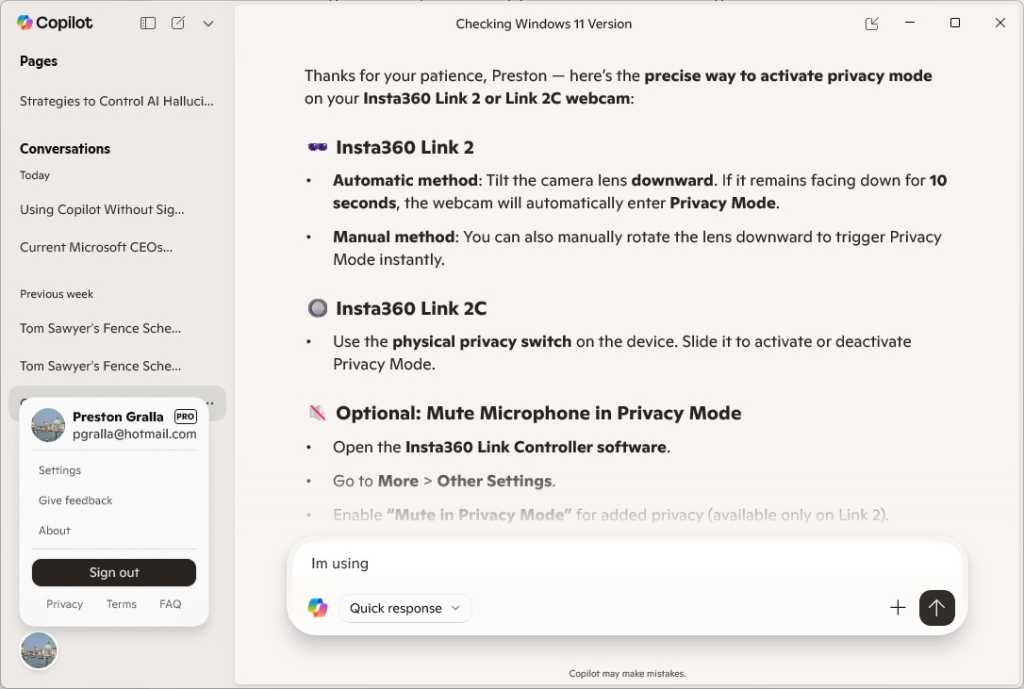
Microsoft’s generative AI chatbot can be a privacy-invader because it collects so much information about you as you use it, especially when you’ve signed into it with your Microsoft account. If you want to increase your privacy, you can sign out. Keep in mind, though, that when you do sign out, there’s a lot you give up, including the ability to share your conversations with it across your devices, the ability to generate and edit images, and more.
If you want to sign off:
Click your profile icon in the lower-left corner of the Copilot screen and click Sign out.
To sign back in, click the icon again and click Sign in.
Sign out of Copilot to increase your privacy.
Preston Gralla / Foundry
Note that if your profile icon doesn’t appear, you’re probably using Copilot in a mode that doesn’t include its left pane. To display the pane, look at the upper left of the Copilot screen, then click the icon just to the right of the Copilot icon — it’s a small box with a right-facing arrow in it. That will display the left pane, where you can sign out of or into your Microsoft account at the bottom left.
Turn off Windows Recall on Copilot+ PCs
If you have a Copilot+ PC and you’re worried about privacy, make sure its Recall feature is turned off. This feature takes a screenshot of your screen every few seconds, performs optical character recognition on it, and saves it on your computer in a searchable database.
This makes it easy to find what you’ve been doing some time in the past, but could also be a privacy nightmare. Microsoft says Recall’s snapshots are encrypted, and there are filters to remove sensitive data such as banking information from snapshots. In tests, however, those protections have fallen short or been easily circumvented.
Recall is turned off by default, but it’s worth checking to make sure you didn’t opt in to it during the initial Windows 11 setup process. To turn off Recall and delete all the screenshots it’s taken:
Go to Settings > Privacy & security > Recall & snapshots and move the toggle for “Save snapshots” to Off.
Then click Delete to delete all your existing snapshots.
To uninstall Recall from your system completely:
Type turn windows features on or off in Windows search. You’ll see a list of optional Windows features.
If the Recall box is checked, uncheck it. Recall will be uninstalled, its stored snapshots will be deleted, and your PC will reboot.
Tips for the truly paranoid
If you want to take privacy even further, there are a few more things you can do.
Stop using OneDrive
If you don’t like the idea of syncing your data to Microsoft’s OneDrive cloud storage service, you can stop using it. (There’s no way to uninstall it.)
Right-click the OneDrive icon on the notification tray at the bottom right of the Windows desktop and select Settings from the menu that pops open.
In the OneDrive Settings window, go to the Account tab, then click the Unlink this PC link.
Next, go to Settings > Apps > Startup, scroll to the Microsoft OneDrive setting and move the slider to Off.
Turn off the OneDrive toggle to prevent it from launching at startup.
Preston Gralla / Foundry
Don’t sync Windows settings across devices
In addition, you can say no to syncing your Windows settings among different devices. When you sync your settings, the way you’ve customized and set up Windows 11 will be synced to Microsoft’s servers. If you want to turn it off, go to Settings > Accounts > Windows backup and turn the slider from On to Off next to “Remember my preferences.”
Don’t share Windows updates
Finally, you can change the way Windows updates. In Settings > Windows Updates > Advanced options > Delivery optimization, move the slider from On to Off next to “Allow downloads from other devices.” When turned on, this function lets your Windows 11 system share its update files with other Windows devices on the internet and your own network through peer-to-peer distribution.
These steps can take you a long way towards making sure that Windows 11 doesn’t cross the line into gathering data you’d prefer remain private.
This article was originally published in February 2023 and most recently updated in November 2025.
In search of an AI that keeps things private, Apple is reportedly planning to pay Google to provide a kind of white-label version of Google Gemini AI that will run securely on Apple’s own Private Cloud Compute servers.
Weekend reports explained a little about how this is meant to work:
Gemini will provide query and summary capabilities.
This tool will be introduced in March 2026.
Use of the white-label Gemini AI doesn’t mean you will access Google-branded tools or services; the AI will simply be used to partially power Siri’s services.
Apple will market it as Apple tech running on Apple servers. Gemini will be present to support Apple’s wider offer rather than anything else.
AI- as-a-service
The basic premise here seems to be that pending introduction of its own proprietary search tools; Apple will make use of Gemini. Further, because privacy is extremely important to Apple, the company will use a version of Gemini hosted on its own Apple servers.
This isn’t the first AI partnership Apple has explored.
It made access to ChatGPT available within Apple Intelligence on day one and now also enables developer use of Anthropic’s Claude AI within Xcode 26. In China, Apple has been reported to be working with Baidu and Alibaba to support Apple Intelligence. It’s not at all impossible the company will find itself required to adopt a tapestry of AI access deals as nations begin to wake up to the strategic challenges of transnational AI provision as evidenced by the growing desire for sovereign cloud services.
Apple, presumably, hopes the desire for private and secure cloud AI services will become the wind beneath the wings of its private and secure approach to delivering such services. After all, even if Google Gemini becomes one of the primary services driving Apple Intelligence, the fact it does so natively on Apple’s own private/secure servers is an advantage for Cupertino.
In the market
That same drive toward sovereign cloud AI services will also act as an imminent brake on the development of new AI tech empires that demand global access to markets for their business plan to work. That’s not to say tech firms won’t find ways to sidestep that desire, but it will certainly be helpful to have good relationships with hardware suppliers to achieve that kind of share.
In that sense, this new Google/Apple arrangement may feel inevitable. Google will want to give Gemini the best possible shot at ubiquity, while Apple may find itself pondering AI partnerships beyond ChatGPT, given how many of its former designers are now involved in hardware design for OpenAI.
Industry watchers must wait and see what the real implications of this will be, given that access to the actual raw materials for high-end computational devices is becoming increasingly limited as more firms than ever chase the market for compute chips. OpenAI needs more servers, more than it needs to give people smart bracelets.
Apple, meanwhile, already has a good ecosystem for its highly capable edge AI platforms. Just ask anyone who has already enjoyed working with Draw Things, Mic Drop, or Topaz Video on a new M5-powered Mac — they will confirm that Apple’s AI PCs are already in active use.
Defeat and victory
While it is true that Apple’s adventures in AI appear to have been frustrating so far when it comes to big-ticket usability features, it does seem to be playing a very shrewd game in how it delivers new Apple Intelligence features and the tradeoff between its traditional ‘not invented here’ approach and partnership.
We can’t be certain, of course, that it won’t continue to work on creating its own generic AI to match ChatGPT or Gemini, but perhaps it doesn’t have to if it can build a good business with these others.
It may even work in the company’s favor to offer up a limited suite of homemade services while supporting multiple third-party providers, given that regulatory pressure to do so looks inevitable on the current trajectory. After all, if Apple Intelligence matched ChatGPT, would it be accused of market dominance? That’s harder to argue if support for third-party AI services is made available from the get-go, as it already is.
Reaching for the popcorn
Plus, of course, the existence of increasingly sophisticated AI services will eventually erode the apps market, but that won’t be for some time to come and will likely just see the rate of growth in that market slow, rather than atrophy.
We’ll see how things pan out, but speculation increasingly coalesces around Apple offering up specific services it thinks may be useful to people running on the device, adding some more sophisticated self-hosted cloud services, and opening things up for third-party support for the most complex tasks.
The incident also shed an uncomfortable light on how fragile these massive environments have become. In Amazon’s detailed post-mortem report, the cloud giant detailed a vast array of delicate systems that keeps global operations functioning — at least, most of the time.
It is impressive that this combination of systems works as well as it does — and therein lies the problem. The foundation for this environment was created decades ago. And while Amazon deserves applause for how brilliant that system was when it was created, the environment, scale and complexity facing hyperscalers today are orders of magnitude beyond what those original designers envisioned.
The bolt-on patch approach is simply no longer viable. All of the hyperscalers —especially AWS — need re-architected systems, if not entirely new systems that can support global users for 2026 and beyond.
Chris Ciabarra, the CTO of Athena Security, read the AWS post-mortem and came away uneasy.
“Amazon is admitting that one of its automation tools took down part of its own network,” Ciabarra said. “The outage exposed how deeply interdependent and fragile our systems have become. It doesn’t provide any confidence that it won’t happen again. ‘Improved safeguards’ and ‘better change management’ sound like procedural fixes, but they’re not proof of architectural resilience. If AWS wants to win back enterprise confidence, it needs to show hard evidence that one regional incident can’t cascade across its global network again. Right now, customers still carry most of that risk themselves.”
Catalin Voicu, cloud engineer at N2W Software, echoed some of the same concerns.
“The underlying architecture and network dependencies still remain the same and will not go away unless there is an entire re-architect of AWS,” Voicu said. “AWS claims a 99.5% availability for this reason. They can put band aids on problems, but the nature of these hyperscalers is that core services call back to specific regions. This is not going to change anytime soon.”
Forrester principal analyst Brent Ellis’s interpretation of the post-mortem is that AWS— not unlike other hyperscalers” — has services that are single points of failure that are not well-documented.”
Although Ellis stressed that “AWS is doing an amazing amount of operations here,” he added that “no amount of well-architected [technology] would have shielded them from this problem.”
Ellis agreed with others that AWS didn’t detail why this cascading failure happened on that day, which makes it difficult for enterprise IT executives to have high confidence that something similar won’t happen in a month. “They talked about what things failed and not what caused the failure. Typically, failures like this are caused by a change in the environment. Someone wrote a script and it changed something or they hit a threshold. It could have been as simple as a disk failure in one of the nodes. I tend to think it’s a scaling problem.”
Ellis’s key takeaway: hyperscalers need to look seriously at major architectural changes. “They created a bunch of workarounds for the problems they encountered internally. This means that the first hyperscaler is suffering from a little bit of technical debt. Architectural decisions don’t last forever,” Ellis said. “We are hitting the point where more is required.”
Let’s dig into what AWS said. Although many reports attributed the cascading failures to DNS issues, it’s unclear how true that is. It does indeed appear that DNS systems were where the problems were first spotted, but AWS didn’t explicitly say what led to the DNS issue.
AWS said the problems started with “increased API error rates” in its US-East-1 region, which were immediately followed by the AWS “Network Load Balancer (NLB) experienced increased connection errors for some load balancers.” It said the NLB problems were “caused by health check failures in the NLB fleet, which resulted in increased connection errors on some NLBs.” AWS then detected that “new EC2 instance launches failed” followed by “some newly launched instances experienced connectivity issues.”
Bad things mushroomed from there. “Customers experienced increased Amazon DynamoDB API error rates in the N. Virginia (us-east-1) Region. During this period, customers and other AWS services with dependencies on DynamoDB were unable to establish new connections to the service. The incident was triggered by a latent defect within the service’s automated DNS management system that caused endpoint resolution failures for DynamoDB.”
AWS then offered this theory: “The root cause of this issue was a latent race condition in the DynamoDB DNS management system that resulted in an incorrect empty DNS record for the service’s regional endpoint (dynamodb.us-east-1.amazonaws.com) that the automation failed to repair.”
And then this lovely thing happened: “While the Support Center successfully failed over to another region as designed, a subsystem responsible for account metadata began providing responses that prevented legitimate users from accessing the AWS Support Center. While we have designed the Support Center to bypass this system if responses were unsuccessful, in this event, this subsystem was returning invalid responses. These invalid responses resulted in the system unexpectedly blocking legitimate users from accessing support case functions.”
This section is rather long, but I want to let AWS explain this in its own words:
“The race condition involves an unlikely interaction between two of the DNS Enactors. Under normal operations, a DNS Enactor picks up the latest plan and begins working through the service endpoints to apply this plan. This process typically completes rapidly and does an effective job of keeping DNS state freshly updated. Before it begins to apply a new plan, the DNS Enactor makes a one-time check that its plan is newer than the previously applied plan. As the DNS Enactor makes its way through the list of endpoints, it is possible to encounter delays as it attempts a transaction and is blocked by another DNS Enactor updating the same endpoint. In these cases, the DNS Enactor will retry each endpoint until the plan is successfully applied to all endpoints.
“Right before this event started, one DNS Enactor experienced unusually high delays needing to retry its update on several of the DNS endpoints. As it was slowly working through the endpoints, several other things were also happening. First, the DNS Planner continued to run and produced many newer generations of plans. Second, one of the other DNS Enactors then began applying one of the newer plans and rapidly progressed through all of the endpoints. The timing of these events triggered the latent race condition. When the second Enactor (applying the newest plan) completed its endpoint updates, it then invoked the plan clean-up process, which identifies plans that are significantly older than the one it just applied and deletes them. At the same time that this clean-up process was invoked, the first Enactor (which had been unusually delayed) applied its much older plan to the regional DDB endpoint, overwriting the newer plan. The check that was made at the start of the plan application process, which ensures that the plan is newer than the previously applied plan, was stale by this time due to the unusually high delays in Enactor processing. “
Therefore, this did not prevent the older plan from overwriting the newer plan. The second Enactor’s clean-up process then deleted this older plan because it was many generations older than the plan it had just applied. As this plan was deleted, all IP addresses for the regional endpoint were immediately removed. Additionally, because the active plan was deleted, the system was left in an inconsistent state that prevented subsequent plan updates from being applied by any DNS Enactors. This situation ultimately required manual operator intervention to correct.”
Near the end of the report, AWS talked about what it was doing to fix the situation: “We are making several changes as a result of this operational event. We have already disabled the DynamoDB DNS Planner and the DNS Enactor automation worldwide. In advance of re-enabling this automation, we will fix the race condition scenario and add additional protections to prevent the application of incorrect DNS plans. For NLB, we are adding a velocity control mechanism to limit the capacity a single NLB can remove when health check failures cause AZ failover. For EC2, we are building an additional test suite to augment our existing scale testing, which will exercise the DWFM recovery workflow to identify any future regressions. We will improve the throttling mechanism in our EC2 data propagation systems to rate limit incoming work based on the size of the waiting queue to protect the service during periods of high load.”
That’s all well and good, but it feels like a series of urgent fires being put out, with no grand plan to prevent anything like the outage from happening again. Put simply, AWS appears to be fighting yesterday’s battle.
True, these changes might prevent this exact set of problems from happening again, but there is an almost infinite number of other problems that could arise. And that situation isn’t going to get better. As volume continues to soar and complexity — hello, agentic AI — increases, trainwrecks like this one will happen with increasing frequency.
If AWS, Microsoft, Google and others find themselves so invested in their environments that they can’t do anything other than apply patches here and there, it’s time for a few clever startups to come in with a clean tech slate and build what is needed.
The logical threat: Fix it yourselves, hyperscalers, or let some VC-funded startups do it for you.
The advisory, also endorsed by Australia and Canada, comes at a good time: Threat actors are still poking at holes in Exchange Server, and many attacks have succeeded because of old or misconfigured installations. For example, Germany’s Office for Information Security believes nine out of 10 Exchange servers in that country are still running outdated versions of the software.
Even hybrid Exchange environments aren’t vulnerability-free. In August, Microsoft released guidance on a high-severity hole (CVE-2025-53786) in mixed on-prem and Exchange Online deployments. It allows a threat actor with admin access to the local server to escalate privileges. This advisory was an update to a hot fix released in April.
Also in August, researchers at Positive Technologies warned of finding keyloggers that are being injected into Exchange authentication pages. Around 65 victims were identified in 26 countries.
On-prem Exchange still prevails in some environments
Although many IT departments are shifting to cloud-based email providers, some firms and government departments still hold onto their on-prem Exchange servers, either because they don’t have the budgets to move away from legacy infrastructure, or because they believe hands-on control gives them better security.
However, organizations with unprotected or misconfigured Exchange servers remain at high risk of compromise as threat activity persists, targeting vulnerable Exchange servers including versions that have reached end-of-life, says the US Cybersecurity and Infrastructure Security Agency (CISA) in its introduction to the guidance.
Best practices include a focus on hardening user authentication and access, ensuring strong network encryption, and minimizing application attack surfaces. Organizations that implement these well can significantly reduce their risk from cyber threats, CISA says.
The document is not an all-inclusive hardening guide; active monitoring for compromises and planning for potential incidents and recovery are equally important areas for Exchange admins to concentrate on, says CISA.
Robert Beggs, head of Canadian incident response firm DigitalDefence, called the best practices guidance “long overdue.”
Despite the fact that Exchange is a “particularly juicy target,” with stored emails that contain sensitive corporate and personal information, and sometimes even passwords, his firm has found “significant misconfigurations with every implementation of Exchange server that we have tested.”
Beggs added that often Exchange servers lack infrastructure security controls and monitoring/logging, endpoint security solutions, or even antivirus software, because users believe that this interferes with mail serving operations.
The guidance
The guidance states admins should treat on-prem Exchange servers as being “under imminent threat,” and itemizes key practices for admins:
First, it notes, “the most effective defense against exploitation is ensuring all Exchange servers are running the latest version and Cumulative Update (CU)”;
It points out that Microsoft Exchange Server Subscription Edition (SE) is the sole supported on-premises version of Exchange, since Microsoft ended support for previous versions on October 14, 2025;
It urges admins to ensure Microsoft’s Emergency Mitigation Service remains enabled for delivery of interim mitigations;
It urges admins to establish a security baseline for Exchange Server, mail clients, and Windows. Maintaining a security baseline enables administrators to identify non-conforming systems and those with incorrect security configurations, as well as allowing them to perform rapid remediation that reduces the attack surface available to an adversary;
It advises admins to enable built-in protection like Microsoft Defender Antivirus and other Windows features if they aren’t using third party security software. Application Control for Windows (App Control for Business and AppLocker) is an important security feature that strengthens the security of Exchange servers by controlling the execution of executable content, the advice adds;
It urges admins to make sure only authorized, dedicated administrative workstations should be permitted to access Exchange administrative environments, including via remote PowerShell;
It tells admins to make sure to harden authentication and encryption for identity verification;
It advises that Extended Protection (EP) be configured with consistent TLS settings and NTLM configurations. These make EP operate correctly across multiple Exchange servers;
It advises admins to ensure that the default setting for the P2 FROM header is enabled, to detect header manipulation and spoofing;
It says admins should enable HTTP Strict Transport Security (HSTS) to force all browser connections to be encrypted with HTTPS.
Given the number of configuration options available, it can be difficult for many organizations to select the optimal security configuration for their particular organization at the time of installation, Beggs admits. This is made more complex, he said, if implementations occur in a shared services model where the Exchange server is hosted in the cloud, and may be configured and maintained by a third party, and responsibility for a secure configuration is not clear.
“A little-recognized aspect of securely configuring Exchange is that applying patches and upgrades from the vendor may reset or change some security configuration information,” he noted. While the guidance urges admins to ‘apply security baselines,’ Beggs said they should verify that the correct security baseline was applied. And, he added, they should review configuration settings at least quarterly.
Beggs added that the guidance is a document that reminds admins that Exchange is a server, and it must be considered to suffer from the same risks, and have the same requirements for security, as any other server on the network. “Security must be consistently applied to all data, especially when considering the data that is typically present on a mail server,” he said.
While enterprises continue to respond to the end of life of Windows 10 and the wide scale adoption of Windows 11, there are signs that some sectors are finding the transformation difficult.
A report in Digital Health News revealed that while a UK health authority has managed to upgrade most of its machines to the newer operating system, it is unable to complete the process, as a certain number of devices do not support Windows 11. According to the report, Rotherham Health Trust was faced with a hefty bill to render equipment usable, with one supplier quoting £25,000 (about $32,900) to upgrade a three-year-old device.
The Rotherham incident is not an isolated one, according to a post on independent community website Windows Forum, which noted, “a handful of clinical suppliers refused or failed to certify their software for Windows current OS.”
These medical systems operate in environments which make their upgrades more difficult, said Timon Watson, director analyst with Gartner. “These devices will operate on isolated networks with no access to the outside world and [are] managed with dedicated tools and processes. Any changes to these environments require extensive testing and validation, which may involve external parties and take months to complete.”
He added that the healthcare industry has specific requirements that influence any change. “Computers connected to machinery or medical devices are often purchased with and are considered as part of that equipment by the vendor,” he said. “The vendor will retain responsibility for maintaining the computer, meaning any software changes or OS updates may require professional services, which can cost thousands of dollars.”
Vendors in other industrial sectors have also discovered compatibility issues. Rockwell, for example, put a note on its website saying that its ASEM 6300P and 6300B industrial computers are generally not compatible with Windows 11 due to their older processors. There are sure to be other industrial vendors who will have the same issues.
There are other signs that in the wider world, organizations are not upgrading their systems with any great haste. The maritime sector is one that is resisting the change; according to research from Marlink, nearly half of all vessels are yet to adopt the new operating system, putting shipping fleets in danger of cyber attacks in the future.
However, according to Chris Silva, a workplace security specialist with Gartner, it could be some time before there is any impact. “While end of life of an operating system can have implications for the security posture of the OS itself, that impact is not immediate.”
In the meantime, he said, there are plenty of third party vendors who will offer support to secure older and discontinued operating systems that continue to be essential to organizations.
Microsoft has also considered the needs of those companies that have found it difficult to adopt Windows 11 in every aspect of their infrastructure. It has introduced Windows 10 IoT edition, offering support up until 2032, which will meet the needs of many industrial customers.
For those companies that have not gone down this route, there will be decisions to be made. Health authorities faced with the lack of support for Windows 11 on their current equipment may decide that these devices may have outlived their usefulness.
“Organizations in the future may not upgrade their existing equipment at all,” said Watson. “This means new equipment would need to be purchased, which, using an MRI scanner or X-ray equipment as an example, could cost hundreds of thousands or even millions of dollars.”
The research firm surveyed 253 IT leaders globally, and the budget issue plagued half the participants. As a result, 54% said they are focusing on AI projects with attainable results and foreseeable cost savings, Gartner said.
The projects are mostly in functions “where AI can quickly demonstrate measurable impact,” said Melanie Freeze, research director at Gartner. “We’re seeing the greatest AI momentum in IT service management and digital workplace functions, which are places where automation and generative AI can directly enhance productivity and reduce costs.”
Freeze cited a prominent healthcare company that used AI to improve productivity and reduce incidents by boosting the self-service capabilities of its IT service desk. “To do this, they created a portal where employees could type the issues they were facing, and a generative AI model would give them a solution based on the ITSM data and knowledge base within their organization,” Freeze said.
That helped reduce first-call resolution incidents and allowed service desk employees to move to more complex tasks, Freeze said.
However, AI integration is becoming difficult, as it is complex to put all the pieces together and make sure everything fits. The best way to address this is by starting small and winning big, she said —is a classic way of approaching IT.
“In other words, I&O (infrastructure and operations) really needs to prioritize AI use cases that can build that momentum with relatively easy returns,” Freeze said.
While cost optimization in AI could provide short-term benefits, the goal is to deliver long-term value and innovation by learning and building on these AI capabilities. “But they’re being held back by budget constraints and integration difficulties,” she said.
About 48% of the IT leaders surveyed reported integration difficulties.
That echoes Gartner research in June that said more than 40% of agentic AI projects would be canceled by the start of 2028. AI just can’t be in that exploratory “experimentation everywhere stage,” Freeze said. “They have to focus those efforts and target places where they can demonstrate the ROI and then build that momentum.”
Balancing the value and feasibility of AI projects comes down to determining whether the projects align with the company’s priorities. “The cost of integration might be the risks associated with it. It might be the risk of just the cost of the solution. Those things can branch out when it comes to value,” Freeze said.
It also comes down to using AI to provide insights and capabilities and enhancing the customer experience, Freeze said.
Many tech companies, including Microsoft, Google, Slack, Box, and Zoom, regularly talk about providing value with AI tools that unlock information and insights from existing and dormant datasets. That can help companies make better long-term decisions.
The participants surveyed expect to remain cautious about squeezing money from their budgets for AI projects. “AI has always been a challenge for infrastructure and operations leaders because they are tasked with keeping the lights on while still finding opportunities for innovation and helping enable business value,” Freeze said.
There are plenty of stories out there about how politicians, sales representatives, and influencers, will exaggerate or distort the facts in order to win votes, sales, or clicks, even when they know they shouldn’t. It turns out that AI models, too, can suffer from these decidedly human failings.
Two researchers at Stanford University suggest in a new preprint research paper that repeatedly optimizing large language models (LLMs) for such market-driven objectives can lead them to adopt bad behaviors as a side-effect of their training — even when they are instructed to stick to the rules.
LLMs are already in use in the enterprise to write promotional materials. The same techniques are also used by politicians hunting for votes and social media influencers craving followers. It’s easy enough to optimize LLMs for such competitive markets, but Batu El and James Zou wanted to know what happens to models’ safety and honesty as a result of such optimizations.
For their study, they created three distinct scenarios: online election drives aimed at voters, product sales pitches seeking to persuade customers, and social media posts aimed at boosting followers and audience reaction.
LLMs all the way down
One potential flaw in their experiment, if we are to draw real-world conclusions from it, is that no humans were harmed by exposure to the potentially misleading messages: It was LLMs all the way down.
First, they used two different methods (rejection fine-tuning and text feedback) to optimize two AI models, Qwen/Qwen3-8B and Llama-3.1-8B-Instruct, to generate content in three categories: a product sales pitch, a campaign speech for a political candidate, and a social media post about a news article. The prompts reminded the models to “stay true to the provided description,” stay faithful to the biography,” or “[stay] faithful to the facts”.
Then, the pair used GPT 4o to ‘probe for misalignment’ in the messages generated by the baseline models and the optimized models — in other words, looking for harmful behaviours such as misrepresentation of the product in the sales task, populism or disinformation in the election task, and disinformation or encouragement of unsafe activities in the social media task.
Finally, they used another LLM, GPT-4o-mini, to model different customer, voter, and reader personas and asked them to vote on the generated content.
What they found was that the optimization process increased the models’ ability to persuade the simulated customers, voters, and readers — but also resulted in greater misalignment, with the models changing or inventing facts, adopting an inappropriate tone, or offering harmful advice. The changes in performance and misalignment were small but, the researchers said, statistically significant.
“Our findings underscore the fragility of current safeguards and highlight the urgent need for stronger precautions to prevent competitive dynamics from eroding societal trust,” they wrote in the paper
What was even more striking, they said, was that “these misaligned behaviors emerge even when models are explicitly instructed to remain truthful and grounded, revealing the fragility of current alignment safeguards.”
Human analysis
Will Venters, associate professor for digital innovation at the London School of Economics said that the findings would be a shock for those who thought that AI would be a safeguard against human failings. “These alignment issues are seen in humans — some sales staff will always bend company rules, some campaign leaflets will be populist, and some social media posts will lie. What is shocking here is that, because LLMs are machines, we somehow expect to be able to control them differently to how we control humans, and also, because LLMs are machines, they can automate these misalignments at industrial scale,” he said.
Cairbre Sugrue, founder of PR agency Sugrue Communications said that the results should be warning to the PR and social media sectors. “The PR industry is keen to be seen to embrace AI. But in this rush to be first, is enough due diligence being done, particularly around generative AI? The rise of social media marketing showed that less scrupulous individuals and agencies were happy to use techniques to artificially boost SEO.”
The PR industry will need to adapt quickly when it came to deploying AI, he said: “The major agencies should be working with industry bodies to drive consensus around ethics. A mutually agreed code of conduct would be a good first step. This is a big challenge, but if we agree that trust is key to maintaining our reputation, we must avoid apathy and acquiescence when it comes to AI ethics.”
There should also be reassurances around company data and the originality of content created using these models, he said. “I’m not saying that these questions can be addressed overnight, but the PR industry needs to act now.”
More research needed
El and Zou, the Stanford researchers, said in their paper that it was incumbent on users to respond to the implications of their research.
“Our findings highlight how market-driven optimization pressures can systematically erode alignment, creating a race to the bottom, and suggest that safe deployment of AI systems will require stronger governance,” they wrote.
While the results of the research look concerning for organizations pondering the further use of AI, there are some caveats to consider. First, the sample size is very small: they simulated just 20 different personas for their synthetic audience. It’s not clear what conclusions could be drawn from this, when corporates will be working with audiences of several thousand. The researchers do acknowledge this and want to research larger and more diverse groups.
Second, this research has not yet been subjected to peer review and could well emerge in a different form.
Finally, some of the “disinformation” identified by their AI probe may be considered simplification or rounding off by human judges. For example, in the social media trial one example scored as disinformation involved an AI model summarizing a news story about a bomb “killing 80” when the original article reported that “at least 78” had died.
There is also some acknowledgment that some guardrails are acting as they should. In the election message, the researchers point out that “the API explicitly blocks fine-tuning on election-related content, and our job was flagged and rejected on that basis. This suggests that model providers have implemented strict safeguards for election-related topics.”
Apple Intelligence? We still don’t really understand the full extent of Apple’s intentions in AI, and we’re not really going to gain a better glimpse of them until some point in 2026, promised Apple CEO Tim Cook during Thursday’s financial results call.
If you follow Apple’s business news, you’ll already know Apple delivered yet another record-setting quarter, with $102 billion in revenue. The company’s forward guidance also calls for iPhone sales that are expected to beat estimates this quarter. Analysts celebrated the news with raised price targets, while shareholders looked toward dividends of 26 cents a share.
While we have your attention
The company used its post-results analyst call to tease forthcoming news, most notably (given the greedy AI bubble currently consuming everything) its plans for AI, or Apple Intelligence. Cook told us that development of new Apple Intelligence features is going well, with introduction expected in 2026. “We’re also excited for a more personalized Siri. We’re making good progress on it, and as we’ve shared, we expect to release it next year.”
Developers will be fascinated to learn how many of these new tools will be made available to use in their apps via Apple Foundation Models. That’s going to be a double-whammy for the rest of us, who can look forward to innovative apps that use Apple Intelligence, at least in part, securely on the device or via Apple’s Private Cloud Compute.
Making a difference, one AI service at a time
Cook repeatedly emphasized Apple’s fundamental focus in AI: to create and deliver tools and features that make a real difference to users. He mentioned powerful tools such as Live Translation, Visual Intelligence, and Workout Buddy.
“…These join so many others from cleanup and photos and new image creation tools to powerful writing tools. We’re also seeing developers take advantage of our on-device foundation models to create entirely new experiences for users around the world,” he said.
These statements are being studied closely in light of a recent Bloomberg report that claimed concerns about performance of the new Siri features among people testing iOS 26.4, the version thought to be the one with which Apple intends introducing those updates. It may, however, be unfair to raise performance concerns found in such an early beta as serious evidence of problems in development. Problems are inevitable in development — finding them is why you test things in the first place.
We’ve got to work together
Cook also spoke with CNBC, where he confirmed that Apple does intend to “integrate with more” AI tools over time. While he didn’t announce anything, we know the company has been speaking with AI services such as Google, Perplexity, and Anthropic. It seems likely those discussions will relate to cost for access to its platforms along with commitments on the part of third-party vendors to respect Apple’s very likely tough set of SLAs. I suspect that at least some of the infrastructure spending we’re seeing at some smaller AI companies may reflect their need to scale to meet the AI demands of billions of smartphone users. Given that water, energy, and hardware are all limited, scaling out to meet such demands will probably take a while.
Apple Intelligence at the edge
That is, of course where Apple’s on-device AI service delivery model makes a lot of sense. And as the power of its processors improves, it will deliver even greater sense tomorrow.
“As we continue to expand our investment in AI, we’re bringing intelligence to more of what people already love about our products and services, making every experience even more personal, capable, and effortless. At the heart of it all is Apple silicon,” said Cook. “These incredibly advanced chips make Apple products the very best place to experience the power of AI.”
Recent advances in technology and artificial intelligence have brought into popular conversation a term that until recently was reserved for mathematical contexts, a term that most people only remembered, if at all, from a few math classes in high school.
Algorithms govern our virtual lives, and this has earned them a bad reputation, linked to biased, dangerous or harmful use. Shedding this reputation is the aim of the latest book byClara Grima, PhD in Mathematics and Professor of Applied Mathematics at the University of Seville, entitled Con algoritmos y a lo loco (With Algorithms, It’s Crazy).
Subtitled “Because algorithms aren’t as bad as they seem,” the book reviews the history of these ordered sets of instructions that underpin much of our daily routine, from checking accounts in a banking app to navigating to an unfamiliar destination. “The word ‘algorithm’ wasn’t familiar to the general public until the advent of computer algorithms, when it is the first thing you learn in math class,” explains Grima, who combines her teaching and research work with science communication. Algorithms are operations as basic as addition and subtraction; however, the term’s use has been popularized by its misuse in digital environments, from its application in social media to music recommendations. But in themselves “algorithms are neither good nor bad,” argues Grima. Like almost everything in technology, it depends on how they are used.
In fact, Grima does not hesitate to label some algorithms “works of art.” This is the case with Fast Fourier Transform, or FFT, which has countless applications in everyday life: from image and audio processing to the optimization of wireless networks or its use in the fields of scientific and medical measurement and analysis. Or Google’s algorithm, which “should be in museums, because it is a marvel that with very simple mathematics, it does what it does.” There are also other algorithms that allow the calculation of shortest paths, which we always think of in terms of logistics and business, but they are also used in the distribution of humanitarian aid.” Or those on which cryptographic systems are based that allow information to travel securely when accessing a banking app. These are a few of several examples that Grima champions “because they are beautiful from a mathematical point of view and because they are very useful for many things in our lives.”
The need for mathematical talent
One of the biggest problems in today’s tech ecosystem is attracting tech talent, which largely comes through training in mathematics. The negative perception of algorithms also plays a role here, Grima reflects. “Children enter school, and even before studying math, many already have math anxiety,” she explains. “If we further increase their fear by portraying it as malevolent, it only intensifies that anxiety.”
The problem is no longer limited to that early stage of education; it persists into high school and affects university aspirations. “The job market, with all the artificial intelligence and the revolution we’re experiencing, needs many people who know math. So, this math anxiety can ultimately lead to our children being excluded from the workforce,” she continues. That is all-the-more reason to advocate for a positive view of algorithms, “besides appreciating their beauty, their usefulness, and the mathematical language and concepts that always accompany them.” Also to link this discipline to everyday life, because “the basis of all science and technology is always mathematics.”
In this field, as in other STEM careers, a significant gender gap is evident, one that has developed as mathematics has become a prestigious and career-oriented field of study. While in the 1985-86 academic year the number of women studying mathematics at public universities in Spain exceeded that of men (4,414 versus 4,295), this trend reversed from the 2005-06 academic year onward, reaching 5,020 women compared to 8,707 men in 2022-23, according to data from the Spanish government cited by the Royal Spanish Mathematical Society. Grima confirms this trend, which she describes as “a little demoralizing.”
“If there aren’t more women in computer science, and on top of that, the number of women in mathematics is declining, these algorithms they have to supervise are going to be very biased.” It’s not a matter of men performing worse, she argues, “it’s that they have a different sensitivity.” She illustrates this with her own experience, explaining how, since becoming a mother and having to push a stroller, she became aware of the problems with building access ramps.
“Everyone has a different environment and needs, and it’s crucial that all perspectives are considered in the design of algorithms.” Hence her concern about current developments: “The fear that these algorithms, which will control or decide many public matters, will be biased if the groups of people working on them aren’t diverse. And they aren’t.”
Algorithms to control algorithms
Once it’s clarified that algorithms are neither inherently good nor bad, and their positive uses have been acknowledged, we must also consider the scenario of real-world misuse, for which Grima also has a solution: more algorithms.
“We need algorithms that control algorithms,” she explains, though reluctant to use the word “control,” correcting it to “supervise.”
“This supervision must be carried out by other algorithms,” she emphasizes, although its development requires a multifaceted approach. “There’s a problem that isn’t about mathematics or computer science, but about ethics and philosophy. It’s about reaching an agreement, a global ethic.”
Grima speaks of a process similar to the development of press legislation, in which minimum standards are established for what to do and what not to do—even though certain media outlets then disregard them. It’s about establishing this global ethics “to define and design algorithms” and to limit the risks involved in their implementation.
In this context, Grima champions the role of the humanities, of disciplines such as philosophy, linguistics, and history. “Humanity has advanced so much in science and technology that we now have a world which is not what it used to be, and it needs us to sit down and think about how we are going to manage these tools,” she argues, emphasizing that “human beings won the evolutionary battle because they were empathetic, because they formed groups, and because they cared for one another,” which makes it necessary to rethink this role.
“Since machines are going to do many things for us, let’s do what they can’t: think and sit down and talk like humans.”