
Author: Security – Computerworld

9 fast fixes for common Google Docs problems

Once upon a time, a word processor was little more than a blank canvas for your finger-transmitted musings: You’d open up the program, type whatever you wanted — and, well, that was pretty much it.

These days, dealing with documents has practically become an art. And even though Google Docs is among the more approachable options out there (paging Microsoft Office Ribbon…), the service has grown surprisingly multilayered as of late.

For the most part, that’s a good thing. Docs is still generally quite easy to use, and it packs more than enough punch for most common word processing purposes. But sometimes, the layers of complexity can lead to cloud-sized headaches that are anything but light and fluffy.

Today, we’ll think through some of the most common Docs challenges and the fastest ways to fix ’em. Whether you’re responsible for only your own Docs usage or you act as the go-to troubleshooter for your office, friend group, or family (be it on an official basis or in one of those lovely unpaid “tech support” positions), this is the reference you need to solve whatever woes may come your way.

Note that most of the issues described here are specific to the Docs web interface for desktop browsers, which is far more fully featured and complex than the service’s mobile app equivalents.

Google Docs problem #1: Edit regret

Documents often represent hours upon hours of precious work — and once they’re gone, ideas aren’t always easy to get back. So what happens when a member of your team (who may or may not be, erm, you) makes a change to a Google Docs document that you later come to realize was a mistake?

Sure, there’s the universal Undo command — Ctrl-Z (or ⌘-Z, on a Mac), which can also be found in Docs’ Edit menu — but that works only if you’re the one who made the edit in question and if you just did it. If someone else is to blame, if you’ve navigated away from the document since the change got made, or if you’ve made a bunch of other changes since then that you do want to keep, Undo isn’t gonna do you a lick of good.

So here’s the fix: Remember to rely on Docs’ robust Version History system. You can find it in the File menu or by using the Ctrl-Alt-Shift-H (or ⌘-Alt-Shift-H) keyboard shortcut.

There, you’ll find versions of your document that were autosaved at different points and can be zapped directly back over as full replacements for the current version of your document.

The complicating issue, though, is that those versions are saved only sporadically, which means you may or may not find one from the precise point you’d like to restore. The best way around that is to manually force Docs to save a version anytime you reach a milestone or you’re expecting major changes to be made. That way, you always know you have a quick ‘n’ easy way to get back to the way things were before — or at the very least to view your pre-shakeup version as a point of reference.

To manually force Docs to save a version of your document, open the File menu, click “Version history,” then select “Name current version.” Give the version any name you want — I’m partial to Clancy, myself, but feel free to use something more descriptive — and then that exact state of your document will always be available and easily identifiable within the main Version History menu.
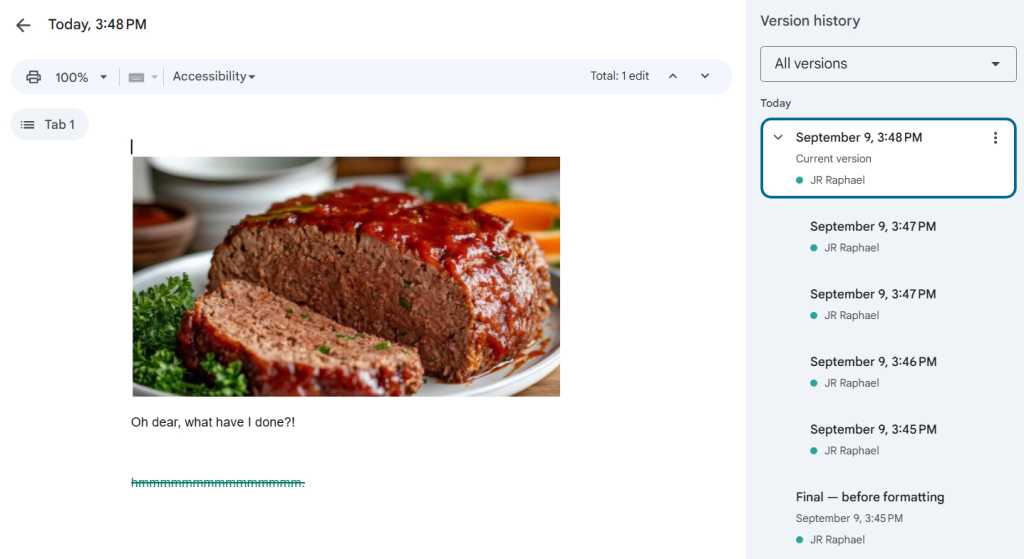
version history in google docs showing several older versions of the current document

Relying on Google Docs’ Version History feature can be a real lifesaver,  especially if you remember to manually save and name versions before  major edits are made.

JR Raphael / Foundry

Google Docs problem #2: Case craziness

Have you ever pasted over text from an email, a web page, or some other source and then realized parts of it were in a wacky ALL CAPS format? Or maybe you’re working on editing a document and need all the headings to exist in title case in order to look correct. Whatever the, ahem, case may be, save yourself the hassle of manually transforming all that text and let Docs do the heavy lifting.

Just highlight the text in question, click the Format menu at the top of the screen, then click “Text” followed by “Capitalization.” There, deep in the Docs menu structure, you’ll find a one-click tool for changing whatever text you selected into all lowercase, all uppercase, or title case — with no time wasted and only minimal effort required.

Google Docs problem #3: Auto-format frustration

By default, Google Docs performs some formatting magic that’s meant to be helpful but can often be annoying. For instance, the service will automatically capitalize the first word of every sentence you type, it’ll change all the quotation marks you enter from the standard straight-quote style into the controversial curly-quote style, and it’ll add a hyperlink onto any web address you enter into a document.

Docs also changes standard three-character ellipses (…) into single-character ellipses (…), using a Unicode symbol for that piece of punctuation. It adjusts normal numerical fractions (like 1/2) into single-character symbols (like ½), too, and it changes certain abbreviations (like c/o) into their single-character Unicode symbol equivalents (like ℅).

For certain purposes, those changes might be pleasant — but just as often, they’re obnoxious. Fear not, though, for you can disable every one of those behaviors and tell Docs to leave your original text alone.

The secret resides in an easily overlooked two-part preferences menu. To get there, click the Tools menu at the top of the Docs desktop interface, then select “Preferences” from the list of options that comes up. There, you’ll see a list of options for some of Docs’ more basic text substitution habits.
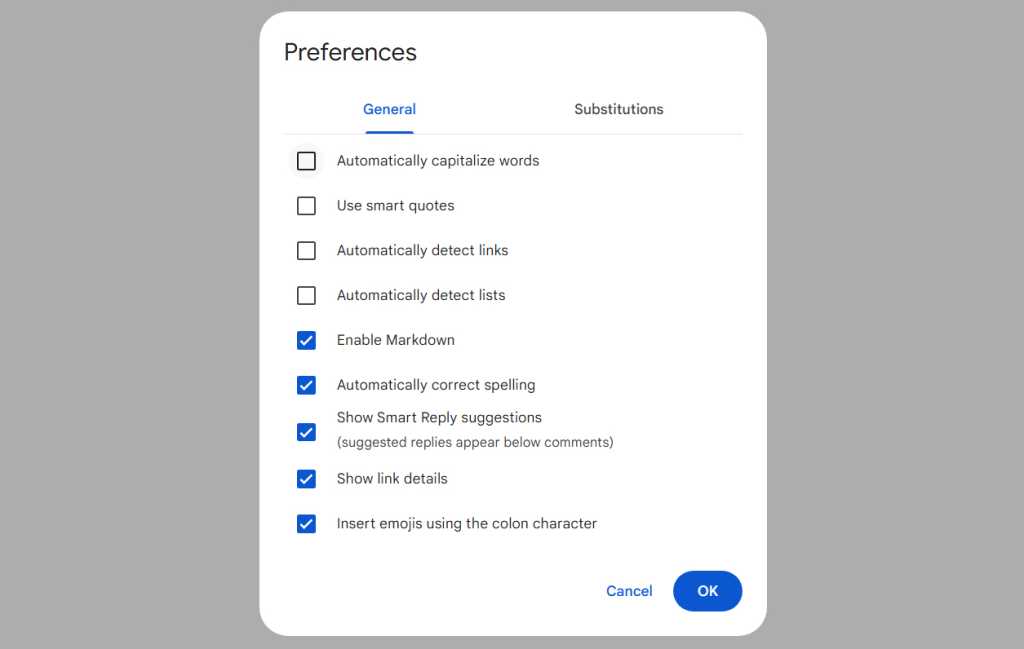
google docs preferences menu general tab

You can disable basic text substitution patterns in the Docs “Preferences” menu.

JR Raphael / Foundry

That area allows you to turn off the auto-capitalization, allegedly “smart” quote transformation, and automatic link formatting, among other things. As for the fractions and other more advanced forms of text substitutions, you’ll need to click on the “Substitutions” header at the top of that same window to find ’em — and then uncheck the box next to any substitutions you want to blast away.
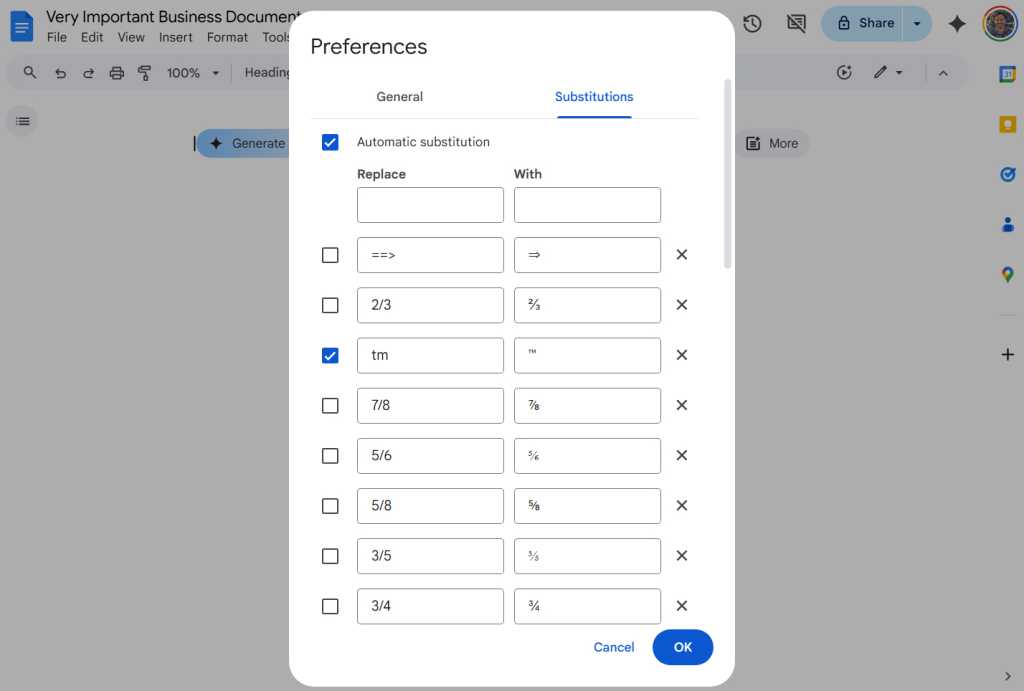
google docs preferences menu substitutions tab

The “Substitutions” section of that menu lets you take total control over how Docs messes with your text.

JR Raphael / Foundry

Ahh…the glass is suddenly looking 1/2 full instead of ½ empty, isn’t it?

Google Docs problem #4: Default font disappointment

Speaking of Docs defaults, maybe you aren’t entirely thrilled with the fonts or font sizes Docs generally offers. Maybe you’re more of a Courier New kind of person — or maybe you like your headings to be huge, blue, and single-spaced.

Whatever manner of font and spacing style you prefer for your current project, you don’t have to resign yourself to manually making all the changes every time you start a new document. Instead, just edit Docs’ font defaults to make ’em look and work exactly the way you like.

The simplest way to do that is to create some text that you want to use as your default for one format or another — normal text, title text, subtitle text, or one of six available heading styles. Once the text looks exactly the way you want, click the Format menu, select “Paragraph styles,” and select whichever type of text you’d like to follow that appearance from here on out. Then, just look for the option to update that text type to follow your current formatting.
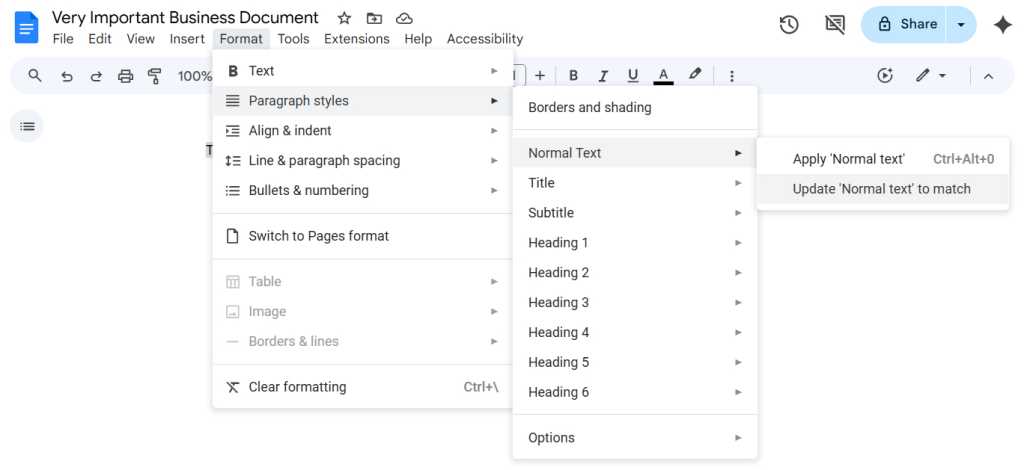
google docs paragraph styles  /> normal text > update normal text to match menu sequence

You can change Docs’ default fonts with a couple quick clicks.

JR Raphael / Foundry

All you’ve gotta do is select that option, then do the same thing for any other text formats you want to adjust. Once you’ve got everything set, click Format once more — and this time, select “Paragraph styles” followed by “Options” and then “Save as my default styles.” All your adjustments will then be saved to your Google account, and any new documents you create from that point forward with that specific account will use those styles instead of the standard Docs defaults.

Google Docs problem #5: Grammar police overreach

Docs loves to tell you when you’ve got something wrong with your grammar, which can certainly be useful at times. But it can also be incredibly irritating — if, say, you deliberately bend the rules for certain reasons or rely on highly stylized approaches and find yourself distracted by all the squiggly red underlines pointing out things that aren’t actually problems. (Been there, done that.)

If that frustration sounds familiar, give yourself a break by disabling Docs’ grammar suggestions — whether permanently or just for a little while, on an as-needed basis. You can find the command to do so in the Tools menu, under “Proofread” and then “Proofread settings.” Just uncheck the box next to “Grammar” to deactivate it.

You can also turn off automatic spelling suggestions in that same place, if you have a brand name that uses an uncommon spelling and constantly gets corrected. (Alternatively, you can use the “Personal dictionary” option within that same top-level settings menu to add specific terms into Docs’ vocabulary and keep it from thinking they’re mistakes.)

And if you find any other sorts of Docs writing suggestions to be more irksome than helpful — corrections related to word choice, voice, conciseness, or sentence complexity (geez, what kind of person would create a long and winding complex sentence in an important document and not keep things as concise as possible or maybe use some awkward wording choice decisions or any other such issues and not realize it themselves without the need for corrections being made by their word processor?!) — you can disable any or all of those in that same area.

Google Docs problem #6: Bullet point blues

Who doesn’t love lists? Docs makes it easy to add bulleted lists into your documents, and it even has a handful of formatting options within its Format menu, under “Bullets & numbering,” in case the basic black dot isn’t doing the trick for what you need.

Those default options are pretty limited, though, and if you have anything specific in mind, they probably won’t include the symbol you want.

But wait! Docs also allows you to insert almost any symbol imaginable as your bullet list indicator. You’d just never realize it, as the option to do so only appears after you’ve created a list. (Go figure.)

So try this: Create a bulleted list within a document, either by looking in the menu we just mentioned or by using the Ctrl-Shift-8 (or ⌘-Shift-8) shortcut. Then, with your cursor on that list, open up the Format menu and look under “Bullets & numbering” again. This time, you should be able to select the “List options” item — and once you do, you can select “More bullets” to select from a sprawling range of bullet symbol styles.
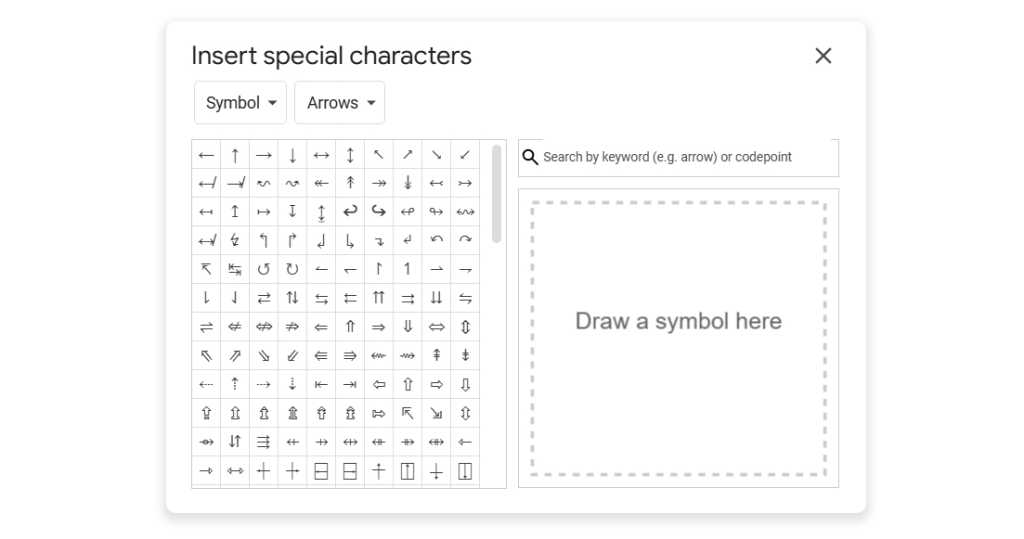
google docs bullet point options in special characters panel

You’ve got all sorts of bullet point options within Docs — if you know how to find and activate them.

JR Raphael / Foundry

That same menu will also allow you to adjust the numbering on a numbered list, in case you ever need a list to revolve around something other than numbers alone (like “Item No. 1,” for instance) or need to have a list start on a number other than 1.

Google Docs problem #7: The envelope enigma

For as capable as Docs has gotten over the years, one feature it’s curiously still missing is the ability to format a page as an envelope or as a sheet of labels for proper printing. If you need either function for your work, you’ll need to turn to a third-party Google Docs add-on to get it.

The aptly named Create & Print Labels add-on will handle everything you need. Add it onto your account (or ask your admin to do it for you, if you’re on a company account without direct add-on access) and then look in the Extensions menu at the top of any document to find and open it.

Click the “Create label” option within its submenu, and you can then simply select the specific type of envelope or label you want to create — as well as optionally selecting an accompanying Google Sheets spreadsheet with data you want filled in on the envelopes or labels for fast ‘n’ easy printing.
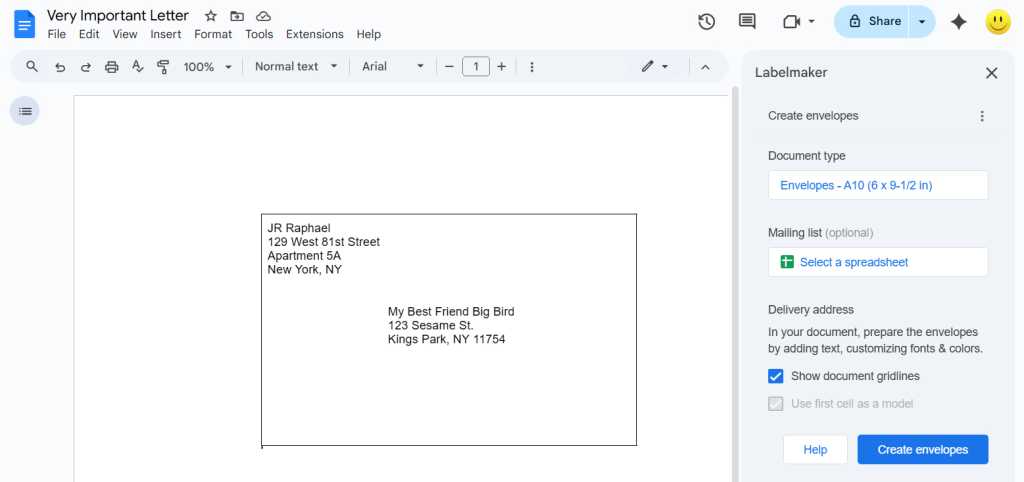
google docs with envelope in main window and labelmaker sidebar on right

Envelope and label formatting in Google Docs is surprisingly easy — once you have the right add-on installed.

JR Raphael / Foundry

Create & Print Labels is free for use with a limited range of standard label formats (which will probably be plenty for most casual purposes). For access to all available formats and features, the add-on runs 30 bucks a year or $80 for a lifetime license.

Google Docs problem #8: Word count inconvenience

If you work in an area where word count is critical, take note: You don’t have to dive deep into Docs’ menus (or futz with the Ctrl-Shift-C or ⌘-Shift-C shortcut) every time you want to check in on your current document length.

At some point, Docs gained the ability to show you a running total of the words in your document as you go. Once activated, the count appears in a handy little box in the lower-left corner of your screen. Clicking it will expand it to show your total page count, too, along with your character count (both with and without spaces).
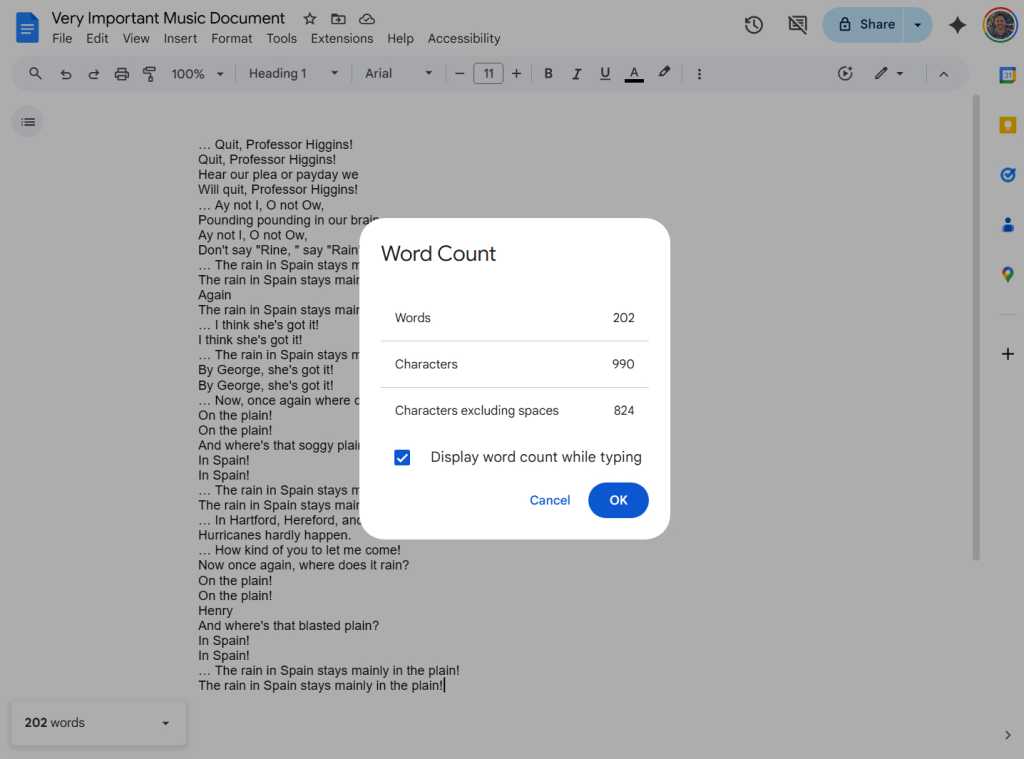
google docs word count dialog box with display word count while typing checked

With Docs’ persistent word count option enabled, you’ll always see a running word count in the lower-left corner of the screen.

JR Raphael / Foundry

To turn that feature on, click the Tools menu and then select “Word count” — or use that Ctrl-Shift-C or ⌘-Shift-C shortcut we mentioned a moment ago — and then check the box next to “Display word count while typing” in the pop-up that appears.

Google Docs problem #9: Missing menu item madness

Last but not least, no way around it: Docs has a lot of options, a lot of menus, and a lot of options within menus (and options within menus within menus, for that matter). It’s not quite an Office-Ribbon-caliber nightmare, but it can be a lot to process — and finding the command you need isn’t always easy.

If you’re ever hunting for a certain menu item within Docs, save yourself the trouble of digging and instead hit Alt and the forward-slash key (/) together. (On a Mac, hit the Option and / keys together.) That’ll pull up a fast-search box that’ll let you type a few letters of the command you’re looking for to find anything in a flash.

Bonus Google Docs problem: Word weirdness

There’s just one more Docs-related fix to address, and it’s related to the way the service interacts with Microsoft Word files. To explore that issue and get into some other relevant experience-improving suggestions, head over to the previous chapter in my “fast fixes” series: “8 fast fixes for common Google Drive problems.”

This article was originally published in May 2021 and updated in October 2025.

More Google Docs help:

When it comes to IT purchasing, price is not the same as cost

Look, your budgets may be constrained and the business environment complicated, but when it comes to investing in the technology needed to drive your enterprise, purchasing decisions should be guided by far more considerations than simple sticker price.

You also have to consider the value across the whole lifecycle — the total cost of ownership across a device’s usable life. Those costs should also be compared to the benefits, not just of owning the device, but also of the productivity benefits a particular platform might unlock. Each of those broad considerations masks a wider series of conversations, but they’ll do as a starting point.  

A white paper from international cloud-based eCommerce platform, New Black, sheds some light on how to approach tech purchasing comparisons. 

This report looks particularly at iOS versus Android in enterprise retail. But the considerations it raises should translate across other platforms and other industries – and while iOS is seen as the superior choice in this research, it’s not the choice that matters; it’s the thinking that guides the decision that should inform any tech purchaser.

When the price isn’t the cost

The key insight is that sticker price does not reflect true operational cost. If you think about it, you knew this already — do you think those cheap (EOL?) Windows systems currently being hacked at airports have really saved anyone any money? Is a system that costs almost as much to run each year  in terms of support per unit really delivering significant budget advantage?

Does it make business sense to equip employees with technology or systems they don’t enjoy using? How does that make them more productive? And are any of these considerations understood by the purchasing power players at your firm?

Total Cost of Ownership (TCO) matters. The white paper shows us how iOS is cheaper than Android in the long run, more secure, easier to use, and with lower ongoing costs, despite the higher initial outlay. 

Failure and consequence

Investing in tech that works matters when you rely on it for business. 

That’s why it’s important to note that Android devices experience annual failure rates between 12% and 18%, compared to 3% for iOS devices (according to IBM Enterprise Fleet Reports, 2023). Similarly, when it comes to Windows versus Macs, an (admittedly 10-year old) Consumer Reports survey found that while Macs had a 4% failure rate, the top five laptops running Windows systems all failed at least three times as much. (I’d love more recent data if anyone has come across any.)

The thing is, when it comes to tech for your business, the likely failure rate should be as public as the initial price. After all, there are major consequences to business when tech falls down, as these failures create operational disruption, deliver unpredictable support and replacement costs, and can put whole teams out of action while damage control and support operations swing into action. (And don’t forget the likelihood of disappointed clients and missed deadlines.)

Designer security, or secure by design?

That’s just one example. When it comes to Android and iOS, the reality that 9% of global cyberattacks were delivered via mobile devices also means the inherent security of the platforms should be a consideration, along with the relative cost of support. Some claim Android support costs can be up to 80% higher than for iPhones, or that PC users are twice as likely to call support as Mac users?

Of course, making IT purchasing decisions shouldn’t be seen through the lens of platform warfare. But, when it comes to deciding which technologies you’ll use to run your business for the next five to 10 years, the right decision today can and will help build business resilience in uncertain times. 

And getting to the right decisions requires you to answer the right questions. So you should be thinking about support, security, and maintenance costs, as well as pondering price.

Costs beyond cost

It’s not just about costs — there are also issues around sustainability, privacy, and employee experiences. Data exists to help guide you in all those decision spaces; the report cites an internal study from Rituals Cosmetics that showed major employee experience gains when that company deployed iOS-based POS systems across its stores, for example. Cisco and IBM have made similar claims. 

Evidence also points to significant energy consumption reductions by migrating to Apple’s systems, which could be of importance when you’re working to align your tech with corporate CSR.

Is it time to Think Different?

That’s not to say your choices need always be determined by data points such as these. Your business may be predicated around different sets of needs that benefit from making different technology choices. But if that is not the case, it really makes sense to build a holistic overall picture of the true value and the hidden costs levied by tech deployments as you engage in each replacement cycle. In some cases, a small additional cost today could generate significant, year-on-year support and maintenance savings across your business — not just tomorrow, but across the entire lifecycle of every new device.

You’ve just got to be willing to look at the options.

You can follow me on social media! Join me on BlueSky,  LinkedIn, and Mastodon.

It’s time to push back against the AI internet

The Dead Internet Theory is a false conspiracy theory. But in practical terms, it might as well be true. 

Emerging from the deranged muck of 4chan and Wizardchan in the late 2010s, the Dead Internet Theory holds that secret cabals of all-powerful government or corporate conspirators use bots and AI-generated content to replace humans on the internet. The goal: to manipulate public perception, control narratives, and influence the public’s behavior. 

A central tenet of the theory is that most online content is generated by bots and AI, not people. 

The false part is the conspiracy. The true part is that most internet content is indeed bots and AI. 

Midway through 2025, roughly 74% of newly created content online was generated with the help of AI or bots, according to several large-scale studies. Only about one-quarter of online content is created by people without AI assistance.

And the rate of change is rising fast. By the end of the year, more than 90% of all content will be AI-generated, according to some predictions. 

The Dead Internet Theory isn’t true. But it might as well be true. To quote the late comedian George Carlin: “You don’t need a formal conspiracy when interests converge.” And in Silicon Valley, the interests are definitely converging. 

GenAI content, now on an epic scale

A company called Inception Point AI is churning out AI-generated podcasts on an industrial scale, powered by custom AI agents that leverage OpenAI, Perplexity, Claude, Gemini, and other chatbots to build the content.

The company’s Quiet Please Podcast Network has created more than 5,000 podcast shows — not episodes, shows! — hosted by more than 50 AI “personalities.” The company intends to create thousands more “personalities” in the future. 

It costs them $1 per episode to produce. So, if an episode sells a $2 ad, they make a profit. 

Based on what the company’s CEO says in public, Inception Point AI seems captured by the delusion that AI-generated personas are human beings. It’s unknown how many listeners have been deluded into believing that the AI podcast hosts are real people. (The AI hosts identify themselves as such at the top of each episode.) 

“We believe that in the near future half the people on the planet will be AI, and we are the company that’s bringing those people to life,” said CEO Jeanine Wright, ignoring the advice of Microsoft AI CEO Mustafa Suleyman, who said in an essay last month that “We must build AI for people; not to be a digital person.”

If they believe they’re “bringing people to life,” then they by definition believe themselves to be gods. 

She added that the “people who are still referring to all AI-generated content as AI slop are probably lazy Luddites.”(People who create a podcast start to finish by pushing a button are calling others “lazy.”)

Of course, Inception Point AI isn’t alone in the industry. Others, including PodcastAI, Wondercraft AI, and Jellypod,are flooding the zone with fake-people podcasts, too. 

The AI podcast startups have a lot of catching up to do. The video startups are way ahead in terms of volume. 

Companies like T-Series, Sony SAB, SET India, and Zee TV have produced between 20,000 and 234,000 videos each. T-Series leads with nearly 24,000 videos, while some channels like Zee TV have exceeded 215,000 uploads.

It’s everywhere

Google is helping them. Creator AI Studios — which is built into YouTube’s ecosystem — enables small teams and solo creators to publish hundreds of videos per day through auto-editing, thumbnail generation, scene detection, and AI-generated scripts.

Platforms like Argil AI, RightBlogger, Team-GPT, and Designs.ai let creators generate scripted TikTok videos without cameras using AI models for ideas, editing, and even synthetic voiceovers.

AI-generated books are on the rise, too. Two years ago, Amazon had to cap book uploads to three books per daybecause people were uploading far more than that. 

Estimates suggest that more than 70% of new self-published Kindle books are partially or fully AI-generated. On Amazon.com alone, people may be collectively uploading as many as 1,000 AI-generated books per day. 

While the state of the art in text, audio, and video fakery ranges now from “very good” to “perfect,” the ability to make or alter photos using AI took a huge leap forward with Google Gemini 2.5 Flash Image (a.k.a. “Nano Banana”). Perfect pictures are a banality now. 

More than 15 billion images have been created using text-to-image algorithms since 2022. Roughly 34 million new such images are churned out every day now, using models based on Stable Diffusion and others. 

They’re used for business objectives in advertising, media and entertainment, e-commerce, fashion, and architecture, as well as for digital art and the lucrative field of online influencing. The technology is also used maliciously to create fake news and propaganda, scams, non-consensual deepfake pornography, and AI-generated child sexual abuse material.

The key benefit of AI-generated images — whether for benign and malignant uses — is low cost. AI pictures are super cheap to make. 

Studies of platforms like Facebook show that users often fail to recognize images as synthetic, even when they’re badly made and look ridiculous. A 2025 Microsoft report, for instance, found that 73% of survey respondents found it hard to spot AI-generated images, and correctly identified them only 38% of the time. 

We are months away from an internet where more than 99% of online content is AI-generated. As a result, the human race is being rapidly frog-marched into a world where we interact primarily, or even exclusively, with machines. 

Whose idea was this? (Probably the same people who decided to replace “writers” and “readers” with “content creators” and “content consumers.”) 

Has it occurred to anyone that the purpose of “content” — articles, books, photographs, videos and the recorded voice — exists for human beings to communicate with each other, rather than for machines to shovel data at people? 

And why do we accept this? We need to start holding the content delivery companies to account. 

Demand prioritization for people-created content

It’s time users demand, pay for, or exclusively use services that give you the choice to prioritize human-generated content. 

The paid-search engine Kagi Search, for example, enables users to avoid AI-generated content primarily through its image search filtering and labeling system, which allows users to choose whether to include, exclude, or exclusively display AI-generated images. Personalization features enable users to block or downrank specific domains if unwanted AI-generated or low-quality imagery slips past initial filters, and these controls are accessible both in image and web search. (Full disclosure: My son works at Kagi.)

DuckDuckGo also allows users to filter out AI-generated images from search results by providing a dedicated dropdown menu in its image search interface, where users can select to hide all AI images. 

Some stock photo platforms, such as Freepik, have added tools to exclude AI-generated results from search queries. 

But this list is pathetically short. While Google offers hard-to-find and ineffectual “NOPE” buttons to turn off some AI content, Microsoft Bing, Facebook, Instagram, Reddit, X, LinkedIn, Pinterest, other sites do not offer users the ability to opt out of AI at all.

If the industry is going to provide the tools for replacing nearly all online content with AI slop, then they must also provide the tools to opt out. 

We must demand the option to see content created by people either primarily or exclusively. It’s time for the living to rise up against the dead internet. 

Google exec sets Android OS for PCs plans in motion

The launch of an Android OS on PCs will definitely happen, and it will be as early as next year, according to a senior Google executive.

Speaking at the Snapdragon Summit 2025 in Maui, Hawaii on Wednesday, Sameer Samat, president of the Android Ecosystem at Google, said, “if you think about the laptop form factor, we’ve had ChromeOS for a long time, and we’re super committed to that platform, and it’s been really successful for us.” Google has learned a lot from it as well, he observed, and from its successful Android tablets, which are becoming what he described as “productivity machines.”

The opportunity that Google sees, he said, is to “accelerate all the AI advancement that we’re doing on Android and bring that to the laptop form factor as rapidly as possible, and also have the laptop and the rest of the Android ecosystem work seamlessly together. What we’re doing is basically taking the ChromeOS experience and we’re re-baselining the technology underneath it on Android.”

Brian Jackson, a principal research director at Info-Tech Research Group, said, “Google’s decision to merge Android and ChromeOS isn’t surprising, and is a development that analysts have speculated on for years. Perhaps it’s only surprising that it’s coming this late, but the trajectory to unify both the user experience and the developer experience for mobile and PC form factors makes sense. It comes at a time when Qualcomm is leaning into its neural processing unit (NPU) architecture, which excels at inference AI. “

Jackson added, “Google is looking to leverage AI more often on Android and wants a low-latency, secure experience for some of these functions, so optimizing inference on the device makes sense.”

The initial market that Android for PC will impact, he said, is the same market segment that deploys Chromebooks today: “The primary enterprise segment that comes to mind is the education sector, where Chromebooks have been the platform of choice for devices issued by schools to their students since the pandemic sent K-12 into a remote learning mode.”

There are, he said, “other examples too, but basically, enterprises look to Chromebooks when they want to cater to a consumer-like mass user segment. The advantages of the platform include its simplicity in device management, user experience, and relative unit cost per device.”  

Android PCs ‘not yet governance ready’

 Sanchit Vir Gogia, chief analyst and CEO at Greyhound Research, said that Google’s announcement “marks its boldest attempt yet to challenge the Windows–macOS duopoly. From our vantage point, the significance for enterprises is less about replacing entrenched estates and more about the prospect of fresh negotiating leverage.”

CIOs, he added, are “wary of lock-in and escalating licensing costs; 61% of them in the Greyhound CIO Pulse 2025 highlight security and compliance as their top driver for endpoints, while 54% cite governance and freedom from lock-in as equally decisive. Android PCs will not be judged on novelty. They will be judged on whether they can withstand enterprise governance.”

CIOs urged to be pragmatic

Android PCs should be viewed as a convergence of ChromeOS’s governance model and Android’s vast app ecosystem, he said. “This makes them intriguing, but not yet enterprise ready. CIOs we speak with are quick to recall Google’s mixed record of sustaining long-term commitments, and that hesitation is likely to linger until the company publishes a clearer roadmap. The larger concern is governance.”

Gogia added, “if a CIO were to ask us today whether to evaluate Android PCs, our counsel would be pragmatic: test them, but do so under guardrails. The sensible starting point is to bind pilots to roles where compliance hurdles are lighter — such as education, frontline retail, or hybrid worker cohorts. These scenarios allow organisations to validate the obvious attractions: lower TCO, long battery life, and continuity with Android apps already in use.”

The news from Google, ironically, comes at a time when, aside from some users in the EU who are being spared, businesses running Windows 10 will no longer receive free software updates, technical assistance, or security updates from Microsoft after October 14.

Clearly, said Jackson, “Android for PC isn’t going to ‘save’ enterprises that haven’t upgraded their Windows 10 systems to Windows 11 yet. But that segment isn’t the realistic target for this OS for the most part. This isn’t something that enterprises are going to look at as a replacement for Windows. Rather, it’s a new option for those who need to issue managed devices at scale.”

For the education sector and others in similar positions, he said, “the question now becomes, what’s the road map to migrate my fleet of devices? They will need to consider whether they should purchase the new Android for PC devices and if that will integrate smoothly into their device management approach.”

And, said Jackson, “they’ll need to start considering when the end of support/end of life date for their current Chromebook devices will hit. Are they going to get a clear path to upgrade that fleet from Google? Or will they need to refresh their hardware to keep pace?”

MacStadium sees Apple adoption accelerating across US enterprises

Apple continues to experience accelerating adoption across business and enterprise environments, with a new US survey of 300 CIOs confirming the trend.  It shows not only that 96% of US CIOs expect their Mac fleets to grow in the coming 12 to 24 months, but that Apple already accounts for an average of 65% of enterprise endpoints. The adoption is delivering big benefits in productivity, reliability, and employee retention, but as usage grows some of the remaining weak points in what Apple offers to business are emerging.

Those are some of the findings from MacStadium’s inaugural CIO survey, which explores the evolution of Apple on the enterprise. The results show rapid Mac deployment across US business in the last two years, with 93% of CIOs claiming increased use, and 59% claiming a significant increase in use of all Apple devices.

I caught up with MacStadium CEO Ken Tacelli to get some insight into the data, which was captured by Censuswide. 

Mac adoption in the enterprise

“As the adoption of Apple hardware continues to rise with both consumers and business users, and Apple Silicon is emerging as a secure and energy-efficient option for AI workloads, Apple is turning its sights to the enterprise,” he said in an interview. Among the specifics:

  • 93% of CIOs report increased Apple device usage over the past two years.
  • 45% of CIOs describe their leadership’s view of Macs as a strategic investment, reflecting growing executive-level buy-in.
  • The top drivers for Apple adoption are security and privacy (59%), employee preference (59%), and hardware performance (54%).
  • Perhaps most importantly, 65% of CIOs say Macs are easier to manage than Windows or Linux devices.

In addition to those factors, the unique technical capabilities of Apple’s kit (53%) play a role. Businesses are buying Macs because they’re cheaper to run, last longer, allow employees to be more productive, and are both more private and more secure.

Want an AI PC? Get a Mac

The survey also shows that AI has become a leading reason to choose Macs. Apple Silicon is highly performant and energy efficient, enabling Macs to run on-device, secure AI, and to access cloud-based AI services. 

That advantage is driving what MacStadium calls “unprecedented” Mac adoption in enterprise environments. The survey confirms that more than 90% of America’s CIOs agree that Apple Silicon is influencing their decision to adopt Macs across their business.

Among organizations using Macs, 73% rely on them for AI processing, surpassing traditional workloads like iOS/macOS development (68%) and build/test/deploy workflows (61%).

Considering this, it’s perhaps unsurprising that most (99%) respondents say Apple technologies are important to their IT strategy. Over a fifth (22%) say they’re mission-critical, while 71% say they’re very important. (That compares to just 1% who say they’re not important.)

Fixing the weak spots

All the same, the Apple ecosystem still has some weak spots in comparison to the enterprise incumbent, Tacelli told me. “While there are tools to manage Apple endpoints on an enterprise scale, the Apple ecosystem still lacks the robust operational frameworks that Microsoft and Linux have had for years,” he said. 

The survey reveals a few pain points in Mac deployment, with a need to fix some of the security and compliance gaps being the main challenges. Integration with existing software also remains a problem.

Perhaps the need to support legacy solutions slows Apple adoption, given so many of those systems were not made with interoperability or the need to support multi-platform enterprise environments in mind. However, stumbling blocks like these can only fade over time as those systems are replaced.

Back to the future

“We believe ‘MacOps’ is emerging within enterprise IT, signifying a profound shift in the management of Apple devices – a systematic application of DevOps principles to the end-to-end lifecycle of the entire Apple ecosystem, including macOS, iOS, iPadOS, tvOS, and visionOS,” Tacelli said.“A MacOps framework is designed to manage Apple devices at scale with automation, consistency, security, and speed. It moves beyond the traditional, reactive model of IT support to a proactive, code-driven paradigm where the entire Apple fleet is treated as a managed, version-controlled component of the enterprise infrastructure.”

The advantage of this emerging approach is that it helps resolve the staffing challenges of Apple support. “IT admins well-versed in Microsoft are widely available, but knowledgeable Apple administrators are harder to come by,” Tacelli said. 

The idea is that an effective MacOps framework should make it much easier to deploy Apple hardware and software across any business. There’s some substance to those claims; the survey shows 69% of CIOs would be even more willing to deploy Macs if an enterprise-ready solution for managing them as infrastructure were available.

One more thing

Change comes in waves. It wasn’t so long ago that the very notion of Apple’s devices being widely used in business would have seen proponents laughed out of town. This has changed dramatically, with Apple investing deeply in iterative improvements to what it offers the enterprise. As with offering Apple Business Essentials outside the US, it appears that Apple’s teams are working to ease every pain point they can to encourage enterprise adoption of its platforms.

It’s just that as deployment accelerates, the nature and number of challenges that must be resolved also grows.

So, what happens next? Here’s a prediction: MacOps will one day become so much part of life no one will remember when Apple was almost invisible in business.

You can follow me on social media! Join me on BlueSky,  LinkedIn, and Mastodon.

Apple: Europe’s DMA should be repealed

One year after Europe codified the Digital Markets Act (DMA), it is clear the law is leading to worse experiences for Apple users in the European Union, limiting choice, undermining privacy, exposing them to risks and damaging the user experience consumers chose. 

Apple is urging the European Commission to rethink the Act, demanding more expertise, more clarity, and more focus on what consumers, not competitors, want from tech.

The DMA should be repealed

Europe has launched its first review of the effectiveness of the DMA, which so far seems mainly to have punished Apple customers in Europe. Apple is demanding it be repealed, or at the very least that enforcement be professionalized and clarified.

The company particularly wants independent experts who understand technology to be responsible for the DMA’s application rather than the current crop of political appointees. The company filed its criticisms of the DMA on Thursday morning, arguing that it is forcing Apple to make “concerning changes” to how it designs and delivers products to customers there. 

For example, it warns that the non-appearance of Live Translation in Europe could be the tip of a growing iceberg. If the DMA is poorly applied, it remains possible European customers could even see features removed.

Malicious regulation

Apple makes no secret that it feels like a victim, given that the DMA forces it to open its platforms to competitors at no cost while also doing serious – perhaps fatal – damage to customer privacy. 

“The DMA’s rules only apply to Apple, even though Samsung is the smartphone market leader in Europe, and Chinese companies are growing fast,” Apple said. “Apple has led the way in building a unique, innovative ecosystem that others have copied — to the benefit of users everywhere. But instead of rewarding that innovation, the DMA singles Apple out while leaving our competitors free to continue as they always have.”

This one-sided application of rules cannot continue, it argues. Not only is it unfair to Apple, but it is deeply unfair to its users. 

An attack on privacy

The company says it can’t do some of the things the DMA requires of it and keep the privacy promises it has made. It also warns that as the rules are applied, competing companies such as Meta can exploit the DMA to exfiltrate huge quantities of user data, breaking privacy. In other words, people you don’t choose to support can still make millions of dollars — even though you chose a completely different product.

“We’ve suggested changes to these features that would protect our users’ data,” says Apple, “but so far, the European Commission has rejected our proposals.”

It gets worse. The application of the DMA makes it illegal for Apple to introduce new features in Europe until they are also made available to other companies’ products. That means that when developing new features Apple must invest not just in its own platform, but in competing platforms and products to ensure such operability or face massive fines.

Apple’s competitors are already using the law to undermine elements of the user experience. Some are demanding the complete content of iPhone notifications and Wi-Fi network history, both of which give third parties valuable data with which to track and monetize customers – without consent.

An impossible lack of clarity

But even this complex web of demands isn’t sufficient, as Europe’s regulators seem deeply capricious. “Under the DMA, the European Commission’s interpretation of the rules is constantly changing. And that makes it nearly impossible for companies to know how to comply,” Apple said. 

Figuratively, this means a decision agreed to one day is no longer good enough by the following week, with Apple suffering punitive fines as a result of the capricious application of regulation.

The company is effectively arguing against its critics, who accuse it of “malicious compliance” by pointing out that it is itself also subject to malicious application of the regulation. Instead, it points to near constant communication between corporate officials and regulators, and the hundreds of engineers it has working to make its systems compliant with Europe’s seemingly ever-changing rules.

It is also true that under the DMA, companies must make the changes demanded by regulators even if they choose to oppose them in a legal process that can take years, during which the damage is done. Penalties are arbitrary, applied unevenly, and punish companies rather than promoting competition.

Bad for Europe, bad for Europeans

All of this is not just bad for Apple’s business, of course, it’s also punitive to customers, who face more risks when downloading apps and making payments as a result of sideloading and alternative payment systems. It also makes for a fractured apps market with less reliable protections.

Not only do European customers lose access to some features Apple can’t introduce in the bloc, but they also lose access to the choice they originally made to opt for an Apple-curated experience.

In other words, far from helping markets, the DMA is making it harder to do business in Europe. In my view, given the application of the DMA I’ve seen so far, Europe’s application of the law is flawed, politically-driven, and should be improved.

You can follow me on social media! Join me on BlueSky,  LinkedIn, and Mastodon.

The experimental phase is over: Atlassian bets on DX to deliver AI ROI

All too often when it comes to AI, enterprises get stuck in a sort of experimentation limbo as deploying AI tools that deliver tangible ROI continues to be a struggle.

Atlassian aims to get them over that hurdle with its definitive agreement to acquire DX, an analytics platform that helps enterprises track their engineering teams’ performance and identify bottlenecks in development and deployment.

The acquisition will allow Atlassian to offer an all-in-one platform with integrated collaboration, project management, and developer productivity measurement tools to help enterprises move from AI testing to deployment.

“What a lot of leaders are saying is, the time for experimenting has passed,” Thomas Randall, research director at Info-Tech Research Group, told Computerworld. “It’s time to now actually put together the solid business case, and greater observability helps.”

Augmenting Atlassian’s ‘System of Work’ strategy

The DX platform was developed to help engineering leaders measure, benchmark, and improve developer productivity. Its tools will fit into Atlassian’s “System of Work” platform, which is designed to speed up processes by connecting business, service, product, leadership, and software teams across an enterprise.

According to the company, DX’s integration into Atlassian’s software development lifecycle (SDLC) will help customers measure AI adoption and impact, pinpoint and address bottlenecks, and gain visibility into developer experience, productivity and system health.

Atlassian has been investing significantly in the software space, with new offerings in Bitbucket Pipelines and Rovo Dev augmenting its Jira, Bitbucket, and Compass tools. The company is also staking a claim in the nascent AI-browser space with an acquisition of The Browser Company of New York.

“For any technology-driven organization, software teams are pivotal for your continued success,” Mike Cannon-Brookes, Atlassian CEO and co-founder, said in a YouTube video accompanying the DX acquisition announcement. “These teams are at a critical moment. AI is transforming how software teams work. This creates both incredible potential, and a whole new set of questions.”

Atlassian has 300,000-plus global customers, and a significant portion of DX’s customers, including Dell, BNY, Chime, Pinterest, GoodRX, Etsy, Vanguard, Pfizer, and Docker, already use Atlassian products.

“By joining forces, Atlassian and DX will help hundreds of thousands of software teams amplify their impact,” said Cannon-Brookes.

Providing insight into friction points, developer satisfaction

Organizations still struggle to pinpoint use cases for AI in their internal workflows and products, Info-Tech’s Randall noted.

“It’s been a bit more of throwing a lot of things at various pieces, or bottom up approaches from departments trying out different things,” he said. “A lot of time and money has been lost because too many projects and tests are going on.”

The integration of DX into Atlassian’s platform will offer observability and context, so teams aren’t just getting caught up in endless testing and experimenting loops, he said. “The core benefit is far greater visibility into where their work is slowing down. They can figure out which investments are actually working, which are having weaker impact.”

For instance, they can gain insight into code reviews or test delays. Many software teams are also adopting code assistants and automated testing tools, which DX can benchmark, Randall noted. They can also use it to gauge developer satisfaction and friction points, allowing them to set norms around measuring progress, and identify best practices and new opportunities for automation.

“It will help reduce technical debt by improving flow, lowering cycle times, reducing delays, expediting incident resolutions and risk management,” said Randall.

A ‘nice perk’ for existing Atlassian customers

The integration is a “nice perk” and “value add” for Atlassian customers, Randall contended. The company can now offer a “comprehensive package” featuring build and run software, matrix and feedback loops.

Enterprises must always be mindful about execution, he emphasized. How well will this integrate into their change management, such as by convincing engineering teams to adopt certain metrics? These tools surveil behavior, so it’s important to consider developer personas and identify what will motivate them and help them do their best work, he pointed out.

With any AI project, enterprise leaders should consider their core business goals, and objectives and key results (OKRs), then determine how AI tools can support them, rather than just adopting AI for the sake of it, said Randall.

“Because,” he noted, “a lot of the time it’s, ‘do you even need AI for that? This could just be straightforward automation with a rules-based system.’”

The ROI of automation: How intelligent ITSM drives cost savings and efficiency

IT service desks have long been viewed as expensive but necessary cost centers that play an essential role in keeping organizations operational. However, this perception is rapidly changing as intelligent IT service management (ITSM) platforms demonstrate their ability to transform service operations from expense drains into efficiency engines that deliver measurable cost savings and strategic value.

Traditional IT service desks face the daily challenge of managing an ever-increasing volume of routine requests while maintaining quality service within constrained budgets. Password resets, access provisioning, and basic software troubleshooting all consume enormous amounts of staff time, creating bottlenecks that frustrate users and limit IT’s ability to focus on strategic initiatives.

When skilled IT professionals spend much of their time on repetitive tasks, organizations not only pay premium wages for routine work but also sacrifice the innovation and strategic thinking these professionals could apply elsewhere. Manual processes also introduce human error, inconsistent service delivery, and delays that ripple through the organization.

The AI-powered transformation

Intelligent ITSM represents a fundamental shift in how service desks operate. Unlike basic automation tools that simply execute predefined scripts, ITSM systems powered by artificial intelligence (AI) analyze historical data, identify patterns, and continuously learn from ongoing operations to improve service delivery.

“The transformation we’re seeing with intelligent ITSM goes far beyond simple cost reduction,” says Karl Triebes, chief product officer at Ivanti. “Organizations are discovering that when you automate routine service desk tasks and free IT staff to focus on strategic initiatives, you’re not just saving money; you’re also unlocking innovation capacity that drives business growth.”

For instance, intelligent ITSM can provide:

  • Automated incident routing that ensures that requests reach the right resources immediately
  • AI-powered chatbots that resolve common issues without human intervention
  • Predictive analytics that identify potential problems before they impact users

Intelligent workflows streamline approvals and escalations, and self-service portals empower users to resolve many issues independently.

Organizations that employ intelligent ITSM report improvements in resolution times, with many routine requests handled instantly through automated workflows. As for the more complex issues that require human intervention, these platforms enable IT to prioritize work based on business impact rather than simply responding to the loudest complaints. The upshot: Users spend less time waiting for IT support and more time on value-generating activities.

Intelligent ITSM also delivers compliance benefits, reducing the risk of costly regulatory violations while ensuring standardized service delivery across the organization. Enterprises can also move out of a reactive stance, leveraging intelligent ITSM’s real-time visibility into service health to enable proactive management and continuous improvement, further optimizing operational efficiency.

Also, intelligent ITSM enables organizations to strategically reallocate IT resources. When routine tasks are automated, skilled technicians can focus on digital transformation initiatives, security improvements, and innovative solutions. This shift transforms IT from a cost center into a function that enables the business to achieve its objectives faster and more efficiently.

One example of an intelligent ITSM platform is Ivanti Neurons for ITSM , which integrates AI-powered virtual agents, incident correlation, generative AI, and automated workflows into a comprehensive service management ecosystem. The platform’s self-service portal enables users to resolve issues independently, and advanced analytics help IT teams identify optimization opportunities and prioritize work based on business impact.

Promoting scalability and flexibility, Ivanti supports hybrid and remote environments while demonstrating how intelligent ITSM can deliver faster, more cost-effective service experiences to enable you to work smarter, not harder.

Discover how Ivanti can help your organization take a proactive, automated approach to ITSM.

Leading the charge in cyber risk mitigation: From gut feeling to objective evaluation

Cybersecurity today is more than an IT issue — it’s a core business risk affecting revenue, operations, reputation, and competitiveness. Yet most organizations still rely on subjective approaches, using gut instinct or limited data, often missing threats hidden in data silos, shadow IT, outdated software, or supply chain vulnerabilities.

Is moving past intuition too disruptive? Not at all. Even with legacy systems and data silos, the shift to objective, data-driven risk management is achievable. According to a recent Ivanti survey of 2,400 cybersecurity professionals, common blockers — such as limited visibility and persistent end-of-life (EOL) software — are widespread but not insurmountable:

  • 55% face data silos.
  • 45% struggle to detect shadow IT.
  • 43% can’t spot supply chain vulnerabilities.
  • 48% rely on EOL software, especially in healthcare.

The good news: Organizations don’t need a massive overhaul. With structured frameworks, AI-powered analytics, and stepwise guidance, even incremental changes deliver real value. Moving to objective evaluation brings faster decisions, clearer priorities, and measurable resilience — without unnecessary hassle.

Common roadblocks — and the way forward

Nearly all organizations hit obstacles in their journey to effective risk assessment. It’s easy to default to incomplete information, especially when teams are stretched and data is scattered. Subjective approaches — albeit common — often miss hidden risks such as unmanaged shadow IT or outdated assets. Recognizing these pitfalls is the first step toward overcoming them.

Objective evaluation, powered by exposure management platforms, brings together enterprise-wide data, contextualizes risks by real business impact, and applies structured frameworks and AI analytics for measurable results. Still, only half of organizations rigorously apply their risk tolerance frameworks — often hindered by data access limitations and talent shortages.

Steps to modernize your cyber risk approach

Ivanti’s Exposure Management Strategy Guide offers practical next steps:

  • Inventory cybersecurity tools, and use readiness checklists.
  • Assign asset criticality scores with internal data.
  • Prioritize vulnerabilities by risk exposure scores — merging likelihood and impact.
  • Perform cost/benefit analysis on mitigation versus risk acceptance.
  • Review risks and controls to adapt over time.

Metrics that matter

IT teams can modernize risk evaluation by using metrics such as:

  • Asset criticality scores: Evaluate assets by business value.
  • Vulnerability exploitation likelihood: Focus remediation on high-likelihood threats.
  • Risk exposure scores: Combine likelihood with impact, aligning with risk frameworks.
  • Time for detection and response: Shorten response times — 62% said siloed data slows them down.
  • EOL software usage rate: Track and reduce outdated assets, especially in high-risk sectors.
  • Data silo integration progress: Measure visibility gains across IT and Security.

How artificial intelligence (AI) drives smarter risk decisions

Generative and agentic AI have distinct roles:

  • Generative AI synthesizes vulnerability and threat data, creates business context reports, and produces risk framework templates.
  • Agentic AI automates inventory, prioritization, and ongoing risk scoring, detecting assets in shadow IT and cloud environments. Human oversight is crucial for validating outputs and setting thresholds.

Inside Ivanti’s exposure management platform

Ivanti’s suite (Ivanti Neurons for risk-based vulnerability management (RBVM), external attack surface management (EASM), and patch management) provides:

  • Continuous discovery and prioritization based on impact and likelihood
  • Automated external exposure identification — shadow IT, cloud, third-party risk
  • Data aggregation across endpoints, networks, software as a service (SaaS)
  • Seamless patch management integration
  • Cross-functional collaboration tools

Results include shorter response times, fewer blind spots, and improved objective metrics. Ivanti’s platform users saw a 14-point year-over-year improvement in data integration.

“Moving from gut feel to data-driven cyber risk decisions does more than tighten up security — it helps businesses adapt and stay ahead,” says Karl Triebes, chief product officer at Ivanti. “When you really understand your risks, you can invest smarter; tackle threats faster; and build a stronger, more resilient company.”

Your action plan for measurable cybersecurity

Cybersecurity as a strategic business enabler

Organizations that embrace objective, data-driven cyber risk evaluation gain resilience, informed allocation, and a long-term competitive edge. With the right tools, cybersecurity transforms from cost center to business enabler.

Learn more about how Ivanti can help your organization adopt an objective approach to managing and measuring cybersecurity risk.

Microsoft prompts Teams AI agents to collaborate with humans

Microsoft has added a “facilitator” agent to Teams to provide AI assistance during meetings by creating agendas, taking notes, and more. It’s one of several Copilot agents coming to Teams and other Microsoft 365 apps that will act like an AI teammate, Microsoft announced on Thursday.

“Microsoft 365 Copilot is moving beyond personal productivity to enable teams to work together with AI — building strategy, reducing miscommunication, and accelerating progress,” said Nicole Herskowitz, corporate vice president for Microsoft 365 and Copilot, in a blog post on Thursday.

The Facilitator agent appears during a Teams meeting to perform a range of tasks that allow participants to focus on their conversation.

For example, it can find an existing agenda from the meeting invite or create its own based on meeting goals set out at the start of discussion. It will also allocate time for each topic to keep the meeting on track, Microsoft said. Participants can then ask the agent to make changes to the timeline, adding or removing topics — useful if you don’t want the AI assistant dictating the entire flow of a discussion.

Once a meeting has started, the Facilitator takes notes that can be edited by all participants, as well as answer questions pertaining to the meeting or more general queries that require information pulled from the web. It can detect when participants mention the need for a new document and offer to create it on their behalf, as well as generating a first draft on the desired topic.

The agent will also capture any tasks mentioned during the meeting and assign them to a coworker, thanks to an integration with a Project Manager agent in the Planner app for Teams. Again, it will be possible to edit and reassign these tasks by interacting with the agent. Tasks can then be managed in the Planner app.

The Facilitator agent is generally available to Microsoft 365 Copilot customers from today, while the task management and document creation skills are available in public preview.

In addition, for M365 Copilot customers, Microsoft is adding agents that will appear in every Teams channel. The Channel agent acts as a “domain expert” for a team, performing a range of tasks: highlighting deadlines, drafting status reports, and assigning tasks.  

The Channel agent can also interact with third-party agents via the Model Context Protocol (MCP), an open standard that has emerged recently as a means to connect AI agents across applications, “sharing context and invoking each others’ tools within the same workflow,” said Herskovitz.

“Microsoft is well-positioning itself to where people collaborate and agentic teammates help complete the work,” said Wayne Kurtzman, research vice president at IDC. 

He said that deployments of AI agents are still in their infancy, as businesses begin to explore the potential of the technology. “Organizations are gradually adopting AI and agentic solutions to evolve how they work. Executives are carefully evaluating any cost and security challenges and balancing that against the cost of falling behind,” said Kurtzman.

“Ultimately, AI will help organizations measure success in new ways and with intriguing granularity. We will have new insights from collaboration, creativity and critical thinking through to customer outcomes.”

Microsoft also announced two agents coming to other M365 apps.

A Knowledge agent for SharePoint, in public preview ahead of general availability in early 2026, automatically generates metadata and arranges files into columns, for example. It can also scan a SharePoint site to detect broken links and inactive pages and suggest how to fill content gaps based on information site visitors are searching for. Users can also query the AI assistant about the contents of files in natural language and ask it to perform functions such as to send an email when invoices reach a certain value, for instance.

Finally, agents in Microsoft’s Viva Engage enterprise social network, also in public preview, will draft responses to community questions and help community managers ensure discussions are accurate, Microsoft said.

The Knowledge agent for SharePoint and agents in Viva Engage require an M365 Copilot license.

Updated with comments from IDC.