Author: Security – Computerworld

AI coding tools can slow down seasoned developers by 19%

Experienced developers can take 19% longer to complete tasks when using popular AI assistants like Cursor Pro and Claude, challenging the tech industry’s prevailing narrative about AI coding tools, according to a comprehensive new study.

The research, conducted by Model Evaluation & Threat Research (METR), tracked 16 seasoned open-source developers as they completed 246 real-world coding tasks on mature repositories averaging over one million lines of code.

Microsoft’s 19-hour Outlook outage exposes fragility in cloud infrastructure

Microsoft’s Outlook service suffered a massive global disruption on Wednesday, leaving millions of users unable to access email through Outlook.com, Outlook for desktop, and Outlook mobile.

In a series of updates posted on X through the official account of Microsoft 365 Status, Microsoft acknowledged the incident and confirmed that it was actively investigating the issue impacting Outlook services. The incident was tracked under the identifier EX1112414 in the Microsoft 365 admin center. Shortly after, the company acknowledged some users were experiencing issues with Microsoft Teams, which was tracked under the identifier TM1112332.

The incident, which lasted for over 19 hours, began at 10:20 PM UTC on Wednesday and was resolved by 5:25 PM UTC on Thursday.

According to the Microsoft Service Health Status report, the configuration change has fully saturated all affected infrastructure. “We’ve verified that the service is healthy by monitoring telemetry and confirming resolution with previously affected customers,” the update stated.

While the company had initially stated that a portion of the mailbox infrastructure wasn’t performing efficiently, Microsoft did not respond to the request for comment on the root cause of the incident.

“A multi-hour outage across Microsoft Office 365 services such as Outlook, Teams, and SharePoint typically signals a significant disruption in Microsoft’s core cloud infrastructure,” said Manish Rawat, Analyst, TechInsights. “The most common technical culprits include failures in Azure Active Directory (now Entra ID), which handles authentication for all users; any misstep here can lock out access across services globally. Another frequent cause is faulty software updates or misconfigured changes, particularly in critical systems like DNS, Exchange Online, or routing layers. Microsoft’s use of automated, rolling updates increases the risk of such errors propagating quickly.”

Rawat said that global outages can also result from Azure Traffic Manager or DNS-related issues, where incorrect routing or BGP misconfigurations sever external access, even if services remain functional internally. Finally, Office 365’s reliance on a complex web of Azure microservices means that a single point of failure in networking, storage, or orchestration can trigger a chain reaction, disrupting multiple applications at once.

A pattern of recurring disruptions

There have been many service disruptions in recent months, exposing persistent fault lines. In June, a global outage disrupted core applications of Microsoft 365 services, which included Microsoft Teams and Exchange Online. In May, Outlook suffered another outage, which was attributed to a change that caused the problem. Earlier, in March, another outage incident disrupted Outlook, Teams, Excel, and more, impacting over 37,000 users.

Microsoft is not alone, as over the last few months, there have been a growing number of high-profile cloud service disruptions across hyperscalers. In June alone, IBM Cloud services were disrupted twice, and a Google Cloud outage incident impacted over 50 services globally for over seven hours.

“The escalating complexity of modern IT systems, particularly cloud-based services like Outlook and large-scale data storage solutions, is the culprit behind increasing system glitches and outages. This complexity is fueled by the sheer volume of data being generated, transmitted, and received daily, coupled with the implementation of sophisticated controls, policies, and AI-driven algorithms designed for data analysis” said Neil Shah, vice president at Counterpoint Research. This “data tsunami” inherently creates more opportunities for system vulnerabilities, often manifesting as configuration errors, distributed cloud issues, system overloads, or targeted cyberattacks.

High-stakes impact on critical sectors

Outages like these can trigger a cascade of disruptions, halting workflows, delaying decisions, and jeopardizing business outcomes. The stakes are especially high in sectors where timing and compliance are critical, such as finance, public infrastructure, and emergency services.

“In regulated sectors such as BFSI and healthcare, interruptions can compromise audit trails, delay critical communications, and jeopardize compliance with legal and reporting standards. The customer-facing impact is equally severe: service-level agreements (SLAs) may be breached, and real-time support or financial transactions could be disrupted. Such outages also pose reputational risks, as clients expect reliable, always-on communication,” added Rawat.

Financially, the cost of downtime for large enterprises can run into millions per hour, affecting revenue, client trust, and business continuity.

Building resilience with AI and automation

To avoid such cascading consequences, Shah explained that cloud service providers like Microsoft must adopt a more proactive and resilient posture. “This necessitates a continued focus on building enhanced redundancy, implementing robust predictive and automated checks, refining configuration management, streamlining incident response, and improving rollback mechanisms.”

Moving forward, AI is poised to play a crucial role in both the predictive identification and preventive mitigation of these outages, enabling dynamic activation of redundancies and automated rollbacks to maintain service continuity.

More Microsoft news:

>

Send in the clones

We’re all so busy that it’s tempting to wish for a digital clone to share the workload. And now, thanks to AI, you can. 

Many people are embracing generative AI (genAI) tools to make a clone or digital twin of themselves that can speak and even interact on their behalf. 

We’re all familiar with the idea of creating fake people using AI. But a digital clone is an AI replica of a real person, with the same appearance, voice, mannerisms, and pertinent knowledge as that person. 

Of course, the first thing that comes to mind when we think about digital clones is fraud and porn. Creep factor aside, legitimate and ethical applications for digital clone technologies are emerging.

Some of the genAI tools people are using should be familiar to you: ElevenLabs, OpenAI’s ChatGPT, Google Gemini, Anthropic Claude, and others. 

You may be less familiar with Hedra’s Character-3, an AI model that enables the creation of videos featuring talking, singing, or moving digital characters. Led by CEO Michael Lingelbach and CTO Alex Bergman, Hedra released Character-3 in March. 

Here’s one way to use it. You can upload a photo of yourself, along with a recording of your voice. Then, you type a prompt about what you want the digital version of you to say and do. The system then bases the video on the photo, the voice on your sample, and the action on your instructions. 

The model can create full-body movement, not just faces, and accurately matches lip and facial motion to the audio. It handles up to 90 seconds of video in one go, with output up to 4K at 60 frames per second.

Character-3 is used by content creators, marketers, teachers, and businesses. For example, teachers can create videos with virtual instructors, and brands can utilize digital spokespersons for their advertisements. The tool is part of Hedra Studio, a web platform that brings together Character-3 and other AI tools for video, audio, and images. Hedra Studio enables users to build scenes, add backgrounds, and control the look and feel of each video. Developers can also use Character-3 through an API.

The most-watched creators who are assumed to be using Character-3 today are comedian Jon Lajoie, who runs the Talking Baby Podcast, and virtual singer and musician Milla Sofia.

It’s not just influencers. Businesses of all sizes are using Character-3 to make digital spokespersons and brand mascots for ad campaigns. Brands can create custom characters that match their style and message, and use them in ads, social media, and customer support videos. One benefit is that brands can quickly respond to fast-moving current events or changing circumstances and build the creative for a campaign in minutes, not days. 

Businesses can also use Character-3 for internal training, making videos with animated trainers who guide employees through new processes or policies, while developers and AI enthusiasts use the Character-3 API to build new apps and services. (They integrate the model into their own platforms to create custom video tools, chatbots, or virtual assistants.)

Teachers and educational companies can use Character-3 to make lessons with virtual instructors. These digital teachers can explain complex topics, act out scenarios, or speak in different languages, making learning more engaging and accessible. The tool is already used in both schools and online education platforms.

Hedra claims over three million users and more than 10 million videos created with Character-3, showing its broad reach across industries and creative fields.

Clones mean business

Enterprises, mom-and-pop shops and everything in between can use genAI tools to create digital clones or digital twins of their leaders, and for several reasons. These digital versions are virtual copies trained on the leader’s speeches, writings, interviews, and meetings. Companies like Delphi, Tavus, and Personal AI offer services to build these clones by feeding AI large amounts of data from the leader’s communication and behavior.

CEOs like Reid Hoffman, Sam Liang, and Eric Yuan have created AI replicas of themselves to attend meetings, handle investor calls, or answer employee questions when the real person is too busy. 

Another reason businesses create digital clones is to preserve and share institutional knowledge. A retiring executive’s AI clone can serve as a mentor to new employees, passing on wisdom and company culture. This helps keep valuable experience accessible even after a leader leaves. Some companies use these clones to onboard new hires by having the digital leader explain company values and strategies. (You can bet Apple would have created a digital clone of Steve Jobs if the technology existed while he was still alive.)

Digital clones also support decision-making and strategy. By embedding a leader’s style and vision into an AI, companies can empower teams with consistent guidance. The clones act as an always-available resource for employees, clients, and partners, offering the kind of advice and insights the real person might. This can expedite decision-making and ensure clarity throughout an organization.

Clones as a repository of knowledge and advice

While the idea of digital clones sounds like dystopian cyberpunk sci-fi (and, in fact, that is where the idea first emerged in the culture), it actually makes a lot of sense for some thought leaders. When people are so sought after that the demand for their wisdom, knowledge, or advice far exceeds their available time, AI can capture all the things they say and offer them up in an automated, interactive way. For such overwhelmed people, a digital clone is better than nothing. 

Becky Kennedy, a clinical psychologist from Manhattan, built a business around helping parents handle tough moments with their kids. She started sharing advice on Instagram in 2020, quickly gaining a large following of 3.2 million by 2025. Kennedy’s style is direct and practical. She often records videos between therapy sessions or after dealing with her own children.

Kennedy’s company, Good Inside, launched an AI chatbot called Gigi last year. The chatbot is built on her parenting method and uses OpenAI technology. Parents can use the app to get real-time advice, such as how to manage a child’s tantrum or how to talk about feelings.

The inevitability of superclones

A superclone (my own term) is a digital twin that mimics the appearance, voice, and mannerisms of a real person but possesses far greater capabilities and knowledge than the real person. 

The first application of superclones will likely be as personal assistants. When people can craft the ultimate AI helper, they might create it in their own image. 

Napster View is a small, high-resolution 2.1-in. 3D holographic display made by Napster — the same brand but different company as the peer-to-peer file sharing service in olden times. (The company launched Napster View in June, just after it rebranded from Infinite Reality and bought Touchcast for $500 million.) Napster View displays Napster Companion, an AI assistant platform. 

The system allows users to create and interact with their Napster Companion in real-time. It connects via USB-C and works immediately with no setup required. The device weighs less than 2.3 ounces and is made of anodized aluminum. 

Napster View allows users to turn their own face and voice into a digital assistant by recording themselves and submitting the video to Napster’s platform, which then creates a photorealistic 3D avatar that can speak, move, and respond in real-time. 

It looks and sounds like you, but has the knowledge of OpenAI and Gemini, which are the models that power the interaction. 

Another concept for a superclone would be a CEO or business leader who creates a twin with all their knowledge and ways of speaking, but which is fed real-time information about the company, markets, and other relevant data, effectively creating a digital version of that leader that is more knowledgeable than the flesh-and-blood version.

No matter how you look at it, the age of AI-powered digital clones is here. 

Will IT turn the AI bot battle into a money maker? (And is that even a good idea?)

Enterprise IT has been waging a difficult battle against generative AI (genAI) bots and crawlers, and banning some crawlers has simply not worked. That’s led to both data leakage and painful out-of-pocket bandwidth costs.

Cloudflare is one of the few companies that has had some success in blocking these unwelcome visitors, although some have complained that by blocking most of the crawlers, Cloudflare is also filtering out some legitimate traffic. 

Now, Cloudflare is exploring a different tactic: If you can’t beat them, charge them. Cloudflare’s plan is to use different mechanisms to enable charging the visitors. 

“We’re excited to help dust off a mostly forgotten piece of the web: HTTP response code 402,” the company said in a blog post. “Each time an AI crawler requests content, they either present payment intent via request headers for successful access (HTTP response code 200), or receive a 402 Payment Required response with pricing. Cloudflare acts as the Merchant of Record for pay per crawl and also provides the underlying technical infrastructure.”

Cloudflare deserves credit for getting creative with the problem, but its initial description doesn’t go into a lot of details about the pricing particulars, other than saying it’s up to the site owner. 

As tempting as this offer might be — and for a smaller business, it could prove irresistible — enterprise IT should think seriously about whether this arrangement is in a company’s long-term interest.

Setting a price

The key question is whether there’s any reasonable/realistic price that makes long-term sense. 

Cloudflare did not say whether it would require a revenue share with the enterprises. But given the effort it’s putting into this venture, it seems likely there would be some kind of a split. (If it had decided not to take a cut, it seems likely Cloudfare would’ve mentioned that. That makes me think some kind of split is on the table.)

Setting that calculation aside, how much money makes it worthwhile to the company?

For starters, there is the bandwidth issue, which is what started this whole controversy. These spiders tend to spend a lot of time grabbing everything they can, creating a massive bandwidth bill for Cloudfare customers.

But there’s no practical way to determine that figure ahead of time. Will a genAI firm agree to cover the costs of added bandwidth weeks or months ahead? And as I’ve noted before, isolating the added bandwidth costs generated by any one spider is all but impossible.

Even if you could somehow resolve the bandwidth payment issue, that’s only a small part of a larger compensation issue. Shouldn’t companies also be reimbursed for the use of their content? How is that possibly calculated?

Given that a genAI agent will grab once and use many times, what dollar amount is appropriate?

Then there are the compliance and cybersecurity issues. If an agent grabs sensitive customer data (PII, payment details, purchase histories, etc.), how do you offset the financial losses if that data gets out into the wild? Fines? Lawsuits? What if your security credentials are grabbed? What if someone improperly locked down a decryption key and the agent grabs it?  

Will it even work?

Another of the big challenges with genAI agents/crawlers/spiders is that they tend to be quite good at obfuscating themselves and working around barriers. If they can get around most “do not enter” text barriers, how much harder will they work to sidestep “pay here” hurdles?

The strategic question is simple. Is it in a company’s longterm interests to hand over almost all of its data to a genAI agent? And if it’s not, then the money payment situation is at best a distraction. 

Assume this: Once your data gets incorporated in a large language model, it’s gone. This is a forever decision. And that’s why you don’t want to let a quick small cash grab rob you of that.

Cloudfare posed some excellent strategic questions. In its blog, it wrote that companies “might want to charge different rates for different paths or content types. How do you introduce dynamic pricing based not only upon demand, but also how many users your AI application has? How do you introduce granular licenses at internet scale, whether for training, inference, search, or something entirely new?”

The company added another critical possibility: “The true potential of pay per crawl may emerge in an agentic world. What if an agentic paywall could operate entirely programmatically? Imagine asking your favorite deep research program to help you synthesize the latest cancer research or a legal brief, or just help you find the best restaurant in Soho — and then giving that agent a budget to spend to acquire the best and most relevant content. By anchoring our first solution on HTTP response code 402, we enable a future where intelligent agents can programmatically negotiate access to digital resources.”

Interesting. But does your enterprise want to permanently support those efforts?

Also, I hate to be cynical, but why would your team trust an agent’s representations about their intended use of the data? What possible motivation would the agent have to tell the truth?


The fast way to fix a frozen Start menu or taskbar in Windows

From time to time, certain key elements in the Windows 10 or 11 user interface can go dormant. You click on or touch the Start menu icon, or other icons in the taskbar, and nothing happens. Keep trying, but nothing keeps happening. This can be anywhere from frustrating to infuriating.

Thankfully, there’s an extremely easy fix for this sort of behavior, as I will soon explain.

No need to restart, though that works, too

One ingrained response in many Windows users when the UI starts misbehaving is to restart their computers. And indeed, that does work to fix a nonresponsive Start menu or taskbar icons. But it takes time — at least a minute for most PC users — and can derail your productivity.

Because File Explorer handles processing for the Start menu and the taskbar, including its notification area, there’s a simpler, faster fix worth trying before you pull out the big gun.

If you press the key combination Alt-Shift-Esc or right-click an empty area in the taskbar, you can launch the Task Manager utility quickly and easily. Figure 1 shows the right-click pop-up menu in Windows 11 (left) and Windows 10 (right), from which you should select the Task Manager item to run that tool.

srcset="https://b2b-contenthub.com/wp-content/uploads/2025/06/fix-win-start-menu-taskbar-fig01-launch-task-manager.png?quality=50&strip=all 639w, https://b2b-contenthub.com/wp-content/uploads/2025/06/fix-win-start-menu-taskbar-fig01-launch-task-manager.png?resize=273%2C300&quality=50&strip=all 273w, https://b2b-contenthub.com/wp-content/uploads/2025/06/fix-win-start-menu-taskbar-fig01-launch-task-manager.png?resize=634%2C697&quality=50&strip=all 634w, https://b2b-contenthub.com/wp-content/uploads/2025/06/fix-win-start-menu-taskbar-fig01-launch-task-manager.png?resize=153%2C168&quality=50&strip=all 153w, https://b2b-contenthub.com/wp-content/uploads/2025/06/fix-win-start-menu-taskbar-fig01-launch-task-manager.png?resize=76%2C84&quality=50&strip=all 76w, https://b2b-contenthub.com/wp-content/uploads/2025/06/fix-win-start-menu-taskbar-fig01-launch-task-manager.png?resize=436%2C480&quality=50&strip=all 436w, https://b2b-contenthub.com/wp-content/uploads/2025/06/fix-win-start-menu-taskbar-fig01-launch-task-manager.png?resize=327%2C360&quality=50&strip=all 327w, https://b2b-contenthub.com/wp-content/uploads/2025/06/fix-win-start-menu-taskbar-fig01-launch-task-manager.png?resize=227%2C250&quality=50&strip=all 227w" width="639" height="703" sizes="(max-width: 639px) 100vw, 639px">

Figure 1: Right-click taskbar options in Windows 11 (left) are far fewer than in Windows 10 (right). In either, pick Task Manager.

Ed Tittel / Foundry

Use Task Manager to restart File Explorer

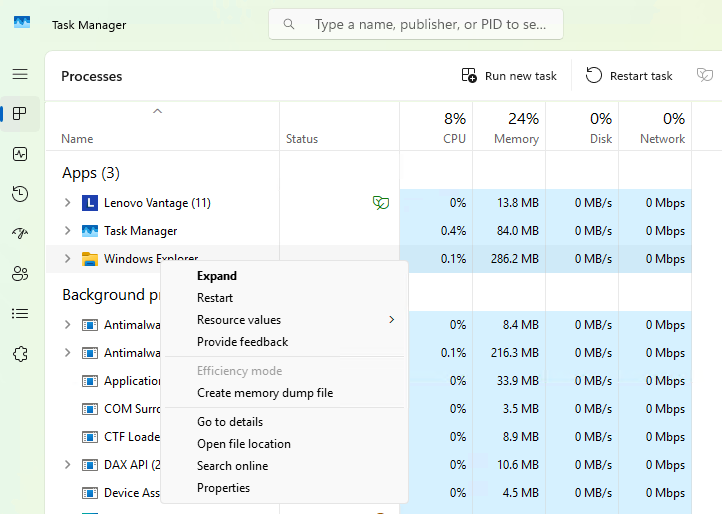
After Task Manager starts up, look for the entry named “Windows Explorer” under the “Apps” heading (see Figure 2). Even though the app itself is named “File Explorer,” it’s shown up as “Windows Explorer” in Task Manager since Windows 95 made its debut 30 years ago.

task manager window with windows explorer right-click menu

Figure 2: Right-click on Windows Explorer, then click Restartin the pop-up menu (2nd from top).

Ed Tittel / Foundry

If you don’t see Windows Explorer listed in Task Manager, no worries. Simply launch an instance of File Explorer. If you can’t do that from the taskbar or Start menu, use the Windows key + R shortcut. This opens the Windows run box, inside which you can type explorer (or explorer.exe). Once launched, it appears in Task Manager as Windows Explorer under the Apps heading as shown above.

Right-clicking Windows Explorer and selecting Restart from the menu that appears usually restores the Start menu and the taskbar to normal operation. This can take up to 30 seconds to complete, so wait for the taskbar to reappear before resuming normal Windows activity. That said, this restart is much faster than restarting Windows.

Don’t be surprised when you see the taskbar go blank and all icons disappear. This is a normal side effect of restarting File Explorer. Before it can be restarted, it must first be stopped — and when it’s stopped, all those UI elements disappear temporarily. However disconcerting this may be, it won’t last long.

As soon as the File Explorer process restarts, it restores the Start menu and taskbar icons and the UI behaviors they support. In the vast majority of cases, that will fix whatever caused the Start menu or taskbar icons to stop responding to user inputs via mouse or touch — and you can get back to work.

The old fallback

If that doesn’t do the trick, then it’s time to restart Windows. If the usual techniques (e.g., Start > Power button > Restart) don’t work, you can use Windows key + R and type the command shutdown /r /t 0 into the run box. (Warning! The /t 0 setting means Windows will restart immediately, so save what work you can before taking this route.)

This article was originally published in July 2021 and updated in July 2025.

More Windows how-tos:

Tariff uncertainty hits US PC shipments in Q2

The impact of threatened tariffs from the Trump administration could cause shrinking PC sales, particularly in the US market, and potentially in other regions across the globe as well.

This prediction was featured in the IDC Worldwide Quarterly Personal Computing Device Tracker, released Tuesday, which showed that, while global PC shipments during the second quarter of 2025 increased by 6.5% from the prior year, with 68.4 million units, the US market is starting to feel the pinch of import tariffs.

Jean Phillippe Bouchard, IDC’s research vice president of data and analytics, said, “what we are witnessing here might highlight US PC demand slowing down in anticipation of the import tariffs looming deadline.”

In an email to Computerworld, he added, “as we’ve seen with the latest quarterly results, the US market remained flat, while the rest of the world grew at 9% year over year. As PC vendors are looking for ways to mitigate the impact of tariffs on pricing, the supply chain is bound to be impacted.”

On Wednesday, Canalys reported similar results for the quarter, estimating that while worldwide shipments of desktops, notebooks, and workstations grew 7.4% to 67.6 million units, “the Trump’s administration’s ever-changing and unclear approach to tariffs continues to generate considerable uncertainty. While PCs were exempt from tariffs in Q2, indirect impacts threaten not only the US, but the global market recovery.”

No pending crisis

Greg Davis, lead US analyst on the Canalys team that put the findings together, said Thursday, “at this point in time, we do not predict that a pending crisis might exist, at least not one that is specific to the PC industry. While, as we have mentioned, there is still quite a bit of uncertainty surrounding the US and its global economic trade policies, many of the larger PC vendors have taken steps to help diversify their supply chains to better navigate what evolving scenarios may occur in the near-term.”

He said, despite that, “what may have a larger impact on the anticipated growth of the PC market this year, and next, is the rising cost of goods for everything else. When you look at consumer purchasing behaviors, expensive electronic devices like PCs are not as high a priority as things like food and energy.”

When overall purchasing power is impacted by rising costs, said Davis, “the PC market will face a downward pressure even if the industry itself is not directly affected by economic changes.”

Tariff situation a ‘moving target’

Scott Bickley, advisory fellow at Info-Tech Research Group, said, “the US market has already moved to accelerate PC purchases in Q1 of this year in anticipation of tariffs being enacted in July. Buyers who have not been proactive should prepare now while the tariff exemption window is still open.”

The tariff situation, he said, “is a moving target and changes daily in terms of the impacted countries, product classes affected, and level of tariff to be levied. PC buyers are sandwiched between the Windows 10 end of life date looming large, normal PC refresh cycles, and the prospect of some level of tariff to be a likely outcome at some point in the future. Some PC vendors are already trying to apply a tariff price increase to new PC sales; buyers should push back on this tactic.”

Mark Moccia, VP research director with Forrester Research, added that if PC shipments, which are currently exempt, do become impacted by tariffs, there’s the potential for ballooning costs for enterprises that are in the midst of an entire fleet device refresh as part of a migration, or just a modest increase in costs for business as usual device refreshes.

The downstream impact of this, he pointed out, “is either the CIO has less money to spend on transformational efforts [such as] AI, or the CEO has to allocate more money from the company P&L toward tech to keep both the run and transformational expenses going.”

And supply chain complexity “provides additional uncertainty in terms of the cost of PCs due to where raw materials are sourced, where chips are produced, and where assembly occurs. The uncertainty with PC costs is especially problematic with the loss of Windows 10 support (and potential mass upgrades) occurring this year,” he said.

A complicated story

Anshel Sag, principal analyst at Moor Insight & Strategy, described the current situation as a “complicated story, because I do believe tariffs are a major issue. Some of the inflationary pressures of tariffs on OEMs are forcing them to keep prices higher, which is affecting their ability to offer deals, and that’s affecting volumes.”

Additionally,  he said, “we are likely already in a recession, which would make both consumers and businesses more sensitive to PC prices. By all measures, this was supposed to be an up year for the PC industry because of AI PCs, Copilot+, and Windows 10, but with so much uncertainty, including tariffs, things are not looking as rosy.”

With tariffs, Bickley pointed out, “the devil is in the details, and those details are not yet finalized. This means any supply chain pre-positioning by the PC manufacturers may be premature. It is safe to say that for PCs manufactured in Mexico vs Southeast Asia, the tariff impact would likely be lower due to the favorable provisions in the USMCA [United States-Mexico-Canada Agreement].”

He added, “aside from the obvious tactic of pre-buying to build stock, I expect organizations to start buying down-the-stack as a means to offset a tariff-based price increase. While suppliers will absorb some of the tariff impact, their supply chains and internal processes are already quite mature, meaning most of the impact may be passed onto the customer.” 

This, said Bickley, mean organizations must become more mindful of the minimum performance level of the hardware required for various job roles. 

Further reading:

>

Zoom’s long-term vision: From conversation to task completion

Because workers don’t want to be in meetings all day — especially if they’re unproductive — Zoom is packing more AI features into its software so attendees get more value from conversations and can use agentic AI to finish projects.

“The vision that our CTO has really laid out is this idea of agentic AI task completion,” said Kim Storin, the chief marketing officer at Zoom.

The approach to agentic task completion is designed to integrate smoothly into corporate workflows to take advantage of opportunities before, during and after meetings.

“That’s why we’ve been able to embed it into the platform instead of bolting it on,” Storin said. “It’s truly part of the overall workflow, versus just a side project of AI.”

Zoom took steps toward its conversation-to-completion goal this week by adding more tools to the company’s Custom AI Companion feature; it shows up in the interface as a chatbot where users can pose questions. 

The Custom AI Companion is now widely available to customers — and the chatbot can get answers from the third-party tools. For example, users will be able to pull out sales records from Salesforce during a conversation by querying the chatbot, and then update records, said Smita Hashim, chief product officer at Zoom.

Zoom has also expanded the functionality with integrations with data storage platform Box and project management tools from Asana and Atlassian’s Jira. That means, for instance, users will be able to update Jira tickets or pull information from files in Box.

Users can also connect to services such as AWS’s Q agents, which is a generative AI (genAI) assistant. Q is Amazon’s version of Microsoft’s Copilot, which helps workers complete jobs and get answers.

“Great meetings are when you’re having an engaging, creative conversation, you are brainstorming, people are alert, they’re not fiddling around,” Hashim said.

Zoom’s AI Companion is available to all users, but the customized AI companion had been available only to large organizations. The add-on is now available to more customers, including small businesses, and will cost $12 per user per month, Hashim said.

“The Custom AI Companion can also join your Google Meet meetings or Teams meetings,” Hashim said.

Zoom’s AI features are based on established large language models (LLMs) from the likes of Anthropic, OpenAI and Meta. The company also uses custom and small language models for AI functions within its videoconferencing software.

“These small language models are more specific to a task and those are becoming better. It’s a federated approach that we are using for models,” Hashim said.

Product integrations are commonplace across productivity suites and project management tools, even if from rival providers. The integrations improve user productivity and keep projects on track.  

Zoom wants to “take that conversation and convert it into something which is really actionable” allowing users to complete tasks “as much as we can in the moment,” Hashim said.

Read more by this author:

Now, they’re coming for Apple CEO Tim Cook

It was only a matter of time before they came for America’s only openly gay CEO, and it’s got nothing to do with performance. How can it? Apple’s valuation has soared under his watch, while the company’s positions on privacy and environmental responsibility lead almost every industry — and should be an example to all.

I imagine that’s precisely what reactionaries dislike about the Cook-led company. It would be so much simpler to introduce various kinds of surveillance (state, services, advertising, etc.) if Apple would just get out the way.

No one likes a goody two shoes

The last thing they need is a company that successfully shows us it is possible to transition to climate neutrality across its business. If it succeeds, it would prove that not only is this possible, but it benefits the business and its customers. Believe it or not, there are powerful forces who will fight to the death to prevent such high-profile successes.

When it comes to artificial intelligence, those with the power and the money (and there’s only a few that have both) know how much easier it would be to train our future MechaHitler overlords if everybody’s digital identities could be turned into open books. In their ghastly vision of tomorrow, privacy becomes something only the very wealthiest among us can afford. 

The rest of us exist solely to feed the machine.

But all of these visions keep hitting the same snags: Apple gets in the way. The company, built on so-called liberal values such as peace, internationalism, diversity, and LGBTQ+ rights, is a conceptual anathema to some of those riding high on the zeitgeist today. Negative energies always focus inward in the end, and they are focusing inward today.

Knives out

In truth, they’ve been after Cook for a while. They didn’t mind Steve Jobs so much; they accepted his ability and genius. Indeed, the kind of people Jobs probably had little use for now use his quotes to sell “business wisdom’”books.

That’s how it rolls.

But Cook’s a different story. The knives have been out for him since he took the CEO throne. And even while the company moves from strength to strength, nothing he does is ever seen as quite good enough; I’ve lost track of the number of people I once respected who seem to take great delight in berating him.

The man who seemingly led development of the Vision Pro, a product so advanced it isn’t expected to become a mass market item until the next decade, is apparently not a “product guy.” The guy who spent a billion on Beats as a flagship to lead a suite of services that now generate almost as much revenue as the iPhone doesn’t get it. Tim Cook’s Apple, which has restored the Mac to glory on the back of Apple Silicon, has lost its way.

I’m sick of reading these kinds of things. They seem to state the news, but miss the reality — that in the current environment, nothing Apple does will be good enough, no matter who leads it. 

The company is beset. 

On the one hand, it faces reactionary forces. On the other it has the current crop of ghastly brain dead neo-liberals (I’m looking at you Europe and the UK), who, by incompetence or design, continue to erode the very values they claim to champion. “Security” means people in the UK don’t even know and aren’t even told the extent to which the dreadful authoritarians in the current government spy on their digital lives, meaning no security at all. While “trade” means Apple products are going to cost more in the US because of the “Trump Tax.” Meanwhile Europe continues to damage Apple’s business and ecosystem so some games developers can make a few dollars at the cost of platform security, using state- sponsored savagery to force an ideological vision of “free market” competition on the business of only one company.

What is there about using state power to undermine the business of one company while leaving competitors untouched that can be defined as ‘free market’?

Climate change

Apple does have its own problems, of course. It’s arguable that its top team has needed refreshment in the form of new talent for a while; hopefully, the company has a wealth of second-line talent to fill the gaps as senior leadership inevitably retires.

It is also interesting that there must be one or two high-placed Apple top 100 leaders who are taking delight in leaking Apple’s secrets, to the detriment of senior leadership’s credibility. Perhaps that is why they do it, reflecting their own ambition?

But for many Apple critics, the biggest problem isn’t Apple, its leadership, its many business challenges, or even Cook. No. The reason they want to force regime change is because Apple, since its inception, has always strived to mean something, to push for positive change. It’s the hopeful antidote to others’ hopeless empty rhetoric. Because at its heart, it has values, values Cook tries to push for, values we must maintain if there is to be any hope at all of surviving this spiritually bereft, morally absent, economically hopeless, nihilistic age.

That’s why I feel the company, despite its own structural imperfections (who else recalls Siri snooping or pressure against in-store unionization?), continues to be worth our time. 

You can follow me on social media! Join me on BlueSky,  LinkedIn, and Mastodon.k

EU finalizes General-Purpose AI Code of Practice for enterprises

The European Commission has published the General-Purpose AI Code of Practice to help enterprises comply with their obligations on transparency, copyright, safety, and security under the European Union’s AI Act.

Following the code of practice is voluntary — but the Commission presented it as a way for enterprises to be sure they meet their obligations under the law.

The Code of Practice was originally scheduled for publication in May, and some European enterprises had called for application of the EU AI Act as a whole to be delayed. However, a Commission spokesperson said earlier this week that it there would be no pause and that it would publish its guidance “in the coming days.”

OpenAI and Perplexity enter browser wars to take on Chrome

Google Chrome’s dominance in the browser market is facing new threats as OpenAI and Nvidia-backed Perplexity unveil AI-powered browsers aimed at reshaping how users interact with the web.

Perplexity AI, this week, launched Comet, a new web browser with built-in AI search capabilities, the company said.

[ Related: More OpenAi news and insights ]

Separately, OpenAI is preparing to release its own AI-powered browser, in a move that could further challenge Chrome’s dominance, Reuters reported.

In a blog post, Perplexity said that Comet offers a unified browsing experience where users can ask questions, complete tasks, and explore information through a single interface.

“Comet allows you to ask questions anywhere they occur to you, whether you want to understand a complex concept, find hidden connections, create new possibilities, or solve problems that have been puzzling you,” the company added.

OpenAI’s upcoming browser is reportedly designed to handle some user interactions within a ChatGPT-style chat interface, reducing the need to visit external websites. The approach is said to be part of a broader strategy to embed OpenAI’s services more deeply into both personal and professional aspects of users’ lives.

Change in browsing approach

AI-driven chat tools like ChatGPT and Perplexity are gaining traction as alternative channels for information discovery, but web browsers continue to serve as the primary access point for more than 90% of users on smart devices.

“Though AI usage is on the rise, the workflow is still distributed and scattered for users,” said Faisal Kawoosa, founder and lead analyst at Techarc. “By default, all web-related tasks happen through browsers. In many cases, collaboration tools and cloud applications are even accessed through browsers. Now, if a user has to use AI during the workflow, it’s a detour, taking the data or information to an AI app, processing it there, and then bringing the results back into the workflow.”

With these companies entering the AI browser market, AI tools could become more integrated into everyday browsing, potentially improving workflow efficiency.

“The industry is witnessing the advent of the ‘Browser 2.0’ era, exemplified by the deep integration of Copilot within the Chromium-based Microsoft Edge,” said Neil Shah, partner & co-founder at Counterpoint Research. “Until AI agents become the primary interface for information access, developing an AI-native browser is a crucial strategy for user acquisition. This approach complements the growth of standalone applications and deeper OS-level integrations, such as the partnerships between OpenAI and Apple, or Perplexity and Motorola.”

An AI-native browser offers a key advantage by bypassing the data restrictions of standalone applications. For firms like OpenAI and Perplexity, it opens the door to detailed telemetry on user browsing behavior, creating new opportunities for monetization through advertising, data deals, and other channels.

Strategic advantage, with challenges

Controlling a web browser offers a direct channel to user behavior and data, an advantage that has long set Google apart. Chrome held 68% of the global browser market in June, according to StatCounter, far outpacing competitors such as Safari, Microsoft Edge, and Firefox.

“Browsers can collect detailed user data, including browsing history and activity,” Kawoosa said. “If OpenAI and Perplexity gain traction with their browsers, they could access similar real-time data streams, potentially boosting the accuracy and efficiency of their AI models.”

That said, since Google, Edge, and other browsers have already integrated AI features, there’s a strong possibility that users may not turn to OpenAI or Perplexity for their AI needs.

“Users are often reluctant to switch from default, OS-integrated browsers like Chrome, Edge, and Safari, which are highly optimized for their respective platforms,” Shah said. “Furthermore, enterprise adoption will be contingent upon the perspectives of CIOs, who will need to assess the privacy, security, and manageability of these new browsers.”

The shift presents both a challenge and an opportunity for firms like OpenAI and Perplexity, which could offer CIOs greater control by integrating enterprise app APIs directly into AI-native browsers, creating a more streamlined and secure environment for search and information access.