
Author: Security – Computerworld

A magically minimalist Android makeover

When people ask me about the difference between Android devices and an iPhone these days, my answer is almost shockingly simple: It’s all about choice.

  • With an iPhone, you’re committing to using your phone in the way some sweater-vested executives within Apple think you should use it. It’s the Apple ecosystem and the Apple way, through and through. If you like that and that aligns with your own personal phone-using preferences, hey, bravo! It’s a match.
  • With an Android device, you can use your phone in basically any way you want to use it. You aren’t locked into any one particular ecosystem of software, accessories, or philosophies — and if there’s any part of the standard experience that doesn’t jibe with your style of gettin’ stuff done, you can change it and make it work exactly how you like.

Now, of course, we can quibble all day over the many minute differences between the two platforms — but ultimately, that mindset mostly sums it all up: If you like the precise way Apple thinks you should use your phone and you don’t mind sticking to that specific prescription, an iPhone will work brilliantly for you. If you crave anything more or different with your mobile device experience (and you don’t mind venturing outside of the carefully constructed Apple bubble and its assorted bits of artificial fencing and pedantic perceptions), Android is the path you need.

And there’s no better illustration of the choice-making power Android provides than what we see in the land o’ launchers — the full-fledged replacements for standard home screen and app drawer environments that dictate so much about how you interact with your device.

Android launchers offer an endless array of opportunities for choice and customization. You can create virtually any manner of environment you want and take complete control over your Android-using experience. The power is in your hands, in other words — not solely in the hands of random managers who sold you the gizmo.

And while we’ve long had a splendid slate of commendable Android launchers to choose from, every now and then, a new contender shows up that really opens your eyes.

[Want even more advanced Android knowledge? Check out my free Android Shortcut Supercourse to learn tons of time-saving tricks.]

Android minimalism, to the max

My friend and fellow Android appreciator, allow me to introduce you to a sleek little launcher called Flow — or Flow Minimalist Launcher, if you want to use its full (and notably less minimalist) name.

Flow, as we’ll call it, is designed to do something most modern mobile devices absolutely don’t want to accomplish by default — and that’s actively help you use your phone less. Or, to reframe that slightly: It’ll help you use your phone more deliberately and efficiently and with less mindless swiping and scrolling.

The Flow philosophy is actually quite simple:

  • On your main home screen panel, you see shortcuts to the five apps you open most often — along with built-in buttons for your Phone and Messages apps and an unfussy time-and-date widget that shows your next calendar appointment.
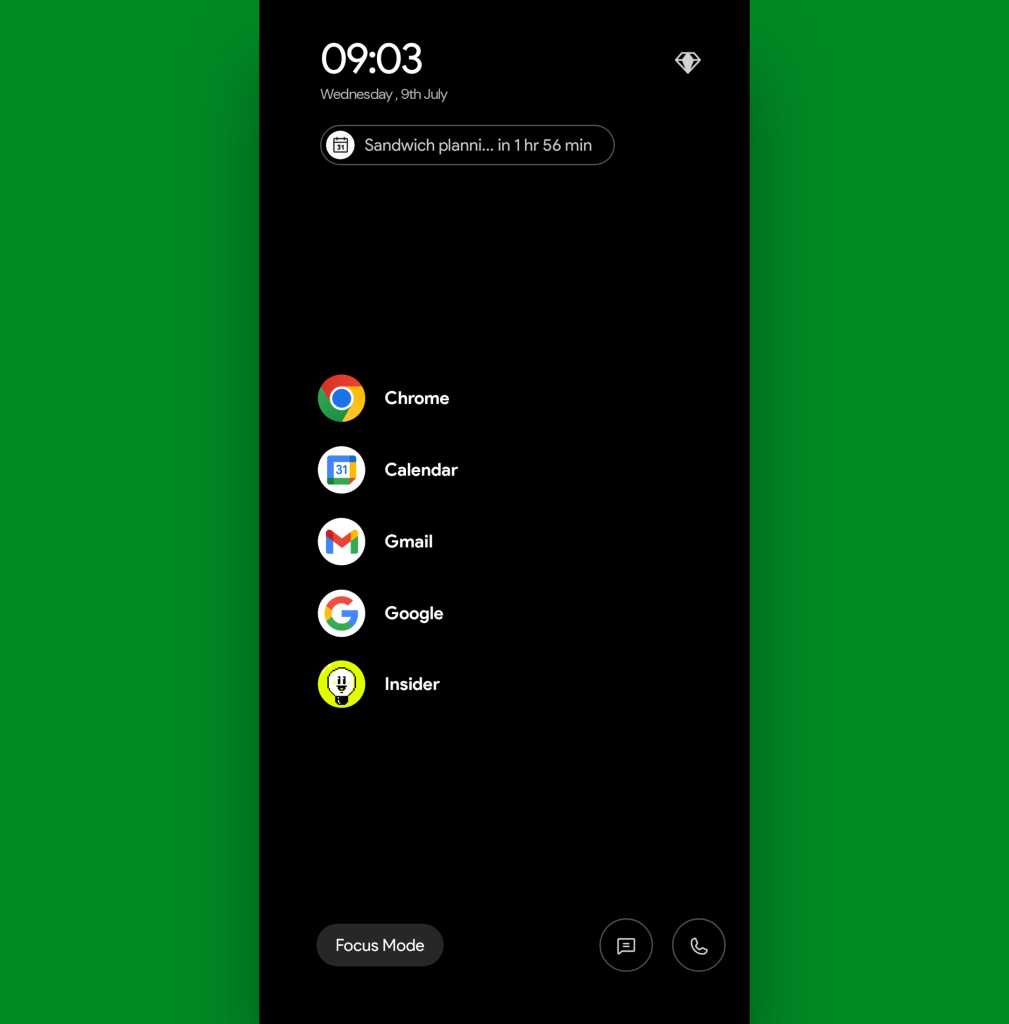
Android minimalist launcher: Flow home screen
The Flow home screen is simple and free from unneeded distractions.

JR Raphael, Foundry

  • When you swipe up on your screen, you see a complete list of every app installed on your device — with built-in buttons for narrowing the list down based on dynamically created app categories like “Most used” and “Productivity.”
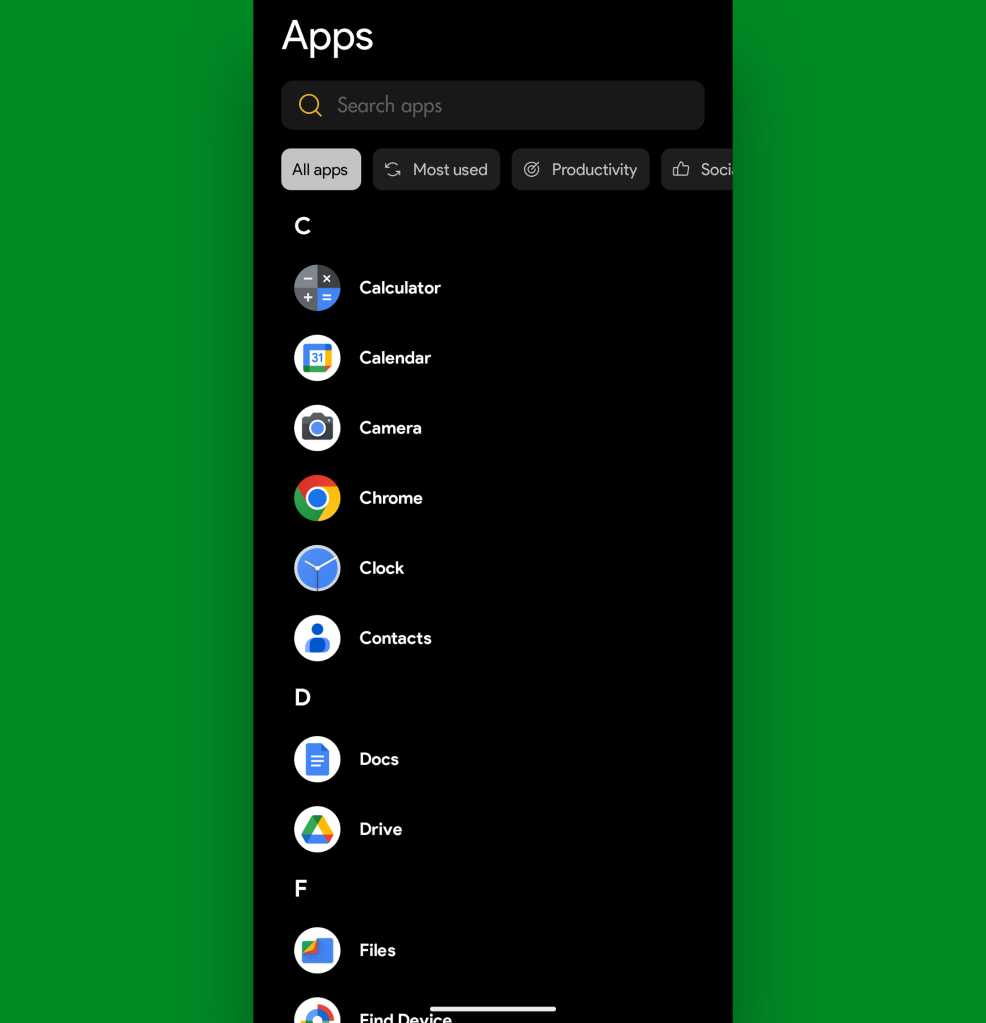
Android minimalist launcher: Flow app drawer
Even Flow’s app drawer is optimized for efficiency.

JR Raphael, Foundry

  • And when you swipe over to the right of the main home screen, you see a single “Feeds” panel that holds some sleek built-in widgets for your agenda, tasks, and screen use and can be expanded to include any standard Android widgets as well.
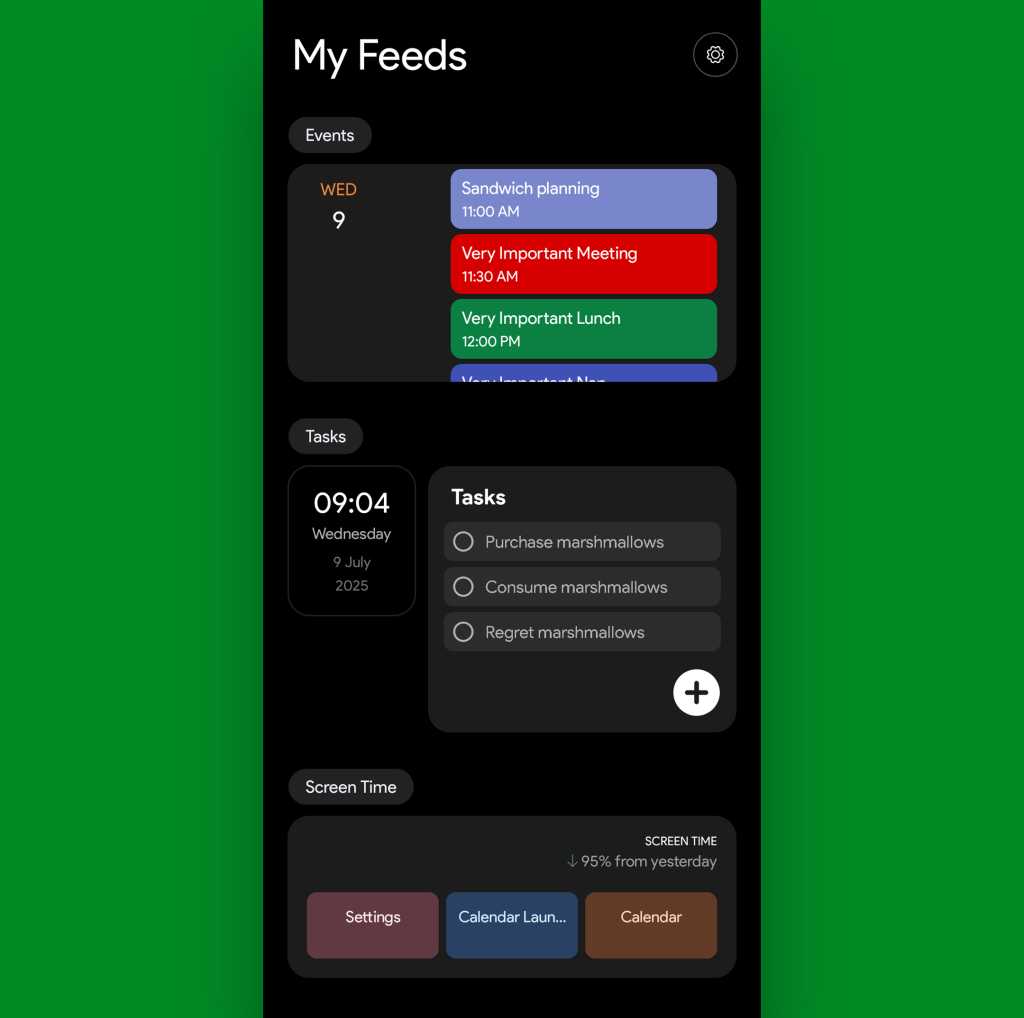
Android minimalist launcher: Flow feeds
Flow’s “Feeds” panel is a clever way to work with widgets on your Android home screen.

JR Raphael, Foundry

There’s also a noteworthy “Focus Mode” button on the main Flow panel that fires up a Pomodoro-style timer and encourages you to stay away from all apps other than your top five until its minutes elapse.
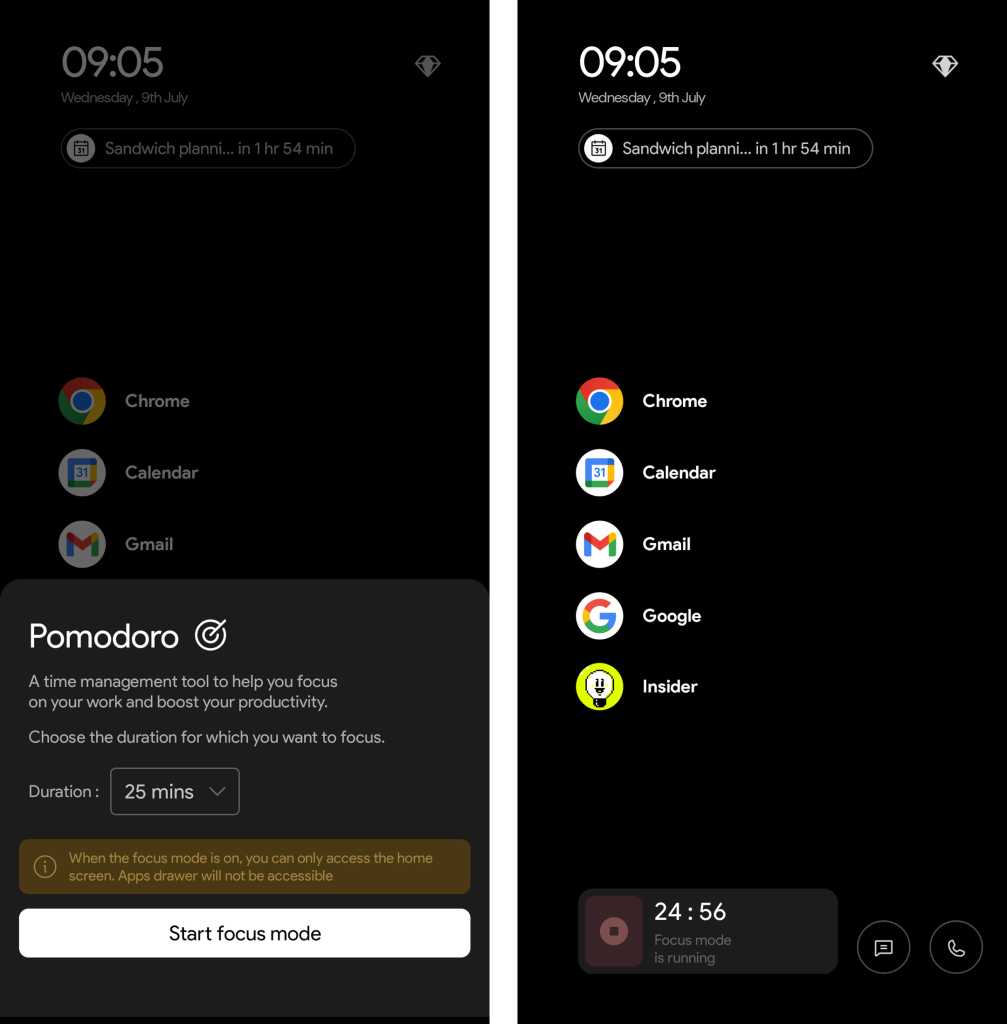
Android minimalist launcher: Flow focus mode
Flow’s Focus Mode discourages you from poking around within your non-essential apps.

JR Raphael, Foundry

And — well, that’s essentially it. Flow is by design minimal and limited in what it shows you — with the idea that you’ll mostly just see what you actually need for your day-to-day doings and avoid getting lost in endless on-screen screwery. It’s distraction-free and clutter-free, and it’s also mostly effort-free to set up and start using, since everything is built right in and carefully constructed to work that way.

That being said, you can customize a fair amount of things about Flow’s appearance, if you’re ever so inspired. The launcher’s settings include commands for changing the shape and style of your various app icons, for instance, along with other such surface-level adjustments.
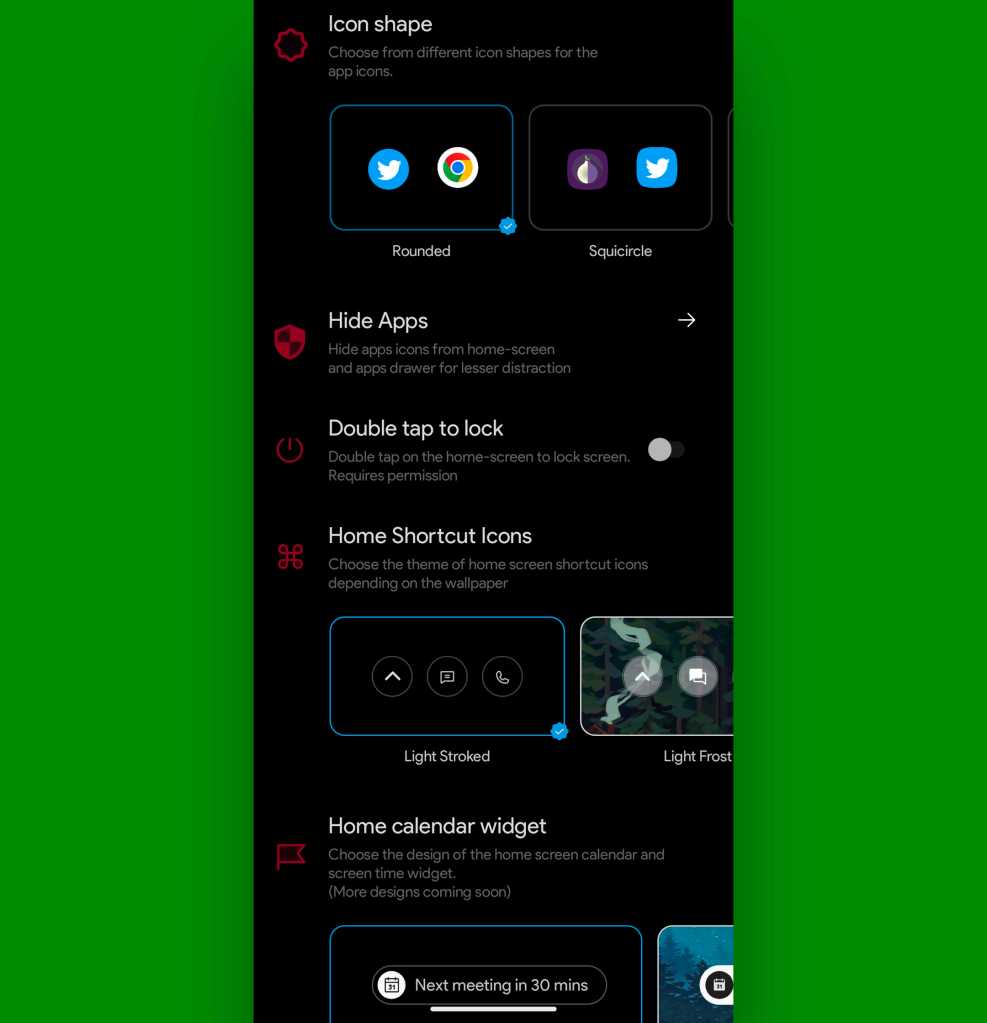
Android minimalist launcher: Flow options
Despite its focus on simplicity, Flow offers up a fair amount of options.

JR Raphael, Foundry

But by and large, the appeal of Flow is its simplicity and the lack of contemplation that goes into its configuration. You just decide which five apps are most important to you, think about which widgets you need to see alongside ’em, and then go about your business with a cleanly organized workspace and a fraction of the usual distractions.

It’s a refreshingly different approach to device interaction and an interesting change of pace to try out and potentially stick with — even for short periods, as an alternative to your standard setup, when you really want to focus and frame your device as a work-centric productivity tool.

Flow is free for its core functions, too, without any annoying ads or over-the-top limitations. If you find yourself diggin’ it and want to support its development while unlocking some extras, you can opt for a 99-cent-a-month or $30 lifetime Premium upgrade that provides a smattering of special features and advanced options — but you definitely don’t need that to enjoy the experience.

That’s the power of Android for ya — the power not only to add in all sorts of advantageous step-savers but also to remove elements and make your setup simpler.

The choice, as usual, is entirely in your hands. And now, with Flow, you’ve got one more enticing option to consider.

Get six full days of advanced Android knowledge with my free Android Shortcut Supercourse. You’ll learn tons of time-saving tricks!

US Treasury Department sanctions individuals and entities over illegal IT worker scheme

The US Department of the Treasury’s Office of Foreign Assets Control (OFAC) Tuesday imposed sanctions on two individuals and four companies involved in schemes to provide US companies with illegal remote IT workers whose income would, it said, generate revenue for the Democratic People’s Republic of Korea (DPRK) regime.

Song Kum Hyok, described as a “malicious cyber actor” associated with the already sanctioned DPRK Reconnaissance General Bureau hacking group Andariel, was sanctioned for facilitating the scheme. OFAC said that in 2022 and 2023, Song created aliases for foreign workers using the names, Social Security numbers, and addresses of US individuals, which the workers then used to pose as US applicants looking for remote jobs.  

In addition, Russian national Gayk Asatryan, who OFAC said has used his Russia-based companies to employ DPRK IT workers, was sanctioned for “having attempted to engage in, facilitate, or be responsible for the exportation of workers from North Korea, including exportation to generate revenue for the Government of North Korea or Workers’ Party of Korea,” OFAC’s announcement said.

OFAC noted that in 2024 Asatryan signed a 10-year contract with DPRK’s Korea Songkwang Trading General Corp. to hire up to 30 DPRK IT workers to work in Russia for his company, Asatryan Limited Liability Co. He also signed a contract with Korea Saenal Trading Corp., another DPRK company, to hire 50 DPRK IT workers for his company, Fortuna Limited Liability Co.

OFAC said that Asatryan’s two companies were sanctioned “for being owned or controlled by or acting or purporting to act for or on behalf of, directly or indirectly, Asatryan, a person whose property and interests in property are blocked.” Songkwang Trading and Saenal Trading were also designated “for being North Korean persons, including North Korean persons that have engaged in commercial activity that generates revenue for the Government of North Korea or Workers’ Party of Korea.”

“These sanctions against the DPRK-Russian fake IT worker pipeline are a significant step toward closing a long-standing gap in remote-work security,” said Fritz Jean-Louis, principal cybersecurity advisor at Info-Tech Research Group. “By adding these key brokers to the SDN [US Specially Designated Nationals and Blocked Persons] list, the government has instantly frozen any payments that might flow through Russian front companies or crypto rails to North Korean developers, thereby cutting off a revenue stream that Pyongyang has relied on. They also raise the bar for corporate due diligence, as the IT worker scheme worked primarily because many organizations hired remote contractors on little more than a resume and a US PayPal address.”

Ongoing crackdown with caveats for hiring companies

These actions are the latest efforts in the US government’s battle to stop DPRK’s illegal activities. Last month, the Justice Department’s major sweep across 16 states seized laptops, financial accounts, and websites associated with the illegal remote IT worker scheme, and the FBI and Defense Criminal Investigative Service (DCIS) also took action.

The latest sanctions mean that any property in the US, or possessed or controlled by US persons, in which the sanctioned individuals hold interest are blocked, and must be reported to OFAC, and unless authorized, “OFAC’s regulations generally prohibit all transactions by US persons or within (or transiting) the United States that involve any property or interests in property of blocked persons,” OFAC said in the announcement. The regulations also forbid “any contribution or provision of funds, goods, or services” either directed to the blocked persons, or being received from them.

“These sanctions draw clear liability boundaries and nudge organizations towards stronger vetting without broad new regulations,” Jean-Louis noted. “A key risk to consider: If a US company unknowingly hires or pays a newly sanctioned contractor, the consequences can escalate quickly. OFAC violations are a strict liability, which means that intent does not matter, and civil fines can run up to significant amounts. Organizations can also face criminal penalties and loss of export privileges. Since OFAC is a US law with extraterritorial application, foreign organizations may do well to also consider potential exposure. An improper hire can turn into an expensive legal crisis overnight.”

Controversial US budget bill is now law; here’s what it means for tech

US President Donald Trump today signed what he called his “One Big Beautiful Bill” during Fourth of July celebrations at the White House, after it squeaked through the House of Representatives Thursday afternoon in a 218 – 214 vote.

But the bill was missing what had been one of its most contentious clauses, at least for the tech industry: a 10 year ban on AI regulation by individual states. The Senate almost unanimously voted to remove that section on Tuesday.

However, noted Scott Bickley, advisory fellow at Info-Tech Research Group, “H.R. 1 [the bill’s official designation] has many provisions that could fundamentally redefine the strategic environment for the enterprise.”

And despite the removal of the AI regulation ban, Bickley said, “it does signal that Washington is seriously considering a national AI framework. Tech leaders investing in genAI today should plan for a regulatory layer tomorrow, which will likely focus on explainability, auditability, and training data integrity.”

Permanent R&D and capital expensing provisions could turn the tax code into a “strategic lever,” he noted. “CIOs and CTOs now have a clear financial incentive to anchor AI training, cloud deployment, and cybersecurity tooling on US soil. For organizations with global architecture, this could reshape their location strategies around data, compute, and compliance.”

In addition, defense allocations for cyber-resilient supply chains, domestic manufacturing, and AI-adjacent technologies could give IT ”a rare but crucial chance to renegotiate vendor SLAs around security baselines,” he said.

On the minus side, he pointed out that loan caps for graduate programs and increased immigration fees could affect talent pipelines, especially for cybersecurity and AI, creating challenges for enterprises whose staffing needs are accelerating.

And while the Department of Energy got a $150 million appropriation to partner with industry sectors within the US to “curate the scientific data of the Department of Energy across the National Laboratory complex,” to make it usable by artificial intelligence and machine learning models, and to use the AI to develop microelectronics and new efficient energy technologies, the bill also slashed other energy spending and eliminated tax credits for environmental initiatives such as clean energy.

“Ultimately, it looks like H.R. 1 will reward localized innovation, incentivize tech-driven capital investment, and foreshadows a coming wave of AI oversight, all while seemingly leaving CIOs in the public sector and ESG-driven organizations to self-fund modernization efforts,” Bickley said.

Ingram Micro’s IT outage stretches into second day

Ingram Micro is grappling with an IT outage that has stretched into a second day, leaving partners and customers of the global IT distributor unable to access some services.

The company’s main homepage still displays a curt message saying, “We are currently experiencing technical difficulties. We apologize for the inconvenience and are working to resolve the issue as quickly as possible….”

Some other domains operated by the company were even more terse, saying only “An error occurred while processing your request,” followed by an error code referencing Akamai Technologies’ EdgeSuite CDN, yet login pages to several of its partner and customer portals at other domain names made no mention of the problem and appeared to function.

The company’s cloud service status page at status.cloud.im reported that its reseller control panel, marketplace API, Microsoft 365 management console, Microsoft Azure Cloud Solution Provider and New Commerce Experience portals, and Professional Services Automation integration tools were operational and listed no incidents within the last 30 days.

Email and phone inquiries to Ingram Micro offices in several countries went unanswered.

The disruption, which began on July 3, has sparked frustration among users, many of whom have taken to Reddit to voice concerns and speculate on possible causes. Suggestions range from a ransomware attack to issues stemming from a recent software update: Ingram made its Xvantage Enable AI platform generally available the day the problems began.

One Reddit user claiming to be an Ingram customer described their experience trying to reach the company, saying that the company’s website had been inaccessible since early in the US day and that they were receiving only automated replies to their emails to the company.

After a 30-minute wait on the phone, the user wrote, they finally reached a company representative who told them the entire website and ordering system were down, adding that they believed the company had been “targeted,” and that engineers were working on the issue. With the ordering system down, other Reddit users also expressed concerns about not being able to manage their customers’ services and not being able to manage software licenses or place orders for hardware.

EU AI compliance guide may be delayed until late 2025, commission says

A long-awaited code of practice to guide businesses on EU AI rules may not take full effect before late 2025, leaving companies facing legal uncertainty as enforcement deadlines approach.

The code of practice, which will apply to large language models such as OpenAI’s GPT-4 and competing systems developed by Google and Mistral, was initially scheduled for release in early May.

A Commission spokesperson has now said the non-binding guidance will be published in the coming days, with companies invited to sign on voluntarily starting in August, and the code potentially taking effect by year-end, according to Reuters.

While the code is voluntary, the EU AI Act’s rules for general-purpose AI models will become legally binding from August 2, with enforcement staggered over the following two years.

Several major tech companies have called for a delay in enforcing the AI Act, citing a lack of practical guidance on implementation as a key concern.

This week, more than 40 CEOs from leading European companies, including ASML, Philips, Siemens, and Mistral, appealed to European Commission President Ursula von der Leyen to pause the rollout of the AI Act for two years.

In a letter, the executives warned that “unclear, overlapping and increasingly complex EU regulations” threaten to undermine Europe’s AI goals, putting both the growth of homegrown tech firms and broader industry adoption at risk amid rising global competition.

High-stakes compliance


The delay in publishing the guidelines carries weight, as the document is expected to offer much-needed clarity for companies seeking to navigate the complex requirements of the AI Act.

“Since the maximum fine for breaking the rules of the AI Act is 7% of global revenue, the stakes are high,” said Hyoun Park, CEO and chief analyst at Amalgam Insights. “CIOs responsible for either following or tracking activity associated with the EU AI act need to carefully check whether the models they are using actually provide this level of lineage and visibility.”

Uncertainty over what the regulations will ultimately permit is also raising concerns that vendors may be forced to slow down AI deployments.

“Vendors liable for following the AI Act may end up having to move more slowly in Europe, as they are unable to fully parse the AI Act or the activities that are allowed,” Park added.  

CIOs on alert

With the rules set to kick in soon, analysts say enterprise technology leaders must act now to ready their systems, vendors, and processes for a rapidly evolving regulatory landscape.

“AI has several stakeholders, and getting them all on a common page will not be easy,” said Faisal Kawoosa, founder and lead analyst at Techarc. “It will take time until the interests of all, especially big tech companies, are safeguarded. While implementations will continue in the enterprise environment, I think CIOs will have to be prepared for compliance checks and re-checks.”

The eventual adoption of the code may not upend how companies currently use AI, but it will introduce new layers of scrutiny, Kawoosa added.

Others see the delay in guidance as a strategic opportunity for CIOs to reinforce internal processes before enforcement begins.

“CIOs should view the delay as a window to strengthen internal governance and vendor assessments,” said Abhishek Sengupta, practice director at Everest Group. “It’s a signal to not pause deployments, but to prepare for future compliance by ensuring transparency and accountability mechanisms are in place today.”

Must-have Android apps for business

Trying to find the right app for any given area on Android is a lot like trying to order dinner at a restaurant with way too many options on the menu. How can you possibly find the right choice in such a crowded lineup? With the Google Play Store now boasting somewhere in the neighborhood of 70 gazillion titles (last I checked), it’s no simple task to figure out which apps rise above the rest and provide the best possible experiences.

That’s why I decided to step in and help. I’ve been covering Android from the start and have seen more than my fair share of incredible and not so incredible apps. From interface design to practical value, I know what to look for and how to separate the ordinary from the extraordinary. And taking the time to truly explore the full menu of options and find the cream of the crop is quite literally my job.

[ Download our editors’ PDF Android business smartphones enterprise buyer’s guide today! ]

Bit by bit, I’ve been figuring out the best Android apps for a variety of areas relevant to you, the modern mobile professional. Whether we’re talking broad themes like organization and collaboration or specific needs like password management and note-taking, I’m making it my mission to find the best of the best for the categories that really matter.

You can find links to stories with all my recommendations below — and be sure to check back regularly, as the recommendations will be revisited routinely and the areas I cover will keep expanding over time.

Android apps for core work tasks

The essential office apps for Android

Create an optimal Android office app power-pack with these thoroughly researched recommendations.

7 standout email and texting apps for Android

Give yourself an edge in business communication with these exceptional Android messaging apps.

6 first-class calendar apps for Android

Strengthen your Android calendar experience with these standout selections for serious professionals with a range of scheduling needs.

13 key Android apps for team collaboration

Stay connected and productive wherever you are with these first-rate collaboration apps for Android.

5 noteworthy note-taking apps for Android

Note-takers, take note: Whether you want gobs of features or uber-simplicity, these are the best apps for collecting and managing info on Android.

The easiest ways to view, sign, and edit PDFs on Android

Stop making your life difficult and start using these simple, free tools.

Android apps for added efficiency

7 efficiency-enhancing Android apps

These clever tools save you time so you can get straight to work — in a way only Android could allow.

4 Android keyboard apps for on-the-go productivity

Heads up, busy professionals: The right Android keyboard app can save you precious time and unlock your performance potential. So what are you waiting for?

7 exceptional Android launchers for enhanced efficiency

Save time and make your Android home screen work better with the help of these eclectic tools.

22 must-have Android widgets for busy professionals

Turn your Android home screen into a powerful productivity hub with these exceptional, business-friendly widgets.

20 genuinely useful AI apps for Android

These practical apps rely on AI in some refreshingly thoughtful ways.

13 useful Google apps you should be using on Android

These easily overlooked Android apps are all made by Google — and they’re all worth your while to install.

Android apps for smarter protection

16 recommended privacy and security apps for Android

Forget malware scanners or over-the-top security suites: These are the apps that’ll actually improve your security and protect your privacy on Android.

The most advisable Android password managers for maximum security

Not all Android password management apps are created equal — so which one makes the most sense for you?

Android apps for optimal organization

The only Android file manager you need

A good file manager app makes it easy to find, organize, and share files on your Android device. With the right one, you’ll be juggling files like a pro.

Essential Android apps for organizing your life

From projects to places and to-do lists to travel, these Android apps will help you organize all the important areas of your life.

18 indispensable Android travel apps

Save yourself time, headaches and even money with these standout Android apps for business travel.

Android apps for cross-platform productivity

7 splendid progressive web apps for productivity

These standout PWAs work on any platform, including Android. They’ll help you get more done without any of the usual baggage.

Android apps for Chromebooks: The essentials

Turn your Chromebook into a uniquely versatile modern computing machine with these Chrome-OS-enhancing apps.

6 magnificent multiplatform productivity apps

These top-notch tools will help you get down to business consistently — no matter which device or platform you’re using at any given moment.

Related: Find out how to use some incredibly useful apps to enhance your Android experience.

And be sure to check out this collection of exceptional Android tips for even more efficiency-enhancing info.

US lets China buy semiconductor design software again

The US has lifted export restrictions on semiconductor design software to China, reversing a controversial policy imposed just six weeks ago that had threatened to cripple China’s chip design capabilities. 

The three leading semiconductor design software providers, Synopsys, Cadence Design Systems, and Germany’s Siemens, announced they had been notified that export license requirements for business in China are no longer in place. 

The one secret to using genAI to boost your brain

We’ve got a big problem on our hands. The public is using generative AI (genAI) to write, create, and think. But the brain is a use-it-or-lose-it organ — and we’re starting to lose it. 

That doesn’t have to happen to you. Here’s what you need to know about genAI-related brain rot, and the one approach that lets you take advantage of the technology while retaining and even enhancing your own natural intelligence. 

But first, let’s look at what science says about genAI brain rot.

Creativity

Research published by Carnegie Mellon University this month found that groups that turned to Google Search came up with fewer creative ideas during brainstorming sessions compared to groups without access to Google Search. Not only did each Google Search group come up with the same ideas as the other Search groups, they also presented them in the same order, suggesting that the search results replaced their actual creativity. 

The researchers called this a “fixation effect.” When people see a few examples, they tend to get stuck on those and struggle to think beyond them. For example, if you see “butter” and “jam” as things you can spread, you’re more likely to think of other foods and less likely to think of “rumors” or “disease.”

Earlier this year, The Journal of Creative Behavior published a study called “Am I Still Creative? The Effect of Artificial Intelligence on Creative Self-Beliefs.” That study looked at the difference between how creative people think they are in general and how creative they feel when working with AI. The researchers focused on “creative self-beliefs,” which means a person’s confidence in their own creative ability — they wanted to know whether using AI changes this confidence, and if so, how. 

The study found that most people felt less creative with genAI than without it. If someone already doubted their own creative skills, using it made them feel even less sure. Even people who usually felt very creative did not always feel that way when they used genAI. Trust in the technology helped, but it did not erase the feeling of lost creativity. People who saw genAI as a helpful tool sometimes felt more confident, but if they thought it was taking over, their sense of creativity dropped.

Importantly, the study also found that people who feel sure of their own creativity tend to achieve more in creative work. But this self-confidence does not always help when they use genAI.

Brain rot

A new study from MIT’s Media Lab offers a rare glimpse inside the brain during the act of writing, with and without AI assistance. The team recruited 54 college students from the Boston area and had them write short essays under three conditions: 1) unaided, 2) using a search engine, or 3) with OpenAI’s GPT-4o chatbot. 

Each participant wore an EEG cap to track real-time brain activity. The experiment ran for four months, with each student writing three essays, and a fourth session where some swapped their assigned method.

Unfortunately, the results were exactly what you might expect. Students who wrote their essays without any outside help showed the highest brain activity, especially in regions tied to memory, creativity, and semantic processing. Those who used search engines showed less activity but still engaged their brains more than the group using the AI chatbot. The ChatGPT group showed the lowest brain activity of all, with up to a 55% drop in neural connectivity compared to the unaided group, as measured by a method called Dynamic Directed Transfer Function. (This technique tracks how information moves across different parts of the brain and is considered a good marker for executive function, attention, and semantic processing.)

It gets worse. When researchers asked students to recall or summarize what they had written, the genAI-assisted group remembered less and felt less ownership of their work. In the final session, when students who had used the tech were suddenly asked to write without it, their performance and brain engagement lagged behind those who had started out unaided. 

Researchers found that this “cognitive offloading” effect means users rely on genAI for tasks they would otherwise perform themselves, potentially undermining their own mental capabilities and creativity.

On the other hand, students who switched from brain-only to genAI showed a jump in brain connectivity when allowed to use the tool, but only when they already understood the topic.

The researchers said that the timing and context of genAI use matter. Using it after you’ve already engaged deeply with a topic can be helpful. But letting the tools do the heavy lifting from the start appears to short-circuit the learning process. 

The study’s bottom line: there’s a real tradeoff between the convenience of external support and the lasting benefits of internal effort.

Groupthink

Another risk from an over-reliance on genAI and search is originality. GenAI tools are actually changing how we think, feel, and act. Tools always shape our minds, from the typewriter to the PC. 

Social media platforms like TikTok, Facebook, and Instagram use AI to decide what we see. Their algorithms pick content based on what keeps us engaged. This often means we get more of what we already like or believe. Over time, this narrows our interests and beliefs. (Psychologists call this “preference crystallization.”)

Our knowledge of and perspective on the world becomes less our own and more what the algorithms feed us. They do this by showing us content that triggers strong feelings — anger, joy, fear. Instead of feeling a full range of emotions, we bounce between extremes. Researchers call this “emotional dysregulation.” The constant flood of attention-grabbing posts can make it hard to focus or feel calm.

AI algorithms on social grab our attention with endless new content. It shapes how we learn from others by controlling what social behaviors we see online. It even changes how we remember things, since we now rely on AI to store and recall information for us.

A similar effect happens when people use genAI-based chatbots unskillfully. 

When you ask chatbots like ChatGPT or Google Gemini a question, you get the most common answer from what people wrote online, a kind of consensus or average. When millions or billions of people are turning to chatbots for answers, you can see how that can become a social media-like echo chamber devoid of original thought.

The secret to brain-boosting use of AI

To elevate both the quality of your work and the performance of your mind, begin by crafting your paper, email, or post entirely on your own, without any assistance from genAI tools. Only after you have thoroughly explored a topic and pushed your own capabilities should you turn to chatbots, using them as a catalyst to further enhance your output, generate new ideas, and refine your results.

And don’t get your initial information from social media or those chatbots. Learn by reading high-quality books and magazine articles; only after that traditional learning should you expose your mind to the same subjects on social or chatbots. 

Brainpower and creativity are a use-it-or-lose-it proposition. So, challenge yourself and then —  and only then — turn to genAI to learn just a little bit more. Always turn to technology at the end, never the beginning, of any endeavor. 

Why I hope Apple keeps investing in on-device AI

Recent reports say Apple may use artificial intelligence models from OpenAI or Anthropic to provide the smarter Siri experience it promised us over a year ago. That’s good in the sense that it means we’ll get yesterday’s jam tomorrow, but it may mean the company ceases to invest as much as it should in the development of genAI models that run on the device.

This concerns me because I think on-device, edge-based intelligence has a huge part to play in the future evolution of AI services. I think there are lots of reasons for this to be the case — security and privacy, obviously, but also for another good reason: the network.

The network, don’t forget the network

Switched-on tech purchasers are making huge investments in network infrastructure to support the AI services they hope to deploy across their companies.

A recent Cisco survey tells us that 97% of IT leaders see the network as critical to rolling out rolling out AI, IoT, and cloud, and 91% of them plan to increase the amount of money they spend on networking as a result. They’re also investing in data centers, and all of them seem to think that the networks themselves need to become smarter.

“AI is changing everything — and infrastructure is at the heart of that reinvention. The network has powered every wave of digital transformation, accelerating the convergence of IoT, cloud, hybrid work, and defending against rising security threats,” said Chintan Patel, CTO and Vice President Solutions Engineering, Cisco EMEA in a press release.

“IT leaders know the network they build today will shape the business they become tomorrow. Those who act now will be the ones who lead in the AI era.” 

The thing is, when it comes to network resources, we already know that the best way to optimize network capacity is to offload traffic to other services where possible. That’s why phones like to use Wi-Fi for calls, for example. Why would it be any different for AI? 

Making AI mundane again

Once you accept that optimizing access to these resources is what’s happening, it becomes easier to accept that one way to reduce demand is to create AI models that run on the device itself. Apple’s devices are, after all, equipped with super powerful low-energy processors and should be more than equal to a range of AI-driven tasks. That’s why it makes sense for the company to invest and continue to invest in genAI models that can work on the device, as so many Apple Intelligence models already do.

The conservation of network resources isn’t predicated only on cost efficiency, but also response. Look at it this way: as AI is inevitably more widely deployed in mission-critical environments, any kind of lag between an AI request and resolution of that request is unacceptable.

Just as you don’t want an AI-powered vehicle to suffer from lag as it approaches a pedestrian crossing, you don’t want lag to hit a rail traffic management system as two express trains speed toward each other on the same track. In some situations, network-derived lag costs lives, and while the drip-fed TV broadcast images of human misery we see so regularly today suggests lives don’t matter as much now as they did at the end of the last century, it still makes sense to offload mundane requests like spelling, summarization, and transcription so more critically important needs can be met within the context of network congestion and scarcity.

This also means it makes sense to continue to invest in edge intelligence. 

Eyes on the prize(s)

Doing so answers another burning need in enterprise deployment for privacy and security. It simply seems better to put more intelligence on the edge device. That means creating focused AI models capable of running on the device.

Doing so dramatically reduces the attack surface, eliminates network-derived lag, and ensures better privacy.

That’s why intelligence at the edge will inevitably become more important over time. Apple’s own on-device Apple Intelligence tools are likely to be the first in a larger suite, though building out that suite may take a while. That time frame is reflected in Apple’s purported decision to open Siri up to additional AI services.

In the end, as you can see, a confluence of factors make intelligence at the edge vital to the overall AI ecosystem. As more and more services and systems become network-reliant, all stakeholders will seek to offload some of those demands elsewhere (just as mobile telcos already shift traffic to Wi-Fi when they can), and the most logical place to run at least the most commonplace demands will be on the devices themselves. Every genAI transaction that can be handled on the device means one less whirl on the server and the preservation of the fragment of power it takes to send the instruction there and back again. 

So, who will make the mobile AI infrastructure?

Of all the AI firms I’m reading about, and all the Big Tech firms working with them, only Apple seems to have made significant investment in delivering such services in this way. That doesn’t mean it is the only one, nor does it mean it will succeed — it may already have declared failure internally — but the direction remains the same: networks will become smarter and devices more capable of handling more complex models natively.

With that in mind, despite the relatively short-term obstacles Apple seems to face, in the longer term it still makes sense for it to invest in on-device AI, because that is the direction of travel. And that’s why I hope Apple continues to invest in it.

You can follow me on social media! Join me on BlueSky,  LinkedIn, and Mastodon.

US Senate crushes attempt to ban state AI regulations

In a stunning 99–1 rebuke, the US Senate on Tuesday torched President Donald J. Trump’s push for a 10-year ban on state AI regulations, yanking the controversial provision from his so-called “Big Beautiful Bill.”

The lopsided vote delivered a sharp slap to Silicon Valley’s dream of dodging local oversight over the fast-evolving technology.

The proposed measure stated that “no State or political subdivision thereof may enforce any law or regulation regulating artificial intelligence models, artificial intelligence systems, or automated decision systems.”

Sen. Ted Cruz, (R-TX), and tech companies like Google, OpenAI, Microsoft, Meta, and Amazon had supported a moratorium on state rules to prevent what they consider a fragmented regulatory landscape — arguing it would slow AI adoption and complicate nationwide deployment. Congressional backers had argued that a regulatory ban would give the US a competitive edge over China because there were be fewer hurdles. They have also compared the restriction on state regulations to the Internet Tax Freedom Act, which helped the early internet grow.

But there are key differences, according to Travis Hall, director for state engagement for the nonprofit Center for Democracy & Technology (CDT), which last month joined others in signing a letter in opposition to the move. The groups warned that removing AI protections would leave Americans vulnerable to current and emerging AI risks.

The 1990s internet needed unity to thrive, Hall said in reference to the Internet Tax Freedom Act, while AI is a diverse set of tailored technologies — meaning varied regulations won’t splinter it. Hall’s comments came in an earlier interview with Computerworld.

On Tuesday, Alexandra Reeve Givens, the CDT’s president and CEO, said the overwhelming vote to strike the AI moratorium from the budget bill reflects just how unpopular it is among voters and state leaders of both parties. “Americans deserve sensible guardrails as AI develops, and if Congress isn’t prepared to step up to the plate, it shouldn’t prevent states from addressing the challenge,” she said. “We hope that after such a resounding rebuke, Congressional leaders understand that it’s time for them to start treating AI harms with the seriousness they deserve.”

Sen. Marsha Blackburn, (R-TN), and Sen. Maria Cantwell, (D-WA), had criticized Congress for inaction on AI deepfakes, discrimination and online privacy issues, saying states have been forced to fill the gap. That prompted praise for Blackburn from an unlikely ally: Sen. Bernie Sanders (I-VT), who praised her for “leading the charge” to protect states’ rights to regulate AI.

In a failed attempt to rescue the ban, GOP lawmakers tied federal funding for rural broadband projects to AI regulation, allowing subsidies only for states that eased their rules and cut the regulatory moratorium from 10 years to five. That did little to mollify critics, however.

The proposed moratorium was a double-edged sword, according to Abhivyakti Sengar, a research director with the Everest Group. “On one hand, it aims to prevent a fragmented regulatory environment that could stifle innovation; on the other hand, it risks creating a regulatory vacuum, leaving critical decisions about AI governance in the hands of private entities without sufficient oversight,” she had said in an earlier interview.

State and local lawmakers, along with AI safety advocates, had sharply criticized the effort, calling it a favor to an industry seeking to avoid accountability. Led by former Trump press secretary and now Arkansas Gov. Sarah Huckabee Sanders, most GOP governors sent a letter to Congress opposing it.

Red and blue states alike — including Arkansas, Kentucky, and Montana — have passed bills governing the public sector’s AI procurement and use. Several states, including Colorado, Illinois, and Utah, have consumer protection and civil rights laws governing AI or automated decision systems. This year alone, about two-thirds of US states have proposed or enacted more than 500 laws governing AI technology.

Trump’s budget bill, which mainly consists of spending cuts and tax breaks, was narrowly passed by the Senate in a 51-50 vote with Vice President J.D. Vance breaking the tie. Three Republicans opposed the bill — Sens. Thom Tillis of North Carolina, Susan Collins of Maine, and Rand Paul of Kentucky. The measure now goes back to the US House of Representatives.


Deprecated: "SimplePie\SimplePie::set_content_type_sniffer_class()" is deprecated since SimplePie 1.3, please use "SimplePie\SimplePie::get_registry()" instead. in H:\root\home\pwtest-002\www\tech\wp-includes\SimplePie\src\SimplePie.php on line 1343

Deprecated: "SimplePie\SimplePie::set_file_class()" is deprecated since SimplePie 1.3, please use "SimplePie\SimplePie::get_registry()" instead. in H:\root\home\pwtest-002\www\tech\wp-includes\SimplePie\src\SimplePie.php on line 1167

Deprecated: "SimplePie\SimplePie::set_parser_class()" is deprecated since SimplePie 1.3, please use "SimplePie\SimplePie::get_registry()" instead. in H:\root\home\pwtest-002\www\tech\wp-includes\SimplePie\src\SimplePie.php on line 1151

Deprecated: "SimplePie\SimplePie::set_item_class()" is deprecated since SimplePie 1.3, please use "SimplePie\SimplePie::get_registry()" instead. in H:\root\home\pwtest-002\www\tech\wp-includes\SimplePie\src\SimplePie.php on line 1199

Deprecated: Function xml_set_object() is deprecated since 8.4, provide a proper method callable to xml_set_*_handler() functions in H:\root\home\pwtest-002\www\tech\wp-content\plugins\feedwordpress\extend\SimplePie\1.9.0\feedwordpie_parser.class.php on line 60

Deprecated: xml_set_character_data_handler(): Passing non-callable strings is deprecated since 8.4 in H:\root\home\pwtest-002\www\tech\wp-content\plugins\feedwordpress\extend\SimplePie\1.9.0\feedwordpie_parser.class.php on line 61

Deprecated: xml_set_element_handler(): Passing non-callable strings is deprecated since 8.4 in H:\root\home\pwtest-002\www\tech\wp-content\plugins\feedwordpress\extend\SimplePie\1.9.0\feedwordpie_parser.class.php on line 62

Deprecated: xml_set_start_namespace_decl_handler(): Passing non-callable strings is deprecated since 8.4 in H:\root\home\pwtest-002\www\tech\wp-content\plugins\feedwordpress\extend\SimplePie\1.9.0\feedwordpie_parser.class.php on line 63

Deprecated: xml_set_start_namespace_decl_handler(): Passing non-callable strings is deprecated since 8.4 in H:\root\home\pwtest-002\www\tech\wp-content\plugins\feedwordpress\extend\SimplePie\1.9.0\feedwordpie_parser.class.php on line 80

Deprecated: Function xml_parser_free() is deprecated since 8.5, as it has no effect since PHP 8.0 in H:\root\home\pwtest-002\www\tech\wp-content\plugins\feedwordpress\extend\SimplePie\1.9.0\feedwordpie_parser.class.php on line 75

Deprecated: trim(): Passing null to parameter #1 ($string) of type string is deprecated in H:\root\home\pwtest-002\www\tech\wp-content\plugins\feedwordpress\feedwordpress.php on line 1792

Deprecated: Using null as an array offset is deprecated, use an empty string instead in H:\root\home\pwtest-002\www\tech\wp-content\plugins\feedwordpress\feedwordpress.php on line 758