
Month: June 2025

WWDC: What we know so far about Apple’s Liquid Glass UI

At WWDC 2025, Apple changed how we interact with our devices with the introduction of a new user interface it calls Liquid Glass. Apple CEO Tim Cook described it this way: “Expressive. Delightful. But still instantly familiar.”

First appearances matter, and what Apple has tried to achieve with Liquid Glass is to bring together the optical quality of glass and the fluidity of liquid to emphasize transparency and lighting when using your devices. It’s a move away from the flat UI we’ve become accustomed to and is supported by tweaks across the operating systems. That means elements that were rectangular, such as tool bars in apps, have been redesigned with rounded corners.

Apple is also maximizing content displayed on-screen through translucent tool bars with groups of dynamic controls to allow for easier navigation across apps.

Apple’s design teams were given rare permission to break cover following the introduction. One Apple Human Interface designer explained that the work was the product of an army of designers and engineers, explaining: “We’re designing it to bend and shape light while feeling like an elastic, flexible material that can dynamically shape shift, to make apps feel fluid and organic.”

What people are saying about Liquid Glass

While reality-distorting Apple critics seem to want to compare Apple’s design to Microsoft Vista’s failed attempt to emulate Mac OS X’s Aqua interface, more serious insight is emerging from across the industry, with the consensus quite positive. 

Anastasiia Satarenko, senior design researcher at technological R&D center MacPaw, told me: “The ‘Liquid Glass’ concept combines fluidity and dynamic motion to present a subtle beauty that mimics water; when static, it may be a bit unassuming, but it really shines when it’s in motion.”

Satarenko also noted: “They’re working to build off of the Vision Pro/visionOS and incorporate it into all their products to finally reconnect the user interface again. This decision makes total sense, and it was just a matter of time before they implemented it. Also, this update makes it simpler to incorporate any apps into the Vision Pro, as the software will already be designed for it.”

Morgan Stanley analyst Erik Woodring put it this way in a statement to Computerworld: “Apple’s broad OS redesign across platforms simplifies the UI and makes for a more unified experience…, which enhances the ecosystem experience. Overall, these enhancements remind us of old WWDC’s and highlight Apple’s innate attention to detail.”
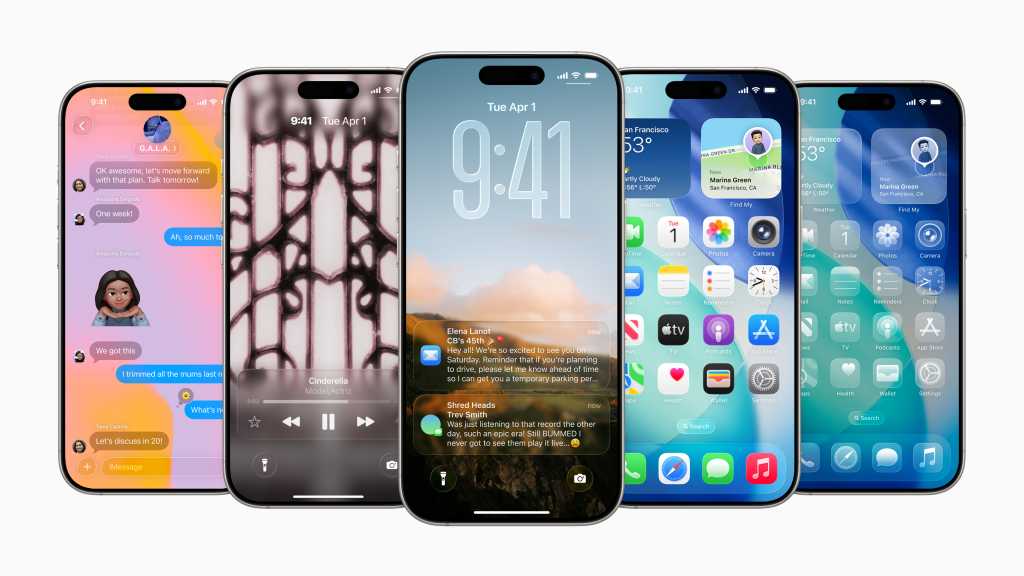
Despite the plaudits, there have been criticisms around readability, particularly when the UI is set to its most translucent mode.

“It’s hard to read sometimes,” said designer Allan Yu, “I think because they’ve set it to be a little too transparent.” Apple will almost certainly address these criticisms before it arrives in final form on various operating systems. (It’s currently only available in early developer betas.) To my eyes, Liquid Glass is a particular problem in Control Center; Apple may need to make everything underneath the controls more opaque.
So just what is Liquid Glass?

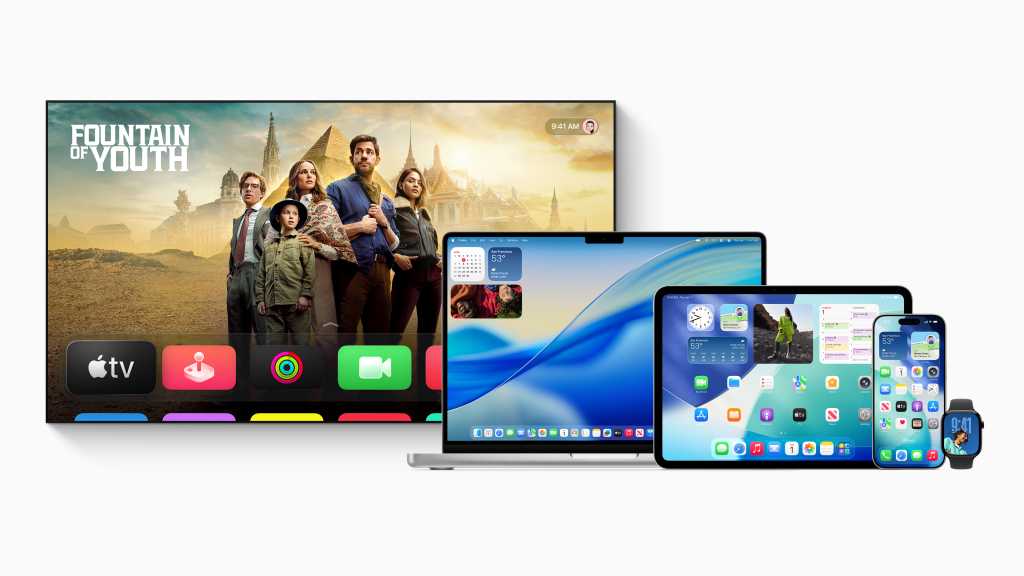
It is important to stress that Liquid Glass will be deployed across all Apple devices, from Macs, iPhones, and iPads, to Apple TV and even Apple Watch. In use, the new interface elements are both translucent and dynamic, giving you the impression that your device is made of liquid, not metal and glass. It delivers a graphics-rich environment made possible by the power of Apple Silicon, which has the power to run it.

Like glass, you’ll find the color of interface elements is informed by the content it surrounds or sits above. Apple calls some of this “lensing” — the ability to dynamically bend and shape light to reflect what you’re working with. “Liquid Glass objects materialize in and out by gradually modulating the light bending and lensing, ensuring a graceful transition that preserves the optical integrity of the material,” Apple said in a statement.

You’ll see interesting specular highlights and on-screen physics in action; some elements seem to bounce, others like to reflect light, and all these interactions are rendered in real time.

The new UI also makes demands of the elements used most — buttons, switches, text, media controls, as well as tab bars and sidebars — all have been tweaked for the new design paradigm. In part, this means all those elements become concentric, with the rounded corners of Apple’s hardware and app windows.

Controls are somewhat nested; they sit on a functional layer above the apps and morph into other controls as you seek them. They are also grouped within the interface; in one example, the Apple Music volume slider pops up above the content browser.

Also, when you scroll, you’ll find tab bars and sidebars work differently; tab bars shrink so they get out of the way of the content, while sidebars have been designed to feel more contextual to the content you’re viewing.

To get a sense of how this all fits together, Apple took pains to show how the time clock now fluidly adapts itself to fit behind the subject of a photo if you use an image as a wallpaper on your iPhone’s Home screen. Apple has done detailed work here — even the San Francisco typeface now dynamically scales the weight, height, and width of each character to fit the scene.

What about developers?

As you’d expect, Apple put together extensive information to help developers deploy Liquid Glass in their apps and created new APIs for use in SwiftUI, UIKit and AppKit. And while some developers will likely lag behind as they always do, most will be able to relatively easily refresh the design of their apps for the new UI.
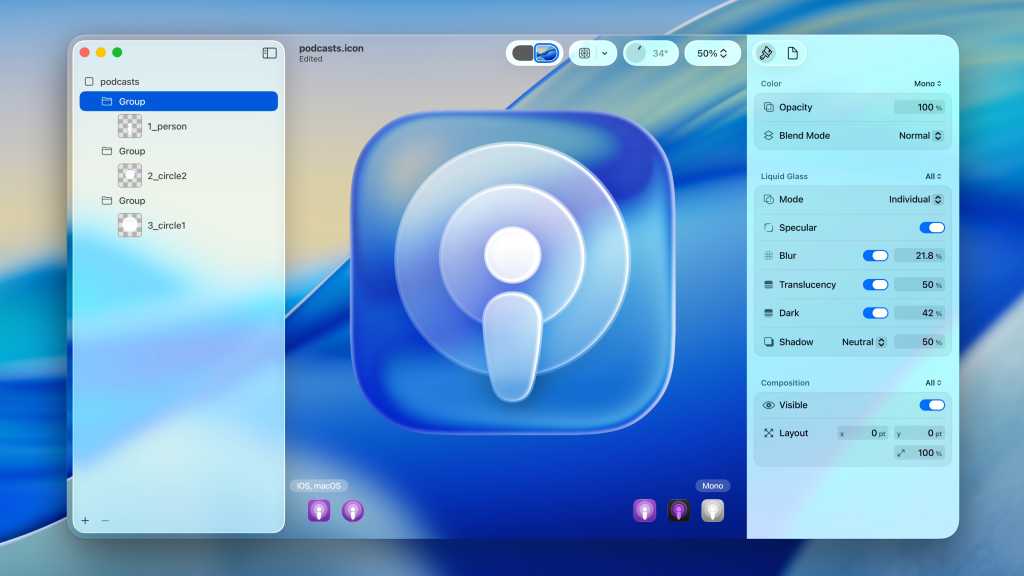
One new tool is Icon Composer, a tool with which to create Liquid Glass icons that render in the different looks the UI supports – light, dark, tinted, and clear.

Making sure apps properly support the subtle nesting within the new UI is a task in itself. Apple’s guidelines advise developers to think about a clear hierarchy of interface elements in order to make it easy for users to get to the element they require. Apple is also pushing developers to craft their apps to better reflect the rounded corners on its hardware and software and to rigorously adhere to the new platform conventions.

While it will take time for Apple users and developers to become fully accustomed to using Liquid Glass, the interface is quite beautiful, and lends itself for use across all manner of hardware and software devices. That makes it an appropriate change as Apple prepares for another decade of product design.

You can follow me on social media! Join me on BlueSky,  LinkedIn, and Mastodon.

RedNote joins China’s open-source AI wave with the launch of dots.llm1

Chinese social media platform RedNote has released its first open-source large language model, dubbed “dots.llm1,” joining a growing wave of Chinese technology companies pursuing open-source AI strategies that challenge Western proprietary models.

The model, developed by RedNote’s internal Humane Intelligence Lab, activates 14 billion parameters out of a total of 142 billion when responding to queries — an architecture designed to balance performance with cost-efficiency.

The company achieved performance comparable to Alibaba’s Qwen2.5-72B after pretraining on 11.2 trillion high-quality tokens without synthetic data, according to the model’s description on Hugging Face.

RedNote, known domestically as Xiaohongshu, operates one of China’s most influential social commerce platforms with over 300 million monthly active users.

A strategic divergence, not just technology

While OpenAI and Google keep their best AI models locked away, Chinese tech companies are taking the opposite approach — giving away their technology for free. But this isn’t just about different business models, according to industry experts.

“Chinese firms like RedNote are deploying open-source LLMs not just as models but as instruments of ecosystem control and geopolitical leverage. Meanwhile, Western firms such as OpenAI and Google remain committed to proprietary architectures,” said Sanchit Vir Gogia, chief analyst and CEO at Greyhound Research. “This is no longer a tactical split in model licensing — it’s a structural divergence in trust frameworks, one that will define the next generation of enterprise AI procurement.”

The split goes deeper than technology choices. “Western AI leaders are optimizing for shareholder return, compliance insulation, and platform lock-in through closed API-delivered models. In contrast, Chinese vendors like RedNote and DeepSeek are aggressively open-sourcing to expand national influence, cultivate developer mindshare, and drive localization-led adoption,” Gogia explained.

Performance vs. purpose

So, how does RedNote’s AI stack up? According to another detailed document on Github, dots.llm1 scored 56.7 on C-SimpleQA, a test of Chinese language skills — not quite as high as DeepSeek-V3’s 68.9, but respectable for a newcomer.

However, some analysts question whether RedNote is playing to its strengths. “Rednote, which has pioneered content-driven commerce, is well-positioned to build a large model based on the ton of data its ecosystem generates,” said Neil Shah, VP for research and partner at Counterpoint Research. “However, in this race of LLMs, Rednote would be better off building a more targeted model to drive AI-driven commerce sitting on a gold mine of data around users’ likes, dislikes, purchase behaviours, etc.”

The economics of free AI

The model uses a “mixture of experts” design that activates only the parts it needs for each task, making it cheaper to run than traditional models. But the economics go beyond technical efficiency.

“RedNote’s dots.LLM1 is less a revenue product and more a market accelerant,” Gogia explained. “The open-source model isn’t a broken business plan — it’s a strategic play to become foundational infrastructure across sovereign cloud ecosystems and public developer communities. The long game is not monetization through licensing but platform entrenchment through adoption.”

This approach is enabled by structural advantages. “Chinese firms benefit from central government subsidies, national procurement incentives, and policy exemptions that support loss-leader behavior in the short term. What might be financially unsustainable in the West becomes strategically viable in China due to alignment with state AI priorities,” Gogia said.

For Chinese vendors, open-source LLMs serve as soft power tools, exporting not only code but also embedded ideologies and governance frameworks into markets across Southeast Asia, Africa, and Latin America.

From social media to a global AI player

RedNote’s AI ambitions go beyond just releasing models. The company has already put AI to work on its main platform with Diandian, a search tool that helps users find content among the platform’s vast trove of lifestyle posts. With nearly 600 million daily searches—about half of what Google rival Baidu handles—RedNote has a real testing ground for its AI.

The timing isn’t coincidental. RedNote grabbed international headlines earlier this year when more than three million Americans joined the platform during TikTok uncertainty, giving the company a taste of global reach. Last week, it opened its first office outside mainland China in Hong Kong.

The trust challenge

For enterprises considering these open-source alternatives, the calculation isn’t straightforward.

“The core trade-off for enterprise buyers is no longer just cost versus performance — it is transparency versus control,” Gogia noted. “Controlled open LLMs provide a bridge across this chasm, giving CIOs and CISOs the ability to audit, customize, and self-host AI models without being beholden to proprietary ecosystems. However, the burden of governance shifts inward — enterprises must build their own trust scaffolding to make openness production-grade.”

The geopolitical dimension adds another layer of complexity. “Chinese open-weight models like dots.llm1 may be technically transparent—but in the eyes of global enterprises, transparency is no substitute for trust. Especially in regulated industries — banking, healthcare, and defense — geopolitical risk is now baked into AI architecture decisions,” Gogia warned.

What this means for business

The rise of capable, free AI models from Chinese companies is forcing a rethink of enterprise AI strategy. Companies that once assumed they’d need to pay premium prices for cutting-edge AI now have alternatives that might work just as well for many tasks, but with new considerations around governance, geopolitics, and long-term strategy.

RedNote’s entry into open-source AI represents more than technological competition — it’s part of a fundamental shift in how AI power will be distributed globally. While these models offer compelling technical capabilities at attractive price points, enterprises must weigh transparency benefits against new governance challenges and geopolitical considerations.

WWDC first look: How Apple is improving its ecosystem

While the new user interface design Apple execs highlighted at this year’s Worldwide Developers Conference (WWDC) might have been a bit of an eye-candy distraction, enterprise users were not forgotten, with announcements unveiled that could make a difference in the business world.

Apple’s WWDC keynote speech was far from the disappointment many had anticipated, given the number of changes announced. In addition to that new user interface, which will show up across all Apple products and is called Liquid Glass (we’ll look at it in more depth elsewhere), there were also APIs designed to help developers work AI into their software. The last is a nod to the company’s slow efforts to make Apple Intelligence the showcase tech promised at last year’s WWDC.

But for now I’m focused on just some of the changes Apple introduced that should have the most impact on enterprise users. Many, but not all, of these changes will be similar across all Apple’s devices, whether that’s macOS, iOS iPadOS, or others.

What’s a computer? The iPad

For me, the big news concerns the iPad, which gains noteworthy improvements that will transform its use. Not only can you open multiple app windows at once, but Apple has done this with a clever and versatile windowing system that even supports windows resizing, pervasive position memory and more. (You can even see all your currently open windows in Expose.)

These multitasking and windowing improvements should make it much easier to engage in professional work on an iPad and are the kind of improvements people have wanted for years. Changes on the iPad extend to the Files app, too, which gets important updates that will make it particularly useful.

Files for the rest of us

All Apple users, not just iPad owners, should see benefits from changes coming to Files. For iPad users, they make it easier to find and work with the files you need, and to add additional sorting options in the Files window; but Files is an app, which implies that at least some of those improvements will be available across other Apple devices. Pro users will likely also appreciate the new ability to customize folders with symbols, emoji, and colors.

The transformation of automation

Apple rolled out improvements in Shortcuts, including the capacity to create them and the ability to use Spotlight to identify and invoke them. And since the Shortcuts you do create can sync across all your devices, users will be able to build powerful productivity shortcuts on one device and use them on another, where they’re supported. This integration is, of course, also reflected by the Liquid Glass UI, which should create a real sense of familiarity as you move from Mac to tablet to iPhone.

Spotlight is evolving

Apple also announced big changes in Spotlight search on the Mac, including intelligent actions built around Shortcuts and Apple Intelligence, as well as Spotlight actions and quick keys; the latter automatically surface actions you might want to take with a Spotlight-selected item and commit those actions from within the search. This is powerful — you can find an item, change and save it, and share it, all from within Spotlight. The software can also learn from what you do, offering personalized actions for what you might want to do. 

“During a search, all results — including files, folders, events, apps, messages, and more — are now listed together and ranked intelligently based on relevance to the user,” Apple said. N”ew filtering options rapidly narrow searches to exactly what a user is looking for, like PDFs or Mail messages. Spotlight can also surface results for documents stored on third-party cloud drives. And when a user doesn’t know exactly what they’re searching for, Spotlight’s new browse views make it easy to scan through their apps, files, clipboard history, and more.”

You can also take hundreds of actions from directly inside Spotlight, such as sending an email or writing a note. While many of these features are being promoted as for the Mac, Spotlight operates across Apple’s platforms, so it will be interesting to see where else these features might show up as beta testing begins and future support rolls out.

App Intents

That brings me to App Intents. App Intents have been around for a while, but the framework will now let developers make actions in their apps in available across the system via Shortcuts or Spotlight. If nothing else this, should make work itself easier to get on with, and as those improvements percolate across Apple’s ecosystem, the hardest task will probably become simply remembering what actions you are able to take.

App Intents also gain support for visual intelligence, which means apps will be able to provide and make use of visual search results.

Etsy CTO Rafe Colburn explained what this means in a statement provided by Apple: “The ability to meet shoppers right on their iPhone with visual intelligence is a meaningful unlock and makes it easier than ever for buyers to quickly discover exactly what they’re looking for while directly supporting small businesses,” he said.

Vision Pro

Enterprises are already using Vision Pro devices, and Apple talked up the spatial computing headset during its WWDC keynote. Given the cost of these devices ($3,499), it is a welcome change that it’s now much easier to share them in workgroups; each user can save their own vision OS profile to their iPhone and then set the vision device up to suit. Apple also unveiled a new Vision Pro tool that lets you save a piece of content as Protected Content. (There are new APIs app developers can use for this, too.) The intention here is to ensure content shared on a Vision Pro doesn’t get shared outside your business.

There’s also support for a new Vision Pro peripheral, one that doesn’t come from Apple. Logitech Muse is a new pen/control device for spatial reality that lets you tweak and draw when working on projects with others. Look to Scroll allows users to explore apps and websites using just their eyes, and users can customize the scroll speed to their liking. Not surprisingly, developers will be able to integrate Look to Scroll into their visionOS apps.

Apple Intelligence was everywhere

Reading between the lines, you can see that artificial intelligence is actually everywhere in this year’s WWDC announcements. One of the biggest announcements does hint at the contextual intelligence Apple has previously told us about: Visual Intelligence now understands what is on screen, lets you ask questions about what you are looking at, and allows you to search for specific items or add events to your calendar. Apple has, of course, made it possible for developers to build support for this feature within their apps. 

“Last year, we took the first steps on a journey to bring users intelligence that’s helpful, relevant, easy to use, and right where users need it, all while protecting their privacy. Now, the models that power Apple Intelligence are becoming more capable and efficient, and we’re integrating features in even more places across each of our operating systems,” said Craig Federighi, Apple’s senior vice president of software engineering.

What this means: developers can now use Apple Intelligence APIs to build its tools within their apps, thanks to the Foundation Models Framework.

Developers can also look forward to Xcode 26, which can connect large language models (LLMs) directly into their coding experience, thanks to built-in support for ChatGPT. (Developers can also use API keys from other providers or run local models to support Xcode.)

Apple Intelligence features will be coming to eight more languages by the end of the year: Danish, Dutch, Norwegian, Portuguese (Portugal), Swedish, Turkish, Chinese (traditional), and Vietnamese. 

Live Translation

Live Translation is profound. It’s built into Messages, FaceTime, and iPhone and runs entirely on device. In use, it can automatically translate messages between languages, offer translated live captions on FaceTime calls, or speak the translation aloud during a conversation while on a phone call. It’s a fantastic feature I can’t wait to try and I expect to see it used in very interesting ways. 

Apple also did confirm a new system to help promote accessibility in apps. Accessibility Nutrition Labels for App Store product pages will let developers tell customers what accessibility features their apps support.

Summing up, even if this is a lean year for flashy announcements, the size of Apple’s ecosystem is now so vast the company is still capable of introducing changes that will delight customers, while also helping them get things done.

Apple rolled out the first betas of the new operating systems on Monday, with public betas following over the next few weeks. So you will be able to see for yourself which improvements make the most difference to you. Follow me through one of the networks below to learn more about these changes as I explore them.

You can follow me on social media! Join me on BlueSky,  LinkedIn, and Mastodon.

At WWDC, Apple infuses AI into the Vision Pro

Sluggish sales of Apple’s Vision Pro mixed reality headset haven’t dampened the company’s enthusiasm for advancing the device’s 3D computing experience, which now incorporates AI to deliver richer context and experiences.

Apple has upgraded the newly renamed visionOS 26 operating system to improve usability, blending AI into the background to enhance images and user interaction, Apple executives said at the company’s Worldwide Developer Conference on Monday.

Apple calls Vision Pro a “spatial computer” in which users can watch movies or interact with digital experiences in the real world using hands, eyes, and other senses.

A new feature called “spatial scenes” uses AI to give a 3D feel to traditional two-dimensional photos, which will be available in the Photos app. The AI model uses computational depth to add more perspectives to images, Haley Allen, senior director of visionOS program management, said during the presentation.

“Spatial scenes will make your web browsing experience more engaging, too,” Allen said.

In Safari, users will be able to select a feature called “spatial browsing” to view two-dimensional inline photos in supported articles in a three-dimensional format. Apple also introduced a curated app called “spatial gallery” to showcase curated spatial image content.

And the company is making major AI-driven changes to its Persona feature, which will now create more realistic avatars of users for the FaceTime video chat application. Previous avatars had lifelike renditions, but the updated Personas will be more personal and familiar, Allen said.

“Hair, lashes, complexion, all look remarkably accurate,” Allen said.

Apple also added many AI-driven improvements to apps such as Image Playground, which are supported across Apple devices. Apple has updated Image Playground to create more creative emojis by tapping into OpenAI’s ChatGPT AI application, which supports text and image creation.

The company also introduced a variety of non-AI features.

Vision Pro users will now be able to access widgets using their headset. The widgets will remain fixed within the visual field and will be clearly accessible at all times, Mike Rockwell, vice president of the Vision Products Group, said during a pre-recorded Apple video detailing the new features.

Widgets such as calendar and battery indicator are already popular in macOS. The company also introduced new widgets, such as a circular clock, music, real-time weather, and photos that can show snapshots of pictures from personal collections.

The widgets are blended into a user interface built around the new “liquid design” color scheme, which focuses on sharp colors and window edges.

Users can also now share Vision Pro experiences with others, which could help enterprises collaborate on three-dimensional engineering and design applications. Teams in hundreds of companies already use Vision Pro headsets for design, sales, training, and more, Rockwell said.

With that in mind, companies can also now create a pool of Vision Pro devices that can be shared among team members and guest users. Users can save their hand, eye, accessibility, and prescription information to their iPhone and activate a shared headset.

Apple also added new APIs such as “Protected Content,” which can show confidential materials to authorized users.

The company is also adding new input options such as the Logitech Muse, a pen-like device that can be used to draw within the 3D interface, and support for the Sony PlayStation VR2 Sense Controller; the latter can be worn on the hand to play motion-controlled video games within the headset.

Eleuther AI releases 8TB collection of licensed and open training data

AI research organization Eleuther AI has launched a massive text database, Common Pile v0.1, that can be used to train AI systems, according to Techcrunch. The 8TB database consists exclusively of publicly licensed texts, or texts that are classified as public domain.

Common Pile v0.1 was developed over two years in collaboration with Poolside, Hugging Face, the US Library of Congress and the University of Toronto, among others.

The data collection was released after concerns arose about several generative AI (genAI) companies using copyrighted material to train their models without the permission of the copyright owners. Eleuther AI was also behind the collection, The Pile, which has become a central point in the debate; it now wants to show with Common Pile v0.1 that training is possible without copyrighted material.

Common Pile v.01 was reportedly used to train the Comma v0.1-1T and Comma v0.1-2T AI models; Eluther AI claims Comma v0.1-2T performs as well as Meta’s first Llama model in terms of programming, image understanding and math. Eluther AI plans is release more open data collections in the future.

Apple warns: GenAI still isn’t very smart

Filling the void in the few hours before WWDC begins, Apple’s machine learning team raced out of the gate with a report to make people think twice about artificial intelligence, arguing that while the intelligence is artificial, it’s only superficially smart.

Some seem to think that Apple is attempting to mask its slow progress in AI development as its competitors push ahead toward artificial general intelligence (AGI). Others warn that perhaps we should all think about these findings, given the speed with which the technology is being deployed across almost every part of our society. Are we really becoming dependent on tech that doesn’t really work and will simply repeat the prejudices of its owners?

Because that’s what you get when you use something that is basically the kind of glorified pattern matching Apple’s researchers reveal in their latest paper, “The Illusion of Thinking.”

The Illusion of Thinking

In the 32-page paper, Apple’s machine learning experts argue that despite the impressive results they can achieve, AI models aren’t actually capable of authentic reasoning, relying more on pattern matching than deduction. For its analysis, the team tested models from OpenAI, Google DeepMind, Anthropic, and DeepSeek.

“Recent generations of frontier language models have introduced Large Reasoning Models (LRMs) that generate detailed thinking processes before providing answers,” they write.“Through extensive experimentation across diverse puzzles, we show that frontier LRMs face a complete accuracy collapse beyond certain complexities. Moreover, they exhibit a counterintuitive scaling limit: their reasoning effort increases with problem complexity up to a point, then declines despite having an adequate token budget.”

They also claim that while both LRM and LLM systems are good at some things, LLM wins at low-complexity tasks, LRMs do well in medium complex tasks, and both LLM and LRM models “experience complete collapse” when handling high-complexity tasks.

“We found that LRMs have limitations in exact computation: they fail to use explicit algorithms and reason inconsistently across puzzles. We also investigate the reasoning traces in more depth, studying the patterns of explored solutions and analyzing the models’ computational behavior, shedding light on their strengths, limitations, and ultimately raising crucial questions about their true reasoning capabilities,” the researchers wrote.

It raises the critical question: are the genAI systems we think are capable of reasoning actually doing so, or have they simply been taught to appear to be reasoning, even when they aren’t.

Between AI ideas and reality, falls the shadow

To prove its point, Apple shows how existing systems can be fed irrelevant or fake data they don’t recognize, leading to failures. The inference is that while these machines are good at repeating and identifying the patterns they know, actual creative problem-solving is beyond their abilities.

AI struggles with abstraction and generalization, which means the notion we’re anywhere near AGI…, well, it’s not going to happen anytime soon.

Apple isn’t alone in warning about resisting the hype around AI. Critic Gary Marcus has been raising red flags about the true intelligence in these systems, pointing to their over-reliance on trading data. This reliance means that while we’re promised that genAI will change everything and make everything better and more productive, it probably won’t achieve anything like those promises. The gulf between promise and reality is driving many in the industry to reassess their expectations already. 

What this means, of course, is that rather than becoming reliant on these systems, it makes more sense to remain pragmatic and develop a hybrid approach, both toward AI deployment AI development. 

Hold the door

Apple would say this, I suppose. We know it is facing unexpected challenges realizing the promises it made for Apple Intelligence at WWDC last year. “We need more time to complete our work on these features, so they meet our high quality bar,” Apple CEO Tim Cook said during last month’s earnings call. “We are making progress, and we look forward to getting these features into customers’ hands.”

It’s not impossible that part of the reason Apple has delayed introduction of some AI features is quite simply because they don’t work as they should. It’s possible this reflects what Apple’s research shows, with the abilities of Apple Intelligence constrained by the same challenges its report describes. 

To some degree, Apple Intelligence doesn’t matter. What is important is that any move to bet the entire future of you or of your business on AI is doomed to fail right now, if only because at root even automated pattern matching will eventually repeat the errors of the past. In the future? Who knows — the ability to create machines with human level intelligence is evidently in process, though most humans will probably prove more a little resistant to being replaced by machines. 

In the meantime, Apple will bring us a rebranded Siri, APIs so developers can build Apple Intelligence within their apps, and more partnerships with AI providers; the final obstacle is whether Apple can evolve an iteration of AI that gives it a truly competitive edge, and how long the company can play for time to achieve that.

You can follow me on social media! Join me on BlueSky,  LinkedIn, and Mastodon.

Chrome extension privacy promises undone by hardcoded secrets, leaky HTTP

Seemingly harmless Chrome extensions aimed at improving browser privacy and analytics could be inadvertently leaking API keys, secrets, and other sensitive machine information.  

According to a Symantec research, several widely used Chrome extensions, including DualSafe Password Manager and Avast Online Security & Privacy extension, are exposing information either through insecure HTTP transmission or hardcoded leaks.  

How to discover hidden tech talent in your organization

Many IT leaders struggle to find the right talent for open positions, especially when new technologies appear. Yet often, tech employees already working in the organization have valuable, transferable skills, such as problem-solving, analytical thinking, project management,, the ability to communicate effectively, and even needed technical skills.  

These overlooked skills — many of them so-called “soft skills” — can help workers adapt to new tools, learn unfamiliar programming languages, or manage complex projects. By recognizing and developing these skills, IT leaders can fill gaps in their teams while helping employees advance their careers.  

IT managers can more easily spot transferable skills if they take a deliberate approach to skills-building. Rather than focusing solely on day-to-day routine work, they should think about broader skills that can help employees succeed in different roles and with new technologies, according to Jill Stefaniak, chief learning officer at Litmos. 

Those key transferable skills include coding logic, problem-solving, data analysis, project management, and communication abilities — skills that are particularly valuable as technology continues to evolve rapidly, Stefaniak said. 

[ Related: Balancing hard and soft skills: the key to high-performing IT teams ] 

To help move a tech employee into a new position, an IT manager should evaluate the employee’s skills, focusing on ones that can easily transfer, such as critical and analytical thinking, data interpretation, or familiarity with automation and control systems, said George Fironov, co-founder and CEO of Talmatic, a concierge hiring service for developers. 

“A developer skilled in one language will be able to pick up another quickly if solid training in logical thinking, algorithms, and design patterns goes into that first language,” he said.  

Computerworld spoke to IT leaders at five companies that have created successful pipelines for tapping into internal tech talent. Here are the different approaches they take to find and develop skilled tech employees who thrive in new roles. 

Redgate Software: Taking a personal, manager-led approach 

For Chris Smith, director of engineering at Redgate Software, the most valuable transferable skills include a strong eagerness to learn, empathy for customers, solid business understanding, effective collaboration and communication, and the flexibility to adapt technically when needed. 

Smith identifies transferable skills within his teams using a personal approach led by managers, instead of using formal tools such as skills charts or tests. Smith, who’s responsible for the delivery side of Redgate’s technology and software division, said his managers stay closely connected to their team members, which helps them understand what each person can do and what they’re capable of learning. 

“Managers have a close understanding of their team members’ skills through regular one-on-one meetings,” Smith said. “And then from there I collate with the insights from all our managers where people with certain technical skills are, where our gaps are in the organization, where our strengths are, and where we might be able to use them in the future.” 

Smith also conducts quarterly mini-reviews to look at each team member’s skills and determine which of those skills they might want to develop.  

“We also run an annual survey around skills that our folks fill in,” he said. “So they share where they’ve got skills and where they’ve got gaps.” 

While he doesn’t analyze this survey at an individual level, Smith said, it helps leadership see the overall skills across the IT organization. 

Smith shared an example of a long-term employee who successfully transitioned through multiple roles by leveraging transferable skills.  

The employee originally started in the product support team, a technical role that required detailed knowledge of Redgate’s products and a deep understanding of customer problems. From the product support role, the employee first moved to a test engineer position. This transition was facilitated by the employee’s technical insight, knowledge about customers, and attention to detail.  

In the test engineer role, the employee developed an interest in automated testing, which served as a pathway to coding skills. The employee then transitioned into a software engineer role, moving beyond testing into full software development. 

Through Redgate’s re-teaming process, the worker subsequently moved to a team handling internal systems, where they worked on a Salesforce migration. Leveraging their technical background and understanding of product processes, the employee successfully became a Salesforce engineer, working with technologies such as Apex and Flow. 

Lexmark: Combining formal evaluations with casual observations 

For Sudhir Mehta, global vice president, Optra products and engineering at Lexmark, transferable skills include “a growth mindset, the willingness to learn new tools, frameworks, and methodologies.”  

Mehta said he uses a multi-faceted approach to identify these transferable skills within his team members. “This approach includes a mix of formal and informal methods, starting with regular performance evaluations, one-on-one meetings, and day-to-day job-related observations,” he said. 

Engineering team members can also demonstrate their abilities through Focus to Future events, which give engineers the chance to step outside their usual roles, Mehta said. As they team up, brainstorm, and build quick prototypes, managers can see who shows strengths in areas such as leadership, problem-solving, communication, and creative thinking. These events help managers notice skills their engineers don’t usually get to show, making it easier to see who might be ready to take on new roles or bigger challenges. 

Mehta provided an example of an IT developer who successfully transitioned from working on ERP applications to a data engineering role at Lexmark. The developer possessed a strong technical background and demonstrated excellent problem-solving skills, which made him an ideal candidate for a new position leading data engineering efforts for an IoT platform solution.  

As part of his transition, he participated in Lexmark’s AI Academy to further develop his skills and capabilities. In his new role, the developer implemented innovative solutions that had a significant impact on the company’s operations.  

He created automation for data pipelines and developed a lakehouse framework that dramatically improved efficiency. The results were impressive: the new approach reduced data orchestration costs by over 65% and decreased deployment and operations costs by more than 50%, Mehta said. 

HireVue: Employing structured, standardized assessments for objectivity 

Nathan Mondragon, chief innovation officer at HireVue, highlighted critical thinking, problem-solving, collaboration, communication, and teamwork as the key transferable skills he looks for in his tech employees.  

To identify these transferable skills within his team members, Mondragon emphasized the importance of a structured and standardized approach. 

“We find the more structure and standardization you can put into that identification, the better off it is,” said Mondragon, who manages a startup team at HireVue that consists of workers from science, product, data, and engineering groups. “So [structured] performance reviews are good.” 

Mondragon said that traditional performance reviews can be subjective, with different managers interpreting transferable skills such as teamwork differently. Instead, he recommended implementing quantitative assessment methods that objectively measure soft skills and cognitive abilities. 

One of these methods is AI-based skills validation through interview assessments that test cognitive abilities such as decision-making, problem-solving, and creative thinking. AI-based assessments analyze interview responses to identify skills and behaviors based on best practices in structured interviewing, according to Mondragon.  

“The questions are designed to draw out specific skills and behaviors,” he said. “The AI analyzes what somebody says in their answer to look for those types of answers that show they’re demonstrating that skill.” 

Although this approach is primarily used for pre-hire assessments, Mondragon said it can also be used to identify transferable skills in current tech employees.  

Additionally, Mondragon said he uses a traditional question-and-answer situational simulation-type approach to identify transferable skills in his tech talent. 

“You present a scenario or a situation and ask how somebody would respond,” he said. “And those sorts of types of setups in Q&A format are a really good approach to looking at how somebody would interact with others and the types of decisions they would make. For example, do they analyze the data to make decisions?” 

By using these structured techniques, organizations can more effectively identify an employee’s problem-solving abilities, communication skills, adaptability, and potential for learning new technologies or transitioning into different roles, according to Mondragon. The goal is to move beyond subjective evaluations and create a more objective framework that clearly identifies and leverages the transferable skills that tech employees bring to their teams. 

Criteria: Using real-work observations and AI-powered feedback 

When looking to uncover transferable IT skills, Chris Daden, chief technology officer at Criteria Corp., pays the most attention to problem-solving, communication, and analytical thinking.  

“I believe that they’re just as critical as coding or security knowledge,” he said. “And I think, for example, a security analyst’s attention to detail can translate very well to a DevOps skill set, and a help desk technician’s troubleshooting mindset can help that person transition into cybersecurity.” 

Trying to identify transferable skills through traditional methods such as performance reviews doesn’t always reveal the full range of an employee’s skills, especially in IT, Daden said. 

“I find the best way to identify transferable skills is through real work, such as project observations, mentorship, and data-driven assessments,” he said. 

Additionally, Daden said, he uses AI-powered assessments that look at skills in more flexible ways, such as by analyzing interview transcripts or conversation notes, and use smart rating tools to fairly measure an employee’s potential. These methods help to show an employee’s true potential — not just what they already know or have done. 

At Criteria, Daden uses a an AI bot named Coach Bo, which engages employees in weekly conversations. This bot is programmed with each employee’s personality and skills profile and can understand unstructured feedback, helping to spot transferable skills, areas for upskilling, and possible career growth paths. 

By collecting and analyzing these ongoing interactions, the company can gain insights into employees’ critical thinking, problem-solving abilities, and adaptability across different roles, according to Daden. 

Mphasis: Identifying transferable skills through observation, not just metrics 

The qualities Srikumar Ramanathan, chief solutions officer at Mphasis, seeks in his IT team members are a strong curiosity or desire to learn, along with solid problem-solving and analytical thinking abilities. 

Ramanathan pointed out that these skills are essential in today’s fast-changing technological environment, where staying relevant means constantly learning and adapting.  

“[The desire to learn] is important because things are changing so fast that if you stop learning, you become irrelevant,” he said. “The second is, of course, problem-solving and analytical thinking. These are probably the most critical skills that one needs.” 

Ramanathan finds formal skills evaluation methods such as performance appraisals inadequate. “Performance reviews are a lag indicator. They reflect what results have been achieved”rather than current capabilities, he said.  

To truly identify key transferable skills, Ramanathan relies more on direct, day-to-day observation — watching how team members approach challenges, adapt to new developments, and contribute during meetings and projects. He noted that this real-time insight offers a more accurate picture of an individual’s learning mindset and problem-solving approach. 

“[I look at] their approaches to addressing problems or opportunities. How do they go about it? How do they adapt to new things coming on board? These are things that one has to observe on a day-to-day basis,” he said.  

Why hands-on learning is critical for IT

Street smarts vs book smarts

Recently, one of our expert contributors opined that the act of writing helps to make an IT leader stronger, arguing that writing is a leadership superpower. According to CIO.com, writing conquers cognitive limits, clarifies complex thoughts, and stress-tests ideas for a decisive strategic advantage.  

This piqued the interest of readers of CIO, who were keen to ask Smart Answers about other ways in which we can learn and do better. One question in particular focused on the value of hands-on learning.  

It’s been a theme in recent years that learning on the job can be more valuable than academic learning; Smart Answers suggests that hands-on learning is crucial for IT skills because it allows individuals to demonstrate capabilities, retain knowledge, learn continuously, and build competency. 

Find out: Why is hands-on learning crucial for IT skills?  

LLMs training LLMs?

A big hit this week was Matthew Tyson’s fascinating deep dive into the rise and fall of Stack Overflow.  At one point, the internet’s senior engineer — the backstop where developers turned with problems that stymied them — Stack Overflow has declined not because AI is able to write code, but because it lost the element of human community that drove its initial growth.  

W’re proud that Smart Answers is useful because it is trained on only the content we create, every piece of which features insights from real humans working in IT. Readers of the Stack Overflow article asked our AI chatbot an important question: where do large language models (LLMs) go to get such insights if everyone acquires information from LLMs? Google Search is built on referrals to original content from publishers. But if no one is being referred, and publishers stop publishing, there will be no content on which to train LLMs.  

Smart Answers agrees: for LLMs to thrive, they need to capture information from trusted sources. It cites community platforms, open datasets, and published content. To mitigate the risks of AI feeding on AI, Smart Answers says future LLMs might need to focus on high-quality, structured data, such as textbook-quality data. And yes, we appreciate the irony of our readers asking our own LLM about this issue. 

Find out: Where will future LLMs get training data?  

SAP stick or twist

This week, we reported that nearly half of SAP ECC customers may stick with legacy ERP beyond 2027. We said that as the end of support for ECC nears, many customers continue to avoid moving to S/4HANA because of the cost and complexity of migration. And, really, what’s the harm? 

Good point. What is the harm?  

Readers of CIO.com asked Smart Answers that question. Continuing to use SAP ECC after 2027 poses several risks, according to our LLM. Running legacy ERP systems can expose customers to security and operational risks. Lack of support for third-party products can introduce security vulnerabilities. And maintenance fees can mount. 

Find out: What are the risks of staying on SAP ECC after 2027? 

About Smart Answers 

Smart Answers is an AI-based chatbot tool designed to help you discover content, answer questions, and go deep on the topics that matter to you. Each week we send you the three most popular questions asked by our readers, and the answers Smart Answers provides.  

Tech layoffs surge even as US unemployment remains stable

Although the US unemployment rate held steady at 4.2% in May with 139,000 jobs added to the US workforce, nearly 100,000 layoffs were also announced — up 47% from last year, according to new data from the US Bureau of Labor Statistics and others. Tech and federal cuts led the way in layoffs, driven by economic pressure, programmatic firings and AI-driven shifts in workforce needs, according to outplacement firm Challenger, Gray & Christmas.

Technology remains a top sector for cuts amid ongoing disruptions, according to the firm’s data. In May, tech companies announced 10,598 layoffs, bringing the 2025 total to 74,716; that’s up 35% from 55,207 at the same time last year.

“Tariffs, funding cuts, consumer spending, and overall economic pessimism are putting intense pressure on companies’ workforces. Companies are spending less, slowing hiring, and sending layoff notices,” Andrew Challenger, senior vice president of Challenger, Gray & Christmas, said in a statement.

Uneasiness continues to weigh on tech hiring, according to CompTIA, a provider of IT training and certification products. The unemployment rate for tech jobs in May was 3.4%, roughly in line with April’s 3.5%, CompTIA data showed. The tech unemployment rate continues to sit below the national rate.

CompTIA jobs graphic

CompTIA

Tech sector companies added a modest 1,571 net new employees in May, analysis of the BLS jobs report by CompTIA showed. Job growth in cloud infrastructure and tech services was offset by reductions in the telecommunications sector.

Tech employment across the broader economy declined by an estimated 131,000 positions. “With prior month employment gains, tech occupation employment remains in the positive for the year,” CompTIA said.

“It is undoubtedly a challenging time for employers and job seekers facing uncertainty on multiple fronts,” said Tim Herbert, CompTIA’s chief research officer. “At the same time, it requires taking a measured approach given the data continues to hold up reasonably well.”

One bright spot for tech hires in May was the finance and insurance industry, which collectively saw a 21% increase in new tech job postings; new tech job openings also rose by 16% in the retail sector, according to CompTIA.

Even so, tech layoffs have continued as AI adoption soars and economic pressures drive a major shift toward new roles and skills in the workforce. “AI isn’t replacing jobs,” said Kye Mitchell, president of tech workforce staffing firm Experis US. “It’s fundamentally redefining how work gets done. We’re seeing AI augment skillsets and make professionals more capable, faster, and able to focus on higher-value work.”

Technology only displaces jobs when about 80% of tasks can be automated — and AI isn’t close to doing that, said Mitchell. Right now, AI is enhancing skills, boosting productivity, and freeing up time for higher-value work.

Hiring for AI positions and those requiring AI skills continues to grow rapidly, according to a CompTIA analysis of data from Lightcast and Stanford University study. CompTIA found that employer job postings related to AI are up 117% year-to-date year-over-year.

Layoffs

Challenger, Gray & Christmas

Skills-based hiring remains core to many employers’ recruiting strategies. About half of all tech job postings did not specify a need for a four-year academic degree, seeking instead a combination of work experience, training and industry-recognized certification, according to CompTIA’s and other data.

Even so, employers are hesitant to hire. “Economic uncertainty is absolutely creating a cautious hiring environment, but it’s more complex than tariffs alone,” Mitchell said. “Our data shows employers adopting a ‘wait and watch’ stance as they monitor economic signals, with job openings down 11% year-over-year.”

Still, the tech job market is adjusting as AI adoption grows. AI skill mentions in job postings fell 10% in May but are still up 10% for the year, showing steady demand, Mitchell said.

The tech industry had been nearly bullet-proof from mass layoffs prior to 2022. After a hiring surge between 2020 and 2022 to meet digitization efforts as more people worked from home, the market shifted and began slashing jobs to readjust to the new reality.

Tech companies such Google, Amazon, Meta (Facebook) and others laid off tens of thousands of workers  as an adjustment to over-hiring during the COVID-19 pandemic. In 2023 alone, 1,186 tech companies laid off about 262,682 staff, compared to 164,969 layoffs in 2022.

In January 2024, job cuts leaped 136% over December and hit a 10-month high, according to Challenger, Gray & Christmas.

While the labor market remained steady, there are signs that hiring across the board is softening. Open job postings fell 7% this year and new postings dropped 16% in the past month — the first full contraction of 2025. Year-to-date, new postings are flat compared to last year, according to Ger Doyle, ManpowerGroup’s regional president for North America. Doyle, however, was optimistic.

“This is a chill, not a freeze,” he said. “Workers and employers are holding steady, awaiting clarity.”

For example, he said, project management roles are up 483% year-over-year, and as the broader outlook improves, a rebound could follow, he added.

 Demand for data roles is surging as companies shift from AI experiments to execution. Database architect postings are up 2,140% year-over-year, with data scientist postings up 280% — clear signs of companies building the backbone for an AI-driven future, Experis’s data showed.

“This shift is also reshaping how talent enters the industry. Entry-level opportunities are becoming more limited, making it harder for recent graduates to gain a foothold,” Mitchell said. “For those looking to break in, deep analytical and technical skills are no longer optional.”