Month: June 2025

Copilot finally has a feature that beats ChatGPT on Windows PCs

There’s no denying it: When it comes to Windows and AI chatbots, ChatGPT leads the pack.

Microsoft invested more than $13 billion in OpenAI, after all. And while the company has pinned Copilot to the taskbar on Windows PCs and placed a Copilot key on new laptops, its Copilot system is still built atop the same large language model (LLM) technology at ChatGPT’s core. That means the system will always be similar to ChatGPT until Microsoft releases its own AI models.

But there’s finally a reason to use Copilot instead of ChatGPT on your PC. It’s a feature Microsoft announced a while ago and is finally making available natively within Windows: You can now share any app on your PC with the Copilot AI chatbot and then have a conversation about it. And Copilot can draw highlights on your screen while you chat.

It’s called Copilot Vision, it’s really interesting — but it has more limits than you might think.

Want more tips for your Windows PC? Sign up for my free Windows Intelligence newsletter. I’ll send you free in-depth Windows Field Guides as a special welcome bonus!

The ChatGPT-Copilot Windows matchup

Traditionally, Copilot has lagged behind ChatGPT in many ways. While OpenAI has confidently stuck with the same ChatGPT interface for a long time, Microsoft has repeatedly hemmed and hawed and changed its mind on what Copilot even should be.

For example, after turning Copilot into something more like the personal companion from Her, Microsoft recently got rid of that more companion-focused app and pivoted Copilot back to more of a standard chatbot interface — for now.

My biggest problem with Copilot, though, is the lack of a crisp model selection tool. ChatGPT lets you get into the weeds and select exactly which AI model you’re using. Microsoft’s Copilot has a simple dropdown box where you select “Quick Response,” “Think Deeper,” or “Deep Research.” If you select Quick Response, you’re not sure what model you’re using: Are you using GPT-4o, or did Copilot just route your query to a less expensive model to save money? There’s no predictability.

Copilot has other limits that aren’t surprising, considering Microsoft has spent the last few years repeatedly reinventing the wheel by constantly creating new Copilot apps. For example, the ChatGPT app lets you search your entire history to find conversations if you want to pull something up. It lets you organize conversations into folders. It gives you the ability to customize your experience. It feels more like a mature app — again, no surprise considering Microsoft has been repeatedly starting from scratch rather than improving a single app over time.

Microsoft’s secret weapon

Despite all those weak points, Copilot has one compelling advantage over ChatGPT — its integration with other Microsoft platforms and services. For example, if you use Microsoft 365 apps like Word and Excel (once called Office apps), you’ll need a $20 per month Copilot Pro subscription rather than a $20 per month ChatGPT Plus subscription. And organizations will need to get AI features for Microsoft 365 through Copilot.

But, while Microsoft quickly added deep Copilot integration to M365, the company lagged when it comes to adding integration to Windows. That’s now changed with Copilot Vision, which arrived first for browsing web pages in Microsoft Edge and officially became available on both Windows 11 and Windows 10 in the US this month. (It will likely launch in additional countries in the future.)

For the moment, the feature works only in real-time voice mode. If you want to have a conversation in text mode, you’ll need to provide screenshots of your screen to Copilot along with text prompts — just as you would with ChatGPT.

How to use Copilot Vision on Windows

To get started with Copilot Vision in its new Windows-native form, just launch the Copilot app from your taskbar or Start menu. (If you have a laptop with a Copilot key, you can just press that, too.)

At the bottom right corner of the Copilot app — at the right side of the text input box — you’ll see a glasses-shaped icon for “Share screen with Copilot.” Click that to get started.

You’ll then be prompted to choose the window you want to share. Copilot doesn’t get access to your PC’s entire display — just the specific app you choose. And it can’t actually control anything in that app: Copilot will be able to see what’s on your screen in that app, and it will be able to draw highlights to call your attention to things. But that’s it.
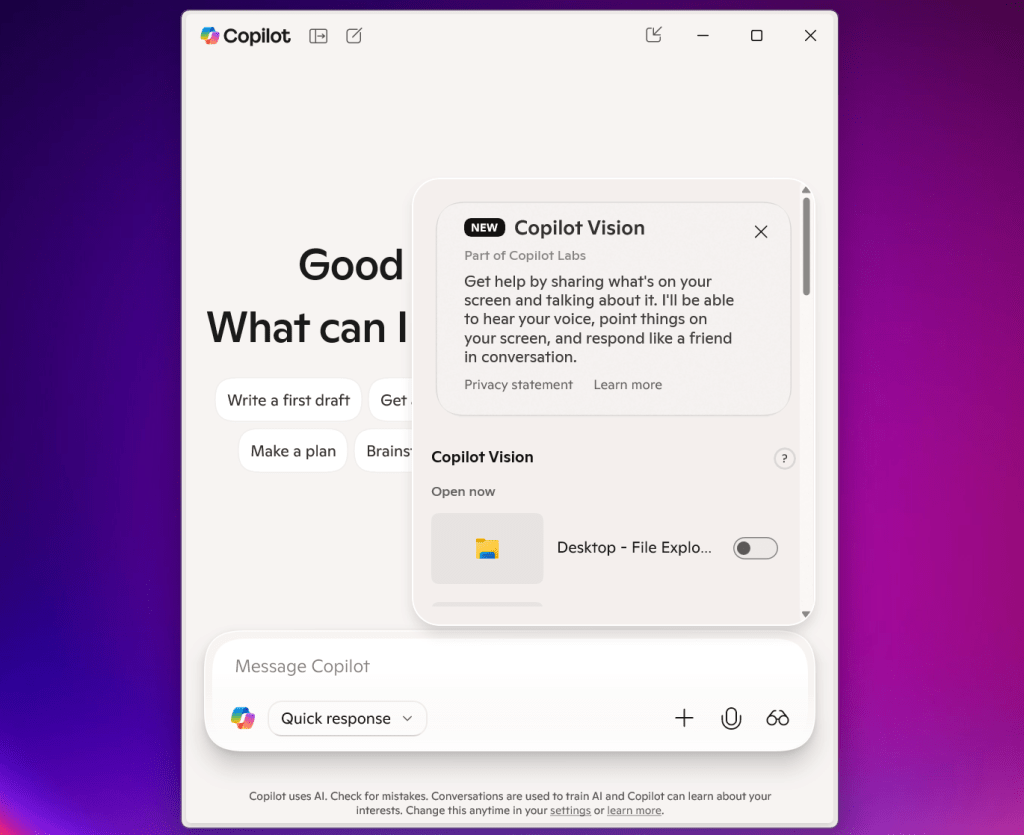
Launch Copilot Vision
Copilot will show you a list of all your open windows, and you can share any one you want with the AI model — but just one window at once.

Chris Hoffman, Foundry

Once you’ve shared whatever app you want, you can have a conversation and ask questions about it. You might ask “How exactly do I accomplish this task in Photoshop?” or “What do you think of this hotel I’m about to reserve online? Are there better options?” and keep the conversation going for as long as you like.

While you’re sharing an app and having a voice conversation, you’ll see a floating box at the bottom of your screen. Click “Stop” to stop sharing.

Copilot Vision floating box
A floating box will appear just above your taskbar icons while you’re sharing a window and having a voice conversation.

Chris Hoffman, Foundry

You can ask it to point out things on the screen, and it can highlight different areas to draw your attention to them. This is a simplistic feature at launch, as it can point out only one thing. Let’s say you need to find an option five menus deep: The system would highlight the individual icon or menu option visible on your screen, and that’s it. The highlights aren’t great for quickly guiding you through complex interfaces on the fly.

Copilot Vision highlight
Copilot Vision can highlight things on your screen to draw your attention to them.

Chris Hoffman, Foundry

The Copilot Vision cons

Beyond that, Microsoft’s Copilot Vision AI experience has some of the same limits as any AI chatbot at the moment. It wants to validate you, the user. It may nod along, even if you get something wrong. For example, here’s a quick interaction I had:

“How do I draw something in Word?”

“To draw in Word, you’d go to the ‘Draw’ tab on the Ribbon…”

“Okay, so it’s under the Layout tab, right?”

“That’s correct!”

“Nope, it was under the Draw tab.”

“Mm-hm.”

This isn’t an attack on AI chatbots in general, the underlying GPT model from OpenAI, or Copilot itself. It’s just a limitation of the technology — at least at the moment. When interacting with Copilot, ChatGPT, or any other LLM, you need to stay on your toes and question what you’re hearing.

The real limitations with AI voice modes

While voice modes might feel more “futuristic” than text-based LLM interactions, text-based interactions are simply better and richer at the moment. First of all, this voice-based experience is just relying on text. Under the hood, the things you’re saying are getting converted to text, and the LLM is outputting text that is being spoken aloud by a different process. This is crucial to understand: The LLM cannot hear any emotional tone you have in your voice. Additionally, while the Copilot voice you hear may appear to have an emotional tone, that is being inserted by the text-to-speech process after the LLM outputs its text.

This results in a rather uncanny valley experience. The LLM can’t receive any of your vocal cues or tone. It will respond in a voice that appears to have an emotional tone, but the emotional tone isn’t provided by the LLM at all. And, again, it isn’t responsive to your emotional tone.

Beyond that, voice-based interactions are naturally quicker and more surface-level than text-based interactions, where deeper and more analytical responses are possible. So, for lots of tasks, a deeper text-based interaction might be much better than a quick voice-based interaction. If you think it’s not being “smart” enough, try dropping back to text mode and following the tips in my guide to the secret to using generative AI.

There’s no real-time sharing of your screen in text mode, though: You’ll need to take screenshots and provide them along with your text prompts. In Copilot, you can click the “+” button at the right side of the message box and select “Take Screenshot” to quickly add a screenshot. That’s one way to get something like “Vision” along with a text conversation.

Then again, you could always provide screenshots to ChatGPT, too. Now, though, at least, Microsoft has some reason to hope you might be inspired to stick with Copilot instead and think of it as your go-to Windows companion.

Looking for more thoughtful Windows analysis and useful PC tips? Sign up for my free Windows Intelligence newsletter today. I’ll send you three new things to try each Friday.
21 ways Gemini can actually be useful on Android

Right now, Gemini’s getting a bit of a bad rap — at least, among certain circles of savvy users who are closely tuned into the technology.

It’s easy to see why: Google rushed Gemini out of the gates way before it was ready. It increasingly crippled the perfectly fine Google Assistant experience in the meantime, and still today, Gemini can’t do everything Assistant did in terms of day-to-day device basics (while Assistant no longer handles those same tasks consistently anymore, either).

Gemini’s also overly complicated and confusing, with its many models and cryptically coded options. It’s being shoved in our faces at every possible opportunity in a move reminiscent of a certain other much-maligned Google service. And, most troubling of all, it’s being positioned as an all-purpose answer machine when it gets answers wildly wrong anywhere from 5 to 20% of the time.

Just like all the other generative AI chatbots of the moment, in other words, it’s a steaming hot mess — even if most of the the mainstream tech-tappin’ masses may not fully realize it yet.

But the problem with Gemini (and other similar systems) is less the technology itself and more the way the tech industry for some reason insists on framing it. These large-language model mechanisms just aren’t good at understanding context or offering factual answers. They shouldn’t be set up to serve as replacements for search. They get stuff wrong shockingly often, for cryin’ out loud, and they always will. It’s par for the course, and it’s just plain silly. (Seriously: The hits keep comin’ — and comin’, and comin’, and…well, you get the idea.)

They are, however, useful in other ways — namely when it comes to lower-level, more mundane sorts of tasks where context, judgment, and a lack of flat-out fabricating aren’t required.

Here, specifically, are 21 simple ways Gemini can actually be useful and worth using on Android — with minimal “AI” (in the current sense of the term), no “brainstorming” ballyhoo, and absolutely no error-filled info-seeking involved.

Note that Gemini is not available in all countries, due to differing regulations in different parts of the world. If you’re in a place where the service is supported and you don’t yet have it on your device, you can download the official Google Gemini app and open it up to get started — then either long-press your device’s power button or say Hey Google to summon it from there, depending on the specifics of your setup.

Part I: Notes and memory with Gemini on Android 

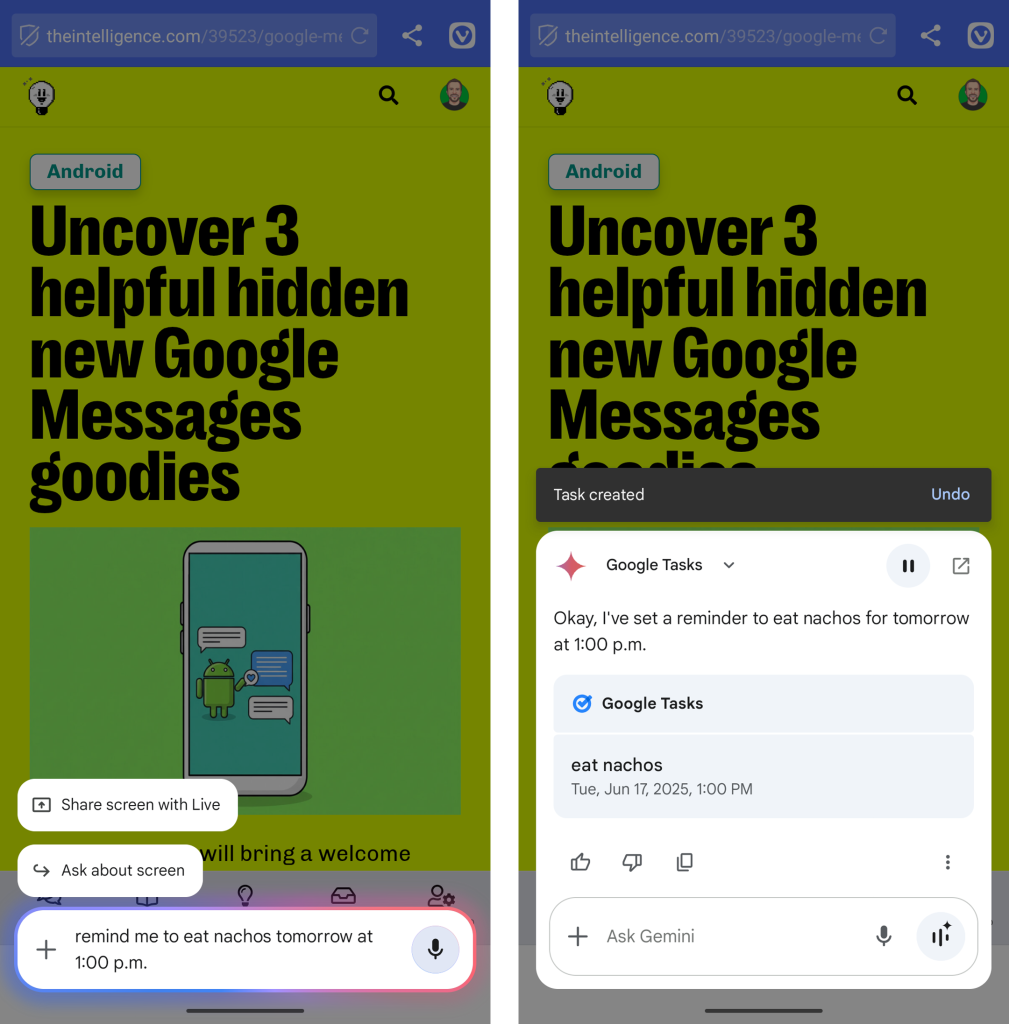
1. In a reminder that the simplest features are often the most practical of all, Gemini can remind you of anything, anytime — just like Google Assistant could before it. Simply fire it up and say Remind me [whatever] at [whenever — day and/or time], and the deed will be done.

Google Gemini Android: Set reminder
Gemini can set a reminder for you without even interrupting what you’re doing.

JR Raphael, Foundry

It may not be flashy, but I’d be willing to wager you’ll rely on that much more often than the on-demand image generation or “creative thought partner” poppycock Google and every other AI-obsessed company is pushing with these things these days.

2. Basic reminders aside, Gemini is great at remembering specific info and then recalling it for you later. Try telling the service something like Remember that the door code is 90210, Remember that my rental car license plate is WIGGLES77, or Remember that Jed’s wife is named Tallulah — then, whenever you need to recall the related nugget, just ask: What’s the door code, What’s my rental car license plate, or What’s Jed’s wife’s name (or whatever question is appropriate for what it remembered).

3. The next time you need to make a more extensive note to yourself, pull out the classic old Assistant trick of telling Gemini to Create a note that says whatever you’ve got on your mind. It’ll save it into the Google Keep Android app for easy future finding.

[Psst: Love shortcuts? My free Android Shortcut Supercourse will teach you tons of time-saving tricks. Start now for free!]

Part II: Places and events with Gemini on Android 

4. If you’re ever feeling lost — or maybe you’re out on a Very Important Business Call and at a location you want to track down again in the future — fire up Gemini on your phone and ask the soul-searching question Where am I? Gemini will give you the nearest address in return. And then…

5. After you’ve asked Gemini for your current location, try saying Remember that location as…, followed by some sort of description you might use in the future — the best place to park, the home of the seven-foot egg roll, the place where I lost my mind (after eating a seven-foot egg roll), or whatever the case may be. You can then later ask Gemini where that place is, and it should serve back up the very same spot for your rediscovering pleasure.

6. Gemini can help you get from point A to point B, too. In addition to asking it to Start a navigation to some particular place, you can ask it questions like How long would it take me to get In ‘N’ Out Burger right now and other equally important inquiries.

7. Just like Assistant before it, Gemini is great at helping you check in on your calendar. Ask it What’s on my agenda for today, When’s my first meeting tomorrow, or When’s my next haircut — or any other variations on those same concepts you can come up with — for a quick ‘n’ easy way to see what you’ve got ahead.

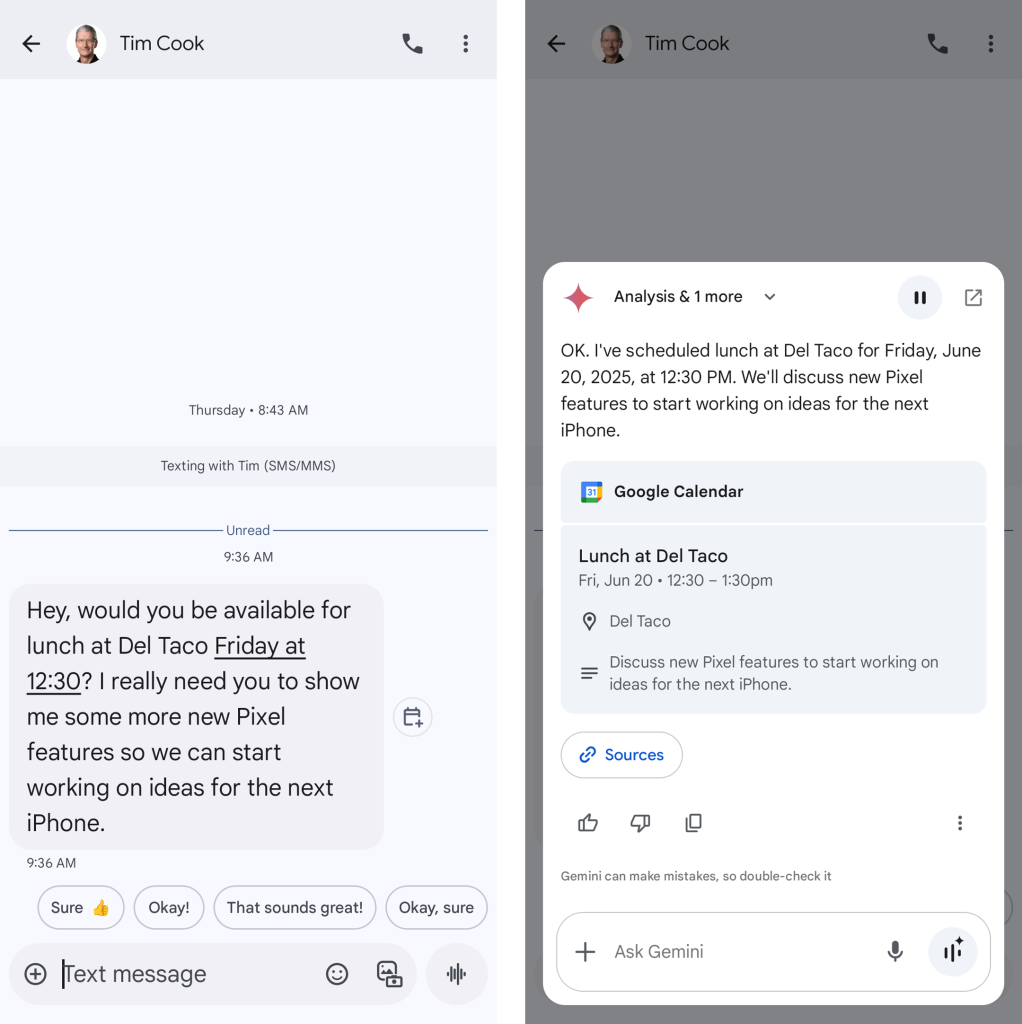
8. You don’t have to stop with calendar check-ins: Gemini can also make new appointments for you in some especially useful ways. In addition to simply asking it to Create a new calendar appointment for [whatever] on [whatever day and time], you can summon Gemini anytime you’ve got info about an event on your screen — in an email, on a website, within a text or Slack thread, or whatever — then tap the button that says “Ask about screen” and say Create a calendar appointment for this. Gemini will interpret the visible info and format it into a full event on your calendar in a single swift step.

Google Gemini Android: Create calendar event
Creating calendar events is especially easy with Gemini’s assistance.

JR Raphael, Foundry

Part III: Intelligent interactions with Gemini on Android 

9. When you’re looking at a web page, a document, or any other type of text on your Android device and you aren’t in a position to read it with your own two eyes — if, for instance, you’re walking, driving, or climbing high atop a towering tree in Narnia — get Gemini, tap that same “Ask about screen” button we went over a second ago, and say Read this out loud. Just please, for the sake of our collective sanity, put in your frickin’ earbuds first.

10. If, on the other hand, you want a summarized version of something on your screen, follow those same steps from the previous tip but this time say Summarize this. Gemini will start to speak a simple summary of the info aloud to you (provided you spoke aloud to it), or you can press the pause button and read its streamlined overview yourself if you’d rather.

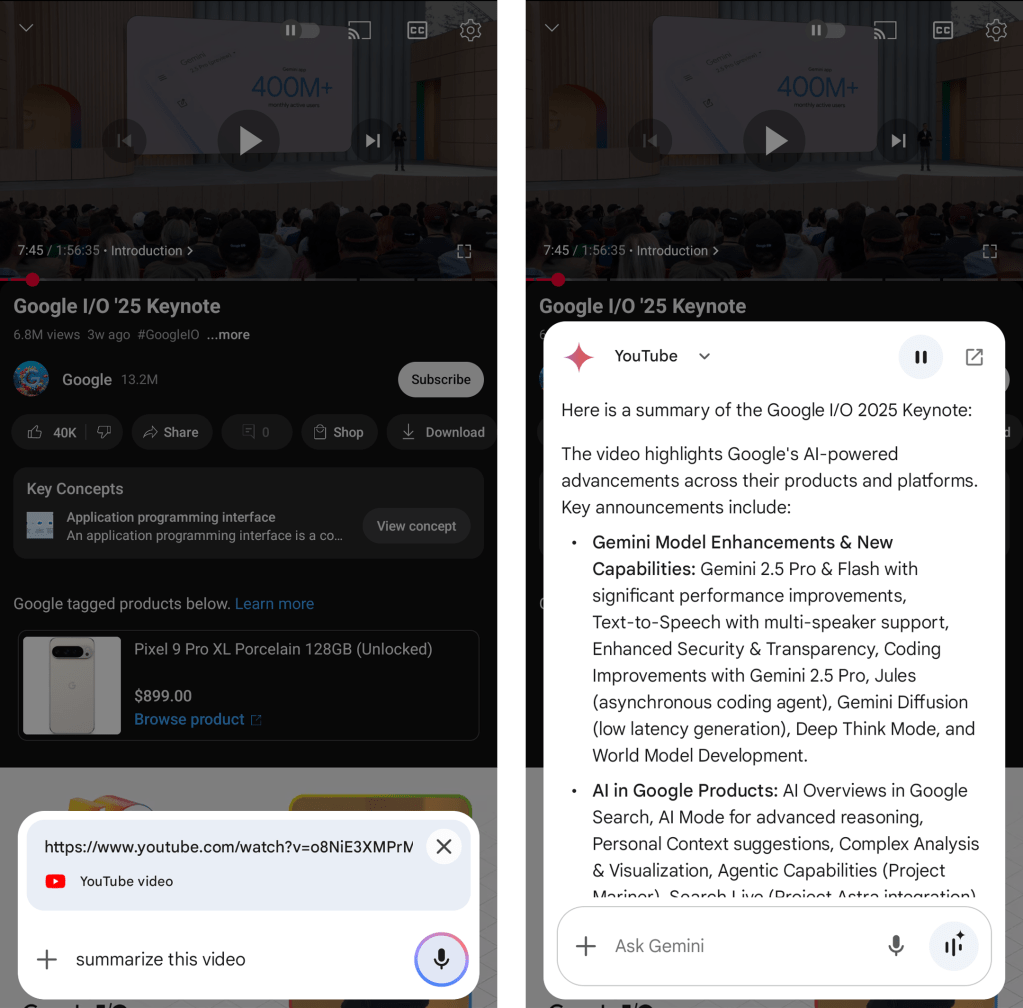
11. Speaking of summarizing, Gemini’s (non-milk-related) condensing powers also extend to the domain of YouTube — where a quick ‘n’ simple summarization can sometimes really be useful. Use that same “Ask about screen” button again while you’ve got a video in front of ye and say Summarize this video. 

Google Gemini Android: Summarize video
Get a simple text summary of any long video in seconds with Gemini by your side.

JR Raphael, Foundry

In advance: You’re welcome.

12. One more slice of summarizing sorcery worth noting: No matter what you’re doing on your device, you can call up Gemini and ask it to Summarize my most recent incoming emails. As long as you’ve got the Gemini Gmail/Google Workspace integration active, El Gembo will give you a bird’s eye view of what’s awaiting in your inbox at that very moment.

13. Trying to identify something you see on your screen — a landmark, a plant or flower, or even a person named Joe Pesci? Caress that Gemini “Ask about screen” button while it’s visible and ask exactly what you want to know: What building is this? What type of flower is this? Who is this? Gemini will tap into the same smarts seen in the superb Google Lens Android setup and give you an answer in the blink of an eye.

Part IV: Basic device functions with Gemini on Android 

14. Check up on your phone’s power in a jiff by asking Gemini What’s my battery level? (You can also try asking it What’s the frequency, Kenneth? — but I wouldn’t necessarily expect any real results in return.)

15. Save yourself the sometimes-awkward finger-stretching and snap a screenshot of anything on your screen simply by asking Gemini to Take a screenshot. Easy!

16. On a related note, you can review your captured screenshots without lifting a finger by giving Gemini the very logical command of Show my screenshots.

17. It may seem obvious, but Gemini can send text messages on your behalf. Just say — brace yourself… — Send a text message to followed by the name of the person you’ve got in mind (and, optionally, the entire message, too, if you want to save yourself a second step).

18. Similarly, your Android Gemini assistant can place a call via the command Call followed by the name of the contact or number you’re needing.

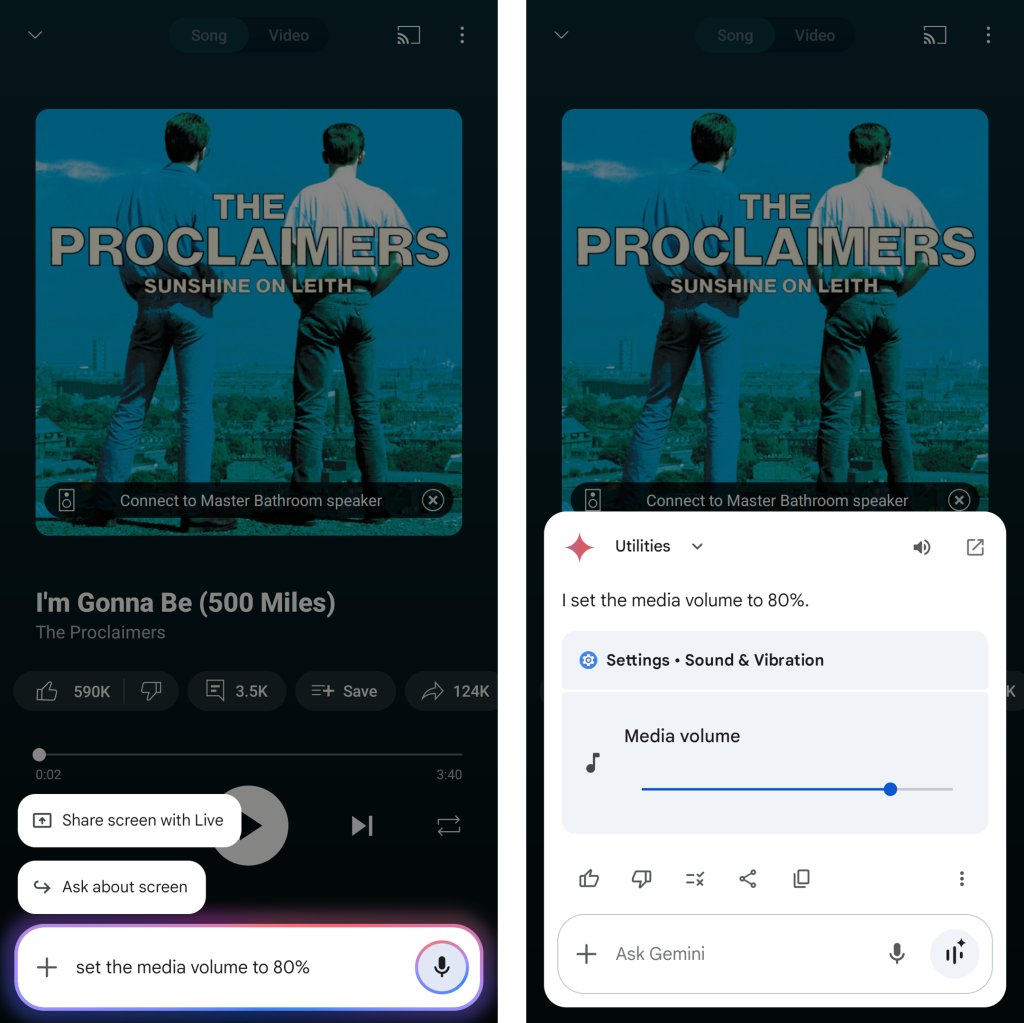
19. Set your sound volume in a split second by asking Gemini to Set the media volume — or call volume, ring volume, notification volume, or alarm volume — either on a one to 10 scale or to a specific percent value.

Google Gemini Android: Set volume
Adjusting any system volume level is never more than a spoken command away.

JR Raphael, Foundry

20. You can also rely on Gemini to adjust all sorts of system settings — for instance, asking it to Turn Do Not Disturb on (or off), Turn the flashlight on (or off), Turn Bluetooth on (or off), and Turn airplane mode on (or off).

21. And last but not least, Gemini can get you where you need to be within your Android system settings without any of the usual hunting. Tell it to Open up the Accessibility settings — or any other area or specific option — and watch it fly you over precisely where you need to be.

Keep the advanced Android knowledge coming with my free Android Shortcut Supercourse. Tons of time-saving tricks await!

Meta officially ‘acqui-hires’ Scale AI — will it draw regulator scrutiny?

Meta is looking to up its weakening AI game with a key talent grab.

Following days of speculation, the social media giant has confirmed that Scale AI’s founder and CEO, Alexandr Wang, is joining Meta to work on its AI efforts.

Meta will invest $14.3 billion in Scale AI as part of the deal, and will have a 49% stake in the AI startup, which specializes in data labeling and model evaluation services. Other key Scale employees will also move over to Meta, while CSO Jason Droege will step in as Scale’s interim CEO.

This move comes as the Mark Zuckerberg-led company goes all-in on building a new research lab focused on “superintelligence,” the next step beyond artificial general intelligence (AGI).

The arrangement also reflects a growing trend in big tech, where industry giants are buying companies without really buying them — what’s increasingly being referred to as “acqui-hiring.” It involves recruiting key personnel from a company, licensing its technology, and selling its products, but leaving it as a private entity.

“This is fundamentally a massive ‘acqui-hire’ play disguised as a strategic investment,” said Wyatt Mayham, lead AI consultant at Northwest AI Consulting. “While Meta gets Scale’s data infrastructure, the real prize is Wang joining Meta to lead their superintelligence lab. At the $14.3 billion price tag, this might be the most expensive individual talent acquisition in tech history.”

Closing gaps with competitors

Meta has struggled to keep up with OpenAI, Anthropic, and other key competitors in the AI race, recently even delaying the launch of its new flagship model, Behemoth, purportedly due to internal concerns about its performance. It has also seen the departure of several of its top researchers.

 “It’s not really a secret at this point that Meta’s Llama 4 models have had significant performance issues,” Mayham said. “Zuck is essentially betting that Wang’s track record building AI infrastructure can solve Meta’s alignment and model quality problems faster than internal development.” And, he added, Scale’s enterprise-grade human feedback loops are exactly what Meta’s Llama models need to compete with ChatGPT and Claude on reliability and task-following.

Data quality, a key focus for Wang, is a big factor in solving those performance problems. He wrote in a note to Scale employees on Thursday, later posted on X (formerly Twitter), that when he founded Scale AI in 2016 amidst some of the early AI breakthroughs, “it was clear even then that data was the lifeblood of AI systems, and that was the inspiration behind starting Scale.”

But despite Meta’s huge investment, Scale AI is underscoring its commitment to sovereignty: “Scale remains an independent leader in AI, committed to providing industry-leading AI solutions and safeguarding customer data,” the company wrote in a blog post. “Scale will continue to partner with leading AI labs, multinational enterprises, and governments to deliver expert data and technology solutions through every phase of AI’s evolution.”

Allowing big tech to side-step notification

But while it’s only just been inked, the high-profile deal is already raising some eyebrows. According to experts, arrangements like these allow tech companies to acquire top talent and key technologies in a side-stepping manner, thus avoiding regulatory notification requirements.

The US Federal Trade Commission (FTC) requires mergers and acquisitions totaling more than $126 million be reported in advance. Licensing deals or the mass hiring-away of a company’s employees don’t have this requirement. This allows companies to move more quickly, as they don’t have to undergo the lengthy federal review process.

Microsoft’s deal with Inflection AI is probably one of the highest-profile examples of the “acqui-hiring” trend. In March 2024, the tech giant paid the startup $650 million in licensing fees and hired much of its team, including co-founders Mustafa Suleyman (now CEO of Microsoft AI) and Karén Simonyan (chief scientist of Microsoft AI).

Similarly, last year Amazon hired more than 50% of Adept AI’s key personnel, including its CEO, to focus on AGI. Google also inked a licensing agreement with Character AI and hired a majority of its founders and researchers.

However, regulators have caught on, with the FTC launching inquiries into both the Microsoft-Inflection and Amazon-Adept deals, and the US Justice Department (DOJ) analyzing Google-Character AI.

Reflecting ‘desperation’ in the AI industry

Meta’s decision to go forward with this arrangement anyway, despite that dicey backdrop, seems to indicate how anxious the company is to keep up in the AI race.

“The most interesting piece of this all is the timing,” said Mayham. “It reflects broader industry desperation. Tech giants are increasingly buying parts of promising AI startups to secure key talent without acquiring full companies, following similar patterns with Microsoft-Inflection and Google-Character AI.”

However, the regulatory risks are “real but nuanced,” he noted. Meta’s acquisition could face scrutiny from antitrust regulators, particularly as the company is involved in an ongoing FTC lawsuit over its Instagram and WhatsApp acquisitions. While the 49% ownership position appears designed to avoid triggering automatic thresholds, US regulatory bodies like the FTC and DOJ can review minority stake acquisitions under the Clayton Antitrust Act if they seem to threaten competition.

Perhaps more importantly, Meta is not considered a leader in AGI development and is trailing OpenAI, Anthropic, and Google, meaning regulators may not consider the deal all that concerning (yet).

All told, the arrangement certainly signals Meta’s recognition that the AI race has shifted from a compute and model size competition to a data quality and alignment battle, Mayham noted.

“I think the [gist] of this is that Zuck’s biggest bet is that talent and data infrastructure matter more than raw compute power in the AI race,” he said. “The regulatory risk is manageable given Meta’s trailing position, but the acqui-hire premium shows how expensive top AI talent has become.”

For June’s Patch Tuesday, 68 fixes — and two zero-day flaws

Microsoft offered up a fairly light Patch Tuesday release this month, with 68 patches to Microsoft Windows and Microsoft Office. There were no updates for Exchange or SQL server and just two minor patches for Microsoft Edge. That said, two zero-day vulnerabilities (CVE-2025-33073 and CVE-2025-33053) have led to a “Patch Now” recommendation for both Windows and Office. (Developers can follow their usual release cadence with updates to Microsoft .NET and Visual Studio.)

To help navigate these changes, the team from Readiness has provided auseful  infographic detailing the risks involved when deploying the latest updates. (More information about recent Patch Tuesday releases is available here.)

Known issues

Microsoft released a limited number of known issues for June, with a product-focused issue and a very minor display concern:

  • Microsoft Excel: This a rare product level entry in the “known issues” category — an advisory that “square brackets” or [] are not supported in Excel filenames. An error is generated, advising the user to remove the offending characters.
  • Windows 10: There are reports of blurry or unclear CJK (Chinese, Japanese, Korean) text when displayed at 96 DPI (100% scaling) in Chromium-based browsers such as Microsoft Edge and Google Chrome. This is a limited resource issue, as the font resolution in Windows 10 does not fully match the high-level resolution of the Noto font. Microsoft recommends changing the display scaling to 125% or 150% to improve clarity.

Major revisions and mitigations

Microsoft might have won an award for the shortest time between releasing an update and a revision with:

  • CVE-2025-33073: Windows SMB Client Elevation of Privilege. Microsoft worked to address a vulnerability where improper access control in Windows SMB allows an attacker to elevate privileges over a network. This patch was revised on the same day as its initial release (and has been revised again for documentation purposes).

Windows lifecycle and enforcement updates

Microsoft did not release any enforcement updates for June.


Each month, the Readiness team analyzes Microsoft’s latest updates and provides technically sound, actionable testing plans. While June’s release includes no stated functional changes, many foundational components across authentication, storage, networking, and user experience have been updated.

For this testing guide, we grouped Microsoft’s updates by Windows feature and then accompanied the section with prescriptive test actions and rationale to help prioritize enterprise efforts.

Core OS and UI compatibility

Microsoft updated several core kernel drivers affecting Windows as a whole. This is a low-level system change and carries a high risk of compatibility and system issues. In addition, core Microsoft print libraries have been included in the update, requiring additional print testing in addition to the following recommendations:

  • Run print operations from 32-bit applications on 64-bit Windows environments.
  • Use different print drivers and configurations (e.g., local, networked).
  • Observe printing from older productivity apps and virtual environments.

Remote desktop and network connectivity

This update could impact the reliability of remote access while broken DHCP-to-DNS integration can block device onboarding, and NAT misbehavior disrupts VPNs or site-to-site routing configurations. We recommend the following tests be performed:

  • Create and reconnect Remote Desktop (RDP) sessions under varying network conditions.
  • Confirm that DHCP-assigned IP addresses are correctly registered with DNS in AD-integrated environments.
  • Test modifying NAT and routing settings in RRAS configurations and ensure that changes persist across reboots.

Filesystem, SMB and storage

Updates to the core Windows storage libraries affect nearly every command related to Microsoft Storage Spaces. A minor misalignment here can result in degraded clusters, orphaned volumes, or data loss in a failover scenario. These are high-priority components in modern data center and hybrid cloud infrastructure, with the following storage-related testing recommendations:

  • Access file shares using server names, FQDNs, and IP addresses.
  • Enable and validate encrypted and compressed file-share operations between clients and servers.
  • Run tests that create, open, and read from system log files using various file and storage configurations.
  • Validate core cluster storage management tasks, including creating and managing storage pools, tiers, and volumes.
  • Test disk addition/removal, failover behaviors, and resiliency settings.
  • Run system-level storage diagnostics across active and passive nodes in the cluster.

Windows installer and recovery

Microsoft delivered another update to the Windows Installer (MSI) application infrastructure. Broken or regressed Installer package MSI handling disrupts app deployment pipelines while putting core business applications at risk. We suggest the following tests for the latest changes to MSI Installer, Windows Recovery and Microsoft’s Virtualization Based Security (VBS):

  • Perform installation, repair, and uninstallation of MSI Installer packages using standard enterprise deployment tools (e.g. Intune).
  • Validate restore point behavior for points older than 60 days under varying virtualization-based security (VBS) settings.
  • Check both client and server behaviors for allowed or blocked restores.

We highly recommend prioritizing printer testing this month, then remote desktop deployment testing to ensure your core business applications install and uninstall as expected.

Each month, we break down the update cycle into product families (as defined by Microsoft) with the following basic groupings: 

  • Browsers (Microsoft IE and Edge);
  • Microsoft Windows (both desktop and server);
  • Microsoft Office;
  • Microsoft Exchange and SQL Server; 
  • Microsoft Developer Tools (Visual Studio and .NET);
  • And Adobe (if you get this far).

Browsers

Microsoft delivered a very minor series of updates to Microsoft Edge. The  browser receives two Chrome patches (CVE-2025-5068 and CVE-2025-5419) where both updates are rated important. These low-profile changes can be added to your standard release calendar.

Microsoft Windows

Microsoft released five critical patches and (a smaller than usual) 40 patches rated important. This month the five critical Windows patches cover the following desktop and server vulnerabilities:

  • Missing release of memory after effective lifetime in Windows Cryptographic Services (WCS) allows an unauthorized attacker to execute code over a network.
  • Use after free in Windows Remote Desktop Services allows an unauthorized attacker to execute code over a network.
  • Use after free in Windows KDC Proxy Service (KPSSVC) allows an unauthorized attacker to execute code over a network.
  • Use of uninitialized resources in Windows Netlogon allows an unauthorized attacker to elevate privileges over a network.

Unfortunately, CVE-2025-33073 has been reported as publicly disclosed while CVE-2025-33053 has been reported as exploited. Given these two zero-days, the Readiness recommends a “Patch Now” release schedule for your Windows updates.

Microsoft Office

Microsoft released five critical updates and a further 13 rated important for Office. The critical patches deal with memory related and “use after free” memory allocation issues affecting the entire platform. Due to the number and severity of these issues, we recommend a “Patch Now” schedule for Office for this Patch Tuesday release.

Microsoft Exchange and SQL Server

There are no updates for either Microsoft Exchange or SQL Server this month. 

Developer tools

There were only three low-level updates (product focused and rated important) released, affecting .NET and Visual Studio. Add these updates to your standard developer release schedule.

Adobe (and 3rd party updates)

Adobe has released (but Microsoft has not co-published) a single update to Adobe Acrobat (APSB25-57). There were two other non-Microsoft updated releases affecting the Chromium platform, which were covered in the Browser section above.

Apple WWDC 2025: News and analysis

Apple’s Worldwide Developers Conference 2025 saw a range of announcements that offered a glimpse into the future of Apple’s software design and artificial intelligence (AI) strategy, highlighted by a new design language called  Liquid Glass and by Apple Intelligence news.

Liquid Glass is designed to add translucency and dynamic movement to Apple’s user interface across iPhones, iPads, Macs, Apple Watches, and Apple TVs. The overhaul aims to make interactions with elements like buttons and sidebars adapt contextually.

However, the real news of WWDC could be what we didn’t see.  Analysts had high expectations for Apple’s AI strategy, and while Apple Intelligence was talked about, many market watchers reported that it lacked the innovation that have come from Google’s and Microsoft’s generative AI (genAI) rollouts.

The question of whether Apple is playing catch-up lingered at WWDC 2025, and comments from Apple execs about delays to a significant AI overhaul for Siri were apparently interpreted as a setback by investors, leading to a negative reaction and drop in stock price.

Follow this page for Computerworld‘s coverage of WWDC25.

WWDC25 news and analysis

Apple’s AI Revolution: Insights from WWDC

June 13, 2025: At Apple’s big developer event, developers were served a feast of AI-related updates, including APIs that let them use Apple Intelligence in their apps and ChatGPT-augmentation from within Xcode. As a development environment, Apple has secured its future, with Macs forming the most computationally performant systems you can affordably purchase for the job.

For developers, Apple’s tools get a lot better for AI

June 12, 2025: Apple announced one important AI update at WWDC this week, the introduction of support for third-party large language models (LLM) such as ChatGPT from within Xcode. It’s a big step that should benefit developers, accelerating app development.

WWDC 25: What’s new for Apple and the enterprise?

June 11, 2025: Beyond its new Liquid Glass UI and other major improvements across its operating systems, Apple introduced a hoard of changes, tweaks, and enhancements for IT admins at WWDC 2025.

What we know so far about Apple’s Liquid Glass UI

June 10, 2025: What Apple has tried to achieve with Liquid Glass is to bring together the optical quality of glass and the fluidity of liquid to emphasize transparency and lighting when using your devices. 

WWDC first look: How Apple is improving its ecosystem

June 9, 2025: While the new user interface design Apple execs highlighted at this year’s Worldwide Developers Conference (WWDC) might have been a bit of an eye-candy distraction, Apple’s enterprise users were not forgotten.

Apple infuses AI into the Vision Pro

June 8, 2025: Sluggish sales of Apple’s Vision Pro mixed reality headset haven’t dampened the company’s enthusiasm for advancing the device’s 3D computing experience, which now incorporates AI to deliver richer context and experiences.

WWDC: Apple is about to unlock international business

June 4, 2025: One of the more exciting pre-WWDC rumors is that Apple is preparing to make language problems go away by implementing focused artificial intelligence in Messages, which will apparently be able to translate incoming and outgoing messages on the fly. 

Apple’s AI Revolution: Insights from WWDC

After this year’s WWDC, I’m feeling a lot more positive about Apple’s efforts to weave artificial intelligence into its ecosystem. While a contextual Siri may not arrive until next year, the focus right now is on developing the inherent technologies rather than mass market AI interactions.

At Apple’s big developer event, developers were served a feast of AI-related updates, including APIs that will let them use Apple Intelligence in their apps and ChatGPT-augmentation from within Xcode. What this means is that as a development environment, Apple has secured its future, with Macs forming the most computationally performant systems you can affordably purchase for this work.

Apple’s role in AI innovation

The power of Apple Silicon has already made the MacBook Pro a favored device for AI development, and the announcements at WWDC consolidate that status. If you want a machine that can build AI, makes use of AI, and can even run its own on-device AI to support the work you’re doing, get a Mac.

Ensuring the Mac remains a chosen development tool makes it more likely the products of that labor will work on the platform in the future. Apple is smart to continue to invest in its platforms to ensure they continue to be the best system for AI development, especially because the future of artificial intelligence isn’t yet written and far from certain.

When smart isn’t so smart

In a widely-discussed, statistics-driven report published just before WWDC began, Apple clarified some of the shortcomings of generative AI (genAI) in the current innovation cycle, showing the intelligent machines are still not as smart as they are so often portrayed. What this means is that even the most sophisticated genAI systems you might use are not yet as smart as they’re made out to be. 

What do you do with a technology that has so many unwritten futures to it? I guess you enter the story line, which Apple achieved at WWDC. Being part of the development narrative may not be the same as being the company that owns a ChatGPT, Anthropic, or Gemini, but it does mean you sit in the same room. Being in the same room matters to AI developers, as professionals in the field really like to speak together, which goes with the territory when working at the cutting-edge of human endeavor. To an extent, it implies that developers at WWDC might all be hoping for more from Apple Intelligence but could well be working on its competitors. On a Mac.

To climb a mountain

I’m not saying Apple has no mountain to climb. It will clearly continue to struggle on the ascent. It’s just that I’ve become more certain the company will reach the summit — because that summit is not defined by consumer-facing AI chatbots. It is defined by powerful, intelligent tools to help humans achieve things they’ve been unable to do before. There’s a huge difference between applied AI and a glorified search engine, and while Apple’s report hints that machines might never match human cognition at the highest levels, that’s not to say Apple’s self-developed large language models (LLMs) can’t amplify what we can do. 

Perhaps the focus around AI is misplaced — the aim should not be on creating smart machines to replace human beings, but on building tech to augment them. Why replace the most sophisticated organic machine that has evolved with a computer when humans already have their own minds? Why not just build an AI to extend and enable what those amazing minds can achieve?

Can AI be a path to freedom?

If we follow that direction of travel, we end up in a place that seems to align with Apple’s moves at WWDC. Focused AI solutions to help people get things done will always be both more useful and less societally challenging than smart machines that seek to replace us. So, it’s with this in mind that I think through a confluence of historical internal decisions and unfortunate failure, Apple has managed to arrive in a pretty good place. 

The company that perhaps wants to develop an artificial intelligence for humanity now offers developers a great platform on which to build it. Perhaps one day, when humans once again make it to the mountain top, we will look with fresh eyes at tech’s promised land, a world in which computing devices augment and liberate humanity, rather than being exploited to keep us all in line.

We’ve just got to fight for it.

You can follow me on social media! Join me on BlueSky,  LinkedIn, and Mastodon.

Gazing into the future of eye contact

Humans need eye contact. It can make people feel closer, more honest, and more respected. When people share eye contact, their brains show similar activity, which helps them bond and understand each other. Eye contact also helps people focus better and remember more during conversations.

Eye contact is a human need. But it also offers big business benefits. 

Brain scans show that eye contact activates parts of the brain linked to reading others’ feelings and intentions, including the fusiform gyrus, medial prefrontal cortex, and amygdala. These brain regions help people figure out what others are thinking or feeling, which we all need for trusting business and work relationships.

A century and a half ago, all business meetings and work-related conversations with co-workers took place in person, face-to-face. Then phones entered the workplace. Email took off in the 1990s. Skype started video calls in 2003 and Zoom launched in 2011. The COVID-19 pandemic in 2020 forced nearly all work online, and rocketed Zoom into prominence. In 2025, most business meetings now happen via video calls.

From an eye contact perspective, video calls seem like they should be better than old-school phone calls. But they’re not. 

Standard Zoom and other video calls make real eye contact impossible. The camera sits above or beside the screen, so when you look at someone’s face on your screen, you are not looking into the camera. If you look into the camera to simulate eye contact, you can’t see the other person’s face or reactions. This means both people always appear to be looking away, even if they are trying to pay attention. It is not just awkward — it changes how people feel and behave.

On a phone call, you don’t have visual information about the other person’s attention. But on a video call, the visual information tells you they’re not paying attention to you, even when they are. 

Over the decades, we’ve slowly lost the benefits of eye contact, including better honesty, trust, bonding, focus, and memory.

But what technology has taken away, technology is bringing back.

HP Dimension

The world recently took two big leaps forward in the quest for remote eye contact. The first such advance comes from HP and Google.

HP unveiled its new HP Dimension system at InfoComm 2025 this week, bringing Google’s Beam technology — once called Project Starline — to businesses for the first time.

The HP Dimension costs $25,000. The Beam service itself has a separate fee, but Google has not yet announced the price.

The system uses Google Beam’s AI video model, which relies on six cameras, a spatial audio setup, and adaptive lighting to turn regular video calls into 3D meetings. The 65-in. display shows people in life-like size, color, and depth, tracking head movements and running at 60 frames per second. This lets users make that all-important eye contact and also see small cues from subtle facial expressions, making meetings feel more real. Users have described the effect as so real it feels like you could reach out and grab an object shown on the screen.

Google is also working on speech translation for Beam, which will let people talk in different languages and still understand each other in real-time, keeping their voice and tone. Beyond that, it’s also working with partners like Diversified and AVI-SPL to bring Beam to more companies. Big names like Deloitte, Salesforce, Citadel, NEC, Hackensack Meridian Health, Duolingo, and Recruit plan to use the technology.

But wait, you say. $25,000? Are you nuts?

The truth is, however, that the price is a steal. In fact, the technology will pay for itself in mere months for many companies, provided one condition is met: if the realism and eye contact provided by the technology replaces expensive business travel.

Because what’s truly nuts is how much money businesses spend now on business travel for employees and executives to go somewhere else to have meetings.

Here’s my back-of-the-napkin calculation: If we conservatively estimate that an average domestic business trip costs $354 (for airfare, Uber, hotel, meals, and incidentals) and an average international trip costs $2,600 — and assume a business traveler makes half their trips domestically and half internationally — then it takes just 17 business trips to reach $25,000.

When you look at it that way, it not only makes sense for smaller businesses to buy an HP Dimension, it would even make sense to buy one for each employee who travels on business. The catch, of course, is that both meeting attendees would need one.

There are cheaper alternatives.

Apple Vision Pro

At its developers conference earlier this week, Apple announced the release of VisionOS 26, which includes an upgraded Spatial Personas feature for Apple Vision Pro.

Personas are 3D avatars that appear during FaceTime calls and virtual meetings. The update dramatically improves the realism of face-to-face calls via Apple Vision Pro.

Initially, Personas were mocked for their horrible appearance, often showing issues like holes in the back of heads, hair lacking volume, and stiff movements. Now, they appear more refined and expressive. When users smile or laugh, their teeth, cheeks, and eyebrows move “more naturally,” a stark contrast to their previous stiffness. Apple attributes these advances to its “industry-leading volumetric rendering and machine learning technology.”

The process for capturing these Personas still involves 3D scanning the user’s face with the Vision Pro’s cameras. Capturing is the same, but the result is now much better.

According to Apple, these enhanced Personas are designed to foster more meaningful connections. They allow users who both have an Apple Vision Pro headset to interact during FaceTime calls as if they are together in the same room.

Most importantly, they enable eye contact. While up to five participants can engage with Spatial Personas in a call, people not using a Vision Pro or who haven’t activated the feature will still appear in a traditional 2D tile view.

Apple Vision Pro costs $3,500, which is far cheaper than HP Dimension — though still far more expensive than many users are willing to pay. But returning to my napkin, if Apple Vision Pro replaces one average international business trip and two or three domestic ones, it pays for itself.

Better yet, there are even cheaper options for eye contact.

Eye contact camera hardware

The iContact Camera Pro is a 4K webcam that uses a retractable arm that places the camera right in your line of sight so that you can look at the person and the camera at the same time. (You can tilt the arm so the camera is between the other person’s eyes or just to the side of their head at eye level.) It lets you adjust video and audio settings in real time. It’s compact and folds away when not in use. It’s also easy to set up with a USB-C connection and works with Zoom, Microsoft Teams, Google Meet, and other major platforms.

Center Cam is another option; it’s a small webcam that hangs in the middle of your screen and uses “eye-to-eye” HD camera tech to make calls feel more like real conversations.

Another option is the PlexiCam, a clear, adjustable mount that lets you put any webcam right in the middle of your screen, so you’re always looking at the person you’re talking to. It works with any camera and any monitor, and you can move it anywhere on your screen. (The latest PlexiCam Mag2 uses a magnetic base for even more flexibility.)

Eye contact software

Finally, there’s Casablanca AI, software that fixes your gaze in real time during video calls, so it looks like you’re making eye contact even when you’re not. It works by using AI and GAN technology to adjust both your eyes and head angle, keeping your facial expressions and gestures natural, according to the company. 

Casablanca AI runs on Windows and Macs with Apple Silicon. If you look away from the screen, Casablanca doesn’t force fake eye contact; your gaze shifts naturally, just like in person. It costs $7 a month, $20 a year, or $200 for a lifetime license.

The same caveat applies to software-only solutions as it does to hardware ones: Both parties need the same stuff for actual eye contact, which is, by definition, mutual.

Don’t look now, but the future of remote eye contact is already here. And it will get ever better over time. Best of all, when technology replaces business travel at your company, even the most expensive solutions will pay for themselves in the blink of an eye. 

Meta’s new architecture helps robots interact in environments they’ve never seen before

Thanks largely to AI, robotics has come a long way in a short period of time, but robots continue to struggle in certain scenarios that they haven’t been trained for and need to adjust to.

This week, Meta (Nasdaq:META) said it has overcome some of these major hurdles with its new open-source Video Joint Embedding Predictive Architecture 2 (V-JEPA 2), the first world model trained primarily on video. V-JEPA 2 can predict next actions and respond to environments it hasn’t interacted with before.

“Meta’s recent unveiling of V-JEPA 2 marks a quiet but significant shift in the evolution of AI vision systems, and it’s one enterprise leaders can’t afford to overlook,” said Ankit Chopra, a director at Neo4j. “Built on self-supervised learning and optimized for agentic, low-supervision use, V-JEPA 2 moves beyond the confines of traditional computer vision, introducing a model that is both leaner and more predictive.”

Trained for predictive tasks on more than 1 million hours of video

Meta says V-JEPA 2, the follow-up to its first video-trained model, V-JEPA, released last year, achieves state-of-the-art performance on visual understanding and prediction in physical environments. It can also be used for zero-shot planning, when robots successfully navigate new settings.

The model represents a “genuine step forward,” said Wyatt Mayham, lead AI consultant at Northwest AI Consulting. “The core challenge in robotics has always been operating in unpredictable and unstructured environments,” he said. “V-JEPA 2 is certainly designed to tackle that.”

The 1.2-billion-parameter V-JEPA 2 was trained through self-supervised learning from more than one million hours of video and one million images from a variety of sources.

“This rich visual data helps the model learn a lot about how the world works, including how people interact with objects, how objects move in the physical world, and how objects interact with other objects,” Meta researchers wrote in a blog post.

The model can support foundational tasks like reaching, picking up objects, and placing them in a new location, achieving a 65% to 80% success rate in pick-and-placing objects. It is equipped with motion understanding, can anticipate and predict what action will be performed one second into the future, and excels on video question-answering benchmarks, they wrote.

V-JEPA 2 has two main components: An encoder that processes raw video and outputs embeddings that capture useful semantic information about the world, and a predictor that takes in a video embedding and additional context and outputs predicted embeddings.

“This evolution has far-reaching implications,” said Chopra. “V-JEPA 2 is not just more efficient, it can enable AI systems that understand, adapt, and evolve with operational workflows.”

A step towards ‘advanced machine intelligence’; new benchmarks for model performance

Meta says V-JEPA 2 is the next step toward its goal of achieving “advanced machine intelligence (AMI)” where AI agents can effectively operate in the physical world. According to Meta researchers, these models should be capable of observing the world (including recognizing objects, actions, and motions); predicting how the world will evolve and change if it takes action; and planning sequences of actions that achieve a given goal.

“As we work toward our goal of achieving AMI, it will be important that we have AI systems that can learn about the world as humans do, plan how to execute unfamiliar tasks, and efficiently adapt to the ever-changing world around us,” Meta researchers wrote.

Meta is also releasing three new benchmarks to evaluate how well models can use video to reason about the physical world. These include IntPhys 2, which measures models’ ability to distinguish between physically plausible and implausible “physics breaking” scenarios, minimal Video Pairs (MVPBench), which tests models’ physical understanding abilities through multiple choice questions, and CausalVQA, which measures models’ ability to answer questions related to physical cause-and-effect.

Potential use cases in enterprise

Neo4J’s Chopra pointed out that current models rely on labeled data and “explicit visual features”. V-JEPA 2, on the other hand, focuses on inferring missing information in the latent space, “in essence capturing abstract relationships and learning from context rather than pixel-perfect details.”

This means it can reliably function in unpredictable environments where data is sparse, making it particularly well-suited for use cases including manufacturing automation, surveillance analytics, in-building logistics, or robotics, said Chopra. Other use cases could include autonomous equipment monitoring, predictive maintenance, and low-light inspections. Meta’s own data center operations could serve as an initial testing ground. And, over time, it could power more advanced scenarios such as autonomous vehicles performing self-diagnostics and initiating robotic repairs.

Ultimately, Chopra said, V-JEPA 2 marks a shift from passive perception to active decision-making, and a new phase of automation where “AI doesn’t just see, but acts.”

“For decision-makers tasked with modernizing industrial systems, reducing maintenance costs, or scaling automation without constant retraining, V-JEPA 2 introduces a new playbook,” he said. “It opens the door to self-learning systems that can operate in low-visibility environments or dynamically respond to changing inputs, arming critical capabilities for sectors like logistics, infrastructure, and defense.”

Still, said Northwest AI Consulting’s Mayham, there has been a lot of hype about robots, but many have only performed well in controlled settings. AI did boost adaptability, and V-JEPA 2 allows bots to think before they act, but it remains to be seen how well it will do with edge use cases.

“It genuinely does seem like real progress,” said Mayham. “But models often disappoint once you deploy them outside the lab.”

But this is a fast-moving area, he noted, and companies building autonomous systems for manufacturing, in delivery, or surveillance should ultimately bet on adaptable AI. “Enterprises should closely monitor and start plotting partnerships now,” Mayham said.

More Meta news:

>

>

After AI setbacks, Meta turns to Scale AI and ‘superintelligence’ research

Meta has recently lost some traction in the AI space, notably halting a major model rollout last month, but the social media company is looking to turn that around with a new $15 billion investment in Scale AI.

The Mark Zuckerberg-led company has reportedly inked a deal to acquire a large minority stake in the startup, which offers data labeling and model evaluation services for industry leaders including OpenAI, Google, and Microsoft.

According to reports, the $14.8 billion investment would give Meta a 49% stake in Scale AI.

This move comes as Meta is also strategically forming a new research lab to pursue “superintelligence,” with Scale AI founder and CEO Alexandr Wang reportedly being tapped to join that initiative.

“Somewhat ironically in the era of AI, Scale AI excels at human-in-the-loop labeling of data,” said Hyoun Park, CEO and chief analyst at Amalgam Insights. “Meta sees this ability to train models and access human curated training data at massive scale as a necessary capability for Meta’s models to keep up with the extremely competitive world of LLMs.”

What Scale AI can bring to Meta

Reports have described Zuckerberg’s frustration with Meta’s AI progress as its competitors, OpenAI, Anthropic and others, continue to innovate and pull ahead. Notably, in May, the company delayed the launch of its new flagship model, Behemoth, purportedly due to internal concerns about its performance capabilities compared to competitors.

“Meta’s models have struggled to keep up with OpenAI and Anthropic in terms of alignment and polish,” said Wyatt Mayham, lead AI consultant at Northwest AI Consulting. Also, he noted, its Llama family of models “haven’t gained much enterprise traction due to weaker instruction tuning and less reliable output quality.”

Mayham pointed out that Scale AI’s “crown jewel” isn’t just labeled data; it’s high-quality enterprise grade human feedback pipelines. Scale would give Meta a fast track path to improve reinforcement learning from human feedback (RLHF) and model steering at scale. The company could dramatically tighten gaps with instruction tuning and output quality by upgrading alignment and task-following performance.

“If this acquisition does indeed go through, it signals that Meta is serious about continued data dominance,” said Mayham.

However, enterprise customers should be both “cautious and curious,” he said.

If Meta owns both the model and the feedback infrastructure, it raises important questions: Who controls alignment priorities? Will fine tuning pipelines be vertically integrated or open? Enterprise teams should watch for lock-in risk if Meta starts to offer end-to-end AI services that compete with open ecosystems, Mayham advised.

And, he said, if enterprises are evaluating which model to bet on long term, this move reinforces the trend that alignment and control are differentiators; not just raw model size. “Whoever owns the human feedback loop owns the intelligence layer.”

‘Superintelligence’ requires a whole new infrastructure

Zuckerberg seems to be going all-in on the development of “superintelligence” — AI systems that exceed human cognitive capabilities. This hypothetical type of AI is the next step above artificial general intelligence (AGI), AI that can match human cognitive abilities. AGI is also still in its hypothetical stages, with experts varying widely on what exactly it could look like, or if it’s even achievable at all.

Behind the hype of AGI is a more “basic threshold of competence” that users are expecting from AI, said Amalgam’s Park. Hallucinations, when AI makes stuff up or outright lies, are actually demonstrations of each LLM’s world view, he noted.

Models need better training and grounding to be more closely aligned to “our worldview, the view of reality and common sense,” said Park. “This investment by Meta is fundamentally focused on providing more human context, metadata, and assumptions into Meta’s next set of models.”

A new type of infrastructure and focus on security and bias is vital as the industry journeys towards AGI, agreed Jimmie Lee, founder and CEO at JLEE.com.

“With the expectation that this superintelligence will far surpass human intelligence, we need to ensure that this new ‘consciousness’ understands the human context,” he said. “Our humanity, the summation of our mindsets, experiences, dreams, and desires, factors into the thousands of decisions we make daily.”

Tomorrow’s AI infrastructure

This potential investment by Meta indicates a shift from a sole focus on LLM development to a more comprehensive strategy centered on the “critical need” for evolved data infrastructure, said Lee.

“As AI and agentic AI continue to develop and grow, the future limiter is not innovation, application, or talent; it will be infrastructure,” he contended. “Currently, modern technologies are outpacing the growth of the very infrastructure that they require to operate.”

For enterprise users, Lee noted, this means deeper integrations and enriched LLMs and data engines that can be more “hyper-specialized and domain-specific,” thus allowing for richer platforms that better support builders. “This results in less infrastructure, greater simplicity, and improved tools and technologies to build on,” he said.

Ultimately, Meta seems to be re-shifting its strategy, Lee noted: It’s going back to its roots of making large bets to try to drive innovation, rather than merely responding to market demands and increasing market share.

Park agreed: “Zuckerberg knows that AI is the biggest battle in tech and intends to do everything he can to make Meta one of the global giants in artificial intelligence.”

Is genAI a gateway drug to runaway costs?

As much as enterprise IT executives complain today about the sky-high cost of generative AI (genAI) model access, some fear those costs will skyrocket in the next couple of years. 

Why? The theory is that the large language model (LLM) makers will wait until their code has become such an integral part of the enterprise environment that unraveling it and starting over with a different model will be cost-prohibitive. Once that happens, genAI firms will pretty much have their customers over an LLM barrel.

Manuel Kistner, the CEO of software development group New Gravity, recently wrote on LinkedIn about those potential genAI price hikes.

“Remember when Uber rides cost $3 across town? When they threw promo codes at us like confetti? Venture capital was bleeding money to get us addicted to convenience. Then the subsidies stopped. That $3 ride became $25, then $100. We were hooked, so we paid. AI is following the exact same playbook, and the signs are everywhere,” Kistner wrote. “Look at enterprise software pricing. Salesforce charges $300/user/month. Adobe Creative Suite went from $50/month to $600/year per license. These companies price based on value delivered, not development costs.”

New, improved — and pricey

Others echo the point. Dev Nag, the CEO of QueryPal, said recent IT industry history suggests that any technology that is sufficiently different — and delivering materially better value — can obliterate pricing expectations.

“When Netscape tried to charge for browsing, Microsoft answered with a free Internet Explorer and the price of web navigation never recovered,” Nag said. “Chrome later cemented the zero-dollar norm. Let’s Encrypt vaporized the certificate market so completely that 300-dollar SSL fees are now folklore. Skype wrecked international-calling tariffs by moving minutes onto IP, flipping the surplus to consumers in a single release cycle. Smartphones then did the same to point-and-shoot cameras, slicing shipments from 109 million units in 2010 to under 2 million in 2023, while photo taking surged. Each case shows that once a digital good can be cloned at near-zero marginal cost, the lion’s share of value sticks to users.”

Aaron Cohen, an AI consultant, offered his own examples. “Think about Amazon. Is shipping for free and not making a profit still happening?  No, they changed certain practices,” Cohen said. “Expect different pricing models. Like Uber, expect surge pricing for AI.”

Cohen argued that this problem is almost certainly going to get worse. “As the models get better, the dependency will get worse and the prices will eventually be, well, they are going to be stuck with a very large bill,” he said. 

The sad reality is that there are two mostly unrelated issues going on here, both of which could deliver even more stratospheric genAI price issues for very different reasons. 

The old vendor lock-in game

The first issue is good, old-fashioned vendor lock-in. GenAI companies are pushing these models globally, urging every business unit to use it in a variety of ways. Let’s say an enterprise has mainly invested in a language model from just one company, say, maybe AWS, Google or OpenAI. Imagine how disruptive and expensive it would be to reverse that decision in two years if prices rise. (And since most companies are already using multiple models, doesn’t that make tossing everything overboard if prices jump even more complicated?)

The second issue is value pricing, where model makers start to charge based on the value delivered. 

Some have argued that any big price increase won’t happen — at least not to an overly painful extent — because of the large number of genAI competitors. That might be true now, but it won’t be true forever. GenAI consolidation is inevitable. Still, even consolidation will likely leave a good handful of viable players.

But the competition factor only influences the second issue, the value pricing one. It does nothing to help a company that went almost all-in on one model maker.

The vendor lock-in is more than end users relying on a model and the code being deeply embedded in your systems. Your team will have by then spent a massive amount of money fine-tuning those models and feeding it your company-specific data.

That combination is likely to mean vendor lock-in. But there are steps companies can take now to reduce the chance that any one genAI firm could soon hold you hostage for whatever price hike they feel like imposing.

“It’s similar to what the old mainframe timeshare model was in that they are renting not owning. [IT is] literally stuck paying token charges in perpetuity. It’s absolutely insane,” said Stephen Klein, CEO of Curiouser.AI. “It would be just as easy to implement an agnostic, multi-LLM model or, even better, open source [option] that (IT) can own. The problem is that open source is kind of like buying furniture from Ikea. It needs assembly and fine tuning.”

Klein’s point is valid, but enterprises are already doing a lot of assembly and fine tuning. That is a big part of what is going to create the lock-in problem.

Could competition keep prices in check?

Not everyone fears big price hikes. Take James Villarrubia, for example. Until May 30, Villarrubia was a head of NASA digital innovation and AI, serving as a presidential innovation fellow for a NASA unit called the Convergent Aeronautics Solutions Project. 

Villarrubia said he doesn’t see any upcoming pricing changes as being materially different from what IT experienced in the past. “This does not strike me as any different than the panic we saw during early cloud migration,” Villarrubia said, when feared price hikes never materialized. 

One reason he’s sanguine about pricing involves the way many genAI vendors have been interacting with each others’ systems.

Enterprises have been “designing their systems to be linked to tools in the lightest way possible,” Villarrubia said. GenAI vendors “were all so desperate to get in on OpenAI business that they were using an OpenAI-flavored API. That made swapping way cheaper.”

Also, Villarrubia argued, the extensive fine-tuning that enterprises are doing will also not likely lock them into any one model. Most are “going straight to a core model” such as Meta’s LLama 4, Villarrubia said. 

“I see the [customized] fine tuning tasks significantly dropped from where it was a year ago,” he said — mostly because Meta made Llama more open, basically telling IT to use it to do model fine-tuning.

“I don’t see a deep monopolistic play yet,” Villarrubia said. “The vendor lock-in is not the thing I see driving up costs. When the new models come out, that is when prices will increase.”

Even then, he doubts price hikes will be unreasonably large because model makers will very much want to encourage upgrades.  “It simplifies their architecture,” Villarrubia said.

Some have suggested trying to negotiate longer-term contracts — such as five-year agreements — to avoid exposure to unlimited price hikes. But Villarrubia questions whether that makes business sense.

“A five-year contract seems insane for products that haven’t been on the market for five years yet,” he said.