I think at this point, it’s safe to say I’m an Android launcher aficionado. (I think it’s also safe to both pat myself on the back and bop myself uponst the nose for coming up with such a delightfully dorky description. But I’ll save that for later.)
Android launchers, if you aren’t familiar, are special tools that essentially take over your device’s default home screen and app drawer environments — empowering you to replace those core areas with something more customizable, more minimal, or maybe just more well-suited to you and the way you like to get stuff done.
They’re without a doubt one of the best parts of this friendly little platform of ours and one of the reasons power users like myself could never even think about giving it up for that other mobile operating system.
Android’s long been home to a whole host of interesting launcher options that can lead to enhanced efficiency and a better, more personally optimized all-around user experience. And every now and then, a new contender comes into the mix that really makes me — ahem, remember: Android launcher aficionado — sit up, take a pretentious-looking puff on my pink plastic bubble pipe, and issue a satisfied-sounding “Hm!” of delight.
Today, m’dearie, is one of those days — doubled. Oh, yes: My never-ending Android explorations have led me to not one but two incredibly interesting new Android launcher options. They’re especially interesting not just because they’re effective but because they’re different — not only mildly tweaked copycats of the same concepts we’ve already got, as so often happens, but refreshingly inventive ideas that open up all sorts of new windows for how you can get around your device.
They also both happen to tie into a touch of tech nostalgia and bring beloved concepts from the past back to the forefront in some clever new ways.
So grab your own pink plastic bubble pipe, if you’ve got one, and allow me to make your introductions.
Android launcher #1: The Nokia-style scribble surface
It’s been a while since the name Nokia represented much more than nostalgia for most of us — but Snake-bearing block-phones aside, Nokia actually had a brief while of being a promising up-and-coming player here in the Android arena.
That phase didn’t last for long, unfortunately, but the company left a lasting impression with one interesting idea it brought into the universe — and that’s a home screen that’s simple by design and all about scribble-oriented gestures.
Yep — you read that right: You get around your phone by scribbling on the screen. And it’s actually surprisingly fast, easy, and intuitive.
Now, an independent developer has brought the concept back to life in a free Android launcher called ReZ Launcher. At its core, ReZ Launcher shows you a swipeable stacked widget at its top — with a clock, calendar info, and media controls, when relevant. Beneath that is the start of an app list, which you can continue to see by swiping upward from the bottom of the screen.
srcset="https://b2b-contenthub.com/wp-content/uploads/2025/10/android-launchers-rez-launcher-app-drawer.webp?quality=50&strip=all 800w, https://b2b-contenthub.com/wp-content/uploads/2025/10/android-launchers-rez-launcher-app-drawer.webp?resize=285%2C300&quality=50&strip=all 285w, https://b2b-contenthub.com/wp-content/uploads/2025/10/android-launchers-rez-launcher-app-drawer.webp?resize=768%2C809&quality=50&strip=all 768w, https://b2b-contenthub.com/wp-content/uploads/2025/10/android-launchers-rez-launcher-app-drawer.webp?resize=661%2C697&quality=50&strip=all 661w, https://b2b-contenthub.com/wp-content/uploads/2025/10/android-launchers-rez-launcher-app-drawer.webp?resize=159%2C168&quality=50&strip=all 159w, https://b2b-contenthub.com/wp-content/uploads/2025/10/android-launchers-rez-launcher-app-drawer.webp?resize=80%2C84&quality=50&strip=all 80w, https://b2b-contenthub.com/wp-content/uploads/2025/10/android-launchers-rez-launcher-app-drawer.webp?resize=456%2C480&quality=50&strip=all 456w, https://b2b-contenthub.com/wp-content/uploads/2025/10/android-launchers-rez-launcher-app-drawer.webp?resize=342%2C360&quality=50&strip=all 342w, https://b2b-contenthub.com/wp-content/uploads/2025/10/android-launchers-rez-launcher-app-drawer.webp?resize=237%2C250&quality=50&strip=all 237w" width="800" height="843" sizes="auto, (max-width: 800px) 100vw, 800px">Rez Launcher brings a simple interface to your Android home screen — with a special secret beneath its surface.
JR Raphael, Foundry
There’s an optional dock at the bottom, too, which you can set by long-pressing on any icons within the main app list.
But the star of the show is that aforementioned scribbling: You can just use your finger to draw any letter anywhere on the home screen, and ReZ will instantly show you all the apps and — if you want — contacts that match.
srcset="https://b2b-contenthub.com/wp-content/uploads/2025/10/android-launchers-rez-launcher-scribble.webp?quality=50&strip=all 800w, https://b2b-contenthub.com/wp-content/uploads/2025/10/android-launchers-rez-launcher-scribble.webp?resize=285%2C300&quality=50&strip=all 285w, https://b2b-contenthub.com/wp-content/uploads/2025/10/android-launchers-rez-launcher-scribble.webp?resize=768%2C807&quality=50&strip=all 768w, https://b2b-contenthub.com/wp-content/uploads/2025/10/android-launchers-rez-launcher-scribble.webp?resize=663%2C697&quality=50&strip=all 663w, https://b2b-contenthub.com/wp-content/uploads/2025/10/android-launchers-rez-launcher-scribble.webp?resize=160%2C168&quality=50&strip=all 160w, https://b2b-contenthub.com/wp-content/uploads/2025/10/android-launchers-rez-launcher-scribble.webp?resize=80%2C84&quality=50&strip=all 80w, https://b2b-contenthub.com/wp-content/uploads/2025/10/android-launchers-rez-launcher-scribble.webp?resize=457%2C480&quality=50&strip=all 457w, https://b2b-contenthub.com/wp-content/uploads/2025/10/android-launchers-rez-launcher-scribble.webp?resize=342%2C360&quality=50&strip=all 342w, https://b2b-contenthub.com/wp-content/uploads/2025/10/android-launchers-rez-launcher-scribble.webp?resize=238%2C250&quality=50&strip=all 238w" width="800" height="841" sizes="auto, (max-width: 800px) 100vw, 800px">Scribble any letter on the Rez Launcher home screen, and the app’s true magic is revealed.
JR Raphael, Foundry
You can keep scribbling more letters to narrow down the search further. It’s a swift and strangely satisfying way to find whatever you need without having to think about where it might be or spend any time searching.
ReZ Launcher has a fair amount of options for customizing its interface and fine-tuning its actions, but the real appeal of it is its simplicity and that unconventional scribble-search setup it enables.
It certainly stands out from the rest of the Android launcher pack and is a fun new possibility to play around with and see if it seems right for you.
And the same is very much true for our next item.
Android launcher #2: The live tile love-fest
We’ve seen efforts to bring the Windows Phone tile-style interface into Android — quite effectively, too! — but a clever creation called Mur Launcher marks the first time I’ve seen someone successfully blend the concept of that era of design with a contemporary Android-specific approach to create an entirely new kind of home screen vibe.
The result is incredibly interesting, to say the least. Mur organizes your apps into thematic categories and presents your most commonly used shortcuts in groups for easy ongoing access — with a look that very much feels like a marriage of Microsoft’s short-lived style and Google’s current Android-wide look.
srcset="https://b2b-contenthub.com/wp-content/uploads/2025/10/android-launchers-mur-launcher-home-screen.jpg?quality=50&strip=all 2160w, https://b2b-contenthub.com/wp-content/uploads/2025/10/android-launchers-mur-launcher-home-screen.jpg?resize=287%2C300&quality=50&strip=all 287w, https://b2b-contenthub.com/wp-content/uploads/2025/10/android-launchers-mur-launcher-home-screen.jpg?resize=768%2C803&quality=50&strip=all 768w, https://b2b-contenthub.com/wp-content/uploads/2025/10/android-launchers-mur-launcher-home-screen.jpg?resize=980%2C1024&quality=50&strip=all 980w, https://b2b-contenthub.com/wp-content/uploads/2025/10/android-launchers-mur-launcher-home-screen.jpg?resize=1469%2C1536&quality=50&strip=all 1469w, https://b2b-contenthub.com/wp-content/uploads/2025/10/android-launchers-mur-launcher-home-screen.jpg?resize=1959%2C2048&quality=50&strip=all 1959w, https://b2b-contenthub.com/wp-content/uploads/2025/10/android-launchers-mur-launcher-home-screen.jpg?resize=667%2C697&quality=50&strip=all 667w, https://b2b-contenthub.com/wp-content/uploads/2025/10/android-launchers-mur-launcher-home-screen.jpg?resize=161%2C168&quality=50&strip=all 161w, https://b2b-contenthub.com/wp-content/uploads/2025/10/android-launchers-mur-launcher-home-screen.jpg?resize=80%2C84&quality=50&strip=all 80w, https://b2b-contenthub.com/wp-content/uploads/2025/10/android-launchers-mur-launcher-home-screen.jpg?resize=459%2C480&quality=50&strip=all 459w, https://b2b-contenthub.com/wp-content/uploads/2025/10/android-launchers-mur-launcher-home-screen.jpg?resize=344%2C360&quality=50&strip=all 344w, https://b2b-contenthub.com/wp-content/uploads/2025/10/android-launchers-mur-launcher-home-screen.jpg?resize=239%2C250&quality=50&strip=all 239w" width="980" height="1024" sizes="auto, (max-width: 980px) 100vw, 980px">Mur Launcher brings a thoughtful blend of classic and new to any Android device’s home screen.
JR Raphael, Foundry
One swipe over reveals a handy screen that lets you see upcoming calendar events, favorite contacts, and commonly opened apps at a glance — while a swipe up takes you to a simple scrolling list of all installed apps, with recently opened apps at the bottom and a useful alphabetical slider to jump around to any specific spot.
A color-coordinated app drawer is one of the many interesting touches Mur Launcher enables.
JR Raphael, Foundry
That in and of itself is pretty darn distinctive. But Mur’s next-level step-up is its ability to let you create those aforementioned Windows-Phone-reminiscent live tiles, which bring dynamic content into the tiles on your home screen and let you see everything from playback controls to notification info within those same in-your-face spaces.
That capability requires an upgrade to the app’s premium version, which costs a whopping 99 cents a month — or eight bucks a year, if you’d rather go annual. (There’s also a one-time $26 lifetime purchase option.)
But the rest of the launcher is free, without any ads or interruptions.
And just like the one before it, it’s unlike anything else out there — and an excellent illustration of the powerful potential of Android’s launcher ecosystem, even beyond the most popular and prominent players.
Just as Windows 10 has reached its end of life (EOL), issues with Windows 11 abound, the most recent an update that broke localhost for some developers, preventing them from accessing web apps running locally on their machines.
The October 2025 cumulative update, (KB5066835), addressed security issues in Windows operating systems (OSes), but also appears to have blocked Windows’ ability to talk within itself.
Localhost allows apps and services to communicate internally without using internet or external network access. Developers use the function to develop, test, and debug websites and apps locally on a Windows machine before releasing them to the public.
“For anyone doing software development, this is huge,” said David Shipley of Beauceron Security.
The problem has been widely reported on Microsoft support forums as well as on other developer sites such as Stack Overflow and Stack Exchange. Microsoft has confirmed the bug; an updated Windows release health page describes the issue and its suggested mitigations.
Impacting the way devs do their work
KB5066835 is an October 2025 cumulative update for Windows 11 versions 24H2 and 25H2. It was preceded by a preview update, KB5065789, released on September 29, 2025, both addressing issues including problems with print preview in Chromium-based browsers, command time-outs impacting auditing in PowerShell Remoting and Windows Remote Management (WinRM), and persistent error messages in Windows Hello setup.
But developers have reported a few unexpected issues as well, including connection failures and HTTP/2 protocol issues impacting various development tools such as ASP.NET and Visual Studio.
Mitigation
Some developers have been able to get around these significant glitches by uninstalling the KB5066835 package, rebooting, and then pausing Windows updates so it won’t be automatically reinstalled. Others, however, have reported in online forums that their attempts to uninstall KB5066835 were unsuccessful, and that they had to instead remove the previous KB5065789 September package. If neither of those tactics worked, users suggested opening Windows Features and turning off Hyper-V, IIS, Windows Process Activation Service, and .NET Framework 3.5 and 4.8.
Microsoft responded by attributing the issue to a “variety of conditions,” including internet connectivity and the “timing of recent update installation and device restarts,” and says it is possible it may not be observed at all in some environments.
Its suggested mitigation is via Known Issue Rollback to remove the offending updates; this will be resolved automatically for home and unmanaged business devices, it said, and can be deployed using a special Group Policy in enterprises.
The company also suggested trying the following steps:
Open “Windows Update” in the “Windows Settings” app.
Click on “Check for updates” and allow any updates to install.
Restart the device (even if no updates were installed in the previous step).
“We are working on releasing a resolution for this issue in a future Windows update,” Microsoft said. “We will provide an update when more information is available.”
Disruption and frustration
“This is affecting local development as well as business applications,” one user wrote on a Microsoft-hosted forum. They reported that when the update is removed, “everything works again.”
The localhost loopback connection is a “fundamental” element of Windows that developers and enterprises quietly rely on every day, explained Erik Avakian, a technical counselor at Info-Tech Research Group. “Localhost serves as a sort of backbone for how many modern apps are built and tested.”
When localhost stops working, entire application development environments can be impacted or “even grind to a halt,” causing internal processes and services to fail and stop communicating, he pointed out. This means developers are unable to test or run web applications locally.
This issue is really about “denial of service,” where tools and processes dependent on internal loopback services break, he noted. Developers can’t debug locally, and automated testing processes can fail. At the same time, IT departments are left to troubleshoot, field an influx of service tickets, roll back patches, and look for workarounds.
“This bug is definitely disruptive enough to cause delays, lost productivity, and frustration across teams,” said Avakian. “All of those equate to real dollars in user time on task and business process disruption.”
Microsoft quality control in doubt: Something so fundamental shouldn’t break
From an economic impact point of view, software developers may each have lost a half day to a day or more due to this issue, noted Beauceron’s Shipley. “That adds up quickly,” he said.
He even went so far as to say that, depending on the number of developers impacted worldwide, this bug could have as large an impact as the widespread CrowdStrike outage in July 2024 that halted flights and took millions of companies temporarily offline.
“If people are rolling back this update, which includes security fixes, for high value targets like developers, this creates a huge risk,” said Shipley.
Having developers step back from automatic patching and take the old approach of waiting a few weeks before applying patches is “massively more dangerous” today, given the speed at which AI-enabled vulnerability development now operates (15 minutes or less), he noted.
“I’d love to see a post-mortem on how this mess happened and if there’s a role here that bad AI code or testing played in it,” said Shipley.
Info-Tech’s Avakian agreed that developers are being forced to pick between two bad options: “staying patched and secure [but unproductive] versus staying functional and productive.”
This type of issue underscores the importance of quality control and thorough testing by third-party suppliers and vendors before releasing updates to commercial markets, he said. Not doing so can have significant downstream impacts and “erode trust” in the update process while making teams more cautious about patching.
“Localhost is really one of the most basic pieces of the Windows networking stack,” said Avakian. “Something so fundamental shouldn’t fall through the cracks when testing update releases.”
He pointed out that the situation is also a great reminder to IT teams to stage updates in test environments first, test various critical business processes throughout the enterprise with each update iteration, and build runbooks with rollback plans and dependencies that map to business processes.
“When these disruptions are multiplied across dozens or hundreds of dev machines, it can amount to a high cost in time, delays, and coordination of the IT teams,” said Avakian.
Anthropic is launching Claude Haiku 4.5, the newest version of the generative AI (genAI) company’s smallest language model. The company says it offers the same performance as Sonnet 4, but at a third of the cost and more than twice the speed.
Haiku 4.5 reportedly performs on par with Sonnet 4, OpenAI’s GPT-5, and Gemini 2.5 in several benchmark tests, including SWE-Bench, Terminal-Bench, and tasks related to tool, computing, and visual reasoning skills.
The model is available in all of Anthropic’s free plans. Due to its low resource consumption, multiple Haiku agents can be run in parallel or in combination with more advanced models.
The previous version of Haiku was released a year ago. Anthropic two weeks ago launched Sonnet 4.5 and, two months ago, Opus 4.1.
Voice AI technology has been around for years. But clunky voices, awkward pauses, and problems with accuracy have been roadblocks to widespread adoption.
Many of those issues are now being resolved as more startups jump into the voice AI fray, Twilio and Zoom CEOs said recently at the Goldman Sachs Communacopia + Technology conference.
Twilio CEO Khozema Shipchandler said that internal research shows customers would prefer to interact with voice AI as opposed to humans — especially in healthcare. That’s because customers feel there’s an “asymmetry in knowledge between the two sides” when it comes to human agents, and weird interactions disappear with virtual voice agents, Shipchandler said.
“You don’t have these awkward pauses when you have these interactions take place between a human on one side and then a voice AI agent on the other side,” Shipchandler said.
Latency — or the reaction time by voice AI agents — has historically been an issue, but that is now close to being resolved, Shipchandler said.
The technology still has a long way to go, as it’s much harder to implement than text-based AI, said Jack Gold, principal analyst at J. Gold Associates. “Voice, even with a single language like English, has a huge amount of variability, with accents — think southern drawl vs. New England ‘ahs’ — and even the same language meaning different things to different people,” he said.
On the plus side, voice is a natural way to handle inquiries, as not everyone types well, Gold said.
In areas such as food delivery, 35% of orders still come in over the phone — and voice AI agents can help make those interactions faster and more efficient. “The voice AI’s capacity is unlimited,” Shipchandler said.
Thousands of venture-backed voice AI companies are now trying to solve these issues, he said.
More people are now talking to ChatGPT instead of using text prompts, which shows the potential of voice AI, Yuan said. “I think pretty sure in the next two to three years, a lot of new solutions will be built upon voice technology,” he said.
There are still risks involved in voice spoofing that will need to be resolved. If systems could identify a voice signature up front and then do light verification on the back end, customers can get right into the conversation and drive the interaction and outcomes. “You’ve got to take out spoofing, because that is a real thing,” Shipchandler said.
Meanwhile, Zoom is working with chief information security officers and publishing papers on how to deploy its AI technologies.
nice AIThere will be continuous improvement in voice AI over the next couple of years to eliminate many of the errors being discovered in voice-based AI systems, Gold said. “That will improve especially as the data input to the models gets better,” he said.
Microsoft’s Copilot will soon be able to work autonomously on local files in Windows, with Copilot Actions, an “experimental” feature that can perform tasks such as sending emails, updating documents and organizing files on its own.
The AI agent relies on a combination of AI vision and advanced reasoning to “click, type and scroll” like a human, Microsoft said. It follows the launch this past summer of a similar Copilot agent (currently available in preview) that can surf the web on its own, booking restaurants or planning trips on behalf of users, for instance.
Copilot Actions for local files, is “coming soon” to Windows Insiders in Copilot Labs, Microsoft.
Here’s how it works: users upload files to the Copilot chat interface in Windows, choose “take action” from a list of options, then describe the task they want completed.
Microsoft cited an example of a user uploading photos and directing Copilot to fix the image orientation and remove duplicates. The agent will then perform the task in the background, interacting with relevant desktop and web applications to complete the job.
“Whether you need a hand sorting through your recent vacation photos or need to extract info from a PDF, Copilot Actions can do the heavy lifting for you based on the context of what’s on your PC,” said Yusuf Mehdi, Microsoft’s executive vice president and consumer chief marketing officer, said in a blog post Thursday.
While the feature is still in development, Copilot Actions has the potential to boost productivity by handling repetitive digital tasks, said Tom Mainelli, group vice president, device and consumer research, at IDC. “Copilot Actions is an ambitious step toward AI that can act on our behalf. It’s an important milestone that I’m eager to test myself,” he said. “Reliability, trust, and clear real-world value will ultimately determine how quickly it becomes mainstream.”
Copilot Actions will detail each step as its performed and will request user approval in certain situations. Users also have the option to interrupt the agent and retake control at any point if they wish.
It remains to be seen just how reliable the agent will be and how comfortable users are having an agent interact with their files autonomously. Microsoft said it will start with a “narrow set of use cases” as the feature is tested with early users and the model is optimized prior to a full launch.
“You may see the agent make mistakes or encounter challenges with complex interfaces, which is why real-world testing of this experience is so critical to help us apply learnings to make this experience more capable and streamlined,” said Mehdi.
The company published a blog post outlining several measures to help users access Copilot Actions securely.
The tool will be disabled by default, for instance, and will have access to only a “limited set” of a user’s local folders — such as Documents, Downloads, Desktop, and Pictures — as well as other files accessible to all accounts on a system. “Only when the user provides authorization can Copilot Actions access data outside of these folders,” said Dana Huang, corporate vice president for Windows Security at Microsoft.
Based on early users’ feedback, Microsoft said security and privacy controls will be further refined ahead of a full release. (The company came under fire with Recall — another AI feature for Windows, which takes regular screenshots of a user’s device — before making changes to it prior to launch.)
Mainelli noted Microsoft’s efforts to address security concerns.
“By isolating agents, limiting permissions, and giving users transparency into actions, the company is working to create a secure environment in this brave new world of agentic AI,” he said. “Of course, any agent that can act on local files introduces some new risks. I expect enterprise IT and security teams to thoroughly test Copilot Actions and validate these controls before large-scale deployment.”
Microsoft made several other announcements today as it continues to embed AI features into Windows 11. It unveiled a text input option for Copilot Vision — a feature that can see a user’s screen and provide advice — to enable private interactions (coming to the Windows Insider program soon).
And it highlighted Copilot “connectors” that allow Windows Copilot to access files in Microsoft apps. These include OneDrive and Outlook, as well as Google services such as Google Drive, Gmail, Calendar, Contacts. The connectors allow users to surface files such as emails or PDFs directly from the chat interface so they can interact with them in different ways, such as creating summaries or checklists from the contents, for example.
For the first time in many moons now, Google’s giving us not one but two new full-fledged Android versions in a single year. Android 16 officially arrived into the world this summer, and it’ll soon be followed by another release this fall.
It may be mildly dizzying at times, but it sure is exciting — and an awesome indication that things are endlessly evolving in this arena, with something fresh ‘n’ shiny always on its way to your device or at least off on the horizon.
Here, specifically, are 14 such shimmering treasures to surface as soon as you see Android 16 show up on your phone — or to look for now, even if the software’s already been there and waiting for a while.
Note that these features are presented as they apply to Google-made Pixel phones and Samsung-made Galaxy devices, specifically. Different device-makers modify Android in different ways, so if you’re using a phone made by any other company, the availability and exact presentation of some items may vary — as may the timing around when exactly your device-maker decides to send any given Android version to you in the first place!
Android 16 tips, part I: Productivity
1. Maybe the most outwardly significant change in Android 16 — and simultaneously one of the toughest tweaks to notice — is the software’s subtly enhanced interface for the expandable Quick Settings panel of on-demand shortcuts.
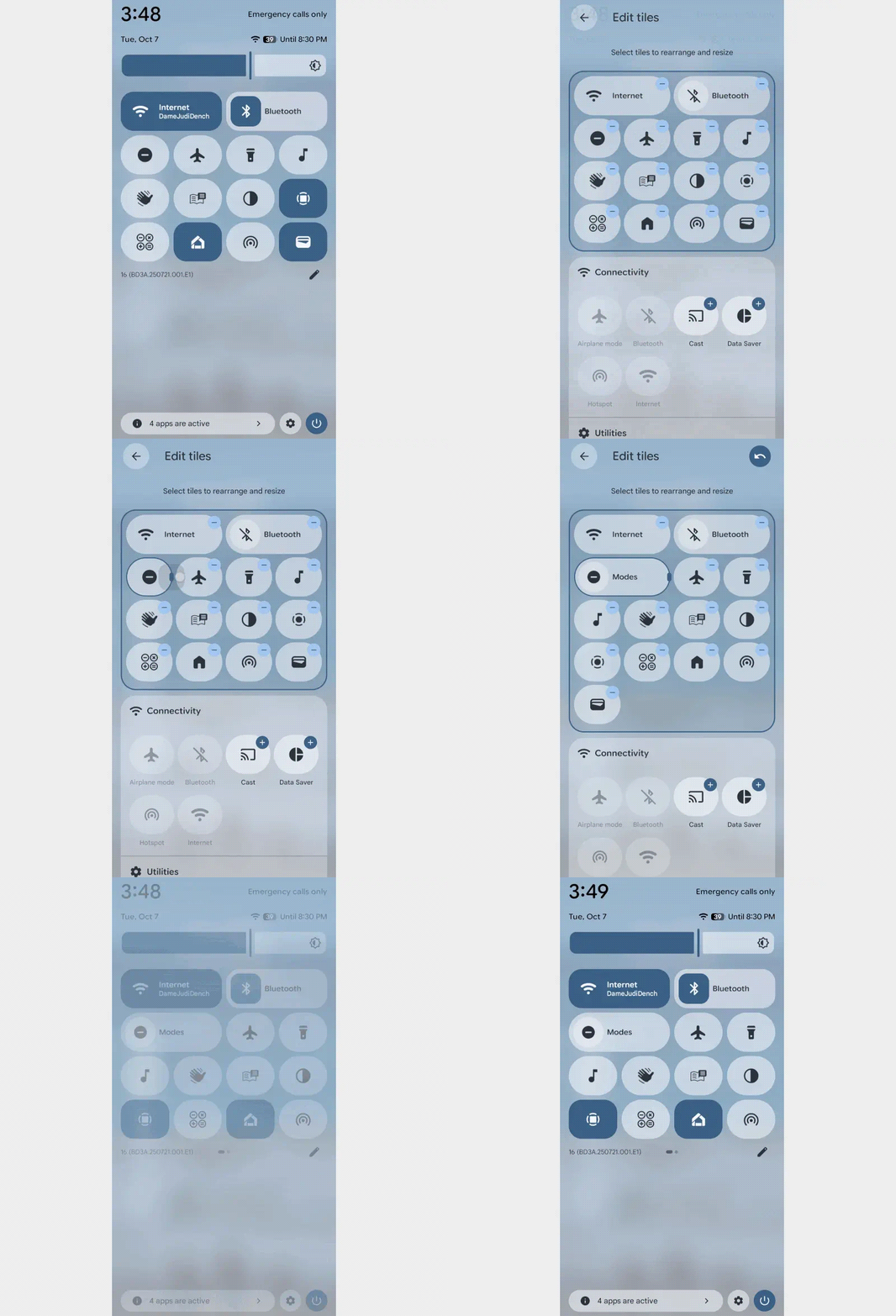
Quick Settings, if the name doesn’t ring a bell, is the menu of tappable tiles that shows up when you swipe down from the top of your screen (swiping specifically from the right side of the display, somewhat confusingly, on recent Samsung devices). And as of Android 16, you can resize any of the shortcuts within that area to fit even more tiles within a single view.
See?
Edit, tap, slide — three steps to a Quick Settings tile resize.
Also, this one is showing up so far only on Google’s own Pixel devices. Samsung, which heavily modifies the standard Android Quick Settings interface in the software it sends out to its Galaxy gadgets, has suggested that the feature will reach its devices sometime next year.
As for other Android device-makers beyond that, we’ll have to wait and see — since no one else has rolled out any Android 16 updates yet (sigh…) — but in scenarios where software closely follows Google’s core Android interface, it certainly seems like the setup should be present.
2. Another easy-to-miss update in Android 16 is a whole new approach around how you tell your phone to hush.
Android’s Do Not Disturb system is now supplemented by a broader, more powerful, and more customizable feature called Modes — essentially a series of states you can create to control exactly how your device does or doesn’t interrupt you at different times. That means you can have multiple do-not-disturb presets for different sorts of scenarios.
So you might, for instance, have one mode for work that allows only notifications from work-related apps and messages from your family and then have another mode for the weekend that blocks all but the most urgent work-related alerts from making their way through.
It’s a lot to wrap your head around initially — and, not surprisingly, the specifics of how it works vary from the standard Google Android setup to Samsung’s different-for-the-sake-of-being-different implementation — but the good news is that once you’ve set things up the way you want ’em once, it’s quite literally just a matter of making a couple quick taps anytime you want to shift your phone from one mode to another from that point forward.
(Modes technically made its debut in Android 15, by the by, but only in a more rudimentary and limited fashion. Android 16 is where the feature really comes into its own.)
3. Speaking of easier adjustments, the Galaxy-aimed version of Android 16 includes an intriguing new series of preset Routines — Samsung’s term for snippets of simple automation that can save you time and make your phone even more primed for productivity.
They’re basically just “if this, then that”-style rules, with all manners of available triggers and actions. Maybe, for example, you’d want your phone’s ring volume to turn all the way up and your default ringtone to change to a generic ringing sound — instead of the wildly embarrassing “MMMBop” ringtone you usually use — whenever you’re at the office. Or maybe you’d like to automatically activate your aforementioned weekend mode anytime you’ve got a calendar event active with the word “vacation” in it. The possibilities are plentiful, and all you’ve gotta do is think about what might be useful for you.
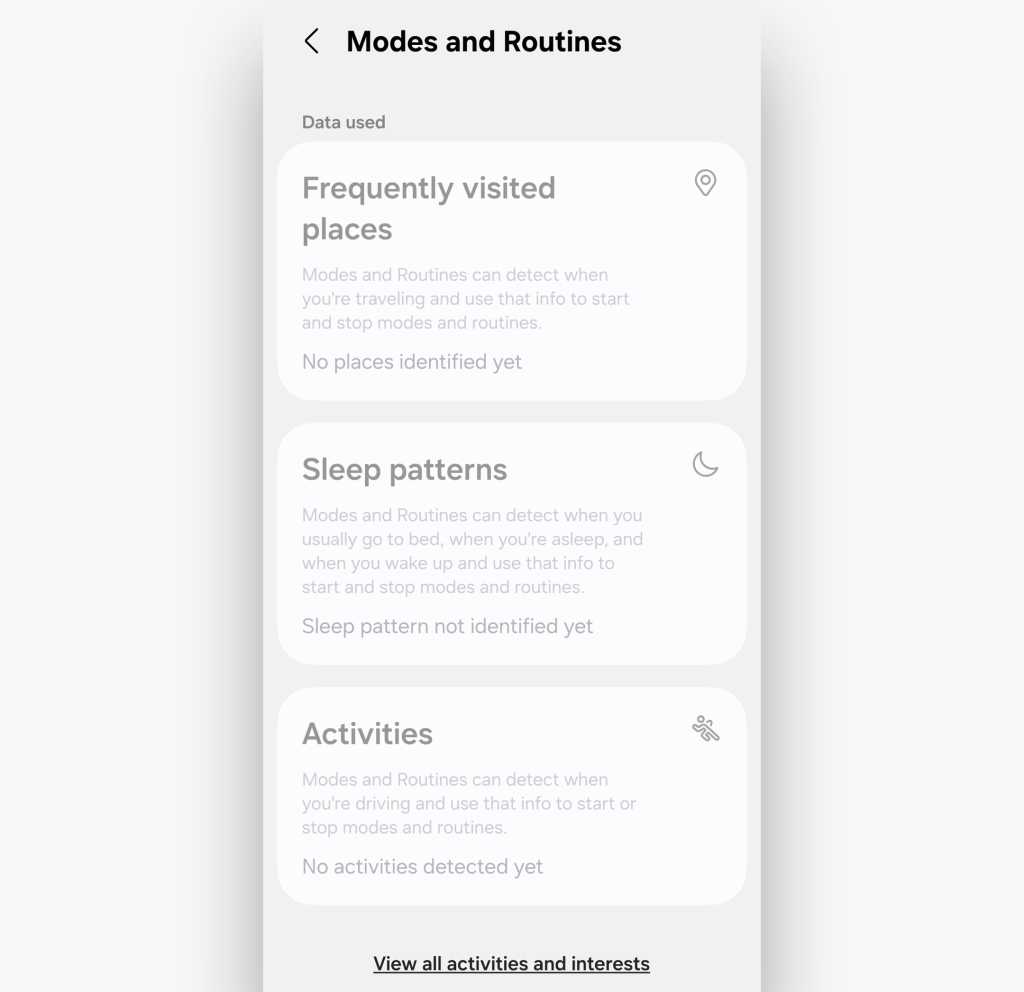
Samsung has some interesting new automation-related options in its Android 16 Modes and Routines section.
JR Raphael / Foundry
Look in the Modes and Routines section of a Samsung device’s system settings and tap the Routines tab at the bottom of that area to explore all your newly available options.
4. Reminders should just be simple — arguably even effortless — but all too often, they aren’t. For one all-too-perfect example, Google added an incredible on-demand screenshot-connected reminders system into its Pixel phones starting with the Pixel 9, and you can now emulate something similar on any Android device via Gemini, but those systems have one glaring limitation: They can’t create a reminder based on your physical location.
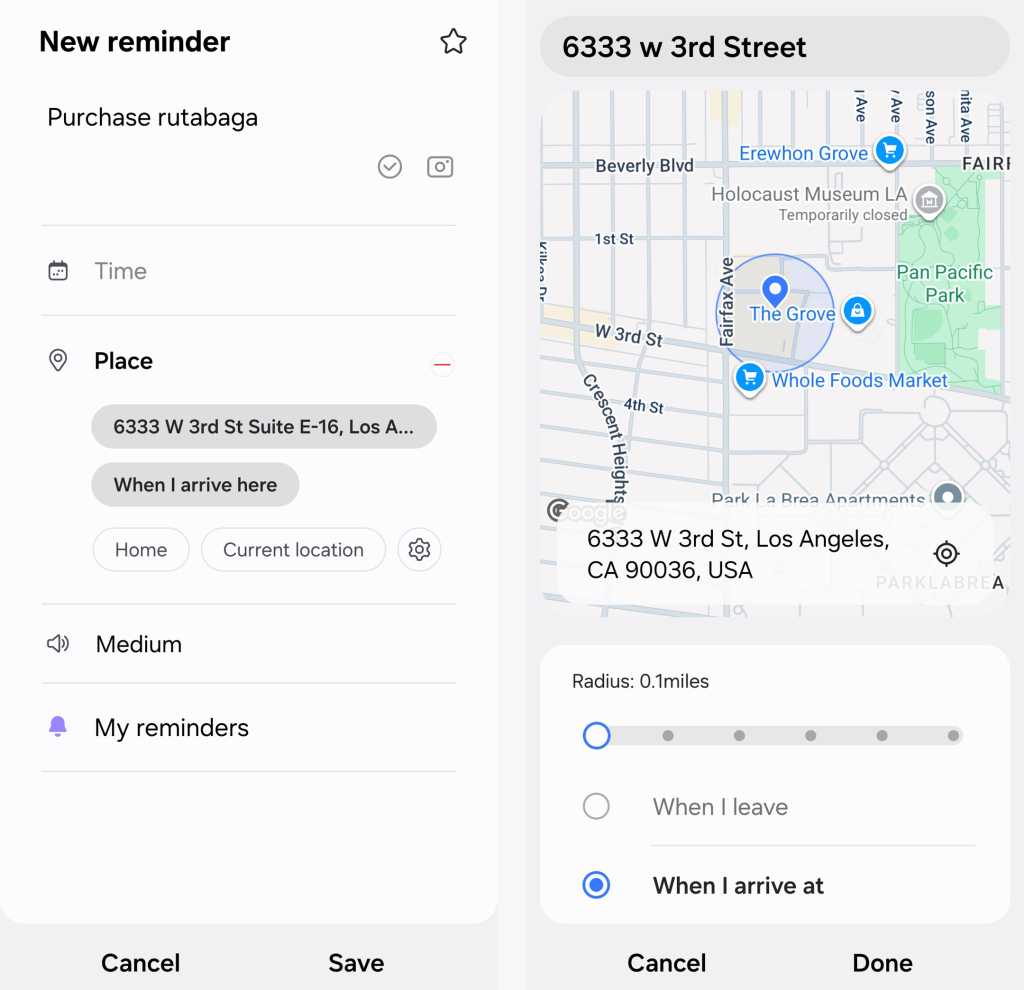
As of Android 16, Samsung is including a Reminder app on its devices that acts as a hub for any and all reminders you want to create on your phone. Notably, it offers the ability to associate a reminder with a specific physical spot and then have it appear whenever you arrive at or even leave said location.
Samsung’s new native Reminder app includes the option to set location-based reminders.
JR Raphael / Foundry
The downside is that the data is limited to being accessed only on Samsung Galaxy phones — meaning you can’t get to it on a computer or a non-Samsung phone or tablet, for one, and if you ever move to a different type of Android device in the future, you won’t be able to continue using the service. (It does have an option to sync with Microsoft To-Do, but since that app doesn’t offer location-based reminders, everything wouldn’t carry over — and also, such syncing can only occur when you’ve actively got the app open on a Samsung phone.)
All of that being said, it’s an interesting new option to have built into your phone for the moment, at least. If you want to try it, look for the new Reminder icon in your Android-16-running Galaxy device’s app drawer — and if you don’t see it, try tapping the search box inside the app drawer and searching for reminder. I had to do that once to get it to show up.
5. Ever find yourself struggling to hear or follow along while someone’s yappin’ your ear off during a Very Important Business-Related phone call? Samsung’s Android 16 setup sports a new feature that can help.
It’s technically redundant with an existing Android platform-level feature, but it might be a teensy bit more convenient to keep active for phone calls, specifically, without affecting any other part of your Android experience.
The feature is called Call Captions, and it does exactly what you’d expect: It puts visible text on your screen showing what each person is saying whenever a call is active (much like the Android Live Caption system, though that feature isn’t specific only to calls).
You can enable it by tapping the three-dot menu icon within the Samsung Phone app, if you’re so inclined, then selecting “Settings” followed by “Call Captions.”
6. Also new in the Samsung sphere is an option to group alarms in the Samsung-provided Clock app (which is not the same as the available-on-any-device Google Android Clock app) so you can turn ’em all on or off together with a single tap. This might be handy if, for instance, you travel frequently for work and have a certain series of alarms you use when you’re out on the road.
Open up the Samsung Clock app and tap the three-dot menu icon within the Alarm tab to find the “Alarm groups” option and see how it might work for you.
Android 16 tips, part II: Security
7. Android’s quietly been beefing up its security in ways that don’t tend to command a lot of headlines but are arguably among the platform’s most important progressions — particularly for professionals. And Android 16 is no exception: Perhaps most notably, the software introduces a new single-switch Advanced Protection option that essentially enables all the most important and advisable Android security settings for you in one fell swoop.
You can read more about what exactly is involved in my Android 16 Advanced Protection primer, and you can find the switch for yourself by searching your system settings for Advanced Protection.
8. Another Android-16-added element worth activating on any work-connected device is a feature called Identity Check. Identity Check ties into the long-standing Google Extend Unlock (a.k.a. Smart Lock) system and uses its “Trusted Places” data to determine which physical locations are relatively low risk for you — like your home, for instance, and maybe also your office.
It then requires extra biometric authentication around various “sensitive” actions anytime you’re outside of those places — so, for instance, you’d have to authenticate with a face unlock or fingerprint before changing your device’s PIN, pattern, or password or before disabling device tracking within the Google Find Hub (a.k.a. Find My Device) system if you aren’t in a trusted area.
It’s a smart added bit of protection with virtually no real downside. Be sure to search your system settings for Identity Check to find and enable it on any devices you’re using.
Android 16 tips, part III: General usability
9. Here’s a handy little addition you might need only on rare occasion but will be very happy to see when any such instance arises: As of Android 16, it’s now possible to restore data from a different device even after your initial setup.
Make a mental note for the future — and if you’re using a Samsung phone, take note, too, that Samsung opts to use its own proprietary system for this instead of relying on the standard Android setup, but it does offer a similar sort of option within its Samsung Switch app (albeit one that seems to be a little moreinconsistentineffectiveness, if user reports are any indication).
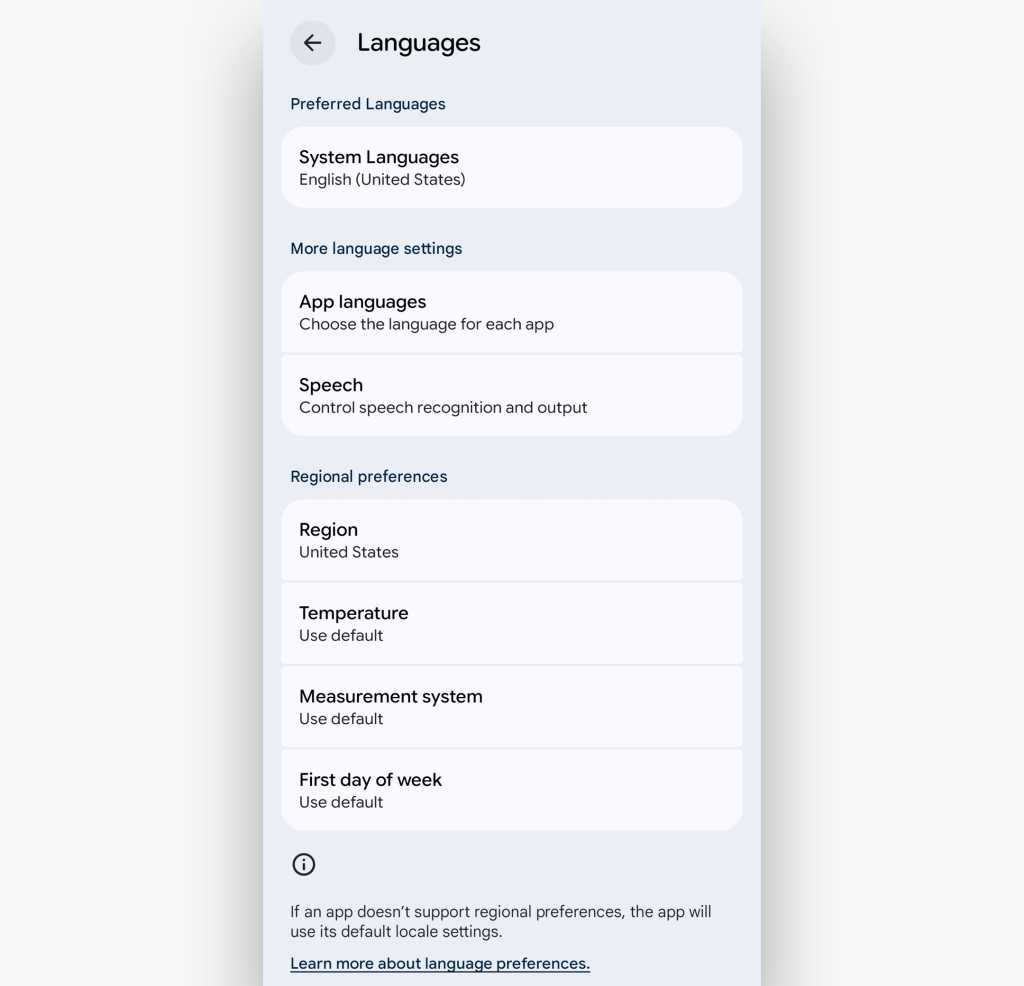
10. Got a Pixel? You can now set a bunch of non-language-specific regional preferences independent of your preferred language — in a shockingly sensible-seeming twist.
Head into the System section of your system settings and tap “Languages” to find the full list of choices.
You’ll find a lot more than just language-specific settings within the Android 16 Languages section.
JR Raphael / Foundry
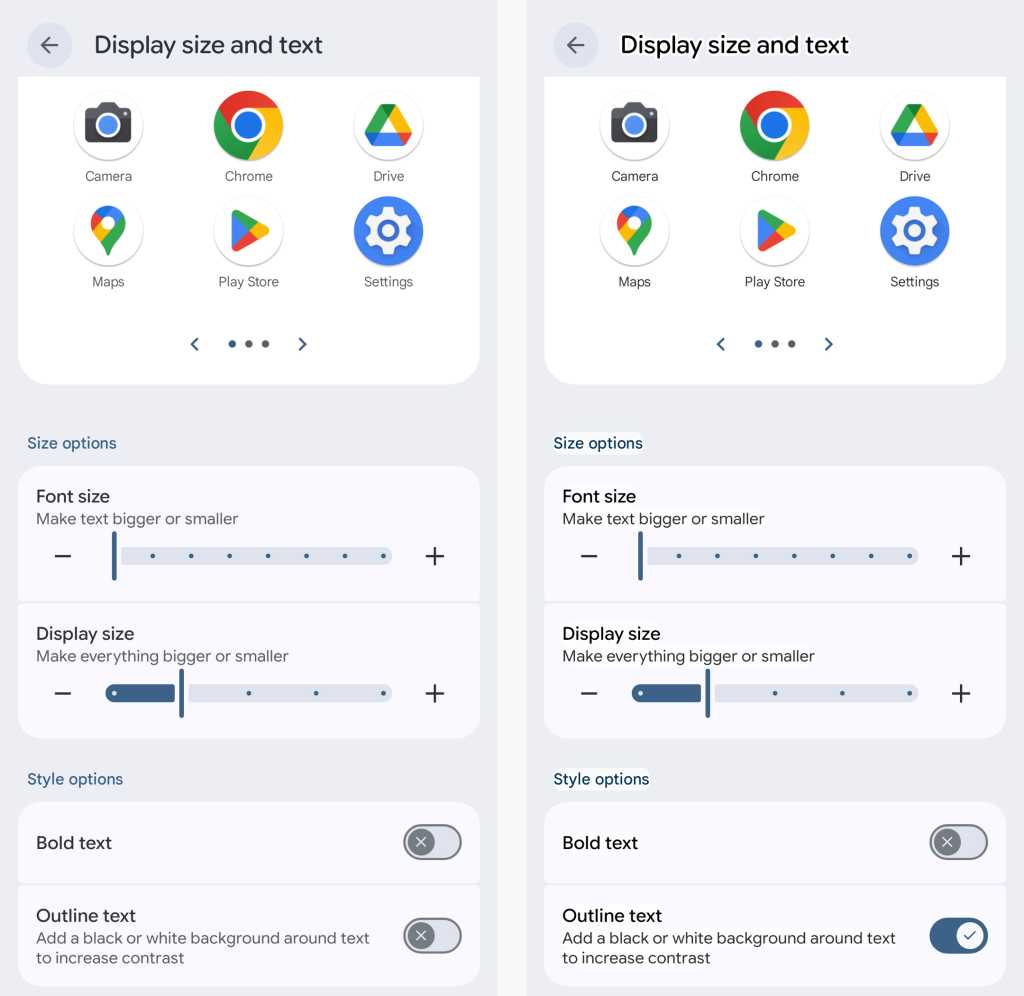
11. If you ever find yourself squinting to see certain text on your screen, you’ve got a handy new option as of Android 16: Inside the Accessibility section of your system settings, under “Display size and text,” you’ll find a switch that’ll outline all text and essentially highlight it (with either a black or white background, depending on the context) to make it easier to read.
At the bottom of the screen is Android 16’s new text outlining option — off (left) and active (right).
JR Raphael / Foundry
Samsung for some reason calls its equivalent “Relumino outline,” and it’s honestly a lot less effective in the way it’s implemented — but it’s there, if you want to try it, within the “Vision enhancements” area of the Accessibility settings on a current Galaxy gadget.
12. Here’s an interesting addition you almost certainly didn’t notice: Android’s split-screen system has gained an extra pinch of flexibility as of the Android 16 update.
Once you’ve initiated a screen split between any two apps, you can now slide the divider between ’em into a 90:10 divide — a ratio that wasn’t previously available and that opens the door to leaving yourself just a sliver of a view in one app while allowing the other to dominate your display.
Who knew?!
13. For the hearing-aid wearers among us, Android 16 on the Pixel front adds a new Quick Settings tile packed with an expanded and more easily accessible series of hearing aid options and controls.
You’ll likely have to find and add the tile into your active Quick Settings area before it’ll be visible — by using the pencil-shaped editing icon in that panel, then scrolling down until you find “Hearing Devices” and tapping it to turn it on.
Once you do, you’ll be able to tap that tile to reveal options for toggling between your hearing aid mic and your phone mic for phone calls — a new Android-16-added touch — along with the ability to adjust your hearing aid volume right from your phone.
14. You can keep better tabs on your battery health with Android 16’s new battery-monitoring features. On Pixels, you’ll find the in-depth dashboard in the Battery section of your system settings, under “Battery health”; with Samsung, the equivalent info (including a newly customizable “Battery Protection” option) is directly within the main Battery settings area.
Samsung’s new native Reminder app includes the option to set location-based reminders.
JR Raphael / Foundry
And remember: Here in the land o’ Android, the hunt for new treasures is never truly over. We’ll have the next big Android version in front of us to inspect and explore before long and plenty of other à la carte additions popping up all over in the meantime.
Microsoft is expected to sidestep a French antitrust probe into its search business after regulators signaled plans to dismiss a complaint by local rival Qwant, easing scrutiny of the US tech giant even as Europe ramps up enforcement of digital competition rules.
France’s competition authority is preparing to reject Qwant’s allegations that Microsoft imposed exclusivity restrictions and favored its own services in search and advertising, a decision that could be announced in the coming weeks, according to a Reuters report.
Qwant, which has historically relied on Microsoft’s Bing to power search and news results, had accused Microsoft of imposing restrictive terms that hindered its ability to expand its own search technology.
Several other smaller search engines, including Ecosia, DuckDuckGo, and Lilo, also use Microsoft’s syndication feed for results.
The outcome of this complaint would matter to CIOs as it touches vendor dependency and platform terms. If the complaint is dismissed, scrutiny may shift from one-off cases to compliance with Europe’s Digital Markets Act (DMA).
Qwant CEO Olivier Abecassis said investigators had advised against pursuing the case following a closed hearing in June, the report said. He added that Qwant is considering an appeal or a referral to other European regulators to continue challenging Microsoft’s practices.
Broader implications for enterprises
Analysts say European regulators are becoming more selective about which complaints proceed, with greater emphasis on the merits and the market where the conduct occurs.
“Microsoft can escape this because its share in search is relatively small,” said Pareekh Jain, CEO at Pareekh Consulting. “Google is the dominant player. On the other hand, the case shapes the perception that big tech still squeezes smaller players. Many European tech companies have depended on US platforms. If antitrust enforcement becomes more selective in a broader context, you will see a stronger business case and public support for ‘sovereign’ approaches in Europe, including sovereign AI.”
For Microsoft’s customers and partners, the concern is dependence on a platform that also competes in adjacent services. Microsoft’s dual role, supplying technology while competing with smaller firms, creates a natural tension, according to Tulika Sheel, senior VP at Kadence International.
“It raises questions about fairness and dependency, especially for smaller European companies using Microsoft tools,” Sheel said. “Even without a formal case, regulators may keep watching how balanced that relationship really is.”
Gatekeeper rules still apply
Microsoft is already designated as a gatekeeper under DMA. Regardless of the outcome of Qwant’s complaint, regulators may still examine whether Microsoft’s conduct provides fair and open access, Jain said.
“This goes beyond search,” Jain added. “Practically, enforcers might be more selective after a dismissal, but technically they retain full powers under the DMA because gatekeeper obligations apply.”
The DMA equips regulators with new tools to shape platform behavior, Sheel said, and attention is likely to shift toward concrete tests of compliance. In practice, that means scrutiny of interoperability, data sharing, and how open Microsoft keeps its platforms.
“So, the pressure may shift from punishment to proactive compliance and transparency,” Sheel added. “The real test for Microsoft now lies in how openly it operates under the new EU digital rules.” This discussion is unfolding as the US government scrutinizes the DMA and the Digital Services Act, citing concerns about potential discrimination against American companies.
Apple’s alleged decision to suspend development of a lighter and cheaper Vision Pro device sounds a lot worse than it actually is, because in a short time the product will be seen as the Newton of the AR age.
Why the Newton? Vision Pro is ahead of its time. To build it, Apple pushed the envelope on operating systems, user interfaces, usability and materials and process design. This resulted in an expensive device that, while cutting edge, hit market far before the applications and experiences to make such devices essential had been born.
Those lessons will also feed into other visionOS products Apple is working on, including its long-anticipated AR glasses. These will combine much of what users already enjoy in visionOS with new features designed to exploit both the glasses form factor augmented by useful tools from across the iOS ecosystem; that includes features like sign translation, ambient local information provision, maps, and computing experiences that mean your Mac will be worn like sunglasses.
What’s the matter with Meta?
Lazily compared with Meta’s AR glasses, Apple’s offering will be more about helping you as a user than selling you advertising, and will benefit from the tech it has been building for Vision Pro. We’ll let the markets decide if what Apple comes up with will be better than Meta’s machines. But given Cupertino’s track record and the sheer achievement encapsulated by Vision Pro, it is unlikely to be as limited — no matter how many engineers Meta’s HR team manages to poach.
You see, it’s all about ideas.
It’s ideas that powered up the Newton. And the ideas that will inform Apple’s visionOS glasses are already partially visible in Vision Pro, a device that has been described as being ahead of its time since before it shipped. The advances it exemplifies will inform industry development for years. Newton did the same, arguably forming the core of the ideas that drove the entire smartphone era (including the amazing Apple Silicon chips that continue to transform Apple’s business).
Seeing the future in our yesterdays
You can get some sense of what these forthcoming augmented reality glasses will be like by taking a look at the iPhone Air. That molded battery inside iPhone Air? That is probably a hint at how the company can get decent battery life from a pair of glasses. Those low-energy, but highly performant, processors Apple likes to use? That matters when it comes to AR specs, which cannot ever be hot to wear, not matter how many FaceTime chats you are involved in.
The game’s afoot, and there’s something at stake. Meta currently holds 75.6% of the combined AR/VR + display less smart glasses market, according to IDC. (Apple has around 5.2%.) But the market is still pretty small, with only about 10 million sold each year. That makes this a segment high in potential, rich in opportunity for expansion, and — despite its early advantage —a market that is Meta’s to lose.
Can Apple take the throne? I think so, given the company has more hardware and software design experience, a vibrant ecosystem, and huge user loyalty. Perhaps more importantly, Apple is seen as a firm that’s all about privacy, which isn’t an advantage Meta can easily be seen to enjoy. That matters when you’re taking about wearable devices equipped with video cameras.
Think different
Apple’s other advantage comes in the form of all the real-world usability cases it has been able to identify for the Vision Pro. Many of these uses will be ably supported by Apple’s AR glasses, and the apps people have already made for those industries will be supported, too. Those not supported might only need the slightly revised M5 Vision Pro devices.
Down the road, as the technology improves and the cost of manufacturing declines, Apple will be able to introduce more Vision Pro-based ideas to its glasses systems, while also building a more affordable Vision Pro successor in a couple of years. The latter may could potentially be made in the US, if Apple invests in the futuristic manufacturing capacity such systems require.
I believe Vision Pro is the Newton for this tech evolution. The ideas it exemplifies will inform product development for the next decade.
The lawsuit, filed Monday in the US District court in the Northern District of California, argues that Microsoft has used its OpenAI influence to vastly increase AI prices.
“ChatGPT prices were inflated since the service’s inception, with price levels reaching an eye-popping 100 to 200 times competitors’ prices on a per-token basis amidst a February 2025 price war,” the filing said. “A secretive agreement struck between OpenAI and Microsoft early in OpenAI’s development allowed Microsoft to control the supply of compute to its horizontal competitor’s products. It used an exclusivity clause to restrict OpenAI’s product output, and to impose a price–or, conversely, output and quality–floor on its competitor OpenAI’s ChatGPT products.”
Contacted by Computerworld, Microsoft declined to address the lawsuit’s specific details, but did say in an email, “while we are still reviewing the details of the complaint, we believe that our OpenAI partnership promotes competition, innovation, and responsible AI development.”
Industry observers were skeptical that the litigation would have much of an impact, given the large number of major companies selling AI, including Google, Amazon, and Anthropic, that are presumably beyond Microsoft’s direct influence.
Taps into policy concerns
Abhishek Singh, a partner at the Everest Group, said that the litigation might encourage regulatory efforts, but that he doubts it would have any direct impact on Microsoft.
“It taps into a genuine policy concern about the concentration of power in AI infrastructure and pricing, but antitrust cases like this are hard to win,” Singh said. “The plaintiffs will have to show not just dominance, but deliberate collusion and measurable consumer harm, which is a high bar.”
But Singh added that even if this specific lawsuit doesn’t go anywhere, it could easily prompt secondary reactions from legislators and regulators.
“In my personal view, the case is not frivolous, but it doesn’t have strong legs as an anti-competitive lawsuit. What it will likely do, however, is push the conversation toward transparency in AI pricing and infrastructure access,” Singh said. “Much of what enterprises perceive as price control in AI is, in reality, a reflection of scarce GPU supply and the costs of training and running ever-larger models, rather than market manipulation.”
If the lawsuit clears the initial legal hurdles and is allowed to proceed, Singh said, “the most plausible outcome is increased regulatory and market pressure for transparency rather than anything structural. Microsoft will argue that its partnership with OpenAI accelerated innovation and democratized access to generative AI—and that narrative is credible.”
Singh also observed that the essence of the monopolistic and anti-trust accusations have been argued before, and Microsoft has typically won those arguments.
“[Because] the lawsuit primarily hinges on the claim that Microsoft effectively controls OpenAI and has used that position to distort AI pricing, it’s important to note that regulators in the UK and EU have already examined Microsoft’s relationship with OpenAI and declined to classify it as a merger giving Microsoft control. Also, more recently, the partnership itself has evolved to allow OpenAI to source non-Microsoft compute, which weakens the argument that Microsoft has a lock on AI infrastructure,” Singh said.
Customers should rethink AI contracts
The most critical aspect is whether this litigation will lead to any reimbursement for enterprises, which seems unlikely. But rebates aside, Singh suggests that this lawsuit does suggest some changes for enterprise IT to consider.
“For enterprise IT executives, the key takeaway is to recognize that AI pricing and infrastructure access are becoming strategic variables. This lawsuit reinforces the need to seek transparency in AI cost structures, diversify vendor dependencies, and build flexibility into commercial arrangements,” Singh said. “The broader signal is about vigilance, understanding where market influence is concentrating, and ensuring enterprise strategies remain adaptable as the AI ecosystem matures.”
Cybersecurity consultant Brian Levine, a former federal prosecutor who today serves as the executive director of FormerGov, a directory of former government and military specialists, argues that Microsoft has had decades of experience fending off various antitrust accusations. For enterprise IT executives, though, the actions mean that they must work with their general counsel to make sure that any Microsoft contracts acknowledge antitrust possibilities, and that the agreements include wording that will protect the enterprise should court rulings prove unfavorable to Microsoft.
“If I was an enterprise CIO, the only immediate action is, if we are considering working with either of these entities, to write in a provision that gives [the enterprise] room to renegotiate to the extent that this case reaches a judgment or they reach a settlement that may impact the contract,” Levine said, adding, “but that language may be implied anyway.”
Douglas Brush, a special master with the US federal courts, said that enterprise IT must rethink all AI contracts in light of these kinds of antitrust accusations.
“The best approach is to use short contracts with re-openers, transparent pricing with safeguards, multiple cloud options, and an economics model that prioritizes consumption. This allows [enterprises] to benefit from falling prices, protect themselves when they rise, and keep the business running regardless of any single vendor’s motives,” Brush advised. “Budgeting needs to treat AI like a commodity input, not a fixed software license — [cost of goods sold] versus [operating expense]. … Quarterly repricing and automatic rebases to current schedules are table stakes.”
The lawsuit does acknowledge that OpenAI eventually slashed token prices “by as much as 80 percent,” but argued that merely proved its point.
The ultimate price reduction “makes clear” that Microsoft’s actions were “the but-for and proximate cause of the price inflation/supply and output restriction,” the lawsuit said, adding, “but the restraint—and Microsoft’s control over it—still remains, lingering as a sword of Damocles over OpenAI wielded by one of its principal competitors.”
The global smartphone market grew by 2.6% in the third quarter of the year, equivalent to 322.7 million units, according to preliminary data from IDC. The research firm traces the growth to upgrades to new premium phones and a growing interest in affordable AI-enabled models.
Apple and Samsung delivered the strongest results. Apple reported its best July quarter ever thanks in part to the new iPhone 17 series. Meanwhile, Samsung achieved record growth with its latest foldable models, the Galaxy Z Fold 7 and Z Flip 7.
Manufacturers like Xiaomi, Transsion, and Vivo also grew strongly. Xiaomi strengthened its position in Europe and Latin America with the successful Redmi Note and Poco series, while Transsion expanded rapidly in Africa thanks to low prices and efficient distribution. Vivo grew in several emerging markets with AI-enhanced cameras and aggressive online promotions.
“The increased demand for the latest AI-based products is expected to lead to a strong finish to 2025, driven by aggressive price promotions and robust product portfolios from leading vendors,” Anthony Scarsell, research director for Mobile Phones at IDC, said in a statement.