Month: October 2025

Apple boosts Macs, iPads, Vision Pro with powerful M5 processors

Just a day after Microsoft shuttered support for Windows 10, Apple has upgraded the world’s best performing AI PCs with updated versions of the iPad Pro, 14-in. MacBook Pro, and Vision Pro — all now powered by Apple’s secure operating systems and equipped with its industry-leading and astonishingly powerful, 3-nanometer M5 processor.

Apple Silicon leads the fleet

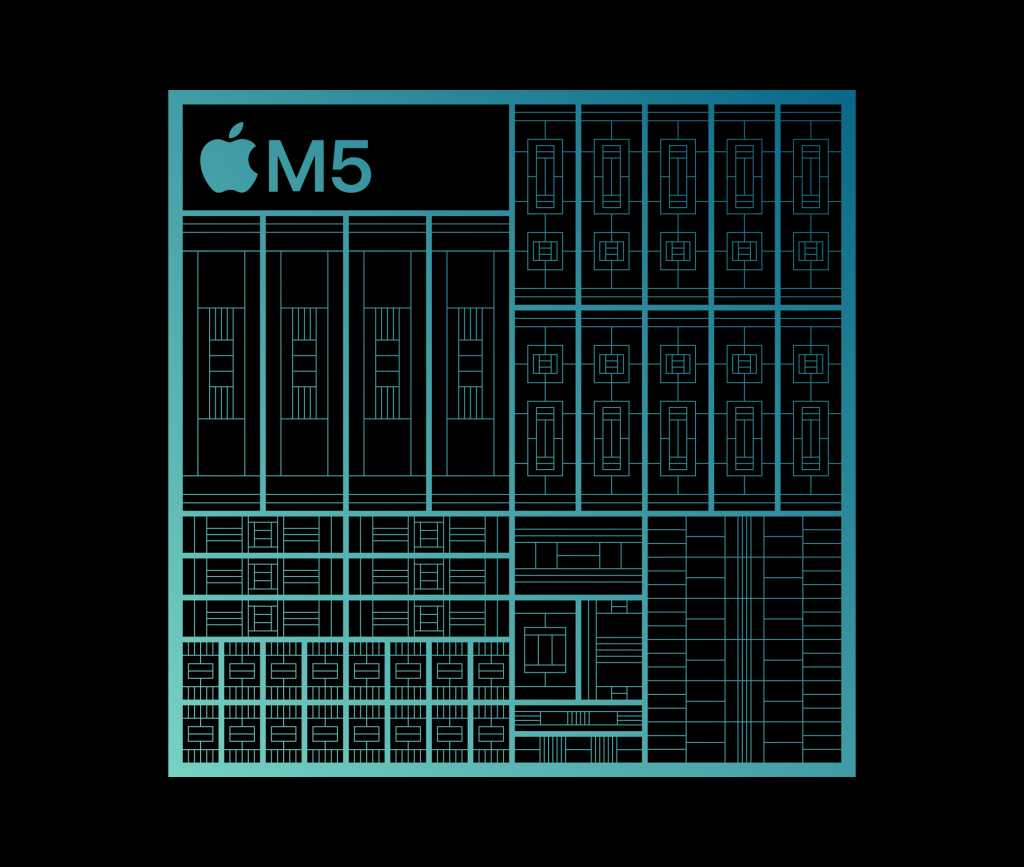
Significantly more powerful than even the M4 processor, the M5 chip got a press release of its own. That’s because the performance enhancements the 3nm processor introduces are, frankly, so impressive. With up to 10 CPU cores (6 efficiency and 4 performance), 10 GPU cores, and a 16-core Neural engine, highlights include:

  • 4x peak GPU performance for AI workloads compared to the M4 chip.
  • Up to 45% higher graphics performance than the M4.
  • Up to 15% faster multithreaded performance than the M4 CPU.
  • 153GB/s Unified Memory bandwidth, a 30% increase over the M4.
  • The ability to drive 10% more pixels at 120Hz refresh rates on the Vision Pro.

“M5 ushers in the next big leap in AI performance for Apple silicon,” said Johny Srouji, Apple’s senior vice president of hardware technologies in the announcement. “With the introduction of Neural Accelerators in the GPU, M5 delivers a huge boost to AI workloads. Combined with a big increase in graphics performance, the world’s fastest CPU core, a faster Neural Engine, and even higher unified memory bandwidth, M5 brings far more performance and capabilities to MacBook Pro, iPad Pro, and Apple Vision Pro.”

Apple stressed that the biggest advantage of the M5 is how AI-ready the processor is. Each GPU core includes a dedicated Neural Accelerator, making the GPU more AI-aware, for example. It means applications that useof Apple’s own frameworks and APIs, such as CoreML and Metal 4, will see immediate performance gains on an M5 system. It also means every Apple Intelligence feature you might use on these devices will be faster than before — presumably delivering benefits for any business using on-device AI models on their Macs. These really are the ultimate AI PCs. 
The world’s best AI PCs are Macs

While we’ll need to wait a few months for the larger MacBook Pros to appear, the new M5 powered 14-in. MacBook Pro delivers up to 3.5x faster AI performance, faster storage, and up to 24 hours of battery life. You get all the advantages of the new processor, a Liquid Retina XDR display, a 12-megapixel Center Stage camera, up to 2x faster SSD performance, and a six-speaker sound system.

“MacBook Pro continues to be the world’s best pro laptop, and today, the 14-in. MacBook Pro gets even better with the arrival of the M5 chip,” said John Ternus, Apple’s senior vice president of hardware engineering (a man hotly-tipped as a future Apple CEO).  “With its amazing performance, extraordinary battery life, and unrivalled display, M5 takes the new 14-in. MacBook Pro to another level.”

What does this next-generation performance cost? Surprisingly, no more than before with prices starting at $1,599. (That SSD performance means the ultimate portable AI PC can load a local LLM far faster than before — and with up to 4TB of storage available as a build-to-order option, users have room to put those LLMs on the device.)

The world’s best AI PCs are also iPads

The M5 chip in the iPad Pro is a major improvement for the pro tablet. It provides a significant boost in AI performance, graphics, and wireless connectivity, including up to 5.6x faster AI performance when compared to the M1 iPad Pro and 3.5x the AI performance of last year’s M4 model. 

Available in space black and silver, the new iPad Pro also boasts faster memory bandwidth, storage, and supports Wi-Fi 7 and 5G cellular connectivity, the latter using Apple’s own C1X modem.

It looks as if Apple is pretty pleased with the C1X modem; Apple said it delivers up to 50% faster cellular data performance than its predecessor with even greater efficiency. The iPad Pro also has an Ultra Retina XDR display capable of 1,600 nits max brightness.

“iPad Pro with M5 unlocks endless possibilities for creativity and productivity — with a huge leap in AI performance and a big boost in graphics, superfast wireless connectivity, and game-changing iPadOS 26 features, it pushes the boundaries of what iPad can do yet again,” said Ternus. 

The 11-in. iPad Pro starts at $999 for the Wi-Fi model, and $1,199 for the Wi-Fi + Cellular model. The 13-in. iPad Pro starts at $1,299, or $1,499 for the Wi-Fi + Cellular model.  

Combined with iPadOS 26, this tablet may be all the AI PC some users need.
The world’s best AI PC is also wearable

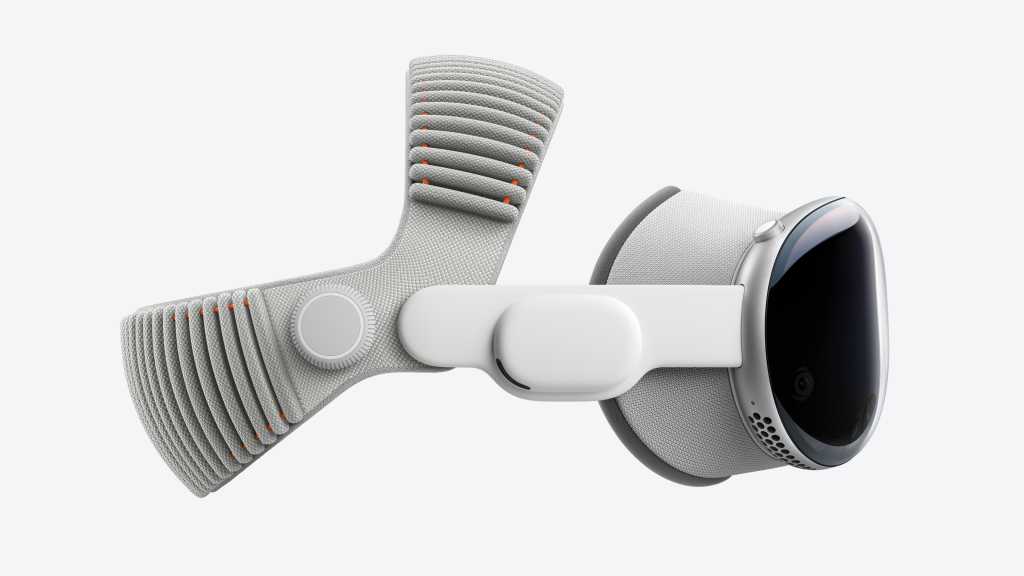
Want to wear a Mac? You can, with the M5-fueled Vision Pro, which uses the processor to deliver big performance and display-rendering improvements, along with better battery life. 

You cannot underestimate the difference the chip makes in Vision Pro, which can support hardware-accelerated ray tracing and mesh shading, enabling developers to add remarkable detail to their apps and games. It enables shaper images, and a 120HZ refresh rate, which makes it smoother to look between your surroundings and virtual imagery on the display. Plus, of course, AI experiences are significantly faster and more realistic than before. 

The battery now supports up to two and a half hours of general use, and up to three hours of video playback, all on a single charge. And if you need to wear if that long, Apple also created a more comfortable headband for the system. Apple Vision Pro with the M5 chip and Dual Knit Band still costs $3,499.

“With the breakthrough performance of M5, the latest Apple Vision Pro delivers faster performance, sharper details throughout the system, and even more battery life, setting a new standard for what’s possible in spatial computing,” said Bob Borchers, Apple’s vice president of worldwide product marketing.

You can follow me on social media! Join me on BlueSky,  LinkedIn, and Mastodon.

Nvidia’s DGX Spark desktop supercomputer is on sale now, but hard to find

Nvidia’s “personal AI supercomputer,” the DGX Spark, may run fast but it’s been slow getting here. It finally went on sale on Oct. 15, five months later than the company initially promised, and early units are hard to find: Nvidia’s online shop was out of stock on launch day, and retailers have few units in store.

When Nvidia unveiled the machine, then known as Project DIGITS, at the CES 2025 electronics show in January, it said it would go on sale in May. But by the time Nvidia gave the product its final name and released more detailed specifications in March, the delivery date had slipped to “later this year”.

[ Related: More Nvidia news and insights ]

CEO Jensen Huang announced on Oct. 13 that Nvidia would begin sales of the DGX Spark two days later, but by 5am Eastern Time on the first day of sale Nvidia’s own online store was already showing a “sold out” message hard coded into the web page’s HTML: It wasn’t even checking stock availability in real time.

As a consolation, Nvidia’s online store offered links to four partners it said were selling the device, but none of them offered an online “buy” button.

Micro Center’s website reported that the retail chain had the DGX Spark in stock and available for in-store pickup at 29 of its 31 outlets. While a few of the stores showed “25+” units available, most had stock levels in the teens, and the Indianapolis store had just nine units available. Micro Center wouldn’t accept reservations or advance payments and warned that its stores will impose a one-per-household limit on DGX Spark buyers.

With the DGX Spark priced at a penny short of $4000 — almost double the cost of a high-end gaming PC — it’s unlikely that householders will be interested in the device. Back in March, when the pre-order price was just $3000, PC World was already predicting that it wouldn’t find many buyers.

Industrial demand

Nvidia’s DGX chips are in high demand in industry, though, and it’s more likely that Micro Center’s one-Spark limit is to prevent businesses scooping them up by the rack-load to run AI applications in their data centers.

The DGX Spark contains an Nvidia GB10 Grace Blackwell chip, 128GB of unified system memory, a ConnectX-7 smart NIC for connecting two Spark’s in parallel, and up to 4TB of storage in a package just 150mm (about 6 inches) square.

It consumes 240W of electrical power and delivers 1 petaflop of performance at FP4 precision — that’s one million billion floating point operations with four-bit precision per second. In comparison, Nvidia said, its original DGX-1 supercomputer based on its Pascal chip architecture and launched in 2016 delivered 170 teraflops (170,000 billion operations per second) at FP16 precision, but cost $129,000 and consumed 3,200W. It also weighed 60kg, compared to the Spark’s 1.2kg or 2.65 pounds.

Nvidia won’t be the only company selling compact systems based on the DGX Spark design: It said that partner systems will be available from Acer, Asus, Dell Technologies, Gigabyte, HP, Lenovo, and MSI.

More Nvidia news:


Satya Nadella is running scared. That’s a good thing.

If there were anyone who could rest on his laurels, it would be Microsoft CEO Satya Nadella, who took over the reins from Steve Ballmer in 2014 when the company was at the lowest point in its history. He took the top job after what many people called the company’s “lost decade.”

Under Ballmer’s leadership, Microsoft had drifted into irrelevance; Google became a search behemoth, Facebook (now Meta) took ownership of social media, and Apple introduced the iPhone and iPad. Microsoft’s internet presence and influence was vanishingly small. The company had thrown away billions of dollars on an attempt to build a Windows-based mobile operating system. 

As a result, Microsoft’s stock prices stagnated and fell. When Nadella took over 11 years ago, the price was lower than it had been at the end of 1999.

At the time the company’s woes seemed intractable. How could it claw its way back in a world in which it lost out on the internet, social media, and mobile computing? 

Somehow, Nadella managed to do it. He ended Microsoft’s ill-advised foray into building a mobile Windows OS, ended the corporate infighting and sniping, and recognized that Windows was no longer the company’s future. Instead, he bet big on cloud computing — and the bet paid off. Then he made an even bigger bet on AI and turned the company into a juggernaut with a value now approaching $4 trillion.

Even so, Nadella isn’t resting on his laurels. Instead, he’s running scared — in a good way. Earlier this month, he appointed Judson Althoff to be CEO of Microsoft’s commercial division. Keep in mind that at Microsoft, the CEO title no longer means head of the company.  Rather, people in charge of divisions are sometimes called CEOs. Mustafa Suleyman, for example, is CEO of Microsoft AI; Rajesh Jha is CEO of Microsoft Experiences and Devices; and Mikhail Parakhin is CEO of Microsoft Copilot. 

After Althoff’s promotion, Nadella retains his title of Microsoft CEO and Chairman of the Board. And it’s important to note that Judson’s background isn’t in tech, it’s in sales and marketing. For the last nine years, he’s been in charge of Microsoft’s global sales organization. 

Nadella made the change so he could put as much of his time and energy as possible into being more directly involved in AI. It’s a return to his roots and echoes the kind of work that propelled him to the top of the company.  Before joining Microsoft in 1992, he was a member of Sun Microsystems’ tech staff. He had a variety of engineering and tech-heavy jobs at Microsoft before becoming CEO, including president of the Server & Tools Division for three years before his promotion.

Going all in on ‘founder mode’

Nadella announced the move in a blog post. He said the shakeup will “allow our engineering leaders and me to be laser focused on our highest ambition technical work — across our datacenter buildout, systems architecture, AI science, and product innovation — to lead with intensity and pace in this generational platform shift.”

Key to understanding the change are the three words “generational platform shift.” It’s a shorthand way of saying that AI will transform the tech world and worldwide culture, and companies that take advantage of it will thrive, while those who don’t will be left behind. By focusing primarily on AI development, Nadella believes he can ensure Microsoft takes advantage of the generational shift. He recognizes there are times when tech companies can flourish by focusing on management and sales, and other times, such as now, when they need to go all in on developing new technology.

In Silicon Valley, there’s a term for when head of a company does what Nadella is doing and devotes his or her energies primarily to tech: founder mode. He’s worked at Microsoft for 33 years, and he saw how tech-savvy founder Bill Gates built the company into a tech behemoth, and how marketing-and-sales guy Steve Ballmer sent the company into a tailspin when he missed out on mobile computing, social media, and other groundbreaking technologies. 

Nadella’s move is a clear indicator he doesn’t want something similar to happen on his watch.

Jack Gold, principal analyst at J. Gold Associates, believes Nadella’s move was the right one. He told Computerworld, “There is a lot of this going on in the industry, as companies structure for growth in diversifying business areas. Having an exec running a critical business area like AI, while the remainder of the exec team focus[es] on growth and new business opportunities makes sense, given the amount of focus required.”

Nadella going all in on tech and leaving marketing and sales largely to someone else isn’t the move of someone content to take things easy. It’s a recognition that if Microsoft is to keep its lead in AI, and possibly extend it, he needs to devote his full attention to it. It’s running scared in the best possible way. 

Got a Pixel Fold — or any other Android foldable? Get this app now

When you live with a folding phone and you’re the kind of person who likes taking total control of your Android environment, you’re bound to realize something pretty quickly:

The apps that work brilliantly in a standard Android setup don’t always work so well when you’re dealing with a dual display.

Specifically, anything involving your Android home screen is suddenly in a whole new universe.

It kinda makes sense, when you really stop and think about it: On a typical Android device — the type 99% of Homo sapiens carry around and that we’ve all traditionally been using for years now — you’ve got just that one display. And so that’s all most home-screen-related apps are created to consider.

With a foldable — whether it’s the freshly released Pixel 10 Pro Fold (better known as the latest Pixel Fold, to anyone who isn’t a complete psychopath) or any of the other foldables from Google, Samsung, Motorola, or whoever — you’ve effectively got two totally different home screens to contend with. There’s that external display home screen, which is the equivalent of the standard Android home screen on any other device, and then there’s also your internal display, which is larger and in a completely different shape and layout.

And it doesn’t take long to realize that most Android launchers — those splendidly useful tools that let you replace your entire home screen with one that’s completely customized and made to work specifically for you — simply aren’t set up to handle that thoughtfully.

There’s an exception, though. I stumbled onto it on accident whilst playing around with the latest Pixel Fold over these past few weeks, and I found myself absolutely delighted by the surprise.

Lemme let ya in on the secret.

[Psst: Got a Pixel? Any Pixel? Check out my free Pixel Academy e-course and uncover all sorts of advanced intelligence lurking within your favorite phone.]

The Android foldable home screen champion

The launcher of which we speak is the aptly named Smart Launcher. It’s one I’ve recommended before, in my Android launcher roundups, but not one I’d used regularly — for the long haul — on my own personal Android phone up ’til recently.

I started revisiting Smart Launcher because of the unfortunate demise of another top-tier launcher option, the now not-long-for-this-world Nova Launcher (sniff). And I was blown away to see how far it had come even just since my last look at it and how handily it filled that total-control, jack-of-all-trades void left in the Android ecosystem by Nova’s departure.

But aside from its all-around ability, the part of Smart Launcher that really surprised me was how eagerly it embraced the unusual dual display situation presented by the Pixel Fold and other folding Android contraptions.

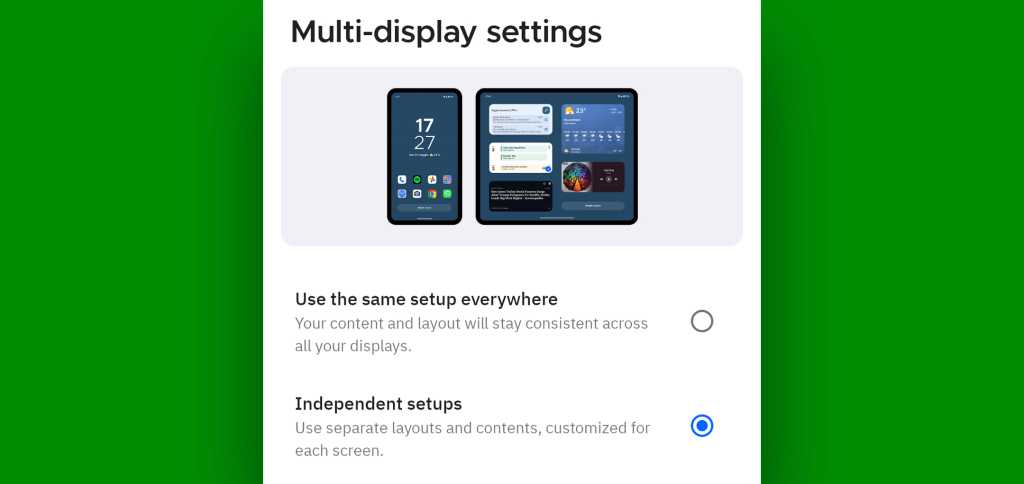
Plain and simple, Smart Launcher gives you the option to create completely separate and distinct home screen setups for your phone’s outer display and for its unfolded inner screen. That means — unlike with most other Android launchers and even with Google’s default Pixel Launcher setup — you can customize the inner screen specifically to make the most of its expanded space while keeping a totally different arrangement that makes sense for your smaller outer screen, too.

Here, for instance, is how I have my Pixel Fold’s outer display home screen at the moment — a setup that’s deliberately simple and minimalist, with a horizontally swipeable widget at the top, a few hidden gestures to get to commonly accessed areas, and a text-free list of my most-used shortcuts placed ergonomically alongside the left of the screen (a touch, incidentally, that’s inspired by Niagara Launcher — another exceptional Android launcher and long-time favorite of mine and one that also adapts itself intelligently to the foldable inner-screen setup, though in a more automated and less customizable way).

Google Pixel Fold - Android foldable: Outer home screen
The outer home screen — similar to what I’d use on any standard Android device.

JR Raphael, Foundry

Then, on my Pixel Fold’s inner screen, I’ve got a more spread-out layout that pulls pieces from that stacked widget into separate glanceable panels and moves an expanded list of my shortcuts into a dock-style design along the bottom edge of the display.

Google Pixel Fold - Android foldable: Inner home screen
The larger inner home screen is its own separate beast.

JR Raphael, Foundry

The reality is that with a folding phone, you have two very different displays that you use in very different ways — maybe even for different purposes. And this approach actually lets you customize ’em to your heart’s content, with a massive toolbox of options and without having to have one environment affect or in any way inform the other.

It just makes sense.

Now, if you’re using a foldable and want the power of a custom launcher without the complexity of creating two separate setups, you certainly don’t have to go that route. Smart Launcher has an option within its settings that lets you choose whether you want to use the same setup everywhere or maintain independent layouts for each screen with any multi-display device you’re using.

Android foldable home screen launcher: Smart Launcher
Smart Launcher puts the power in your hands to decide how exactly your foldable home screens work.

JR Raphael, Foundry

But if you’re like me and actually enjoy optimizing your Android environment for maximum ergonomics and efficiency — and if you, too, find that the approach that makes sense on an outer screen doesn’t necessarily translate exactly the same way to what you need on that spacious inner display — Smart Launcher is a spectacular tool for having your cake and eating it, too. It really is an indispensable upgrade for any Android foldable.

(The app is free to use in its base form, by the by, with an optional premium upgrade that unlocks a slew of extra features.)

That, my friends, is the power of Android in a nutshell for ya. And that’s why if you appreciate advanced productivity options and truly care about making your device work the way you want, there’s no question which platform is the right place for you.

Don’t let yourself miss an ounce of Pixel magic. Come join my free Pixel Academy e-course and lemme show ya oceans of hidden features and power-user upgrades!

GenAI agents are changing language translation in the enterprise

Generative AI (genAI) agents are changing language translation, with actions, emotions and diagrams now driving communication across languages.

Translation agents from a few companies go beyond text and use voice, image, and video to communicate across languages in real time and with high accuracy. “You need to be able to deal with multimodality. It’s not just plain text. There’s a lot more relevant data that you have to ingest,” said Matt Hardy, vice president of linguistic AI at RWS.

Computer translation isn’t new. But with genAI agents talking and automating actions in productivity and customer service, the stakes are higher. There’s little room for mistakes, especially as agents replace humans to get work done.

Translation agents from RWS, DeepL and Grammarly analyze information sources, verify intent, establish context, and deliver translations that go beyond words. “The beauty of agents is that they are so pliable. They’re supposed to be modular,” Hardy said.

The ability for AI to translate audio, video and text helps the genAI tools capture context and nuance — actions in a video, or specific tones in audio, for example — and pack that into translation.

“Languages are not about just a written representation of pure thoughts,” said Stefan Mesken, chief scientist at DeepL. “There is context, both cultural, also situational. To get this right, you have to be very close to your customers, which includes speaking their language.”

Translations are now trending toward a broader understanding of the intent of the actual user. Like expression, physical context plays a role in getting the nuances right.

“The other way around to address this is to create a multilingual agent… [that] can freely switch between any language that might be beneficial for this line of work, which much more closely resembles how humans interact,” Mesken said.

The UN estimates there are 8,324 languages worldwide. For high-resource languages like English, the translation tools are generally good, but translation quality sharply drops off in other languages.

“Another way to address this, of course, is to bring language AI into the agentic space, essentially as an accessibility layer, similar to how we do this with humans,” Mesken said.

Historically, companies hired multilingual support teams who spoke multiple languages, outsourced it, or built separate language-specific teams. Translation AI agents are changing that, said Ailian Gan, director of product management at Grammarly.

Multilingual communication improves the customer experience “while also making it easier and more cost-efficient for businesses to expand internationally,” Gan said.

DeepL recently released a “DeepL agent” — a general-purpose AI agent with built-in translation capabilities based on a translation API that supports 36 languages. The agent can establish multimodal context.

“For media, images and diagrams specifically, since so much of this world is encoded in feature and media rich documents, this is of course one of the areas where we focus as well,” Mesken said.

The company also has writing and real-time voice translations. It supports 36 languages and is focusing on quality, not quantity, as accuracy is important.

“For high-resource languages, you can get good enough to a certain extent and then it sharply drops off…, which essentially cuts out a large part of the population of this technology,” Mesken said.

RWS has developed Evolve, a multi-agent AI translation system that first translates text. A second agent checks the accuracy of the translation against hundreds of human opinions and data. RWS has been in the translation business for decades and has gathered a lot of data about multilingual communications.

“If the machine still can’t figure it out how to make that a good translation, that’s when it pops over onto a translator’s desk and they make the change,” Hardy said.

Translator agents are one area where human creativity is critical for accuracy and compliance purposes.

DeepL works with language experts for accuracy and fluency. RWS employs thousands of linguists.

“I do not see machines taking over this industry during my career, honestly. There’s still some years left in it,” Hardy said.

Grammarly, which has been reinventing itself as a platform for Agentic AI, has released a slew of multilingual features — including the ability to easily translate across 19 different languages in real time in any text box. “Our analytical linguist team conducts quality evaluations for each of the 19 languages that we support translations in, including looking at these kinds of nuances,” Gan said.

But there’s a lot of work to be done in the area, especially expanding beyond the internet’s dominant languages. AI models were trained more on data in English versus lower-resource languages.

Available training data becomes scarce after about 25 languages, and the quality of translation drops.

“The next billion internet users are going to be in the continent of Africa, they’re going to be in Southeast Asia, they’re going to be in India,” Hardy said.

It’s here! Windows 10’s end-of-support deadline arrives

Windows 10 on Tuesday reached its end-of-support deadline, meaning businesses will no longer receive free security patches or technical support from Microsoft for devices running the operating system. 

Those that continue with Windows 10 past the deadline must pay $61 per device for the first year of additional support via Microsoft’s Extended Security Updates (ESU) program. The program will be in place for three years, with the yearly cost doubling every 12 months to reach $244 in the final year. Without extended support, businesses risk exposure to cyberattacks and data breaches as new security vulnerabilities will no longer be patched.

Microsoft had been encouraging customers to upgrade to Windows 11 or to Windows 365 cloud PCs ahead of the Oct. 14 deadline. However, adoption has been relatively slow due to factors such as stricter hardware requirements for Windows 11, tight budgets among small and mid-sized businesses, and a lack of perceived benefits in the upgrade.

Migrations have ramped up ahead of the deadline, however. Windows 11 has now overtaken Windows 10 in global enterprise adoption, accounting for 60% of deployments. That’s according to analysis of data from 8 million Windows devices last month by asset management software provide Lansweeper. 

The shift away from Windows 10 has also driven an uptick in PC sales this year.  

Last week, analyst firm IDC noted a 9.4% year-on-year increase in sales during Q3 2025, due in part to the transition to Windows 11. Omdia’s research put the increase at 6.8%, with Windows 11 adoption set to continue to drive PC sales into 2026. 

“While Microsoft and its partners have greatly stepped up efforts to drive awareness, particularly amongst SMBs and consumers, a significant portion of the global Windows installed base remains either on Windows 10 or on a PC that is five or more years old,” Ishan Dutt, research director at Omdia, said in a statement last week. 

Omdia’s survey of PC channel partners indicated that many businesses are still in the process of upgrading to Windows 11. 

According to the poll of 453 channel partners, 39% said almost all of their business customers’ Windows 10 PCs are now refreshed or upgraded. Meanwhile, 18% said customers will continue to use Windows 10 past the support deadline, likely with support via the ESU program.

Apple makes a major energy investment in Europe

In what may become another strategically positive moat around its business, Apple has announced a huge 650MW European energy investment to ensure the energy required to use its devices and services is offset with renewable power.

The move forms  part of a global commitment as the company moves to build a circular business by 2030.

Apple dramatically cuts Scope 3 emissions

The energy used to charge Apple devices accounted for around 29% of the company’s greenhouse gas emissions in 2024, contributing a large amount to its Scope 3 emissions. The company is working toward becoming completely carbon neutral across its business, and slashing Scope 3 emissions is an integral part of that. The company has already slashed emissions by 60% since 2015.

To help achieve this, Apple is supporting development of large wind and solar energy farms in Greece, Italy, Latvia, Romania, and Poland. This follows a similar investment in Spain earlier this year. Together, these Apple-enabled projects will add 650 megawatts of renewable energy capacity to electrical grids across Europe in the coming years.

The aim is to ensure energy neutrality across the product lifecycle, from manufacturing to disposal and at each step between.

Cleaner tech, plentiful energy supply

While these energy producers will simply feed the energy they produce into their local grid, the idea is that Apple can use that energy production to offset the energy consumed by users. The overall intention is to match 100% of the electricity Apple’s customers use in Europe, (including the UK, which is part of the European tectonic bloc) to run their devices within five years. 

“By 2030, we want our users to know that all the energy it takes to charge their iPhone or power their Mac is matched with clean electricity,” said Lisa Jackson, Apple’s vice president of environment, policy, and social initiatives. “Our new projects in Europe will help us achieve our ambitious Apple 2030 goal, while contributing to healthy communities, thriving economies, and secure energy sources across the continent.” 

Apple is working to enable renewable energy projects worldwide – you can learn more about its overall strategic approach here. In addition to these investments, Apple and its suppliers support more than 19 gigawatts of renewable energy for use across its global corporate operations and manufacturing supply chain — including (I believe), Apple services such as Apple Intelligence.

Energy intelligence for Apple Intelligence

Because Apple now has manufacturing, its own business operations, and customer energy use met through renewables, the company is ahead in the game of sourcing sufficient energy supply. 

This should give it a competitive advantage as investment in energy to power AI accelerates. While competitors seek the energy, Apple’s low-energy high-performing systems will deliver Apple Intelligence at the edge, no additional energy required.

In context, this matters because for many reasons, Europe is struggling with energy prices; and in the UK, where energy is completely privatized, domestic energy bills are the highest in the region. 

Apple estimates it will need to put in place a system to produce 3,000 GWh of renewable energy a year to match the electricity customers use for charging. The newly announced projects bring about a third of that amount, meaning Apple will need to continue to expand its investment in renewable energy in Europe to becoming completely energy neutral by 2030.

Abundance?

“This agreement represents the first international long-term corporate power purchase agreement and the largest CPPA in the Baltic region,” said Gregor McDonald, vice president, head of energy trading and PPA for European Energy, which is building a 110MW solar energy facility with support from Apple in Latvia. “Together with Apple, we are enabling new solar capacity to be built and contributing to the energy independence of European countries.”

“Together, we are creating the infrastructure backbone that makes sustainable operations achievable for companies worldwide while accelerating the path toward a decarbonized energy system,” said Andreas Schell, CEO, ib vogt which now produces 131MW solar energy in Spain with Apple’s help.

Building business, one energy supplier at a time

Speaking to PA News Agency, Jackson stressed that the move to renewables is a business decision. The company invests in good renewables firms that will make money selling the energy they create.

“So, we invest in businesses, and those businesses are investing, not out of the goodness of their heart, but because they see an opportunity to do what businesses do, which is make money selling the energy that comes from these projects,” she said. 

The bottom line is that it makes sense to invest in renewable energy to help reduce the cost of energy overall, while making energy more widely available. That’s going to be of particular significance as the energy demands of AI increase.

You can follow me on social media! Join me on BlueSky,  LinkedIn, and Mastodon.
Slack’s Slackbot is now a fully-fledged AI assistant

Slack is turning its Slackbot helper into a more capable, personalized AI assistant that can perform actions such as drafting content and scheduling meetings.

Users have long been able to interact with Slackbot from channels and direct messages, where it can be asked to send reminders or notifications, or provide a preset response to keyword prompts such as what the Wi-Fi password is, among other tasks.

The revamped Slackbot, which is currently in pilot, will be accessible from a button at the top of the app. Once invoked, it will answer user queries based on information in conversations, files and other data stored in Slack, as well as Salesforce tools and connected third-party apps including Google Drive and Microsoft’s OneDrive, the company said.

As with other AI assistants on the market, the new Slackbot will perform a range of functions such as drafting content and summarizing reports. Slackbot will also be able to schedule a meeting by checking colleagues’ calendars for available times and will draft a meeting agenda and surface relevant documents ahead of the call.

The AI assistant runs on a combination of third-party large language models (Slack didn’t specify which) hosted by Amazon Web Services in a virtual private cloud.

The new Slackbot will initially only have access to data within a Slack workspace, but there are plans to connect to web data at a later date, a Slack spokesperson said. Other capabilities on the product roadmap include the ability to interact with and orchestrate other AI agents in Slack, as well as build AI agents for users without any coding. Slack recently announced developer tools to make it easier to connect with third-party AI assistants.

Among the other announcements at parent company Salesforce’s Dreamforce event this week is the general availability of channel agent. Accessible in a Slack channel, the agent is described as an “always on teammate” that can answer questions related to shared projects. This is included at no extra cost in Slack Business+ plans and above.

Updated enterprise search functionality will enable users to search for information across connected third-party apps such as Gmail, Dropbox, and Notion. This is available now on the Enterprise+ plan.

The updates are part of a wider drive to reshape the collaboration app as the interface for getting work done in Salesforce’s suite of business apps.

With this in mind, there are new integrations with four of Salesforce’s Agentforce agents. In Agentforce IT Service, for example, employees can get help with requests such as password resets from within Slack. The agent will also create an “incident channel” for more complex problems, automatically adding the relevant people and information. It’s available now on all Slack plans with a Salesforce Agentforce license, alongside Agentforce Sales, Agentforce HR Service, and Agentforce Tableau.

Asimov’s three laws — updated for the genAI age

An analyst recently offered an amusingly accurate observation about how Isaac Asimov’s three laws of robotics — from his classic 1950 science-fiction book “I, Robot” — would read today in a world of generative and agentic AI.

The first law was: “A robot may not injure a human being or, through inaction, allow a human being to come to harm.”

Valence Howden, an advisory fellow at Info-Tech Research Group, observed that if that book were updated for 2025, the first law might better be: “AI may not injure a hyperscaler’s profit margin.”

Let me elaborate. This is how I think the OpenAI crew might update the other two rules, which Asimov penned as “A robot must obey the orders given it by human beings except where such orders would conflict with the First Law” and “A robot must protect its own existence as long as such protection does not conflict with the First or Second Law.”

Today’s version of the Second Law would be: “GenAI must obey the orders given it by human beings, except where its training data doesn’t have an answer and then it can make up anything it wants — and do so in an authoritative voice that will now be known as Botsplaining.”

And the third updated rule would be: “GenAI must protect its own existence as long as such protection does not hurt the Almighty Hyperscaler.”

I got to thinking about these laws after seeing a recent report about Deloitte Australia using genAI to write a report for a government agency —then having to partially refund its fee when authorities found multiple “nonexistent references and citations.”

Apparently, Deloitte published the information without anyone bothering to see whether it was, well, true. 

Irony alert: Deloitte is supposed to be telling enterprise IT executives the best way to verify and leverage genAI models, not demonstrate the worst-possible practices itself. (Then again, the latter approach is probably the more persuasive of the two.)

Maybe what we really need are three laws governing how enterprise IT should use genAI. 

Law One: “IT Directors may not injure their enterprise employers by not verifying genAI or agentic output before using it.”

Law Two: “A model must obey the orders given it by human being,s except when it doesn’t have sufficiently reliable data to do so. In that case, it is required to say ‘I don’t know.’ Making up stuff —without saying that you are making up stuff — is a major violation of this law.”

Law Three: “IT Directors must protect their own existence by not blindly using whatever genAI or agentic AI vomits onto their screen. Failure to do so will result in termination and — if the world has any justice left — lawsuist and being exiled to North Sentinel Island, where technology isn’t allowed.”

Let’s say the quiet part out loud: The kind of strict verification needed to get anything out of genAI that is usable and reliable is likely to gut the gorgeous ROI many CEOs are dreaming of. It’s a tool to help, not replace, workers. 

The simplest tactic is to treat AI information as a highly unreliable source. That doesn’t mean you ignore it. But it does mean you must treat the data accordingly. The ROI of these highly-flexible systems will still be there, even if the efficiency won’t be as high as execs want.

As a journalist, I have had extensive experience dealing with low-reliability sources. The technique is similar to dealing with an off-the-record source. 

People ask “Why would you ever accept information off-the-record? What good is it if you can’t publish it?” The answer relates to proper AI data procedures. If the off-the-record information prompts you to ask a question you wouldn’t have otherwise thought about or go somewhere you wouldn’t have otherwise gone, it’s potentially valuable.

A long time ago, I was a reporter for a daily newspaper in a large city and I was trying to find out what happened to city resources that had gone missing. A city hall source — very political and unreliable —  quietly told me: “You want to know what happened to (the items)? Go to this address. It’s a warehouse and look in the backroom.”

I asked, “What will I find there?” He replied “Your answer.” I didn’t have a lot of confidence in the mission, but the address was close by so I went. Sure enough, the backroom gave me the answer. (The details of what was missing is anticlimactic, but there were some 60,000 missing street signs.)

That’s how to deal with what genAI tools produce. Don’t assume it’s correct, but feel free to ask questions — and make other inquiries — based on that information. It can be helpful, if you do the legwork.

It’s important to remember that for every right answer genAI delivers, there will be many wrong answers. (The hyperscalers often seem to forget to mention that.) And sadly, “wrong answers” are not limited to hallucinations.

Hallucinations often occur when a large language model (LLM) doesn’t know the correct answer because it has not been trained, or fine-tuned, with that information.

But it also often has low reliability data. As I have noted before, “In healthcare, for example, it might be the difference between using the New England Journal of Medicine or Lancet versus scraping the personal website of a chiropractor in Milwaukee.”

And even if the data is reliable, it might be out of date. Or it might be in the wrong language and the translation is off. Or it might refer to the wrong geography. (A correct answer in the US might not be the correct answer in Japan or France.)

And even if the germane data exists and is highly reliable, the model can still misinterpret it. For that matter, it might also misinterpret your user’s query. 

When thinking about genAI reliability, it’s important to split AI functions into two categories — informational, such as when asking a question or seeking a recommendation and Action, such as when you ask a system to code or to create a series of spreadsheets or to make a short movie.

Action requests require more due diligence, not less. Does that kill the ROI? It might. But if it does, maybe there was never any meaningful ROI in the first place.

Is it time for companies to embrace Arm-based PCs?

The Windows PC market appears to be in flux at the moment. With the end of support coming this month for Windows 10, companies are trying to decide whether to finally jump to Windows 11, move to another platform entirely, or maybe stick with Windows — but ditch Intel for Arm processors.

What’s an IT buyer to do?

When Microsoft first announced Copilot+ PCs last year, it focused largely on hardware based on Qualcomm’s Snapdragon X Elite processors and its neural processing unit (NPU). (The move was seen partly as a response to Apple’s shift to its own Arm-based M-series chips in Macs.)

Microsoft has long hoped to see success for Windows 11 on Arm — especially after Windows RT and Windows 8 failed to gain traction — and lined up a range of PC makers to back the shift. (It also had a workable emulator for x86 code to support legacy applications.) Apple had already shown such a shift was possible, even beneficial, for end users. 

For IT decision-makers and buyers eyeing the current landscape, the question becomes: are laptops and even desktops running on Arm truly viable options, whether they run Windows, MacOS, ChromeOS, Linux or even unseen OSes like the rumored laptop version of Android? 

Is your organization ready for a new Wild West in the PC market? Here’s a rundown of what to keep in mind in answering that. 

What do workers need?

The first question to ask is what software do your users need to run. A quick inventory of what goes onto a typical new hire’s PC will give you an answer. If it’s standard workplace fare like Microsoft 365, a web browser and links to cloud-based tools, then chances are that an Arm-based PC could work — as long as there aren’t company- or industry-specific apps to worry about. 

It’s also important to determine just how well those apps and services will run. This is particularly true for anything that relies on emulation, whether that’s an app or any drivers, libraries or other dependencies. You’ll want to test any software that is in common use. 

I should note that this isn’t like Apple’s Rosetta Stone 2, which translated older code in real time rather than using emulating processor calls and instruction sets. If something will run in emulation, test whether the functionality and any performance hit is worth a switch. You might end up deciding that Arm-based hardware is interesting, but fails to meet your corporate needs at this time. 

Beyond Windows?

Though I’m focused here on Windows, you might want to treat this exercise as a chance to consider jumping to a new platform like Mac, Linux or Chrome. 

The same kind of testing and compatibility checks apply, and the more cloud oriented you are, the better your chance of a successful migration. The more legacy software your company runs, the more of an uphill climb any platform shift would be. 

Macs are an obvious consideration, but they aren’t the only option. If you’re truly cloud- and web-based, Chromebooks, Linux-based hardware or even iPads — now that they’re  more than oversized iPhones — could be real alternatives. Even Android might be worth considering from a mobile or notebook/desktop perspective. 

Specialized software needs

As any IT pro knows, the basic software workers use is often the tip of the iceberg when it comes to support. Whether it’s video production, web/print design, scientific or medical tools, or developer needs, there are always additional solutions you have to enable, purchase and manage. 

Broadly speaking, Arm-based laptops might work fine for many organizations, even if specific users need different hardware for specialized roles. Any group that relies on special tools that run locally deserves extra consideration and involvement in buying decisions and testing. 

Security and management 

Snapdragon processors have security concerns that will differ from x86 chips, Apple Silicon or the processors in Android devices or Chromebooks. You’ll need security software that addresses those differences. Depending on your vendor, this might pose no problem at all — or it might well make adoption of Arm-based devices running Windows a no-go. You’ll need to understand what your vendors currently offer and what’s on their roadmap, and you need specifics. 

Just because a vendor supports Arm for Apple or mobile, don’t assume that also means Windows gets support. This also isn’t an area where you can rely on emulation; you’ll need security tools designed for the environment you’re considering. If those tools aren’t available, or their future development is in doubt, chose alternates — or stick to close to what you use currently. 

Device management is another factor. In theory, most PC management tools should provide at least the basics of configuration, restrictions and reporting. But you’ll probably want more than just basic tools and you’ll want to know if your MDM software is designed to support and manage Windows on Arm. 

Again, don’t treat any move to Arm as simply more Windows devices. Treat it as an entirely new platform to manage, secure and support. In many ways, that’s really what this is. 

Support for your support staff

Make make sure you can equip your IT help desk and other tech support staffers with  any new machines. Although they might look like other Windows PCs, they are different from the ground up. The processor, RAM, and GPU are going to be treated as a single unit. They will run a different variation of Windows. So, when it comes to pre-existing software and files, your tech support operation is going to need a solid understanding of what’s different and how to keep things running smoothly. 

They’ll also have to explain to users that Windows and the applications they’re used to might behave differently going forward. 

Make the jump or hold off?

I can’t tell you outright that this is the time to deploy Windows on Arm hardware or move to a new platform — that’s going to vary widely from one organization to another. But given the options now available on the Windows side of the equation — and the non-Windows alternatives — it is definitely the time to consider your roadmap without being locked in by the past.

As exciting as Arm-based laptops (and desktops) are, they might not be right for every company at the moment. Buyers might decide to hold off on any purchases for now and then revisit the situation later — after vendors have had more time to build support for them. 

Remember, Windows on Arm isn’t like Apple Silicon

While the rise of Arm hardware might look similar to the transition Apple made five years ago to Apple Silicon, the two are not the same. Microsoft doesn’t have singular control over hardware (outside of its Surface line) as Apple does. Nor does it or Qualcomm (or anyone else) control the level of integration of components outside the processor and NPU. 

As a result, any jump from Intel hardware to Arm won’t be as smooth and uniform as Apple’s shift to its own chips has been. And that alone might persuade IT teams to stick with the familiar, at least for now. There’s no need to rush through what is, let’s face it, a complex process. But at least admins have some guidance now on what to consider.