Month: March 2026

Microsoft backtracks on Copilot Chat access in M365 apps

Microsoft is set to remove Copilot Chat access within Microsoft 365 apps such as Word, Excel, and PowerPoint for large M365 commercial customers starting April 15 — a “mystifying backtrack,” according to one technology industry analyst.

Copilot Chat is essentially a freemium version of the paid Microsoft 365 Copilot, which costs $30 per user per month for larger customers, and $21 per user per month for businesses with 300 or fewer users. Using Copilot from within the M365 apps used to require a separate Microsoft 365 Copilot license, but in September 2025, Microsoft made Copilot Chat available at no extra cost to Microsoft 365 customers.

With Microsoft 365 customers unconvinced of the value of the paid version — only around 3% pay for the fully-featured version, Microsoft revealed in January — Copilot Chat has proven a more attractive option for businesses to try out the AI assistant.

Copilot Chat provides access to many of the same features as the paid version, with certain limitations: it’s grounded in web data rather than work information such as emails, files, and other data a customer has connected to Microsoft 365.

Microsoft has also expanded Copilot Chat functionality in recent months, rolling it out in Microsoft 365 apps — Word, Excel, PowerPoint, Outlook, and OneNote — via a side panel, closing one of the gaps with the paid version.

However, Microsoft now plans to remove this functionality for Microsoft 365 customers with more than 2,000 users, and place usage restrictions for others.

“Starting April 15, 2026, Copilot will no longer be available in Word, Excel, PowerPoint, and OneNote for Copilot Chat users,” Microsoft said via a message sent to those large customers in the Microsoft 365 admin message center, according to a copy of the message archived on a third-party mirror. This access will instead require a paid Microsoft 365 Copilot license. Access to Copilot Chat will remain in Outlook for these customers, however.

The situation is different for customers with fewer than 2,000 users. Here, Microsoft will restrict rather than remove access to Copilot features in Word, Excel, and PowerPoint for Copilot Chat users. This means Copilot Chat will users will have “standard access” to features, with reduced quality and performance at certain points during the day, subject to service capacity. Copilot Chat users may also see “in-product notifications” for the paid Microsoft 365 Copilot license, Microsoft said in a separate message to admins at smaller enterprises.

In both cases, Microsoft said it will introduce “in-product labels,” with Copilot Chat referred to as “Copilot Chat (Basic)” and the Microsoft 365 Copilot license as “M365 Copilot (Premium).”

Commenting on the changes to Copilot Chat, a Microsoft spokesperson said: “These updates clarify the Copilot experience available to customers and reinforce that enterprise-grade AI capabilities in our core productivity apps are delivered through Microsoft 365 Copilot, including advanced reasoning, model choice, and Work IQ.”

There are two likely reasons for the move, according to Jack Gold, principal analyst at J. Gold Associates. One is the resources it takes to enable Copilot Chat functionality in Microsoft 365 apps. The other is to “maximize revenues” from customers.

Gold expects the change will result in little or no increase in adoption of the paid version of Microsoft 365 Copilot in the short term, though “in the longer term it may give some companies pause,” he said.

“If this change goes through, it would represent a mystifying backtrack on Microsoft’s part,” said J.P. Gownder, vice president and principal analyst at Forrester, who spoke conditionally because he was not briefed on Microsoft’s announcement.

Microsoft’s decision to roll out Copilot Chat features inside Microsoft 365 apps last September appeared to undercut or at least muddy the value proposition of the paid Microsoft 365 Copilot, he said. But reversing the decision is unlikely to drive Microsoft 365 Copilot adoption, he added. “It would, however, be likely to anger customers who feel like this move is chaotic and capricious,” said Gownder.

The change would be “unhelpful” to organizations that are actively rolling out Copilot Chat for their entire workforce but that don’t currently have budget for Microsoft 365 Copilot licenses. “The gap in pricing is very significant,” he said.

The move may lead some organizations to consider other AI assistants, according to Gownder, and investigate offerings such as ChatGPT Enterprise, Anthropic Claude, and Gemini in Google Workspace.

The reversal will “undercut confidence in Microsoft’s Copilot decision-making and commitment to customer centricity,” he said.

The competition for AI chat products is pretty intense right now, said Gold, with most companies focusing on “best for their needs” tools. “Many Microsoft-centric shops are no longer simply adopting what Microsoft offers as a default,” he said.

Related reading:

Microsoft 365: A guide to the updates

Microsoft 365 (and Office 365) subscribers get more frequent software updates than those who have purchased Office without a subscription, which means subscribers have access to the latest features, security patches, and bug fixes. But it can be hard to keep track of the changes in each update and know when they’re available. We’re doing this for you, so you don’t have to.

Following are summaries of the updates to Microsoft 365/Office 365 for Windows over the past year, with the latest releases shown first. We’ll add info about new updates as they’re rolled out.

Note: This story covers updates released to the Current Channel for Microsoft 365/Office 365 subscriptions. If you’re a member of Microsoft’s Office Insider preview program or want to get a sneak peek at upcoming features, see the Microsoft 365 Insider blog.

Version 2605 (Build 20026.20182)

Release date: June 16, 2026

This build includes, in the words of Microsoft, “various fixes to functionality and performance.”

Get more info about Version 2605 (Build 20026.20182).

Version 2605 (Build 20026.20168)

Release date: June 9, 2026

This build offers “various fixes to functionality and performance,” according to Microsoft.

Get more info about Version 2605 (Build 20026.20168).

Version 2605 (Build 20026.20140)

Release date: June 3, 2026

This build fixes a single bug, in which images didn’t display when using top and bottom text wrapping in classic Outlook.

Get more info about Version 2605 (Build 20026.20140).

Version 2605 (Build 20026.20112)

Release date: May 26, 2026

This build offers “various fixes to functionality and performance,” according to Microsoft.

Get more info about Version 2605 (Build 20026.20112).

Version 2605 (Build 20026.20076)

Release date: May 20, 2026

This build fixes several bugs, including one in which Excel or PowerPoint closed unexpectedly in rare cases while the user was actively co-authoring, particularly when opening a document for the first time.

Get more info about Version 2605 (Build 20026.20076).

Version 2604 (Build 19929.20172)

Release date: May 14, 2026

This build fixes a bug in Outlook in which sending mail failed when multiple Exchange accounts were configured.

Get more info about Version 2604 (Build 19929.20172).

Version 2604 (Build 19929.20164)

Release date: May 12, 2026

The build plugs a number of security holes. For details, see Release notes for Microsoft Office security updates.

What IT needs to know: Because this is a security update, it should be applied relatively soon. Over the next few weeks, check for reports about problematic issues, and if all seems well, apply the update.

Get more info about Version 2604 (Build 19929.20164).

Version 2604 (Build 19929.20136)

Release date: May 5, 2026

This build fixes a bug in which Outlook closed unexpectedly after replying to a mail item with labels.

Get more info about  Version 2604 (Build 19929.20136).

Version 2604 (Build 19929.20106)

Release date: April 29, 2026

This build includes “various fixes to functionality and performance,” according to Microsoft.

Get more info about Version 2604 (Build 19929.20106).

Version 2604 (Build 19929.20090)

Release date: April 21, 2026

This build includes “various fixes to functionality and performance,” according to Microsoft.

Get more info about Version 2604 (Build 19929.20090).

Version 2603 (Build 19822.20182)

Release date: April 14, 2026

In this build, Copilot can now edit your PowerPoint documents. Copilot can start a new presentation or build on an existing one, generate slides, update content, improve layouts, and polish design, while preserving formatting, structure, and branding. 

The build also plugs a number of security holes. For details, see Release notes for Microsoft Office security updates.

What IT needs to know: Because this is a security update, it should be applied relatively soon. Over the next few weeks, check for reports about problematic issues, and if all seems well, apply the update.

Get more info about Version 2603 (Build 19822.20182).

Version 2603 (Build 19822.20168)

Release date: April 9, 2026

This build fixes several bugs, including one in Outlook in which users could not close the Copilot chat pane using a keyboard. Users can now close the pane by navigating to the Close button using a keyboard or by using the assigned keyboard shortcut.

Get more info about Version 2603 (Build 19822.20168).

Version 2603 (Build 19822.20142)

Release date: March 31, 2026

This build includes “various fixes to functionality and performance,” according to Microsoft.

Get more info about Version 2603 (Build 19822.20142).

Version 2603 (Build 19822.20114)

Release date: March 24, 2026

This build fixes a single bug in which PowerPoint sometimes closed unexpectedly when opening a newly created empty file from the OneDrive folder.

Get more info about Version 2603 (Build 19822.20114).

Version 2602 (Build 19725.20190)

Release date: March 18, 2026

This build fixes an Outlook bug in which updating a single instance of a recurring meeting in a Microsoft 365 group calendar updated the entire series.

Get more info about Version 2602 (Build 19725.20190).

Version 2602 (Build 19725.20172)

Release date: March 10, 2026

This build introduces agent mode in Word, which adds a conversational chat experience that helps create, edit, and refine document content as you work. In addition, the build fixes a bug that impacted the rendering of extended characters in calendar items, causing certain characters to appear as question marks.

The build also plugs a number of security holes. For details, see Release notes for Microsoft Office security updates.

What IT needs to know: Because this is a security update, it should be applied relatively soon. Over the next few weeks, check for reports about problematic issues, and if all seems well, apply the update.

Get more info about Version 2602 (Build 19725.20172).

Version 2602 (Build 19725.20152)

Release date: March 3, 2026

This build fixes a bug in which closing a document sometimes remained in progress indefinitely after the Office app resumed from sleep or hibernation.

Get more info about Version 2602 (Build 19725.20152).

Version 2602 (Build 19725.20126)

Release date: February 24, 2025

This build fixes several bugs, including one that caused OneNote to close unexpectedly upon startup.

Get more info about Version 2602 (Build 19725.20126).

Version 2601 (Build 19628.20214)

Release date: February 17, 2025

This build includes, in Microsoft’s words, “various fixes to functionality and performance.”

Get more info about Version 2601 (Build 19628.20214).

Version 2601 (Build 19628.20204)

Release date: February 10, 2026

This build fixes a bug that sometimes prevented users from opening emails with the Encrypt Only label in Outlook.

It also plugs a number of security holes. For details, see Release notes for Microsoft Office security updates.

What IT needs to know: Because this is a security update, it should be applied relatively soon. Over the next few weeks, check for reports about problematic issues, and if all seems well, apply the update.

Get more info about Version 2601 (Build 19628.20204).

Version 2601 (Build 19628.20166)

Release date: February 3, 2026

This build includes, in Microsoft’s words, “various fixes to functionality and performance.”

Get more info about Version 2601 (Build 19628.20166).

Version 2601 (Build 19628.20150)

Release date: January 27, 2026

In this build, OneNote applies your chosen proofing language more consistently, so you don’t have to reset it for every paragraph when writing in multiple languages. In addition, the build fixes several bugs, including one that caused Office applications to become unresponsive when profile card-related activities were performed.

Get more info about Version 2601 (Build 19628.20150).

Version 2512 (Build 19530.20184)

Release date: January 21, 2026

This build includes, in Microsoft’s words, “Various fixes to functionality and performance.”

Get more info about Version 2512 (Build 19530.20184).

Version 2512 (Build 19530.20144)

Release date: January 13, 2026

This build fixes a number of bugs, including one that caused Excel, PowerPoint, and Word to become unresponsive when profile card-related activities were performed.

It also plugs a number of security holes. For details, see Release notes for Microsoft Office security updates.

What IT needs to know: Because this is a security update, it should be applied relatively soon. Over the next few weeks, check for reports about problematic issues, and if all seems well, apply the update.

Get more info about Version 2512 (Build 19530.20144).

Version 2512 (Build 19530.20138)

Release date: January 8, 2026

This build offers, in Microsoft’s words, “Various fixes to functionality and performance.”

Get more info about Version 2512 (Build 19530.20138).

Version 2511 (Build 19426.20218)

Release date: December 16, 2025

This build offers, in Microsoft’s words, “Various fixes to functionality and performance.”

Get more info about Version 2511 (Build 19426.20218).

Version 2511 (Build 19426.20186)

Release date: December 9, 2025

This Patch Tuesday build offers, in Microsoft’s words, “Various fixes to functionality and performance.” The build also has a variety of security updates (see details).

What IT needs to know: Because this is a security update, it should be applied relatively soon. Over the next few weeks, check for reports about problematic issues, and if all seems well, apply the update.

Get more info about Version 2511 (Build 19426.20186).

Version 2511 (Build 19426.20170)

Release date: December 3, 2025

This build includes, in Microsoft’s words, “Various fixes to functionality and performance.”

Get more info about Version 2511 (Build 19426.20170).

Version 2510 (Build 19328.20244)

Release date: November 20, 2025

This build fixes a bug in Outlook that caused users to see “Contacting the server for information” repeatedly when loading some emails.

Get more info about Version 2510 (Build 19328.20244).

Version 2510 (Build 19328.20232)

Release date: November 18, 2025

This build includes, in the words of Microsoft, “various fixes to functionality and performance.”

Get more info about Version 2510 (Build 19328.20232).

Version 2510 (Build 19328.20190)

Release date: November 11, 2025

This Patch Tuesday build fixes a bug in Outlook that caused some recipients to be unable to access OneDrive links shared with them via email. The build also has a variety of security updates (see details).

What IT needs to know: Because this is a security update, it should be applied relatively soon. Over the next few weeks, check for reports about problematic issues, and if all seems well, apply the update.

Get more info about Version 2510 (Build 19328.20190).

Version 2510 (Build 19328.20178)

Release date: November 4, 2025

This build fixes a single bug, in which @mention searches produced no results in Office apps.

Get more info about Version 2510 (Build 19328.20178).

Version 2510 (Build 19328.20158)

Release date: October 30, 2025

This build introduces a new Get Data dialog in Windows that simplifies finding and using external data, and adds Analyze Data to the Data tab.

The build also fixed an bug in Outlook that prevented users from downloading web add-ins in some virtualized environments.

Get more info about Version 2510 (Build 19328.20158).

Version 2509 (Build 19231.20216)

Release date: October 21, 2025

This build has, in Microsoft’s words, “various fixes to functionality and performance.”

Get more info about Version 2509 (Build 19231.20216).

Version 2509 (Build 19231.20194)

Release date: October 14, 2025

This build has a variety of security updates (see details), along with various fixes to functionality and performance.

What IT needs to know: Because this is a security update, it should be applied relatively soon. Over the next few weeks, check for reports about problematic issues, and if all seems well, apply the update.

Get more info about Version 2509 (Build 19231.20194).

Version 2509 (Build 19231.20172)

Release date: October 7, 2025

This build has, in Microsoft’s words, “various fixes to functionality and performance.”

Get more info about Version 2509 (Build 19231.20172).

Version 2509 (Build 19231.20156)

Release date: October 1, 2025

This build fixes two bugs, one in Excel in which ribbon controls were not rendered when rejoining Office sessions in a virtual machine, Azure Virtual Desktop, or remote desktop environment, and another that caused Outlook to terminate unexpectedly when starting.

Get more info about Version 2509 (Build 19231.20156).

Version 2508 (Build 19127.20264)

Release date: September 23, 2025

This build has, in Microsoft’s words, “various fixes to functionality and performance.”

Get more info about Version 2508 (Build 19127.20264).

Version 2508 (Build 19127.20240)

Release date: September 16, 2025

This build has, in Microsoft’s words, “various fixes to functionality and performance.”

Get more info about Version 2508 (Build 19127.20240).

Version 2508 (Build 19127.20222)

Release date: September 9, 2025

This build has multiple security updates (see details), along with various fixes to functionality and performance.

What IT needs to know: Because this is a security update, it should be applied relatively soon. Over the next few weeks, check for reports about problematic issues, and if all seems well, apply the update.

Get more info about Version 2508 (Build 19127.20222).

Version 2508 (Build 19127.20192)

Release date: September 3, 2025

This build fixes a bug in which some Outlook add-ins were getting “Office.auth.getAccessToken is not a function” errors.

Get more info about Version 2508 (Build 19127.20192).

Version 2508 (Build 19127.20154)

Release date: August 26, 2025

This build fixes a bug that caused Outlook to terminate unexpectedly when sending a meeting invite with an encryption label. It also adds support for pixelated rendering of embedded images in SVG assets for the entire Office suite.

Get more info about Version 2508 (Build 19127.20154).

Version 2507 (Build 19029.20208)

Release date: August 19, 2025

This build fixes a variety of bugs.

Get more info about Version 2507 (Build 19029.20208).

Version 2507 (Build 19029.20184)

Release date: August 12, 2025

This build fixes a bug which required users to restart Outlook to open a .msg file after initially accessing it once. The build also includes a variety of security updates (see details).

What IT needs to know: Because this is a security update, it should be applied relatively soon. Over the next few weeks, check for reports about problematic issues, and if all seems well, apply the update.

Get more info about Version 2507 (Build 19029.20184).

Version 2507 (Build 19029.20156)

Release date: August 5, 2025

This build fixes a single bug, in which users had to restart Outlook to open a .msg file after initially accessing it once.

Get more info about Version 2507 (Build 19029.20156).

Version 2507 (Build 19029.20136)

Release date: July 30, 2025

This build fixes a wide variety of bugs, including in which Outlook closed unexpectedly shortly after launch, and another in Word in which the word count sometimes displayed incorrectly.

Get more info about Version 2507 (Build 19029.20136).

Version 2506 (Build 18925.20184)

Release date: July 22, 2025

This build fixes two bugs, one that caused the Copilot Command Center to continue to be visible after disabling the Copilot user interface, and another in which when creating handouts in PowerPoint, certain characters (full-width numbers) couldn’t be properly transferred to the handout.

Get more info about Version 2506 (Build 18925.20184).

Version 2506 (Build 18925.20168)

Release date: July 15, 2025

This build fixes two bugs, one that caused Visio 32-bit to close unexpectedly when using the Drawing control, particularly in setups involving COM components or .NET integrations, and another in Word in which copying and pasting content between documents sometimes changed the applied style unexpectedly.

Get more info about Version 2506 (Build 18925.20168).

Version 2506 (Build 18925.20158)

Release date: July 8, 2025

This Patch Tuesday build fixes several bugs in Outlook, PowerPoint, Word, and the whole Office suite, including one that caused the Copilot icon to unexpectedly display in Outlook when Copilot had been disabled by the admin in government cloud.

The release also includes a variety of security updates (see details).

What IT needs to know: Because this is a security update, it should be applied relatively soon. Over the next few weeks, check for reports about problematic issues, and if all seems well, apply the update.

Get more info about Version 2506 (Build 18925.20158).

Version 2506 (Build 18827.20176)

Release date: July 1, 2025

This build fixes a wide variety of bugs, including one in Word in which print preview sometimes stopped working when printing long emails.

Get more info about Version 2506 (Build 18827.20176).

Version 2505 (Build 18827.20176)

Release date: June 26, 2025

This build introduces several new features, including one in Excel in which the PivotTables dialog box interface has been replaced by a redesigned panel, making it easier to view all of your options and simpler to change your data selection before inserting a recommended PivotTable.

Get more info about Version 2505 (Build 18827.20176).

Version 2505 (Build 18827.20164)

Release date: June 17, 2025

This build fixes a bug that caused the “Try the new Outlook” toggle to be enabled when working in Classic Outlook side by side with the new Outlook.

Get more info about Version 2505 (Build 18827.20164).

Version 2505 (Build 18827.20150)

Release date: June 10, 2025

This build fixes several bugs, including one for the entire Office suite in which a Save As attempt on an existing file didn’t complete successfully, and subsequent attempts continued to encounter issues when trying to save to a file that no longer existed.

This Patch Tuesday release also includes a variety of security updates: see details.

What IT needs to know: Because this is a security update, it should be applied relatively soon. Over the next few weeks, check for reports about problematic issues, and if all seems well, apply the update.

Get more info about  Version 2505 (Build 18827.20150).

Version 2505 (Build 18827.20140)

Release date: June 3, 2025

This build offers a variety of bug and performance fixes.

Read about Version 2505 (Build 18827.20140).

OpenAI’s Sora exit signals enterprise-first AI shift

OpenAI has discontinued its AI video generation platform Sora. The company announced the development in a sudden and unexpected post on X, stating that it was “saying goodbye” to the Sora app.

“We’re saying goodbye to the Sora app. To everyone who created with Sora, shared it, and built community around it: thank you. What you made with Sora mattered, and we know this news is disappointing,” the official handle posted.

The development comes just a day after the company published a blog post highlighting how safety was being built into Sora from the very start.

Sora was first showcased as an initial preview in February 2024, followed by its first public release in December that year. However, it was only with the launch of Sora 2 and the standalone app in September 2025 that the video generator gained widespread traction. In December 2025, The Walt Disney Company announced plans for a $1 billion equity investment in OpenAI and to license characters from Disney, Star Wars, Pixar, and Marvel for the Sora AI video generator as part of a three-year partnership.

“As we focus and compute demand grows, the Sora research team continues to focus on world simulation research to advance robotics that will help people solve real-world, physical tasks,” an OpenAI spokesperson said.

With Sora now discontinued, the company said it will continue to focus on its roadmap to AGI and the compute needed to deliver agentic AI capabilities. The company said exiting Sora was part of a tradeoff in how it applies compute across research, product launches, and inference. It said it is prioritizing the highest-value uses that best advance its mission.

Enterprise becomes priority

The discontinuation of Sora is being widely interpreted as an indication that OpenAI is doubling down on enterprise customers, where spending is more predictable and long-term contracts offer greater stability.

“The tools like Sora are extremely resource-heavy because of the way they are designed. So, it is also partly because of economics. It is difficult to sustain a product when it is expensive to run and does not have a clear pathway for significant monetization,” said Devroop Dhar, co-founder and CEO at Primus Partners. “It is a lot of companies’ job to balance many different bets, and not all of their experimental projects are going to make it into long-term investments. This is more of reprioritization than it is failure.”

Experts say the move also aligns with the “code red” directive issued by CEO Sam Altman in December last year. The internal memo asked employees to focus on improving ChatGPT while pausing or deprioritising other projects. The development came days just days after Google released Gemini 3 with new reasoning and automation features, intensifying competitive pressure. Beyond Google, OpenAI is also facing growing competition from Anthropic, whose models have gained traction among enterprise users.

“There is an increased focus on securing enterprise clients by OpenAI,” said Anushree Verma, senior director analyst at Gartner. “The vendor wants to expand its footprint beyond models and ChatGPT and become a platform for architecting, orchestrating, and governing AI chatbots and agents. Therefore, I would expect any resource-intensive applications, such as Sora and others, would be discontinued if it consumes heavy resources in delivering minimal increased results.”

OpenAI has also been expanding its enterprise partnerships. The company launched stateful AI on AWS last month, while reaffirming its partnership with Microsoft.

Talent ramp for enterprises

The enterprise push is also reflected in OpenAI’s aggressive hiring plans. The company is looking to nearly double its workforce from around 4,500 to about 8,000 employees by the end of 2026, signalling a sharp ramp-up in capabilities to meet growing enterprise demand. Much of this hiring is expected to focus on product development, engineering, research, and sales, along with roles such as technical ambassadorship that can help enterprises deploy and scale AI solutions.

In September last year, Anthropic had also stated that it would triple its international workforce as demand for its AI models grew outside the US region. Experts say the developments indicate OpenAI is not just positioning itself as a model provider, but as a full-stack enterprise AI platform supporting businesses in their AI journey.

CIOs rethink AI dependencies

For CIOs, the development highlights both opportunity and risk.

OpenAI’s enterprise focus could lead to stronger product stability, better support, and more scalable solutions aligned with business needs. However, the rapid discontinuation of a high-profile product underscores the volatility of the AI landscape, where even high-profile products may not be supported a year later.

“It is a case of CIOs having to think more carefully about things such as dependency, particularly if it sits directly within a business workflow. You should focus on platforms and APIs that are core to a vendor’s strategy, rather than ones that are seen as a side experiment,” added Dhar.

There is also a need to think more flexibly. The ability to switch models or vendors without causing a lot of disruption to a business is becoming part of best practice within AI, noted Dhar.

HP will cram a 20-billion-parameter AI model into new AI PCs

HP is planning to roll out AI software to automate routine tasks and support decision-making on its enterprise AI PCs, offering enterprises an alternative to Microsfot’s cloud-based Copilot.

Unveiled at HP’s Imagine event on Tuesday, HP IQ will initially be available in early access on the next generation of HP EliteBook X G2 AI PCs in the second quarter, and will move onto other notebooks, desktops, and Poly Studio Video Bars in a limited release in the third quarter.

“Employees who receive a new HP AI PC can now use a powerful AI tool that comes built into the device, and a powerful 20-billion-parameter model packed into these PCs is robust enough to power the most complex of workflows all without a dependency on internet access, so you can work on the airplane or on the client site without issue,” said Matt Brown, director of product, HP IQ. It can also offload work to the cloud when necessary, if enterprise policy and user permissions allow.

Initial HP IQ on-device AI experiences include Ask IQ, which responds to both text and voice inputs; Analyze, which looks at personal files and generates summaries and actionable insights; Notes and Knowledge, which keeps track of interactions and organizes notes; and Meeting Agent, which records notes or captures ideas during meetings. HP says additional capabilities will roll out later this year.

HP plans to use Google’s Device-to-Device-Infrastructure APIs in IQ to let Windows PCs, Android devices, and meeting room devices discover, connect, and share tasks with each other, a feature HP calls NearSense. For example, users will be able to pass files to nearby co-workers by dragging and dropping them from the IQ app.

IQ also provides a new user interface, Visor, that appears in the top third of the screen when needed and fades away when not required, Brown said.

HP’s launch of IQ is a strategic play to own the local AI experience, said Anurag Agrawal, chief global analyst at Techaisle. “NearSense aims to eliminate the friction of multi-device collaboration with instant, secure device discovery and handoffs. The Visor UI serves as the contextual layer, dynamically adapting to what the user is doing to keep them in their flow. By keeping this orchestration local, HP is offering enterprises the benefits of AI without the data privacy and latency risks of sending proprietary files to the cloud.”

Moor Insights & Strategy Principal Analyst Anshel Sag expects HP IQ to become a major focal point for the company. “It should help to improve user productivity while also leveraging on-device compute, which should help to improve operational costs while boosting productivity,” he said.

Management platform

HP’s Workforce Experience Platform (WXP) is also gaining new AI features to help IT understand how devices are performing and provide automated ways to remediate issues.

The additions include enhanced AI remediation, in which every alert comes with AI-generated guidance or automation to help resolve the issue more quickly and with less manual effort. Along with the recently released Workflow Builder, it allows IT to automate scheduled or event- or alert-triggered tasks.

New custom data reports give customers the flexibility to design reports that show what matters to them, rather than being forced to rely on canned dashboards.

“With the ability to tailor device health telemetry reporting, IT can pinpoint the root cause of issues — whether it’s maxed out memory, an OS fault or an outdated app — and uncover trends across the fleet that point to optimization opportunities,” HP said.

Another new feature, Pulse Notifications for Microsoft Teams can be used to prompt employees to perform corrective actions such as removing noncompliant software.

HP has also extended the WXP API to include Protect and Trace with Wolf Connect, a tie-in to HP Wolf Security that lets IT locate, lock, and erase PCs even if they’re turned off.

Finally, a new premium service, Poly+ Analyze, offers premium support for HP’s Poly collaboration environments.

All of these features are currently available, and some time in the third quarter HP will also add a Carbon Footprint Report to provide visibility into device usage, power consumption, and estimated carbon emissions.

Agrawal is impressed with the enhancements. “HP is successfully maturing WXP from a passive monitoring dashboard into an active management and remediation engine,” he said.

And, he added, “HP is recognizing that the future of work is not just about faster silicon; it is about removing daily digital friction. HP’s strategy to bridge hardware, localized AI, and seamless connectivity directly targets that friction. Crucially, by keeping AI inferencing for things like document analysis local to the device, they are democratizing AI access while bypassing the massive data privacy, latency, and token-cost concerns associated with cloud-based models.”

However, the new offerings are not unique, he said. HP IQ and NearSense show parallels to what Lenovo is doing with Qira, AI Now, and its Aura Edition Smart Share.

“This is the new battleground for PC OEMs,” he said. “What this tells us is that hardware vendors realize they cannot just be delivery vehicles for Microsoft Copilot. By building these localized, cross-device AI and connectivity meshes, HP is actively trying to reclaim user stickiness and own the layer between the OS and the user.”

A Slack Android upgrade worth finding

Man, when it comes to Android, Slack sure has been slackin’.

The app is generally considered the go-to, standard tool for most professional communication — right? And yet, somehow, it has managed to exist on the most used mobile operating system all this time without offering up a single Android widget to make our on-the-go musings a wee bit easier.

Well, join me for a collective hallelujah: The folks behind Slack have seemingly found the time for a break from launching overhyped AI features no one actually wants (better known as “those annoying upsell prompts you have to dismiss in the app every four to seven weeks”) and seen fit to (gasp!) create an actual home screen widget for those of us on Android to enjoy.

Hey, it’s only 13 years delayed! (Slack first launched on Android in 2013.) But better late than never — and if you’re using Slack on Android already, it’s well worth your while to dig up, try out, and put into action.

[Get fresh practical insight in your inbox with my free Android Intelligence newsletter. Three new things to try every Friday!]

Your new Slack Android widget surprise

Now, first things first, before you get too excited: Our freshly surfaced Slack Android widget miracle may not be everything you’d hope it to be.

Back in the summer of ’24, y’see, Slack unveiled a series of four widget options for our friends over in the magical and revolutionary land of Apple-stamped iGizmos — sensibly offering a variety of practical functions for direct ‘n’ easy ongoing access to our counterparts on that side of the digital divide.

We lowly Android-appreciating organisms clearly aren’t magical nor revolutionary enough to earn that kind of equality, even two years after the fact, but — well, luckily, the one widget we are getting right now might be the most useful one of all.

It creates a simple status-setting shortcut on your home screen that lets you pick from one of several premade status options and set ’em for yourself with a single swift tap of your favorite phelange. See?

Slack Android widget: Set status
The new Slack Android widget, in all of its awkward scrolling glory.

JR Raphael, Foundry

Now, if we want to further shame Slack and focus on how little the team behind it seems to actually use or understand Android, we could point out that this widget awkwardly doesn’t allow you to resize it vertically — making it taller, in other words — and so its available options weirdly require a slight internal scroll to fully see, without the bottom two being cut off even in the widget’s wide-as-possible form. That’s pretty sloppy and not exactly what you’d expect from a professional developer of any caliber.

We could also note how it’s odd that the widget’s status-setting options don’t sync up and align with any custom or recent Slack statuses you’ve created and used within your own actual Slack team space and instead stick to only the most generic all-purpose defaults imaginable. That feels like a pretty weird choice when it comes to user experience in this day and age.

And, if we really wanna pick at nits, we might note how vexing it is that a feature of this magnitude didn’t ever even show up in the Slack Android app’s “What’s new” list in the Play Store — or even within the more elaborate Slack for Android release notes on the company’s website. You really had to just luck out and happen to be poking around in the right place, as I did this week, to stumble onto the addition and realize it was there.

But hey, we won’t go down that road. The truth is that even just having a one-tap shortcut to set a Slack status from the home screen is a pretty incredible improvement — and, similarly, being able to see your current Slack status at a glance and reset it with just one tap from your home screen is a powerful enhancement of its own.

Slack Android widget: See and clear status
Being able to see and reset your Slack status without having to poke around in the app may be the best part of all.

JR Raphael, Foundry

So head on over to the Play Store, make sure your Slack app is updated to the latest available version, and then press and hold any open spot on your home screen to seek out our sole new widget addition.

All well-warranted snark aside, it truly is a useful new element to have in front of us after all this time — and hey, who knows? Maybe in another 13 years, we’ll get a second widget added into the mix.

Maybe.

Feed yourself fresh Android wisdom every Friday with my free Android Intelligence newsletter. Three new things to try in your inbox — and plenty of interesting extras along the way.

Zoom sees human conversation as its edge in the agentic AI era

AI agents in the workplace are increasingly able to retrieve information, coordinate tasks, and even act on a user’s behalf. But important decisions still typically happen through human interaction.

As agentic AI threatens to disrupt the SaaS market, Zoom sees an advantage in its ability to capture interactions across video, phone, and in-person meetings — and put its own AI tools to work on that information. 

“When we look at what AI can do for us within Zoom and to transform work, it’s taking that engagement and turning it into action,” Jeff Smith, interim chief product officer, said in an interview. 

Zoom rose to prominence in the early 2020s by connecting remote workers during the COVID-19 pandemic. It has since expanded beyond video and voice calls, morphing into a broader workplace platform that spans productivity, workplace management and employee engagement tools — the latter through its 2023 acquisition of Workvivo. 

Zoom has also embedded AI functionality across its products with its AI Companion; the assistant is built into meetings, chat, and other tools, where it can summarize conversations, take notes and suggest actions. Zoom said that monthly active users of AI Companion have tripled in a year, though it did not provide specific numbers. 

AI Companion 3.0

The AI assistant is now on its third iteration, with the 3.0 version announced in December.  Zoom also unveiled several feature updates earlier this month that expand the company’s ambitions around AI agents under the guise of its Custom AI Companion — an add-on that costs $20 per user —  with a new no-code agent builder that makes it easier for workers to create their own agentic workflows.

Custom agents help to “personalize the way that AI Companion interacts with me and automates the things that I want,” said Smith. Among other things, the companion can scan messages, highlight trending topics and flag out-standing work commitments.

It’s also possible to connect Zoom’s Custom AI Companion agents to third-party apps, including Salesforce, ServiceNow, Google Drive, OneDrive, and others. The agents can then retrieve information, automate tasks and orchestrate workflows across apps, Zoom said.

The big challenge for office workers today lies in “siloed data and multiple AI copilots/virtual assistants,” said Irwin Lazar, president and principal analyst at Metrigy. Zoom’s growing ability to “pull in data from third-party sources such as CRM and document repositories increases the usefulness of AI Companion,” he said. 

To help capture and retain interactions, Zoom has introduced My Notes, a “universal, cross-platform transcription service,” according to Smith. My Notes records conversations across Zoom and other collaboration apps, as well as in-person meetings. The app then acts as a “second brain,” he said, “with perfect recall for all of my interactions.”

Another addition is a new suite of AI “canvases” called AI Docs, Sheets, and Slides. These are aimed at automating the process of turning meeting conversations into “structured documents, data analysis, and presentation content,” according to Zoom. The tool can help create project plans with deadlines and individual responsibilities.

Ahead of meetings, AI Companion can also generate agenda documents that reflect completed tasks and work that remains unfinished. “The result is we get to have more rich interactions — we do more of the engagement and less of the siloed, individual work,” said Smith.

“I might have a Microsoft or Google document that is the end state for this content, but our strength is going to be in getting the information at least in a transitory format that can be manipulated from there.”

AI agent competition

Zoom has long positioned itself as an open platform that integrates with a wide range of tools, and that approach now extends to AI agents. The company is adopting open protocols such as Model Context Protocol (MCP) and Agent-to-Agent (A2A) to connect with external AI systems. With A2A, for instance, it’s possible to schedule Zoom video meetings directly from Google’s Agentspace AI agent, which interacts with Zoom’s AI Companion to coordinate. 

“We’re thinking beyond where a user has to be interacting in a siloed application, but meeting those users where they are, and providing Zoom capabilities in those services,” Smith said. “It’s rapidly evolving, and we’re keeping up with it.”

As AI agents become better at acting autonomously on behalf of users, human  interactions could shift away from applications like Zoom to those agents. In that scenario, collaboration software apps risk becoming the underlying infrastructure rather than the primary interface, a shift that recently prompted concerns about a broader “SaaS-pocalypse” following the launch of AI agent tools such as Anthropic’s Claude Cowork. 

Zoom’s response is to support both models. Users may access its services through third-party agents, but the company is also aiming to remain a primary interface for work. “There are some capabilities that we want users to always have access to,” said Smith, arguing that relying solely on external agents could limit functionality.

Another concern is that as enterprises adopt AI assistants from the likes of Anthropic, Google, Microsoft, and OpenAI, the end result could be a more fragmented interface landscape. “Someone could use the Zoom AI Companion UI in a meeting, or when preparing for a meeting, while also using Claude when doing other work,” said Lazar.

But greater interoperability between agents and applications could strengthen Zoom’s position. “This should allow companies like Zoom to continue to provide value by increasing the number of data sources that can be integrated into AI Companion, while also allowing Zoom to share data into its customers’ other models,” he said.

OpenAI’s Foundation play reframes the AI roadmap for IT leaders

OpenAI’s non-profit arm has revealed its plans to tackle “humanity’s hardest problems.”

The OpenAI Foundation has announced a sweeping range of investment and research goals, from building safeguards around how AI behaves in the wild to pushing for shared data ecosystems and funding disease research.

The stated roadmap could serve as a blueprint for how other organizations approach model development and safety.

“We are still at the beginning of what AI can make possible,” Bret Taylor, chair of the OpenAI Foundation’s board of directors, wrote in a blog post today. “The opportunity — and responsibility — is to make sure these technologies lead to real progress for people.”

Establishing ‘AI resiliency’

OpenAI completed its recapitalization last October, with the OpenAI Foundation now holding equity in the for-profit OpenAI business and pledging to invest $25 billion into AI research, $1 billion over the coming year.

The Foundation is focusing on “two dimensions”: AI’s potential significant benefits in the way people work, learn, and access medical care; and, on the flip side, the challenges that are already surfacing as AI becomes more and more capable.

The non-profit calls the latter ‘AI resilience.’

“What OpenAI means is, will AI continue to reach the goal that humans meant for it, or will it fail in some way?” explained Brian Jackson, principal research director at Info-Tech Research Group. “’Will there be errors that cause us to fall short of the goal? Or, even worse, will there be safety considerations that lead us in a bad direction and we end up causing harm when we intend to help?’”

In promoting AI resilience, the Foundation says it will target three areas where concerns are “already apparent”: Biosecurity, model safety, and impact on children and youth.

In biosecurity, the non-profit will work to improve detection, prevention, and mitigation of potential biological threats, both “naturally occurring and AI-enabled.” It also will support independent testing and evaluation, develop “new and stronger” industry standards, and fund research to help detect AI model safety issues early or avoid them altogether.

To address AI’s impact on children and youth, the Foundation says it will invest in data-driven research and evaluation, and identify and build safeguards to promote “beneficial interactions.”

One of “humanity’s hardest problems” that the Foundation is targeting first is life sciences and curing diseases.

“AI has enormous potential to speed up scientific and medical progress to save and improve lives,” Taylor writes. “Researchers are [already] using AI to better understand diseases, explore new ways to prevent and treat them, and move ideas from the lab to patients faster.”

Three initial focus areas will include:

  • Public data for health: Underscoring the importance of sharing scientific data, the Foundation will help partners create and build out “open, high-quality datasets,” and potentially open ones that were previously closed, to support medical research projects.
  • AI for Alzheimer’s: Alzheimer’s is “one of the toughest problems in medicine,” Taylor notes, but AI’s ability to reason across complex data could help researchers derive new insights. The Foundation will partner with research institutions to map disease pathways, detect biomarkers for clinical trials and care, and speed up personalized treatment. Work could potentially include repurposing existing FDA-approved molecules.
  • Accelerating progress on high-mortality and high-burden diseases: AI can help lower the cost and risk of developing or repurposing therapies for diseases where research is under-funded. The Foundation will bring together AI researchers and disease experts to identify ways to support scientists with AI tools.

“What I like about this OpenAI statement is they gave us some really specific areas where they think they’re going to make a difference,” Jackson said.

These specific medical programs are “highly-complex and specialized,” he noted; there’s a ton of data from millions of the afflicted, but limited ability to reason about that data, parse it, and make sense of it to derive insights on different treatment options.

“They see a lot of data. They see that clear limitation,” Jackson noted. “That’s a good lesson that can be applied from an enterprise point of view: Where do you have a lot of data but not a lot of bandwidth to do the reasoning?”

Prioritizing AI projects, sharing data wisely

There are a few important takeaways for enterprises, Jackson said, notably, OpenAI is creating an example for other organizations struggling to prioritize AI projects. They should focus on the areas where they can make the greatest impact.

“A lot of enterprises are still saying, ‘Where do we get our return on investment in AI, and how do we organize to make sure that we’re focused on leveraging AI for the best possible value?’” he noted.

IT leaders can also view this as a framework for safe AI practices. Jackson pointed to the way the Foundation is looking to build a “data culture” and share domain expertise for “the most shareable and valuable data that you can get your hands on.”

 “What’s the best way for all these different research efforts to surface their data so that AI can learn from it?” he asked.

It’s an important development that enterprises can learn from, particularly in legacy environments that still hold a ‘don’t share your data’ mindset, Jackson noted. Enterprises are still siloed or protective of their data, and often don’t look at it holistically, even across internal departments.

However, “when we put our different domain expertise together, we create value that’s greater than the sum of its parts,” he said. The Foundation’s mindset is, “we’re creating a safe ecosystem where we can share data and we can all benefit from it.”

Claude Code and Cowork can now use your computer

Anthropic’s Claude is getting a new feature that allows the AI model to use your computer to perform tasks automatically. Both Cowork and Code can then navigate the screen by pointing, clicking, and scrolling, open files, use the browser, and run development tools without the need for special integrations.

The feature also supports the recently launched Dispatch, which allows a user to assign tasks to Claude from their phone and have them executed on the computer.

Anthropic emphasized that the system always requires a user’s approval before opening new applications, and that the process can be canceled at any time. However, the feature can make mistakes, runs slowly, and users are advised to avoid sensitive information.

The computer control feature is currently available as a “research preview” for Claude Pro and Max subscribers on macOS.

Apple goes global with key MDM tools and services for business

As it steadily grows its share in business markets, Apple has at last introduced its very useful collection of services for small and mid-sized businesses (SMBs), Apple Business Essentials, outside the US; except it’s not called Apple Business Essentials, and much of it will be free.

First introduced November 2021 following the company’s acquisition of Fleetsmith, Business Essentials is a collection of tools focused on the needs of SMBs. It includes Apple-friendly MDM tools, services, storage, and premium AppleCare and support options. It also includes free business-class domain-based email and calendar services, custom domain support, and location-based advertising within Apple Maps along with powerful tools for brand management.

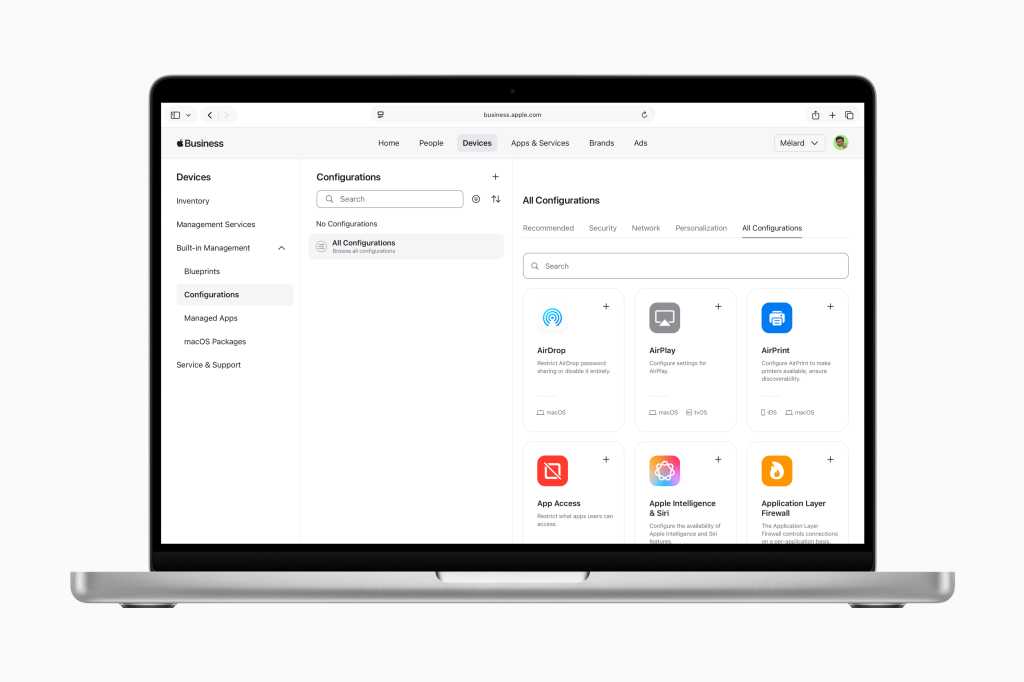
The entire cornucopia of services is being made available via the all-new Apple Business portal, which combines Apple Business Connect, Apple Business Essentials, and Apple Business Manager all in one place. The idea is to make it much easier for any business to manage its tech and its presence from within the Apple ecosystem, though not every feature will be available in every place. 

“Apple Business is a significant leap forward in our decades-long commitment to helping companies of all sizes leverage the power of Apple products and services to run and grow,” Susan Prescott, Apple’s vice president of enterprise and education marketing, said in a statement. “We’ve unified Apple’s strongest business offerings into one simple, secure platform, delivering key features for organizations in every stage and sector, including built-in device management, collaboration tools, and additional ways to reach new customers….” 

What is Apple Business?

Apple Business will be available starting April 14 in more than 200 countries and regions. The new platform offers all of Apple’s key business-focused services with a few additions. For most business users, the most important tool will be the built-in mobile device management service Apple can provide. While not pretending to be anything as granular as MDM services from the likes of Jamf, Iru, or Hexnode, what is available will help SMBs manage, deploy and configure new Apple hardware.

Some of the features include:

  • Managed Apple accounts that separate private employee data from company information through integration with an identity service provider.
  • The ability to configure employees and/or employee groups.
  • Tools to manage device settings and security.
  • Tools to manage and deploy apps and settings using Blueprints and the App Store.
  • Zero-touch deployment of new hardware.

Apple’s APIs offering access to device, user, audit, and MDM service data are also now available to businesses seeking even more control — particularly for larger deployments. For many smaller enterprises, what matters most is that the basic MDM features are now free, rather than requiring a subscription as before. The company offers 5GB storage for employee accounts, with higher amounts starting at 99 cents per person.

The company also announced that AppleCare+ for Business coverage is available per device or per user, starting at $6.99 per month, or $13.99 per month per user for up to three devices.  When this was first introduced in 2022, it offered 24/7 access to phone support, training for both IT admins and employees, and up to two device repairs per plan — by individual, group, or device — each year. (I’m not clear yet on whether that component of the service offers as much.)

Competing with Google Workspace and M365?

What Apple now has on offer means it is putting together a viable competitor for existing productivity suites. Not only has it made it possible to use custom domains for email, and to populate your online presence with pro-seeming details such as logos that appear in outbound emails, but it also supports Apple Business with free apps such as Pages or Keynote. And it now provides fully integrated email, calendar, and directory services. 

Put it all together and you can use Apple Business to drive efficiency in business, with scheduling tools like calendar delegation, a company directory, and personalized contact cards.

Apple also offers its own collaboration tools such as Messages, FaceTime, and FreeForm, which, when you add it up, means many business users might now think Apple’s platforms offer particularly good value — particularly as the cost of entry to the ecosystem falls.

The only surprise to m, is why Apple hasn’t corralled all of this together under the iconic “Apple Works” brand. But, as predicted shortly after the service first appeared, today’s news can only intensify the company’s bid to woo business users. 

You can follow me on social media! Join me on BlueSky,  LinkedIn, and Mastodon.

Apple: Local business ads are coming to Apple Maps

Following years of speculation, Apple has confirmed it intends to introduce advertising in Apple Maps — specifically a business-focused offering designed to grab a chunk of the estimated $296 billion location-based ads market. 

Announced alongside big changes in Apple’s services for business, including international introduction of services previously available with Apple Business Essentials in the US, Apple’s Maps ad plan should generate more cash for Cupertino’s coffers; the company promises user privacy will not be for sale.

Ads on Maps begins this summer in the US and Canada. Aimed at small business, the idea is that these ads will appear when users search in Maps. These will be presented at the top of search results (when relevant) and within a new Suggested Places section in Maps. Ads will be clearly marked, so you’ll know when your search experience has generated one of the things.

Business users gain a suite of Apple tools

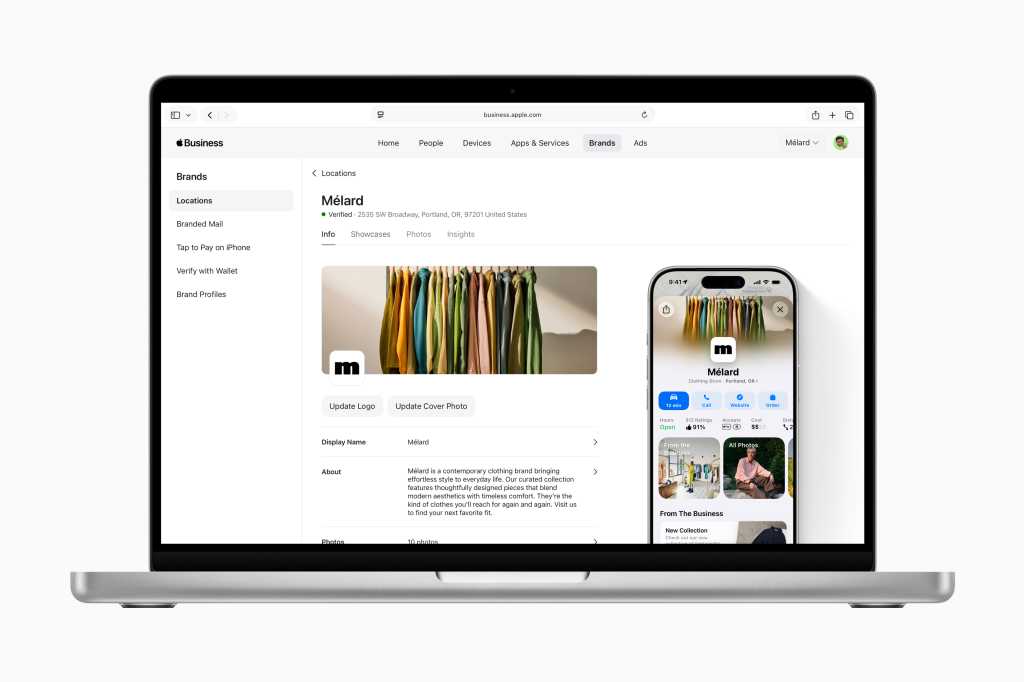
Apple has combined these new Ads on Maps services with other existing business-focused services, including Apple Business Essentials and Apple Business Connect, making all of these available via a new portal at Apple Business.

When it comes to ads in Maps, business users will be able claim their location and create ads via that portal, which requires confirmation of who they are and the status of their business to help prevent fraud.

Brand management tools allow companies to:

  • Manage brand name, logo, and key details consistently across Maps, Wallet, and other Apple features and services. 
  • Customize their Map entry with Rich Place Card, offering images, information and other useful details. These will then appear across Maps, Safari, Spotlight and so on.
  • Highlight deals, special offers, new products, or seasonal items on place cards in Maps. Add custom actions like order or reserve to direct customers to a preferred website or app.
  • Utilize a series of analytical tools to get business insight into their performance on Maps.

When Apple Business is available in April, businesses will need to first claim their location on Maps before they are able to use Apple’s fully automated ads creation tools.

Current Apple Ads advertisers and agencies will be able to book ads through their existing portal, which will gain additional options for their campaigns. Ads on Apple Maps will be available to businesses starting this summer in the US and Canada. For more information, visit ads.apple.com/maps.

The privacy thing

While it remains unclear why, or if, anyone really needs ads across their online experience, Apple likely feels the need to create a new income stream as it faces the inevitable end of any search-generated income it may have received from Google. It’s also true that highly localized and contextualized advertising for stores and services has become popular, particularly for business users seeking to connect with local customers. 

The devil will be in how these ads are served. From what I’ve seen, the ads are quite discreet and clearly labelled with a small blue icon that says “Ad,” so you are unlikely to feel fooled into clicking something you don’t want to see.

Apple also promises that Ads on Maps maintains Apple’s broader privacy-first approach to advertising. That means a user’s location and the ads they see and interact with in Maps are not associated with their Apple Account. It also means personal data stays on a user’s device, is not collected or stored by Apple, and is not shared with third parties. 

You can follow me on social media! Join me on BlueSky,  LinkedIn, and Mastodon.