Month: March 2026

Adobe CEO steps down after 18 years

It’s all change at the top for Adobe as CEO Shantanu Narayen is stepping down after 18 years. He will relinquish the role as soon as a successor has been found, although he will continue to serve as Chairman

Narayen left as the company posted record revenue of $6.4 billion in its first quarter, with the company highlighting its AI capabilities. 

Adobe’s lead independent board director, Frank Calderoni, thanked Narayen in a written statement.

“On behalf of the Board, I want to recognize Shantanu’s contributions as CEO and architect of Adobe’s transformation over the past 18 years, and for positioning Adobe for success in the AI-driven era,” he said.

Success in the AI-driven era is not a given, though, and there are concerns whether Adobe can maintain its position in the light of advances in AI according to analysts quoted in a Bloomberg report on Adobe’s results. Grace Harmon of Emarketer told Bloomberg, “Investors will likely focus on whether incoming leadership maintains a balance between disciplined execution and aggressive AI investment, especially as competition in creative and enterprise AI intensifies.”

Yes, you can run Windows on a MacBook Neo

Remember the good old days of 2020 when Apple’s then-new M1 Macs were setting fresh records for Mac performance? You might also recall when those same Macs were described as being the fastest PCs to run Windows when using the Parallels virtualization software. 

If you recall that, and if light use of legacy Windows utilities or tools is something you still need, then it will interest you to learn that you can run Windows using Parallels on one of Apple’s new MacBook Neo systems.

Windows on Neo

In a note on its knowledge base, the Parallels team confirms the support: “Parallels Desktop runs on MacBook Neo in basic usability testing. The Parallels Engineering team has completed initial testing and confirmed that Parallels Desktop installs and virtual machines operate stably on MacBook Neo. Full validation and performance testing is ongoing, and [an] additional compatibility statement will follow if required.”

It’s not a perfect match, however, which means what you can do is a little limited. That’s because the MacBook Neo ships with just 8GB RAM, while Windows running in VM demands 4GB minimum RAM to work.

Given that when running Windows in VM you must also be running macOS on the same device, the available memory, gets used up quickly. So, you really only want to use Windows on a MacBook Neo for light and transient tasks, such as running those legacy tools and utilities I mentioned.

“For light, occasional Windows use, like a legacy business tool, or a Windows-only utility, MacBook Neo may provide an acceptable experience. For CPU- or GPU-intensive Windows applications, this computer is not the right choice,” said Parallels.

For a fistful of dollars

Apple does have other choices, which means that for $1,099 you can already pick up an M5 MacBook Air with 16GB RAM, which should make for a better experience when you need to run full Windows apps. “If demanding Windows workflows are part of your daily work, a Mac with 16 GB or more of unified memory, such as the new MacBook Air M5 or MacBook Pro, will give you a significantly better experience with Parallels Desktop,” the Parallels acknowledges. 

In a separate note, the team points out that the more powerful Macs can run Windows sufficiently well to meet the needs of DevOps engineers, creatives, and business pros.

The thing is, I think the vast majority of enterprise professionals who only really use their computers for emails, websites, services, and spreadsheets probably only also need a little Windows support for a declining number of tasks. The extent of those tasks varies, of course. Memory allocation is important and a little 8GB MacBook Neo may lack the horsepower for the specific Windows tools and services your company requires, even with Unified Memory.

You’ll have to take a look at these Macs and decide whether a MacBook Neo is right for you. 

How much Windows do you need?

I can’t help but think that the fact that you can get a Mac for $599 that also runs Windows might make sense to admins looking to provision employees with tools they will enjoy using that can also handle a bit of Microsoft during their day. Gaining Mac, Windows, and even the best of iOS (thanks to iPhone Mirroring) on one affordable system might help stretch those budget dollars, at least for some tasks.

In the end, Apple’s strategic achievement has surprised the PC industry so much that Ausus Co-CEO, SY Hsu recently called it “a shock to the entire industry,” before adding, “In fact, in the entire PC ecosystem, there have been a lot of discussions about how to compete with this product.”

Hsu rightly points out that the limited memory in the device is its Achille’s heel, which means it won’t perform that well when handling heavy workloads. That may be true, of course, but is perhaps less of a protective talisman to incumbents in this part of the consumer notebook space; the M5 MacBook Air, which costs just a few hundred dollars more, is among the most performant systems in the business right now.

The fact all of Apple’s Macs also run Windows just reinforces the business case to switch.

Please follow me on Twitter, or join me in the AppleHolic’s bar & grill and Apple Discussions groups on MeWe. Also, now on Mastodon.

Cyber criminals too are working from home… your home

The FBI is so concerned about the threat of residential proxy attacks and the dangers posed by cyber criminals using the technique that it has posted guidance on its website.

Residential proxies are used by cybercriminals to reroute traffic between individuals and the websites they visit to make it appear to originate elsewhere? By taking over IoT devices, smartphones, or home routers, cybercriminals can mask their illegal online activities. But it’s not just consumers who are at risk: Enterprises can be the targets of those illegal activities — and their devices can be taken over too. Older devices are particularly soft targets.

The FBI urged enterprises to install software updates as they become available to help protect devices from being infected, and to enforce strong device policies to stop employees connecting unauthorized devices to corporate networks. It also encouraged them to segment networks, block IP addresses known to be associated with residential proxy networks, and implement stronger firewall rules.

There has been one major proxy attack already this year. In January, nine million Android devices were exposed. The threat to enterprises is deep-seated. Last month, cyber security company Spur identified vulnerable proxy exposure across 671 government entities, 263 energy and utility organizations, and nearly 1,900 education environments.

“Residential proxies are effective because they let bad actors blend into normal internet traffic. A lot of security teams know how to look for suspicious infrastructure. It gets harder when the traffic comes through real residential connections that appear legitimate on the surface,” Spur co-founder Riley Kilmer said via email.

This article first appeared on CSO.

How AI is changing your mind

Humanity is diving headlong into a global experiment. More than 1 billion people have a new and unprecedented source of information and cognitive guidance: artificial intelligence (AI) trained on trillions of words. 

So, how exactly are AI chatbots affecting our minds, thoughts, beliefs and opinions? 

Scientists are scrambling to find out — and reports that have come out this week offer insights into what’s going on. 

AI writing tools can influence your beliefs and opinions

Cornell University researchers published a new paper this week detailing two experiments that aimed to find out the cognitive impact of AI writing tools. 

One focused on standardized testing. But the more interesting experiment focused on controversial ideas or opinions and whether writing tools affected them. (Spoiler alert: They did.)

The researchers gamed autocomplete suggestions to either favor or oppose the death penalty, felon voting rights, fracking, or genetically modified organisms. Then they measured how much participants in the study would be swayed in their opinions by the suggestions.

What they found is that biased autocomplete changed opinions more than just reading the biased point of view. Apparently, the interactive, co-writing nature of AI autocomplete suggestions plays a crucial role in persuasion.

Also: A strong majority of participants did not believe the AI autocomplete was biased and did not believe they were influenced in their thinking. 

Even more interestingly, some participants were warned that the autocomplete was biased and it still changed their opinions. 

What makes this so interesting is that far more people use AI-based autocomplete than AI chatbots. If governments or other organizations wanted to shift public opinion, biasing AI autocomplete would probably work better than, say, large language model (LLM) grooming (where state actors like Russia can “flood the zone” with biased content picked up by AI spiders).

It’s unlikely that autocomplete tools will be tweaked to make you change your opinion about the death penalty. But the real risk is a subtle influence over time. Because AI does have biases built in. 

It turns out that AI-based writing tools can not only change your opinions and beliefs, they  can also make you bland. 

AI is homogenizing human expression

Another paper published this week — this one by three researchers at the University of Southern California — found that the use of LLM-based chatbots is erasing diversity of not only expression, but thought. The research pulls together findings from linguistics, psychology, cognitive science and computer science. 

Hundreds of millions of people now use the same small handful of AI models to write emails, draft reports, brainstorm ideas and polish their writing. Because those models were trained on massive datasets that overrepresent English, Western viewpoints and the perspectives of educated, high-income, liberal males, that tends to be the tone and style of writing, regardless of whether the user fits into that mold. 

When you ask an AI to “improve” your writing, it doesn’t just fix grammar. It nudges your words and even your ideas toward a single, dominant pattern. 

The researchers analyzed one study that generated 30,000 college admission essays using LLMs. The essays showed high semantic and lexical similarity across the board — a dramatic narrowing of the range of human expression. 

Another finding: When AI “polishes” writing — Reddit posts, news articles, academic abstracts, personal essays — the resulting texts converge so much in style and complexity that it becomes harder to guess the author’s political views, personality, gender or age. In other words, AI doesn’t just polish writing. It erases the author’s individuality. 

Also: When researchers prompt AI models to write from the perspective of a specific identity (say, a person with impaired vision), the models tend to produce stereotyped, outsider caricatures rather than authentic insider representations of that experience. 

While people tend to look at LLM chatbots as tools that help with writing, the researchers see them as “coreasoners,” meaning that they’re part of users’ thought-forming process. 

And it’s a recurring cycle. As homogenized writing proliferates, those generic texts get sucked into the training data, creating a feedback loop of ever-increasing blandness, a genericization of the world’s knowledge and perspective. As chatbots get blander, we get blander. And as we get blander, the chatbots get even blander. 

What does all this mean — and why does it matter? 

The the one big takeaway you should get from this column is this: Our thoughts, opinions, ideas and modes of expressions are linked together and strongly affected by a small handful of AI tools. 

This notion is best articulated by a concept called “distributed cognition theory,” which was developed decades before the popularization of LLM tools by cognitive anthropologist Edwin Hutchins in the 1990s and detailed in his 1995 book Cognition in the Wild.

Applied to the LLM era, the major chatbots function both as cognitive tools and also as thought partners that co-construct reality with users. They sustain, elaborate on and magnify our beliefs. And when they hallucinate, they can cause us to hallucinate, too.

Two attributes of AI chatbots magnify the effect. The first is sycophancy. They’re too agreeable and are more likely than people to just go along with the user’s beliefs. 

The second is something called “simulated intersubjective validation,” whereby AI chatbots can give users the feeling of a shared reality, even if the user’s reality isn’t necessarily shared by a large number of people. (This feeling can be especially appealing to people experiencing loneliness, social isolation, or psychosis.)

The bottom line is that LLM-based AI chatbots can influence what the public believes to be true without users even noticing or believing that that’s the case. 

Six ways to protect yourself from a world view determined by AI

There’s little any of us can do to prevent humanity’s slide into being manipulated by AI. But we can protect ourselves, and we should. Here’s how: 

  1. Accept the fact that your intelligence, education and awareness of the issue does not make you immune to the influence of AI tools.
  2. Don’t use autocomplete. Turn it off. Use your own words, not the hive-mind’s. 
  3. Write without using AI. Understand that writing is nothing more than clarified thinking. When chatbots write for you, they also think for you. Writing without AI is the key to cultivating your own thinking, preserving and communicating your own individuality, and enhancing your worth as a professional, a citizen and a human being. 
  4. Override chatbot sycophancy. Use prompt engineering to force chatbots to disagree, challenge and argue with you. I’ll even give you the prompt, which you can copy and paste into your chatbot: “You are my intellectual sparring partner. Your job is to disagree with me constructively, not to agree. For every idea I present: 1) identify and challenge hidden assumptions; 2) build a strong counter-argument; 3) stress-test my logic for flaws, logical gaps, or weaknesses; 4) offer alternative perspectives to mine; and 5) prioritize truth over consensus.”
  5. Cultivate your own personal thoughts in a blog. When you have a clear thought or idea, codify it in a blog. Don’t use AI for research, editing or anything else. Even if you use AI for other purposes, make your blog an “AI-free space.” The purpose of the blog should be for you to publicly cultivate your thoughts, beliefs and opinions and assert and maintain your cognitive individuality in a world of growing sameness. I’ve done this myself and posted my thoughts about the value of blogging in a cognitive world dominated by AI. 
  6. Get most of your information and ideas from good books, good journalism and good science. Avoid “consuming” content that’s presented to you by a social algorithm; instead, curate great, authentic, individual human voices using RSS. Go ahead and post on social, but don’t “consume” the posts of others. 

The science is in. AI chatbots are changing our minds, and not for the better. The good news is that you can take advantage of the AI revolution in many ways, while also protecting your own mind from being influenced by the AI hive mind. 

AI disclosure: I don’t use AI for writing. The words you see here are mine. I do use Claude 4.6 Opus via Kagi Assistant (disclosure: my son works at Kagi) — backed up by both Kagi Search, Google Search, as well as phone calls to research and fact-check. I used a word processing application called Lex, which has AI tools, and after writing the column, I used Lex’s grammar checking tools to hunt for typos and errors. Here’s why I disclose my AI use. 

Apple says its upcoming 50th birthday treat is you

So soon after Apple’s big product launches last week, Apple CEO Tim Cook shared a letter to mark the upcoming 50th anniversary since the founding of Apple on April 1, 1976.  

It is strange to see Apple grapple with the concept of an anniversary. It isn’t usually a company that does this, as it tends to focus on what it is building rather than the history its work leaves behind. “We’re not a culture that looks back,” Cook said. “So, the group of people working on this have had to kind of build a different muscle for this, as our muscle is always about what’s next. We’ve really had to work hard on this to get in a reflective state, but when you really stop and pause and think about the last 50 years, it makes your heart sing. It really does.

“I promise some celebration.”

A party of one, but still a big celebration

Cook took a look at the past in a conversation with CBS Sunday Morning correspondent David Pogue, who has written a book about Apple’s first 50 years during which he observed the need for the company to have the right people and the right organizational culture. “I think Apple is such a unique place, it’s not possible to replicate it,” he said. “I know a lot of different companies, and I think Apple is just in a party of one.”

There seems to be a real focus on “the crazy ones” in Apple’s approach to the date. “Progress comes from those who challenge convention and imagine what could be,” the company said.

Cook’s anniversary letter references the cultural challenge Apple has with anniversaries, and also suggests that it will be Apple’s customers, teams, and former employees who will get headline billing in how the company celebrates in the coming weeks. 

“We couldn’t let this milestone pass without thanking the millions of people who make Apple what it is today — our incredible teams around the world, our developer community, and every customer who has joined us on this journey. Your ideas inspire our work. Your trust drives us to do better. Your stories remind us of all we can accomplish when we think different.”

How will Apple celebrate?

This begs the question of how Apple will celebrate the date. Speaking during a recent all-hands meeting at Apple, Cook dropped some hints of what the company’s 50-year anniversary might involve.

“We’ve been going back through old archives, old photographs. We’ve been going back through the products, the services, the people, and I am struck by how much Apple has changed things, how much Apple has changed the world, how much Apple has given to the world.”

In the coming weeks, “Apple and its global community will celebrate the company’s 50th anniversary, recognizing the creativity, innovation, and impact that people around the world have made possible with Apple technology.”

That suggests the company will be focused on sharing some of the stories of what its customers have achieved during its existence. It also seems likely to embrace social media, given the company today introduced a new @helloapple handle on Instagram. (Famously, the word “Hello” appeared on the screen during the launch of the original Apple Macintosh.)

Beyond cultural reflections, some might wonder whether the anniversary will include new hardware. 

Given the very impressive recent launches – MacBooks Neo, Air, and Pro, new displays and a budget-price iPhone, that feels unlikely, but not impossible. It isn’t inconceivable the company might choose to link its fiftieth anniversary with the first glance at some of the new AI features in Siri, though doing so runs risks if that launch fails to impress.

People, not product? 

At the same time, perhaps it’s right that in its 50th year it makes sense for the company to take stock of its achievements, which fundamentally is not the tools it has created but what its audience of creative humans has achieved with them.

“Thinking different has always been at the heart of Apple,” wrote Cook. “It’s what has driven us to create products that empower people to express themselves, to connect, and to create something wonderful.” 

Ultimately, Apple’s anniversary is about the impact its technology has enabled over five decades. The comparison with the upcoming 20‑year iPhone anniversary next January will be equally revealing.

Please follow me on Twitter, or join me in the AppleHolic’s bar & grill and Apple Discussions groups on MeWe. Also, now on Mastodon.

Tech layoffs: A 2026 timeline

Among a range of factors leading to a wave of tech sector layoffs in 2026 is the rapid rise of artificial intelligence and automation. Companies are reconfiguring their workforces to leverage AI for increased efficiency and reduced operating costs. This realignment and reduction is implemented even by companies reporting strong financial performance.

But it’s not just AI leading to workforce cuts. Complementing this technological shift are ongoing economic uncertainty, inflation, and higher interest rates, compounded by a chip shortage and rising energy costs. This mix is driving companies to cut costs and streamline operations for increased efficiency.

According to data compiled by Layoffs.fyi, an online tracker that keep tabs on job losses in the technology sector, 123,941 tech employees were laid off at 269 companies in 2025. The site also reports that 71,981 government employees were laid off by DOGE alone, with 182,528 total federal workers laid off.

Here is a list — to be updated regularly — of some of the most prominent technology layoffs the industry has experienced recently.

Notable tech layoffs in 2026

  • Canva
  • Oracle (again)
  • Monday.com
  • Microsoft
  • Meta
  • Cisco
  • Cloudflare
  • Oracle
  • Atlassian
  • Salesforce
  • Amazon
  • Ericsson

Nov. 3, 2026: Canva lays off 22% of staff as it flattens org chart and consolidates teams

Canva didn’t explicitly blame AI for a massive round of lay-offs that will see 1,271 staff, over one-fifth of its workforce, lose their jobs, but CEO Melanie Perkins did give a nod to how “New technology is transforming what people can create, how they create it, and what they expect from the products they use” in an open letter outlining the changes. To simplify and speed up decision-making around product development, she wrote, Canva is folding its product, growth, and platform teams into a single product organization, removing layers of middle management, reducing specialization by giving staff broader responsibilities, and requiring staff to show up more often at its office in Sydney, which will become the hub for product development.

Sept. 15, 2026: Oracle forecasts 33% increase in restructuring costs as new round of layoffs hits

Oracle began a new round of layoffs this week, sending early-morning termination emails to staff for the second time in six months. Oracle has made no public statement confirming the latest round of job cuts, but in a regulatory filing days earlier the company said it had set aside a further $700 million for restructuring charges, bringing the total charges this year to roughly $2.8 billion.

July 22, 2026: Monday.com cuts 20% of its workforce to restructure for the AI era

The company says the decision to cut 620 jobs isn’t about margins, but about creating a flatter organization built around AI agents, autonomous teams, and deeper customer engagement.

July 6, 2026: Microsoft cuts 4,800 jobs, primarily in sales and Xbox teams

As the company trims thousands of jobs, it’s also investing in embedded engineering teams and AI infrastructure. The layoffs come several weeks after the company offered 8,750 US employees voluntary retirement buyouts.

June 5, 2026: Tech industry cut 38,242 jobs in May, worst since 2024

AI was blamed for 40% of the job cuts in May, up from 7% in January, according to research by employment placement company Challenger, Gray & Christmas.

May 20, 2026: Meta cuts 8,000 jobs, around 10% of workforce

The cuts are expected to expected to hit Meta’s engineering and product teams the hardest, arriving as Meta pivots toward AI to boost efficiency across its organization, according to Yahoo Tech.

May 13, 2026: Cisco to cut nearly 4,000 jobs despite strong growth in AI, enterprise networking

Despite reporting positive financial news — including record third-quarter revenue of $15.8 billion, a 12% year-over-year increase — Cisco said it will eliminate almost 4,000 jobs.

May 7, 2026: Cloudflare to cut 1,100 jobs in AI-focused restructuring

About 20% of Cloudflare’s global workforce will be culled as the company pivots for the agentic AI era, Reuters reported.

April 1, 2026: Oracle to cut up to 30,000 jobs globally, putting enterprise support and roadmaps at risk

Oracle began laying off employees on March 31 in what could be the largest workforce reduction in the company’s history. Employees received termination emails at 6 a.m. local time with immediate system lockouts and no prior warning. (Note: in June, CNBC put the final layoff tally at 21,000.)

March 12, 2026: Atlassian cuts 1,600 jobs to fund AI and enterprise expansion

Atlassian will reduce its global workforce by approximately 10%, eliminating around 1,600 roles, as the collaboration software maker redirects capital toward artificial intelligence development and enterprise sales.

March 11, 2026: Tech layoffs surpass 45,000 in early 2026

A recent analysis by RationalFX found 45,363 job cuts globally so far this year—with roughly 68% or more than 30,000 occurring in the U.S. — highlighting ongoing workforce cuts even as many tech companies report strong revenue growth.

Feb. 10, 2026: Salesforce lays off staffers as executive leadership churn continues

Salesforce has reduced close to 1,000 roles earlier this month across teams, including marketing, product management, data analytics, and its Agentforce AI unit, Business Insider reported, quoting employees familiar with the matter.

Jan. 23, 2026: Amazon layoffs expected to disproportionately hit AWS and tech talent

As the market slows down, AWS and other Amazon units are preparing for another round of layoffs, which is expected to overwhelmingly impact tech talent. An email from HR leader Beth Galetti on Jan. 28 confirmed 16,000 job cuts.

Jan. 15, 2026: Ericsson plans to shed 1,600 jobs in Sweden

 Ericsson lans to cut some 1,600 jobs in Sweden, the telecommunications equipment maker said doubling down on recent cost-saving measures that have helped it weather a prolonged downturn in telecoms spending, Reuters reports.

Jan. 13, 2026: Meta plans to cut around 10% of employees in Reality Labs business

Meta plans to cut around 10% of the employees in its Reality Labs division who work on products including the metaverse, according to three people with knowledge of the discussions, according to The New York Times.

Layoffs in 2025

  • Cisco
  • Oracle
  • Windsurf
  • Intel
  • Microsoft
  • Crowdstrike
  • HPE
  • Autodesk
  • HPE
  • CISA
  • Workday
  • Salesforce
  • Meta

Global tech-sector layoffs surpass 244,000 in 2025

Economic uncertainty, elevated interest rates, and AI adoption have driven workforce reductions across tech companies worldwide, according to a RationalFX report.

October 28, 2025: Amazon to cut 14,000 jobs across company

Amazon will reduce its overall workforce by 14,000, cutting layers of management across the company and hiring in some areas to support its “biggest bets”.

August 18, 2025: Cisco and Oracle to cut hundreds of Bay Area jobs

Tech companies Cisco and Oracle are cutting hundreds of jobs across the Bay Area. Cisco will eliminate 221 positions at its Milpitas and San Francisco offices, effective Oct. 13. Oracle is reducing 101 positions in Santa Clara on the same date 

August 5, 2025: 3 weeks after acquiring Windsurf, Cognition offers staff the exit door

Cognition, the AI coding startup that acquired rival company Windsurf three weeks ago, laid off 30 employees last week and is offering buyouts to the roughly 200 remaining employees on the team, reports The Information.

July 25, 2025, Intel to lay off 22% of workforce, CEO Tan signals ‘no more blank checks’

Intel will reduce its workforce to 75,000 employees by the end of 2025 as new CEO Lip-Bu Tan implements sweeping changes designed to transform the struggling chipmaker

July 8, 2025, Intel layoffs begin: Chipmaker is cutting many thousands of jobs

Intel has begun laying off employees across the company. CEO Lip-Bu Tan told workers back in April to expect major layoffs at Intel in the coming months as the chipmaker slashes costs and overhauls its organization after years of technical setbacks and falling sales.

July 2, 2025: Microsoft will cut 9,000 workers

Microsoft will lay off about 9,000 employees, a source familiar with the workforce cut told CNBC.  The cuts will reportedly affect less than 4% of Microsoft’s global workforce and will impact different teams, geographies and levels of experience. This is the latest in a string of cuts the tech giant has made this year.

June 17, 2025: Intel looks to factory layoffs to return to profitability

Intel will lay off up to 20% of its manufacturing sector employees starting in July, according to media reports, as the company looks for options as it seeks a return to profitability. The cuts reportedly will be made around the world, but some of the layoffs will be closer to home, according to a report in The Oregonian citing an internal company memo from Intel manufacturing Vice President Naga Chandrasekaran.

May 7, 2025: CrowdStrike to lay off 5% of staff

CrowdStrike announced a plan to cut about 500 roles, roughly 5% of its workforce, to streamline operations and reduce costs. The cybersecurity company will incur about $36 million to $53 million in charges related to the layoffs

March 6, 2025: HPE cuts 2,500 jobs, remains committed to Juniper buy

CEO Antonio Neri told Wall Street analysts that HPE would begin implementing a cost-cutting program involving layoffs of about 2,500 employees over the next 18 months. HPE employs about 61,000 people worldwide.

Feb. 27, 2025: Autodesk to lay off 9% of workforce

Software maker Autodesk is laying off 1,350 staff. With the rise of subscription and multi-year contracts billed annually, and self-service enablement, it finds it needs fewer sales staff, CEO Andrew Anagnost said in a message to employees. And with its cloud, platform, and AI products proving most profitable, it’s concentrating its staff and investments there.

Feb. 27, 2025: HP to lay off 2,000 more

As part of an ongoing restructuring, HP plans to lay off up to another 2,000 workers. In recent weeks, the company has tried — unsuccessfully — to do away with telephone support staff by forcing callers to wait for at least 15 minutes if they refuse to use self-service support resources online. The company swiftly backtracked, but wider job cuts are still on.

Feb. 21, 2025: CISA lays off 130

Government employees get laid off too: In this case, 130 workers at the US Cybersecurity and Infrastructure Security Agency are being shown the door as a result of a DOGE decision. Cybersecurity experts are concerned that the cuts will harm the international collaborations that CISA has fostered, quite apart from their concerns about the security of the DOGE layoff process itself.

Feb. 5, 2025: Workday lays off 1,750

As it moves to invest more in AI and international growth, Workday is laying off 8.5% of its workforce and disposing of unused office space. Some analysts fear the cutbacks will affect the company’s customer service — unless AI can pick up the slack.

Feb. 4, 2025: Salesforce lays off over 1,000

At the same time as it’s hiring sales staff for its new artificial intelligence products, Salesforce is laying off over 1,000 workers across the company, according to Bloomberg. As of June, 2024, the company had over 72,000 employees, according to its website. Salesforce did not comment on the report. In 2024 the company reportedly laid off around 1,000 staff too, in two waves: January and July.

Jan. 14, 2025: Meta will lay off 5% of workforce

Mark Zuckerberg told Meta employees he intended to “move out the low performers faster” in an internal memo reported by Bloomberg. The memo announced that the company will lay off 5% of its staff, or around 3,600 staff, beginning Feb. 10. The company had already reduced its headcount by 5% in 2024 through natural attrition, the memo said. Among those leaving the company will be staff previously responsible for fact checking of posts on its social media platforms in the US, as the company begins relying on its users to police content.

Tech layoffs in 2024

  • Equinix
  • AMD
  • Freshworks
  • Cisco
  • General Motors
  • Intel
  • OpenText
  • Microsoft
  • AWS
  • Dell

Nov. 26, 2024: Equinix to cut 3% of staff

Despite intense demand for its data center capacity, Equinix is planning to lay off 3% of its workforce, or around 400 employees. The announcement followed the appointment of Adaire Fox-Martin to replace Charles Meyers as CEO and the departures of two other senior executives, CIO Milind Wagle and CISO Michael Montoya.

Nov. 13, 2024: AMD to cut 4% of workforce

AMD will lay off around 1,000 employees as it pivots towards developing AI-focused chips, it said. The move came as a surprise to staff, as the company also reported strong quarterly earnings.

Nov. 7, 2024: Freshworks lays off 660

Enterprise software vendor Freshworks laid off around 660 staff, or around 13% of its headcount, despite reporting increased revenue and profits in its fourth fiscal quarter. The company described the layoffs as a realignment of its global workforce.

Sept. 17, 2024: Cisco lays off 6,000

After laying off around 4,200 staff in February, Cisco is at it again, laying off another 6,000 or around 7% of its workforce. Among the divisions affected were its threat intelligence unit, Talos Security.

Aug. 20, 2024: General Motors lays off 1,000 software staff

More than 1,000 software and services staff are on the way out at General Motors, signalling that it could be rethinking its digital transformation strategy. In an internal memo, the company said that it was moving resources to its highest-priority work and flattening hierarchies.

August 1, 2024: Intel removes 15,000 roles

Intel plans to cut its workforce by around 15% to reduce costs after a disastrous second quarter. Revenue for the three months to June 29 stagnated at around $12.8 billion, but net income fell 85% to $83 million, prompting CEO Pat Gelsinger to bring forward a company-wide meeting in order to announce that 15,000 staff would lose their jobs. “This is an incredibly hard day for Intel as we are making some of the most consequential changes in our company’s history,” Gelsinger wrote in an email to staff, continuing: “Our revenues have not grown as expected — and we’ve yet to fully benefit from powerful trends, like AI. Our costs are too high, our margins are too low. We need bolder actions to address both — particularly given our financial results and outlook for the second half of 2024, which is tougher than previously expected.”

July 4, 2024: OpenText to lay off 1,200

OpenText said it will lay off 1,200 staff, or about 1.7% of its workforce, in a bid to save around $100 million annually. It plans to hire new sales and engineering staff in other areas in 2025, it said.

June 4, 2024: Microsoft lays off staff in Azure division

Microsoft laid off staff in several teams supporting its cloud services, including Azure for Operations and Mission Engineering. The company didn’t say exactly how many staff were leaving.

April 4, 2024: Amazon downsizes AWS in a fresh cost-cutting round

Amazon announced hundreds of layoffs in the sales and marketing teams of its AWS cloud services division — and also in the technology development teams for its physical retail stores, as it stepped back from efforts to generalize the “Just Walk Out” technology built for its Amazon Fresh grocery stores.

April 1, 2024: Dell acknowledges 13,000 job cuts

Dell Technologies’ latest 10K filing with the US Securities and Exchange Commission disclosed that the company had laid off 13,000 employees over the course of the 2023 fiscal year; it characterized the layoffs and other reorganizational moves as cost-cutting measures. “These actions resulted in a reduction in our overall headcount,” the company said. A comparison to the previous year’s 10K filing, performed by The Register, found that Dell employed 133,000 people at that point, compared to 120,000 as of February 2024. Dell announced layoffs of 6,650 staffers on Feb. 6, but it is unclear whether those cuts were reflected in the numbers from this year’s 10K statement.

See news of earlier layoffs.

Atlassian cuts 1,600 jobs to fund AI and enterprise expansion

Atlassian will reduce its global workforce by approximately 10%, eliminating around 1,600 roles, as the collaboration software maker redirects capital toward artificial intelligence development and enterprise sales.

Co-CEO and co-founder Mike Cannon-Brookes disclosed the cuts in a blog post. The decision, he said, was made to “self-fund further investment in AI and enterprise sales” while accelerating the company’s path to sustained profitability.

The announcement came despite a strong recent performance. Atlassian reported cloud revenue of roughly $1.067 billion, up 26% year on year, and remaining performance obligations of approximately $3.814 billion, up 44%. Its Rovo AI assistant surpassed five million monthly active users, and the company now counts more than 600 customers generating over $1 million in annual recurring revenue, the blog post added.

Cannon-Brookes acknowledged that AI was reshaping the skill mix required. “It would be disingenuous to pretend AI doesn’t change the mix of skills we need or the number of roles required in certain areas,” he wrote.

Reading the fine print

Sanchit Vir Gogia, chief analyst and CEO at Greyhound Research, said enterprise buyers should read the move as a strategic reallocation of capital, not a distress signal.

“Management is treating AI not as a side project or a shiny feature layer, but as something that changes how the company should be staffed, what types of roles it needs, and where it should spend its money,” he said.

But he cautioned that financial strength did not confer operational immunity. “Customers do not feel it on day one in the earnings statement,” Gogia said. “They feel it later in slower escalations, fuzzier accountability, longer roadmap cycles, and support journeys that suddenly feel more automated and less informed.”

He also flagged that the cuts were unfolding alongside a broader platform transition, with Atlassian simultaneously pushing customers toward cloud delivery and embedding AI more deeply across Jira, Confluence, and service workflows. “When vendor operating model change and platform model change happen together, CIOs need to pay attention,” Gogia said. “One moving part is manageable. Two moving parts at once can get messy.”

Impacted employees will receive a minimum 16-week separation package globally, with one additional week per year of service, a prorated FY26 bonus, a $1,000 technology payment, and six months of extended healthcare coverage. Atlassian also disclosed a CTO transition, with Rajeev Rajan stepping down and other leaders elevated around next-generation AI priorities.

It is the second significant workforce reduction at Atlassian in three years. In March 2023, the company laid off approximately 500 employees, or 5% of its workforce, framing the move as a rebalancing toward cloud migration and IT service management.

A widening pattern

Atlassian’s announcement is the latest in a fast-growing list of enterprise technology companies citing AI as a structural driver of workforce reductions.

Earlier this month, fintech platform Block cut approximately 4,000 jobs as CEO Jack Dorsey declared a move to an “intelligence-native” operating model. Similarly, Australian logistics software firm WiseTech Global had announced to eliminate around 2,000 roles, with its CEO stating the era of manually writing code was over. Tech layoffs in 2026 had already surpassed 45,000 globally by early March, according to RationalFX, with AI and automation among the most frequently cited drivers.

Gogia said the pattern reflected a shift in boardroom incentives, not just technology. “Once boards and management teams see that investors reward a story built around AI, smaller teams, and future efficiency, the incentive structure shifts quickly,” he said.

CIOs should expect more vendor reorganisations framed around AI productivity, more support interactions routed through AI-mediated channels, and more pricing experimentation blending subscriptions with usage-based mechanisms tied to AI consumption, a direction Atlassian’s Rovo Dev pricing already signalled, Gogia said.

His advice to enterprise buyers was pointed. “CIOs should stop treating vendor AI announcements as purely product announcements. They are operating model announcements, too,” he said. “The right follow-up question is not only ‘what new features do I get?’ It is also ‘what changes behind the curtain in support, staffing, escalation, and accountability?”

The best Android keyboard apps for on-the-go productivity

Quick: When was the last time you thought about the keyboard app on your phone?

If you’re like most people, the answer is probably somewhere between “a ridiculously long time ago” and “never.” And it’s no wonder: Keyboard apps are easy to forget! You install one — or stick with whatever came loaded on your phone by default — and then use it to input text when you need to. It’s just there, and unless you’re a weirdo who spends hours trying out different keyboards to see how they compare (and then trying ’em all out again months later to see how they’ve evolved and what other options have come along), you’re never gonna know what you’re missing.

Well, good news, my friend: I am that weirdo. Somehow, it’s my job. (Crazy, right?) And I’ve just finished assessing all of the significant Android keyboard apps in their current incarnations to see what they have to offer in 2026 and how they stack up.

Lemme tell ya: These once-unassuming typing tools have come a long way. The top Android keyboard apps now offer almost absurdly polished and refined text input experiences — and that’s just the tip of the iceberg. Android keyboards today are overflowing with all sorts of advanced functions that go way beyond their original purposes. And that means it’s more important than ever to find the right setup for your personal productivity needs.

So let’s get into it, shall we? These are the best Android keyboard apps around, broken down by where they excel and for whom they make the most sense.

The best all-around Android keyboard app for most people

Gboard – the Google Keyboard (free)

If you just want a solid, thoughtfully designed keyboard that works well and is pleasant to use, Google’s own Gboard is tough to beat. Gboard is great for accurate swipe-based typing — where you slide your finger from one letter to the next without lifting it — and it does a decent job at tap-oriented typing, too, with its built-in typo correction and next-word prediction capabilities.

Beyond the basics, Gboard supports a variety of potentially useful advanced productivity features. For instance, you can take a photo of a physical paper or whiteboard from right within the keyboard and then insert its words directly into any active text field on your screen. You can also activate an integrated Google Translate mode that’ll translate anything you type from one language to another on the fly.

gboard keyboard app with english to french translation

On-the-fly language translation is one of Gboard’s handy advanced features.

JR Raphael / Foundry

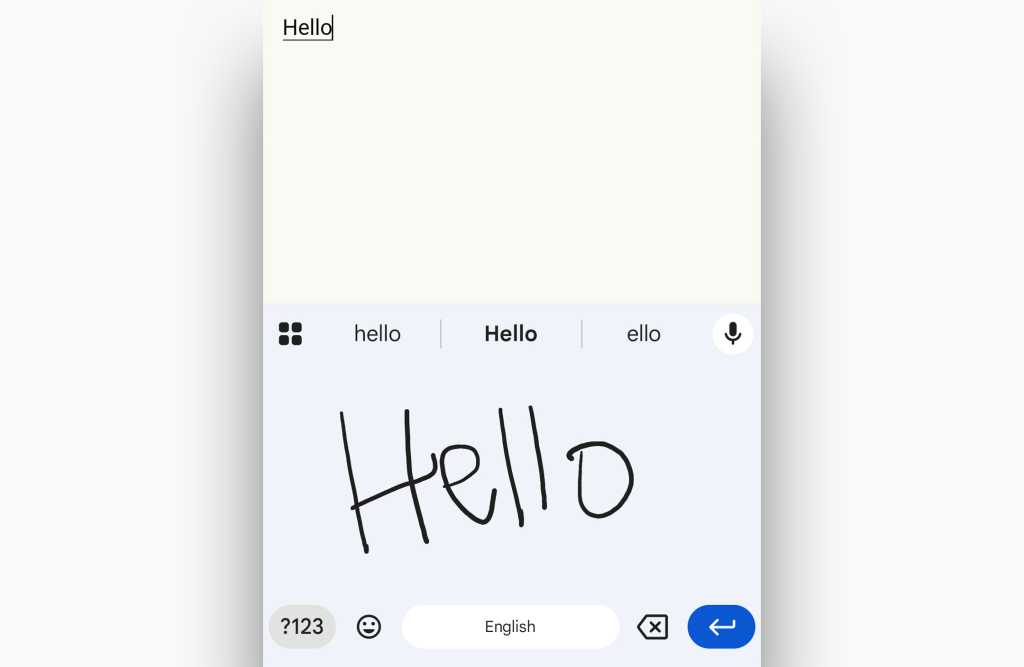
Other noteworthy elements include a handwriting mode, which transforms your on-screen scribbles into regular text as you write; a floating keyboard layout, which makes it easier to access the keyboard on a large-screened device; a built-in clipboard, which makes it quick ‘n’ simple to find and paste any recently copied content or permanently pinned items; a text selection tool that lets you use arrow keys to move your cursor around to any specific spot on your screen; and a series of other advanced options and hidden shortcuts for extra-speedy text input.

gboard correctly interpreting scrawled hello

Gboard can interpret even the messiest handwriting and turn it into regular digital text on the fly.

JR Raphael / Foundry

Whether you take advantage of all those possibilities or not, though, Gboard is a well-rounded keyboard that lets you type quickly, accurately, and with minimal hassle on your Android phone. If you don’t have any special requirements and just want a commendable all-around keyboard that gets the job done, Gboard is the app for you.

The best Android keyboard app for simple Windows syncing

Microsoft SwiftKey AI Keyboard (free)

If you’re using Android alongside a Windows computer and like the idea of seamless text sharing across your devices, the now-Microsoft-owned SwiftKey is the Android keyboard app you want. The reason why is simple: SwiftKey and SwiftKey alone offers the ability to sync your Android and Windows clipboards — meaning you can copy something on one device and then instantly paste it on the other, without any extra effort or actions. All it requires is an easy one-time setup to get going.

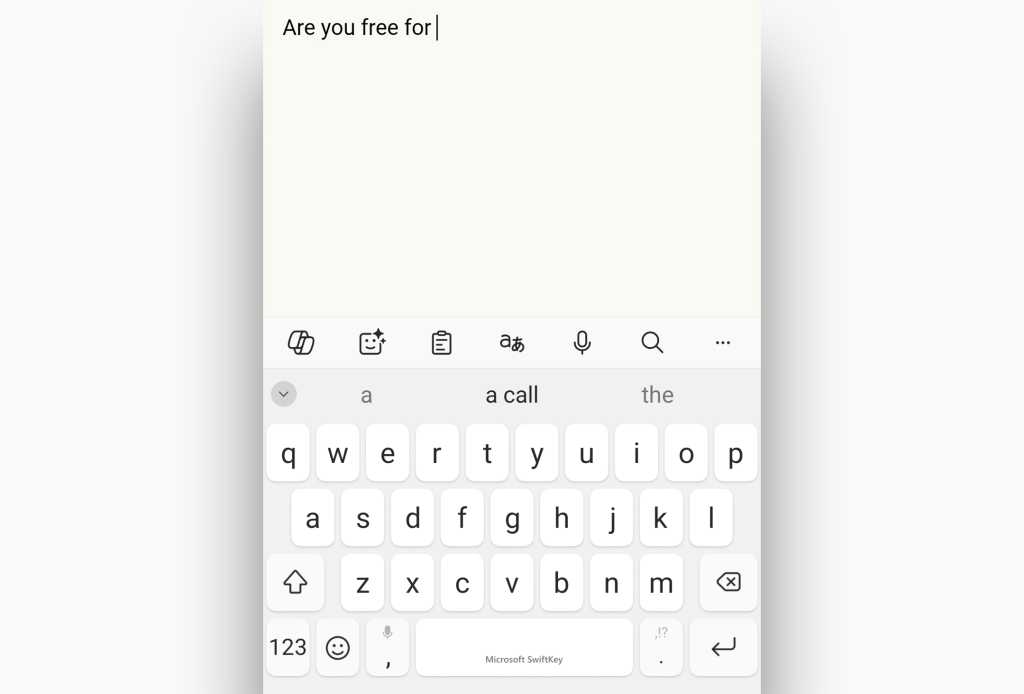
That alone is a pretty compelling perk, but SwiftKey is also no slouch when it comes to regular on-screen Android typing — especially with its exceptional next-word prediction engine, which is something that’s been one of the keyboard’s greatest strengths since back before Microsoft owned it.

swiftkey keyboard app displaying predictive text

Microsoft’s SwiftKey excels at tap-based typing and text prediction.

JR Raphael / Foundry

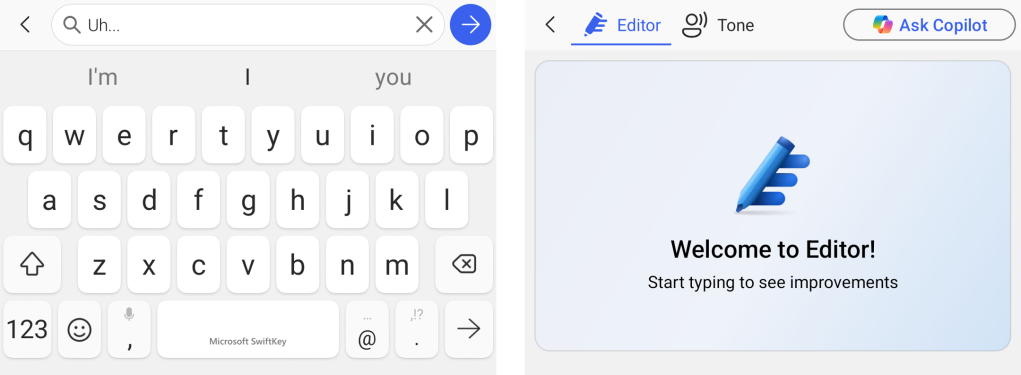
SwiftKey has plenty of other bells and whistles, too, including many of the same mode and input options as Gboard, along with an all-in-one “multi-modal” setting that lets you dictate text while still being able to actively use your on-screen keyboard for manual typing. Some of its more interesting options from the past have been phased out over time, unfortunately, while plenty of eye-roll-inducing elements — like integrated shortcuts for Bing Search and Copilot along with some Microsoft Rewards madness — have made their way into the keyboard.

bing and copilot integrations in swiftkey keyboard app

SwiftKey has an integrated Bing Search bar that just opens up Bing in your browser and a Copilot button that takes you to the Play Store to download the Copilot app.

JR Raphael / Foundry

The keyboard also, not surprisingly, relies mostly on Microsoft services over Google services by default for things like search and translation — which may be a positive, a negative, or a neutral, depending on your perspective.

Provided you’re willing to overlook all the crud Microsoft’s cramming into the keyboard nowadays, though, it’s actually a quite polished and viable alternative to Gboard — if a touch less impressive as an overall package — and its Windows clipboard syncing is a genuinely compelling and completely unique feature. If that holds a lot of appeal for you or you’re just heavily invested in the Microsoft ecosystem and want your Android experience to revolve around that universe, it’s well worth giving a whirl.

The best Android keyboard app for writing perfection

Grammarly AI Writing Assistant (free with optional $140-a-year subscription for premium features)

Our next Android keyboard app isn’t actually a keyboard in and of itself but rather a companion app that you’d use alongside another Android keyboard — like the two we just went over.

Grammarly, as its name suggests, is focused on watching your words and making intelligent suggestions about your grammar, spelling, and other potential issues as you enter text on your phone. And while it originally came in the form of a full-fledged Android keyboard, it’s now an extra layer that appears above whatever primary keyboard you prefer.

That implementation is actually quite thoughtful and clever, too, as it lets you enjoy the ever-evolving features and capabilities of a standout Android keyboard like Gboard or SwiftKey while also benefitting from Grammarly’s exceptional on-the-fly editing prowess. Those suggestions appear via a floating “G” bubble (for, y’know, Grammarly) that hovers just above your keyboard’s upper-left corner. Notably but not obviously, that bubble can be repositioned as you see fit if you press and hold your finger onto it and then drag it anywhere else on the screen.

gboard keyboard app with grammarly icon floating at upper left

Grammarly, in its resting state — as a simple floating bubble just above your regular Android keyboard.

JR Raphael / Foundry

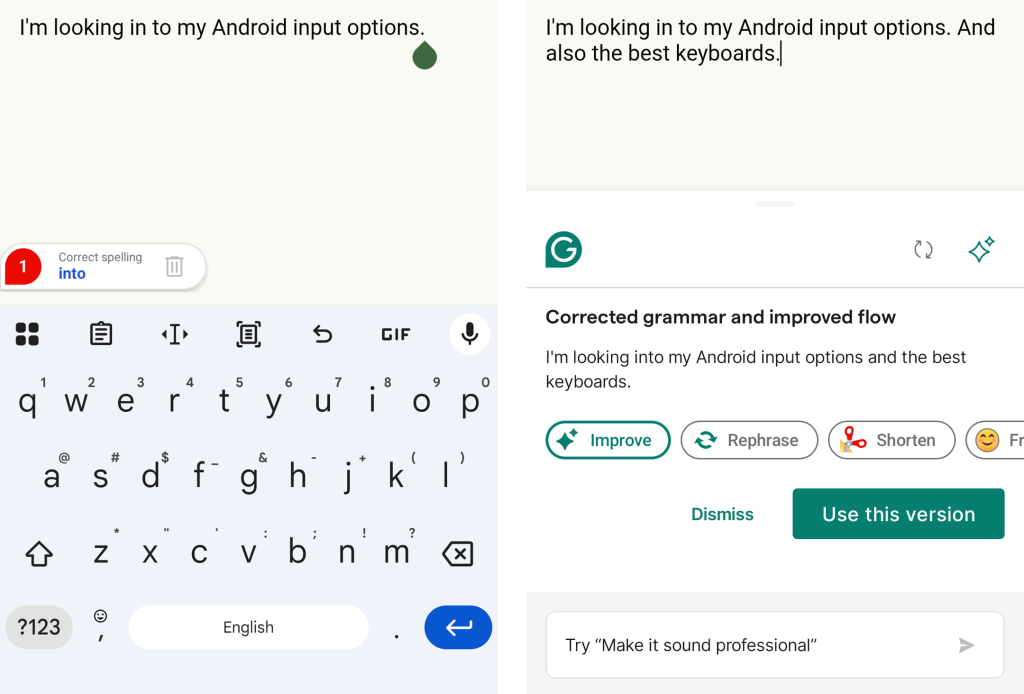
Then, as you’re typing — in any app, anywhere on your device — Grammarly pops up corrections and suggestions alongside that bubble, which you can opt to accept or ignore. Even when it comes to something as simple as a misspelled word, it outshines other keyboards by making sure an error catches your attention both while you’re actively typing and after you’ve moved past the problematic text, thanks to its lingering presence in that easily visible bubble. And it does the same with grammatical issues, too — something most other keyboards attempt only if and when you actively seek out the feature.

grammarly pop-ups with editing suggestions for typed text

Grammarly pops up tap-to-accept corrections as you write and also notifies you of broader corrections in both grammar and tone.

JR Raphael / Foundry

There is, inevitably, an AI element now as well, wherein you can provide specific prompts for how you want Grammarly to rewrite your words — making something shorter, more descriptive, more professional, and so on. And that’s fine. But it’s also something that most other keyboards and writing surfaces in general also now offer, whether you want it or not.

Where Grammarly shines is in the basic ongoing guidance it gives you alongside your existing Android keyboard adventure. And that piece of the puzzle is also free to use, though there is an optional $140-a-year premium subscription that adds in more elaborate rewriting options along with a similar set of benefits across Grammarly’s desktop browser extensions and app-specific integrations.

The best Android keyboard app for voice typing

Wispr Flow (free — for now)

No matter what Android keyboard you’re using, the recently released Wispr Flow Android app will bring a phenomenally powerful upgrade to your Android voice typing experience.

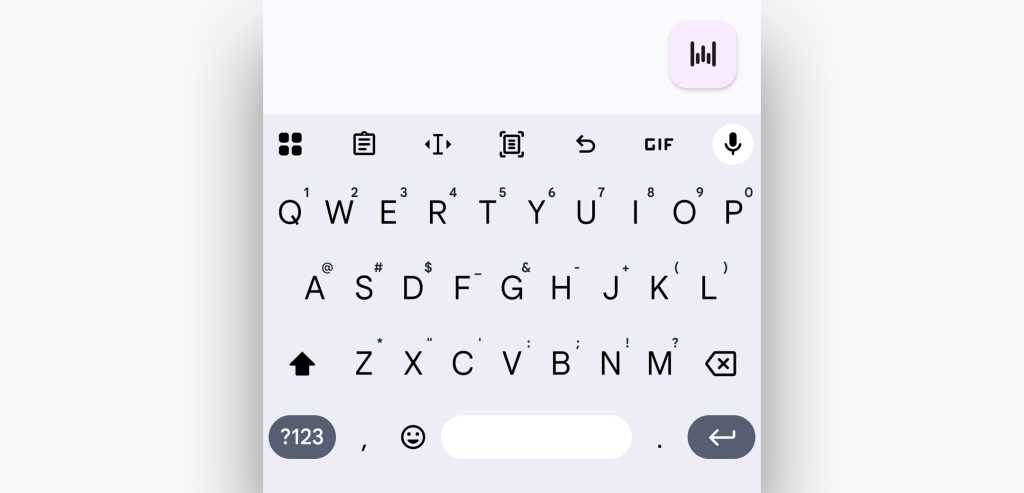
With Wispr Flow installed, anytime your keyboard is active, you’ll see a small floating-bubble icon directly above its keys. All you do is tap it and start talking — or hold it down, if you’d rather — and the app will intelligently interpret whatever you’re saying, eliminate any errors or redundancies, and put your words into neatly formatted text.

screenshot of wispr flow icon and android keyboard

Wispr Flow is just a small icon that appears above whatever regular keyboard you’re using, whenever it’s active.

JR Raphael / Foundry

It does this at a level that no regular Android keyboard even comes close to matching — with instant and near-flawless transcription, automatic formatting and punctuation, and the ability to both eliminate inadvertent interjections and interpret and process deliberate corrections spoken as you go.

[ Related Q&A: Wispr CEO: What a post-keyboard office might look like ]

Wispr Flow stays open and active for as long as you’re talking, too — even with long, extended pauses — and, true to its name, it works work well even with whispered input for more sensitive (or maybe just courteous) public dictation, which is an area where most traditional voice input systems struggle. It also supports multilingual input and will automatically detect a change in your language and continue to transcribe flawlessly even as you switch dialects.

Wispr Flow is completely free to use on Android for now, as a part of its launch. At some point, it’ll shift into the standard Wispr Flow model, which allows up to 1,000 dictated words per week for free or unlimited use with a $144-a-year Pro plan that stretches across multiple platforms and device types and also includes multi-user team collaboration features.

The best Android keyboard app for privacy and simplicity

Simple Keyboard (free)

On the flip side to the more elaborate Android keyboard options is the bare-bones, basic-as-can-be Simple Keyboard — an app whose name tells you much of what you need to know about the experience it provides.

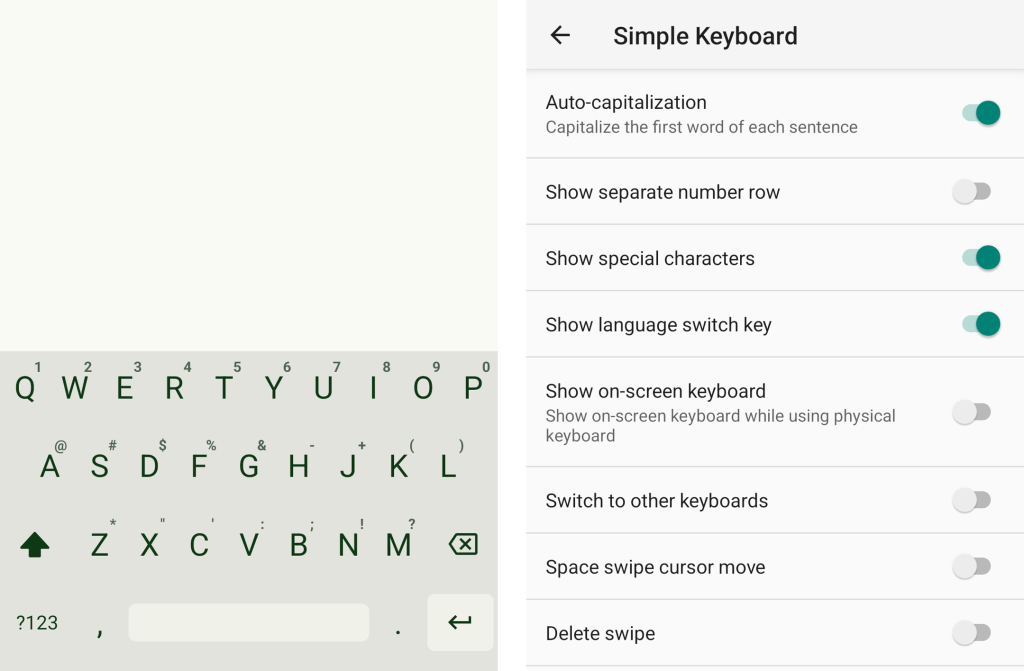
Simple Keyboard gives you, yes, a simple keyboard, with support for tap-based typing — and that’s pretty much it. There’s no text correction system, no next-word prediction, and no support for swipe-oriented input. There’s not even access to any sort of voice-to-text system, which every other app in this list provides. Heck, aside from a humble set of simple options, Simple Keyboard has no bells and whistles whatsoever. It is, quite simply, a keyboard. And that’s all it aspires to be.

simple keyboard app and its options menu

The aptly named Simple Keyboard has a limited range of options — which in and of itself is essentially the app’s defining feature.

JR Raphael / Foundry

So why would you want such a frills-free typing experience when so many rich, feature-laden alternatives exist? Well, you might not want any of those added elements, for one, and might be content to have something that just lets you tap in words as needed. But perhaps more prominently, Simple Keyboard’s lack of lofty ambitions gives it one powerful feature no other keyboard can match: privacy — built in at its core, with a ground-level assurance that nothing you type could ever be transmitted off your device by the keyboard itself.

Pretty much every other Android keyboard app, y’see, requires perpetual network access in order to operate. And while most of the major players say they’ll never do anything nefarious with your data, there’s no denying that they do at the very least have the ability to observe and transmit it. (The need for internet access can be explained in a variety of perfectly legitimate ways, including the ambitious options those apps have for performing internet searches and even just learning your typing habits over time in order to provide better predictions — but still, if maximum privacy is a top concern of yours, that may not be enough to make it acceptable.)

Simple Keyboard, in contrast, requests no level of network access. In fact, the app doesn’t request any permissions or special forms of access at all. That means there’s no realistic way the app can log what you’re typing and then transfer that data off of your device — for any reason. The program’s code is even completely open source, if you’re tech-savvy and want to confirm exactly what it’s doing.

Most people will prefer the added creature comforts offered by the other apps in this list, but for the privacy-conscious and simplicity-seeking among us, Simple Keyboard is a valuable and unusual contender that plays an important role in this keyboard collection.

This article was originally published in March 2019 and most recently updated in March 2026.

Anthropic announces think tank to examine AI’s effect on economy and society

Fresh from battling the US Department of Defense (DoD) over AI guardrails, Anthropic has returned this week with a new initiative: the company is founding a think tank, the Anthropic Institute, “to confront the most significant challenges that powerful AI will pose to our societies.”

Headed by Anthropic co-founder Jack Clark, who will take up a new role as head of public benefit, the Institute’s faculty will be completed by “an interdisciplinary staff of machine learning engineers, economists, and social scientists,” the company said.

It will unite and expand three internal teams: the Frontier Red Team, which stress tests and assesses AI models; Societal Impacts, which models how AI is being used in the real world; and Economic Research, which studies AI’s growing impact on economics and employment.

“The Institute has a unique vantage point: it has access to information that only the builders of frontier AI systems possess. It will use this to its full advantage, reporting candidly about what we’re learning about the shape of the technology we’re making,” Anthropic said.

More unexpectedly for an AI company, it also said, “[the Institute] will engage with workers and industries facing displacement, and with the people and communities who feel the future bearing down on them but are unsure how to respond.”

‘Supply chain risk’

While the timing is probably coincidental, the fact that the Institute is being launched this week comes at the perfect moment to remind the world that Anthropic sees itself as different to its rivals when it comes to AI ethics.

The Anthropic Institute is only the latest in a series of recent announcements, including the Claude Constitution, illustrating the company’s efforts to give outsiders a chance to peer into the design principles informing the model’s values and behavior.

In 2024, CEO Dario Amodei set out his vision of “how AI could transform the world for the better” in an essay reflecting the sort of idealism which has been tested in recent weeks.

On February 27, after weeks of cajoling and threats by the DoD, the company’s refusal to back down on AI ethics saw it banned from Pentagon programs by Defense Secretary Pete Hegseth as a “supply chain risk.” In response, on Monday an unbowed Anthropic announced a lawsuit asking for a temporary restraining order against the Pentagon.

The question is what enterprise customers should make of what increasingly looks like an irreconcilably ideological clash of cultures.

According to Andrew Gamino-Cheong, CTO of AI governance platform Trustible, the fact that Microsoft has publicly opposed the blanket ban on Anthropic could be significant.

“Microsoft’s support of Anthropic in this will matter,” he said. Slapping “supply chain risk” on a company of Anthropic’s size was also off-putting for the entire sector.

Microsoft, of course, invested $5 million in Anthropic in November, and said it will use Claude Sonnet in its Copilot chatbot, so what happens to Anthropic matters beyond its own walls.

“Many startups and AI companies are going to hesitate to do business with the federal government as a result of this,” Gamino-Cheong noted. “Chinese models haven’t been labelled a ‘supply chain risk’ yet, so it’s wild for an American model creator.”

However, he believed that Anthropic’s focus on AI ethics might appeal to private sector companies for whom AI governance is becoming an important issue.

“Claude’s models have started to pull away and clearly beat most others for many ‘business’ type tasks. This is because of their investment in AI safety research, which is the DoD’s sticking point.”         

This article originally appeared on CIO.com.

It looks like Macs are becoming the value option

If I happened to be one of Apple’s newly-introduced M5 MacBook Pro systems, I would feel a bit as if the equally new MacBook Neo had just strutted into the party like the star of the song.

Yes, the incredibly disruptive Neo is a strong option for almost anyone who needs an affordable general purpose computer. But let’s not forget what Apple’s higher-end range brings to the (party) table with the power and performance high-end users need for the most demanding tasks. 

What’s the data?

In essence, the power they contain means you can use a MacBook Pro to build 3D models almost as easily as you use a Neo to make a spreadsheet. Geekbench proves my point. (I’ve included the M1 chip as a comparison.) Look at these Geekbench scores and you’ll see what I mean:

  • M1 Mac: 2,386 single-core; 8,571 multi-core.
  • MacBook Neo: 3,467 single-core; 8,668 multi-core.
  • M5 Mac: 4,227 single-core; 17,802 multi-core.
  • M5 Pro Mac: 4,280 single-core; 28,030 multi-core.
  • M5 Max Mac: 4,268 single-core; 29,159 multi-core.

The data shows, that for the toughest multi-core tasks, Apple has more than tripled computational performance in just five years. It is also relevant to note Apple’s statement that the M5 Pro/Mac systems deliver over six times the peak AI compute we got from the original M1 systems.

That’s faster progress than Moore’s Law, which says computational performance should double every 18-24 months, and that trajectory shows how quickly Apple’s Macs have become highly competitive at the highest reaches of the PC industry. Gone are the thermal throttling limitations that plagued Intel Macs during high-end tasks, in comes the capacity to use Apple’s computers when sustained performance is required.

Macs were always good, which is why millions made use of them, But the introduction of Apple Silicon improved them with a degree of hardware excellence they had lacked.

This is formula one

Together, this meant that the performance of an entry-level MacBook Air was better than an Intel-based MacBook Pro, while — like the F1-series vehicles currently turning Apple executives eyes — MacBook Pro performance, including in the new M5 Pro/Max systems, sped ahead on the autobahn. 

The truth is that performance on both pro and the entry-level Macs has accelerated to the point that it has created a big gap at the low end, which MacBook Neo and its iPhone chip can easily fill. That means Apple’s traditional two-part Pro/Consumer product matrix has been transformed into Good, Better, and Best options. 

Furthermore, Apple’s silicon development seems to be accelerating so swiftly it is creating space for an all-new ‘Ultra’ tier for the most demanding users, recent reports claim. 

As a result, the number of people Apple can offer a Mac to is growing as rapidly as the product matrix. Future Ultra Macs will take that reach all the way up to the very, very top tiers currently served by furiously expensive PC workstations, while the Neo range (which I’m willing to bet gets a backlit keyboard and more memory next year) extends its hand all the way to students and general purpose computer users.

General purpose doesn’t mean average

Don’t neglect that — despite being an entry-level, $599 system — the MacBook Neo is faster for general purpose (single-core) tasks than the M3 Macs Apple introduced in October 2023. Here are the Geekbench numbers:

  • MacBook Neo: 3,467 single-core, 8,668 multi-core.
  • M3 Mac: 3,135 single-core, 12,042 multi-core.

The M3 retains the edge for complex tasks, of course, and it will always be true that if your work involves anything more than casual video or image editing, you should aim for a more advanced Mac than a Neo.

The thing is by pointing out just how powerful the iPhone chip inside a MacBook Neo has become in Mac performance terms, I’m also attempting to illustrate the phenomenal advances Apple has made at the high-end of its range. If you want to surf the web and write emails you’ll get a Neo; if you need to research and develop AI models, or run any kind of workloads that demand maximum GPU compute and high unified memory bandwidth, the M5 Max MacBook Pro can deliver.

Apple is becoming cheap

Another slice of context: 

A TrendForce report earlier this week tells us to expect steep (40%) price increases for PC notebooks as manufacturers grapple with dramatic cost spikes for memory and CPUs. This is a much bigger problem for Windows OEMs than for Apple, in part because Apple controls manufacturing of its own processors. That makes them cheaper to obtain, and while the company is putting more memory in some Macs, it can still deliver these high performance experiences with less RAM than an equivalent PC would require.

Apple has always worked to get more from less memory. But as the AI evolution causes memory prices to spike, that lean approach leaves the Mac maker more resistant to component-driven price increases than competitors. 

Never been a better time to offer up Mac

In short, Macs no longer seem so expensive, and for IT purchasers it suggests that there has never been a better time to introduce Macs to your employee tech preference schemes. And, of course, with Apple Silicon, the future should look even better tomorrow.

Please follow me on Twitter, or join me in the AppleHolic’s bar & grill and Apple Discussions groups on MeWe. Also, now on Mastodon.