
Month: March 2026

Google embeds Gemini AI deeper into Workspace apps

Google on Wednesday introduced several new ways for Gemini AI assistant to create and edit content in Workspace apps such as Docs, Slides and Sheets. 

The changes, said Julie Geller, principal research director at Info-Tech Research Group, represent “incremental improvements more than revolutionary features, but they address real workflow gaps. The actual value is that Google is embedding AI assistance directly into the tools people use every day, like Docs, Sheets, and Slides.”

With the “help me create” feature in Docs, Gemini creates a draft based on user instructions, pulling together information from other Workspace files such as documents, chat messages, and emails. It’s accessed via a side panel or the new prompt bar at the bottom of a document. Once a draft is created, Gemini can then make edits to specific sections of text within the document.

Gemini can also match the writing style across a document, which can be particularly useful when multiple coworkers create a document. A “match doc” feature is used to add information to an existing template.

For many office workers, the biggest hurdle to starting a project is manual prep work and “digging through emails to get a first draft on the page,” Yulie Kwon Kim, Google vice president of product for Google Workspace, said in a briefing. “Now, Gemini handles that for you, drawing on information across your Drive, your Gmail, your Chat, to deliver personalized outputs based on your specific context. Once you have a draft you can then co-edit with Gemini live in the document.”

For Sheets, Gemini can take turn raw data in a spreadsheet with raw data into a dashboard with visualizations using natural language prompts. Gemini sets out a series of steps for user approval and asks clarifying questions if needed as it carries out a task. 

Gemini and Sheets are “moving from a tool you work in, to a collaborative partner,” said Kim. “With a single prompt, Gemini pulls relevant data from across your Gmail, Chat, Drive, to create a formatted spreadsheet in seconds,”

Gemini lets users describe what they want in plain English, without needing to know complex formulas. Additionally, a “fill with Gemini” function in Sheets lets users quickly populate cells with relevant information. 

Google cited a company research document as an example. Gemini can determine from the column headers what information is required — HQ location, revenue, and market cap, for instance —and then search the web to generate the information.

While the tool could potentially save office workers time, hallucinations are always a concern with generative AI (genAI), particularly when working with important business data. Google claims Gemini in Google Sheets has achieved a near-human level of accuracy in benchmark tests, and users are given source links to check the data themselves. 
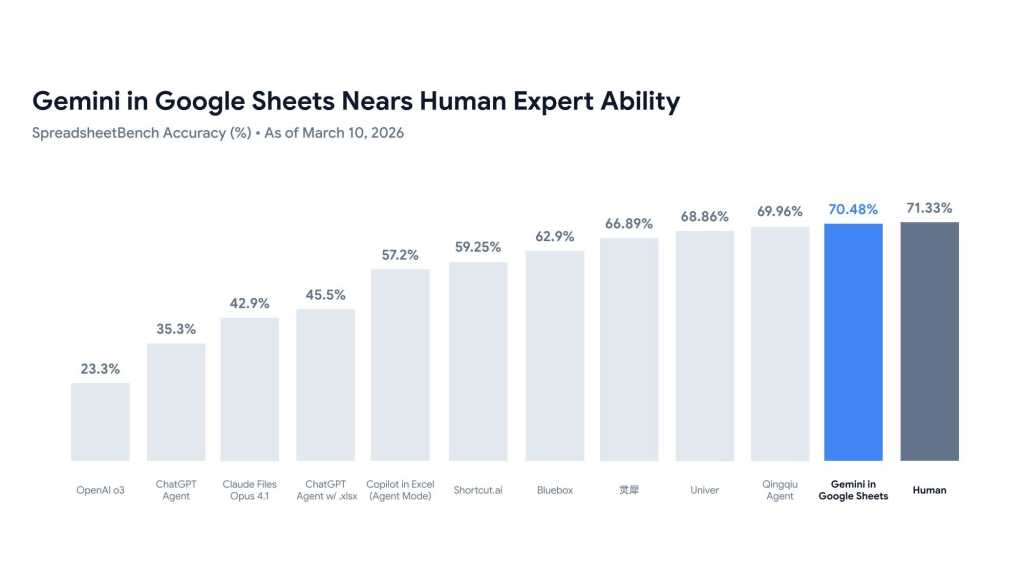
Google Gemini in Sheets

Google says Gemini in Google Sheets has achieved near-human levels of accuracy in testing.

Google

“Accuracy is a top challenge for genAI, and user trust is the ‘final boss,’” said Amy Machado, senior research manager at IDC. “Regardless of the vendor, even the most sophisticated tools will fail to achieve meaningful adoption without it.”  

With that in mind, Google is prioritizing the “context stack,” she said, with a focus on “optimizing document AI, RAG architectures, and vector embeddings that power these new features.

“The goal is high-precision, grounded retrieval and outcomes that earn user confidence,” said Machado.

Gemini in Drive and Slides

There are also updates to Google’s Drive storage. In response to user search queries in Drive, AI Overviews provides a list of relevant files alongside a short summary of their contents. For more in-depth questions, it’s possible to create custom file repositories based on specific files and folders, or even Workspace apps, with Ask Gemini in Drive. 

The Gemini features in Google Drive are the “sleeper story” of the updates this week, said Mike Leone, practice director, data, analytics & AI, at Omdia. “Turning Drive from passive file storage into something closer to an active knowledge-base could change how people think about their own information,” he said.

“I’ve been watching every major platform try to solve the ‘I know this is somewhere in my files’ problem, and Google’s approach of layering AI Overviews on top of Drive search feels like the most natural implementation I’ve seen.”

In Slides, users can edit individual slides with natural language prompts to Gemini, adapting existing design components and text as directed. It’s possible to generate a new slide that matches the same design and formatting across the rest of the deck.

In the future, Google said it will be possible to generate a full presentation from scratch based on Workspace documents.

All of the features roll out this week in beta, and will be available to AI Ultra and Pro subscribers, and Workspace customers in the Gemini Alpha program.

The features streamline processes and could save time on repetitive tasks, said Geller.  “Instead of switching between applications or starting from scratch, employees get support for drafting, organizing data, and summarizing information built right in.”

But she noted “friction points” that could undermine any time-savings. “Ask Gemini function can generate verbose responses without consolidation, leaving you with repetitive content to clean up manually,” said Geller. “And basic things like pasting screenshots for context don’t work the same way as on other platforms, which limits how useful the AI can actually be.”

Leone called the individual features “solid but not groundbreaking, since AI-assisted writing and slide generation have been around for a while now. What’s actually interesting is how Gemini now pulls from Gmail, Drive, Chat and Calendar to build a first draft or assemble a spreadsheet.

“Right-sized context is king right now in enterprise AI, and Google has a natural advantage because so much of a person’s work context already lives inside the Workspace ecosystem,” he said. “I’d expect strong business demand around Sheets and Drive specifically.”

Competing with Microsoft 365 Copilot

Google’s Gemini announcements follow close on the heels of updates to Microsoft 365 Copilot unveiled Monday, including its Copilot Cowork AI agent.

“When it comes to document applications and content creation, Google’s announcements are on par with what Microsoft offers,” said Machado. “Where Microsoft appears to be differentiating is in driving more multi-model and cross-application, integrated agentic experiences.”

Rather than competing directly with Microsoft 365 Copilot, Google is taking a different approach, said Geller. “Google isn’t playing catch up here because they’re moving on a different track,” she said. 

Microsoft is focused on user-facing workflow automation, said Geller, while Google is “offering both lightweight assistants in Workspace and developer tools for building agents. 

“They’re not directly competing yet,” she said. “If these features work reliably and save time, they deepen your investment in the ecosystem, which is exactly what both Google and Microsoft are counting on. 

“Both are iterating quickly, but speed alone won’t determine the winner. The real differentiator will be the way the customer feedback loops are designed, not just shipping features.”

While Microsoft described Copilot as an “agent” in its Wave 3 launch, Google steered clear of the term in relation to Gemini for Workspace. “They frame Gemini as a ‘collaborative partner,’ which tells you where this sits on the AI maturity curve,” said Leone.

“From my recent conversations with Google’s Workspace and Gemini teams, I know their broader agentic vision is much more ambitious, so stay tuned for that. Google has arguably the strongest foundation AI model and agent development frameworks in the market right now, and today’s features show how well Gemini can connect context across the Workspace ecosystem.

“But Microsoft is setting the pace for agentic in the workplace, and that’s the gap Google needs to close.”

Storage vendor offers a real guarantee — but check out those fine-print exceptions

For as long as most junior coders have been alive, tech vendors have talked up performance guarantees even though they neglect to detail just what happens if they don’t deliver as promised. 

I have been begging vendors to knock off these deceptions for a long time — a very long time. 

Last week, I briefly celebrated when storage vendor Scality announced a guarantee and backed it up with a promised payment of $100,000 if it failed. So far, so good.

In its announcement, the company boasted that the guarantee did not come with a lengthy list of limitations. “Unlike complex vendor programs that advertise larger amounts but are difficult to claim,” the vendor said, “Scality’s guarantee is designed to be clear, accessible.” 

It argued that the guarantee was “simple” and came with “straightforward eligibility” requirements and company execs made a lot of noise about what they were doing.

In an interview, Scality CMO Paul Speciale elaborated, dismissing other companies that deliver a “long list of stipulations and terms” and an “onerous list of conditions.”

In a statement, Scality CEO Jérôme Lecat said, “With this cyber guarantee, we’re putting our money where our architecture is. It’s a simple, direct promise that reflects the confidence we have.”

Given that we journalists are a cynical and suspicious lot, those words sounded too good to be true, so I took a look at the company’s end-user license agreement (EULA). More on that in a moment, but let’s just say my suspicions turned out to be warranted. 

Read the EULA

The lesson here for IT? Always read every word in the EULA and other documents before signing any deals. 

Let’s start with the guarantee, which relates to customers using its Artesca storage line: “A $100,000 financial guarantee to customers if an external cyberattack destroys or encrypts data stored immutably on Artesca. The program applies to every Artesca customer without requiring the purchase of additional services. As long as organizations keep Artesca up to date and protect data using Object Lock in compliance mode, they qualify for the guarantee.” 

Forget the limitations, even the initial offer has limts. The cyberattack must be external — somehow exempting insider attacks from this guarantee — and the attack must destroy or encrypt data. If an attacker simply exfiltrates data or even just accesses it without authorization, the customer gets no money. (This Willy Wonka clip strikes the right note.)

By the way, the absence of exfiltration was no oversight. As Speciale said, “Even with stolen or leaked credentials, we can prevent data stored immutably from being deleted or encrypted. But anyone with proper access credentials can read and therefore exfiltrate data. A deletion/encryption can be audited whereas a data exfiltration cannot be audited.”

He also said his company has mechanisms in place to make it less likely for an attack on the vendor to expose customer data. “First, our support team does not have the customers’ Artesca access credentials,” Speciale said. “Next, even if we would, our product implements MFA, so it would not be enough that the credentials are stolen. The device enabling the real-time second factor authentication needs to also be under control of the attacker, a much rarer occurrence. This would require more active participation of the person attacked by the social engineering, but again we don’t even have the access credentials for the customers’ system to begin with.”

What other limits are in the fine print? “Customers must notify Scality within 48 hours of discovering a qualifying incident and cooperate in root cause analysis, including providing relevant logs and telemetry.”

Oh, really? A customer that’s just been hit with a cyberattack is going to be insanely busy those first two days. Customers could easily blow by that deadline — if they’re even aware of it — before even thinking of applying for the money.

Speciale said the 48-hour time frame is only for an initial heads up. Why theshort window? “If a customer waits weeks or months to report the incident, critical system logs may be overwritten, and evidence of how the breach occurred will be lost, making it impossible to verify if the software failed or if the customer made a configuration error.” So Scality wants to see those logs to decide for itself whether the incident qualifies. 

The dilution of the guarantee deepens elsewhere. The news release said the guarantee “applies to every Artesca customer without requiring the purchase of additional services.” Not exactly,  given that it excludes free license customers.

The documents also limit that ethereal $100,000 to customers “with a minimum of 50TB license.” That’s  not an especially onerous requirement, but it does undermine the “applies to every Artesca customer” claim.

There is also a strange exemption that kicks in if an attacker does anything beyond deleting or encrypting data; the EULA says that encryption or deletion must be “the direct and sole consequence” of the attack.

How much is enough?

Scality also includes this interesting line in its news release: “Many Artesca customers protect 50TB or more, while investing only a few thousand dollars per year in software. For those customers, a $100,000 payout represents a multiple of their annual investment, thereby delivering very strong proportional assurance.”

But when a breach occurs that is the vendor’s fault, the issue is how much did that mistake cost the customers. If a customer loses $15 million, the company CFO is not going to say, “That’s OK because we only spent $10,000 on the product.” That company is going to want full compensation.

It makes me wonder: Is this guarantee a cute way of sidestepping a civil court verdict that could easily cost far more? The EULA says: “Licensee acknowledges and agrees that the Guarantee Payment shall constitute the sole and exclusive remedy for any Qualifying Cyber Incident, and no other damages, including, but not limited to, direct, indirect, incidental, or consequential damages, shall be available to the Licensee.”

Asked about this, Speciale said that other paperwork signed by the customers already blocked alternative legal mechanisms, whether by civil lawsuit or arbitration. 

“The guarantee is actually an enhancement, since without the Cyber Guarantee, standard commercial terms from most storage vendors, including Scality, disclaim liability for loss of data or a security breach. Our standard liability is also capped at the amount paid by the customer.” 

In other words, if customers don’t read the initial documentation carefully and sign it, they’ve already have surrendered their right to be made whole.

Maybe loudly touting a guarantee that comes with with an extensive list of exemptions is slightly better than offering no guarantee at all. But the underlying lesson remains: caveat emptor has never been more apt. 

Zoom expands agentic AI platform to automate enterprise workflows

Zoom Communications said it is expanding its enterprise agentic AI platform with workflow orchestration capabilities across Zoom Workplace, Zoom Phone, and Zoom CX. The aim is to help organizations automate tasks and trigger workflows based on interactions across its services.

The update includes new capabilities such as custom and prebuilt AI agents that can be orchestrated using no-code tools, enterprise search connectors for the company’s AI Companion assistant, and productivity tools, including Zoom AI Docs, AI Sheets, and AI Slides.

Zoom also introduced new capabilities across its communications and customer experience tools, including Zoom Phone Mobile, SMS support for the Zoom Virtual Agent AI Receptionist, AI Expert Assist 3.0 for its contact center platform, natural-language workflow orchestration for customer interactions, and new meeting security enhancements.

The company said the goal is to enable organizations to turn interactions across meetings, phone calls, and customer service engagements into automated workflows and completed business outcomes.

“The idea behind the new platform capabilities is straightforward,” said Sanchit Vir Gogia, chief analyst at Greyhound Research. “If meetings are where decisions happen, the platform hosting those meetings should be able to translate those decisions directly into operational outcomes.”

Platform strategy debate

The move suggests a broader effort from Zoom to expand beyond video meetings and position its platform as a hub for workplace collaboration powered by AI-driven automation. But analysts remain skeptical about the outcome.

“At the moment, Zoom is likely to remain as a specialized player serving as a layer on top of these ecosystems,” said Lian Jye Su, chief analyst at Omdia. “This builds on Zoom’s strengths in video and real-time collaboration, adding agentic AI capabilities based on insights from meetings and connected apps.”

A key challenge, analysts say, is that rivals already control the core enterprise systems where most organizational data resides. Platforms such as Microsoft 365 and Google Workspace have built their AI agents directly into productivity environments that manage email, documents, spreadsheets, storage, and identity services.

“Microsoft’s Copilot agents are designed to retrieve information and perform actions such as sending emails or updating records inside Microsoft 365,” said Pareekh Jain, CEO of Pareekh Consulting. “Google, meanwhile, positions Gemini Enterprise as an assistant and agentic platform that can access enterprise data with permissions and connect to third-party systems.”

But some analysts argue that Zoom may have an advantage in another area: the vast volume of conversational data generated during meetings and calls. Much of that information historically disappears once conversations end unless someone documents it manually.

“If Zoom can consistently convert those conversations into structured outputs such as documents, tasks, workflow triggers, and operational updates across enterprise systems, the platform becomes far more than a meeting tool,” said Gogia. “It becomes a bridge between collaboration and execution.”

In practice, this means Zoom is unlikely to replace Microsoft 365 or Google Workspace as the central productivity environment for most enterprises. What it may become instead is the orchestration layer that sits across enterprise systems and converts conversation into action.

That role may be less visible than owning the core productivity suite, but it could prove strategically important if organizations increasingly rely on AI systems to capture decisions and trigger business processes automatically, Gogia added.

How to get an early taste of Android’s next-gen multitasking magic

It isn’t often that we see an interface addition so significant — so shape-shifting — that it has the potential to completely change the way you use your phone.

It may sound like hyperbole, but that very sort of enhancement is absolutely on its way into Android. After a comical amount of hemming, hawing, flippin’, and a-floppin’, Google is finally coming back around to its original Bubbles multitasking concept from seven years ago and working to fulfill the vision it teased us with in 2019 and then never fully delivered.

And now, the notion of having desktop-style floating-window apps on Android is officially on its way into the world — for realsies! — as a part of the not-far-in-the-future Android 17 update.

But you don’t have to wait for Android 17’s arrival to experience the splendor of Bubbles on your favorite Googley gadget. As is so often the case here in the land of Android, you can grant yourself a similar sort of superpower this second — if you know where to look.

Depending on your device and how ambitious you’re feeling, all it takes is either a pinch of digging and brain-training or, at worst, a teensy touch of creative tinkering.

[Psst: Want even more advanced Android knowledge? Check out my free Android Shortcut Supercourse to learn tons of time-saving tricks.]

The Android Bubbles soap opera

We’ll get to the specific steps for bringing Bubbles-like multitasking onto any device in a second. First, let me back up a minute and properly set the stage for what this is even all about, for the non-mega-nerds among us…

Way back in 2019, y’see, Google gave us our first glimpse at an Android multitasking concept it called Bubbles — billed as “a new way for users to multitask and re-engage” with apps.

The idea was that with Bubbles, you could “carry an app’s functionality around” with you and keep things like notes, lists, and other pieces of pertinent info present on your screen and readily available for ongoing, on-demand access. It seemed like it could be a “mobile multitasking breakthrough,” as I opined at the time.

And then — well, Google…Googled. It got distracted by some shiny new thing, lost interest, and ultimately failed to fully flesh out the vision it had given us. Bubbles, the versatile on-demand multitasking revolution, turned into a limited, mostly annoying, and not at all on-demand option to have specific conversations in the Android Messages app always appear on your screen in a bubbled window form. And that’s it. Bah.

Fast-forward to last year, though, and the original Bubbles vision suddenly floated back to the surface as an under-development experiment. By the start of this year, it looked even more likely to make it into Android sometime soon.

Then, just a couple weeks ago, Google dropped its second Android 17 beta in our laps with the wild surprise that — yes, indeedly — Bubbles is back, baby, and soon to be available on demand with any app, anytime, as a piece of this year’s big new Android version.

width="618" height="640" sizes="auto, (max-width: 618px) 100vw, 618px">
The official Google demo showing how Android’s Bubbles multitasking system will work in 2026.

Google

The system doesn’t seem to be live and functional yet, even in that latest beta. But — allegedly! — the vision we were first promised nearly six years ago (!) is finally ready to become a reality as this latest Android update creeps closer to its final form.

Android Bubbles today: 3 crafty options

Now for the fun part: If you want to experience that Bubbles-like on-demand multitasking magic this minute, without waiting for Android 17 to be finished and rolled out to your device, you’ve got options.

For once, this is a scenario where Samsung’s heavy-handed modifications to the operating system are actually an advantage. But no matter what kind of Android device you’re holding or what specific sort of setup you prefer, there’s a path forward here for you.

On a recent Samsung Android device

First, provided you’re palming a reasonably recent Samsung Android gizmo, you’ve got the easiest approach of all — ’cause Samsung has already integrated a similar sort of setup directly into your device’s software. It just isn’t at all obvious or something most mere mortals are in any way aware of.

But it be there, all right — and once you know where to look, it couldn’t be much easier to tap into:

  • First, make your way into the Samsung Android Overview area — either by tapping the three-vertical-line button on the bottom-left of your screen or by swiping up about an inch from the bottom of the screen and then stopping, if you’re using the current Android gesture system.
  • Swipe left or right to move through your recently opened apps and find the one you want to open in a floating window.
  • Press and hold your finger onto its preview, then let go on your home screen — and, poof: The app will be floating and ready to move around on your screen to any position you like, atop anything else you’re doing.
srcset="https://b2b-contenthub.com/wp-content/uploads/2026/03/android-app-floating-window-samsung.webp?quality=50&strip=all 800w, https://b2b-contenthub.com/wp-content/uploads/2026/03/android-app-floating-window-samsung.webp?resize=292%2C300&quality=50&strip=all 292w, https://b2b-contenthub.com/wp-content/uploads/2026/03/android-app-floating-window-samsung.webp?resize=768%2C790&quality=50&strip=all 768w, https://b2b-contenthub.com/wp-content/uploads/2026/03/android-app-floating-window-samsung.webp?resize=678%2C697&quality=50&strip=all 678w, https://b2b-contenthub.com/wp-content/uploads/2026/03/android-app-floating-window-samsung.webp?resize=163%2C168&quality=50&strip=all 163w, https://b2b-contenthub.com/wp-content/uploads/2026/03/android-app-floating-window-samsung.webp?resize=82%2C84&quality=50&strip=all 82w, https://b2b-contenthub.com/wp-content/uploads/2026/03/android-app-floating-window-samsung.webp?resize=467%2C480&quality=50&strip=all 467w, https://b2b-contenthub.com/wp-content/uploads/2026/03/android-app-floating-window-samsung.webp?resize=350%2C360&quality=50&strip=all 350w, https://b2b-contenthub.com/wp-content/uploads/2026/03/android-app-floating-window-samsung.webp?resize=243%2C250&quality=50&strip=all 243w" width="800" height="823" sizes="auto, (max-width: 800px) 100vw, 800px">
Bubbles-esque floating windows are already possible in Samsung’s latest Android software.

JR Raphael, Foundry

Now, there is no true “bubble” involved here — and you can’t minimize the app down to an icon and then keep it on standby, like what the full formal Android Bubbles system will allow. But it’s pretty darn close to the same practical effect, at least in concept, especially with how easy it is to bring an app back into that form via the Overview menu.

On any Android device — the easy (but more limited!) way

Next: No matter what Android device you’re using, you can enjoy a taste of the on-demand app bubbling action with a simple little app called Overlays.

Overlays is limited in that it works only with Android widgets — not the full underlying apps — but given how many worthwhile Android widgets are available and how much they let you accomplish (like being able to see and interact with your notes in Google Keep, see and interact with your emails in Gmail, or see and interact with your agenda in Google Calendar), that might be all you actually need.

And it’s a heck of a lot simpler to set up than our final, more fully featured option, which we’ll get into next.

By default, Overlays gives you a bunch of its own little widgets to choose from, but the real power comes from adding in widgets from the Android apps you already use and rely on. To do that, tap the “Triggers” tab at the bottom of the Overlays configuration area, then tap the red plus button in the lower-right corner of the screen. Select “Manual,” then type in whatever name you want for your widget and tap the icon to pick any icon you like.

Tap “Save,” then select “Widget” and find the widget you want from the list. At that point, you’ll see a preview of the widget. Move or resize it if you like, to control exactly how and where it’ll appear on your screen whenever you summon it, then hit the arrow in the upper-left corner of the screen to exit out of that interface. Last but not least, tap the name of your newly made widget on the screen that comes up next to change its status to “Always on.”

And that’s it: As soon as you head out of the app and back to your home screen, your fancy new widget should pop right up. All you’ve gotta do is tap the little downward-facing arrow in its corner to minimize it down to a bubble, which you can then press and hold to move anywhere your bubble-lovin’ brain desires.

srcset="https://b2b-contenthub.com/wp-content/uploads/2026/03/android-app-floating-window-overlays.webp?quality=50&strip=all 800w, https://b2b-contenthub.com/wp-content/uploads/2026/03/android-app-floating-window-overlays.webp?resize=286%2C300&quality=50&strip=all 286w, https://b2b-contenthub.com/wp-content/uploads/2026/03/android-app-floating-window-overlays.webp?resize=768%2C805&quality=50&strip=all 768w, https://b2b-contenthub.com/wp-content/uploads/2026/03/android-app-floating-window-overlays.webp?resize=665%2C697&quality=50&strip=all 665w, https://b2b-contenthub.com/wp-content/uploads/2026/03/android-app-floating-window-overlays.webp?resize=160%2C168&quality=50&strip=all 160w, https://b2b-contenthub.com/wp-content/uploads/2026/03/android-app-floating-window-overlays.webp?resize=80%2C84&quality=50&strip=all 80w, https://b2b-contenthub.com/wp-content/uploads/2026/03/android-app-floating-window-overlays.webp?resize=458%2C480&quality=50&strip=all 458w, https://b2b-contenthub.com/wp-content/uploads/2026/03/android-app-floating-window-overlays.webp?resize=343%2C360&quality=50&strip=all 343w, https://b2b-contenthub.com/wp-content/uploads/2026/03/android-app-floating-window-overlays.webp?resize=238%2C250&quality=50&strip=all 238w" width="800" height="839" sizes="auto, (max-width: 800px) 100vw, 800px">
You can bring widget-based Bubbles onto any Android device with the help of Overlays.

JR Raphael, Foundry

Overlays can also create bubble-based widgets that automatically appear based on context — so you could have something show up every time you connect to a certain Bluetooth device or Wi-Fi network, for instance. To explore those options, just follow the same steps from above but pick “Event” instead of “Manual” when you reach the “Triggers” tab configuration.

Overlays is free, for these purposes, with an optional $4 in-app upgrade that removes some ads from the configuration interface and unlocks a handful of advanced extra features (none of which are required for what we just went over).

On any Android device — the ambitious (but most fully featured) approach

Last but not least is a brilliant way to enjoy full Bubbles-like floating windows for any app on any device, in a way that’s especially easy to access but that requires a bit of a complex initial setup.

It revolves around a fantastic Android power-user app called Panels, which is one of my all-time favorite productivity enhancers. It works amazingly well, once you’ve got it up and running. But its setup process isn’t exactly intuitive, and it takes some time and patience to get through when you’re first getting going.

Once you have it up and running, though, you’ll be able to access all of your apps with a single swipe along the side of your screen — like so:

srcset="https://b2b-contenthub.com/wp-content/uploads/2025/08/android-multitasking-panels-app-list.webp?quality=50&strip=all 800w, https://b2b-contenthub.com/wp-content/uploads/2025/08/android-multitasking-panels-app-list.webp?resize=291%2C300&quality=50&strip=all 291w, https://b2b-contenthub.com/wp-content/uploads/2025/08/android-multitasking-panels-app-list.webp?resize=768%2C791&quality=50&strip=all 768w, https://b2b-contenthub.com/wp-content/uploads/2025/08/android-multitasking-panels-app-list.webp?resize=677%2C697&quality=50&strip=all 677w, https://b2b-contenthub.com/wp-content/uploads/2025/08/android-multitasking-panels-app-list.webp?resize=163%2C168&quality=50&strip=all 163w, https://b2b-contenthub.com/wp-content/uploads/2025/08/android-multitasking-panels-app-list.webp?resize=82%2C84&quality=50&strip=all 82w, https://b2b-contenthub.com/wp-content/uploads/2025/08/android-multitasking-panels-app-list.webp?resize=466%2C480&quality=50&strip=all 466w, https://b2b-contenthub.com/wp-content/uploads/2025/08/android-multitasking-panels-app-list.webp?resize=350%2C360&quality=50&strip=all 350w, https://b2b-contenthub.com/wp-content/uploads/2025/08/android-multitasking-panels-app-list.webp?resize=243%2C250&quality=50&strip=all 243w" width="800" height="824" sizes="auto, (max-width: 800px) 100vw, 800px">
Panels makes your entire app drawer available from anywhere with a simple swipe along the side of your screen.

JR Raphael, Foundry

And, with a couple more quick taps from there, you can open any of those apps into a floating, resizable window that you can then position anywhere you like on your screen and use atop or alongside anything else you’ve got open.

srcset="https://b2b-contenthub.com/wp-content/uploads/2025/08/android-multitasking-panels-freeform-window.webp?quality=50&strip=all 800w, https://b2b-contenthub.com/wp-content/uploads/2025/08/android-multitasking-panels-freeform-window.webp?resize=295%2C300&quality=50&strip=all 295w, https://b2b-contenthub.com/wp-content/uploads/2025/08/android-multitasking-panels-freeform-window.webp?resize=768%2C780&quality=50&strip=all 768w, https://b2b-contenthub.com/wp-content/uploads/2025/08/android-multitasking-panels-freeform-window.webp?resize=686%2C697&quality=50&strip=all 686w, https://b2b-contenthub.com/wp-content/uploads/2025/08/android-multitasking-panels-freeform-window.webp?resize=165%2C168&quality=50&strip=all 165w, https://b2b-contenthub.com/wp-content/uploads/2025/08/android-multitasking-panels-freeform-window.webp?resize=83%2C84&quality=50&strip=all 83w, https://b2b-contenthub.com/wp-content/uploads/2025/08/android-multitasking-panels-freeform-window.webp?resize=472%2C480&quality=50&strip=all 472w, https://b2b-contenthub.com/wp-content/uploads/2025/08/android-multitasking-panels-freeform-window.webp?resize=354%2C360&quality=50&strip=all 354w, https://b2b-contenthub.com/wp-content/uploads/2025/08/android-multitasking-panels-freeform-window.webp?resize=246%2C250&quality=50&strip=all 246w" width="800" height="813" sizes="auto, (max-width: 800px) 100vw, 800px">
Freeform app windows in action on Android, courtesy of Panels.

JR Raphael, Foundry

Not bad, right? It’s basically a more flexible, versatile, and powerful version of Android’s standard split-screen mode — a desktop-caliber way to multitask and interact with two (or more!) apps without having to stick to the at-times awkward and limiting side-by-side, full-screen-style grid. And once you get it set up, it’s delightfully simple to use.

I’ve got step-by-step instructions for setting up Panels properly right here. You’ll need roughly five minutes to get through it, once, and then your device will be ready to roll with easy on-demand freeform window multitasking from that moment forward.

Pick whichever of these paths makes the most sense for you, and you’ll be enjoying the freedom and advanced efficiency that comes from having your apps on demand as floating, moveable windows — well before Google officially opens up the Bubbles door for you.

Get six full days of advanced Android knowledge with my free Android Shortcut Supercourse. You’ll learn tons of time-saving tricks for whatever device you’re using!

Microsoft seeks a stay on DoD’s effective ban on Anthropic offerings

Microsoft is urging a federal court in California to temporarily pause the US Department of Defense’s (DoD) effective ban on Anthropic’s AI offerings, arguing that the government’s “supply chain risk” label could have significant knock-on effects for its own defense technology business.

In a filing backing Anthropic’s request for emergency relief, the company said the designation could force contractors that integrate Anthropic’s models, including itself, to quickly modify or replace AI components used in systems tied to US military programs, potentially disrupting existing deployments and introducing new costs and uncertainty across their government contracting operations.

Microsoft, instead, sees the temporary stay as an avenue to allow Anthropic and DoD to pursue a negotiated resolution that it believes is in the best interest of both parties and allows vendors, such as itself, to avoid “wide-ranging negative business impacts.”

Revenue and customer risk

Analysts say that Microsoft’s filing is driven largely by commercial considerations and the potential revenue impact of the restriction.

“Anthropic’s $19-20B run-rate revenue could lose 10-20% from federal and defense bans, including DoD contracts affecting Microsoft’s Azure integrations and joint deals. There is further risk for broader compliance hurdles in regulated sectors as well,” Pareekh Jain, principal analyst at Pareekh Consulting, said.

Some customer organizations and their procurement teams have started reassessing Anthropic and related vendors after it got slapped with the supply-chain risk label, Greyhound Research chief analyst Sanchit Vir Gogia pointed out.

“Some prospective customers have paused negotiations while assessing the implications of the designation. Others have asked for stronger contractual protections, including broader termination rights, in case regulatory conditions change,” Gogia noted.

This is being largely driven, Gogia added, by the structure of the AI solutions market: “AI models are rarely used in isolation. They power developer tools, enterprise platforms, automation systems, and customer-facing applications. When the supplier of a core model receives a risk designation, organizations that depend on that technology may reconsider how much exposure they want.”

Ethical red lines at the center of the dispute

The filing further goes on to extend Microsoft’s full support to Anthropic’s ethical red lines, such as avoiding the use of frontier AI models for mass domestic surveillance and in weapons systems, which have been the flashpoint of the disagreement between the AI startup and DoD that started in February.

The disagreement culminated in the DoD sending a letter to Anthropic last week officially declaring it a supply-chain risk — a title that has usually been reserved for entities that pose danger to US national safety or interests.

Anthropic, earlier this week, challenged the official designation in two courts — one in Northern California and the other in New York — and sought emergency relief while terming the DoD’s actions as “arbitrary, capricious, and an abuse of discretion”.

Amicus briefs could prove effective

Microsoft’s filing, often referred to as an amicus brief, could be seen by a US federal judge as a credible argument that demonstrates to the court that the impact of the supply-chain risk designation isn’t theoretical, according to Jain.

There are similar precedents where amicus briefs have been accepted by courts, Jain said, giving the example of the FTC versus Qualcomm case in 2019, where companies like MediaTek filed amicus briefs related to stay motions and appeals.

Another example, Jain added, was the Microsoft versus US case on data privacy in 2014-2016, which saw the tech industry unite via amicus briefs to prevent the government from overreaching into cloud architectures.

“It established the cloud neutrality concept that Microsoft is likely invoking in the Anthropic versus US DoD case as well, arguing that a service provider shouldn’t be penalized for how its software is architected. In Anthropic’s case, its safety guardrails,” Jain noted. 

Last week, the Information and Technology Council, an industry group representing major technology companies including Amazon, Nvidia, Apple, and OpenAI, reportedly, in a letter to Defense Secretary Pete Hegseth, also hinted that labeling Anthropic as a supply-chain risk was an overreach.

Microsoft’s filing, filed in the same court in Northern California where Anthropic has filed its petition, calls the DoD’s order unprecedented.

However, that should not come as a surprise, as Microsoft is not only an investor in Anthropic but also uses its frontier AI models via its own offerings.

Last week, after Anthropic received the official letter, Microsoft came out in support of the company and said that the AI startup’s products were still available as part of Microsoft’s offerings. Amazon did the same.

Anthropic CEO Dario Amodei himself, via a blog post, tried to do the same by explicitly saying that the supply-chain risk label doesn’t have any impact on other customers.

Industry rallies as amicus briefs mount

Microsoft is not the only entity to have filed an amicus brief in the case.

A total of 37 top AI scientists and engineers from Google and OpenAI, in their personal capacity, filed a separate amicus brief on Monday, calling the DoD action unprecedented and saying that they, too, share the same ethical concerns around the use of AI models in weapon systems and for mass domestic surveillance.

Microsoft’s filing is yet to be accepted by the court.

It’s an AI boom, not a bubble…, but is that true at Microsoft?

It’s become conventional wisdom that we’re in the midst of an AI bubble. As evidence, AI naysayers point to a McKinsey report that found “nearly eight in 10 companies report using gen AI — yet just as many report no significant bottom-line impact.” They also cite an MIT report, The GenAI Divide: State of AI in Business 2025, that claimed 95% of generative AI (genAI) pilots in businesses are failing.

There’s growing evidence, though, that enterprises are now getting big payoffs from AI and we’re not in a bubble at all. 

A study in December from the VC firm Menlo Ventures, 2025: The State of Generative AI in the Enterprise, found that “for all the fears of over-investment, AI is spreading across enterprises at a pace with no precedent in modern software history…. Our latest market data shows broad adoption, real revenue, and productivity gains at scale, signaling a boom versus a bubble.”

Where is AI booming?

That deep-dive report offers plenty of good news for AI boosters. It found that AI spending in 2025 was $13.8 billion — more than six times the $2.3 billion spent on it in 2023. The report calls that “a clear signal that enterprises are shifting from experimentation to execution, embedding AI at the core of their business strategies…. [Seventy-two percent] of decision-makers anticipate broader adoption of generative AI tools in the near future.”

It’s not just the amount of money, but how it was spent that shows genAI is starting to boom, the report claims. The boom was led by chatbots like Microsoft’s Copilot and OpenAI’s ChatGPT, the brains behind Copilot. Now, though, the report says \ AI in enterprises is “increasingly distributed across departmental solutions in coding, sales, customer support, HR, and verticals from healthcare and legal to the creator economy.”

Equally important: enterprises have dramatically shifted the way they develop and deploy AI. Rather than build their own tools internally, they’re buying them from AI companies. In 2024, the report says 53%of AI solutions were bought rather than built internally, a number that jumped to 76% in 2025. The report notes “ready-made AI solutions are reaching production more quickly and demonstrating immediate value,” unlike internal solutions that take more time and don’t necessarily pay off.

How does Microsoft benefit?

What does all this mean for Microsoft? There’s evidence the company might not be helped by the boom as much as other AI companies. The financial site The Motley Fool warns, “The math behind Microsoft’s AI boom doesn’t add up.” It notes that on paper, Microsoft’s AI business is barreling along, with $625 billion in orders for services from its Azure cloud-based platform. But, it cautions, $281 billion of that is from OpenAI, which has been losing ground to competitors and might face financial trouble.

Microsoft frequently touts the success of Microsoft 365 Copilot, its AI add-in for the Microsoft 365 enterprise office suite. At the end of the last fiscal quarter, the company claimed Microsoft 365 Copilot had 15 million paid seats. That sounds substantial. But, as The Motley Fool points out, there are 450 million paid seats for Microsoft 365. SO, “despite Microsoft’s massive investments in AI, Copilot’s penetration rate is barely over 3%. Commercial customers appear to be extremely reluctant to pay for Copilot.”

Similarly, it warns that the AI coding tool GitHub Copilot has just 4.7 million paid subscribers even though GitHub itself has approximately 150 million users – a penetration rate also barely over 3%.

Microsoft fights back

Microsoft knows those numbers need to rise. So it’s introduced several new Copilot products aimed at enterprises. Copilot Cowork for Microsoft 365 does more than answer questions or work with Microsoft 365 applications; it takes actions based on what you need done. Here’s an example of how it can purportedly help people prepare for a client meeting: “Cowork pulls relevant inputs from email, meetings, and files, schedules prep time on the calendar, then produces a connected set of deliverables: a briefing document, supporting analysis, and a client-ready deck.”

The company on Monday also introduced Microsoft Agent 365, which manages enterprise AI agents, automatically determining every agent’s identity, permissions, activity, and risk level. Microsoft is also rolling out a new enterprise suite, 365 E7: The Frontier Suite, which combines Microsoft 365 with Microsoft 365 Copilot and Agent 365.

That’s all fine. But is it enough to boost the low uptake of Copilot? Unlikely. Eventually, expect Copilot to become a free or almost-free part of enterprise subscriptions for Microsoft 365, because Google does that with Gemini and Google Workspace. That will increase the use of Copilot, but it won’t bring in additional revenue.

So, are there boom times instead of a bubble bust ahead for Microsoft? A lot will depend on how well Azure does, and whether OpenAI continues to need the Azure services it claims it needs. 

Perhaps the biggest wildcard is whether Microsoft’s bet on what it calls “Humanist Superintelligence” pays off. Human Superintelligence is a series of AI-based technologies, each pointed at solving an important problem and aimed at bettering people’s lives. If it succeeds, real boom times are ahead for the company. If not, Microsoft might eventually be displaced as the world’s leader in AI.

ClickFix attackers using new tactic to evade detection, says Microsoft

Threat actors are trying a different tactic to sucker employees into falling for ClickFix phishing attacks that install malware, says Microsoft.

Rather than asking potential victims to copy and paste a (malicious) command into the Run dialog, launched by hitting the Windows button plus the letter R, they are being told to use the Windows + X → I shortcut to launch Windows Terminal (wt.exe) directly.

Once the terminal is opened, victims are prompted to paste in malicious PowerShell commands delivered through fake CAPTCHA pages, troubleshooting prompts, or verification-style lures designed to appear routine and benign.

Why? Going this route evades defenses looking for unusual run commands, and it bypasses security awareness training that tells employees not to do anything that invokes the Run command.

Microsoft described the tactic in a post on X this week, saying what makes this campaign notable are the post-compromise outcomes. In one case, several Windows Terminal/PowerShell instances are opened that ultimately launch another Powershell process responsible for decoding embedded hex commands.

The decoded PowerShell script then downloads a legitimate but renamed 7-Zip binary and saves it with a randomized file name, along with a zipped payload. The renamed archive utility extracts and runs the malware, which executes a multi-stage attack chain that includes retrieval of additional payloads, establishment of persistence through scheduled tasks, defense evasion through Microsoft Defender exclusions, and exfiltration of stolen machine and network data.

In a second attack path, the victim pastes a hex-encoded, XOR-compressed command into Windows Terminal. This command downloads a randomly named batch file to AppData\Local that is then invoked through cmd.exe to write a VBScript to %Temp%. The batch script is executed via cmd.exe with the /launched command-line argument, and is then executed again through MSBuild.exe, resulting in LOLBin abuse. The script connects to Crypto Blockchain RPC endpoints, indicating etherhiding technique, and also performs QueueUserAPC()-based code injection into chrome.exe and msedge.exe processes to harvest web and login data.

But is this really new?

However, a number of experts quickly added comments to the Microsoft post complaining that the Windows + X tactic isn’t new.

 Roger Grimes, CISO advisor at awareness training provider KnowBe4, agreed.

“ClickFix attacks using Win+X instead of Win+R have been around for at least six months, if not a year or more,” he said in an email. “What they are doing during execution is not new.”

Regardless, he added, the continuing and increasing use of ClickFix attacks means infosec leaders still need to educate employees about them.

“We’ve long had training content around this type of attack. Users need to know that nothing legitimate will ever ask them to do Win+ whatever keys to paste gobblygook to run code. Anything that does that should simply not be performed,” he said.

“And all Windows computers should already be restricted so that random, unsigned (not signed by the organization), PowerShell commands should not be allowed. Every organization and machine should already have the following PowerShell command setting: ‘Set-ExecutionPolicy Restricted -Force‘ enabled. If not, your organization’s cybersecurity risk is far higher than it needs to be.” 

Payload chain ‘built to last’

Joshua Roback, principal security solution architect at Swimlane, noted the campaign outlined by Microsoft pushes the ClickFix playbook into more trusted, everyday workflows by getting users to run pasted command content inside legitimate Windows tooling that feels routine and safe. That matters, he said, because it slips past the usual mental red flags people associate with sketchy popups, and it can also dodge some of the controls and detections that security teams have tuned to the more obvious ClickFix patterns.

The payload chain is also more built to last than previous variants, he added. Instead of a quick one-and-done retrieval trick, it uses a more layered delivery and persistence approach that helps it blend in, stick around longer, and quietly escalate the damage once it lands. One path adds an additional indirection layer that helps the attacker’s infrastructure blend in and stay reachable, which can make takedowns and straightforward blocking a lot less effective.

For CISOs, he said, the message to employees has to be clear. “Use a simple rule of thumb: never run pasted commands, never approve unexpected sign-ins, and report all incidents through official company support channels.”

How ClickFix works

ClickFix phishing campaigns began in 2024, Microsoft noted in a security blog last year that detailed the campaign’s tactics and indicators of compromise. The attack starts with an employee being asked to click on a link or open an attachment, often with a payment or invoice theme, within an email or text. To evade defenses looking to stop employees downloading unapproved files, the user is told in a popup box to “verify the download” by opening a Run dialog and copying and pasting something into it.

The goal is to get the unwitting victim to download malware such as infostealers (usually LummaStealer), remote access tools such as Xworm, AsyncRAT, NetSupport, and SectopRAT; loaders like Latrodectus and MintsLoader; and rootkits.

In the blog, Microsoft provides tips to defenders for fighting ClickFix attacks, including recommending they enable PowerShell script block logging to detect and analyze obfuscated or encoded commands, which would provide visibility into malicious script execution that might otherwise evade traditional logging.

This article originally appeared on CSOonline.

Gov’t IT spending seen as key to building Europe’s tech ecosystem

As more European organizations reconsider their reliance on US technology suppliers amid rising geopolitical and trade tensions, public sector organizations are leading the way in a potential shift to local tech providers. 

The German state of Schleswig-Holstein is moving tens of thousands of employees from Microsoft apps Office, Windows and Exchange to open-source alternatives, for example, while Denmarks’ Ministry of Digitalization has begun to phase out Office 365 in favor of LibreOffice. The French government recently announced plans to swap Microsoft Teams and Zoom for its own video conferencing platform for 200,000 employees – potentially saving €2 million a year in licensing costs.

These are exceptions, however, and the European public sector is still heavily reliant on US suppliers. 

The German federal government spends €481 million on Microsoft licenses annually, a figure revealed in a response to a recent written inquiry by Rebecca Lenhard, a member of German Parliament representing the Green Party. That’s only the spending at a federal level, with the total amount across German states “certainly even higher,” said Lenhard, speaking during a roundtable discussion hosted by German open source software vendor, Nextcloud, this week. “It’s a lot of money we are investing in one company that we are completely dependent on.”

The recent surge in interest around European digital sovereignty is driven by a desire to reduce the use of non-European suppliers.  

Not all see it as a positive development. Several tech leaders recently voiced concerns about digital sovereignty strategies, which they claim could increase business costs and slow user adoption of digital technologies in the region, hampering productivity and competitiveness.

Still, the notion of digital sovereignty continues to gain traction among European organizations, a growing number of which plan to increase cloud computing spend with local providers. Sovereign cloud infrastructure-as-a-service revenues are set to triple by the end of 2027, according to Gartner. 

The topic has become a strategic focus at a national government and EU level. Last  November, French and German leaders pledged to increase the use of open-source technologies among government organizations as part of that push. 

Open-source software should be the “default” across Germany’s public sector, said Lenhard, a member of the Bundestag’s Committee on Digital Transformation and Government Modernization.

“Public procurement is one of the critical points where we have to change,” said Kim van Sparrentak, a Dutch member of the European Parliament representing Group of the Greens/European Free Alliance. A “buy European” approach should be favored where possible, said van Sparrentak, “not as prerequisite for all technologies — because it’s maybe not possible yet — but for the critical aspects of government at least.” 

The state can also serve as a “valuable anchor client,” said Lenhard, supporting the growth of a wider ecosystem of European tech and service providers, which is currently dwarfed by the US tech sector. This would give businesses the ability to “plan demand better, [and] invest the money in their products so they become better and better,” she said.

A 2025 report by Cigref — a non-profit that represents French businesses and public administrations — estimates that European organizations spend a total €265 billion on US software and service each year. 

Mirko Boehm, senior director for Community Development at the Linux Foundation Europe, said policy makers should “require that every major IT procurement includes an assessment of strategic dependency.

“If a ministry in one of the member states signs a contract with a hyperscaler, that’s not just an IT decision, it’s an industrial policy decision, a skills development decision, a technology transfer decision, and a digital sovereignty decision,” said Boehm. “These are all costs that are currently not considered in procurement.”

Every euro invested in public sector procurement generates multiples more in subsequent economic activity, said Boeh, a benefit that Europe misses out on by purchasing most of its technologies from US tech companies. 

“When European governments, for example, purchase from non-European hyperscalers, that multiplier effect builds in their innovation ecosystem — not in ours,” said Boehm. “The jobs, the supplier networks, the research and development investments, the tax base — all of that compounds somewhere else.”

Boehm said open-source technologies can provide an alternative for European organizations to “retain this econonic multiplier.

“The dependency that we currently see is basically a choice, a choice we made. It’s not an inevitability,” he said. “We have the options…. We need a political will.”

European consumers ask EU to put a stop to digital enshittification

Online rights campaigners have come together to complain about the propensity of IT companies to make life more difficult for their users. The groups, mainly from Europe but with some from the US, have written to policy makers in the EU/EEA, UK and the US.

The initiative has been spearheaded by Forbrukerrådet (the Norwegian Consumer Council) which complained of the “enshittification” of software. The term was popularized by writer Cory Doctorow, one of the signatories of the letter to the policymakers.

In the letter the groups complain about “the increasing concentration of power and lack of alternatives in digital markets, the push for deregulation, and the urgent need to enforce digital laws to protect our fundamental rights and create a level playing field for competition and innovation.”

They call for a rebalancing between software providers and consumers, the need to tackle the dependency on Big Tech by introducing more competition, greater use of existing laws to help companies fight against restrictive practises and the introduction of a strong Digital Fairness Act.

But the warning applies to any enterprise considering making its own systems harder to use once it has customers locked in.

While there is no evidence that enterprise software companies are deliberately trying make their products worse, many customers have lamented the shift to subscription-only services for software features they previously owned and the cramming of unwanted AI services into every corner of applications.

To illustrate what it’s talking about, Forbrukerrådet has produced a video to demonstrate how enshittification has taken hold, leading to the constant need to upgrade systems, the pervasiveness of ads, and the need to pay subscriptions to access features previously included in the purchase price of a product.

GPT 5.4 solves previously unsolved math problem with help from long-forgotten human research

GPT just keeps getting better at mathematics, increasingly solving the trickiest of problems.

In January, AI testing company Epoch AI found that a previous version of the AI model, GPT-5.2 Pro had solved 31% of its mathematical challenges, a rise from the previous score best of 19%.

The newest version has continued the progress, tackling a range of mathematical problems set by academics..

According to an Epoch AI blog post, it has gone one stage further: “GPT-5.4 Pro solved one Tier 4 problem that no model had solved before. In a preliminary analysis, it appeared to have found a preprint from 2011 which let it shortcut much of the intended work. The problem author was unaware of this preprint,” said the blog, referring to an academic paper that had not yet been subjected to peer review.

While “solving” the problem, this does demonstrate how GPT-5.4 (and indeed all AI models) are sophisticated search engines, whose effectiveness depends on access to and rapid assimilation of information.

GPT 5.4 Pro offers several other innovations. Open AI claimed that it was the first version that can do things on computers, rather than saying how to do things. For example, GPT-5.4 Pro can click a mouse — or to be more precise, it can issue a “click the mouse” command to an agent.

It also has improved spreadsheet skills, can solve problems using fewer tokens, and will prepare a plan before tackling complex tasks, giving users the chance to tweak the results and steer it in the correct direction.