
Month: April 2026

Adobe Summit 2026: How Adobe hopes to redesign marketing and creativity with AI

Adobe Summit serves as a platform for Adobe to introduce new services, capabilities, and enhancements to its portfolio of creative and marketing software and services. The 2026 edition kicks off live in Las Vegas on April 20, with a virtual event running alongside it.

The company has long been a name to watch as a developer of creativity and design software. This year will be a pivotal one for Adobe, with the recent announcement that its CEO is stepping down after 18 years at the helm, and the rise of AI tools challenging both creators and the software vendors that serve them. Expect announcements setting out Adobe’s response to those challenges — and watch for signs that the company may be changing direction or losing ground to AI offerings from companies such as Microsoft, OpenAI, or Google.

Adobe is also one of the bigger players in the enterprise digital marketing solutions, and Adobe Summit will also provide insights into changes to Adobe Marketing Cloud and Adobe Experience Platform.

Follow this page (and this one) for the latest news and insights from Adobe 2026, and check out recent related coverage below.

Adobe news and analysis

Adobe builds an ‘agentic content supply chain’ for the AI era

April 21, 2026: Adobe is adding new capabilities to GenStudio and Firefly to automate content creation and provide agentic assistants to keep up with branding as it evolves in the age of AI. The additions include a ‘Workflow Optimization Agent’ in Adobe Workfront, its workflow management platform.

Adobe bets on agentic AI to rewrite SaaS for customer experience

April 20, 2026: Adobe is shifting its approach to what it calls ‘Customer Experience Orchestration (CXO).’ Announced today at Adobe Summit, the new Adobe CX Enterprise suite is a pivot to a future defined by agents rather than by software alone, where SaaS companies claim an advantage based on their deep domain expertise and troves of first- and third-party data.

The top priority for Adobe’s next CEO? Prepping for the ‘age of agents’

April 9, 2026: Adobe CEO Shantanu Narayen announced plans to step down last month after 18 years leading software vendor. For whomever is tapped next for the top job — the CEO search is expected to take several months — the biggest priority will almost certainly be reshaping Adobe’s products and strategy for the next wave of agentic AI, analysts said.

Adobe Acrobat Standard review: A polished PDF editor with clear limits

March 16, 2026: Adobe Acrobat Standard is Adobe’s entry paid-tier PDF editor, sitting between the free Acrobat Reader and the more fully featured Acrobat Pro. It’s meant for people who need more than viewing, signing, and basic annotations, but not Adobe’s full set of advanced document tools. It handles routine PDF work well, but advanced features still require a move up to Pro.

Adobe CEO steps down after 18 years

March 13, 2026: It’s all change at the top for Adobe as CEO Shantanu Narayen is stepping down after 18 years. He will relinquish the role as soon as a successor has been found, although he will continue to serve as chairman. The creative software company’s new boss will have to face the challenge of AI.

Adobe makes Agent Orchestrator and AI agents generally available

September 10, 2025: Adobe has launched AEP Agent Orchestrator and six AI agents for building, delivering, and optimizing customer experiences and marketing campaigns. Agent Composer, coming soon, will aid with customizing and configuring agents.

Adobe Commerce and Magento users: Patch critical SessionReaper flaw now

September 10, 2025: Adobe issued an emergency patch for one of the most severe vulnerabilities ever discovered in the Magento Open Source ecommerce platform and Adobe Commerce, its enterprise counterpart. The flaw allows unauthenticated attackers to hijack user accounts and, in some cases, execute arbitrary code on servers. Security experts warn of exploits soon.

Adobe is developing an agent to integrate Adobe Express with Microsoft 365

March 20, 2025: Adobe is working with Microsoft to develop an AI agent that can generate graphics and design content from within the Microsoft 365 interface. The Adobe Express Agent, still under development, will allow users to create and embed graphics directly within productivity applications such as Word and PowerPoint.

Adobe makes agentic AI push with Agent Orchestrator, purpose-built agents

March 18, 2025: Adobe unveiled Agent Orchestrator, a new capability for Adobe Experience Platform (AEP) to supervise AI agents, whether from Adobe or third-party ecosystems. It also introduced 10 new agents built on the capability at Adobe Summit 2025.

With John Ternus as CEO, expect Apple’s platforms to proliferate

Apple now has a new iCEO, as current leader Tim Cook (65) announced late Monday that he is set to become chairman of the board, while current head of hardware engineering, John Ternus, prepares to take over as CEO on Sept. 1.

As you’d expect, this leadership transition at one of the world’s most successful firms, is generating reams of news reports and hot takes. Here’s mine: Just as Steve Jobs presided over the resurrection of Apple and Cook led the company through unprecedented business growth, Ternus will guide the company through an era of equally unprecedented hardware proliferation. 

Expect more growth

He’s someone who cares about craft in hardware design and recently appeared in a worth-watching video interview (chaperoned by Greg Joswiak, the company’s senior vice president of worldwide marketing). The soon-to-be-CEO did well in what was an obvious media training exercise. “Everything we do, even if our customers don’t necessarily see it, everything we do has some new ideas in it…, we feel like we’re innovating all the time,” he said. 

Among a range of achievements, Cook innovated operations to the extent that every product Apple makes is supported by the world’s most efficient multinational manufacturing and logistics system. While he did, Ternus innovated product. “John Ternus has the mind of an engineer, the soul of an innovator, and the heart to lead with integrity and with honor,” said Cook.

The current CEO has had to handle huge supply chain challenges while scaling logistics to support growth. The numbers illustrate this: Apple sold 18.1 million Macs in the year following his appointment as CEO 15 years ago. In 2025, it sold 27.2 million. iPhone sales grew from 136 million in 2011 to 247 million last year. Rumor has it the MacBook Neo has shifted as many as 10 million units, just as Ternus turns up to take that figure higher.

“Tim’s unprecedented and outstanding leadership has transformed Apple into the world’s best company,” said outgoing Apple board chairman Arthur Levinson. 

You don’t need a weatherman

You can see which way the wind blows. 

Apple’s hardware is selling in record quantities, even as the company seems more prepared – and better able – than ever before to widen its addressable market with more affordable products. It is able to do this without compromising on product quality or user experience for three big reasons: 

  • The massive per-customer services income built by Cook.
  • Huge iPhone sales as an inheritance from Steve Jobs.
  • The adoption of Apple Silicon, which has been presided over by Ternus and led by Johny Srouji.

Srouji will take on the hardware leadership role being vacated by Ternus and as part of this will combine the hardware technologies and hardware engineering teams, separated in 2012. “I am excited to bring these teams together and deepen their integration to help us innovate even more than we do today. There is no limit to what we can achieve together,” he wrote. 

That optimism is well-founded. Apple’s processor designs will enable the company to push fast in its new phase of proliferation. With 1nm chips on the horizon, Apple’s processors are small, powerful, and energy efficient, making them suitable for a plethora of new hardware designs the world hasn’t even seen yet.

Making impossible things possible

Apple under Ternus will no doubt lean into that opportunity. This approach means that not only will you see Apple widen its addressable market with a combination of product quality at better prices, but you’ll also watch it expand its offer with new product families. 

It’s no coincidence, for example, that Ternus at one point led Apple’s robotics team as the company prepares to introduce its first robotic products in the coming months. Apple’s hardware is supported by Apple’s software, of course. 

While it will offer some of its own solutions within Apple Intelligence, Apple doesn’t even need to make the AI. It just needs to make the best hardware to run AI on, which is what Ternus is going to focus on. 

You can already see it. With Ternus leading hardware, the Mac is more powerful and more popular today than at any point in its history — and the MacBook Neo is building on that success. It represents the thin end of a wider wedge of hardware-driven market share growth across all Apple’s products that will now accelerate under Ternus, even while the latter makes his own transition.

As board chairman, Cook will turn to handling the complex political and strategic relationships he’s been dealing with as CEO. Cook is very good at that, which also raises the question of whether he has wider ambitions for political engagement.

You can follow me on social media! Join me on BlueSky,  LinkedIn, Mastodon, and MeWe. 

Apple CEO Tim Cook stepping down, to be replaced by John Ternus

Apple announced late Monday that Tim Cook, the company’s CEO since 2011, is stepping down Sept. 1 to be replaced by current senior vice president of hardware engineering, John Ternus. Cook will become executive chairman of the board.

Cook, who is 65, will continue as CEO until the end of August to assist in the transition, which, Apple said, came after a “thoughtful, long-term succession planning process.”

“It has been the greatest privilege of my life to be the CEO of Apple and to have been trusted to lead such an extraordinary company, Cook said In the announcement about the changes. “I love Apple with all of my being, and I am so grateful to have had the opportunity to work with a team of such ingenious, innovative, creative, and deeply caring people who have been unwavering in their dedication to enriching the lives of our customers and creating the best products and services in the world.”

john ternus apple

John Ternus will succeed Tim Cook as Apple CEO in September.

Apple

He also sang his successor’s praises: “John Ternus has the mind of an engineer, the soul of an innovator, and the heart to lead with integrity and with honor. He is a visionary whose contributions to Apple over 25 years are already too numerous to count, and he is without question the right person to lead Apple into the future. I could not be more confident in his abilities and his character, and I look forward to working closely with him on this transition and in my new role as executive chairman.”

Current board non-executive chairman Arthur Levinson, who has held the post for 15 years, will become Apple’s lead independent director on Sept. 1. When he assumes his new role, Ternus will join the board.

Apple also announced that Ternus’s job will be filled by Johny Srouji, effective immediately.

“Johny is one of the most talented people I have ever had the privilege to work with,” Cook said about that change. “He has played a singular role in driving Apple’s silicon strategy, and his influence has been felt deeply not just inside the company, but across the industry. He has always led his organization with remarkable deftness and judgment, and time and again, his team has delivered breakthrough innovations that have transformed our products. We are incredibly fortunate to have him as Apple’s chief hardware officer.”

Global RAM shortage appears set to continue through 2027

The ongoing shortage of memory chips looks likely to continue throughout the year as demand from the AI sector surges. According to Nikkei Asia, leading manufacturers are expected to be able to meet only about 60% of global demand despite expansion plans.

Although new factories are on the way, several of them are not expected to reach full production until 2027 at the earliest. Even once those facilities are up and running, additional time will be required to scale up to efficient production levels.

An annual production increase of around 12% would be needed to catch up with demand, analysts said, though current plans are significantly lower. The balance between supply and demand for memory is not expected to normalize until 2028.

Because of the shortage, memory prices have risen by approximately 90% during the first quarter of 2026.

World ID expands its ‘proof of human’ vision for the AI era

Identity management is a critical concern for any enterprise, and it’s becoming ever more complex and convoluted with the advent of AI agents.

World ID is taking a unique (and to some, controversial) approach to this challenge by building a ‘digital proof of human’ ecosystem for the internet. Today, at its “Lift Off” event, the Sam Altman co-founded initiative made a series of announcements, which included the launch of version 4.0 of its World ID protocol, a World ID app, World ID for Business, World ID for Agents, a new verification tool called Selfie Check, new monetization programs, and integrations with Zoom and Okta.

“It’s a re-engineering of the stack around a very simple idea: Humans should have a right to exceptional privacy and security,” Daniel Shorr, chief of staff to the CEO at Tools for Humanity, said at the event.

How ‘proof of human’ works

Billed as the infrastructure for the age of AI, World ID was co-founded by Altman and Alex Blania, and is being developed by technology company Tools for Humanity, whose iris imaging technology seeks to eliminate the need to provide emails, photos, or other personal details to prove identity.

World ID’s mission is to provide “proof of human” (POH), so that people know they are in fact interacting with another human being (or a bot on behalf of a verified human), rather than a deepfake or other unknown entity. The ideal is to reduce abuse, impersonation, fraud, and misinformation, and promote trust in online interactions.

POH ensures that only one account exists per user (‘one-person-one-ID’) via Tools For Humanity’s iris-scanning Orb device, which uses multispectral sensors and infrared light to capture high-res images of a human’s irises. These images are processed in seconds on-device to generate an ‘IrisCode,’ a unique cryptographic hash based on the iris’s unique details and textures.

IrisCodes are then compared to entries in the World Chain, a global blockchain-based database, to verify the user hasn’t previously registered. This check uses zero-knowledge proofs (ZKPs), a cryptographic prover-verifier mechanism, to confirm iris uniqueness without needing to link personal data.

If the IrisCode is identified as unique, the user receives a World ID that can be stored on their phone. IrisCodes are anonymized and fragmented across secure servers to minimize breach risks, preventing reverse engineering. The Orb also deletes original images by default.

Other World ID initiatives include Deep Face and Face Auth, which help identify deepfakes by performing private 1:1 face comparisons of selfies and Orb-captured images.

Tiago Sada, chief product officer at Tools for Humanity, emphasized the protocol’s open source nature, third-party auditing, and regular security updates. “It goes beyond standard end-to-end encryption, and it uses multiple primitives, including anonymized multi-party computation and zero knowledge proofs to protect you along the way,” he said at today’s event.

More than 18 million people across 160 countries have now verified their “humanness” via Orb and have used them more than 450 million times, execs said.

New World ID features

The new World ID 4.0 is a more scalable and powerful version of World ID that incorporates essential upgrades like key rotation (which detaches keys from identity), multi-party entropy (to ensure that every interaction is unlinkable), and finer credential controls (more ways to manage and protect information), Shorr explained.

It now includes a new verification method, “Selfie Check,” that can be used in lieu of Tools for Humanity’s Orb device. “Take a selfie and ‘boom, you’re in,’” Shorr explained. He noted that it’s not as robust as the Orb, but it’s “really, really compelling for specific use cases. Not every use case today requires the gold standard of Orb assurance.”

World ID also now includes agent delegation tools that essentially serve as what Shorr called “a power of attorney for your agent,” allowing it to perform actions on the user’s behalf.

“With the explosion of agents, the internet is fundamentally changing again,” he said. “How do you make sure the right humans are in the loop?”

This is especially important at critical moments where users or platforms need to ensure that a purchase or decision was intentional. At the same time, he said, “we don’t want Skynet.”

Security company Okta is now onboard, introducing Human Principal, a verification method based on World ID that is now available in beta.

World ID also announced upcoming new monetization efforts. Shorr noted that it’s difficult to monetize the network when you can’t share user data, but at the same time, being human is “incredibly valuable” in the age of AI, and the internet will want to know which users are human.

“We dug through the history books, and we came up with an inventively old approach: Fees,” he said. When services or developers ask for World ID proof, apps will pay a fee, not humans.

World ID and Zoom fighting deepfakes

Ensuring participants in Zoom calls are real people is another concern.

Brendan Ittelson, Zoom’s chief ecosystem officer, noted that deepfakes are more realistic than ever and the technology to create them is much more accessible, so it’s no longer a hypothetical ‘will this happen?’

Customers across Zoom’s user base are deeply concerned, he said, yet there are challenges with existing verification techniques and knowledge base options.

“The technology is evolving so fast, so doing detection techniques and all that is a constant cat and mouse game,” he said. “You really need a platform where you’re looking at [the question], ‘how can you validate someone and be privacy forward, but also have that strong human connection?’”

To address that problem, today’s announcements included the news that World ID is coming to Zoom. New capabilities will match live images with the Orb-verified ID on a user’s device when they log into a call. They can also verify themselves in real time; nothing leaves their device. World ID verification will be indicated by a badge in the user’s Zoom window.

Not everyone is convinced, though

While touted as a way to make the internet a safer, more democratic, and inclusive place, the ambitious initiative has been met with significant criticism.

Detractors, including the likes of notorious whistleblower Edward Snowden, warn of privacy and biometric data risks. They argue that storing iris data could create immense security problems, as well as the potential for its misuse and for unlawful surveillance.

Other criticisms are that World ID creates a central point of failure, requires blind trust in one company, and exploits vulnerable and developing nations. For instance, the initiative became massively popular in Kenya because iris scans were traded for Worldcoin cryptocurrency (WLD). This hinted at bribery, detractors note; the program has since been banned in the country, and is also either banned or suspended in Brazil, Indonesia, Hong Kong, and Spain.

Further, the initiative raises concerns around data protection laws, credential theft (which can be particularly catastrophic because irises are immutable), and ‘function creep’ that could eventually restrict access to sites and force participation in the program.

Indeed, Orbs, which began shipping in the third quarter of 2025, are purchased from the private Tools for Humanity organization and are owned by “community operators,” who verify World IDs with their devices and receive WLD tokens for their efforts.

Protecting this kind of biometric data is crucial, said David Shipley of Beauceron Security: He pointed to Apple’s approach, where biometric data is securely stored on-device, and only a digital expression based on that data is transmitted, never the original biometric data itself.

“This feels like a super-bad idea,” he said of World ID. While having a secure, verified digital ID as a service that can be trusted is much needed, it shouldn’t be delivered by a private sector entity, he contended.

“Private sector control of personhood feels Hollywood-style cyber dystopian,” said Shipley. “Proof of being human and proof of being a citizen are public goods and should be delivered by public bodies that can be held accountable through democratic representation.”

Microsoft’s Patch Tuesday updates: Keeping up with the latest fixes

Long before Taco Tuesday became part of the pop-culture vernacular, Tuesdays were synonymous with security — and for anyone in the tech world, they still are.  Patch Tuesday, as you most likely know, refers to the day each month when Microsoft releases security updates and patches for its software products — everything from Windows to Office to SQL Server, developer tools to browsers.

The practice, which happens on the second Tuesday of the month, was initiated to streamline the patch distribution process and make it easier for users and IT system administrators to manage updates. Like tacos, Patch Tuesday is here to stay.

Patch Tuesday coverage has long been a staple of Computerworld’s commitment to provide critical information to the IT industry. That’s why we’ve gathered together this collection of recent patches, a rolling list we’ll keep updated each month.

In case you missed a recent Patch Tuesday announcement, here are the latest six months of updates.

October Patch Tuesday: 1,408 CVEs, 1 exploited flaw and a SharePoint surprise

Microsoft just shipped 1,408 vulnerabilities in one month, and a SharePoint flaw it marked “not exploited” is actually under attack right now. Our expert recommends a Patch Now scheduling for Windows, Office, Exchange and the developer tooling, and a standard release schedule for SQL Server.

Get more info on the October 2026 Microsoft security updates.

September Patch Tuesday: 963 CVEs, 2 exploited flaws, 1 message

September’s Patch Tuesday is Microsoft’s biggest of 2026, with 963 CVEs, two exploited flaws and a clear message: prioritize Windows, Office and SQL Server.

Two vulnerabilities are already exploited: CVE-2026-81963 in the Windows Update Stack and CVE-2026-85880 in Advanced Local Procedure Call. Nothing in this release was publicly disclosed ahead of the patch. Readiness recommends a Patch Now scheduling for Windows, Office, SQL Server and the developer tooling, and standard patch release for Exchange.

Get more info on the September 2026 Microsoft security updates.

August’s Patch Tuesday is a monster: 751 fixes, with an exploited Windows flaw

Microsoft’s August 2026 Patch Tuesday closes at 751 CVE entries (across all product families), with 108 rated as critical. One flaw is already exploited, CVE-2026-68820, an elevation of privilege in the Windows WinSock driver (afd.sys). Two more were disclosed but not exploited.

This security-only release earns Patch Now for Windows, Office and Exchange; no SQL Server updates this month. Unfortunately, several critical issues affect server roles: Windows DNS Server carries a cluster of critical RCEs; Windows DHCP Server is the most-populated Microsoft product family at 14 entries. Testing should lead with printing and fonts and the Remote Desktop client, then a WinSock smoke test given the exploited afd.sys flaw.

Get more info on the August 2026 Microsoft security updates.

July’s Patch Tuesday sees an end-of-support collision amidst a massive, record-setting patch wave

Microsoft addressed 722 CVEs this month once the 427 Chromium upstream relays are set aside — roughly three times a normal cycle and one of the largest single months in recent memory. Two vulnerabilities arrive under active exploitation: an elevation of privilege in Active Directory Federation Services (CVE-2026-56155), and an elevation of privilege in SharePoint Server (CVE-2026-56164). A third, a BitLocker security feature bypass (CVE-2026-50661) is publicly disclosed but not yet exploited.

The July 2026 Patch Tuesday earns Patch Now recommendations for Windows, Office, Exchange, and SQL Server. SharePoint has two critical RCEs on top of its exploited zero-day, and Exchange Server returns with a critical on-premises spoofing flaw. Adding to our (dear) administrator’s efforts, SharePoint Server 2016/2019 and SQL Server 2016 all reach end of support today.

More info is available here on Microsoft Security updates for July 2026.

For June, Patch Tuesday means an IT scramble

Microsoft this month released 206 updates affecting Windows, Office, Exchange Server, and its developer tools — including three Windows vulnerabilities already publicly disclosed. That trio includes an elevation of privilege in the Collaborative Translation Framework (CVE-2026-45586), a denial of service in HTTP.sys (CVE-2026-49160), and a BitLocker security feature bypass (CVE-2026-50507). At the moment, none appear to be under active exploitation, but all three are rated “Exploitation More Likely.” 

Even without an exploited zero-day, the June 2026 Patch Tuesday release requires Patch Now recommendations for Windows, Office, and Exchange. The latter is back in the patch picture with a consolidated security update that Microsoft recommends installing “as soon as possible.”

More info is available here on Microsoft Security updates for June 2026.

For May, Patch Tuesday means 139 updates — but no zero-days

Microsoft this month released 139 updates affecting Windows, Office, .NET, and SQL Server (though there were no updates for Microsoft Exchange Server). Despite the absence of zero-days, the May Patch Tuesday update still requires Patch Now recommendations for Windows and Office. 

The combination of three unauthenticated network RCEs (Netlogon, DNS Client, and SSO Plugin for Jira and Confluence), four Word Preview Pane RCEs, the large TCP/IP vulnerability cluster, and the carry-over BitLocker recovery condition (still active on Windows 10 and Windows Server) warrants an accelerated deployment release schedule. 

More info is available here on Microsoft Security updates for May 2026.

Microsoft’s Patch Tuesday release for April is a whopper

Windows admins are going to be busy this month, dealing with the largest Patch Tuesday cycle we can recall. The April release involves 165 updates and roughly 340 unique CVEs from Microsoft — including two zero-days, one of which is already being actively exploited in the wild. 

The Readiness team is recommending “Patch Now” schedules for nearly every major product family this month: Windows, Office (with a zero-day), Microsoft Edge (Chromium), SQL Server, and Microsoft Developer Tools (.NET). April also brings Phase 2 of Microsoft’s Kerberos RC4 hardening with full enforcement set for July. There is a lot to cover, so the Readiness team built an infographic mapping the deployment risk for each platform.

(More information about recent Patch Tuesday releases is available here.)

Known issues

Microsoft reports a single Windows 11 25H2 issue. It affects a narrow enterprise deployment group, but matters to anyone affected.

  • KB5083769 – BitLocker recovery prompt on first restart (Windows 11 25H2/24H2). Devices with BitLocker enabled on the OS drive and the Group Policy “Configure TPM platform validation profile for native UEFI firmware configurations” set with PCR7 in the validation profile may be prompted for the BitLocker recovery key on the first restart after installing this update. Recommendation: Remove the PCR7 Group Policy configuration and run gpupdate /force before installing.

Issues resolved

April’s KB5083769 closes four issues, three quality-of-life and one multi-cycle reset failure:

  • KB5083769 – Reset this PC (Windows 11 25H2/24H2). Resolves a defect that broke device reset on certain hardware and configuration combinations, taking the last-resort recovery path with it.
  • KB5083769 – Secure Boot certificate rollout. The ongoing Secure Boot CA refresh picks up two improvements: the Windows Security app now displays certificate update status directly (Settings → Privacy & Security → Windows Security), and the quality update widens the device-targeting data for the staged rollout.
  • KB5083769 – SMB compression over QUIC. SMB compression requests over QUIC now complete more consistently; the update addresses prior timeouts.
  • KB5083769 – Remote Desktop anti-phishing. Opening a .RDP file now triggers a confirmation dialog listing every requested connection setting, each disabled by default. Users must explicitly opt in to local resource sharing before the connection is made; a one-time security warning appears the first time a .RDP file is opened after installing the update.

Major revisions and mitigations

Microsoft released no major revisions to Windows or Office. But Azure and Chromium/Edge have picked up several updates since the last month:

  • Microsoft documented four critical Azure CVEs; no user action required.
  • Microsoft re-published 141 Chrome/V8/WebGL/WebML/WebRTC fixes from the weekly upstream cadence; Edge picks them up through its own auto-update channel.

So Microsoft published 145 CVEs that affected Edge over the past 30 days. That averages out to around five reported security vulnerabilities per (working) day. Does anybody remember the good old days when we just had 10 critical-rated memory-related issues with IE — each month?

Windows lifecycle and enforcement updates

The saying that “April is the cruelest month” seems apropos, as we have three rather strict enforcements from Microsoft:

  • Kernel driver cross-signed trust — evaluation mode begins April. Microsoft is dropping trust for legacy kernel drivers signed under the deprecated cross-signed root program, audit-only on Windows 11 24H2/25H2/26H1 and Server 2025.
  • Kerberos RC4 hardening Phase 2 — April. Following November 2025’s Phase 1, domain controllers now default to AES-SHA1 encrypted tickets for accounts without an explicit Kerberos encryption type configured (CVE-2026-20833). The enforcement phase begins in July.
  • Windows Deployment Services hands-free deployment — disabled by default from April. Hardening for CVE-2026-0386 (Unattend.xml over unauthenticated RPC) disables hands-free WDS deployment by default, beginning with the April update. Admins can override, but Microsoft does not recommend doing so.

Testing guidance

Each month, the Readiness team analyzes the latest Patch Tuesday updates and provides detailed, actionable testing guidance. April’s release covers 56 component updates across Windows. Microsoft flagged two as High Risk — Kerberos authentication and the Remote Desktop client — and delivered five patches to the Projected File System driver affecting cloud sync scenarios. Secure Boot and BitLocker validation expands to seven scenarios this cycle, including a new Windows Hello PIN persistence check. Prioritize Kerberos infrastructure, Remote Desktop stability, and cloud sync before broad deployment.

Kerberos and KDC

The Kerberos Key Distribution Center (kdcsvc.dll) and client library (kerb3961.dll) carry a High Risk flag this month. Microsoft’s guidance targets environments using keytab-based authentication with RC4 encryption — a legacy configuration common in mixed Windows and non-Windows service environments. The client-side update affects only Windows 10 1607, but server-side changes apply to all editions from Windows Server 2022 through 2025.

  • After installing the update on domain controllers, open Event Viewer and review the System and Security logs for events with IDs 201–209.
  • Capture full event details for any new events in that range: text, timestamp, and affected account or service.
  • Focus testing on long-running services authenticating via RC4 keytabs, as these are most likely to surface failures after the update.

Remote Desktop client

Microsoft also flags the Remote Desktop ActiveX control (mstscax.dll) as High Risk. The update affects clipboard redirection, printer redirection, and session reconnection stability across all supported Windows versions. A separate update to mstsc.exe covers SmartScreen behavior for .RDP file handling, RemoteApp, and Hyper-V Enhanced Session mode.

  • Connect to a remote device using mstsc.exe and check that the session establishes and remains stable.
  • Copy and paste between local and remote sessions, both text and files, and expect correct transfer in both directions.
  • Redirect a local printer into the remote session, print a test page, and confirm the job completes.
  • Disconnect, reconnect, and verify clipboard and printer redirection survive the reconnection.
  • Expect RemoteApp resources to launch normally and Hyper-V Enhanced Session mode to connect without error.

Secure Boot and BitLocker (continuing)

Secure Boot and BitLocker testing now expands to seven scenarios, including a new Windows Hello PIN persistence test. These validate Secure Boot state, BitLocker encryption, and key rolling related to the ongoing CVE-2023-24932 mitigation. Perform only on dedicated test devices with recovery keys backed up.

  • Enable BitLocker on the OS drive, verify TPM protectors are present using manage-bde -protectors -get c:, then disable and verify the drive is fully decrypted.
  • Enable BitLocker on a data drive, verify protectors, then disable and verify decryption completes.
  • With Secure Boot enabled, enable BitLocker, trigger the recovery screen using reagentc /boottore, and verify the recovery key unlocks the drive.
  • With Secure Boot disabled, enable BitLocker, force recovery via BCD test signing changes, unlock with recovery key, suspend BitLocker, and verify normal boot resumes.
  • With both enabled, apply the Secure Boot key update (CVE-2023-24932) and verify the system boots without triggering recovery.
  • Test hibernation with Secure Boot and BitLocker both enabled and verify clean resume without recovery prompts.
  • On a device running March 2026, enable Windows Hello PIN and BitLocker, install the April update, and confirm the PIN still works.

Networking

April patches the Ancillary Function Driver for WinSock (afd.sys) twice — once paired with the TDX transport driver, once standalone — making it the most-patched network component this month. A separate patch to HTTP.sys affects HTTP/3 on Windows 11 23H2 and 22H2.

  • Browse websites, download and upload files (including large files), and test VPN and Remote Desktop connections over both IPv4 and IPv6.
  • Check that Teams, Outlook, and other messaging applications sign in, send messages, and reconnect after network blips.
  • Test sandboxed and low-privilege processes — Edge, Store apps, and Electron apps — to confirm their network requests succeed.
  • Generate sustained network load and confirm no BSODs, no new errors in Event Viewer, and no throughput degradation.

VPN and IPsec

April patches two VPN components: the Windows Filtering Platform driver (wfplwfs.sys) and the IKE Extensions service (ikeext.dll). The WFP update targets UWP VPN plug-in stability, sleep/wake recovery, and Always On VPN. The IKE update covers IKEv2 tunnels, IPsec security associations, and Connection Security Rules.

  • Connect and disconnect your UWP VPN plug-in client repeatedly (10+ cycles) and confirm the client remains usable and the system stays stable.
  • Keep the VPN connected for 30+ minutes during active use; verify it survives network changes (Wi-Fi to Ethernet) and sleep/wake cycles.
  • If using Always On VPN, confirm it connects at sign-in and reconnects after network loss.
  • Establish IKEv2 VPN connections and verify the tunnel is stable and internal resources are reachable.
  • Validate that Connection Security Rules negotiate IPsec correctly and that protected traffic remains protected.

Authentication and security

Patches to the SSPI kernel drivers (ksecdd.sys, ksecpkg.sys) span NTLM, Kerberos, CredSSP, and TLS/SSL. The Windows Hello for Business stack also picks up updates for Enhanced Sign-in Security.

  • Exercise end-to-end sign-in and resource-access flows for applications that use NTLM, Kerberos, CredSSP, or TLS/SSL authentication.
  • Test both success and failure cases: correct versus incorrect credentials, allowed versus denied accounts, and expired certificates.
  • Verify Windows Hello for Business authentication with Enhanced Sign-in Security across sign-in, lock, unlock, and reboot cycles.

Graphics, Shell and desktop

April updates span Direct3D, the Desktop Window Manager, and the graphics kernel (win32kbase.sys, win32kfull.sys). The Windows Shell (shell32.dll) picks up a patch affecting Mark-of-the-Web preservation for downloaded shortcuts, and COM Automation (oleaut32.dll) gets an update.

  • Run stress tests with sustained UI activity: rapid open/close of windows, snap layouts, virtual desktop switching, and multi-monitor connect/disconnect.
  • Test GPU-accelerated workloads — video playback, 3D applications, browser hardware acceleration — and check for visual artifacts or flickering.
  • Download a .lnk shortcut file from the internet and confirm SmartScreen displays a warning when the shortcut is opened — verifying Mark-of-the-Web is preserved.
  • Run COM Automation workflows — VBA, PowerShell, and Office automation — and confirm they execute correctly.

Hyper-V and virtualization

April patches both Hyper-V compute layers (computecore.dll, vmcompute.dll, vmwp.exe), along with the hypervisor binary (hvax64.exe) for Windows 11 25H2 and 24H2.

  • Start, save, resume, and stop a VM using Hyper-V Manager or PowerShell and repeat the cycle multiple times.
  • Export a VM, import it, and confirm the imported VM boots and runs normally.
  • Launch Windows Sandbox and confirm it starts without error.

Windows Installer, Cloud Sync and MDM

April updates to Windows Installer (msi.dll), the Cloud Files filter (cldflt.sys), and the MDM management layer affect installation workflows, cloud sync, and device management.

  • Install, uninstall, and repair MSI packages to verify Windows Installer functions correctly.
  • Connect and disconnect your cloud sync provider (e.g. OneDrive) multiple times and confirm sync functions after restarts.
  • Enroll a device in Intune or your MDM solution, verify compliance status, and trigger a policy sync.

Common Log File System and storage

The Common Log File System driver (clfs.sys) — subject of March’s major hardening change — picks up a follow-up patch. Storage Spaces (spaceport.sys) and app isolation file system drivers (bfs.sys, wcifs.sys) also receive updates this cycle.

  • Run Windows Update install and rollback cycles, then power-cycle the machine multiple times to confirm the system boots normally each time.
  • Install and uninstall a set of representative applications through multiple cycles and confirm each completes without error.
  • Perform a backup using your normal solution, restore from it, and verify data integrity.
  • If using Storage Spaces, create a pool with mirrored and thin virtual disks, write data, and verify clean deletion.

Office and SharePoint

April’s Office updates target MSI editions: Excel 2016 (KB5002860), PowerPoint 2016 (KB5002808), Office 2016 shared libraries (KB5002859), and SharePoint Server 2016, 2019, and Subscription editions. These will not install on Click-to-Run deployments such as Microsoft 365 Apps.

  • Open and edit complex Excel workbooks with formulas, macros, and external data connections; save and reopen to verify integrity.
  • Create and edit PowerPoint presentations with embedded media and transitions.
  • Across all patched server editions, validate SharePoint document library operations, co-authoring, and workflow execution.
  • Verify that Office add-ins and line-of-business applications integrating with Office continue to operate correctly.

April’s two High Risk components should top every testing queue. Kerberos changes could disrupt long-running services using RC4 keytabs; monitor event IDs 201–209 and keep rollback plans ready. The Remote Desktop client update warrants thorough validation of clipboard, printer redirection, and session reconnection, particularly in RDP-dependent environments. Secure Boot and BitLocker validation remains essential as CVE-2023-24932 key rolling continues. Five patches to the Projected File System driver elevate cloud sync testing this cycle. The dual afd.sys updates and VPN/IPsec patches warrant regression testing across remote-access infrastructure. Office updates are confined to MSI editions.

Each month, we break down the update cycle into product families (as defined by Microsoft) with the following basic groupings:

  • Browsers (Microsoft IE and Edge)
  • Microsoft Windows (both desktop and server)
  • Microsoft Office
  • Microsoft Exchange and SQL Server
  • Microsoft Developer Tools (Visual Studio and .NET)
  • Adobe (if you get this far)

Browsers

Microsoft’s browsers look quiet this month. Two Microsoft-authored Edge spoofing fixes both ride the standard Edge update channel: CVE-2026-33119 (Edge for Android, CVSS 5.4, moderate) and CVE-2026-33118 (CVSS 4.3, low).

The real story is upstream: 140+ Chromium fixes in the past month, including CVE-2026-5281 — a use-after-free in Dawn that Google has confirmed is actively exploited in the wild. We  recommend you patch now for all Chromium endpoints (here’s looking at you, Edge).

Microsoft Windows

Microsoft delivers 134 Windows CVEs across desktop and server — four critical, the rest important or moderate, with no zero-days or publicly disclosed flaws this cycle. Headline by raw CVSS is a 9.8 IKE/IPsec RCE; priority by exploitability is the Active Directory RCE — the only Windows critical Microsoft rates “Exploitation More Likely.” The four critical-rated issues are concentrated in three Windows areas: Active Directory, networking (two flaws), and Remote Desktop Client.

  • Active Directory / Identity — CVE-2026-33826, RCE in Active Directory via improper input validation (CVSS 8.0, critical; Exploitation More Likely). An authenticated low-privilege attacker on an adjacent network can execute code on a domain controller – your entire directory service is the surface. This is a priority for anyone running AD on-prem.
  • Networking (IKE/IPsec) — CVE-2026-33824, RCE in IKE Service Extensions via double-free (CVSS 9.8, critical; Less Likely). Highest CVSS in the cycle: unauthenticated, network-callable, no UI. Patch VPN concentrators and IPsec gateways first.
  • Networking (TCP/IP) — CVE-2026-33827, RCE via race condition in the TCP/IP stack (CVSS 8.1, critical; Less Likely). Network-callable, but the race lifts attack complexity (AC:H).
  • Remote Desktop Client — CVE-2026-32157, RCE via use-after-free (CVSS 8.8, critical; Less Likely). Triggered when a user connects to a malicious RDP server (UI:R) — the threat model is reverse RDP, not inbound. Flag for jump-host operators.

Beyond the criticals, the standout Windows flaw is CVE-2026-27912 — Kerberos elevation of privilege via improper authorization (CVSS 8.0, important). Authorized attackers on an adjacent network can elevate through the Kerberos handler. Coordinate domain-controller deployment with the Kerberos RC4 Phase 2 hardening covered in the lifecycle section; both touch domain controllers. The Kerberos flaw (CVE-2026-27912) pushes April’s Windows updates to Patch Now.

Microsoft Office

Office receives 14 security fixes, three rated critical and one actively exploited in the wild. The active SharePoint exploit forces Office to Patch Now, with SharePoint servers taking priority over the client push.

  • CVE-2026-32201 – Microsoft SharePoint Server — Spoofing, actively exploited in the wild (CVSS 6.5, important). The score understates the urgency: exploitation has been confirmed, and a spoofing flaw inside SharePoint is a platform for credential theft and lateral movement regardless of internal-only posture. Patch immediately, ahead of the Office client push.
  • CVE-2026-32190 – Microsoft Office — Remote code execution (CVSS 8.4, critical). The Preview Pane remains the attack vector; previewing a crafted file in Outlook or File Explorer is sufficient to trigger execution without further user action. As we’ve noted before, this keeps recurring.
  • CVE-2026-33114, CVE-2026-33115 — Microsoft Word — Remote code execution (both CVSS 8.4, critical). Paired Word RCEs on the same release channel; affected surface matches CVE-2026-32190.

Excel carries the heaviest cluster — four additional RCEs: CVE-2026-32189, CVE-2026-32197, CVE-2026-32198, and CVE-2026-32199, plus an information-disclosure flaw in CVE-2026-32188. Microsoft Word picks up two fixes outside the critical pair: RCEs CVE-2026-33095 and CVE-2026-23657, and information disclosure CVE-2026-33822. This is a Patch Now release for Office, driven by the SharePoint zero-day. Organizations that cannot deploy Office clients quickly should consider disabling the Preview Pane in Outlook and File Explorer as a temporary mitigation against the critical RCE trio.

Microsoft Exchange and SQL Server

Exchange Server picks up zero CVEs this month, a rare quiet cycle, and the right window to clear any deferred CU work. SQL Server gets three, including a network RCE that grants SQL sysadmin on success:

  • CVE-2026-33120 — Microsoft SQL Server — Remote code execution via untrusted pointer dereference (CVSS 8.8, important; Exploitation Less Likely). Authenticated attackers get full SQL sysadmin on success. Scope is unusually narrow: only SQL Server 2022 for x64-based Systems on the GDR servicing branch — CU 24 and every other supported version (2016 SP3 through 2025) are not listed as affected.
  • CVE-2026-32167, CVE-2026-32176 — Microsoft SQL Server — Elevation of privilege via SQL injection (both CVSS 6.7, important). Paired flaws affecting SQL Server 2016 SP3 through 2025 on both GDR and CU branches. Local EoP, not remote — the concern is breadth, not blast radius.

The Readiness team recommends Patch Now for any SQL Server 2022 GDR operation. Schedule the wider SQL footprint with your normal database-maintenance window.

Developer tools

There are 10 CVEs in Developer Tools this month, headlined by a critical-rated .NET Framework DoS and two GitHub-attributed flaws that will affect developer workflows directly.

  • CVE-2026-23666 — .NET Framework — Denial of service via improper input validation (CVSS 7.5, critical; Exploitation Less Likely). The critical rating despite a DoS impact reflects exploit-code maturity; the CVSS vector includes E:P (proof-of-concept).
  • CVE-2026-32631 — Visual Studio — NTLM hash leak via git clone from manipulated repositories (CVSS 7.4, important). GitHub-attributed: cloning a malicious repo or checking out a branch that resolves to an attacker-controlled UNC path leaks the user’s NTLM hash. Affects Visual Studio 2017, 2019, and 2022 (17.12 and 17.14).
  • CVE-2026-26143 — PowerShell — Security feature bypass (CVSS 7.8, important). Highest CVSS in the set, and PowerShell SFBs always merit attention.

Five more developer-related updates round out the cycle: four .NET / Visual Studio DoS or spoofing fixes (CVE-2026-26171, CVE-2026-32178, CVE-2026-32203, CVE-2026-32226) and a moderate TLS PSK/ALPN bypass (CVE-2026-21637). None have been disclosed or exploited. The Readiness team recommends Patch Now for .NET Framework and PowerShell.

Adobe (and third-party updates)

Microsoft no longer ships Adobe updates as part of its bulletin. Adobe ships APSB26-44 separately for Acrobat and Reader — two listed as critical. They are worth your attention, given Reader’s prevalence on enterprise desktops. For anyone packaging, testing and deploying these recent and rapid Adobe releases: we hear you. The packages are big, and the management effort keeps growing.

IPv6 may briefly have accounted for more than half of internet traffic

Has IPv6 finally reached its day of glory?

It’s fair to say that IPv6 has not had the level of take-up expected when the Internet Engineering Task Force (IETF) ratified it back in 1998. Take-up has been agonizingly slow, not reaching 5 percent of traffic until 2014. However, the use of IPv6 has been slowly climbing since, and according to Google statistics, briefly accounted for 50.1% of the internet traffic Google sees on March 28.

However, technology publication The Register, which spotted the tiny but significant blip in Google’s traffic graphic, quoted two other sources: Cloudflare and APNIC Labs as stating that IPv6 had yet to reach such an exalted level: Cloudflare tracked it at a high of 43 percent, while APNIC registered that 43.13% of network hosts across the world were IPv6 capable.

It has been a long climb to this point. IPv6, with support for around 3.4 x 1038  addresses, was developed due to fears that the 4.3 billion unique addresses available under the previous version of the protocol, IPv4, would be insufficient for a global population now numbering around 8 billion.

While the development of technologies such as Network Address Translation has extended the lifespan of IPv4 by allowing multiple devices to hide behind a single address, there is little doubt that IPv6 has gradually been growing in importance and there is every chance that the 50 percent usage line will be crossed for good at some point in the future.

This article first appeared on Network World.

Robot Zuckerberg shows how IT can free up CEOs’ time

Mark Zuckerberg, the CEO of Meta, is building an AI version of himself.

The virtual CEO is being trained on Zuckerberg’s mannerisms and will be loaded with his views on corporate strategy, the Financial Times reported.

The idea is that employees will find the virtual Zuckerberg more accessible than they would the flesh and blood manifestation.

There are plenty of claims that AI will lead to jobs being eliminated but, until now, the CEO job has looked safe. If Zuckerberg’s experiment proves successful, though, even company leaders could be due for the chop.

In February, OpenAI’s Sam Altman warned that CEOs could be as vulnerable as other senior executives. “AI superintelligence at some point on its development curve would be capable of doing a better job being the CEO of a major company than any executive, certainly me,” Altman said. “On our current trajectory, we believe we may be only a couple of years away from early versions of true superintelligence.”

Klarna CEO Sebastian Siemiatkowski has already tempted fate, using an AI version of himself to present the company’s financial results to analysts, and even to take customer calls. So far, though, he’s kept his job.

Reporter’s notebook: In Nepal and Sri Lanka, AI boom brings hope

The soap refill dispenser at a cafe in TRACE Expert City — a technology hub in Colombo, Sri Lanka — boldly declares that it was delivered by ”USAID, from the American people.”

The device is a relic from the past, reflecting goodwill that once existed between the US and Sri Lanka. Now, as external aid through USAID and other entities dries up, the island nation is looking inward for its future.

You’ll find some of that focus at TRACE’s campus, where energetic AI entrepreneurs with international ambitions brim with fresh ideas. Startup Jendo Innovations is already deploying AI-driven medical technology internationally. “We have the best affordable talent in the region to develop applications on AI,” said Heminda Jayaweera, executive director of TRACE.

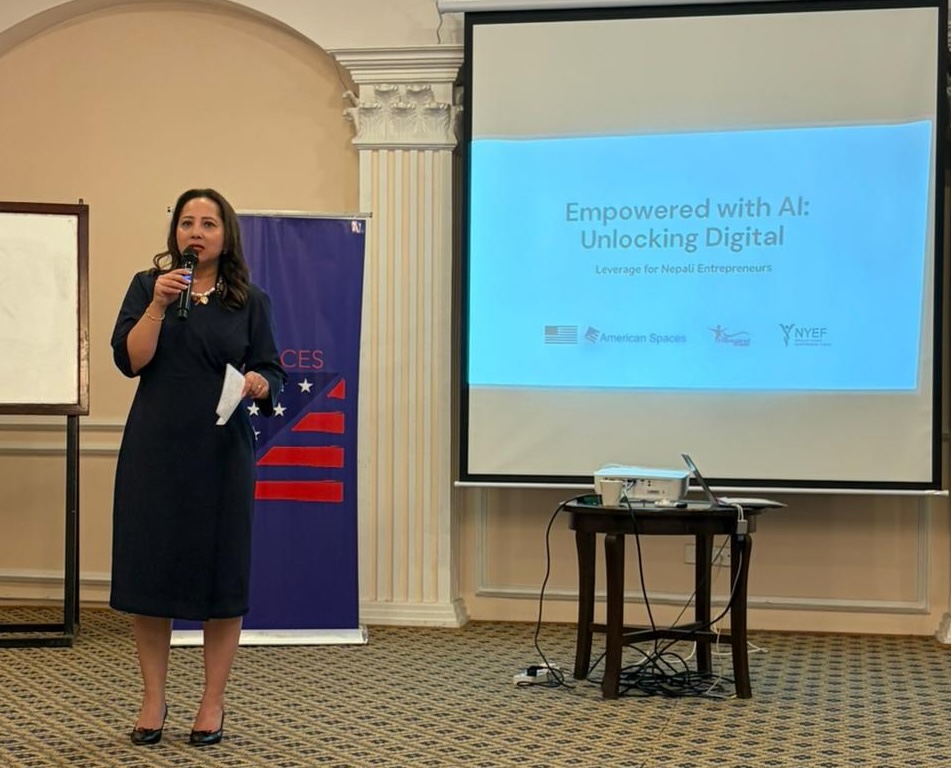
Meanwhile, in Kathmandu, Nepal, venture capitalist Preeti Adhikary and medical doctor Kisu Rawal beam with joy as women entrepreneurs wrap up a series of AI training sessions. Adhikary sees in the women newfound confidence and fresh ideas about how to expand and streamline their businesses.

While much of the chatter about AI in the US carries with it an element of danger — hallucinations, rogue AI agents, leaked or stolen data — in Nepal the conversation centers around empowerment and upward mobility.

“While AI has been an equalizer…, it’s on us to find underserved communities and demographics to educate and enable,” said Adhikary, who is a general partner at Momo VC. She works to connect the Nepal tech ecosystem through initiatives like The Great Nepali Diaspora, a global network of Nepali talent, and The Empowered Women Network, which organized the recent AI training session.

Preeti Adhikary

Preeti Adhikary, venture capitalist and a general partner at Momo VC.

The Empowered Women Network

To be sure, AI is still in the Wild West phase in Nepal, Sri Lanka and many developing economies — just as it is elsewhere in the world. Locally, some startups have focused  AI tools on their unique cultures, demographics and business environments.

Some are focused on AI for good, especially in rural areas, where 33% of the population resides, according to the World Bank. 

Mobile devices are ubiquitous in those areas, which opens the door for AI-driven healthcare that can quickly diagnose diseases and reduce long lines in remote hospitals.

But culture also presents unique data challenges. Literacy remains an issue, and locals prefer interacting with AI using voice-driven methods rather than text, which changes customer feedback and service flows. 

Product recommendations are also made by word-of-mouth, cutting off one layer of product discovery and reshaping how AI models are built.

Because workforces in Nepal and Sri Lanka are still emerging, the concern over AI-driven job losses is not as dire as in the US, where job cuts have been attributed to automation via AI. And unlike in the US, legacy systems and technical debt are not a burden here. 

Enterprises with lean IT budgets have little appetite for digitizing legacy data, which could slow AI adoption. So, bootstrapped startups, facing limited hardware, capital and talent, hope to make their workflows and processes AI-native from the start.

Even so, the lack of resources makes innovation and skills development difficult. Nvidia GPUs, for instance, are particularly scarce in Nepal and Sri Lanka and prohibitively expensive. 

To work around the challenges, startups have turned to small language models (SLMs) and popular AI tools. “AI tools — which are powerful even at the free version — and open-source models have meant AI is truly democratized now,” Adhikary said.

AI adoption is poised to grow in both Nepal and Sri Lanka, both of which have Gen-Z-inspired governments that grew up on social media and are AI-ready. Nepal last year published a national AI strategy outlining plans to boost infrastructure, skills readiness and countrywide awareness.

It has room to grow. Nepal ranks 106 out of 190 countries in Oxford Insights’ 2025 Government AI Readiness Index. The nation’s goal is to reach the top 50.

Meanwhile, Sri Lanka is ranked 80th and is pushing AI adoption. The country in 2024 established the Ministry of Digital Economy and has an AI strategy to boost the local ecosystem.

And Sri Lanka’s new digital nomad program could bring diaspora and foreign tech workers back onshore to help bolster local AI development and adoption.

As in other parts of the world, there is an ongoing need for mentorship, domain expertise and access to networks to grow and scale, according to Adhikary. But AI  entrepreneurs in Nepal recognize the benefits of collaboration. 

“I’m pleasantly surprised … that a nation with a newish tech ecosystem can compete with New York and Silicon Valley in terms of ideas and technical acumen,” Adhikary said.