Month: April 2026

Apple may be the only laptop vendor to grow in 2026

Chinese market research firm Sigmaintell expects Apple to be the only company to see growth in the laptop market this year.

Overall, Sigmaintel predicts global notebook shipments will reach 181.1 million units this year, a decline of 8%. That drop will, in part, be caused by memory and component shortages and also by slowing market demand. That’s going to damage all of the notebook vendors, bar Apple,. 

Apple laptop sales expected to rise more than 20%

Sigmaintell calculates Apple will ship 28 million laptop in the year, up 21.7% from 2025. This puts Apple in third place in laptop shipments, a demand the company will be able to meet despite component shortages because of the efficient use of memory inherent to its systems. That memory efficiency acts as a protection against the impact of climbing costs, even as competitors struggle with the affects on their business.

Apple’s incoming CEO, John Ternan, is being presented as a hardware man, so he will no doubt be pleased to experience the benefit of MacBook Neo’s massive attack on the lower echelons of the market. The Neo is already generating millions of additional sales, something Apple’s diversified revenue engine, including services, can further capitalize on.

PC makers face steep decline

There’s quite stark news for PC manufacturers. The report predicts Lenovo, Dell, HP, and ASUS will see sharp sales declines and warns that the entire industry will need to quickly transition from hardware-based sales toward full ecosystem plays. 

That’s going to be extraordinarily difficult for most PC makers. Not only do most of them use operating systems they don’t build themselves, but most lack a successful range of services customers will happily choose to use. 

For the most part, while Apple offers Apple Music, competitors only offer Spotify, a situation that generates far less revenue for them. That lack of successful monetization in terms of attached income across the customer base meant less when the PC market was growing, but in an environment buffeted by multiple business challenges it becomes a vulnerability that cannot be ignored. It exposes the inherent weakness of a strategy in which hardware manufacturers rely on third parties for operating systems and services, as the lion’s share of income doesn’t reach those hardware makers. 

You can go your own way

There’s little doubt that part of the reason Apple is in such a strong position is because of its highly strategic outgoing CEO, Tim Cook, who led efforts to build a strong services business, accompanied by a wide ecosystem of complementary accessories. You don’t just buy an iPhone, you buy a Mac, AirPods, and Apple Music. You don’t just get an iPad, but you likely also acquire Apple Arcade. 

To a great extent, Apple’s strength now owes a big debt to the many years in which the company was marginalized. Forced to follow its own path, Apple deliberately developed its own unique platform-based approach. That approach meant the company remained profitable even when it held just a few percentage points of the PC market; as its market share improves, we can also see its profitability climb. 

The way that you do it

This good news may not matter as much as you might think to Apple’s leadership team. To them, while becoming the industry’s fastest-growing notebook manufacturer is nice, what matters more is crafting a platform experience that means something to the people using it. That, after all, is how to generate the high user satisfaction Apple’s platform loyalty and word-of-mouth recommendations come from.

That 16% of everyone purchasing a notebook this year will choose a Mac suggests a watershed moment for all Apple’s platforms.

You can follow me on social media! Join me on BlueSky,  LinkedIn, Mastodon, and MeWe. 

Tim Cook’s legacy: a successful CEO who stumbled over AI

Apple’s Tim Cook was viewed as a worthy successor to Steve Jobs when he took over as CEO in August 2011, two months before Jobs’ death. 

Apple products became successful (and profitable) in many ways due to his success as COO, where he whipped company operations and supply chains into shape. Cook expanded the company’s product portfolio into new devices such as the Vision Pro and Apple Watch, rolled out a plethora of profitable services, and cut off failed projects like the rumored Apple car.

But Cook, who announced this week he will step down as CEO on Sept. 1 to become executive chairman, has one major blemish on his legacy. He missed perhaps one of the most important moments in computing history — the AI revolution. 

Apple could still win AI war, and it now falls on incoming CEO John Ternus, formerly Apple’s senior vice president of hardware engineering, to play catch-up with AI rivals Google, Microsoft and OpenAI. 

When ChatGPT took the world by storm in late 2022, Apple was years behind in the AI race and had to scramble to catch up. Cook’s failure is mostly attributable to Apple believing it could always go it alone when it comes to technology, said Jack Gold, principal analyst at J. Gold Associates

“They have a bias to doing everything in house,” Gold said.

The company did not believe in AI until ChatGPT emerged to take the tech industry by storm, according to a 2025 Bloomberg news report, and Cook did not provide the resources needed in-house to develop an AI-powered Siri. Apple was forced in early 2025 to look at partnering with Anthropic and OpenAI to push Siri into the AI era; in finally settled on working with Google’s Gemini.

The stumble was even more apparent since Apple was onto the AI trend early on, when it introduced neural chips for AI in iPhones as early as 2017. (Qualcomm introduced AI chips in its smartphone chips around the same time.)

At the time, the neural engine was hailed as a revolutionary development for developers to plug AI into applications. Apple wanted to use the neural chip’s matrix computing features to accelerate image and video processing, and users loved the results. 

Then in 2024, Apple introduced Apple Intelligence to much fanfare, hoping to bring AI technology across its devices and platforms. The AI layer was based on homegrown foundation models. 

Though it arrived nearly two years after ChatGPT, Apple Intelligence at the time offered truly innovative features. It had better OS and app integration and privacy features that kept user data secure — in part because of Private Cloud Compute. Other AI providers at the time were harvesting user data to improve their AI models.

Behind the scenes, however, Apple leadership and technological challenges slowed the development of Apple Intelligence. Apple in 2018 had hired former Google executive John Giannandrea to bring AI to Apple products. Giannandrea’s leadership was largely seen as ineffective and he retired last December. In early 2026, Apple turned to former Microsoft AI leader Amar Subramanya to lead the company’s AI efforts.

As a result, many of the main Apple Intelligence features were delayed, with hopes they  would finally arrive in 2026.

Then in January came the partnership with Google: “The next generation of Apple Foundation Models will be based on Google’s Gemini models and cloud technology,” the companies said in a joint statement.

Tim Cook and John Ternus

Incoming Apple CEO John Ternus and current CEO Tim Cook.

Apple

Now, the work for Apple’s soon-to-be CEO Ternus is clear: bring the company fully into  the AI age. “Unlike previous market inflections and transitions, Apple can’t afford to come in late to the party this time around,” said Jim McGregor, principal analyst at Tirias Research.

With its experience in devices and talent, Apple is well equipped to build AI into a personal experience, McGregor said. “Apple has to chart a path to reinvent the personal experience, which will drastically change devices and how we use them,” he said.

To succeed, Ternus will have to look at more partnerships and drop Apple’s reliance on in-house development, analysts said.

“When AI is moving at such a fast pace, no one company like Apple can really move fast enough to keep up,” Gold said.

The Google partnership is a solid step in that direction, as finding the expertise to hire the right people is a major hurdle, given the compensation package that others are offering, Gold said.

Whether the company has finally righted the AI ship should become clear in a little over a month at its annual Worldwide Developers Conference — the last one of the Cook era.

Claude Mythos signals a new era in AI-driven security, finding 271 flaws in Firefox

The Claude Mythos Preview appears to be living up to the hype, at least from a cybersecurity standpoint. The model, which Anthropic rolled out to a small group of users, including Firefox developer Mozilla, earlier this month, has discovered 271 vulnerabilities in version 148 of the browser. All have been fixed in this week’s release of Firefox 150, Mozilla emphasized.

These findings set a new precedent in AI’s ability to unearth bugs, and could turbocharge cybersecurity efforts.

“Nothing Mythos found couldn’t have been found by a skilled human,” said David Shipley of Beauceron Security. “The AI is not finding a new class of AI-exclusive super bugs. It’s just finding a lot of stuff that was missed.”

However, the news comes as Anthropic is reportedly investigating unauthorized use of Mythos by a small group who reportedly gained access via a third party vendor environment, revealing the double-edged nature of AI.

Closing the fuzzing gap

Firefox has previously pointed AI tools, notably Anthropic’s Claude Opus 4.6, at its browser in a quest for vulnerabilities, but Opus discovered just 22 security-sensitive bugs in Firefox 148, while Mythos uncovered more than ten times that many.

Firefox CTO Bobby Holley described the sense of “vertigo” his team felt when they saw that number. “For a hardened target, just one such bug would have been red-alert in 2025,” he wrote in a blog post, “and so many at once makes you stop to wonder whether it’s even possible to keep up.”

Firefox uses a defense-in-depth strategy, with internal red teams applying multiple layers of “overlapping defenses” and automated analysis techniques, he explained. Teams run each website in a separate process sandbox.

However, no layer is impenetrable, Holley noted, and attackers combine bugs in the rendering code with bugs in the sandboxes in an attempt to gain privileged access. While his team has now adopted a more secure programming language, Rust, the developers can’t afford to stop and rewrite the decades’ worth of existing C++ code, “especially since Rust only mitigates certain, (very common) classes of vulnerabilities.”

While automated analysis techniques like fuzzing, which uncovers vulnerabilities or bugs in source code, are useful, some bits of code are more difficult to fuzz than others, “leading to uneven coverage,” Holley pointed out. Human teams can find bugs that AI can’t by reasoning through source code, but this is time-consuming, and is bottlenecked due to limited human resources.

Now, Claude Mythos Preview is closing this gap, detecting bugs that fuzzing doesn’t surface.

“Computers were completely incapable of doing this a few months ago, and now they excel at it,” Holley noted. Mythos Preview is “every bit as capable” as human researchers, he asserted, and there is no “category or complexity” of vulnerability that humans can find that Mythos can’t.

Defenders now able to win ‘decisively’?

Gaps between human-discoverable and AI-discoverable bugs favor attackers, who can afford to concentrate months of human effort to find just one bug they can exploit, Holley noted. Closing this gap with AI can help defenders erode that long-term advantage.

The industry has largely been fighting security “to a draw,” he acknowledged, and security has been “offensively-dominant” due to the size of the attack surface, giving adversaries an “asymmetric advantage.” In the face of this, both Mozilla and security vendors have “long quietly acknowledged” that bringing exploits to zero was “unrealistic.”

But now with Mythos (and likely subsequent models), defenders have a chance to win, “decisively,” Holley asserted. “The defects are finite, and we are entering a world where we can finally find them all.”

What security teams should do now

Finding 271 flaws in a mature codebase like Firefox illustrates the fact that AI-driven vulnerability discovery is now operating at a scale and depth that can outpace traditional human-led review, noted Ensar Seker, CISO at cyber threat intelligence company SOCRadar.

Holley’s “vertigo,” he said, was because defenders are realizing the attack surface is larger, and “more rapidly discoverable than previously assumed.”

Security teams must respond by shifting from periodic testing to continuous validation, Seker advised. That means integrating AI-assisted code analysis into continuous integration/continuous delivery (CI/CD) pipelines, prioritizing “patch velocity over perfection,” and assuming that any externally reachable code path will eventually be discovered and weaponized.

“The goal is no longer just finding vulnerabilities first, but reducing the window between discovery and remediation,” he said.

Shipley agreed that any company building software must evaluate resourcing so it can quickly and proactively find and fix vulnerabilities. “But stuff will happen,” he acknowledged. So, in addition to doing proactive work, enterprises must regularly exercise their incident response playbooks.

“The next few years are going to be a marathon, not a sprint,” said Shipley.

Dual-use nature of AI is a challenge

However, the dual-use nature of these systems present a big challenge. The same capability that helps defenders identify hundreds of flaws can be turned against them if the model or its outputs are exposed, Seker pointed out.

The reported unauthorized access to Mythos “reinforces that AI systems themselves are now high-value targets, effectively becoming part of the attack surface,” he said.

It’s not at all surprising that people found a way to access Mythos, Shipley agreed; it was inevitable. “Nor does Anthropic have some unique, insurmountable or exclusive AI capability for hacking,” he said, pointing out that OpenAI is already catching up in that regard, and others will “catch and surpass” Mythos.

Striking a balance requires treating AI models like privileged infrastructure, Seker noted. Enterprises need strict access controls, output monitoring, and isolation of sensitive workflows. Developers, meanwhile, must adapt by writing code that is resilient to automated scrutiny; this requires stronger input validation, safer defaults, and “fewer assumptions about obscurity.”

“In this paradigm, security isn’t just about defending systems; it’s about defending the tools that are now capable of breaking them at scale,” Seker emphasized.

This article originally appeared on CSOonline.

Google Chat becomes an agent interface for Workspace

Google wants its Chat app to become the main interface for office workers to interact with AI agents within its Workspace suite.

“We’re making Chat the centerpiece through which people talk, not just with other people, but with all their agents, whether they are in Workspace or built on our platform,” Google Cloud CEO Thomas Kurian said in a briefing on the company’s plans. 

The Ask Gemini in Chat feature — generally available now — also allows Workspace users to interact with third-party tools such as Asana, Jira, and Salesforce, Google said in a blog post. Ask Gemini in Chat provides a “daily briefing” that highlights action items, unread message threads, and tasks to complete. It can also act on behalf of a user, generating documents and slides, scheduling meetings, and retrieving files, for instance.

Irwin Lazar, principal analyst at Metrigy, said the addition of Ask Gemini in Chat highlights Google’s efforts to compete more directly with Microsoft Teams. “Today, chat is the primary interface for employee engagement as email has fallen by the wayside,” he said. “Ideally, I’d like to see the AI interface be equally accessible across all apps, so one could access it in Gmail, Docs, etc.” 

Other AI-related updates to Workspace apps announced at Google Cloud Next include the ability to build and edit spreadsheets in Sheets via natural language prompts; Gemini can orchestrate “multi-step construction” and combine data from various sources such as a user’s files, emails, and chats, as well as the web. Gemini in Docs is getting an upgrade, too, with the ability to create infographics grounded in business data.

Underpinning some of the Gemini features is a new work graph, Workspace Intelligence, that connects data held across emails, chats, files and the web to improve the accuracy and relevance of outputs from Gemini agents. Workspace Intelligence “understands complex semantic relationships” between a user’s data and apps, helping to personalize these outputs by learning past work and communication patterns,” Google said.

Customers’ Workspace Intelligence data is not reviewed by Google staff, sold to advertisers, or used to train Google’s AI models, unless the customer gives permission to do so, the company said.

Work Intelligence is similar to tools such as Microsoft’s Work IQ, said Lazar. “The basic idea is giving employees an AI agent that has visibility into both their own activities as well as company knowledge, enabling them to be more efficient in managing work,” he said. “The challenge for any of these tools is that to be truly useful, they need to be able to pull in data from external sources such as CRM, ERP, project management, etc.”

It’s also important to function in multi-vendor environments now common for customer organizations, such as “mixed Google-Microsoft-Zoom-Cisco-Slack shops,” he said. “The third-party integrations are still coming, but I’m not sure if/when we’ll see multi-vendor integration.” 

Google also unveiled a series of updates at Cloud Next to Gemini Enterprise, the  standalone app that lets users interact with AI agents, as well as new governance tools for IT teams.

Google pushes Gemini toward ‘agentic enterprise’ with new platform and workflow tools

Google has updated its Gemini Enterprise app, adding new ways for office workers to build, manage, and interact with AI agents. The company also rolled out additional tools for IT teams to govern the use of agents via the new Gemini Enterprise Agent Platform.

Google first unveiled Gemini Enterprise last year, pitching it as a way for knowledge workers to access agents that can surface information and carry out tasks autonomously. 

At Google Cloud Next this week, Google announced a raft of new features in the Gemini Enterprise app that are expected to be available over the “coming months.” Among these are new ways to interact with Gemini Enterprise, either independently or alongside colleagues. Projects is a new collaborative workspace that enables teams to interact with a shared “expert” chatbot that’s connected to specific data sources from Google Workspace, Microsoft 365 and team chats. 

Gemini Enterprise app

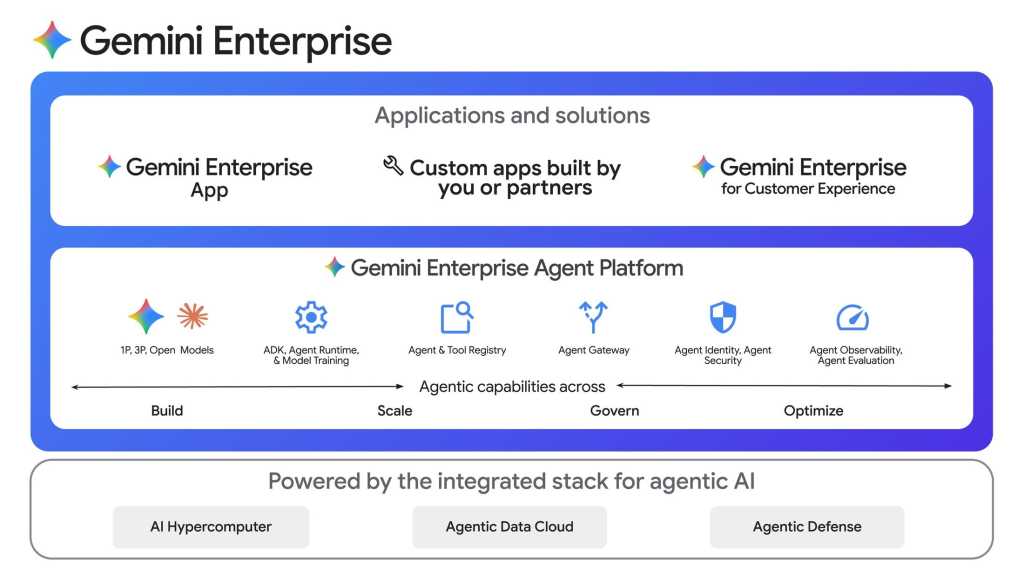
The Gemini Enterprise application is built on Google’s new Agent Platform for building and managing agents at scale.

Google

A new Canvas tool lets users create and co-edit documents directly within Gemini Enterprise, whether that’s Google Docs and Slides, as well as Microsoft 365 files. Google is also making agents more accessible to users — and more capable. 

Agent Designer, for example, is a no-code agent builder tool that lets users create “schedule- or trigger-based” agents with natural language prompts or via a visual interface. Announced in preview last year, the feature is now ready for general release in the next few weeks, providing users a “virtual flowchart” interface to inspect and test each step in an agent workflow. It’s also possible to insert human-in-the-loop checkpoints to approve actions when needed. 

[ Also see: How to build your own AI agents with Google Workspace Studio ]

Then there are new “long-running” agents that can tackle more complex business processes, Google said. The agents work autonomously in cloud sandboxes, and can complete multi-step workflows such as financial reconciliations that can take days to complete. 

The Agent Gallery provides access to third-party agents from the likes of Adobe, Lovable, and ServiceNow. 

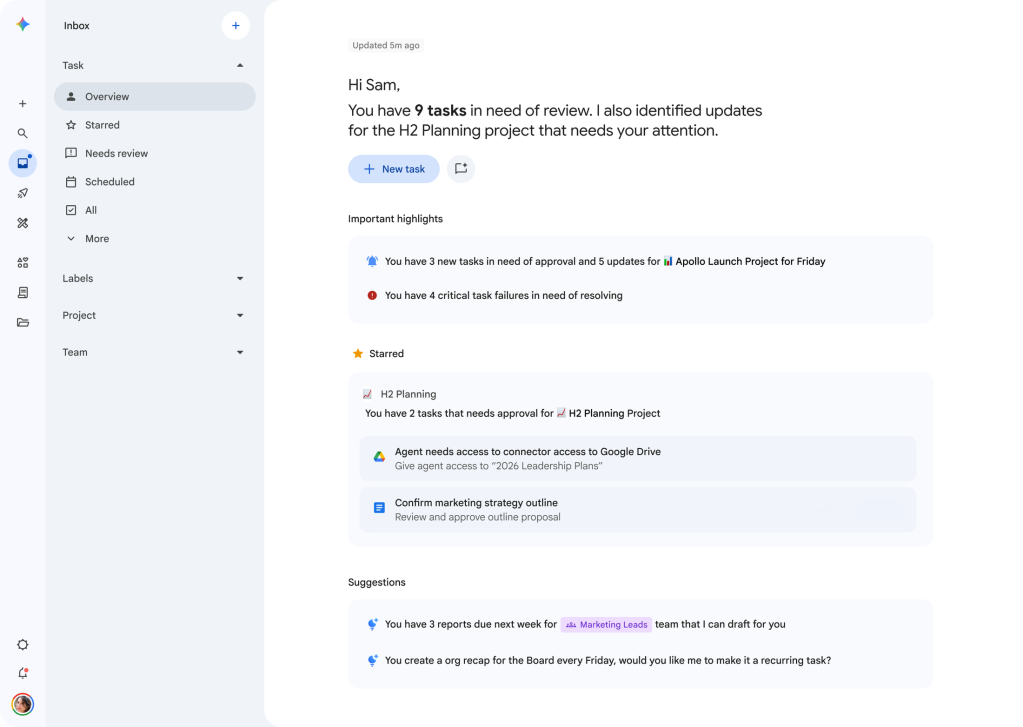
To help manage the various agents working across Gemini Enterprise, Google introduced Inbox, a “central command location to monitor, guide, and securely manage all of your agent activity,” the company said in a blog post. That includes the long-running agents. 

Inbox for agent management

The Inbox tab provides a space for Gemini Enterprise users to manage agents, receive notifications, and track task completion progress.

Google

From Inbox, users can monitor active agents and view notifications around agent actions such as “Needs your input,” “Errors,” and “Completed,” to provide a “clear, consolidated view of ongoing agent progress.” 

Mike Leone, vice president and principal analyst at Moor Insights & Strategy, said that while the Project and Canvas features are “table stakes” these days when it comes to AI agents, the Inbox feature is an interesting addition. “Keeping humans in the loop when async agents are running multi-day workflows in the background is a genuinely unsolved problem, and treating agent output as a prioritized notification queue is a solid way to tackle it,” Leone said.

Gemini Enterprise costs $30 per user each month for large organizations, and $21 per user for smaller businesses. Gemini Enterprise relies on Google’s own large language models (LLMs) such as Gemini 3.1 Pro, Gemini 3.1 Flash Image, and Lyria 3, as well as third-party models such as Anthropic’s Claude Opus 4.7.

Underpinning the Gemini Enterprise app is the new Gemini Enterprise Agent Platform that’s billed as the platform to “build, scale, govern, and optimize agents,” said Michael Gerstenhaber, vice president of product management, Cloud AI, Google Cloud.

IT gets new agentic AI management tools, too

As part of the Agent Platform, Google introduced new tools at Cloud Next to help IT teams manage agents built and deployed in Gemini Enterprise. Among these is Agent Identity, which assigns a unique cryptographic ID to each agent operating in Gemini Enterprise. 

“This creates a clear, auditable trail for every action an agent takes, mapped back to defined authorization policies,” said Gerstenhaber. It’s similar to Microsoft’s Agent 365 platform, where each agent is assigned a unique Microsoft Entra ID to track usage and apply risk policies. 

The new Agent Registry acts as a “central library,” indexing all internal agents and skills to help IT ensure that only approved assets are accessible; Gerstenhaber described Agent Gateway as the “air traffic control” for a customer’s agents, providing “secure, unified connectivity between agents and tools across any environment.”

These are all tools that will appeal to IT as businesses start to push on with their use of agents, said Leone. “Google wants every agent action to leave the same audit trail a payroll transaction does. That’s a high bar,” he said. “Agents are going to be taking real actions on employees’ behalf at scale, and no enterprise will roll that out without knowing exactly who did what, when, and why.” 

Agent Platform “sits in the same competitive neighborhood” as enterprise agent products from the likes of Microsoft, OpenAI, and AWS, said Leone, that also provide tools to build, govern, and orchestrate agents at scale.  

“Implementing agentic processes is seen by most vendors as the next big opportunity to drive adoption of AI technologies in enterprise environments,” said Ed Anderson, research vice president and distinguished analyst at Gartner. “There will be a lot of competition in this area.”

According to Leone, Google’s edge lies in a “full-stack ownership claim few other vendors can make as cleanly, across infrastructure, models, data, security, and end-user apps,” he said. Tools such as Agent Identity, Registry and Gateway — as well as security features such as Model Armor and MCP and A2A protocols to connect agents — will help provide IT with visibility and control when running thousands of agents across business units. 

“My bigger concern is that a typical IT buyer still struggles to figure out what to buy from Google and what each product actually includes as the portfolio and services have grown and evolved quickly,” said Leone.

Pricing for the Gemini Enterprise Agent Platform was not immediately available.

Meta to track employee keystrokes, screen activity to train AI agents

Meta plans to track US employees’ mouse movements, clicks, keystrokes, and screen activity to train workplace AI agents, according to Reuters, offering an early look at how far major tech companies may go to build systems that can automate knowledge work.

The company plans to do so through a tool called Model Capability Initiative, or MCI, which will run on work-related apps and websites and periodically capture screen snapshots, according to the report.

Meta reportedly told staff in internal memos that the data collected through MCI would be used to help train AI models in areas where they still struggle to mimic how humans interact with computers, such as navigating dropdown menus and using keyboard shortcuts. The company added that the data would not be used for performance reviews and would be limited to AI training.

The move is likely to intensify debate over worker surveillance and data governance as companies push to use AI for a growing share of workplace tasks.

In a separate memo, Meta CTO Andrew Bosworth told employees the company was expanding internal data collection as part of its broader “AI for Work” push, now rebranded as the Agent Transformation Accelerator, Reuters added. Bosworth said Meta’s goal was to build a future in which AI agents “primarily do the work” while employees “direct, review and help them improve.”

The move comes as the broader AI industry pushes toward agents that can operate software on behalf of users. Anthropic has already showcased computer-use capabilities, while OpenAI launched its Operator agent last year.

“Meta’s move signals a shift from automating discrete tasks to replicating entire human workflows by learning from real employee behavior,” said Pareekh Jain, CEO of Pareekh Consulting. “Enterprise systems will increasingly act as data exhaust pipelines, capturing how work actually gets done so AI agents can execute it.”

Sanchit Vir Gogia, chief analyst at Greyhound Research, said the shift is important because companies are no longer just documenting workflows for automation, but capturing how work is actually carried out inside systems. “Systems do not just learn from historical data anymore. They learn from the way people intervene, adjust, and get outcomes despite the system itself,” he said.

Governance and compliance concerns

For enterprise IT leaders, this kind of monitoring raises a new category of behavioral data risk because it captures not just business information, but also how employees perform tasks inside enterprise systems.

“Privacy and compliance risks are significant, especially in Europe under GDPR and labor laws, where capturing keystrokes and screen activity may be restricted or require explicit consent,” Jain said. “Security risks increase because training datasets may contain credentials, IP, and sensitive workflows, making them high-value attack targets.”

Gogia said the risks should not be viewed in isolation. “These risks stack. They interact. They reinforce each other,” he said, adding that data gathered for AI training could also be repurposed over time for productivity monitoring or other employment-related decisions.

Jain added that governance could become more difficult because companies may struggle to trace what AI systems learned from specific employees. Employee awareness of monitoring could also affect the quality of the data itself. “People do not behave the same way when they know they are being observed,” Gogia said. Over time, that could mean systems are trained not on how work naturally happens, but on behavior shaped by observation.

The smartest ways to sync your Android and computer clipboards

For all the fancy-schmancy things our modern-day technology promises to do for us, one thing Google has yet to give us is a simple and reliable way to sync the clipboards on our Android phones and computers.

It’s such a powerful feat to have at your fingertips, when it works well — ’cause you can just copy something in one place and then paste it immediately in the other, without any thought or effort. At its best, it’s like your two work surfaces share the same clipboard and work harmoniously to make your life easy.

What’s most frustrating is that Google actually had a super-simple system for this years ago, within Chrome — a single switch you could flip that’d just make your clipboards sync seamlessly and automatically, across any two devices where the browser was installed — but then, in typical Google form, the company gave up on the concept and killed it off at some point along the way. (Sigh.)

Since then, we’ve been left with a mishmash of overly complicated workarounds and compromise-ridden consolation prizes to choose from.

It’s overwhelming, to say the least, and more than a little annoying. But with the right pinch of one-time planning, you can still set up a synced clipboard between your Android device and computer. You just have to know where to begin.

Lemme show you the four best paths, then you can figure out which one of ’em makes the most sense for you.

[Get smart solutions in your inbox with my free Android Intelligence newsletter. Three new things to try every Friday — and my Android Notification Power-Pack as a special welcome bonus.] 

Android-computer clipboard syncing option #1: The keyboard connection

If you’re using a Windows computer alongside your favorite Android companion, you’ve got one especially easy option — though it does come with a catch.

And no, it isn’t Microsoft’s official Link to Windows app. That system is obnoxiously limited and locked down in terms of which specific devices it allows to use it — for absolutely no good reason — and it more often than not isn’t even worth your time to futz around with.

The simplest path for Android-Windows clipboard syncing is actually the Microsoft-owned SwiftKey Keyboard. It’s one of my picks for the best Android keyboard apps, in large part because of the native Windows clipboard syncing it offers.

In short, if you don’t mind using SwiftKey for your Android text input, you can set it up so that anything you copy on Android is instantly available on Windows — and vice-versa. There’s nothing to it. It just works, instantly and automatically, which is something no other clipboard-syncing setup currently offers.

The catch is that you’ve gotta commit to stickin’ with SwiftKey as your keyboard. It’s honestly a solid all-around keyboard, so you might not mind — and/or you might find the clipboard syncing sorcery useful enough to make any hesitations worth accepting.

If, on the other hand, you strongly prefer Gboard — or any other Android keyboard app — keep reading, ’cause you do have other options.

Android-computer clipboard syncing option #2: The simple share

If the keyboard syncing path isn’t right for you (or maybe if you aren’t even using Windows to begin with), the next best option is leaning on Google’s native Quick Share system to sync stuff across your clipboards manually, as needed.

This setup lacks the instant, ongoing syncing that SwiftKey provides, which is a bummer. At the same time, it could present a privacy advantage, from some perspectives — since everything you copy won’t automatically be synced across your devices without warning or any opportunity for exception.

  • On the Android front, provided you’re using a reasonably recent device, Quick Share is already built in and present — so there’s nothing you need to do there. The same is true for ChromeOS, on Chromebooks.
  • On Windows, you’ll need to install and set up the official Google Quick Share Windows app.
  • On Macs — sorry, Charlie: Apple doesn’t like its devices to play nicely with things it didn’t create. But, with the right device, you might be able to share stuff into Apple’s propriety AirDrop system, thanks to a recent (and ongoing!) Android-side workaround.

To get things ready, you’ll need to go into the Quick Share settings on any device involved and make sure that system is set to be visible to all of your other nearby devices. (On Android, search your system settings for Quick Share to find the appropriate area. On Windows, open the Quick Share app you just installed. And on ChromeOS, click the clock in the lower-right corner of your desktop and then click the Quick Share tile.)

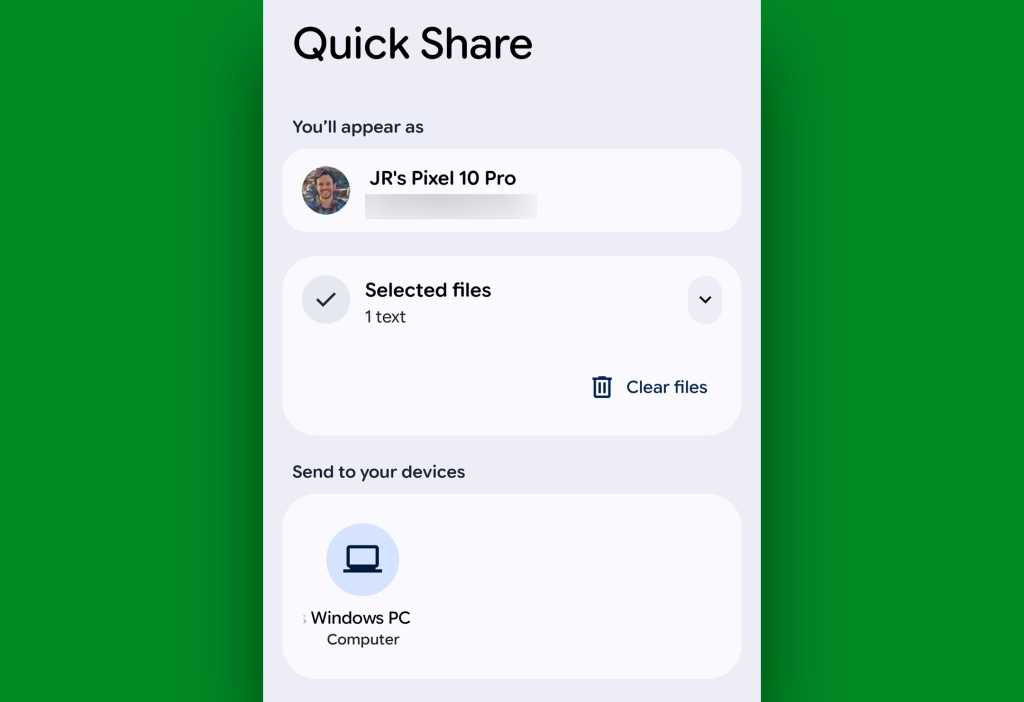
Then, when you’ve got something you want to sync to the clipboard on one of your other devices — from Android:

  • Press and hold your finger onto the text you want to share to highlight it, then select “Share” from the menu that pops up.
  • Select “Quick Share” from the list of options.
  • And select your computer from the list of available devices.
Sync Android-computer clipboard: Quick Share Android
It isn’t obvious, but Android’s Quick Share system has an easy way to sync text from your phone’s clipboard to a computer.

JR Raphael, Foundry

That’s it! Within a split second, you should see a notification on the computer that the text has been received and is on the clipboard and available — and you can then hit Ctrl-V in any open field to paste it.

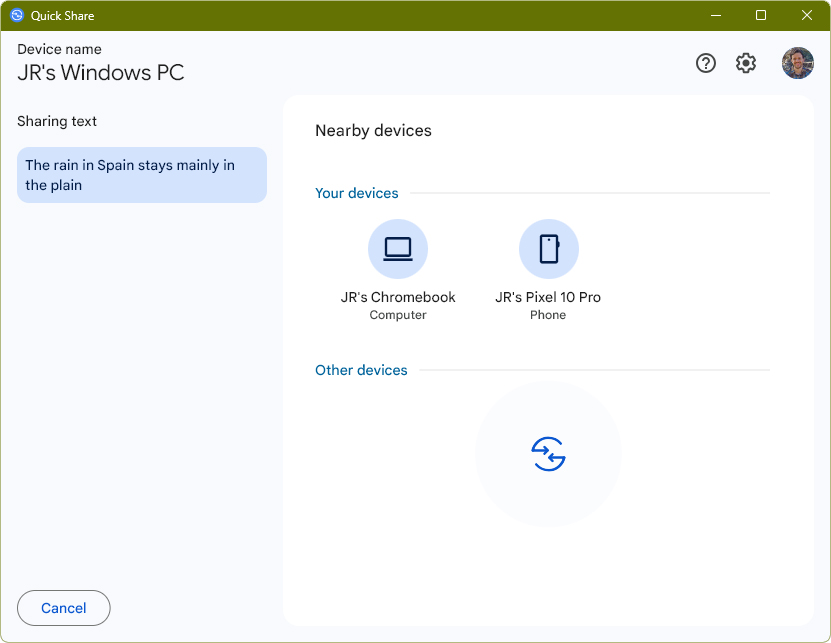
From Windows, meanwhile, you’ll copy your text normally — using Ctrl-C — then open the Quick Share app and hit Ctrl-V to paste it and sync it over to your Android phone’s clipboard.

Sync Android-computer clipboard: Quick Share Windows
You can sync text from a Windows computer’s clipboard over to Android, too, with Quick Share in place.

JR Raphael, Foundry

With ChromeOS, there’s weirdly no way to sync stuff from the computer to Android (go figure). But maybe, hopefully, surely, Google’s upcoming Android-ChromeOS “merger” plan will address that and make this kind of cross-device clipboard sharing even richer and more effective in that arena.

Android-computer clipboard syncing option #3: The browser beam

Two other interesting options exist for quick ‘n’ easy clipboard sharing — at least, if you’re going from Android to another computer.

No matter what kind of computer it is (yes, even the illustrious Macintosh, in this instance!), as long as you’ve got Chrome installed there and signed into the same Google account you’re using on the Android front, remember this:

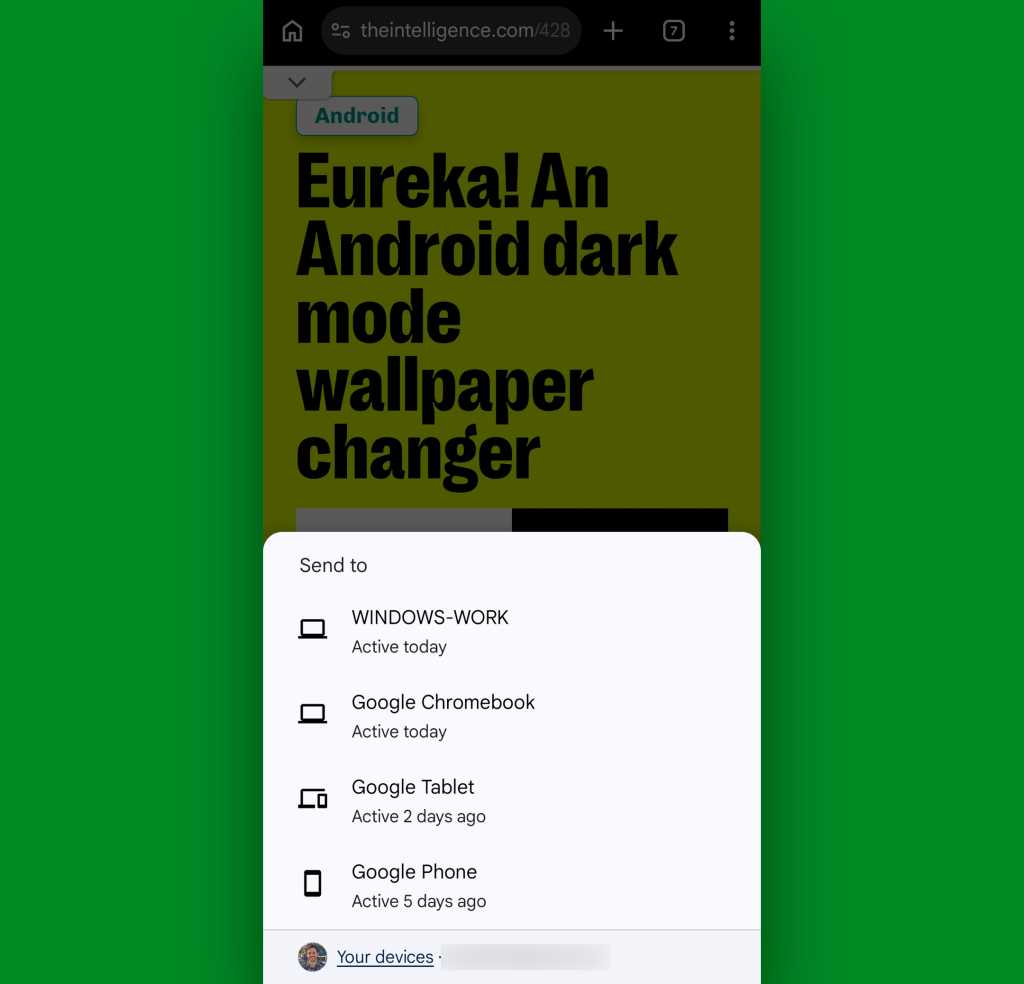
In Chrome on Android, you can highlight any text on any page — by pressing and holding it with your finger — then select “Share” followed by “Send to devices.”

Sync Android-computer clipboard: Chrome
Chrome’s “Send to devices” options is a hidden gem for clipboard syncing from Android.

JR Raphael, Foundry

Chrome will show you a list of all the devices where you’ve been signed into the browser with that same Google account in recent days. You can tap any of ’em — and in an instant, your text will be on that system’s clipboard and ready for pasting anywhere your precious pinkies (and other assorted appendages) desire.

Sync Android-computer clipboard: Chrome devices
Select any other device, and boom: Your text will be on its clipboard instantly.

JR Raphael, Foundry

And last but not least…

Android-computer clipboard syncing option #4: The Lens limb

If you want to sync some text from Android to a computer and the text isn’t already in a standard plain-text form — something from a photo, for instance, or in an area of the operating system for whatever reason doesn’t support standard text selection — just capture a screenshot or share the existing image over to Google Lens.

Lens is a fantastic and free Google app. You’ll need to download its official shortcut from the Play Store before you can share to it.

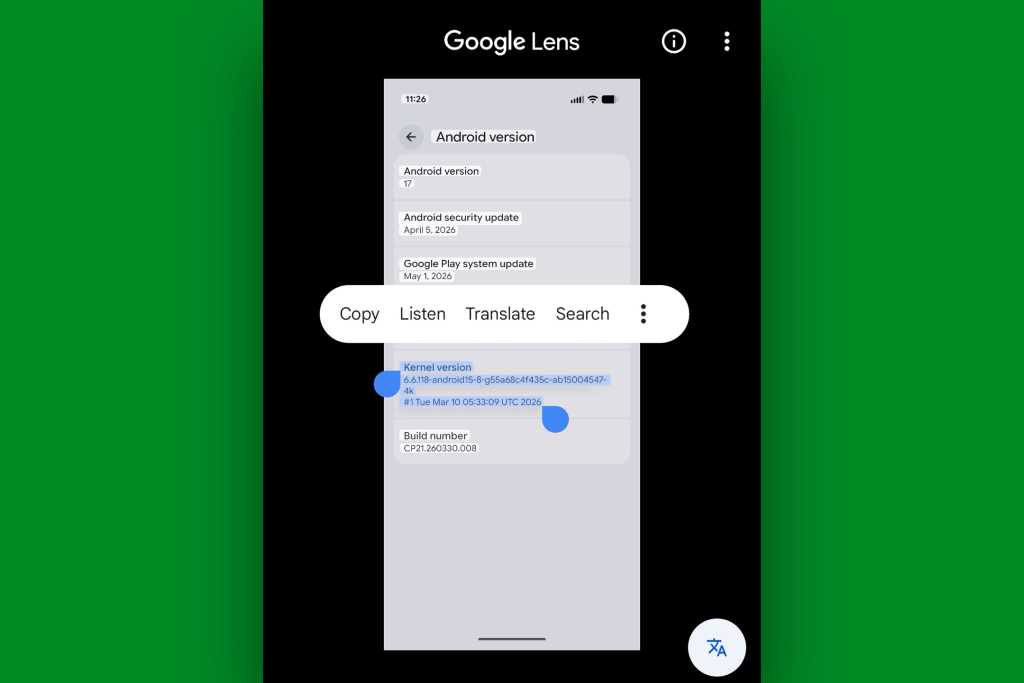
Once you’ve got whatever you’re seeing into Lens, you can then press and hold any text within the image there to select it.

Sync Android-computer clipboard: Google Lens select
Google Lens makes it easy to select text from within any image on Android.

JR Raphael, Foundry

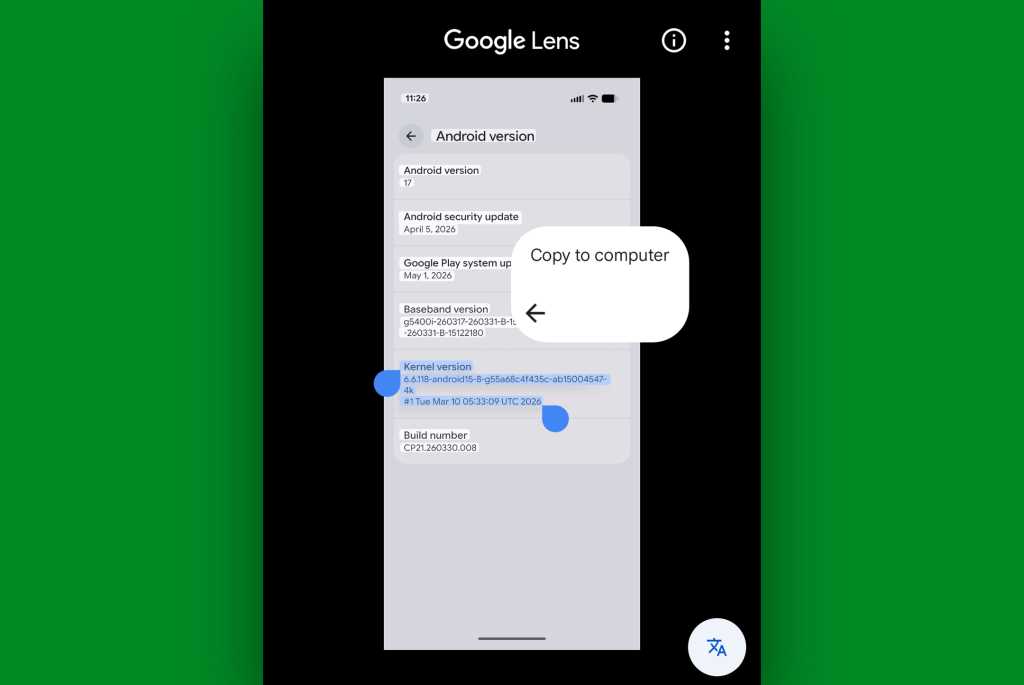
Then, tap the three-dot menu icon within the text selection menu that appears — and hey, how ’bout that? Tucked away there, where no reasonably sane person would ever think to look, is a handy little command called “Copy to computer.”

Sync Android-computer clipboard: Google Lens copy
Lens has its own tucked-away “Copy to computer” option for quick clipboard syncing. Who knew?!

JR Raphael, Foundry

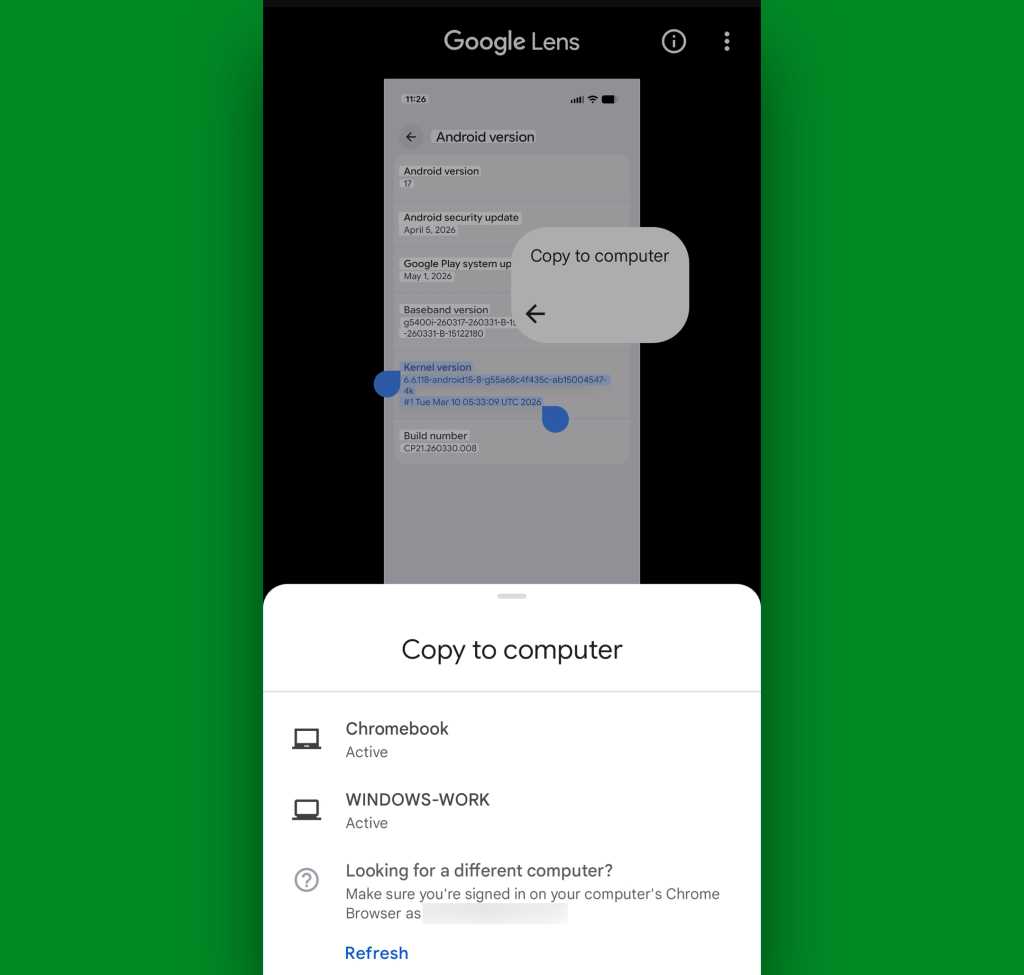
Tap that bad boy and tap it good, and you’ll be able to choose from any computer where you’re currently signed into Chrome with the same Google account — Windows, Chromebook, Mac, Linux, you name it — and after that, the text from that image will be on your computer’s clipboard and ready to paste wherever.

Sync Android-computer clipboard: Google Lens copy menu
As long as your computer has Chrome — with the same Google account signed in — Lens can send text directly into its clipboard.

JR Raphael, Foundry

These options may not be as easy or effortless as they oughta be, but they do get the job done. And once you know how to use ’em, you’ll have a whole new kind of time-saving text trick in your toolkit and ready to deploy — just like the total tech wizard we all know you’re meant to be.

Check out my free Android Intelligence newsletter for even more thoughtful knowledge — including three new things to try each Friday and a trio of useful Android notification tools to get you going.

Microsoft trims cloud desktop pricing, even as it boosts AI costs

For years now, Microsoft has been doing its level best to move you from desktop Office and Windows to Microsoft 365, Windows 365, and Azure Virtual Desktop (AVD). Since the company first started down this road, however, something changed: the AI revolution, which has become a huge deal for the guys from Redmond. 

So, it should come as no surprise that the company is now combining its efforts to push cloud-based PCs and get as many users working with its AI services as possible.

First, Microsoft has reduced pricing for Windows 365 and AVD in select configurations by 20%. In particular, the company is slashing prices for persistent desktop deployments and lower-tier virtual machines (VMs). These are the instances commonly used by task workers and call centers, not by developers or white-collar office worker bees. 

Microsoft is also expanding bundled discounts tied to existing enterprise agreements and Microsoft 365 subscriptions. This cuts the per-user cost for organizations already invested in its Desktop-as-a-Service (DaaS) ecosystem. 

Beyond that, the company is introducing an on‑demand start experience that allows Cloud PCs to hibernate when users disconnect. The change will lower infrastructure costs while preserving performance when sessions resume. 

In addition to lower base pricing, Microsoft is promoting new autoscaling and power management features in AVD. For example, unused instances will now shut down automatically. This addresses one of the key criticisms of cloud desktops: the cost of idle capacity. 

Considering how PC prices are skyrocketing, this new DaaS pricing makes a lot of sense. But what the company giveth, the company taketh. Turns out that price cut comes as Microsoft 365 costs are set to rise in July. Microsoft wants you to think that a per desktop price increase of up to 33% is worth it for all the brand-spanking new AI goodness. Me? I’m still not sure Notepad Copilot improved my work life by 0.33%, never mind 33%! 

Windows prices are also going up. After July 1, standalone Windows components (per user/month, commercial list), such as Windows E3 and E5 are going up while Windows Enterprise (per device/month) is set to jump by 31%, from $5.85 to $7.63.

Overall, according to US Cloud, a leading independent provider of third-party Microsoft support and enterprise licensing optimization, Microsoft’s pricing decisions will mean a cumulative cost increase of up to 25% on a typical $10 million Enterprise Agreement by mid-2026. That is the company’s “AI Tax.” (Hey, those gigawatt AI centers aren’t going to build themselves!)

Meanwhile, back in DaaS land, Microsoft is positioning its AI‑enabled Windows 365 Cloud PCs as a higher‑end class of virtual desktops: Still in beta, they combine Windows 365 with AI acceleration to deliver integrated Windows AI features to any device via the cloud.

These high-end virtual AI desktops require Windows 365 Enterprise SKUs with at least 8 vCPU, 32GB RAM and 128GB storage. In other words, while the low-end virtual desktops are getting cheaper to use for AI, you’ll want the most expensive configurations. These currently cost $123 per user, per month.

By comparison, for serious AI use, Microsoft recommends Copilot+ PCs. These are high-end Windows 11 PCs powered by a turbocharged neural processing unit (NPU) capable of delivering more than 40 trillion operations per second (TOPS). These, such as Lenovo’s ThinkPad T14s Gen 6 Snapdragon, cost around $2,100. 

It might appear that the standalone PC is cheaper for AI. But Microsoft argues that its cloud PC — which you can run on any device — will scale well beyond what a fixed NPU can deliver in a Copilot+ PC configuration. 

What I see happening is Microsoft is using its lower-end DaaS price cut as a broadening of the funnel into Windows 365 while it keeps the AI‑heavy experiences as an upsell on more capable Cloud PCs. In other words, the low-end DaaS price cuts and the increases in PC prices are, Microsoft hopes, all about getting you to move to high-end AI cloud-based desktops. 

There’s also the rumor that Microsoft will be shifting its AI-cloud services from a fixed priced plan to a token-based one. True, for model APIs and gen‑AI services, the company had already standardized on token‑based pricing. But we always knew flat-pricing for AI services was a loss leader. If Microsoft can get you on a cloud-based AI desktop today, it’s betting it’ll get far more revenue from you tomorrow than it can with today’s Software-as-a-Service (SaaS) such as Copilot in Microsoft 365. 

If all this sounds complicated, you’re right — it is. As SAMexpert CEO Alexander Golev reports, “Microsoft AI uses two billing systems: Predictable per-user licensing and variable Azure consumption. Hybrid products like Copilot Studio and Security Copilot can charge through both, so costs land in different budgets, require separate monitoring, and complicate forecasting.” You think?

Of course, Microsoft has long been about shifting people from buying software to leasing it. Promoting Windows 365 AI‑enabled Cloud PCs is very much about using AI as the differentiator to justify running a Windows desktop from Azure instead of a cheaper, more generic VDI/DaaS stack or a more generic Windows DaaS. 

What all this boils down is that while Cloud PC list prices are coming down for small and midsize businesses, Microsoft is baking more AI into its Enterprise Cloud PCs. Thus, AI will be the value‑add that keeps the high end of its desktop cloud premium. This will all, Microsoft hopes, continue to empower growth, which increasingly relies on Azure and AI. 

So, what does this all mean for you and me? While I admit AI can be valuable in some areas such as programming, I remain cynical about AI in broader business uses. After all, as the MIT NANDA report, “GenAI Divide / State of AI in Business 2025,” states: “95% of organizations are getting zero return” from AI. 

Let’s say AI eventually does deliver the goods — or as I see it, we finally figure out how to get real value from the technology beyond just meeting summaries. That’s great. But it begs the question, “Do you really want to tie yourself to Microsoft’s desktop and service?” I don’t think so. 

Personally, I’ve never wanted to put all my desktop eggs in one Microsoft basket, and I’m sure not going to do that now with AI.  

Adobe builds an ‘agentic content supply chain’ for the AI era

Generative AI is fundamentally (and quickly) shaping how information is discovered and acted on, forcing enterprises to rethink how they engage with both humans and machines.

Adobe is responding to this shift, introducing new tools that keep up with evolving branding, surface campaign insights, and speed up content creation. At this week’s Adobe Summit, the company introduced a new Brand Intelligence system and expansions to its GenStudio platform, as well as launching products that use agentic AI to reshape customer experience.

And last week, Adobe announced one of its most significant AI rollouts, the new Firefly AI Assistant, interestingly on the same day rival Canva introduced its own new agentic platform, Canva 2.0.

“Brand visibility is going to shift toward what agents see, and what is picked up, understood, and returned by those agents,” said  Terra Higginson, a principal research director at Info-Tech Research Group. “Adobe is well-positioned for this shift.”

[ More Adobe Summit 2026 coverage ]

Helping teams stay on brand

Adobe describes Brand Intelligence as a “continuously-learning engine” that provides context to AI agents so teams can quickly create content that aligns with evolving branding. Instead of basic, static brand guidelines, the platform can gain from more nuanced insights like customer feedback, rejections, and approvals.

The system is based on a collection of small language models (SLMs) tailor-made to have a much deeper understanding of how a brand shows itself, in a multi-modal fashion, Adobe VP Sundeep Parsa explained to Computerworld. Enterprises can tweak the content along the way.

Brand Intelligence essentially reshapes the content supply chain so that teams can measure, plan, create, and manage brand-specific materials. Such customization is critical, because, he pointed out, “Coca Cola’s brand intelligence system is going to look very different from Nike’s.”

Info-Tech’s Higginson pointed out that an interesting use case for this would be when a brand wants to capitalize on a trend quickly. Back in the day, “instant” still meant a lot of planning and rework, but new Brand Intelligence capabilities can personalize agentic content immediately while still adhering to brand guidelines and localization requirements in real time.

“It’s taking personalized content to another level,” she said.

Ultimately, with LLMs in the mix, brand visibility is “twice as hard” as it used to be, and marketers’ jobs have gotten significantly more complex, Higginson noted.

“They don’t just need to convince humans to buy their products; they now need to convince agents, too,” she said. That means content must be instantly accessible, structured properly, and governed by brand guidelines.

New GenStudio enhancements

Along with Brand Intelligence, Adobe has rolled out new offerings within its GenStudio content creation platform. Notably, this includes a ‘Workflow Optimization Agent’ in Adobe Workfront, its workflow management platform.

The agent automates actions across workflows such as planning, execution, review, and approval. This can help teams build projects, speed up reviews, and pull out insights on demand, without the need for manual reporting. Teams can also involve AI agents in project planning and assign them tasks, such as resolving simple issues or performing reviews based on specific instructions and context.

Additionally, new creative production capabilities in Adobe Firefly for Enterprise Workflow Builder help developers build reusable workflows, link generative actions, and run batch production. Teams can also launch AI agents that interpret campaign briefs, compile supporting assets, and build templates and workflows.

Adobe is also rolling out a new dedicated ‘canvas’ interface to help teams pull together inputs and performance data to build better campaign briefs. Here, too, they can kick off an AI assistant.

Further, Adobe is announcing a new GenStudio module for marketing that turns long-form documents and videos into tailored campaigns, builds customer case studies, and writes web content. Marketers can quickly pull out performance insights (such as leads generated or follower statistics) and ask AI for recommendations to expand audience reach. And a new agency system of record will preserve enterprise context as it moves across content flows, supporting governance, accountability, and a shared understanding of branding.

“End users are seeing an exponential increase in the amount of content that needs to be created,” Higginson noted, adding that the benefits of a tool like Adobe GenStudio are not just generation of more content, but faster iteration, and less manual rework.

“It’s necessary because humans can basically no longer keep up with the demand for creation, iteration, testing, optimization, localization, and related workflows,” she emphasized.

Firefly AI Assistant speeds up creation

Adobe also announced a new Firefly AI Assistant (available soon) that users can interact with in natural language. Based on human instructions, agents can build workflows, ask contextual follow-up questions, offer suggestions, and report on results. They can also organize and share work in the Frame.io collaboration platform, interpret feedback, and automatically apply changes.

Agents have access to pre-built skills purpose-built for specific workflows, such as retouching portraits. They learn from creators over time, determining their preferred tools, workflows, and aesthetics, and maintain persistent memory across sessions. This carries over to other Adobe apps, too, so developers don’t have to start from scratch with each one.

A primary use case for the Firefly AI assistant is that of a creative team requesting input from the division owner, Higginson explained, including questions about color and brand consistency. In a demo at the event, Adobe illustrated this with a campaign for a major travel company. Feedback was folded in “almost in real time,” then localized across languages and countries.

“Work that would have taken months was reduced to minutes,” Higginson said. The platform makes creative workflows “more conversational and easier to manage across teams, which gets users to optimization much faster.”

Competition launches the same day

In an interesting development, Adobe announced its new Firefly AI Assistant on the same day that Canva introduced its next-gen agentic platform, Canva 2.0. Available now in research preview, Canva 2.0 also features brand intelligence tools and AI agents. Canva calls it its “most significant product evolution” since the company launched in 2013.

The platform upgrade reflects a broader move, beyond design “into more unified, AI-driven workflows,” Higginson said. Canva’s recent acquisitions of Simtheory and Ortto reinforce that push: They suggest the company is building toward a “wider marketing platform,” with content-centric workflow, stronger measurement, and lighter customer data platform (CDP) and lifecycle marketing capabilities that overlap with entry-level customer relationship management (CRM) territory.

That makes Canva more competitive, particularly with broader user groups and small to medium businesses (SMBs).

“Canva’s strength is accessibility, while Adobe’s strength is enterprise workflow depth,” said Higginson. “Adobe, though, still appears better positioned in complex enterprise environments where governance, scale, and established workflows matter more.”

You can now test and compare AI models on LinkedIn

LinkedIn is testing a new AI feature, Crosscheck, which allows users to compare several popular AI models directly on the platform. Users enter prompts into Crosscheck and receive two different responses generated by competing AI models from companies such as OpenAI, Anthropic, and Google.

After the user selects the best response, the model behind each answer is revealed. LinkedIn product manager Hari Srinivasan describes the service as a kind of blind taste test for AI models, according to Engadget.

Crosscheck works only with text, but has no limits on the number of questions. At the same time, LinkedIn shares anonymized user data with the AI companies to provide insights into how the models perform across different professional groups.

The feature is initially available to LinkedIn Premium subscribers in the US, with plans to expand to more countries and free users soon.