This appears to be just the beginning of a more far-reaching process to strengthen the EU’s independence from the US, TechCrunch reports.
“DINUM will coordinate a cross-ministerial plan to reduce dependence on suppliers outside Europe,” the agency said in a statement. “Each ministry will be required to develop its own plan by this fall, covering the following areas: workstations, collaboration tools, antivirus software, artificial intelligence, databases, virtualization, and network equipment.”
As growth in the smartphone market slows, Apple, Meta, and others see a new product opportunity in smart glasses — and Apple is reportedly preparing to enter the face race.
It’s important to set expectations for new products. The smart glasses Apple is working on now won’t be augmented reality glasses in the same sense as Vision Pro. They will instead be smart spectacles with built in cameras, microphones, and other sensors. Apple is also working on augmented reality glasses with integrated displays, but we’ll be waiting for a while until those appear.
Imagine a pair of spectacles equipped with speakers, microphones, and cameras that pair with the iPhone and its processor to do useful things such as take photos and videos, provide notifications, deliver directions, play music, or offer up smarter Siri responses. The glasses should be seen as an accessory, just like an Apple Watch and they will not be enterprise products.
What Apple is doing, according to Bloomberg
Bloomberg tells us Apple is testing at least four different designs that it hopes to announce later this year and ship in 2027. The company hopes to introduce something that looks better than any rival smart glasses, thanks to its talent for design. It also hopes to define an iconic appearance, just as the iPod became the definitive design for MP3 players or the iPhone defined smartphones.
It’s typical Apple. After all, the company has arguably perfected the user interfaces for these gadgets with its more expensive systems. So, now it absolutely can focus on the technology, hardware, and hardware design.
Face values
Design excellence also demands these glasses use premium components, which Bloomberg says they will. That means high-end materials such as acetate rather than plastic. It also means the hardware must look, work, and perform better than what anyone else (principally, Meta) has been able to bring to market.
Apple is looking at a variety of designs, which might be available in multiple colors, such as black, blue, or light brown:
Larger glasses with oval or circular frames.
Smaller glasses with oval or circular frames.
Slim, rectangular glasses similar to the frames worn by Apple CEO Tim Cook.
Glasses that echo Ray-Ban Wayfarers, one of the world’s most popular designs.
When are these things coming? The report tells us Apple hopes to announce them later this year but warns they might not ship until fall 2027. (That of course means we can anticipate at least one “Apple to ship product late” headline ahead of that.)
Why it matters
There’s cash to be made. Counterpoint Research says global smart glasses shipments surged 210% in 2024, reaching 2 million units for the first time.
“Smart glasses look set to become the next fast-growing AI edge device, disrupting the traditional eyewear industry as its leading players cooperate with tech companies,” said CitiGroup.
Apple’s main competitor in the space is Meta, which had 82% of the market in the second half of 2025, Can Apple change that? It might well be worth trying, given that some analysts predict the smart glasses market could reach $40 billion by 2030.
All the same, Apple must tread carefully. When Google introduced Google Glass, the people who wore these things were quickly dubbed “glassholes.” Apple will want to avoid opening its customers up to such ridicule — the cool factor is a must for mass market success.
Apple will also be challenged by the need to reassure customers (and everyone around those customers) about privacy. In an increasingly surveillance-heavy environment, in which governments demand back doors into data, it’s probable that many would-be customers will resist the technologies. They will see them as akin to paying for the tools of their own oppression. More fundamental questions also exist: Is it really appropriate to wear these spectacles outside a school, for example?
Time, and the reaction of the mass market, will tell.
The great hope for AI agents is that they will automate many of the repetitive tasks office workers perform, such as writing and emailing weekly project updates. These tools combine rules-based automation with generative AI models to perform a series of tasks that make up a workflow.
In this vein, Google late last year announced Workspace Studio, a no-code application that lets non-programmers choose from prebuilt steps or use natural language descriptions to create and customize agents that automate workflows in Google Workspace. These “flows” integrate with Workspace apps including Gmail, Docs, Sheets, Drive, Calendar, Chat, Forms, and Tasks, and also (in limited preview) some third-party apps such as Asana, Mailchimp, and Salesforce. Google’s genAI assistant, Gemini, helps you create and execute flows.
Who can use Workspace Studio: Announced in December 2025, Workspace Studio is now rolling out to Google Workspace business, enterprise, and education customers. (Your administrator may need to enable access to Gemini.) It’s also available to users with Google AI Pro for Education and Google AI Ultra for Business accounts.
This quick guide will show you how to navigate Google Workspace Studio, how to set up a flow, and how to manage your flows.
In this article:
What is a flow?
The Workspace Studio home page
Build your first flow
Create a flow from a template
Prompt Gemini to build a flow
Manage your flows
Tips for building flows
What is a flow?
In Google’s parlance, a flow is a series of steps that automatically run in the background of your Google Workspace environment. The flow waits for a “starter” event to happen, and when it does, one or more actions is triggered in response. Some examples:
When you receive an email with an attachment, the flow examines the attachment to see if it has certain financial data in it. If so, then it extracts this information and sets it into a specific Google Sheets spreadsheet in your Google Drive.
Two hours before your weekly department meeting, the flow reviews the current statuses of projects listed in a specified Sheets spreadsheet or Tasks task list, writes a summary of them, and then emails this summary to the meeting invitees.
In the background, Gemini is used to “reason” through the execution of a flow, analyzing your documents or other content that the flow references, to help ensure that the actions taken by the flow go through successfully.
A flow can also be set on a schedule or in response to an event to enter a prompt into Gemini, or to execute a Gem. (Gems are customized AI agents trained on specific topics. See our guide to Gemini Gems for details about using them.) For example, you could create a flow that runs every Friday and prompts Gemini to write and send an email summarizing the latest data in a Google Sheet that you and your co-workers update frequently.
There are three ways you can create a flow in Workspace Studio:
Using a template (a premade flow that you customize)
Prompting Gemini to design one for you
Using the builder tool within Workspace Studio
But first, we’ll cover how to get around in Workspace Studio.
The Workspace Studio home page
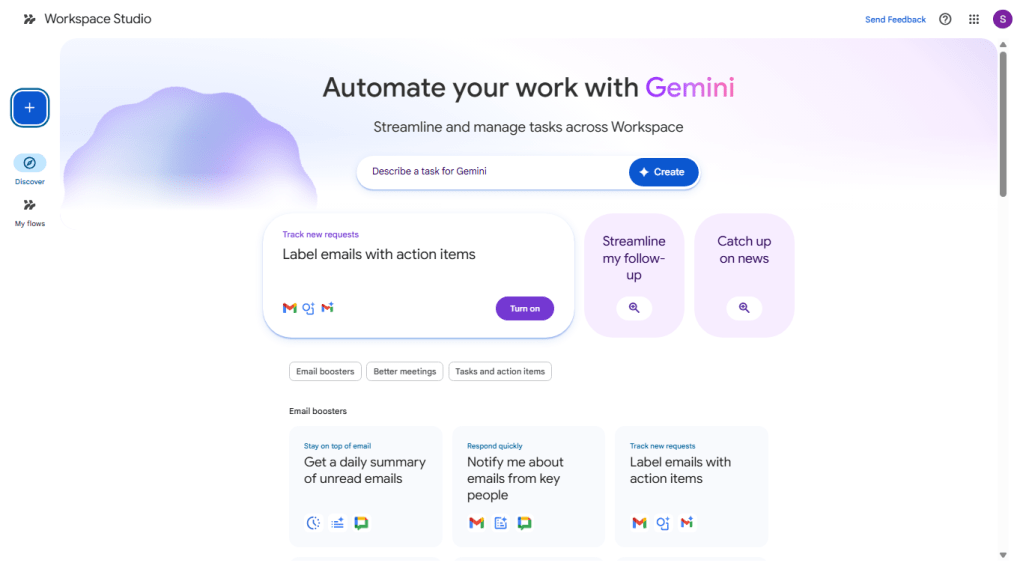
When you open the Workspace Studio home page (also known as the Discover page), you’re greeted with a text entry box for Gemini. You can type a prompt inside it describing the actions (a.k.a. “steps”) that you want a flow to take when something happens (a “starter” event or schedule).
Three suggested flow templates appear below the Gemini text entry box. (In the screenshot below, the templates are Label emails with action items, Streamline my follow-up, and Catch up on news.) You can click a template to activate it.
On the Workspace Studio home page, you can type in a prompt for Gemini to create a flow, select a flow template, or click the big + sign to start a new flow.
Howard Wen / Foundry
Below these three suggested flows, there are even more flow templates. They’re organized under categories describing what they’re for, such as “Email boosters,” “Better meetings,” and “Tasks and action items.”
The vertical toolbar along the left has three icons:
+ symbol (for “New flow”): This opens the tool for building a flow.
Discover: This is the default home page with the Gemini text entry box and templates below it. If you’re in another page of the Workspace Studio, such as the “New flow” page above, clicking this takes you back home.
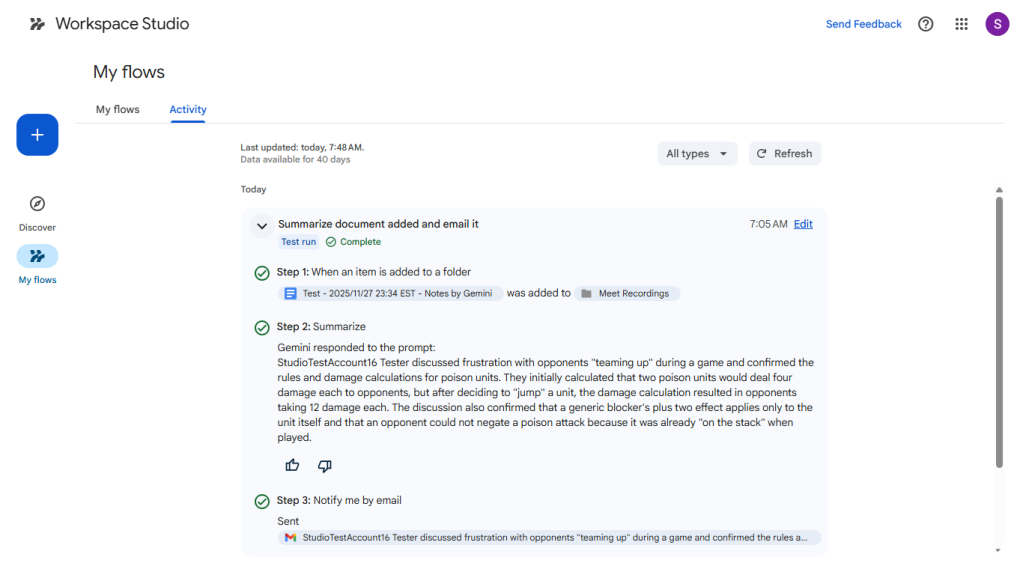
My flows: This opens a page that lists the flows you’ve created. You can manage your flows: delete, edit, rename, or share them with others. This page also has a tab you can click to view an activity log that lists which flows are active, when they were executed, what steps they took, and if their execution was successful or not.
Build your first flow
On the home page, you can use Gemini or a template to start a new flow. But it helps to learn by using the flow builder tool first. This way, you’ll understand more clearly how flows work. (Even if you use Gemini or a template, you’ll be taken to the flow builder interface, because you must review and test the flow before you can activate it.)
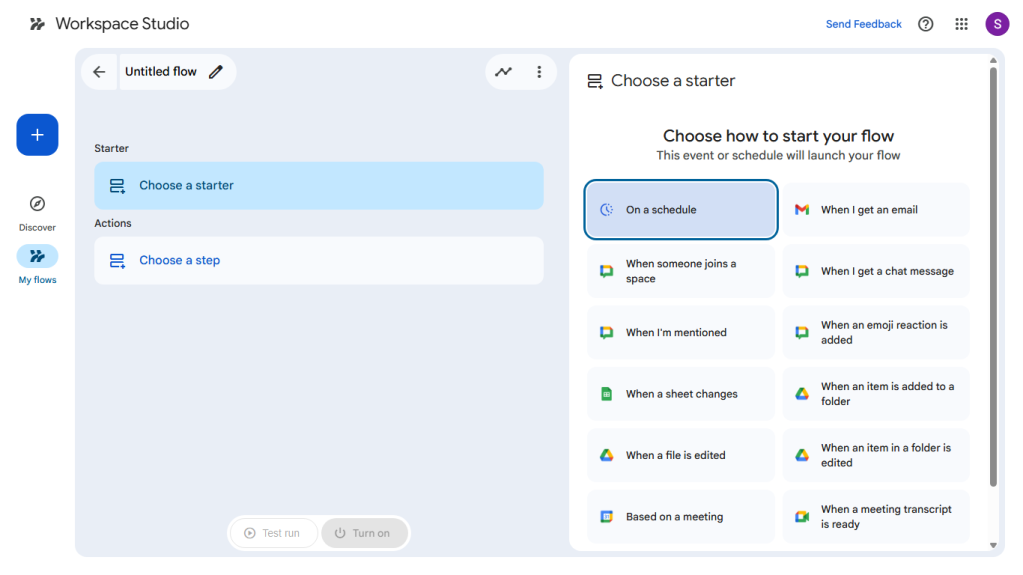
On the left toolbar, click the + symbol. The flow builder tool will open in the main window to the right.
Workspace Studio’s tool builder, with the flow in the main window and suggested “starters” to the right.
Howard Wen / Foundry
First, give your new flow a name. Toward the upper left, click Untitled flow and type in a name for your flow.
Selecting an event (a.k.a. “starter”)
Below the flow name, click Choose a starter. Then, in the pane along the right, select an event that will trigger the flow to take action. Once you’ve selected a starter event, the pane on the right may show additional parameters to fill in. Examples:
On a schedule: The action will happen on a day, date, and/or time that you set. This can be recurring, such as every Wednesday at 9:00 a.m.
When I get an email: The action will happen when an email arrives in your Gmail inbox. You can select certain attributes for the email, such as who it’s from, what words it contains, or if it has attachment.
When a sheet changes: Whenever a change is made to a spreadsheet in your Google Drive, the flow triggers an action such as sending you an email or a Chat notification. This flow is handy if you’ve shared a spreadsheet with co-workers to collaborate on.
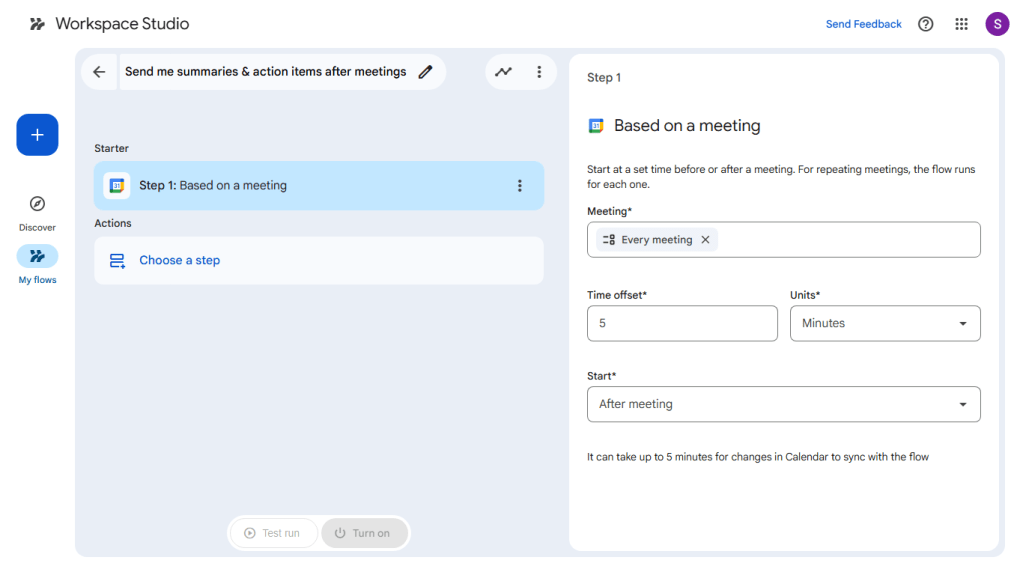
Based on a meeting: The flow can take an action before a meeting you’ve scheduled in Google Calendar, or it can perform an action after the meeting has happened.
This flow is set to start 5 minutes after every meeting ends.
Howard Wen / Foundry
A flow can have only one starter, which becomes Step 1.
Selecting one or more actions (a.k.a. “steps”)
Once you’ve selected a starter event for the flow, click Choose a step in the main window.
In the right pane, there are several actions (steps) that you can select from. They’re presented under categories such as “AI skills,” “Tools,” and individual Workspace apps (Gmail, Chat, Sheets, etc.) and can include anything from adding a label to a Gmail message to sending Gemini a prompt. There are also steps that can integrate with your accounts on Asana, QuickBooks, and Salesforce.
For example: If a document is added to a specified folder in your Google Drive (the starter), the flow can trigger Gemini to generate a summary of the document’s content (the step).
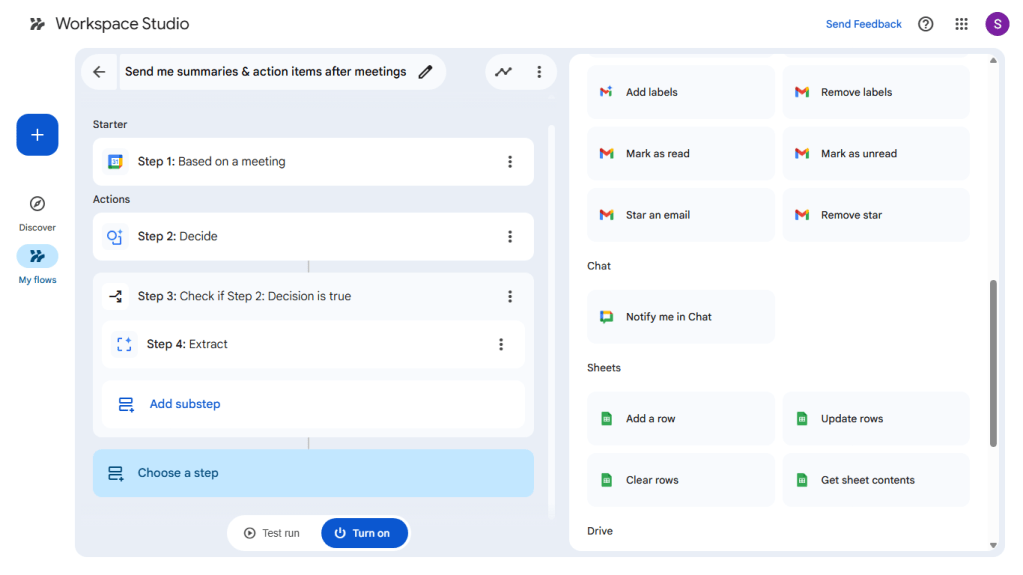
You can add more actions that your flow will execute when the starter event happens. In the main pane, and below the first step of your flow, click + Add step, then select a second step from the right pane that the flow will take after it executes the first step. The maximum number of steps that you can add to a flow is 20.
A flow with a starter event, steps, and a substep to execute.
Howard Wen / Foundry
You can add a substep to a step (click Add substep in the main pane); indeed, certain steps require you to do so. A regular step is a main, sequential action in the overall flow, executed one after another. A substep is subordinate; it is only executed after and as a result of its parent step. For example, a step could identify a document, with its substep sending the document to a specific folder. (In the screenshot above, Step 4 is a substep of Step 3.)
You may also opt (or be required) to add a variable for a step (by clicking the + Variables button in the right pane). For example, a variable could be a time or date that you want the action to be executed, or text that you select, such as the title for a document that you want an action to generate.
Adding a document title variable to a step.
Howard Wen / Foundry
There are currently about a dozen starters and two dozen steps to choose from in Workspace Studio. See Google’s comprehensive list of Workspace Studio starters and steps for descriptions, examples, and configuration details for each one.
Testing and activating your new flow
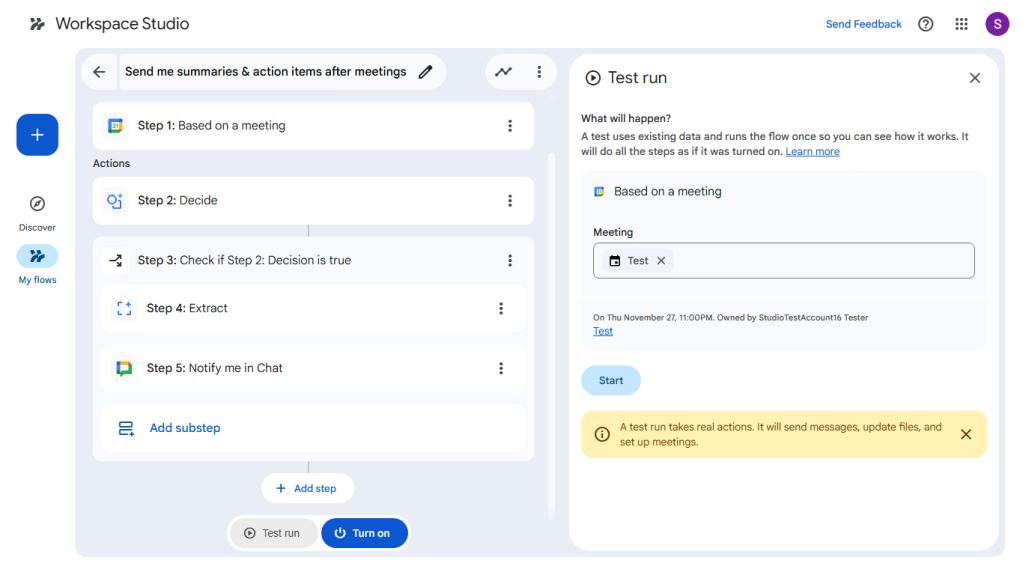
When you’re finished building your flow, click the Test run button at the bottom of the main pane.
The right pane guides you through what will happen: When you click the Start button in this pane, your flow will be executed. Note that the test run takes real actions, such as changing a document or setting up a meeting. Google recommends temporarily setting up the flow with a test document or a meeting where you’re the only invitee. If the test run works, you can go back and swap in the real document or meeting before deploying the flow.
Click Start in the right pane to test the flow.
Howard Wen / Foundry
If the test run is successful (or not), you’ll see a notice at the bottom of the right pane. If the test isn’t successful, you’ll be advised on what fixes you can make to the steps in your flow.
After you’ve confirmed that your new flow will work according to the test run and made any final adjustments, click the Turn on button at the bottom of the main pane.
Note: You can create a maximum of 100 flows, and other limits apply, such as how many times your flows can run each day.
Create a flow from a template
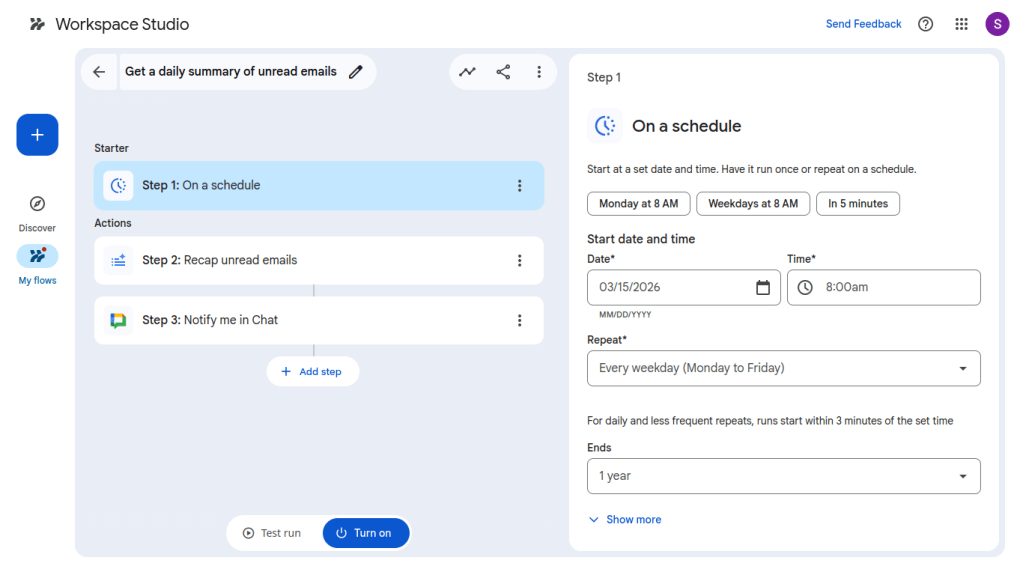
Now that you know how flows work, check out the Workspace Studio templates to see if any fit your workflows. Click Discover in the left toolbar to return to the Workspace Studio home page, scroll down to see all the available templates, then click on a template. The flow builder tool opens with all the steps already in place.
A flow template in the flow builder tool. You set parameters such as start date and scheduling, and you can customize it further if you wish.
Howard Wen / Foundry
Click on each step (including the Starter step), configuring each one for your needs, such as selecting a specific file to take action on. You can also add, delete, or reorder steps in the flow using the three-dot (“More”) icon next to a step.
Prompt Gemini to build a flow
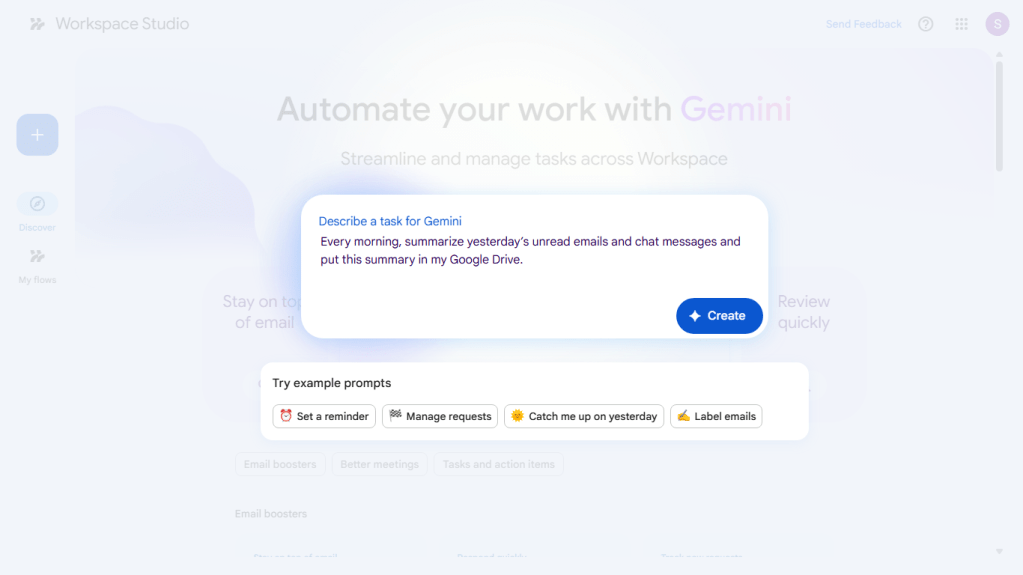
The fastest way to build a flow is to have Gemini do it. On the Workspace Studio home page, type a description of the flow you want into the text box and click the Create button.
Describe the flow you want Gemini to create.
Howard Wen / Foundry
Generally, you want to describe three things in your prompt:
What is the action that you want the flow to do?
When should this action happen, or what event should happen that triggers this action?
Where do you want the flow to put the results of this action?
Example prompts:
Every morning, summarize yesterday’s unread emails and chat messages and put this summary in my Google Drive.
When I get an email with the word “budget,” label it appropriately.
The possibilities for prompting Gemini to build a flow are very broad. So it helps if you’re familiar with the Google Workspace apps that flows can interact with and have the imagination and savvy for experimenting with writing AI prompts.
Once you’ve clicked Create, the generated flow opens in the flow builder tool, where you can review and edit it if needed.
Manage your flows
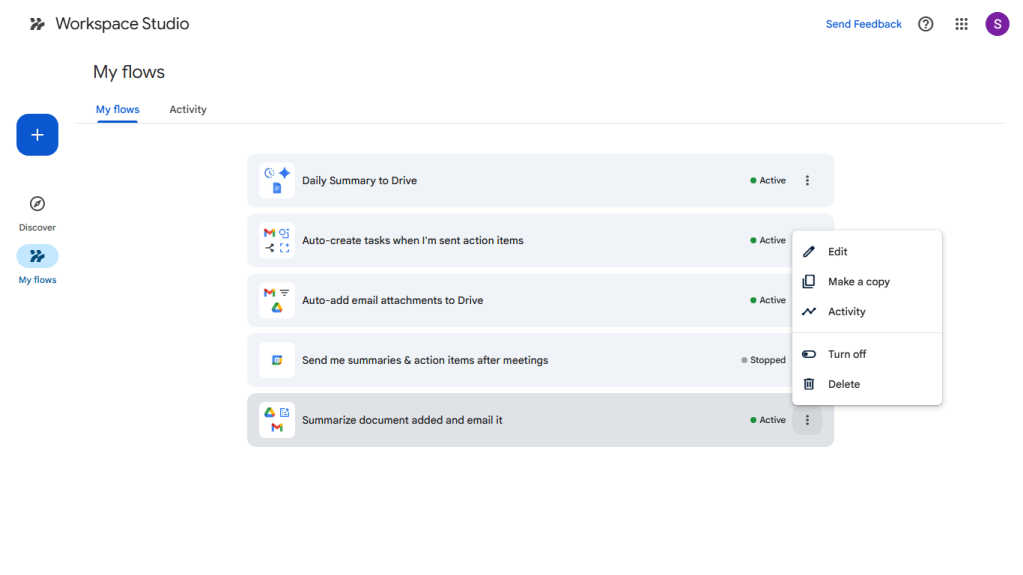
On the toolbar along the left, click the My flows icon. A list of your flows will open to the right in the main window.
You can manage your flows on the “My flows” page.
Howard Wen / Foundry
Click the three-dot icon to the right of a flow’s name. This will open a menu with selections for you to manage the flow: Edit, Make a copy, Activity, Turn off, Delete.
Edit will open the builder tool page for the flow. Its starter and steps will be listed in the main pane, and the descriptions for each appear in the right pane. You can make changes to each or delete them.
Make a copy is handy if you want to create a new flow that’s a variation of the original one. You can make a copy, give it a different name, and customize it.
Activity opens a page in the main window that shows when the flow was most recently executed and whether it was successful.
Reviewing the activity for a flow.
Howard Wen / Foundry
Clicking the Activity tab on the “My flows” page takes you to a page that lists the activities for all your flows.
To share a flow with others in your organization, select it in the list of flows, then click Get a link to copy at the top of the page. Change the permission to Anyone in your organization with the link can make a copy, then click Copy link. You can share the link with co-workers via email or in Chat.
Using the Studio sidebar in Workspace apps
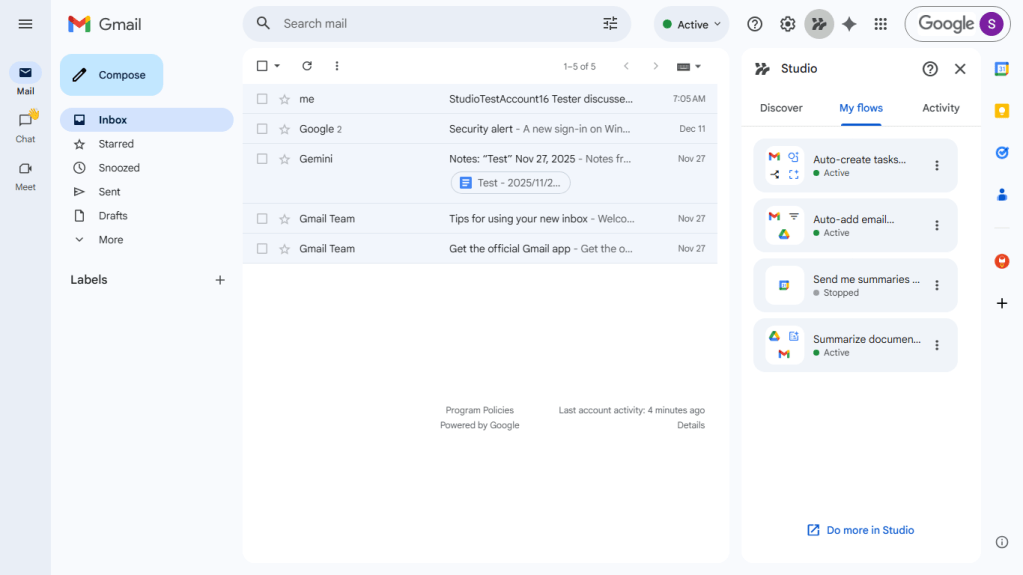
In Gmail and Google Chat, you can open a sidebar that helps you manage your flows. Look to the upper-right corner of the Workspace app for the Studio icon — it’s between the Settings gear icon and Ask Gemini nova star. Click this and the Studio sidebar will open along the right. It has three tabs in it:
Discover: Like the Workspace Studio home page, this tab presents suggested flows that are ready for you to activate.
When you add a new flow by selecting a template in the Discover tab, you’ll be taken to the flow builder tool in the Workspace Studio app. You have to customize and test run it from here before you can activate it.
My flows: This lists your flows. You can delete, edit, rename, or share them from this tab.
Activity: This tab shows the activity log of your flows — when they went into action and the steps that they took.
The Studio sidebar lets you manage flows from within Gmail and Google Chat.
Howard Wen / Foundry
Tips for building flows
Learn by example: Select a flow template and customize it in the tool builder. This will help you learn how a flow works.
Reference files: Use the @ to directly reference a file in your Google Drive when you’re customizing a step in the flow builder tool or writing a Gemini prompt to generate a flow.
Experiment: Don’t be afraid to experiment with your prompts to Gemini. Describe the flow you want, using everyday language. Remember, your prompt should answer what, when, and where.
Review flow activity: After a flow is executed, review its activity log to understand how it played out its steps.
Google has made a big step forward by extending end-to-end encryption to Android and iOS devices for Gmail client-side encryption (CSE) users, says an expert.
“All in all, this is a welcome update, especially in light of recent concerns surrounding WhatsApp’s encryption methods,” said Gartner analyst Avivah Litan. “Google’s approach offers verifiable customer-managed keys and ensures the provider does not have access to encrypted content.”
Meta has reportedly said the claims are false, and that WhatsApp messages remain protected by default. The suit’s allegations have not been proven in court.
Litan noted that Google’s encryption update is only for organizations subscribing to its Enterprise Plus with Assured Controls edition. Messages and attachments are encrypted directly on-device, with encryption keys managed externally by the customer.
“For CSOs in regulated industries, this development is significant, as it supports secure mobile communication, compliance with regulations such as HIPAA [the U.S. Health Insurance Portability and Accountability Act] and GDPR [the European General Data Protection Regulation], and reduces the risk of plaintext data exposure on mobile devices,” she said. “External recipients retain the ability to reply via a web portal.”
However, Litan added, the capability remains opt-in, requires premium licensing and administrative configuration, and disables several Gmail functions, including AI features and comprehensive search, on encrypted content. But, she pointed out, the limitations are consistent with those in Gmail web and desktop implementations.
It’s also a capability that Microsoft doesn’t provide. A Microsoft spokesperson said in an email that the company doesn’t currently offer end-to-end Outlook encryption on mobile, although messages can be digitally signed and encrypted.
In its April 9 announcement, Google said Workspace users can compose and read end-to-end encrypted messages natively within the Gmail app on Android and iOS without the need to download extra apps or use mail portals. Users with a Gmail E2EE license can send an encrypted message to any recipient, regardless of their email address. If the recipient uses the Gmail app, the encrypted message will be delivered as a normal message thread to their inbox, but if not, they can seamlessly and securely read and reply in their own native browser. This, Google said, ensures that all users have a simple and secure interface, regardless of their email service or device.
Google Workspace admins will need to enable the Android and iOS clients in the CSE admin interface to give users access to the new capability. This can be done in the Admin Console.
End users also need to be taught the new process: To add client-side encryption to any message, they must click the lock icon and select ‘additional encryption’. Then they can compose a message and add attachments as they normally do.
Forrester Research Senior Analyst Andrew Cornwall noted the biggest benefit for enterprises is that Workspace admins or Google can disable the ability to take screenshots and screen recordings when users read an encrypted message in the Gmail app. That will prevent Android and iOS recipients from forwarding a message as an image, he said, noting that Google can also disable screenshots in Android Chrome for business users and presumably will do this when Android users with email programs other than Gmail open a message in a browser.
From a user’s perspective, he added, this encryption gives Gmail an advantage over third-party email programs like Outlook and Thunderbird, which won’t automatically decrypt messages that have been encrypted using Google’s encryption mechanism. Unlike some encryption methods, Gmail doesn’t require the exchange of a key in advance, so users will be more likely to use it.
However, he pointed out, Google’s client-side encryption doesn’t encrypt headers or message senders, so an attacker with access to the device can still get some potentially sensitive information even with encryption enabled.
“If you’re planning to use Gmail to commit financial crimes or plan a revolution,” he added, “you should know that Google controls the display and often the keyboard on devices they build. Even if emails are encrypted on device, your messages may still be available while being read or composed.”
And while end-to-end encryption (E2EE) is considered by experts to be an excellent protection against the hijacking of data in transit, it won’t protect data on compromised devices, stolen and hacked devices, or in unencrypted backups.
David Shipley, CEO of security awareness provider Beauceron Security, noted the extension of Gmail end to end encryption to mobile platforms will help organizations ensure compliance with privacy concerns. “On the downside,” he added, “this is going to be a powerful tool for criminals. If they spin up a Google Workspace tenant and send encrypted messages to end users who aren’t on Gmail, in those cases, users will get a link to a new portal to read the sent message which will not be intercepted by a lot of security tools like email filters.”
Let Agentic AI speak unto Agentic AI — but in some kind of mathematical code.
That’s the thinking behind the MATHBAC (Mathematics for Boosting Agentic Communication) project, which aims to develop a new area of AI communication, one in which AI agents will ‘talk’ to each other to understand how they collaborate and share information.
MATHBAC is being run by the US Defense Advanced Research Projects Agency (DARPA), one of the progenitors of the internet. It hopes the research will enable agentic AI models to collaborate to solve complex problems, and increase understanding of the mathematics that lies behind the ways that they function.
A key element of the project is discovering fundamentally new ways of working: Research that results only in incremental improvements in existing methods and models that already exist is specifically excluded from MATHBAC funding.
The project has been divided into two phases. The first will consider the derivation of the mathematics behind agentic AI and look at ways of improving communication between systems. The second, much more ambitious, will look to create tools to enable development of a new science, solving “fundamental scientific and mathematical problems underpinning collective agentic intelligence.”
DARPA expects to achieve all that in just 34 months, and is accepting proposals from organizations wishing to work on the project.
Though I reviewed Apple’s recently-introduced MacBook Neo, M5 MacBook Air, and M5 Max MacBook Pro, I didn’t look at Apple’s new displays. But it is noteworthy that even these products open up new opportunities for the company.
That’s because Apple this week gained FDA clearance for the Medical Imaging Calibration feature introduced in the Studio Display XDR. Just as the affordable MacBook Neo opens up a fresh mass market opportunity, this specialized product feature forges space in a new niche.
Apple opens a new growth market
That niche will only become even more important once specialized AI medical tools to support treatment and diagnosis appear in the radiology space, as such tools inevitably will. (Inevitably? I mean, just look at this December research announcement from the Institute of Cancer Research, which demonstrated that combining artificial intelligence (AI) with state-of-the-art MRI imaging can revolutionize prostate cancer treatment.)
The combination means you don’t need a dedicated radiology workstation costing in excess of $15,000; you need only a Mac and a $2,899 Apple display.
Once those things are in place, you can select your choice of imaging software — probably something like Visage Imaging 7, OsiriX MD, Falcon MD, or another of the solutions available for Mac. Even better, while privacy and data confidentiality concerns do exist, the Mac you use for this work can also be used for other tasks, like any other Mac. This democratizes access to tools of this kind; gives the medical profession all the Apple advantages around product resilience, TCO, and tech support; cuts budgets; and enables medical tech purchasers to get more for less.
On-device AI, an Apple advantage
Then we get to think about AI, and that’s where Apple’s strategic sensibility seems to be coming into play. I see it like this: it is obvious that AI for medical imaging will need to run on something. And what Apple has done with Apple Silicon, its approach to on-device AI, and this new medical image calibration feature on its displays all mean it now offers a trusted, highly usable, incredibly flexible solution to run future AI-augmented MRI imaging packages. Apple’s processors can simply shrug their way through that kind of work, while its new displays can give radiologists and other medical examiners the precise accuracy they need.
The new display feature also gives Apple an impressive story to tell in the $42.6 billion global market for medical imaging devices. That tale is tempered by Apple’s cast-iron commitment to privacy and the impressive capacity of Apple Silicon to run on-device LLMs. Apple’s introduction of MLX means you can easily imagine medical imaging deployments that rely on a new Studio Display and four Mac minis clustered via a single Thunderbolt 5 cable. Total cost? Not $15,000.
Apple is cheap
Apple is cheap. That’s not an illusion. Look at the ecosystem. The entry level $599 MacBook Neo shows this, while all the TCO and tech support and security studies I’ve seen across the last decade show that once you begin using these platforms you end up spending a lot less keeping your investments going.
That matters in any business, of course. But when it comes to the kind of industries Medical Imaging Calibration is meant for, that can be life-saving. Who wants urgent surgery to be delayed by an operating system crash or another Crowdstrike-like moment?
There might be problems getting this message through to every medical provider across the planet, but check out Emory University and its Department of Radiology and Imaging Sciences. There, you can peruse a white paper explaining most of the steps radiologists and imaging practices must take to integrate Apple’s displays and systems into their clinical workflows.
As explained here, the paper praises the CPU/GPU performance of Macs used in the test, which rival or exceed traditional workstations at a fraction of the cost. The white paper also opens a second dimension in medical practice, thanks to visionOS and the capacity to create new workflows that have the headset using new surgical apps from the likes of Stryker and Storz. Add AI to that equation and you can see that Apple has raised a very, very large flag depicting a very large Apple logo on part of the future of medical care.
When voters in the forthcoming Hungarian election assess the current government, its record on internet security will not be one of its proudest achievements.
An analysis by open source investigation organization Bellingcat has revealed that the passwords for almost 800 Hungarian government email accounts are circulating online, many of them associated with national security. These breaches in security are not down to high-tech attacks but rather are the result of poor email hygiene among government employees. The security leaks were widespread: 12 out of 13 government departments were affected.
Hungarian Prime Minister Viktor Orban’s administration likes to present itself as firm protector of Hungarian borders, resisting foreign interference, but this doesn’t seem to apply to its computing prowess. Among those whose details were revealed were an officer responsible for information security and a counter-terrorism expert.
Bellingcat found that government officials have been using weak passwords such as variations of the word “Password” or the number sequence “1234567, while another simply used his surname.
The Hungarian government is not alone in its laxity. Earlier this year, Specops found that 6 billion logins had been exposed online and found that number sequences and ‘password’ featured highly in the list of the most compromised logins.
The vulnerabilities inherent in the Hungarian example are a warning to all CSOs that they should be reminding their staff to tighten their security credentials. Many choose simple, short memorable passwords because they’re easy to remember but using a password manager or deploying passkeys will immediately strengthen employees’ ability to protect data.
Microsoft Windows Insider members will soon have an easy way to select which new features they test. Until now, Windows Insiders have had to wait for Microsoft to randomly assign them news features for testing through its Controlled Feature Rollout program or enable the features themselves through third-party software such as ViVeTool.
The new Windows setting, Feature Flags, will be a boon for administrators of Microsoft products who want to get a handle on the innovations relevant to their enterprise. Microsoft has not officially announced the new functionality, but an eagle-eyed user spotted the Feature Flags setting buried in the latest Windows Insider software build.
Microsoft Windows design and research leader Marcus Ash responded congratulating the spotter on their speed, adding that he would be “Excited to share more about WIP settings next week.”
He followed that up with a post to a Microsoft blog that changes were on the way, saying that users will “ have more control” over features they care about.
The Windows Insiders who wish to delve into the new settings are out of luck for now: They are not enabled yet. But messages contained in the latest build of the software say “these features are still in development and may change” and that “turning them on or off could affect performance or stability.”
So, while there are plenty of hints about the forthcoming release, users will still have to wait for an official announcement from Microsoft and there is no indication as to when that will be.
Meta Platforms is reportedly pulling top software engineers from across the company into a newly created AI unit on a mandatory basis, with the stated goal of eventually having autonomous agents perform the bulk of the work of building, testing, and shipping its products, and human engineers serving only to monitor them.
The development was based on an internal company memo authored by Maher Saba, a vice president in Meta’s Reality Labs division and a longtime associate of Chief Technology Officer Andrew Bosworth, who leads the new Applied AI (AAI) Engineering organization, reported Reuters. According to the report, Saba created AAI last month and initially sought volunteers to join. This week, he told selected employees their transfers are no longer a choice.
“AAI is one of the company’s highest priorities and we’re resourcing it by moving our strongest talent to address it. Therefore, the transfers aren’t optional,” Saba wrote in the memo, the report added.
The unit’s mandate goes significantly beyond building AI productivity tools. According to the memo AAI’s stated end goal is for autonomous AI agents to perform the bulk of the work required to build, test, and ship Meta’s products and infrastructure with human engineers monitoring rather than executing.
Gartner predicts that AI agents will require 80% of the engineering workforce to upskill by 2027, and separately forecasts that 40% of enterprise applications will embed task-specific AI agents by year-end 2026, up from less than 5% in 2025.
“Meta’s move signals that AI is now being fundamentally positioned within engineering as a core execution infrastructure, rather than just as a productivity layer,” said Ishi Thakur, senior analyst at Everest Group. “Competitive advantage will hinge less on access to models and more on how deeply organizations can embed AI into real-world engineering workflows.”
But analysts caution that the path there is far from straightforward. “For Meta-scale firms, agent-led engineering is achievable only in tightly scoped domains today,” said Charlie Dai, VP and principal analyst at Forrester. “Before reducing hands-on developer responsibility, enterprises must establish robust evaluation harnesses, policy-as-code controls, deterministic build pipelines, and explicit human escalation paths.”
What AAI is building
AAI will work alongside Meta’s Superintelligence Lab, headed by former Scale AI CEO Alexandr Wang, to build what Saba described as “the data engine that helps our models get better, faster,” according to the report. The organization consists of two teams: one focused on interfaces and tooling, and a second responsible for executing tasks, generating data, and providing evaluations that feed back to Meta’s modeling teams.
“This reflects a growing belief that traditional management layers will become less relevant as AI absorbs coordination and execution tasks,” said Thakur. “Value is concentrated in high-skill individual contributors augmented by AI.”
Dai cautioned that the structure carries significant governance risk. “If provenance tracking, gated approvals, and automated security testing are not mandatory, AI-generated code can overwhelm oversight and erode accountability for quality, compliance, and audits,” he said.
On Meta’s Q4 2025 earnings call in January, CEO Mark Zuckerberg said 2026 would be “the year that AI starts to dramatically change the way that we work.” Susan Li, Meta’s chief financial officer, said on the same call that output per engineer had already risen 30% since the start of 2025, driven largely by AI coding agents, with power users recording an 80% year-over-year productivity increase.
For Meta, AAI is the next step in embedding that trajectory deeper into its engineering infrastructure.
Workforce reductions ongoing
Separately, Meta has been reducing its overall headcount in 2026. The company has already cut approximately 10% of its Reality Labs division in January, affecting around 1,000 employees, and laid off several hundred more in late March across recruiting, sales, global operations, and Facebook social teams.
Meta’s capital expenditure for 2026 is projected between $115 billion and $135 billion, nearly double its 2025 spend, driven by investments in data centers, chips, and AI infrastructure. The company formalized that infrastructure drive with the launch of Meta Compute, consolidating its global data center and network operations under a single leadership structure.
“The dominant barrier is organizational,” said Dai. “Enterprises have not yet redefined ownership, incentives, and liability when software is produced by agents. Until accountability frameworks catch up, leadership caution will continue to slow adoption.”
Thakur put it plainly: “The real constraint is no longer technological capability, but whether organizations can evolve their operating models fast enough to responsibly absorb this level of autonomy.”
Meta did not immediately respond to a request for comment.