
In the first quarter of 2026, 65.6 million PCs were sold worldwide, according to data released this week by IDC. That represents a 2.5% increase compared to the same quarter a year ago. The research firm attributed the increase to customers moving to buy PCs now ahead of expected significant price hikes.
The fact that computer sales are rising despite the uncertain global situation and a worldwide shortage of RAM is seen as a positive sign, but the industry faces uncertainty in the months ahead.
“The conflict in the Middle East has introduced a new layer of volatility to the fragile computer market, which is weighing on global logistics with a double-edged sword of rising energy and transportation costs,” Isaac Ngatia, senior research analyst, IDC Devices Research, said in a statement.
As usual, Lenovo, HP, and Dell were the top PC sellers, followed by Apple and Asus. The latter accounted for the largest increase — specifically, up 17.1%.
Month: April 2026
Google’s new AI app is a glimpse of the future
I don’t know about you, but I spend a lot of time offline. And not by choice. That’s why I love new tools that work offline like the great one Google just launched.
I know, I’m an outlier. As a full-time digital nomad who travels constantly, I have unusual connectivity problems. Right now, I’m living on a farm in Tuscany. It’s amazing. I love it. But for two days recently, the connectivity got so bad I could barely work. There was little I could do except drink Chianti and gaze at the rolling green hills. (On Easter Sunday and the day after — a local day off — everybody was at home stressing their internet connections, which made connectivity close to impossible.)
I often find myself in this position. My wife and I tend to favor old houses in old neighborhoods, usually in Europe or Latin America, and the connectivity can be bad to nonexistent.
I lose connections while driving, while in or near very old stone buildings, while flying in airplanes, and while driving through remote areas.
But even for people who don’t travel and move around like I do, being offline can also be a choice. It’s much more secure to disconnect, especially in public spaces like coffeeshops and airports and when using one of the many untrustworthy cloud-centric companies. Sometimes you need desperately to save battery life. Sometimes it can feel healthy psychologically to know you’re offline.
Tools can and should work better offline. I have an expensive iPhone that would have been considered a supercomputer just 10 years ago. A modern smartphone is powerful enough to do a lot of the work that’s currently performed in the cloud.
Cloud computing is necessary for chatbots like ChatGPT, Perplexity, Claude and Gemini because all-purpose AI models require hundreds of billions of parameters, massive amounts of RAM, and huge amounts of electricity to be ready to do anything and everything very quickly. Forcing these workloads onto a mobile device fundamentally caps the intelligence and capability of general-purpose AI. But breaking down individual tasks (like transcription) doesn’t require massive data centers.
The biggest problems for me are two of the tools I use most: MyMind and Lex.
I wrote about MyMind in August. It’s a lifelogging, bookmarking, remember-everything tool that makes it very fast at recalling information. It uses AI to auto-tag and takes the work out of both saving and recalling information.
Unfortunately, without a connection, I lose MyMind. It simply has no offline capability. So when I’m disconnected and want to save or recall something, I can’t. The more I rely on this prosthetic memory tool, the more being offline gives me amnesia. This is my biggest complaint about MyMind.
I’ve also told you about Lex. Lex is essentially a word processor with built-in AI tools designed not to write for you (and make you worse at writing), but instead to point things out and advise you in ways that make your writing better.
Lex also doesn’t work offline. Which is a shame, because its major alternatives like Google Docs and Apple Pages do. You can simply use them offline, and later when you get a connection they sync to the cloud. Lex’s lack of offline support is the main reason I often think about cancelling my subscription and going back to Pages. (Note that I use a Bluetooth keyboard with my phone to do real writing of columns, newsletters, blog posts and even books.)
Both MyMind and Lex use AI and I expect that in the very near future we’ll see a shift away from all-purpose chatbots to smaller, special-purpose AI-based tools like these running on the edge or on our phones.
One great example of this shift is a new tool from Google called AI Edge Eloquent.
Talk to the handheld
Google launched its free, iOS-only, English-only offline dictation app on Monday. While dictation doesn’t sound very interesting, Google has built in several features that make it really great.
Firstly, it uses AI, with Gemma-based speech recognition models running locally on the phone. It doesn’t just capture what you say, but what you meant to say. Which is to say that it ignores your ums and ahs and repetitions, capturing only the clean words you intended. (If you toggle on cloud processing, it works even better.) It’s very good at adding punctuation automatically.
When you’re done talking, the app automatically loads the clean text to the clipboard. That means you can talk to the app, then just switch over to your word processor, social media app, email app or other app and simply paste in the results.
The app can re-write your transcripts using one of four default style options:
- Key points (condenses speech into a bulleted list)
- Formal (shifts the text into a professional tone)
- Short (summarizes the message)
- Long (expands on the initial text)
(For most writing, I don’t recommend these kinds of stylistic shortcuts; I recommend communicating in your own style.)
After you dictate something, you can press a stop button or a pause button. This is a great pair of choices because if you’re working on a longer piece, the pause button lets you gather your thoughts, do a bit of research, then resume, ending up with the whole screed in the clipboard.
The most surprising feature is that it can learn custom words. For example, it learns from your edits, from the manual addition of words or — wait for it — from your Gmail conversation history (a button asks your permission, and you need to choose to explicitly log in to Gmail). The Gmail option brings in not only jargon, but also names, brand names you’ve talked about, abbreviations, foreign words, place names, and others.
And, finally, the app prominently displays “usage stats,” including how many words, how many words per minute, average dictation speed, total number of words dictated, and the total number of “polishing edits” made by the app.
AI Edge Eloquent sherlocks Wispr Flow and Willow, which each cost $15 per month. It also sherlocks SuperWhisper, priced at $85 per year. (In Silicon Valley parlance, “sherlocking” is when a major company copies a major feature of a competitor’s product, thereby rendering the competitor’s product obsolete.)
In short, AI Edge Eloquent is kind of perfect and extremely useful for anyone who wants to dictate anything.
The slow rise of offline AI
I’m seeing a few other tools emerge that are based on the idea that AI should be on the edge and offline.
One interesting new tool released this week is called WarClaw from a Bellevue, WA-based startup called Edgerunner AI. The company calls the tool a “digital adjutant” (an adjutant is a military officer who serves as an assistant to a military commander).
The company claims WarClaw was built by former soldiers for use by active-duty military personnel. It’s a secure operating layer built on top of OpenClaw, according to the company. (I talked about OpenClaw earlier this year, as did my colleague Steven Vaughan-Nichols, who explained about how incredibly insecure OpenClaw is.
The software is designed to work during combat in what they call DDIL settings (Denied, Disconnected, Intermittent, and Low bandwidth).
WarClaw runs on a disconnected mobile device and was trained on specific military data. It automates mission planning, scheduling, and the analyzing of information. Surprisingly, it can directly control office tools like Microsoft Word, PowerPoint, Excel, Slack, web browsers, and email.
The company has already won contracts to supply WarClaw to three US military branches.
While WarClaw is for soldiers, I think business people could benefit from such a tool. For example, it would be great to have an offline assistant while traveling on business to data-insecure places (like China) and environments (like airports).
I’d love to see nearly all the AI jobs currently requiring a connection to be turned into an app that runs locally, disconnected on the phone. Beyond the obvious convenience, that also represents a big opportunity for Google and Apple: they can match their AI tools to increasingly powerful smartphones, which gives phone buyers a powerful reason to upgrade their hardware more frequently.
AI disclosure: I don’t use AI for writing. The words you see here are mine. I do use a variety of AI tools via Kagi Assistant (disclosure: my son works at Kagi) — backed up by both Kagi Search, Google Search, as well as phone calls to research and fact-check. I use a word processing application called Lex, which has AI tools, and after writing use Lex’s grammar checking tools to find typos and errors and suggest word changes. Here’s why I disclose my AI use and encourage you to do the same.
This problem might not need a solution: customer-service bots that code for free
Why bother paying for your own generative AI (genAI) tokens when you can have the computations done for free using a competitor’s AI-powered customer service bot? That question is at the heart of a CIO.com report that explores the trend and various ways to block it.
It’s possible the best response to this kind of computational chicanery is to ignore the thieves and stay focused on delivering the best service for customers — hopefully boosting revenue by doing so.
The CIO.com story offers a detailed look at how to combat the problem — options that include limiting the number of tokens that can be used for a single answer and layering on AI to validate that questions are legitimate.
But all the proposed approaches have major downsides. For one, the frequency of these inappropriate “queries” might be limited — and the costs of tokens used to handle them might not break the bank.
My argument — to ignore the issue — includes both good and bad facets. On the positive side, genAI-based chatbots, when properly deployed, have the potential to be more efficient than human customer service people, and far better.
Specifically, genAI tools can handle highly-complex queries. Consider Amazon. With its various partner programs, it has an astoundingly large number of products in a massive number of categories. No human could have deep understanding of all of those SKUs and certainly wouldn’t be able to answer technical or detailed questions about them. GenAI, properly trained, can.
Or consider a customer who chats with a high-end restaurant bot, saying: “We have a reservation for 12 at your restaurant tomorrow night. The problem is that seven of those people have dietary issues, including one vegan, one who is strictly kosher, one gluten-free and several others who have rare allergies to specific ingredients. I am pasting a detailed description of the dietary issues for all 12 people. Can you review the full ingredients for all of your menu items and recommend to us several entrees, side orders, soups, salads and desserts that would accommodate all of our guests? That way, we don’t have to pepper the waitstaff with questions such as ‘Is the sugar you use vegan?’ or ‘Have you segregated the cookware for strict kosher?’”
GenAI is especially well suited to handle that kind of question and an accurate answer might win customers for life (though it might use up a large number of tokens). But if it buys the loyalty of new customers, that’s a powerful win.
That said, there remains a serious concern. I have argued that AI can be a powerful tool, but its hallucinations make it a bad choice for direct customer interactions. It’s the same reason I don’t back enterprise use of autonomous agents. Agents are great, but they are not nearly ready to function autonomously.
For some companies, “GenAI can sometimes make things up and do so in a highly confident manner” is going to remain a deal killer. And it’s not like there’s a reasonable chance hallucinations will be eliminated anytime soon. (Indeed, the more sophisticated these models get, the more they hallucinate. Lovely.)
But if a company can set the hallucination issue side for now — I know. It’s like that line, “Aside from that, Mrs. Lincoln, how was the play?” — genAI customer service chatbots have serious potential. And if a few stray coding and recipe requests rob you of some tokens while gaining you new customers, it’s a trade-off worth considering.
Chrome, Vivaldi, and the challenge of changing browsers
Ahem: My fellow Android-appreciating organisms — I’ve got a confession.
After the better part of two decades of personally using Google’s Chrome browser on both Android and every desktop computer I own, I’ve made the leap into the arms of a shiny new web-weaving seductress. Her name is Vivaldi.
Yes, it feels like a mildly geeky version of virtual adultery (especially with an exotic-sounding name like that). But I’ve long been a proponent of embracing whatever apps and services best serve your individual needs at any given moment and avoiding being beholden to any one company — no matter who that company may be. And now, after all these years, it’s become clear that Chrome is no longer the best web-wading companion for me.
Now, don’t get me wrong: Chrome is completely fine. It’s got plenty of positives, and I’ve certainly got no major beefs with it. I think that’s why it’s been so easy to stick with all this time, for so many of us — ’cause it gets the job done, and it’s familiar. There’s something to be said for that.
But as a person who’s always curious about new technology, constantly striving to optimize my digital environments, and endlessly working to make ’em all as efficient as humanly possible, I came to realize that “fine” wasn’t as good as it’d get anymore. And, lemme tell ya: Particularly if you’re a productivity-minded browser power-goober like me, stickin’ with Chrome largely just because it’s what you use and know is causing you to miss out on some incredibly interesting and advantageous upgrades.
And you know what? You aren’t alone. In fact, the vast majority of monitor-staring mammals work exclusively within the confines of Chrome. (The browser commands somewhere around three-quarters of the worldwide desktop computer browser market as of early 2026, according to some recent estimates.)
Again: It’s easy to understand why. Heck, I was one of those numbers myself — up until just a matter of months ago. I’d tried pretty much every other browser out there at some point, and I just hadn’t found anything meaningfully different and better enough for my needs to make it worth the hassle of switching over and dealing with all that adjustment.
Until now.
And my goodness, it wasn’t an easy change to make.
[Get level-headed knowledge in your inbox with my free Android Intelligence newsletter. Three new things to try every Friday — and my Android Notification Power-Pack as a special welcome bonus.]
My Chrome to Vivaldi adapting adventure
I’ve got an entire separate article about what ultimately won me over with Vivaldi and which exact features I’m finding to be invaluable within it. I’d highly recommend giving it a read.
Here, I want to focus specifically on how I managed to overcome the hurdle of such a challenging change — and it isn’t about anything technical with the transition, either. In fact, Vivaldi makes it almost shockingly easy to move your data over from Chrome and import all your basic settings and history.
What I found, though, was two-fold:
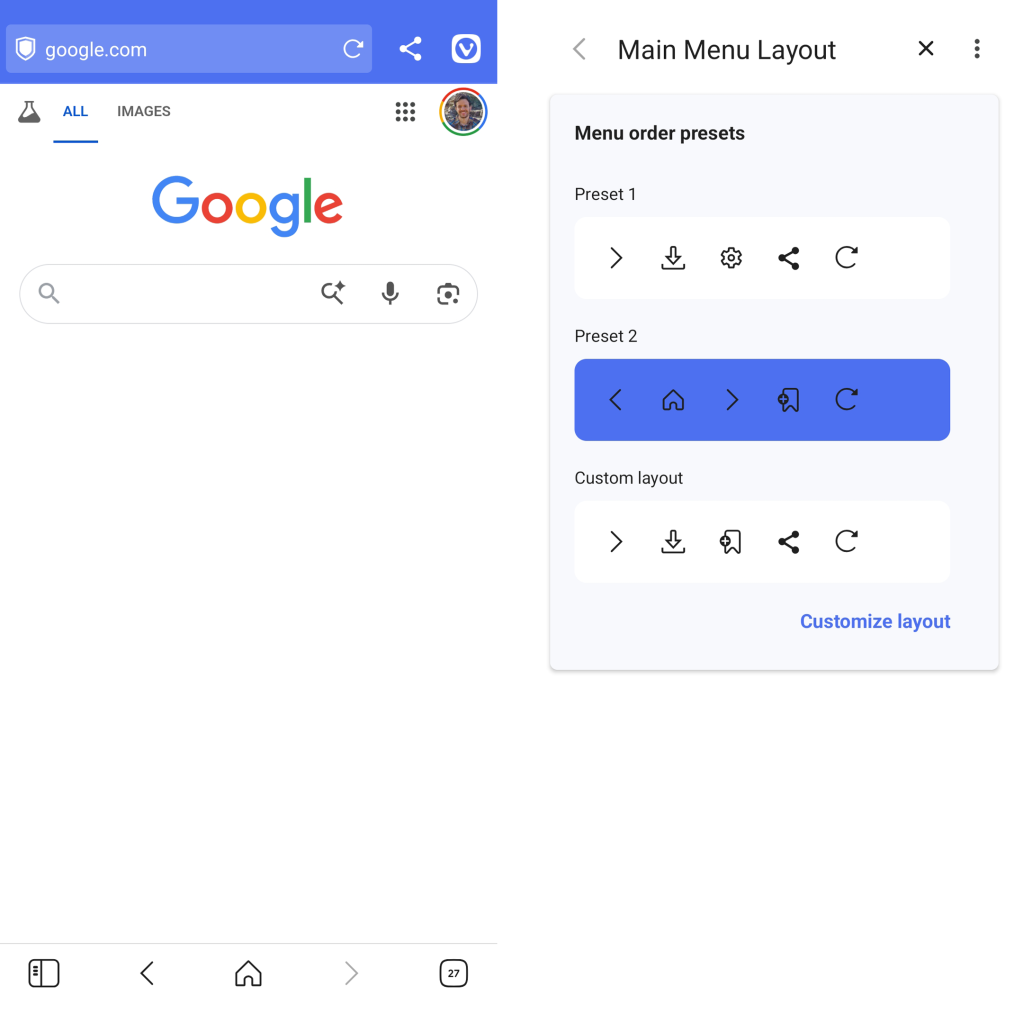
- On the Android front, moving into the Vivaldi app was actually quite painless. I started out by using it here and there, as a supplement to the standard Android Chrome browser, and quickly realized how much I enjoyed and appreciated its experience and the added niceties it gave me — including seemingly endless customization over every last element of the browser interface and a whole slew of on-demand privacy and web-clutter-cutting options. It wasn’t long before I changed my Android browser default and was using it full-time.
JR Raphael, Foundry
- On the desktop front, the change presented far more friction. In fact, I’ve been using the Vivaldi Android app for months now — since sometime in the fall of 2025 — and it wasn’t until early this year that I made the leap over to Vivaldi on my workday Windows computer, too.
What changed was that I finally put my finger on the problem.
If there’s one real hurdle with Vivaldi — and one thing that kept me, personally, from fully moving into its desktop version for so long — it’s that it really can be overwhelming to adapt and get accustomed to all the new interfaces and elements it gives you, especially within the feature-rich desktop domain and with an environment so central to everything we do these days.
As I noted in my in-depth Vivaldi exploration, with as much time as most of us spend in our browsers on computers at this point, the browser essentially is our desktop — and our virtual office, too. And leaving the comfort of familiarity behind for something so unknown and unfamiliar is a daunting prospect.
Vivaldi, in particular, is quite different from Chrome on a computer at first exposure. And it has a lot of new options, features, and possibilities to ponder.
JR Raphael, Foundry
With that in mind, let me tell you what worked for me:
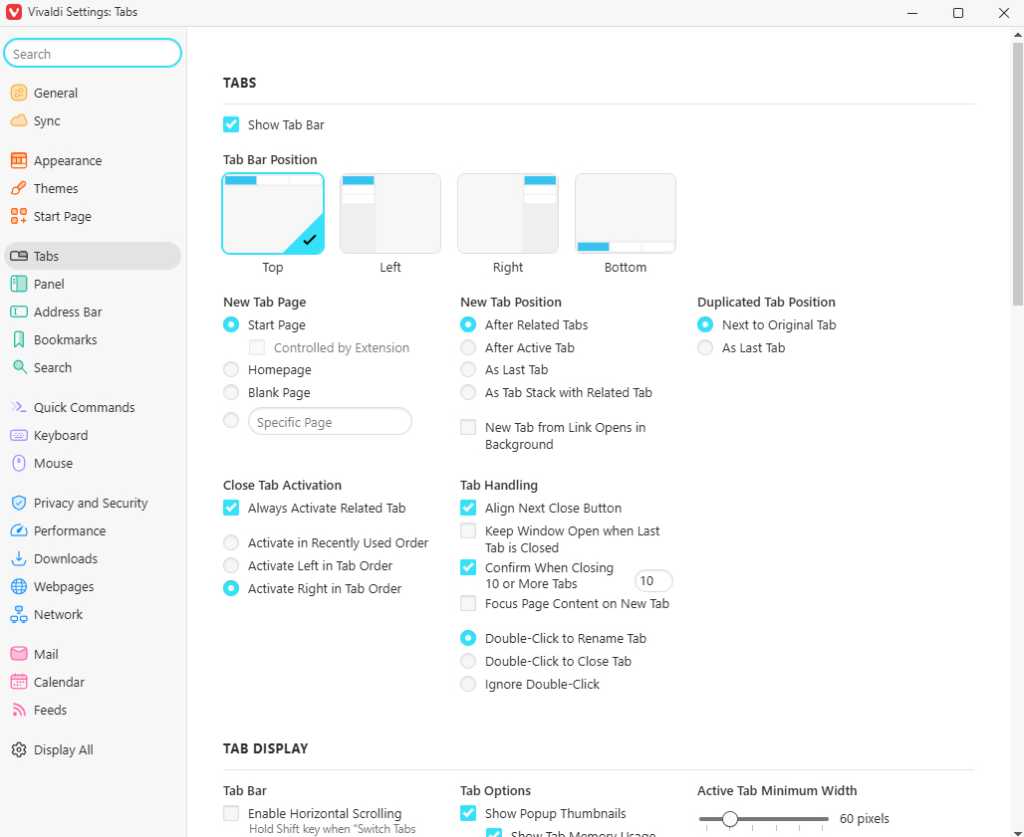
- First, I took advantage of Vivaldi’s immense customization potential and scaled back some of the more jarring differences. For me, that meant eliminating the on-by-default left-of-screen vertical tab bar — which was just too different of an interface for me at first, especially amidst everything else I was adjusting to — and also changing the “Tab Cycling” setting to “Cycle in Tab Order” and the “New Tab Position” setting to “After Related Tabs,” which were two subtle-seeming returns to the standard Chrome behavior that really kept throwing me off in their different-by-default implementations.
- Second, I forced myself to ignore most of the new Vivaldi features — all that good stuff I go over in that other article! — and focus on just one new feature or element at a time, for at least a few days each. There is a lot to take in with this program, and if you try to ingest all of it at once, it’s bound to overwhelm you and lead to a retreat. But if you explore one new piece of the puzzle at a time, really see how you feel about it and get in the habit of using it (or, alternatively, disabling it — if it just isn’t for you), it’s a much more manageable and enjoyable transition.
- Third, after that initial targeted series of adjustments, I mostly ignored the mountain of Vivaldi settings for a while. There’s just too much there to reasonably process at the get-go. I’m still peeking in periodically and finding something new and realizing I can customize it in a way that suits my working style better (and then sometimes realizing that a similar option also exists that I hadn’t yet tapped into on Android). Doing it all at once before you even have a feel for the browser just isn’t reasonable.
Last but not least, remember — particularly for desktop purposes — that Vivaldi is based on the same Chromium foundation as Google’s Chrome browser. That means you can use the standard Chrome Web Store to find and install extensions as needed and bring over the same tools you’ve always had in your browser setup. That, too, helps a lot with making yourself comfortable and creating an optimal environment that works for your needs (though I always recommend eliminating any extensions you aren’t actively using, and a browser change is a perfect time to perform an audit and get rid of any dead weight).
If you follow this approach and take the time to wrap your head around everything Vivaldi offers, the transition doesn’t have to be difficult. And — who knows? — you might find yourself feeling the same sense of excitement I have over a guilt-free virtual dalliance where the only lasting impact is your own happiness and efficiency.
Check out my free Android Intelligence newsletter for even more thoughtful knowledge — including three new things to try each Friday and a trio of useful Android notification tools to get you going.
The new M5-based MacBook Air is built to last — and perform
With its powerful M5 chip, the latest iteration of the world’s most popular laptop keeps everything that made the MacBook Air compelling in the first place, while meaningfully boosting performance across the board. Beyond the faster processor, there’s also much quicker SSD storage and better memory bandwidth, all of which combine to make this a highly capable Mac.
In practical terms, the powerful M5 chip allows these Macs to better handle demanding data workloads than earlier models, making it an ideal machine for many creative and professional users. You also get 512GB of storage as standard (with as much as 4TB available as an option) and at least 16GB of RAM.
Big improvements to Apple’s most popular laptop
To some extent, of course, the MacBook Air has been left in the shadows by the all-new MacBook Neo. The latter costs much less, is quite capable of handling most tasks, and is a great fit for general purpose use, though the M5 Air can do all of that faster, because it is built to be a more efficient machine. Compared to the M4-powered model you can see these improvements:
- With 10CPU cores and either 8 or 10 GPU cores, the M5 chip has a 15% faster CPU and 30% faster GPU.
- It also has neural accelerators in each core, which makes the M5 MacBook Air very capable for AI-specific tasks or 3D rendering.
- The memory bandwidth hits 153GBps. (The M4 model gave us 120GBps.)
- SSD read/write speed are up to twice as fast as the M4, which you’ll feel when doing things with big files, such as when flinging video or imaging assets through apps or working/developing with on-device AI models.
The price has increased by $100 to start at $1,099, though you get twice the built-in storage to help soften the blow.
Benchmark performance
Let’s look at some of the benchmark scores I saw using Geekbench 6 with the Apple-loaned 15.3-in. MacBook Air I tested:
- Single-core: 4,103.
- Multi-core: 17,089.
For comparison, here are benchmarks for the previous generations:
- M1 MacBook Air: 2,346 single-core; 8,356 multi-core.
- M2 MacBook Air: 2,588 single-core; 9,691, multi-core.
- M3 MacBook Air: 3,065 single-core; 11,959 multi-core.
- M4 MacBook Air: 3,833 single-core; 14,871 multi-core.
- M5 MacBook Air: 4,103 single-core; 17,098 multi-core.
- MacBook Neo: 3,608 single-core; 9,346 multi-core.
Illustrating the extent to which the move to Apple Silicon has opened up new opportunities for Macs, the M5 MacBook Air delivers the kind of performance we once got from M3 Pro/Max MacBook Pros that shipped just over two years ago.
The bigger picture
To some extent, what’s coming next doesn’t mean much when planning what to get today, but the takeaway must be that MacBook Air has plenty of power under its hood for the future. When you choose one, you aren’t just getting the processor — you’re also getting a range of other internal improvements designed to optimize the benefits it brings.
These improvements must certainly have been the North Star to engineers when they built this Mac, which also benefits from those new neural accelerators across all its cores. Even compared to the year-old M4 MacBook Air, these systems represent a big upgrade.
Of course, when you grab a laptop, the big thing you need is battery life. While your results will vary, the promised 18 hours of use on battery will get you through your day, every day. So will the display, which in this case is a 15.3-in. Liquid Retina P3 display with support for 1 billion colors, True Tone, and 500 nits of brightness.
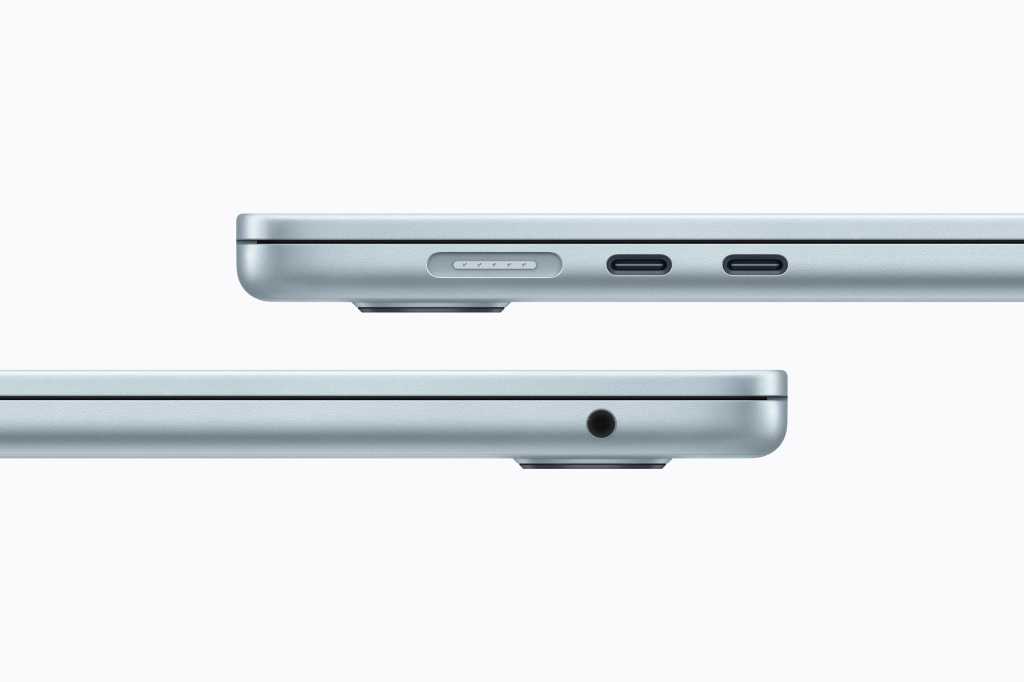
When it comes to audio output and the built-in web conferencing cameras in these Macs, nothing much has changed fromlast year’s M4 models. The song remains the same when it comes to design: you get that beautiful aluminum chassis, new colors (Sky Blue, Midnight, Starlight, and Silver), with pretty much everything we already love about these Macs the same. Connectivity relies on an Apple N1 wireless chip for Wi-Fi 7 and Bluetooth 6. You also get two USB-C/Thunderbolt ports, MagSafe charging and the ability of driving up to two external displays in addition to that Liquid retina screen. That’s very useful for on-the-go pros who want to use a larger display most of the time but need the convenience of a portable now and then.

What about MacBook Neo?
Some feel the arrival of the MacBook Neo will cannibalize MacBook Air sales. There’s some truth in that. And while the Neo can and will handle almost anything a regular user might want to throw at it, the M5 Air is much more capable by design. While the Neo has a 6-core CPU, the Air has up to 10; the Neo gets 5 GPU cores, the Air gets 10; Neo has a maximum 8GB memory, while the Air ships with at least 16GB — and the memory interconnect is much faster too. It means these systems are great for anyone who wants to accomplish more demanding tasks, but can’t quite justify purchasing a MacBook Pro.
No doubt, most people will be happy with any one of these Macs most of the time. But when you need to hit a deadline or regularly tackle more demanding tasks, you’ll probably lean toward the Air, or something better. Most business users will do just that, even though more companies will be eyeing Macs thanks to the affordable Neo, which will be suitable for a whole collection of new use cases that couldn’t justify investment in Air.
Buying advice
In reviewing Apple’s latest trio of Macs, I must confess — like so many people — that I really have lost a little bit of my heart to the MacBook Neo. But I do need a bit more power for what I do. That work doesn’t involve data-wrangling, video compositing, AI model design or any high-end graphics work, so while I might want a MacBook Pro, I really only need a MacBook Air. And this iteration offers all the power and performance I’d expect from a Mac I expect to use it for the next few years.
It’s a solid improvement to the most popular consumer notebook on the planet, remains a viable upgrade for MacBook Neo users and continues to serve as an alluring gateway to inch us toward the MacBook Pro.
You can follow me on social media! Join me on BlueSky, LinkedIn, and Mastodon.
Apple worst, Asus best for laptop repairability
Broken laptops are not becoming easier to fix, despite the availability of public data about their repairability and growing support for right-to-repair legislation. That’s according to US PIRG Education Fund, a consumer protection nonprofit.
Its fifth annual Failing to Fix survey found Asus to be the most repairable laptop brand — although its score dropped compared to last year — and Apple the least repairable of those surveyed. Prominent enterprise PC suppliers Dell, HP, and Lenovo fell somewhere in the middle of the rankings.
While the report looks at consumer products, many of the issues highlighted by the report would apply to businesses too — particularly Apple, which sells the same models to everyone.
“We haven’t done the research, so don’t have the exact numbers,” said Nathan Proctor, senior director or Right to Repair. “But businesses buy the same products and Right to Repair issues are even more pronounced the more expensive that the device is.”
Repairability is not just about product design: It can also be affected by contract terms.
“A lot of companies will tie service to a maintenance contract, and enterprises will find themselves left short if they don’t sign up, said Proctor. “For example, they might not send the firmware needed for a repair, if the customer hadn’t signed up for such a maintenance contract.”
It is certainly the case that more enterprises will look at maintenance as part of the overall package and will not look at PCs or laptops in isolation but rather as part of a “PC as a service” (PCaaS) deal, according to market research firm IDC. In a survey from last year, it found that enterprises were paying more attention to sustainability. “We see more IT leaders considering the complete lifecycle when choosing IT products for the enterprise,” said Lara Greden, senior director market intelligence with IDC.
“In a recent IDC survey, 88% said end-of-first-life, or IT asset disposition services, are a critical or important factor in choosing PCaaS vendors, for instance. OEMs like Dell, HP, and Lenovo offer these services, often with partners, including Apto Solutions and Iron Mountain, for example,” she said.
This is also reflected in the longer laptop lifecycles that companies are implementing. The tradition approach taken by companies is to allow for three years before upgrading but that is no longer the case.
“Some companies still refresh on a fixed three-year lifecycle, but there is a trend towards lengthening lifecycles to four to five years and even more so, to replace only as needed. Services such as Dell Lifecycle Hub and Lenovo xIQ make use of device performance telemetry data to inform repair and replacement cycles,” said Greden.
The PIRG survey of 105 products revealed some to be wary of when it comes to considering whole lifecycles. Apple’s laptops scored the worst, rated C- by PIRG, just behind Lenovo. Businesses wanting to put repairability at the top of the list will look to Asus and Acer, the two top scorers in the PIRG ratings. “I think people were surprised by Apple’s ratings,” said Proctor, “but we found that they didn’t offer the same levels of software support.”
The repairability of a device is certainly a factor to be considered. “IDC research shows that the ability to repair PCs, and even to include refurbished PCs, in PCaaS contracts is a top-2 decision-making factor for choosing a PCaaS vendor,” said Greden.
This is not the first time that PIRG has had the IT industry in its sights. Last October, it was urging Microsoft to change its deadline for the end of Windows 10 support. It is now looking for the US to introduce the same sort of system for scoring system for repairability that France has introduced. Consumers there can see detailed information about how fixable consumer tech products are, with companies obliged to post an overall repair score based on standardized criteria when a product goes on sale.
Buyers elsewhere would benefit 100% from the same sort of labeling, said Proctor.
US court refuses to stay Pentagon’s ‘supply-chain risk’ blacklisting of Anthropic
A federal appeals court in Washington has refused to suspend the Pentagon’s supply-chain risk designation against Anthropic, leaving defense contractors with conflicting legal signals over whether they can continue using Claude, and putting the ruling at odds with a separate federal court that reached the opposite conclusion last month.
“The equitable balance here cuts in favor of the government,” a three-judge panel wrote in its order Wednesday. “On one side is a relatively contained risk of financial harm to a single private company. On the other side is judicial management of how, and through whom, the Department of War secures vital AI technology during an active military conflict.”
The panel, comprising Judges Henderson, Katsas, and Rao, acknowledged that Anthropic “will likely suffer some degree of irreparable harm” but found its interests “seem primarily financial in nature” rather than constitutional.
The order states the ruling is not a final decision on the merits. Oral arguments are set for May 19.
Anthropic had asked the US Court of Appeals for the District of Columbia Circuit to pause the supply-chain risk designation issued March 3 by Secretary of War Pete Hegseth.
The label, according to the company’s court filings, bars it from Pentagon contracts and requires defense contractors to stop using Claude in military work. The court denied the request, conflicting with a US District Court in California that granted Anthropic a preliminary injunction on March 26, blocking a parallel designation under a related statute.
Acting Attorney General Todd Blanche called the ruling “a resounding victory for military readiness” in a post on X. “Military authority and operational control belong to the Commander-in-Chief and Department of War, not a tech company,” he wrote.
Vendor risk is no longer predictable
For enterprises, the split ruling creates a compliance problem with no clean answer. The order states the Department has canceled its contracts with Anthropic, begun removing Claude from its systems, and prohibited contractors from using it as a subcontractor on Pentagon work. It also states, however, that “the Department has not prohibited contractors from using Claude for work performed for entities other than the Department.”
That distinction does not resolve the uncertainty. Following the California injunction, the government filed a compliance status report on April 6, cited in legal analysis by Herbert Smith Freehills Kramer, confirming it had restored Anthropic access across federal systems. That compliance applied only to the California statute. The broader D.C. designation remains active.
Sanchit Vir Gogia, chief analyst at Greyhound Research, said enterprises are dealing with vendor risk that their procurement frameworks were not designed to handle. “It means a vendor does not have a single legal status anymore. It can be restricted under one framework and protected under another, at the same time. That is a very different world from the one enterprise procurement teams are used to operating in,” he said.
The timing mismatch compounds the problem, Gogia said. “Legal processes move on their own timelines. Procurement cycles move on to another. Architecture decisions, once made, are not easy to reverse. When those timelines fall out of sync, you end up locked into dependencies that may no longer be viable,” he said.
‘Any lawful use’ shifts governance into the contract
The case has implications beyond Anthropic, Gogia said. The “any lawful use” standard the Pentagon sought to impose is one that the General Services Administration is separately moving to codify across federal AI procurement.
If that happens, governance authority would move from vendor-defined safeguards into contract language, Gogia said. “The contract becomes the final authority, not the platform. Governance is no longer primarily enforced through design. It is enforced through legal agreement,” he said.
Large defense contractors required to operate under such terms will push equivalent requirements down their supply chains, Gogia said, meaning enterprises with no direct Pentagon exposure may still face similar obligations through their partners.
On Anthropic’s refusal to drop its ethical restrictions, he said the question enterprises ultimately ask is “not whether a vendor is ethical, but whether that vendor can remain usable across all the contexts in which the enterprise operates.”
Matt Schruers, CEO of the Computer & Communications Industry Association, which filed an amicus brief in the case alongside ITI, SIIA, and TechNet, said the outcome adds to an already difficult environment. “The Pentagon’s actions and the DC Circuit’s ruling create substantial business uncertainty at a time when US companies are competing with global counterparts to lead in AI,” he said in a statement.
The D.C. court directed both parties to address three unresolved threshold questions before May 19, including whether the court has jurisdiction over Anthropic’s petition at all, according to the order. Anthropic’s opening brief is due April 22. Anthropic did not immediately respond to a request for comment.
The top priority for Adobe’s next CEO? Prepping for the ‘age of agents’
Adobe’s Shantanu Narayen announced plans to step down as CEO last month after 18 years leading software vendor through several periods of tech change from the arrival of the cloud, mobile computing, and the early days of artificial intelligence.
For whomever is tapped next for the top job — the search is expected to take several months — the biggest priority will be reshaping Adobe’s products and strategy for the next wave of agentic AI, analysts said.
“Ultimately, Adobe must evolve from a leader in creative tools to the system that connects content, context, and commerce in a world of real-time agentic interactions,” said Gerry Murray, research director at IDC.
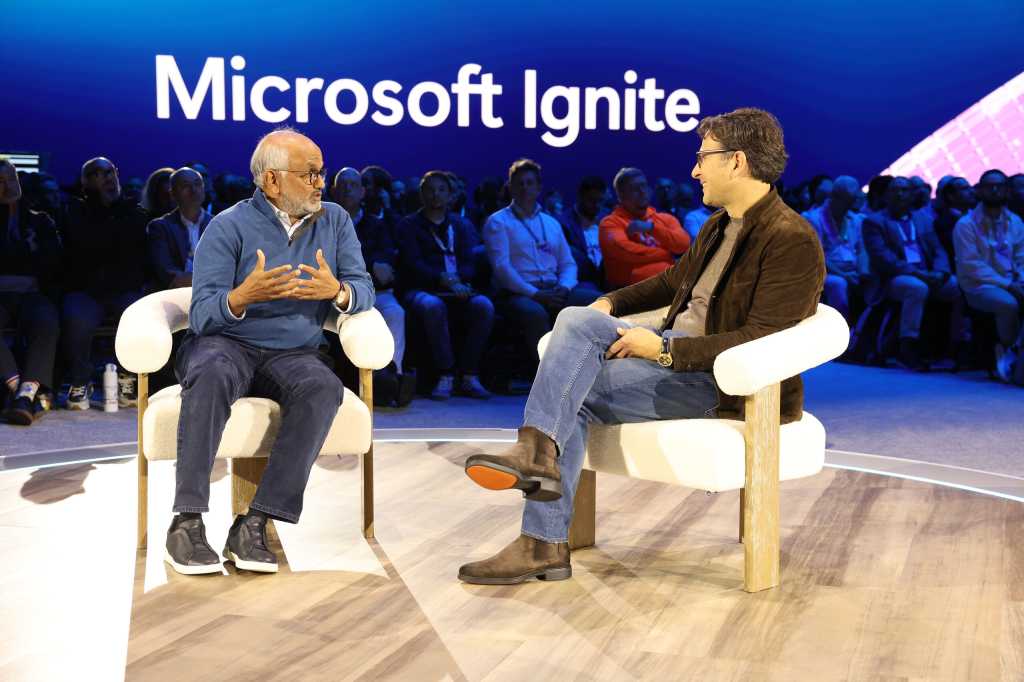
Adobe CEO Shantanu Narayen (L) and Judson Althoff, CEO of Microsoft’s commercial business, speak on stage at Microsoft Ignite 2025.
Microsoft
Narayen’s resignation, will “force the Adobe board to search for a leader who is not just a master of the subscription economy, but a visionary in the ‘agentic’ AI era,” Jim Lundy at Aragon Research said in a blog post last month.
Adobe’s next CEO inherits a business that’s fundamentally strong, but entering a “more complex phase of execution,” said Maria Bell, senior research analyst at CCS Insight. “Under Shantanu Narayen, the company not only transitioned to a cloud subscription model, but built a highly integrated platform spanning creative, document and marketing workflows.
“The challenge for his successor is less about transformation and more about proving that Adobe’s AI-led strategy can deliver consistent, long-term growth.”
Questions about the company’s path ahead come as it prepares for Adobe Connect later this month in Las Vegas. The event runs April 20-22.
Adobe was among the early adopters of generative AI (genAI) with the launch of its Firefly model in March 2023, positioning itself as a commercially safe tool for enterprise customers such as IBM, Pepsi and Mattel to generate content. It later expanded Firefly with the addition of multi-modal AI tools that included video, vector and audio, while embedding Firefly across its software and rolling out GenStudio in 2024 to help businesses manage AI-generated at scale.
Those moves have yet to reassure investors that the company is on solid footing. Adobe’s stock fell following its latest earnings report, despite seeing better-than-expected revenue and a three-fold year-on-year increase in AI-related sales.
Adobe had 850 million monthly users across Acrobat, Creative Cloud, Express and Firefly, according to its most recent financial results.
The company faces competition from a number of vendors, including Canva and Figma, which also offer creative design tools. It is also must contend with AI providers such as OpenAI and Google that enable users to generate content via prompts.
“Adobe is no longer competing only with traditional design tools, but with a broader set of AI-native platforms and ecosystems that are reshaping how content is created and consumed,” said Bell. “This shifts the basis of competition from product capability to accessibility, integration and cost — putting pressure on Adobe’s historical pricing power.”
Although he will remain as chairman of the board, Narayen’s departure adds to the uncertainty around Adobe’s future.
“While Adobe is currently in a position of strength,” said Lundy, “a leadership change of this magnitude often invites aggressive competitive maneuvers from rivals in the marketing and design tech stacks.”
The key challenge for any successor will be “balancing Adobe’s professional-grade heritage with the increasing commoditization of creative tools driven by AI,” he said.
The most immediate pressure point for Adobe is its Creative Cloud suite, according to Murray, as competitors threaten Adobe’s dominance in the market. Adobe had 850 million monthly users across Acrobat, Creative Cloud, Express and Firefly, according to its most recent financial results.
“AI-native tools are collapsing the value of skill, time, and complexity, especially for students and prosumers,” he said. “Adobe will need to rethink pricing and packaging around outputs rather than tools, while dramatically simplifying the user experience.”
Nevertheless, Adobe retains a “significant structural advantage” in the strength of its product ecosystem and user base, said Bell. “Its tools remain deeply embedded among professional designers and creative teams, supported by a strong community built over decades.”
Another priority will be the need to differentiate its offerings from competitors that rely on similar AI models. This shifts competition away from engineering and towards a go-to-market strategy, Murray said, requiring Adobe to “innovate on pricing, packaging, and partners” to attract and retain users.
Adobe has made “clear progress” embedding generative AI (genAI) tools across its portfolio, said Bell, but the move towards usage-based models — including generative credits and more flexible access models — “creates uncertainty around pricing, revenue predictability and margin sustainability.
“As such, the priority is moving from feature rollout to monetization discipline,” she said.
There’s also the prospect that increasingly capable autonomous third-party AI agents could put pressure on Adobe’s margins. While some SaaS-pocalypse concerns are overblown — including the prospect that business customers will vibe-code their own enterprise apps – the emergence of increasingly capable AI agents could push software applications down to an infrastructure layer that agents access on behalf of humans.
“AI is making it possible to recompose software dynamically, which threatens traditional application-layer value,” said Murray.
At the same time, he noted that Adobe also has the opportunity to “redefine its moat” around agentic workflows and its ability to connect content and data for smarter automation.
To help Adobe adapt to these ongoing technological shifts, the next CEO will need to appoint a “central authority to align AI product strategy, platform architecture, and partnerships across business units” or lead the charge.
Adobe requires a “robust AI stack,” he said, but will have to find its place in a shifting landscape. “… Adobe is unlikely to own the enterprise AI control plane, so success will depend on building an open, interoperable stack that integrates with hyperscalers while delivering differentiated value at the application and workflow level,” said Murray.
About the Best Places to Work in IT
Nominations for the 2027 Best Places to Work in IT program are now open! Click HERE to nominate an organization today.
The 2027 Best Places to Work in IT company survey deadline has been extended to >Friday, July 31, 2026.
See our Best Places to Work in IT 2026 special report for the complete list of current honorees, major trends from the most recent survey, and much more.
About the Best Places to Work in IT program
Computerworld conducts an annual survey to identify the best places to work for IT professionals. We invite readers, PR professionals and other interested parties to nominate companies they consider great employers for IT workers. You may nominate your own company. We then ask those nominated companies that meet our basic criteria to participate in our survey.
Once again, we are excited to extend this program, which has a 33-year history in the United States, to companies worldwide.
The employers in the Best Places list are evaluated by company size: Large companies have 5,000 or more employees; midsize have between 1,001 and 4,999 employees; and small companies employ from 100 to 1,000.
To be eligible, companies must have a minimum of 5 IT employees and a minimum of 100 total employees. We consider IT employees to be those IT workers who provide technology support and services to their own company — or to multiple companies through their work at an IT service provider. Workers who would *not* be included are administrative support staff for the IT department, staff who work in communications or PR for the technology department, IT contractors, or those staff whose primary role is in product development for outside sales.
Best Places to Work in IT is a global program. We ask that companies submit no more than one survey within any one country. If your company operates in multiple countries and you would like to submit a survey for your location only, please note this in the company name field (e.g., “Foundry North America” or “Foundry Germany”). If no location is specified in the company name, we will assume that the entry represents all locations worldwide.
In most cases, we prefer to have the parent company, rather than subsidiaries or affiliates, apply for the Best Places to Work in IT list. However, a subsidiary or affiliate may be eligible, providing that it stands out as a separate entity from the parent company, with separate business functions, IT leadership and so on. A subsidiary may also be eligible to apply separately if its parent company is a holding company. In those cases, the parent company and subsidiary may be able to apply separately. We encourage companies to complete the nomination form or contact us at bestplaces@computerworld.com, and our Best Places research team will evaluate the submissions on a case-by-case basis.
Questions about the Best Places to Work in IT program can be emailed to bestplaces@computerworld.com.
Frequently asked questions
Survey requirements and eligibility
Does my company have to be nominated to complete the survey?
No. Companies may participate even if they were not nominated. In lieu of a nomination, please send an email to bestplaces@computerworld.com with the name and contact information (including email address) of the individual who should receive the company survey and other information; we’ll take care of the rest.
Does the Best Places to Work in IT list include public companies only?
No. The survey includes private as well as public companies.
What criteria must my company meet to participate?
To be considered for our Best Places to Work in IT list:
- Companies must have a minimum of 5 IT employees.
- Companies must have a minimum of 100 total employees worldwide.
- In most cases, we prefer to have the parent company, rather than subsidiaries or affiliates, apply for the Best Places to Work in IT list. However, a subsidiary or affiliate may be eligible, providing that it stands out as a separate entity from the parent company, with separate business functions, IT leadership and so on. A subsidiary may also be eligible to apply separately if its parent company is a holding company. In those cases, the parent company and subsidiary may be able to apply separately. We encourage companies to complete the nomination form or contact us at bestplaces@computerworld.com, and our Best Places research team will evaluate the submissions on a case-by-case basis.
Who should complete the survey?
An individual familiar with employment statistics, benefits, policies and programs of your IT department and your company should complete the survey. This could be a human resources representative, a CIO or corporate PR representative — or a team of all the above.
Survey contents and procedures
What does the company survey ask?
Our online survey includes questions about companies’ benefits, training and development, IT salary changes, percent of IT employees promoted, IT turnover rates, and the percentage of women employees in management in IT departments. In addition, we will collect information about company culture, workplace modernization, and company growth.
Which employees are considered “IT workers” in this survey?
Answers to the survey should be based on those IT workers who provide technology support and services to their own company — or to multiple companies through their work at an IT service provider. Workers who wouldn’t be included are administrative support staff for the IT department, staff who work in communications or PR for the technology department, IT contractors, or those staff whose primary role is in product development for outside sales.
What happens if I leave a question blank on the survey?
You can’t leave a question blank if it is required. Many of the questions on the survey are required; the survey can’t be processed if they aren’t answered. Please answer to the best of your ability for questions with lists or options included. If any open-ended/text based questions aren’t applicable to your company, please indicate “NA” for “not applicable.” If there is a question you can’t answer fully given the format of the survey, you may briefly explain your answers in an addendum field that follows each survey section.
Companies that withhold information used to rank the finalists will have points deducted from their ranking. Answers that are left blank or have unexplained N/As will be assumed to be 0 (zero).
What information will be shared publicly?
Computerworld tries to avoid printing information that a company may consider competitive. The following information may appear publicly:
- Company name
- Location
- Industry
- Website
- Total number of employees
All other information will be used only in aggregate format or for ranking purposes, unless a featured organization explicitly grants permission.
Can I save my survey and come back to it at a later date?
Yes. You will be able to save your partially completed survey and can save a partially completed survey as many times as necessary. Please save your unique URL to re-enter the survey. When you return to the survey, you will be able to review/modify questions that you have already answered. However, we will continue to provide a printer-friendly version of the survey, and we recommend that you complete this survey, then enter your answers online.
How should I send my company’s information to Computerworld?
We accept company information from the online survey only. Please enter all data as accurately as possible. Provide company name, location, web address and other information, as you would like it to appear in print.
Can I get a copy of the survey to review before I go to the online survey and submit my company’s information?
Yes. A printer-friendly version of the 2027 Best Places company survey can be downloaded for reference. We encourage participants to complete the printer-friendly version offline before filling out the online survey.
Will Computerworld provide us with a copy of our submitted survey?
Upon request, Computerworld will email you a PDF of your company’s survey responses.
Is there an employee portion to the survey?
There is no longer an employee survey portion to the survey. Computerworld decided to make this change in the 2023 program to streamline the process for global participation and to enable companies with smaller IT departments to participate. In lieu of the employee survey portion of the program, Computerworld will be inviting a panel of judges consisting of industry experts to evaluate entries and confirm this year’s honorees.
List publication and notification
When will the list of honorees be published?
The Best Places to Work in IT honorees will be announced in December 2026 on Computerworld.com.
When can I find out if my company is on the list?
Computerworld will notify companies that will be honored as a 2027 Best Place to Work in IT several weeks in advance of publication. Computerworld will provide honorees with an online press kit including a sample press release and other promotional information.
Is there a timeline to which I can refer for survey action items?
Below is the 2027 Best Places to Work in IT timeline.
| April 15, 2026 | Nominations open for the 2026 Best Places to Work in IT. Nominated companies receive an email with a unique link to the Best Places company survey from Computerworld by the end of April. Thereafter, company surveys will be sent on a rolling basis. |
| July 31, 2026 | DEADLINE: Completed Best Places company survey is due to Computerworld. |
| October 2026 | Nominees are notified regarding their status as Best Places to Work in IT honorees. |
| December 2026 | List of Best Places to Work in IT honorees is available online. |
What if I have a question that was not answered in this FAQ?
Please email your questions to the following address: bestplaces@computerworld.com.
In the subject line, please include your company name and be as descriptive as possible in the subject line as to the nature of your inquiry.
Questions raised about how LinkedIn uses the petabytes of data it collects
Through LinkedIn’s more than one billion business users, the Microsoft unit has access to a vast array of personally-identifiable information, including data that could identify religious and political positions. What is less clear is what LinkedIn does with all of that data.
A small European company that sells a browser extension to leverage different aspects of LinkedIn data is running a campaign, which it calls BrowserGate, that accuses LinkedIn of “illegally searching your computer” and “running one of the largest corporate espionage operations in modern history.”
“Every time any of LinkedIn’s one billion users visits linkedin.com, hidden code searches their computer for installed software, collects the results, and transmits them to LinkedIn’s servers and to third-party companies including an American-Israeli cybersecurity firm,” the company claimed.
“The user is never asked. Never told. LinkedIn’s privacy policy does not mention it,” the BrowserGate site said. “Because LinkedIn knows each user’s real name, employer, and job title, it is not searching for anonymous visitors. It is searching identified people at identified companies.”
LinkedIn denies some of those accusations, and avoids addressing the remainder.
“This [accusation] is a house of cards built entirely upon a fabrication,” said an emailed LinkedIn statement . “We do disclose that we scan for browser extensions in our privacy policy, in order to detect abuse and provide defense for site stability.”
When asked whether it uses that data solely to do those things, LinkedIn did not reply.
Possible misuse
The key person behind the allegations calls himself Steven Morrell (not his legal name, which he asked not be published). The company he represents also has different names, including Teamfluence and Fairlinked.
Morrell said that LinkedIn is gathering data that includes sensitive details, including information that he argued could be used to determine religious and political leanings. Gathering such data, Morrell said, could violate European privacy rules.
But Morrell is not saying that LinkedIn is in fact using the data to determine those preferences, but merely that they could. Much the same could be said for almost all large companies.
Morell isn’t exactly unbiased, however. He and LinkedIn are also involved in a legal dispute in Germany, in which Morrell said that LinkedIn violated EU rules and that it improperly kicked him, and others, off the service.
LinkedIn countered that Morell and the other plaintiffs had violated its terms of service with their plugins. Last month, a judge in Munich sided with LinkedIn, dismissing the motion for a preliminary injunction.
Might cause compliance issues
Safayat Moahamad, research director at Info-Tech Research Group, said that compliance approaches throughout the European Union and the UK could indeed have some issues with this deep a level of data collection.
“European courts are likely to support platforms that restrict automated data harvesting, when they can plausibly link organization-level policy enforcement actions to consumer protection and regulatory compliance,” Moahamad said.
Advice for CIOs
Cybersecurity consultant Brian Levine, executive director of FormerGov, said enterprise CIOs should use these allegations, even if they prove to be untrue, to help them tweak their data strategy and privacy policies for 2026.
“Assuming the BrowserGate allegations are true, LinkedIn users should consider reducing the amount of identifiable, trackable, or sensitive data their browser exposes, and organizations should treat LinkedIn as a potentially hostile web environment until facts are verified,” Levine said. “Even if BrowserGate is exaggerated, browser fingerprinting is a real, widespread practice across the web. Treat LinkedIn like any other third-party data collector. LinkedIn has historically been treated as safe, [but] that assumption may need to be revisited.”
Levine said IT executives should “assume that LinkedIn can map your tech stack” and that, if the claims are accurate, LinkedIn could infer “which SaaS tools your employees use, which competitors you rely on, which job search tools your staff is using and which political/religious extensions appear inside your workforce.”
He added that IT should consider blocking LinkedIn on sensitive networks, or require it to only be accessed through VDI, as well as employing browser isolation techniques. Some companies might even want to use a separate isolated browser solely for LinkedIn, or, he said, “use a sandboxed browser session, such as Browserling or other cloud-isolated browsers.”
This article originally appeared on CSOonline.