As AI shifts from output-generating large language models (LLMs) to armies of agents taking actions on their own, there is a growing threat that failures could affect system reliability.
Temporal, a Bellevue, WA firm founded in 2019, hopes to solve that problem by stabilizing AI and long-running computing processes through “durable execution,” a technology that reliably resurrects failed computing processes on other hosts. If a machine crashes in the middle of agentic AI transactions, the company resurrects the function on a different host so it can continue exactly where it left off. Temporal says its durable execution process comes with a 100% durability guarantee.
The company was solving these kinds of distributed-systems problems long before the generative AI (genAI) rush, and today it powers infrastructure from Coinbase to Airbnb to OpenAI.
For IT decision-makers, Temporal’s offerings promise to bring reliability to AI operations — especially in regulated industries. Co-founder Samar Abbas spoke recently with Computerworld about his company’s technology, AI reliability, execution and what IT leaders need to keep in mind when evaluating and deploying agentic AI.
How did Temporal come to be a backbone powering AI system? “OpenAI recently announced we power many of their products underneath the cover — that’s where Temporal comes in.
“A couple of years ago, as LLMs got smarter, use cases were about generating outputs. Now, the industry is moving into agentic solutions, where AI isn’t just generating outputs, it’s taking actions. The longer these systems run, the more tools they invoke and the more value they create.
“They’re evolving into a whole army of agents coordinating to get complex tasks done. This starts to look like distributed systems. We become that execution authority, the reliability backbone for those agentic systems to get their tasks done from A to Z.”
What is Temporal doing in the backend to keep them stable? “It’s a new paradigm for building applications, we call that durable execution. If you write a function and a failure happens, you lose all of your state. When a machine crashes, we maintain the state. We seamlessly resurrect that function on a different host and continue executing exactly where it left off, without you as a developer writing a single line of code.
“It’s not just a cache, it’s an operating system guaranteeing execution in the presence of failure. We provide 100% durability guarantees behind it. People can use it for mission-critical use cases like transcribing doctor conversations, where even losing one [word] has big implications.”
Did this challenge exist before AI? “My co-founder and I have been at it pretty much our entire careers, spanning almost three decades. We’ve been solving this problem of distributed systems, at Amazon, Microsoft and then Uber, before starting Temporal. We are definitely pre-AI.
“As more workloads move to cloud and become distributed, it introduces this class of failures. This is the fifth time I’m building this system. I built simple workflow, then [a] durable task framework at Azure, then Cadence at Uber, now Temporal. The company is roughly seven years old, but the code base is over 10 years old, because we started at Uber and it’s been running in production ever since.”
And now you tackle that same problem at AI scale? “The funny thing is, especially with AI, that same problem is now at such a massive scale, it’s gone on steroids, with agentic systems coming online and doing real work. We’ve been powering every Coinbase transaction, every Snap story, every Airbnb booking, every Yum Brands order — KFC, Pizza Hut, Taco Bell.
“A couple of years ago, it looked like we’d over-invested in the scale and reliability of the platform. Then AI showed up in such a big way that now I’m asking the team: how do we scale another 10x, 100x, even 1000x? These agents are hitting the market in a way we couldn’t have imagined.”
Can you give a concrete example of that 100% guarantee? “When you’re moving money — debit or credit — imagine a failure happens after you’ve debited an account. Temporal guarantees execution of the entire function from start to finish, in the presence of all sorts of failures. At the end of the day, we’re in the business of selling reliability.
“Developers today spend 80% of their time building resiliency into their systems by working with low-level primitives like queues, databases, retry mechanisms and durable timers, and stitching them together. What we provide eliminates that. And that reliability is exactly what’s becoming critical as enterprises move agents into production.”
Why should CIOs and other IT leaders care about AI reliability? “These agents are now real, no longer prototypes or [proofs of concept]. They’re doing meaningful work in those organizations. Reliability and durability weren’t on the radar for CIOs 12 months ago. Now, it’s the blocker. Especially in regulated industries, if a transaction gets left in the middle, it has real regulatory concerns.
“That’s what’s holding them back from transitioning into the AI stage. It comes up in pretty much every conversation, in the first 10 minutes I’m talking to a CIO.”
CW: Where do the hardest problems sit today? “Security, governance, identity, authorization, authentication. This is where majority of the problems exist, and the ecosystem is so immature. Even things like MCP, I see organizations struggling to implement MCPs to build these agents. This is an area ripe for innovation and a lot of work, including here at Temporal.”
What skills should developers and CIOs build for the AI age? “The biggest skill now is that developers need to be more product focused. Product-minded engineers are the ones who will thrive, because the whole software development flow, writing code by hand, debugging by hand, testing it, is going to look completely different. The job of an engineer is now building the system that builds the system.
“Two things are happening in this AI world. First, a lot more engineers are coming into the fold, because companies like Replit or Lovable are making software development approachable for people who haven’t been professionally trained. Second, there’s going to be a lot more applications written than ever before. The problem space is shifting toward how we run all those applications safely and reliably, with all the guardrails. That’s where the industry is headed.”
Google’s latest and greatest Android version is officially now out in the world and available — but if you’re using any phone other than a Pixel, that doesn’t mean much for you just yet.
Hold the phone, though — ’cause there is some good news here: While we can’t force any Android phone-maker to start treating software support as a priority, we can get creative and find ways to bring interesting new Android features to devices running older Android versions. In fact, all four of the Android 17 features I called out earlier this week can be emulated on any Android phone this instant. All it takes is a teensy pinch of inspiration and a dash of tenacity — and, of course, the right roadmap to make it all come together.
The tenacity’s on you, but if you’re game, I’ve got your roadmap ready. Here’s exactly how to enjoy a similar sort of Android-17-style sorcery on whatever phone you’re using right now — as far as some of the more surface-level highlights, at least — without having the actual Android 17 upgrade in front of you.
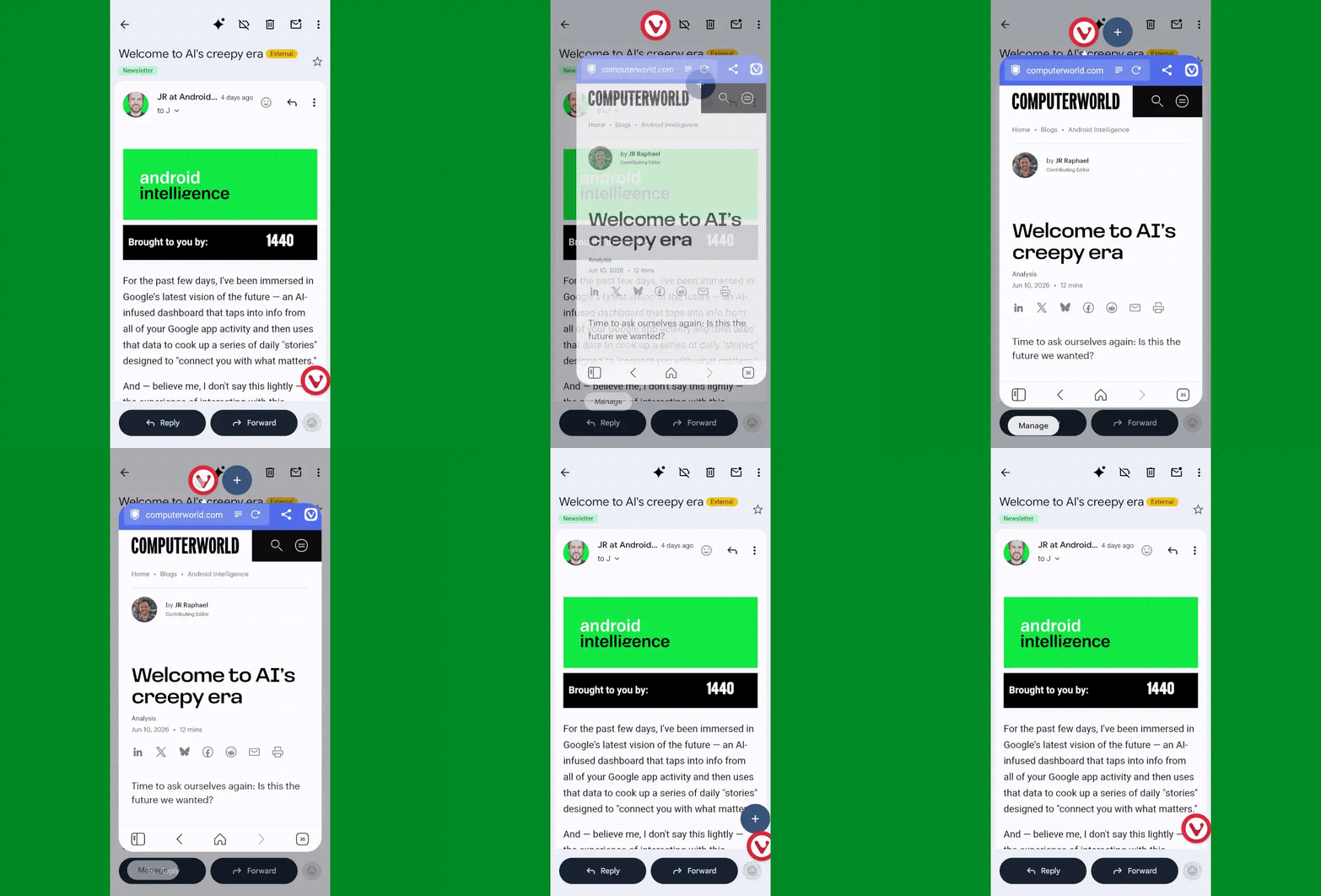
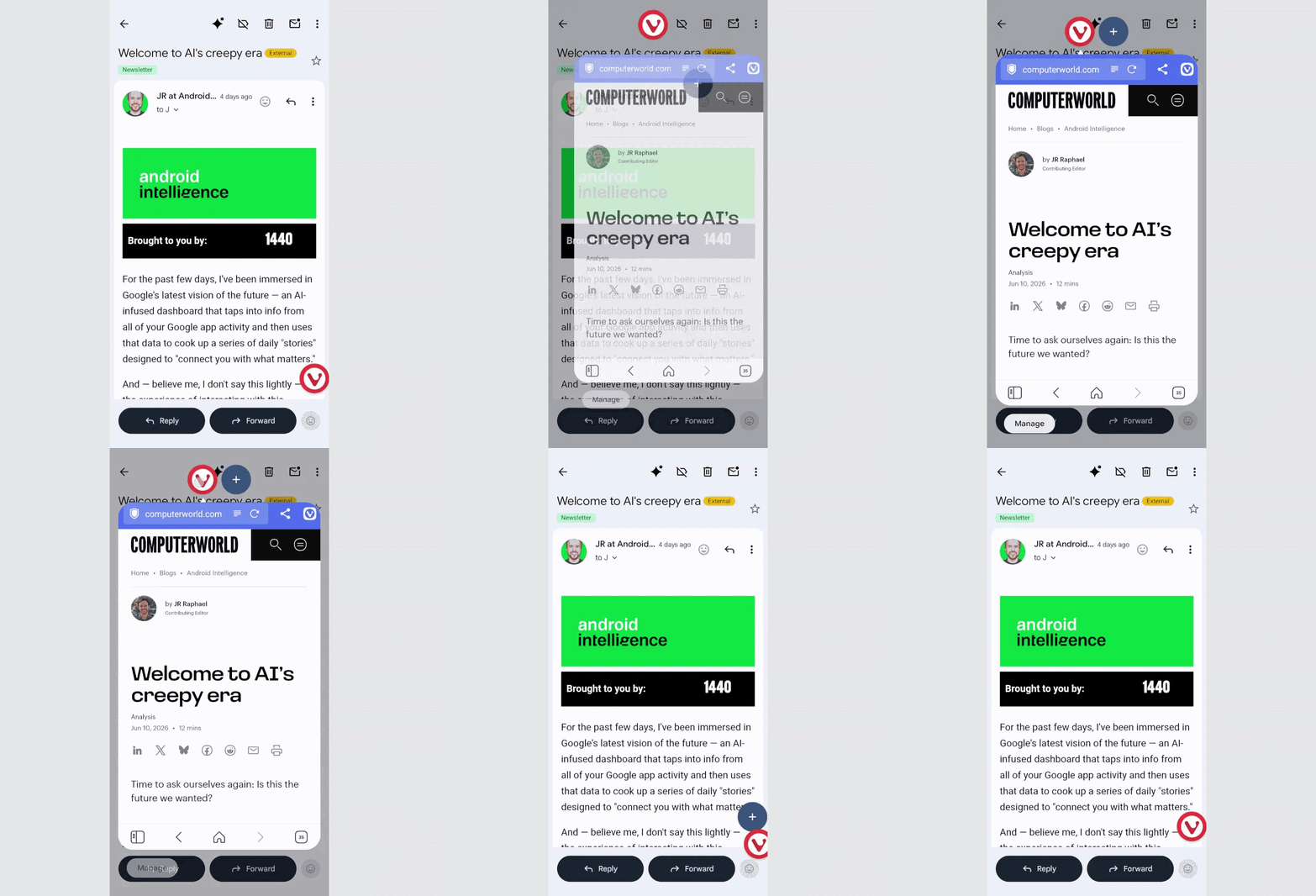
The most shape-shifting Android 17 of all, without a doubt, is Bubbles — a snazzy new way to turn any app into a floating, collapsible window that’s readily available for on-demand access but also out of your hair when you aren’t actively using it.
Android 17’s Bubbles multitasking system in action.
Look over this list of crafty Bubbles-bringing workarounds and see which makes the most sense for you. One way or another, you’ll find yourself facing a fantastic new option for multitasking anytime you want it — no waiting or out-of-reach upgrades required.
Android 17 feature #2: Smarter location access
Our next Android 17 addition is a little trickier to emulate without the actual operating system update in the equation. But fear not, for this is Android — and when there’s a will, there’s a way.
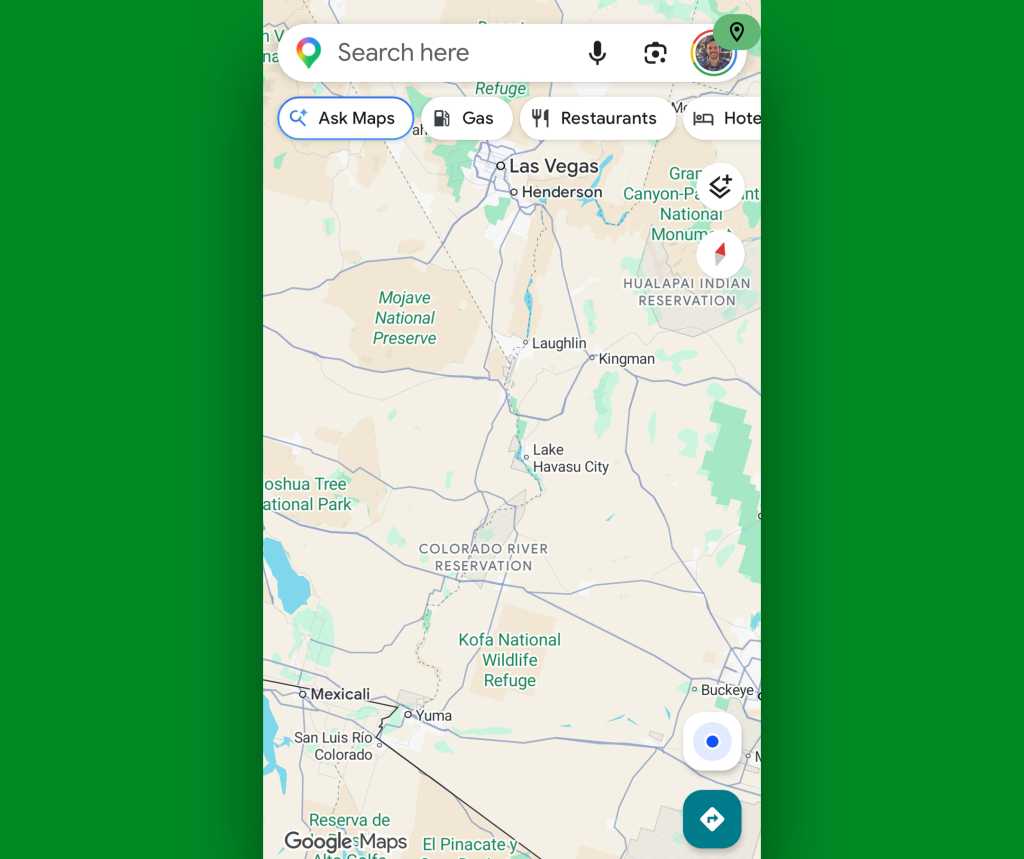
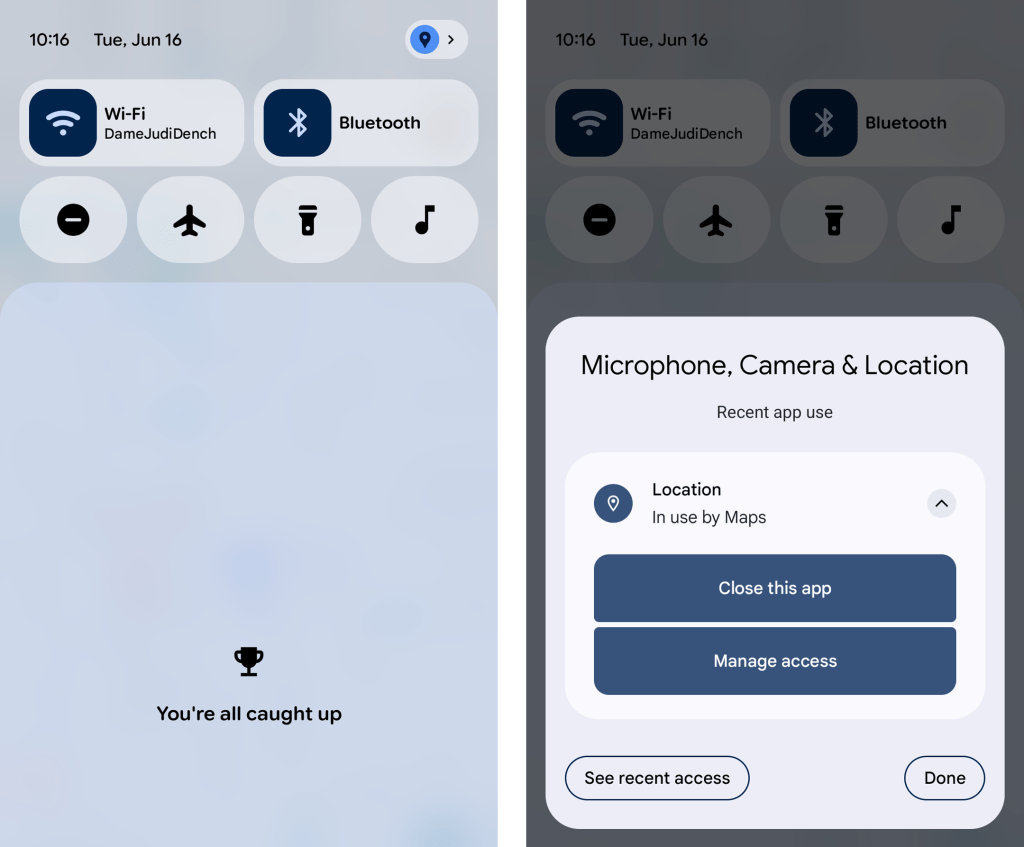
The feature of which we speak is an expansion of Android’s framework for how apps can access your location. It’s a two-parter: First, whenever any app is accessing your location, you’ll now see a blue dot appear in the upper-right corner of your screen — and if you swipe down once from the top of your screen to open your notification panel, you can actually tap on the location icon that appears in its place to get detailed info about exactly which app or apps are involved. Second, when an app asks to access your precise location, Android 17 adds in the option to allow such access only temporarily — for that one brief moment and purpose — without giving the app permanent permission for ongoing use.
The second part, unfortunately, is challenging to achieve without Android 17 being present. But the first part is something we can make happen with a sliver of creative zest.
The trick revolves around a classic third-party app called Privacy Dashboard. Privacy Dashboard came about back in the Android 12 era, when Google first introduced a full-fledged privacy dashboard into Android and certain devices were lagging behind and taking too long to adopt it.
With Android 12 now being five years old, the app hasn’t had much need in recent years — until now. Interestingly enough, the ability to see full details about ongoing location access and then tap to adjust the associated app’s settings is something Privacy Dashboard has long offered. And it’s consequently a great way to bring that newfound native ability from Android 17 onto a device running an older Android version.
The catch is that because of the limited need for the app all this time, it’s no longer being actively developed — and as a result, if you hadn’t previously downloaded it, the Play Store will probably give you an error saying it’s made for an older Android version and can’t be installed on your device.
It will still work, though, and it’s perfectly functional and effective.
Provided you’re comfortable and that this won’t violate any of your company-associated policies, you can download the original verified Privacy Dashboard app package from my own personal Drive storage. I saved it using the Google Files file manager and then uploaded it directly to Drive. It’s quite literally the same exact app you’d get from the Play Store, if the Play Store would let you download it — and while I wouldn’t often advise installing apps from unknown sources, I don’t exactly consider myself to be “unknown” (most of the time). So as long as you share that same trust, you can grab the app from me and put it on any device you want.
Once you get the app installed and give it the permissions it needs to operate, open ‘er up and tap the “App Settings” options on its main screen. Tap the line that says “Indicator Customization,” beneath “Privacy Indicators,” then flip the toggle next to “Click action” into the on and active position.
Aaaaand, that’s it: Anytime an app is accessing your location, you’ll see a green location icon appear in the upper-right corner of your screen. And tapping it will take you to the system-level timeline of exactly which apps have accessed your location recently, for added context.
Privacy Dashboard was ahead of its time with its Android-17-reminiscent location access indicators.
JR Raphael, Foundry
Before you install Privacy Dashboard, you might also want to try just opening an app that you know accesses your location — like Google Maps — and seeing what, if any, indicator appears in the corner of your screen and if you can tap it. While that ability is technically associated with Android 17, it was actually included in an earlier Android quarterly update, and it’s possible your device may already have that piece of the puzzle in place even if it isn’t yet running Android 17.
Android 17 feature #3: More dynamic dark mode
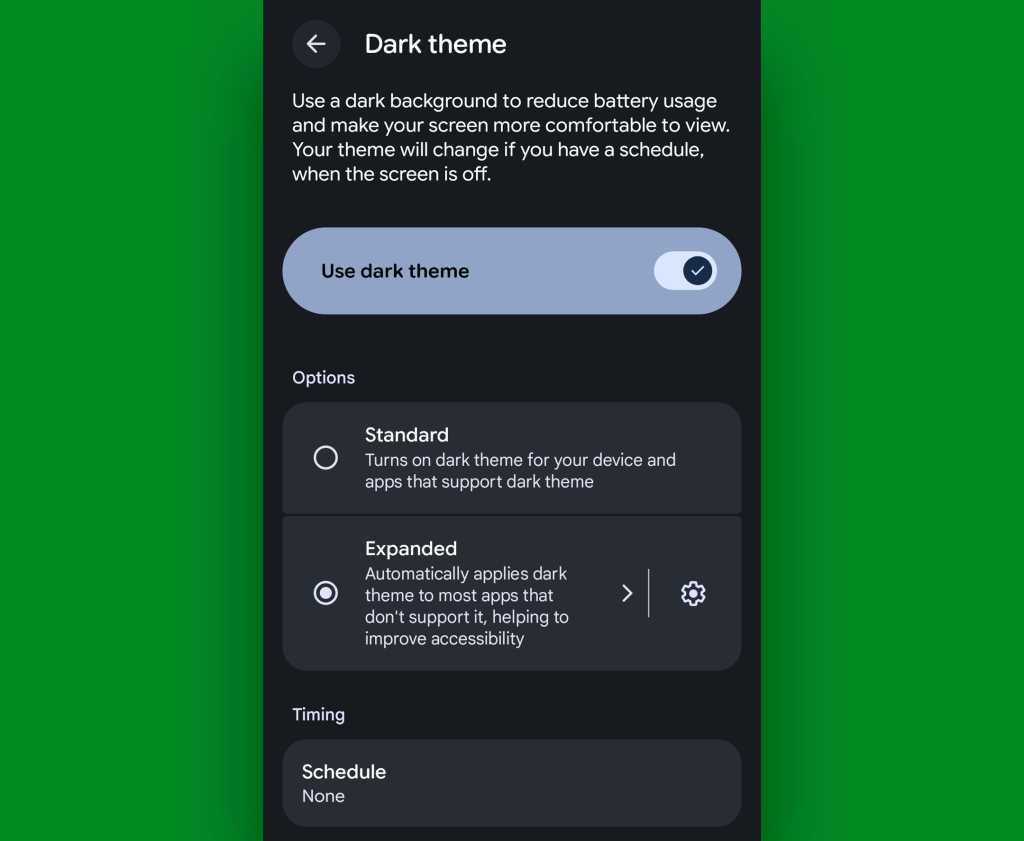
Android’s dark mode is better than ever as of Android 17, with a nifty new way to force each and every app to respect your device-wide dark mode setting and adjust its interface to a less glary look — even if it doesn’t technically support the option.
Dark mode in Android 17 includes a useful new “Expanded” option.
JR Raphael, Foundry
Well, get this: If your phone’s Android software is reasonably recent, it’s entirely possible you can unlock the very same function by adjusting a few out-of-sight system settings.
Try this:
First, you’ll need enable Android’s developer options, if you haven’t done that previously.
That’s a special, typically hidden section of Android’s system settings with all sorts of advanced options that aren’t typically intended for average phone-usin’ folk to futz around with.
There’s no risk to you or your phone with enabling ’em, and as long as you follow the instructions here exactly and enable only the one single setting we’re about to go over, it’s actually quite easy. (It’s also quite easy to undo, if you ever decide you aren’t into it and want to go back.) But we are pokin’ around in an area of Android that’s meant mostly for developers, and if you veer off-course and mess with the wrong setting, you could make a mess — so follow the steps closely, capisce?
The process for enabling Android’s developer options may sound strange, but I swear it works: Head into the “About phone” section of your system settings, tap “Software information,” if needed, then find the line that says “Build number.” Tap your finger on it seven times, then enter your PIN or password, if prompted, and confirm that you want to activate the developer options.
Now, go back to your main settings screen and either tap on the “Developer options” that appears within that list or tap “System” and then tap “Developer options” from there.
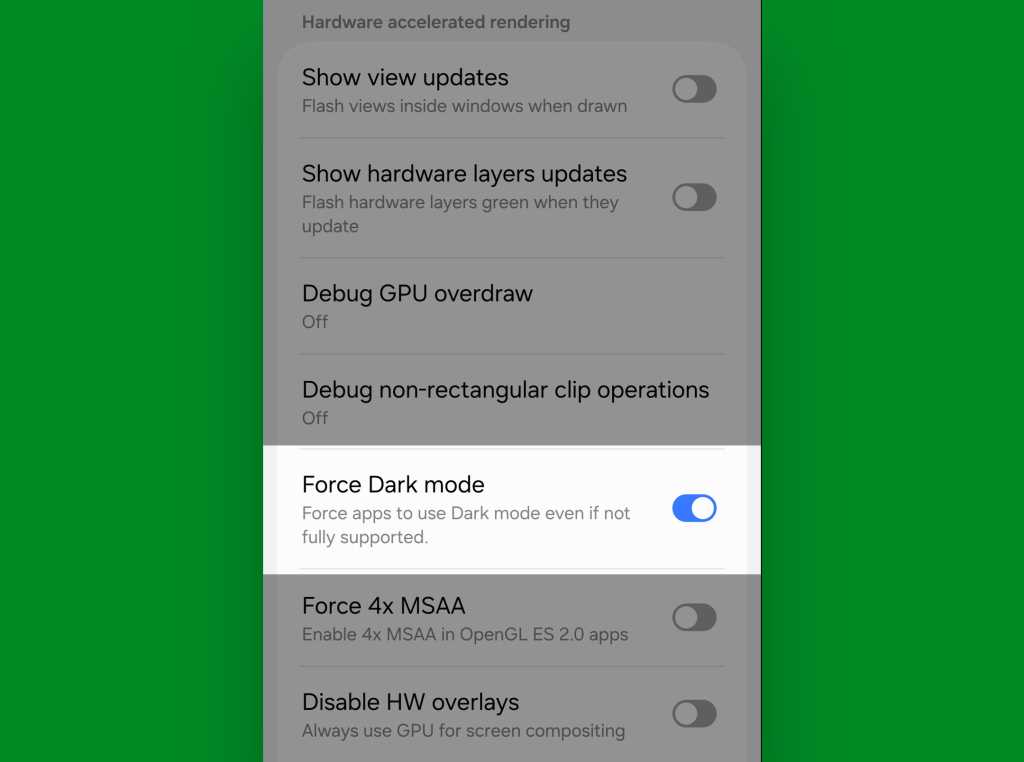
Scroll down through that section until you see an option called “Force Dark mode.” Flip the toggle next to it.
Android’s developer settings holds the secret to Android-17-style “Extended” dark mode, even on older Android versions.
JR Raphael, Foundry
And there ya have it: You should now be able to open any app, even if it doesn’t officially support dark mode, and see it shift into a darkened state whenever you have dark mode enabled at the system level.
Easy peasy, no?
Android 17 feature #4: A more comfy all-around view
Our final Android 17 feature is a saucy little somethin’ called Comfort View. It applies a softer, pastel-oriented filter to your display with automatic adjustments based on your current viewing environment in order to make your screen easier on the eyes.
If you’re using a Samsung device, you may already have something similar in place even with an older Android version. Look in the Display section of your system settings and see if you see something called “Adaptive color tone,” then try activating it if it’s there — and/or look for “Screen mode” and play around with some of the settings in that area to see vaguely similar sorts of adjustments. It isn’t quite as intelligent or automatic as the new incoming Android-level equivalent, but it’s a start!
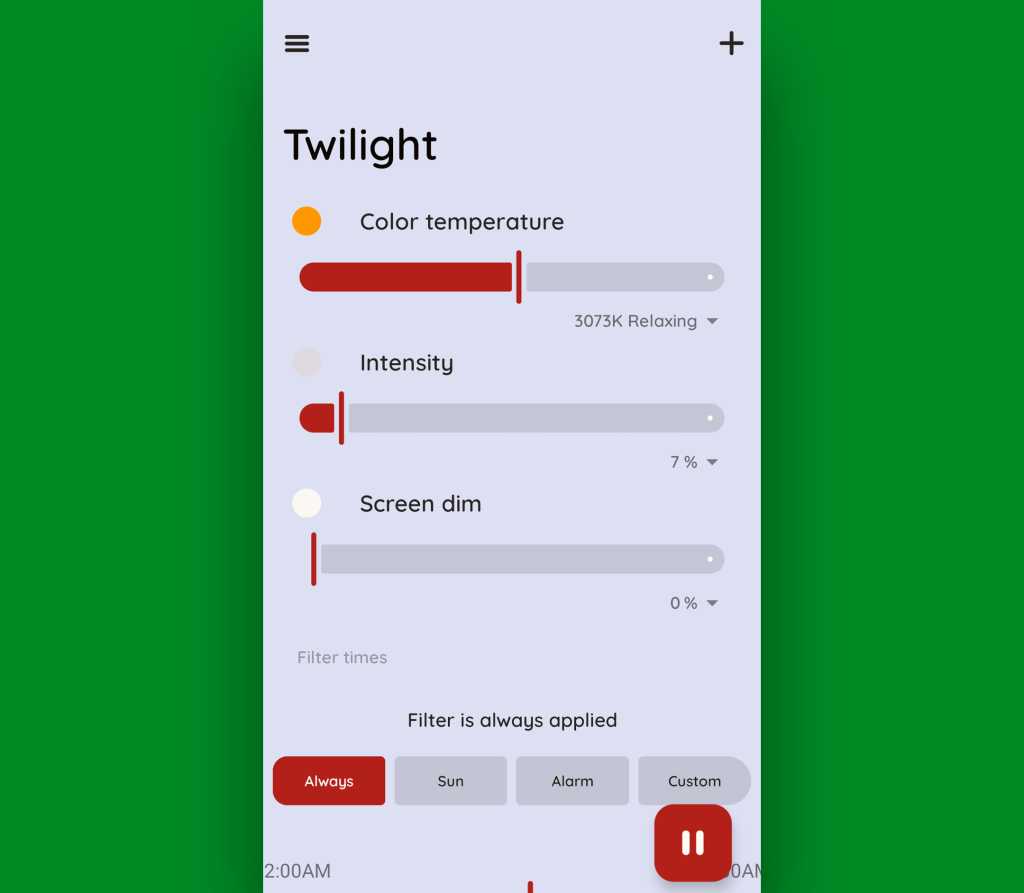
In any other scenario — or if you just want more nuance and control, even with a Samsung gizmo — grab an app called Twilight. It’ll let you tweak all sorts of specifics about the appearance of your screen, and while it’s presented mostly for nighttime optimization, you can use those same controls to create your own custom modes for any scenario imaginable.
Twilight can help you recreate effects similar to Android 17’s Comfort View.
JR Raphael, Foundry
The app doesn’t collect or share any manner of data, and while it does offer a $10 Pro upgrade, the free version is perfectly functional for most purposes.
And with that, give yourself a pat on the back: Your phone is officially now set up to showcase some of Android 17’s finest flavors — even without the software itself being available to you yet.
That, my friend, is quite an accomplishment. Well done.
Apple execs are now acknowledging the company is going to need to raises prices to cope with higher component costs, particularly memory. Apple has been battling to avoid doing so, but warned this week that those efforts are “unsustainable.”
The price pressure is being felt across the tech industry. Omdia predicts the average selling price (ASP) of smartphones globally will increase by around 20% this year — partly because AI industry demands have pushed up RAM prices and partly because of rapid cost increases in processor production as a direct consequence of war in the Middle East. This impacts anything that uses memory or processors.
Apple must raise prices, CEO warns
“We’re doing our best to mitigate the huge increases that are being passed to us, and we’ve been trying to shield our customers from the increases, but the situation has become unsustainable,” current Apple CEO Tim Cook told the Wall Street Journal.
OK, so prices are going to go up. But how?
If Apple must raise prices, the way it does so matters. Will it increase prices across the board, or choose a subtle, strategic approach that protects margins while also maintaining rapidly accelerating market share growth?
Until now, Apple has been benefiting from the rising tide in memory prices. While competitors have been steadily increasing prices across the board, Apple introduced its first $599 laptop even as it eats into mid-range smartphone sales.
To grow, or to grow less?
The PC industry is not growing (outside of Cupertino), and Apple and its investors already know that the inordinately high customer satisfaction ratings its platforms enjoy mean that when people switch to them they tend to stick around. That’s why it matters that Cook highlighted record switchers and first-time platform users during the company’s most recent fiscal call. Apple is growing new customers, people who are likely to sign-up for services, accessories, and future upgrades. Winning the customer is an investment in future performance.
When it comes to increasing prices, we’ve seen some gentle experimentation in the Mac mini line, where the entry-level $599 model was effectively replaced by a more expensive $799 SKU. There have been suggestions Apple could do the same with the $599 MacBook Neo, dumping the entry-level build in favor of the (better) $699 model. I’m not certain that’s the best approach.
A matter of choice
I’d argue that the $599 price point is psychologically the best bit of marketing Apple has ever done as it draws new users to look at its platforms. I also think substantial numbers of people already shift up to the $699 version, if they can, making that entry-level price an incredibly effective marketing tool with which to woo customers. It looks like that approach is working; the MacBook Neo has led the Amazon Laptop Sales chart ever since it was introduced and is selling in huge quantities globally.
Francisco Jeronimo, IDC vice president for data and analytics, sees this, writing: “It will be interesting to see whether Apple raises prices across its entire portfolio or plays strategically by subsidizing its more affordable products to gain market share and grow its installed base.”
If Apple raises prices at the price sensitive, entry-level end of its market, it runs the risk of slowing its own resurgence. Given that a 10% price hike here is only worth around $60, the revenue generated might not justify blunting Apple’s offer to new users.
Pricing and strategy
But Apple isn’t defined by its entry-level markets. Its biggest earning opportunities continue to be generated by the aspirational middle class, who, while feeling the pinch of declining living standards in many markets, can still handle the price of a top-of-the-range iPhone Pro. A 10% price increase at that end of the market will generate a much more significant chunk of revenue – and since rival vendors are raising their prices at this end of the market, Apple can follow suit while still seeming affordable. It’s an approach that maintains growth while optimizing margins.
Apple generates roughly half its revenue from iPhone sales, with the Pro and Pro Max devices accounting for a significant chunk of that money. Consumers looking to buy one of Apple’s high-end devices are likely to be less price-sensitive than those making purchases at the low- and mid-points of the company’s market range.
With that in mind, it makes more sense for the company to raise prices at the top, while working to maintain the cost of entry at the lower end. It could, of course, raise prices universally, but doing so makes less sense.
What next?
Whatever strategy Apple adopts, company leadership is clear that component pricing is hitting hard. “We definitely need memory pricing and supply to return to reasonable levels for consumer products. That’s the bottom line,” Cook said.
You can follow me on social media! Join me on BlueSky, LinkedIn, Mastodon and subscribe to The Core for your daily fix of Apple News.
France’s OVHcloud is moving beyond cloud infrastructure into frontier AI model development, a shift that could test whether Europe can produce another serious alternative to US and Chinese AI systems.
The company, one of Europe’s leading homegrown cloud providers, plans to train a family of models from scratch and aims to open-source them once they meet its performance targets, CEO Octave Klaba told Reuters.
The move would put OVHcloud in closer comparison with Mistral AI, the Paris-based model developer that has become Europe’s most visible challenger to US AI labs.
Klaba said the economics of building advanced AI models have changed, with improvements in chips, training methods, and synthetic data reducing the cost of a project that may once have required about $1.15 billion (€1 billion) to now cost less than $230 million (€200 million).
Reuters reported that OVHcloud said one of its models has completed pre-training on Jupiter, the Germany-based EuroHPC supercomputer described as Europe’s fastest and its first exascale system, though the company has not yet disclosed detailed performance benchmarks.
This comes as European governments and enterprises are increasingly having to assess AI infrastructure through the lens of data governance and continuity of access, rather than performance alone.
Those concerns were sharpened this month after Anthropic said a US government export-control directive required it to suspend access to its Fable 5 and Mythos 5 models by foreign nationals inside and outside the US.
Training is only the opening cost
OVHcloud’s lower cost estimate does not capture the full cost of becoming a frontier AI model provider, said Neil Shah, vice president for research and partner at Counterpoint Research.
The $230 million (€200 million) figure likely refers mainly to the initial training run, Shah said. Once trained, however, models require continued investment because they can become depreciating assets if they are not improved with fresh data.
OVHcloud would also need to spend on fine-tuning, post-training, sovereign infrastructure, storage, security, distribution, and enterprise support. It would also need enough scale to make model serving economically viable against established AI providers such as Google and Anthropic.
“Model is seen as a depreciating asset if it is not consistently trained and kept fresh with the data,” Shah said.
That makes OVHcloud’s plan a test not only of technical capability, but also of policy support and economic viability. If the company falls short, enterprises may be reluctant to shift workloads away from more established models.
The lower training cost could still give OVHcloud a credible starting point, said Charlie Dai, principal analyst at Forrester.
The budget range can be enough to produce a credible frontier model as efficiency gains reduce the cost of entry, Dai said. But enterprise competitiveness will depend on sustained capabilities beyond training, including inference efficiency, data pipelines, evaluation frameworks, and ecosystem reach.
Buyers need proof
OVHcloud’s plan remains an expression of intent rather than demonstrated capability, said Sanchit Vir Gogia, chief analyst at Greyhound Research, pointing to the absence of published benchmarks and other details.
“$200 million now buys a serious training run,” Gogia said. “It does not buy a serious enterprise AI franchise.”
Gogia said questions around sovereignty also extend to the infrastructure used to train the model, noting that pre-training was run on Jupiter rather than on infrastructure owned or controlled by OVHcloud.
The system is a publicly owned European supercomputer in Germany that runs on American silicon, Gogia said, adding that this shows how partial European AI sovereignty remains.
CIOs will need evidence that the models can be supported in production, governed effectively, audited when needed, and exited without major disruption.
Gogia said a European-owned model could reduce some dependence on US and Chinese providers, but would not remove jurisdictional risk. “Sovereignty does not abolish the off switch,” he said. “It changes whose hand rests upon it.”
OVHcloud’s move into model development could also alter the lock-in risks enterprises need to assess, Gogia said. Customers may be able to move cloud infrastructure later, but find it harder to shift AI workloads once applications and processes are built around a provider’s models and governance tools.
From its inaugural release to today, Android has transformed visually, conceptually and functionally — time and time again. Google’s mobile operating system may have started out scrappy, but holy moly, has it ever evolved.
Here’s a fast-paced tour of Android version highlights from the platform’s birth to present. (Feel free to skip ahead if you just want to see what’s new in the most recent Android 17 update.)
Android versions 1.0 to 1.1: The early days
Android made its official public debut in 2008 with Android 1.0 — a release so ancient it didn’t even have a cute codename.
Things were pretty basic back then, but the software did include a suite of early Google apps like Gmail, Maps, Calendar, and YouTube, all of which were integrated into the operating system — a stark contrast to the more easily updatable standalone-app model employed today.
loading="lazy" width="400px">
The Android 1.0 home screen and its rudimentary web browser (not yet called Chrome).
T-Mobile
Android version 1.5: Cupcake
With early 2009’s Android 1.5 Cupcake release, the tradition of Android version names was born. Cupcake introduced numerous refinements to the Android interface, including the first on-screen keyboard — something that’d be necessary as phones moved away from the once-ubiquitous physical keyboard model.
Cupcake also brought about the framework for third-party app widgets, which would quickly turn into one of Android’s most distinguishing elements, and it provided the platform’s first-ever option for video recording.
Android 1.6, Donut, rolled into the world in the fall of 2009. Donut filled in some important holes in Android’s center, including the ability for the OS to operate on a variety of different screen sizes and resolutions — a factor that’d be critical in the years to come. It also added support for CDMA networks like Verizon, which would play a key role in Android’s imminent explosion.
loading="lazy" width="400px">
Android’s universal search box made its first appearance in Android 1.6.
Google
Android versions 2.0 to 2.1: Eclair
Keeping up the breakneck release pace of Android’s early years, Android 2.0, Eclair, emerged just six weeks after Donut; its “point-one” update, also called Eclair, came out a couple months later. Eclair was the first Android release to enter mainstream consciousness thanks to the original Motorola Droid phone and the massive Verizon-led marketing campaign surrounding it.
Verizon’s “iDon’t” ad for the Droid.
The release’s most transformative element was the addition of voice-guided turn-by-turn navigation and real-time traffic info — something previously unheard of (and still essentially unmatched) in the smartphone world. Navigation aside, Eclair brought live wallpapers to Android as well as the platform’s first speech-to-text function. And it made waves for injecting the once-iOS-exclusive pinch-to-zoom capability into Android — a move often seen as the spark that ignited Apple’s long-lasting “thermonuclear war” against Google.
loading="lazy" width="400px">
The first versions of turn-by-turn navigation and speech-to-text, in Eclair.
Google
Android version 2.2: Froyo
Just four months after Android 2.1 arrived, Google served up Android 2.2, Froyo, which revolved largely around under-the-hood performance improvements.
Froyo did deliver some important front-facing features, though, including the addition of the now-standard dock at the bottom of the home screen as well as the first incarnation of Voice Actions, which allowed you to perform basic functions like getting directions and making notes by tapping an icon and then speaking a command.
loading="lazy" width="400px">
Google’s first real attempt at voice control, in Froyo.
Google
Notably, Froyo also brought support for Flash to Android’s web browser — an option that was significant both because of the widespread use of Flash at the time and because of Apple’s adamant stance against supporting it on its own mobile devices. Apple would eventually win, of course, and Flash would become far less common. But back when it was still everywhere, being able to access the full web without any black holes was a genuine advantage only Android could offer.
Android version 2.3: Gingerbread
Android’s first true visual identity started coming into focus with 2010’s Gingerbread release. Bright green had long been the color of Android’s robot mascot, and with Gingerbread, it became an integral part of the operating system’s appearance. Black and green seeped all over the UI as Android started its slow march toward distinctive design.
loading="lazy" width="400px">
It was easy being green back in the Gingerbread days.
JR Raphael / IDG
Android 3.0 to 3.2: Honeycomb
2011’s Honeycomb period was a weird time for Android. Android 3.0 came into the world as a tablet-only release to accompany the launch of the Motorola Xoom, and through the subsequent 3.1 and 3.2 updates, it remained a tablet-exclusive (and closed-source) entity.
Under the guidance of newly arrived design chief Matias Duarte, Honeycomb introduced a dramatically reimagined UI for Android. It had a space-like “holographic” design that traded the platform’s trademark green for blue and placed an emphasis on making the most of a tablet’s screen space.
loading="lazy" width="400px">
Honeycomb: When Android got a case of the holographic blues.
JR Raphael / IDG
While the concept of a tablet-specific interface didn’t last long, many of Honeycomb’s ideas laid the groundwork for the Android we know today. The software was the first to use on-screen buttons for Android’s main navigational commands; it marked the beginning of the end for the permanent overflow-menu button; and it introduced the concept of a card-like UI with its take on the Recent Apps list.
Android version 4.0: Ice Cream Sandwich
With Honeycomb acting as the bridge from old to new, Ice Cream Sandwich — also released in 2011 — served as the platform’s official entry into the era of modern design. The release refined the visual concepts introduced with Honeycomb and reunited tablets and phones with a single, unified UI vision.
ICS dropped much of Honeycomb’s “holographic” appearance but kept its use of blue as a system-wide highlight. And it carried over core system elements like on-screen buttons and a card-like appearance for app-switching.
loading="lazy" width="400px">
The ICS home screen and app-switching interface.
JR Raphael / IDG
Android 4.0 also made swiping a more integral method of getting around the operating system, with the then-revolutionary-feeling ability to swipe away things like notifications and recent apps. And it started the slow process of bringing a standardized design framework — known as “Holo” — all throughout the OS and into Android’s app ecosystem.
Android versions 4.1 to 4.3: Jelly Bean
Spread across three impactful Android versions, 2012 and 2013’s Jelly Bean releases took ICS’s fresh foundation and made meaningful strides in fine-tuning and building upon it. The releases added plenty of poise and polish into the operating system and went a long way in making Android more inviting for the average user.
Visuals aside, Jelly Bean brought about our first taste of Google Now — the spectacular predictive-intelligence utility that’s sadly since devolved into a glorified news feed. It gave us expandable and interactive notifications, an expanded voice search system, and a more advanced system for displaying search results in general, with a focus on card-based results that attempted to answer questions directly.
Multiuser support also came into play, albeit on tablets only at this point, and an early version of Android’s Quick Settings panel made its first appearance. Jelly Bean ushered in a heavily hyped system for placing widgets on your lock screen, too — one that, like so many Android features over the years, quietly disappeared a couple years later.
Late-2013’s KitKat release marked the end of Android’s dark era, as the blacks of Gingerbread and the blues of Honeycomb finally made their way out of the operating system. Lighter backgrounds and more neutral highlights took their places, with a transparent status bar and white icons giving the OS a more contemporary appearance.
Android 4.4 also saw the first version of “OK, Google” support — but in KitKat, the hands-free activation prompt worked only when your screen was already on and you were either at your home screen or inside the Google app.
The release was Google’s first foray into claiming a full panel of the home screen for its services, too — at least, for users of its own Nexus phones and those who chose to download its first-ever standalone launcher.
loading="lazy" width="400px">
The lightened KitKat home screen and its dedicated Google Now panel.
JR Raphael / IDG
Android versions 5.0 and 5.1: Lollipop
Google essentially reinvented Android — again — with its Android 5.0 Lollipop release in the fall of 2014. Lollipop launched the still-present-today Material Design standard, which brought a whole new look that extended across all of Android, its apps and even other Google products.
The card-based concept that had been scattered throughout Android became a core UI pattern — one that would guide the appearance of everything from notifications, which now showed up on the lock screen for at-a-glance access, to the Recent Apps list, which took on an unabashedly card-based appearance.
loading="lazy" width="400px">
Lollipop and the onset of Material Design.
JR Raphael / IDG
Lollipop introduced a slew of new features into Android, including truly hands-free voice control via the “OK, Google” command, support for multiple users on phones and a priority mode for better notification management. It changed so much, unfortunately, that it also introduced a bunch of troubling bugs, many of which wouldn’t be fully ironed out until the following year’s 5.1 release.
Android version 6.0: Marshmallow
In the grand scheme of things, 2015’s Marshmallow was a fairly minor Android release — one that seemed more like a 0.1-level update than anything deserving of a full number bump. But it started the trend of Google releasing one major Android version per year and that version always receiving its own whole number.
Marshmallow’s most attention-grabbing element was a screen-search feature called Now On Tap — something that, as I said at the time, had tons of potential that wasn’t fully tapped. Google never quite perfected the system and ended up quietly retiring its brand and moving it out of the forefront the following year.
loading="lazy" width="400px">
Marshmallow and the almost-brilliance of Google Now on Tap.
JR Raphael / IDG
Android 6.0 did introduce some stuff with lasting impact, though, including more granular app permissions, support for fingerprint readers, and support for USB-C.
Android 7.0 Nougat and its new native split-screen mode.
JR Raphael / IDG
Perhaps most pivotal among Nougat’s enhancements, however, was the launch of the Google Assistant — which came alongside the announcement of Google’s first fully self-made phone, the Pixel, about two months after Nougat’s debut. The Assistant would go on to become a critical component of Android and most other Google products and is arguably the company’s foremost effort today.
Android version 8.0 and 8.1: Oreo
Android Oreo added a variety of niceties to the platform, including a native picture-in-picture mode, a notification snoozing option, and notification channels that offer fine control over how apps can alert you.
loading="lazy" width="400px">
Oreo adds several significant features to the operating system, including a new picture-in-picture mode.
JR Raphael / IDG
The 2017 release also included some noteworthy elements that furthered Google’s goal of aligning Android and Chrome OS and improving the experience of using Android apps on Chromebooks, and it was the first Android version to feature Project Treble — an ambitious effort to create a modular base for Android’s code with the hope of making it easier for device-makers to provide timely software updates.
Android version 9: Pie
The freshly baked scent of Android Pie, a.k.a. Android 9, wafted into the Android ecosystem in August of 2018. Pie’s most transformative change was its hybrid gesture/button navigation system, which traded Android’s traditional Back, Home, and Overview keys for a large, multifunctional Home button and a small Back button that appeared alongside it as needed.
Android 9 introduced a new gesture-driven system for getting around phones, with an elongated Home button and a small Back button that appears as needed.
Google released Android 10 — the first Android version to shed its letter and be known simply by a number, with no dessert-themed moniker attached — in September of 2019. Most noticeably, the software brought about a totally reimagined interface for Android gestures, this time doing away with the tappable Back button altogether and relying on a completely swipe-driven approach to system navigation.
Android 10 packed plenty of other quietly important improvements, including an updated permissions system with more granular control over location data along with a new system-wide dark theme, a new distraction-limiting Focus Mode, and a new on-demand live captioning system for any actively playing media.
Android 10’s new privacy permissions model adds some much-needed nuance into the realm of location data.
JR Raphael / IDG
Android version 11
Android 11, launched at the start of September 2020, was a pretty substantial Android update both under the hood and on the surface. The version’s most significant changes revolve around privacy: The update built upon the expanded permissions system introduced in Android 10 and added in the option to grant apps location, camera, and microphone permissions only on a limited, single-use basis.
Android 11 also made it more difficult for apps to request the ability to detect your location in the background, and it introduced a feature that automatically revokes permissions from any apps you haven’t opened lately. On the interface level, Android 11 included a refined approach to conversation-related notifications along with a new streamlined media player, a new Notification History section, a native screen-recording feature, and a system-level menu of connected-device controls.
Android 11’s new media player appears as part of the system Quick Settings panel, while the new connected-device control screen comes up whenever you press and hold your phone’s physical power button.
JR Raphael / IDG
Android version 12
Google officially launched the final version of Android 12 in October 2021, alongside the launch of its Pixel 6 and Pixel 6 Pro phones.
In a twist from the previous several Android versions, the most significant progressions with Android 12 were mostly on the surface. Android 12 featured the biggest reimagining of Android’s interface since 2014’s Android 5.0 (Lollipop) version, with an updated design standard known as Material You — which revolves around the idea of you customizing the appearance of your device with dynamically generated themes based on your current wallpaper colors. Those themes automatically change anytime your wallpaper changes, and they extend throughout the entire operating system interface and even into the interfaces of apps that support the standard.
Android 12 ushered in a whole new look and feel for the operating system, with an emphasis on simple color customization.
Google
Surface-level elements aside, Android 12 brought a (long overdue) renewed focus to Android’s widget system along with a host of important foundational enhancements in the areas of performance, security, and privacy. The update provided more powerful and accessible controls over how different apps are using your data and how much information you allow apps to access, for instance, and it included a new isolated section of the operating system that allows AI features to operate entirely on a device, without any potential for network access or data exposure.
Android version 13
Android 13, launched in August 2022, was simultaneously one of the most ambitious updates in Android history and one of the most subtle version changes to date.
On tablets and foldable phones, Android 13 introduced a slew of significant interface updates and additions aimed at improving the large-screen Android experience — including an enhanced split-screen mode for multitasking and a ChromeOS-like taskbar for easy app access from anywhere.
The new Android-13-introduced taskbar, as seen on a Google Pixel Fold phone.
Google
On regular phones, Android 13 brought about far less noticeable changes — mostly just some enhancements to the system clipboard interface, a new native QR code scanning function within the Android Quick Settings area, and a smattering of under-the-hood improvements.
Android version 14
Following a full eight months of out-in-the-open refinement, Google’s 14th Android version landed at the start of October 2023, in the midst of the company’s Pixel 8 and Pixel 8 Pro launch event.
But despite the subtle nature of its first impression, Android 14 delivered a fair amount of noteworthy new goodies. The software introduced a new system for dragging and dropping text between apps, for instance, as well as a number of new improvements to privacy and security — including a new settings-integrated dashboard for managing health and fitness data and a more info-rich and context-requiring system for seeing exactly why apps want access to your location. And it brought about a new set of native customization options for the Android lock screen.
Android 14 includes options for completely changing the appearance of the lock screen as well as for customizing which shortcuts show up on it.
JR Raphael / IDG
Android version 15
Though Android 15 followed the trend of significant advancements arriving as their own separate rollouts — outside of and even ahead ofits arrival, as an official operating system update — 2024’s new Android version was certainly no slouch.
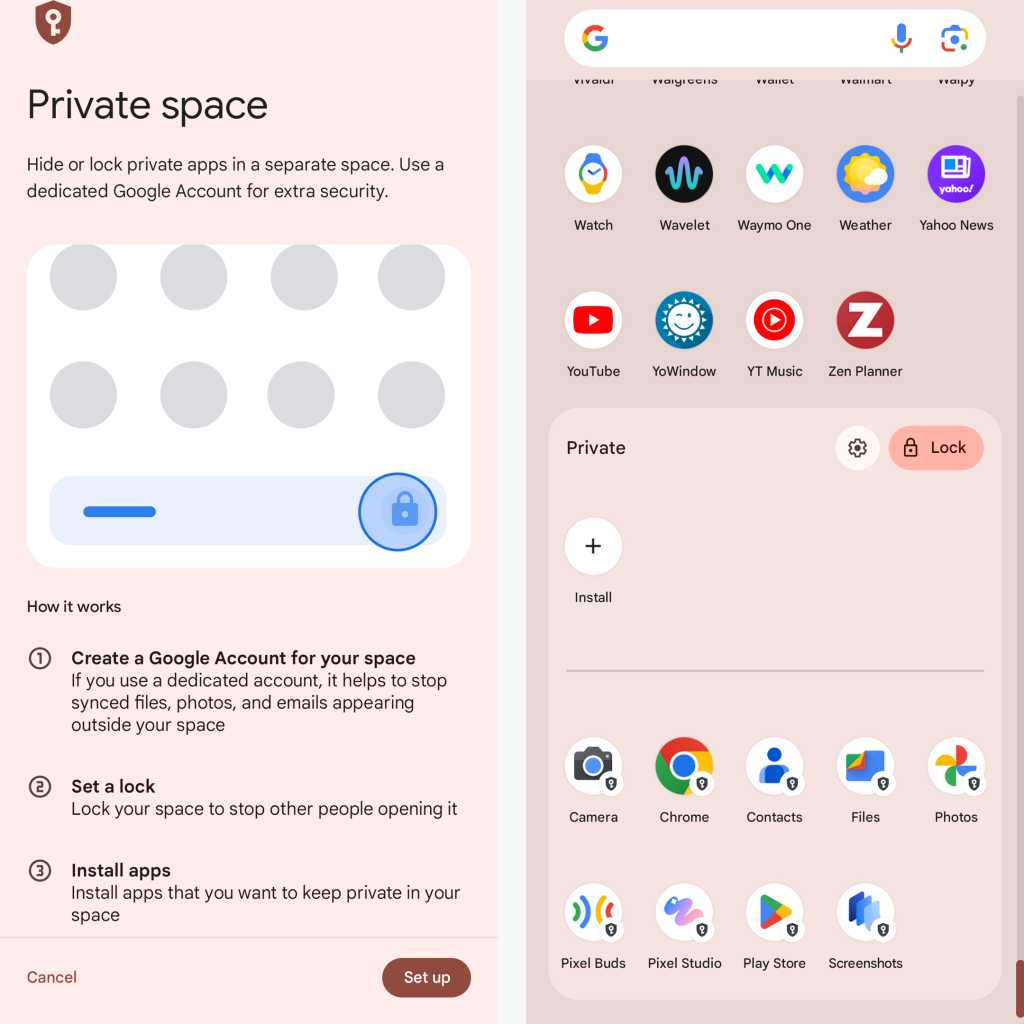
The software introduced a number of noteworthy new features — including a redesigned system volume panel, an option to automatically re-enable a device’s Bluetooth radio a day after it’s been disabled, and a Pixel-specific Adaptive Vibration feature that intelligently adjusts a phone’s vibration intensity based on the environment. It also marked the debut of a system-level Private Space area that lets you keep sensitive apps out of sight and accessible only with authentication.
Once you set up Android 15’s new Private Space feature, certain apps appear in a special protected — and optionally hidden — area of your app drawer.
JR Raphael / IDG
Add in handy touches like a space-saving app archiving option and a predictive back visual that lets you sneak a peek at where you’re headed before you get there, and this small-seeming update shaped up to be a pretty hefty progression.
Android version 16
In a marked change from recent Android upgrade cycles, Google decided to go with two new Android versions per year as of 2025 — starting with Android 16 in the spring and then following that with a smaller release in the fall.
True to that promise, Android 16 catapulted into the world in early June, creating the framework for future-facing systems such as Live Updates — a new type of notification designed to support persistent, ongoing alerts, similar to what Apple does with iOS’s Live Activities — and introducing an Advanced Protection security supermode that provides a simple single-switch way to activate a whole slew of advisable Android security settings in one fell swoop.
The Android 16 Advanced Security control panel, as seen on a Google Pixel phone.
JR Raphael, Foundry
The update included a sprawling series of other new security strengtheners, too, making protection seem like the true centerpiece of Android 16 — even if other touches, such as a more advanced standard for hearing aid support, helped flesh out the software into a rounded and feature-rich release.
Managing app location access is extra easy and powerful in Android 17.
JR Raphael, Foundry
While those features and the inevitable slew of under-the-hood security, performance, and privacy improvements add up to form a compelling final picture, it’s hard not to notice that much of Google’s focus in this era is now on the AI layers surrounding Android as opposed to being on Android itself, as an operating system. The company’s I/O conference in May showcased many such measures, appropriately noting that Android was transitioning from being “an operating system” into being “an intelligence system” (whatever that means).
But even at its foundational level and without any AI-laden Halo effect included, Android 17 manages to hold its own — with Bubbles acting as an anchor and bringing some much-appreciated new productivity potential our way.
This article was originally published in November 2017 and most recently updated in June 2026.
Because generative AI (genAI) tools and services have become so ubiquitous (and popular), the costs of using them are going through the roof — leading to an insatiable appetite for tokens.
Tokens represent a common way to measure and price AI use. Much like letters and words in English, large language models (LLMs) grasp a sentence or query by breaking words into tokens.
With the AI explosion well under way, tokens are now “the fundamental units of data our models process, many representing a problem being solved,” according to Google CEO Sundar Pichai. (Google, by the way, processes about 3.2 quadrillion tokens a month.)
But as the price of all those tokens adds up, business and IT execs are looking for ways to cut costs while keeping corporate productivity up. Uncontrolled token use has already landed one company with an unexpected $500 million AI bill.
There are a number of ways companies can rein in the price of AI at the model, infrastructure, silicon, and business levels. Here’s a look at how some of those savings might actually be achieved.
Switch to lower-cost models
One way of potentially saving money is by re-routing AI work to a cheaper model, Pichai said. At Google that would Gemini 3.5 Flash. It delivers “frontier-level capabilities at less than half the price of comparable frontier models.
“If companies use a mix of [Gemini 3.5] Flash and other frontier models, they could save a lot of money,” Pichai said.
Those kinds of models provide cheaper tokens, with reasoning that’s good enough for many users — if not as strong as mainstream Gemini 3.5 — to deliver useful results.
“There is sometimes overkill with the [LLMs],” said Deepak Seth, senior director analyst at Gartner. “I don’t always need a large language model which has been trained on the works of Charles Dickens and Shakespeare and Harry Potter.”
Hyperframe Research principal analyst Steven Dickens can’t stop using Amazon’s Quick, which costs $20 a month, for personal tasks. “It is great personal ROI as it has not only made tasks faster, but unlocked tasks I would never have even attempted previously,” Dickens said.
Don’t forget the hardware and software part of the equation
The token crisis isn’t new, said Dheeraj Pandey, CEO of DevRev, who likens what’s going on now in the AI market to the disruptions that emerged with the arrival of cloud computing and virtualization years ago.
“We let chaos reign and then we had to rein in the chaos,” Pandey said. “The word that people started using was server consolidation and virtualization.”
The answer to the token problem, he said, is the same: “Anything in systems can be solved with caching and indirection.”
DevRev, for example, is building a memory layer between AI agents and primary data sources, such as Salesforce or ERP records; that can cut token load and make data movement more efficient. The layer holds a knowledge graph with answers to common agent questions and runs on cheaper CPUs, avoiding more costly GPU cycles.
Sending agents straight at systems like ServiceNow and Salesforce “will burn a lot more tokens. It’s also not precise. And finally, it’s not safe enough where I can roll it back in case an agent has committed a mistake,” Pandey said.
Network automation firm NetBrain uses a different method: It uses conventional computing to map a network’s layout then feeds only key information to models for planning and reasoning, where AI excels. “So you don’t have to spend all the tokens,” said Netbrain CTO Song Pang.
Focus on prompt efficiency
Staffing firm ManpowerGroup has found that prompt efficiency can be an effective tool for improving token use, both internally and externally for clients.
For example, users accessing its internal labor-market tool initially needed 10 follow-up questions to drill into a query. A year later, more efficient use of prompts has brought that number down to an average of four, said Max Leaming, head of data science and AI solutions at ManpowerGroup.
“They’re using fewer tokens and they’re simply more efficient,” he said. “And that in large part has to do with your ability to prompt efficiently.”
Go local
New AI hardware that generates free tokens at home could ease some of the cost crisis.
At GTC Taipei earlier this month, Nvidia and Microsoft unveiled RTX Spark, an agentic AI desktop PC that runs agents and 120-billion-parameter models locally on Windows. The goal is “to deliver unmetered intelligence to every home and every desk with Windows,” Microsoft CEO Satya Nadella said in a statement.
Some companies are looking to reduce cloud AI costs by putting their own hardware in data centers, with vendors such as HPE and Dell providing servers installed in independent facilities. (On-premise AI is gaining ground amid sovereign AI and geopolitical concerns, including the recent conflict in the Middle East, where large data centers were struck with missiles.)
“There are local, region-specific and multiple vendor AI solutions. All of those things can help mitigate the risk. But they’re not going to eliminate it,” said Max Goss, senior director analyst at Gartner.
Use forward-deployed engineers
Reducing token costs is something that may fall to forward-deployed engineers (FDEs) in customer environments, said Taimur Rashid, managing director of AWS’s Generative AI Innovation Center.
“I expect these teams to be able to architect systems that have those cost requirements in mind, whether it’s use a different model or a different use case that doesn’t increase the per-token cost,” Rashid said.
Companies may spend heavily on token consumption, “but if you’re generating revenue, as long as the economics work out, then you’re at peace,” Rashid said.
Change the measure of success from tokens to outcomes
Even with the current emphasis on reducing token use to save money, the metrics used to measure AI success are likely to shift, Gartner’s Seth said. At some point, token-based pricing will move more toward an outcome-based model, where the unit of value is outcomes, not fragments of words.
“Some companies are moving towards outcome-based pricing,” Seth said. “When people start realizing the real cost of tokens, then companies will start looking at token efficiency.”
A federal judge has rebuffed Workday’s claim that it cannot be held liable under California anti-discrimination laws when its tools are used to screen (and potentially reject) job candidates in other states.
This week, US District Judge Rita Lin indicated that she will likely allow additional state discrimination claims against Workday to move forward. This would significantly expand the closely-watched case and likely ratchet up scrutiny of AI recruiting tools and their potentially inherent biases when it comes to age, race, sex, disabilities, and other factors.
Further, it could indicate that, even if a company is not the final employer, it may be held liable if its tools materially influence who gets rejected. This could set new legal standards for AI hiring systems, and have implications across industries, experts note.
“This case reinforces the importance of actually managing AI risks,” said Valence Howden, advisory fellow at Info-Tech Research Group. “If an AI-enabled model or ATS [Applicant Tracking System] is making decisions based on historical information, it can raise questions about whether bias in outcomes and datasets has been properly addressed.”
The case so far
Mobley v. Workday, Inc. alleges that Workday’s AI screening tools discriminate against job seekers based on age, race, and disability. The suit was filed in 2024 in the US District Court of California by Derek Mobley, a Black disabled man over 40, who claimed Workday’s algorithms continually screened him out as he applied for more than 100 positions on the platform.
The claims alleged discrimination prohibited by several US and California statutes: Race and sex under the Civil Rights Act of 1964 (Title VII); disability under the Americans with Disabilities Act of 1990 (ADA); age under the Age Discrimination in Employment Act of 1967 (ADEA); and race, gender, and age under California Fair Employment and Housing Act (FEHA).
Specifically, the suit centered around Workday’s use of automated, algorithm-driven tools for applicant screening. It alleged that these systems rely on historical data and statistical modeling that can make them susceptible to existing biases, even if protected characteristics like race, age, sex, or disability are not explicitly provided.
Bias may enter these systems in different ways, the plaintiffs argued, including via training data, model design, and evaluation criteria for candidate fit. The system could reproduce discriminatory outcomes by making correlations from data. For instance, years of experience on a resumé may indicate age; long employment gaps may infer a disability or caregiving responsibilities; educational and institutional affiliations could reflect race.
Workday has argued that it is not subject to liability under employment statutes because it does not qualify as the job applicants’ “employer.” But federal judges have allowed key parts of the lawsuit to move forward, ruling that Workday could potentially be treated as an employer’s “agent” for the purposes of anti-discrimination law.
The latest dispute centers on FEHA. According to legal sources, the California statute is among the strongest anti-discrimination laws in the US, in many cases providing broader protections than federal employment laws.
Workday asked the court to dismiss claims brought under California law, saying FEHA should not apply to the hiring decisions of out-of-state employers and applicants. The company’s lawyers argued that enforcing this would effectively allow California law to supersede that of other states, just because a company used their platform.
But Lin disagreed, saying FEHA does apply, and in fact, Workday is directly liable for its “own engagement in FEHA-regulated activities on the employer’s behalf.” Holding businesses liable for “their own discriminatory conduct” is within the scope and purposes of FEHA and consistent with public policy.
However, the issue is still to be decided; Lin did not indicate when she would release a final ruling.
Workday’s defense
A Workday spokesperson called the claims in the suit “false.”
“Workday’s AI recruiting tools don’t make hiring decisions and are designed with human oversight at their core,” the spokesperson told CIO. “Our technology looks only at job qualifications, not protected traits like race, age, or disability. We rigorously test our products as part of our responsible AI program to confirm our tools do not harm protected groups.”
Workday’s platform is meant to provide insights on how well a candidate’s qualifications match the requirements of a posted job, the company said. Those tools focus only on qualifications listed in a candidate’s application, which are compared to qualifications identified by the employer as important for the job.
Workday’s Chief Responsible AI Officer Kelly Trindel said its AI does not make employment decisions, automatically reject candidates, or determine who gets a job; further, she said, there is no evidence that the company’s tools result in harm to protected groups.
Trindel, who is former chief analyst of the Equal Employment Opportunity Commission (EEOC), leads a dedicated team composed of psychologists and PhD-level data scientists whose sole focus is to ensure that its AI is “responsible, fair, and ethical.” She said that the company’s AI systems undergo ongoing reviews throughout their lifecycle to help prevent unintended consequences, and Workday is “committed to accountability, transparency, and trust,” and invests “significant resources” into identifying and mitigating bias.
Further, she said, Workday has a company-wide commitment to ethical AI, and an independently-evaluated AI governance program based on standards from the National Institute of Standards and Technology (NIST) and the International Standards Organization (ISO).
“Workday builds AI to support people, not replace them, and this is of particular importance when it comes to hiring,” Trindel noted. Its platform is designed to help employers “manage high-volume processes more efficiently, surface relevant information, and reduce administrative work so teams can spend more time applying their expertise and judgement to hiring decisions.”
What this means for enterprise leaders
Workday isn’t alone in its legal challenges; other AI hiring tools are also being scrutinized over their methodologies, algorithms, and data-collecting practices. Eightfold, for one, is also facing a California class action lawsuit alleging that its tools unfairly rely on job candidates’ online data to predict whether they’d be a good fit for a position.
This means that enterprises, who are already feeling increased pressure to document hiring decisions, conduct AI bias audits, and maintain human oversight in recruitment and hiring, must be even more diligent in their vetting of AI tools.
Organizations must be actively defining how these recruitment tools should work, identifying bias in their algorithms, and setting up structures to test for bias across the tools’ decision-making logic, Info-Tech’s Howden advised.
“Validation of non-biased outcomes also needs to be active and ongoing, rather than a point-in-time exercise,” he said.
While Workday and others say human oversight is paramount, “it’s hard to incorporate humans into the process if the platform does the weeding out before humans have the ability to intervene,” Howden pointed out.
Discriminatory biases can exist in past hiring decisions, so it’s easy to forget that AI can “emulate and adapt those biases as part of its perspective,” he said. That includes how AI looks at language: Different cultures use different phrasing, and AI can capture that and use it to exclude candidates.
Ultimately, he called the case a “cautionary tale” illustrating how lightly some organizations have been treating AI risk. It also highlights the urgency involved in building out more advanced enterprise risk practices, “rather than relying on the limited capabilities they may have employed up until now.”
For generations, technology export controls referred to the transfer of code to other countries. But that no longer works, as the latest Anthropic fight with the US Commerce Department makes clear.
On Friday, Anthropic announced that it had received instructions from Commerce “to suspend all access to Fable 5 and Mythos 5 by any foreign national, whether inside or outside the United States, including foreign national Anthropic employees. The net effect of this order is that we must abruptly disable Fable 5 and Mythos 5 for all our customers to ensure compliance. Access to all other Anthropic models will not be affected.”
What the Commerce letter says is that Anthropic needs a license to export Fable 5 and Mythos 5 (a “deemed export“), listing four circumstances in which that license would be required: “The sending or taking of the model out of the United States in any manner; The sending or taking of the model from one foreign country to another in any manner; Retransferring the model within a single foreign country; or the release of the model to a ‘foreign person’ in the United States or a foreign country.”
Restricts capabilities not code
Although moving a model has historically meant transferring the code, most experts argue that the definition has changed for all SaaS deployments, and could now be interpreted as referring to any access to the models.
“This is not just about data sovereignty anymore. It is about capability sovereignty, where governments want to control who has access to frontier AI capabilities, irrespective of who built it, where it is hosted, or who worked on it,” said Valence Howden, advisory fellow at Info-Tech Research Group.
“The reference to deemed exports is important, because traditionally that would apply to code, technology, or technical knowledge being transferred,” he said. “In this case, the thing crossing borders is not necessarily the model itself, but it is access to the capability. That is a significant shift, and signals the real intent behind the AI arms race. The focus is moving from controlling the technology to controlling access to the outcomes the technology can produce.”
Mark Rasch, a former federal prosecutor who specializes in legal technology issues, agreed. “I don’t need to have the code physically resident in order to take advantage of the capabilities of that code. Today, the location of the code is irrelevant.”
Practical challenges
There are two practical issues involved. The first is that a large part of Anthropic’s workforce is not US citizens, and some of them have direct access to the code for these models.
But the potentially more daunting issue is that today it is difficult, if not impossible, to identify the citizenship of any AI user, which might force companies to assume that everyone might be unauthorized.
In fact, said Yuri Goryunov, CIO of consulting firm Acceligence, “there is no way to check citizenship through an API call. Besides, three-quarters of Americans don’t have passports.”
Consultant Brian Levine, executive director of FormerGov, added that the issue will make life difficult for CIOs even if the Commerce position is viewed as dubious.
“Regardless of the strength of Commerce’s position, once it issues an ‘Is Informed’ letter, every unlicensed interaction with a foreign person becomes a potential violation, and the safest move is often to halt access until a licensing path exists,” he said.
This means that enterprise CIOs need to approach AI contracts with the knowledge that any government can now declare the product legally unavailable, with no notice.
Sovereignty has climbed the stack
Howden said that this shift will force CIOs to strongly consider non-US AI models such as France’s Mistral or even China’s DeepSeek, “to reduce the concentration risk attached.”
“There are hundreds out there that are very good. It is very easy to sit in the bubble of the four or five we know,” Howden said. “Enterprise CIOs think it’s a much more limited market than it really is.”
Sanchit Vir Gogia, chief analyst at Greyhound Research, said that enterprise executives now need to take the significant import rule changes into account when selecting AI models.
“The harder truth is that sovereignty has climbed the stack,” he said. “The wall no longer stands around the database, it now stands around the intelligence layer itself. Under the export-control frame, it covers the release of controlled technology or code to a foreign person, including one standing inside the United States. The border follows the person, not the parcel. Code is part of the doctrine, but it is not the whole of it.”
He added, “the difficulty is that the cited rules speak of technology and code, while the letter reaches for the model itself. A hosted model hands the user no weights and no code. It hands them inference, and inference is a capability, not a file.”
Ultimately, Gogia said, Anthropic’s decision to cut off model access to everyone immediately “was a rational answer to an impossible instruction. A frontier model can now vanish for reasons unconnected to uptime, price or performance. The same models that help secure systems can be withdrawn at the moment defenders most need them.”
With Firefly Graph, users can connect multiple tools in visual workflow, with each “node” performing a specific task before passing its output to the next node. This gives creative professionals more control over generated outputs, according to Adobe, and makes it easier to try out ideas by swapping, adjusting or adding components.
For example, a user could start with a text prompt box that connects to a node that generates an image using an AI model from Adobe or third-parties such as Google and OpenAI. Further along the chain, the user could add nodes to remove a background or upscale an image, for instance, before producing an image, video or other asset ready for use.
Changing one aspect, such as adding a reference image or adapting the text prompt, would change the final output.
With so many AI tools available to creative professionals, workflows can get complex and hard to replicate, said Elliot Sedegah, director for strategy and product marketing at Adobe. Firefly Graph provides access to more than 300 different node types, including images, video editing and AI generation tools across Adobe’s portfolio and third-party tools.
“Whether you’re working at a mom-and-pop shop or a larger enterprise, you’re looking for consistency and then bringing that into a workflow so that you’re not hopping in and out of different tools,” he said. “Putting all that together takes massive amount of time, and sometimes it’s very difficult to even know what you did.”
Once created, workflows can be shared across an organization as repeatable processes for other individuals or teams to use. “Think of that rock star creative that you have and the recipes they create: those are now canonized as workflows, as assets, that the rest of the organization can take and reuse over and over again,” said Sedegah.
In addition, while creative professionals are needed to created high quality assets, reusable workflows can be put into the hands of broader teams to create content for large audiences, said Sedegah.
Firefly Graph addresses a challenge that most large creative organizations face, said Lisa Gately, principal analyst at Forrester — namely that their best creative workflows “live inside the heads of a few experts.
“Teams can generate images and video with AI, but reproducing the exact sequences of creative decisions, model selections, edits, and refinements that lead to a high-quality result is difficult and inconsistent. Firefly Graph turns those workflows into reusable assets,” she said.
While other node-based workflows aim to address similar problems, Adobe’s pitch is that Firefly Graph provides customers with the benefit of integration into its product suite.
“Firefly is a full, broader AI creative studio, not just a node-based tool, so [Firefly Graph] is a part of a bigger picture,” said Sedegah. “The strength is having everything in one place with the tools that people know.”
“Where Adobe differentiates is in enterprise integration,” said Gately, with Adobe connecting Firefly Graph to a range of other Adobe tools. Those include Creative Cloud applications; Firefly Boards for ideation; and Firefly Creative Production.
“The workflow becomes part of a broader content supply chain instead of a standalone creation tool,” she said. ”Organizations committed to other tools are unlikely to migrate for a node-based canvas — making a change is about the broader content supply chain.”
Firefly Graph is available now to Adobe Creative Cloud for Enterprise subscribers. Creative Cloud for Enterprise is licensed by seat, requiring custom, volume-based enterprise agreements. Creative Cloud for Enterprise customers receive credits for Firefly Graph. Creative Cloud for teams customers can sign up for a public beta online. Creative Cloud pricing starts at $99.99 per license each month.
This article was updated on June 19 with pricing information from Adobe.
Beth Tschida, who became Jamf CEO in May after serving as CTO and as interim CEO, is the first woman to lead the company in its near 25-year history. I spoke with her this week at the London Jamf Nation event, where the company introduced its new AI Governance solution.
How the transition to CEO is going
“It’s been a great privilege and an adjustment,” she said. “Jamf has always been a company deeply focused on culture, which is exactly why I love being here. Having the ability to influence and improve that culture from this role is something I feel very supported in doing.”
The last few years have seen a variety of changes at Jamf, which was briefly a public company. “We’ve come through a period of change, not all of it easy,” Tschida said. “But we now have a great partnership with Francisco Partners. We’re private, we’re focused on solving customer problems, and we’re finding ways to lean into what we’re good at.”
Women in tech and mentorship
Tschida is a good choice to lead a software engineering company, as she’s an engineer herself. She originally joined Jamf as vice president for software engineering in 2018, moving up to CTO in 2022. She’s also one of the few women in leadership positions in tech. (To Jamf’s credit, the company also has CIO Linh Lam on its team.)
“I think it’s important for women to stay deep in the tech, build their skills and find their voice confidently,” Tschida said. “You’ll never know all the technology out there. Nobody does. What matters is the ability to keep adapting and evolving.”
Tschida stressed the importance of mentorship. “I feel very honored to have a chance to be a role model for other women,” she said. “I had women who forged a path for me, including a female CIO early in my career who I asked to mentor me and learned an enormous amount from. I’m certainly not the first woman in tech, but I do want to play my part in helping others grow in their careers.
“Ultimately, I want to be respected for what I do, not for my gender. That’s how everyone should be judged.”
AI Governance
Tschida’s product focus means she knows what matters to Jamf. “If you focus on the problems customers have and how your product can help fix them, that’ll take you to where you want to go.”
For many in the enterprise, both in and beyond the Apple space, the next big problem is AI — how to deploy it, how to manage it, and how to regulate it.
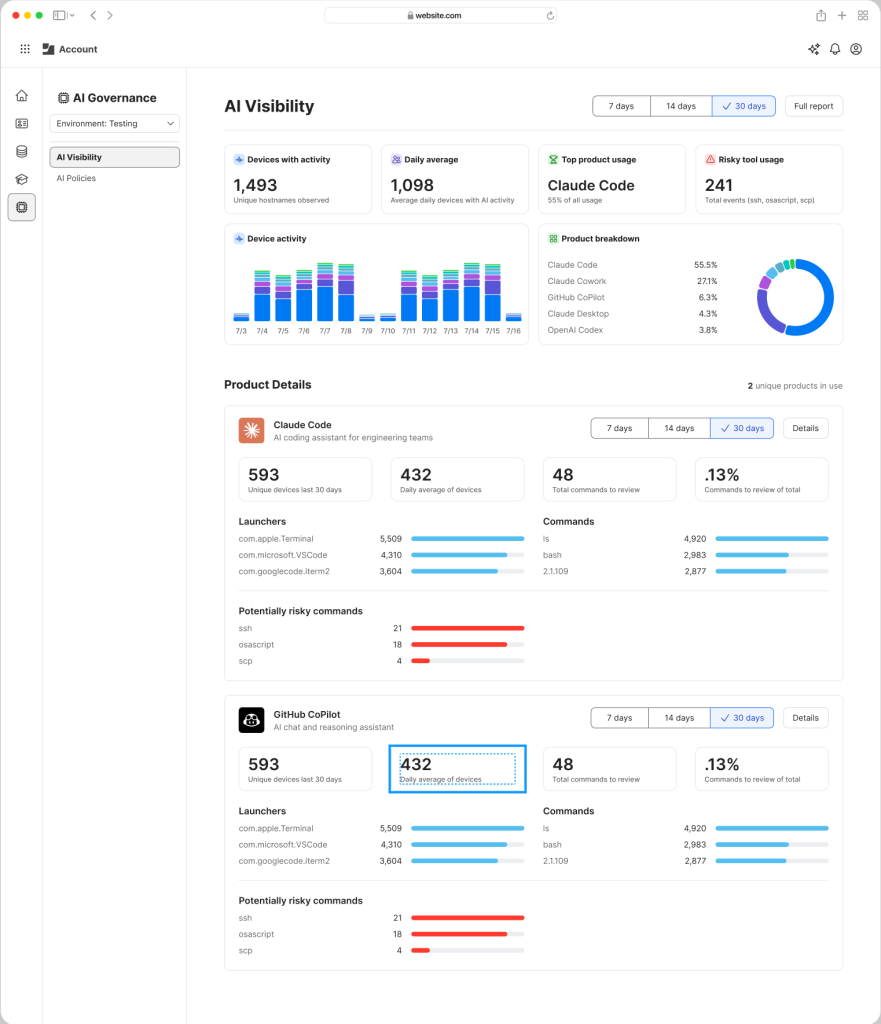
AI Governance is a new Jamf solution that has been developed in response to those pain points. Countless surveys, including Jamf’s own data, show that AI is being widely used across every company, but IT lacks visibility into its use. It’s hard to know what data is being shared with AI tools, which services are being used, and how to report on that use effectively — particularly in regulated industries.
AI Governance is designed to make it possible for anyone managing an Apple fleet to get granular insight into AI use across their Mac, iPhone, and iPad devices. It uses telemetrics to shed light on that use, offers governance and management tools to help IT gain better oversight and control over it, and provides highly comprehensive reporting tools suitable for internal or regulatory review.
“AI is happening whether organizations know it or not,” said Tschida. “That’s the problem. You can try to block it, but that’s very hard to do well. It’s far better to build visibility and governance around it.”
The offering makes it possible for companies to enable the AI use they already know is taking place while protecting corporate interests and enabling fast and accurate reporting. You can find out more details here.
Jamf’s approach is focused on endpoint management. AI Governance means IT can see what’s running on a device, categorize it, and understand what AI tools and models are in use. “If you know how people are running AI on your fleet, you can open it up safely. Then all of your customers and employees can find their way to figure out how AI is going to optimize their workforce,” she said.
What does that look like in practice? Think of it as an orchestration layer. IT can define different AI configurations for different teams: HR might use one set of models, engineers another. And admins can apply opinionated postures per group: what models are permitted, what cloud services they connect to, what’s visible to IT versus the CISO versus the CFO. “It’s an extension of what Jamf has always done, it just now applies to AI endpoints too.”
What about regulatory complexity across geographies? “A lot of governance controls are shared across regulations; a good base set is a healthy way to run regardless. But each regulation has its own twists. Our mission is to make sure customers operating in different markets can expand on that base and fit the specific models and regulations they need, getting the right configurations to the right devices.”
Managers must prepare for AI cost challenges
There’s a second dimension beyond management — cost. The industry is developing quickly, with new AI models appearing almost every week. Yesterday’s leading LLM is tomorrow’s fading star, even while the cost of AI infrastructure goes through the roof. As that churn slows, investors will want to start seeing returns on their bets, which is why token costs — the price of running AI services, at least in the cloud — are climbing fast.
As costs become more realistic, that’s going to change the nature of AI deployment from the laissez-faire, anything goes approach to a more strategic management of such use. “Models keep dropping fast, but token costs are only going to go up,” said Tschida.
“Organizations will need to decide: just because you can build something with AI, should you? What’s the right model for what work? We’re helping customers move from, ‘We’ll just block it’ or ‘We’ll turn it on and hope for the best,’ toward a place where they have a real viewpoint and can manage and change that viewpoint over time.”
The ever-changing AI world is also prompting Jamf to make more of its APIs externally available. “We’re used across every industry and every geography, at every scale,” said Tschida. “There’s no way we can build every workflow every customer needs, we’d never get to all of them.”
Embracing openness also helps build future foundations. “Thinking about where we’re heading next — agentic endpoint management — having platform APIs allows our customers to build things they can imagine, that we can learn from, in a way that solves their specific problems.”
Apple, WWDC, and the enterprise
Tschida’s comments come shortly after WWDC 2026, where Apple introduced a raft of AI advances that formed a strong foundation for its future, improvements that matter to Jamf. “When Apple innovates, Jamf celebrates,” she said.
“Apple is doing great things in their AI ecosystem, revamping Siri, expanding their AI capabilities, making Apple the platform people want to run AI on because those machines simply perform better. Our job is to take what Apple builds and bring it into the enterprise in the way that enterprises actually need it.”
Most of the industry recognizes that Apple’s enterprise story has changed dramatically as its products see accelerating use, and momentum is not slowing. Tschida reflected on how just a few years ago, Apple in the enterprise was an option in employee choice programs. “Now it’s becoming the clear choice,” she said. “We expect that trend to continue. And the more Apple invests in AI running natively on device, the stronger that argument gets.”
Where is Jamf going?
AI Governance is a unique answer to an increasingly important set of questions that are now beginning to affect the IT management of Apple’s platforms. (It’s not clear whether anything as sophisticated exists for other platforms at al, but as the need to manage AI grows, demand for such solutions will grow.)
Ultimately, the company’s latest move reflects Jamf’s inherent strategy under its new CEO. “Focus on customers, listen to them, solve their problems, and don’t throw tech at it. Ask: what’s the problem? Can we solve it? That focus is what takes you where you need to go.
“We’re on a good trajectory, customers stay with us, and the culture has always underpinned us. Now we’re finding ways to lean into it even further,” she said.