Month: July 2026

Copilot worm can spread through Microsoft Word docs

An “AI worm” can spread through Microsoft Word documents using Copilot as a vector, a prominent Norwegian AI researcher reported on Tuesday.

The report from Håkon Måløy, later confirmed by Microsoft, said that an attacker can conceal instructions in a document that is later used as source material for Copilot-generated or Copilot-edited Word documents, for example, as input to a financial report. Those malicious instructions could potentially alter figures in the document being created. They then copy themselves into the new document, causing it to become a carrier of the attack when used in another Copilot-assisted workflow.

Måløy noted: “To my knowledge, this is among the first public demonstrations of document-borne AI-worm self-propagation through normal workflows in a mainstream commercial productivity suite.”

Microsoft on Thursday emailed a statement to CSOonline discussing the report’s revelations. 

“We have addressed the findings reported by the researcher and thank them for working with us through coordinated vulnerability disclosure. To address this class of risk, we use a defense-in-depth strategy with safeguards that block malicious instructions at multiple points and help keep tasks aligned with users’ requests,” Microsoft said.

“We are continuously strengthening these safeguards as the technology and threat landscape evolve,” it added. “We encourage customers to install the latest updates, use multiple layers of security protection, treat content from unknown sources with caution, and review AI-generated content before using or sharing it.” 

Sidesteps defenses

Aman Mahapatra, chief strategy officer for Tribeca Softtech, a New York City-based technology consulting firm, has reviewed the mechanisms used in this vulnerability and says that it is much worse than it might seem, because it will sidestep just about every defensive mechanism enterprises have in place today.

“This is a worm, a self-propagating malware pattern that uses Copilot as the transmission mechanism and legitimate corporate collaboration as the delivery channel. It bypasses every traditional email security control because the document is not malicious on delivery and it becomes malicious when Copilot processes it. That means that it bypasses DLP because the exfiltration happens through the user’s own authenticated Copilot session,” Mahapatra said. “It then bypasses endpoint protection because no code executes, only instructions get followed by an AI service the enterprise has explicitly authorized.”

He also noted that researchers have been warning about this class of attack for two years.

Microsoft’s involvement

Måløy said that he has been working with the Microsoft Security Response Center (MSRC) since March 3 and Microsoft  subsequently implemented and distributed multiple small focused mitigations, but the core vulnerability has yet to be fixed.

He said he was hesitant to disclose an active vulnerability, but felt that it was now time to publish. 

“My reasoning is that defenders cannot reduce exposure to a risk they are unaware of,” Måløy wrote, “and the propagation mechanism described here affects ordinary document workflows that many organizations already rely on.”

In an email interview, Måløy noted that the tweaks Microsoft has implemented were helpful, nonetheless. 

“The coordinated disclosure process showed that mitigations can meaningfully reduce the demonstrated attack surface, making attacks less reliable and limiting their reach, even without completely eliminating the underlying problem,” he said. 

Måløy also addressed the resolution that many analysts and consultants suggested, which is to change the nature of LLMs to fully isolate instructions from the data they operate on. 

“Separating instructions from data may be part of the solution, but I think the distinction between data and instructions is not always clear in real-world workflows. For example, a user may ask an agent to arrange a business trip, requiring the agent to retrieve an email specifying the approved itinerary and a document containing the booking procedure,” Måløy said.

“My view is that the broader challenge is therefore not simply to prevent systems from interpreting external content as instructions, but to evaluate whether those instructions align with the user’s goals and the context in which the system is operating,” he added.

Problem hard to overstate

Mike Wilkes, enterprise CISO at Aikido Security, said it would be difficult to overstate the potential problems from this situation. 

“This is a significant issue because it moves prompt injection from a single compromised interaction into a potentially self-propagating document integrity attack,” he said, noting that it is not a conventional worm that spreads automatically. A user or Copilot workflow must still bring an infected document into the model’s context. “But once that happens, the malicious instructions can reportedly alter business information, conceal themselves inside the resulting Word document and turn a legitimate internal file into the next carrier,” he said.

That, he pointed out, creates “a dangerous enterprise supply chain in which financial reports, contracts, policies and partner documents may inherit malicious behavior while retaining the trust associated with their legitimate authors and Microsoft 365 accounts.”

Not a new issue

The key issue behind this flaw is the fact that genAI tends to struggle with telling the difference between data that a user offers as input and the instructions the AI is to execute.

Flavio Villanustre, CISO for the LexisNexis Risk Solutions Group, observed that the same problem with mixed data and instructions occurred in databases decades ago, and turned into what we know as SQL injection attacks today. But, he noted, a few years later, parametrized binding for the database access layers was developed, which separates instructions, which are handled internally and safely, from data, which can come from untrusted sources. “The same needs to happen with LLMs and other AI,” he said.

Mike Leone, a VP/principal analyst at Moor Insights & Strategy, agreed.

“It’s hard not to chuckle a bit with this one. People have been asking whether data can give orders since SQL injections. We fixed that one by giving the database a way to tell an instruction from a value,” Leone said. “Thirty years later, we’ve built an entire category of software that can’t tell the difference at all.”

Tom Findling, CEO at Conifers.ai, also said he sees the data-vs-instructions issue as the biggest problem. 

“Separating data from instructions is still unsolved at the model layer. The labs are making real progress, but not enough to be your only control,” he said, and stressed, “Microsoft doesn’t need to wait for that. It can slow propagation inside Copilot: stop hidden content from being written into new documents, surface hidden text before it’s used, preserve the trust level of what Copilot read and show all AI-generated changes.”

Fix needs industry agreement

However, Frank Dickson, group VP for security at IDC, argued that a fix needs industry agreement. 

“A fundamental fix requires the industry to converge on the same architectural change, which isn’t happening anytime soon given the incentives and the fact that the major players are far from besties,” he said, pointing out that Instruction-data separation would need to be baked in at the model or platform level across every major vendor. “None of them are rewarding that work commercially right now, so treat that as a multi-year research problem, not something a CISO should wait on.”

Leone disagreed, arguing that a single vendor can do quite a bit, at least for its own customers. 

“Microsoft has said publicly since last year that indirect prompt injection can’t be fully prevented, and I give them credit for saying it out loud rather than pretending otherwise,” Leone said, noting that the industry doesn’t have to move in lockstep. “This attack lives inside one product,” he said. “If Microsoft hardens the Copilot document path, Copilot customers get safer whether or not anyone else moves.”

Dickson added that another critical problem with this vulnerability is that the carrier documents are created by legitimate employees using legitimate tools, “so there’s no obvious point of origin once the payload starts moving; an organization could be laundering corrupted financial figures through its own workflow for weeks before anyone notices.”

Tactics that might help

That said, experts had some specific suggestions for CISOs trying to negate this problem. 

IDC’s Dickson said, “the most useful lever right now sits outside the model entirely, in how much untrusted content Copilot is allowed to pull into a session without a human choosing it.” He noted that enterprises can turn Copilot’s auto-discovery behavior off or restrict it, and require humans to explicitly select the documents they feed it. “That alone closes off one of the two ways the attack gets a foothold,” he said.

IDC also suggested a visible diff or redline of anything Copilot changes in a financial or otherwise consequential document, and the requirement for a human to approve the changes. “That’s not a technical fix, it’s a workflow one, and it’s available today,” Dickson said.

He said that IT should also track where content came from and what was touched by an AI system, in metadata that travels with the document. “It doesn’t stop the injection, but it means when something does get through, an organization can actually trace how far it spread instead of discovering a corrupted number three reports later with no way to reconstruct the chain,” he said.

However, one expert, Tyler Reguly, Fortra’s associate director of security R&D, said that he didn’t see this vulnerability having a meaningful impact because it feels like what he called a “laboratory vulnerability.”

Normal enterprise workflows don’t encompass a number of the necessary steps for compromise, he said, pointing out that, if anything, people are trained not to download Word documents. Plus, he noted, looking at the blurred example in the report, the malicious document contained an additional apparently blank page which held the concealed prompts in white text.

“That page is going to send up warning signs for me if someone even managed to convince me to download an external Word document,” he said. So, overall, “this feels like it requires a perfect storm.”

This article originally appeared on CSOonline.
Qualcomm shows Apple’s modem transition is almost complete

Apple may be moving faster than expected in its modem development work, and Qualcomm’s latest comments suggest that shift is already reshaping the iPhone supply chain. 

Qualcomm overnight said supply constraints are shrinking some of its Apple business faster than anticipated. “It’s availability of supply,” CEO Cristiano Amon told Reuters.

While he wasn’t specific, that likely reflects the broader industry shortage in memory, storage, and everything else and means the company’s share of components used for the next iPhone launch will fall “well below” its anticipated estimates. Amon says this is part of a transition in which future Qualcomm income will be generated by AI datacenter demand.

The company also intends to boost modem prices on Sept. 1 (And remember, the patent licensing agreement between Apple and Qualcomm expires in March 2027.)

Given Apple is selling plenty of smartphones (even as the broader industry shrinks), supply constraints won’t necessarily be because of demand for the devices; this could reflect Apple’s plan to divide the iPhone release schedule across several months, as well as its future modem development efforts. 

Reports for months have indicated Apple plans to introduce new iPhones twice a year, with the Pro range updated each fall and entry-level devices scheduled for spring. It’s a move that’s likely to help build more consistent quarterly earnings by spreading demand across different parts of the year and could reduce short-term demand for components.

Things look a little different this year, of course; the expected introduction of the new iPhone Ultra means Apple will be making three new iPhone models, not the customary four – though there is also speculation the Ultra may not ship in quantity until later on this year. 

How much does Apple need Qualcomm? Not much

There’s also Apple’s own modem development plans to consider. We know Apple’s relationship with Qualcomm isn’t easy. The two firms were engaged in costly litigation before they found a way to bury the hatchet and work together on 5G iPhones while Apple developed its C-series modems.

Those C-series modems are already used in Apple devices. The iPhone 16e, 17e and iPhone Air carry Apple’s C1/C1X modem, with the C2 variant expected in the 18 Pro series this year. 

Apple’s new modem is expected to deliver better battery efficiency, improved cellular network privacy, and AI-supported network efficiency. So, your device should last longer, be less visible to your carrier, and better able to get a connection — even when connectivity is constrained. 

Next year’s 18-series devices will certainly stick with Apple’s modems, meaning Qualcomm’s remaining Apple business should be wrapped up in the release this fall. As Apple’s modem appears in more devices, you’ll probably only see Qualcomm modems used to provide mmWave support, which realistically has very little traction or carrier support outside America.

Waiting to replace mmWave

That view is supported by reports based on information recently stolen from Apple’s India-based iPhone partner, Tata. It claimed Apple will use the C2 in internationally sold iPhones Pro and Max, while keeping to Qualcomm in US devices.

If Apple takes the same approach with next year’s iPhone releases, it would mean only US iPhones — and probably not all of them — have mmWave. As a result, Qualcomm’s modems will only be available in a very small subset of iPhones sold. That would almost certainly account for the modem maker’s reduced Apple optimism. (Apple is also part of the 6G standard development group, which implies it hopes to find some way to replace mmWave.)

It also indicates Apple is less likely to renew its current patent licensing deal, though it could still require some licenses since Qualcomm’s SEPs include some 5G-essential technologies. The other takeaway here: Apple has a high degree of confidence in its forthcoming C2 modem, which makes sense given how well-received its C1 modem has been. 

A clean sweep

One more thought. It is interesting the extent to which Tim Cook’s Apple seems to be finalizing much of its business before the transition to new CEO John Ternus on Sept. 1. (It is also notable that Qualcomm also intends to raise its prices on the same date.)

You can follow me on social media! Join me on BlueSky,  LinkedIn, Mastodon and subscribe to The Core.

Why Google Voice is your secret business weapon

All right, quiz time: In a single sentence, can you tell me exactly what Google Voice does?

It’s a question even the most giddy Google-appreciating geeks struggle to answer succinctly — and for normal, non-tech-obsessed Homo sapiens, the answer typically falls somewhere between “Huh?” and “Wait, is that the same thing as gChat?”

Really, it’s no surprise. Google Voice is one of Google’s most complex, confusing, and poorly promoted services. But it’s also one of its most powerful — if you take the time to figure out exactly what it does and how it can work for you.

And especially if you’re using your phone for any manner of business, it can make a night-and-day difference in your ability to stay as connected and productive as possible, no matter where you’re working or what type of device you’re using at any given moment. Without exaggeration, it’ll completely change the way you think about your modern mobile devices and what a phone number even is.

Consider this your unofficial guide to getting started with Google Voice and then getting the most out of the underappreciated but potential-packed service.

The Google Voice business basics

We’ll start with the basics — and go back to that question I posed at the beginning of this conversation: What exactly is Google Voice?

In its simplest form, Google Voice is a cloud-based service that manages your phone number for you. Instead of being connected to a SIM card (or eSIM) and tied specifically to a single physical smartphone, your number lives in a fluffy Google server and is controlled entirely by Google software.


That arrangement ultimately frees your digits from their traditional shackles and allows you to communicate in all sorts of convenient, efficiency-enhancing ways — without any complex carrier-switching or awkward add-ons required.

At its core, that empowers you to:

  1. Make and receive calls using your standard number on any device — phone, tablet, or even desktop computer. No one you’re talking to will know the difference.
  2. Send and receive regular text messages through the Voice website or apps on any device anytime — even with multiple devices being connected simultaneously.

Together, that means any phone, tablet, or computer where you sign into Google Voice effectively becomes “your phone” — regardless of what type of connection it relies on or if it even has active cellular service.

So, for instance, you could:

  • Install the Google Voice app on an old Android phone or iPhone and then have it ring whenever a call comes into your number, be able to make outgoing calls on it from your number, and be able to send and receive text messages on it with your regular number as long as it’s connected to Wi-Fi.
  • Install the Google Voice app onto a Chromebook, an Android tablet, or an iPad and communicate with customers and co-workers in all those same ways from there.
  • Sign into the Google Voice website on any laptop and handle calls and messages on it as if it were your phone — regardless of whether your actual current smartphone is nearby or even powered on.

And there’s more: Google Voice also automatically transcribes your voicemails and lets you listen to or read ’em from any device where you’re signed in. It brings Google-caliber spam filtering to your incoming calls, text messages, and voicemails, along with the option to have all of your calls screened for you. And it gives you a robust system of contextual call forwarding — almost like Gmail filters for your phone.

Like I said, this is one seriously powerful but also confoundingly complicated service. Let’s dive in and explore every last piece of the puzzle so you can make sure you’re taking full advantage of everything it has to offer.

Getting started with Google Voice

The first step to getting started with Google Voice is simply signing into the service and setting yourself up with a number. That part of the process is easiest if you begin on a computer.

For individual, non-company-connected Google accounts, Voice plans range from free to $20 a month for different sets of features. You can immediately choose a new Google Voice number in any available area code for free, or you can opt to pay $20 to transfer an existing number into the service. In either scenario, you’ll have to be in the US to be eligible. (Sorry, international pals!)

With company-connected Google Workspace accounts, Voice is available in the US as well as in Belgium, Canada, Denmark, France, Germany, Ireland, Italy, Netherlands, Portugal, Spain, Sweden, Switzerland, and the UK. Your Workspace administrator will have to activate the service for you, and it costs $10, $20, or $30 per user per month — billed to the company — depending on what tier of service is selected.

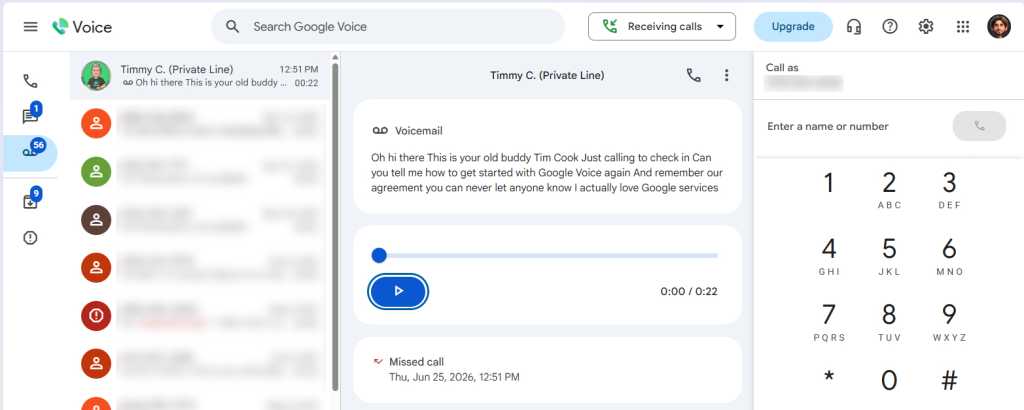
Either way, once you’ve got your number set, you’ll find yourself facing the main Google Voice dashboard. That’s where you’ll always be able to see your recent calls and messages, make new calls and messages, and read or listen to voicemails left on your number.

screenshot of google voice web dashboard with voicemails

The Google Voice dashboard lets you manage everything related to your calls and messages from any device where you’re signed in.

JR Raphael / Foundry

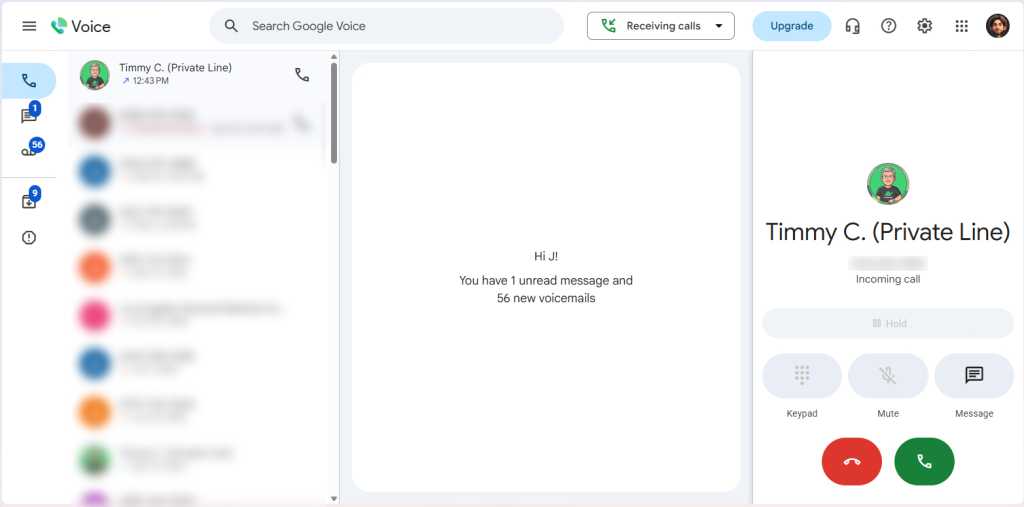
And as long as you have the website open, any calls coming into your number will actually ring your computer — and you can answer ’em right then and there.

screenshot of google voice web app with incoming call

Incoming calls can be answered on any device where you’re signed into Google Voice — including a computer.

JR Raphael / Foundry

We’ll come back to explore some advanced settings in a second. First, we need to shift our focus for a moment and get Google Voice set up on any phones where you want to use it — including the primary phone you rely on for your day-to-day communication.

Setting up phones with Google Voice

Now that we’ve got the core Voice setup finished, this part’s pretty easy:

Either way, open the app up and follow the prompts to sign in using the same Google account you used in your initial setup on your computer.

On Android, you’ll be prompted to connect that device to Google Voice to allow the phone to make and receive calls using your Google Voice number. If your phone has active cellular service with a separate number that’s connected to your carrier, follow the steps to link the two and allow them to work together.

If you’re using an older or secondary phone that doesn’t have active cellular service, just skip that step. You’ll still be able to make and receive calls with your Google Voice number whenever the phone’s connected to Wi-Fi.

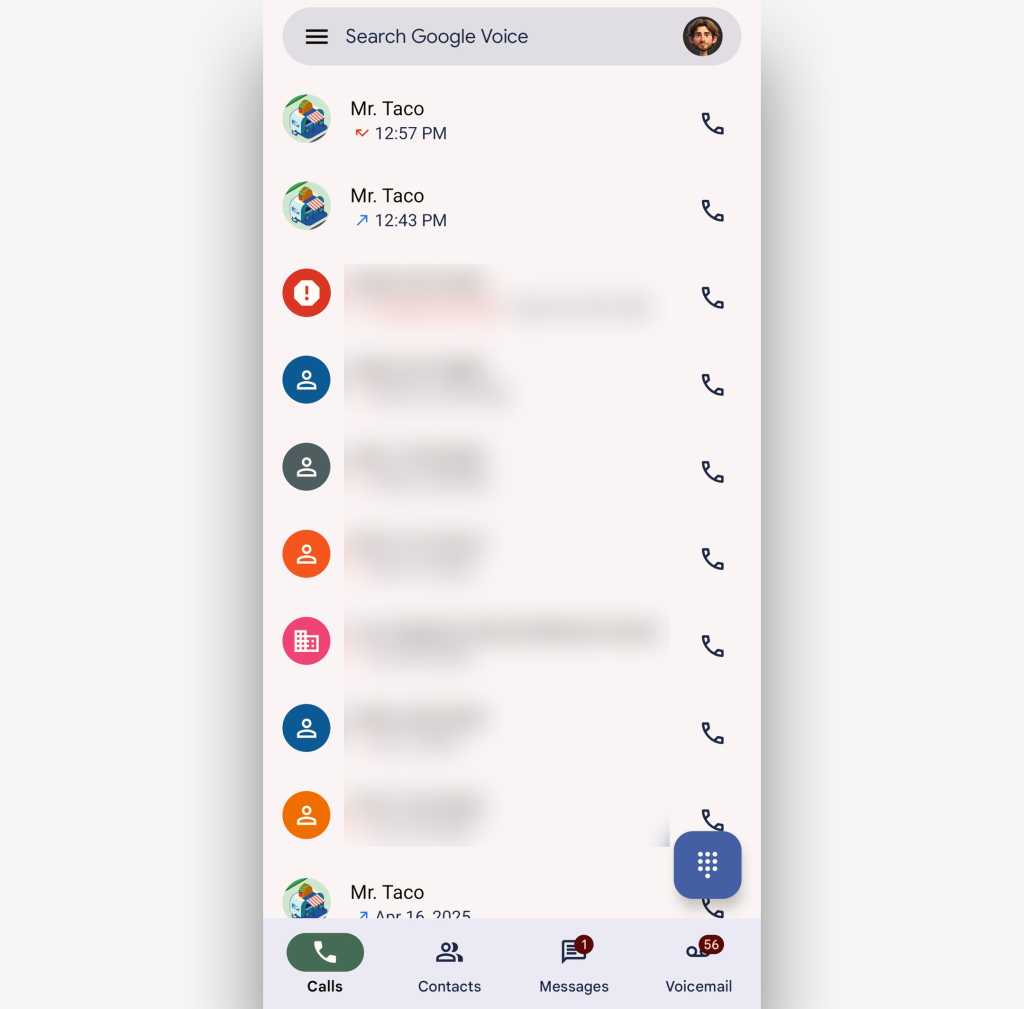
On both Android and iOS, you’ll then see the main Google Voice dashboard interface — with tabs for your recent calls, your contacts, your text messages, and your voicemails. The button in the lower-right corner of the screen will allow you to make a new call or start a new message, depending on which tab you’re viewing.

screenshot of google voice android app - searching calls

The Google Voice mobile apps effectively transform any smartphone into your Google Voice device.

JR Raphael / Foundry

And on both platforms, you’ll be able to tap the three-line menu icon in the app’s upper-left corner to find the main settings menu.

In a moment we’ll explore the main Voice settings thoroughly from the service’s website, where every last option is available, but for now, take a quick peek at the “Making and receiving calls” (or “Make and receive calls”) and “Incoming calls” areas of the apps’ settings. Those will control exactly how calls to and from your Voice number will be handled on that specific device — if they’ll rely on your carrier-provided cellular minutes, assuming those are available, or if they’ll rely primarily on Wi-Fi and/or mobile data.

If you have any other phones or any tablets you want to add into the mix and allow to access all of the same Google Voice functions, repeat this same process on any of them, using the appropriate Android or iOS app.

Just remember: If you set up all those devices to answer calls, you’re gonna have an awful lot of things ringing every time someone dials your digits. So if you don’t want a bunch of different devices simultaneously demanding your attention with every incoming call, be sure to go into the Google Voice app’s notification settings on each device and make the appropriate adjustments.

Otherwise, we’re ready to move back to your computer to dive in deep to all of the Google Voice settings.

Exploring the Google Voice settings

All right — ready to get into some of Google Voice’s greatest powers?

Back on the Voice desktop website, click the gear-shaped icon in the upper-right corner of the screen. That’ll take you to the full Google Voice settings menu, where you’ll find every available option.

And my goodness, are there a lot of ’em.

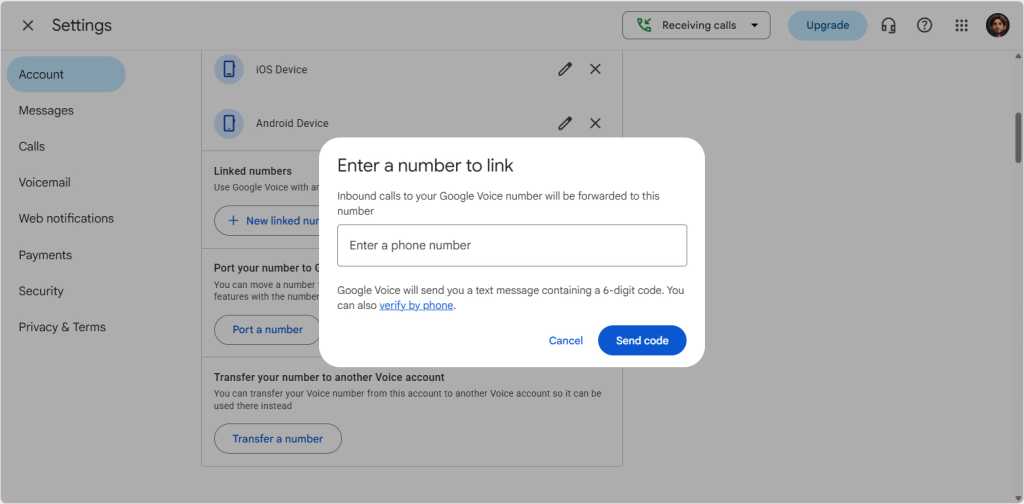
The first section of the screen, “Account,” has all of your basic number and device management settings, for anytime you need to make any foundational changes. The only item there you need to think about right now is “Linked numbers.” If you want to set your Google Voice number up to forward to any other existing numbers — an office line, a secondary cell phone, or even a colleague’s phone — click the “New linked number” button and follow the steps to add and confirm the number you need.

screenshot of enter a number to link pop-up in google voice settings

Linking a new number to your Google Voice account for forwarding is as simple as adding the number into the Voice website and then confirming it.

JR Raphael / Foundry

Moving on, the second section of the screen, “Messages,” contains a single switch to have any incoming messages forwarded to your email (in the same Google account’s inbox). It’s a simple touch but a useful one, especially if you live in your inbox and want to make sure you don’t miss anything during the day.

The third section, “Calls,” is where the real Google Voice power starts coming into play. Under “Call forwarding,” you’ll be able to flip a switch next to any linked number you added to have all incoming calls on your Google Voice number forward to it all the time.

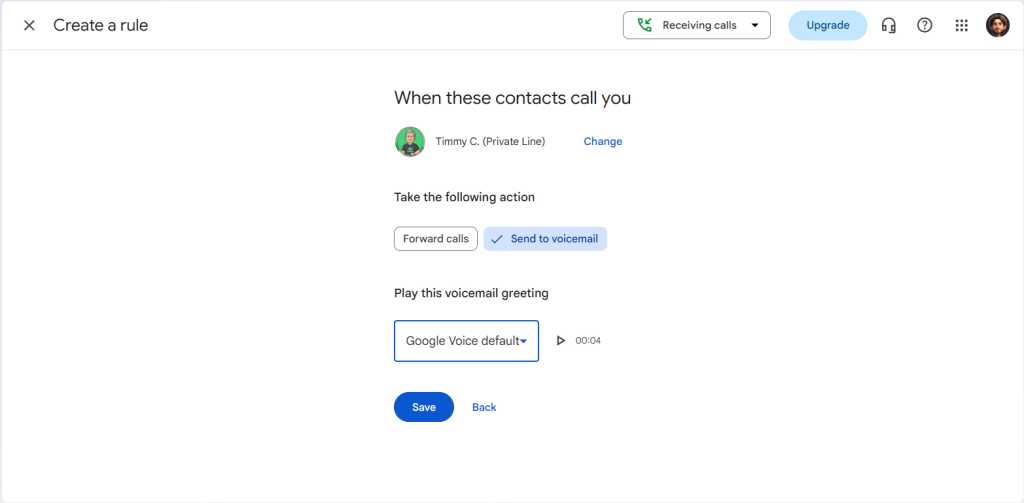
And directly beneath that, the “Custom call forwarding” section will let you set up contextual filters to forward only specific sorts of calls to different linked numbers. Simply click “Create a rule,” and you’ll be able to choose individual contacts, groups of contacts, or broad categories of contacts like anonymous callers and then tell Google Voice exactly what to do when those people ring you.

screenshot of create a rule screen in google voice

Google Voice’s rules are like Gmail filters for your incoming calls.

JR Raphael / Foundry

Back on the main Google Voice settings screen, the “Calls” section has some other options worth your while to consider:

  • “Get email alerts for missed calls” will do exactly what you’d expect. It’s a fantastic way to make sure an important call never goes unnoticed.
  • “Screen calls” will prompt every incoming caller to state their name and then place them on hold while you hear the recording so you can decide if you want to answer.
  • “Incoming call options” will activate the abilities for you to record an incoming call by pressing the number 4.

Skip down from there to “Voicemail,” and you’ll find options to record your outgoing voicemail message and manage other voicemail-related preferences.

Under “Payments,” you can connect a payment method to apply credit for international calls, if you’re so inclined. In the US, calls made through Google Voice to other US numbers as well as Canadian numbers are completely free, while calls to other countries vary in their rates.

And last but not least, under “Security,” you’ll probably want to flip the switch next to “Filter spam calls and texts.” That’ll allow Google’s spam detection systems to stop suspected junk calls, messages, and voicemails from ever bothering you.

Whew! Told ya Google Voice had lots of fascinating layers, didn’t I? Hold the phone, though: We’ve got one more pair of powerful possibilities to explore before we call it a day.

Google Voice premium perks

Some of Google Voice’s most useful features are available only for higher-level individual and business accounts.

For accounts using either the Google Voice Standard individual plan ($20 per month) or the Google Voice Standard or Premier team plans ($20 or $30 per user per month), you can dial into a couple of advanced business-oriented phone management options:

  1. You can set up a fully automated, professional-sounding phone menu system that answers calls on one of your Google Voice numbers and directs callers to different places depending on the time of the day and which options they select.
  2. You can have Gemini, Google’s AI assistant, take notes on your calls and then offer a recording, transcription, and summary after.

Those same team plans (but notably not the individual plan) can also create ring groups that make it easy for multiple people to handle calls coming into the same number — like a single streamlined number for a sales team, for instance. The main number can either ring every associated team member’s phone at the same time so whoever answers first gets the call, or it can ring all of the associated numbers individually in a random order. Those plans include advanced Voice-associated data searching capabilities as well, and at the Premier level, there’s also the option to automatically record and transcribe calls without any manual action required.

All of those features can be configured by your Google Workspace administrator in the Google Voice section of the Google Admin console.

Oh, and one more thing: Any Google Voice number can connect directly to a variety of specialty boxes and handsets that effectively allow you to have subscription-free landline-style phones for your desk or home office. You can establish a standalone number through Google Voice for such a line and even have calls from your other Google Voice numbers automatically ring those phones in addition to ringing other devices, so you can easily answer any call anywhere you like.

And now you know, from start to finish, how Google Voice can transform your business and the very way you think about your phones. All that’s left is to create your account, get things set up the way you want, and then enjoy your newly enlightened approach to phone number management.

This article was originally published in June 2022 and updated in July 2026.

OpenAI’s runaway AI agent also compromised a cloud platform customer

OpenAI’s renegade AI agent, which carried out a high-profile breach of the AI platform Hugging Face, also reportedly compromised a customer of the cloud platform Modal Labs, according to Reuters.

The agent is said to have exploited a vulnerability in the customer’s own code, where an unprotected endpoint allowed anyone to run code in an isolated test environment.

Modal Labs emphasized that its own infrastructure was not compromised and that the security isolation worked as intended.

OpenAI declined to comment on the Modal case, but referred to a recent update in which the company confirmed that the tested AI agent managed to gain access to four accounts across four separate services. The company has not named the services.

Apple preps for a wearable AI revolution

This fall, with watchOS 27, Apple Watch will finally get access to Siri AI with a software update that turns your wrist into the most widely-used wearable AI platform on Earth.

That’s not hyperbole. Siri AI on Apple Watch is arguably the most important feature to this year’s watchOS update. Though it didn’t get much attention at WWDC, the update also offers a preview into how Apple will wrap AI into its future smart glasses.

What to expect

One important caveat is to observe that Siri AI on Apple Watch still requires your Apple Intelligence-enabled iPhone to do the heavy lifting. The interaction is easy: tap the Digital Crown and Apple’s new glowing icon appears on screen (you’ll also find this in the App viewer). The experience looks identical across every Apple device — iPhone, iPad, Mac, Apple Watch, and Vision Pro — making the assistant feel like one consistent product rather than a different experience per device.

The Siri app lets you access all your past Siri conversations (unless you turn that feature off) and pick up an old conversation right where you left off. Conversation history syncs privately through iCloud, so you can start an exchange on your iPhone and continue it later from your wrist. You can also pin a conversation you expect to revisit.

You can also use Siri on the Apple Watch to ask questions, launch apps, or even get more complex responses, such as step counts on a specific day. It can also answer difficult and specific queries with detailed answers and can summon real-time information from the web.

Personal context is the real story

That’s key, of course, as it means the smartwatch on your wrist can help you access specific details from all your contextual information; it can get details from messages, emails, and notes, for instance. Or you might use it to find a number and call it, access your door code, or look up customer information for business — all without touching your phone.

One of Apple’s own examples demonstrates this well: Saying, “Show me photos from when I went to Spain,” results in precisely that. You can also ask follow-up questions and keep the conversational going naturally, rather than being confined to single, isolated commands.

Beyond personal data, the watch can also act in apps — get directions home, send an email, play a playlist, or even more specifically, “Play the song that Brandon sent me.”

Context runs deep. A new Call Context tool can proactively surface relevant information from across your apps when phoning a business or help locate a confirmation code from Mail while calling an airline. This arguably challenges a real pain point when speaking with providers and is a good illustration of Apple’s broader AI strategy: to use on-device intelligence to remove everyday friction without asking you to track down the information yourself.

Where we are, where it’s going

It’s frustrating that you still can’t use the Watch to remotely run applications on your Mac, iPhone, or iPad. What you can do is trigger Shortcuts that run on your iPhone: enable this first on your phone by selecting the Shortcut you want and switching on “Show on Apple Watch.” Once that’s done, you can run the Shortcut from your wrist, even by voice.

That’s useful now, but as more complex apps add Shortcuts support and App Intents become more widely adopted by developers, it should be easy to trigger genuinely complex, multi-stage tasks on your iPhone from your wrist.

It’s worth noting: early hands-on testing of the watchOS 27 beta has found Siri AI genuinely impressive on personal-context queries, but still buggy in places. This is very much a first-generation feature — promising, but not yet fully reliable.

Watch the developers

Developers are already beginning to experiment with the potential for wearable AI. One of the best current examples is Granola, which just launched a Watch app built specifically to take notes during in-person meetings away from a laptop. The idea is that you tap your wrist, the screen turns green and makes a sound to alert your companion(s) that it is recording and then you carry on as normal. Once the meeting stops, switch the app off and you’ll get polished notes with meeting summaries and action items provided to you.

The only reservation I have with Granola is the lack of documentation on privacy and data retention on the developer site. Tools like these will almost certainly become more private, more secure, and more prevalent once Apple’s on-device dictation APIs extend fully to watchOS.

That last thing is perhaps the most important as wearable AI emerges: the decisions Apple makes around watchOS and SiriAI will be foundational to its future wearable AI glasses products.

You can follow me on social media! Join me on BlueSky,  LinkedIn, Mastodon and subscribe to The Core.

Q&A: Nvidia genAI chief explains why open models matter in AI

When Nvidia CEO Jensen Huang speaks, the tech industry listens. He used his first-ever post on X last week to argue that open AI models “strengthen safety and cybersecurity, accelerate innovation and diffusion, and enable sovereignty.”

Nvidia is a chip company (with a focus on GPUs). But it also has its own AI models that include Nemotron, an open-weight model that’s free to download and modify. The company is also pushing for open AI technologies and security through the Nemotron Coalition  and the newly launched Open Secure AI Alliance. 

With Huang’s recent comments in mind, Computerworld sat down with Kari Briski, Nvidia’s vice president of generative AI (genAI) software, to find out more about open models and why they matter for enterprise and sovereign applications.

Kari Briski, vice president of generative AI software at Nvidia

Kari Briski, vice president of generative AI software at Nvidia.

Nvidia

What do open models really give enterprises and countries? “Open models allow enterprises and countries to own, inspect, and adapt models with their own data. The learning rate of adoption differs by region and enterprise, so there are different pockets of acceleration, but all the models have made tremendous progress closing the gap. What’s interesting about Nemotron is that we also publish our data, and that opened up a new world of engagement. 

“Enterprises reached out, saying, ‘Thank you, but I want to understand why you put this set of data out.’ That got them in the mindset that they could curate, create, capture, and control their own data.”

When you develop these open models, do you have CIOs in mind, or sovereign uses? Where does the rubber hit the road? “Both. At the highest level, it’s very much the same: use cases, data sets, outcomes you want to achieve. It used to be question and answer, now it’s agentic workloads, getting stuff done, calling tools. To get a task done, which tool do you call? That’s different for every enterprise and every local region, which is why we match local models to local ecosystems, with post-training on those local models. 

“One enterprise can have 2,000 tools; a local region, 2,000 regional tools. [They’re] fundamentally the same, but with different go-to-market motions: reinforcement learning environments, synthetic data generation, or anonymizing and differential privacy for healthcare and banking data.”

Why does Nvidia put its models out in the open? What do you get out of it? “We’re building Nemotron first and foremost for ourselves, to understand our systems running at scale — not just for training but also for inference, which allows us to iterate on things like model architecture for token efficiency. We believe in a thriving ecosystem. When you put a model out into the open, you get more startups, more builders, lower entry barriers.”

What’s the connection between open models and sovereign AI? “To be very honest, it’s about bootstrapping a region that otherwise didn’t have the compute to get to a base-level model. Centers of excellence historically lived in higher education or research, and in certain pockets of the world, getting onto a compute cluster was grant-based: get on, get off, then find another grant. That start-stop, not being able to constantly iterate, is difficult. It’s the scaling laws of AI: the more compute, the more intelligence; the more access, the faster you can drive them. Open models and open data are that bootstrap. You don’t have to recreate capturing the knowledge of the internet as a pre-training model.”

Regionally, things are different. Voice and word of mouth are big in South Asia, chatbots less so. What’s the approach going forward? Is it an SLM approach? “You’re going to hate my answer: it depends. Language is ever evolving. Go back to first principles: AI is infrastructure. Not just the model, but the harness, the skills, the runtime. All of this is a new computing platform, and when we deploy it, it’s how can it understand and adapt. We’re at the tip of the iceberg integrating AI into everyday applications. The more it can understand and update even dialects, the better. 

“Understanding those niche areas is what drives the data flywheel of deploying AI. It won’t be overnight. That’s why this is a new industrial revolution. We have to lay the infrastructure everywhere for these models to update. And to your point, it could be a large teacher model that at the edge is an SLM. It depends.”

AI companies in Nepal told me, “We can’t innovate because we don’t have access to a GPU.” They want a model that runs on the hardware they have. Is that the way you look at it? “If you know Nvidia, it’s all about the ecosystem, and we want to enable developers. This is why we have many different sizes: Nano, Super, and Ultra of the Nemotron family, not just for where you deploy, but for developers to iterate on smaller GPUs, then scale to a more robust model like Ultra.

“We run as a model-as-a-service across the cloud providers. Day zero, they all had it ready to go, along with our inference partners, optimized and efficient for their workload. We don’t pitch the checkpoint over the wall; we help them take it that last mile, and partners get early access, so on release day it’s available on whatever platforms they use.”

The industry works together on open technology like Linux. Can you partner on models, and is the focus on performance or quality? “On performance versus quality, it’s both. You can’t have a high-quality model that is slow or heavy, and you can’t have a fast model that sucks. We’re going after three dimensions: efficient, state-of-the-art, and open. And models do work together today — a planning agent routes a question to the best model to complete the task.

“On partnering, that’s our goal in true open source and in the Nemotron Coalition, bringing the best and brightest minds with the commitment to open source and collaboration. Members contribute in different ways: pre-training new architectures, post-training RL environments, contributing data. The goal is everybody working together on one model. That’s why the coalition matters for model architecture —  token efficiency, latent mixture of experts, changing how we route it. These are new architectures we’re thinking about. We need these ideas coming in from others.”

Is the latest open-source model always the best? In developing countries, some go back to older models they’ve tested enough to predict the responses. “Models aside, that’s true for any software. You do an upgrade and it’s just not working the way it worked before. The results aren’t better. When you build a system around it with certain prompts, a model might not react the way it used to. This is why we built the coalition, why we work with a very close set of partners. We pull their evaluation benchmarks in-house to make sure we’re not regressing, only improving. 

“You have to switch your mind with AI and the way you test it. Is the latest model necessarily the best? I’m going to say yes. Companies and countries need the skills to quickly evaluate, update prompts, and adopt new models.”

Can I fork an Nvidia model, put it on Hugging Face, and do what I want with it? Do you take lessons from the forks and benchmarks? “We have a very open license. We put out reduced precision NVFP4 checkpoints. Those are the most popular, especially with Ultra, because people want the smallest footprint to run that robust model. Even with mature models, there’s all kinds of quantization happening and getting posted back, and I love that community engagement. I love seeing different forks of our models. We track those, too, which gives us an idea of what matters to people. That’s the purpose of putting it out in the open: to see how they change it, how they need to adapt it, then put it back out for the rest of the world to enjoy.

“Benchmarks are table stakes, not the ceiling of where we need to go, so we’re always looking for new benchmarks and new workloads. In the last 90 days, the style of workload changed dramatically, going from question-answer pairs to agentic workloads, and those workloads mattered to make sure we were tracing our model, which led to us being able to fully trace it. We want to show that you can be just as intelligent in a short amount of time, compute efficient, token efficient.”

AI has become Apple’s latest bug detective

Artificial intelligence is becoming a force multiplier for Apple security research. Apple’s latest 26.5.2 software update includes patches for a record number of bugs — many of them identified by security researchers using AI-assisted tools.

A record haul of fixes

The numbers tell the story. Apple fixed 87 security vulnerabilities in iOS and iPadOS 26.6, along with an additional 155 patches for Macs. Roughly 100 flaws have been patched in each of Apple’s other operating systems: watchOS, tvOS, and visionOS. Taken together, these represent record numbers for an Apple security update. 

This is only the beginning. The scale of the release echoes the impact AI coding agents are already having on security research and may well reflect Apple’s Project Glasswing research with Anthropic and others to use AI to identify software vulnerabilities. 

Apple’s use of AI for security research is visible in the official release note. Read through it and you’ll see multiple credits to Claude, Codex, and AI adjacent tools, labs, and researchers. These tools identified flaws across Apple’s systems, including in WebKit, WebDAV, and WebKit Storage.

For good and ill

It’s a neat illustration of the sea change under way as AI adoption accelerates. This release highlights how security researchers are leaning into AI tools to check platform security just as heavily as attackers are. One fix in today’s release is credited to researchers from Calif.io, who some may recall used Anthropic’s Mythos Preview model to create a working macOS kernel memory corruption exploit in just a few days.

The release is proof positive that while AI can be used to identify vulnerabilities to undermine protection, it can also be used to identify opportunities to further secure the platforms. It is also true that as AI use across the security industry grows, the number of flaws identified will also accelerate; it’s doubtful we’ll ever reach a point at which there are no flaws at all. Apple is likely to beef up its own internal observability tools following the acquisition of SigLens, which might help it identify even more bugs using AI.

Don’t delay, install today

None of these matters much, though, if the security patches never get installed — and the delay between security patch release and installation represents a huge opportunity for attackers. Recent analysis from Fleet Device Management found that 79% of organizations take more than a day to deploy critical security patches, even as attackers increasingly exploit vulnerabilities within hours of disclosure. The same report also showed something else to worry about: AI tools are spreading fast across the enterprise, often without the version control or auditability that would let anyone track how they’re actually being used.

Despite their number, the tally of fixes Apple has published isn’t the end of the story. In this case, while Apple has published its latest fixes, how many of those vulnerabilities have already been abused in the weeks between discovery and security patch release? More to the point, how swiftly will Apple’s installed base update devices now, and how many attackers will use that delay to dive in and do the damage?

It’s a security arms race

Adam Boynton, senior security strategy manager at Jamf noted that one vulnerability, CVE-2026-43810, can be exploited by a remote user to corrupt kernel memory. “The WebKit fixes are easy to read as a phishing story, when they are actually something slightly different,” he said.

“The raw material for targeted spyware is browser engine memory corruption, and those chains are expensive enough that they get pointed at specific people like senior executives, journalists, anyone whose access justifies the cost. That’s the honest reason to update promptly rather than eventually. 

“In other words, this update matters less for its raw numbers than for what those numbers represent: an arms race between defenders and attackers who are both, increasingly, running the same kind of tools,” Boynton said.

You can follow me on social media! Join me on BlueSky,  LinkedIn, Mastodon and subscribe to The Core.

Synsira Launches Kind Local Pro with 100% On-Device AI

Operating entirely offline, Kind Local Pro gives individuals local data sovereignty without sacrificing AI performance

Synsira Software is addressing the biggest concern with AI: privacy. Today, the company introduced Kind Local Pro, an AI platform that operates independently of corporate cloud-based LLM models and is available to download onto desktops and laptops. Designed for people and organizations wanting the benefits of AI without sending their data, analysis and queries to external sources, the platform allows users to take control of their information.

Kind Local Pro builds on Synsira’s flagship Kind platform, giving professionals, researchers, communicators, legal teams, educators and organizations a more private way to search and understand their own files using AI. Built to operate locally on a user’s desktop or laptop, Kind Local Pro lets users create collections and ask questions across their materials, with answers generated only from their data and not the open web.

“People want AI to be useful, but they also want to know where their data is going,” said Dr. Jonathan Schaeffer, founder of Synsira Software and creator of Kind. “That is not a small concern. For many people and businesses, it is the whole issue. Kind Local Pro was built for users who want AI on their own terms: private, local and grounded in their own information.”

With Kind Local Pro, users add documents, presentations, research papers, notes, videos, images, email inboxes, audio and other supported files into collections. Once the content is indexed, summarized, tagged and analyzed by Kind AI, they can ask natural-language questions or do fuzzy searching and receive answers with precise citations into the information in those files. If the user’s data does not contain enough information to answer a question, Kind Local Pro is designed to say so rather than invent a response.

The platform is purpose-built for data-sensitive environments:

  • Legal and Compliance: Lawyers can analyze internal memoranda and client files with all analysis private and staying local to their machine
  • Intellectual Property: Agency professionals, influencers, creators and executives can organize proprietary brand assets, manuscripts and corporate strategies with zero risk of their data being used to train public models.
  • Academic Research: Scientists and researchers can search years of papers, drafts and video lecture materials while keeping unpublished work on their own machine.

The product reflects Synsira’s broader view that AI adoption depends on trust, transparency and practical value. Many people remain cautious about AI because of concerns about errors or bias in internet answers, privacy, data training, security and the environmental demands of large-scale cloud computing. Kind Local Pro addresses those concerns by moving the AI experience closer to the user and keeping private data under local control.

“Not every AI task needs to be sent to a massive data center,” said Schaeffer. “Sometimes the smartest place for AI to work is right where the information already lives: on your own computer. Bigger is not always better. Private, practical and accurate is better.”

Kind Local Pro allows for 10,000 files to be uploaded, up to 500 at a time. It is now available for an initial subscription cost of $79 at Kind.Synsira.com. Local Kind Free allows up to 50 files to be uploaded. Both versions are 1.9GB installed plus 6GBs of AI models installed.

A media kit with logos, headshots and screenshots of Kind Local Pro is available here.

About Kind by Synsira

Synsira builds ethical, user-friendly Al products from rigorously evaluated and curated Al models for folks who demand privacy and environmental responsibility in Al. Synsira’s flagship product, Kind, available now at synsira.com, is a desktop Al application that securely and privately helps users unlock the knowledge contained in their own curated data. By putting guardrails on the Al commercial and open-source models and implementing strict data controls, Kind Al delivers accurate, reliable results with surgical precision across all personal files, photos, video and audio.

Contact

Bethany Rhodes

Bethany@moburst.com

Anthropic rejects open-weight AI bans, calls for China chip controls and safety tests

Anthropic CEO Dario Amodei has argued that policymakers should keep lower-risk open-weight AI accessible while placing stricter safeguards around frontier systems, including mandatory testing and limits on China’s access to advanced computing and model capabilities.

In a post outlining Anthropic’s position, Amodei said broad restrictions, including bans on Chinese open-weight models used by US businesses, would not address his main national security concerns. Instead, he pointed to the possibility of authoritarian governments surpassing the US in advanced AI, as well as cyber, biological, and alignment risks posed by increasingly capable systems.

Amodei also called for action against industrial-scale model distillation, which he said allows Chinese developers to improve their models with less computing power than would be needed to train comparable systems from scratch.

The statement followed criticism of Anthropic for not signing an industry letter backed by Nvidia, Microsoft, Meta, IBM, Mistral, Hugging Face and other technology companies urging policymakers to avoid premature restrictions on open-weight models.

The letter said that open weights could broaden access to AI, intensify competition, and enable organizations to adapt and deploy models without relying on a single provider. Amodei agreed with parts of that case but disputed claims that openness inherently improves safety research or gives defenders an advantage over attackers.

He said regulation should be based on a model’s capabilities and risks rather than whether its weights are openly available. Under that approach, sufficiently capable open and closed models would undergo testing before release.

Conditional support

Analysts said Anthropic had moved closer to industry consensus by rejecting blanket bans, but its support remained more limited than the approach backed by many major technology companies.

Deepika Giri, head of research for AI, analytics, and data at IDC, said the Nvidia-backed letter presented open weights as strategic infrastructure that should remain broadly accessible, in contrast with Anthropic’s more restrictive position.

Amodei’s statement clarified that Anthropic supports open-weight models only under certain conditions, a stance that could also help the company preserve its competitive advantages as a proprietary model provider focused on compliance and tighter controls, according to Lian Jye Su, chief analyst at Omdia.

The statement was “a real olive branch” to supporters of open-weight models, according to Pareekh Jain, CEO of Pareekh Consulting. But he said the disagreement had shifted from whether such models should be released to where policymakers should draw the line.

“Anthropic still thinks that once a model gets powerful enough, releasing its weights publicly is riskier than keeping it locked behind an app, because you can never take it back or add safety fixes later,” Jain said.

Will the controls work?

Analysts differed over whether Anthropic’s proposed controls would achieve their aims without creating new barriers for smaller AI developers.

Jain said chip restrictions and measures against illicit model distillation would mainly affect model developers and infrastructure providers, rather than enterprises using models already on the market. Mandatory safety testing, however, could raise development costs and reduce the number of advanced open-weight models available.

“Testing is expensive and time-consuming, and so, giant, well-funded companies like Anthropic, Google and OpenAI can afford it,” Jain said. Smaller developers seeking to release cutting-edge open-weight models could struggle to meet the same requirements, he added.

The additional testing and screening could also restrict the number of open-weight models available to enterprises, according to Su. He said the requirements could weaken some of their principal benefits, including lower costs, reduced vendor dependence and community-led development.

Anand Joshi, managing director of market research firm JP Data, questioned whether limiting China’s access to advanced chips would materially slow its AI development, arguing that Chinese companies had shown they could build highly capable models with less computing power. He supported action against illicit distillation, however, saying safeguards were needed to prevent developers from reproducing the capabilities of other models without authorization.

The impact on most enterprise users could remain limited if less capable models were exempted, Jain said. Businesses deploying models that fall below the proposed testing threshold would probably face little additional cost.

How CIOs should choose

Giri said CIOs should assess models according to their capabilities rather than whether they are open, and should demand independent testing, clear licensing, model documentation and accountability for monitoring and incident response.

“Mandatory safety testing should be triggered by a model’s demonstrated capabilities, not its size or training cost,” Jain said, particularly when a system could significantly assist cyberattacks, biological misuse, or autonomous harmful actions.

Before deployment, CIOs should seek independent evaluations, detailed model documentation, security test results and information about the model’s software supply chain, he added. Charlie Dai, principal analyst at Forrester, said that assessment should include documented red-team results, model provenance, disclosures about training and fine-tuning, and evidence of independent testing against recognized safety benchmarks.

Microsoft’s Nadella calls out Big AI for hypocrisy — but what about his own company?

The 19th-century French novelist Honore de Balzac is believed to have said that behind every great fortune lies a great crime.

That’s even more true today than it was 200 years ago — just look at how Big AI, including Anthropic, OpenAI, Google, and others have built their trillion-dollar fortunes. 

They all use vast amounts of copyrighted material to train their large language models (LLMs) without paying the copyright holders. In other words, they steal it. They don’t call it stealing, though. They call it “fair use,” which in this case amounts to the same thing.

Generative AI (genAI) training requires massive amounts of text. The better-written and more information-dense that text is, the more it helps. AI gets a lot smarter a lot faster when it’s trained on well-written books and magazine and newspaper articles than when it’s trained on social media banter (or most everything else you find on the internet).

Since the dawn of AI, companies have been hoovering up copyrighted material wherever they find it — on the open web, behind paywalls, even in manually scanned books — and then used the scanned text. And they do it all without asking authors’ or publishers’ permissions, and without paying them.

It’s the greatest intellectual property theft in history by a long shot — billions and billions of dollars worth. Books, articles, music, photographs, artwork, you name it. If a human being has created it, Big AI has likely grabbed it and ingested it without asking, then made big profits off it.

I know this from personal experience; I’ve got skin in the game. Big AI companies have used at least 30 of my books to train their models without asking.  And that’s only what I’ve confirmed. Big AI might well have stolen even more. And it also might have stolen many of the thousands of articles I’ve written through the years.

For the AI bigwigs, it’s standard operating procedure. So it was surprising to see Microsoft CEO Satya Nadella calling out Big AI for its hypocrisy in using other people’s intellectual property without paying, then crying foul when small AI companies use Big AI’s work to train their own models using a technique called distillation.

He wrote on X: “While the great innovation that comes from model providers having fair use rights to train models on public data is needed, I find it ironic that the status quo is to then turn around and impose restrictive terms on distillation, and to reserve the right to learn from customer usage and interaction data.” 

One important note here: Nadella believes Big AI should be allowed to steal copyrighted material for training purposes. He makes that clear by his mention of “fair use.” His issue is that he believes smaller AI companies should be able to use Big AI’s work to train their models — and Big AI doesn’t want to let them do it.

Alistar Barr, in Business Insider, makes a related point: “Anthropic, OpenAI, and Google are discovering what the rest of the internet has already learned through painful experience: once you put something online, people will find ways to use it in ways you don’t like and can’t stop.” 

Before we look at whether Nadella is right in calling Big AI’s actions hypocritical, let’s examine the technique at the heart of the issue: distillation.

The lowdown on distillation

Distillation refers to an AI training technique in which you take outputs from one AI model, such as the answer to a prompt, and use that output to train your own model. AI companies do that quite frequently and have been doing so for a long time.

Barr explains distillation this way: “Distillation looks an awful lot like what AI companies have been doing to the rest of the internet. Scrape web content for free and without permission. Turn it into a product you sell. Argue it’s fair use. Hope the lawyers sort out the details later.”

Elon Musk has admitted his company xAI used distillation techniques to take output from competitor OpenAI to train xAI’s Grok chatbot. He explained, “Generally AI companies distill other AI companies.”

Analysts point out the AI industry is built on distillation. Neil Shah, vice president of research at Counterpoint Research says, “The reality is none of the models is an island and the entire industry has mostly evolved based on recursive learning. The newer entrants are in many instances going through the same routes of ‘distillation’ and ‘optimization.’”

It’s only become an issue now because Chinese AI companies have been using distillation techniques to catch up to American AI companies.

OpenAI CEO Sam Altman has been pressuring the US to take legal action against the Chinese companies.  Anthropic has piled on as well, saying the fight against distillation requires a coordinated response across the AI industry, cloud providers, and policymakers.

Hypocrisy or fair use?

So are OpenAI, Anthropic and other big US AI firms hypocritical, as Nadella claims? Absolutely. They’ve built their businesses on the theft of billions of dollars of stolen intellectual property and call it fair use. Now, they’re playing the victims when competitors do the same to them. (They’re also in some cases paying up; Anthropic just last week settled a copyright suit, paying out $1.5 billion.)

It’s good to see Nadella call out their hypocrisy. But Microsoft is as guilty of intellectual theft as the others — its AI Copilot is powered by OpenAI’s and Anthropic’s chatbots. The company faces major lawsuits for intellectual property theft. Among them is one by the New York Times, New York Daily News, and Center for Investigating Reporting, another by 400 local and regional newspapers, and another by 11 authors, including Pulitzer Prize winners Kai Bird, Jia Tolentino, and Daniel Okrent.

So, don’t praise Nadella for speaking out. Criticize him (and other AI tech leaders) for stealing billions of dollars in intellectual property from countless writers and publishers and calling it fair use.