Month: July 2026

AMD raises the AI stakes with Helios, Venice and robotics

AMD executives took to the stage at its Advancing AI 2026 event in San Francisco today to detail the company’s next generation of AI infrastructure solutions, from Instinct MI455X AI accelerator GPUs and 6th Gen EPYC “Venice” CPUs, to Pensando networking, ROCm.AI software and its Helios rack-scale platform that ties it all together.

AMD has been working towards rack-scale AI system solutions for years. Its ZT Systems acquisition last year added valuable engineering talent and intellectual property that is now finally bearing the real fruits. Its Helios AI platform is a major platform evolution for AMD, with shipments scheduled to begin in the second half of this year (which is here and now).

The announcements at Advancing AI show how the company has engineered its AI platform solutions for large reasoning models, sustained inference and agentic workflows. These workloads pressure memory capacity, data movement, networking and CPU orchestration. AMD’s approach is to keep as much data close to the compute engines as possible and move it more efficiently throughout the system, but there’s deeper nuance here that’s obvious versus AMD’s chief rival, NVIDIA.  

AMD’s MI455X targets the AI memory wall

The Instinct MI455X GPU is the compute engine that fuels the Helios rack, and the first GPU based on AMD’s new CDNA 5 architecture. Built with a modular mix of 2nm and 3nm chiplets, it carries 432GB of HBM4 and 23.3TB/s of peak memory bandwidth.

Compared to AMD’s current MI355X, the MI455X offers 1.5 times the memory capacity, up to 2.9 times the peak memory bandwidth and up to four times the peak matrix performance with MXFP4 and MXFP8 data types, which are lower-precision numerical formats designed to accelerate AI processing while reducing memory demands. With MXFP6 (6-bit floating point), performance is rated at up to twice that of MI355X.

AMD also shared some actual, measured internal results using production silicon. The company claims MI455X delivers 3.8 times higher FP8 decode performance, 3.5 times more measured FP4 compute performance and between 2.5 and 3.5 times more networking bandwidth than MI355X, depending on the transfer path tested. Those figures provide more context than just numerical specifications, though they remain AMD-provided comparisons that will need independent validation.
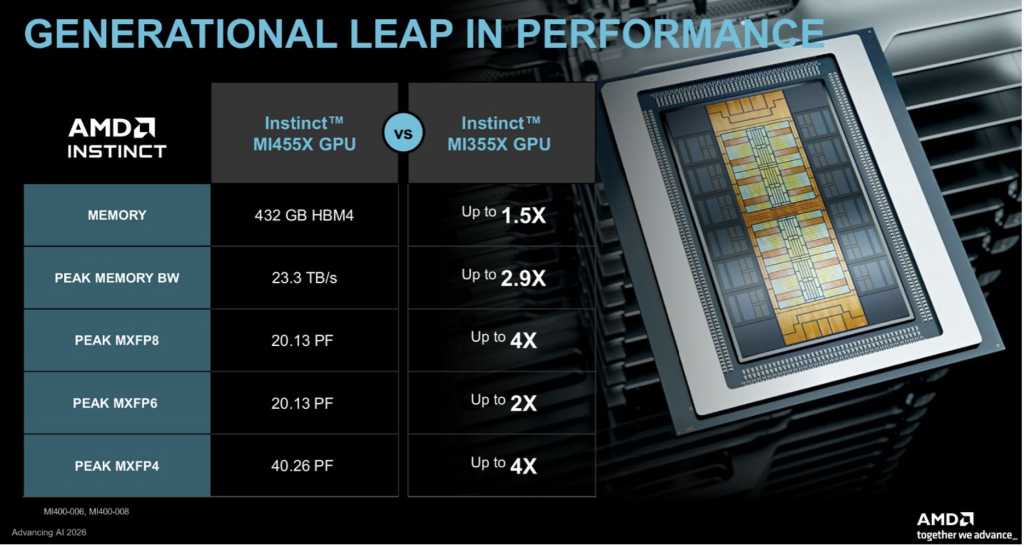
AMD Instinct chart showing generational leap in performance

AMD

The architectural choices behind the numbers are important. Reasoning models and long context windows require sizeable KV caches for maintaining AI attention states, while mixture-of-experts models frequently move large amounts of data across accelerators. MI455X should let more model data, activation states and cache remain local. New dedicated IP in hardware can transfer data while the GPU continues processing, and expanded cache and multicast capabilities are designed to reduce redundant data movement to further improve efficiency.

The aforementioned lower-precision formats can also raise throughput and reduce memory use, but model developers still have to determine where they can be applied without unacceptable accuracy loss.

AMD’s Helios rack takes aim at Vera Rubin
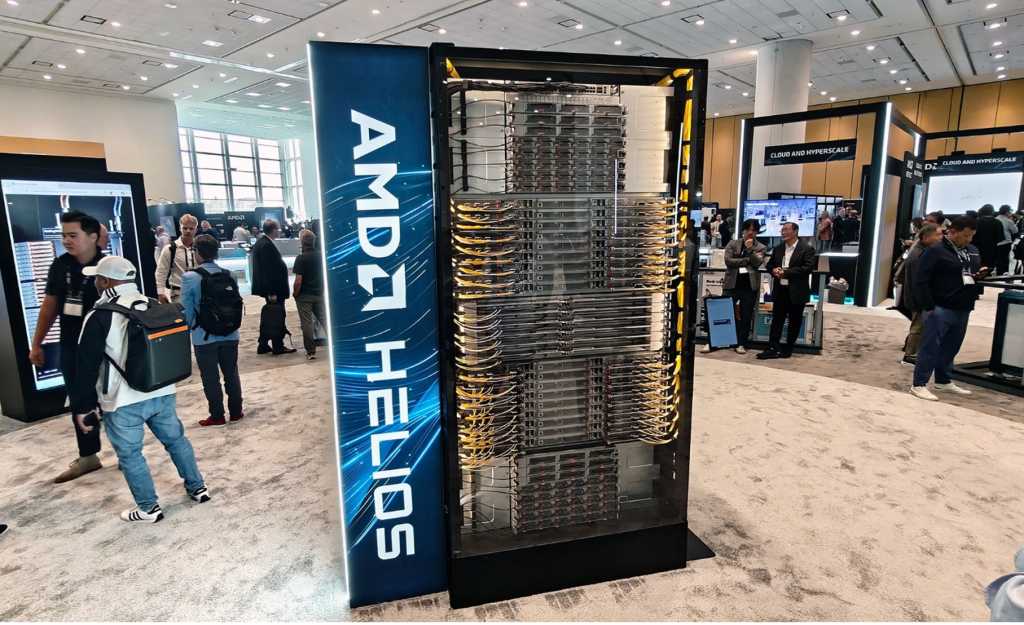
AMD Helios rack

Dave Altavilla

Helios is AMD’s primary rack-scale competitor to NVIDIA’s Vera Rubin platform. Each liquid-cooled rack combines 72 MI455X GPUs, 18 single-socket Venice host CPUs and Pensando networking technologies.

In its most complete, premium configuration, AMD rates Helios for 2.9 exaflops of low-precision AI compute, with 31TB of aggregate HBM4 capacity, 1.7PB/s of memory bandwidth, 260TB/s of bidirectional scale-up bandwidth and 43TB/s of scale-out bandwidth.

These are formidable figures, but they are technical specifications rather than actual application benchmarks. The more consequential development is AMD’s move from collections of eight-GPU servers to a 72-GPU shared-memory domain. Models too large for one node can operate across the rack without treating every exchange as a scale-out networking transaction, which benefits large-model inference as well as training.

AMD uses UALink over Ethernet, or UALoE, for an open standard scale-up fabric. Each MI455X provides 3.6TB/s of bidirectional scale-up bandwidth, while the complete rack delivers all-to-all connectivity through a single switch layer. AMD also claims six times more scale-out bandwidth per GPU than MI355X when MI455X is configured with three Pensando Vulcano 800 AI NICs.

While open standards give cloud providers more control over suppliers and system design, AMD and its partners now have to prove those components can deliver the predictable performance, reliability and deployment experience customers expect from a tightly controlled, more vertically integrated platform.

Finally, AMD designed Helios with automatic rerouting around failed links, virtual rack partitions, tray-level serviceability and rack-wide power, cooling and health monitoring. Major hyperscalers and potentially large-scale enterprise customers will likely key in on these capabilities, which can affect the availability, total cost and consistency of the AI services they consume.

Kind of like cowbell, AMD Venice gives agentic AI more CPU
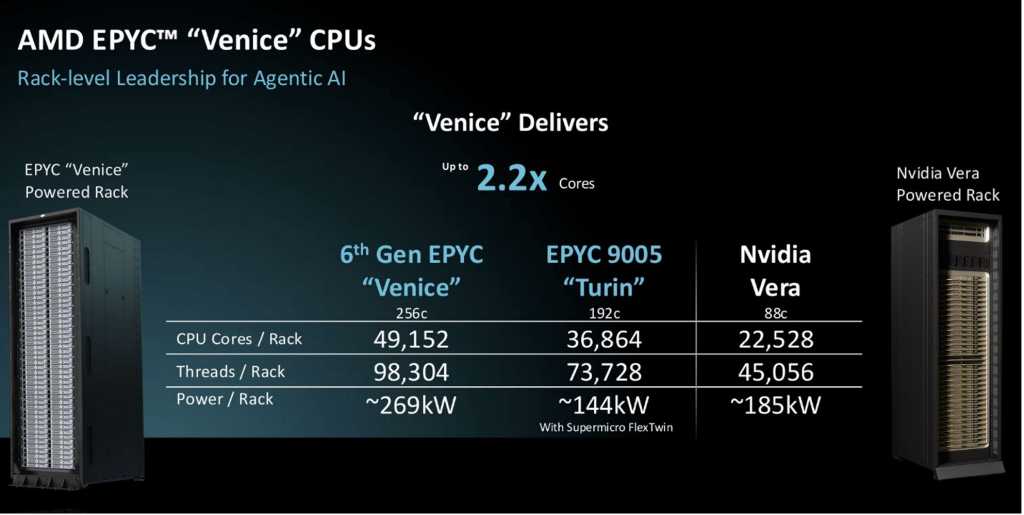
Chart showing AMD EPYC CPU performance

AMD

AMD’s agentic CPU messaging regarding its upcoming Venice-based EPYC processors is mostly marketing speak, but the underlying requirement is very real. An AI agent can invoke retrieval, databases, security checks, code execution and other tools before a GPU generates a response. Running many agents concurrently increases the amount of conventional compute requirements surrounding the accelerators.

Venice scales to 256 Zen 6 cores with support for 512 threads, 16 memory channels, up to 1GB of L3 cache per socket, along with PCIe 6.0 and CXL 3.1 connectivity. AMD is also offering several Venice configurations for other applications, including general-purpose servers, high-frequency workloads, GPU hosts and high-density CPU sandbox systems used to execute agent tools.

Treating the CPU solely as a GPU host understates its role. Gateways, tokenization, vector search, databases and short-lived code execution stress different mixes of per-core performance, thread count, memory bandwidth and I/O. Specifically, AMD’s internal testing shows Venice significantly outperforming its current EPYC 9965 Turin CPU across five parts of the agentic AI pipeline, including gateway processing, context assembly, vector search, enterprise applications and short-lived tool execution. Individual gains vary by workload, but AMD details the overall generational improvement at up to a 1.7 times lift. As with the MI455X figures though, these comparisons come from AMD and will require independent validation.

Pensando networking and ROCm software advance

Keeping GPUs fed with data and coordinating traffic across racks directly affects utilization and operating costs. In fact, GPU utilization is a pretty sad state of affairs currently for some of the major frontier model providers.

As such, Pensando networking has become central to AMD’s roadmap. Helios can connect each MI455X to as many as three 800Gbps Vulcano AI NICs, while Salina DPUs handle front-end networking and infrastructure services.

On the software side, which is an equally critical component, AMD also introduced ROCm.AI, an AI-assisted development layer due to arrive in August. It includes reusable skills for coding agents, simplified management and Hyperloom, which can profile workloads, tune serving configurations, modify kernels and validate results.

These tools address two persistent AMD challenges: developer efficiency and ease of use, and software tuning. Automated optimization still has to produce repeatable gains without creating hard-to-maintain code, however. And while ROCm has progressed significantly over the last few years, NVIDIA’s CUDA retains an advantage in maturity, tooling and developer familiarity.

Customer commitments underscore rack-scale confidence

AMD now has commitments that give its MI450 generation and Helios considerably more weight. Meta and OpenAI have announced multi-generation agreements composed of up to 6GW of AMD compute capacity, with initial 1GW deployments planned for the second half of 2026.

Oracle plans a 50,000-GPU public cloud cluster beginning in the third quarter, while Microsoft will deploy Helios for Azure AI inference. Finally, just before the AMD event, Anthropic announced a strategic partnership for up to 2 Gigawatts of AMD-fueled AI compute, with its first gigawatt expected online in the first half of 2027.

Commitments of this scale reflect confidence in more than just MI455X performance. These customers are evaluating the complete architecture, including Venice CPUs, Pensando networking, ROCm software, rack integration, serviceability and AMD’s ability to deliver and execute across multiple product generations.

There is some financial alignment behind the agreements as well. AMD issued OpenAI performance-based warrants and committed to investing up to $5 billion in Anthropic. That context matters when evaluating these deals as market validation, but these planned deployments are substantial nonetheless and put Helios on a much stronger foundation as it begins shipping.

AMD expands its robotics and embedded foundation

AMD also expanded its physical AI portfolio, building on credible traction from its Xilinx-derived Kria adaptive system-on-modules and embedded technologies that are already powering robotics, machine vision and industrial automation applications.

The new Ryzen AI Embedded X100 combines up to 16 Zen 5 CPU cores, integrated Radeon graphics, a second-generation NPU and as much as 128GB of unified LPDDR5X memory shared across its compute engines. To me this looks a lot like a repackaging and optimization of the company’s Strix Halo platform, but with specific optimizations for the embedded space. Regardless, AMD is pairing X100 with the Kria AI Robotics Developer Platform, which includes a System Module or SOM, and a new Robotics Partner Network spanning hardware, software and platform providers.

Samples began shipping in June, with full production expected in the fourth quarter. This broader objective is to give developers a path across AMD x86 CPUs, GPUs, NPUs and FPGAs for real-time autonomous systems, rather than requiring them to assemble those hardware engines and software components independently.

Execution for AMD is now the test

AMD has assembled a credible platform for the burgeoning agentic AI market that’s blowing up currently with no signs of stopping. MI455X addresses memory and data movement, Venice handles dense agentic CPU workloads, Pensando networking connects global system resources, and ROCm.AI addresses software complexity. Finally, Helios assembles these components into a true competitive threat for NVIDIA’s latest Vera Rubin platform.

AMD’s open architecture may appeal to customers seeking supplier choice, but openness must also translate into reliable deployments, competitive total cost and software that does not require a significant rip-up. NVIDIA enters this cycle with a stronger ecosystem and far more rack-scale deployment experience. The true test will be how easily and reliably customers can integrate, operate and maintain these AMD solutions at scale.

As it stands, AMD now has major customers and a clearly defined architecture with systems engineering expertise behind it. Delivering Helios on schedule and showing that its performance claims translate into a real production workload throughput advantage and total cost of ownership gains will determine how much the competitive gap narrows. And of course, this is in a market that is clamoring for ever-more compute resources with a seemingly insatiable demand for AI services and capacity. That’s an environment for big iron success. Now AMD just has to deliver optimized, turnkey AI platforms. This is far easier said than done, but time will soon tell as deployments take shape this year.

This article is published as part of the Foundry Expert Contributor Network.
Want to join?
Google CEO distracts from Gemini 3.5 Pro delay with talk of Gemini 4 and monthly releases

Google CEO Sundar Pichai has sought to allay concerns over the delayed release of the Gemini 3.5 Pro large language model. He dodged questions about it in Google’s quarterly earnings call on Wednesday by focusing on the company’s next frontier AI model, Gemini 4, and plans to release subsequent LLMs at an almost monthly cadence.

His comments came a day after Google unveiled Gemini 3.6 Flash and 3.5 Flash Cyber but offered no update on the release of Gemini 3.5 Pro, the company’s delayed flagship reasoning model that many developers had expected to arrive weeks earlier.

Google introduced the Gemini 3.5 family at its annual I/O conference, promising to release the Pro model in June. That timeline has since slipped, with Bloomberg suggesting Gemini 3.5 Pro is months late because the model’s coding performance is falling short of internal expectations, especially when compared to better performance by similar models from OpenAI and Anthropic.

Instead of revisiting the Gemini 3.5 Pro timeline, Pichai used the earnings call to shift the discussion toward Gemini 4, when asked about how his company planned to navigate an increasingly competitive race to release frontier AI models by to Barclays Investment Bank analyst Ross Sandler.

“We are creating a baseline on top of which you will see us rapidly iterate on subsequent model releases. And so picking up pace and releasing models almost at a monthly cadence is part of our road map as we are building Gemini 4 as well,” Pichai said during the call.

Sandler’s question followed one from JPMorgan Chase & Co analyst Douglas Anmuth, who asked Pichai if Google was releasing frontier AI models frequently enough to keep pace with rivals OpenAI and Anthropic.

Pichai had responded to Anmuth’s question that Google remained confident of competing at the frontier and was investing heavily in a larger Gemini 4 base model.

Analysts, though, aren’t as confident as Pichai.

While delays to Google’s frontier model roadmap have not triggered an exodus of existing customers, either because of high switching costs or because many enterprises already running multi-model architectures, they have made CIOs evaluating AI platforms more cautious about making new commitments, said Bhupendra Chopra, chief revenue officer at IT consulting firm Kanerika.

A monthly model release cadence could prove to be a double-edged sword for enterprises and their CIOs.

While a monthly release cadence could help enterprises gain faster access to improvements in model performance, cost and capabilities, it will also require CIOs to invest more heavily in testing, governance and version management to safely adopt those updates, said Sanchit Vir Gogia, chief analyst at Greyhound Research.

Similarly, Pareekh Jain, principal analyst at Pareekh Consulting, said enterprises will embrace a faster release cadence only if each successive model delivers measurable improvements in performance, cost or safety, rather than simply changing version number.

The challenge for CIOs, Jain said, is not just keeping up with model releases; it’s deciding whether each new version is worth the cost of validating it.

This article first appeared on InfoWorld.

MacBook Neo’s success wasn’t luck, it was a plan

It’s difficult to ignore the fact that Apple seems to have turned its MacBook Neo into a weapon to promote platform growth, with enough performance under the hood to make competitors seem inferior.

And even as the PC industry moves to try to compete with Apple’s last huge Mac success, the company is already planning a powerful follow-up.

That points to the discipline Apple has applied to the Mac since the introduction of Apple Silicon. The company has built a clear product roadmap, strong entry-level pricing, and steady performance gains. This focus is now paying dividends, giving people the impetus to keep placing their trust in Apple and its Macs — even as the industry raises prices in the face of RAMageddon and price increases. 

The numbers don’t lie

“Apple’s recent price increase seems to be an inevitable response to these cost increases. In the second half of the year, other PC OEMs are expected to continue to raise prices, and the overall ASP increase is expected to continue,” Counterpoint said in a post Wednesday. The researcher tells us global PC shipments shrank 4% in the second quarter of 2026 as rising costs hit demand. The Mac maker, by contrast, moved in the opposite direction, generating 13% growth in the quarter — mainly on the back of the MacBook Neo introduction. 

Recent IDC data gives Apple 10.1% year-over-year growth and just under 10% (9.9% to be exact) of the worldwide PC market, even as the overall market declined 4.9%.

“With emerging supply chain and tariff challenges inflating memory prices…, Apple’s incredibly aggressive price-point for the MacBook Neo makes its release feel all the more like a gut punch to one of the PC market’s most valuable price tiers,” Futurum Research Director Olivier Blanchard said when the Neo was released. 

Neo 2.0 is already coming

In the immediate future, as competitors raise prices on the PCs that compete with Apple’s lower-cost device, Cupertino is already plotting the path toward MacBook Neo 2. Reports claim this will debut in March in new colors and use the A19 Pro chip from the iPhone 17 Pro, with performance boosted by slightly more unified memory (12GB, rather than 8GB). That’ll make it a much better Mac, likely with 10-15% performance gains and the ability to run Apple Intelligence, making it the best and most affordable AI PC in its class.

Just four months after the Neo’s rollout, Apple is already in position to leak rumors of an even more computationally capable follow-up, while competitors struggle to compete with the original on performance, build quality, and price. Still, the Neo might get more expensive, reporting warns, with the lowest-price 256GB model now gone, making the $599 Mac a mirage we can only wistfully hope to see again. 

That might matter less in context, as PC makers everywhere boost prices while RAM, chips, and storage prices head north, along with transport, logistics, and energy costs. “While [Apple] did raise prices in line with the broader market, it still remains well positioned against rivals facing the same cost pressures,” said Jean Philippe Bouchard, vice president for consumer devices at IDC. 

“As market conditions continue to worsen, the importance of supply chain management and capabilities are increasingly important,” Bouchard said. “The largest vendors, with their buying power and long-standing supplier ties, are best positioned to take share from smaller rivals.”

This was never about luck

This isn’t solely a market take about competition, it’s about planning.

Few in the industry seemed prepared for the massive memory price increases that hit this year. Apple clearly planned its low-cost Mac well before that happened, hoping to seize the PC market at the low-mid-range. This is precisely what it seems to have done, what it continues to do, and what it will continue to do.

The recent reports that it has a successor planned shows the breadth of the Mac company’s strategic vision, as Apple has quite clearly sought to fully exploit the failings of Windows and the internal contradictions of a value-conscious industry in stiff competition with itself.

With the first M-series Macs about to enter the replacement cycle, Apple has built a market it can capitalize on for at least a decade, meaning it already has a vision for PC sales that extends at least as far. That’s the kind of road map corporate purchasers want when they make platform deployment decisions, which is why Apple’s 10% share gains are the beginning of even more significant market change. 

You can follow me on social media! Join me on BlueSky,  LinkedIn, Mastodon and subscribe to my daily Apple-related news summaries at The Core.

OpenAI Presence raises new questions about enterprise automation and jobs

OpenAI has launched Presence, an enterprise service for deploying voice and chat agents that can resolve customer and employee requests, potentially automating some work now handled by frontline support teams.

The agents can answer questions and operate IT systems, and enterprises can decide what actions the agents may take and when they should seek human approval for actions or transfer a case to a human.

OpenAI is already using Presence internally for its English-language phone support channel, where it verifies callers and uses account information to complete approved actions. The company said the system resolves 75% of inbound issues without human assistance.

Another OpenAI service, Codex, can be used to monitor agents and suggest updates or improvements to processes. In OpenAI’s own tests, suggestions from Codex helped reduce handoffs to humans by 15 percentage points over 10 days, it said. Presence also includes simulation and evaluation tools that allow companies to test an agent before deployment. The tests assess whether it reaches the correct outcome, follows company policy, and hands a case to an employee when required.

OpenAI intends each Presence deployment to deal with one kind of task, for example billing issues, insurance claims, or employee IT service requests, with agents getting only the knowledge and system access required for that task.

Presence is not a self-service product: Enterprises will have to sign up for the limited availability program, with integration performed by OpenAI or selected global systems integrators.

Companies exploring or testing Presence include Spanish bank BBVA, which is evaluating the service for everyday banking support in Mexico, and Japanese technology group SoftBank, which is using it in trials involving Japanese-language customer interactions. Australian insurer IAG is assessing whether the technology can help it respond to surges in customer demand during severe weather events.

Workforce impact

OpenAI’s announcement did not address the potential effect of Presence on employment. But its claimed automation rate raises questions about how the technology could affect staffing in customer service and other support functions.

Pareekh Jain, CEO of Pareekh Consulting, said CIOs should regard the 75% figure as evidence that the technology can work, rather than as a benchmark that every enterprise can expect to reach.

Jain said OpenAI’s deployment benefits from being built around the company’s own products and data. Large enterprises may achieve lower automation rates because they must contend with fragmented legacy systems, uneven knowledge bases and more complex compliance demands.

“Most organizations should expect lower initial automation levels that improve over time as the AI agent is refined,” Jain said.

The first workforce effect is more likely to be slower hiring than immediate layoffs, according to Tulika Sheel, senior vice president at Kadence International.

“The roles most exposed are likely to be repetitive, high-volume functions such as frontline customer support and routine back-office processing,” Sheel said. “However, I would expect the first impact to be on hiring and team growth rather than immediate large-scale job cuts. Over time, enterprises may redesign roles around AI-assisted workflows, with humans focusing more on complex cases, escalation, and relationship management.”

Jain said Tier-1 support agents handling predictable queries would face the most exposure. Broader reductions would become more likely only after companies reorganize their operations around the technology.

However, Lian Jye Su, chief analyst at Omdia, said Presence is unlikely to increase the threat of job displacement because companies have used similar customer-support automation from vendors such as Genesys, NiCE, Five9 and AWS for years.

Enterprises are more likely to use Presence alongside employees, with AI handling routine requests while people remain responsible for work requiring judgment and empathy, Su said.

Cost and operational risks

Analysts said CIOs should examine whether Presence can maintain resolution quality as usage grows, since fewer human handoffs could leave employees dealing with a more difficult mix of cases.

“The key question is not simply how many tasks AI can handle, but whether it can handle them reliably at scale,” Sheel said.

The financial case will depend partly on the cost of connecting Presence to existing systems and maintaining the controls needed to govern its use, according to Jain. “Often the biggest cost of enterprise AI is not tokens but integration and governance,” Jain added.

Companies will need to determine what systems and data the agents can access, monitor their performance, and audit the actions they take. Those investments could offset early savings.

Su said the complexity of enterprise IT will make it difficult for OpenAI to automate entire workflows on its own. Enterprises will still need to work with other technology providers and human employees, while CIOs will favor systems that can be audited and integrated with existing infrastructure.

Jain said the economics could improve if companies use the same integrations and governance controls across additional workflows.

This article first appeared on CIO.

Monday.com cuts 20% of its workforce to restructure for the AI era

Healthy software companies typically don’t suddenly eliminate one-fifth of their workforce, but monday.com is doing just that as it bets on flatter teams, AI agents, and customer implementation expertise as the winning combination in the AI era.

Monday.com co-founder and co-CEO Eran Zinman today announced the “very difficult decision” to reduce the AI work platform company’s global workforce by about 20%, or 620 people.

The move has nothing to do with increasing margins or replacing humans with AI, he insisted in his post on LinkedIn; rather, it’s a calculated decision to trim down and hone the company’s focus as AI becomes integral to day-to-day workflows.

“This is not a distress signal; it is a deliberate reset, disclosed with its price attached,” said Sanchit Vir Gogia, chief analyst at Greyhound Research. “The industry has quietly swapped the meaning of productivity, and this filing is the clearest exhibit yet.”

A ‘significant opportunity’ in technology

In a SEC filing this week, monday.com said its restructuring plan reflects the “ongoing transformation of its product, marketing, and go-to-market strategy.” The move is intended to support a “leaner, more focused operating model” as the company continues to invest in its AI-driven strategy.

Zinman noted in his post that the company has shifted to “doing the work with AI and not just managing it,” and is focused on building environments where “people and AI agents [work] together in one workspace.”

In recent months, monday.com has evolved its products, strategy, and the way it serves its customers, and Zinman contended that “the organization we built for our previous chapter is not the organization that fits the new AI era.” Monday.com needs to “execute more decisively,” take on new challenges, and quickly respond to market changes, he said.

“We have never seen such a significant opportunity in software, driven by such exciting technology,” Zinman noted. He emphasized that the reduction is not to replace people with AI, nor to improve margins; the “vast majority” of savings will be reinvested into talent, products, and AI.

The restructuring will result in a “flatter organization” with fewer management layers and smaller, more autonomous teams, and monday.com also has a new go-to-market model, Zinman explained. Customers expect “deeper implementation support” as they deploy AI, and the company will work more closely with customers, increase its on-site presence, create new roles, and “adapt many existing ones.” In its SEC filing, the company said it expects to continue hiring in “key strategic areas” throughout 2026.

Workers will be expected to work better, “not harder,” Zinman noted. He pointed to several past examples where work could have been done in a few days, but instead took many months with “multiple meetings and endless friction.”

“This wasn’t people’s fault and everyone was frustrated by this,” he said. “Our new org changes ownership to allow people to make decisions and move fast.”

A spokesperson for monday.com declined to comment further on the staff reductions.

Monday.com’s key market advantages

Monday.com certainly isn’t struggling; the company expects 19% to 20% year-over-year growth in 2026.

“Companies in that position do not restructure because they must,” Greyhound’s Gogia noted. “They restructure because they have decided to become something else.”

Melody Brue, VP and principal analyst at Moor Insights & Strategy, pointed out that organizational redesign is important for real AI transformation, but while it can signal confidence to the market, it can still be “devastating” to humans.

While the company looks as though it’s trying to do right, that ultimately remains to be seen, she said. “There are often hidden internal bruises that can surface long after layoffs.”

Monday.com’s advantage is in its “structured substrate,” Gogia noted; its boards, permissions and typed workflows give agents something firmer to act on than just documents and chat history. The company highlights its natively built agents that can be configured by any team member, as well as connectors with Claude, Microsoft Copilot, and ChatGPT, and dedicated routes for external agents to authenticate and operate.

“For some time, the sharper enterprise question has been shifting from who has an agent to who owns the governed runtime in which an agent can safely act,” he said. “Structured work is a serious claim on that runtime.”

But parts of monday.com’s agent estate remain in staged release, and its product is ultimately “mid-transition,” Gogia pointed out; its agent builder carried a beta label as recently as March,. Also, the company’s pricing model changed in May to a hybrid model charging for seats as well as mandatory AI credits. And, while its AI-powered no-code builder monday vibe passed $1 million in annual recurring revenue within two and a half months, monday.com has not released subsequent outcomes, usage volumes, or attach rates.

Further, there’s an element of “gravity” with its competitors, he observed. Asana is reorganizing teams around agents, Atlassian is wiring agents into the developer estate, and others are simply bundling them into their offerings: Microsoft is doing so across the productivity stack, and ServiceNow across enterprise operations, each with identity and procurement built in.

“Their pull is strongest exactly where monday.com wants to grow, in the largest accounts, where control-plane depth and administrative reach decide the deal,” said Gogia.

Actions for the near-term

Going forward, buyers should focus on operating risk, not headline risk, Moor’s Brue noted. In practice, that’s continuity of service, roadmap consistency, and strength of enterprise support. Productivity should be valued as better outcomes per unit of organizational effort, not mere activity.

“It should be a measure of how much smoother, faster, and more effective the operating model becomes when AI is built into the work,” said Brue.

Gogia noted that strain surfaces first in customer service, and monday.com’s attention is being redistributed. The company’s annual report disclosed that its focus is now concentrated on the largest accounts, with support for medium-sized clients moved to an AI-first and human-supported model.

During the first month of the transition, buyers should track named account continuity and escalation times, he advised. By the first quarter, keep an eye on whether credit governance and admin controls mature on schedule, and if the roadmap beyond the AI estate keeps pace. By the half-year mark, determine whether promised implementation depth is producing outcomes or “simply more billable engagement.”

Support tiers should be enumerated in writing before renewal, and buyers should contract for “side exits,” Gogia emphasized, with overage pricing fixed in advance, the right to pause consumption, and portability for workflows and agent configuration “if the relationship sours.” Finance should also insist on monthly consumption reporting by capability. Further, integration efforts, partner dependency, and change management should be considered first-class costs of the agent era, “not as afterthoughts to a license.”

“A license was a known cost,” said Gogia. “A meter is a behavior, and behavior is harder to forecast than headcount.”

This article originally appeared on CIO.com.

Own nothing, upgrade everything: Apple’s new Klarna deal

Just in time for the iPhone’s 20th anniversary, Apple is moving closer to becoming a service company. It is set to launch its new deal with Klarna next week and when it does, Apple enthusiasts in the US will effectively be able to subscribe to their favorite Apple hardware, with the cost spread across up to three years.

This matters because when combined with Apple One and Apple’s Creator Studio subscriptions, the Klarna arrangement brings Apple closer to offering a full subscription model for hardware, software, and services. The only thing you don’t get under the new arrangement is AppleCare, for which you’ll allegedly need to pay extra.

Moving closer to hardware-as-a-service

Apple has slowly been transitioning toward hardware-as-a-service for almost a decade. Back then, Forrester analyst Frank Gillet predicted the company would eventually offer bundles of services and products for a monthly, all-in, fee. 

This isn’t quite where we are yet; you still need at least three subscriptions to get close. But, after the better part of a decade, Apple has moved much nearer to the hardware-as-a-service idea.

There are some products reportedly excluded from the arrangement, including MacBook Neo, Apple Watch SE, the entry-level iPad, and iPhone 16. Clearly, Apple sees those products as sufficiently affordable. 

Easy payments for RAM-ageddon

The new Klarna arrangement comes as Apple is forced to increase product prices as AI-driven memory price inflation becomes widely felt across every economy. In theory, I assume, Apple hopes to make its products available to cash-strapped consumers who need new hardware, while also navigating a time of deep economic tumult and uncertainty. It’s thought the company has previously rejected these plans to protect normal hardware sales, but normality is a kingdom we no longer seem to possess. Interesting times. Probable inflation incoming.

“Apple Upgrade lands at precisely the moment Apple needs it,” IDC analyst Francisco Jeronimo wrote in a note seen by Computerworld. “Having just pushed Mac and iPad prices up on the back of the memory shortage, with iPhone increases widely expected in September — as well as the new iPhone foldable expected at $2,500 — Apple’s real risk is that rising prices even further can impact the upgrade cycle.” 

New age, new shopping habits

The introduction of the scheme gives consumers a way to purchase the company’s popular high-end devices when they are introduced — no doubt,at higher cost — this fall. Plus, of course, if it’s good enough for GM, it’s good enough for Apple.

It’s all about attitude, too. From Apple’s perspective, it has done plenty of the groundwork required to convince its customers that subscription payments for things you value are no bad thing. 

Reluctance to embrace “Access Not Ownership’”purchasing models has dropped dramatically since Apple — and CEO Tim Cook — first began banging the drum for services income. Apple’s services stream has now become its second-biggest revenue driver after the iPhone. It has over 1 billion paid subscriptions, and an active hardware installed base of more than 2.5 billion devices globally.

A combination of changed customer habits and external threat means the stars are now aligned for hardware-as-a-service models. “Reframing a device as a low monthly payment protects that [upgrade] cadence and allows Apple to start marketing their products as device-as-a-service to consumers, which no other vendor was ever able to do,” Jeronimo wrote to me. 

There is a one-more-thing aspect to this: the products are effectively being leased, a new approach that will give Apple a stronger grip on EOL devices, helping it grab more of them for refurbishment, resale, and recycling. Over time, this will give the company a much stronger grip on the lucrative second-user market that exists around Apple equipment, even while for almost every consumer product we find the life we want is something we can rent, but probably can’t afford to own.

Managing future risk

The other solid reason to take a partnership approach is risk management. Apple had intended to develop its own buy-now, pay-later scheme via Apple Pay Later, but abandoned that plan as it became riskier with rising bank rates. “Also, by backing the program with Klarna rather than reviving the in-house subscription plan it shelved in 2024, Apple captures the demand upside without taking the credit risk onto its own balance sheet,” Jeronimo said.

You can follow me on social media! Join me on BlueSky,  LinkedIn, Mastodon and subscribe to The Core.

10 cool things Copilot can do in PowerPoint

Building a presentation can take lots of time. There are design choices to figure out: the slide layouts, fonts, theme colors, and so on. You can use a template to skip this hassle, but you still have to paste your text and other content into the slides and edit it all so that the results are visually appealing.

In PowerPoint, Microsoft’s Copilot AI assistant can now automate the heavy lifting of presentation creation. It can generate a first-draft presentation in minutes, then help you edit it. You can also prompt Copilot to help you quickly understand the contents of a presentation and glean insights from it. Use the tips in this guide to save oodles of time as you create and work with presentations.

Who can use Copilot in PowerPoint

Individuals with a Microsoft 365 Personal, Family, or Premium subscription have access to Copilot from within PowerPoint and other Microsoft 365 apps. Users with a Premium plan have higher Copilot usage allowances and access to advanced AI features.

For business users, it’s more complicated. Organizations with more than 2,000 users must pay for Microsoft 365 Copilot licenses for their users in addition to their regular Microsoft 365 licenses. Users at organizations with fewer than 2,000 users can use Copilot within M365 apps even without the M365 Copilot add-on licenses, but there are limitations in usage, speed, and feature availability.

(Copilot Chat Basic users do get some Copilot functionality, including the ability to generate presentations, via the Copilot Chat hub. See our Copilot Chat tutorial for details.)

In this article:

Working with Copilot in PowerPoint

First, let’s quickly go over the notable settings of the Copilot sidebar.

When you have a presentation open in PowerPoint, click the Copilot icon; it may be floating at the lower-right corner of your PowerPoint window or parked at the right end of the Ribbon toolbar. The Copilot sidebar will open along the right of the page. You’ll type your prompts to Copilot inside the chat window in this pane.

powerpoint screen with copilot sidebar open on right

The sidebar on the right is where you interact with Copilot in PowerPOint.


Howard Wen / Foundry

Agent mode: By default, Copilot can build a new presentation or make changes to an existing one in the main PowerPoint window. This is known as “agent mode.” To change this so that Copilot can’t take direct action on a presentation (all its responses appear in the sidebar), click the Allow editing button above the chat window and change it to Chat only.

The tips in this guide require that Copilot be in agent mode, so make sure you see Allow editing above the chat window.

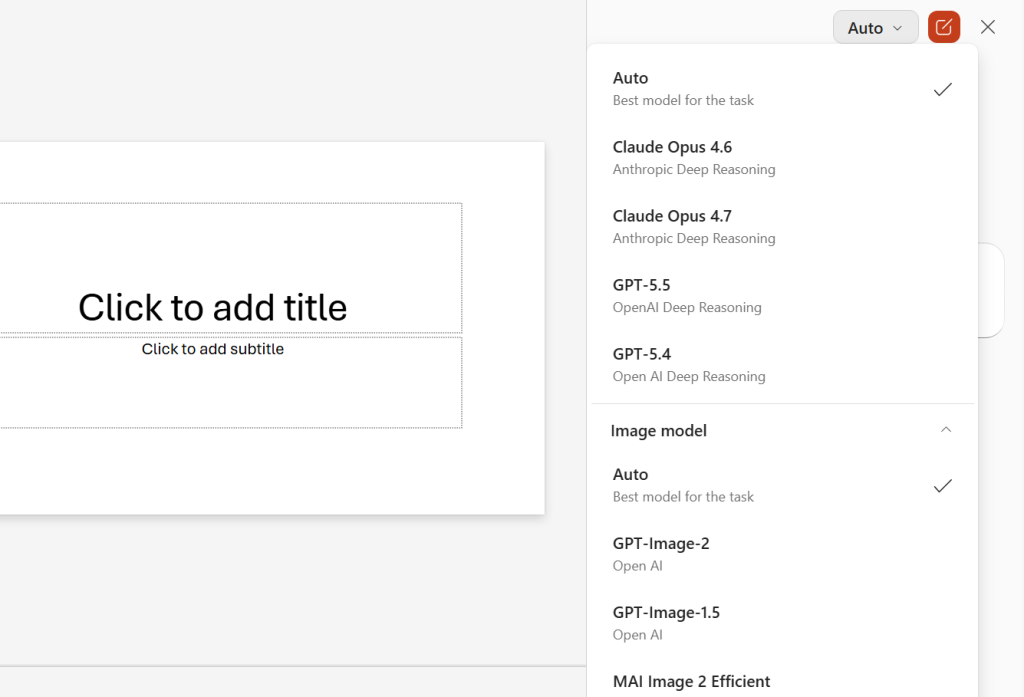
Choice of AI model: Behind the scenes, Copilot has access to various genAI models, including different versions of Anthropic Claude and OpenAI GPT.  By default, it decides which model to use based on your prompt. You can set it to use a particular model: click Auto at the upper right of the Copilot pane and select a model from the dropdown that opens.

screenshot of copilot sidebar in powerpoint with models dropdown menu open

You can choose which AI model you want Copilot to use for a request.

Howard Wen / Foundry

The tips in this guide should work fine on the default Auto setting. But feel free to experiment switching to specific models to see which give you the best results for particular tasks.

Important: Remember that generative AI output often includes errors, so always check Copilot’s output for accuracy. (Also see our tips for reducing hallucinations in Copilot.) You’ll likely want to rewrite it in your own voice as you’re reviewing it.

1. Create a presentation template

For many people, the hardest part of creating a presentation is getting started. What types of information should be included on the slides, and in what order? Copilot can give you a leg up by creating the type of presentation you need, with placeholder data that you can later replace with your own.

Start a new presentation, open the Copilot sidebar, and type your prompt into the chat window. It’s best to provide very specific details in your prompt. The more context or details you provide, the more likely Copilot will generate a presentation template that suits your needs.

A good prompt should contain the slide count, subject, audience, and tone. Example:

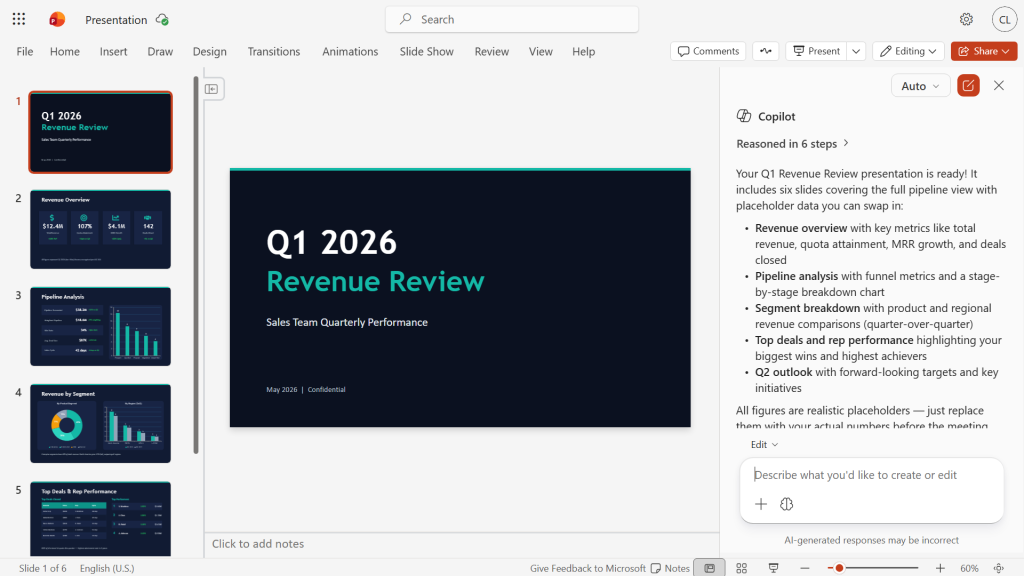
  • Create a 6-slide presentation for a sales meeting focusing on Q1 revenue. The audience is the sales team, so keep the tone professional and focused on the sales data.

Copilot may ask a series of follow-up questions, such as your preferred visual style and desired level of detail. Then it will generate a presentation template.

screenshot of powerpoint presentation generated by copilot with placeholder data

Copilot generates a presentation with placeholder data and explains its elements.

Howard Wen / Foundry

You can optionally prompt Copilot for revisions, and when you’re happy with the template, swap in your own data.

2. Create a presentation from a document

You can attach a document (such as a Word document, Excel spreadsheet, or PDF) and prompt Copilot to generate a presentation based on its contents. This works best with a structured-format document (such as a business plan, project proposal, or summary report) that contains sections with headings.

Copilot can extract the document’s text and structure to generate the slide content for the new presentation. This can especially be useful for quickly turning a long report into a visually appealing presentation.

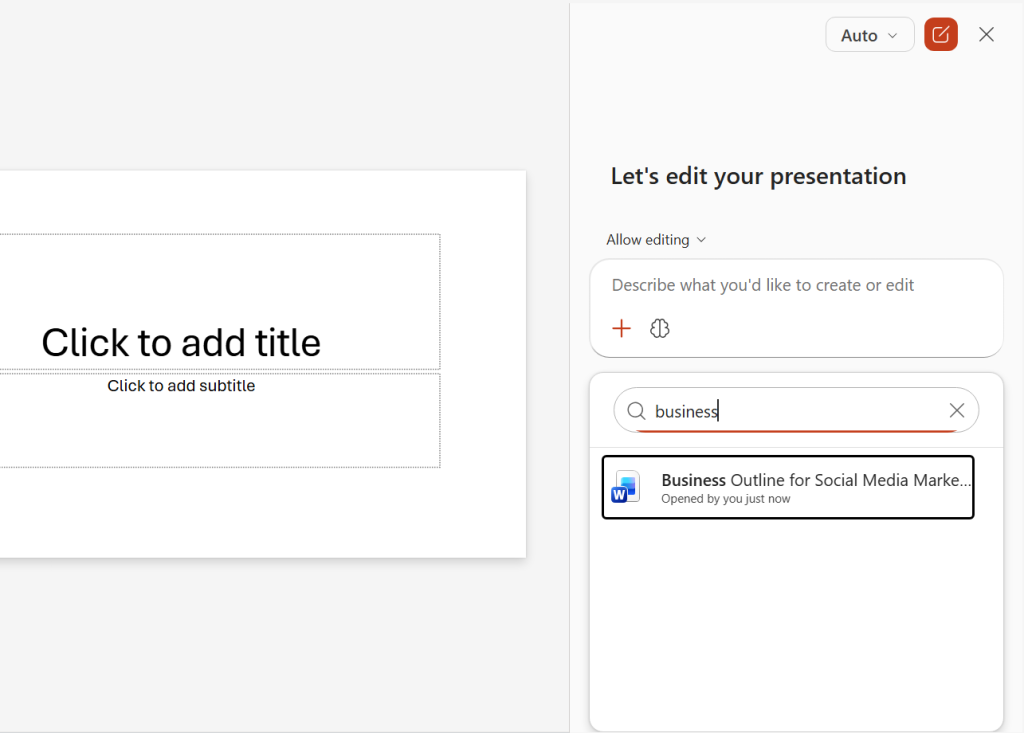
In the Copilot pane, click the + icon at the bottom of the chat window. A list of documents that you’ve recently accessed appears. Select the one that you want Copilot to use. Alternatively, click the magnifying glass icon and inside its search box, type a few letters of the filename for the document you want. (Business users with an M365 Copilot license can select up to five files for Copilot to pull from when creating a presentation.)

screenshot of copilot sidebar in powerpoint with a document being attached for copilot to base a presentation on

Attaching a document for Copilot to base a presentation on.

Howard Wen / Foundry

Then in the chat window, you can enter a prompt that’s as simple as “Create a presentation,” although as always, providing more details and context is better. This is especially important for corporate users who reference multiple source files. It’s useful to tell Copilot what data to pull from each document.

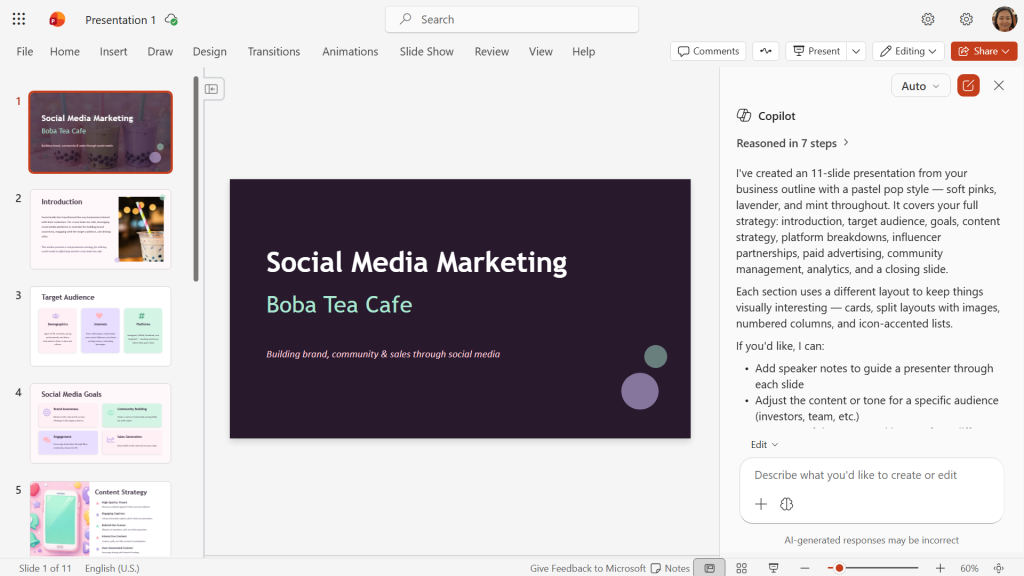
Answer any follow-up questions that Copilot asks, and it will then generate the presentation.

screenshot of powerpoint with a presentation generated by copilot from a document

Copilot has generated a professional presentation from a social media marketing campaign document.

Howard Wen / Foundry

Note: Your marketing department may have created one or more branded company templates for Copilot to work from. If that’s the case at your organization, simply open the appropriate company template as your first step. Then you can upload docs and type a prompt as described above. Copilot will create a presentation using the branded template.

3. Add content from a document to a slide

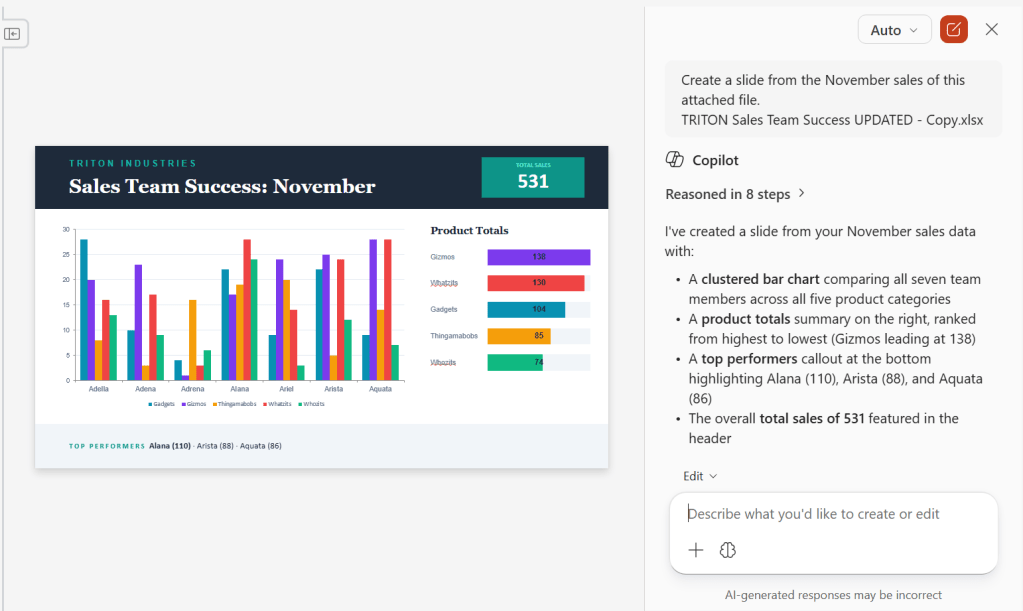
Manually copying text or other content from a document and pasting it into a new slide is a chore. Instead, you can prompt Copilot to extract information directly from a Word document, Excel spreadsheet, or PDF to create new slides.

In the Copilot pane, attach the document using the same steps described in tip 2, then tell Copilot to create a slide from the document. As always, it helps to provide details such as the new slide’s focus or what data to include:

  • Add a slide based on the attached document.
  • Use the attached file to add a slide about the project budget that focuses on Q1 projections.
  • Summarize only the financial section of the attached document as a slide.
screenshot of a slide in powerpoint generated by copilot from spreadsheet data

A new Copilot-generated slide based on data from an Excel spreadsheet.

Howard Wen / Foundry

4. Refine your slide text

A presentation should be visual and display only the core message. Conciseness and proper writing tone are essential for your slides, so that they don’t lose the attention of your audience.

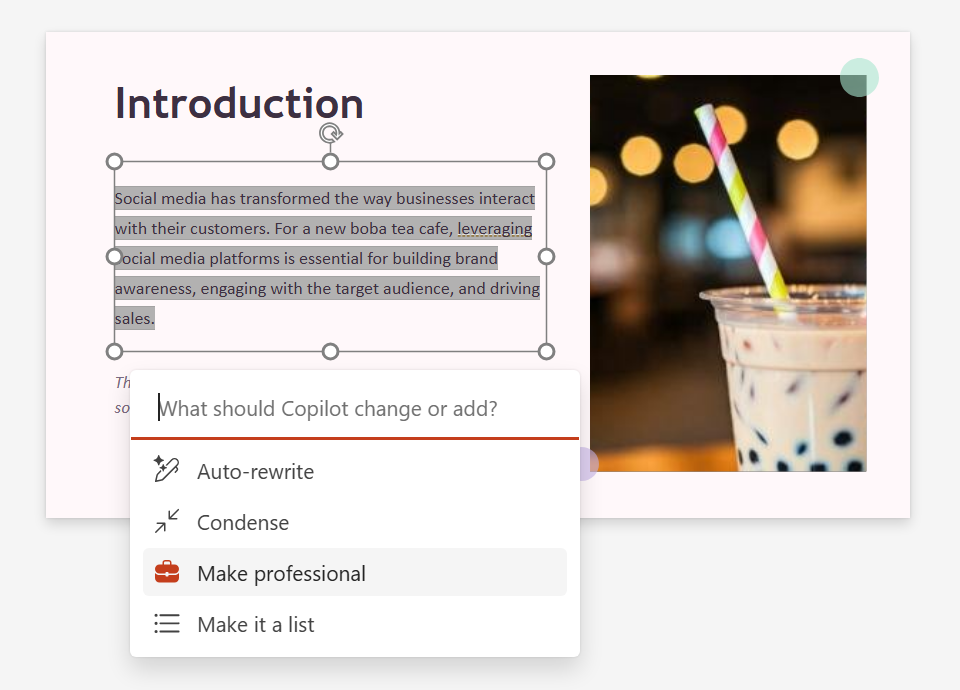
You can prompt Copilot to refine text on an individual slide in various ways, such as rewriting it in a more professional tone or making it more concise. Highlight the text inside a text box on the slide. On the toolbar that appears over the highlighted text, click Edit with Copilot.

On the menu that opens, you can select a preset prompt to refine the text, such as Condense or Make professional. Or, at the top of this menu, you can type a prompt to rewrite the highlighted text.

screenshot of text on a powerpoint slide with copilot dropdown menu includng condense and make professional options

Choose a preset prompt for refining text on a slide or type in your own prompt.

Howard Wen / Foundry

Note that this feature affects all the text inside the text box. To rewrite only a portion of text inside a text box, you must split that portion out into a separate text box.

Alternatively, you can prompt Copilot to analyze your entire presentation and tighten up the wording throughout all of its slides. For example:

  • Make these slides more visual and use less text.

5. Find or create an image

If you have Copilot generate a presentation from an existing Word document that contains images, it will incorporate those images into the presentation. If there are no images in the source document, you can ask Copilot to find or create one and add it to a slide.

To add a stock image or an image from your organization’s brand library, tell Copilot what you’re looking for:

  • Add a stock photo of young adults in a cafe drinking boba tea.
  • Add a photo from our asset library of young adults in a cafe drinking boba tea.

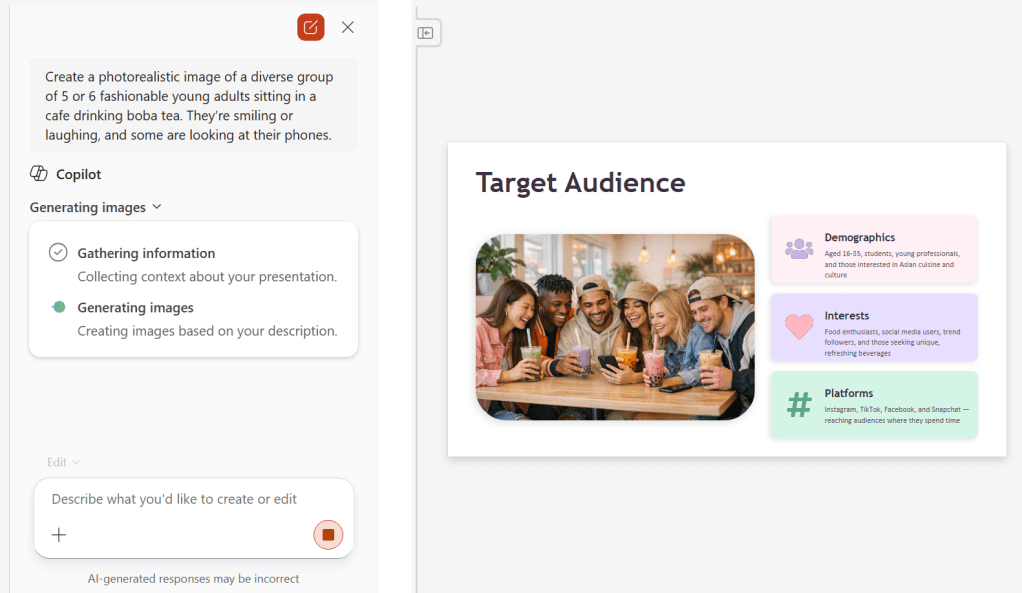
To have Copilot create an image using Microsoft’s Designer image generation tool, describe your desired image. As always, specificity is helpful:

  • Create a photorealistic image of a diverse group of 5 or 6 fashionable young adults sitting in a cafe drinking boba tea. They’re smiling or laughing, and some are looking at their phones.
screenshot of image generation prompt in copilot sidebar in powerpoint plus the resulting generated image on a slide

Copilot in PowerPoint hooks into Microsoft’s Designer tool for image generation.

Howard Wen / Foundry

Just as you need to review any text output from Copilot, take a close look at generated images to be sure nothing looks off.

Also note that Copilot image generation isn’t always reliable in PowerPoint. For some time during our testing for this story, Copilot said it couldn’t create an image because “the image generation service is returning a server error on every attempt.” After about a day and a half, the service began working again.

6. Expand your presentation with relevant slides

As you’re building your presentation, you may find that it’s become text heavy. Or perhaps it could use more visually oriented slides to break things up and make its progression flow better. Copilot can generate and insert new slides that are based on the content of the slides already in the presentation.

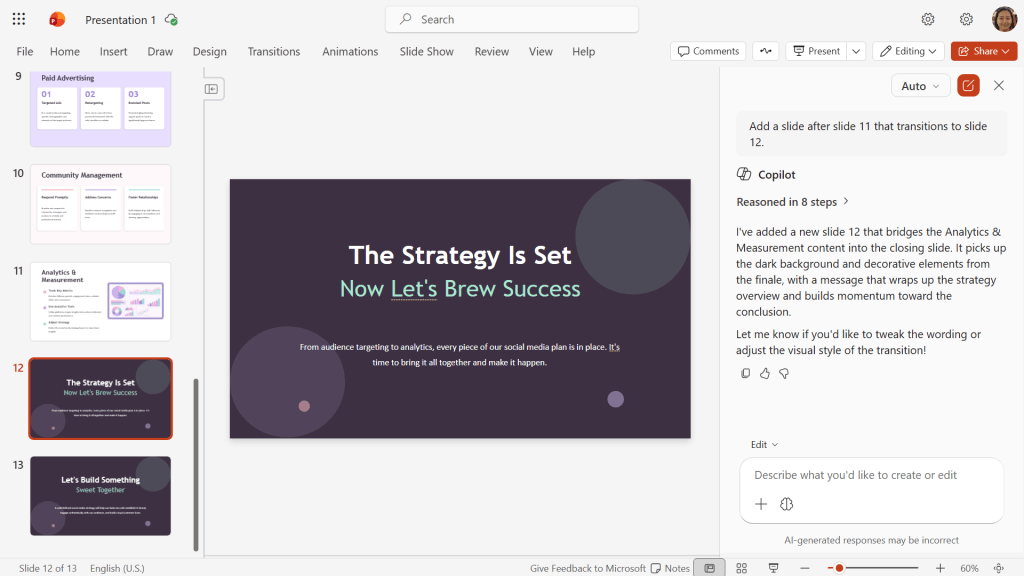
In the Copilot pane, specify exactly where you want the new slide to go. This helps Copilot to analyze the content of the slides before and after where you want the new slide. Then it can generate a slide to bridge between the two slides. Examples:

  • Add a slide after slide 3 about our competitive advantages.
  • Add a slide after slide 11 that transitions to slide 12.
screenshot of powerpoint screen with copilot sidebar and a transition slide generated by copilot

Need a transition slide? Just ask!

Howard Wen / Foundry

7. Summarize a presentation

Maybe you need a quick refresh of your presentation before an important meeting. Or maybe a co-worker has sent you a presentation that’s packed with lots of slides. You can prompt Copilot to generate a summary of the presentation’s overall messaging.

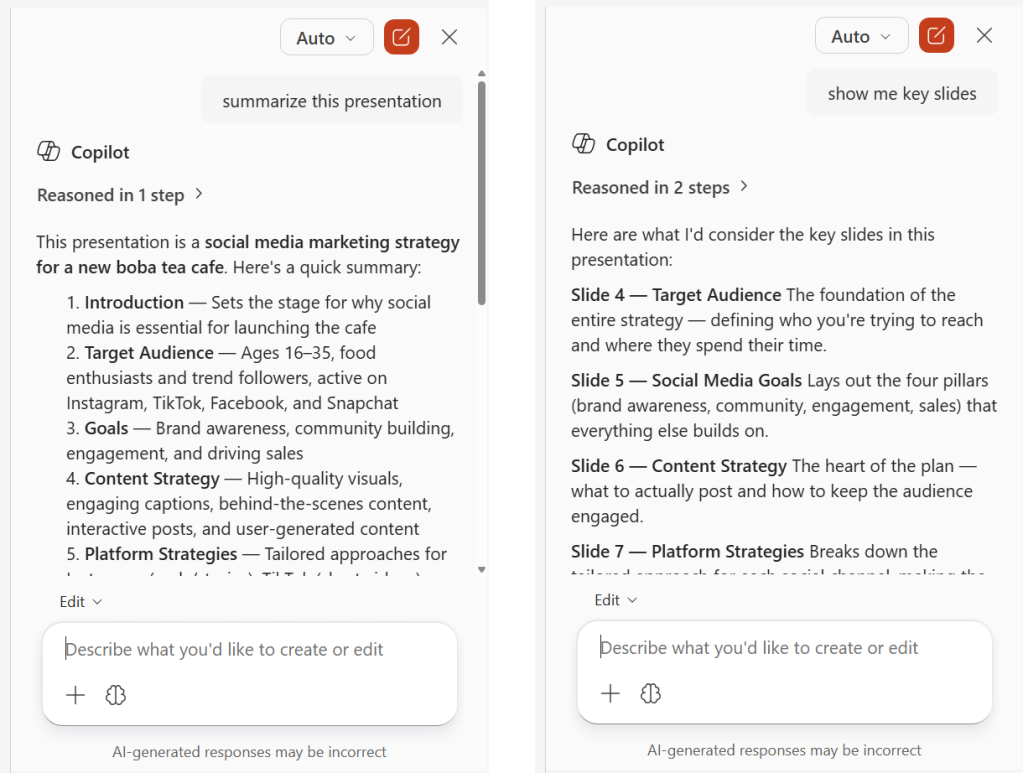
In the Copilot pane, just type “summarize this presentation.” You can also have Copilot flag key slides that contain important information: “show me key slides.”

screenshots of copilot sidebar in powerpoint - one with summarize results and one with key slides response

Ask Copilot to summarize a presentation or flag key slides.

Howard Wen / Foundry

8. Answer questions about a presentation

As you’re reviewing a presentation, especially one that you didn’t create and are not familiar with, you can get Copilot to pull key data points from its slides.

In the Copilot pane, type specific informational questions. Examples:

  • What are the action items in this deck?
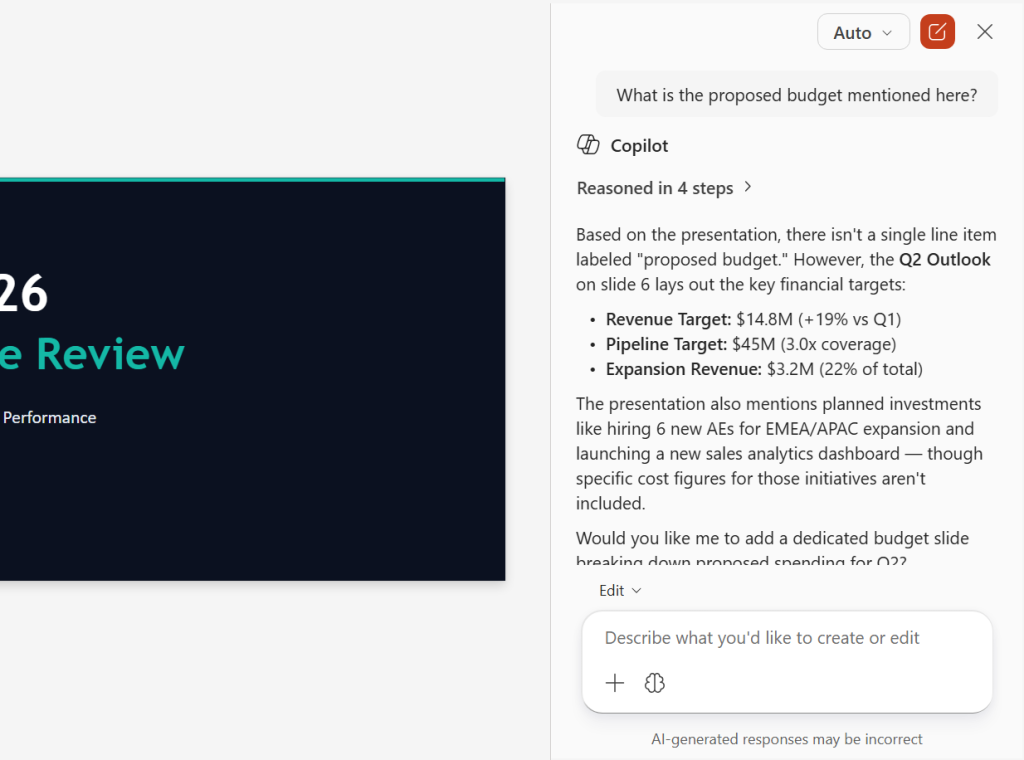
  • What is the proposed budget mentioned here?

If Copilot can’t find the exact answer to the question you ask, it will provide related information from the presentation.

screenshot of copilot sidebar in powerpoint with response to query about proposed budget in the slide deck

Ask Copilot specific questions about the contents of a presentation.

Howard Wen / Foundry

This method can also help you validate that your presentation includes everything you want it to. If you ask Copilot about the action items in a presentation and it can’t find any, you know you need to add them. (Copilot will likely offer to generate them for you based on the rest of the slides.)

9. Help you navigate a large presentation

In the business world, presentations with dozens of slides are not uncommon, such as for financial reports or project documentation. Trying to find a specific slide or multiple slides can be tough. Copilot can help you navigate such a presentation.

In the Copilot pane, prompt Copilot to find slides based on specific topics. Example:

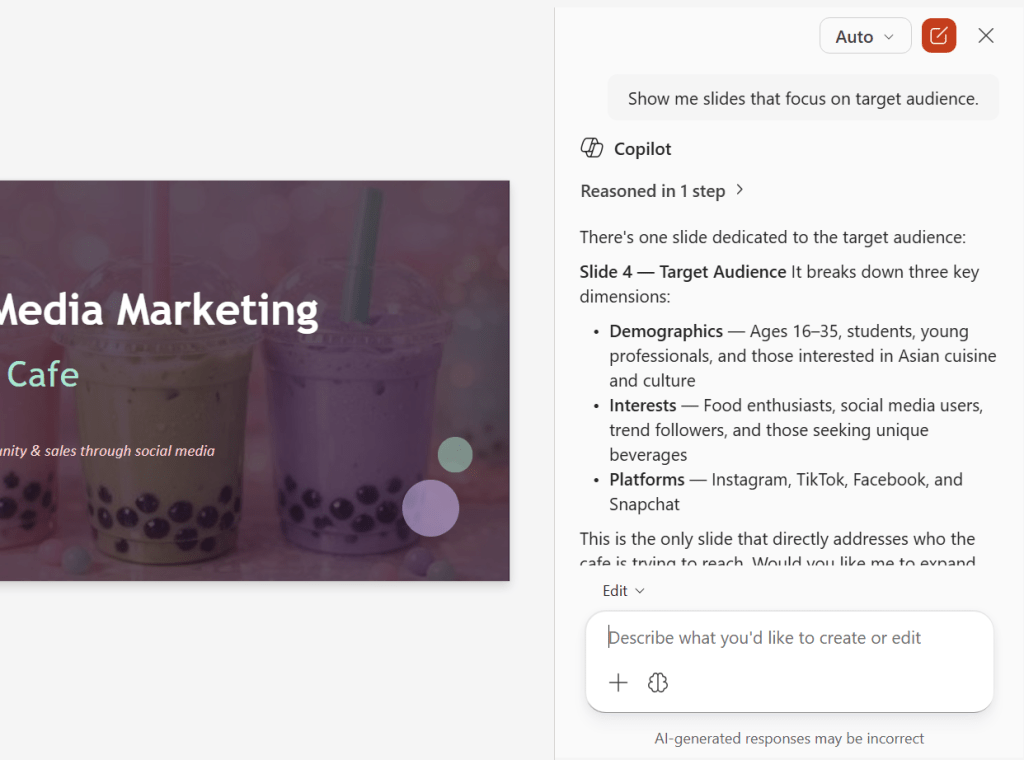
  • Show me the slides about the project timeline.

Copilot will analyze the presentation and reply with a list of links to the relevant slides. Click one of these to jump directly to that slide.

screenshot of copilot sidebar in powerpoint with response about the slide that talks about target audience

Copilot can help you zoom directly to a slide that covers a particular topic or shows specific data.

Howard Wen / Foundry

10. Generate speaker notes and/or an FAQ

Here’s a great timesaver when you’re preparing to show your presentation to an audience: Copilot can automatically generate suggested speaker notes for you, based on the content of your slides. Example prompt:

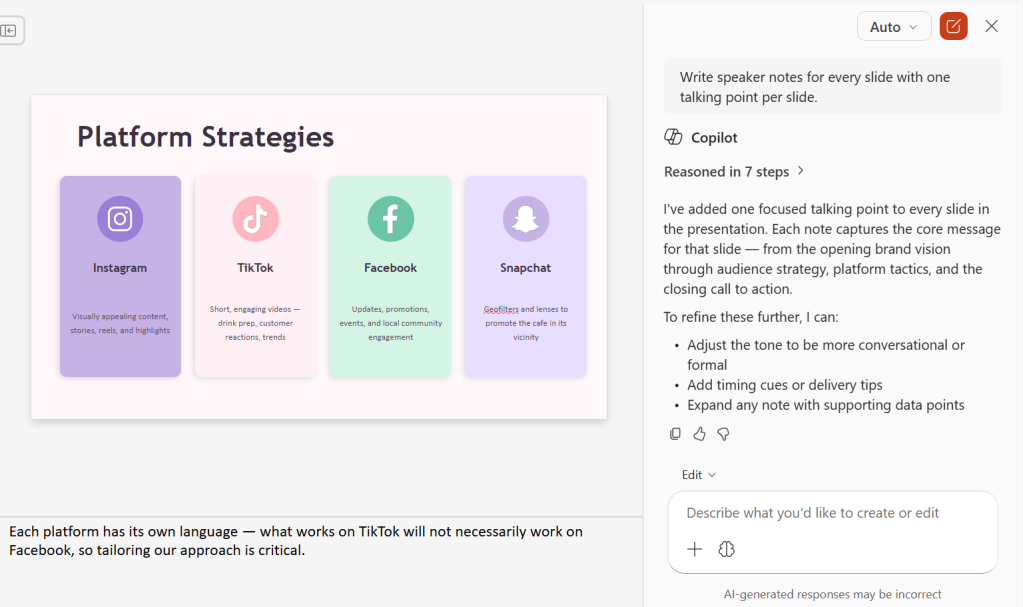
  • Write speaker notes for every slide with one talking point per slide.
screenshot of powerpoint presentation with speaker notes generated by copilot

Copilot can create speaker notes in seconds.

Howard Wen / Foundry

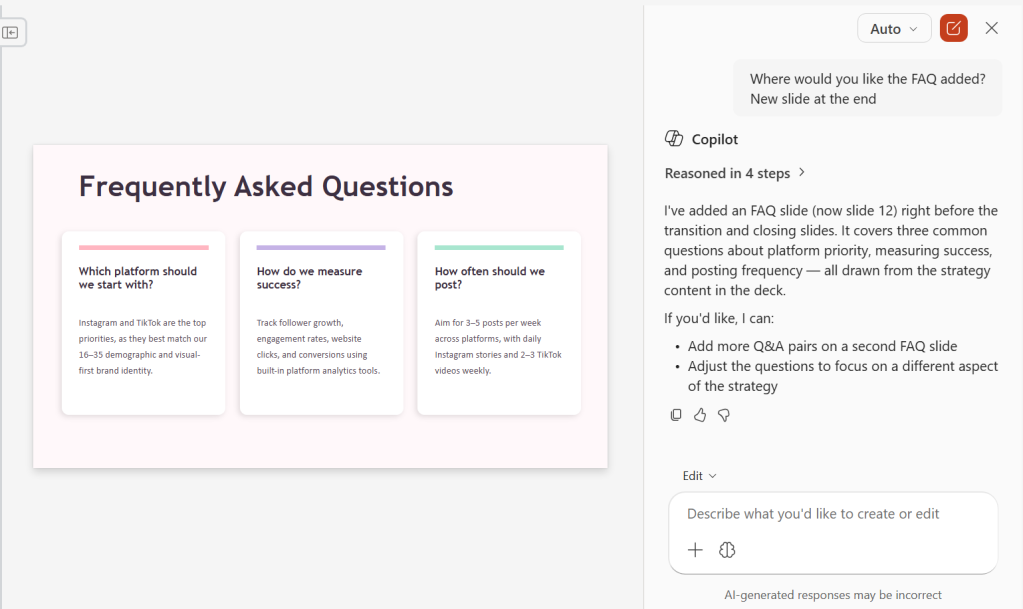
In a related feature, Copilot can create a frequently asked questions list (FAQ) for you to consult in your speaker notes or to present as a slide:

  • Write an FAQ for these slides.

Copilot will ask where you want the questions and answers added — as a new slide at the end, integrated into the speaker notes of relevant slides, or somewhere else that you designate. Make a selection, and Copilot will generate the FAQ based on the content of your presentation.

screenshot of frequently asked questions slide generated by copilot in powerpoint

A Copilot-generated FAQ slide.

Howard Wen / Foundry

Related reading:

Your instant Android backup upgrade

Here in this high-tech era of 2026, keeping important info backed up and synced should be effortless and something that just happens on its own, automatically, without any actual thought or ongoing human effort.

In many areas of our digital life, that mercifully does Just Work™ in exactly that way. Fire up an email in most modern mail services, and you can stop at any point and find your in-progress draft in that same app on any other device. The same applies to any file you’re finessing within Google Drive or other cloud storage services or document you’re dawdling over in Docs.

One area where seamless syncing somehow still doesn’t occur, though, is in the domain of downloaded documents on Android. If someone sends you a PDF or a Word file and you save it to your phone, that file exists in an archaic-seeming silo — only locally, on that one gadget. And that, of course, means (a) you can’t access it from any other device, and (b) if you misplace your phone or move into a new one at some point along the way, the file will be left behind in time and entirely unavailable.

Well, take a moment to join me in celebration: Amidst all the Gemini gobbledegook that no one asked for (and that often falls somewhere between “pointless” and “actively counterproductive”), Google’s giving us a major upgrade to Android’s backup capabilities right now. It’s a simple-seeming switch buried in your system settings, and it’s up to you to find and activate it.

Once you do, though, those once-orphaned documents on your Android device’s local storage will be perpetually synced and protected, automatically, without any ongoing thought or effort.

All you’ve gotta do is find and flip that one new switch.

[Don’t let yourself miss an ounce of Android Intelligence. Join my free weekly Android Intelligence newsletter and get one new thing to try in your inbox every Friday!]

The Android backup lowdown

So, for a quick bit of pertinent context on this: Android’s backup systems have actually come a really long way over the years.

‘Twas a time, y’see, when little to nothing about you would sync and carry over automatically from one Android device to another. Years ago — back in the ancient-seeming prehistoric era of the early 2010s — Android enthusiasts in the know would rely on community-created third-party apps for everything from remembering and resyncing downloaded apps to restoring data from within those apps and onward. And reconfiguring your system preferences would be a whole time-consuming song and dance every single time you reset a device or moved into a new one, as little to nothing would automatically carry over.

Most of that stuff is now effortless and automatic. And, thanks to apps like Google Messages, Calendar, Drive, and Docs, many other areas of important data are also synced on their own at the app level — outside of any system mechanisms.

Locally stored files, however, have remained an awkward omission. To this day, anything you download on any Android device exists only on that one device and isn’t synced or backed up anywhere. The only way that happens is — in a blast-from-the-past twist — if you go out of your way to find and set up a third-party app to handle the heavy lifting.

That brings us to today. Right now, as we speak, Google’s in the midst of sending out a quiet under-the-hood update that (brace yourself…) adds in the option to automatically sync and back up any documents on your device as a native part of Android’s backup setup.

See?

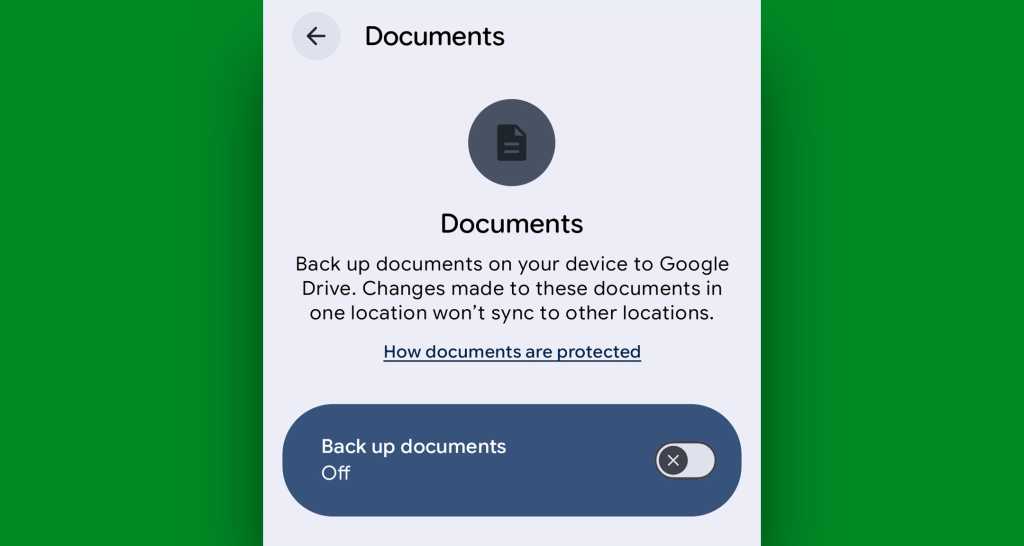
Android backup documents
The easily overlooked new option for backing up documents on Android.

JR Raphael, Foundry

The option is on its way to all devices running 2018’s Android 9 release and higher. (If you’re still using a phone with an Android version older than that, you’re now a whopping eight years out of date, and you have much bigger problems.)

Once the added option is present and available for you, you’re literally lookin’ at 10 seconds to find and activate it.

Lemme show ya how.

Android’s document backup addition

I promise: This couldn’t be much simpler.

No matter what kind of Android device is in front of you, just head into your system settings and open the section called “Accounts and backup,” “Back up or copy data,” or something along those same lines. (The exact wording can vary based on who made your device and when it was released or last updated.)

Either tap the line labeled “Google Backup” or look for an option to “Back up data” via Google Drive. You should then either see a series of options for different areas of available backup right then and there — or, depending on your device, you might have to tap a line labeled “Other device data” (or something similar) to find the full list of possibilities.

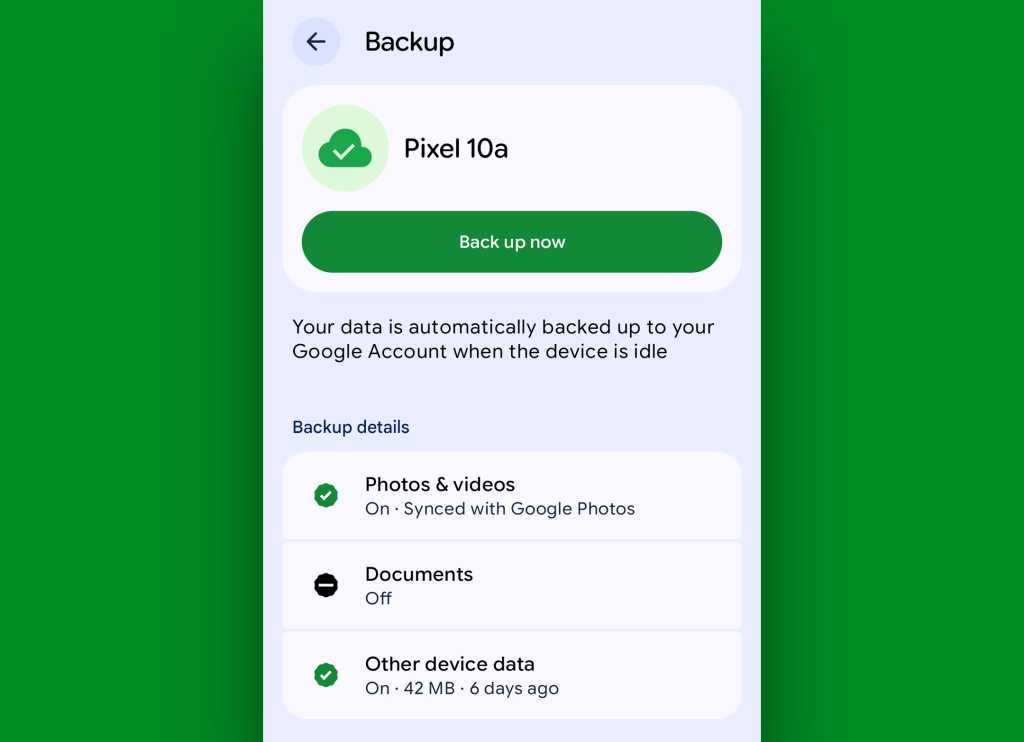
However you get there, once you’re lookin’ at that list, you’ll see a newly added line for “Documents” if this latest under-the-hood update has reached you.

Android backup options
Android’s expanded list of backup options — now including documents alongside other forms of on-device data.

JR Raphael, Foundry

And from there, all that’s left is to tap it and enable the switch to include that in your automated backups from that moment forward.

If you aren’t seeing the option yet, don’t panic. Google always sends these under-the-hood updates out bit by bit over time, so the change probably just hasn’t reached your device quite yet. As long as you’re running Android 9 or higher, it’ll get there. Set yourself a reminder to check back once a week or so. Odds are, you’ll see it pretty soon.

Notably, all documents synced in this way are always encrypted for security, and they’re kept in your personal (or, depending on the nature of your account, perhaps company-connected) Google Drive storage. That does mean they’ll count against your overall Google storage total, so keep an eye on your Drive storage total to make sure you’re in solid shape and look to the Google One storage hub if you ever want some simple suggestions for freeing up space.

Speaking of other Google services: If you ever want to keep other types of locally stored non-document files from an Android device synced and available elsewhere, you can easily rely on Google Photos for syncing screenshots and other images — after enabling sync in general, be sure to look in the app’s “Collections” areas to find the “On this device” folder and then flip the toggle to “Backup all device folders” (or get more nuanced and open specific individual on-device folders if you want to sync some but not all of those areas) — and you can still turn to those aforementioned third-party apps for broader syncing of anything else imaginable.

But with documents now being handled automatically and natively, that’s one big worry now out of your hair. Just note that the onus will fall on you to find and flip the switch and actively opt in to the feature on each and every Android device you’re using.

Take 10 seconds to do that, though, and you’ll have one less void in your Android data arena. And you don’t need Gemini to tell you that that can only be a good thing.

Get practical Android knowledge in your inbox every Friday with my free Android Intelligence newsletter — one new thing to try each week, straight from me to you.

Anthropic pays $1.5B to settle contentious copyright case

A US federal court has approved Anthropic’s $1.5 billion settlement in a class-action lawsuit in which authors accused the AI company of using their books without permission to train the AI model Claude. This is the largest such settlement to date in a US copyright case, according to Reuters.

The dispute is one of several legal cases in which copyright holders sued AI companies over how large language models (LLMs) were trained, and it is the first major AI-related copyright dispute in the US to be resolved through a settlement.

A judge had previously ruled that the actual training of AI models using books falls under the “fair use” doctrine in US copyright law. But Anthropic was found to have violated the law by storing more than 7 million pirated books in a central library, regardless of whether they were later used for AI training or not.

Apple and the changing of the guard

As Apple gears up to anoint John Ternus the new company CEO in September (while current leader Tim Cook takes a seat on the board) the company appears to be firing on all cylinders ahead of the leadership transition. 

What’s going well

Just look at the evidence: 

  • Apple is building market share across its entire product range; even memory-driven price inflation doesn’t seem to have dampened demand for its hardware yet.
  • While Apple had to raise prices, the company’s MacBook Neo remains seriously popular. It’s sitting atop Amazon’s US best-selling chart, which currently includes six Macs in the top 10. The Neo has topped this chart since its introduction.
  • Apple’s iPhone 17 series continues to sell well, with recent market data showing sustained growth. Both Counterpoint and IDC tell us that iPhone shipments continue to increase, even as other vendor shipments slide.
  • IDC analyst Francisco Jeronimo recently estimated that Apple’s upcoming foldable iPhone Ultra could grab 29.4% of global folding smartphone sales this year, rising to 34.9% in 2027.
  • The company’s new 27 series of operating systems is attracting a great response as beta testers report that it is already solid, stable, and performing well.
  • The AI narrative has really changed, with analysts no longer quite so starry-eyed at the prospects for the big frontier AI firms. Apple’s edge-AI-enabling approach is winning converts.

What’s coming up

The company’s newly-filed lawsuit against OpenAI may or may not succeed, but it will certainly help consolidate recognition of the importance of Apple’s designs and intellectual property in whatever hardware emerges from the AI firm. It also means both Apple and OpenAI are already competing in hardware, even though neither company yet offers anything that directly challenges the other. 

Apple has just set out its stall to brand-loyal fans in a big way and did so before OpenAI gets to woo the same set of customers with a wriggle of its Jony Ive-tinged talisman.

The stage is set for intense competition between the two. Though some say Apple’s needs to improve employee retention, if it does find proof of efforts to use recruitment to engage in industrial espionage, it’ll be easier to represent its own products as being the OG for new hardware. 

If nothing else, it means consumers will forever be asking, “If OpenAI’s designers are so good, why did it need to poach them from Apple?” Doubt is a weapon.

Managing perception

It doesn’t matter how the case goes, because there fight is already affecting consumer psychology. It also means that as Ternus prepares to take his seat atop the rainbow-colored Apple throne, we can already size him up. “A man is measured by his enemies,” Joe Abercrombie wrote in “The Trouble With Peace.”

Given the proximity of the leadership transition, it’s highly probable that Ternus signed-off on the litigation; in doing so he — and Apple — tell us to expect more of the same. 

Apple has, rightly or wrongly, decided that OpenAI will become its new existential bugbear, following in the footsteps of Microsoft Windows, Real Networks, Adobe Flash, Android, and Samsung, all of whom have been useful foils against which Apple has been able to build and maintain its identity.

Looking at that list, you’d be tempted to believe that nothing much is new. Apple has often defined itself by the enemies it sometimes keeps. What has been will be again, which in this case means even as OpenAI attempts to carve out an identity as a hardware manufacturer delivering solutions to compete with Apple and Google, Ternus’ team’s looks to drive a consensus-shaped wedge into the pro-LLM propaganda. 

That blow comes as Apple finally gets its act together around AI, and as the company prepares for a future in which the world’s most-used wearable device also becomes the wearable way to woo Siri AI.

My kingdom come

Rising market share, powerful solutions, an increasingly recognized and respected approach to AI, and an ideological crusade — these details constitute Apple’s place today and are Tim Cook’s coronation gift to Ternus. He’s passing along a strong and hyper-profitable baton that screams of timeliness and relevance even as the company gets set, ready, to go with a year or two of new product designs, new product families, and a 20thanniversary iPhone.

This is Apple’s party. OpenAI’s name didn’t make the list. 

You can follow me on social media! Join me on BlueSky,  LinkedIn, Mastodon and subscribe to The Core.