Month: August 2026

Polish data center plans to send its waste heat to the neighbors

As Europe swelters in a heatwave, residents probably don’t want to hear about ways to make their homes even hotter, but that’s what Polish property developer Citylink is talking about, with plans to dump waste heat from a new data center in Wrocław into the municipal district heating network.

Citylink is designing the data center so that heat from servers can be recovered instead of being dissipated via cooling systems — and as the data center grows, any increase in computing power will mean more energy available for recovery.

The collaboration with local power company Kogeneracja will provide “valuable experience in designing and operating modern data centers, with a particular focus on infrastructure dedicated to AI nodes,” said Michał Starybrat, development director at Citylink.

“The dynamic growth of the artificial intelligence and cloud technology markets generates unprecedented demand for computing power, this collaboration demonstrates how modern digital infrastructure can actively contribute to building the energy ecosystem of the future,” he added.

This type of initiative is not new. There have been similar projects in the UK and in New Zealand, but with warnings that data centers are contributing to the warming of the planet, there may well be a lot more organizations looking to deploy that excess heat more fruitfully in the future.

However, announcing it during a heatwave may not be the most politically sensitive approach to take.

This article first appeared on Network World.

Airtable joins Evernote, Brightcove, WeTransfer and AOL in Bending Spoons portfolio

Bending Spoons has snapped up Airtable to add to its portfolio of software companies, alongside AOL, Evernote, WeTransfer, Brightcove and Vimeo

Airtable made its name as a builder of low/no code database services, aimed particularly at non-technical staff, but is now one of many vendors facing financial difficulties in the face of the SaaS/AIpocalypse. The arrival of AI coding tools, which offer non-technical employees more flexible ways to build business applications, has hit demand for its services.

Bending Spoons bought Airtable in a deal it valued at just $1.285 billion, a far cry from the $11.7 billion Airtable was worth at its peak.

Bending Spoons has built its portfolio by buying once-successful companies like Airtable that have struggled to cope with newer, nimbler competitors or failed to adapt to emerging technologies. Bending Spoons takes these companies, cuts costs and markets them aggressively with the goal of returning them to profitability.

“Airtable is a pioneering brand reshaping how teams organize data and manage critical workflows. We’re committed to investing in Airtable for the long run, and doubling down on its core strength: bringing teams and workflows together in one flexible workspace. We plan to expand what can be done across the full spectrum of work and make Airtable even more valuable to customers at every scale,” said Luca Ferrari, Bending Spoons CEO and co-founder.

This article first appeared on InfoWorld.

Wispr moves beyond AI dictation with note-taking assistant

Wispr, the startup behind dictation tool Wispr Flow, has created an AI note-taking assistant that records meetings and generates conversation summaries for users.

The Wispr Flow Notetaker tool “captures your meetings so you can stop splitting your attention between listening and writing things down,” said Sahaj Garja, Wispr CTO and co-founder.

Notetaker starts recording with one click, and doesn’t require a bot to attend a video or voice call. It can also be used to capture in-person conversations.

The software has three key functions. Before a call, Notetaker displays a meeting brief with information such as meeting purpose and background of participants.

Once the meeting starts, a live transcript displays the dialogue text and labels speakers. A “what did I miss?” button provides a summary of talking points from the previous few minutes.

Finally, post-meeting, Notetaker generates a more detailed summary organized by topic that includes information such as key dates, decisions, and next steps. Users can search across notes from previous meetings in the Notetaker app. “Over time your meeting history stops being a folder of documents you have to go find and becomes something you can ask questions of,” said Garja.

Notetaker integrates with AI assistants such as Anthropic’s Claude and OpenAI’s ChatGPT via model context protocol. This allows users to connect outputs such as transcripts and summaries “into how you already work, instead of sitting in a separate app,” said Garja.

With Notetaker, Wispr competes in an increasingly busy market for AI note-taking apps that includes Fireflies, Granola and Otter.

Wispr claims Notetaker can produce more accurate transcripts than existing tools, partly because of the additional context it uses during transcription. It uses the same personal dictionary from Wispr Flow that includes acronyms, products, and preferred spellings, and can also draw on other sources such as calendar information to understand the purpose of a meeting and help ensure speakers are labelled correctly.

Before generating the final summary, Notetaker also re-reads the live meeting transcript and combines it with additional context to create a more accurate final output, Garja said.

Notetaker is the first new product launched by Wispr, which was founded in 2021 and has since raised $81 million in funding.

“We didn’t set out to build a dictation app,” said Garja. “The mission has always been to reshape how people interact with their devices, and dictation was the fastest way in.”

“Notetaker is the second product on that path. Dictation took the keyboard out of writing. Notetaker takes it out of meetings, so nobody has to spend the call typing up what everyone just said.”

As AI note-taking tools have become more prevalent in the workplace, privacy concerns have arisen, including the need for all-party consent when recording a call in some jurisdictions, and whether meeting audio is used to train AI models. Two software vendors, Otter and Granola, currently face separate lawsuits in California that allege privacy law violations related to their products.

Wispr Flow Notetaker captures audio locally on a user’s device rather than joining the call as a visible bot. That means there’s no notification to signal that a conversation is being transcribed, which places responsibility on users to disclose the recording to others on the call in accordance with local laws, said Garja.

“Users should always let the other person know before you start recording or transcribing a conversation, whether it’s a video call, an in-person meeting, or a phone call,” he said, adding that Wispr intends to build additional features for automated consent messaging “in the coming weeks.”

Wispr doesn’t train its AI models on customer data without consent, though free and standard tier customers must choose to opt-out, according to Wispr’s privacy terms. Nor does it create “voiceprints or biometric profiles” of users or anyone else on a call using audio recording data, the company says.

When Notetaker is active, conversation audio is captured on a user’s device and processed on cloud servers to enable transcription. The recorded audio file is encrypted and stored temporarily on the user’s device or cloud storage, Wispr said. After a limited period, the audio is automatically deleted.

Notetaker is available with the Wispr Flow macOS app to free and paid subscribers, with support for Windows “coming soon.”

DeepMind founder ascends to singular AI role at Google

Demis Hassabis, the driving force behind Google DeepMind, is ascending to the role of chief scientist at Alphabet, Google’s parent company, replacing Jeff Dean who is leaving to work at a start-up.

The role will enable Hassabis to “put his full attention on actively shaping the future of AGI,” or artificial general intelligence, Alphabet CEO Sundar Pichai wrote on the company’s Inside Google blog.

Hassabis’ attention will still be divided, however: He will continue to lead research at Google spin-off Isomorphic Labs, which works on drug discovery, and although he will no longer be CEO of DeepMind, he will be its chair. Koray Kavukcuoglu will take over DeepMind, reporting directly to Pichai. He is currently its CTO.

Hassabis has been a strong promoter of AGI, defined by Google as the “hypothetical intelligence of a machine that possesses the ability to understand or learn any intellectual task that a human being can.”

He has a long career in AI, having helped found DeepMind in 2010. He has been a prominent figure in the AGI field, prophesying in May that it will be a viable technology within three years. He has been keen to tackle any barriers in the way of developing the technology; just last month, he called for greater self-regulation in the market, arguing that it would help drive the technology forward.

Hassabis welcomed the chance to focus on AGI development. “We have arrived at a pivotal moment in human history. I’ve been working towards AGI my whole life, and now, I feel it is close at hand. It’s critical that we collectively get the next steps right to ensure this all goes well for humanity and we usher in an incredible new age of discovery and wonder” he wrote in the Inside Google blog post.

Cloudflare wants to provide the operating system for the AI-first enterprise

Traditional operating systems (OS) were built to manage hardware, files, apps, and users on a device, but Cloudflare says the agentic AI era requires a whole new format.

The company this week announced Cloudflare OS, which connects AI agents, enterprise data and context, internal systems, and workflows together in one secure workspace. It is open source and browser-based, sparing companies the need to build all-new infrastructure.

The OS is launching alongside several other new security, identity, spending, and user insight tools that Cloudflare has built for the AI-based workplace.

“Cloudflare OS isn’t a traditional desktop OS,” said Rita Kozlov, VP of product at Cloudflare. “It reimagines the workplace computing environment for AI.”

Open source OS runs in a browser

Cloudflare OS serves as a secure, AI-equipped workspace that is plugged into internal company systems. Available now through Cloudflare’s open source repository, it is accessible directly in a browser, and runs inside an enterprise’s Cloudflare account.

“It is a browser-based workspace that begins with a conversation,” Kozlov explained. Users can ask an agent to research, create slides, spreadsheets, and documents, build full-stack apps, or automate workflows without the need for a terminal. Those outputs are then shareable, but kept in isolated databases with access controls.

Enterprises will soon be able to access the OS directly through Cloudflare or via a “select group” of partners that will build tailored offerings on Cloudflare’s architecture, the company says. Because it is open source, organizational processes, internal system connections, and context aren’t locked into a vendor product or AI model provider. Customers can use whatever models they choose.

Cloudflare OS is built on Cloudflare Workers, Dynamic Workers, Durable Objects, and Access, the company’s zero trust network access (ZTNA) tool that verifies every user and request. Agents start with zero permissions by default and are only granted access to tools required for a specific task. Organizations configure their own Access policies, models, branding, skills, and integrations, Kozlov explained.

Governed connectors known as gatekeepers give admins control over what AI can see, what it can change, and when the system needs human sign-off. They can also control budgets, set rate limits, and delegate tasks to different models.

“Because agents act on people’s behalf and produce work others can access and modify, they require a new security model,” Kozlov said. Thus, Cloudflare OS tracks the resources an agent requires so the right access controls follow its work when it is shared.

Cloudflare initially built the OS for internal use, and employees “across every team” use it daily. Kozlov estimated that, over the last 30 days, internal users have used it to create more than 4,000 apps, automations, and tools. Over that same period, she claimed, the company’s sales team saved an estimated 10,000 hours by automating previously manual tasks like territory planning and proposal creation.

“We open sourced Cloudflare OS so any organization can build ‘Your Company OS,’” Kozlov said. Open source is critical because “you cannot put your company into software you do not own. Organizations need to be able to inspect the platform, customize it, connect their own systems, and make it their own,” she explained.

A more cohesive bundle

Cloudflare deserves credit for packaging Cloudflare OS as an operating system, noted tech analyst Carmi Levy.

“This very much is not Windows, macOS, or Linux, and it isn’t an operating system by its common definition,” he said. “But Cloudflare’s use of this terminology implies familiarity to enterprise IT buyers.”

This makes for an easier discussion as enterprises struggle to understand how to best incorporate AI-related platforms and workflows into infrastructure that wasn’t initially designed for it.

Microsoft has marketed the combination of its Azure, Entra, Fabric, Windows, and Microsoft 365 offerings as an operating system of sorts, but hasn’t pulled all the pieces into a common brand, Levy said. And Google’s Gemini, Workspace, Vertex AI, and Cloud Run are “circling similar territory.”

But, he noted, Cloudflare OS is “more cohesively bundled” and infrastructure-focused, offering a single pane of glass platform for buyers worried about stitching together otherwise disparate AI-aware networking pieces. The company recognizes that AI introduces new architectural realities such as inference and model routing “over and above” traditional OS core competencies.

“While competing offerings generally leave the infrastructure heavy lifting to enterprise decision-makers, Cloudflare is marketing itself as a single-source vendor, which potentially frees IT planners from having to integrate all the AI pieces on their own,” Levy said.

An infrastructure-first, application-agnostic approach means Cloudflare OS can coexist with whatever AI applications already exist in an enterprise, he said. It will “play nice” with OpenAI, Anthropic, Google, Microsoft, Meta, or open source layers, allowing employees to begin working in familiar workflows after sign-in.

“Its open-source architecture also minimizes the potential for vendor lock-in as enterprises gradually figure out how to evolve their stacks to align with new AI-era realities,” Levy said.

Managing identities and budgets for both humans and AI

As AI agents emerge across the enterprise, tracking their use can be challenging, causing problems from both a security and a spend standpoint. Along with Cloudflare OS, the company has launched a way to address this issue with its new Identity-Aware AI Gateway, now in beta.

Also integrated with Access, the offering gives admins visibility into what users (both human and AI) are requesting from AI models. It allows security teams to set up custom domains in front of their gateways and replace shared API keys by integrating with their identity provider, like Okta or Entra, and ZTNA infrastructure, Cloudflare explained.

Every request is tied to Access-verified identities, and enterprises can filter each user’s logs, analytics, and spend. IT teams can track redundancies, limit usage rates, and apply filters that strip out employee names, passwords, and other sensitive data before requests go to outside model providers.

A companion feature, AI Spend, tracks every user’s behavior over time to create a baseline of normal AI usage. When spending deviates from that pattern, the system alerts the IT team.

A new tab, User Insights, tracks cost and identifies over-spend caused by activities such as low cache-hit rates or oversized context windows. The capability scores sessions and compares them against account history using a 95th percentile session cost over the previous 30 days, Cloudflare product managers Ming Lu, Kenny Johnson, and Ayush Kumar explain in a blog post. Anything above 2x an account’s 95th percentile is a “strong candidate for anomalous behavior.”

For instance, one Cloudflare customer had an employee who left a rogue AI session running, generating a $30K bill. “User Insights helped them identify the problem and shut off access before the problem was further exacerbated,” Kozlov said.

Cloudflare is also building prompt classification functionality that sorts requests into categories such as coding or writing. This can help enterprises understand what AI is being used for.

“Once business traffic is separated from everything else, personal use becomes visible,” the project managers explained. “From the outside, someone running a side hustle on company time and someone quietly moving data out through a model look the same. Telling them apart is central to catching insider risk.”

Looking at the bigger picture

Identity-Aware AI Gateway and AI Spend address the visibility problem that has dogged so many recent AI deployments where enterprises failed to monitor usage, Levy noted. Projects “crashed and burned” as users unwittingly blew through token allocations.

These platforms provide single-point visibility into what is being used, how it’s being used, and where the potential lies for raising the productivity bar, he said. They overlay with existing models; in doing so, they enhance security with more precise control over resource allocations, and via automated anonymization protocols that prevent inadvertent sharing of sensitive data.

Ultimately, he said, vendors who free IT from having to independently assemble the pieces of their own AI implementations, and who assist them with answers to AI-specific questions, “will gain advantage over vendors that aren’t looking at the bigger picture.

This article originally appeared on CIO.com.

Apple’s memory crisis is a big red flag for tech

The memory crisis is getting worse for Apple, which is struggling to get enough memory chips together for its upcoming iPhone 18 Pro series smartphones. That’s according to tech journalist Tim Culpan.

As he details it, Apple and its assembly partners are still attempting to secure sufficient quantities of memory, and though they’re confident they can meet initial demand once the devices are introduced, they apparently remain concerned that wait times could rapidly extend as retail inventory evaporates.

Apple’s manufacturing process compounds the problem. The A20 processor is packaged with memory using a new TSMC process, meaning processors are reportedly piling up while manufacturers wait for memory chips. You should read Culpan’s report to get the full picture.

What’s the frequency?

You don’t need to read between the lines to see the challenge. Despite demand for TSMC’s new processors, Apple seems to have been able to secure the supply it needs. But when it comes to churning out the final packaged chips memory, supply constraints have created significant obstacles to producing in quantity.

This is bad for Apple, particularly as the challenge doesn’t appear to be confined to iPhones; customers are experiencing delays getting new Macs. “Many new orders are now not arriving until September,” Bloomberg’s Mark Gurman wrote earlier this week. 

It isn’t just Apple that will be impacted by the AI-driven memory drought. The scale of Apple’s orders is among the greatest in the industry, and if its product plans are feeling the pain, every other manufacturer will be feeling it as well.

Conscious uncoupling

This is certainly in tune with expectations voiced at the beginning of the year when Ranjit Atwal, senior director analyst at Gartner, warned: “This is the steepest contraction in device shipments witnessed in over a decade. Higher prices will narrow the range of devices available, prompting buyers to hold on to devices for longer, fundamentally altering upgrade cycles.”

Gartner in February predicted a 10.4% decline in global PC shipments and an 8.4% drop in smartphone shipments as a result. The analyst also predicted a 130% surge in combined memory and SSD storage prices by the end of this year, with steep product price increases to follow. Recent data from IDC, Gartner, Counterpoint, and Omdia confirm PC market declines, but only at around 4% (the estimates vary).

Today’s report from Culpan suggests we’ve not yet experienced the full extent of this decline — hinting that while the initial fall reflected price, the next impact will be defined by lack of supply. While this hurts big brands like Apple, smaller entities could be left high and dry. 

When the chips are down

It is interesting to reprise Atwal’s warning in February that, “the sub-$500 entry-level PC segment will disappear by 2028,” as this seems to be what’s happening. That’s something long-time Mac users like me find particularly ironic, given it was only this year Apple briefly offered up its superbly priced $499 MacBook Neo. The industry direction we’re seeing now suggests we’ll never see that again, though the success of that device gave Apple a phenomenal 28.7% increase in sales in its just-revealed June quarter.

Despite memory supply challenges, Apple seems to be faring fairly well, with market share increasing across its business. Counterpoint data reveals that Apple has achieved an astonishing 65% share of the premium smartphone market. In part, that’s because as an existing premium brand, Apple was able to better absorb rising memory costs through higher margins and reduced promotions. Realistically, this means we can expect an overall increase in iPhone prices when the new range is announced up to $300 more, Jeff Pu, of GF Securities, recently claimed. 

Building the moat

Once again, what’s sustainable but difficult for larger brands such as Apple is existential disaster for smaller players — and it’s only now a matter of time before we see some real blood. That’s particularly true in smart home and device markets, where manufacturers lack the margins to sustain higher memory prices while delivering products customers can afford. A recent Global Electronics Association report tells us 62% of electronics manufacturers are already experiencing constrained availability or extended lead times. It also tells us 82% expect rising prices, including 33% who cite a “significant increase.”

This is already being felt by consumer and business users, as networking equipment is experiencing significant shipping delays. So, while we may find ourselves waiting a month or more for an iPhone, the wait for new routers, external storage devices, and home automation systems could be even longer once available inventories disappear. 

This doesn’t appear to be a short-term challenge; a recent Digitimes report warns that vendors have already sold their entire allocation of memory capacity for 2027.

Don’t even get me started on the likely impact on the military and defense markets as high-performance memory, storage, and processor supplies become constrained. Just like declining river levels in Europe, lack of memory threatens severe disruption. With so much turbulence impacting the tech economy, all we need now is for one or more of theinvestor-supported AI companies that have helped create the memory shortages to default on loan payments.

Got to keep the customer satisfied

Eager to protect sales, Apple recently introduced the Apple Upgrade leasing service in the US. This should enable consumers to purchase new devices at prices more sustainable to them over time. Apple isn’t alone in taking such action, which will inevitably extend beyond America.

“OEMs are expanding financing, trade-in and buyback programs to improve affordability,” said Counterpoint’s Harshit Rastogi. “Samsung has also expanded its Galaxy Forever program to several markets to make flagship devices more accessible.” 

Such schemes are all well and good, of course. Consumers will embrace them in hopes of a better tomorrow. But the tech industry is not immune to the wider constellation of existential challenges impacting economic environments.

In the end, if Apple, the industry’s biggest buyer of advanced components, is struggling to secure memory, the rest of the electronics sector is likely to face even greater challenges. For consumers, the initial impacts will be longer waits and higher prices. But the longer term consequences could be slower innovation and increased consolidation across the industry.

You can follow me on social media! Join me on BlueSky,  LinkedIn, Mastodon and subscribe to The Core.

6 things you should know about Google’s new selfie sign-in system

Losing access to your Google account might just be the epitome of a modern-day nightmare.

Especially if you’re using Android and even more so if you’re invested in lots of different Google services on top of that, the amount of access and info connected to that one single sign-in is just staggering. Think about it: You’ve got everything from your Android apps and settings to potentially your email, your documents and spreadsheets, and all of your assorted files in Google Drive. And that’s to say nothing of all the images you might be backing up to Google Photos, the notes you might be storing in Google Keep, and even random things you might not think about like your browsing activity in Chrome or your location-related data in Maps.

It’s a lot, to say the least. And that’s precisely why it’s so important to think about your Google account security proactively and do everything you can to (a) make sure no one else ever gains access and, equally important, (b) make sure you never lose access to that all-encompassing sign-in.

At this point, you’re hopefully already doing smart stuff like using a unique and secure password and relying on two-factor authentication to add an extra layer of security beyond that — or maybe using a passkey for an alternate form of two-factor protection.

But even with all of those layers, the issue still remains of what happens if for any reason you aren’t able to get into your own Google account one day. And now, Google’s got a new option to help you make sure that nightmare never actually comes to pass.

Suffice it to say, it’s well worth your while to consider. But there are some important things you should know about it first.

[Get fresh Googley insight in your inbox with my free Android Intelligence newsletter. One new and useful tip every Friday!]

The ins and outs of Google selfie sign-in

The system of which we speak is an option to use a sophisticated selfie of yourself to sign into your Google account in an emergency — if all of your usual methods are for whatever reason not getting you through the gate. It happens more often than you’d think. And having multiple secure workarounds in such a scenario could be a massive lifesaver if it ever happens to you.

Depending on where you look, the option is called “selfie for sign-in,” “video verification,” or sometimes just “selfie video.” (Hey, this is Google we’re talking about here. Branding has never been a strength.) The system was announced in a random blog post a couple weeks back and has been slowly but surely showing up under the hood for accounts around the world ever since — but you’d never know it unless you happened to poke around in the exact area of your Google account settings where the option appears.

In my experience so far, it seems most average Android-owning animals are woefully unaware of its existence — and those who are aware of it are mostly perplexed by how exactly it works and if or when it’s advisable to use.

I’ve set it up on my own personal Google account, and I’ve explored every last nook and cranny. Here’s everything there is to know:

1. Selfie sign-in is super simple to set up

Seriously — it couldn’t be much easier. Just go to this page within the Google account settings site on a device with a camera (like, y’know, your phone or maybe an Android tablet).

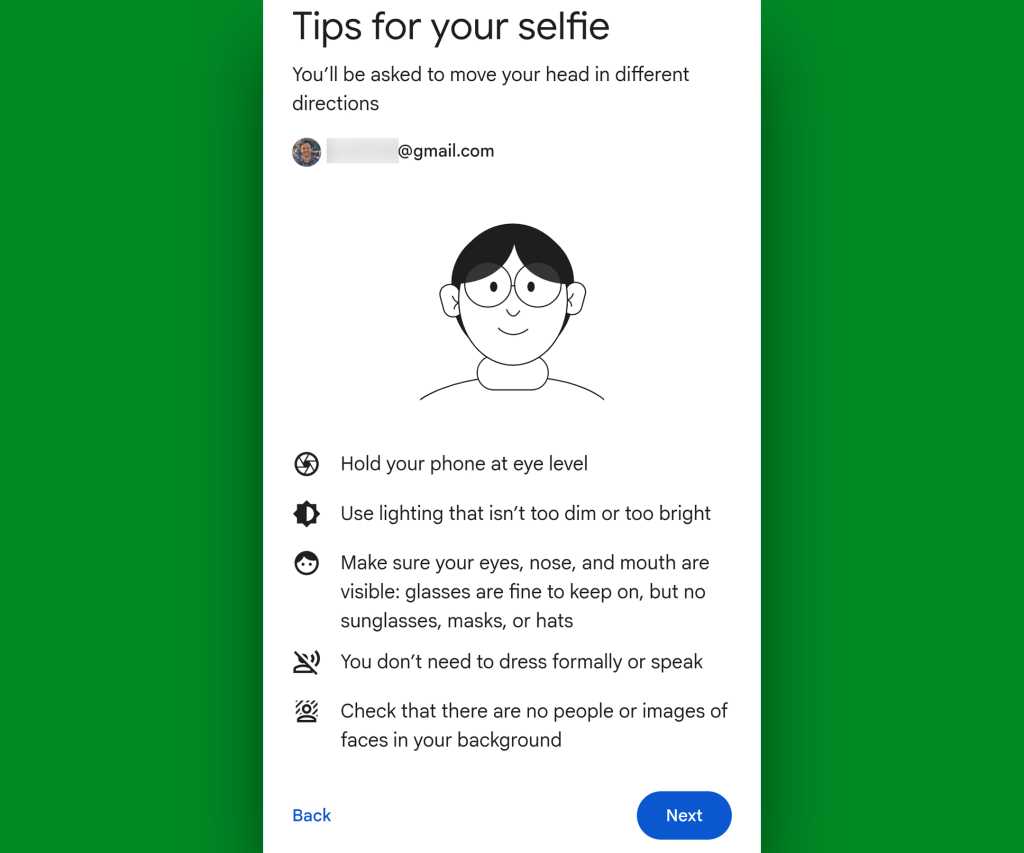
Provided the feature is available on your account now, you’ll just click a couple o’ quick buttons to get the process started, then you’ll follow some simple prompts to stare into your camera longingly for a few moments.

Google selfie security: camera setup
Setting up a Google selfie sign-in is surprisingly swift ‘n’ simple.

JR Raphael, Foundry

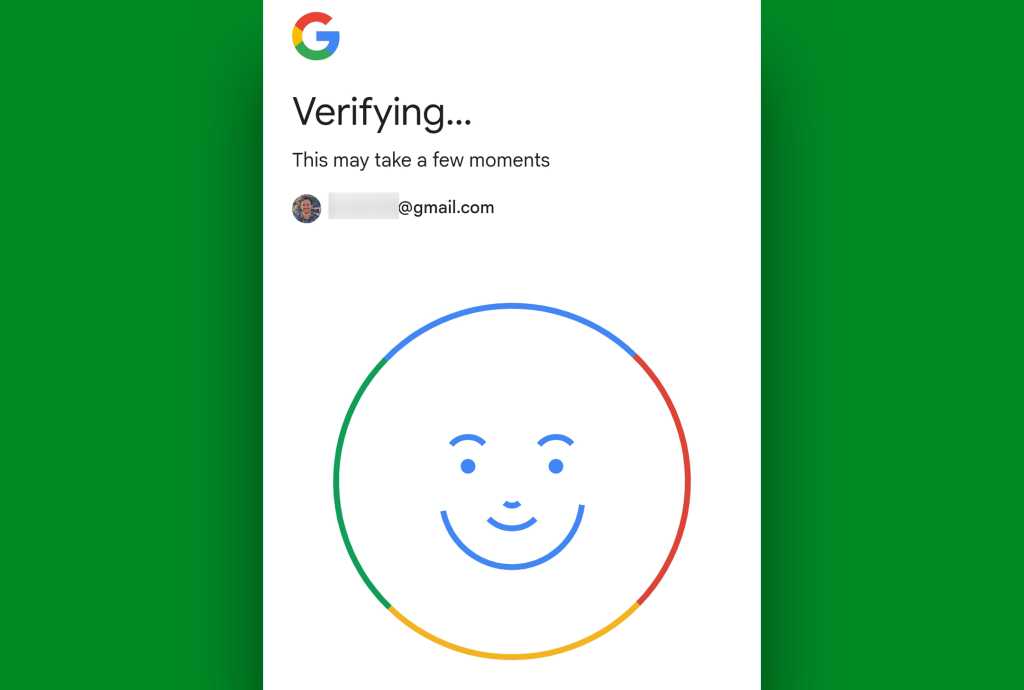
The system will ask you to turn your head in specific directions. Then, it’ll take a handful of seconds to process and save your stunning turn on the virtual runway.

Google selfie security: verification
The process takes less than a minute to verify and save your selfie video.

JR Raphael, Foundry

And — well, that’s pretty much it.

2. Your selfie video is only for access to your Google account — not your phone or tablet

This is slightly confusing, since most modern Android devices offer the ability to use biometrics on the lock screen and show your face to unlock the phone itself — but the selfie sign-in system we’re speaking of here has nothing to do with any of that. It won’t unlock your device in any scenario or have any connection to any specific phone or tablet.

It’s connected purely to your Google account, and its sole purpose is acting as a mechanism to let you sign into that account — not to unlock or access any specific piece of hardware.

Speaking of which…

3. It’s only there as a last resort

Once you set up your selfie sign-in, odds are, you’ll never actually think about it again or have a reason to use it. Anytime you sign into your Google account, you’ll still use your standard password, passkey, and any two-factor authentication you’ve placed on the account.

The selfie path is there only in the event that all those regular methods are for some reason failing you. It’s unlikely, but it’s not impossible. And with your selfie video saved, if that situation ever arises, you’ll have an easy alternate way to prove your identity — by submitting a live on-the-fly selfie video and allowing Google to match it with your original saved one — so you can avoid getting locked out.

4. The selfie sign-in is designed to be both private and secure

When it comes to matching a saved selfie video and a new live one, Google requires different movements to verify validity and avoid any impersonation attempts.

Google says the data from your saved selfie video is always encrypted, too — not just in transport but also at rest, when it isn’t actively being used — which means no one else should ever be able to access it or do anything with it. You can always opt to delete a saved selfie video entirely, if you want, via that same Google account settings page.

And on that note…

5. You can prevent your selfie video from being used for any form of training

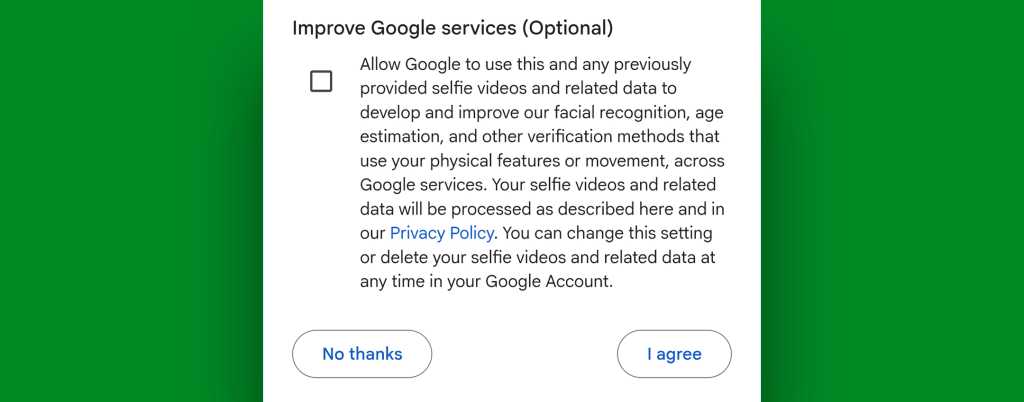
Lots of folks are understandably uneasy about the idea of their personal data — including their personal faces! — being used for any manner of machine learning these days. Google does ask for permission to do that and anonymously lean on your submission to help improve its facial recognition systems when you sign up for the selfie sign-in option, but critically, you can easily say no thanks.

When you’re in the midst of the selfie sign-in setup, look for the option to “Improve Google services.” It’ll appear at the bottom of the initial service agreement.

Google selfie security: privacy
Keep that box unchecked, and your selfie video will never be used for any form of training or other purposes.

JR Raphael, Foundry

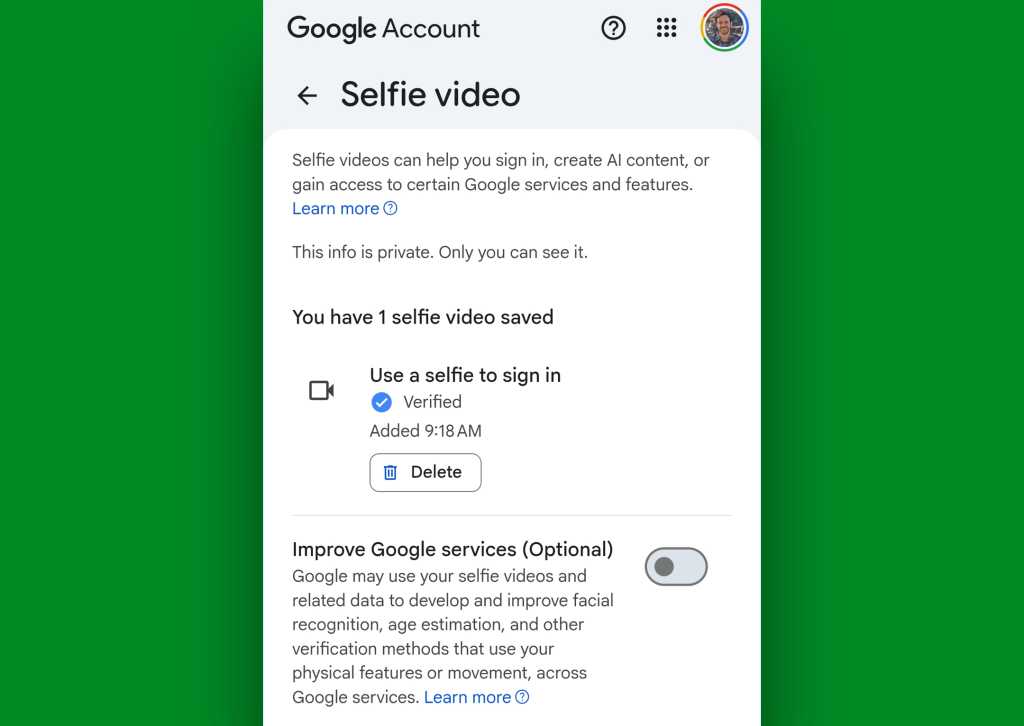
As long as you don’t check the box in that area, your selfie sign-in data will never be used for anything other than its primary intended purpose. And if you ever change your mind or are unsure of how you initially answered, you can also always revisit and revise that decision on that same Google account settings page.

Google selfie security: privacy option
The option to opt out of model training is always available on the selfie video settings screen.

JR Raphael, Foundry

6. Selfie sign-ins are (so far) only for individual Google accounts

With this initial rollout, Google’s selfie sign-in option is not available for accounts that are part of a Google Workspace team or organization. That kind of makes sense, since in any such situation, you could always turn to an admin for help if you were ever to lose account access, anyway.

This is something more intended for individual Google accounts, where you’re on your own and largely out of luck if you ever lose access. So whether you’re conducting business from an individual account or using an individual account alongside a Workspace-connected company sign-in, it’s something to consider for that part of your online identity.

The only other noteworthy asterisk is that selfie sign-ins won’t work with accounts where Advanced Protection is enabled. Advanced Protection is an extra-heightened form of Google account security created for people in the public eye or otherwise at an elevated risk of a targeted attack, and so it deliberately makes it much more difficult to get into an account in ways that go above and beyond what’s necessary for most ordinary organisms. If you have Advanced Protection on for your Google account, selfie sign-in won’t be available for you.

But for the rest of us, it’s a powerful new path that could prevent an unthinkable nightmare — and all you’ve gotta do is take two minutes to set it up now and then hopefully forget all about it.

Got Android? Check out my free Android Intelligence newsletter to get an exceptional new tip in your inbox every Friday.

‘Apple is one of the greatest companies of all time,’ says OpenAI

In an open letter, OpenAI this week turned to the court of public opinion in its existential war against Apple with a public notice in which the company refutes the iPhone maker’s claims concerning wholesale use of confidential information.

You can detect the depth of enmity between both firms in OpenAI’s opening lines to its letter, which begins: “Apple is one of the greatest companies of all time,” and then moves swiftly into defending itself against company’s claims, while attempting to characterize Apple’s complaints as weak.

What Apple claimed

As reported elsewhere, Apple filed suit against OpenAI in the US District Court for the Northern District of California on July 10. The litigation names OpenAI Foundation, OpenAI Group PBC, io Products, Chang Liu (former senior systems electrical engineer), and Tang Yew Tan (former vice president of product design for iPhone and Apple Watch, now OpenAI’s chief hardware officer), and alleges breach of intellectual property agreement and misappropriation of trade secrets under the Defend Trade Secrets Act. The company has since then filed preservation orders to protect evidence. 

Apple’s complaint is more detailed than that. Among many other things, it claims Tan allegedly directed job candidates still at Apple to bring “actual parts” to interviews for “show and tell” sessions. It also alleges Tan distributed an internal Apple document describing Apple’s own departure security protocols to new hires before they resigned. Liu is separately accused of failing to return an Apple laptop and using it to download confidential technical documents.

OpenAI’s rebuttal

Now, OpenAI argues Apple’s trade-secret lawsuit is based on factual errors, poor communication and misleading claims. It says Apple mistakenly contacted the wrong OpenAI lawyer after confusing two people with the same surname, falsely claimed a phone call had occurred, then acknowledged both mistakes without raising the allegations later included in the lawsuit. (Apple says it sent OpenAI a warning letter back in February with no response, which undercuts OpenAI’s “we offered to resolve this before litigation” statement.)

OpenAI argues that Chang Liu was responding to requests from Apple colleagues seeking help locating Apple files, reflecting Apple’s own access-management failures rather than misconduct. It also claims Tan consistently instructed OpenAI staff not to seek or use competitors’ confidential information. OpenAI maintains it neither possesses nor wants Apple’s trade secrets, offered to resolve concerns before litigation, and finally argues that Apple’s request for a preliminary injunction is unnecessary and unsupported.

What Apple might actually argue

Will Apple see it the same way? That seems unlikely, in part due to the extent of the claimed infractions. Apple will point to the hundreds of former Apple employees now at OpenAI, including former Chief Designer Jony Ive. In doing so, it will likely argue that the remit of the case is not defined by erroneous legal correspondence, though that is probably seen as an error. Instead, the substantial claims it’s likely to focus on are that OpenAI has been engaged in a multi-front attempt to accumulate information pertaining to Apple and its design processes through recruitment and the way it recruits.

It’s feasible both arguments have some validity. OpenAI might be right in pointing out weaknesses in Apple’s own approach to internal communications in terms of secrecy. And Apple is correct in pointing out that OpenAI moved to abuse those vulnerabilities, weaknesses in its approach that have only been identified during OpenAI’s campaign to grab secrets.

While the Apple lawyer’s error in approaching OpenAI might be an unforced error that helps the AI firm cast doubt on Apple’s claims, it doesn’t necessarily invalidate them — and both sides believe themselves to be justified. Deciding which company is in the right will be a matter of law and not of public opinion.

Which side does the smoking gun face?

To prove its position, OpenAI shared some correspondence. These communications do seem to show a failure at Apple to properly implement device management over employee accounts, including the claim that personal iMessage accounts are routinely used to share corporate correspondence. That may be true, and shouldn’t be – it’s an obvious weakness in corporate security.

At the same time, the correspondence also shows hints of job opportunities at OpenAI for and to a former colleague, which kind of proves part of Apple’s point in terms of steady employee poaching. “I can always give you some fun side projects,” one message said. 

Of course, interaction between former colleagues is inevitable,. But at the level of seniority here, it feels plausible this could be in breach of any off-ramping arrangements reached between Apple and its former employees. No doubt, courts will decide that – though it does underline Apple’s claims that OpenAI instructed former Apple staffers about how to leave without reaching such agreements.

“This isn’t Apple getting it wrong. It is OpenAI getting caught with its hand in the hardware cookie jar and then writing a blog post about how the jar was left unlocked,” US tech thought leader Brian Roemmele wrote on X.

Where happens next?

Ultimately, what comes next is up to Apple and OpenAI. The two companies might reach a deal out of court, or be forced into an agreement by the legal system. The existential nature of the rivalry suggests the latter, rather than former.

It is also very telling that OpenAI, which now has more than 400 former Apple employees on its teams, including many former designers, also claims: “Apple’s request for a preliminary injunction is both based on false information and completely unnecessary because we do not have, nor want, any of their trade secrets. We’re much more interested in building innovative products and technologies that push the frontier.”

While Apple hasn’t yet responded, it will be interesting to see whether whatever hardware OpenAI ships looks and behaves like any released or unreleased Apple products; the latter will now be able to bring details of its own historical project design decisions — and the people who made them — to court.

I think this case will play out over time. Perhaps the most interesting question is whether OpenAI has taken what it knows about Apple to create its own internal product design and development LLM models. Would that use be legitimate? It would, after all, not be the first time an AI company has trained its models on other people’s creative energy.

You can follow me on social media! Join me on BlueSky,  LinkedIn, Mastodon and subscribe to The Core.

AI agents get better at IT ops, but only with humans in the loop

AI agents are performing roughly 1 in 3 actions in enterprise IT workflows (but that share is rising quickly), while human analysts are rejecting about one-quarter of AI-proposed actions (but that rate is falling), according to a new study of tens of thousands of human-AI interactions. Operational data, rather than underlying AI infrastructures, is often the culprit when things go wrong.

Human analysts are approving the most consequential actions, managing exceptions, and supervising and shaping agentic systems, while AI agents are carrying out routine tasks and executions, automation platform provider Fixify found in the study.

“That may sound less dramatic than replacing the help desk,” Matt Peters, Fixify’s co-founder and CEO, wrote in a blog post. “It’s also a much more credible path to changing how IT work gets done.”

Building scaffolding

Fixify identified four steps of agentic work: Planning, proposing, approving or declining, then acting on approved steps.

It analyzed nearly 18,000 plans and over 147,000 actions executed by agents across 40 companies over a three-month period, finding that agents are taking over one-third of IT actions, most notably in software, applications, security, and collaboration work where requests tend to be “repeatable and easy to reverse.”

Tasks that are well understood and that present low risk are best suited for the current generation of agents, Peters wrote. Human analysts remain closely involved in higher-stakes areas like identity verification, setting up and removing IT access (onboarding and offboarding), and hardware environments.

However, AI’s share of the work is increasing as feedback loops improve: Over the three-month period, human approval of AI-proposed actions rose from 23% to 41%, and rejection fell from 27% to 16%, Fixify found.

The company identified six types of actions in AI automation. Running a skill — actually doing something — accounted for 39.4% of all actions). Most of the rest were coordination: sending a message to the human requester (27.7% of actions), leaving an initial comment (13.2%), giving instructions to a human analyst (9.8%), or waiting (8.8%). Running entire workflows accounted for just 1.1% of actions.

AI is building “scaffolding” that wraps around meaningful changes, often planning far more scenarios than the agent will execute. Typically, agents map out 15 possible actions but run only two, Fixify said.

“The agent maps the paths a request could take, then walks down the path that makes the most sense as it meets reality,” the study said.

Peters pointed to one example where an AI agent identified which team needed access to process a high-volume type of ticket. Rather than fully automating the process, the agent did the initial triage, asked questions, then routed tickets to the team that had the information to act immediately.

“We didn’t need a world-ending hive mind,” he said. “We just needed to point a little conversational intelligence in the right direction.”

When AI breaks down

IT automation typically involves analyzing tickets and moving them along; in other words, low-risk tasks.

But agents do participate in areas like security (albeit only about 6%), most notably adding and removing people from groups or channels, unlocking accounts, resetting passwords, analyzing multi-factor authentication (MFA), provisioning (or deprovisioning) accounts, and assigning software licenses.

However, this identity-lifecycle work is where agents failed the most, particularly in onboarding and offboarding and identity-access management (IAM), the study found. “Hardware and connectivity changes rarely fail; identity-lifecycle changes fail three-to-nine times as often.”

Why AI breaks down

Thanks to human-in-the-loop controls, Fixify was able to analyze scenarios where agent recommendation diverged from human judgment. This occurred about 23% of the time.

The largest failure category (nearly 50%) was ‘target not found,’ meaning the agent couldn’t uncover what it needed. This typically comes down to poor data: A user, group, account, or resource was not where the system expected it to be. When people change teams, groups are restructured, accounts are renamed, or work has already been done but not reflected in the system, this is more of an identity hygiene problem than an AI problem. The system needs cleaner and more current data.

Invalid inputs accounted for around 29% of failures, followed by unhandled errors, denied permissions, or invalid operations or configurations. The latter signal “real breakage” in integrations, according to Fixify.

AI becomes more sophisticated over time

The good news is that AI automation improves over time, even if it might take a while. In hybrid systems, humans keep the most consequential changes under their own control, and iterative rejection and approval helps AI learn.

Over time, agents’ plans get leaner and they start to re-plan when conditions change, rather than pre-planning all kinds of scenarios that may never occur. “That’s a sign of sophistication,” the study said. “Adapting in the moment is a more advanced behavior than trying to pre-script every contingency.”

In turn, humans second guess the system less often and feel comfortable handing off more work. Instead, they control how agents behave, make high-impact decisions, and handle exceptions. “The hardest requests remain human-heavy, especially those that require repeated replanning or contextual judgment,” the study said.

How teams can adapt to AI agents

As agentic AI becomes embedded in more workflows — and at deeper levels — enterprises must evolve to accommodate, Fixify emphasized.

This means investing in clean identity data and building strong playbooks, review workflows, and reliable integrations.

Teams should judge agentic tools by their supervision loop and view rejections as a training process, Fixify advised. Analyst time, queues, and metrics should be built around reviewing proposals. Agent replanning can be seen as a routing signal: A single replan might indicate healthy adaptation, while repeated replanning means ambiguity, irrelevance, or unclear policies.

“Make the review surface easy to understand so analysts can assess proposed actions and make quick decisions about how to proceed,” the study advised. “This is where the analyst’s attention belongs.”

Surviving AI: Navigating workload creep, AI slop, and the new tech career playbook

After more than 30 years the cybersecurity field, Keith Jones recently realized that his role had changed, from being a single contributor to manager of a fairly large team. And this team was getting a lot accomplished — tasks that used to take up a huge chunk of his workday.

No, his company hadn’t hired a group of new employees to work under him. He simply accelerated his use of artificial intelligence tools. Now, instead of grinding through a lot of basic tasks, that work is done for him while he focuses on bigger-picture work.

“It really feels like I have a team behind the scenes, but what I have is Claude [Anthropic’s AI tool],” says Jones, who currently works as a cybersecurity researcher. “I’ve been thinking for the last several months about how much differently I work now than I did a year ago, when I would sit and write all the low-level stuff before I could get to the 10% of the good stuff I really wanted to focus on. Now I can sit back and say, ‘Give me three different ways to solve this problem.’”

width="1024" height="678" sizes="auto, (max-width: 1024px) 100vw, 1024px">

Keith Jones, cybersecurity researcher

Keith Jones

Most people working in the technology field, like Jones, have had to figure out how best to work with AI. The technology has come on strong, with many companies making its use mandatory and actively evaluating whether employees are faster and more efficient because of it. And while it is boosting productivity and taking over the burden of repetitive, manual tasks, it’s also creating a new level of stress and a dizzying kind of mental exhaustion.

So what can tech workers do about the heavier mental load that comes with using AI, on top of escalating worries about the safety of their own jobs? AI users and industry analysts say there are specific ways to ease some of those burdens and prepare for a changing job market.

Combating the slop factor

When it comes to working with LLM tools, a well-known issue is dealing with AI workslop and hallucinations. The slop is AI-generated output that is low-quality, buzzword-heavy, and generic. It also can refer to bloated, boilerplate code. Hallucinations are inaccurate or completely made-up results. AI routinely offers this messy or incorrect information with total confidence, giving users a false sense of security.

Using this bad data can lead to anything from minor software bugs to severe liabilities. “Don’t believe the machine is infallible,” says Craig Shue, computer science professor and department head at Worcester Polytechnic Institute (WPI). “That’s when bugs will start working in. There’s a lot of misinformation on the internet, and that could be what the LLM is grabbing and using.”

width="1024" height="674" sizes="auto, (max-width: 1024px) 100vw, 1024px">

Craig Shue, computer science professor and department head at Worcester Polytechnic Institute 

WPI

Here are ways to combat the problem:

  • Make AI show its work: Ask it to cite its sources or explain its reasoning. Example prompt: Explain the logic and show the steps before writing the code.
  • Give the AI a source of truth: Instead of letting the AI search the internet for information, give it the exact source material (reports, transcripts, data sheets) to base its output on, telling it to use only the information provided.
  • Validate. Validate. Validate: Never let AI publish code directly to the main project without first reviewing and running it locally. Similarly, never take AI output and simply move it on to the next person in the project. Every single AI output needs review.
  • Don’t be fooled by confidence: As with managing a human, question the output. When you’re busy or tired, it’s easy to just go with the results it gives you. Don’t. Always analyze and question it.

Taking on AI-driven workload creep

Let’s face it: The great promise of AI is that it will take over repetitive, manual tasks, which will save you an incredible amount of time. What isn’t talked about as much is that it also can create a new workload — one that can be exhausting in a whole new way.

“Is AI saving people time? The short answer is yes,” says J.P. Gownder, vice president and principal analyst with Forrester Research. “But people also are being overwhelmed with overproduced things. Everyone wants to look busy and they’re producing more, but not necessarily better. Managers have to push back on that or it’s not really saving you time.”

In a multi-year study by Upwork, the largest online freelance marketplace, 77% of employees reported that AI had increased their workload. The report noted that a boost in productivity comes with a “significant emotional and relational cost,” with 88% of workers who saw the highest productivity gains also feeling burned out. And IDC’s Future of Work 2026 survey reported that 24% of IT workers report increased workload as a top AI concern.

Here are ways to combat the problem:

  • Keep it short: Part of the prompt — always — should be to tell any AI tool to be concise.
  • Build an anti-slop culture: Don’t simply accept and pass on workslop. It’s insulting for a co-worker to have to deal with pages of largely useless information.
  • Filter the noise: When everyone on a team starts using AI, the volume of Slack messages, long-form memos, and data reports skyrockets. Don’t treat it all with equal importance. Practice radical prioritization.
  • Manage the transcript deluge: Stop wading through 40-page meeting transcripts that bury action items. Instead, prompt the system to produce a concise summary focused strictly on deliverables or status updates.
  • Reduce the AI blast radius: When asked to fix a bug, AI tools often rewrite hundreds of lines of unrelated code, multiplying your code review time. Prevent this by instructing the tool to isolate its changes only to the specific function or file in question.

Managing the AI mental tax

Using AI often necessitates a different kind of mental processing, changing what had been the natural pacing of your day and dramatically increasing context switching. Instead of simply building and testing, someone might be jumping back and forth between auditing, fact-checking, prompting, and re-prompting. To manage strain and protect your focus, new strategies are needed.

Published this past March in the Harvard Business Review, a study by Boston Consulting Group and the University of California, Riverside, surveyed 1,500 workers and coined the term “AI brain fry.” The researchers found that juggling multiple AI tools causes decision fatigue and increases errors.

How to combat the problem:

  • Work in batches: Continuously reviewing AI output as it comes in can quickly lead to mental burnout. Dedicate blocks of time throughout your day to interact with your AI tools.
  • Create analog islands: Your brain needs time to decompress, and that means taking a break from digital processing… and from screen time in general. Make time in your day to step away from screens, such as taking a 15-minute walk or reading a book instead of watching a video online.
  • Know when to step in: Instead of endlessly tweaking prompts to get a perfect result, it is often faster and less mentally taxing to manually write or refactor the final 20% yourself.
  • Create base prompts: Writing custom prompts that include everything from guardrails to tone instructions for every new project quickly drains your mental energy. Instead, build two or three reusable system prompts, such as one for refactoring legacy code and another for drafting API docs, and use them as templates.

Proving your human value in a new job market

With companies regularly using AI-based applicant tracking systems to filter resumes, and AI actively shifting job responsibilities and skills requirements, the strategy for how you apply for roles and handle interviews is changing.

Leo Freitas, an analyst and research manager at IDC Research, says it’s critical for job applicants to show potential employers what they can do that machines cannot. “You need demonstrable achievements,” he adds. “It’s good to show highly human skills.”

width="1024" height="683" sizes="auto, (max-width: 1024px) 100vw, 1024px">

Leo Freitas, analyst and research manager at IDC

IDC

How to combat the problem:

For your resume:

  • Mirror their language: Use the exact language from the job description. Traditional applicant tracking systems rely heavily on structured information and keyword matching, says Teresa Hill, founder and leader of Anchor GTM, a growth marketing consultancy. That means if a posting says “product marketing manager,” don’t just write “PMM.” Write both.
  • Keep it simple: Use standard section headers, like “Experience” and “Education.” Creative alternatives and formatting can confuse parsers.
  • Avoid AI writing: Use AI to help structure your thinking, then edit until the copy sounds natural and authentically human.
  • Swap responsibilities for metrics: To stand out, especially with AI scanners, tie as many bullet points as possible from your work to business outcomes.

For the interview:

  • So, how do you use AI? Every interviewer eventually asks some version of this question. The best answers focus on judgment vs. simply name-dropping tools. Explain what you automate, what you never automate, and why.
  • Show that you’re a gatekeeper: AI tools can generate code or copy instantly, but they also introduce errors. To stand out, show that you know how to audit, verify, and safeguard quality.
  • Focus on learning: Don’t emphasize your expertise with a specific AI tool. Focus on being someone who is adaptable and learns quickly, Hill says. 
  • What sets you apart from a machine: Show, don’t tell. Give work examples that demonstrate that you know how to be creative, collaborative, and problem solve. Show metrics whenever possible.
  • Demonstrate that you know the limits: Make it clear that you know when to use AI and what not to let it touch without heavy review. 
width="1024" height="576" sizes="auto, (max-width: 1024px) 100vw, 1024px">

Teresa Hill, founder and leader of Anchor GTM

Teresa Hill

Future-proofing your career in a shifting tech market

The anxiety echoing through the tech industry is tangible as companies reallocate corporate capital toward automation. While both Gownder and Freitas emphasize that there is far more fear than actual AI-driven layoffs, the shift in corporate spending is undeniably stoking job insecurity.

“There’s this apocalyptical view that AI will take everyone’s job in a few years,” says Freitas. “I don’t see that happening, but many things will change in the nature of how we work. I don’t think the world is going to end tomorrow. But it’s always good to do a self-assessment and look at whether AI can do what you’re doing now.”

How to combat the problem:

  • Use this technology to your advantage: Approach AI as a new tool, not a replacement. Use it to make yourself better and faster at your job. “I look at AI like it’s another new tool, and I’m going to learn it like I’ve learned any other tool,” says Jones.
  • Don’t bury your head in the sand: Take a look at what you do and consider if it could be done by AI.If your role is highly automatable, think about switching to a more advanced position or to a role, like security, that more clearly needs a human in the loop.
  • Take ownership of your career: Expand your knowledge and skills. Find courses and certifications (many are free online) and take advantage of employers’ training programs.
  • Work with the business side: Make sure you understand the business — its long-term goals, competitive market, and jargon. Be the bridge between the technical and business sides of the company, giving presentations and solving business problems with technology.
  • Highlight your in-house expertise: When you have institutional knowledge, make sure you are openly using it to benefit the business. Your knowledge can be your key differentiator.
  • Push the business forward: Think about the next app or customer-facing system that will propel the business forward. Be the one who is advancing the company with tech.
  • Continue to adapt: Don’t get stuck in your anxiety. Keep being curious and working your learning muscles. 

More on AI in the workplace: