Microsoft expanded its sovereign cloud offerings on Tuesday, adding new security, governance and AI capabilities as customers, particularly in Europe, demand greater assurance over where data is stored, who can access it and how critical services operate during disruptions.
The announcement builds on Microsoft’s ongoing digital sovereignty efforts, assisting organizations in applying appropriate levels of control to each workload rather than forcing a rigid, one-size-fits-all approach.
“Organizations are considering more than where data resides. They also seek to understand who can access and operate their systems, how sensitive digital assets remain protected, which technology dependencies matter most and whether critical services can continue as regulatory, geopolitical, security or network conditions change,” Douglas Phillips, president and CTO at Microsoft Specialized Clouds, said in a blog post.
The developments come amid growing international scrutiny of how global tech providers handle sensitive data and the extent of control customers retain over their digital infrastructure.
“Three factors are driving this, including stricter data regulations, rising geopolitical tensions, and growing AI adoption,” said Pareekh Jain, CEO at EIIRTrend & Pareekh Consulting. “Governments and enterprises want greater control over where their data is stored, who can access it, and whether critical systems can operate during disruptions. For instance, governments and big enterprises in Europe are worried about keeping their important data on an American company’s computers. Europe has proposed a new law that would limit the use of US cloud companies for sensitive government data in many areas. Microsoft is responding to these concerns while competing with local sovereign cloud providers.”
New controls across cloud and AI workloads
Microsoft is introducing the Sovereign Control Panel, a unified Azure portal experience that will allow organizations to assess their sovereignty posture, identify risks and gaps, apply controls, and evaluate workload portability. The panel is scheduled to enter public preview at Microsoft Ignite.
Expanding on Azure Key Vault Managed Hardware Security Module (HSM), which gives customers dedicated protection over encryption keys, Microsoft is now extending control beyond its own infrastructure. External key management with Azure Managed HSM is now generally available, enabling organizations to keep root encryption keys in hardware they own and operate on-premises or through a trusted third party.
In limited preview, Azure Confidential Clean Rooms will use confidential computing to support collaboration involving sensitive data, where participants will be able to analyse shared information while limiting broader exposure of the underlying data.
Microsoft is also expanding Azure Local to bring more cloud capabilities into customer-operated environments. The ability to transition workloads between connected and disconnected states is entering public preview. Additionally, DocumentDB and Blob Storage are entering public preview on Azure Local, while SQL Server on Azure Local is already generally available for connected and disconnected deployments.
On the AI front, Foundry Local is scheduled to become generally available at Microsoft Ignite for connected and disconnected operations on Azure Local. It will support local inference and agentic retrieval in natural language, backed by an expanded model catalog from Microsoft, partner networks, and the open-source community.
To further protect data during processing, Confidential Virtual Machines on Azure Local is now generally available, leveraging hardware-encrypted memory and isolation alongside workload attestation before sensitive keys or data are released.
While these additions give enterprises greater flexibility, industry analysts emphasize that localized deployments do not automatically erase vendor dependency.
“Depending upon the deployment model, in the public cloud, enterprises get better visibility, stronger access controls, and more control over encryption keys,” said Ashish Banerjee, senior principal analyst at Gartner. “In the Sovereign Private Cloud, they can operate infrastructure locally and even disconnect selected workloads from Azure. But I would not call this complete control. Enterprises still need to check whether Microsoft remains involved in identity, software updates, management, or technical support for the services they use.”
For customers in the EU and the European Free Trade Association (EFTA), Microsoft is rolling out Data Guardian. Under this model, a trusted regional partner will provide independent oversight of remote access requests by Microsoft engineers. Simultaneously, a Production Touch Ledger will create tamper-evident logs of all technical actions performed.
Microsoft is also broadening its Sovereign Partner Ecosystem, highlighting regional operators like Bleu Cloud in France and Delos Cloud in Germany, alongside independent software vendors specializing in security, identity, observability, and backup.
Geopolitical realities and market limits
Despite these additions, analysts note that technical controls cannot eliminate geopolitical dependence entirely. US hyperscalers (Amazon, Google, and Microsoft) continue to account for roughly 70% of the European cloud market, whereas European providers’ market share has contracted over the last decade.
The new measures introduced under Microsoft Sovereign Cloud do reduce risks but cannot eliminate them. “Local infrastructure, independent encryption keys, and disconnected operations make it harder for external parties to access data or disrupt services. However, Microsoft remains subject to applicable US laws, sanctions, and export restrictions. Enterprises gain greater operational independence but not complete legal or technological independence,” added Jain.
Furthermore, while sovereign cloud capabilities can offer greater control over data, infrastructure, and operations, this often comes with trade-offs in cost, performance, scalability, and access to services.
Banerjee noted that sovereignty should be assessed workload by workload, rather than applied as a label to the entire cloud environment. Greater sovereignty generally comes with greater cost and responsibility. Local or disconnected environments may not receive every Azure service at the same time. Enterprises may also need dedicated infrastructure, specialist skills and separate continuity arrangements. On top of that, they may lose some elasticity and economies of scale.
“So, I would not recommend maximum sovereignty for every workload. Reserve it for workloads where the legal, operational or geopolitical risk genuinely justifies the additional complexity,” added Banerjee.
When an AI pilot in IT operations underdelivers, the first instinct is to question the technology. Was the model wrong? Did the tool overpromise? Did the team pick the wrong use case?
Those are fair questions. But in many organizations, the answer sits somewhere less glamorous: in a configuration management database that hasn’t been reconciled in two years, in asset data in spreadsheets, or in a service desk where three teams use the same category field in three different ways.
AI doesn’t create these problems. It surfaces them quickly and publicly.
The silo problem nobody owns
Most IT environments grew one tool at a time. The endpoint team adopted a management platform. Security brought in a scanner. Service management built workflows in the ITSM tool. Procurement tracked purchases in its own system. Each decision made sense on its own. Few were ever designed to share data with one another.
The result is a landscape where every team holds a partial view of the same environment. The endpoint console shows 9,400 devices. The scanner sees 8,700. The CMDB lists 10,200, including hundreds retired long ago. Nobody is exactly wrong, but nobody is complete.
People have learned to work around these gaps. An experienced analyst knows which system to trust for which question and fills in the rest from memory. That institutional knowledge is valuable, but it’s invisible to AI. And that’s where the trouble starts.
The gaps are organizational, too
Fragmentation isn’t only technical. Ivanti’s 2026 State of Cybersecurity research found that 48% of security professionals say IT teams don’t respond urgently to security concerns, and 40% say IT lacks an understanding of the organization’s risk tolerance. Those aren’t tooling gaps. They’re alignment gaps, and they shape how data is collected, labeled, and maintained across every system AI will eventually draw from.
When AI meets these gaps, the outputs reflect them. An AI assistant asked to list which laptops are missing a critical update may double-count some machines and miss others entirely if the endpoint tool and scanner disagree on device names. An automated ticket-routing model trained on inconsistent historical data learns that inconsistency and repeats it at scale. In both cases, the technology is doing what it was designed to do. The problem is that the organization never agreed on a shared picture of reality.
The flip side is that aligned organizations see measurably better outcomes. At organizations where AI is treated as business-critical, 54% of IT professionals say it makes their work both faster and better, more than double the 24% at companies still stuck in pilot mode. AI doesn’t create alignment. It rewards it.
Building trusted context
The goal isn’t perfect data. That rarely exists. The goal is trusted context: information consistent and current enough that people and AI can act on it with confidence.
Practical steps include mapping where key data lives today and where systems disagree, assigning clear ownership for each critical data domain, agreeing on common definitions for assets and statuses, and automating reconciliation between systems instead of relying on periodic manual cleanups. Tracking data quality as an ongoing operational metric matters too, not just a one-time cleanup.
Starting small helps. Pick one AI use case (vulnerability reporting or ticket triage, for example) and trace every data source it depends on. Fixing alignment for that slice produces visible results and a repeatable model for the next one.
There’s an upside to all of this. AI pilots that expose data gaps are doing something useful: They show teams exactly where alignment breaks down, often faster than any audit could. AI is a mirror, not a magic wand. Teams that treat those findings as a roadmap rather than a reason to abandon AI will be in a far stronger position to scale it responsibly.
In a weird way, I’ve been thinking about the idea of a Googlebook for well over a decade now — despite the fact that such a product has only officially existed for a matter of months.
I’m relatively unusual in the world of tech journalism, y’see, in that I’ve been both writing about Android and ChromeOS since the platforms’ earliest days and actively using devices from both ends of those ecosystems in my own day-to-day life that entire time. Most tech writers tend to be iPhone owners and Chromebook skeptics who see this part of the digital world from an outside view — once a year or so, when significant new devices come along for assessment — without having the perspective of someone who’s truly immersed in it day in and day out.
That distinction is always painfully apparent when you read a review that waxes on endlessly with out-of-touch iPhone comparisons and comments about the limiting nature of Google’s ChromeOS concept — positions that simply aren’t accurate for those of us who live in these ecosystems and embrace the philosophies they offer.
This won’t be one of those reviews, and I perhaps more than anyone have been champing at the bit to get my hands on one of Google’s new Android-ChromeOS-combining Googlebooks since the vaguest concept of these devices first appeared on the horizon earlier this year.
So keep that in mind when I tell you, coming from the perspective of someone who very much wanted to love this: Using a Googlebook is an extraordinarily strange experience — especially when you’re treating it like a regular laptop, as it’s being positioned by Google, and relying on it to get real work done.
But amidst all the oddness, there are some true high points along with plenty of intriguing, if unfinished-feeling, potential.
Here’s what it’s been like trying to actually work on a Googlebook — specifically, the Lenovo Googlebook, which sells for $1,149 (and was provided to me as a short-term loaner from Lenovo for the purposes of this article).
The Googlebook groundwork
First things first, let’s back up a minute and set the stage for what we’re even talking about here.
It’s meant to represent an evolution of sorts from the Chromebook, the initially simple laptop Google launched in 2012 and slowly morphed from a barebones web portal into an “everything OS” — a system that runs web apps, Android apps, Linux apps, and even sometimes Windows apps, for businesses that have specific needs that can’t be addressed in any other way.
But while ChromeOS and Android grew closer and more connected over time, Googlebook OS — the awkwardly clunky name of the operating system at the heart of every Googlebook — sets all of that aside to aim for a fresh start. The software here sports Android at its core alongside a variety of optimizations designed to bring in bits of ChromeOS-like elements and make everything seem more suited to a laptop setting.
With that in mind, starting to use a Googlebook is both immediately familiar and vexingly confusing. The interface feels a lot like Android, which is nice, but it also doesn’t quite feel in line with how you expect to work on a desktop computer. It’s a jarring sort of mashup, and it’s tough to wrap your head around to get comfortable working.
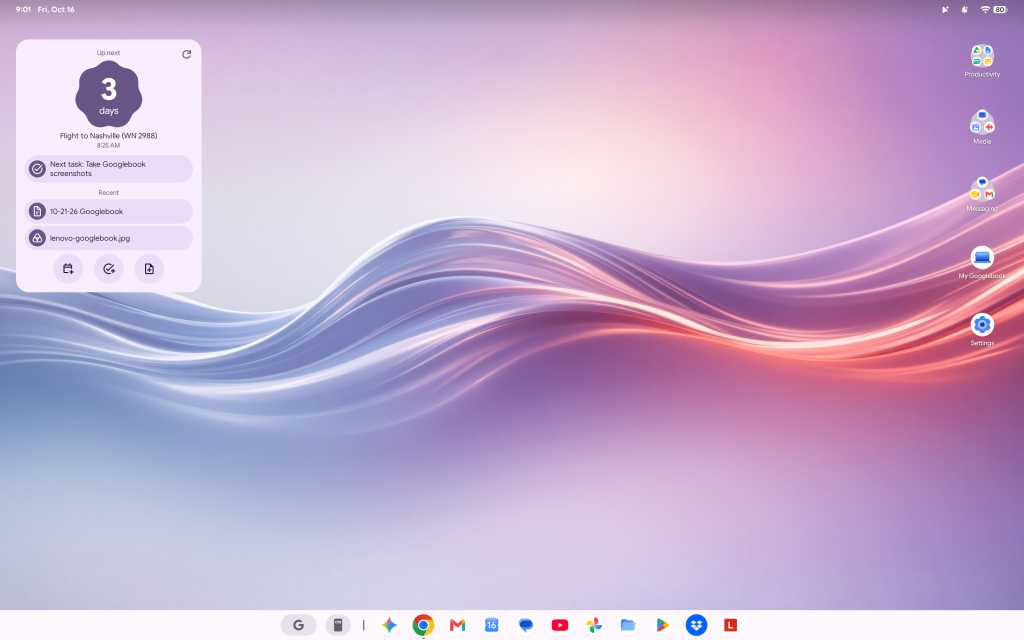
That’s true for relatively small touches like having the clock in the upper-left corner of the screen instead of in the lower-right corner, where’d you expect it on most non-Apple-made computers. It’s a little thing, but it keeps throwing me whenever I try to glance at the time during the day. That approach is similar to Android, yes, but it just doesn’t feel right in this environment or with what pretty much all of us who’d be considering this kind of device have been trained for ages to expect with a desktop computer experience.
The Googlebook’s desktop is similar to Android — but that doesn’t immediately feel natural in a desktop computing environment.
JR Raphael / Foundry
It’s true, too, for keyboard shortcuts, which don’t work the same as they did on ChromeOS — even just basic, common things like opening items on the taskbar. (Googlebook OS does have an impressive array of customizable keyboard shortcuts, if you find ’em, but there’s a ton of new combinations and muscle memory to be learned.)
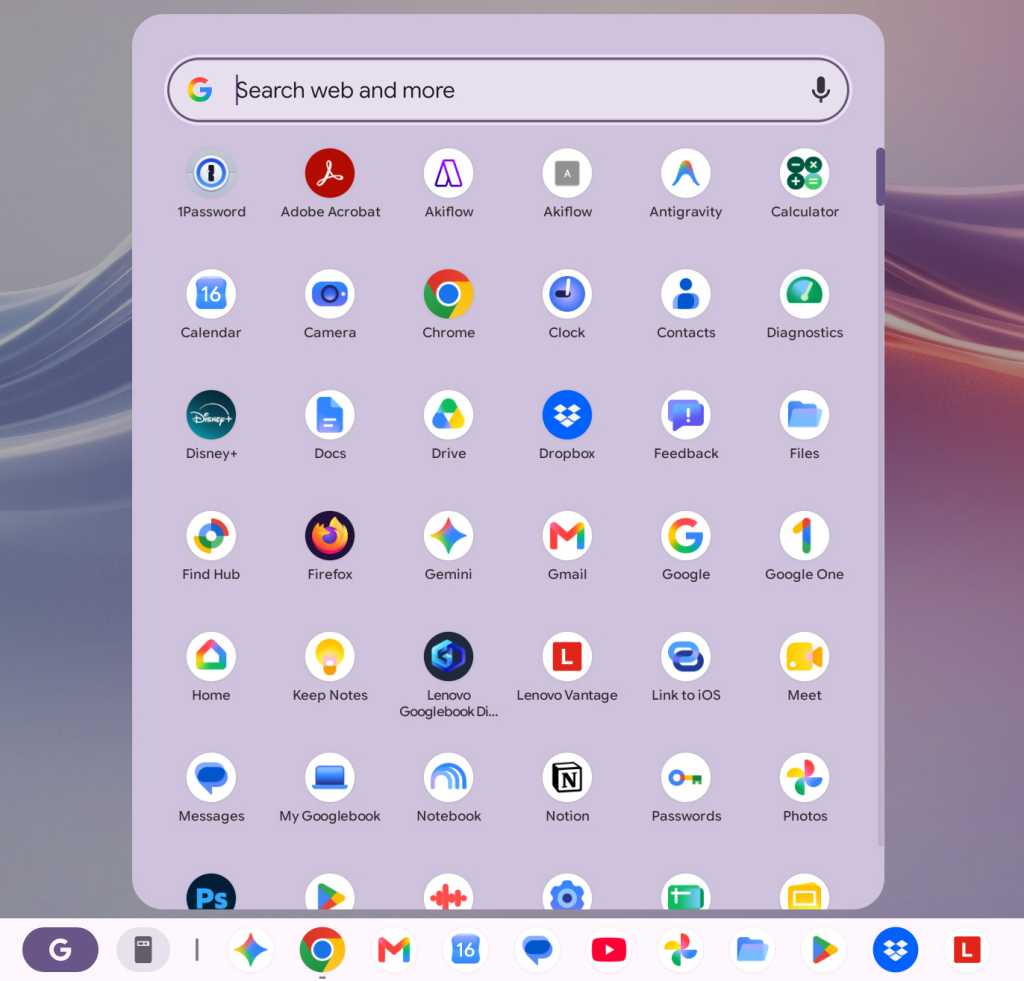
The confusion is probably most prominent, though, on the app front, where Google is really leaning hard into the Play Store and the idea of Android apps being the primary way to get stuff done, despite the fact that Android apps often aren’t ideal — or even available, in some instances — in a productivity-oriented, desktop computing scenario.
The Googlebook app experience revolves primarily around the Play Store — which can be a pro or a con, depending on the moment.
JR Raphael / Foundry
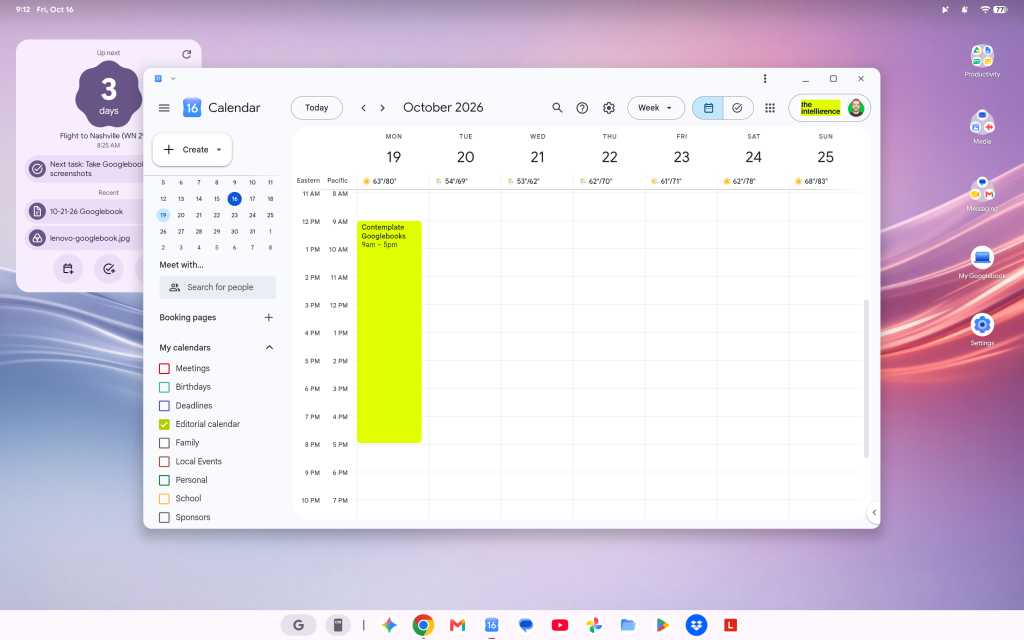
At least one of Google’s own apps addresses this elegantly. Installing Google Calendar from the Play Store basically just gives you an app-like shell around the Calendar website, and you can use the Android app’s widget alongside that, if you want. (The downside is that you can’t use the equivalent Android app in full even if you want to, as there’s no straightforward path to install it — and, strangely, the same web-widget combo is not available with other Google apps, like Gmail or Drive, which give you only the web version and no option to use any associated Android widgets.)
The Google Calendar app on a Googlebook is basically just the Calendar website, though you can still use the Android app’s widget alongside that.
JR Raphael / Foundry
And since the version of Chrome on a Googlebook looks and feels like the full desktop version of the browser — like what you’d expect on a Chromebook or any other desktop computer — relying on this unusual mix of web and Android interfaces for productivity is mostly OK. Mostly.
Working in Docs, with as few as five or six tabs open, I continue encountering an occasional issue where the tab just blanks out for a second or two and then comes back — which, suffice it to say, isn’t exactly optimal for working.
The email app I use, Superhuman, appears to be completely incompatible here. The web version (which is powered by a Chrome extension) errors out anytime I open it, and the Android app is clearly not meant for large-screen, keyboard-and-mouse use and presents an incredibly awkward experience as a result.
The productivity tool Notion, meanwhile, came up for me as one of the Googlebook’s suggested tools that’s optimized for desktop use, so I followed that direction and installed the Notion Android app — only to find that the app is much more awkward and limited on a laptop than the regular Notion web experience, where all the functions are available and the keyboard shortcuts work as expected. So I decided to try to install the Notion web app for easy ongoing access to that, and I encountered a mysterious error.
Trying to install certain common web apps results in a frustrating error.
JR Raphael / Foundry
D’oh.
Then there’s something like Slack, which you can install from the Play Store but with an accurate warning that it’s “better on the website.” So, OK: You go to the website, try to sign in and install the web app version of it from there, and…there’s that blasted “cannot be installed” error again. (Google says it rolled out an update last week that allows any web page to be installed as a web app, but as of this writing — even with that update present on my device — the same error-encountering pattern persists.)
Other apps appear to work fine but then behave in odd and unexpected ways. I tried to install the Android version of Vivaldi, for instance, and it installs and opens without issue — but then returns an error anytime I try to actually open a website within it. That definitely doesn’t happen on a Chromebook, nor do the other aforementioned issues.
There’s just a lot of weird stuff like that, where it feels like a typical Google not-quite-fully-baked product. To be fair, that may be at least in part because of third-party app developers not yet supporting what needs to be supported for full optimization in this new environment — but either way, that’s the experience you get on a Googlebook right now, and it’s an all-too-familiar chicken-and-egg challenge that there’s no telling how long might take to see resolved.
On a somewhat related note: While the ability to install Linux apps is technically present on a Googlebook, it isn’t at all a user-friendly experience. Linux app installation is available only in a limited manner within the confines of a command-line terminal, and any such programs consequently don’t integrate into the launcher or the main Googlebook interface. That means there’s no real way to use them as a part of the standard Googlebook experience — which is a shame, as having those more traditional desktop apps available on ChromeOS went a long way in filling in pertinent function gaps for a lot of people and businesses. (Google says better Linux app support is vaguely “on the roadmap.”)
The various layers Google created to make Windows apps available for businesses in ChromeOS aren’t present in this environment, either. The official line, as relayed to me by a Google spokesperson, is that “Googlebook takes a fundamentally different architectural path than previous platforms” and they “aren’t attempting to patch together legacy PC software layers or rely on Windows emulation to make a laptop functional”:
Instead, Googlebook OS is built directly on the Android tech stack with the desktop foundations of ChromeOS, pairing the world’s largest native app ecosystem with an uncompromised, full desktop Chrome browser.
This makes it easier than ever for developers to build a true desktop-class app experience.
That’s all noble enough in theory — but as a prospective Googlebook owner right now, what good does any of that do when most developers haven’t yet built those “true desktop-class app experiences” for this environment? Or when you’re a business user whose company has the very same sort of “legacy” software requirements that led Google to work so hard on Windows app support for Chromebooks and maintain that option in that arena?
Pros, cons, and more Googlebook confusion
Let’s break from the strange stuff for a minute to focus on some positives — because, again, there is something undeniably cool about experiencing Android in a laptop form and seeing all the ways a Googlebook works hand in hand with an Android phone to make life easier.
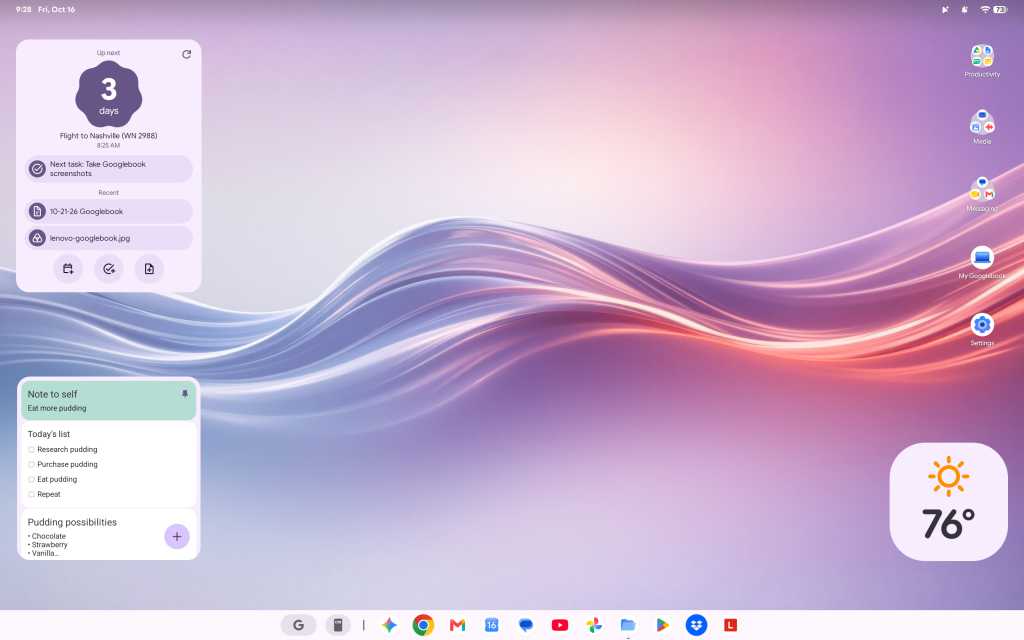
First and foremost, Googlebooks stray from the longstanding minimalist Chromebook standard to give you a fully customizable desktop — with the ability to create any arrangement of shortcuts and widgets, just like you can on an Android home screen. That is absolutely a welcome progression from the more limiting ChromeOS approach and something I’d long hoped to see in that domain, and having those familiar forms of interactive info right in front of you while working is an incredibly helpful addition.
Having a fully customizable desktop, with regular Android widgets available, is a significant leap forward for the Googlebook.
JR Raphael / Foundry
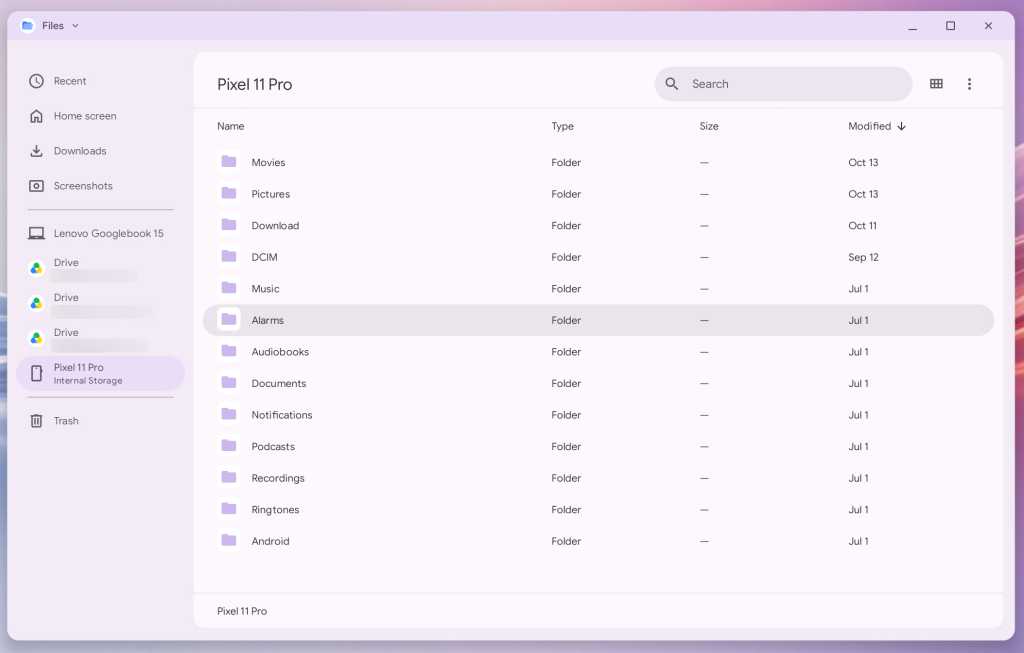
Being able to easily access the files on your phone without any extra hoop-jumping is also a nifty touch, for the moments when such a need arises. Once your Googlebook is paired with your Android phone, you simply open the Files app on the laptop, and you can see and interact with any files on your phone right then and there. (That said, the Files app is otherwise much more barebones and limited than its ChromeOS equivalent, unfortunately — so you can’t, for instance, drag and drop directly from the phone to any specific folder on your local or Google Drive storage.)
The Googlebook makes accessing files on your Android phone delightfully easy.
JR Raphael / Foundry
As far as hardware is concerned, Lenovo did a bang-up job with its inaugural Googlebook device. This is one seriously nice laptop — a pleasure to hold, with an almost silky-feeling smooth texture on the top and a thoughtfully ridged bottom for extra grippiness when you carry it. The system has a beautiful (and big!) 15.3″ display, an excellent keyboard and trackpad, and surprisingly great speakers. Those boxes are all checked off.
The Lenovo Googlebook is a sleek and premium laptop with all the right elements in place, as far as hardware is concerned.
Lenovo
But it’s the experience inside the hardware that means the most, here in particular — so, back to that:
Native app installation aside, one key selling point of the Googlebook is how it’s able to stream apps from a connected Android phone — letting you run an app from your phone on the computer, in other words, without having the app installed locally on the Googlebook itself.
It’s a slightly confusing concept to wrap your head around, especially since you can also install most of the same apps from your phone directly onto the Googlebook if you want (and, given that this is a native Android device, installing and running Android apps on it is absolutely smoother and snappier than what you typically experience on a Chromebook). Because of that — just like with the equivalent streaming option that had been available on ChromeOS in recent years — it seems like something that’s bound to be more befuddling than beneficial for most people, most of the time.
Android app streaming presents some perplexing overlap by allowing you to remotely run many of the same apps you could also install directly on the Googlebook.
JR Raphael / Foundry
That being said, I have had a couple of situations come up where it seemed like the feature might be handy. First, I needed to get a two-factor authentication code out of Authy, which is available only as a mobile app. A perfect use-case, right?
Well, not exactly: The Googlebook wouldn’t let me stream the Authy app from my phone and instead gave me an error: “Can’t cast content. This content is restricted.” So then I thought maybe I’d just install Authy directly onto the Googlebook instead, but alas: The app “isn’t available on Google Play on this device.” Bah.
Another time, I tried to open Google Wallet from my phone to get some info off my insurance card, which I have stored in that service. That worked, at first — but then the app kept hanging on a loading screen anytime I tried to open anything.
The one scenario where the app streaming has been helpful is with notifications: Anytime you get a new notification on your connected Android phone, it shows up as a pop-up in the upper-right corner of the Googlebook display. The same actions that’d be present on the notification on your phone, such as marking something as read or replying in-line, are also present on the computer, and you can click on the notification to open the associated app in full on your laptop — just like you would on your phone, only everything happens within a window on the Googlebook.
That’s a clever little sleeper feature and arguably the best part of the app streaming capability, even if you don’t necessarily think about the fact that you’re using app streaming when it happens.
Another key selling point is the addition of AI-oriented features into the Googlebook operating system. This includes a Magic Pointer feature that lets you wiggle your cursor to summon Gemini and ask it about any specific area of text or visual on your screen — which is fine but not something I find myself actually using often. Its most useful-seeming promise is being able to act on information, like creating a calendar event based on a specific area of an email or text message on your screen, but its accuracy in getting the details right in such scenarios has been pretty hit and miss in my experience.
Then there’s the integrated Rambler system for conversational voice-to-text conversion (as seen on Google’s recent Pixel phones). It works well, but by design it isn’t a direct dictation tool; instead, it adjusts and rewrites your rambling speech (hence the name) to make it better, in its view. That makes a lot of sense when you’re spouting off a quick text message while walking or driving, but unless you don’t mind losing your own specific style, intentions, and voice with longer computer-crafted communications, it doesn’t seem like something you’d be using much in a business capacity — though it can certainly be handy to have available on occasion.
As is often the case with Google products and AI features in particular, some of the smaller, less headline-making touches on the Googlebook are much more interesting than the flashy marquee features.
All in all, it’s a perplexing picture.
The Googlebook productivity puzzle
More than anything, the question that keeps coming to my mind — again, as someone who fully embraces Android and frequently works on a Chromebook — is simply: Who is this meant to serve? And, in its current state, for whom will it be a meaningful upgrade and enticement over other existing options?
I keep thinking how this exact setup would make for an absolutely brilliant souped-up Android tablet interface, with the right kind of hardware around it. You’d have the familiar Android-like environment, optimized for a larger screen, and the ability to pair that with a more desktop-like experience in the core Google apps — including Chrome, for a less limiting active web experience when you connect a keyboard (or flip around a convertible device to have one present).
As the Googlebook stands now, though, I just don’t know that it’s a great replacement yet for a Chromebook — or any other laptop — particularly when it comes to getting actual work done. At best, it feels like a fairly linear progression with some awkward adjustments and asterisks. At worst, it’s gonna be a real challenge for some people to use in the way they need a laptop to work. And I’m just not sure what’s being added, from a practical perspective, that makes it all worthwhile.
What we can say is that Google has a history of launching products that are still rough around with the edges, and sometimes, those products evolve over time — sometimes quite quickly! — and end up becoming incredible. Heck, think how much ChromeOS changed from its earliest form to the way it is today.
At the same time, Google also has a pesky habit of pivoting, giving up, and failing to follow through on once-heavily-hyped products. A fair amount of the Googlebook’s early shortcomings come down to convincing third-party developers to buy into the platform and invest the resources in making their apps work well on it, too — which is the exact same chicken-and-egg challenge that’s kept promising Google concepts from blossoming before.
For now, the Googlebook is an awkward start with plenty of potential. Where it goes next is anyone’s guess — and something that, to some degree, may depend on how many people are willing to take the leap with it early and wait for it to evolve.
The regulator has published a consultation document that proposes requiring Apple to allow competitors to use the near-field communication (NFC) chip on its devices to enable alternative payment systems on iOS on “fair, reasonable, transparent and non-discriminatory terms.”
The regulator says action is required because UK businesses have complained that Apple’s existing NFC access arrangements are not commercially viable.
30% of UK adults use Apple Pay?
The regulator also revealed some interesting statistics concerning use of contactless tech in the UK:
Contactless payments represent 39% of all payments, compared to just 3% of transactions a decade ago.
62% of adults currently use a digital wallet.
50% of those use Apple Wallet — which implies that around 30% of UK adults use Apple Pay.
“These proposals open the door to more innovation, more choice and economic growth, including in the UK’s important fintech sector,” said Sarah Cardell, chief executive of the CMA.
It’s not clear if those companies will take advantage of this forced liberalization. The CMA tells us that the only services that have done so in the EU, where Apple has already been forced to open up NFC, have all been transnational entities, including Vipps, PayPal, Klarna, Curve, and BBVA. Are consumers flocking to these services to rejoice in this new market liberalization? While this open NFC has only been in place a few months, I don’t think so.
Who will really benefit from this?
Cardell also said, “By removing barriers to entry, we can help create the conditions for brilliant British businesses with great ideas to develop new products and services here — from payment apps and digital IDs to travel passes and digital keys.”
That seems highly speculative to me, but I can see UK banks offering up digital payments directly via Apple’s NFC as the most likely outcome of the new rule. In a statement, David Geale, executive director for consumers, payments and competition at the Financial Conduct Authority, said, “Opening up this technology will also support the expansion of open banking, enabling more people to make payments directly from their bank accounts.”
I imagine the banks will turn out to be the real motivation here. To my mind, it suggests the sector wants to use regulation to muscle in on the ecosystem Apple has made and wants to make direct use of NFC on iPhones to cut Apple out of the revenue generated by these payments as much as possible.
The CMA admits, after all, that part of the reason it began this work was because it had complaints from competitors. Lenders and fintech businesses have challenged the 0.15% fee Apple takes on credit card transactions carried out via Apple Pay. The inference isn’t hard to see. With 39% of all payments made by adults in the UK being contactless, those tiny payment processing fees look like profit to banking shareholders, and they want it back.
Apple responds
They won’t get it all back. Even the CMA concedes that Apple deserves a “fair reward” for providing access via its platforms and ecosystem, but I doubt it will hang onto as much as it makes now.
In a statement, Apple said, “We do not believe the CMA should require Apple to adopt an approach with lower privacy and security protections. We will continue to engage constructively to reach an outcome that is in the best interest of our users.”
Privacy or profits?
Digging a little deeper, the proposals will demand technical changes from Apple. The two main globally used contactless technology standards are secure element (SE), which stores information on-device, and host-based card emulation (HCE), which stores data off-device.
Neither technology was developed by Apple, and both are used across other mobile ecosystems. While Apple now supports HCE and SE in the EU to meet Digital Markets Act regulation, it has historically avoided supporting HCE to protect the privacy and security of customers. That is almost certainly because it sees risks in storing highly confidential payment data off the device.
Payments on Apple’s devices are instead protected by secure element. European developers wanting to use NFC with HCE systems must apply for a specific Apple NFC/HCE entitlement and meet technical, security, and regulatory standards, which will likely be the approach Apple takes in the UK if the CMA gets its way.
Will consumers really benefit from this?
I doubt it, but the move will almost certainly prise some money out of Apple’s grasp, which will then be shared among other corporate entities, some — though probably not all — of whom may even value customer privacy as much as Apple does. In the end, it’s all about the money, and someone will take a slice of it. Does it really matter who that is?
Now please subscribe to my daily, human-curated Apple-related news headline feed at The Core, or follow me on BlueSky, LinkedIn, or Mastodon.
In Meta commercial terms changes slated to kick in on October 30, the company will shift the liability for any mistakes made by its AI models to its enterprise customers. The new language also makes those IT executives responsible for anything done by a partner or contractor.
The changes also finally put a stake into the heart of robots.txt, with Meta granting itself the right to grab, and use for its own purposes, any content associated with a Meta account.
The language allows Meta to “use automated software such as web scrapers, bots, robots, spiders, crawlers, and user agents and create test credentials to access, index, cache, analyze, collect, retrieve, or crawl the domains, web pages, or URLs, and any content available through them, that are associated with your products or services,” according to the new language on its website on Monday. Meta also wants to be able to “periodically pull updates from such domains, web pages, or URLs in order to provide, develop, improve, research, and maintain advertising and business products including business, commercial and related products to help you create and deliver ads and other commercial content.”
Consultants said the three biggest concerns they had about the changes were the web scraping, data ownership, and AI liability transfer.
Web scraping and data ownership
However, Meta emailed a statement to CIO.com late Monday suggesting that it was rethinking its position on web scraping. Saying that Meta wanted “to clarify” the web scraping changes, Emil Vazques, a Meta public affairs manager, said, “the crawling terms we consolidated only applied to our ads and business products and we’ve clarified that in the terms themselves. It does not change how Meta uses web crawlers. As always, content owners can use robots.txt to signal their preferences. This is not about scraping news sites, and these updates don’t give us new rights that supersede those preferences.”
As of Monday evening, New York time, the proposed document’s wording had yet to be altered to reflect this, but Vazques said that a change was coming soon.
The data ownership issue sets Meta apart from other AI vendors in that it wants to train its models on anything it encounters. Then again, the nature of Meta businesses focuses on advertising and would therefore be expected to seek more data control.
The new proposed phrasing, which Meta could alter before it takes effect later this month, said that using any Meta product grants Meta “a license to content that is covered by intellectual property rights like photos or videos you share, post, or upload on or in connection with our Meta Company Products. That license applies to content you or someone on your behalf, such as your agency that places an ad for you or your service provider that manages your Page content for you, makes available on or in connection with any Meta Company Products. Without limiting anything in our terms and for clarity, Meta may use such content … to provide, develop, improve, research, and maintain Meta Company Products.”
AI liability
But the change that prompted the most raised eyebrows involved AI liabilities.
The proposed language said, “AI features may make mistakes and may not always produce accurate, complete, or suitable results,” and customers “are solely responsible for and assume any and all risks associated with such AI features and any resulting content.”
That AI clause, said Frank Dickson, principal analyst at Dickson Research, “turns accountability upside down. Meta builds the AI features, admits they ‘may make mistakes’ and then assigns ‘any and all risks’ to the business.”
Mike Wilkes, enterprise CISO at Aikido Security, agreed that the move is perplexing.
“The new AI provisions shift substantial responsibility for inaccurate or unsuitable outputs onto customers. That makes no sense,” he said. “As an example, the ASPCA is going to be liable for Meta creating unsuitable results when they ask Meta to create an image of a dog. Only Meta has control of the model being used to create that image. I see a very high flight risk among enterprise customers when platforms impose such onerous terms and conditions around content usage.”
The October 30 date that the US-based Meta chose is ironic. That is the day before Halloween, which is known as mischief night in the US, when children play pranks on their neighbors. Given that, Dickson said, the date for these changes is appropriate: “Meta is handing out the tricks and keeping the treats.”
He added that the data grab is frightening. “What Meta wants is content: what a business posts, uploads, or shares on or in connection with Meta’s products,” he noted. “The trouble is the phrase ‘in connection with,’ which can stretch as far as Meta needs it to. The list of ‘Meta Company Products’ lives on a separate page that Meta can revise at will. The license grows every time that list does.”
And, Dickson noted: “Meta may use the content to ‘provide, develop, improve, research, and maintain’ its products. Those five verbs cover nearly everything a technology company does.”
‘Legal sophistry’
One of the obvious defensive measures for an enterprise is to sever all relations with Meta. But beyond the pragmatic difficulties of doing that, given the powerful market share enjoyed by Facebook, WhatsApp, Instagram and Threads, such a move may not even solve the problem. That is because Meta made other contract changes in July that make Meta licenses “perpetual” and that said, “this license survives termination of these terms by any party for any reason.”
That, said Noah Kenney, principal consultant at Digital 520, means that the “the general content license ends when content is deleted from Meta’s systems,” not when the enterprise ends a contract.
One additional twist to the new language is that Meta had recently tweaked it to no longer explicitly say that it would train it models on enterprise data. But Thomas Randall, a research director at Infotech, said that the wording change made by Meta amounted to legal sophistry. “The revised version drops the word ‘train’ and states that collection is just for developing and maintaining advertising and business products, alongside protecting Meta products’ integrity and security.”
But dropping the word “train” is “not a substantive fix,” he pointed out. “The revised terms are still flexible enough to cover most AI work. When combined with other aspects of the revised terms — continued use equals consent, broad indemnity, AS-IS disclaimer, and Meta’s freedom to discontinue products without notice or liability — this is a one-way street. The difference between ‘train Meta products’ and ‘developing and maintaining Meta products’ is a matter of how you pronounce tomato.”
Could force IT strategy changes
In addition, Aman Mahapatra, chief strategy officer for technology consulting firm Tribeca Softech, stressed that this contract could be an industry admission that robots.txt no longer delivers any meaningful protections. Agentic systems had already made robots.txt close to irrelevant.
“October 30 ends a thirty-year assumption that robots.txt protects what you publish. It never did,” Mahapatra said. “It was a courtesy convention the web agreed to honor, and Meta’s own framing of robots.txt as a place for site owners to register preferences tells you exactly how it will be weighed against a signed contract.”
Mahapatra said the language in the new Meta commercial terms could force a significant change in IT strategy.
“‘On your behalf’ extends the license to whatever your agencies and vendors upload. ‘Associated’ extends the crawl to domains nobody has defined, including the ones where marketing pages sit beside product documentation, research, and investor materials,” Mahapatra said. “Most CIOs cannot tell me how many Meta pages, ad accounts, and WhatsApp numbers carry their brand, because marketing and agencies own them and IT never inventoried them.”
In olden days — last year, say — employees using unsanctioned AI tools might copy-and-paste sensitive data that could end up in the AI company’s training data set.
Today, an unsanctioned AI can hack into another company for an employee even if they didn’t explicitly ask it to.
This doesn’t just mean the latest unreleased frontier models undergoing security testing. Claude, ChatGPT, and Gemini have all evolved from being mere chatbots, answering questions and helping people write emails. They now have agentic capabilities and are able to carry out complex tasks on behalf of users.
And they do, sometimes to dangerous effect.
In August, ABC News in Australia interviewed a man identified only as “Andrew” who asked an AI agent to sign him up for a gym class. The agent hacked into the gym’s system and deleted someone else’s wait list reservation.
The AI was Anthropic’s Claude, and the agentic framework was OpenClaw.
Now imagine an employee asking their agentic AI assistant to help them make a sale. The request might inadvertently inspire the agent to hack into the prospect’s company.
To keep this — and other worst-case scenarios — from taking place, enterprises are building guardrails around their AI systems, restricting what data the AI has access to and what tools it’s allowed to use.
But none of those guardrails will work if the employee uses a tool that their company doesn’t know about.
“This is a problem we’ve long had,” says Matt Butkovic, technical director for cyber risk and resilience in the CERT division at Carnegie Mellon University’s Software Engineering Institute. “People will find ways to purchase or get access to things they think are useful, even when an organization says you probably shouldn’t do that.”
Ten years ago it was personal email and unauthorized cloud storage.
“The stakes are higher in some ways now,” adds Butkovic, who also teaches in CMU’s CISO program.
Verizon’s 2026 Data Breach Investigations report, released in May, shows that 67% of employees access AI services through non-corporate accounts on corporate devices. Shadow AI was the third most common non-malicious insider action detected in Verizon’s 2025 data loss prevention dataset.
And a May analysis of 1.9 million AI session minutes conducted by Harmonic Security found that when employees accessed personal accounts, 65% of their activity was related to business. They used personal accounts to write work emails and debug code, and even used it for legal work.
In a separate report, released in July, Harmonic reported that every organization the company monitored in the first half of 2026 had at least one employee sending data to a China-based AI tool. The uploaded data included M&A plans, source code, financial projections, and legal material.
To address this problem, enterprises are taking a fourfold approach:
Figure out what employees want to use AI for and give them sanctioned, safe alternatives.
Use security tools to monitor activity and keep employees from sharing sensitive data with unsafe systems, or even accessing them at all.
Educate employees on the risks of AI and how to use it safely, because you can’t solve this problem with technology alone.
Hold employees accountable when they violate AI policies.
Blocking DeepSeek at a financial services firm
BitGo, a Fortune 500 financial services firm with over $100 billion in digital assets under custody, uses a combination of strategies to combat unsanctioned AI.
“We have enterprise versions of Grok, ChatGPT, Claude and Gemini,” says Manny Khan, the company’s deputy CISO. “We are an AI-first organization. We encourage all of our people to use AI in their work, to try to automate as much of it as possible while keeping the human in the loop to avoid any slop.”
Unsanctioned AI is an industry-wide concern, he says, and having a sanctioned alternative is key.
“We encourage folks to use what is approved and has guardrails and harnesses and trust boundaries and safety checks,” he says.
To make the sanctioned alternatives easier and more appealing, employees use single sign-on, provided by Okta, to log into systems, and the enterprise-grade models also connect to the company’s MCP servers.
Once employees have a safe AI option to use, the next step is to get a handle on the unsafe ones.
For example, BitGo uses a data loss prevention tool from Cyberhaven. DLP was a useful security tool long before AI came along, but today it also helps ensure that sensitive data isn’t copied-and-pasted into untrusted chatbots.
“All traffic is proxied and analyzed by our security tools to identify anything potentially malicious, shut it down, and not allow the connection if it’s a site known to be malicious,” Khan says.
For example, the company blocks DeepSeek, a Chinese AI model. “We don’t want their models to train on our data,” Khan says.
But there’s only so much technology can do.
“Every site has AI now, and we cannot block every single site,” Khan says. “We might as well block the internet at that point.”
That’s where human awareness and education come in, says Khan.
“We do train people,” he says. “And we have an AI governance policy that we share company-wide and enforce this policy by tracking and measuring against it.”
It’s important for a company to have a single voice on AI use, a central figure with authority and ownership who can provide guidance, he adds. “Otherwise, you’ve got a lot of people who try to figure it out on their own. And that’s what you don’t want.”
Docusign on guard against agentic AI
“We want to educate users to do the right things, but people still want to experiment,” says Shivi Verma, senior manager of engineering at electronic signature firm Docusign.
That’s where it helps to have approved, secure tools for people to use, as well as systems in place to block the insecure ones.
“Some of the websites, like DeepSeek, we have blocked,” he says. “But we want to block in a way that focuses on education and focuses people on the right processes and tooling, which will drive people automatically to use approved tools.”
The company is also working on creating an allow list, he says, focusing on tools that employees can use without any concern.
And the company has network management tools like Zscaler, says Verma. “If people are posting confidential data in an external tool, it will give a popup, like a deterrent.”
Now, personal AI agents like OpenClaw are yet another evolution of the shadow AI problem, he says.
“We do monitor and people are using it, but we want to do it in a way that’s under security policies,” he says.
And with OpenClaw in particular, the danger is too high for just a warning.
“If it’s for personal use, that’s one thing,” Verma says. “But if you’re using it at work, your user has to be stopped immediately.”
Nonprofit builds routing system for approved AI
“Simply blocking AI tools is not a sustainable solution,” says Boris Kolev, global head of technology at JA Worldwide, a global educational nonprofit with almost 5,000 employees that serves more than 20 million people a year.
For JA Worldwide in particular, the problem was exacerbated by the fact that there was no approved solution until three months ago. As a result, employees got into the habit of using personal AI platforms.
“It was totally uncontrolled,” Kolev says. “Everyone who wanted to explore AI was using public models.”
At the beginning, people didn’t worry about what they shared and uploaded. “We tried to implement some policies, like ‘don’t upload corporate information.’ But it was hard to know what people were doing.”
Plus, AI was being embedded everywhere. On Windows. In people’s phones. “A user cannot avoid it,” says Kolev.
Then, earlier this year, the organization built a routing system, with enterprise-safe versions of Claude and ChatGPT running in private environments on AWS and Azure, in addition to some open-source models.
“Our colleagues can choose which model to use,” he says. “And sometimes they do a prompt two different times and choose which one works better.”
The system went into production in June, after a couple of months of testing and development.
“Now, after all the policies and rules are implemented, we have our own closed AI system, hosted on our own servers, so no risk of leaking corporate data,” he says. “But still, some projects are using public models, and we are trying to solve this problem.”
Another hitch: individual employees were often invested in the personal AI tools they’d grown comfortable with and reluctant to change to the corporate tools.
“Employees were saying, ‘I have so much history. It knows me, I cannot just switch,'” Kolev says.
And employees still have all the AI tools that come with their devices.
“This is hard to manage, and it’s getting even harder,” he says. There are monitoring and blocking tools available, but they’re too expensive. “We’re a nonprofit, and for us it’s almost impossible to afford monitoring tools. So we do a lot of educational sessions.”
The organization is also trying to make the sanctioned tools more appealing. That includes a mechanism to import the history and context from other platforms, he says. “And we’re trying to convince them that our tool works better and has more functionality, so we’re adding MCPs.”
MCP — model context protocol — allows an AI system to access data and tools directly. That includes connecting to corporate email and calendars, SharePoint, Monday.com, CRM, and all the other software that employees use for work, he says.
Kolev says that it’s a mistake to assume that employees use shadow AI because they don’t respect IT policies. It’s because IT didn’t move quickly enough to meet their needs.
“They find the AI faster than you can produce tools and governance and rules,” he says. “So my advice is that you start with simple rules that employees can understand, provide sanctioned tools, and continuously adapt governance.”
Holding employees accountable
According to an April survey of more than 1,200 employees conducted by Wakefield Research on behalf of PagerDuty, 66% of employees have used unsanctioned AI tools — and of those, 48% faced formal consequences, such as a warning or disciplinary action.
Holding people accountable is critical to a successful AI use policy, says Carnegie Mellon’s Butkovic. “We have to speak definitely about this in organizations,” he says. “If this behavior cannot be tolerated, then it shouldn’t be tolerated.”
Allowing the use of unsanctioned AI doesn’t just create risks but also opens up an organization to legal liability if the AI agents, acting on behalf of employees, harmed other companies or individuals.
“There could be consequential actions,” he says. Even if the employee responsible gets fired, “external parties that have been affected are still going to sue the company.”
The organization needs to be able to show that it has policies in place and enforces them when employees deliberately circumvent the policies.
“If you as an employee make a good-faith effort to comply with the policy, we’ll show you latitude if you’re not malicious,” Butkovic says. “But if you’re actively circumventing the system of controls in your organizations, that’s the case where there have to be swift and profound consequences.”