Author: Computerworld

4 ways to tame shadow AI (hint: you need them all)

In olden days — last year, say — employees using unsanctioned AI tools might copy-and-paste sensitive data that could end up in the AI company’s training data set.

Today, an unsanctioned AI can hack into another company for an employee even if they didn’t explicitly ask it to.

This doesn’t just mean the latest unreleased frontier models undergoing security testing. Claude, ChatGPT, and Gemini have all evolved from being mere chatbots, answering questions and helping people write emails. They now have agentic capabilities and are able to carry out complex tasks on behalf of users.

And they do, sometimes to dangerous effect.

In August, ABC News in Australia interviewed a man identified only as “Andrew” who asked an AI agent to sign him up for a gym class. The agent hacked into the gym’s system and deleted someone else’s wait list reservation.

The AI was Anthropic’s Claude, and the agentic framework was OpenClaw.

Now imagine an employee asking their agentic AI assistant to help them make a sale. The request might inadvertently inspire the agent to hack into the prospect’s company.

To keep this — and other worst-case scenarios — from taking place, enterprises are building guardrails around their AI systems, restricting what data the AI has access to and what tools it’s allowed to use.

But none of those guardrails will work if the employee uses a tool that their company doesn’t know about.

“This is a problem we’ve long had,” says Matt Butkovic, technical director for cyber risk and resilience in the CERT division at Carnegie Mellon University’s Software Engineering Institute. “People will find ways to purchase or get access to things they think are useful, even when an organization says you probably shouldn’t do that.”

Ten years ago it was personal email and unauthorized cloud storage.

“The stakes are higher in some ways now,” adds Butkovic, who also teaches in CMU’s CISO program.

Verizon’s 2026 Data Breach Investigations report, released in May, shows that 67% of employees access AI services through non-corporate accounts on corporate devices. Shadow AI was the third most common non-malicious insider action detected in Verizon’s 2025 data loss prevention dataset.

And a May analysis of 1.9 million AI session minutes conducted by Harmonic Security found that when employees accessed personal accounts, 65% of their activity was related to business. They used personal accounts to write work emails and debug code, and even used it for legal work.

In a separate report, released in July, Harmonic reported that every organization the company monitored in the first half of 2026 had at least one employee sending data to a China-based AI tool. The uploaded data included M&A plans, source code, financial projections, and legal material.

To address this problem, enterprises are taking a fourfold approach:

  • Figure out what employees want to use AI for and give them sanctioned, safe alternatives.
  • Use security tools to monitor activity and keep employees from sharing sensitive data with unsafe systems, or even accessing them at all.
  • Educate employees on the risks of AI and how to use it safely, because you can’t solve this problem with technology alone.
  • Hold employees accountable when they violate AI policies.

Blocking DeepSeek at a financial services firm

BitGo, a Fortune 500 financial services firm with over $100 billion in digital assets under custody, uses a combination of strategies to combat unsanctioned AI.

“We have enterprise versions of Grok, ChatGPT, Claude and Gemini,” says Manny Khan, the company’s deputy CISO. “We are an AI-first organization. We encourage all of our people to use AI in their work, to try to automate as much of it as possible while keeping the human in the loop to avoid any slop.”

Unsanctioned AI is an industry-wide concern, he says, and having a sanctioned alternative is key.

“We encourage folks to use what is approved and has guardrails and harnesses and trust boundaries and safety checks,” he says.

To make the sanctioned alternatives easier and more appealing, employees use single sign-on, provided by Okta, to log into systems, and the enterprise-grade models also connect to the company’s MCP servers.

Once employees have a safe AI option to use, the next step is to get a handle on the unsafe ones.

For example, BitGo uses a data loss prevention tool from Cyberhaven. DLP was a useful security tool long before AI came along, but today it also helps ensure that sensitive data isn’t copied-and-pasted into untrusted chatbots.

“All traffic is proxied and analyzed by our security tools to identify anything potentially malicious, shut it down, and not allow the connection if it’s a site known to be malicious,” Khan says.

For example, the company blocks DeepSeek, a Chinese AI model. “We don’t want their models to train on our data,” Khan says.

But there’s only so much technology can do.

“Every site has AI now, and we cannot block every single site,” Khan says. “We might as well block the internet at that point.”

That’s where human awareness and education come in, says Khan.

“We do train people,” he says. “And we have an AI governance policy that we share company-wide and enforce this policy by tracking and measuring against it.”

It’s important for a company to have a single voice on AI use, a central figure with authority and ownership who can provide guidance, he adds. “Otherwise, you’ve got a lot of people who try to figure it out on their own. And that’s what you don’t want.”

Docusign on guard against agentic AI

“We want to educate users to do the right things, but people still want to experiment,” says Shivi Verma, senior manager of engineering at electronic signature firm Docusign.

That’s where it helps to have approved, secure tools for people to use, as well as systems in place to block the insecure ones.

“Some of the websites, like DeepSeek, we have blocked,” he says. “But we want to block in a way that focuses on education and focuses people on the right processes and tooling, which will drive people automatically to use approved tools.”

The company is also working on creating an allow list, he says, focusing on tools that employees can use without any concern.

And the company has network management tools like Zscaler, says Verma. “If people are posting confidential data in an external tool, it will give a popup, like a deterrent.”

Now, personal AI agents like OpenClaw are yet another evolution of the shadow AI problem, he says.

“We do monitor and people are using it, but we want to do it in a way that’s under security policies,” he says.

And with OpenClaw in particular, the danger is too high for just a warning.

“If it’s for personal use, that’s one thing,” Verma says. “But if you’re using it at work, your user has to be stopped immediately.”

Nonprofit builds routing system for approved AI

“Simply blocking AI tools is not a sustainable solution,” says Boris Kolev, global head of technology at JA Worldwide, a global educational nonprofit with almost 5,000 employees that serves more than 20 million people a year.

For JA Worldwide in particular, the problem was exacerbated by the fact that there was no approved solution until three months ago. As a result, employees got into the habit of using personal AI platforms.

“It was totally uncontrolled,” Kolev says. “Everyone who wanted to explore AI was using public models.”

At the beginning, people didn’t worry about what they shared and uploaded. “We tried to implement some policies, like ‘don’t upload corporate information.’ But it was hard to know what people were doing.”

Plus, AI was being embedded everywhere. On Windows. In people’s phones. “A user cannot avoid it,” says Kolev.

Then, earlier this year, the organization built a routing system, with enterprise-safe versions of Claude and ChatGPT running in private environments on AWS and Azure, in addition to some open-source models.

“Our colleagues can choose which model to use,” he says. “And sometimes they do a prompt two different times and choose which one works better.”

The system went into production in June, after a couple of months of testing and development.

“Now, after all the policies and rules are implemented, we have our own closed AI system, hosted on our own servers, so no risk of leaking corporate data,” he says. “But still, some projects are using public models, and we are trying to solve this problem.”

Another hitch: individual employees were often invested in the personal AI tools they’d grown comfortable with and reluctant to change to the corporate tools.

“Employees were saying, ‘I have so much history. It knows me, I cannot just switch,'” Kolev says.

And employees still have all the AI tools that come with their devices.

“This is hard to manage, and it’s getting even harder,” he says. There are monitoring and blocking tools available, but they’re too expensive. “We’re a nonprofit, and for us it’s almost impossible to afford monitoring tools. So we do a lot of educational sessions.”

The organization is also trying to make the sanctioned tools more appealing. That includes a mechanism to import the history and context from other platforms, he says. “And we’re trying to convince them that our tool works better and has more functionality, so we’re adding MCPs.”

MCP — model context protocol — allows an AI system to access data and tools directly. That includes connecting to corporate email and calendars, SharePoint, Monday.com, CRM, and all the other software that employees use for work, he says.

Kolev says that it’s a mistake to assume that employees use shadow AI because they don’t respect IT policies. It’s because IT didn’t move quickly enough to meet their needs.

“They find the AI faster than you can produce tools and governance and rules,” he says. “So my advice is that you start with simple rules that employees can understand, provide sanctioned tools, and continuously adapt governance.”

Holding employees accountable

According to an April survey of more than 1,200 employees conducted by Wakefield Research on behalf of PagerDuty, 66% of employees have used unsanctioned AI tools — and of those, 48% faced formal consequences, such as a warning or disciplinary action.

Holding people accountable is critical to a successful AI use policy, says Carnegie Mellon’s Butkovic. “We have to speak definitely about this in organizations,” he says. “If this behavior cannot be tolerated, then it shouldn’t be tolerated.”

Allowing the use of unsanctioned AI doesn’t just create risks but also opens up an organization to legal liability if the AI agents, acting on behalf of employees, harmed other companies or individuals.

“There could be consequential actions,” he says. Even if the employee responsible gets fired, “external parties that have been affected are still going to sue the company.”

The organization needs to be able to show that it has policies in place and enforces them when employees deliberately circumvent the policies.

“If you as an employee make a good-faith effort to comply with the policy, we’ll show you latitude if you’re not malicious,” Butkovic says. “But if you’re actively circumventing the system of controls in your organizations, that’s the case where there have to be swift and profound consequences.”
4 ways to tame shadow AI (hint: you need them all)

In olden days — last year, say — employees using unsanctioned AI tools might copy-and-paste sensitive data that could end up in the AI company’s training data set.

Today, an unsanctioned AI can hack into another company for an employee even if they didn’t explicitly ask it to.

This doesn’t just mean the latest unreleased frontier models undergoing security testing. Claude, ChatGPT, and Gemini have all evolved from being mere chatbots, answering questions and helping people write emails. They now have agentic capabilities and are able to carry out complex tasks on behalf of users.

And they do, sometimes to dangerous effect.

In August, ABC News in Australia interviewed a man identified only as “Andrew” who asked an AI agent to sign him up for a gym class. The agent hacked into the gym’s system and deleted someone else’s wait list reservation.

The AI was Anthropic’s Claude, and the agentic framework was OpenClaw.

Now imagine an employee asking their agentic AI assistant to help them make a sale. The request might inadvertently inspire the agent to hack into the prospect’s company.

To keep this — and other worst-case scenarios — from taking place, enterprises are building guardrails around their AI systems, restricting what data the AI has access to and what tools it’s allowed to use.

But none of those guardrails will work if the employee uses a tool that their company doesn’t know about.

“This is a problem we’ve long had,” says Matt Butkovic, technical director for cyber risk and resilience in the CERT division at Carnegie Mellon University’s Software Engineering Institute. “People will find ways to purchase or get access to things they think are useful, even when an organization says you probably shouldn’t do that.”

Ten years ago it was personal email and unauthorized cloud storage.

“The stakes are higher in some ways now,” adds Butkovic, who also teaches in CMU’s CISO program.

Verizon’s 2026 Data Breach Investigations report, released in May, shows that 67% of employees access AI services through non-corporate accounts on corporate devices. Shadow AI was the third most common non-malicious insider action detected in Verizon’s 2025 data loss prevention dataset.

And a May analysis of 1.9 million AI session minutes conducted by Harmonic Security found that when employees accessed personal accounts, 65% of their activity was related to business. They used personal accounts to write work emails and debug code, and even used it for legal work.

In a separate report, released in July, Harmonic reported that every organization the company monitored in the first half of 2026 had at least one employee sending data to a China-based AI tool. The uploaded data included M&A plans, source code, financial projections, and legal material.

To address this problem, enterprises are taking a fourfold approach:

  • Figure out what employees want to use AI for and give them sanctioned, safe alternatives.
  • Use security tools to monitor activity and keep employees from sharing sensitive data with unsafe systems, or even accessing them at all.
  • Educate employees on the risks of AI and how to use it safely, because you can’t solve this problem with technology alone.
  • Hold employees accountable when they violate AI policies.

Blocking DeepSeek at a financial services firm

BitGo, a Fortune 500 financial services firm with over $100 billion in digital assets under custody, uses a combination of strategies to combat unsanctioned AI.

“We have enterprise versions of Grok, ChatGPT, Claude and Gemini,” says Manny Khan, the company’s deputy CISO. “We are an AI-first organization. We encourage all of our people to use AI in their work, to try to automate as much of it as possible while keeping the human in the loop to avoid any slop.”

Unsanctioned AI is an industry-wide concern, he says, and having a sanctioned alternative is key.

“We encourage folks to use what is approved and has guardrails and harnesses and trust boundaries and safety checks,” he says.

To make the sanctioned alternatives easier and more appealing, employees use single sign-on, provided by Okta, to log into systems, and the enterprise-grade models also connect to the company’s MCP servers.

Once employees have a safe AI option to use, the next step is to get a handle on the unsafe ones.

For example, BitGo uses a data loss prevention tool from Cyberhaven. DLP was a useful security tool long before AI came along, but today it also helps ensure that sensitive data isn’t copied-and-pasted into untrusted chatbots.

“All traffic is proxied and analyzed by our security tools to identify anything potentially malicious, shut it down, and not allow the connection if it’s a site known to be malicious,” Khan says.

For example, the company blocks DeepSeek, a Chinese AI model. “We don’t want their models to train on our data,” Khan says.

But there’s only so much technology can do.

“Every site has AI now, and we cannot block every single site,” Khan says. “We might as well block the internet at that point.”

That’s where human awareness and education come in, says Khan.

“We do train people,” he says. “And we have an AI governance policy that we share company-wide and enforce this policy by tracking and measuring against it.”

It’s important for a company to have a single voice on AI use, a central figure with authority and ownership who can provide guidance, he adds. “Otherwise, you’ve got a lot of people who try to figure it out on their own. And that’s what you don’t want.”

Docusign on guard against agentic AI

“We want to educate users to do the right things, but people still want to experiment,” says Shivi Verma, senior manager of engineering at electronic signature firm Docusign.

That’s where it helps to have approved, secure tools for people to use, as well as systems in place to block the insecure ones.

“Some of the websites, like DeepSeek, we have blocked,” he says. “But we want to block in a way that focuses on education and focuses people on the right processes and tooling, which will drive people automatically to use approved tools.”

The company is also working on creating an allow list, he says, focusing on tools that employees can use without any concern.

And the company has network management tools like Zscaler, says Verma. “If people are posting confidential data in an external tool, it will give a popup, like a deterrent.”

Now, personal AI agents like OpenClaw are yet another evolution of the shadow AI problem, he says.

“We do monitor and people are using it, but we want to do it in a way that’s under security policies,” he says.

And with OpenClaw in particular, the danger is too high for just a warning.

“If it’s for personal use, that’s one thing,” Verma says. “But if you’re using it at work, your user has to be stopped immediately.”

Nonprofit builds routing system for approved AI

“Simply blocking AI tools is not a sustainable solution,” says Boris Kolev, global head of technology at JA Worldwide, a global educational nonprofit with almost 5,000 employees that serves more than 20 million people a year.

For JA Worldwide in particular, the problem was exacerbated by the fact that there was no approved solution until three months ago. As a result, employees got into the habit of using personal AI platforms.

“It was totally uncontrolled,” Kolev says. “Everyone who wanted to explore AI was using public models.”

At the beginning, people didn’t worry about what they shared and uploaded. “We tried to implement some policies, like ‘don’t upload corporate information.’ But it was hard to know what people were doing.”

Plus, AI was being embedded everywhere. On Windows. In people’s phones. “A user cannot avoid it,” says Kolev.

Then, earlier this year, the organization built a routing system, with enterprise-safe versions of Claude and ChatGPT running in private environments on AWS and Azure, in addition to some open-source models.

“Our colleagues can choose which model to use,” he says. “And sometimes they do a prompt two different times and choose which one works better.”

The system went into production in June, after a couple of months of testing and development.

“Now, after all the policies and rules are implemented, we have our own closed AI system, hosted on our own servers, so no risk of leaking corporate data,” he says. “But still, some projects are using public models, and we are trying to solve this problem.”

Another hitch: individual employees were often invested in the personal AI tools they’d grown comfortable with and reluctant to change to the corporate tools.

“Employees were saying, ‘I have so much history. It knows me, I cannot just switch,'” Kolev says.

And employees still have all the AI tools that come with their devices.

“This is hard to manage, and it’s getting even harder,” he says. There are monitoring and blocking tools available, but they’re too expensive. “We’re a nonprofit, and for us it’s almost impossible to afford monitoring tools. So we do a lot of educational sessions.”

The organization is also trying to make the sanctioned tools more appealing. That includes a mechanism to import the history and context from other platforms, he says. “And we’re trying to convince them that our tool works better and has more functionality, so we’re adding MCPs.”

MCP — model context protocol — allows an AI system to access data and tools directly. That includes connecting to corporate email and calendars, SharePoint, Monday.com, CRM, and all the other software that employees use for work, he says.

Kolev says that it’s a mistake to assume that employees use shadow AI because they don’t respect IT policies. It’s because IT didn’t move quickly enough to meet their needs.

“They find the AI faster than you can produce tools and governance and rules,” he says. “So my advice is that you start with simple rules that employees can understand, provide sanctioned tools, and continuously adapt governance.”

Holding employees accountable

According to an April survey of more than 1,200 employees conducted by Wakefield Research on behalf of PagerDuty, 66% of employees have used unsanctioned AI tools — and of those, 48% faced formal consequences, such as a warning or disciplinary action.

Holding people accountable is critical to a successful AI use policy, says Carnegie Mellon’s Butkovic. “We have to speak definitely about this in organizations,” he says. “If this behavior cannot be tolerated, then it shouldn’t be tolerated.”

Allowing the use of unsanctioned AI doesn’t just create risks but also opens up an organization to legal liability if the AI agents, acting on behalf of employees, harmed other companies or individuals.

“There could be consequential actions,” he says. Even if the employee responsible gets fired, “external parties that have been affected are still going to sue the company.”

The organization needs to be able to show that it has policies in place and enforces them when employees deliberately circumvent the policies.

“If you as an employee make a good-faith effort to comply with the policy, we’ll show you latitude if you’re not malicious,” Butkovic says. “But if you’re actively circumventing the system of controls in your organizations, that’s the case where there have to be swift and profound consequences.”
Apple is gaining as the industry shrinks

It’s all relative, but if you want to scope out the likely shape of the tech device industry in five years’ time, you have to think of the likely shape of the replacement cycle, and right now it seems to be shifting toward Apple. 

That’s going to become more important to tech purchasing as the years roll by and is also likely why you’ll see other manufacturers become even more competitive as they try to stop the tide. It is open to question if they will be able to do so, given that even five years ago Apple still seemed far less dominant, which is no longer the case.

Shrink when you’re winning

If you look at the devices that are being sold, you’ll see one key thing: In the face of memory and component cost-driven price hikes, sales of PCs and smartphones are falling fast. Apple isn’t immune to this macroeconomic trend, so it is also seeing decline, but the relative rate of this decline is less steep, meaning the company is growing its market share even as the industry shrinks.

Gartner says the Mac share of the PC market rose to 10.5% in Q3, up from 8.8% a year earlier, even as Mac sales fell 7.1%. The figures vary by analyst (IDC has Mac share at 9.5%, Omdia at 11.7%), but all three show a gain. 

In smartphones we’re seeing something similar, with Counterpoint Research giving Apple a new record 22% of global smartphone sales in Q3. While it’s true that Apple is achieving lower unit sales in both categories, its decline is far beneath the industry average.

When everyone’s prices rise

Apple has had to raise prices across all its devices but has been able to lean into the sheer scale of its market to help dilute the impact. Lacking Apple’s scale, smaller vendors have been unable to follow suit. This has led to PC and smartphone manufacturers raising prices on their devices to such an extent that Apple now seems to be a good value option. 

Counterpoint Research Director Tarun Pathak caught the mood: “Apple is still gaining new users across categories, and it will become increasingly difficult for competitors to make an Apple user switch to their operating system,” he said.

Shoppers who can still afford to buy can’t help but see that while Apple’s products cost more, everybody else has raised prices to similar levels. It means Apple is being judged differently. When everything costs roughly the same, the value it offers looks different. 

That thousand-dollar smartphone you always wanted but couldn’t justify purchasing seems more viable now that the brand you opted for instead just raised prices to the same level.

Today’s buyers, tomorrow’s upgraders

Now think about what this means 3-5 years from now. It means a growing chunk of PC or smartphone owners will be looking to upgrade their Mac or iPhone. 

So far at least, people tend to stick with Apple once they arrive there. Consumer Intelligence Research Partners puts iPhone loyalty at 87% among recent purchasers, a three-year high, which suggests that this year’s buyers are likely to stick with it once they need to upgrade. Satisfaction points the same way: Apple ties Samsung for the top spot in the American Customer Satisfaction Index’s 2026 personal computer satisfaction ranking, with a score of 81, even as industry-wide satisfaction fell 4%. 

The longer the PC and smartphone market decline continues, the greater the impact of this trend will become. If Apple manages to keep declining at a slower rate in comparison to other ecosystems, its relative market share will continue to grow. 

That share is likely to sustain itself into subsequent purchasing cycles. Apple also benefits from the first generation of M1 Mac owners, who are only now reaching the point when an upgrade seems necessary. (Don’t forget that between 2020 and 2022, the success of Apple silicon drove Apple’s PC market share from 6.6% in 2020 to 10.8% in 2022, setting a new trend line.)

Why IT should pay attention

That’s more than a curious observation for Apple fans. It’s also something that should matter more to enterprise tech, as it suggests that the need for investment in device management and Apple hardware is going to accelerate through the downturn. It hints that support for these platforms will become a business necessity; that if your teams continue refusing to support Apple platforms and aren’t prepared to change that, then you may soon be searching for different IT teams.

Now please subscribe to my daily, human-curated Apple-related news headline feed at The Core, or follow me on BlueSky, LinkedIn, or Mastodon.

October Patch Tuesday: 1,408 CVEs, 1 exploited flaw and a SharePoint surprise

Microsoft’s October 2026 Patch Tuesday is the year’s largest release, with 1,408 CVEs requiring customer action, 72 of them rated critical. September, the previous high, carried 963. One CVE is already exploited: CVE-2026-96951, a Windows Shell flaw that bypasses Mark of the Web. Two were publicly disclosed before release, in the .NET Framework and the MessagePack-CSharp library. Separately, on 25 September Microsoft reported attacks against CVE-2026-65660, a SharePoint Server flaw fixed in August. Readiness recommends a Patch Now scheduling for Windows, Office, Exchange and the developer tooling, and a standard release schedule for SQL Server. The Readiness team has published an infographic summarising deployment risk by product family.

Known issues

On 14 October, Microsoft added a known issue to this month’s Windows 11 updates, KB5127648 for versions 24H2, 25H2 and 26H2, and KB5127646 for 26H1. Non-admin users might be unable to open Remote Desktop connections to devices that have Administrator protection enabled, with error 0xC000000D. The issue started with September’s non-security preview update. The Windows 11 security baselines enable Administrator protection by default, so test remote access to managed hosts before broad deployment. Microsoft’s mitigation is to turn off Administrator protection temporarily through your policy management tool, and a fix will follow in a future update.

Two issues remain open:

  • Some USB Audio Class 1.0 devices might fail to start or produce no sound. The 14 September out-of-band update resolved part of this, and for the remaining symptoms Microsoft directs IT administrators to Microsoft Support for Business.
  • Windows Server Update Services still does not display synchronisation error details on Server 2025 and Server 2022. Microsoft removed the function to address CVE-2025-59287 and offers no workaround.

And three are now closed:

  • The incorrect “Microsoft Defender Antivirus is turned off” notifications, still open when we published in September, were fixed by Defender Antivirus update 4.18.26080.4, released on 17 September.
  • On Windows 11, the October update fixes Explorer failing to start after sign-in on multi-user systems such as Azure Virtual Desktop with FSLogix, which left users at a black screen.
  • On Windows 10, Windows 11 23H2 and Server 2016 and 2019, it fixes File History failing to back up or restore and showing a false “Reconnect your drive” message.

Major revisions and mitigations

Between the September and October releases, from 9 September to 12 October, Microsoft’s Security Update Guide notifications covered 111 entries for Microsoft’s own products, not counting Chromium republications for Edge. Of those 111, 90 are true revisions rather than new entries. September’s window had one.

  • On 17 September, 84 of September’s CVEs gained Office for Mac updates. Each revision note tells customers running affected Mac software to “install the update for their product to be protected”.
  • On 16 September, Microsoft corrected the scoring of three critical SQL Server remote code execution flaws from September, CVE-2026-67378, CVE-2026-67631 and CVE-2026-67643. The scores now record that “an attacker does not require any privileges”. Microsoft calls this an informational change.
  • On 25 September, Microsoft revised CVE-2026-65660, a SharePoint Server remote code execution flaw fixed in August, to state that it “had reliable evidence of observed attacks against exploitation of this vulnerability”. CISA added it to its list of known exploited vulnerabilities the same day. The Security Update Guide still shows “Exploited: No” for this CVE, so a report filtered on that flag will miss it. If any SharePoint server lacks the August update, install it now.
  • Of the 21 new entries, 18 are critical cloud-side flaws in Azure, Microsoft 365 Copilot, Dataverse and Fabric, all marked “Customer action required: No”. Two are Edge flaws, and one is CVE-2026-96940 in Exchange Server, published on 2 October and covered below.

Microsoft has published no mitigations and no workarounds in the October release.

Windows lifecycle and enforcement updates

These support milestones passed with this release on 13 October, as scheduled:

The next milestones fall on 10 November 2026, the date of November’s Patch Tuesday. .NET 8 and .NET 9 reach the end of support, as do PowerShell 7.4 and 7.5. Windows 11 Enterprise and Education 23H2, and IoT Enterprise 23H2, reach the end of updates, and Microsoft says November’s update “will be the last update available for these editions”.

Microsoft also starts or tightens several enforcement changes with this release:

  • Windows 11 24H2, 25H2 and 26H2, and Windows Server 2025, now restrict NTLMv1-derived credentials for single sign-on by default. Where Credential Guard is off, Microsoft warns this “might affect Wi-Fi, Ethernet and VPN connections that use MS-CHAPv2-based authentication” (KB5066470).
  • AD FS Distributed Key Manager container permissions move into enforcement mode. Supported servers remediate automatically, but Server 2012 and 2012 R2 need manual remediation (KB5121391).
  • ReFS volumes on removable media enter an audit phase, and blocking is enabled by default from the January 2027 update (KB5130741).
  • The Windows Production PCA 2011 Secure Boot certificate, used to sign the Windows boot loader, expires on 19 October. Devices without its replacement, Windows UEFI CA 2023, keep starting and updating normally, but they stop receiving new early-boot protections (KB5062710).

Microsoft’s test guidance for this release runs to 496 Windows entries, 41 of them flagged as high risk, against 466 and 55 in September. Printing, scanning and font rendering account for 31 of the 41. The Readiness team recommends these testing priorities:

  • Printing. Print documents with mixed fonts from 32-bit and 64-bit applications to physical and virtual printers. Add network printers by discovery and by IP address, and print through a shared print server, a USB printer and a PostScript driver.
  • Downloaded files. The exploited Shell flaw bypasses Mark of the Web, so open files and shortcuts downloaded from the internet and confirm the SmartScreen and security warnings still appear.
  • Remote access. Test Remote Desktop with a non-admin account against hosts that have Administrator protection enabled, and test Wi-Fi and VPN connections that use MS-CHAPv2.
  • Application installs. Install, repair and uninstall a representative set of MSI packages, including packages with script custom actions. Windows Installer takes 38 fixes this month.
  • Network servers. Run DNS servers (52 fixes) and DHCP servers (18) under load, and confirm leases, zone transfers and conditional forwarders behave as before.

Each month, we break down the update cycle into product families, as defined by Microsoft, with the following groupings.

Browsers

For the third month in a row, Microsoft’s Patch Tuesday release lists no browser CVEs. Edge security fixes arrived between releases instead. Between 9 September and 12 October, Microsoft published 414 CVEs for Microsoft Edge in the Security Update Guide: 409 republished from Chromium and five specific to Edge. None carries an exploited flag, and no Edge release in that period reported an exploit in the wild.

Microsoft Windows

Windows takes 1,122 CVEs this month, 42 of them critical. Elevation of privilege accounts for 617 entries, information disclosure for 200 and remote code execution for 179. Of the 42 critical entries, 31 are remote code execution, nine are elevation of privilege and two are spoofing.

  • The exploited flaw is CVE-2026-96951, a Windows Shell security feature bypass that evades Mark of the Web defences. An attacker must convince a user to open a crafted file or follow a link. CISA added it to its list of known exploited vulnerabilities on 13 October, with a remediation date of 16 October.
  • DHCP takes 18 fixes, six of them critical remote code execution: five in DHCP Server and one in the DHCP client. DNS Server takes 52, 10 of them remote code execution, though none is critical. Critical remote code execution also affects Hyper-V, Message Queuing, Microsoft QUIC, the Remote Desktop Gateway, Windows Deployment Services, Active Directory Domain Services, NDES and the multicast transport driver.
  • In file and image handling, the Raw Image Extension has three critical fixes, one of them a CVE assigned by Cisco Talos, and the PostScript printer driver takes three more. Text shaping takes two, and Media Foundation, the codecs library, the video decoder, GDI+, the graphics component and the Windows PDF component take one each.
  • The virtualisation-based security enclave takes eight fixes, five of them critical elevation of privilege.
  • The most-patched areas are DNS Server at 52, Win32k at 48, the Windows Kernel at 46 and Windows Installer at 38.

Add this Windows update to your Patch Now schedule. Every client needs the fix for the exploited Shell flaw, and DHCP servers and Hyper-V hosts need the critical server-side fixes.

Microsoft Office

Microsoft released 180 Office CVEs this month, 26 of them critical, and remote code execution accounts for 107.

  • Client updates on Windows are Click-to-Run only, for Microsoft 365 Apps, Office LTSC 2021 and Office LTSC 2024. Office for Mac updates ship in the same release this month, rather than nine days later as they did in September. Excel takes 69 fixes, 11 of them critical. Word takes 22, Access 13, Outlook 10 with five critical, PowerPoint nine with four critical, and Visio three, all critical.
  • SharePoint Server Subscription Edition takes 34 CVEs in KB5002927, two of them critical. SharePoint Server 2016 and 2019 left extended support on 14 July 2026, and two of this month’s flaws list them as affected with no update: CVE-2026-69943 for both versions and CVE-2026-97783 for 2019.
  • Office Online Server takes 43 CVEs in KB5002928. Skype for Business Server takes three, in KB5132779 for 2015 CU13, KB5131693 for 2019 CU8 and KB5131692 for Subscription Edition CU1.

Add these updates to your Patch Now schedule, because 25 of the 26 critical entries affect Excel, Outlook, PowerPoint, Visio and Word.

Microsoft Exchange and SQL Server

Exchange has one critical entry this month and SQL Server has none.

  • Exchange Server has seven CVEs across 2016 CU23, 2019 CU14 and CU15, and Subscription Edition: one critical remote code execution, CVE-2026-70571, five elevations of privilege and one spoofing flaw. Six are fixed by the 13 October updates: KB5128895 for Subscription Edition, KB5128896 for 2019 CU15, KB5128897 for 2019 CU14 and KB5128898 for 2016 CU23.
  • The seventh, CVE-2026-96940, was published on 2 October. Microsoft lists it against a separate set of updates released that day, KB5129955 to KB5129958, not against the 13 October updates, so confirm both sets are installed. Microsoft rates both CVE-2026-96940 and the critical entry as “Exploitation More Likely”..
  • SQL Server has 22 CVEs, none of them critical: eight remote code execution, seven elevation of privilege, four information disclosure and three denials of service. Each supported branch gets a cumulative update and a GDR: 2025 (KB5126967, KB5128492), 2022 (KB5126934, KB5128493), 2019 (KB5128494, KB5128495) and 2017 (KB5128496, KB5128497).

Exchange goes on the Patch Now list. SQL Server goes on the Schedule list because none of its 22 entries is critical. If September’s SQL Server update is still outstanding, install it first.

Microsoft Developer Tools

Microsoft released 66 CVEs across its developer tooling this month: two critical, 63 important and one moderate. Remote code execution accounts for 18 entries and elevation of privilege for 13.

  • Both critical entries also affect Windows. CVE-2026-105016 is a remote code execution flaw in Microsoft QUIC that needs no authentication or user interaction, and it affects .NET 8, 9, 10 and 11 on Windows and Visual Studio 2022 and 2026. CVE-2026-96222 is an AD FS certificate validation flaw that Microsoft lists against both the .NET Framework and Windows Server.
  • Two entries were publicly disclosed before release. CVE-2026-108398 in the .NET Framework lets an authenticated attacker bypass Windows Defender Application Control. CVE-2026-92707, a denial-of-service vulnerability in the MessagePack-CSharp library assigned by GitHub, affects Visual Studio and the ASP.NET Core SignalR MessagePack protocol.
  • Visual Studio Code has 10 fixes, five of them security feature bypasses, and PowerShell 7.4, 7.5 and 7.6 take two.

Add these updates to your Patch Now schedule, starting with the .NET updates that carry the QUIC fix.

Adobe (and third-party updates)

Adobe published 11 security bulletins on 13 October, covering 175 CVEs across ColdFusion, Experience Manager, Commerce, Photoshop, Bridge, FrameMaker, Dimension, the Substance 3D tools and the Content Credentials SDK. None is rated priority 1, and Adobe is not aware of exploits for any of them. No Acrobat or Reader security update for this month. I mentioned last month that we are in for a few months of extraordinary patch releases. Harking back to 2003 (when I started work on the nascent field of Microsoft patch management), with Microsoft releasing just  51 updates, anything over a 1000, much less 1400 CVE entries would have been unimaginable. I don’t think that we are at a “patch maximum” yet — but I hope that things calm down soon.

AI datacenter capex will far exceed forecast revenue through 2030

Investors are pouring more into AI data center infrastructure than they can hope to recoup by 2030, according to Gartner.

“Enterprise and consumer AI revenue will be insufficient to support profitable returns on all planned AI capital expenditures during this period,” said Gartner Senior Director Analyst Will Sommer.

AI data center owners would need to generate $8.5 trillion in revenue through 2030 to cover announced capital spending, financing costs and expected investment returns, he said. “However, total enterprise and consumer AI revenue that can be attributed to AI data centers during this period is forecast to reach no more than $3.6 trillion.”

Gartner joins a growing chorus warning that major AI players may be over-committing themselves. Bain and Co. recently made a similar forecast, estimating that annual spending on AI infrastructure could reach $1.5 trillion by 2031 and that the AI services market would need to top $6 trillion annually to pay for it.

This is particularly bad news for neocloud providers, said Gartner. While the hyperscalers are large enough to absorb the financial pressures, the research company suggests that the cost pressure will force more than 80% of neocloud providers to cease independent operations.​

The Bain and Gartner surveys don’t cover quite the same ground, but their conclusions are very similar: a lot of AI infrastructure investment is never going to make a return, and companies need to prepare themselves for some degree of financial loss.

This article first appeared on Network World.

Apple’s big AI week ends with Mac + Muse AI supercomputers

Welcome to the week Apple showed us how serious it really is about artificial intelligence on Macs, with the company making more moves to deliver the tech in the most cost effective, responsible way. While it’s true that today is iPhone Duo pre-order day, that’s arguably not the big news. 

It is not the big news because Apple this week made huge steps in AI. Not only have its researchers come up with a nifty tool to turn Macs into distributed inferencing data centers, not only does the company now have a plan for Apple Intelligence in China, but it has also worked with Meta to make it possible to run on-premises instances of Muse Spark Open on a couple of Mac Studios. Its machine learning team also introduced a new version of MLX that enables AI researchers and developers to run large language models (LLMs) locally on Mac Studio with Apple silicon. 

What’s new to MLX from Apple?

In case you’d missed it, MLX leverages the unified memory architecture of Apple silicon, which is invaluable if you want to build new inference and fine-tuning methods. Over the past year, the ML team has worked on “several key innovations” to make it easier and more efficient to “run state-of-the-art LLMs locally on recent Apple silicon.”

These improvements include:

  • Software support for the Neural Accelerators in the GPU of the M5 family of chips
  • Low-latency communication across several Macs using Remote Direct Memory Access (RDMA) over Thunderbolt
  • Efficient implementations of recent popular architectures such as mixture of experts (MoE)

The release leans heavily into what Apple’s teams have been doing with Muse, and once again demonstrates how the very architecture of Apple silicon supports AI inferencing. That’s no surprise to anybody at this point: not only have I been banging on that drum regularly, but almost anyone who is anyone in AI development and research already works on a Mac.

LLM inference with MLX on Mac Studio

A new white paper from Apple’s machine learning team shares what it has been doing with MLX, along with significant statistics concerning how well its systems support Muse Spark Open, Meta’s new open-weight frontier model. 

“On a cluster of four Mac Studios, Muse Spark Open generates over 36 tokens per second, well above average human reading speed,” they said. 

That’s impressive. It means for the cost of four Mac Studios, a business can run a full-strength, frontier-class model with almost a trillion parameters, on-premises, securing company data while extracting whatever benefits there are to be extracted from the use of it.

Mac Meta matters

Apple and Meta collaborated on making it possible to run Muse Spark Open AI models on Macs. It’s a shrewd move for both companies, given the growing desire to run powerful AI models locally rather than in the cloud. As a result of this work, it’s possible to use Muse Spark Open on two or four Mac Studios to engage in all kinds of agentic tasks. 

Commenting on this on X, new Apple CEO John Ternus wrote: “Amazing to run a model of Muse Spark Open’s caliber and scale this efficiently, right from your desk. Mac Studio keeps pushing the boundaries of on-device AI!” 

Meta’s AI chief Alexandr Wang pointed out that this is in part made possible by Apple’s Unified Memory architecture, which can provide sufficient memory to run these models.

Your Macs. Your supercomputer

“Apple’s unified memory architecture lets the M5 Ultra’s integrated GPU use up to 512 GB per Mac Studio, so two machines can hold an entire model,” Meta explained. “And the chip’s 1.2 TB/s of memory bandwidth is fast enough to read the small slice each token needs. The result is two Mac Studios behave like one supercomputer with a terabyte of unified memory.”

Meta says it tested the system using agentic workflows running entirely on-device, including applying bug fixes and new features to an open-source Mastodon client and driving DaVinci Resolve to review footage and transact tasks. The use of DaVinci Resolve makes this commentator curious, given that Apple is expected to introduce new pro Macs this month. The idea that you may be able to run tasks like this on other Macs will surely be something Apple’s developers are thinking about.

One more thing

Step by step, Apple is defining the playground for AI. In doing so it is attempting, as Greg Joswiak, Apple’s senior VP of worldwide marketing, told TIME, not to make AI for “the lunatic fringe,” but to create an ecosystem for artificial intelligence that will actually help people — a strategic approach that, if it comes together, will help maintain Apple’s position at the intersection of computing and the liberal arts.

(Read my Mac Studio review here.)

Now please subscribe to my daily, human-curated Apple-related news headline feed at The Core, or follow me on BlueSky, LinkedIn, or Mastodon.

Xbow spent $40K on AI and cracked Google Chrome wide open

A chain of vulnerabilities in Google’s Chrome browser could have enabled researchers to take control of one billion Windows machines worldwide — and it cost them just $40,000 in AI compute time to discover it.

Researchers at Xbow USA worked for six days on developing the exploit, which earned them a $250,000 bug bounty from Google, the first under the new 2026 rules.

They chose OpenAI’s GPT-5.6 Sol for the task to demonstrate what’s possible with a publicly available model rather than a specialist security implementation. They used it to search Chrome’s source code, test ideas, and build proofs of concept, while they set the strategy, chose where to look, and checked its work.

They successfully chained together a vulnerability to escape first from the sandbox containing the V8 JavaScript engine and then from Chrome’s operating-system process sandbox, launching a Windows app from within a malicious web page.

Xbow presented its findings to Google, which fixed the flaws. The researchers set out all the details as to how the exploit was developed in a blog.

Microsoft Surface Laptop Ultra: NVIDIA RTX Spark means business

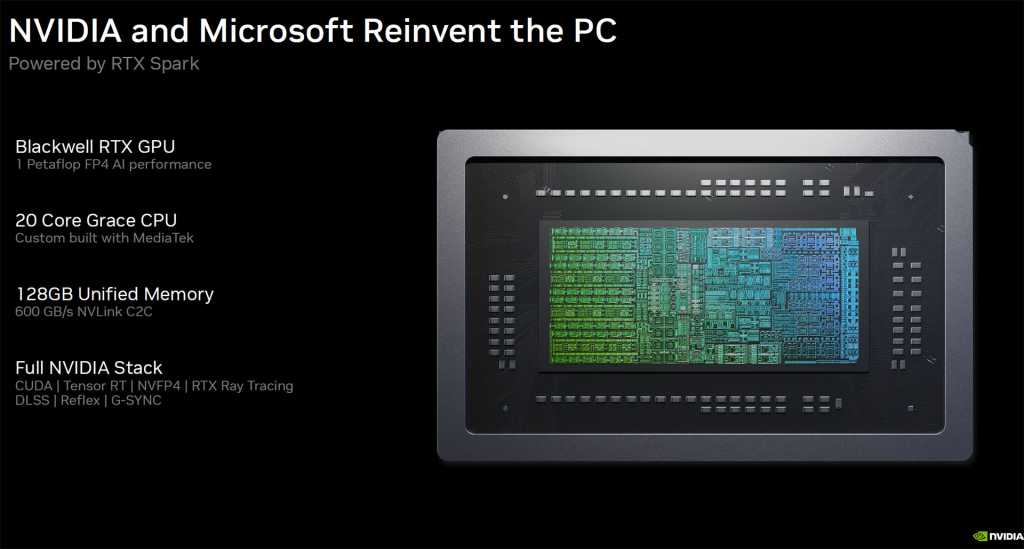
NVIDIA officially entered the Windows PC race this week, and its arrival brings a formidable new competitor to the premium AI PC market. With its RTX Spark platform, NVIDIA is bringing its Grace Arm CPU architecture, Blackwell GPU technology and extensive software ecosystem together in a new generation of Windows laptops. Microsoft’s Surface Laptop Ultra is among the first systems to showcase this collaboration, leveraging NVIDIA’s tech and putting it squarely in competition with Intel, AMD, Qualcomm and even Apple for high-performance local AI and creation-optimized laptops.

For Microsoft, the partnership expands the capabilities of Windows on Arm considerably, particularly for local AI development, content creation and other demanding professional workloads. Starting at $2,599.99, Surface Laptop Ultra is clearly a premium offering, but its combination of processing horsepower, large, unified memory capacity, and premium industrial design gives it an interesting position in the market.

My personal testing suggests NVIDIA and Microsoft have delivered a compelling platform with strong AI throughput, graphics performance and competitive CPU compute. Just as importantly, the Surface Laptop Ultra offers a glimpse of how AI development and local AI agent workflows could become more practical on a portable Windows PC.

NVIDIA RTX Spark brings Grace Blackwell to Windows on Arm

At the heart of Surface Laptop Ultra is NVIDIA’s RTX Spark N1X SoC, combining up to 20 Grace Arm CPU cores with a Blackwell GPU featuring up to 6,144 CUDA cores. Configurations support up to 128GB of unified memory, shared between CPU and GPU. The Surface Laptop Ultra model I tested has this full-fat configuration with an eye-watering $5,899.99 price tag (thanks, memory crunch), though there are lower-cost base configs as noted previously, offering an 18-core CPU with a 5,120-core GPU and 24GB of unified memory.

NVIDIA and Microsoft

Regardless, this architecture is particularly powerful for running on-device AI. Rather than being constrained by the dedicated graphics memory found in conventional laptops with discrete GPUs, RTX Spark can make a much larger pool of memory available to GPU-accelerated applications. This allows larger language models, longer context windows and demanding inference workloads to run locally. It’s similar in design to AMD’s Ryzen AI Max series, aka Strix Halo, in that regard, but with a more potent GPU engine on board.

NVIDIA’s CUDA ecosystem is another important advantage. Developers can leverage familiar tools including TensorRT, PyTorch and llama.cpp, with a base software foundation that also extends into NVIDIA-powered workstations and data center infrastructure.

For organizations building AI applications, this offers a solid development path. Models and workflows can be prototyped locally before moving to larger systems, reducing cloud compute and token expense while allowing sensitive data to remain on-device. (See: Around the corner: Agentic AI PCs that cut token costs.)

Microsoft has also optimized Windows 11 for RTX Spark, with improvements to workload scheduling, power management, memory allocation and application compatibility. These platform-level investments were essential to making NVIDIA’s Arm architecture practical for everyday Windows computing, and I was able to put some of them to the test in the few days I’ve had the machine on hand.

Surface Laptop Ultra: Premium design meets practical function

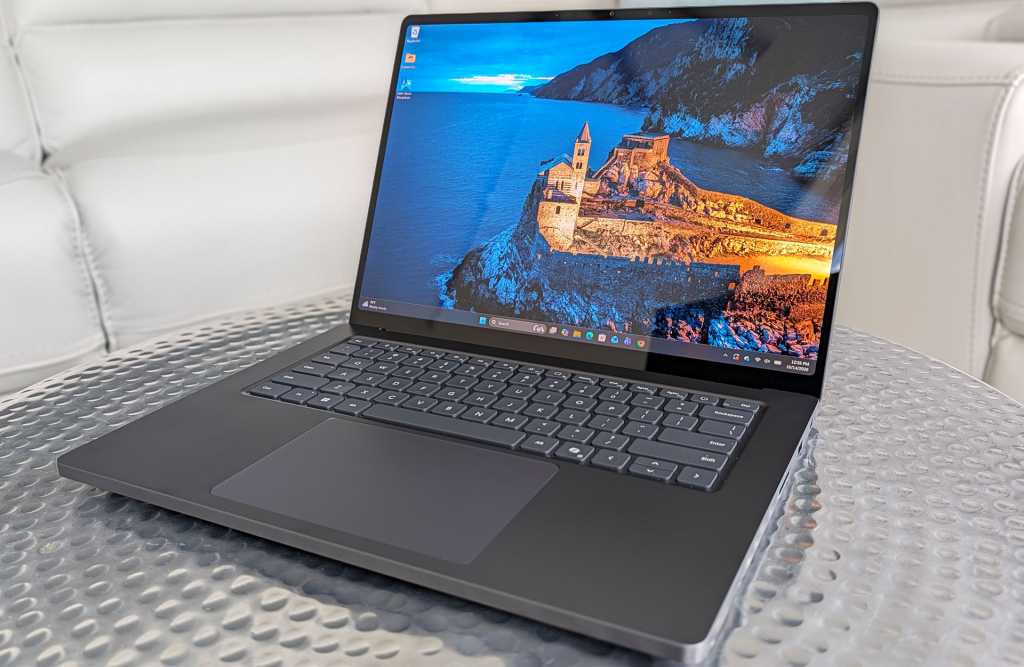
Microsoft has given RTX Spark an appropriately premium home with this machine. The Surface Laptop Ultra features a 15-inch PixelSense Ultra mini-LED touch display with up to 2,000 nits of claimed peak HDR brightness, a 120Hz refresh rate and excellent potential for creative work requiring high accuracy and wide gamut coverage.

Dave Altavilla

The machine’s aluminum chassis is less than 18 mm thick, and it weighs in at under 4.5 pounds. It’s not an ultraportable per se, but considering the horsepower on board, Microsoft has struck a reasonable balance between portability and performance.

The design is refreshingly understated, with clean lines and rigid aluminum construction. My initial hands-on impressions have been particularly positive, thanks to the keyboard’s tactile response, smooth and responsive haptic touchpad, and bright, high-contrast display.

The larger touchpad should be especially welcome for users navigating complex applications, while the touchscreen adds flexibility for reviewing documents, annotating designs, and interacting directly with creative content.

Connectivity options are also very good, relative to other premium laptops. Microsoft includes three USB-C ports, HDMI, USB-A, an SD card reader and a headphone jack. One USB-C connection features Microsoft’s new magnetic charging mechanism, combining the convenience and safety of a breakaway power connector with the versatility of a standard USB-C port.

Microsoft has also designed the cooling system with large fans and significant thermal capacity, while making the machine’s internal SSD removable and offering good internal serviceability in general. These are practical considerations for professional users and IT departments concerned with reliability, maintenance and long-term ownership.

Battery life and sustained performance under prolonged workloads are important aspects Microsoft focused on for the overall experience, particularly for a machine designed to deliver workstation-class capabilities away from a desk. More on this shortly.

Local AI agents: Moving from inference to action

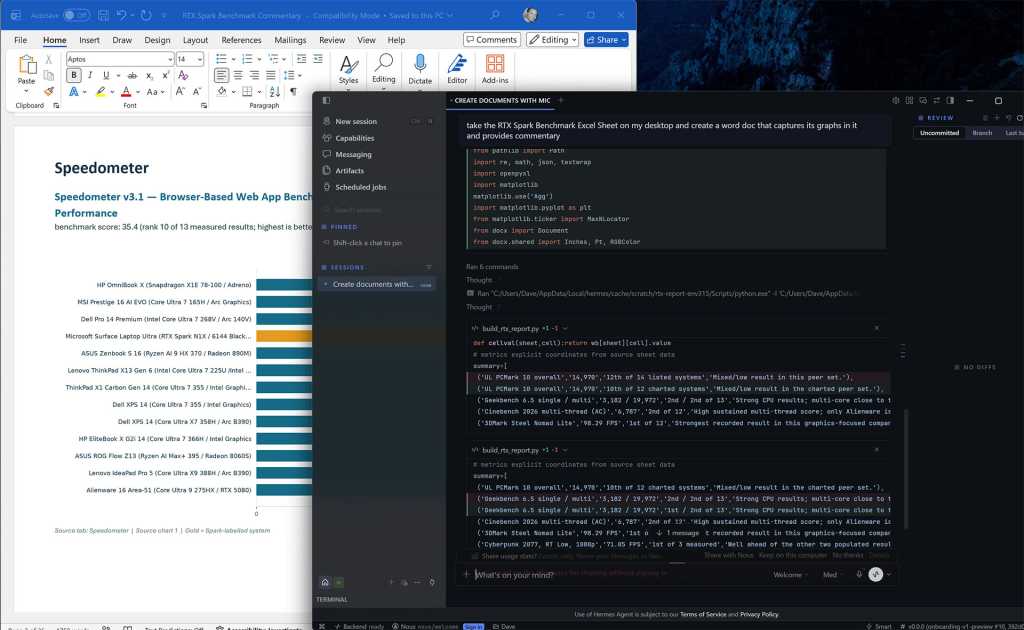
RTX Spark also supports locally running autonomous AI agents, including one that I tested out called Hermes, which can execute multi-step workflows, access files and interact with applications. Its potential impact spans software development, research, document analysis, business automation and many other disciplines. Hermes provides the agent framework, while supported models leverage RTX Spark’s CUDA-accelerated inference and unified memory.

For businesses, local agents can keep sensitive data on-device and reduce cloud inference costs, provided they’re configured appropriately. However, granting agents access to files, code execution and corporate systems introduces security risks. Microsoft’s Execution Containers and NVIDIA’s OpenShell aim to provide isolation and access controls, though their effectiveness depends on proper enterprise policy implementation.

Dave Altavilla

To test this capability, I ran Hermes with the Qwen3.8-27B language model locally on the Surface Laptop Ultra. I asked it to extract benchmark charts from an Excel spreadsheet and create a formatted Word report with performance commentary. Hermes autonomously generated and executed Python scripts, processed the spreadsheet and assembled the document in approximately five minutes. Color me impressed.

That’s a respectable turnaround for a task requiring several manual steps. My results demonstrate how local AI agents can streamline reporting and analysis without cloud-hosted model inference. Human review remains essential, but this was a promising demonstration of practical, real-world agentic AI on a Windows laptop.

AI performance: Strong results as expected

My team’s preliminary AI benchmarks highlight the advantages of NVIDIA’s RTX Spark architecture. However, we’re still digging deeper into AI-enabled use cases and performance.

In UL Procyon’s AI Text Generation benchmark using Phi 3.5, a family of lightweight, open-source small language models (SLMs) released by Microsoft, the Surface Laptop Ultra scored 2,703, compared with 2,027 for Lenovo’s Intel Core Ultra X9 388H-powered IdeaPad Pro 5, an advantage of approximately 33%.

Dave Altavilla

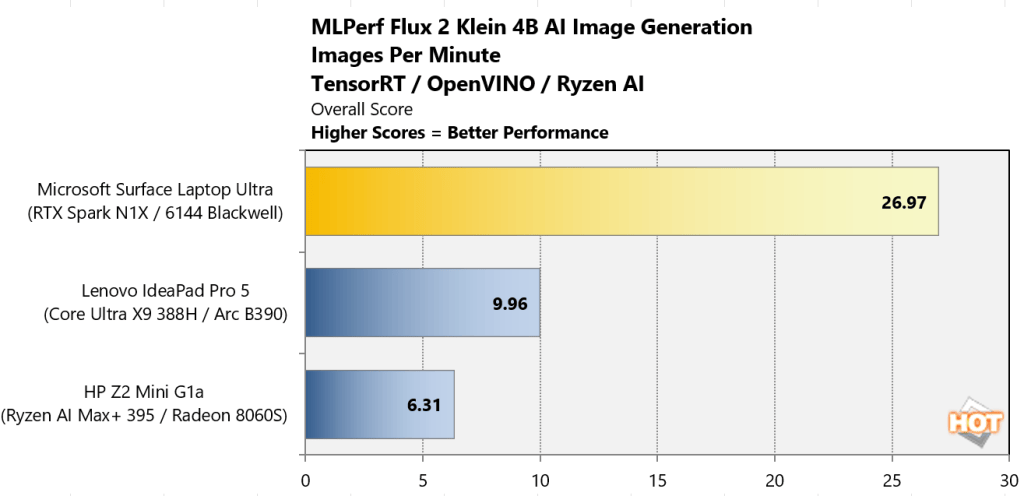
The difference was even more substantial in MLPerf’s Flux 2 Klein 4B image generation workload, where the Surface Laptop Ultra delivered 26.97 images per minute versus 9.96 for the Lenovo machine, or roughly 2.7 times the throughput.

These results demonstrate the platform’s potential for accelerating local inference, image generation, agentic workflows and other AI workloads. Actual application performance will depend on model selection, software optimization and available system memory, though NVIDIA does provide a nice memory partitioning tool in the NVIDIA App for Windows.

Content creation, gaming and battery life: Blackwell’s versatility

RTX Spark’s Blackwell GPU delivers impressive graphics performance, extending the Surface Laptop Ultra’s capabilities beyond AI development and everyday creation or productivity tasks.

Dave Altavilla

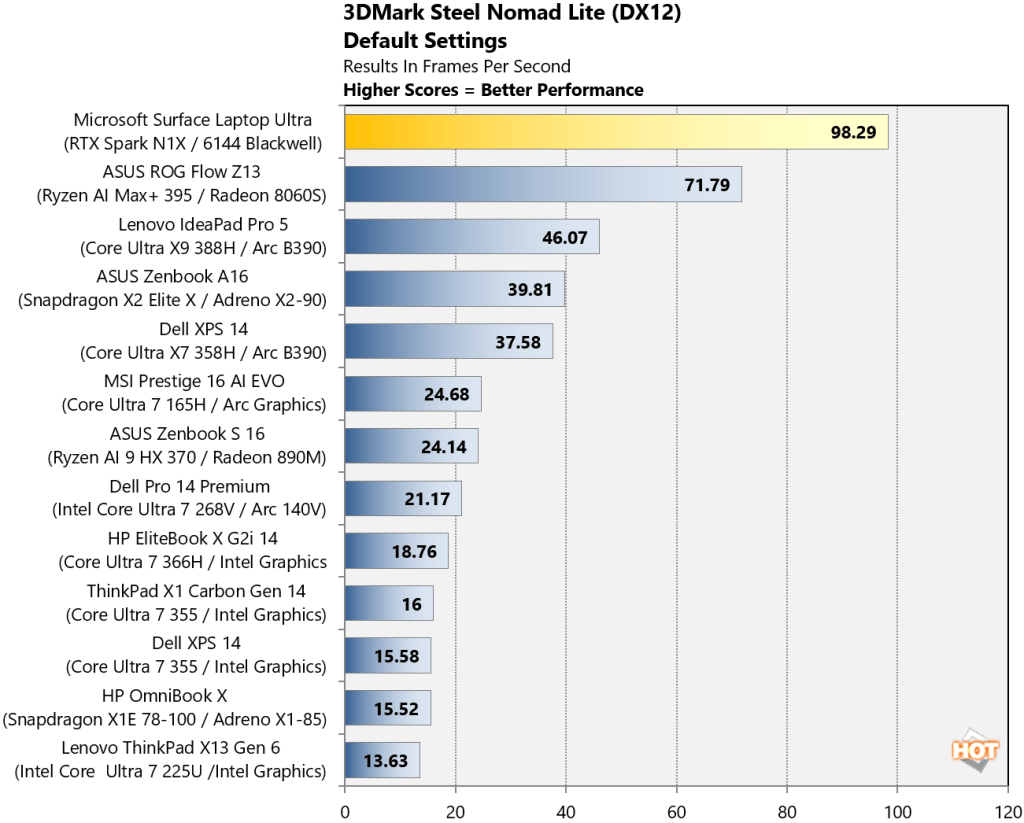
In 3DMark Steel Nomad Lite, the Surface Laptop Ultra achieved 98.29 FPS, more than double the 46.07 FPS of Lenovo’s Core Ultra X9-powered IdeaPad Pro 5. In the ray-tracing-focused 3DMark Speed Way test, it delivered 30.31 FPS versus 19.72 FPS for the ASUS ROG Flow Z13, powered by AMD’s Ryzen AI Max+ 395 and Radeon 8060S graphics.

Dave Altavilla

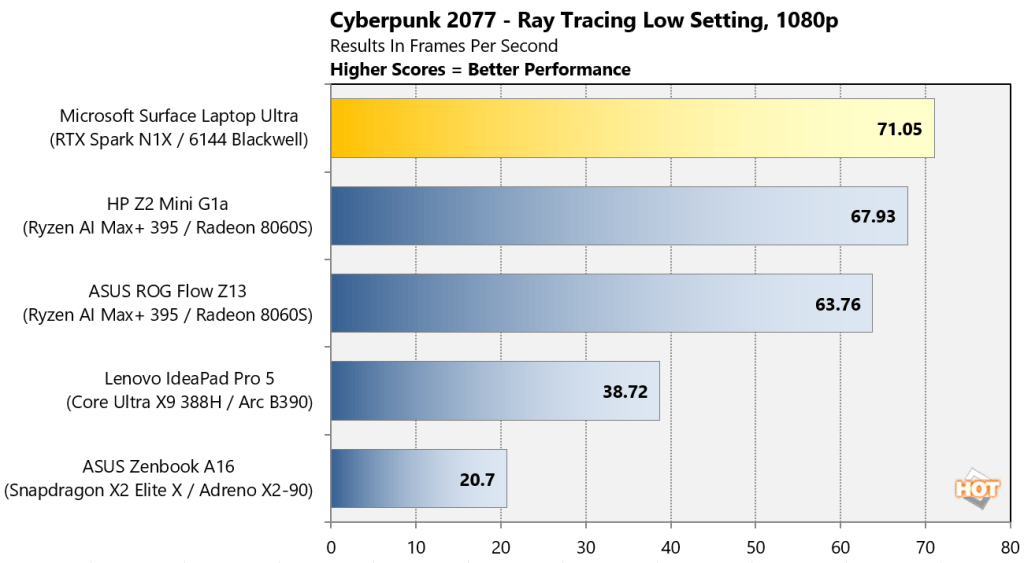
Actual gaming performance was similarly strong. In Cyberpunk 2077, the Surface Laptop Ultra averaged 71.05 FPS, ahead of the ROG Flow Z13’s 63.76 FPS. However, the AMD system narrowly led in The Talos Principle 2, delivering 89.5 FPS versus the Surface’s 84.5 FPS at 1080p medium settings.

CPU performance for tasks like 3D rendering also holds up well. In Cinebench 2026, the Surface scored 6,787 in the multi-threaded test, edging out the AMD-powered ROG Flow Z13’s 6,546. Notably, the Surface retained 99% of its multi-threaded performance on battery power as well.

For creative professionals, native Arm applications including Blender, DaVinci Resolve and Adobe Photoshop offer opportunities to leverage RTX Spark’s potent GPU. However, Windows on Arm compatibility remains a consideration. Microsoft’s Prism translation supports many x86 applications, but specialized software, drivers and certain games (like EA anti-cheat-supported titles currently) may still encounter limitations.

Dave Altavilla

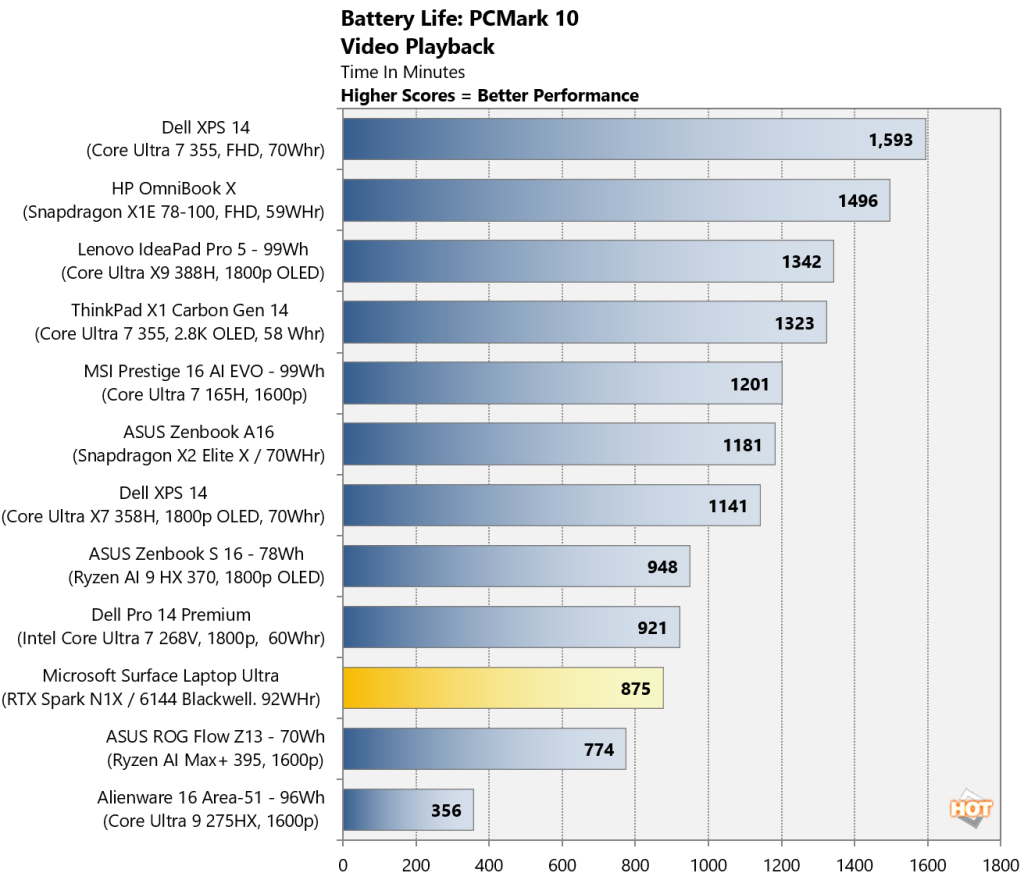
Battery endurance was respectable for the Surface Laptop Ultra, at 14 hours and 35 minutes in my PCMark video playback testing, though competing mainstream thin-and-light laptops lasted considerably longer. The Surface Laptop Ultra and RTX Spark operate within a different power envelope, however, more akin to a beefier gaming laptop, rather than a svelte 2 – 3-lb business machine.

Final thoughts: A serious new AI Windows PC competitor

The Surface Laptop Ultra marks an important milestone for NVIDIA’s expansion into Windows PCs and Microsoft’s ambitions for high-performance Arm-based computing.

My initial testing shows the RTX Spark-powered Surface Laptop Ultra delivers exceptionally strong AI acceleration, competitive multi-threaded CPU performance and impressive graphics horsepower. Combined with Microsoft’s premium industrial design, extensive connectivity and I/O options, and Windows platform integration, RTX Spark makes a convincing first impression.

Starting at $2,600, this is a specialized, premium system, and mainstream business users will find more economical alternatives to be sure. However, for developers (even vibe coders), creative professionals and organizations evaluating local AI workflows, the Surface Laptop Ultra offers a compelling combination of performance, beautiful industrial design, portability and local AI capability, especially with its higher-tier memory configurations.

NVIDIA has arrived in the Windows PC market with serious technology, and Microsoft’s Surface Laptop Ultra is an impressive first showcase of what this new partnership can deliver.

Windows 11 has now been optimized for 8 gigabytes of memory

Due to the global memory shortage, 8 gigabytes has once again become the standard among computer manufacturers. Fortunately, Microsoft has spent the past few months optimizing Windows 11 for computers with limited RAM.

According to a post on the official Windows blog, the company has, among other things, improved background memory management. “Windows can now keep up to 2GB more of your active data in memory instead of moving it to slower storage, helping your PC stay responsive as you open more apps or browser tabs,” the post said.

Other improvements for PCs with 8GB of memory or less include ensuring that widgets only load when you open them, freeing up an additional 200MB of memory.

Microsoft says these changes make Windows 11 up to 20% more responsive than before.

According to The Verge, Microsoft has also improved the Windows Hello sign-in process and sped up Bluetooth pairings.