Due to the global memory shortage, 8 gigabytes has once again become the standard among computer manufacturers. Fortunately, Microsoft has spent the past few months optimizing Windows 11 for computers with limited RAM.
According to a post on the official Windows blog, the company has, among other things, improved background memory management. “Windows can now keep up to 2GB more of your active data in memory instead of moving it to slower storage, helping your PC stay responsive as you open more apps or browser tabs,” the post said.
Other improvements for PCs with 8GB of memory or less include ensuring that widgets only load when you open them, freeing up an additional 200MB of memory.
Microsoft says these changes make Windows 11 up to 20% more responsive than before.
According to The Verge, Microsoft has also improved the Windows Hello sign-in process and sped up Bluetooth pairings.
Founded in 2021, Character.ai enables users to create customizable chatbots and interact with them, and by February 2025 claimed to have over 20 million monthly active users.
However, it failed to turn them into a profitable revenue stream, and has been losing $8 million a month, according to Reuters. The company estimated in its bankruptcy filing that it only had assets of between $50 million and $100 million, and liabilities in the same range, despite receiving investments totalling almost $200 million over the years, pushing its valuation to a peak of around $1 billion.
Character.ai told subscribers that during the bankruptcy proceedings their access to Character ai chatbots is unaffected, and they will continue to be charged for the service.
To keep its chatbots chatting, the company has granted Disney a non-exclusive license to its technology for $20 million as part of the bankruptcy proceedings, a so-called stalking-horse deal that sets a benchmark for other bids.
Character.ai’s troubles haven’t just been economic: It has faced several legal challenges over the psychological effects of its service on users. In January, the Kentucky Attorney General claimed that Character ai chatbots preyed on children. In May, the state of Pennsylvania sued the company over a chatbot that claimed to be a licensed psychiatrist and said it aimed to “stop the company from misrepresenting its AI companion bots as licensed medical professionals who can provide medical advice.” And in 2025, the company settled out of court with a mother who claimed that a Character ai chatbot had led to her son dying by suicide.
These challenges have taken their toll on the company. “Character.ai has taken meaningful steps to sustain and improve its business in the face of significant legal, regulatory, and operational headwinds. After a comprehensive review of the available alternatives, the board determined that this court-supervised sale process provides the Company with the best opportunity to maximize value for all stakeholders,” said Colin Adams, CEO of Character.ai.
Widgets, widgets, widgets. Has there ever been an Android feature so full of promise that went unloved by Google for so very long?
Okay, so maybe there has been — erm, lots of times, actually. But even so, Android’s widgets system is a perfect example of an exceptional advantage that Google basically buried, abandoned, and left on the brink of extinction up until its overdue revival in 2021’s Android 12 update. (And that revival, by the way, happened for no apparent reason whatsoever. Just a totally random, unprompted change of heart after a decade of indifference. Riiiiiiiiight.)
Google may have given up on widgets for a while, but the good news is that (a) they’re back, baby — still now, more than ever, even in our overly AI-obsessed 2026 timeline — and (b) the Android developer community keeps chuggin’ along and coming up with ever-more creative new ways to embrace widgets beyond what Google itself sees fit to give us. That means no matter what Android version your favorite phone is running, you can step up your own Android widget game and give yourself some fresh and fruitful paths to make the most of your phone’s framework.
Here, my dear, are some fantastic beyond-the-basics ways to put your favorite Android widgets to use and change the way you get stuff done on your phone.
Android widget enhancement #1: The on-demand home screen pop-up
Widgets are a wonderful way to interact with all sorts of info without ever having to open up apps, but having too many widgets can quickly lead to a cluttered and overwhelming home screen.
Well, here’s a neat way to give yourself the benefit of a widget while still maintaining a neat and minimal space for working: An excellent app called Popup Widget lets you create an on-demand pop-up widget (get it?!) that looks like a regular ol’ icon on your home screen but then loads any widget you want when tapped.
See?
Any widget, anytime — with Popup Widget on Android.
JR Raphael, Foundry
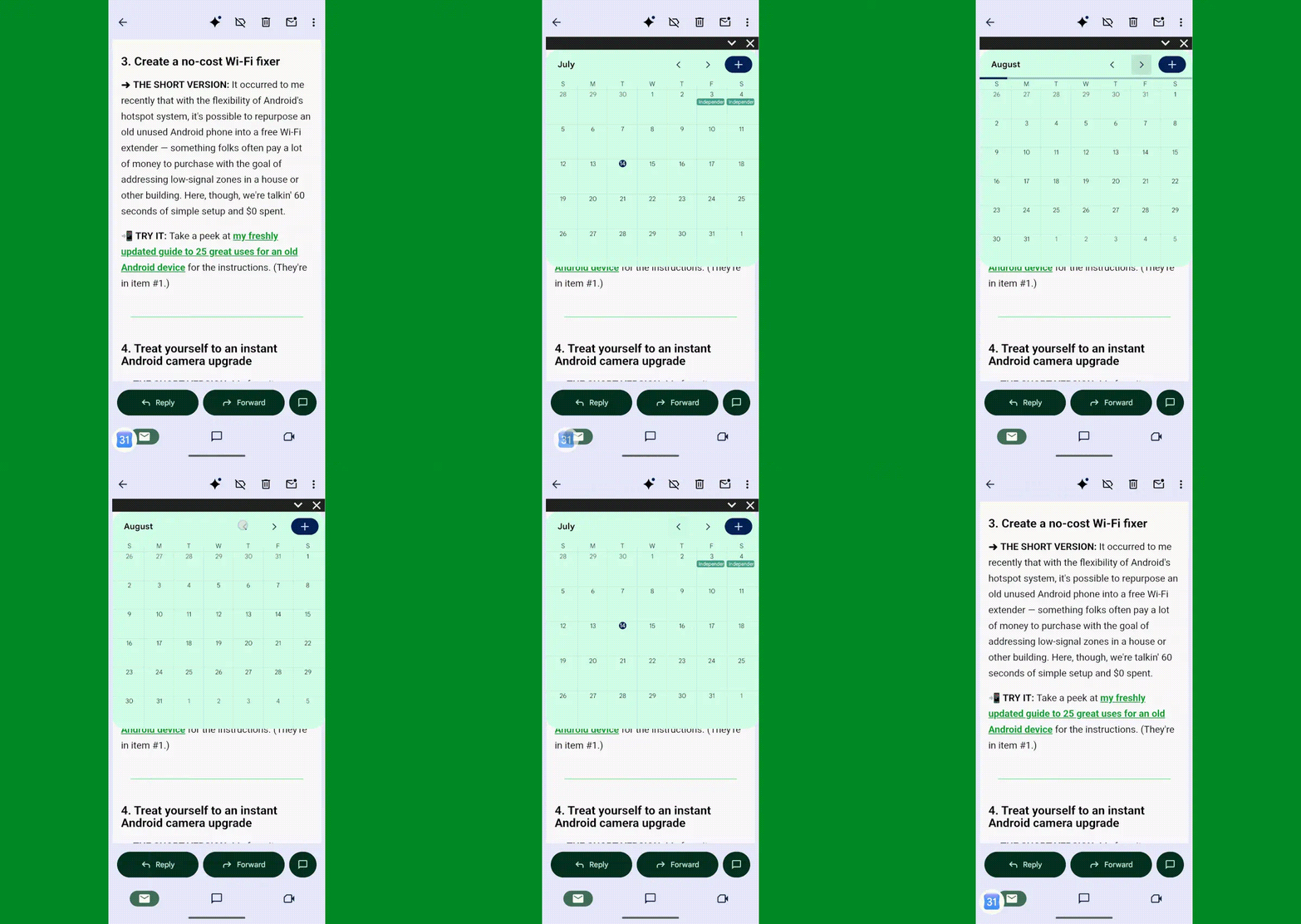
You can even get really wild and set up a single icon that opens multiple widgets at the same time — like your inbox and your calendar together:
Popup Widget can even let you summon two widgets together with a single tap.
JR Raphael, Foundry
Not bad, right?
Popup Widget costs two bucks and doesn’t require any special permissions or manners of access. And it’s pretty simple and self-explanatory to set up: Once you install and open the app, it’ll walk you through adding in whatever pop-up widgets you want. You can choose the name and even the icon associated with each one along with its precise placement on your screen and how much the screen behind it should dim when it’s loaded.
The app will offer to add the shortcut directly onto your home screen for you then, or you can also find all of your Popup Widget creations by pressing and holding the main Popup Widget icon in your app drawer.
Alternatively, if you’re already using a custom Android launcher like Smart Launcher or Niagara, you can find similar options for summoning widgets on demand within their settings — no separate apps even required.
And that, my widget-loving wallaby, is but our first winning widget possibility.
Android widget enhancement #2: The on-demand universal pop-up
If you like the idea of having a widget on demand but would rather have it be available to summon from anywhere instead of just from your home screen, this next wacky widget option is just the thing for you.
It comes from a spectacular app called Edge Gestures, which works in conjunction with Popup Widget to take that same concept and make it universally accessible. (I told ya it was wacky!)
When you first install Edge Gestures, the app will prompt you to enable it as a system accessibility service and to grant it the ability to display over other apps. These permissions sound scary — and they should! — but in the case of this specific utility, they’re absolutely appropriate and necessary in order for it to operate. The former is the only way an app is able to create a custom system-wide gesture, which we need for this setup to work its magic, and the latter is how your widget is able to be shown on top of whatever else you’re doing.
(If you’re at all worried, note that Edge Gestures doesn’t request any other significant system permissions. Beyond that, it’s reputable, it’s been around for quite a long while, and it has a large number of overwhelmingly positive reviews.)
Where were we? Oh, right: Once you’re inside the Edge Gestures configuration area, you’ll be able to select exactly what gesture you want to use for pulling up your widget. I’d think carefully about finding something that won’t interfere with anything else, like the system-level Android gestures, and that’ll be convenient to access without being a command you’re likely to trigger by mistake.
So, for instance, you might make the gesture a simple swipe downward along the left side of your screen. To do that, you’d find the “Swipe down” option within the app’s “Left” tab, and you’d set it to “Popup Widget” — and then create or select whatever Popup Widget item you want. And remember: You can select one widget or multiple widgets, too.
Prepare yourself for some serious oohing and ahhing:
Your favorite widgets are never more than a swipe away with Edge Gestures on Android.
JR Raphael, Foundry
As you can see, this opens up a whole new world of mobile multitasking potential. I mean, really: How could you not love that?!
The final thing worth doing is going into all the other gesture options in that same configuration area and tapping “Clear” for each of ’em to get rid of Edge Gestures’ default actions. I’d also go into whichever side of the screen you aren’t using — left or right — and tap the toggle to turn the gestures for that side off entirely. That way, you won’t inadvertently activate any gestures that you don’t actually want or need.
Edge Gestures costs $2 to use.
Android widget enhancement #3: The camera cutout command center
All screen swiping aside, you can create a complete widget-summoning control panel that exists entirely in the camera cutout at the top of your phone’s screen — y’know, that otherwise useless black hole where the front-facing camera is hidden.
The secret to this slice of Android widget sorcery is a snazzy little app called Material Capsule. You’ll have to spring for its $3.49 premium version (also available in a 99-cent monthly subscription, if you’d rather go that route) for the app’s widget wonders — but if you like the way it works, it’s well worth it.
In short, the app lets you set up to five different gestures for calling up different widgets from anywhere on your device — with a tap, a double tap, a long press, and a swipe to the left or the right across the same camera cutout area.
Any of those actions will bring whatever widget you choose into view for easy access, no matter what else you’re doing.
Material Capsule’s on-demand camera cutout widgets in action.
JR Raphael, Foundry
It’s quite the upgrade and one of those things that’ll make you wonder why it wasn’t just built into Android itself from the get-go.
Android widget enhancement #4: The physical key call
Next, here’s another interesting twist on that same on-demand Android widget idea: You can make any widget especially easy to access from anywhere without even having to mess around with any on-screen swiping or tapping by setting one of your phone’s physical keys as a trigger for the widget’s appearance.
I’ll give you a second to catch your breath and process the sheer splendor of that spell.
Back? Cool. So, the key to this feat (har har) is the combination of the aforementioned Popup Widget and a handy Android contraption called Key Mapper — which makes it easy to map your phone’s physical keys to all kinds of crazy custom actions.
In this case, we’ll set it up so that pressing and holding one of your volume keys causes whatever widget you want to be summoned, like so:
Yes, your volume key can cause a widget to appear (whoa!).
JR Raphael, Foundry
Pretty nifty, no?
I’ve got step-by-step instructions for making this happen in this separate guide.
Android widget enhancement #5: The floating bubble
If you like the notion of having a widget always available but aren’t so keen on the hidden gesture concept, an app called Overlays will let you create a small floating bubble that you can position anywhere on your screen and then tap to pull any widget up when you want it — just like with Android’s recently revived Bubbles multitasking system, only compatible with any Android device and version and with the simplicity of a widget instead of the complexity of an entire app.
Check it out:
Overlays puts a floating icon on your screen for easy ongoing widget access.
JR Raphael, Foundry
By default, Overlays gives you a bunch of its own little widgets to choose from, but the real power comes from adding in widgets from the Android apps you actually rely on. To do that, tap the “Triggers” tab at the bottom of the Overlays configuration area, then tap the red plus button in the lower-right corner of the screen. Select “Manual,” then type in whatever name you want for your widget and tap the icon to pick any icon you like.
Tap “Save,” then select “Widget” and find the widget you want from the list. At that point, you’ll see a preview of the widget. Move or resize it if you like, then hit the arrow in the upper-left corner of the screen to exit out of that interface. Last but not least, tap the name of your newly made widget on the screen that comes up next to change its status to “Always on.”
As soon as you head out of the app and back to your home screen, your fancy new widget should pop right up. All you’ve gotta do is tap the little downward-facing arrow in its corner to minimize it down to a bubble, which you can then press and hold to move anywhere your widget-worshipping heart desires.
Overlays can also create widgets that automatically appear based on context — so you could have something show up every time you connect to a certain Bluetooth device or Wi-Fi network, for instance. To explore those options, just follow the same steps from above but pick “Event” instead of “Manual” when you reach the “Triggers” tab configuration.
Overlays is free with an optional $4 in-app upgrade that removes some ads from the configuration tool and unlocks a handful of advanced features.
Android widget enhancement #6: The widget stack
Last but not least in our collection of wacky Android widget possibilities is one of my favorite widget wonders — and that’s the ability to stack multiple widgets and then swipe between ’em on your home screen without having ’em take up any extra space.
Check it out:
The space-saving simplicity of stacked widgets, as seen in Smart Launcher.
JR Raphael, Foundry
This enhancement presents a bit of a choose-your-own-adventure-style path:
First, if you’re using a reasonably recent Samsung Galaxy gizmo, the option is should already be present and available in your standard Samsung home screen setup. Just press and hold any open space on your home screen and then select the option to add a widget — then, once the widget is added, press and hold it and look for the “Create stack” command.
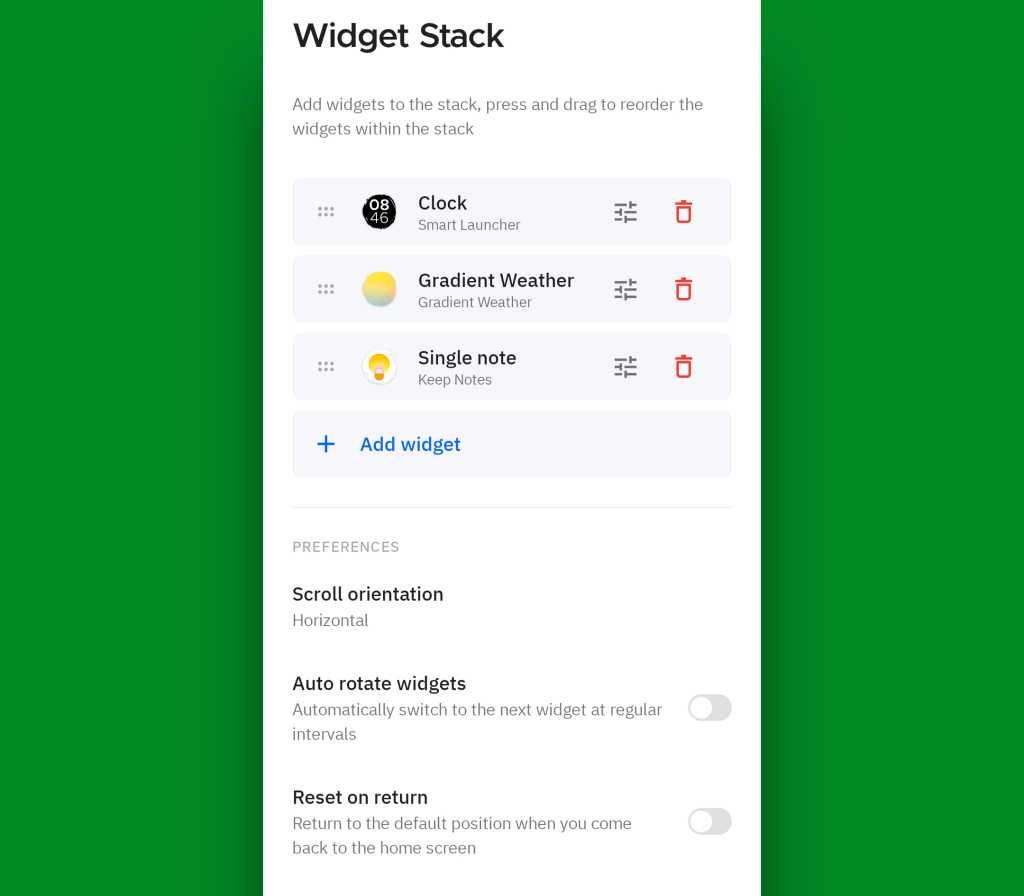
Those launchers replace your phone’s entire home screen environment and give you all sorts of interesting new possibilities for optimizing your interface and making it especially well-suited for you. And the stacked widget feature is just one small sliver of what they offer and how they’ll transform your Android experience.
The setup interface for a widget stack within Smart Launcher.
JR Raphael, Foundry
So there ya have it: six wacky, wild, wonderful ways to make widgets even more wow-inducing. Some days, you’ve just gotta love Android and the endless customization, control, and power it provides.
That ad you just scrolled past on your phone but barely spared a look or click? It could be tracking your movements and collecting your data, without you having to do a thing.
This “zero-click mercenary spyware,” dubbed “AdFection,” is increasingly exploiting a sprawling online advertising ecosystem ripe for abuse, according to researchers at The Citizen Lab. One top actor in the space, Discover-Tech, runs the Controlium platform that allows cyber criminals to “precisely profile and de-anonymize” millions of users, fingerprint them, and automatically infect their devices when an ad is displayed.
Troublingly, Discover-Tech is successfully masquerading as a legitimate ad company across the online ad sales environment, the researchers said, listed as a “certified” and “approved” vendor by the likes of Google and IAB Europe.
Over a four-month period, the company’s ads were shown on nearly 200,000 unique websites and in Android/iOS apps in dozens of countries. Furthermore, its ads have been presented through major networks like Google, Yandex, and Beeswax, and it even exploited the European General Data Protection Regulation (GDPR) consent frameworks to target victims in the EU.
The Citizen Lab researchers disclosed their findings to Google, IAB Europe, Beeswax, Vungle (Liftoff), and Eskimi, all of whom took action to disconnect Discover-Tech’s access to the digital advertising ecosystem.
“Discover-Tech’s mass abuse, privacy invasion, and facilitation for mercenary spyware attacks illustrates structural flaws with the online advertising system, which failed to detect or prevent the abuse,” the researchers warned.
How AdFection exploits a largely unprotected system
The online ad market operates largely via real-time bidding (RTB), auctions hosted by ad exchanges. Run by companies like Google, these take place “hundreds of billions” times a day, the researchers explained. When an ad box pops up on an app or website on a user’s device, it immediately triggers a bid request; advertisers then submit their offers, and the exchange grants a winner the ability to push their ad to the user within split seconds. These ads can contain images, video, and, most importantly to cybercriminals, code.
Demand-side platforms (DSPs) and supply-side platforms (SSPs) act as intermediaries in the process, and data about specific users and devices is shared across the exchanges so advertisers can decide whether they want to show specific ads to a specific individual, based on device identifiers and characteristics such as a user’s precise location, cookie ID, mobile ad ID, or IP address.
“The auction system is designed to enable targeting single individuals,” the researchers explained. “The totality of information gleaned from ad auctions is quite valuable.” Companies with access to auction data can track users without their knowledge, across cellular, Wi-Fi, and virtual private networks (VPNs).
Discover-Tech has effectively infiltrated and connected the spyware industry to this online ecosystem, which includes infamous Israeli mercenary spyware vendor Candiru. Its partners can deliver ads to “mass-profile unwitting phone users,” and silently infect the devices of select targets, according to the researchers.
When Discover-Tech wins a bid, one of its ads is pushed to a website or app that is open on a user’s device. Sometimes this is seen by the user; other times is merely renders in the background.
Many of these ads have been shown to devices on national security-sensitive networks, in security organizations including NATO, networks associated with critical infrastructure, and media organizations around the world. Using AdFection, Candiru’s spyware infected devices at international news network Al Jazeera.
The researchers emphasized that a Discover-Tech ad impression does not mean that a device has been infected with spyware. However, the fact that the company has been able to bid on and show ads across sprawling ad networks highlights a “systemic risk” warranting “urgent investigation.”
Lack of vetting
Discover-Tech’s ads carried no exploit at all, noted Frank Dickson of Dickson Research. “The ad was clean; that is the frightening part. Nobody clicked anything.”
Instead, each ad called home with the device’s advertising ID and IP address. In almost every case, the server sent back nothing, Dickson emphasized; only chosen targets received malicious code.
“Third-party verification scanners saw a harmless banner, because for nearly every viewer, it was one,” he said. This is exactly how tags slipped past verification.
Also alarming is the reach: Discover-Tech’s ads displayed in 75,373 apps and 120,768 websites over the course of four months, and had impressions on networks belonging to NATO, Intel, Microsoft, and Apple. While the report emphasizes that an impression is not an infection, the company’s targeting clearly reached enterprise networks, Dickson said.
Just as troublingly is the badge: Discover-Tech was listed as a certified or approved vendor for years. The report said that vetting often amounted to self-attestation, a box checked on a form. “A certification is only as good as the vetting behind it,” Dickson said.
Steps enterprises should take now
On managed browsers, ad blockers are necessary, but they’re not wholly sufficient, Dickson said. Many Discover-Tech bids were for ads inside mobile apps, typically overlooked by browser extensions. But clearly, desktops are at play too; Candiru targeted Al Jazeera’s Windows software.
Dickson advised enterprises to:
Push a vetted ad-blocking extension to managed browsers through policy rather than leaving it to users to install it.
Favor browsers with built-in tracking protection.
Block ad and tracking domains at the DNS or secure web gateway layer; this reaches in-app ads on managed phones.
Disable advertising identifiers on corporate mobile devices through mobile device management (MDM) and restrict ad-supported consumer apps on devices holding sensitive data.
Turn on Apple’s Lockdown Mode for high-risk executives, journalists, and any users traveling to sensitive locations.
Keep browsers and operating systems patched “The ad is only the delivery truck; the exploit still needs a flaw,” he pointed out.
Watch traffic tied to ad impressions for odd follow-on requests.
Finally, search domain name system (DNS) and proxy logs for the domains published in the report.
The advertising ID in particular deserves a hard look, Dickson pointed out. The Citizen Lab report says that blocking advertising identifiers alone would have stopped this attack method.
Troublingly, he noted, many enterprises spend fortunes managing their users’ identities, then let corporate phones hand that persistent identifier to anonymous auctions that run hundreds of billions of times a day.
“Every ad is someone else’s code running on your device,” Dickson said. “Treat the ad network like any other untrusted vendor.”
Although the Jev model rolled out last month by TypeSafe claims to have significant advantages over traditional LLMs, a security report published Wednesday argued that its streamlined approach makes it more vulnerable to some kinds of attack, compared to traditional LLMs.
“In some cases, [Jev] is even more vulnerable to attacks, with both adversarial text attacks and prompt injection being able to disrupt the model’s outputs, resulting in incorrect and potentially devastating actions,” said the blog post from researchers at HiddenLayer.
TypeSafe did not respond to multiple requests for comment.
LLM, or something else?
There seems to be debate about whether Jev is technically a large language model (LLM), with TypeSafe suggesting it is not, but HiddenLayer saying that it appears to be one. TypeSafe has even coined a name for the category: System One, which TypeSafe described as “a new class of frontier models built to make fast, structured decisions that software can use directly.” Jev is the first—and thus far, only—named product categorized as System One.
Jev is a streamlined model designed to function machine-to-machine. Its approach allows it to perform tasks faster and to use fewer tokens. But Kasimir Schulz, the director of security research at HiddenLayer, the blog’s co-author, said that the accelerated approach robs Jev of some of the checks and balances that exist in traditional LLMs. This means that Jev can fall for some attacker tricks that current LLMs typically detect and refuse, he said in an interview.
Despite this, “Jev is great. You should use it. It has a lot faster response time,” he said, with the caveat “it doesn’t have all of the protections” seen in traditional LLMs, so some attacks on it succeed that should have failed.
“TokenBreak, for example, normally does not work with larger LLMs, but Jev is vulnerable to it out of the box,” Schulz said.
Although simply inserting characters in front of important words, as in the original TokenBreak attack, did not yield much, HiddenLayer’s blog noted, “we did notice that increasing the number of perturbations and improving their targeting led to much higher attack success rates.”
But although traditional LLMs are typically able to see through such attacks, it pointed out, “System One models appear to be vulnerable. As a result, this class of decoder should be treated with caution, given that they are susceptible to both autoregressive LLM attacks and text classifier attacks, providing potential adversaries with greater optionality.”
The post cited some examples:
“On a simulated checkout page, an attacker-controlled advertisement caused the browser agent to click away from the user’s purchase [and respond to the ad] despite instructions to treat page text as untrusted,” it said. “In a separate classification test, targeted TokenBreak-style changes lowered toxicity scores for prompts both models had initially flagged.”
The post argued that multiple risks are therefore associated with Jev.
“A browser agent may immediately click a selected element. A moderation system may allow an input whose toxicity score falls below a threshold. A routing system may send a request to a different tool or workflow. Each of these turns a model judgment into an operational decision, and therefore, risk,” the post said. “When evaluating System One models, test those decisions in the application where they will be used. Include untrusted webpages, misleading task-related text, and modified inputs that preserve their meaning while changing their form. Monitor the selected actions and scores and put independent checks around outcomes that matter. Keep in mind that, under the hood, these are still language models at heart.”
Analysts agreed with both the report’s methodology and its technical conclusions, while also pointing out that a security vendor concluding that a new approach is not secure is somewhat self-serving.
Philip Harris, an IDC research director, observed that the methodology described in the blog post “is sound, and consistent with established AI red-teaming practice: building a controlled test environment and probing for adversarial manipulation and injection is exactly the right approach.”
But Gartner VP Analyst Nader Henein added that Jev, which was introduced on Sept. 15, is so new that he thinks some of the flaw reports were premature.
“Jev will go through the same maturity process as do all other models, including susceptibility to seemingly rudimentary manipulation attempts,” Henein said. “This model was only released last month, so being surprised that it has issues is similar to being surprised when your baby drools.”
However, Frank Dickson, principal analyst at Dickson Research, noted that the same attributes that make Jev so attractive also expose it to riskier behavior.
“Jev can only choose from options the developer puts on the menu,” he said. “It limits attack paths. However, if ‘click any element on the page’ is on the menu, the attacker’s ad is on the menu. That is an architecture decision, and the buyer makes it.”
He pointed out, “Jev makes AI decisions faster and cheaper, which also makes the wrong decisions faster and cheaper. Speed is a feature. It is not a security control.”
“Constraining the format of a decision does not necessarily constrain the correctness, trustworthiness, or consequences of that decision,” he said, noting, “the simulated checkout scenario [in the post] illustrates how an agent can be redirected from an authorized task by information introduced through a less-trusted component of its operating environment. The fact that the agent was explicitly instructed not to trust page content, yet still responded to the malicious advertisement, is particularly relevant.”
ServiceNow is giving its AI Control Tower new features to make AI agents more governable — and a new name, Super Intelligence Control Tower (SICT), to please the US President. It is also updating EmployeeWorks to make building AI agents easier.
AI Passport, a new component of SICT, gives every agent, whether from ServiceNow or a third party, a verifiable identity, and provides runtime control over its activities.
As enterprises scale autonomous agents from pilots to production, they are facing new challenges, said Nenshad Bardoliwalla, SVP of AI product management at ServiceNow: “If companies can’t identify which agents are running, what they are doing, and what systems they can access, then scaling quickly becomes a risk.”
An AI Passport is a cryptographically signed credential for AI agents that is checked at runtime to verify the scope authorized by the enterprise. When an AI agent stays within its passport scope, it can operate freely, but if it tries to deviate, defined actions are enforced. These can include redirecting, restricting, or reconnecting the agent with proper context, or even triggering a kill switch. All actions are audited so agent activity can be tracked.
It is built on open specifications, so any governance product, identity provider, or enforcement point can issue and verify credentials for their own and third-party AI agents, and those credentials are verifiable at every step in multi-agent workflows.
A bouncer at every door
This is a real step forward, said Frank Dickson, principal analyst at Dickson Research. “Most agent governance today is a security camera. It records what happened so someone can review the tape later. AI Passport is a bouncer at every door.”
The controls extend beyond ServiceNow’s own agents, he said: “For third-party agents, the passport replaces the agent’s own ‘claims’ about its permissions,” he said. “Taking an agent’s word for what it is allowed to do is an Achilles’ heel of agentic AI.”
And, he said, “A passport is only as trustworthy as the office that issues it. Here, the issuing office is ServiceNow’s CMDB, its GRC policies, and its workflow approvals. If that data is stale, the passport is stale. Credit ServiceNow for building on open specifications, but an open spec matters only when others adopt it. Nvidia is the launch partner, and ServiceNow says that enforcement implementation is still being built.”
In addition to AI Passport, ServiceNow has further beefed up its governance tools with a number of other features, including shadow-AI detection to locate unapproved agents on the network; more than 400 connectors to enable AI discovery across platforms and vendors; access mapping; and continuous enterprise AI observability.
It also announced cost governance; “value intelligence” that connects consumption, cost, quality, and “realized user value” to help teams optimize their AI use; AI cost management as part of ServiceNow IT Asset Management, which integrates with the Control Tower; and policy enforcement.
AI Passport, Shadow AI detection, and AI Cost Management are expected to be available by year end.
EmployeeWorks enhancements
The third generation of ServiceNow EmployeeWorks now lets employees add automations to the autonomous AI personal assistants they build. ToolSmith is a new agentic developer environment that takes tool building “from days to minutes,” the company said.
What companies have been trying to do, said Bhavin Shah, SVP of ServiceNow’s employee experience group, “is to give developers a way to build, but in a way that’s governed, that allows them to stay within the guardrails and the controls that that are required in order to do the kinds of safe but deep and capable work that they want for their constituents inside the company.”
ToolSmith helps address that problem. It’s a vibe-coding environment with which developers can build automations for ServiceNow EmployeeWorks AI assistants by describing what they need in natural language. ServiceNow said ToolSmith was trained on over 75,000 APIs and optimized for reliability and token efficiency. Developers can test and refine its output using the same conversational interface.
ServiceNow said that ToolSmith also identifies what to build next, scanning logs “to identify opportunities to fix, improve, or invent the next best workflow.”
Non-coding employees, on the other hand, can build new Productivity Assistants to perform contextual or persona-based work including long-running tasks, the company said. There are also pre-built assistants available, beginning with several for HR service delivery.
EmployeeWorks itself includes two assistants out of the box: a research assistant that can scan internal and external sources for answers, based on the user’s role, and a calendaring assistant that, ServiceNow said, “goes beyond typical calendar booking solutions by orchestrating nuanced requests like scheduling quarterly one-on-ones with an entire team on days that minimize disruption to project work or finding the least hectic day to bring together a team for a full day workshop. “
To automate repetitive tasks, Productivity Routines run proactively in the background, repeating routine steps and providing deliverables without human intervention. Employees just have to describe what they want to automate, select the necessary tools, and deploy the routine.
“The principle is right,” Dickson said. “The people closest to the work understand the problem best.”
But, he added, “the guardrails are only as good as the decisions behind them. Productivity Routines, by ServiceNow’s description, run in the background without human intervention. That is unsupervised work, and someone should own it.”
All of these EmployeeWorks enhancements are in controlled availability now.
Bottom line
Melody Brue, analyst in residence at Moor Insights & Strategy, said the announcements are a sign that ServiceNow is extending its existing security and workflow controls into a broader role in governing agent actions across systems.
“AI Passport makes identity and authorized scope verifiable, Control Tower provides oversight and enforcement, and ToolSmith expands the tools and connectors through which agents can act within enterprise guardrails,” she said, adding that with CEO Bill McDermott’s recent positioning of ServiceNow as a security company, “This suggests an ambition to become a control point for enterprise autonomy.”
But, she said, “What matters now is how consistently ServiceNow can enforce boundaries and verify outcomes across the systems agents actually touch.”
Dickson, too, has concerns.
“ServiceNow says Control Tower tracks spending by user, department, and runtime, and ties that spend to quality and value. The brake is another matter,” he noted. “The graduated alert, throttle, and block enforcement is described in future tense, as is the AI Cost Management integration, which is expected by year end.”
However, “a meter you can watch is not a brake,” he said. “A Productivity Routine that runs every morning is a standing purchase order. Someone should sign it.”
Give every agent and every routine a named owner and a budget before it goes live, he advised, and ask ServiceNow how assists are counted for background routines and whether hard caps exist today. Turn on throttling the day it ships, and reconcile its dashboards against your own invoices.
But despite these concerns, he said, ServiceNow has the right idea. “An agent should carry its permissions, its manager, and its budget wherever it goes. But until the brakes ship, that budget is a decision a person still has to make.”
If your business has lots of Macs, what do you do with them at night? And how much money do you spend on AI inferencing?
What if the computational power of those Macs could be used to handle some inferencing tasks? A new white paper from Apple’s machine learning team tells us it’s possible.
Apple’s teams have developed an internal technology for distributed processing they call “Minions,” which effectively creates a virtual GPU cloud from connected Macs. While it’s not available outside Apple at this time, it seems a pretty good candidate to turn Macs into a distributed AI data center, cutting the cost of AI inferencing and making it easier for enterprises to safely analyze company data by ensuring the information stays in the company.
Meet Apple’s Minions
This exciting approach is described in a newly published white paper, ‘Minions: A Dynamic and Distributed Virtual GPU Cloud Built on Idle Apple Silicon Devices.” In it, the researchers explain how constrained GPU resources delay access to inference tasks and increase costs — even while powerful Macs running Apple silicon chips may sit idle.
They’ve developed an approach to use that power. It’s based on three components: a Minion Server, an Executor, and a Watchdog. The server splits tasks up and puts them into a queue; the executor then acts as kind of a nightclub concierge, directing tasks across all the available Macs. The watchdog monitors active tasks and checks for failures — a Mac may be shut down or go to sleep during a task, for example. If a node goes offline, the watchdog returns that sub-task to the queue, making sure the work gets done.
Minions currently supports two kinds of GPU inference on Macs, embedding generation and LLM completions using open-source transformer models from Hugging Face and Ollama, respectively. Ollama is installed and executed on participating devices, enabling local inference without remote API calls. The Apple team plans to extend Minions so it also supports distributed model training in the future, which should mean enterprise AI developers will be able to call on the power of all your available Macs to build new models as required.
“The platform is particularly valuable in environments where centralized GPU resources are constrained, enabling teams to unlock substantial compute capacity at zero cost using existing hardware,” the paper notes.
Inferencing power you already have in-house
Of course, what’s most important about Minions is that it unleashes all that unused computational power without requiring people to spend way more money on external inference capacity, even when you factor in the electrical cost of running enough Macs to generate inferencing tokens. That’s potentially great news for any company working on AI projects that happens to have some Macs around with available capacity, and less great news for the big AI services firms who stand to lose another chunk of business from cloud to on-prem data handling.
AI inferencing capacity is in high demand, and Apple’s new internal tech should be an attractive way to use the computational power your company already has for machine learning/artificial intelligence or even (super?) intelligence tasks. Or, I guess, the “supra-hyper-bow-down-puny-mortal intelligence” some in Silicon Valley may be praying for. Ultimately, of course, any business using AI will be in a much more powerful position concerning its use if they own the means of production. Minions shows it’s possible, at least to some extent.
No more ten-hour queues
If you combine Minions with RDMA-clustered Macs running AI, then you end up in a very interesting place. The report tells us Apple has used the tech to make GPU compute more readily available to teams.
“Prior to its adoption, some inference jobs experienced queue times exceeding ten hours due to limited centralized GPU availability,” they said. “With Minions, tasks can often begin execution within minutes by leveraging idle macOS devices.”
The white paper touches on a couple more topics worth mentioning:
Temporary teams: “In practice, teams frequently coordinate executor participation informally. For example, team members may send Slack messages requesting others to temporarily run the Minion Executor and target a specific project or task,” they said.
Confidentiality: To mitigate concerns over confidentiality, Minions supports team- or organization-scoped deployments “backed by dedicated PostgreSQL databases and isolated executor pools.” What that means is that when handling confidential data, organizations can create small pools of Macs to ensure strong risk governance.
Will Apple stop there?
It seems unlikely. The researchers wrote: “More broadly, Minions points toward a novel opportunity for the machine learning community: if idle macOS devices across organizations — or potentially acrossthe global community — can be securely federated, they could form a massive, shared GPU resource pool that benefits the broader ecosystem.”
The only flaw in this outpouring of enthusiasm is that Apple hasn’t yet announced any plans to make Minions available outside of the company itself. But we live in hope.
Now please subscribe to my daily, human-curated Apple-related news headline feed at The Core, or follow me on BlueSky, LinkedIn, or Mastodon.