
Author: Computerworld

Qualcomm’s next Snapdragon mobile chip comes into focus with on-device AI

Qualcomm is taking an unusual approach to the launch of its next-generation premium Snapdragon mobile platform this year. Instead of holding everything for its annual Snapdragon Summit in Maui happening later this month, the company has been methodically disclosing the architecture that will power the next wave of flagship Android phones over the past couple of weeks.

First, the company disclosed its new Oryon CPU architecture, followed by a major overhaul of its Adreno GPU. Today, Qualcomm is detailing the next-generation Hexagon NPU that will serve as the platform’s primary AI engine.

Taken together, the disclosures give us a pretty good picture of where Qualcomm is going before we even know the chip’s official name.

There is obviously a strong performance story here, anchored by a 5GHz CPU, but the more interesting theme running through the architecture is memory locality and specialized AI acceleration. Qualcomm is trying to keep more data close to the compute resources that need it, while distributing AI workloads across the CPU, GPU and NPU.

These architectural changes are important as the company continues to drive on-device AI beyond relatively simple generative features toward more persistent, agentic workloads.

Oryon hits 5GHz, bolstered by FlexCache

Qualcomm disclosed in August that its next Oryon CPU will be the first mobile CPU to reach 5GHz. The eight-core design includes two 5GHz Prime cores and six Performance cores, with Qualcomm attributing the frequency gains to its fully custom Oryon microarchitecture, an in-house Arm-based CPU design that gives the company full control over the cores, cache and memory hierarchy, branch prediction and CPU subsystem.

The 5GHz headline is certainly going to get attention. However, Qualcomm’s new FlexCache architecture may ultimately have a larger impact on sustained performance. FlexCache allows Oryon’s Prime and Performance cores to tap into the same shared cache pool, with capacity dynamically allocated based on the workload. So rather than a demanding core being limited to a fixed slice of cache, it can draw on more of the available pool when needed. This keeps larger working data sets close to the CPU cores and reduces high-latency trips out to system memory.

This approach should benefit everything from gaming and multitasking to content creation, but it also aligns well with agentic AI workloads, where tasks may move through several stages of processing and across different CPU cores. The basic goal is straightforward: keep the CPU fed and avoid expensive trips to external memory.

Qualcomm’s next-gen Adreno GPU adds dedicated AI engines

Qualcomm’s next disclosure focused on graphics, where the company is making one of the more significant changes to its Adreno GPU engine in recent years. The new GPU adds dedicated Adreno Matrix Cores for running AI models directly inside the graphics pipeline. They’re paired with 18MB of Adreno High-Performance Memory, or HPM, which provides low-latency local storage for tile-based rendering, frame buffers and GPU compute.

Qualcomm claims HPM provides a 12% power improvement compared to its previous-gen Snapdragon 8 Elite Gen 5.

The more visible feature for users, however, may be Adreno Neural Fusion, which combines AI super resolution, neural processing and frame generation in a unified graphics pipeline. There are obvious parallels here to what NVIDIA, AMD and others are doing with neural rendering on the PC, though Qualcomm’s next-gen Snapdragon SoC has to operate within a much tighter mobile power envelope.

Qualcomm claims enabling Neural Fusion reduces power consumption by up to 40% in its internal testing using the company’s Dragon Alley graphics demo. That’s an impressive number, though as always, we’ll want to see how the technology behaves across actual shipping games and devices before drawing any definitive conclusions.

Qualcomm has also helped integrate Neural Fusion technology into Unity and Unreal Engine, which may ultimately be just as important as the underlying hardware. Developer adoption determines whether features like this become meaningful platform advantages or just another tick box on a spec sheet.

Qualcomm’s Hexagon NPU is being reworked for agentic AI
Qualcomm

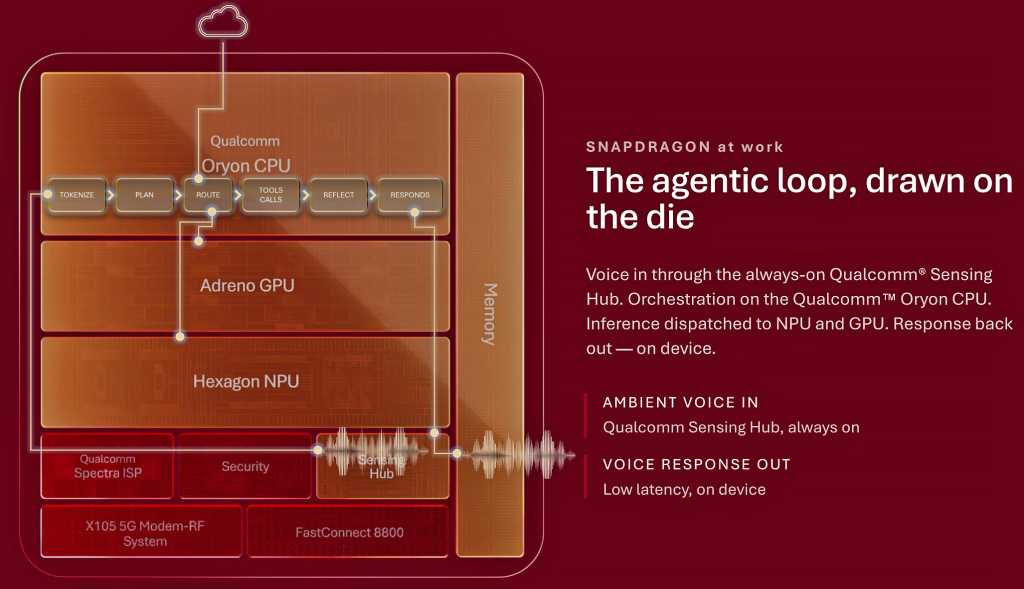
The most recent disclosure centers on Qualcomm’s Hexagon NPU, where the broader architecture starts to come together. The company’s next-generation Hexagon introduces a new Element Accelerator designed for transformer workloads, alongside its existing vector and scalar processing resources. Qualcomm says the new block is optimized for fast action loops, key-value (KV) cache acceleration and context lengths of up to 32K.

Hexagon is also getting 50% more shared memory, and again, that memory complement is important. Model state, context and KV-cache data can generate substantial memory traffic, particularly with larger language models. Keeping more of that data close to the NPU can reduce latency and power consumption. Qualcomm says the architecture is designed for long-context reasoning, multimodal models, concurrent agents and low-latency action loops.

For INT4 quantized models, the company claims up to a 50% improvement in pre-fill performance versus its previous-generation Snapdragon 8 Elite Gen 5. Qualcomm is also targeting Mixture-of-Experts, or MoE, models as large as 30 billion parameters. In its example, the company points to a 30B model that activates only about 3 billion parameters during a given token-generation step. That selective approach is a natural fit for the tight power and memory constraints of a handset.

Qualcomm isn’t suggesting that a smartphone will simply run a 30B dense model entirely from DRAM, however. By activating only the experts needed for a particular task, MoE architectures can dramatically reduce active compute and memory bandwidth requirements, potentially making much larger classes of AI models practical on mobile hardware.

Qualcomm’s next-gen Snapdragon mobile impact

There is a larger competitive story here as well. For years, flagship smartphone competition largely came down to CPU, GPU, modem performance and power efficiency. AI is now another major area of differentiation, and Qualcomm is clearly designing its next-gen Snapdragon mobile platform around this need.

Apple has the advantage of controlling its silicon, operating system and software stack end-to-end. MediaTek continues to push aggressively into premium Android devices as well. Qualcomm’s response is to make its custom Oryon CPU, Adreno GPU and Hexagon NPU work more like a fully integrated compute platform, tuned for modern AI and agentic workloads.

This is a solid advantage for Android handset OEMs because many don’t have the resources to engineer this level of silicon integration themselves. Qualcomm can effectively provide its Android OEM partners, including Samsung, Xiaomi, Honor and others, with a common hardware foundation for on-device AI, advanced graphics and agentic computing. It also gives Qualcomm another way to defend its premium Snapdragon position.

The company’s custom Oryon architecture now spans smartphones and Windows PCs, and soon servers, while AI acceleration is distributed across its CPU, GPU and NPU. For business users, that could mean more AI processing happens locally, reducing cloud and network dependence, improving response times and keeping more potentially sensitive data on-device. And for IT organizations, Qualcomm now has an opportunity to provide a more consistent AI compute foundation across Windows PCs with Snapdragon X and premium Android handsets.

There is still plenty we don’t know, however. Qualcomm hasn’t disclosed the complete SoC specifications, final performance or power characteristics, or which devices will ship with it initially. Many of these AI experiences will also depend heavily on Android, app developers and the models themselves.

The new 5GHz mobile CPU may generate the biggest headline at Snapdragon Summit, but the more important developments may be what sit around it: more local memory, specialized AI acceleration and tighter integration between the CPU, GPU and NPU.

If Qualcomm can translate this architecture into better sustained performance, enhanced power efficiency and useful on-device AI experiences, it could strengthen its position in premium Android phones while putting more competitive pressure on Apple. For business users, the payoff could be more capable local AI without sacrificing the performance and battery life expected of a flagship device.

That is the part I’ll be watching most closely when the complete silicon picture is unveiled at Snapdragon Summit later this month. And I may even get some hands-on time with it in some benchmarks, as we have in years past, so we shall see.

Anthropic maps three AI futures for 2030; the most extreme could upend the economy

AI is evolving faster than most people, even those building it, could even fathom, and its impact on the workforce and the economy is, at this point, really anyone’s guess.

Researchers from The Anthropic Institute are offering a few possibilities: They have built a nuanced framework looking at how AI might impact jobs, unemployment, and gross domestic product (GDP) growth between now and 2030.

They posit three potential scenarios for an AI-augmented future: “modest,” “substantial,” and “extreme,” and have created an interactive tool where users can explore how productive, or disruptive, AI will become in the workplace, based on their predictions of how they will work in 2030.

“Which of these worlds we are heading toward may become clearer within a year or two, and preparing for potential disruption seems to us the prudent course,” the researchers noted.

The goal of their work is to inform debate as AI becomes more powerful and capable. “AI is likely to reshape the US and global economies in profound ways in the coming decade, but how, and by how much, is extraordinarily uncertain,” they wrote.

How different scenarios could play out

If you add up every single task performed by people, machines, and software, the US has created a staggering $30 trillion in value over just the last year, the Anthropic researchers estimated. Their model and the corresponding tool are a way to explore how AI impacts tasks that contribute to the economy, the tasks it augments and creates, impacts on productivity, and speed of adoption.

“The answers to these questions have direct effects on GDP, the labor market, and the share of the pie taken home by workers,” they wrote.

Under their definition of “modest” change, AI will add less than half a point to GDP by 2030, meaning it will increase the growth rate of the national economy by just 0.5%, and will raise unemployment by just a tenth of a point, a minor shift. In this future, it’s difficult to see AI’s impact in macroeconomic data; change is steady but gradual, similar to that of the internet. “It drives real economic gains, but they’re within the historical norm for new technologies,” the researchers noted.

In the “substantial” scenario, AI will be capable of doing half of all knowledge work by 2030, the majority of it autonomously. Still, it wouldn’t be adopted for all work; in fact, most knowledge work tasks would still be completed without AI. Correspondingly, the economy would grow at twice its normal rate, but even as some non-knowledge workers see gains, wages for knowledge workers wouldn’t rise.

In this case, “AI makes a bigger impact than the internet, or the railroad,” the researchers wrote. Reallocation could be costly, but it is in line with what the US labor market has historically absorbed.

In the “extreme” scenario, of course, AI would be more productive than humans on the majority of knowledge work tasks, would do all of them autonomously, and subsequently would create no new knowledge tasks for humans.

The technology would “drive a completely transformed, unprecedented economy” arising from recursively self-improving AI. GDP growth would rise to 15% per year, but nearly one in five cognitive workers would be unemployed, and their relative wage would fall “immensely.”

The conundrum is that resources to compensate unemployed or under-paid workers will exist, but it’s unclear whether they would be fairly allocated. Mechanisms by which people can benefit from a much richer economy (retraining, income support, or universal basic income, for example) would become a question of economic policy.

“Whether and how those resources reach the people who bear the cost is not something growth delivers by itself,” the researchers wrote.

What users think

As well as developing the framework, the Anthropic researchers conducted a survey among roughly 11,000 Americans, asking them to predict AI use, productivity gains, automation versus augmentation, and displaced work.

They found that, in the main, public expectations land around the “substantial” scenario. That is, GDP would be 10% higher by 2030 than it would be without AI, and the overall unemployment rate would rise to around 5%.

Roughly 10% of respondents, on the other hand, had views in line with the “extreme” scenario.

Anyone can generate their own forecast using the researchers’ interactive tool, answering questions like: “Out of every 100 instances of a task AI can do in 2030, how many will AI actually be doing?”, “How many will be fully automated?”, or  “How much more gets done in an hour in 2030, compared with doing the tasks without AI?” The tool then responds, mapping their predictions to one of the three scenarios.

“Ultimately, what the economy looks like in 2030 depends on many factors, like what AI can do, and how companies and workers choose to adopt it,” the researchers wrote. “It also depends on how the financial benefit of this technology is shared.”

The between-the-lines reality

Sanchit Vir Gogia, chief analyst at Greyhound Research, emphasized that the Anthropic research “maps the conditions under which very different futures appear, it does not schedule destiny.”

He sees the distribution result, rather than the unemployment result, as the serious finding. In the extreme case, GDP is 32.4% above the no AI path, and the cognitive wage bill is 31% below it. Labor’s share of income falls from 60% to 45.2%, and capital income rises 81.4 %. That means a full 15% of GDP is captured as ROI rather than being paid out in labor costs.

In other words, he pointed out: “A richer economy is not automatically a fairer one.” Capability, diffusion, productivity, automation, and occupational friction all have to arrive together.

“AI will touch a large and rising share of knowledge work and will execute a much smaller share under independent authority,” he said. There is no single honest adoption percentage, because worker use, company use, technical exposure, and executed task instances are four different measurements.

Lessons from the research

Enterprises can take important lessons from the research as they deploy AI and consider its impact on their systems, workflows, and workforce, Gogia said.

“For enterprises, the binding variable is permission to delegate,” he noted. “A model that can draft a payment instruction is not thereby permitted to move money.”

His firm identifies five recurring concerns that come up in enterprise conversations: Durable returns after the full cost of deployment, control over authority being granted, augmentation quietly becoming substitution, erosion of professional formation, and fairness of how gains and risks land.

Some of those changes are progressing faster than the governance around them, he observed. Once a system can inspect customer data, change configurations, or act on workforce records, autonomy has stopped being a feature and has instead become an allocation of institutional authority.

“And the tasks easiest to automate are frequently the tasks through which judgement is learned,” he noted.

Layoff remorse: Gartner says at least one in three positions eliminated by AI will be restored by 2029–at a higher cost

Gartner on Wednesday said that it expects 30% of the positions eliminated by AI-related layoffs to be refilled by 2029, suggesting that the initial terminations were ill-advised and excessive.

“When business and IT executives look back on the early AI era, they will realize their greatest mistake was believing that work automation was the point, when workforce amplification was the opportunity,” said Tori Paulman, VP analyst at Gartner. “The competitive advantage will go to the CIOs and business executives who build an AI-shaped organization where AI value compounds by reshaping roles and allowing workflows to cross traditional boundaries, increasing velocity and reducing friction.”  

The Gartner report noted that it is finding that the cuts “deplete talent pipelines and erode institutional knowledge.” Beyond the immediate workforce disruptions associated with any mass layoff, companies will also face steep increases in costs for recruitment, training, and onboarding.

It also predicted that, by 2027, “75% of organizations that prioritize capturing AI productivity gains as cost savings will be eclipsed by competitors that aggressively reinvest those gains into innovation, modernization and upskilling.”

In an interview with Computerworld, Paulman said that the 30% figure represents the average impact on organizations of all sizes; they estimate that the layoff boomerang for enterprises would be even higher, roughly 40%. 

Paulman said that Gartner’s research found a lot of what they called “AI washing” by executives who want/need to do layoffs for purely budgetary reasons, and will falsely blame AI for the reductions because it makes them look better.

“More than 50% of our enterprise clients have been given a number [by their bosses],” Paulman said, and have been told by senior management to find that percentage of savings from AI.

But despite widespread evidence of problems due to AI-related layoffs, such job cuts are still increasing. 

Layoffs were ‘excessive’

Other analysts and consultants agreed with the Gartner suggestion that many of these job losses attributed to AI are going to be walked back, but questioned the specific statistic. Some also noted that 70% of the AI-attributed layoffs may remain in force, which would suggest that the original terminations were mostly justified. 

However, Frank Dickson, principal analyst at Dickson Research, argued that a lot of the layoff reversals will occur in a variety of ways that will obscure the fact that they are restoring a terminated role. 

“A lot of that 70% never shows up as a clean rehire even when the original cut was wrong,” he said, pointing out that some of the losses caused service to quietly get worse, and stay poor, some of the work was contracted out or offshored, some of the roles were reconstituted with a different position or title, and some was covered by the remaining staff absorbing the load. This,” he noted, “shows up later as burnout and attrition, not as a line item on this report. None of that gets counted in the 30%, and none of it is evidence the original call was sound.”

Melody Brue, principal analyst for Moor Insights & Strategy, added that the 70% scenario “could show that a substantial share of the AI-related workforce reductions is durable,” but, she stressed, “it shouldn’t be mistaken for endorsement of how those layoffs were made. What it doesn’t show is whether the organization captured the full economic value it expected. A lower headcount is not by itself evidence of a successful AI transformation.”

Valence Howden, advisory fellow at Info-Tech Research Group, questioned the methodology behind the calculation of Gartner’s 30% figure, but he agreed with the overall sentiment that layoffs attributed to AI have been excessive.

“I’m not sure we can substantiate those numbers, since it’s much more of a guesswork statement than anything else,” he said. “I do believe the current trend is going to lead to rehiring, especially as AI governance requirements ramp up and given AI’s lack of contextual semantic understanding. We know AI has not provided the value proposition that it has been sold as providing, and unless costs are controlled, it will be cheaper to use humans to perform some of the advanced work.”

Supporting data

Dickson also raised questions about the Gartner report because it lacked comparative layoff statistics. 

“Gartner doesn’t say what the reversal rate looks like for ordinary layoffs, the ones that have nothing to do with AI,” he said. “Suppose normal cuts get walked back at 10% to 15% in a typical five-year window, which is plausible given ordinary churn and business-cycle rehiring. A 30% rate specific to AI-driven layoffs would still run well above that, and that’s a damning number. Without that comparison, 30% is just a figure floating with no anchor.”

However, Dickson pointed to various datapoints supporting the position that AI layoffs have been excessive, noting that Forrester reported that 55% of businesses “already regret AI-driven cuts and are predicting half of those layoffs get quietly reversed.” 

“Robert Half puts it at a third of hiring executives who eliminated roles for AI having already rehired. Ford, IBM, Booz Allen Hamilton, Alphabet and CSX have all walked back cuts or announced rehiring drives,” Dickson said. “Gartner’s 30% by 2029 sits comfortably inside that range.” Klarna has also walked back AI layoffs. 

A ‘major indictment’

He added that many AI layoffs amounted to a corporate version of a crash diet. “You cut fast, you look great on the next earnings call, and eighteen months later, the weight is back, plus interest, because nobody fixed why the cut was made in the first place.”

Gartner’s Paulman agreed, noting, “business and IT executives who use AI primarily as a tool for cost cutting risk making reductions that are too deep and too soon, affecting their ability to innovate their business model and compete in new markets as AI continues to mature.”

Mike Wilkes, enterprise CISO at Aikido Security, said that even if the 30% figure turns out to be accurate, it is a major indictment of the layoffs. 

“If 30% of AI-driven layoffs must be reversed, that is an enormous error rate for a strategic workforce decision,” Wilkes said. “Imagine any other major capital decision where nearly one-third had to be unwound at a premium three years later. No CFO would call that a strong outcome.”

The iPhone is now Apple’s ‘intelligent personal hub’

Twenty-five years ago, I sat near the front of the room while then-Apple CEO Steve Jobs rolled out Apple’s digital hub strategy, a vision in which the Mac would become the central manager of all manner of portable digital devices.

Now, a quarter of a century later, nearly all of those digital devices have become features on your iPhone, and the arrival of AI means the iPhone has become the intelligent personal hub, the central manager of, well, of you. Apple’s new CEO, John Ternus, went straight for the concept in his important opening remarks at Wednesday’s big iPhone launch, where nearly all the pre-event speculation came true.

The intelligent personal hub

“As we look ahead, we see a future filled with enormous discovery and transformation,” Ternus said at the Surprise and Shine event. “AI makes entirely new kinds of experiences possible. An AI can become even more useful when it brings together your life with the apps, services, and products you use every day. And this means the product at the center of your experiences becomes even more essential — what I like to think of as an intelligent personal hub.”

(To be clear: He’s talking about the iPhone.)

Think about it: all those tasks you now do on your iPhone are tasks AI can help you with. Siri AI lets you work on files and folders using spoken commands, while contextual AI lets you sift through all the data once gathered by your iPhone to do things, make things, create networks, or even organize luncheon. 

“It’s the intersection of broad new capability, and a deep understanding of your personal context that makes this idea so powerful,” Ternus explained.

AI’s brave new world

That’s the context within which Apple will be introducing all its future products, a battle the company now feels confident marching into now that it appears to have resolved its historical challenges with AI. At the same time, the company also seems to be doing its best to lean into privacy — enabling life-changing AI transformation of daily lives while putting a brake on scary privacy attacks. This is going to be foundational to what happens next at Apple.

Of course, you’re not reading this to look too deeply into what Ternus said about the future of Apple; you’ll also want some insight into the slew of devices the company introduced at its event. That list includes the:

The big surprise? Price

For some, the biggest surprise in these introductions was price. All of the accessories were kept at the same price as last year’s equivalents, while the new Pro iPhones came in at only $100 more for the entry-level model, rising to around $300 more at the more price-resistant highest end. An iPhone 18 Pro Max equipped with the max 2TB storage comes in at $2,499 compared to the $1,199 iPhone 18 Pro entry point. 

When it came to price, though, all eyes were certainly on the iPhone Duo, and Apple has given everyone (except competitors) a pleasant surprise on that. 

With a starting price of $1,999, the folding phone’s price hit the low end of expectations, and while that grows to an eye-watering $3,199 with 2TB of storage, it compares well with the market leader, Samsung. While the Galaxy Z Fold 8 begins at $1,899, in terms of features and design, Apple’s folding phone lines up with the Galaxy Z Fold 8 Ultra, which costs from $2,099. 

Dig a little deeper and you’ll see that while the iPhone has IP68-rated dust and water resistance, the Samsung equivalent has only IP48. You can drop the Fold 8 into five feet of water for up to half an hour and it should be OK, but you can chuck your iPhone Duo in almost twenty feet of water, and it should survive. Though you probably shouldn’t test that unless you’re a hugely successful “influencer” already generating a small nation state of money through clicks. If that’s you, good for you. I’m only slightly envious. 

A productivity powerhouse?

What that suggests is that the iPhone is less likely to get damaged and is better engineered, though it’s also ever so slightly thicker. Apple’s device is powered by what the company modestly described as the most powerful mobile processor on the planet — which it is, particularly for the AI tasks all the new iPhones can handle. That matters, particularly for applied contextual AI deployed across daily lives.

It also matters because the combination turns Apple’s device into a mobile productivity powerhouse, one that I think will likely affect iPad sales more than anything else. Though this wouldn’t be the first time a new Apple release ended up eating its siblings. 

The productive possibilities of Apple’s premium device will also be realized as app developers embrace both the form factor and Siri AI. Apple said during the keynote that more than 300,000 apps already work with Siri AI and more than 2.5 billion Siri requests are being made each day. That latter number will only grow now that Siri performance has been dramatically improved. 

While this argument applies to all Apple’s new devices, the fact of the matter is that you now have an iPad-sized object you can carry in your pocket that is capable of doing some really powerful tasks by spoken command alone. That’s the iPhone Duo – a product of an unexplored territory at the crossroads between mobile computing, daily digital existence, and the opportunities of AI.

It’s not for everyone, yet

I don’t expect the Duo will be for everyone; the vast majority of users won’t be spending $2,000 on a phone. But we know that the cost of technologies like this tends to decline, which suggests that in perhaps five years’ time, it will be possible to create equivalent devices for a much lower price. Right now, it’s for affluent Apple consumers, C-class executives, students, AI pros, medical professionals and others who might actually need this kind of performance and display space to get things done.

This, incidentally, is precisely the same group of people that first embraced the iPad when it appeared, turning that into the world’s best-selling tablet.

What might this mean for Apple? 

I traded a few messages with IDC analyst Francisco Jeronimo, who sees it like this: “Apple entered the foldable market and, in one keynote, set the price and the standard every rival will now be measured against.”

He also pointed out, the iPhone Duo is “…a direct test of whether Apple can use design, ecosystem integration and premium positioning to reshape a segment that has so far remained selective.” 

He’s right, of course, but Ternus also just defined what that segment, and the industry, is driving for. I’s the same thing Apple was aiming at 25 years ago. “iPhone sits at the center of an amazing ecosystem of intelligent features and experiences that work seamlessly across the products you use every day,” the company said — an “intelligent personal hub.” And the Macs are all right, too.

Now please subscribe to my daily, human-curated Apple-related news headline feed at The Core, or follow me on BlueSky, LinkedIn, or Mastodon.

Adobe Acrobat evolves beyond PDFs with enterprise search, AI content creation

Adobe on Wednesday unveiled a range of updates to Acrobat, including the ability to turn PDF documents into interactive visual reports and podcasts. And a new Knowledge Base feature connects Adobe’s Acrobat AI assistant to document sources such as Microsoft SharePoint and Google Drive.

It’s the biggest Acrobat update in several years, Adobe said, and highlights the application’s evolution from PDF reader to what the company now describes as an AI-powered document productivity and creativity platform. 

Acrobat users open more than 400 billion PDFs in the app each year, Adobe said, claiming 650 million monthly active users as of last year. 

Among the new additions is the ability to turn dense PDFs into interactive, visual documents and presentation slides. To create these, Acrobat’s AI assistant scans the selected file, asks questions about the user’s intent, then generates documents charts, images and navigation.

It’s also possible to turn documents and web links into podcast-style audio summaries — similar to capabilities in Google’s NotebookLLM and Microsoft Copilot Notebook. A new Stylize feature can enhance plain-looking documents, applying a template to turn them into “professional deliverables” such as CVs and invoices, Adobe said.

The audio and visual generation features are all available in paid Acrobat plans (Acrobat Studio, Acrobat Express and Acrobat AI Assistant). 

Another addition, Acrobat Knowledge Base, lets customers connect the Acrobat AI assistant to a wider range of file types, enabling users to ask questions about information held in documents stored in Microsoft SharePoint and Google Drive, for example.  

Acrobat’s Knowledge Base “transforms curated document collections — policies, playbooks, product information, pricing guidance, research — into cited answers available from Slack, Microsoft Teams, Acrobat, and other places employees already work,” Abhigyan Modi, senior vice president for Adobe Document Cloud, said in a blog post. 

Adobe also added an Analyzer tool designed to retrieve data from large volumes of documents. This could involve analyzing thousands of contracts or invoices to identify information such as renewal dates and revenue clauses.

That turns information once trapped in files into data that can inform finance, procurement, compliance, and the systems that support them, said Modi.

Analyzer is the more interesting of the two releases, said Mike Leone, vice president and principal analyst at Moor Insights & Strategy. “Knowledge Base is a search product and search products get judged feature against feature. Analyzer is closer to a data product, because that extraction work is what companies currently pay people and pipelines to do,” he said. 

“What I’d want Adobe to answer is whether that data can leave Acrobat and land where the rest of the company’s data lives. If it can, this starts competing for real data budget. If it stays inside the app, it’s a very good Acrobat feature.” 

Access to Analyzer and Knowledge Base requires an Acrobat Studio for Enterprise subscription. (Adobe doesn’t publish pricing.) 

In addition, Knowledge Base includes a credit-based model that places some restrictions on usage, with licensed users allowed up to 1,000 queries a month. Other actions, such as document uploads, queries from Slack and Microsoft Teams, and queries by employees without an Acrobat Studio license, draw varying amounts of Acrobat Studio “shared credits.” Adobe didn’t say how much additional credits cost once a yearly limit is reached.

 More information about Adobe’s Knowledge Base credit usage policy is available on Adobe’s website. 

Analyzer also includes a credit system that limits document ingestion and attribute extraction.

For enterprise customers, usage-based pricing can add complexity when managing employee access.

“The issue for a broad deployment is that headcount barely predicts usage,” said Leone. “One person pointing it at 10,000 contracts will burn more credits than a hundred people asking the occasional question. Pooling the credits across the whole organization is the right design, because usage on something like this is rarely spread evenly.

“One of the big challenges is that people could very well start rationing themselves because they don’t know what a question costs,” he said. “Or worse, a couple folks use all the credits and everyone else is out of luck. The last thing any organization wants is to pay for a knowledge tool that people won’t use or can’t use.”

No, AI is not killing jobs for everyone, studies say

A slew of recent studies indicate that AI isn’t dramatically displacing workers. At the same time, there were no indicators that the fast-moving technology is creating a lot of jobs, even as AI skills remain in high demand.

Stanford University researchers in an August study found that any AI-related job declines were concentrated among young workers aged 22–25. But for older and more experienced workers that wasn’t the case.

“Claims of economy-wide AI-driven job losses are not visible in payroll data through June 2026,” the researchers said, citing ADP payroll information. Stanford partnered with ADP to conduct the research.

The decline for young workers is more often related to the automation of some work tasks by AI, as opposed to its use to complement work. In contrast, AI is more often used by experienced workers to augment what they do. 

According to the Stanford report, workers between 22 and 25 and employed in jobs highly exposed to disruption by AI are falling behind their older counterparts. Their employment levels in June were about 19% below the same age group in less-exposed occupations. That’s compared to where they would be if both groups had kept pace with each other.

“Experienced workers show no comparable gap,” the researchers said, adding that “this is consistent with recent reports of a worsening job market for entry-level workers.”

Employment of younger workers in AI-exposed jobs fell about 11% from late 2022, while the same age group in less-exposed jobs actually grew about 10%. “For older age groups, we find much less marked differences in employment growth across AI exposure quintiles,” the researchers said.

Stanford, which created a lab last year to study AI’s impact amid heightened fears of the technology’s economic effects, said its numbers were based on available indicators.

AI’s adverse impact on young workers has been well documented, with many of them laid off in the initial wave of AI automation. AI has also suppressed wages for entry-level workers.

AI was cited for 116,175 job cuts in 2026, but that number is declining. The technology  was blamed for 3,462 cuts in August, according to data from Challenger, Gray and Christmas.

It’s the “lowest monthly total since December 2025 when 142 cuts were attributed to AI,” the company wrote in a blog entry. The research firm also noted aggressive hiring plans for companies in 2027.

AI is adding value to companies in different ways, and humans are an important part of that process, said Michael Chui, a senior fellow at QuantumBlack, AI at McKinsey. “The night shift is real now,” he said. “People are sending off their agents to write code and checking in the morning.”

MIT late last year established an AI labor index to determine how agents are affecting the workforce. The school’s Project Iceberg looks at how the coordination and interaction with agentic AI changes how work is done.

Despite the disruptions, demand for AI-related talent continues to rise, tech industry consortium CompTIA said last week. About 320,000 job listings in August required AI-related capabilities, a 4.5% increase from July.

AI-related hiring is outperforming the broader tech market, with demand for AI skills up 96% year-over-year, said Kye Mitchell, head of Experis North America, which is part of ManpowerGroup.

“We’re seeing real growth…in marketing management and project management roles, suggesting employers are looking beyond the people building AI to the people applying it,” Mitchell said.

More broadly, the US economy added 162,000 jobs in August, according to US Department of Labor figures released last week. CompTIA noted that tech employment across all sectors rose by 86,000 workers in August.

But within the tech sector, 14,700 positions were cut, CompTIA said.

Siri AI Recaps? Even if Apple builds it responsibly, others might not

Late-breaking reports suggest Apple has built a new Siri AI ‘Recaps’ feature that summarizes your day for you. The idea sounds great until you recognize that this summary will also include overheard conversations. 

Suspending the huge red flag of concern over privacy and data protection for a moment or two, why would this be useful and who is it for?

How it’s supposed to work

First, it is being described as an Apple Watch feature that will only be available on the latest models: Apple Watch Series 12 and Apple Watch Ultra 4, as these allegedly include secure audio processing hardware. Reading between the lines, that suggests the devices will be able to listen to and process audio on device, which implies that the information won’t need to leave your smartwatch, not even to your iPhone.

The report also says the feature doesn’t make a transcript, nor does it store the audio; it instead gathers key datapoints from what is said to include in the summary, deleting all the remaining information in the process. You can have the feature working all day, on-demand, or only in specific locations. The idea seems to be to provide some kind of actionable summary of events and key conversations that take place during the day. I imagine the subtext is to digitize as much as possible of your daily existence as Apple thinks you will be comfortable with to create the kind of datapoints contextual AI requires if it is going to help with your life.

The case for it

That sounds fine, up to a point — the idea that a digital assistant will be able to recognize key events, moments, and requirements to remind us of them, act on them, or suggest next steps concerning them is certainly a notion that’s gained currency in tech circles. They see it as augmenting human achievement, enabling people to become more productive, more efficient, and capable of doing more with less effort. At least, that’s part of the argument.

What is wrong with that (other than concerns over privacy or a desire not to have one’s entire waking life transformed into a series of datapoints that can be measured, tested, or surveyed by entities outside of our control), right? If you have nothing to hide, you have nothing to fear, at least, not until times change and what didn’t need to be hidden in the past becomes something that must be shrouded in future.

Apple’s privacy defense

Apple, of course, has its strong privacy story to lean into as it introduces this surveillance-as-a-service solution; it’s an argument that says it recognizes how this tech can be abused, and wants to deploy it correctly. It will point to that record as it promises its system doesn’t gather data, doesn’t collect it, and doesn’t keep any form of transcript on or off the device. The company should be commended for building a system that works this way, recognizing as it does that the best way to protect confidential information is not to gather it in the first place.

The warning

But what Apple has also done with this new speculated upon — and as-yet-unconfirmed product — is to show us what these tools can already do. Much of this is already visible; take recent news that LG smart TVs constantly collect and upload user data as an illustration of the seemingly egregious ways in which such tech is used. (LG denies the claim.) What Apple shows us is that with AI in the picture, all your waking moments can be collated, curated, analyzed, digitized and rendered into actionable data. Apple may not be doing that, but others will not be equally cautious, so we owe Apple a debt for warning us of what’s at stake.

Though we don’t know whether Apple will actually introduce this new service, the source of the claims is one of the strongest in the industry. What we do know is that the technology required to build systems like this exists, along with AI systems capable of sourcing, sharing, and sifting through that information. What we don’t yet know is how to remove ourselves from the data stack.

Now please subscribe to my daily, human-curated Apple-related news headline feed at The Core, or follow me on BlueSky, LinkedIn, or Mastodon.

AI notetakers at work could leave companies at risk for lawsuits

AI note-taking applications are increasingly used by workers to record meetings, generate conversation summaries and suggest post-meeting action items. 

Along with the promised productivity benefits — enabling users to focus on meetings rather than actively taking notes — the emergence of these AI tools has raised privacy questions, particularly around obtaining prior consent by meeting participants for their use. Those concerns, in turn, have prompted a spate of lawsuits against software vendors that sell AI notetaking tools.

In some ways, the underlying questions are not new: It’s long been possible to record a phone call with a dictaphone, and laws around surreptitious recording have been around for decades. Yet widespread access to AI notetakers via desktop or smartphone apps means that it’s easier than ever to record a conversation for future reference. 

Among the thorny questions arising from the technology’s use: what happens to conversation data sent to a software vendor’s servers for processing? Are the recording and transcript used to train those vendors’ AI models, for example, or create biometric voiceprints? Those practices are among the issues being considered in US courts. 

Otter, which claims to have 35 million users, was subject to a class-action complaint in a federal court in California last year. That complaint accused Otter of recording individuals without consent and using their voices to train its speech recognition AI tools. Last month, a judge rejected Otter’s attempt to dismiss the main claims, though the scope of the case was narrowed.

A lawsuit filed against another vendor, Fireflies, in an Illinois court late last year, alleges the company collects and stores biometric voiceprints without user consent, in violation of the Illinois Biometric Information Privacy Act (BIPA). Fireflies claims to have more than 20 million individuals and 1 million organizations as customers.

Earlier this year, a class-action complaint in a Washington court claimed that a live transcription feature in Microsoft’s Teams collaboration application also violates BIPA by collecting biometric data without consent. 

And most recently, a complaint alleged that Granola, a well-funded startup, designed its product to be used without the knowledge of all meeting participants, in violation of the Electronic Communications Privacy Act (ECPA). That complaint also claims Granola trains its AI models on conversation data without consent. 

None of these cases has yet been resolved, and it’s unclear whether any of the vendors broke the law in the design and delivery of their products and services. But the lawsuits highlight considerations for businesses that allow the use of AI notetakers, both in terms of prior consent for recordings and understanding how conversation data is handled.

More broadly, the lawsuits raise questions about how existing privacy and consent rules apply to new technologies that make it easier to record others, whether through AI note-taking apps, smartglasses, or other recording devices.

Computerworld spoke with Brian McGinnis, partner at law firm Barnes & Thornburg and a founding member and co-chair of the firm’s Data Security and Privacy Law practice group, about the focus of the lawsuits, potential outcomes, and how businesses can deploy AI notetaking apps safely.

Several cases have already been brought against popular AI note-taking apps. What are some of the main commonalities between these? Which laws are the vendors accused of breaching? “The common allegation is that these companies capture communications of people who did not agree to the recording or receive adequate notice. Some of the lawsuits also allege that meeting data is used to train AI models and that consent cannot meaningfully be withdrawn once the data has been processed.

“There are various federal and state claims. You’ve got the Electronic Communications Privacy Act, a federal wiretapping statute. As a general matter, the Electronic Communications Privacy Act permits an interception when one party consents, subject to statutory exceptions and questions about whether the technology constitutes an unlawful interception or third-party eavesdropping. In other words, if you, as the user, provide consent, you can be on a meeting with 20 other people and it’s deemed to be sufficient; you don’t necessarily need to get the consent of other people. 

“But California and a minority of other states are what we call ‘two-party consent’ states, meaning each individual on the call has to give consent; it’s not sufficient for you as the person who turns the notetaker on to provide the consent — you also have to get the consent of others that are being recorded. There are state laws around that.

“There’s a law called CIPA, the California Invasion of Privacy Act, that’s being utilized in this context.  We see a lot of suits being brought under that law — it’s a wiretapping statute designed for telephone wiretapping that’s now being applied to the internet.”

What about the use of biometric data? “A growing number of states regulate biometric data, with Illinois’ BIPA being particularly prominent because it provides a private right of action. This means an individual can sue a company for violation of the law.  

“That law covers biometric information. With an audio recording or recording of ‘dumb’ video that isn’t running any algorithms, you’re not necessarily collecting any biometrics. But when you start identifying people, you’re recording things like faceprints or voiceprints, which are in the definition of biometric information within the statute. Now you’re not only collecting personal information, but also biometric information, which is considered very sensitive and much more highly regulated. 

“Then you’ve got the private right of action that goes against it. Part of the argument here is that recordings taken by the AI notetakers can be used to produce some form of biometric information, such as a voiceprint.  

“We’ve seen a lot of cases, and a lot of changes in industry as a result of this law. Shutterfly had a famous case about scanning for people’s faces and things like that in Illinois that changed the photo storage and processing industry a little bit. 

“A lot of companies stay out of Illinois to avoid this law specifically. But a customer organization might not know exactly who’s in a meeting and where a person is located at the time of the meeting. So, you need to either follow that law and get individual consent, or stay out of states with biometric laws if you want to use some of these tools. 

“It’s just a further challenge for these applications if the goal is to be used as much as possible with as little detection as possible.”

What are some of the potential outcomes for these cases? “I think it’d be unlikely to get an outright ban, absent passing some kind of new law that says these tools are per se illegal for use. It’s much more likely the outcome will require some changes and controls over the way that they get used. The clearest case would be some kind of a pop-up notice: ‘Hey, this meeting’s being recorded, here’s who it is, here’s their privacy policy, here’s their terms of service – do you consent to it?’ And getting opt-in consent from anybody who wants to be recorded. 

“The notion that only one person in the meeting has to say it’s okay and you can just automatically record everybody else, I think that’s probably at risk, and could potentially be replaced with a standard that requires everybody to consent before it’s considered legal.

“But the newer —and more interesting — wave of these is the Granola case, where part of its marketing is that people aren’t aware that it’s there. The Granola complaint alleges that the product was designed to operate without alerting other participants. It’s possible that kind of activity could result in a decision that would ultimately ban it outright. In other words, that it’s illegal to utilize these tools if you aren’t providing notice to everybody and/or aren’t getting consent from everyone on the call. That’s a possible outcome that we could see.

“To me, that’s interesting when you think beyond AI note-taking and into the broader world, with conversations around, like, Meta Glasses, or any of these kinds of AI wearables. Granola in particular has an Apple Watch app, and there are other wearable or physical devices — there’s one [Plaud Note] that sticks on the back of your phone and is essentially an always-on recording device. 

“With these devices, you’re going from an online meeting where you can provide notice and there’s a structure to obtain consent, to walking down the sidewalk and recording people and casual conversations. Maybe it’s somebody you’re having a conversation with, maybe it’s somebody at the table next to you in the coffee shop that you have no relationship with whatsoever — what are the laws around consent and notice in those cases, where there’s no digital interface to put that up in front of people? Do you have to go around with a pad of paper and a pen and get people to sign consent to use these things? Do you have to physically tell them?

“Those are the more interesting conversations that this line of cases is just at the beginning of helping us get some answers on. In other words; how do you get consent? How do you provide notice in a world where we don’t have documents or screens in front of us to easily handle that? Those are interesting questions that the law will have to figure out here.”

These tools are increasingly used in the workplace. How can businesses be sure they deploy the technologies safely? “We’re getting a lot of questions from our clients about this topic, because they’re really unsure and uncertain of how to handle these tools.

“Obviously, there’s a push for broad use of AI within their companies, for productivity increases within their company. People like the tools; they want to be able to use them. But then we also hear a lot of stories about ‘I jumped on a meeting; I didn’t even know it was being recorded, then I got an email afterward with a transcript of it,’ and ‘half of what it recorded wasn’t actually what I said, or it was interpreted incorrectly’ — things like that. So there’s a lot of consternation amongst our clients about the people within their organizations using it. 

“I can’t tell clients definitively that they’re legal as they are; there are ways to use this legally and safely that aren’t going to get your organization sued, but you probably have to do some things that are beyond what’s provided ‘out of the box’ by the software providers. 

“With Granola, for example, my understanding is that certain notice features may not be enabled by default. You can turn on video or audio watermarking, and you can turn on the notice that pops up in these things, but I think it ships without those features enabled. That puts the responsibility on the individual user to determine and then implement their own legal privacy and legal compliance mechanisms using their settings.

“You really have to play to the most stringent state’s law. I would advise a company that, to decrease your chances of getting in trouble for use of these tools, you need to obtain consent of all parties on the call. You can do that verbally, as well; written is even better. 

“Then it’s about having an internal AI note-taking policy. Think of a BYOD policy, which all these companies have, or an AI usage policy — this could be part of that policy, or a standalone policy: ‘Here’s how our organization thinks about these tools:  you can only use these approved tools and, if you’re going to use them, you have to turn on these features. You have to get consent from everyone. Here are limits on what you can do with the output of those transcripts or recordings.’ 

“If you set all that up and do the compliance and governance work, I think you can use these tools and most likely stay on the right side of the law. Certainly, the law doesn’t prevent consenting adults from consenting to the use of these kinds of tools.  

“But the further you get away from that written consent standard, the more problematic it becomes. If you just want to go to a notice standard and not obtain actual opt-in consent, or, even worse, if you want to try and do this without anybody knowing, that potentially could get challenged.”

Wanna make your own Android ping tone? Ask Gemini

By now, you probably know my stance on Gemini and other generative AI gobbledegook — right?

In short: It’s an insanely powerful form of technology (obviously). But it’s also wildly inaccurate and ineffective as an all-purpose answer engine, and by cramming it into every last nook and cranny, Google is doing a serious disservice to its users — and to itself.

That being said, generative AI can be incredibly useful. The key is simply to frame it as a purpose-specific tool for the right type of limited task as opposed to treating it as the end-all answer for everything, as most tech players seem overly eager to do these days.

Here in the land of Android, I’m always looking for purpose-specific ways Gemini can make our lives easier. Over time, I’ve found those ideas often aren’t the big headline-making features Google and other tech companies market but rather random little off-the-beaten-path possibilities that rarely get emphasized.

Today, I’ve got a new Gemini Android advantage for you to explore — another one that I’ve never seen advertised anywhere but that works brilliantly well and solves a long-standing limitation of our modern mobile gizmos.

It’ll take you all of a minute to master and cost you precisely $0 to pull off. Ready?

[Get next-level knowledge in your inbox with my free Android Intelligence newsletter — one useful new thing to try every Friday, straight from me to ye.]

Gemini’s custom sound advantage

This Gemini-provided power-up very much follows the path of thinking about AI as a limited, purpose-specific tool for a narrow task — the exact sort of area where AI excels.

I won’t keep you waiting: Gemini, as I discovered whilst poking around within it recently, is really good at generating unique, custom ringtones and notification sounds based on your personal preferences and specifications.

It almost seems obvious, once you think about it. But I sure hadn’t thought about it up until now — and I suspect most other folks haven’t, either.

The advantage here goes beyond just superficial silliness, too: By creating your own custom ringtones and notification noises, you can know exactly what event your phone is alerting you to within a split second of hearing the associated sound — without having to rely on the same limited and often underwhelming pool of default options that everyone else uses (or, worse yet, having to lean on shady, ad-ridden “ringtone apps” to find mediocre alternatives). That means you’ll know within a heartbeat when your boss or an especially important client is calling or if an incoming call is a random unknown number.

On the notification front, you can create a specific, memorable sound to accompany a new message in an important work-related Slack channel and a different distinctive sound for a high-priority email. They’ll all be sounds that you make and identity with and that no one else in the world uses. That’s pretty powerful.

And creating these custom sounds couldn’t be much easier, either, once you realize it’s possible:

First, just fire up Gemini on your phone (or on any device you’re using) and tell it what you want. So, for instance…

  • Create a soft, subtle ringtone that’s reminiscent of an old office phone sound.
  • Create a ringtone that sounds like an 8-bit version of The Final Countdown.
  • Create a one-second high-pitched notification sound that brings to mind the Super Mario Bros theme song.
  • Create a short notification sound that mimics the Back to the Future time circuits noise.
  • Create a notification sound that sounds like a robot saying “ALERT, ALERT!”

The only limit is your imagination. And if you’re not feeling especially imaginative, you can even ask Gemini to give you a list of ideas for distinctive, memorable ringtones or notification sounds based on geeky nostalgia, 80s pop-metal, or whatever it is that tickles your fancy.

Once you’ve sent a request, Gemini will — somewhat confusingly — spit back a big honkin’ block of HTML code. This is because, for reasons unknown, the system can’t or won’t just provide a sound file directly. Go figure.

JR Raphael, Foundry

But from there, it’s just one more quick step to get the file you need: Click or tap the copy icon in the upper-right corner of that code block — the icon that looks kinda like two stacked, rounded rectangles — to copy the entire chunk of code onto your system clipboard.

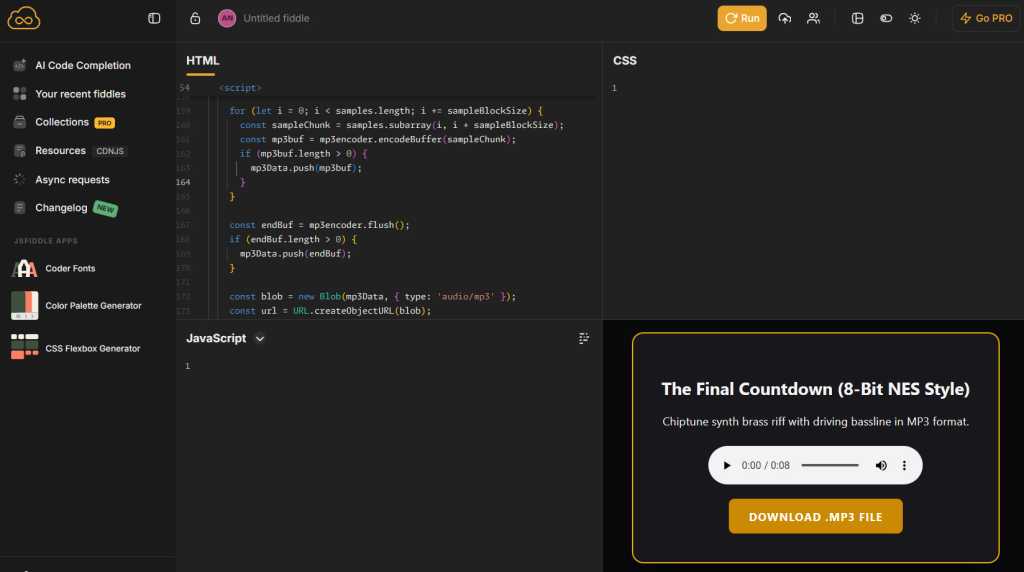
Then open up your browser and go to the website JSFiddle.net. It’s a well-known, long-standing tool for running code like HTML right in your browser and seeing the result, and it works entirely in the browser and without any downloads or special permissions required.

Tap or click into the “HTML” field, then paste in the code from your clipboard (by long-pressing any open space, on Android, and selecting “Paste” from the menu that appears). Click or tap the “Run” button, and — ta-da: You’ll see a player to listen to your custom Gemini-generated sound and a button to download it.

JR Raphael, Foundry

Provided you like what you hear, hit the button to download the file, then head into the Sound section of your Android system settings to save it and make it available for applying as any kind of alert or ringtone. The exact steps for doing that will vary from one type of Android device to another, but on a Pixel or another phone that follows Google’s core Android interface, you’ll tap on either “Ringtone” or “Notification,” then tap “My Sounds” and tap the plus icon to import your own custom file from your phone’s local storage.

On a Samsung device, you’ll start the same way but look for the plus icon within the “Ringtone” section of the settings, then tap the “Folders” tab to find your locally downloaded files. Samsung doesn’t make it easy to add in your own custom notification sounds, annoyingly, so what you’ll have to do is open up the Google Files app, find the file you downloaded in your “Downloads” folder, then tap the three-dot icon alongside it to copy it to the folder called “Notifications.” Once the file is in that folder, it should show up as a notification noise option within the Samsung Android settings.

And remember: You can use Android’s notification channels to set specific sounds to be used for different types of alerts, even within a single app — and you can use the Google Contacts app to set custom ringtones for different people, too.

With Gemini as your personal composer, you’ll never be stuck with generic overused sounds again — and you’ll always know exactly what’s happening from the first note of whatever noise you hear.

Keep the experience-enhancing wisdom coming with my free Android Intelligence newsletter. One new useful trick in your inbox every Friday!

Leap second proposal will keep software stacks in sync

For decades, global time experts have mapped atomic clock time to the earth’s rotation, periodically adding a second (aka a leap second) as rotation slowed. But the planet’s rotation has now slightly sped up, which could mean that a negative adjustment will be required. 

The problem is that computer systems have not been programmed to do that.

To avoid this issue, the General Conference on Weights and Measures (GCWM) in October will vote on a proposal to maintain the Coordinated Universal Time (UTC) as a continuous time from May 20, 2027, without adjustment via leap seconds, allowing UT1, the measure of time based on the earth’s rotation, and UTC to drift apart by up to one hour.

It pointed out, “a negative leap second has not previously been applied, and it is considered to pose a high risk of causing anomalies and disruption to critical infrastructures that are largely unprepared, and the preparation would create, for the industries that rely on time synchronization, a need for financial investment, whose amount is estimated to be similar to their preparations for the millennium bug.”

The group said that a 2025 workshop which included experts on Earth rotation estimated that the probability of a negative leap second will increase rapidly in the near future, reaching 30% by 2035. Acceptance of the proposal, it said, will ensure the long-term continuity for UTC for several centuries.

Unexpected requirement

Jeremy Roberts, senior director at Info-Tech Research Group, said that authorities never expected the need to reverse time. 

“We have been adding leap seconds for decades, basically to keep atomic time in line with observed time, but this is the first time we’d have to take one away. The problem is that computer systems aren’t designed to work this way,” Roberts said. “Rather than introduce a negative leap second, the proposal here is to let the two clocks go out of sync rather than keep adjusting to keep synchronicity with UT1 time and atomic time, which is much more consistent and not impacted by changes in the Earth’s rotation. This would make it easier for those building and maintaining infrastructure, because the clock would behave in a predictable way.”

Still, Roberts stressed that the proposed approach might eventually cause problems. 

“As with all things, this will require work to implement, and because the proposal includes a provision that allows for the clocks to go up to an hour out of sync, that would presumably create a problem for our descendants when we eventually reach that point,” Roberts said. “[But] being indecisive could cause fragmentation in standard time as different entities move to different standards, which could come with its own set of problems.”

Frank Dickson, principal analyst at Dickson Research, added that this proposed move is revolutionary in time-keeping circles.

“This is the biggest change to civil timekeeping since the leap second itself was adopted in 1972,” Dickson said. “Earth’s rotation has historically been slowing down, so that’s the only direction the system has ever had to handle. What’s crazy is that the Earth’s rotation has been speeding up in recent years, requiring a negative leap second, subtracting a second instead of adding one. Nobody has ever run that in production, at global scale, on the systems the world actually depends on.”

Dickson said that it is critically important that the vote pass, because the IT community has seen what happens when clocks malfunction.

“In a world of interlocking software applications, you cannot always predict how a global change will impact digital systems. In 2012, one ordinary positive leap second took down Reddit, LinkedIn, and Qantas’s booking system,” Dickson said. “It also triggered a race condition in the Linux kernel that spiked CPU load across servers worldwide. Nobody had tested for it because it had never happened before.”

And another incident involving timekeeping took down the Telstra network in Australia just last month. 

A ‘more rational’ engineering decision

Mike Wilkes, enterprise CISO at Aikido Security, pointed out that the consequences of a negative leap second could be significant. “Skipping a second can expose assumptions buried in databases, distributed systems, authentication systems, schedulers, market infrastructure and logging platforms,” he said. “The CGPM proposal is effectively saying that, rather than forcing the entire digital economy to prepare for a novel failure mode, we should make UTC continuous. That seems like a far more rational engineering decision.”

Most consultants and analysts agreed that if the vote to adjust current time procedures fails, the resultant problems would likely happen gradually, and possibly dramatically.

“The most likely problem would not necessarily be one spectacular global outage. I would be more concerned about thousands of smaller inconsistencies occurring simultaneously,” said Boris Kolev, global head of technology at JA Worldwide. The problems he anticipated included timestamps appearing out of order, distributed transactions behaving unexpectedly, authentication tokens being interpreted incorrectly, monitoring and audit trails becoming inconsistent, or different systems disagreeing about the sequence of events.

Systemic technology risk

But Kolev warned of a potentially more severe problem, as different companies sharing varied technology dependencies with enterprises try tackling the time problem differently.

“That means an enterprise does not only have to worry about what its own servers do. It has to consider what happens when its cloud provider, operating system, identity provider, database, external APIs, and on premises systems interpret the same moment differently,” Kolev said. “This is precisely the type of systemic technology risk that concerns CIOs: individually, every dependency may look manageable, but globally there are millions of interconnected systems maintained by different organizations, written in different eras, and operating under different assumptions.”

Justin Greis, CEO of consulting firm Acceligence, also said that he hoped the proposal would pass. 

“I think this is one of those cases where delaying what appears to be the technically correct answer may actually be the more responsible engineering decision. At some point, you have to ask whether preserving the relationship between civil time and the Earth’s rotation to within a second is worth introducing operational risk across financial systems, telecommunications networks, cloud platforms, power infrastructure, transportation systems and countless other technologies that depend on precise synchronization,” Greis said. “For the overwhelming majority of enterprise technology, I don’t think it is.”

This article originally appeared on Network World.