Author: Computerworld

Apple after Cook: The Ternus age begins this week

We’re hurtling toward the loss of something big. Finally, after months of speculation, Apple is about to introduce its first-ever folding smartphone. And once it does, the conversation will change as the annual iPhone rumor season is replaced with the reality of whatever Apple unveils.

Except, it won’t quite be the same as in the past. Because no sooner will new Apple CEO John Ternus finish his iPhone announcement keynote speech tomorrow than the speculation will shift to next year’s 20th-anniversary iPhone, what’s coming to the iPhone 18 and e-series iPhones, and expectations around Apple’s upcoming wave of smart home products, including health and home security services. There’s a lot going on.

Meet John Ternus

Having a lot going on is one of the prime expectations of Apple under its new boss. A family man with a wife and kids, he’s led Apple’s hardware division for five years after an eight-year stint running hardware engineering. He joined the company in 2001 and is described as a highly competent, hugely talented, and modest by nature. 

His hobby is quite revealing — he drives race cars, is a regular at California’s Laguna Seca Raceway, and owns an incredibly rare 2019 Porsche 935. To me it suggests a calm, competent, individual with excellent mental and physical reflexes who can make life or death decisions at speed. He’s also deeply committed to good product design.

He’ll need that calm embrace of speed and adrenaline to manage the company his predecessor, Tim Cook, led to become the world’s most valuable firm. 

A hard act to follow

He’s also got a hard act to follow, as while Cook had to carve out his reputation in the shadow of Steve Jobs, Ternus must sculpt his own destiny in the shadow of Cook, who managed to make shareholders of record in 2011 around 20 times richer by the time he quit. (Apple stock rose from $13.74 per share on a split adjusted basis to $319.97 per share today.)

While Cook was frequently criticized for not being a product guy, he presided over the launch of the Apple Watch, AirPods, Apple Silicon, and the Vision Pro, and helped grow Apple’s services income to become its second-biggest product category, diversifying Apple’s revenue and creating financial stability. That’s no easy task.

Building his own team

Can Ternus improve on that? He’s certainly being positioned as someone who can. His deep experience in hardware has led to expectations that Apple will double down on product under his watch, so a great deal is expected of him in consequence. He is also putting together a hardware-focused team, including Laura Legros, former vice president of hardware engineering, as a direct report.

What will we see of this tomorrow? To be fair, while he will lead the announcement on the keynote stage, development of this first tranche of products took place under the leadership of Cook, and while Ternus will have had a big hand in development, this year’s Apple event should be seen as a moment of transition. 

“I’m just as excited about what lies beyond that, including the incredible products already in the works and the ones we haven’t even imagined yet that we’ll dream up and create together. There’s no team in the world I’d rather build the future with,” Ternus told Apple staff in his first memo as CEO.

It’s what Apple does in the next couple of years that will truly define the new leadership. He’s literally been CEO for a week!

What to expect on Sept. 9

Here’s my TL; DR list:

  • First folding iPhone: Apple’s response to folding devices from Samsung, Google, Huawei, Xiaomi. It’s expected to have a highly durable, near invisible hinge and a powerful 2nm A20 chip around 20% more performant than the 17 series devices; Touch ID; a 48MP camera; and be able to unfold from a 5.5-in. to a 7.8-in. display. Potentially called iPhone Ultra, some predict it might be the “iPhone Duo” or “iPhone Fold.” It’s likely to cost $2,000+.
  • iPhone 18 Pro series: Equipped with a fantastic new display, smaller Dynamic Island, 48MP main camera, and telescopic lens and supported by a fresh tranche of pro-photography features, the 18 Pro/Pro Max range will also use A20 chips. Both the fold and Pro devices will carry significantly more RAM, enabling them to handle on-device AI tasks. Apple is expected to introduce the iPhone 18, iPhone Air 2, and iPhone 18e devices at a spring 2027 event. Prices on all iPhones are expected to increase by $100 or more, depending on model.
  • Apple Watch Series 12, Apple Watch Ultra 4: While Apple is thought to be working on new designs for next year, this year’s models will — for the first time in years — include an improved processor, better networking, and more accurate heart monitors. A model with a ceramic body is expected, while the devices will be equipped with additional storage, and integrated satellite emergency features. 
  • AirPods 5: Earlier speculation about cameras inside AirPods remains, but these aren’t expected at the launch. Instead, Apple’s AirPods 5 will be boosted with a new H3 Wireless Chip for better voice isolation, noise cancellation, and spatial audio. They may also provide some basic health monitoring features with a built-in temperature sensor and heart rate monitoring.
  • Smart home products: Apple is still expected to introduce additional products for smart homes, including an Apple TV with a faster processor and SiriAI support, a HomePod mini upgrade, and — potentially — a new home hub. The latter could effectively be a combination of an iPad with a HomePod to run apps, control smart devices, take and make calls, and run Siri.

Finding the next big thing

While all these products are important to the company, the smart home devices should demand attention (if they appear at all), as the indicators suggest Apple intends to explore the smart home space with a range of future hardware, including domestic robotics, security services, and smart devices. This hardware proliferation in new markets could end up becoming one of the hallmarks of Ternus’ Apple leadership, as will Apple’s AR spectacles (once they are introduced). 

Equally, it cannot be ignored that one of Ternus’ main tasks since becoming vice president of hardware has been the introduction of new Macs and the transition to Apple Silicon. So he’ll be expected to strike a balance between improving Apple’s traditional product lines while racing his company toward new and emerging opportunities in hardware. (I believe Apple should pay much more attention to the enterprise space within that.) 

Apple’s little AI problem

The biggest challenge to all of this will be Apple’s success in implementing AI that’s good enough to get things done while avoiding the unexpected dangers of poor implementation. We don’t want AI agents corroding smart home security, for example, which is why Ternus seems likely to maintain Cook’s focus on security and privacy as enabling technologies to support trusted hardware/software product designs.

Another thing? Tomorrow’s keynote will likely begin with the single word, “Hello,” and feels very likely to also include that classic Apple keynote line, “…One more thing.”

We’ll find out more as the conversation moves from speculation to reality after the 10am (PT) keynote.

Please subscribe to my daily, human-curated Apple-related news headline feed at The Core, or follow me on BlueSky, LinkedIn, or Mastodon.
Swiss government explores replacing Microsoft 365 with open-source software

Swiss authorities have launched a pilot project to determine whether it is possible to replace Microsoft 365 with similar open-source services, RTS reports. This follows a proof-of-concept project in which 172 civil servants tested the German open-source platform openDesk.

According to Matthias Stürmer, a professor at the University of Bern, there are three main reasons for the switch: to reduce dependence on US services, to improve operational reliability, and to reduce costs.

In the first phase, the migration involves 3,000 computers, which corresponds to 7% of Switzerland’s federal workforce. The government has more than 54,000 workstations in operation. The pilot will prioritize employees who have access to highly sensitive data, according to RTS.

A move by the Swiss Armed Forces from Microsoft 365 to openDesk is already underway, with that migration expected to be completed in October, It’s FOSS reports.

Switzerland’s move is part of a larger ‘digital sovereignty’ effort in the European Union that aims to retain local control over data, applications, and infrastructure. In January, lawmakers directed the European Commission to map critical technology dependencies and then develop policies to reduce reliance on foreign providers.

This article originally appeared on Computer Sweden.

More on the EU’s digital sovereignty push:

Judge spares Google’s ad-tech business from a breakup

Back in April 2025, the US Department of Justice (DoJ) proudly proclaimed that it had prevailed in a landmark antitrust case against Google’s ad business. Yeah. Right.

You see, just last week, US District Judge Leonie M. Brinkema rejected the DoJ’s effort to force Google to sell its AdX ad exchange. What began as a major anti-monopoly victory has become a mouse-sized settlement. 

[ Google US antitrust trials: A timeline ]

Does any of this this sound familiar? It should. We’ve seen this show before. Last year, Google had also been convicted of abusing its search business. At first, all the talk was about how Google might be forced to divest itself of the Chrome browser and/or the Android operating system. 

Instead, Google was allowed to keep making search deals and only had to share some search data with its rivals. 

I say rivals, but in fact Google still dominates the search market. Indeed, its control has actually expanded a bit. By StatCounter’s numbers, in August 2025, Google search owned 89.89% of the market. By last month, almost a year after the company had been slapped on the wrist, its share had grown to 91.1%. 

Boy, wasn’t that a win?

The remedies phase of the government’s ad-tech antitrust case order is a similar Google win. No, it doesn’t overturn the April 2025 finding that Google unlawfully maintained monopolies in the publisher ad-server and ad-exchange markets, or that it illegally tied its ad server and exchange together. Instead, it determines how the company must change its conduct.

The DoJ wanted Google to divest itself of AdX, the company’s ad exchange for matching publisher inventory with advertiser demand. It also sought to require Google to open-source the final-auction logic in its DoubleClick for Publishers (DFP) ad server and, if necessary, divest its DFP business. 

Brinkema rejected all three requests. Instead, her short order accepts “most” of the parties’ proposed behavioral remedies, subject to modifications described in a memorandum opinion that remains sealed while the parties identify confidential information for redaction.

Specifically, the court directed Google and the plaintiffs to meet and submit a joint proposed final judgment within 30 days. If they cannot agree on the details, each side must submit its own proposed version.

Google — as it should — sees this as a win. As Lee-Anne Mulholland, Google’s vice president of regulatory affairs, said in a statement, “We’re very pleased the Court rejected the DOJ’s proposal to break apart tools that help small businesses reach new customers and grow.”

Far less convincing is the DOJ’s characterizing the decision as a win. “The Antitrust Division is pleased that the court ordered substantial relief in the Google ad-tech case. We are one step closer to restoring competition and bringing relief for the American people in online advertising markets.” 

Oh please! It does nothing of the sort.

To quote Laurel Kilgour, research manager at the American Economic Liberties Project, an anti-monopoly, nonprofit group: “Judges keep finding Google guilty, but Google keeps walking away with both its ill-gotten gains and its empire intact. Without actual structural remedies, antitrust rulings are just inconvenient speed bumps that allow Google to lock down search and ad tech markets today while using that same unchecked power to monopolize tomorrow’s AI frontier.”

Exactly so. 

The specific obligations Google will face are not yet public, because Brinkema’s explanatory opinion remains under seal. Earlier, Google had proposed making real-time bidding responses from AdX available to rival ad servers, removing Unified Pricing Rules, and accepting a monitoring trustee for a three-year supervision period. None of that will even dent Google’s ad business.  

When all’s said and done, Google is still in charge of both its exchange and publisher ad-server operations. I expect the minor changes required won’t amount to a hill of beans. Restoring competition in markets where the company was found to have used its vertically integrated position unlawfully? Give me a break. 

Public Knowledge, a free speech and internet advocacy group, described the decision as one that leaves Google’s monopoly power substantially intact. 

As Public Knowledge Legal Director John Bergmayer said, “The court found that Google illegally acquired and maintained monopolies in publisher ad servers and ad exchanges, and used its control of DFP and AdX to shut out rivals.” He concluded, “Telling a monopolist to do better is not the same as restoring competition.… A finding of liability means little if the remedy leaves the market fundamentally unchanged.”

Ya think? 

In Google’s last reported quarter, the company reported $81.6 billion in advertising revenue. Next year, when Google is being “punished,” I expect its revenue will be even higher. 

How to automate your Gmail inbox — without AI

Gmail is filled with hidden features and add-on possibilities, but one of the service’s most powerful organizational tools is sitting right in the heart of its regular settings.

As you may have guessed by now (especially if you read this story’s headline, you clever little cat), I’m talking about filters — Gmail’s long-standing system for automating your inbox with a series of custom-crafted rules. At a glance, filters can seem complicated. They can seem overwhelming. They can even seem unnecessary.

But don’t let yourself be fooled by the feature’s curiously crusty exterior. Gmail filters have the potential to completely reshape your inbox and the way your incoming messages are handled. They can help you keep your email in order with no ongoing thought or effort.

And, unlike Google’s new AI Inbox option (which notably still doesn’t seem to be available for most people as of this writing), filters (a) don’t require your personal messages to be processed by generative AI systems — and (b) give you complete control over exactly how your email is handled instead of forcing you to rely on inherently unreliable technology to figure out what you want for you (and then likely come up short at least some of the time).

Best of all? All it takes is a teensy touch of one-time planning to get Gmail filters set up to your exact specifications and working for you quietly and automatically from that moment onward.

Follow the filter-centric Gmail tips in this guide, and your inbox will be running like a well-oiled (but not too greasy) machine in no time.

Part 1: Figuring out your Gmail filters

Let’s start by thinking through some Gmail filter possibilities to get an idea for the sorts of setups you might want to consider — then, we’ll go step by step through the process of creating them.

With Gmail filters, you could:

  • Ensure messages from specific high-priority senders always go into your inbox’s Primary tab, where you’re certain to see them
  • Ensure specific sorts of lower-priority messages — like invoices, reports, or updates from different services you use — automatically get sorted into an out-of-the-way location and never even show up in your inbox
  • Keep messages from annoying people out of your hair (but still available in case you need to find them) by automatically archiving them as soon as they arrive
  • Forward messages from a specific address or with a specific phrase in their subjects to other members of your team or family
  • Instantly respond to messages to or from a specific address with a prewritten template
  • Label messages sent to a specific variation of your Gmail address (like youraddress+vip@gmail.com) or written with a specific word or phrase in the subject (like “urgent,” “important,” or “hey jerkwad, pay attention to this”) as “VIP” and then receive notifications only for messages with that designation
  • Mark specific types of messages from yourself as reminders by giving them a bright yellow “REMINDER” label that makes them stand out in your inbox
  • Get a snickerdoodle delivered to your desk every time your boss emails you

All right, so that last one isn’t really possible (not yet, anyway) — just wanted to make sure you were still paying attention. Everything else in that list, however, is absolutely doable and actually quite easy to set up with Gmail filters.

Got some ideas of your own? Good deal. Time to make ’em happen.

Part 2: Creating your Gmail filters

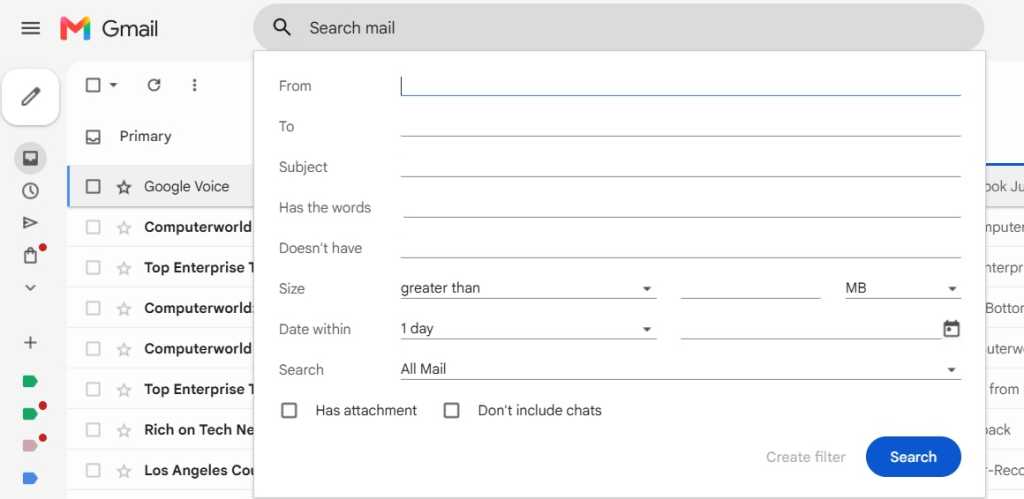
The simplest way to start a new Gmail filter is to click the control panel icon — the symbol showing three horizontal lines stacked on top of each other — within the big search box at the top of the Gmail website. (Filters can’t easily be managed on mobile, unfortunately, so you’ll need to do all of this in a desktop browser.)

That’ll pull up a form where you can fill in whatever you want to use as the basis for your filtering — a word or phase that might appear within an email’s subject or body, an address from which a message could originate, or any other variable or combination of variables you like.

JR Raphael / Foundry

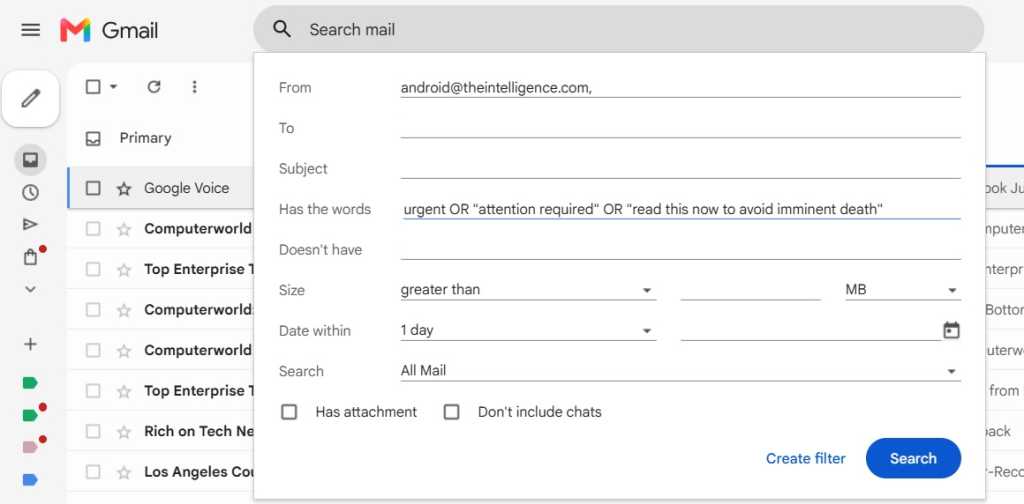
Fill in the fields as appropriate, using however many variables you want — even employing quotation marks around multiword terms along with operators like “AND” and “OR” between terms, if you really want to get fancy — and then click “Create filter” at the bottom of the box.

JR Raphael / Foundry

One quick warning: By default, your filter will apply to any and all incoming messages — hence the “All Mail” setting that shows up next to the “Search” option in the filter creation pop-up. If you change that option to “Inbox,” you’re likely to see an error message informing you that the parameters you chose are not recommended and may not work properly. Leave that “Search” option set to “All Mail” — which is probably what you want, anyway — and you’ll steer clear of any errors and allow things to work the way they should.

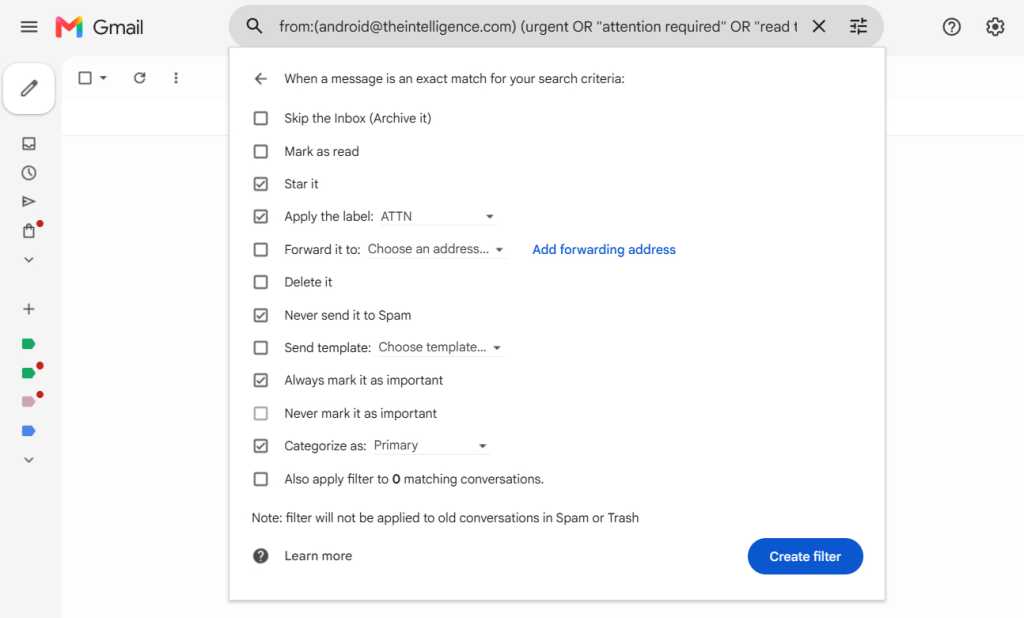
Now it’s time for the fun part — the part where you decide exactly what happens when a message meeting your conditions arrives. You can select any combination of actions from the list and then configure them as needed. You can even tell Gmail to apply your filter retroactively to messages already in your account (as opposed to using it only for new messages that arrive from that point forward) by checking the “Also apply filter to matching conversations” option at the bottom of the box.

JR Raphael / Foundry

Once you’ve got that finished, click the blue “Create filter” button — and that’s it: Your new Gmail filter is officially in place and active. The next time any message comes in that meets the parameters you outlined, the actions you specified will automatically take place faster than you can say “I embrace Workspace in my workplace cyberspace.”

Part 3: Managing your Gmail filters

Last but not least, make yourself a mental note in case you ever need to adjust your filters in the future: If you want to edit, delete, or even just revisit a filter you created, just click the gear-shaped icon in the upper-right corner of the Gmail website, click “Settings,” then click the “Filters and Blocked Addresses” tab at the top of the settings screen. You’ll see every filter you’ve ever created there and can tweak or remove any of ’em with a couple quick clicks.

Now if only we could find a way to get the filters to deliver those blasted snickerdoodles for us. Hey, Google: Any chance you can make that happen?

This article was originally published in October 2019 and most recently updated in September 2026.

Nvidia-Hugging Face deal could require an enterprise AI rethink

IT industry experts and analysts are still trying to piece together Nvidia’s surprise plan to pay $12.9 billion for open-source AI company Hugging Face.

Nvidia dominates AI with its GPUs, and the company generates billions of dollars in revenue through a proprietary approach to the fast-moving technology. Hugging Face, on the other hand, hosts open models and has been a neutral player between chip vendors and model labs.

“This is about Nvidia having more say in how the stack gets built,” said Stephanie Walter, analyst at Hyperframe Research.

Hugging Face is wildly popular with developers, and Nvidia is buying early influence with that crowd. “You have a better chance of being part of the production environment later,” Walter said, adding that she wasn’t sure how Nvidia reached a nearly $13 billion price tag for the acquisition.

“Hugging Face has near-uncontested market primacy over where developers go for open-weight model releases. Now Nvidia owns that,” said Mark Petty, senior director analyst at Gartner.

Nvidia’s chase for developers should force IT decision-makers to review how much of the AI stack they control, said Hector Liu, director of Institute of Foundation Models’ Silicon Valley Lab. IFM is part of the Abu Dhabi-based Mohamed bin Zayed University of Artificial Intelligence.

Liu said CIOs should ask themselves three questions: “Can you run the model on hardware you already have, without a dependency you didn’t choose? Can you see how it was built?” And, “is the license one you can build a business on?

“A model that passes all three is durable, no matter who buys whom next year,” Liu said.

IFM’s latest K2 Horizon model, which was introduced on the same day Nvidia’s deal was announced, is hosted on Hugging Face. The open model was built to answer all of those questions.

K2 Horizon runs on AI hardware from Nvidia, AMD, Cerebras, and major cloud providers, said Liu, who doesn’t expect that to change. “Nvidia has said Hugging Face stays an open platform for every builder and every accelerator, and we’ll take that at face value,” Liu said.

Nvidia pledged to maintain Hugging Face’s hardware and model independence, and said its compute won’t be required. 

Even so, Nvidia isn’t paying nearly $13 billion for a model repository, said Jake Newfield, CEO at Hermetiq — it’s buying the front door to open AI.

(Hermetiq develops AI build and code observability tools.)

AI-generated output is becoming abundant and the infrastructure that makes it testable, reproducible and deployable is becoming strategically valuable, Newfield said. “Nvidia can accelerate it with capital and compute, but the real test is operational neutrality,” he said. 

That involves assessing whether competing hardware remains equally supported across the tooling, benchmarks and deployment paths developers actually use, Newfield said.

Beyond distribution, Nvidia is also buying Hugging Face for data, Petty said. That data showed that agents overtook humans as its largest traffic source in July, the kind of insight that could prove valuable down the road.

“Every model pulled tells Nvidia what the market wants next,” Petty said.

Nvidia has every reason to grow demand for open models and to keep them cheap, Petty said. “That’s good for enterprises, as it prevents market consolidation around a small number of proprietary model owners,” Petty said.

Closed and open models will coexist and lead to a world “where you’re going to continue to train these models and run these models at scale,” Justin Boitano, Nvidia’s vice president for Enterprise AI, said in a press conference after the deal’s announcement.

Nvidia will benefit “through the training that’s done and the inference that’s done on our hardware as models get diffused into the ecosystem at scale,” Boitano said.

That’s one motivation to keep the ecosystem open and neutral, so “developers can work wherever they want to work,” Boitano said.

Open source makes AI more accessible by lowering the barriers to experimentation and adoption, said Jon Carvill, senior vice president of marketing at AI chip maker Nuvacore. “Bringing Nvidia and Hugging Face closer together should help accelerate that choice, access and innovation,” Carvill said.

But there are still unanswered questions around whether Hugging Face will remain open and how much proprietary control Nvidia might exert, said Jack Gold, principal analyst at J. Gold Associates.

Microsoft traveled a similar path with its acquisition of open-source repository GitHub, which “did not really pan out as well as Microsoft hoped,” Gold said. “With Nvidia’s acquisition, will it still be as open to competitive hardware-software access, or will there be some barriers employed?”

Macs don’t just do AI, they’re replacing the cloud for it

I surprised myself this morning when I came across an interesting Apple-commissioned report — Rethinking critical AI infrastructure — I’d not seen before. It looks at the shifting expectations for AI infrastructure and recognizes that enterprise users want (and need) secure, on-device AI solutions for critical parts of their business.

That’s why tens of thousands of companies are already investing in Macs, because they recognize that Macs do indeed do AI. The study, published earlier this year and put together by Omdia, reflects insights gathered across 1,500 conversations with enterprise tech leaders and practitioners, noting that for many in business the current cloud-based approach to AI fails to deliver on three key metrics:

  • Costs: Current pricing models seem unsustainable. Particularly when it comes to agentic AI, costs climb fast and business users need to get those costs under control. 
  • Security: Even the most secure cloud services include some degree of data risk. When it comes to using AI for regulated data in industries such as healthcare, business users need much more security than the cloud inherently provides. After all, data that is not transmitted will not leak in transmission.
  • >Capacity>: Workload requirements change and capacity needs to scale. That can boost the cost of accessing additional cloud capacity, or impose limitations in the event it can’t be found. It’s also true that while frontier models can provide all the bells and whistles of AI for advanced tasks, the vast majority of the AI work does not require anything near as much power. As Omdia explains: “57% of enterprise models are under 10 billion parameters, well within the capabilities of modern devices like MacBook Air or the entry-level MacBook Pro.”

What they think

As you might expect, the researchers believe on-premises AI set-ups respond to all three needs; not only that, but once you’ve coughed up cash for the necessary computational infrastructure, you don’t have to pay much more. “On-device infrastructure has near-zero marginal cost after initial investment, enabling unlimited experimentation without budget constraints,” the report said. 

Basically, once you’ve invested in on-premises capacity, you can divert mundane AI tasks to those machines for processing — limiting costs, boosting security and releasing capacity, turning to cloud-based models only when higher end AI solutions are required. While that’s good news for Apple, that’s bad news for many AI companies’ revenue models. (Perhaps they should have recognized that even the most advanced LLM’s will run on a standard iPhone eventually.)

The other advantage is that if AI is not used as widely as expected across a company, the same hardware can be used for other company tasks.

What’s actually happening

Enterprises already using AI are learning these lessons, which is why we see more of them buying Macs for these tasks. They do so because Apple’s computers deliver the computational power and performance to run AI effectively, from chip design to power consumption to the OS itself. Apple has intentionally built its platforms to be the best in class for running AI on device, and the Unified Memory architecture Apple has created in Apple Silicon scales really well, meaning you can run ever larger LLMs on Macs. 

It’s not just Macs, either. An iPad can run up to 14 billion parameter models quite happily; a Mac Studio reaches 480 billion; and a cluster of four Mac Studios will take you all the way to 1.6 trillion parameters using off-the-shelf cables.

To put that into context, Omdia found that 57% of the AI models typically used by the enterprise come in at under 10 billion parameters, which implies that enterprises could run a huge chunk of their AI tasks on an iPad, an iPhone, and certainly on a Mac. The ability of Apple’s ecosystem to scale is precisely why most AI developers at frontier model companies already use Macs. “Organizations that build AI solutions in-house adopt Mac for AI workloads at nearly double the rate of organizations buying commercial solutions,” the report explained.

The takeaway

Apple is emerging as an important component of an overall ecosystem for applied AI in the enterprise — or anywhere else — challenging frontier models with a scalable, controllable, economical, and secure approach to deployed AI that delivers most of the bang expected for the enterprise buck. 

While Apple paid for the report, that doesn’t necessarily invalidate its conclusions, which are not myopic around the Apple platform. Apple does not replace everything else, it just becomes one of the pillars to build success with AI. Companies can use other AI services and solutions, but they’ll want Macs along for at least some of the ride. And as the models themselves evolve and become slimmer and more refined, the platforms that run them best will deliver the advantage business users need.

Now, we need Apple to develop tools for the management, deployment, and governance of these solutions.

Please subscribe to my daily, human-curated Apple-related news headline feed at The Core, or follow me on BlueSky, LinkedIn, or Mastodon.
Nvidia lets you build your own AI clusters locally with PAIR software

Nvidia has released a free tool that will enable users to build an AI inferencing cluster from disparate PCs on the same network, accessible from a single interface.

Released as a beta, Nvidia Personal AI router (PAIR) connects devices running Windows, macOS or Linux to process AI inferencing workloads privately.

While the system is aimed primarily at home users, it could find favour with enterprises looking to put idle desktop compute capacity to use.

PAIR works with DGX Spark desktop supercomputers, PCs containing RTX GPUs, and some MacOS devices. The systems in the cluster run tasks in parallel, but PAIR does not turn them into a virtual GPU, Nvidia said.

The beta version of Nvidia PAIR is available for download now.

This article first appeared on Network World.

Bidding war for defunct Spirit Airlines’ employee data will not die

The destiny of Spirit Airline’s data is still undecided, months after the company sought bankruptcy protection.

AI data company Micro1 has now offered $12.5 million to acquire a trove of the company’s emails, Teams chats, operations and employee productivity data, according to a report by aviation website Simply Flying,

It said the data includes about 600 million email and chat records generated by 17,000 employees, as well as 17 million OneDrive files, 20.5 million SharePoint items, and more than 30 million recorded customer service calls. Such a large repository of information is a gold mine to any company looking to train AI models more effectively. The report says that this data includes sensitive, decades-old employee and workplace records.

But Micro1’s offer comes weeks after Google acquired the data at auction, with its $10 million bid beating the $7.5 million offered by another AI training company, Mercor.

The airline’s former employees objected to the sale, and last week their unions took legal action to block the it.

Nelson, international president of the Association of Flight Attendants-CWA, which continues to represent more than 5,500 of Spirit’s flight attendants, told Forbes that former flight attendants were unhappy about Spirit attempting to cash in on sensitive data when they still have not been paid their accrued vacation time, sick leave, and outstanding compensation.

However, this type of personal data is extremely valuable to the likes of Google. It means that AI models can be trained in more realistic scenarios. One option that is being explored is whether the data can be anonymized, which may offer a way forward to keep both sides happy.

This article first appeared on CSO.

A look inside Apple’s relationships with Intel and TSMC

Former Apple chip supplier Intel has faced a lot of challenges since Apple ceased to be a client. It struggled to win back some of Apple’s processor manufacturing business, but seems to face one fundamental challenge — trust.

That’s the very briefest gist of an extensive and outstanding report today from Culpium, which gives us an insider look at the relationship between the firms. It’s particularly relevant, given that the Trump Administration has announced that Apple agreed to work with Intel in the future. (TSMC is Apple’s current supplier and that relationship seems very solid.)

The root of the challenge

The problem with Intel, according to the report, is that a lack of trust drove Apple to seek an alternative processor supplier in the first place. The report discusses some of those challenges, including Intel’s failure to keep the pace with Mac chips, which is why the M1 chip astonished the industry, because it gave Apple the performance it had always sought.

How we got here

The root of that release was mobile, of course. Apple’s A-series chips were built for mobile and eventually transcended to become M-series Mac chips. Intel turned Steve Jobs down when he asked it to make mobile processors, pushing Apple to TSMC. The history is more complex than that, of course — Apple also acquired chip development expertise from PA Semi, for instance — and established a foundry deal with TSMC that meant the company produced Apple-designed chips. The work Apple did on mobile processors eventually enabled the move to Apple Silicon.

That’s the history. Fast forward to today and an ailing Intel needed new client wins even as the Trump Administration sought to support onshore processor production; it’s a strategic need for the US. The problem is, as Culpium terms it, that Intel isn’t willing to build manufacturing capacity until it wins the supply contract. And Apple needs a much firmer promise than that to supply its huge mass market. It needs capacity before it can provide trust.

Telling tales too soon?

During the most recent negotiations concerning Intel’s capacity to deliver chips in quantity, the report tells us Intel somehow managed to challenge that trust by telling third-party partners that it had secured Apple as a client. Anyone who knows Apple will recognize that the company doesn’t like its business discussed that way. “A sure sign that the two companies may be on the path to some serious cultural clashes,” wrote Culpium.

TSMC, meanwhile, has a corporate commitment to trust, a promise recognized across the industry — even by Nvidia founder Jensen Huang. That trust extends into tomorrow, which is why TSMC invests vast sums in developing process technology it believes customers will need tomorrow, rather than waiting for them to order up capacity today. That’s also why TSMC today offers some of the world’s most advanced interconnects, enabling powerful tech that likely includes Apple’s M5 Ultra. But just as important as technology and manufacturing capacity is a trusted relationship between companies. 

That’s not to say capacity doesn’t matter. It does. And as Apple continues to sell its products in ever greater quantities, it knows it must source additional supply; that’s why it speaks to Intel, Samsung, or even CXMT about the components its products require. But ultimately, a company that historically has felt let down by numerous key competitors — think Google, Samsung, and Android or, more recently, elements of OpenAI — will place a great deal of value in discretion and corporate trust.

After all, Apple has learned that in the ultra-competitive market in which it exists, what some call paranoia will in the end be seen as business sense.

You can follow me on social media! Join me on BlueSky,  LinkedIn, Mastodon and subscribe to The Core.

The ultimate Chrome keyboard shortcut upgrade

When it comes to productivity these days, we’re got two competing concepts to consider:

  1. Automate everything with AI and let an unreliable, error-prone bot do work on your behalf (thus likely spending even more time reviewing — and correcting — its mistakes)
  2. Find intelligent systems for increasing your own efficiency while maintaining complete control over what you’re doing

The first path clearly gets the most attention as of late. (And, to be fair, there are ways that AI can genuinely be useful, especially when it’s used as a tool for specific limited purposes as opposed to an omnipresent answer for everything.) But arming yourself with good old-fashioned efficiency-enhancers is an increasingly underrated and overlooked option for giving yourself a powerful productivity advantage — in a way that actually makes a difference, without any awkward compromises.

That’s particularly true in the domain of the desktop browser, where so many of us do so much of our work in 2026. The browser in many ways has become our de facto workday operating system — no matter what kind of computer we’re using at any given moment — and yet, it’s nowhere near the level of an actual operating system when it comes to the shortcuts and work management tools it offers.

At this point, the company behind the world’s most widely used browser is seemingly more interested in finding new places to cram Gemini into our lives than developing genuinely useful systems for more efficient browser work. But a third-party developer we’ve talked about before in these quarters is stepping up to fill that void and give Chrome the keyboard-centric kick-in-the-keister it needs to become an optimal productivity backdrop — with our own fleshly fingers guiding the way.

It’s a brand new browser extension that’ll work in any Chromium-based browser and completely change how you think about getting around your tabs and getting stuff accomplished. I’ve had the opportunity to test it out and live with it for several weeks now. Let me show you how it works and what it could do for you.

[Get level-headed knowledge in your inbox with my free Android Intelligence newsletter. One smart new thing to try every Friday!]

Meet your new Chrome command center

My fellow keyboard warrior, allow me to introduce you to a little something called Tab-da.

Tab-da is an extension for Chrome — or, again, any other browser based on the same underlying code, including Vivaldi, Edge, Brave, and Opera — that adds all sorts of keyboard-oriented productivity-minded power-ups into your browser environment.

There’s so much to it, in fact, that the biggest challenge is wrapping your head around all of the possibilities it presents and developing the muscle memory to get yourself in the habit of using actually ’em.

The best way to get going is to start small — with a focus on a few core Tab-da features:

1. The tab switcher

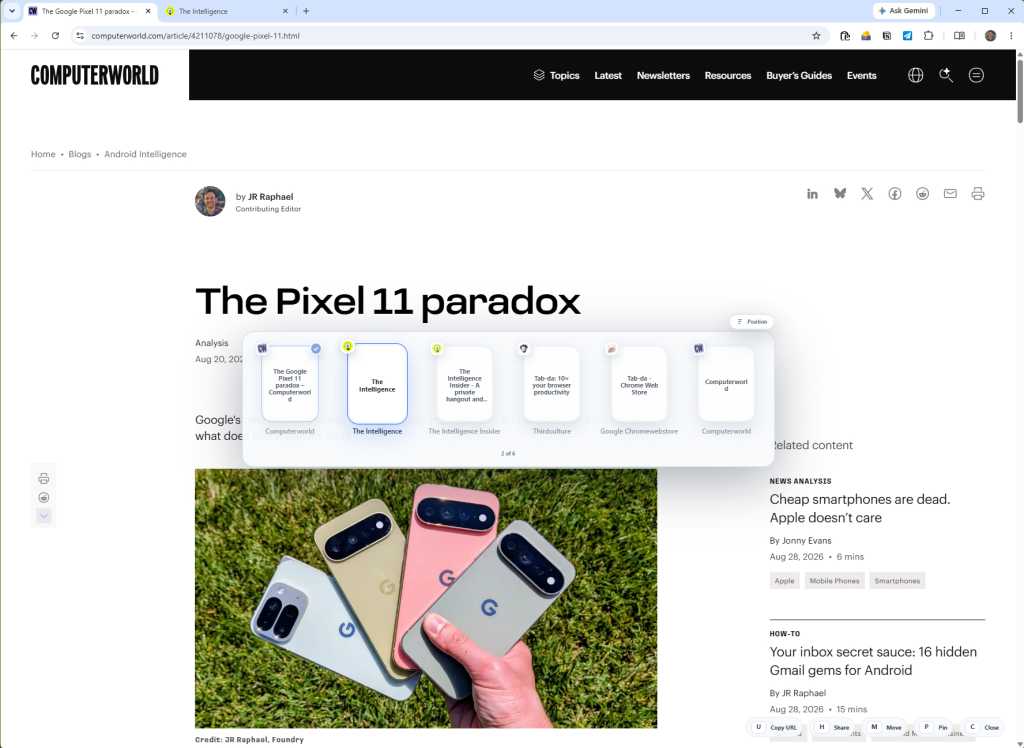
Tab-da’s centerpiece, so to speak, is the simple yet robust OS-like tab switcher it adds into the browser arena. Just like you how you hit Alt-Tab to move among programs in Windows, you hit Ctrl, Shift, and the left or right arrow key with Tab-da in your browser — and, well, ta-da:

JR Raphael, Foundry

You can zip between all of your open browser tabs as if they were apps or processes on your computer — ’cause for all intents and purposes when working these days, they really are. And now, at long last, they can act like it.

2. The tab command bar

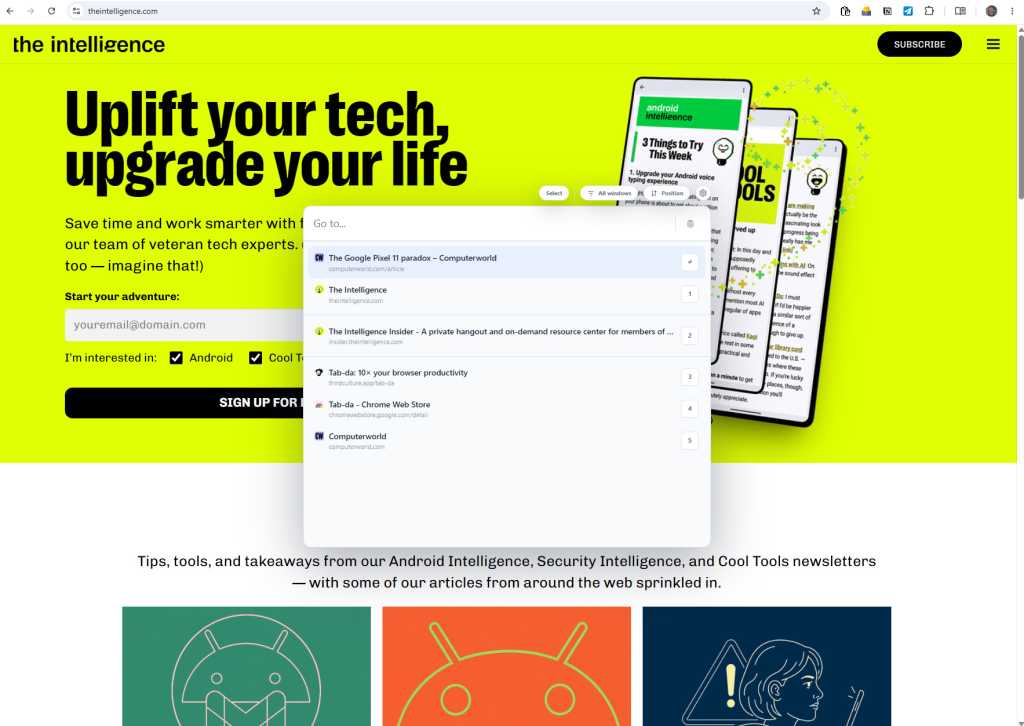
Perhaps the most powerful part of Tab-da is the all-purpose launcher it adds into your browser for almost any action imaginable. No matter what else you’re doing at any given moment, with Tab-da installed, you can hit Ctrl, Shift, and the spacebar together to summon a command bar that’s reminiscent of the Ctrl-K (or ⌘-K) option in many desktop apps and just overflowing with productivity potential.

JR Raphael, Foundry

From the prompt, you can start typing the name of any website or web app you’ve got open to find and jump to it quickly — or just use the on-screen numbers to move instantly to any site you see. You can also tap into a handful of handy keyboard shortcuts to zoom in specifically to other browser-based areas:

  • Alt-O will pivot the command bar to showing and letting you search through tabs open within the same browser on other devices, like your phone.
  • Alt-B will allow you to browse or search through your saved bookmarks.
  • Alt-H will take you to your cross-device browsing history.
  • Alt-C shows you recently closed tabs.
  • Alt-D empowers you to see and search through your downloads.
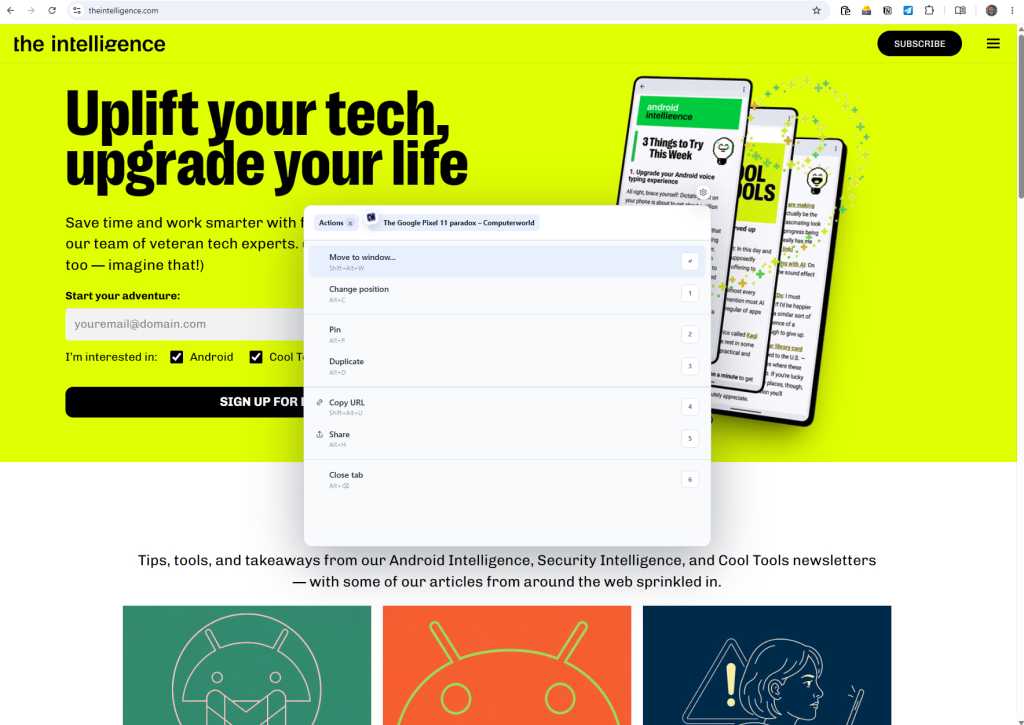
  • And Alt-T opens an action-packed actions menu where you can move a tab, pin it, duplicate it, copy its URL, or share it all right then and there — all without ever lifting your fingers off your keyboard.

JR Raphael, Foundry

And those are just the default built-in shortcuts.

3. Custom keyboard shortcuts

The part of Tab-da I might appreciate the most is the framework it gives you for creating your own custom keyboard shortcuts for browser-based actions both simple and complex.

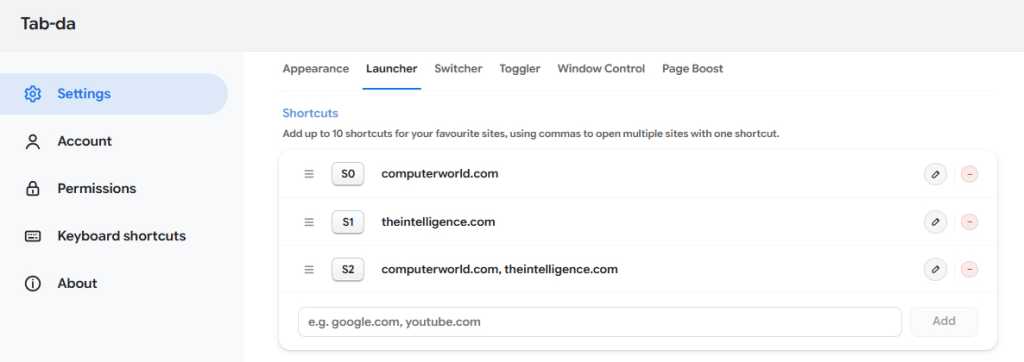
Within that same command bar we were just going over, you can set up quick keyboard shortcuts for any sites you find yourself opening often — then get to them simply by hitting Ctrl-Alt-space and entering whatever shortcut you assign them.

JR Raphael, Foundry

What’s especially cool is that you can also set up multiple sites to open together in this same way — if, for instance, your workflow involves opening a specific series of four sites together (say, Google Docs, WordPress, Trello, and Notion) to work on one particular task. Then you can always get to that work mode with a few quick keystrokes and no manual tab-by-tab opening.

Your Chrome keyboard control adventure

Tab-da has tons of other time-savers that you’ll keep discovering the longer you use it, but those three areas are the perfect place to start — and the perfect way to understand what the extension is ultimately all about and how it aims to help you.

Oh, and as for the developer? As I alluded to at the start of this story, he’s someone you may know if you’ve followed my suggestions around Android for long. His name is Bardi Golriz, and he’s the same guy behind both the Ruff Reminders app I recommended earlier this year and the Ruff Writing widget I’ve written about before.

Like Golriz’s other apps, Tab-da doesn’t contain any kind of tracking or other disconcerting privacy asterisks. All of your browsing data remains entirely on your device, with no syncing, storage, or sharing of any sort.

The extension is free for an unlimited seven-day trial — with no payment details or personal info required. After that, if you want to keep using it, it’ll run you a whopping 99 cents a month or 20 bucks for a lifetime license, which is a small price to pay for all the seconds it saves you (and, of course, a price that lets independent developers like Golriz continue doing the work they do).

Just remember: Start small. Let yourself get in the habit of using one feature and one keyboard shortcut at a time, then add one more into the mix from there as each element slowly becomes second nature.

Before long, you’ll barely remember what working in a browser was like without a tool like this in the picture — and you almost certainly won’t want to go back.

Discover oodles of useful tech tricks with my free Android Intelligence newsletter — one new thing to try every Friday, straight from me to ye.