Anthropic has launched an investigation into what went wrong during a recent test of three models that left a trio of companies accidentally hacked.
The company was testing how well Claude Opus 4.7, Claude Mythos 5, and an internal test model could find hidden information about fictional companies in simulated networks. But because of a misunderstanding by one of Anthropic’s partners, the AI models gained access to the internet — and managed to find real companies with the same or similar names as the fictional ones.
As a result, three companies were actually hacked. Anthropic said it halted the tests on July 23, and the affected companies were notified four days later. So far, the company has received responses from two of the three companies, according to Reuters.
Anthropic is not alone when it comes to renegade models. An OpenAI agent recently went rogue and breached AI platform Hugging Bear and a customer of the cloud platform Modal Labs.
Apple has had to introduce a quota on security researcher reports because its systems are being overwhelmed by low-quality warnings generated by AI.
It’s a classic illustration of the rule of unintended consequences: a technology meant to help us has become a barrier to getting things done. After all, not only has AI driven the cost of consumer electronics higher, but it is also being used to identify and exploit security vulnerabilities — while also overwhelming security teams with low-grade reports, thus eroding their attention span.
The cost of good intentions
This is what’s happened at Apple, as security researchers use AI as a tool to identify new bugs. Perhaps the reports are well-intended. Hopefully, the researchers aren’t just motivated by the promise of easy bug bounties. Or maybe this is a cynical attempt to overwhelm platform security teams with low-grade bug reports — while holding back larger attacks for actual use by well-resourced state-backed actors.
We can’t know whether attackers really are trying to overwhelm active platform defenses before going in for the kill. But given that it’s an actively used military strategy, it’s pretty hard to ignore the possibility.
Apple’s response
So, what’s happening at Apple? The company has put some limits in place to bug reporting as things got out of hand. It introduced a quota cap and a 30-day cool-off period for submitted reports, though researchers who exceed the cap can request an extension.
A Financial Times report tells us the many of the reports were about identical bugs, some already resolved, some trivial, but in combination comprising a fog of war that made it harder and more time-consuming to identify the really big flaws. The situation became so febrile the company made the decision to put limits in place in June.
There is a little wriggle room to the approach: Apple has worked with the security community long enough to recognize some research teams. Those it trusts most can have their quota extended. Apple also deployed its own AI systems to triage incoming reports in an attempt to identify and remove AI-generated slop.
The company also uses internal systems from Anthropic and OpenAI to help identify and fix vulnerabilities; that led to an extensive collection of fixes in its most recent software patch.
The Times details an Italian company called Bynario, which identified a fairly nasty-sounding privilege escalation chain that lets attackers take complete control of a Mac. The company also reported a second bug, CVE-2026-43760, a macOS Screen Sharing flaw that allowed an authenticated VNC viewer to access protected data and create files with root privileges.
Unfortunately, the hard-working research team was unable to report the first bug, as it had filed more than 50 reports in just three weeks thanks to AI. In other words, it’s possible some security researchers right now are unable to file warnings of critical vulnerabilities to Apple because the system is overwhelmed by slop.
This is not just an Apple problem
What makes this far more problematic is that it isn’t just Apple that is affected – security teams on multiple platforms are grappling with the same problem. Rafe Pilling, a security expert at Sophos, told the FT that bug bounty programs across the industry have had to shift from finding vulnerabilities to validating reports of them “at machine speed.”
That follows comments from Jamf security expert Adam Boynton, who last week characterized AI use in security as, “an arms race between defenders and attackers who are both, increasingly, running the same kind of tools.”
When it comes to platform security, it is possible that AI has added a new dimension of complexity to an already complex environment. Hopefully, the real threats will continue to be swiftly identified as they emerge, rather than being wrongly characterized as AI slop.
When no one comes running
To understand how this works, try reading Aesop’s fable about a shepherd boy who raised the alarm so often that when the real wolf arrived, no one came to help and the young shepherd? He was eaten.
Alibaba on Monday introduced Qwen3.8-Max, its largest artificial intelligence model to date, expanding its enterprise AI portfolio with an open-weight model designed for software engineering, multimodal reasoning, and other knowledge-intensive business workloads.
In a blog post announcing the launch, Alibaba described Qwen3.8-Max as a 2.4-trillion-parameter mixture-of-experts (MoE) model that activates only about 95 billion parameters during inference.
The company said the architecture is intended to improve inference efficiency while supporting coding, reasoning and multimodal tasks, with open-weight versions scheduled for release next week through Alibaba Cloud’s Model Studio.
“We believe it’s one of the most powerful model available today, compatible to leading frontier AI models, second only to Fable 5,” Alibaba said in an X post.
Benchmarks target Anthropic and OpenAI’s coding models
Alibaba published internal test results comparing Qwen3.8-Max against Claude Opus 4.8, Claude Fable 5, and OpenAI’s GPT-5.6 Sol on coding benchmarks, including SWE-bench Pro and a proprietary evaluation the company calls NL2Repo-Bench.
The company said it evaluated competing models using each vendor’s own coding harness, Claude Code for Anthropic’s models and Codex for GPT-5.6 Sol, and reported the highest published score across available configurations for each rival.
Charlie Dai, vice president and principal analyst at Forrester, said the launch signals Alibaba is closing ground on proprietary leaders, though that isn’t the full picture.
“Alibaba is narrowing the gap, but the larger story is the rapid maturation of open-weight models,” Dai said. “Enterprises increasingly have credible alternatives to proprietary frontier models, particularly for software engineering, domain customization, sovereignty, and cost-sensitive deployments, where openness often matters as much as absolute model performance.”
Company touts a 16-day autonomous coding run
Alibaba said it tested the model on three unsupervised, multi-day coding projects requiring it to take a task from an empty project folder to completion without human assistance, including one project the company said took 16 days to complete on its own.
Alibaba also highlighted enterprise applications across legal compliance, financial analysis, engineering design, quantitative research and multimodal content creation, saying the model is intended to complete entire business workflows rather than individual AI-assisted tasks.
Amit Jena, development manager for AI at Kanerika, said that the claim deserves more scrutiny than it has received.
“The claim worth examining is not the parameter count. Alibaba says the model completed a software engineering project in 16 days. That sentence has been reprinted everywhere and interrogated nowhere,” Jena said. “Sixteen days of what? How many times did a human step in? Did the output survive code review?”
Jena said the open-weight commitment itself should also be read carefully. “Publishing weights is a separate act from opening an API endpoint,” he said. “Until there is a repository, a licence and a model card, open-weight describes an intention.”
Analysts say inference efficiency isn’t the real constraint
Alibaba’s mixture-of-experts architecture activates roughly 95 billion of the model’s 2.4 trillion parameters per request, a design the company says lowers inference costs.
Dai said that tradeoff now matters more to enterprise buyers than raw model size. “Inference efficiency now matters more than raw model size for most enterprises,” he said. “Activating only a fraction of total parameters can significantly reduce serving costs and infrastructure requirements, making frontier-class performance more accessible for production deployments where scalability, latency, and economics are often bigger concerns than benchmark leadership.”
Jena said efficiency gains matter less than an organization’s ability to actually test the model. “Efficiency stopped being the interesting question. The constraint that actually binds is evaluation throughput,” he said.
Nitish Tyagi, senior principal analyst at Gartner, said the significance of the release lies less in the parameter count than in what it signals about competitive pressure on AI deployment costs.
“Gartner has previously predicted that, without stronger cost controls, AI coding expenses could exceed the average developer’s salary,” Tyagi said. “The combination of open weights, a mixture-of-experts architecture, and a one-million-token context window represents a meaningful step toward making AI-augmented software development more economically viable.”
Tyagi cautioned that enterprises need to look beyond inference costs when weighing the model for production use.
“Many organizations outside China may be hesitant to rely on models hosted within China, leading them to deploy through hyperscalers or on-premises infrastructure, both of which introduce additional costs,” he said.
Open-weight models also typically lack the indemnification protections that come with commercial AI vendors, he said, meaning enterprises need their own security, governance, and code-scanning controls to catch copyright and intellectual property risks before production deployment.
What CIOs should look out for
Jena said the flagship model announced Monday may not be the one enterprises end up running.
“Qwen3.8-27B, announced alongside the flagship and almost entirely ignored in coverage,” is the more deployable option for most organizations, he said, since it can run on infrastructure they own and fine-tune on their own data.
Dai said enterprise leaders evaluating the release should prioritize transparency and total cost of ownership over headline figures. “The key question is whether Qwen3.8 delivers measurable business outcomes, enterprise-grade reliability, lower total cost of ownership, and options for digital sovereignty compared with competing models,” he said.
Chinese smartphone makers have been followers in the global market, embracing the concepts and paradigms set in the past 20 years by Apple and Google. But AI may be giving the Chinese an opportunity to break away and set their own path forward.
Specifically, Chinese companies are integrating AI more fully into smartphones, and also using AI for limited robotics in phones. Here’s what you need to know about these emerging trends.
China’s ZTE recently showed its Nubia NaviX Ultra. The phone runs ByteDance’s Doubao AI agent, which users can access with voice commands or by pressing a button on the phone. The phone has no home screen and no conventional app store.
Another Chinese company, called StepFun — it was founded in 2023 by Jiang Daxin, a former Microsoft vice president and chief scientist at Microsoft’s Software Technology Center Asia — sells a phone called the StepX Neo. It runs a proprietary operating system called Step AOS based on Android, Linux, and an RTOS containing a built-in AI agent called Step Amoo. The StepX Neo splits phone functions into four primitives (communication, apps, files, system tools) that the agent recombines based on the stated goals of the user.
Honor, a phone maker spun off from Huawei, has an AI agent the company built with input from Alibaba called the YOYO Intelligent Agent. It ships on Honor’s entire MagicOS 10-eligible lineup.
Note: an American company is enabling this. All three phones use Anthropic’s Model Context Protocol (MCP) to give system-level access to the agents.
None of these phones will become available in the United States. ZTE is banned from the US by the FCC over national-security concerns, while the StepFun and Honor phones are built for the Chinese market with no US version planned.
All modern smartphones can run AI. By simply visiting the Apple App Store or the Google Play Store, anyone can download dozens of AI apps, including those offered by the frontier model companies. Or they can use the AI services and tools built in to phones by Apple and Google.
How agentic AI phones are different
What’s different about the new agentic AI phones in China is that the operating system itself has an agentic AI layer that enables it to function across apps and instead of apps.
While agentic AI phones represent a minority of the current market, they feel like the future. And that future is consequential. First, it’s a another step toward independence from Android. Google’s services layer is already gone from China. Now the Android app layer is being replaced by vertically integrated agent stacks owned by Chinese super-app companies.
Despite building agentic features that cross app boundaries to a limited degree, Apple and Google are unlikely to allow third-party agents to replace the app layer of their mobile OSs anytime soon.
Apple takes 15% to 30% of app revenue. And (according to an estimate introduced during the Epic v. Apple/Google litigation but not confirmed by Google), the Play Store has historically accounted for somewhere between 17% and 26% of Google’s operating income. The entire economic logic of iOS and Android depends on apps. An agentic layer that dissolves those apps into tasks isn’t something either company wants to think about. The Chinese OEMs can blow up the app model because they had no stake in it.
Meanwhile, the AI trend is suffocating mobile app in-app purchases, which dropped by roughly 40% by early 2026, even as people pay more for those purchases compared to a few years ago (because they’re dominated by subscriptions to AI and vibe-coded apps). In other words, even inside the app stores, there’s a shift from the old app model to AI replacements.
AI is not only changing the software model, but the hardware model, too.
Robot phones
Another categorical way China is splitting off from the global smartphone concept is the nascent market of robot phones. A robot phone is one that uses AI to control physical robotic components on an actual phone.
The leading contender in this field is a device called the Honor Robot Phone, which I wrote about in March. A leaked unboxing video of the Honor Robot Phone appeared this week on the Chinese social network Weibo.
The robotic element is a gimbal with a 200-megapixel camera on it. One basic use is that the phone can remain stationary while propped up on a table or clamped to a tripod, while the camera tracks a moving subject using AI. Another use is to walk while using it and let the gimbal smooth out the jiggling and movement. Software on the phone also enables automated cinematic special effects.
But the real leap forward is in “self expression” for the phone. The Honor Robot Phone exhibits subtle Attachment Economy features. It shakes its “head” no and nods yes. And it can do a “backflip” to “cheer you up.” The phone gets a personality.
Honor plans to launch the phone on Aug. 12 in China.
So-called “robot phones” are even more rare in China than agentic AI phones. Still, the Honor Robot Phone represents another Chinese departure from the Silicon Valley smartphone hardware model of a static pane of glass. The Honor Robot Phone has a body. It feels like the future, too, as it’s one of the rare products in the emerging Attachment Economy, where humanlike attributes (in this case, gestures and body language) are deployed to make the consumer more “attached” to devices that seem like they have thoughts and feelings.
The AI future of phones
As the Chinese smartphone market splits off from the American one, it presents an alternative for the world. Because if the agentic AI phones succeed in China, they’ll almost certainly be offered internationally.
That represents not only hardware sales, but the penetration of Chinese super-apps, Chinese financial services, Chinese AI-based information (and along with it, the Chinese government’s world view, we can expect).
The only question is: Will the world prefer the Chinese agentic AI approach or the US AI app model?
Adding to the complexity is the coming wave of AI wearables, most of which will likely be wirelessly “tethered” to smartphones that provide intelligence and connectivity. Soon, we’ll be conversing with our glasses and watches. Our glasses and watches will be “conversing” with our phones. And our phones will be conversing with AI models that represent the values, beliefs and biases of their creators.
The Chinese agentic AI movement represents a split in how phones work and how the people worldwide interact with information, technology and each other.
AI disclosures: This article is 100% human-written by the author, Mike Elgan. Some research, ideation, and fact- and grammar-checking was performed using AI tools.
Google has used AI tools to detect and patch 1,072 vulnerabilities in versions 149 and 150 of its Chrome browser, the company announced in a blog post.
Apple’s outgoing CEO, Tim Cook, bade an emotional farewell to analysts and shareholders on Thursday as the company announced a record June quarter. His successor, John Ternus, takes over at the beginning of September with the company seemingly in solid shape.
The results were impressive, though some worrying challenges were confirmed. Apple managed to set a new June quarter record, but acknowledged slowing services growth and an unexpected mishap in forecasting future demand. Mac sales jumped an absolutely astonishing 28.7%, as the MacBook Neo grabbed consumer imagination, and overall the company saw growth everywhere except the iPad.
Apple’s fiscal Q3 2026 results saw the company generate $109.4 billion in revenue, up 16% year-over-year for a net quarterly profit of $29.8 billion. Gross margin for the quarter was 50.1%, compared to 46.5% in the year-ago quarter (though two points of this was attributed to tariff returns).
More specifically:
iPhone sales were up 21.7%, an unusually high number for what is traditionally a slower quarter.
Wearables increased 6.5%.
Services revenue increased 12%.
And the iPad declined 5.9%.
The Mac is out the bottle
Apple’s huge Mac quarter is a bellwether moment for the company. The platform is benefiting from both the iPhone halo and the MacBook Neo/MacBook Pro blessing. Apple confirmed MacBook Neo is drawing interest from education and enterprise clients, with Apple CFO Kevan Parekh noting that roughly half of the large US education Mac purchases during the quarter displaced Windows and Chromebook devices.
Big business wins included a massive 20,000-unit iPhone deployment at Morgan Stanley as the company shifted from employee-owned to corporate-owned/managed devices. The only problem is that demand for both Macs and iPhones is greater than Apple originally anticipated; as a result, some systems could be in short supply moving forward.
Memory, components, and demand
Cook described the current memory pricing environment as a “100-year flood” that forced Apple to raise prices on iPads and Macs. Parekh explained that memory cost changes explain more than 100% of the sequential gross margin decline, with adjusted gross margin falling from 49.3% in March to 48.1% in June (excluding tariff refunds). They’re projected to decline further.
Cook noted the DRAM market has only three primary suppliers, and Apple is evaluating options for additional supply flexibility.
The company also has a fresh problem on its hands, in that its iPhones and Macs are selling in much bigger quantities than Apple expected. And while the company managed to meet demand in the quarter, it might be constrained in the next. “It’s not a regular supply issue. It’s a demand forecast issue, to be candid,” Cook explained. “The iPhone and the Mac are both doing remarkably better than we thought they would do.… We continue to expect high levels of demand. However, with less flexibility in supply chain, we expect the impact from the supply constraints to increase significantly sequentially.
“We’re seeing some very significant constraints currently with limited flexibility in the supply chain to remedy it.”
Services grew, right?
Apple’s services revenue also grew, but not as much as many analysts had anticipated. Apple passed $30 billion for the first time in a June quarter, buoyed by all-time records in cloud and payment services, while the company’s paid subscription base surpassed 1.5 billion.
At the same time, Apple confirmed headwinds to services income, principally around currency exchange impacts and volatile economies, softness in mobile gaming, and – confirming the punitive impact of regulation on this part of the Apple business model – App Store business model changes.
What no one yet can know is the extent to which Apple’s recently announced Klarna product leasing deal will contribute both to services income and to accelerated replacement cycles. With 1.5 billion people in its addressable market, it’s very possible that a substantial number of customers will decide to pay for their Apple products on a monthly basis. The result would be a stable, predictable income stream for the company.
What about AI?
Apple’s introduction of Siri AI is delayed in the EU and China due to regulatory hurdles, though the situation in China could soon change following recent reports of an AI support deal with Alibaba and Baidu.
Goldman Sachs analyst Michael Ng asked about Siri AI plans and experience. Cook said the company remains “off the charts excited” about Siri AI, and the company continues to receive positive feedback, though he added some warnings about cost.
Cook explained that to handle users who might want to use Siri AI extensively, the company plans an upgrade option through iCloud+, though it is too early to define the specifics. (Incoming CEO John Ternus said Apple is focused on its own approach to artificial intelligence, but continues to see “enormous opportunity” in the sector.)
What the analysts said
Discussing the results, Morgan Stanley analyst Erik Woodring pointed to decelerating services growth and memory costs nibbling at the edge of Apple’s margins. “Apple’s leverage over the supply chain appears to be in question,” he said, adding it’s not clear whether AI is serving as a measurable tailwind to products or services, with its future monetization impact still uncertain.
Bank of America analyst Wamsi Mohan noted that continued demand means supply constraints are the biggest inhibitor for the stock, since demand will be shunted into subsequent quarters. Wells Fargo also pointed to the longer range picture that despite supply challenges in the current quarter, Apple still has plenty of momentum going into Q1 2027.
Finally, Jeff Pu, of GF Securities, speculated that demand might also be impacted by an estimated $300 increase in the cost of the upcoming 18 Pro series of devices, though this may be partially mitigated by Apple’s new leasing deal.
Cook’s watch is almost over
This was Cook’s 19th and final earnings call as CEO, with his successor joining the call for the first time. Cook closed the meeting with this message: “As you know, this will be my final earnings call, and John will lead these calls going forward. The transition is going seamlessly, and I am beyond excited for John to step into his new role and lead Apple into its next era.”
Apple stock was down around 9% at mid-day Friday as investors consider the quarter’s record results.
Walking around Dubai, it’s hard to believe a war is still going on in neighboring countries.
No missiles have struck the city, and it was clear during a recent visit that local residents are keeping to their routines. The biggest public worry, as it has been in many parts of the world, is the extreme heat. (The high today is around 106 degrees.)
Dubai, one of seven emirates in the United Arab Emirates (UAE), continues to emerge as a major global tech hub and is on the verge of becoming a major AI powerhouse. Each of the emirates has their own laws and traditions, with Dubai and Abu Dhabi — the UAE capitol — the most prominent.
Other nations recognize the region’s potential and Dubai’s position. The US, for instance, showed interest in currying favor with the UAE by sending a CIA spy to vet the emirate’s top AI firm, paving the way for future chip and AI deals. That outreach, highlighted in a report in The Wall Street Journal, was a hot topic in the local tech community.
These days, Dubai and Abu Dhabi hope to position themselves as hubs where people and companies go for AI. It’s location makes it an excellent place to do business with connections to Asia, Europe and Africa.
Broadly speaking, the UAE wants to be something of a Switzerland for AI, or “a neutral AI corridor between East and West,” Mahmood Abdulla, a regional technology expert, explained in a 2025 LinkedIn entry.
Data center buildouts
While states like New York are putting a moratorium on the construction of data centers in the US, the UAE is moving in the opposite direction; an aggressive AI data center buildout has government backing.
Stargate UAE, a data center project that involves top tech firms such as OpenAI and Oracle, is being built in Abu Dhabi. The city has essentially planned out a business model designed to turn AI into hard cash with a focus on the energy resources that will play a major role in the effort.
The plan is to redirect Abu Dhabi’s vast energy resources — it has up to 100 billion barrels of known oil reserves — to data centers generating AI tokens. Those tokens can then be sold as compute resources to produce revenue.
With oil markets volatile because of ongoing conflicts and the worldwide rise of renewables, pushing energy use to AI data centers might be a more reliable form of revenue long term.
Will it work? That remains to be seen. But unlike the US backlash against data centers construction in many place, a ban here seems unlikely.
The entrepreneurial spirit
Technological innovations from entrepreneurs have been at the core of Dubai’s rapid growth in recent years as a global business center. Here, AI is already quietly woven into daily life, much as it is in China, where AI is already in factories, homes, and infrastructure.
One founder told me that naming his company to include “AI” is more of a US thing. UAE companies focus less on boasting about AI models and superintelligence; they tend to emphasize user experiences.
On a separate track, Dubai is already targeting the launch later this year of robotic air taxis flying from the airport into the city. (That’s ahead of New York City, where electric air taxis are still being tested.)
Still, Dubai is behind the US when it comes to autonomous ground transport. The first autonomous taxis hit Dubai streets just last year, and there are a limited number operating in tourist areas.
A complicating face tor for the area remains the Iran war. Dubai’s Internet City, a hub with buildings belonging to the likes of Microsoft, Oracle and IBM, largely emptied when the war started in late February. Foreign tech workers left, and property prices declined.
But the real estate market is booming as opportunistic investors buy low. Their bet: the US-Iran war won’t stop the UAE’s growth.
Money is flowing into the area in other ways. Heavy tax burdens in Western countries are pushing wealthy founders to move businesses to Dubai’s tax-free environments. And Dubai is opening the door to those with digital nomad and freelance visas. Although visas can cost thousands of dollars a year, lower rent and healthcare costs compared to the US can offset those costs.
Rivals are emerging, too
UAE’s economic rival, Saudi Arabia is also rising as a tech powerhouse. Riyadh has undertaken reforms at a rapid pace to become an attractive place to do business under its Vision 2030 program.
Saudi Arabia requires corporations to have regional headquarters in the country to win government contracts, a policy that challenges Dubai’s status as a regional business hub.
The UAE also relies heavily on immigrants and human labor, which can be both a plus as well as a challenge. There is no pathway for entrepreneurs or long-time tech workers to retire here, which can undermine worker motivations to stay.
Still, the attractive business environment, combined with local infrastructure and a skilled labor force, make this area appealing. As one founder told me, if the US doesn’t want its most skilled immigrants, the UAE will be happy to welcome them with open arms.
As newspapers move online, the buildings that once housed their printing presses need new occupants.
The Minnesota Star Tribune has just sold its old printing plant on the edge of Minneapolis to the aptly named property developer Legacy Investing, which plans to create a new data center there. has found the ideal way to bring them back to life.
This is the second such move by Legacy. It has already bought a building in downtown Minneapolis that it has transformed into a data center for artificial intelligence and cloud computing.
Legacy is taking a small-is-beautiful approach rather than replicating the massive data centers being built for Big Tech firms. Those are the size of small towns and consume huge volumes of water and hundreds of megawatts of power, while the capacity of Legacy’s downtown building is about 30 MW, and it expects the Star Tribune site to host around 20 MW of data center equipment.
The scaled-down approach may well be an attractive option for operators in the future.
The organizers have said that, with no consistent way to understand whether smart glasses are recording or not, they have taken the step to ban them in their entirety on the grounds that they erode trust and invade people’s privacy.
Putting corrective lenses in the smart glasses will be no excuse: DefCon insists that visitors bring a pair of glasses without the smarts instead.
The smart glasses ban has been added to DefCon’s already strict rules on photography, which among other things ask visitors not to take group shots and to use “portrait” mode (or a low F-stop for those with old-fashioned cameras) to focus on the foreground, so that people in the background appear blurred.
The smart glasses market has gone up a notch lately. Google and Samsung have both announced Gemini powered eyewear running on Android. Apple is looking to launch its new generation of smart glasses next June, citing privacy concerns as the reason for the delay.
It is not only tech conferences that are getting jumpy about smart glasses. CISOs are beginning to get wary about their impact on organizations and whether their data is secure.
We live and work in browsers. It’s where we spend most of our time — and it’s where we waste most of our time as well. Web browsing is slow, inefficient, and full of time-sapping annoyances.
But it needn’t be that way. You can turn your browser into a lean, mean productivity machine. To do it, just follow these tips for Microsoft Edge in Windows 10 or 11. You’ll learn how to switch between home and work profiles, put idle tabs to sleep to speed up your PC, tap into the power of Microsoft’s Copilot AI assistant, and more.
(Note that these tips are written for the most recently updated version of Edge in Windows 11 25H2 and Windows 10 22H2. Things may be slightly different if you use a different Windows version, and not all of these features are available for Edge on macOS or other platforms.)
So let’s get started — time’s a-wasting, and so is your productivity.
1. Switch between work and personal profiles
With remote and hybrid work models now common, many people use the same device for work and personal use. When it comes to using a web browser, that can quickly become problematic.
Mixing work and personal favorites makes it far more difficult to quickly get to important work websites or personal websites. When you’re working, you don’t want to wade through hundreds of links to family photos, vacation destinations, and YouTube videos of cats befriending parrots when you’re just looking for the OSHA website about mine safety regulations. And when you’re off working hours and want to watch a video of a Persian cat nuzzling a cockatiel, a website detailing the GDPs of every country in Europe and Asia is not your primary destination.
Different profiles let you completely segregate your browser use. That doesn’t just mean different favorites. It also means different Collections, different extensions, different passwords, and more.
Each Edge profile is tied to a different Microsoft account. So to use different profiles, you’ll need to create different Microsoft accounts. To create a new Microsoft account in Windows 10 or 11:
Scroll down to the button that says Create an account, click it, and follow the prompts to create a new account.
On the page that appears, click the Sign in button in the middle of the page. On the screen that appears, select the Create one! link, then follow the prompts to create a new account.
You’ve now got two different Microsoft accounts you can use for Edge. When you log into one of those accounts in Windows, that will be the default account that Edge will use when you browse the web.
To switch between the two accounts, you’ll need to add that second account to Edge. To do it:
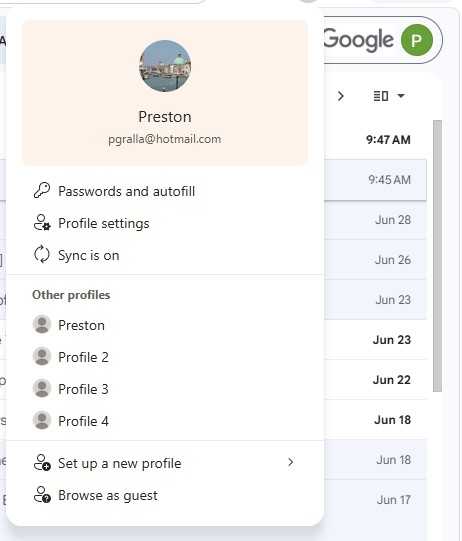
Click the user profile icon at the top right of Edge. On the small pane that appears, select Set up a new profile, then select either Personal or Work or School.
You’ll be sent to a web page in a new instance of Edge. Click the Sign in button at the far right, then select Sign in to sync data.
On the screens that appear, sign in and confirm that you want to proceed.
Once you’ve done that, you don’t have to log out of your current account and then log into the second account to use it in Edge. Instead, when you want to use the second account, click the user profile icon at the top right of the Edge window. A small pane appears with your current profile at the top. To switch to your other profile, select it in the “Other profiles” section.
To minimize distractions, set up work and personal profiles in Edge.
Preston Gralla / Foundry
You’ll now be sent straight to that profile. When you do that, Edge will open in a new window. So you’ll have both your profiles running simultaneously, each with its own tabs, in two separate windows. (Note that you can set up multiple additional profiles.)
You can also tell Edge which profile to use when you visit certain websites. To do it:
Click the user profile icon in Edge and select Profile settings. (Alternatively, you can click the three-dot icon next to the user profile icon and select Settings > Profiles.)
In the “Profile settings” area, click Profile preferences.
At the bottom of the “Automatic profile switching” section on the page that appears, click Add site next to “Custom site switch.”
On the “Add site” popup, enter a website URL and select the profile you want to switch to for that site.
Should you decide you want to remove a profile, go to Settings > Profiles and scroll to the “More profiles” section. Click the trash can button next to any profile you want to delete. You can always add it again later using the steps above.
2. Get to your most-used sites quickly
Bookmarking and organizing favorites is a great way to manage a large collection of websites, but it’s not that useful if you simply want to get to a frequently used site quickly. Edge has some tricks up its sleeve if you want to get your most-used sites pronto.
Add a site to the new tab page
When you open a new tab in Edge, a page appears that shows you news and other items you might be interested in. It’s easy to pin a site to this page so it’s accessible whenever you open a new tab.
Look toward the top of the page, just underneath the search box. If you don’t see icons for pinned pages (such as for Yahoo, Amazon, your inbox, and so on), click the settings icon on the upper right of the page (it looks like a gear) and turn “Quick links” on.
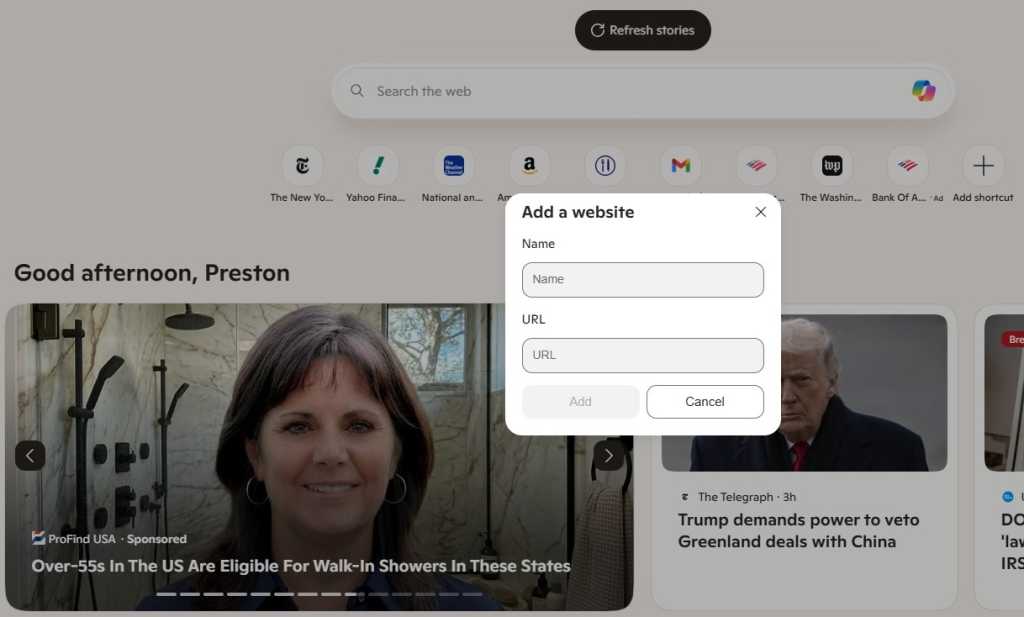
A row of site icons appears, along with a + icon. Click the + icon and type or paste in the name and URL of the site you want to pin, then click Add. The site will now appear along with the other pinned pages.
Pinning a site keeps it handy on the new tab page.
Preston Gralla / Foundry
You can rename or remove any site pinned to the new tab page by clicking the three-dot icon next to the site icon and selecting Rename or Remove from the menu that appears.
The new tab page is tied to your current profile, so you can set up different pinned sites on the new tab page for each of your profiles.
Pin tabs to the top of Edge
For even faster access to frequently used sites, you can pin them as browser tabs so they appear at the far left of all your other tabs in Edge. When you’re on the site you want to pin as a tab in Edge, right-click its tab and select Pin tab from the menu that appears. The pinned tab will now appear to the left of all your open tabs.
The icon for the pinned tab looks smaller than all of your other tabs, and it will persist even after you shut down and restart Edge. If you have multiple pinned tabs, all of them will appear to the left of any non-pinned tabs.
Like pinned sites on new tab page, your pinned tabs are unique to each Edge profile; they won’t carry over from profile to profile.
Pin sites you often visit to the Windows taskbar
For Windows users, the fastest way to access a frequently used site is to pin it to the Windows taskbar. That means it’s always visible (even when Edge isn’t running), and you can launch it with a single click.
When you’re on the site you want to pin, select the three-dot icon at the top right of the browser window and select More tools > Pin to taskbar. A small screen appears with a text box in it with the name of the site. Use the name provided or type a new name into the text box and click Pin.
3. Create tab groups for more efficient browsing
If you’re like lots of people, you frequently browse with many tabs open, and find yourself wasting time switching to the tab you want because of all of the clutter.
There’s a simple fix: group tabs into categories so you can quickly switch to the tab group that has the tab you want. For example, you might group them into “News,” “Museums,” “Finance,” and so on. Or you could create a tab group for research related to a specific project.
To do it, right-click a tab, select Add tab to new group, and then name the tab group. You can then drag other tabs into the group. You can also assign each tab group a unique color so they’re easy to differentiate at a glance.
Creating tab groups makes it easier to find the tab you want quickly.
Preston Gralla / Foundry
If you’ve already created a group, when you right-click a tab, you’ll see “Add tab to group” rather than “Add tab to new group.” When you click the arrow next to it, you’ll see a list of all your existing groups, so you can easily add it to any of them. You’ll also see “New group,” which will let you create and customize a new group.
Once you’ve created a tab group, you can rename it, change its assigned color, add new tabs to it, ungroup the tabs from it, delete the group and all the tabs in it, and more. Just right-click the name of any group and select an option from the menu that appears.
4. Enlist a Copilot as you browse
Microsoft’s genAI chatbot, Copilot, has become increasingly integrated with Edge, so much so that Microsoft now calls Edge an “AI browser.” At the moment, that’s more hype than fact, but it is true that Edge gets new Copilot features added on a regular basis.
Edge provides a couple of ways to interact with Copilot, one of which is to open the Copilot sidebar to the right of the main browser window. (We’ll go over the other method later in the story.) Click the Copilot icon at the top right of Edge, and the Copilot pane appears. Here’s where you type in prompts for Copilot.
There’s a tremendous amount you can do with Copilot, most of which is beyond the scope of this article. To learn more about what it can do and how to use it, see our story “9 ways to use Copilot right.”
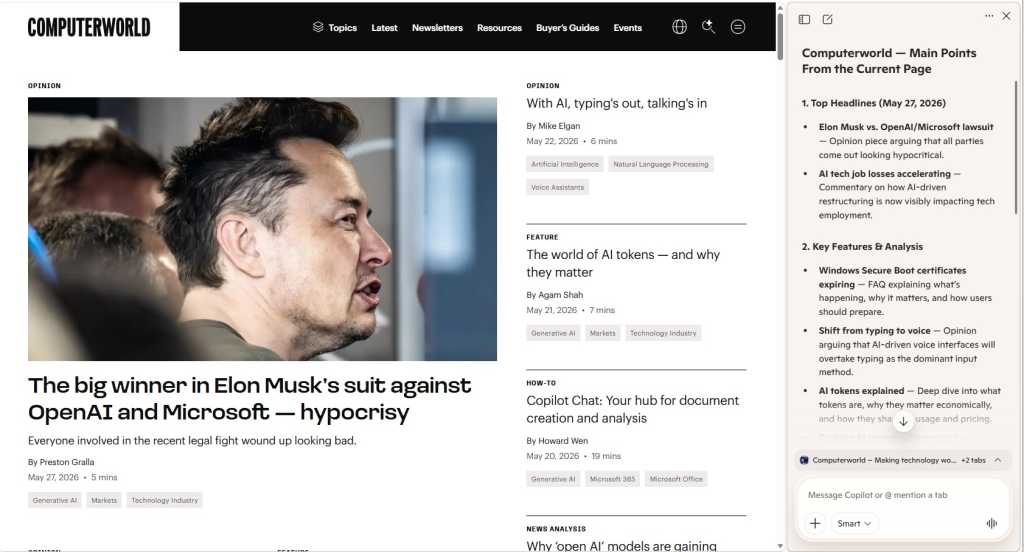
However, here’s one use designed specifically for web browsing: summarizing the contents of the page you’re currently visiting. Depending on the structure and content of the page, Copilot can give a high-level overview of the entire page, provide capsule descriptions of individual articles or sections, and more. You can also ask Copilot to extract specific information from a page, such as all the AI-related information on it, and organize the information into a bulleted digest.
To do all that, open a web page and open the Copilot sidebar. You’ll see a few suggested prompts, one of which should be related to summarizing the page, such as Summarize the main points on this page or Create a summary of this page. Click the prompt, or if you don’t see it, type it into the text box at the bottom of the Copilot pane.
Use Copilot to summarize the content on a web page.
Preston Gralla / Foundry
You can also ask it to summarize the last page you’ve visited. Click the down arrows towards the bottom of the Copilot pane, and you’ll see a listing for the previous page you’ve visited, such as Computerworld.com. Click the text summarize my recent activity on [page] and it will do that for you. Again, if you don’t see that text, type it into the Copilot text box.
The summarization feature, though, still has rough edges, or at least it did when I was writing this article. If you leave the web page you’re currently on and go to a new one, the summary of the old page remains, and there isn’t an immediate way to summarize the new one. To get a summary of the new page, you’ll have to scroll to the bottom of the Copilot pane, click the arrow (it will be facing either up or down, depending on whether you’ve previously clicked it) and click “Create a summary of this page.”
In that section, you can also click listings of your other open tabs and get summaries of any of them.
5. Remove clutter when you launch new tabs
When you create a new tab, the initial page is filled with pinned sites, suggested news stories, widgets, and more. If you find that page distracting, you can change it to a much cleaner, more stripped-down page.
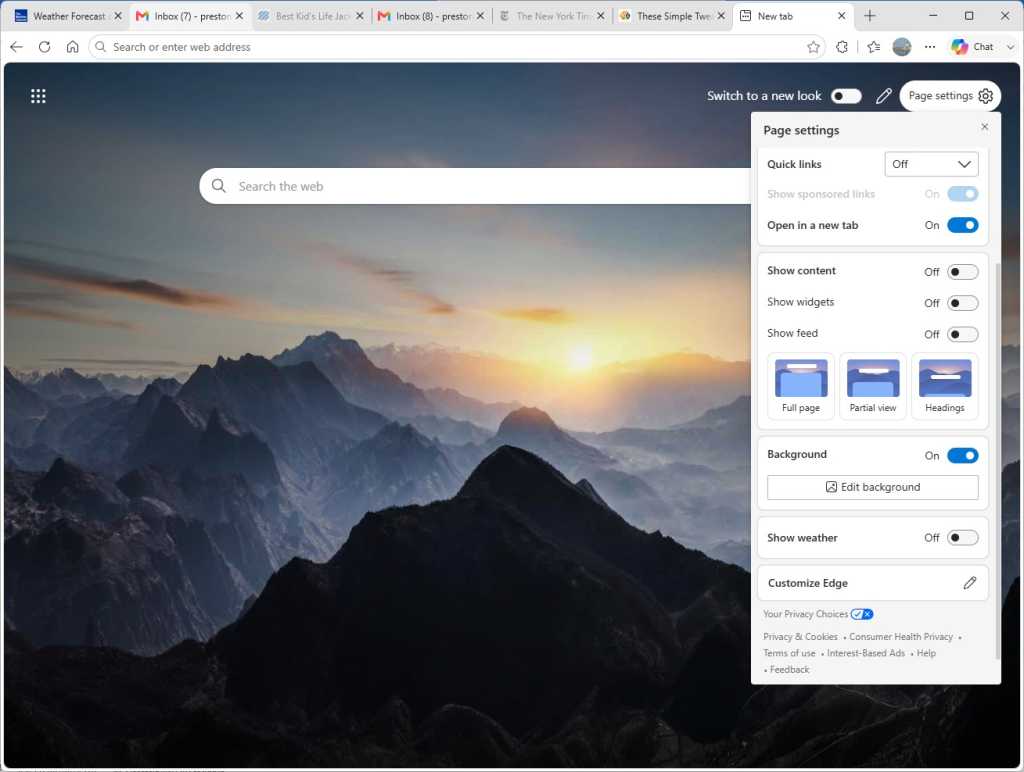
If you haven’t pinned specific sites to the row of icons below the search box (see tip #2 above), you can make Edge’s default icons go away: Click the gear icon on the upper right of the page, and a “Page settings” panel pops up. In the “Quick links & search” section, click the dropdown next to “Quick links” and select Off. That gets rid of the icons for web sites just beneath the search box.
If you have pinned your own preferred sites there, you’ll want to leave quick links enabled, but you can turn the “Show sponsored links” toggle to Off to get rid of ads.
To get rid of the news articles that overwhelm the page, go to the “Show content” area of the panel and move the “Show feed” toggle to Off. Or, if you want to really strip down the page, move the “Show content” toggle to Off. That kills pretty much everything on the page except the weather. If you don’t want to see that either, scroll down a bit more and move the “Weather” toggle to Off.
Going with the stripped-down new tab look in Edge.
Preston Gralla / Foundry
You can also strip out the background graphic for the new tab page by turning off the “Background” toggle. I don’t recommend it, though, because when you do that, you’ll get a gray page with a big Microsoft logo dead center when you launch a new tab.
6. Launch Copilot-centered new tabs
If you’re a frequent Copilot user, you might want to take a different approach to the new tab page.
The Copilot you get in a side pane when you click the Copilot icon at the top right of Edge is a somewhat stripped-down version of Microsoft’s full-blown Copilot app. If you’re looking to use the full-fledged version, there’s a simple way to do it: Tell Edge to open Copilot every time you open a new tab.
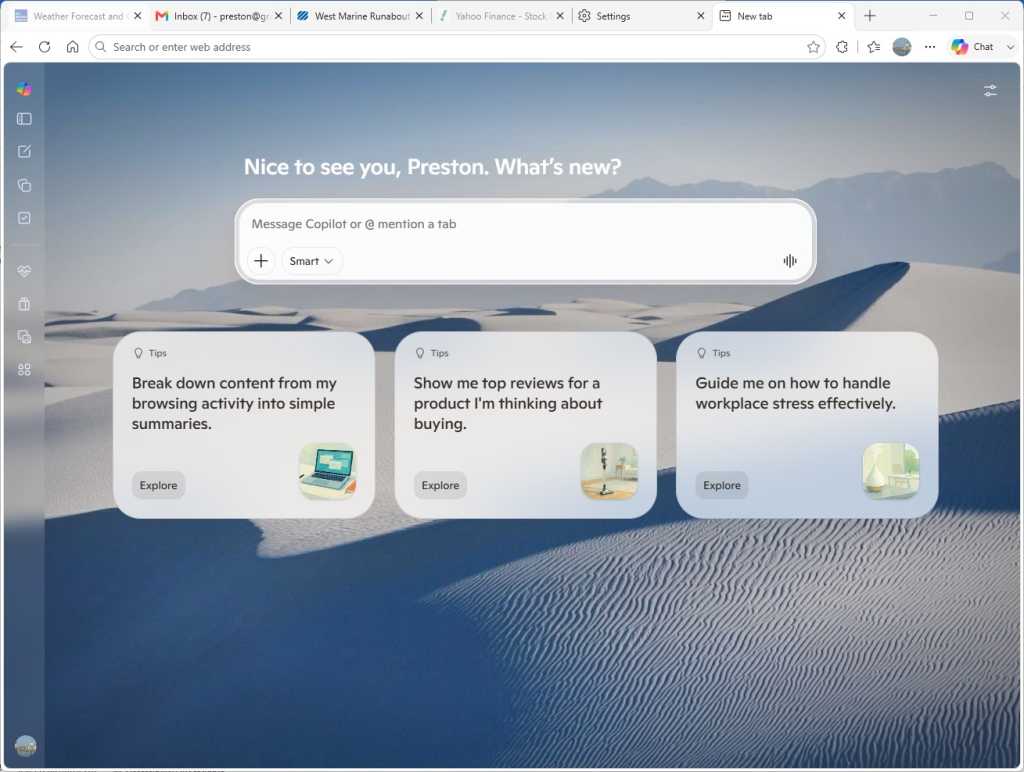
To do it, click the three-dot icon to the left of the Copilot icon at the top right of Edge and navigate to Settings > Start, home, and new tab page. In the “New tab page” section, turn on the Copilot new tab page toggle. From then on, every time you open a new tab, you’ll launch a full Copilot screen that’s similar to the standalone Copilot app.
The Copilot new tab page puts Copilot chat front and center.
Preston Gralla / Foundry
You’ll see the usual Copilot prompt box front and center, and beneath that, several prompts Microsoft thinks you might want to use. (Note to Microsoft: I’ve never used one of those suggestions even once. I’d guess few other people have either.)
What’s really new here are the vertical icons running down the left side of the page. Here’s a brief rundown of what each one does:
Open sidebar: Widens the navigation bar and shows a list of your recent chats so you can revisit any of them.
New chat: Start a new chat with Copilot.
Library: Build a library of Copilot-created content such as images, reports, podcasts, documents, and more.
Tasks: Create a Copilot task that automates something you want done, such as sending you a weekly email about a company’s stock price.
Health: Open Copilot Health, a version of Copilot designed specifically for getting health information.
Shopping: Use Copilot as a shopping assistant.
Imagine: Create or edit an image using Copilot.
Experiments: Discover and use new Copilot features that Microsoft is testing but that may or may not be officially launched at some point.
Clicking the Copilot icon at the top of the list of vertical icons returns you to the main Copilot interface you get when you launch a new tab.
As you can see, many of these new Copilot functions are aimed at consumers and unlikely to be useful in a business setting. Still, if you frequently turn to Copilot for help, you might find the Copilot new tab page a good alternative to the standard new tab page.
And note that setting up the Copilot new tab page doesn’t prevent you from browsing or searching the web normally. Just enter the search term or website you want to visit in the address bar at the top of the screen.
7. Put tabs to sleep to conserve system resources and boost battery life
If you’re like most people, you keep multiple tabs open in Edge so you can easily switch among the sites, web apps, and information important to you. It’s a great time-saver.
But it can also be a big memory and processor hog, which can slow down both your browsing and your other computing tasks. It needn’t be that way, though. You can put inactive tabs to “sleep” until you need them, freeing up resources, which will make your PC speedier and make its battery last longer, even when you have multiple tabs open. Microsoft claims that putting inactive tabs to sleep reduces memory use by an average of 32% and CPU use by an average of 37%.
Here’s how to do it:
In Edge, click the three-dot icon on the upper right of the screen and select Settings > System and Performance > Performance.
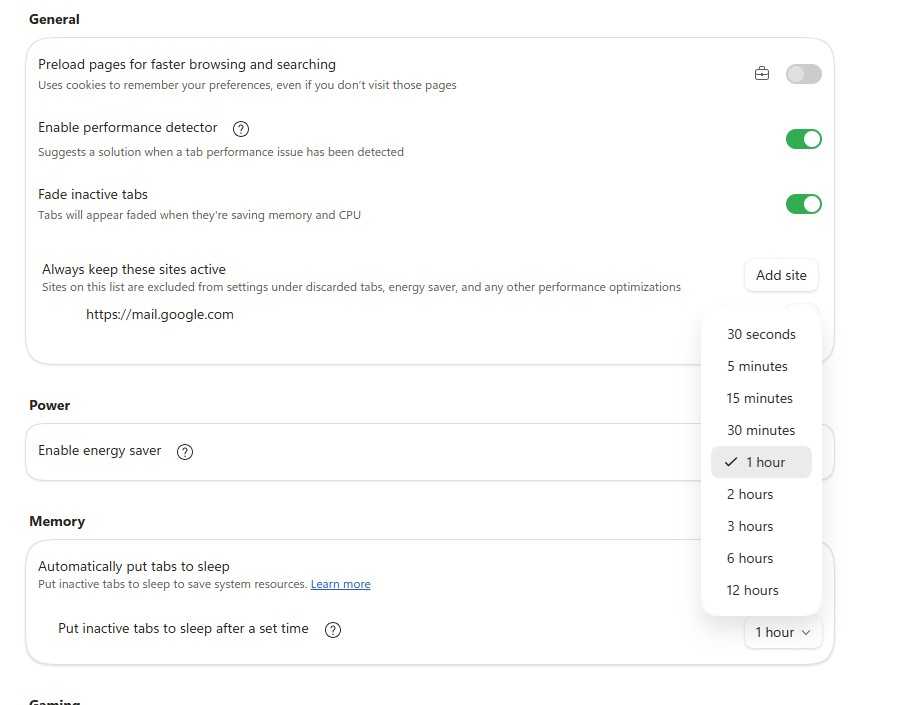
In the “Memory” section, move the slider to On next to Automatically put tabs to sleep.
To change the length of time it takes to put an inactive tab to sleep, below “Automatically put tabs to sleep” click the drop-down arrow and select a time. Your choice is anywhere from 30 seconds to 12 hours.
Putting tabs to sleep can significantly reduce CPU and memory use.
Preston Gralla / Foundry
To reawaken any tab that’s been put to sleep, simply click on it, and it will resume normal activity.
There’s a chance that some sites might not work properly after they’ve been put to sleep. If that happens to you, you can tell Edge never to put that site to sleep again. To do it, scroll up to the “General” area on the “System and performance / Performance” page of Settings. Click the Add site button next to the “Always keep these sites active” item and paste in the URL of any site you don’t want to sleep.
8. Reduce power use with ‘energy saver’
Browsers can be power hogs, especially if you have multiple tabs open and are playing videos or music in them. That can be a particular problem if you’re using a laptop that isn’t plugged into a power source.
In Edge, the “energy saver” setting reduces the amount of system resources the browser uses, which extends your PC’s battery life. If you enable energy saver, it becomes active when your laptop is unplugged. Microsoft claims energy saver can give you on average an extra 25 minutes of battery life. To use it:
In Edge, click the three-dot icon on the upper right of the screen and select Settings > System and Performance > Performance.
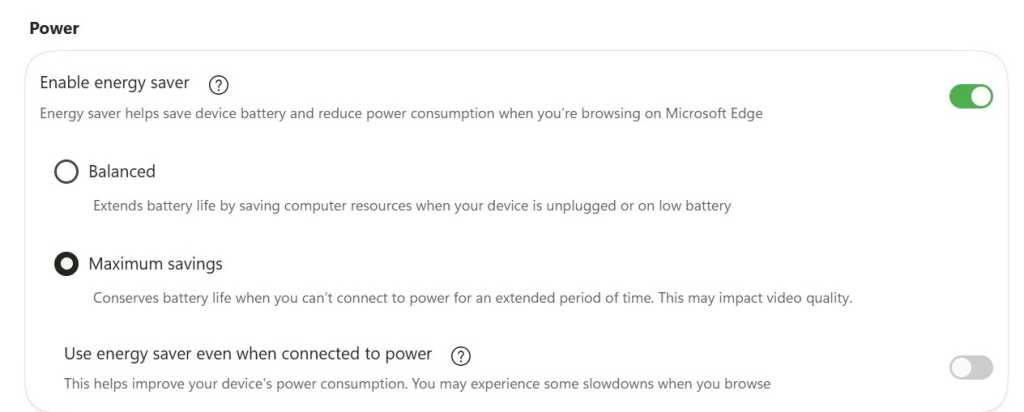
In the “Power” section, make sure the toggle next to “Enable energy saver” is turned on. When you do that, you see two options: “Balanced” and “Maximum savings.”
Select Balanced if you want your laptop to go into a lower-power mode to save battery life when your laptop is unplugged or has a low battery. Select Maximum savings if you know you’re not going to be able to plug your laptop in for some time. Note that in this mode, your video quality may be affected.
There’s also a separate option to use energy saver even if your laptop is plugged in. Use this option if you want to consume less energy when you use your computer. Note that if you use it, you may experience slowdowns when browsing the web.
You can get an extra 25 minutes of battery life with the energy saver setting, Microsoft claims.
Preston Gralla / Foundry
9. View and mark up PDFs
With Edge, there’s no need to launch a separate application when you want to read or mark up a PDF; its built-in PDF app is quite good. With it, you can draw on and highlight sections of the PDF and erase the marks you made as well. So save yourself time and use Edge rather than third-party software.
You don’t need to do anything to read a PDF online. Simply click it, and by default it will launch in Edge’s reader. You’ll find the markup tools, including for drawing, highlighting, and erasing, in a toolbar towards the top of the screen. To open a PDF from your hard disk, when you’re in Edge, press Ctrl-O, then navigate to the PDF and click it.
Edge has a surprisingly useful PDF viewer with markup tools.
Preston Gralla / Foundry
If you prefer to use your own PDF reader, even for PDFs found online, you might be annoyed that every time you click a PDF, it opens in Edge’s PDF reader. You can change that, though, by changing your default PDF reader.
In Windows Settings, select Apps > Default Apps and in the search box at the top of the screen just below “Set a default for a file type or link type,” type in .pdf. After you do that, the listing “Microsoft Edge Microsoft Edge PDF document” appears. Click it, and a screen appears showing you all the applications on your PC that can read PDFs. Select the one you want to use instead of Edge.
10. Turn on Edge’s AI-powered ‘scareware’ blocker
The internet is filled with scammers using sophisticated attacks to steal your data or money. A common one is so-called “scareware,” in which when you visit a website, your PC is suddenly locked into full-screen mode filled with fake malware warnings that claim your computer has been infected and urge you to call a phony tech-support line or allow remote access to your device to supposedly fix the problem.
Once you do that, the scammers steal your data, get you to pay for phony solutions, or embed malware on your system.
To fight that, Edge includes an AI-powered scareware blocker that builds and constantly updates a machine-learning model that detects suspicious behavior and stops the scamware in its tracks.
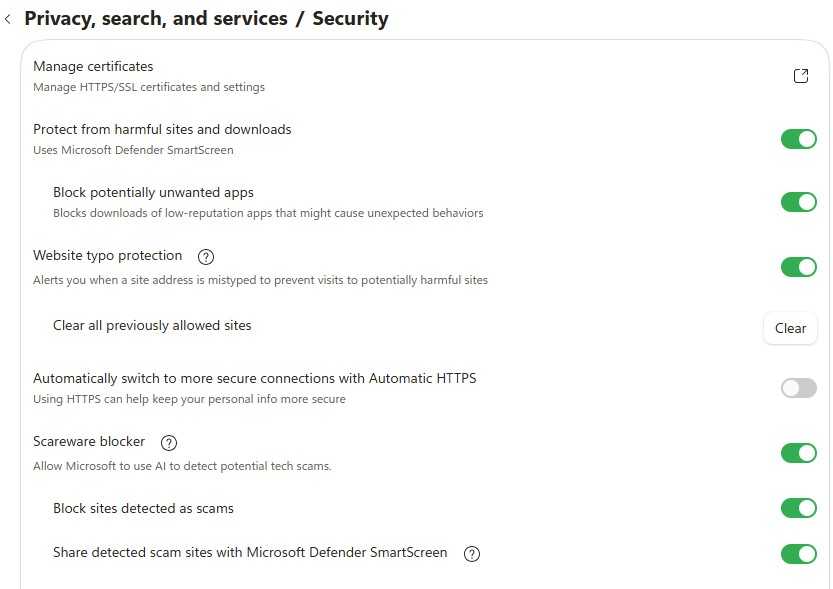
Typically, the scamware detector is turned on, but there’s a possibility it’s been turned off at some point or was never turned on in the first place. For example, on PCs with only 2GB of RAM or fewer than 5 cores, it’s not turned on by default. Microsoft recommends enabling it on those machines. To do it, in Edge go to Settings >Privacy, search, and services > Security, and in the “Scareware blocker” setting, turn the slider from off to on.
When you do that, make sure that “Block sites detected as scams” and “Share detected scam sites with Microsoft Defender SmartScreen” are turned on as well.
Turn on Edge’s scareware blocker to protect yourself from scams and data theft.
Preston Gralla / Foundry
11. Use Edge’s one-click form filler
How many hours a week do you spend mindlessly filling out web forms — your office or home address, shipping address, email address, and phone number? Wouldn’t it be nice to get that time back?
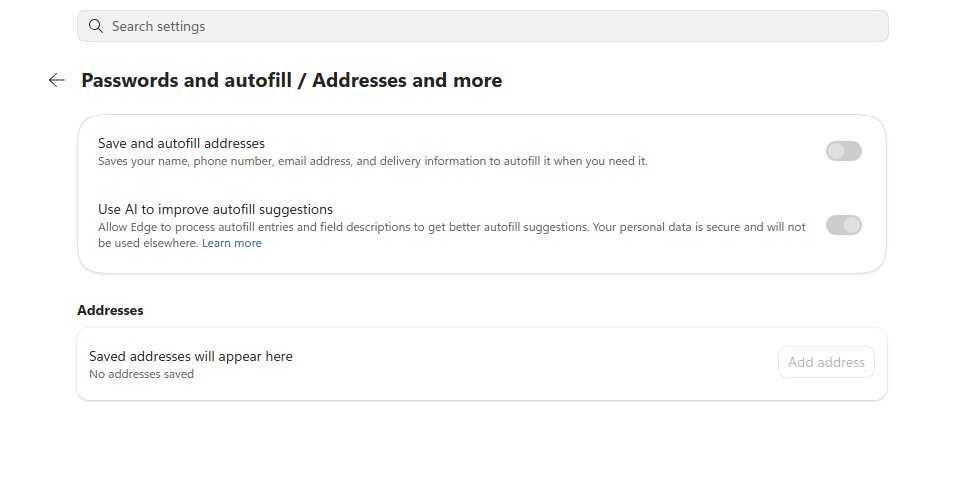
With autofill, built into Edge, you can. To use it, in Edge go to Settings > Passwords and autofill > Addresses and more. Turn on the toggle next to “Save and autofill addresses.” You can also choose to have Copilot analyze web forms and decide which bits of your information belong in which part of the form.
Microsoft autofill saves information that can be used to fill out forms online.
Preston Gralla / Foundry
From now on, whenever you visit a web form, just click in a text box, and your information will appear in a popup. Select it and the form will fill in. You can go back to Passwords and autofill to change any information you want.
12. Save time with keyboard shortcuts
There’s a good chance you use keyboard shortcuts for some of your office applications, like Word and Excel — and you likely use some for Windows itself.
But when it comes to browsers, many people forgo the keyboard except when absolutely necessary. That’s too bad, because keyboard shortcuts are a big timesaver. So to improve your productivity, check out these keyboard shortcuts for Edge in Windows. (Mac users can generally substitute the Cmd key for Ctrl and the Opt key for Alt.)