Author: Computerworld

10 cool things Copilot can do in PowerPoint

Building a presentation can take lots of time. There are design choices to figure out: the slide layouts, fonts, theme colors, and so on. You can use a template to skip this hassle, but you still have to paste your text and other content into the slides and edit it all so that the results are visually appealing.

In PowerPoint, Microsoft’s Copilot AI assistant can now automate the heavy lifting of presentation creation. It can generate a first-draft presentation in minutes, then help you edit it. You can also prompt Copilot to help you quickly understand the contents of a presentation and glean insights from it. Use the tips in this guide to save oodles of time as you create and work with presentations.

Who can use Copilot in PowerPoint

Individuals with a Microsoft 365 Personal, Family, or Premium subscription have access to Copilot from within PowerPoint and other Microsoft 365 apps. Users with a Premium plan have higher Copilot usage allowances and access to advanced AI features.

For business users, it’s more complicated. Organizations with more than 2,000 users must pay for Microsoft 365 Copilot licenses for their users in addition to their regular Microsoft 365 licenses. Users at organizations with fewer than 2,000 users can use Copilot within M365 apps even without the M365 Copilot add-on licenses, but there are limitations in usage, speed, and feature availability.

(Copilot Chat Basic users do get some Copilot functionality, including the ability to generate presentations, via the Copilot Chat hub. See our Copilot Chat tutorial for details.)

In this article:

Working with Copilot in PowerPoint

First, let’s quickly go over the notable settings of the Copilot sidebar.

When you have a presentation open in PowerPoint, click the Copilot icon; it may be floating at the lower-right corner of your PowerPoint window or parked at the right end of the Ribbon toolbar. The Copilot sidebar will open along the right of the page. You’ll type your prompts to Copilot inside the chat window in this pane.
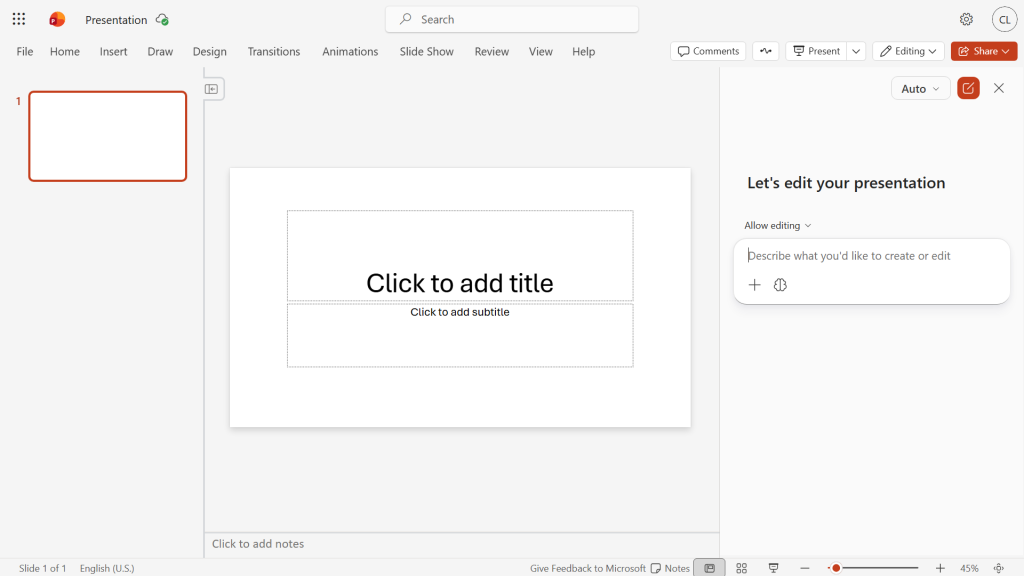
powerpoint screen with copilot sidebar open on right

The sidebar on the right is where you interact with Copilot in PowerPOint.


Howard Wen / Foundry

Agent mode: By default, Copilot can build a new presentation or make changes to an existing one in the main PowerPoint window. This is known as “agent mode.” To change this so that Copilot can’t take direct action on a presentation (all its responses appear in the sidebar), click the Allow editing button above the chat window and change it to Chat only.

The tips in this guide require that Copilot be in agent mode, so make sure you see Allow editing above the chat window.

Choice of AI model: Behind the scenes, Copilot has access to various genAI models, including different versions of Anthropic Claude and OpenAI GPT.  By default, it decides which model to use based on your prompt. You can set it to use a particular model: click Auto at the upper right of the Copilot pane and select a model from the dropdown that opens.
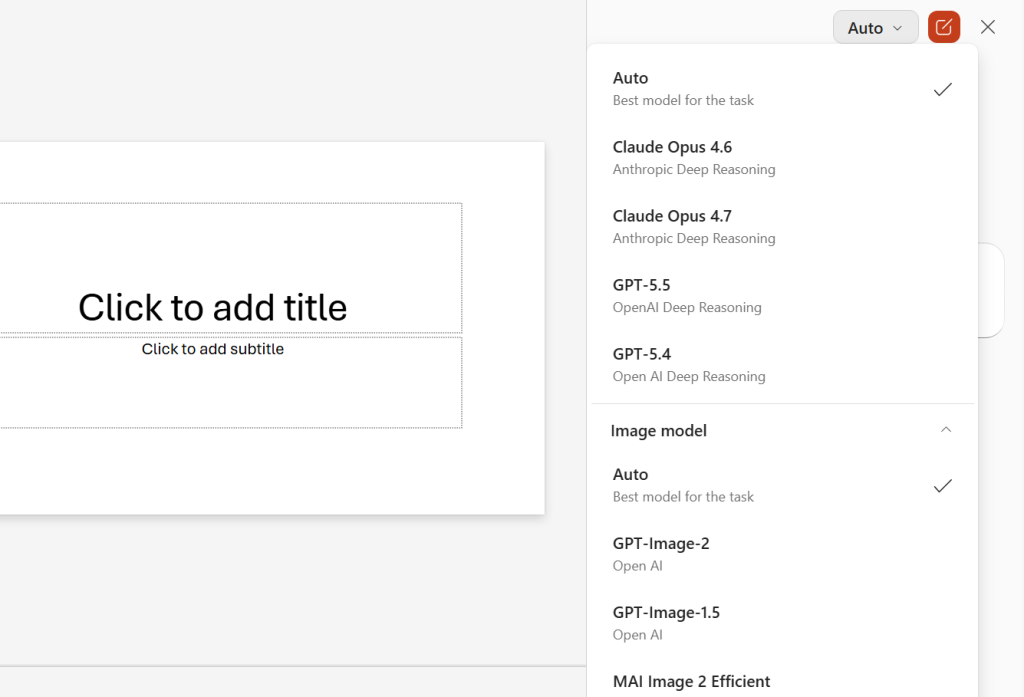
screenshot of copilot sidebar in powerpoint with models dropdown menu open

You can choose which AI model you want Copilot to use for a request.

Howard Wen / Foundry

The tips in this guide should work fine on the default Auto setting. But feel free to experiment switching to specific models to see which give you the best results for particular tasks.

Important: Remember that generative AI output often includes errors, so always check Copilot’s output for accuracy. (Also see our tips for reducing hallucinations in Copilot.) You’ll likely want to rewrite it in your own voice as you’re reviewing it.

1. Create a presentation template

For many people, the hardest part of creating a presentation is getting started. What types of information should be included on the slides, and in what order? Copilot can give you a leg up by creating the type of presentation you need, with placeholder data that you can later replace with your own.

Start a new presentation, open the Copilot sidebar, and type your prompt into the chat window. It’s best to provide very specific details in your prompt. The more context or details you provide, the more likely Copilot will generate a presentation template that suits your needs.

A good prompt should contain the slide count, subject, audience, and tone. Example:

  • Create a 6-slide presentation for a sales meeting focusing on Q1 revenue. The audience is the sales team, so keep the tone professional and focused on the sales data.

Copilot may ask a series of follow-up questions, such as your preferred visual style and desired level of detail. Then it will generate a presentation template.
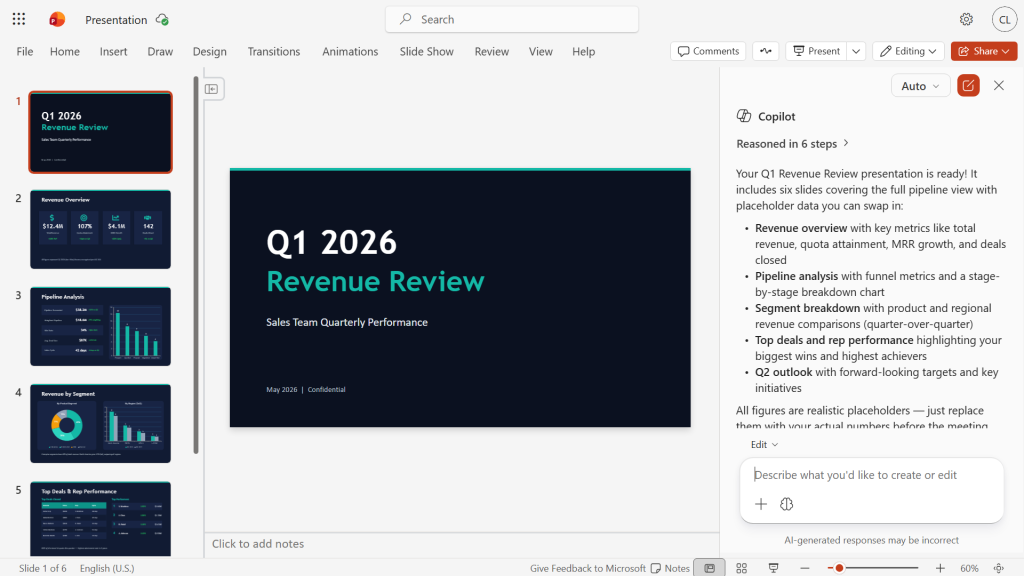
screenshot of powerpoint presentation generated by copilot with placeholder data

Copilot generates a presentation with placeholder data and explains its elements.

Howard Wen / Foundry

You can optionally prompt Copilot for revisions, and when you’re happy with the template, swap in your own data.

2. Create a presentation from a document

You can attach a document (such as a Word document, Excel spreadsheet, or PDF) and prompt Copilot to generate a presentation based on its contents. This works best with a structured-format document (such as a business plan, project proposal, or summary report) that contains sections with headings.

Copilot can extract the document’s text and structure to generate the slide content for the new presentation. This can especially be useful for quickly turning a long report into a visually appealing presentation.

In the Copilot pane, click the + icon at the bottom of the chat window. A list of documents that you’ve recently accessed appears. Select the one that you want Copilot to use. Alternatively, click the magnifying glass icon and inside its search box, type a few letters of the filename for the document you want. (Business users with an M365 Copilot license can select up to five files for Copilot to pull from when creating a presentation.)
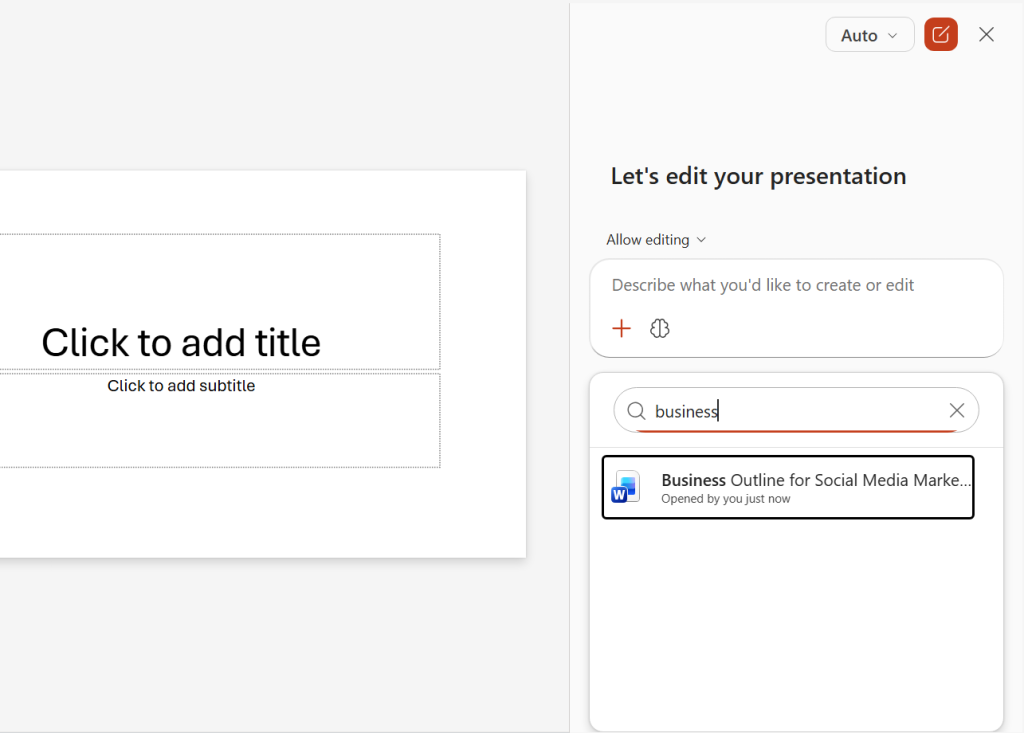
screenshot of copilot sidebar in powerpoint with a document being attached for copilot to base a presentation on

Attaching a document for Copilot to base a presentation on.

Howard Wen / Foundry

Then in the chat window, you can enter a prompt that’s as simple as “Create a presentation,” although as always, providing more details and context is better. This is especially important for corporate users who reference multiple source files. It’s useful to tell Copilot what data to pull from each document.

Answer any follow-up questions that Copilot asks, and it will then generate the presentation.
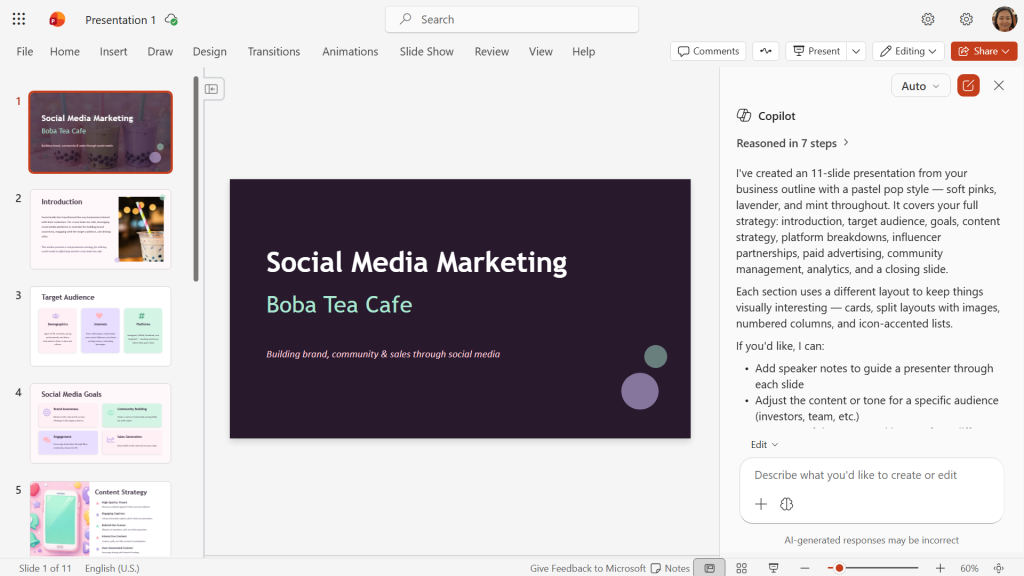
screenshot of powerpoint with a presentation generated by copilot from a document

Copilot has generated a professional presentation from a social media marketing campaign document.

Howard Wen / Foundry

Note: Your marketing department may have created one or more branded company templates for Copilot to work from. If that’s the case at your organization, simply open the appropriate company template as your first step. Then you can upload docs and type a prompt as described above. Copilot will create a presentation using the branded template.

3. Add content from a document to a slide

Manually copying text or other content from a document and pasting it into a new slide is a chore. Instead, you can prompt Copilot to extract information directly from a Word document, Excel spreadsheet, or PDF to create new slides.

In the Copilot pane, attach the document using the same steps described in tip 2, then tell Copilot to create a slide from the document. As always, it helps to provide details such as the new slide’s focus or what data to include:

  • Add a slide based on the attached document.
  • Use the attached file to add a slide about the project budget that focuses on Q1 projections.
  • Summarize only the financial section of the attached document as a slide.
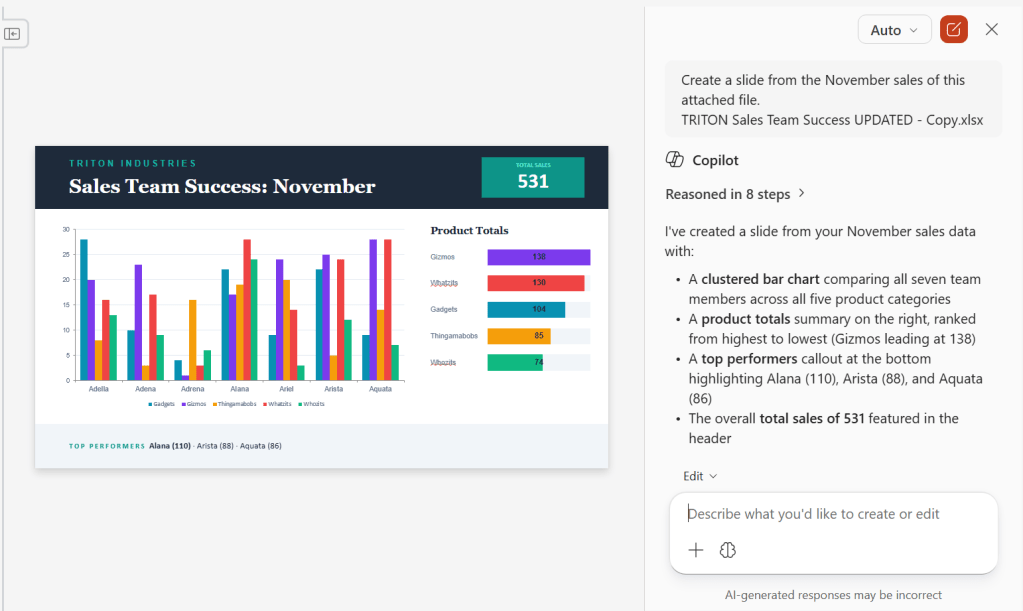
screenshot of a slide in powerpoint generated by copilot from spreadsheet data

A new Copilot-generated slide based on data from an Excel spreadsheet.

Howard Wen / Foundry

4. Refine your slide text

A presentation should be visual and display only the core message. Conciseness and proper writing tone are essential for your slides, so that they don’t lose the attention of your audience.

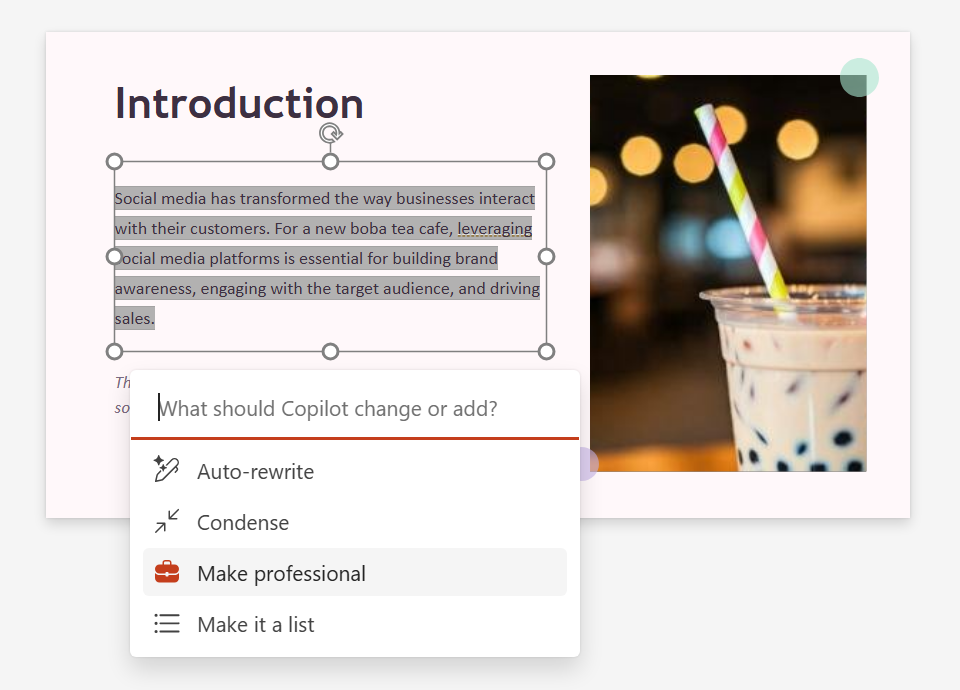
You can prompt Copilot to refine text on an individual slide in various ways, such as rewriting it in a more professional tone or making it more concise. Highlight the text inside a text box on the slide. On the toolbar that appears over the highlighted text, click Edit with Copilot.

On the menu that opens, you can select a preset prompt to refine the text, such as Condense or Make professional. Or, at the top of this menu, you can type a prompt to rewrite the highlighted text.
screenshot of text on a powerpoint slide with copilot dropdown menu includng condense and make professional options

Choose a preset prompt for refining text on a slide or type in your own prompt.

Howard Wen / Foundry

Note that this feature affects all the text inside the text box. To rewrite only a portion of text inside a text box, you must split that portion out into a separate text box.

Alternatively, you can prompt Copilot to analyze your entire presentation and tighten up the wording throughout all of its slides. For example:

  • Make these slides more visual and use less text.

5. Find or create an image

If you have Copilot generate a presentation from an existing Word document that contains images, it will incorporate those images into the presentation. If there are no images in the source document, you can ask Copilot to find or create one and add it to a slide.

To add a stock image or an image from your organization’s brand library, tell Copilot what you’re looking for:

  • Add a stock photo of young adults in a cafe drinking boba tea.
  • Add a photo from our asset library of young adults in a cafe drinking boba tea.

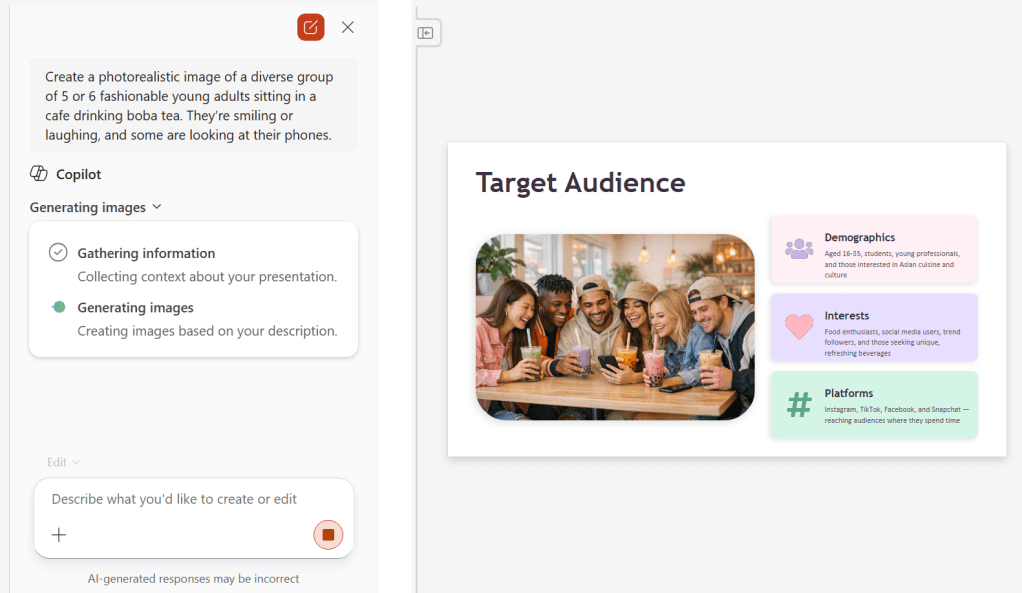
To have Copilot create an image using Microsoft’s Designer image generation tool, describe your desired image. As always, specificity is helpful:

  • Create a photorealistic image of a diverse group of 5 or 6 fashionable young adults sitting in a cafe drinking boba tea. They’re smiling or laughing, and some are looking at their phones.
screenshot of image generation prompt in copilot sidebar in powerpoint plus the resulting generated image on a slide

Copilot in PowerPoint hooks into Microsoft’s Designer tool for image generation.

Howard Wen / Foundry

Just as you need to review any text output from Copilot, take a close look at generated images to be sure nothing looks off.

Also note that Copilot image generation isn’t always reliable in PowerPoint. For some time during our testing for this story, Copilot said it couldn’t create an image because “the image generation service is returning a server error on every attempt.” After about a day and a half, the service began working again.

6. Expand your presentation with relevant slides

As you’re building your presentation, you may find that it’s become text heavy. Or perhaps it could use more visually oriented slides to break things up and make its progression flow better. Copilot can generate and insert new slides that are based on the content of the slides already in the presentation.

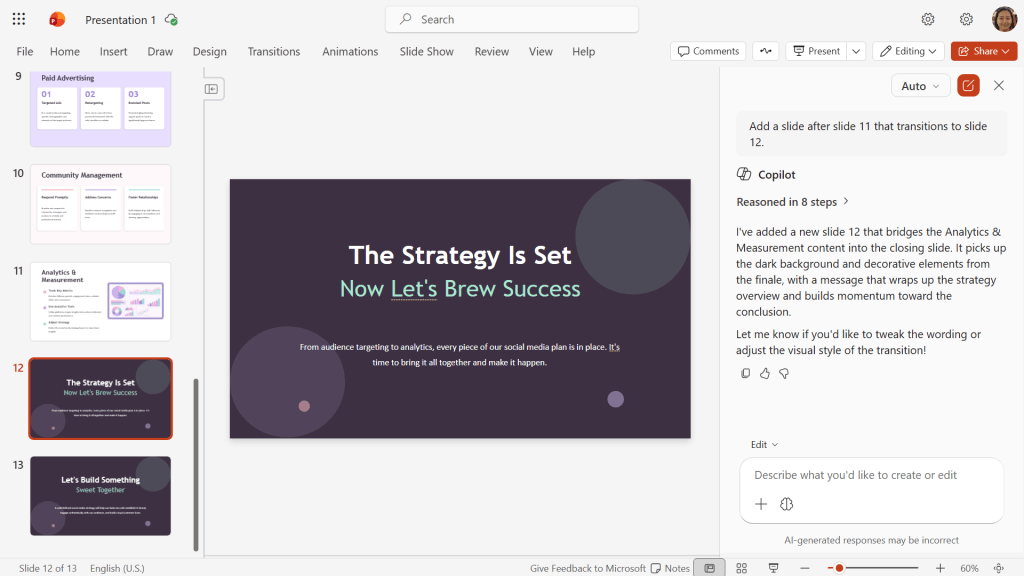
In the Copilot pane, specify exactly where you want the new slide to go. This helps Copilot to analyze the content of the slides before and after where you want the new slide. Then it can generate a slide to bridge between the two slides. Examples:

  • Add a slide after slide 3 about our competitive advantages.
  • Add a slide after slide 11 that transitions to slide 12.
screenshot of powerpoint screen with copilot sidebar and a transition slide generated by copilot

Need a transition slide? Just ask!

Howard Wen / Foundry

7. Summarize a presentation

Maybe you need a quick refresh of your presentation before an important meeting. Or maybe a co-worker has sent you a presentation that’s packed with lots of slides. You can prompt Copilot to generate a summary of the presentation’s overall messaging.

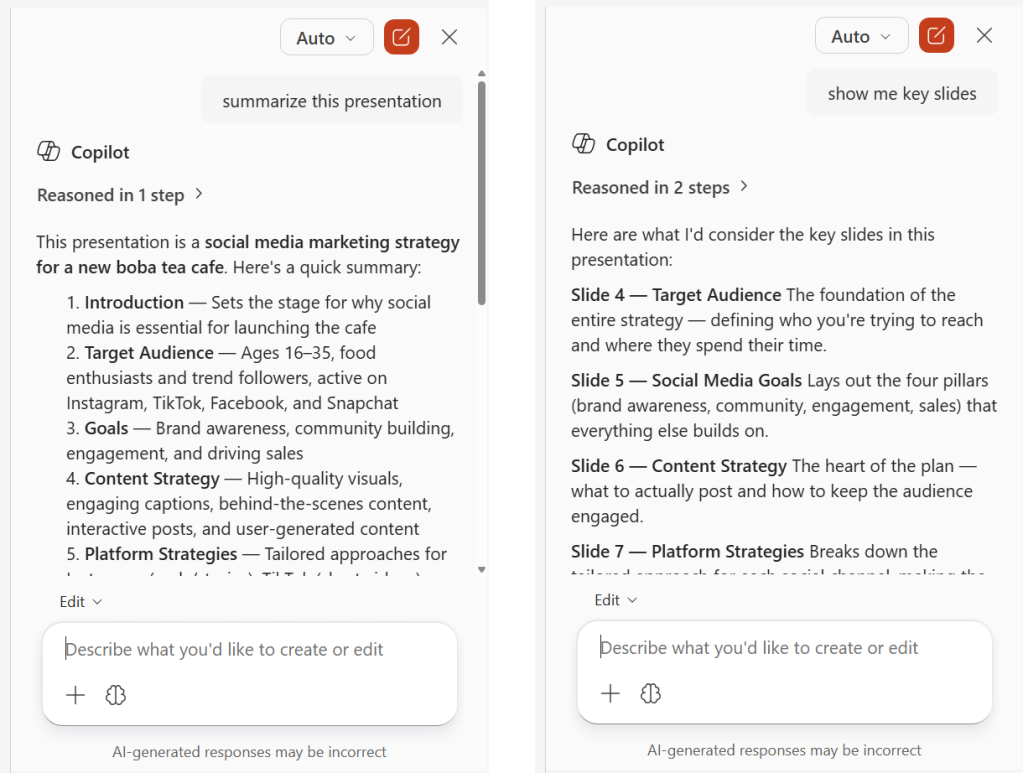
In the Copilot pane, just type “summarize this presentation.” You can also have Copilot flag key slides that contain important information: “show me key slides.”
screenshots of copilot sidebar in powerpoint - one with summarize results and one with key slides response

Ask Copilot to summarize a presentation or flag key slides.

Howard Wen / Foundry

8. Answer questions about a presentation

As you’re reviewing a presentation, especially one that you didn’t create and are not familiar with, you can get Copilot to pull key data points from its slides.

In the Copilot pane, type specific informational questions. Examples:

  • What are the action items in this deck?
  • What is the proposed budget mentioned here?

If Copilot can’t find the exact answer to the question you ask, it will provide related information from the presentation.
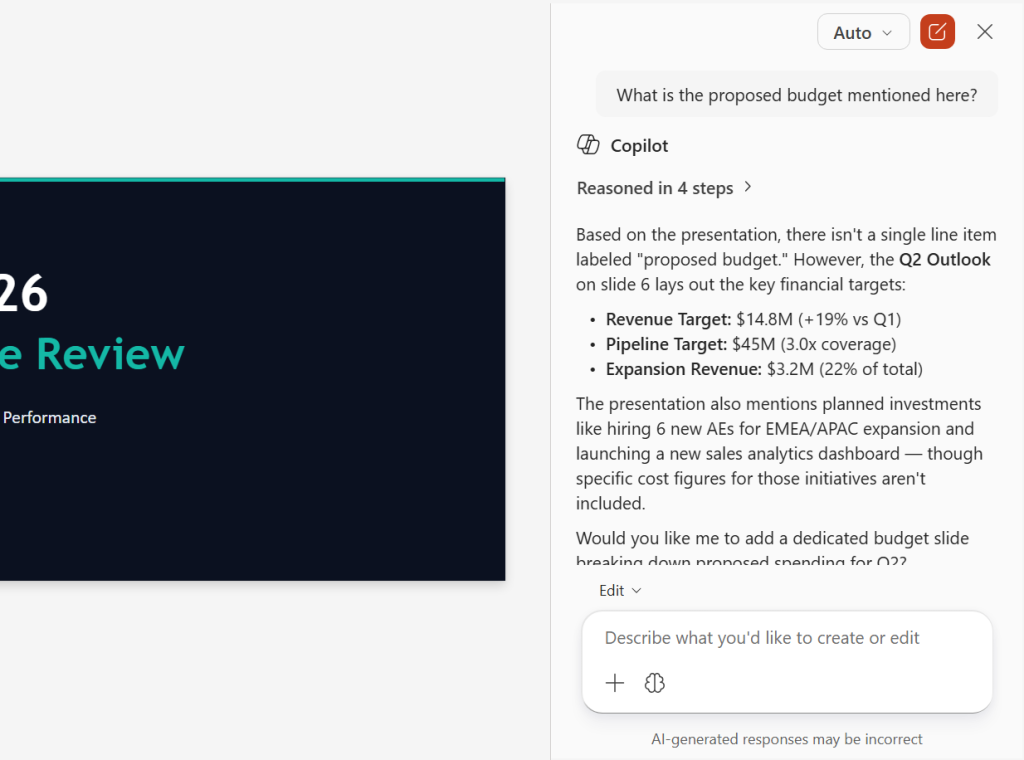
screenshot of copilot sidebar in powerpoint with response to query about proposed budget in the slide deck

Ask Copilot specific questions about the contents of a presentation.

Howard Wen / Foundry

This method can also help you validate that your presentation includes everything you want it to. If you ask Copilot about the action items in a presentation and it can’t find any, you know you need to add them. (Copilot will likely offer to generate them for you based on the rest of the slides.)

9. Help you navigate a large presentation

In the business world, presentations with dozens of slides are not uncommon, such as for financial reports or project documentation. Trying to find a specific slide or multiple slides can be tough. Copilot can help you navigate such a presentation.

In the Copilot pane, prompt Copilot to find slides based on specific topics. Example:

  • Show me the slides about the project timeline.

Copilot will analyze the presentation and reply with a list of links to the relevant slides. Click one of these to jump directly to that slide.
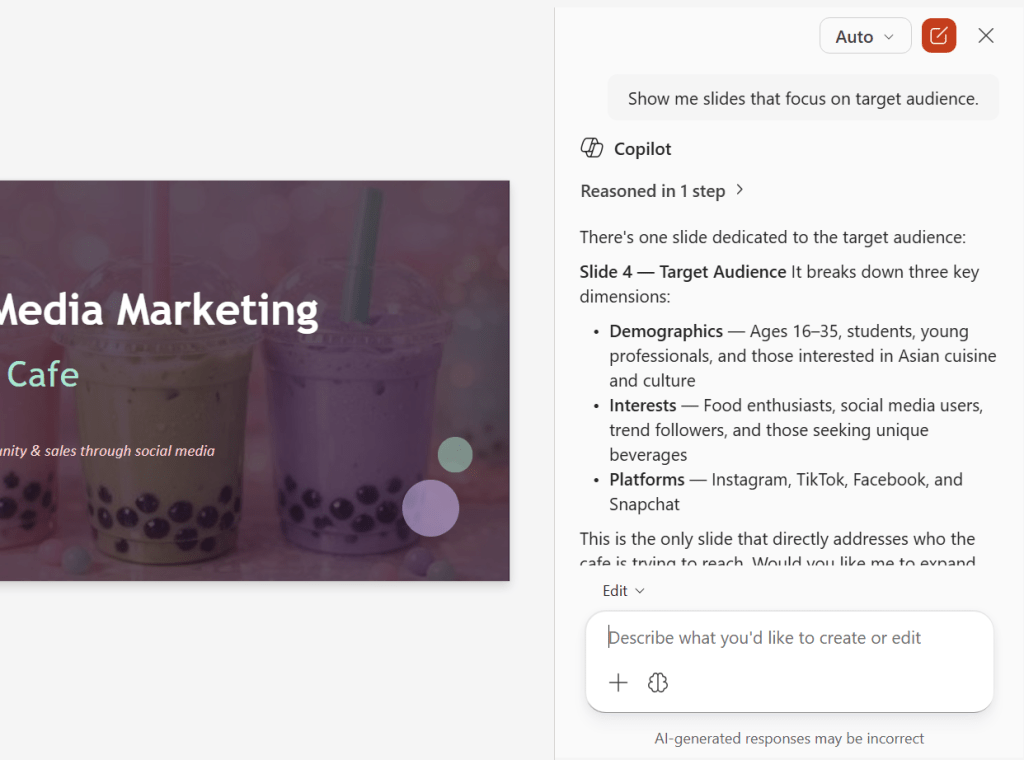
screenshot of copilot sidebar in powerpoint with response about the slide that talks about target audience

Copilot can help you zoom directly to a slide that covers a particular topic or shows specific data.

Howard Wen / Foundry

10. Generate speaker notes and/or an FAQ

Here’s a great timesaver when you’re preparing to show your presentation to an audience: Copilot can automatically generate suggested speaker notes for you, based on the content of your slides. Example prompt:

  • Write speaker notes for every slide with one talking point per slide.
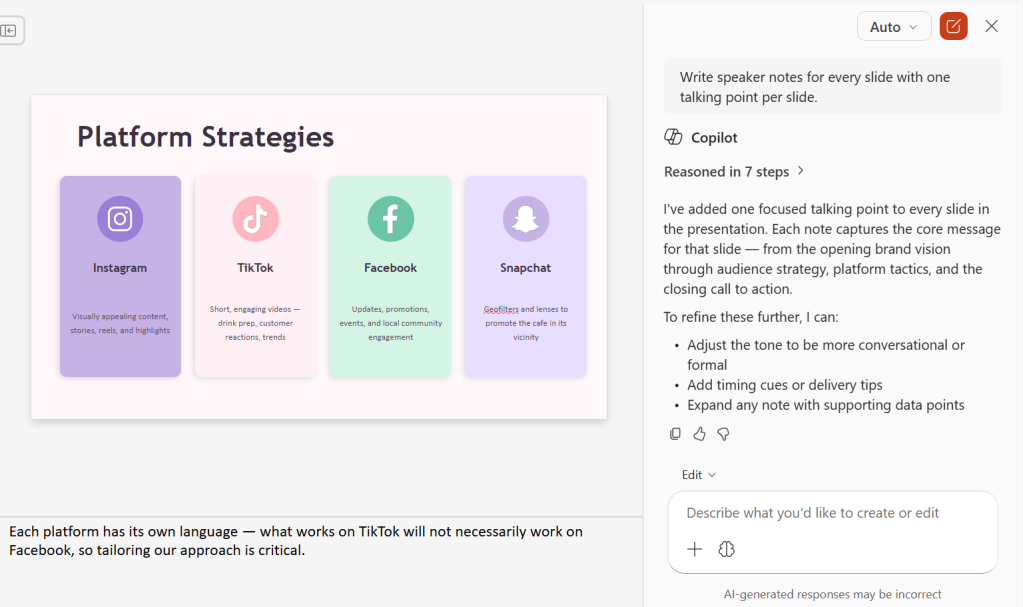
screenshot of powerpoint presentation with speaker notes generated by copilot

Copilot can create speaker notes in seconds.

Howard Wen / Foundry

In a related feature, Copilot can create a frequently asked questions list (FAQ) for you to consult in your speaker notes or to present as a slide:

  • Write an FAQ for these slides.

Copilot will ask where you want the questions and answers added — as a new slide at the end, integrated into the speaker notes of relevant slides, or somewhere else that you designate. Make a selection, and Copilot will generate the FAQ based on the content of your presentation.
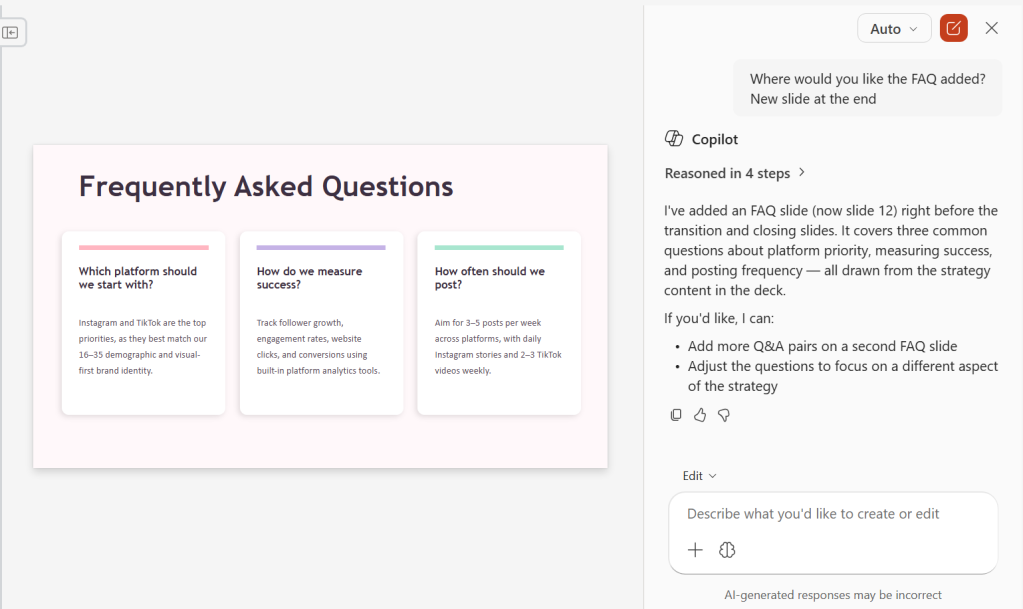
screenshot of frequently asked questions slide generated by copilot in powerpoint

A Copilot-generated FAQ slide.

Howard Wen / Foundry

Related reading:

Your instant Android backup upgrade

Here in this high-tech era of 2026, keeping important info backed up and synced should be effortless and something that just happens on its own, automatically, without any actual thought or ongoing human effort.

In many areas of our digital life, that mercifully does Just Work™ in exactly that way. Fire up an email in most modern mail services, and you can stop at any point and find your in-progress draft in that same app on any other device. The same applies to any file you’re finessing within Google Drive or other cloud storage services or document you’re dawdling over in Docs.

One area where seamless syncing somehow still doesn’t occur, though, is in the domain of downloaded documents on Android. If someone sends you a PDF or a Word file and you save it to your phone, that file exists in an archaic-seeming silo — only locally, on that one gadget. And that, of course, means (a) you can’t access it from any other device, and (b) if you misplace your phone or move into a new one at some point along the way, the file will be left behind in time and entirely unavailable.

Well, take a moment to join me in celebration: Amidst all the Gemini gobbledegook that no one asked for (and that often falls somewhere between “pointless” and “actively counterproductive”), Google’s giving us a major upgrade to Android’s backup capabilities right now. It’s a simple-seeming switch buried in your system settings, and it’s up to you to find and activate it.

Once you do, though, those once-orphaned documents on your Android device’s local storage will be perpetually synced and protected, automatically, without any ongoing thought or effort.

All you’ve gotta do is find and flip that one new switch.

[Don’t let yourself miss an ounce of Android Intelligence. Join my free weekly Android Intelligence newsletter and get one new thing to try in your inbox every Friday!]

The Android backup lowdown

So, for a quick bit of pertinent context on this: Android’s backup systems have actually come a really long way over the years.

‘Twas a time, y’see, when little to nothing about you would sync and carry over automatically from one Android device to another. Years ago — back in the ancient-seeming prehistoric era of the early 2010s — Android enthusiasts in the know would rely on community-created third-party apps for everything from remembering and resyncing downloaded apps to restoring data from within those apps and onward. And reconfiguring your system preferences would be a whole time-consuming song and dance every single time you reset a device or moved into a new one, as little to nothing would automatically carry over.

Most of that stuff is now effortless and automatic. And, thanks to apps like Google Messages, Calendar, Drive, and Docs, many other areas of important data are also synced on their own at the app level — outside of any system mechanisms.

Locally stored files, however, have remained an awkward omission. To this day, anything you download on any Android device exists only on that one device and isn’t synced or backed up anywhere. The only way that happens is — in a blast-from-the-past twist — if you go out of your way to find and set up a third-party app to handle the heavy lifting.

That brings us to today. Right now, as we speak, Google’s in the midst of sending out a quiet under-the-hood update that (brace yourself…) adds in the option to automatically sync and back up any documents on your device as a native part of Android’s backup setup.

See?

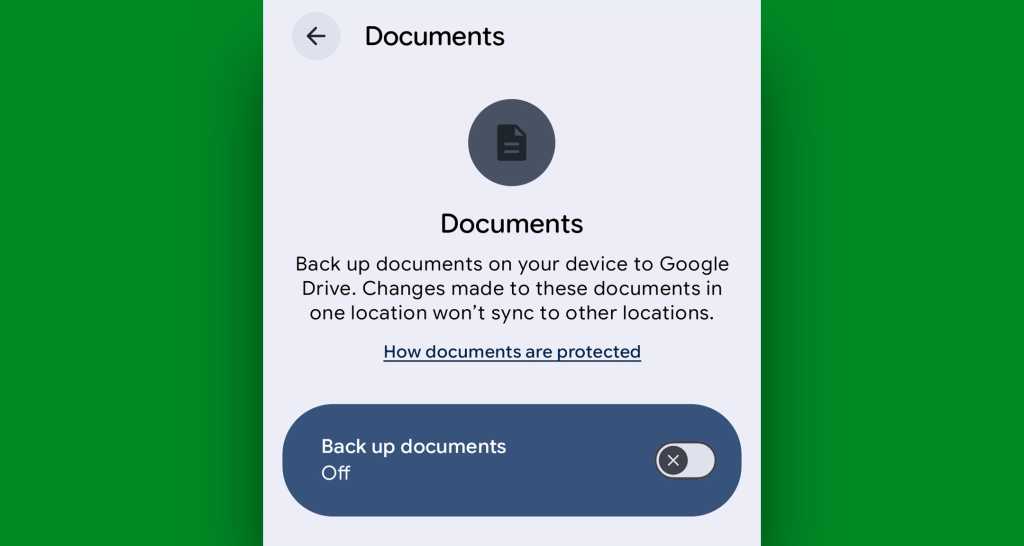
Android backup documents
The easily overlooked new option for backing up documents on Android.

JR Raphael, Foundry

The option is on its way to all devices running 2018’s Android 9 release and higher. (If you’re still using a phone with an Android version older than that, you’re now a whopping eight years out of date, and you have much bigger problems.)

Once the added option is present and available for you, you’re literally lookin’ at 10 seconds to find and activate it.

Lemme show ya how.

Android’s document backup addition

I promise: This couldn’t be much simpler.

No matter what kind of Android device is in front of you, just head into your system settings and open the section called “Accounts and backup,” “Back up or copy data,” or something along those same lines. (The exact wording can vary based on who made your device and when it was released or last updated.)

Either tap the line labeled “Google Backup” or look for an option to “Back up data” via Google Drive. You should then either see a series of options for different areas of available backup right then and there — or, depending on your device, you might have to tap a line labeled “Other device data” (or something similar) to find the full list of possibilities.

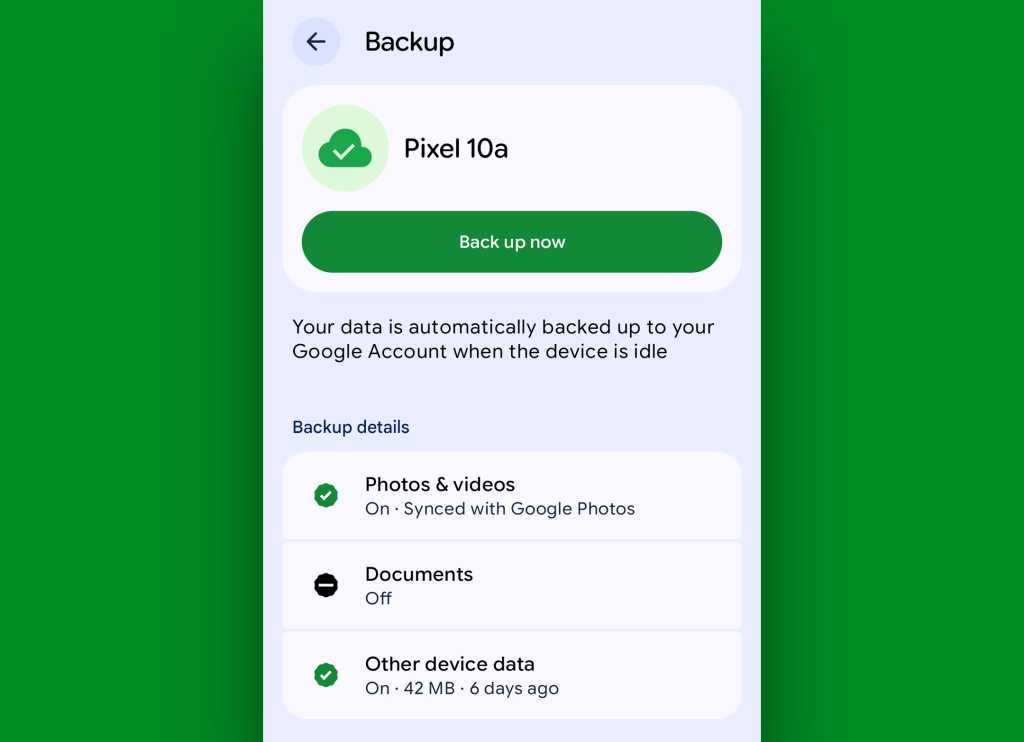
However you get there, once you’re lookin’ at that list, you’ll see a newly added line for “Documents” if this latest under-the-hood update has reached you.

Android backup options
Android’s expanded list of backup options — now including documents alongside other forms of on-device data.

JR Raphael, Foundry

And from there, all that’s left is to tap it and enable the switch to include that in your automated backups from that moment forward.

If you aren’t seeing the option yet, don’t panic. Google always sends these under-the-hood updates out bit by bit over time, so the change probably just hasn’t reached your device quite yet. As long as you’re running Android 9 or higher, it’ll get there. Set yourself a reminder to check back once a week or so. Odds are, you’ll see it pretty soon.

Notably, all documents synced in this way are always encrypted for security, and they’re kept in your personal (or, depending on the nature of your account, perhaps company-connected) Google Drive storage. That does mean they’ll count against your overall Google storage total, so keep an eye on your Drive storage total to make sure you’re in solid shape and look to the Google One storage hub if you ever want some simple suggestions for freeing up space.

Speaking of other Google services: If you ever want to keep other types of locally stored non-document files from an Android device synced and available elsewhere, you can easily rely on Google Photos for syncing screenshots and other images — after enabling sync in general, be sure to look in the app’s “Collections” areas to find the “On this device” folder and then flip the toggle to “Backup all device folders” (or get more nuanced and open specific individual on-device folders if you want to sync some but not all of those areas) — and you can still turn to those aforementioned third-party apps for broader syncing of anything else imaginable.

But with documents now being handled automatically and natively, that’s one big worry now out of your hair. Just note that the onus will fall on you to find and flip the switch and actively opt in to the feature on each and every Android device you’re using.

Take 10 seconds to do that, though, and you’ll have one less void in your Android data arena. And you don’t need Gemini to tell you that that can only be a good thing.

Get practical Android knowledge in your inbox every Friday with my free Android Intelligence newsletter — one new thing to try each week, straight from me to you.

Anthropic pays $1.5B to settle contentious copyright case

A US federal court has approved Anthropic’s $1.5 billion settlement in a class-action lawsuit in which authors accused the AI company of using their books without permission to train the AI model Claude. This is the largest such settlement to date in a US copyright case, according to Reuters.

The dispute is one of several legal cases in which copyright holders sued AI companies over how large language models (LLMs) were trained, and it is the first major AI-related copyright dispute in the US to be resolved through a settlement.

A judge had previously ruled that the actual training of AI models using books falls under the “fair use” doctrine in US copyright law. But Anthropic was found to have violated the law by storing more than 7 million pirated books in a central library, regardless of whether they were later used for AI training or not.

Apple and the changing of the guard

As Apple gears up to anoint John Ternus the new company CEO in September (while current leader Tim Cook takes a seat on the board) the company appears to be firing on all cylinders ahead of the leadership transition. 

What’s going well

Just look at the evidence: 

  • Apple is building market share across its entire product range; even memory-driven price inflation doesn’t seem to have dampened demand for its hardware yet.
  • While Apple had to raise prices, the company’s MacBook Neo remains seriously popular. It’s sitting atop Amazon’s US best-selling chart, which currently includes six Macs in the top 10. The Neo has topped this chart since its introduction.
  • Apple’s iPhone 17 series continues to sell well, with recent market data showing sustained growth. Both Counterpoint and IDC tell us that iPhone shipments continue to increase, even as other vendor shipments slide.
  • IDC analyst Francisco Jeronimo recently estimated that Apple’s upcoming foldable iPhone Ultra could grab 29.4% of global folding smartphone sales this year, rising to 34.9% in 2027.
  • The company’s new 27 series of operating systems is attracting a great response as beta testers report that it is already solid, stable, and performing well.
  • The AI narrative has really changed, with analysts no longer quite so starry-eyed at the prospects for the big frontier AI firms. Apple’s edge-AI-enabling approach is winning converts.

What’s coming up

The company’s newly-filed lawsuit against OpenAI may or may not succeed, but it will certainly help consolidate recognition of the importance of Apple’s designs and intellectual property in whatever hardware emerges from the AI firm. It also means both Apple and OpenAI are already competing in hardware, even though neither company yet offers anything that directly challenges the other. 

Apple has just set out its stall to brand-loyal fans in a big way and did so before OpenAI gets to woo the same set of customers with a wriggle of its Jony Ive-tinged talisman.

The stage is set for intense competition between the two. Though some say Apple’s needs to improve employee retention, if it does find proof of efforts to use recruitment to engage in industrial espionage, it’ll be easier to represent its own products as being the OG for new hardware. 

If nothing else, it means consumers will forever be asking, “If OpenAI’s designers are so good, why did it need to poach them from Apple?” Doubt is a weapon.

Managing perception

It doesn’t matter how the case goes, because there fight is already affecting consumer psychology. It also means that as Ternus prepares to take his seat atop the rainbow-colored Apple throne, we can already size him up. “A man is measured by his enemies,” Joe Abercrombie wrote in “The Trouble With Peace.”

Given the proximity of the leadership transition, it’s highly probable that Ternus signed-off on the litigation; in doing so he — and Apple — tell us to expect more of the same. 

Apple has, rightly or wrongly, decided that OpenAI will become its new existential bugbear, following in the footsteps of Microsoft Windows, Real Networks, Adobe Flash, Android, and Samsung, all of whom have been useful foils against which Apple has been able to build and maintain its identity.

Looking at that list, you’d be tempted to believe that nothing much is new. Apple has often defined itself by the enemies it sometimes keeps. What has been will be again, which in this case means even as OpenAI attempts to carve out an identity as a hardware manufacturer delivering solutions to compete with Apple and Google, Ternus’ team’s looks to drive a consensus-shaped wedge into the pro-LLM propaganda. 

That blow comes as Apple finally gets its act together around AI, and as the company prepares for a future in which the world’s most-used wearable device also becomes the wearable way to woo Siri AI.

My kingdom come

Rising market share, powerful solutions, an increasingly recognized and respected approach to AI, and an ideological crusade — these details constitute Apple’s place today and are Tim Cook’s coronation gift to Ternus. He’s passing along a strong and hyper-profitable baton that screams of timeliness and relevance even as the company gets set, ready, to go with a year or two of new product designs, new product families, and a 20thanniversary iPhone.

This is Apple’s party. OpenAI’s name didn’t make the list. 

You can follow me on social media! Join me on BlueSky,  LinkedIn, Mastodon and subscribe to The Core.

US AI testing institute chief steps down within three months

The head of the US government’s AI testing institute, Chris Fall, has resigned about three months after taking charge of the Center for AI Standards and Innovation (CAISI), the federal organization responsible for evaluating advanced artificial intelligence models for safety and security.

Current National Institute of Standards and Technology NIST Director Arvind Raman will serve as acting CAISI Director following Fall’s departure while continuing to oversee the Commerce Department office responsible for the institute, the Daily Signal reported, citing two people familiar with the matter.

A Commerce Department spokesperson who spoke to the publication did not disclose a reason for the resignation.

Fall assumed leadership of CAISI in April after the Trump administration reorganized the former US AI Safety Institute under NIST. The institute develops methodologies for evaluating frontier AI models and works with AI developers on voluntary technical assessments covering areas such as cybersecurity, model misuse, reliability and other risks associated with increasingly capable AI systems.

The leadership change comes as governments and AI companies continue developing technical approaches for evaluating frontier AI models while enterprises expand deployments of generative AI and agentic AI across business operations.

In recent months, the Commerce Department has taken a more active role in AI policy involving advanced models, placing greater attention on how the federal government evaluates technologies with potential national security implications.

Continuity matters more than personalities

CAISI works with AI developers such as Anthropic, Google’s DeepMind and OpenAI on voluntary evaluations of frontier AI models and develops methodologies for testing model capabilities and risks. The institute does not regulate AI developers or certify commercial AI systems.

For enterprises, those evaluations are one source of technical information alongside vendors’ own testing, third-party security assessments and internal AI governance programs.

Sanchit Vir Gogia, chief analyst at Greyhound Research, said enterprises should focus less on the individual leading the institute and more on whether its technical work continues with the same level of consistency and transparency.

“Leadership churn at CAISI weakens the signal long before it weakens the science,” Gogia said. “The testing has not stopped. Its authority simply does not travel as cleanly once the leadership does not.”

According to Gogia, the more important question for enterprises is not whether the institute’s evaluation work will continue but whether the processes supporting those evaluations remain stable.

“The instinct is to ask whether the pipeline is breaking,” he said. “The more useful question is where the pipeline now sits.”

Enterprises still carry the burden of AI governance

Gogia said organizations should continue treating government-led AI evaluations as one input into their governance processes rather than as evidence that a model is inherently safe for enterprise deployment.

“A government evaluation was always a signal, never a certificate,” he said. “A signal loses value the moment its issuer becomes unpredictable.”

He said enterprises should instead monitor whether CAISI maintains consistent evaluation methodologies, continues publishing technical findings and preserves continuity within its research teams under interim leadership.

“The name on the door is not the signal. The behaviour underneath it is,” Gogia said.

Gogia also cautioned against linking Fall’s resignation to recent Commerce Department actions involving AI policy or export controls, noting that there is no public evidence connecting the two.

“CAISI evaluates; it does not enforce export controls, because it holds no such power,” he said. “This is not a testing body reaching for enforcement. It is enforcement reaching past the testing body.”

With Raman assuming the role on an interim basis, the next significant milestone for enterprises will be the appointment of a permanent director, and whether the institute’s evaluation programs continue without disruption, the analyst said.

Gogia said the successor’s mandate may prove more important than the individual selected.

“A CAISI result is not a safe harbour,” he said. “It informs an obligation; it does not discharge one.” NIST did not immediately respond to a request for comment.

OECD: Physical labor isn’t immune from AI disruptions

Jobs involving physical labor are at high risk of disruption from automation, with new technologies such as AI robots becoming more prevalent, according to a recent study by the Organization for Economic Co-operation and Development (OECD). That means workers in construction and extraction, farming, fishing, forestry, production and material transportation could be affected by fast-moving technology changes.

“Routine and low-skilled jobs are at higher risk,” the Paris-based public policy group said, adding that “overall, jobs requiring non-routine cognitive, social and creative skills are less susceptible to automation.”

The kinds of creative and cognitive jobs still thought to be less exposed to automation include social work and community service roles. 

OECD also said management jobs — which often require workers to devise creative answers to solve problems — fall within the creative and cognitive category. “While AI has made some high-skill job requirements more susceptible to automation, many critical skills in these roles remain difficult to automate,” OECD said.

The same still holds true for some physical and manual labor jobs – including cleaners, agricultural workers, food-prep assistants, and laborers — which are less exposed to the affects of AI, OECD said.  

But people who work in programming, translating and interpretation positions could find their work affected by the quick rise of AI tools and services. According to the organization, global AI uptake rose from 7% in 2021 to 20% in 2025.

“In these occupations, GenAI could perform a significant share of tasks at least twice as fast today or in the near future,” OECD said.

The effects of the AI boom are not always uniform across industries or regions. In a separate 2026 Employment Outlook study released by the group, exposure to disruption from generative AI (genAI) ranges from about 16% in some areas to more than 70% elsewhere, depending on industries and occupations. 

Numerous research firms have said in recent years that AI is driving short-term job losses, though tech industry experts and analysts have argued AI will also create new careers and jobs as agentic AI takes over low-skilled work. 

AI technology has become so ubiquitous that it’s been compared to electricity — virtually all companies will need it or at least know how to use it. But it’s adoption has been hindered at times as companies struggle to find ROI from its use, and by regulatory and ethical hurdles.

In the US, AI blamed for June job losses

According to a Challenger, Gray & Christmas study released earlier this month, AI was cited as the top reason for job cuts in June. The outplacement firm said employers cut 45,849 job cuts in June, of which 14,029 were attributed to AI, with the tech industry leading the cuts.

“Tech remains the epicenter of this year’s cuts,” Challenger said. “AI is the dominant force as companies are restructuring around it, automating roles, and reallocating budgets toward new capabilities. The sector is being reshaped in real time.”

Overall, AI has been responsible for 173,568 job cuts since 2021, the company said.

AI is hurting jobs in customer service, internal reporting, telecommunications, and hosting automation, said Victor Janulaitis, a staffing consultant who was formerly CEO at Janco Associates Inc.

“C-level executives continue to be focused on eliminating ‘non-essential’ managers, staff, and services,” he said. “Coders and developers have limited opportunities with legacy applications.”

While jobs in the IT sector overall are declining, current hiring tends to skew in the direction of people with AI skills. A report this month by CompTIA put job listings with AI skills at around 500,000, which is close to double the number in January.

“Employers in other industries are accelerating digital transformation initiatives and moving from AI experimentation to implementation,” said Seth Robinson, CompTIA’s vice president for industry research.

That view dovetails with what ManpowerGroup, the recruitment firm, is seeing; demand for AI-related skills has nearly doubled over the past year, said Ger Doyle, regional president of North America at ManpowerGroup.

That growth extends well beyond traditional technology roles as companies move from experimenting to AI deployments at scale, Doyle said. “We’re seeing it influence hiring across occupations ranging from data science and engineering to project management and operational roles,” he said.

The EU’s AI transparency deadline is weeks away. Is your enterprise ready?

Providers and deployers of AI systems: You only have a couple of weeks left until you must explicitly inform users when they are interacting with AI content.

To assist in the effort, the European Commission (Commission) has published guidelines to help AI deployers get in line with the AI Act’s transparency obligations, which will begin to go into effect on August 2.

After that, companies providing AI systems must alert users when they are interacting with AI. They must also tell users when they have been exposed to deepfakes, “emotion recognition,” or biometric categorization systems, or when they are given AI-manipulated content in matters of “public interests without human review or editorial control.”

Henna Virkkunen, the Commission’s executive VP for tech sovereignty, security and democracy, said in a statement, “with today’s guidelines, the Commission supports the smooth and effective application of the AI Act to make AI systems interacting with people such as chatbots and AI agents and AI content more transparent and trustworthy. These guidelines support providers and deployers in meeting their obligations under the AI Act, while helping citizens know when they are interacting with AI.”

Systems must include machine-readable markers to reveal such content, to reduce “the risk of deception and manipulation” and build public trust in AI.

“Generative systems have collapsed the cost of producing convincing content while the cost of judging it stands where it always stood,” said Sanchit Vir Gogia, chief analyst at Greyhound Research. This requirement is “an attempt to restore friction to that imbalance.”

A company’s non-compliance could result in fines anywhere from €750K (about $856K) to €15M (about $17 million), or even up to 3% of its total worldwide annual revenue.

Transparency requirements

The EU AI Act’s transparency requirements apply to “natural or legal persons,” public authorities, agencies, or other bodies that develop AI systems, or have them developed, and place them on the EU market or into use under their name or trademark. This means all companies, regardless of whether or not they are EU-based.

“Systems placed on the European market, put into service there, or producing outputs used there are inside the field, wherever the developer sits,” Gogia noted.

Applicable systems must be intended to interact directly with “natural persons”; these systems include AI-enabled chatbots or conversational agents, AI companions, or coding agents. However, AI-enabled tools like recommender systems, spam filters, authentication, search and retrieval, transcription, text and code auto-completion, or predictive maintenance do not fall under the rule.

Specific outputs such as AI-generated text, images, video, and audio must contain a machine-readable mark. Deepfakes and public interest-related text created by AI without human review or control must be clearly labeled, however, deepfake content that is “artistic, creative, satirical, or fictional” is largely exempt.

AI content must be marked with one of three labels: “AI,” “Fully AI-generated,” or “Partially AI-modified.” For instance, “Fully AI-generated” applies when news summaries, music, art, or videos have been created without any human oversight (apart from prompting), while “partially AI-modified” could mean a person’s face is swapped into an authentic photograph to create a deepfake.

The three icons are publicly available for free use; enterprises can download zip files in PNG and SVG formats.

Most of the Act’s transparency rules begin to go into effect on August 2. But AI systems placed on the market before then will have some leeway; they must be in compliance by December 2.

However, a four-month allowance “on one obligation, for one population of systems, contingent on one procedural step, is not a strategy,” Gogia emphasized. Enterprises should plan to comply by August 2 and “treat any relief that arrives as margin.”

A consistent code of practice

Along with the transparency guidelines, the Commission has introduced a code of practice that essentially serves as a gesture of good faith. When signed, it can provide “legal certainty” and a “simple and practical” way to demonstrate compliance with the AI Act, according to the Commission. Signatories can also collaborate through the ‘Signatory Taskforce,’ which will share practices and advance technologies around marking and labeling practices.

Providers that choose not to sign must comply through other methods and demonstrate that those methods are “adequate” through assessment by surveillance authorities, according to the Commission.

Non-signatories “keep their flexibility, and will face more case-by-case scrutiny for it,” said Gogia.

Criteria for compliance

Shashi Bellamkonda, principal research director at Info-Tech Research Group, pointed out that the transparency requirements apply to content only when three criteria are met: It has been published, is informative to the public, or is on matters of public interest.

B2B business content or blogs may not need an AI disclosure if they do not meet these criteria, he noted. Also, published text that has undergone human review or is under editorial control does not need to be labeled. Editorial control means that a person must hold the ultimate legal responsibility for the publication of the content.

Many companies like Google, Adobe, and LinkedIn have already established ways to identify images marked as AI-generated. Meta has made it a requirement, but the creator has to add the AI-generated label, Bellamkonda said.

“This is a good move for guardrails around public information, and companies with good compliance and ethical oversight may not have to worry about this,” he noted. But as a general practice, companies should disclose AI-generated content and state whether it has been human reviewed.

Creating a transparency pipeline

Establishing full transparency means identifying who carries the responsibility for the content, whether the marking survives real use, not just testing, and what evidence will defend the decision, Gogia said.

Concerns cluster around responsibility, durability and evidence. Several organizations usually touch one piece of content, and none controls the whole chain, which is why contracts become the “pressure point,” he said. Most current agreements were written to deliver software and say “almost nothing” about provenance persistence, verification access, or evidence retention.

The durability concern is the most difficult, Gogia noted, because marking performs well in controlled settings but “badly in ordinary life.” Meta, for one, said its invisible watermark was designed to survive cropping; a published test, however, found the company’s preview detector missed 55% of cropped images.

“CIOs should ask which platform can actually provide evidence before believing its dashboard,” said Gogia.

Disclosure of AI use must be “clear, distinguishable and accessible,” he emphasized. “A notice buried in lengthy terms, or reachable only through determined clicking, satisfies nobody, least of all a market surveillance authority.”

Sustained compliance is a “living control” requiring a central record of systems, duties and evidence; testing taking place where the user meets the control rather than where the developer built it; and continuous supplier assurance. Enforcement will vary by country, so keep one common baseline with local overlays, Gogia said.

His advice: Inventory every system that talks to people, generates content, or gauges sentiment; classify provider and deployer roles; place disclosures at first interaction; define substantive human review; keep the evidence.

Marks and provenance signals should be tested after content undergoes cropping, compression, translation, transcription, and other editing, Gogia said. A useful audit starts from a real output and follows its “pulse” through generation, editing and publication, identifying at “each beat” the responsible party, the surviving mark, and evidence for exceptions. Missed labels should also be traced for root cause and recurrence.

To ensure compliance, before August 2, enterprises need a prioritized inventory, live disclosures on the highest-risk use cases, and a “named owner for every control,” he noted. In the first 30 days, they should stabilize and test; in the first 90 days, push requirements into procurement processes as a standing discipline. Procurement must secure commitments on marking methods, known failure modes, and evidence access, with explicit notice if/when any of them change.

“The sensible architecture is a common transparency baseline carrying traceability, responsibility, and evidence, with jurisdictional overlays for language, sector rules, and local practice,” Gogia said.

This article originally appeared on CIO.com.

Apple could ‘run the table’ on AI if it does things right

Looking ahead just a short time, Apple could hold a powerful position in AI where it most makes sense: deployment.

Not only will the company offer up its own AI models for the kind of tasks millions use ChatGPT to do today, but it will provide more sophisticated on-device agentic models to help users get things done through Siri AI.

Apple also offers limited capacity for more complex tasks through Private Cloud Compute, and, in partnership with the likes of Google in the US and Alibaba in China, the company is giving users a trusted conduit through which to access even more sophisticated AI services. 

Deeply deployable

Critics can say it took Apple a long time to get to this point, but they also seem to think the company has finally got the mix right with its series 27 operating systems. Arriving late to a party doesn’t mean you won’t shine once you get there.

Apple is also coming up the inside lane around frontier AI, with iterative OS and hardware enhancements that mean its devices become increasingly effective for Edge AI use cases, on device — no cloud service required.

The company appears to be digging down into those use cases. Mark Gurman at Bloomberg recently predicted that future M7 Ultra Macs will support as much as 1.5TB RAM, making these systems more than capable of running full weight frontier models in people’s offices, colleges, and homes. 

While that does assume the AI-flationary memory market can supply that much RAM at prices humans can afford, it is also true that people are already running AI clusters using off-the-shelf Mac minis networked over Thunderbolt cables. It’s no stretch to believe this will continue to be the case, and that it will even broaden as the power/performance offered at the high end grows.

What’s wrong with good enough?

When combined with open AI stacks, particularly newly emerging varieties, Apple’s platforms should become leading contenders for private AI services and edge AI. Many business users will leap at the chance to offer their workers powerful, self-hosted, private AI services using one or more daisy-chained Mac Studios or Mac minis. The recent craze in deployment of both Macs to support OpenClaw instances shows they already are.

Ultimately, these different slices of momentum mean I agree with investor Jason Calacanis that Apple is in position to apply a great deal of pressure on OpenAI and Claude just by putting models on their devices. 

It’s also worth thinking about how people use AI today. How many of the queries made in the world right now constitute relatively simple tasks that could be transacted by on-device AI, such as the emerging new version of Apple Intelligence or even smaller LLM models running on device? You can even run PrismML’s 1-bit, 27-billion parameter Bonsai on an iPad using the Locally app, and that’s in the here and now.

What happens? Pretty soon you’ll find people recognize that they can already run the vast majority of their AI-augmented workflows using services they have on their existing device or can access on their on-prem Mac set-ups. And, of course, as people get used to running small tasks locally and larger tasks on premises, the actual space in which they need to turn to cloud-based frontier models will erode. That’s even as companies like PrismML work towards slimming down full-weight models so they don’t need to run on a server at all.

“It’s going to be wild when people have unlimited tokens on their desks,” said Calacanis in a podcast round table discussion.

Who has the most to lose?

The current incarnations of AI felt like they came from nowhere. Most people weren’t aware of the technology until returning to work after the 2022 holiday season. Since then, the industry has proliferated with dozens of competing models, most recently including powerful but affordable frontier models such as Qwen and Kimi.ai.

These models aren’t necessarily all as good as one another, but in many cases for much of what we do, we’ll find them to be good enough. That’s an existential crisis for some, as industry observers now think the inevitable pricing pressure means some services might have over-invested in capacity before finding any way to turn a profit.

Those profit-seeking services are the ones with the most to lose as Apple extends its hardware advantage, democratizing AI access for all while providing platforms suitable for edge AI, on-premises AI, private AI, and even AI access using third-party services. (The need for the latter will shrink as the capabilities of the former get better.)

Cupertino rising

What does this all mean? While the industry remains young, it is already fragmenting. And striding through the dust of that process comes Apple, equipped with the hardware, software, and approach to build its business even as the enterprise of first mover AI services erodes.

You can follow me on social media! Join me on BlueSky,  LinkedIn, Mastodon and subscribe to my daily Apple-related news summaries at The Core.

OnlyFans performers become unlikely allies of CISOs in securing websites

CISOs at government organizations and universities have an unexpected ally coming to their aid: OnlyFans models.

For some time, hackers have exploited weaknesses in the websites of universities or government departments to host scams or malware, using content stolen from the OnlyFans website as bait to attract victims.

Now, according to security researchers at Upguard, the fightback has begun: creators of adult content on OnlyFans are leveraging Google search results and the protection offered by copyright law to break up the traffic distribution systems created by bad actors.

These distribution systems work in three stages: entry points using adult or other content to attract and capture web traffic, a routing system sends it to destination sites, and those sites monetize the traffic through scams and malware. It has proved to be a lucrative business for the scammers.

Google recognizes the approach and calls such actors SEO parasites as they benefit from the reputations of other organizations — in particular government or academic sites, which Google views as having high authority.

Since the creators of OnlyFans content are also the copyright holders, they are able to issue Digital Millennium Copyright Act (DMCA) take-down notices for the stolen content posted by the bad actors to other sites. Upguard was able to track this through Google’s DMCA Transparency Report, and through the Lumen Database, another tracker of takedown notices, to which it was granted research access.

“This allows us to identify likely compromised sites: government and university domains advertising unlicensed adult content,” Upguard said.

The OnlyFans creators’ action has two benefits for the operators of the affected websites: The adult content associated with their domain disappears from Google search results, no longer affecting their reputation — and if they receive takedown notices for such content they can check their webservers for the vulnerabilities that enabled the bad actors to post it there in the first place.

This article first appeared on CSO.

OpenAI’s new hardware is a $230, 13-switch keyboard for Codex

OpenAI is selling its first hardware — without any help from Jony Ive. It describes the Codex Micro as a “command center for agentic work” but it’s really a 13-switch wireless keyboard customized to help developers keep tabs on what their Codex agents are doing. It costs $230.

The keyboard has 13 mechanical switches (one keycap covers two of them by default), a rotary encoder, joystick, and RGB backlighting around the whole keypad and individual keys. It comes with 32 customizable icon keycaps.

OpenAI claims that the Codex Micro is a serious business tool: The command keys enable Codex users accept changes, reject outputs, push-to-talk, start new chats, and trigger custom actions. The rotary encoder can be used to dial up the “brainpower” allocated to tasks — or in more conventional terms, how many tokens to allocate to reasoning on a task. And the RGB lighting can provide feedback on how various tasks are progressing. And the RGB lighting under the “agent” keys can provide feedback on how various tasks are progressing.

The Codex Micro’s manufacturer, Work Louder, already has a similar device on the market, the Creator Micro, which offers similar functionality, but without the colorful keys. It costs $56 less than the Codex Micro, however.

The Codex Micro will fit in snugly with OpenAI’s other merchandise, where using Codex is as much about a fashion statement as a technological choice.

This article first appeared on InfoWorld.