Author: Computerworld

For November, Patch Tuesday means a to-do list that starts with Outlook

November is a (relatively) big month. Microsoft’s November 2026 Patch Tuesday fixes 1,240 CVEs, 64 of them rated critical. Start with Outlook: attackers are already using CVE-2026-124194, a spoofing flaw. A Chromium flaw, CVE-2026-125350, is also being exploited, and at the time of writing, Microsoft has fixed it only in Edge for Android. The Readiness team recommends that Windows, Office, Exchange and Microsoft browsers are included in a Patch Now schedule. SQL Server and Microsoft developer tools can follow your standard release schedule. Our infographic shows the deployment risk for each product family. Our count takes Microsoft’s 1,094 CVEs, adds 165 republished Chromium fixes and leaves out 19 Azure and open-source entries.

Known issues

Good news first: the November Windows 11 updates list no known issues. The three updates are KB5132061, KB5132059 and KB5131087. Several older issues also close this month:

  • On-premises Exchange had a rough October. After the October Windows Server updates, some servers lost Outlook on the web sign-in, left mail in the Outbox or failed mailbox replication. The November server updates fix this: KB5131080 for Windows Server 2025 and KB5131090 for Windows Server 2022. Windows Server 2019 gets KB5131085, and Windows Server 2016 gets KB5131291.
  • Some USB Audio Class 1.0 devices that have failed with error code 10 since 8 September should start again.
  • Adding a printer published in Active Directory through Settings works again, after failing with error 87 since October.
  • KB5132061 fixes two October issues on Windows 11 24H2. Smart App Control can be turned back on, and non-admin Remote Desktop works again with Administrator protection enabled. 25H2 and 26H2 already had both fixes from the 28 October preview. That preview was KB5127936.

One Windows Server issue stays open. WSUS still hides synchronization error details on Windows Server 2025 and 2022. Microsoft made that change to address CVE-2025-59287, and there is no published workaround. If a sync fails, WSUS will not tell you why.

Outside Windows, one issue carries over and one is new:

  • SQL Server 2022 CU27 (KB5129300) and SQL Server 2025 CU10 (KB5129299) still list an access violation when querying sys.dm_exec_requests during database recovery. It has been listed since 16 July. Until a fix arrives, Microsoft suggests trace flag 4696.
  • Upgrading the ASP.NET Core Hosting Bundle from 8.0.33 or 9.0.22 may leave the previous ASP.NET Core Module installed. Microsoft notes this in the .NET 8.0.34 and 9.0.23 updates, KB5135243 and KB5135242.

Major revisions and mitigations

Between the two Patch Tuesdays, Microsoft published or revised 1,818 CVEs in the MSRC Security Update Guide, not counting Azure Linux. Most of them, 1,451, were Chromium entries republished for Microsoft Edge.

That leaves 365 Microsoft CVEs and two third-party .NET entries, mostly housekeeping. These are worth your time:

  • CVE-2026-70197, a .NET and Visual Studio remote code execution flaw, reopened on 19 October because the October fix had not addressed it. This month’s .NET and Visual Studio updates include the full fix.
  • CVE-2026-111497 is an out-of-bounds write in the .NET Brotli decoder, fixed in the out-of-band .NET updates of 25 October. Microsoft rates it critical but not exploited. CISA lists it as exploited, and I’d go with CISA. Only applications that use Brotli decompression are exposed, and it is off by default.
  • CVE-2026-83844, a remote code execution flaw in Windows Paint (yes, Paint), was revised on 6 November. A full fix needs Paint build 11.2609.401.0.
  • Nine Windows CVEs from July, August and September were revised on 28 October to add supported editions of Office to the affected products. If you patched Windows but deferred Office, you are still exposed.
  • On 26 October, Edge was added to the affected products of 11 CVEs. One is CVE-2026-96951, the Windows Shell security feature bypass exploited in October.

Microsoft has already changed this November release too, altering 18 CVE records within 11 hours. Only one change carries a revision note. CVE-2026-95885, in the Windows Client for NFS, is now remote code execution, though its title still says elevation of privilege. CVE-2026-119991, in Configuration Manager, left the Windows product family. Our figures use Microsoft’s data on 11 November.

Windows lifecycle and enforcement updates

Patch Tuesday, 10 November 2026, was also the last day of support for several products:

Next, on 12 January 2027, Windows Server 2016 and Windows 10 Enterprise LTSC 2021 reach the end of support. There is no non-security preview update in December 2026.

Several security changes alter existing behavior, including:

  • NTLM signing. Windows clients now offer NTLM message signing by default for non-anonymous connections. This is phase one. In May 2027, Windows servers will start requiring it and rejecting clients that do not offer it (KB5135557).
  • PowerShell script signing. Signed scripts with invalid UTF-8 may now fail validation until they are saved as UTF-8 with a byte order mark and signed again.
  • RD Web Access. On Windows Server, pages are now rendered on the server and no longer depend on XSLT support in the browser.
  • Windows Deployment Services. On Windows Server, the Import-WdsInstallImage cmdlet now requires administrator rights. Running it without them fails with an ACCESS_DENIED error.

With printing as the testing focus this month, we recommend a full test cycle on the following areas:

  • Printing, scanning and fonts. This area carries 57 of the 71 high-risk flags, so start here. Print mixed-font and non-English documents to a physical printer, Microsoft Print to PDF and the XPS Document Writer. Add and remove printers over IPP, WSD, USB and TCP/IP, and scan from eSCL, WSD and USB scanners.
  • Network discovery and device association (10 high-risk flags). Check that shared folders, printers, UPnP and WSD devices appear, disappear and come back as a single entry.
  • Kerberos, NTLM and AuthIP (three high-risk flags). Test NTLM connections by IP address between updated machines with the new signing settings. Then work out which failures are intended.
  • Remote Desktop (one high-risk flag). Connect with clipboard, drive, printer and smart card redirection, then disconnect and reconnect.
  • Storage, Windows Installer and SQL Server. Test degraded Storage Spaces pools on hardware you can recover. Test per-user MSI install and repair as a standard user, and the SQL Server GDR on each branch you run.

Each month, we group the rest by Microsoft’s product families. Worth mentioning is CVE-2026-122194, a critical flaw in the Defender malware protection engine, fixed in engine version 1.1.26100.4.

Browsers

Microsoft released 166 browser CVEs this month, and 165 are Chromium fixes republished for Edge. Four are critical, all memory safety flaws.

  • Most of the Chromium fixes ship in Edge 157.0.4341.42.
  • Microsoft’s own entry is CVE-2026-122518, an information disclosure flaw in Edge rated moderate.
  • On 9 November, Google said CVE-2026-125350, a use-after-free flaw in Chromium, is being exploited, and fixed it in Chrome 157.0.8103.50. Microsoft said it is working on an Edge fix. On 11 November it shipped the fix in Edge for Android (157.0.4341.53).

Add these updates to your Patch Now schedule. Confirm that managed Edge channels are on the current build. When the Edge fix for CVE-2026-125350 ships, I’d deploy it without waiting for a pilot ring.

Microsoft Windows

Windows has 744 CVEs this month, 60% of the total, and 37 of them are critical. Most are elevations of privilege. Microsoft rates 38 Windows entries as “Exploitation More Likely”.

  • Three critical remote code execution flaws need no authentication and score highest. They are CVE-2026-119958 in LDAP, CVE-2026-116928 in Windows Search and CVE-2026-112967 in the Xbox Live Networking Service. The Windows Search one is the nastiest. Exchange Server can trigger it by indexing a crafted attachment, without anyone opening the email.
  • Patch your domain controllers first. Active Directory Domain Services has two critical entries, both rated “Exploitation More Likely”. They are CVE-2026-118146, a remote code execution flaw, and CVE-2026-118148, an elevation of privilege. Don’t be fooled by the important rating on CVE-2026-85844 in Kerberos. It lets an unauthenticated attacker gain SYSTEM privileges on a domain controller.
  • Two more critical remote code execution flaws are rated “Exploitation More Likely”: CVE-2026-119952 in Schannel and CVE-2026-113862 in Network Address Translation.
  • Hyper-V has 16 fixes, eight of them critical elevations of privilege. Message Queuing has five critical remote code execution fixes.
  • Windows DNS has 33 fixes, 11 of them in the DNS Server role, and Windows DHCP Server has nine. Both include a remote code execution flaw that needs no authentication.
  • The most-patched components are the Windows Advanced Rasterization Platform (37) and Windows Installer (36). The Graphics Kernel, the Windows Kernel and the Print Spooler follow.

Windows goes on your Patch Now schedule. The Readiness team recommends domain controllers, DNS and DHCP servers first, then Hyper-V hosts.

Microsoft Office

Microsoft Office has 204 CVEs this month: 22 critical, 181 important and one moderate. That moderate one is the one that matters most.

  • CVE-2026-124194 is an Outlook spoofing flaw, and it is being exploited. A crafted message file makes Outlook connect to an attacker’s server without the external-content warning, leaking the user’s NTLMv2 hash. The Preview Pane is not an attack vector. It affects Microsoft 365 Apps, Office LTSC 2021 and Office LTSC 2024.
  • All 22 critical entries are remote code execution, 12 of them in Excel. For eight of them, including all three in Outlook, the Preview Pane is an attack vector.
  • Click-to-Run estates carry most of the work. Microsoft 365 Apps is affected by 174 of the Office CVEs, and 138 reach Office for Mac.
  • SharePoint Server Subscription Edition has 27 entries, all rated important, in KB5002945. The highest-scoring is CVE-2026-120002, an elevation of privilege that needs an authenticated attacker. Office Online Server has 56 Excel fixes.

This month, Office goes on your Patch Now schedule. Deploy the Outlook fix first.

Microsoft Exchange and SQL Server

Exchange has one critical CVE and SQL Server has none, but SQL Server’s top entry scores higher.

  • Exchange Server has nine CVEs, one critical, in a single update for Subscription Edition, KB5133453. The critical one, CVE-2026-118207, is a remote code execution rated “Exploitation More Likely” that needs an authenticated attacker. None of the nine is exploited or disclosed.
  • Exchange servers need this month’s Windows Server update too, for the mail-flow fix and the Windows Search flaw (CVE-2026-116928).
  • SQL Server has 54 CVEs, all rated important, across its four supported branches and the Microsoft.Data.SqlClient and JDBC drivers. The one to watch is CVE-2026-116945, a remote code execution that needs no authentication and affects all four branches.
  • There are eight packages, a CU and a GDR update for each branch. SQL Server 2025 gets KB5129299 and KB5132748. SQL Server 2022 gets KB5129300 and KB5132747. SQL Server 2019 gets KB5132745 and KB5132751. SQL Server 2017 gets KB5132746 and KB5132749. After installing, check that your Always On availability groups are healthy.

Exchange goes on your Patch Now schedule. If you are still on Exchange 2016 or 2019, there is no update for you, and Microsoft’s note on this month’s release is blunt:

“If you are using those versions of Exchange, you should consider them permanently vulnerable and should upgrade your organization immediately.”

SQL Server can follow your standard release schedule. Because of CVE-2026-116945, I’d start with instances that run integration packages against external endpoints.

Microsoft developer tools

The developer tools have 50 CVEs this month, all rated important.

  • The top-scoring entry is CVE-2026-109467 in Azure DevOps Server. A Project Reader can use it to run code on your pipeline agents.
  • Visual Studio Code has 19 entries, all fixed in version 1.145.3. The worst, CVE-2026-120779, needs a user to connect to a malicious MCP server and click a crafted link. I’d mention it to your developers.
  • ASP.NET Core has 13 entries and .NET five. The most serious is CVE-2026-114146, an ASP.NET Core elevation of privilege. The fixes ship in .NET 8.0.34 (KB5135243) and 9.0.23 (KB5135242). Versions 10.0.15 (KB5135241) and 11.0.0 carry them too.
  • Visual Studio has five remote code execution entries, fixed in Visual Studio 2026 versions 18.11.4 and 18.12.0. Visual Studio 2022 version 17.14.45 carries this month’s ASP.NET Core and .NET fixes.
  • PowerShell 7 has four information disclosure entries, fixed in 7.6.10 and 7.7.0.
  • .NET Framework has no CVEs this month.

Add these developer-focused updates to your standard release schedule. With .NET 8, .NET 9, and PowerShell 7.4 and 7.5 out of support, I’d plan the move to .NET 10 and PowerShell 7.6. This month’s .NET and Visual Studio updates also complete the fix for CVE-2026-70197.

Adobe (if you got this far)

We have now officially entered the age of vulnerability, and AI handed us the receipts. Another huge month, but the good news is that November’s count was lower than October’s. Not sure that this offers a quantum of solace for those dealing with more than 1,000 security vulnerabilities, but we may be seeing the “end of the beginning” of this new age. And I got it wrong this month: my model said 1,586 CVEs, and our count came to 1,240. That said, more than 1,800 CVEs were published or revised between the October and November Patch Tuesdays. So, yeah – lots, and more to come.
United Airlines becomes the latest enterprise to shut its door to customer bots

United Airlines on Wednesday became the latest enterprise to block customer bots, following similar moves from Walmart, Target and Amazon. 

The $59 billion airline, the second largest in the world, said the move was prompted by fears of data leakage, unintended purchases, and the risk of violating federal airline rules. 

But industry observers say that the more concerning business risks are the lack of industry standardization around AI coupled with an ever-increasing number of bots from major AI vendors and AI startups. The fear is that supporting the multiple bots that customers use could become an almost infinite drain on IT resources. However, they said, strictly enforced industry standards might persuade some enterprises to rethink their bot resistance. 

United’s statement said, “United is taking steps to restrict access – directly within our digital platforms and indirectly via travel agencies and aggregators – to prohibit use by unauthorized, third-party personal AI agents or assistants. This work includes updates to our booking, ticketing and distribution policies.”

It pointed out that corporate leaders in the banking and retail industries have taken similar actions regarding AI agents, and said, “we encourage others to consider measures that preserve the data and security of their customers and strengthen safety.”

The airline listed a variety of problems with bots that it is trying to avoid, including the risks associated with customers sharing account credentials “with personal, third-party, AI assistants [that] can expose sensitive information, and actions taken by these tools may result in unintended purchases, account changes, or use of MileagePlus miles.”

It also spoke of regulatory challenges: “These automated AI actions have the potential to violate FAA [United States Federal Aviation Administration] and DOT [US Department of Transportation] regulations,” such as those stating that flight check-in requires human acknowledgment that bags do not contain banned substances like explosives.

However, the airline sent a clear signal to the industry that it was willing to reconsider the ban if there are sufficient changes. “As personal AI assistants evolve, United will continue to evaluate how these tools interact with our services, with a focus on protecting our customers,” the statement said.

Separating the humans from the bots

One of the bigger enterprise concerns about agents is that, because they are using the customer’s credentials, the bot activity is typically indistinguishable from the human customer’s activity. Analysts say that the cleanest way to address that is to simply assign bots their own credentials.

Last month, Walmart got close to that goal, putting in place a program, scheduled to start this month, to try to differentiate bot and human actions.

“Today, when a customer uses an AI agent, it signs in using a customer’s account. This means that all purchases – whether made by the customer or the agent – appear together, without any differentiation,” its announcement said. “Agent Profiles, launching in the next month, will offer a new level of transparency for customers. Customers will be able to authorize each AI agent with a dedicated profile within the customer’s account, so the customers will be able to see the agent’s purchases separately from the rest of their purchases.”

Target, on the other hand, blocked all but a handful of approved agents in recent changes to its terms and conditions, granting access only to Target’s AI Shopping Assistant, OAI, Google and Microsoft, although it said it may ”add, remove, or otherwise modify the list of Approved Agents at any time and in its sole discretion.”

Any other agentic commerce tools, it said, “are unauthorized, expressly prohibited, and may not be used to access, log into, scrape, query, or otherwise interact with or gather data from the Site under any circumstances, whether directly or through API call(s), automated use of user credentials, or other means” and approved agents may not be used in combination with unauthorized ones unless explicitly approved by Target, in writing.

Reducing risk

Although analysts and consultants agreed that they expect many more enterprises to block external bot access, their opinions were mixed on whether these blocks would meaningfully dilute the value of autonomous agents, especially those making purchases, ordering plane tickets or performing related concierge functions.

Frank Dickson, principal analyst at Dickson Research, said, “blocking does not destroy the value of agents. It moves it. Every wall eventually gets a gate. The gate charges admission.”

He pointed out that United’s own wording points there: it prohibits unauthorized agents, which leaves room for authorized ones. “Expect agent access to come back through channels the enterprise controls, on the enterprise’s terms,” he said. “Whoever owns the agent owns the customer relationship. Airlines have spent years pulling customers back from third-party travel sites. They are not going to hand that relationship to someone else’s chatbot.”

He added that enterprises are just trying to reduce risk.

“Enterprises do not fear bots. They fear liability that nobody has assigned,” Dickson said. “Once a rule says which steps a human must perform, which steps an agent may perform, and how each is recorded, a general counsel can sign off on the deployment. Ambiguity is what keeps bots stuck in pilot.”

He noted that the complexity of having an unlimited number of different agents visiting is too risky. 

“A sea of agents is a sea of requests. Somebody pays for every one,” he said. “Every new agent arrives with its own way of logging in, its own idea of what the customer approved, and its own record of what it did, if it keeps one at all. An airline cannot build a separate door for each of them. Nobody should expect it to. Saying no until the market settles down is a reasonable risk decision. Bots that check prices over and over do not buy more seats.”

Noah Kenney, principal consultant at Digital 520, added that there’s no downside to United’s ban. 

“United is in a position where there is substantial risk, an uncertain commercial upside, and almost no competitive pressure to accept either,” he said. “In that type of position, they are able to take the approach of waiting for the legal consequences of bot behavior to become more predictable before they allow it.”

Limits needed

Kenney said one of his biggest concerns is the lack of effective limits on what a bot can do.

“One of the biggest mistakes I see in enterprise AI deployments is giving agents access to far more information and systems than their responsibilities actually require,” Kenney said. “There is a fundamental difference between an agent that is instructed to access only one system and an agent that is technically incapable of accessing anything else. We shouldn’t be giving agents broad capabilities and hoping they exercise restraint.”

Because of this, Justin Greis, CEO of consulting firm Acceligence, said he expects more companies to impose restrictions on bots while they establish controls on their use, noting, “widespread blocking would reduce agents’ value by preventing them from completing tasks across services.”

He added that customer training in bot realities could also be quite helpful.

“People need to understand that actions they authorize through an agent can still create obligations for them, even when they never personally click ‘buy,’ ‘send’ or ‘confirm,’” Greis said. “I expect a substantial cultural shift here: just as people may say things online they would never say face to face, agents could create a similar distance between someone’s choices and their sense of responsibility.”

AI-related job creation to outpace losses by 2030, says Gartner

Wider use of AI within organizations will lead to more jobs being created than are lost by 2030, according to Gartner.  

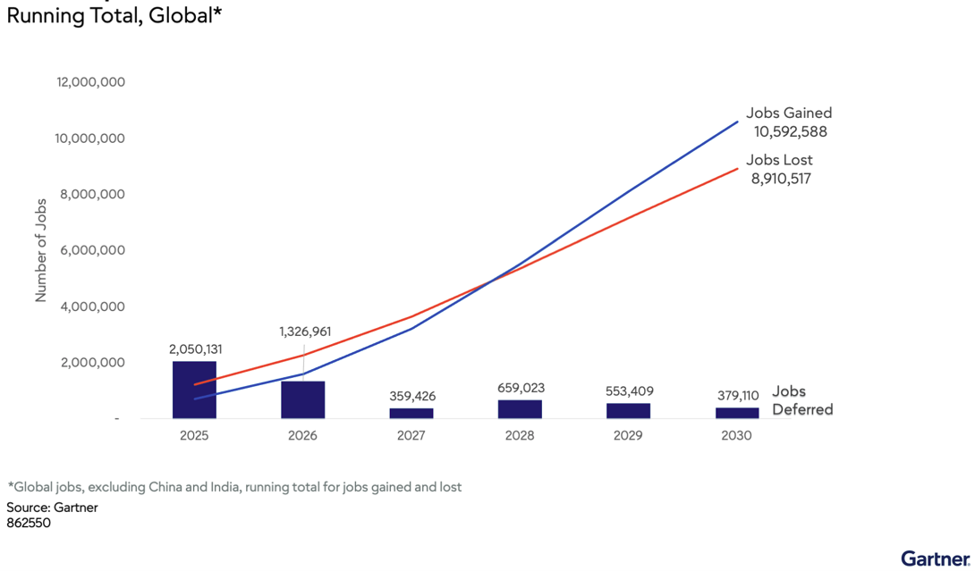
Around 10.6 million jobs will be added globally (excluding China and India) by the end of the decade, with 8.9 million lost, according to a Gartner report — a net increase of 1.7 million jobs. At most, around 1.8% of the workforce will experience job losses attributable to AI during this time period, Gartner predicts.

At the same time, a total of 5 million jobs will cumulatively be deferred during this period. This refers to jobs that “would otherwise have been created, but where AI is used as an excuse to restrain hiring,” according to Gartner’s report. Gartner considers deferred jobs as separate from jobs lost.

“Job deferrals were the first effect felt from AI,” said John Lovelock, Gartner distinguished VP analyst and chief forecaster, with “companies holding off hiring open positions until the effects of AI projects were known.”

A recent KPMG survey of 400 US CEOs showed that 89% expect to increase headcount over the next three years, which KPMG US CEO Tim Walsh linked to AI adoption in an Axios interview last month.

For now, though, job losses attributed to AI outpace those created, according to Gartner’s study. During 2026, there were 2.2 million jobs lost due to AI, and 1.6 million gained.  

Lovelock expects the situation will change in the coming years, however, as organizations see greater success with AI deployments. “This will reverse once AI is through the Trough of Disillusionment,” he said, in reference to Gartner’s Hype Cycle framework.

Gartner

The number of jobs deferred is also forecast to fall in the coming years. During 2026, 1.3 million people experienced a delay in hiring, down from 2.1m last year, according to Gartner’s forecast, with 400,000 jobs forecast to be deferred during 2030.

The impact of AI will vary across sectors, with the technology industry expected to see the largest net job gains compared to other areas, such as public sector and asset-intensive industries. Gartner predicts the creation of 1.9 million new technology jobs by 2030, with 400,000 lost.

Services sector jobs — such as in financial services — are forecast to see a similar level of job creation, alongside large numbers of losses.

A similar Gartner report in 2025 predicted that more services jobs would be lost than created, but the analyst firm now forecasts a net increase as demand grows for data- and system-oriented skills. “This industry is most able to improve productivity of employees and increase employment,” said Lovelock.  

The Gartner report doesn’t specifiy which job roles will benefit from greater adoption of AI, though the analyst firm expects some portion of newly created jobs will be “directly linked to the implementation, maintenance and scaling of AI.”

Government jobs are expected to see the largest net job loss of any industry, said Lovelock. “Without the incentive of revenue growth or industry transformation, governments are expected to focus on the AI benefits of efficiencies and staff reduction,” he said.

Entry-level positions are expected to be the hardest hit by job deferrals, said Lovelock. “We do see many of the deferred positions being hired after a 12- to 24-month delay,” he said.

“Unfortunately, some deferred positions do transition into job loss. In most industries and positions, the employee experience pyramid will skew toward senior positions.”

In a separate report from September, Gartner forecast that 30% of positions eliminated by AI-related layoffs will be refilled by 2029, on average. For enterprise-sized organizations, the figure is likely to be higher, at around 40%.

US tech jobs grow in a ‘low-hire, low-fire’ market

Tech jobs grew in October, and the holiday season will provide a boost in an otherwise “low-hire, low-fire” market, data released by research firms showed.

The tech industry added 7,200 jobs, and tech jobs across all industries grew by 26,000 in October, according to CompTIA, which studied numbers released by the US Bureau of Labor Statistics. The BLS said the US added 165,000 jobs overall in October.

Job gains were in tech manufacturing, IT services, and software. IT unemployment was at 2.8%, lower than the national average of 4.1%.

Seasonal hiring to provide a boost

A separate study by Challenger, Gray & Christmas said seasonal jobs from Amazon — which announced plans to hire 300,000 workers — will boost hiring in the technology sector. “Amazon’s 300,000 seasonal hires account for nearly all of the 300,252 Technology hiring plans announced in October,” the research firm said.

Amazon’s seasonal jobs will largely be in warehousing and e-commerce fulfillment. The research firm considers them tech jobs, as the company is in the tech sector.

The hiring is largely short-term, seasonal work, and “companies want the flexibility to meet holiday demand without adding permanent headcount,” Challenger said.

Warehouse associate postings are up 13% from a year ago and have grown for three straight months as employers gear up for the seasonal rush, said Ger Doyle, regional president for North America at ManpowerGroup, a staffing and recruitment agency.

“Despite that growth, warehouse postings year-to-date are still running slightly behind 2025’s pace, pointing to a recovery in demand rather than a new high,” Doyle said.

Growth in jobs — for some

The latest numbers reflect a strong labor market, which is encouraging, Doyle said. But gains are still concentrated in areas such as engineering, manufacturing, and logistics, specifically related to data centers, semiconductors, and infrastructure, he said.

“For workers, job openings aren’t necessarily translating into hiring, and the jobs that are growing aren’t always where the people looking for work are,” Doyle said.

Even though demand is starting to improve, it still isn’t easy for people to find work or feel better off, Doyle said.

“What we’re watching now is whether this improvement turns into faster, broader hiring and wages start to regain ground against inflation,” Doyle said.

Tech job cuts in October totaled 5,576, which is the lowest of the year, according to Challenger, Gray & Christmas. “Even so, the sector leads all industries with 171,501 cuts through October, up 21% from the 141,159 announced in the same period last year,” Challenger said. The technology sector accounts for 28% of job cuts in 2026, the firm said.

A hefty job reduction may be looming, with Microsoft offering voluntary exits to 60,000 employees. Challenger will record those numbers depending on the number of employees accepting the offers or Microsoft’s target.

What job listings say

Despite what research firms called a slow hiring environment, the number of new IT job listings reached 290,892 in October, up 22.2% from a year ago, according to CompTIA.

Job listings for AI skills across sectors reached 366,322 in October, growing by 6.2% from September.

According to the Indeed hiring tracker, AI appeared in 7.3% of its job listings on September 30, doubling from the same day last year.

Job postings tied to data centers are up 52% year-over-year, while semiconductor demand is up 92%, said Kye Mitchell, president of Experis North America, which is owned by ManpowerGroup.

More than half of data center operators are struggling to find qualified workers, which may include engineers, technical workers, and IT talent, Mitchell said.

But hiring may change after US voters nationwide voted to slow down data center development during the November midterm election. Data center projects could face more scrutiny around energy, infrastructure costs, and location at a time when employers are already competing for specialized talent, Mitchell said.

“If a project moves to another market, you can’t assume the workers will move with it. You can move capital, but moving an entire skilled workforce is much harder,” Mitchell said.

Claris Harbor could turn Mac fleets into on-prem AI servers

It feels quite appropriate that one of Apple’s more interesting AI deployments may not come from the company itself, but from its more business-focused subsidiary, Claris, still better known to many as FileMaker. What we know is limited: It intends to release an app that uses Apple Silicon Macs to create a private AI server.

What Claris is promising

The company, famous for its database software for the enterprise, has initiated a private preview of what sounds — at least on the surface — like something worth watching for enterprise users seeking to achieve AI insights from their data. The product is called Claris Harbor, and the company says it “turns the Apple silicon computers you own into a private AI server.”

To achieve this, Harbor leans steeply into the powerful performance packed inside Apple Silicon: “Set up an endpoint in minutes on a single Mac.” It also makes use of the existing features of Macs that have already made them so popular among people deploying OpenClaw. 

“When you want to run larger models, connect multiple machines over Thunderbolt 5 to pool unified memory on hardware you control,” Claris said. It also says you can set up an endpoint on a single Mac — one of your Macs becomes an AI server for everyone else.

Your Macs. Your AI

Put this together and you have an Apple solution built around the part of the company with extensive enterprise and database experience that offers one of the emerging holy grails of business-class AI — powerful, scalable AI that can work on confidential and protected data on-premises, on-device, and in confidence. “Data and prompts stay strictly within your physical Mac hardware,” the company promised.

While Claris doesn’t claim it, it’s not hard to imagine those banks of Macs already deployed in business being used as AI clusters overnight before returning to normal business use in the morning. That’s what the ability to connect multiple machines makes possible — though it’s not quite what Claris claims.

Little more is known about the solution at this point. The company has opened a mailing list to keep potential customers informed, promising to provide early access to the new private AI server as it is built.

Why Claris, and why now?

I like the approach to this. Claris has been a consistently profitable entity for Apple. At one point in the history of the company, it was this part of its operation that kept the rest of the firm afloat. It has extensive experience in both data and enterprise and may therefore be the best part of the Apple machine from which to disseminate a wholly Apple approach to local AI.

It comes at a good time. Frontier AI has hit a wall of colossal spending combined with relatively feeble returns, even as enterprise customers rapidly recognize the need to protect their data. Enterprise interest in local AI has surged. Businesses are already moving beyond the experimental cloud-only approach, navigating toward deployments guided by the need to control costs, protect data, and provide predictable governance. Deloitte’s State of AI in the Enterprise report, released last month, tells us that 74% of enterprises now prioritize data residency and in-region compute.

If, as seems likely, Harbor is designed to integrate tightly with FileMaker databases, that opens a potential market of up to 1.3 million existing FileMaker users for this Apple approach to AI. Claris also has a community of over 30,000 developers, and it would be in keeping with FileMaker’s approach to relational database development for Harbor to be configurable in some way, making it a flexible solution for business users. We shall wait and see the extent to which that potential is realized as Harbor heads toward opening.

What we don’t know yet

Claris will have to answer some hard questions to build strong momentum once its new solution ships. Enterprise purchasers will want to know what AI models it runs and will be curious about the performance Thunderbolt 5 pooling provides when it comes to inferencing.

They’ll want to learn more about cost and seek performance comparisons against other on-premises AI setups. It’s hard to make predictions about those things, but it does feel fair to point out that AI deployment will not be a zero-sum game. In most cases, I expect people will use on-device AI for most matters, on-premises AI for confidential or slightly more complex tasks, and cloud-based models only when serious AI horsepower is required. 

Much of this is highly speculative. Right now, Harbor is a mailing list and a promise. But for Mac-heavy enterprises handling sensitive data, it feels likely to be a mailing list worth joining, if only to find out more once it appears.

Now please subscribe to my daily, human-curated Apple-related news headline feed at The Core, or follow me on BlueSky, LinkedIn, or Mastodon.

Hackers stole AI credentials to get $740,000 in free compute; Railway picked up the bill

As AI model training and distillation increase, AI tokens are becoming a piping hot currency for threat actors.

Cloud hosting provider Railway found out the hard way; it has confirmed a near 26-hour battle against attackers targeting AI provider credentials to sell to AI ‘transfer stations’ for use in model distillation. The crooks generated about $740,000 in fraudulent AI usage charges using the stolen credentials and potentially had access to up to 100,000 workspace credentials.

Railway said the attacker’s database searches looked for AI provider keys by name before anything else; some queries also targeted cloud, database, and payment service credentials.

The company disclosed the incident on October 22, and posted a follow-up report this week. Because of the ongoing investigation, it is not able to share the specific details and scale of the exploits, but advised users to revoke and reapply sensitive environmental variables stored on Railway prior to October 21.

“AI credentials are becoming the new credit card numbers,” said David Shipley of Beauceron Security. “So-called LLMjacking is expected to displace Cryptojacking as a cheap, scalable way to make money.”

A 26-hour battle

The attack began on October 20, when hackers exploited a previously unknown vulnerability in Railway’s build infrastructure. They were able to evade filesystem isolation protections and obtain an internal credential that they used to access stored build histories. From there, they retrieved a copy of Railway’s internal source code and analyzed it to identify additional avenues of compromise.

They then exploited another vulnerability involving an improperly configured trust relationship  that allowed them to gain even more access to Railway’s infrastructure and obtain credentials used to decrypt customer environment variables.

In a nearly 26-hour battle, Railway’s engineering team worked 24-7 in shifts and the escalating situation became a “contest of agent speed,” the company explained. The threat actor chained various exploits, moved laterally across multiple systems, and “probed many potential routes, in parallel.” Defenders in turn hardened routes in parallel.

“This was not a single breach followed by a single fix,” Railway wrote.

The threat actors were “fully evicted” on October 21, but over the course of their time in the system, they obtained and decrypted a “subset” of customer variables, roughly 100,000, or “at most” 1.85% of workspaces. They also racked up $740,000 in fraudulent AI usage charges, with customers reporting their keys answered coding questions and performed training-data tasks they never ran. The company is working to reimburse customers, including for charges providers decline to refund.

The breach also exposed linked-account tokens belonging to more than 1,850 users, which included GitHub and OAuth tokens that Railway says it reset. The company worked quickly with GitHub, GitLab, Anthropic, OpenAI, OpenRouter, SpaceXSI, Stripe, and others to revoke potentially compromised keys.

In the wake of the attack, customers have been advised to remove public network access to databases; rotate any sensitive variables and keys; check GitHub account audit logs and review all app access; and check audit logs within registries such as Dockerhub.

On its own systems, Railway said it shut down any potentially compromised internal tooling; rolled all keys and “then rerolled them” after validating that intruders had been shut out; moved to a new generation of infrastructure; rebuilt tooling used to run its infrastructure; and added functionality to mass revoke Railway app permissions in the event of suspicious activity in the future.

Why attackers want AI keys

AI credentials are cheap to harvest at scale, Shipley noted; attackers can hit a provider like Railway rather than trying to target one company at a time. That access can then be resold to generate revenue through so-called AI routers, which provide access to models that users otherwise could not afford, or even reach.

This makes that access a hot commodity for tasks like distillation, which transfers knowledge from a larger model to a smaller one to cut costs and improve efficiency.

Training one model on another model’s answers at scale takes millions of questions, said Frank Dickson of Dickson Research, and a single account asking millions of questions stands out. Stolen keys spread those questions across thousands of real customers.

“Think of copying a textbook one page at a time, using library cards that belong to other people,” Dickson explained. Frontier AI is expensive to buy, and the owner of the keys gets the bill while the thief gets cost-free compute.

“It is the 2026 version of cryptomining; [the] same playbook with a different output,” he said.

Managing identities when so many are machine-held

Even though the facts are ugly, Railway deserves credit for a “remarkably candid report,” Dickson emphasized: It owns its own configuration mistake, it admits it cannot be sure it found every account the attacker created, and it commits to telling customers of issues more quickly in the future.

Railway is now moving to short-lived credentials and logging every decryption. That is the right fix, Dickson said, and every platform holding customer secrets should copy it.

“Railway customers should treat every secret stored on the platform as stolen until they have rotated it,” he noted. But that rotation has to beat the thief’s clock; an investigation by Wiz found that stolen keys were tested within 30 minutes of theft, then flooded with traffic four to seven days later.

Start with AI provider keys, then rotate cloud, database, and payment credentials, he advised. Check AI provider bills and usage logs for traffic internal teams did not generate, then report any unauthorized charges to Railway. Alert on any call from an unrecognized address.

Further, he said, limit the damage any one key can do. Set hard spending caps and usage alerts on every AI key, and scope each key as narrowly as the provider allows. This really works: In one case Wiz examined, a key restricted to a narrow set of model profiles left most of the thief’s traffic throttled.

Non-Railway users, meanwhile, should ask their platform providers two questions: How are my secrets stored, and who can decrypt them? A good standard practice: Issue fewer keys. “No one ever said during a key rotation that they wished they had issued more keys,” Dickson pointed out.

Ultimately, he said, a stolen AI key spends real money, and machines now hold most of the keys. “Protect machine identities like cash, because to a thief, that is exactly what they are,” Dickson urged.

This article originally appeared on CSOonline.

Anthropic targets workplace collaboration with Claude Meetings

Anthropic has expanded the range of productivity and collaboration features in Claude with the launch of spreadsheet, whiteboard, and meeting assistant tools aimed at knowledge workers. The features add to the Claude Docs and Slides features announced in September, as Anthropic equips its AI assistant for a wider range of productivity tasks.

“Anthropic is moving Claude from a place you go to ask a question to a place where teams do their work,” said Craig Durr, chief analyst at The Collab Collective.

One of the new tools announced Tuesday is Claude Meetings. This lets users add Claude to video meetings, where it takes notes, answers questions in the call’s chat interface, retrieves information from connected apps, and creates project plans and timelines. After a call, notes and action items are available in claude.ai, the browser-based version of Claude. Claude Meetings is reportedly accessible only in Google Meet currently; Anthropic hasn’t responded to a request for further details

The launch of Claude Meetings highlights the “continued value of leveraging context within meetings to improve workflows,” said Irwin Lazar, principal analyst at Metrigy.

Claude Meetings has similar functionality to existing meeting assistants, such as Copilot in Microsoft Teams, Zoom My Notes, and Webex’s meeting agent, he said, and also competes with standalone meeting assistants, such as Otter and Granola.

“As Claude increasingly becomes the place where people are doing their work, it makes sense for Claude to have direct access to meeting notes without requiring cut/paste, or MCP access, which vendors like Zoom now charge for,” said Lazar.

But while Anthropic is increasingly seeking to compete with office productivity suites, he doesn’t expect the company will venture further into developing collaboration and communication software any time soon. Email, calling, and video meeting software “all require far more extensive capabilities and infrastructure,” he noted.

For IT teams that enable Claude Meetings, Durr recommends establishing procedures for obtaining meeting participants’ consent to its presence, in accordance with local laws.

It already requires admin approval to attend calls including external guests; if approval is not granted, it will leave the meeting.

“Claude identifies itself and posts a notice in the meeting chat, but recording and consent rules vary by jurisdiction and by company policy,” he said. “IT, legal, and HR should agree on when Claude is allowed into a meeting before it’s rolled out.”

IT teams should also monitor the availability of new functions that might change the way Claude Meetings functions, Durr advised. The tool currently only acts when instructed by users, but could become “more proactive” over time, according to an Axios report that quoted Nicholas Lin, a product leader at Anthropic.

“I’d watch that closely,” said Durr. “A meeting participant that acts on its own is a different product, and it starts a different governance conversation.”

Claude Meetings is available in beta for customers with Claude Team and Enterprise payment plans. The feature is on by default for Claude Team customers.

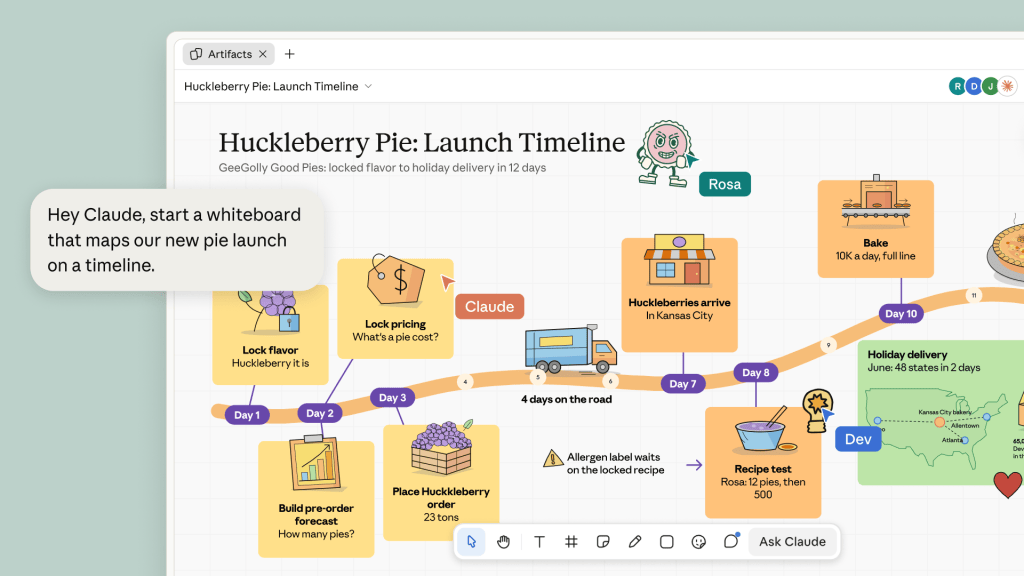
Other Claude features announced Tuesday include Claude Whiteboard, a shared canvas for coworkers to use while brainstorming. Teams can discuss ideas and Claude turns this into a board with a timeline, task owners, and due dates.

Anthropic

Currently in beta for paid Claude plans, Claude Whiteboard is available in web, mobile, and desktop. Customers on Claude Team and Enterprise plans can also access whiteboards inside Claude Meetings.

Claude Sheets, a collaborative spreadsheet tool, is also available in beta, while Claude Data, a tool for creating interactive visual charts and reports that was previously called Claude Dashboards, is now generally available. Both are included in paid Claude subscriptions.

Anthropic

Finally, Anthropic announced updates to its “interactive connectors” that embed third-party applications within Claude. Following the feature’s initial launch in January, which enabled access to other apps from the Claude chat interface, the updated connectors let users open full versions of supported applications, either alongside a Claude conversation or in full-screen view. Users can also ask Claude to make changes to the embedded app, such as editing a document or retouching an image. Applications from a small number of software vendors are available initially, Anthropic said, including Adobe, Box, and Notion.

Interactive connectors are available in all Claude plans on the web and in the desktop app. The connectors follow existing user permissions around file access, and admins can limit what each connector does.

The bad news for Microsoft in the Blue Tsunami

Elections have consequences — and big elections have big consequences. Few have been bigger than last week’s US midterms, featuring a Blue Tsunami that swept aside Republican control of Congress and signaled the end of Trumpism.

Those consequences will especially be felt by Big Tech and Big AI. Voters made it clear that they don’t want data centers in their backyards. They voted for candidates who vowed to rein in AI, and those who promised to investigate the cozy relationship between tech companies and President Trump. And they voted for candidates who promised to put an end to rampant government corruption tied to tech billionaires.

Microsoft didn’t go all-in on Trump as so many Big Tech firms did. The company held fast to core values like diversity, equity, and inclusion in its hiring and employment practices. Microsoft CEO Satya Nadella didn’t attend Trump’s inauguration as other tech CEOs including Meta’s Mark Zuckerberg, Amazon’s Jeff Bezos, Google’s Sundar Pichai, and Tesla and SpaceX CEO Elon Musk did. He didn’t fawn over Trump like Apple’s Tim Cook, who gave Trump a 24-carat gold plaque and attended the gala White House screening of the Amazon-funded Melania documentary held on the day US Immigration and Custom Enforcement (ICE) agents murdered Alex Pretti in Minnesota.

Microsoft even fired its law firm because the firm agreed to provide Trump with $125 million in pro bono work, replacing it with a firm that sued Trump.

But in other ways, Microsoft has played nice with the Trump administration, including donating millions of dollars for his White House ballroom project.

So Microsoft is no more protected than other tech companies against what comes next under the Democratic Congress. In this column I’ll look at the potential bad news for the company. In the next I’ll look at how Microsoft might benefit from the election.

Investigate, investigate, investigate

The voting was barely over when top Democratics made clear that one of their first orders of business would be investigations and public hearings into Big Tech and Big AI. Microsoft will be among the companies investigated.

Two days after election day, Senator Richard Blumenthal demanded that the FCC and tech companies including Microsoft, Apple, Meta, Google, Nvidia, Amazon and others turn over documents related to the companies’ donations to Trump for his new ballroom. That’s part of an investigation that will look into conflicts of interest and quid pro quos. The Washington Post reported that Microsoft donated $10 million to the project.

If the companies didn’t turn over the documents, Blumenthal warned, they’d face subpoenas when he becomes chair of the Permanent Subcommittee on Investigations when the new Congress convenes in January.

That’s only the first investigation of many to come. Senator Ed Markey, who has locked horns with Microsoft and other tech firms in the past, posted on X on election night: “They are going to need to plant new forests for all of the subpoenas we’ll be printing.”

No free ride for data centers

One of the midterm election’s biggest issues was the data centers Microsoft and other AI giants have been building. Critics say the centers increase electricity costs, and that residents are subsidizing tech companies by bearing those higher costs. “Data centers raised wholesale [electricity] prices by 6.9 percent nationally by 2025,” the Federal Reserve Bank of Dallas reported.

Critics also complain of data centers’ water use, noise level, pollution, and taking away both open space and local control from communities.

Forty out of 41 local ballot initiatives against the centers won. Democratic governors, senators, and state officials promised crackdowns. Darrell West, a senior fellow at the Brookings Institution, a think tank, told the New York Times, “Expect a tsunami of new rules and oversight.”

That’s bad news for Microsoft. The company has already said that it can’t build data centers fast enough to meet demand for its AI services. Microsoft CFO Amy Hood said on the company’s Q1 2026 earnings call that Microsoft can’t keep up with demand for Azure AI services, because it doesn’t don’t have enough computing power.

With so many local, state, and federal officials pledging during the election to crack down on data centers, Microsoft should expect it to become more difficult to build them.

AI under the microscope

Trump and Republican officials have been all-in on AI and against any government oversight. They’ve been big cheerleaders for the technology and fought hard to make sure AI development remains unfettered. Trump even signed an executive order blocking states from regulating AI.

With a Democratic Congress, and with many statehouses across the country now controlled by Democrats, expect big pushback against that order, along with plenty of attempts to rein in AI.

The Hill reports, “Democrats are making commitments to make artificial intelligence regulation and the investigation of companies a key priority as they prepare to take control of the House and Senate after Tuesday night’s election sweep.”

That regulation will cover everything from AI-related job losses and AI safety problems to protecting intellectual property from being hoovered up for free by AI companies to train AI models.

All that means Microsoft, like other AI companies, may not be able to operate freely anymore. There may be slowdowns in AI development, rules about AI safety, and more.  

The bigger the AI company, the more they’ll feel the impact. Microsoft is one of the biggest, so it’ll feel a lot of pain.

ICED out

One of the more surprising results of the midterms was how many people across the political spectrum, from conservatives to progressives, cited ICE as being out of control and want it held accountable.

Peter Polos, a 73-year-old New Jersey physician, summed it up this way for the New York Times: “Saying he was going to secure the border is one of the reasons Trump got elected. But he didn’t say he was going to secure the border by knocking people down in the street, throwing them in a car, and taking them away.”

Under Trump, ICE’s budget has skyrocketed: a baseline budget of $10 billion, pumped up by a $75 billion supplement in 2025. (By way of contrast, the Justice Department, which includes the FBI, has a $35 billion budget.)

Microsoft has been one of the recipients of the ICE spending spree. An investigation by The Guardian and its partners +972 Magazine and Local Call found that ICE stores vast amounts of data on Microsoft’s Azure cloud storage and uses Microsoft AI tools to analyze it. It also found that ICE uses Microsoft productivity tools and might be running its own tools and systems on Microsoft servers.  

The Democratic Congress will certainly slash ICE’s budget. Microsoft may lose a significant revenue stream.

The upshot

The midterm election wasn’t just a reckoning for Trump, Republicans, and MAGA supporters. It’s one for Microsoft and Big Tech as well. Microsoft will soon be facing a landscape of much more government oversight, the end of AI’s free ride, and maybe reduced revenue.

The election wasn’t all bad news for the company, though. There’s some good news as well. I’ll be writing about that in my next column.

Related: Midterm results will raise AI costs and compliance questions for IT leaders

Adobe opens Creative Cloud apps to third-party AI assistants

Adobe will open its Creative Cloud applications to third-party AI assistants, with the ability to edit content in Photoshop, After Effects, Illustrator, and Premiere from tools such as ChatGPT or Claude, the company announced at its Max event.

The model context protocol (MCP) integration, due in private beta in early 2027, would let third-party AI assistants to make changes to content in Creative Cloud desktop applications, without losing the ability to adjust individual elements of a design or video manually afterwards.

For example, a third-party AI assistant could remove a logo from multiple advertising campaign assets. “Make the change once, then ask your agent to cascade it across the rest of the campaign, and step in at any moment to refine the work by hand,” said Deepa Subramaniam, Adobe’s VP, product marketing for Creative Cloud, in a blog post Tuesday.

Third-party agents could also connect to other apps in a single workflow, so it would be possible to “pull in a project brief from Google Docs, work on it in Adobe’s tools and share the result with your team via Slack,” for example, Subramaniam said.

The MCP connections can help creative professionals “keep their work where they choose to work, without sacrificing the upside of modern collaborative and secure systems,” said Liz Miller, vice president and principal analyst at Constellation Research. “End users … have always relied on multiple tools to capture their taste and bring it to life. For them, these connections are another tool that opens up access to so much more of their toolkit.”

Keith Kirkpatrick, vice president of research at The Futurum Group, also anticipates demand from Adobe users to access Creative Cloud apps via third-party AI assistants, though he expects it will appeal most to a “fairly specific crowd” of “creative technologists, production teams, and power users who already spend their day in Claude or ChatGPT and want an agent to take care of the tedious stuff: organizing assets, setting up layers, building out sequences.”

“Most creative pros are still going to want their hands in the application,” he said.

Opening access to Creative Cloud apps via third-party agents could potentially loosen the direct relationship Adobe has with customers — a scenario that many software vendors are now grappling with.

For Adobe, it’s a necessary adaptation, as employees increase their use of AI assistants to get work done. “Companies are using several AI models at once, and people are starting more of their work inside these assistants,” said Kirkpatrick. “If that’s where the request starts, Adobe wants to be the one doing the work behind it.”

Gartner predicts that enterprise AI assistants will account for more of knowledge workers’ daily interaction time than any other application within the next three years, according to a recent Magic Quadrant report.

Miller said that opening its applications to third-party tools could be beneficial for Adobe’s business. “This won’t negatively impact Adobe’s place with their core creative, marketing, or business users,” she said.

“In fact, the flexibility will give their customers options in where and how to get work done. “For users who have found their flow and patterns of work in ChatGPT or Claude, [they can] stay there but still access the skills and tools you need to use to generate the quality of work expected,” Miller said.

The MCP integration in Creative Cloud is the latest part of Adobe’s strategy to embrace third-party AI assistants — Adobe has previously announced ChatGPT, Claude, and Google Gemini integrations that provide limited editing capabilities for apps such as Acrobat, Photoshop, Premiere, Express, and Lightroom, directly within the AI assistants. This contrasts with the new MCP integrations that let AI assistants make changes directly to content in Adobe’s desktop applications.

“The real question is whether any of this turns into paying Adobe customers, and Adobe hasn’t shown that yet with its existing connectors,” said Kirkpatrick. “Adobe’s edge has to be that its tools are better and that it comes with the IP and brand controls enterprises need.”

Firefly upgrades — Builder, Design, and ‘always-on’ agents

The MCP integration was one of numerous agent-related announcements at Adobe Max on Tuesday, with other updates aimed at enhancing native functionality within Creative Cloud and the Firefly AI assistant.

This includes “always-on” agents that work in the background, taking on recurring tasks for users. Users choose from pre-built agents aimed at specific workflows, then customize what actions the agent takes, set goals, and review plans before it begins. The agents ask for approval for certain decisions, learn preferences from feedback, and are managed via a central dashboard in Firefly.

“On a multi-week video project, for example, an always-on agent can organize incoming footage, remove duplicate clips, and flag camera shake or audio issues for your review,” Mike Polner, vice president of product marketing, Creators at Adobe, said in a blog post.

“For the right person, I think it’s an easy sell,” said Kirkpatrick, such as a social media manager starting their day with a batch of draft posts to review, though it may be less appealing to creative professionals responsible for generating broader ideas.

For some end users, the always-on agents can be “an additional set of hands to drive efficiency,” said Miller, while “others will see this as a force multiplier, allowing them to expand their business flow … while the assistant handles the sorting and cleaning.”

Customers who use the always-on agent should ensure there are sufficient guardrails in place, said Kirkpatrick.

“Before activating an always-on agent, I’d want to know exactly what it can touch, and I’d make sure it drafts but never publishes on its own. Everything it makes should get a brand check,” he said.

He cited Adobe’s own survey of marketing and creative professionals that showed that around a believe that public-facing content is “off-brand.” “An agent working around the clock can make that a lot worse if nobody’s paying attention,” said Kirkpatrick.

Managing costs of an always-on agent with budget controls is another consideration, he said. Adobe hasn’t disclosed full pricing information at this stage. Always-on agents, launching in beta in early 2027, will initially be available for Adobe Firefly.

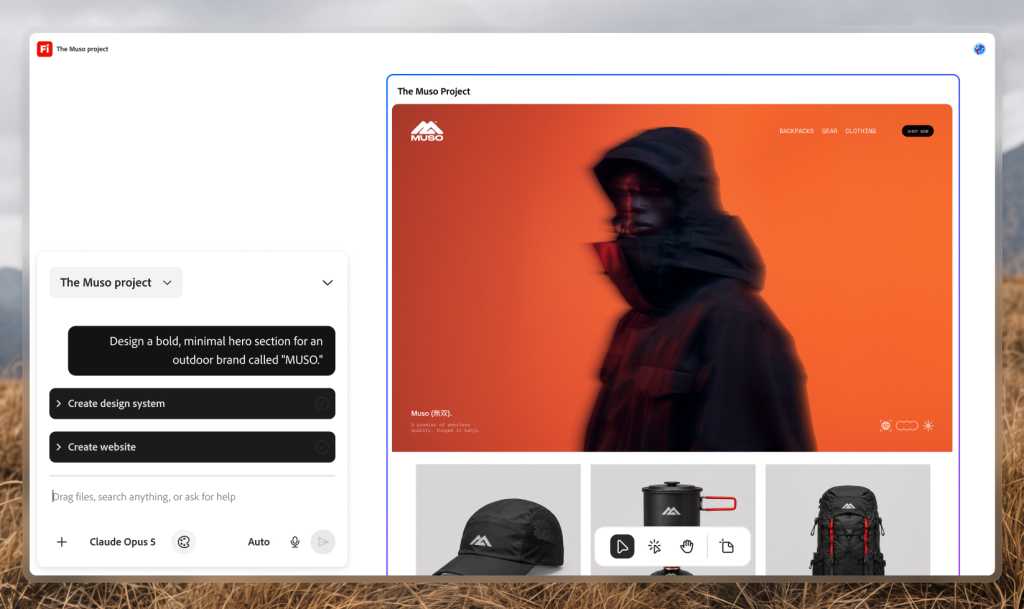
Other Firefly capabilities announced at the MAX event include Firefly Builder, in private beta, which creates prototypes of websites and interactive apps from natural language prompts. Firefly Design, in beta, is a new design workspace app that combines tools for image editing, animation, illustration, and 3D designs.

Adobe

While Adobe builds out its own native and third-party AI features, it also faces competition from other software tools aimed at creative professionals.

“From a competitive perspective, I see Canva and Figma going after the same in-house teams and are showing up in the same AI assistants,” said Kirkpatrick.

Adobe also faces competition from AI model providers such as Anthropic, Google, and OpenAI that are building design tools into their products.  

“Where Adobe really wins is when precision, brand control and commercially safe content matter, and that’s mostly in the enterprise,” said Kirkpatrick. “With individual creators, its lead is a lot smaller, and where Adobe is most at risk for displacement.”

Your new Android speed-typing superpower

When we talk about more efficient text entry on Android, we’re typically talkin’ about one of two things:

  1. Tips for tapping into little-known shortcuts and extras within your existing on-screen keyboard
  2. Smarter voice input systems for faster and easier speech-to-text transcription

Those areas of improvement are all well and good — and plenty important, without a doubt! — but when it comes to serious productivity and work communication, there’s one more type of tool that can make a monumental difference and yet virtually never comes up in the Android typing conversation.

It’s the type of tool that lots of smart workers already embrace on the desktop front but that’s far less common in the mobile world, where it’s if anything even more useful — and that’s an intelligent text expander. Text expanders let you create and save common phrases or even entire paragraphs of text you find yourself typing often and then insert ’em into any text field, anywhere, with a quick ‘n’ simple keyboard command.

There’s one such tool on Android that stands out above the rest, and it just got a massive makeover that makes it even more of an indispensable addition.

Lemme show ya how it works and what it’s all about.

[Psst: Want even more advanced Android knowledge? Check out my free Android Shortcut Supercourse to learn tons of time-saving tricks for your phone.]

Your Android text expander advantage

My fellow Android-appreciating animal, allow me to introduce — or maybe re-introduce — you to a handy little tool called Typing Hero.

Typing Hero first popped up on my radar a few years ago. But it’s come a really long way since, especially with its recent revamp, and it’s well worth bringing to the surface now as a potential new piece of your Android productivity toolbox.

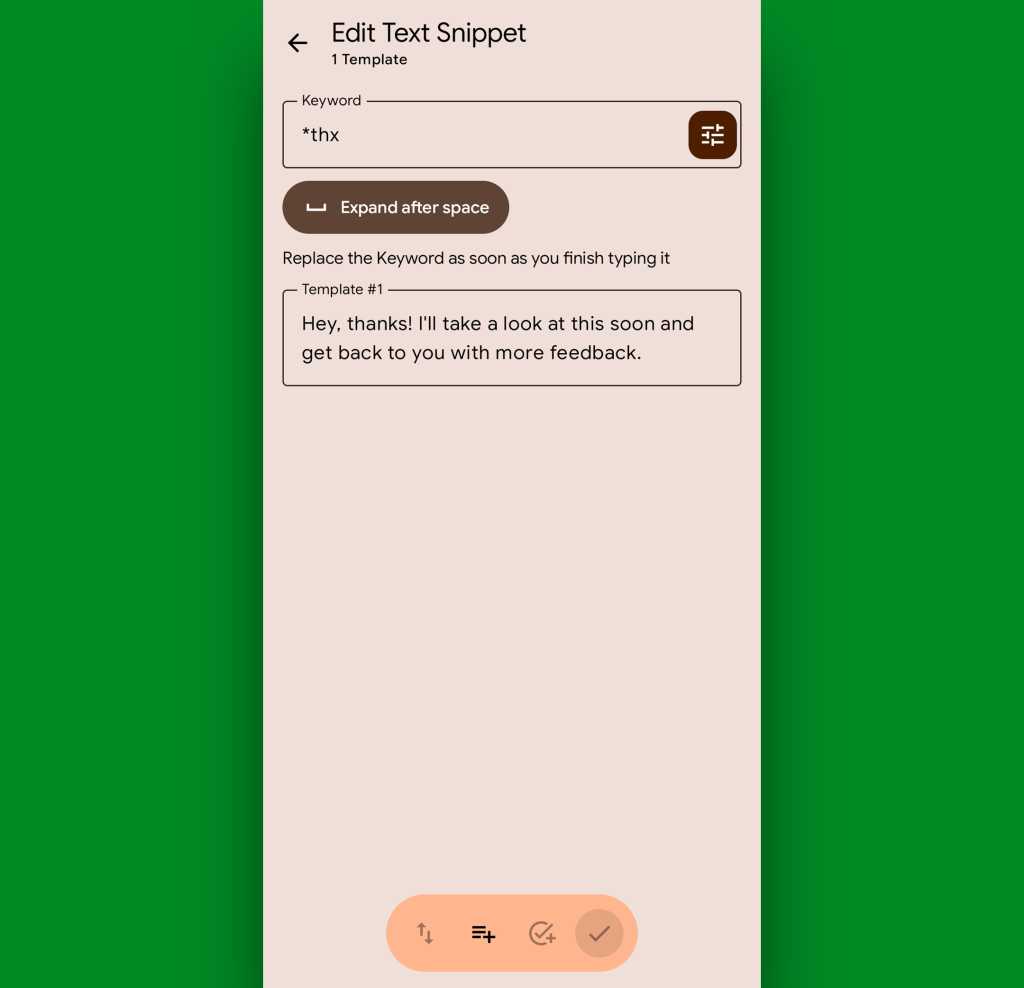
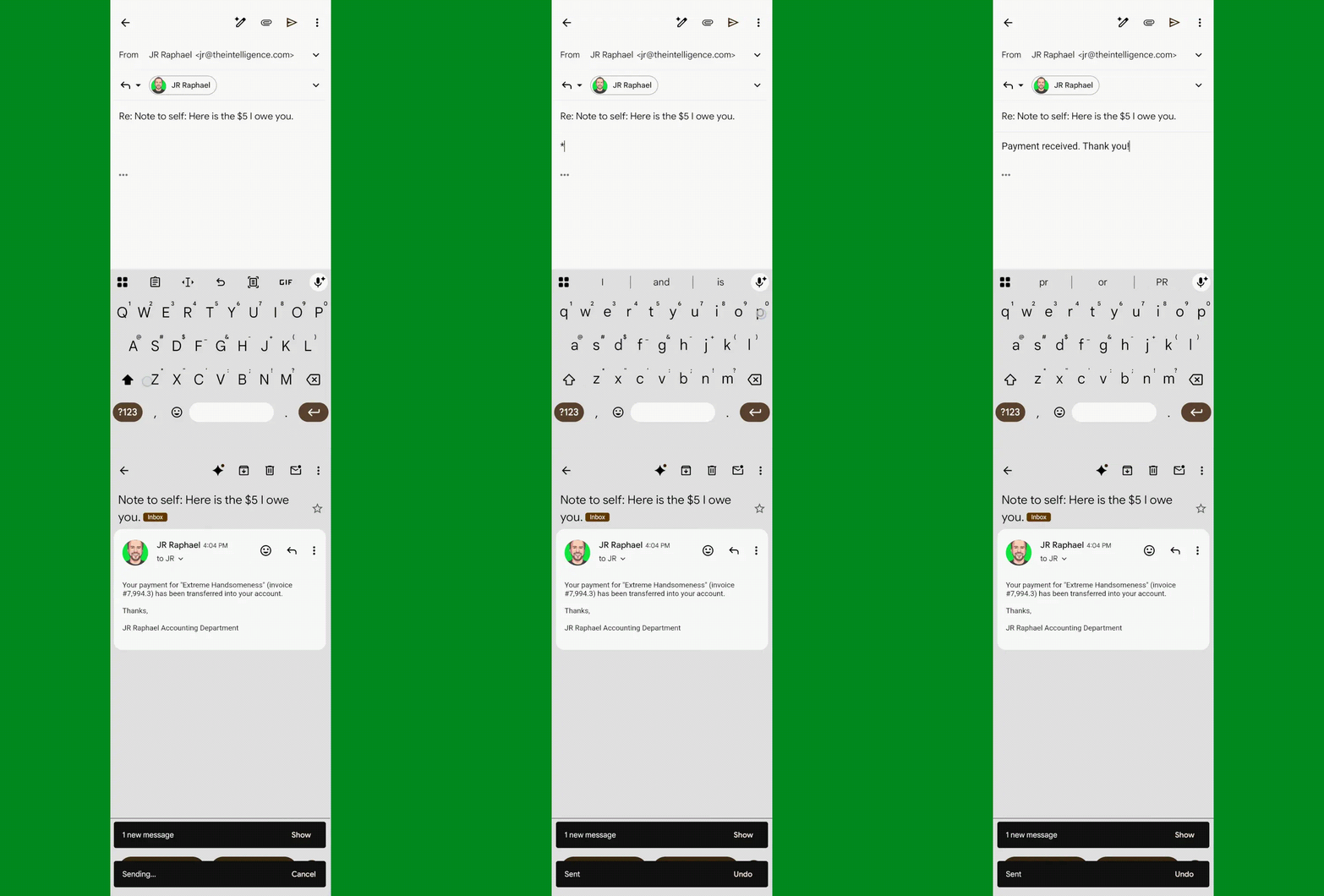
On the simplest possible level, what Typing Hero does is allow you to create prewritten text snippets and then map ’em to specific keyboard commands — short and memorable abbreviations like *thx or *omw that you can type into any text field, using whatever regular Android keyboard app you already use, and then have your full snippet appear right in that same place.

It’s so easy and so effective, it genuinely gives me a jolt of joy every time I see it happen:

JR Raphael, Foundry

Setting up snippets is super-simple, too: You just go into the Typing Hero app, create a new snippet, and put in whatever keyword and result you want.

JR Raphael, Foundry

That in and of itself is such a smart time-saver, especially if you tend to type the same sorts of stock responses over and over while you’re dealing with emails, Slack messages, or any other kind of communication. And honestly, that’s what’ll make Typing Hero worth having in place for most of us.

But the app gets even more interesting when you start to explore some of its extra-advanced options — for instance, being able to map multiple snippets to a single trigger keyword and then get a pop-up menu to choose from anytime you enter the term.

JR Raphael, Foundry

Typing Hero also supports all sorts of advanced commands for actual actions on Android — like automatically hitting send and then moving back to the previous screen as a part of a single keyword.

JR Raphael, Foundry

Not bad for step-saving, right?

Beyond that, Typing Hero can incorporate a bunch of different variables into its snippets — so, for instance, you might have it automatically insert whatever text was most recently copied into your Android system clipboard as a part of a snippet or automatically insert the current date or time. 

You can even configure it to pause for your input and ask you to fill in certain blank variables whenever a snippet is activated — if, say, you want to manually type a name or a precise number into an otherwise standard prewritten message.

JR Raphael, Foundry

No exaggeration: This thing feels like a secret weapon. And once you get used to having it in place on whatever device you’re using, you’ll wonder how it wasn’t always there and built right into Android as a readily available asset for everyone.

Oh, and the app is respectful of your privacy, too, with virtually no data ever leaving your device or being used in any way beyond its intended and approved purpose.

Typing Hero is free for up to 20 saved snippets and with certain feature limitations in place, like only being able to use a single snippet per keyword and not having the multiple-choice menu possibility we talked about a moment ago. You can lift all those limitations and unlock its full set of features with the app’s premium version, which costs $20 a month or $60 for a lifetime license.

Whether you go the premium route or just stick with the basic free setup, it’ll save you tons of time and bring a hefty upgrade to your on-the-go productivity. And that, m’dear, is yet another only-on-Android advantage worth celebrating.

Keep the enlightened Android phone-owner knowledge coming with my free Android Shortcut Supercourse. You’ll learn tons of time-saving tricks!