There’s a new flavor of cereal on the table, but not the appealing kind, particularly for defenders.
A new report from global security company ESET describes a “sophisticated, modular, and tightly interconnected” toolset designed to run on compromised Exchange servers for long-term cyberespionage.
The malware is named ‘Cereal’ because it relies heavily on serialization, a technique used to package data and code for transport. It comprises a novel Exchange email collection module, a sneaky command and control (C&C) mechanism, and clever .NET execution tricks.
While as of now, it is being used by nation-state actors to attack government bodies, enterprises should still be concerned.
“Tradecraft like this tends not to stay with its inventors,” said Frank Dickson of Dickson Research, citing a baseball analogy: “Criminal groups study nation-state techniques the way minor leaguers study a big league pitcher’s grip. What works in the majors eventually shows up in every ballpark.”
Sophisticated tradecraft
ESET describes Cereal as a malware toolkit that runs on Microsoft Exchange servers, receives commands and executes them in memory, maps the victim organization, and collects selected email messages. No external network infrastructure was identified; instead, the toolkit contains a passive backdoor that runs on targeted servers and provides access. It leaves little on disk.
The researchers noted that one of the most interesting aspects of the toolkit is what they did not find: External C&C infrastructure. The victim’s compromised Exchange server is effectively “co-opted” to play the part.
Operators send commands as separate, but similarly-structured, executables, suggesting an automated framework. An automated email collection module is injected into legitimate Microsoft Exchange processes, allowing threat actors to access and manipulate the email transport pipeline, the researchers explained.
“This requires deep understanding of the inner workings of Microsoft Exchange and is a novel technique,” they wrote.
They described a typical attack chain this way: An official in a national government office sends an email to a colleague at a transnational military alliance. The message goes out through a Microsoft Exchange server, just as it should; nothing looks suspicious. But before the email departs, a piece of code quietly examines it, identifies whether it is interesting, and if it is, sets aside a copy to be forwarded to “prying eyes.” The original email continues on its way as usual.
The toolset demonstrated that Exchange servers are not just mail servers, they are “durable collection points,” internal execution hubs, and a suitable environment for hiding sophisticated .NET tradecraft, the researchers noted. The transport pipeline reflects a level of investment in this type of technique that is “uncommon even among sophisticated APT [advanced persistent threat] actors,” they said.
The researchers discovered that the malware has so far been used to target Kazakhstan and Romania. ESET attributes the toolkit to Russia-aligned APT group Turla.
Attackers made a significant effort to remain undetected
Experts agreed that some of the most notable aspects of Cereal are the lack of a C2 channel and the effort the attackers made to stay in stealth mode.
“ESET found no attacker-controlled server. None,” Dickson noted. The victim’s own Exchange server is the command center, and the backdoor waits for encrypted requests on web paths that look like ordinary Outlook Web Access, Autodiscover, and ActiveSync traffic.
“Cereal never calls home. It is home,” he said.
This is dangerous because most network defenses watch for traffic leaving for a suspicious destination. But here, there is no destination to block and no server to take down. “The attackers walk in through the front door, dressed as Outlook,” he noted.
Then there is the mail hook: Legitimate transport agents in Exchange allow software to inspect mail as it flows. But Cereal injects itself into Exchange’s mail process and wraps the agents already running in memory.
Mail keeps flowing, but nothing new appears. “It is the postal carrier who steams open the envelope, copies the letter, and reseals it before delivery,” Dickson said.
A component dubbed CerealBox selects messages with .doc, .docx, and .pdf attachments from chosen senders, recipients, and subjects. In Romania, ESET discovered that it collected mail involving The North Atlantic Treaty Organization (NATO) and EU addresses. This should concern enterprises, Dickson said; swap in your preferred targets: outside counsel, your acquisition target, or your regulator, to retrieve a contract, a deal memo, or a legal strategy.
Further, the commands ESET documented include pulling entire mailboxes, extracting credentials stored on the server, and querying Active Directory for users, groups, and computers. An Exchange server sits deep inside the identity fabric. It is an Achilles’ heel because it is internet-facing, highly privileged, and complex. “Own it, and you hold the keys to the kingdom if you will,” Dickson said.
His advice: Migrate or retire on premises Exchange where possible. Treat whatever remains as a tier-zero asset, “guarded like a domain controller.” Limit internet exposure of Outlook Web Access and ActiveSync to what the business truly needs. Hunt with the indicators described by ESET. Watch for unexpected code loading into Exchange’s transport process.
But while the researchers’ work is excellent because it maps what Turla did once inside an organization in “remarkable detail,” it does not say how Turla got onto those servers, Dickson pointed out. No vulnerability is named, and no stolen credential or phishing email is described.
“A burglar who leaves no fingerprints is impressive,” said Dickson. “A burglar whose way in remains unknown is a problem for every house on the street.”
‘A level above’
And, said David Shipley, CEO of Beauceron Security, we’ve seen the gap between nation state hackers and criminals collapse over the past few years in terms of sophistication, in particular thanks to AI, but “then you see something like this, which is still a level above.”
Running on premises Exchange has been increasingly risky for years, he noted. For government, AI firms, finance, and other high-value targets, the risk of hosting on prem instead of using cloud-based versions continues to grow.
However, it’s worth noting that just having Microsoft host Exchange doesn’t mean you’re safe from nation-states, Shipley said. “It just raises the bar.” Another key challenge with Exchange servers is Microsoft’s own advice not to have anti-virus scanners looking in certain places like ExchangeTransport.exe, because doing so could create instability.
“They basically told criminals where to hide and why it’s good to hide there,” he noted. “Not that they can do much about it, but it points to a huge Catch-22.”
Another Catch-22: With the publication of this report and new ideas that will undoubtedly come from it, “we’ll likely see criminal groups consider the value of this kind of technique in the future,” Shipley noted.
IT leaders need to quickly adapt IT strategies as AI and data centers will face more scrutiny following the US midterm elections, analysts said.
Concerns around AI and data centers helped Democrats sweep the US House and Senate. Tighter restrictions, more oversight and slower approvals could slow AI deployment and raise costs.
An exit poll conducted by SSRS and shared by NBC News showed that 56% of voters considered AI and data centers a major factor in their vote.
The voter concerns revolve around AI data centers consuming electricity, water, and other resources, with the costs being passed on to consumers and local municipalities, said Jack Gold, principal analyst at J. Gold Associates.
“There is not so much a backlash against the IT industry itself, but more against the thought that increased data centers will raise costs for normal consumers and do things to home values and land use,” Gold said.
Over the next two years, there will be more pressure to show who benefits, who pays, and who answers when something goes wrong, said Stephanie Walter, practice leader for the AI stack at HyperFRAME Research.
IT leaders should keep deploying AI where it improves the work, while building the evidence to defend those decisions, Walter said. “A new Congress will not fix poor data, unreliable answers, or an application nobody needs,” Walter said.
“Do not assume AI services will always get cheaper just because technology usually does,” said David Linthicum, founder of Linthicum Research, in a LinkedIn post titled “The Midterms Put the AI Industry on Notice.”
The election showed that AI isn’t just an enterprise issue anymore, but a kitchen table conversation. AI will face more resistance, scrutiny, and hearings, and “more demands to justify the resources it consumes,” Linthicum said.
Building out AI infrastructure could get more expensive, and the costs will show up somewhere. “They may show up in token pricing. They may show up in enterprise contracts. They may show up in limited availability. They may show up in stricter usage policies,” Linthicum said.
Enterprises will need to rethink how they build AI systems, Linthicum said. CIOs could adopt smaller models, use tokens more efficiently, and make more careful decisions about what runs in the public cloud, he said.
Many Democrats campaigned on fighting AI, but AI companies and their capital spending have been keeping the economy afloat, said Anshel Sag, principal analyst at Moor Insights & Strategy.
The industry waited too long to address public sentiment around data centers and AI, and could now be stuck with “spiteful legislation that makes it harder to remain a competitive economy,” Sag said.
“I think right now CIOs need to think about their compute needs for the future, whether they have planned well enough, and whether they can continue to scale with the existing data centers and power they have today,” Sag said.
There may be a shift in AI towards performance per watt, with total wattage making more of a difference, Sag said.
Gartner analysts, in multiple research notes, advised companies to “reassess AI business cases under increased compute-cost and reduced infrastructure-availability scenarios.”
US President Donald Trump, a Republican, has been hands-off with AI regulation. He has said he is willing to work with the Democrats in passing legislation but has also expressed his willingness to veto legislation.
“A Democratic majority in the US House and Senate and a Republican presidency will likely result in legislative gridlock as the president uses his veto power,” the Gartner analysts wrote.
Federal inaction could result in states taking action in areas such as AI governance, data center development, energy infrastructure, and environmental regulation, the analysts wrote.
AI vendors should “be prepared for increased requests for disclosure of testing, safety controls, privacy practices, data provenance, bias management methods, human oversight, and procurement justifications,” Gartner analysts wrote.
Non-US CIOs should not pursue a “wait-and-see” approach, the analysts noted. “Instead, they must proactively conduct scenario analysis as geopolitical friction becomes part of regular business operation,” the analysts wrote.
IT leaders outside the US should diversify their systems so they don’t depend on one country, one provider, or one AI model ecosystem. “For CIOs outside the US, Kubernetes and multivendor cloud environments will become increasingly important because they can support both local and global deployments,” the analysts wrote.
HyperFRAME’s Walter said IT leaders should also tighten governance over the AI they already run.
“Know which systems are in use, what they can access, what actions they can take, and who owns the result. Ask vendors for test results, incident information, and clear contractual responsibilities,” Walter said.
Some things won’t change regardless of who controls Congress, Walter said. “Enterprises still have to establish whether AI produces better work after accounting for review, corrections, and operating costs,” she said.
Anthropic has introduced Claude Fable 5.2 and Mythos 5.2, claiming significant improvements in handling complex software engineering tasks while cutting API prices by 20% compared with the previous versions.
Fable 5.2 and Mythos 5.2 share the same underlying model but have different safeguards. Fable is broadly available, while direct access to Mythos is restricted to vetted cybersecurity and life sciences organizations to limit potential misuse.
The models are both priced at $8 per million input tokens and $40 per million output tokens, down from $10 and $50, respectively. Anthropic said the newer versions can generate output up to 30% faster than their predecessors.
The company reported substantial gains in coding performance. Fable 5.2 scored 49.1% on the FrontierCode 2.0 benchmark at its Xhigh effort setting, compared with 32.4% for Fable 5.1. The benchmark assesses whether maintainers of open-source projects would accept AI-generated changes to their code.
Performance and costs could entice enterprises
The models’ improved performance and lower prices could make long-running AI agents viable for software migrations and scientific research, according to Lian Jye Su, chief analyst at Omdia. Higher task completion rates could further reduce deployment costs, he said.
Anthropic said Fable 5.2 at its “High effort” setting achieved a coding benchmark score comparable to Opus 5.5 at its highest setting, at roughly half the cost per task. The comparison suggests that Fable could be more economical for some demanding assignments, although the savings would depend on the workload and effort setting.
“Anthropic has cut the price of a token, not the price of a thought,” said Sanchit Vir Gogia, chief analyst at Greyhound Research. He urged CIOs to treat AI processing effort as a budget consideration and measure costs against successfully completed tasks.
Anthropic also recommends Opus 5.5 for most coding and knowledge work, with Fable and Mythos intended for more demanding assignments.
Reliability challenges persist
In an internal experiment, an Anthropic engineer tasked Fable 5.2 with building a prototype operating system. The model coordinated more than 1,000 subagents over eight days and produced software that could boot on a laptop.
Su said the improvements bring enterprises closer to highly autonomous software development, although widespread deployment will depend on addressing persistent operational limitations.
“Reliability remains an issue without human supervision,” Su said.
Coordinating multiple AI agents across enterprise tools and internal teams also remains difficult, he added. Organizations will need to monitor agent activity and run these systems in appropriately isolated environments. Critical changes should remain subject to human approval, with sufficient visibility into agent behavior to support audits.
Pareekh Jain, CEO of Pareekh Consulting, said complex legacy systems and the need to meet business requirements could limit how much software development enterprises can delegate to AI agents.
Faster vulnerability discovery raises concerns
Anthropic said Mythos 5.2 identified 89.6% of vulnerabilities in its internal CVE Rediscovery evaluation, compared with 78.3% for Mythos 5.1.
Conducted against 1,829 previously disclosed vulnerabilities, the test assessed whether models could independently rediscover flaws in software snapshots taken before the vulnerabilities were fixed. The company said Mythos 5.2 was also better at reproducing vulnerabilities and developing fixes.
Anthropic has restricted direct access to Mythos 5.2 through its verification programs. However, Claude Enterprise customers can use the model’s vulnerability detection capabilities through Claude Security without joining those programs, the company said.
According to Su, “Mythos 5.2 shifts the balance towards defenders in controlled enterprise settings.”
Jain, however, cautioned that advances in AI-powered vulnerability discovery could also help attackers identify software weaknesses more quickly. “This creates an AI-powered race between attackers and defenders,” he said.
Data retention raises compliance questions
Anthropic said customers eligible for zero data retention can continue using Fable 5.2 and Mythos 5.2 under those arrangements, while other customers face 30-day retention for safety monitoring.
The company has also introduced Enterprise Frontier Safeguards, currently in private beta, which allows automated safety monitoring to run on prompts and responses stored within customers’ infrastructure.
Gogia said data retention requirements could outweigh the benefits of lower API prices for regulated enterprises. He urged procurement teams to obtain written confirmation of zero-retention arrangements before deploying the models for sensitive workloads.
Apple signaled its intention to build its business in India 10 years ago. A decade later, Apple Chairman Tim Cook is in the Republic of Türkiye for a flurry of appearances and announcements that signify Türkiye’s importance to the company.
Apple announced plans to open five new Apple Developer Academies, one Apple Developer Center, and one Apple Manufacturing Academy in Türkiye. This is the first manufacturing academy the company will open outside the US, which is worth mentioning on its own account.
Türkiye has its own ambitions
Apple’s move reflects Türkiye’s ongoing attempt to build up its manufacturing industry. The country recently announced a $5 billion preferential financing system to provide targeted support at the manufacturing industry there. That package sees funds made available to business in the form of long-term loans and comes within a broader policy of supporting Turkish manufacturers and exporters and facilitating the implementation of industrial investment projects.
While the manufacturing academy won’t open its doors before 2028, Apple’s decision to open its academy echoes the national ambition. The World Bank has also turned its attention there.
What did Apple say about the academy? “The academy, which will invest in individuals and institutional knowledge, aims to increase the speed of innovation and adopt advanced technologies by supporting Türkiye’s production sector,” the company says. Courses will cover machine learning technology, predictive maintenance, advanced automation, and robotics, along with interactive workshops on operational and production efficiency.
What does Apple want?
Türkiye sits where Europe meets the Middle East and Asia, so is a great location to attract talent from all those locations, as well as being in a customs union with the EU. Apple’s intentions won’t be philanthropic; it’s most likely the company hopes to identify hot new talent from across the region, presumably tempting the best workers to join its ongoing effort to build manufacturing in the US. Apple knows it needs to cast an incredibly wide net to find the best possible talent to run the manufacturing facilities for the products it hopes to make in the next decade.
Apple being Apple, it may also be part of its attempt to navigate Türkiye’s tax structure, which currently means someone purchasing an iPhone there must pay around the same price as the device again in various forms of tax. Türkiye is one of the most expensive places to purchase iPhones on Earth, and these new investments may become leverage for future tax concessions.
Bugün Apple Yönetim Kurulu Başkanı @tim_cook ile gerçekleştirdiğimiz görüşmede, küresel düzeyde dijital teknolojinin geleceğini ve Apple’ın Türkiye’deki dijital uygulama ekonomisine yönelik desteğini konuştuk.
The US International Trade Administration (ITA) points to the nation’s “young, sizeable population, dynamic entrepreneurial class, and advantageous geographic position as a bridge between Europe and Asia.” It points out that manufacturing accounts for 16.8% of the nation’s GDP and tells us 40.3% of Türkiye’s manufacturing exports consisted of medium-tech products and 5.1% consisted of high-tech products.
Türkiye also has other advantages. Despite having a skilled workforce with technical education, labor costs are 40%-60% lower than in Western Europe. It has energy capacity, modern infrastructure and reliable telecoms, and is already a base for electronics production from the likes of Vestel and Samsung. It is also Europe’s largest exporter of household appliances.
Building tomorrow’s industrial production
But where Apple’s ideas and Türkiye’s ambitions may mesh most deeply is that as it seeks to build its manufacturing business, the nation seems keen to invest in the industry 4.0 technologies that Apple is also investing in across its existing supply chain.
The advantage Türkiye has is that it needs a lot more investment in the digital technologies required to build that kind of future, which makes it a perfect example of a high-tech customer with ambitions to become a high-tech player in the manufacturing space, one which is not held back by existing legacy manufacturing investments to the same extent as some other nations.
That also means Türkiye is keen on facilitating big investments in the country. “The Government is supporting the establishment of digital transformation centers and model factories, piloting emerging technologies and advanced manufacturing solutions within organized industrial zones and technology development zones (Technoparks) across Türkiye,” wrote the ITA.
What’s the playbook again?
It’s not a new opportunity. Cook mentioned that Apple has done business in Türkiye for 35 years. It already runs three retail stores there, and I suspect that the scale of Apple’s business will expand following these investments there.
We’ve seen this playbook before. Apple identifies a country with potential, invests in it, and a few years later the industry notices that it has built a thriving business there. We saw this most recently in India, which at this point makes over 25% (and possibly more) of all iPhones sold globally and is among Apple’s fastest-growing markets.
Speculate to accumulate, as they say. And no one accumulates quite like Apple.
Now please subscribe to my daily, human-curated Apple-related news headline feed at The Core, or follow me on BlueSky, LinkedIn, or Mastodon.
Microsoft’s email filters meant to protect users from malicious messages appear to be rejecting legitimate ones.
Over the last few days, some mail sent to Microsoft consumer addresses have bounced if they did not publish a domain-based message authentication, reporting, and conformance (DMARC) record. This includes messages to Outlook, Hotmail, Live, and MSN.
The refusals began November 5 and are ongoing as of publication time . Microsoft did not announce a policy change and has not published a postmaster notice, service-health entry, or other blog post.
The issue may indicate that a policy change and a bug may both be in play, noted Frank Dickson of Dickson Research.
“Requiring every sending domain to prove it is who it says it is makes email safer,” he pointed out. “Doing it without notice, with an error message that points at the wrong problem, makes a mess.”
Intermittent sending issues
DMARC is meant to protect against spoofing, phishing, and business email compromise. Microsoft has had a rule in place since May 2025 requiring DMARC, but only from domains sending more than 5,000 messages a day to consumer mailboxes.
But as of November 5, mail from small, ordinary senders, rather than from bulk ones, have been bounced due to lack of DMARC, Sender Policy Framework (SPF), or DomainKeys Identified Mail (DKIM). Senders have been receiving Non-Delivery Reports (NDRs) citing 550 5.7.1 or 550 5.7.23 errors, but are doing so inconsistently; some messages are getting through while others are rejected.
Your message to @hotmail.com couldn’t be delivered. hotmail.com couldn’t confirm that your message was sent from a trusted location.
Another user reported the same problem, adding: “Some emails work fine and others return errors with SPF failed.” Adding to the confusion, some bounced domains were reported to have working SPF, DKIM, and DMARC.
A Microsoft external staff moderator called it a “service degradation” currently under active investigation.
According to email security company MailRoute, enterprises can determine if their domain is impacted with this command on any terminal (replacing example.com with their domain): dig +short TXT _dmarc.example.com. A response starting with v=DMARC1 means there is a DMARC record; no reply means there isn’t, MailRoute said.
The fix is a single TXT record: v=DMARC1; p=none. This declares that a domain uses DMARC and asks receivers to send reports, but it tells them to take no action on failures, MailRoute explained.
DMARC meant to make impersonation difficult
DMARC relies on two foundational email authentication tools that must be active on a domain: SPF and DKIM.
SPF verifies whether the sending server’s IP address is allowed to send email on behalf of a domain, while DKIM adds a cryptographic signature to the message to prove it wasn’t altered along the way and actually belongs to the domain it says it is coming from.
DMARC checks the two, identifying whether the domain listed on the “from” address aligns with the validated domains. It ties those checks to the name the reader actually sees and tells receivers what to do with forgeries, Dickson explained.
“Without it, impersonating your domain is easy,” he said. “That is where a lot of phishing and business email compromise starts.”
But because Microsoft, at least to this point, has only required DMARC for larger senders, it is not standard across the board; many small senders reasonably concluded it did not apply to them, Dickson noted. This includes SMBs, nonprofits, schools, and professional practices such as law firms, accountants, and doctors’ offices running on domains that “someone set up years ago, and nobody has touched since.”
Larger organizations miss DMARC on secondary domains, regional domains, and the subdomains that their marketing and billing platforms send from for mundane reasons. No one owns the domain name system (DNS), and “people fear breaking legitimate mail sent by third parties,” Dickson said.
Quiet, inconsistent failure
As MailRoute pointed out, what makes this particular malfunction so dangerous is its inconsistency: The person who sent the message sees a bounce “full of acronyms, assumes a glitch, and moves on.” Meanwhile, the customer never knows a message was sent.
It fails quietly, which is “the bane of an email marketer’s existence,” Dickson said. Customers, patients, job applicants, and others use Hotmail, Outlook, Live, and MSN, and when invoices, password resets, appointment confirmations, and offer letters go missing, the customer thinks they’re being ignored, not necessarily that the message is not getting through.
The good news is that the failures are findable, he pointed out. Every rejection generated a bounce, and bounces are logged. Enterprises should search mail logs, email platforms’ bounce reports, and help desk tickets for entries citing “Message lacks SPF/DKIM/DMARC” since Nov. 5.
Then, resend what matters, time-sensitive transactional mail first.
From there, fix the cause by confirming that every domain sending mail as you publishes a DMARC record, Dickson advised. If one is missing, a basic monitoring record (p=none) stops these bounces without changing how anyone else treats your mail, as long as SPF or DKIM lines up with the From domain.
Microsoft 365 customers who never turned on DKIM for their own domains should do it now, he advised. “Do not rewrite SPF just because the bounce blames it,” he said. If your records are clean and mail still bounces, send the full bounce to Microsoft so it lands in the investigation.
However, a p=none record is “first base, not home plate,” he said. The goal is p=reject, which tells receivers to refuse anyone forging your name.
Inventory every service that sends email as you, Dickson advised: The CRM, the billing system, the HR platform, and the marketing tools. “Most organizations cannot produce that list,” he noted. “You cannot protect a domain when you do not know who is speaking for it.”
A signal of what is to come
While it remains to be seen what is causing this glitch, enterprises should make no mistake about where things are heading, Dickson said: DMARC will be enforced for every sender. Google and Yahoo began requiring it of bulk senders in February 2024; Microsoft followed in May 2025.
“Requirements start with the big senders and then become the floor for everyone,” he said. “The rollout was botched, but the destination is not in doubt.” But while Microsoft has the destination right, “nobody should learn about a new rule from a bounce message.”
Windows has come a long way since its initial release in 1985. From its birth, it gained a reputation as a kludge of an operating system, ugly and unloved, something that would get the job done (mostly) but cause lots of unpleasantness along the way.
Who can forget struggling to do something as simple as install a new printer? Or the dreaded Blue Screen of Death that would pop up for no apparent reason and crash Windows, taking all your work along with it?
The worst of those days are long behind us. Over time, Microsoft managed to kill many of the gremlins that bedeviled the operating system. Windows 11 is quite stable, and not nearly as confusing and cumbersome as previous versions.
That’s not to say all is well with Windows, though. There’s plenty that still goes wrong and plenty of design choices that can trip you up when you’re just trying to work.
Don’t fear. Help is on the way. Here are five of the worst things about Windows — and how to make them better so you can get some real work done.
1. Windows slows down with age
It seems inevitable: You buy a new PC and it runs like greased lightning. Then several years later, it’s slow as molasses. PCs, just like people, slow down with age. But there’s a lot you can do to speed up a years-old PC and make it zippy again.
First, disable programs that run at startup unnecessarily. As you install new software, or when existing software gets updated, it’s not uncommon that an increasing number of apps and processes run at startup when you don’t really need them.
To fix that, first launch Task Manager in one of these ways:
Press Ctrl-Shift-Esc.
Right-click the taskbar and select Task Manager.
Type task manager into the Windows search box and select it from the results.
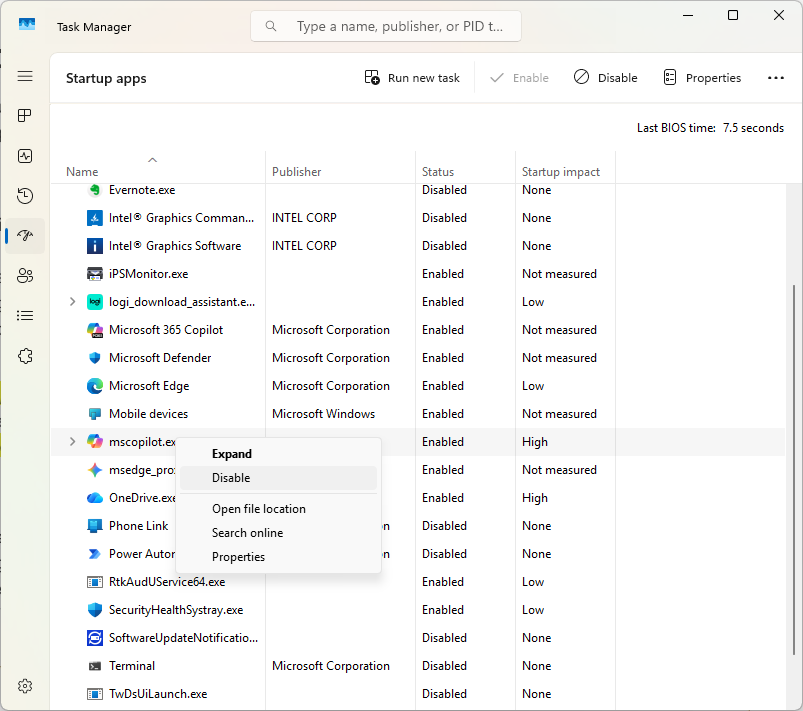
Click the Startup apps icon in the left-hand navigation pane — it’s the speedometer icon, fifth from the top. You’ll see a list of every application or process that launches at startup and runs on your PC in the background as you use it. The list includes each program’s name, publisher, whether it’s enabled to run on startup, and its “Startup impact.” The Startup impact tells you how much it slows Windows down — low, medium, high, none, and sometimes “not measured.”
Here’s how to disable apps and services that run on startup.
Preston Gralla / Foundry
To stop a program or service from launching at startup, right-click it and select Disable. That only stops it running at startup. You can still run the application after launch. If for some reason you want it to launch at startup again, you can just return to the Startup apps area of the Task Manager, right-click the application and select Enable.
You may not recognize many of the programs that run on startup, but there are several ways you can find out more about any of them:
Right-click an item and select Properties for information about it, such as its location on your hard disk, whether it has a digital signature, and other information including the version number, the file size and the last time it was modified.
Right-click the item and select Open file location. File Explorer will open to the folder where the file is located, often giving you another clue about the program’s purpose.
Select Search online after you right-click. Bing launches with links to sites with information about the program or service.
Go to Should I Block It? and search for the file name. You’ll often find solid information about the program or service.
Another way to speed up an aging PC is to disable eye candy like shadows, animations, and visual effects, which can exact a performance hit.
To turn them off, in the search box, type sysdm.cpl and press Enter. The System Properties dialog box launches. Click the Advanced tab, then click Settings in the Performance section. The Performance Options dialog box opens, with a varied list of animations and special effects.
Select Adjust for best performance at the top of the screen and then click OK. Windows then turns off the effects that slow down your system.
2. Windows is bedeviled by glitches and system errors
Windows has come a long way since the days when running it felt like a crapshoot — would it crash for no apparent reason and show you the dreaded Blue Screen of Death today?
The operating system has come a long way since then. You may never see a Blue Screen again. That doesn’t mean it’s truly reliable, though. Glitches remain. System errors are a way of life.
Windows includes little-known troubleshooters that can help resolve these kinds of problems. To get to them, go to Settings > System > Troubleshoot.
As a first step, from the Options section, click the box to the right of Recommended troubleshooter history and select Ask me before running. This will allow Windows to suggest a troubleshooter for you to run if it detects you have a problem that needs a fix. You can also choose to have troubleshooters run automatically and then notify you or not. If you don’t want them to run at all, select Don’t run any.
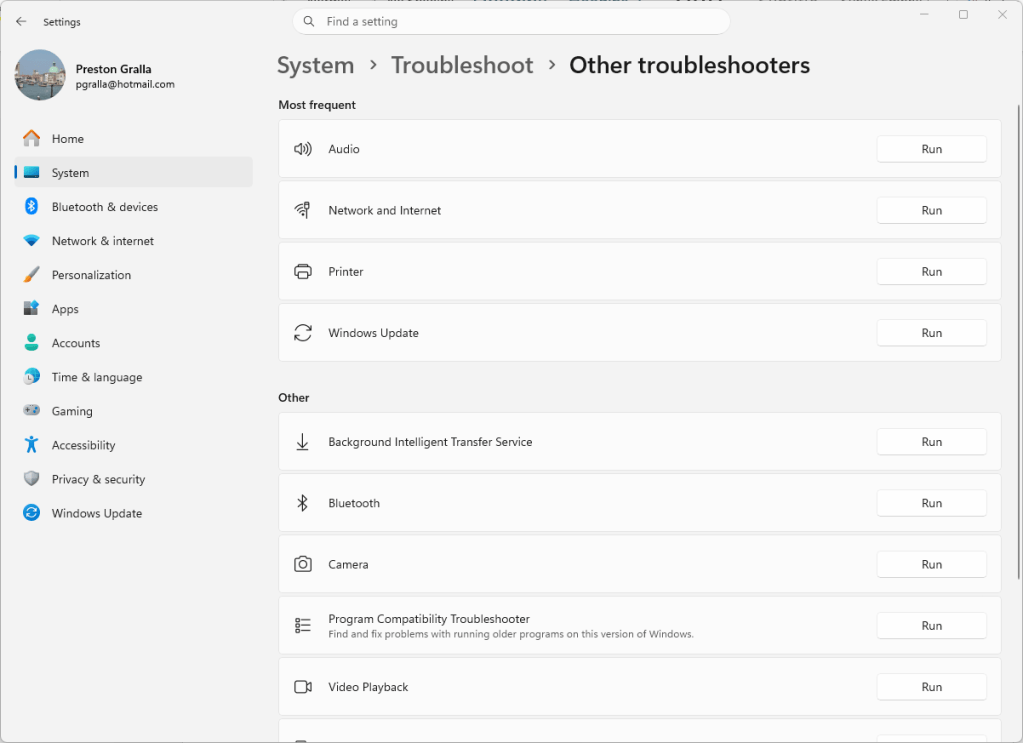
I’ve found, though, that often Windows won’t recommend a troubleshooter when I’m running into problems. If that’s the case for you, from the Troubleshoot screen select Other troubleshooters. Windows will display a long list of troubleshooters you can choose, including for network and internet problems, printer problems, Bluetooth, Windows Update, and more.
Go here to select a troubleshooter to cure what ails Windows.
Preston Gralla / Foundry
Select the troubleshooter you want to run from the list. The troubleshooter will try to diagnose the problem and then will either fix it itself or recommend what you should do.
There’s no guarantee the troubleshooter will work, of course. There are other things you can try to fix the problem. It’s possible that Windows has gotten an update that has a fix, and you haven’t installed the update yet. Go to Settings > Windows Update and click for Check for updates. If there’s an available update, install it. That might do the trick.
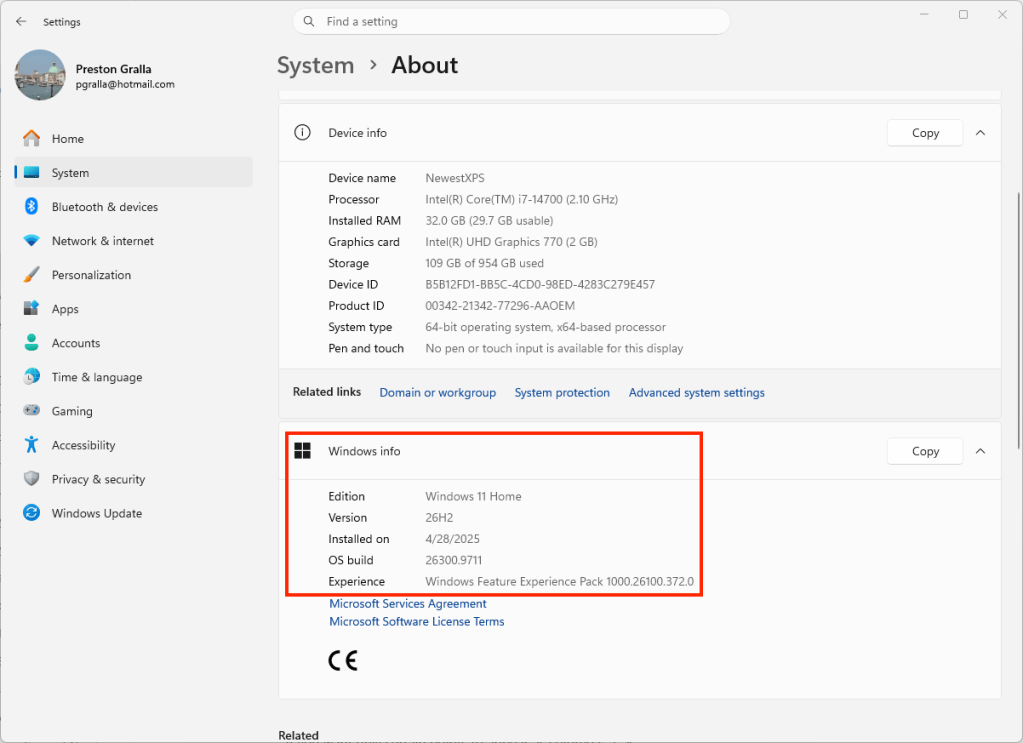
You can also try turning to Copilot. Click the Copilot icon on the taskbar, describe the problem, and ask for help. Be as detailed as possible, including all details of the problem and the version number of Windows you’re using — not just Windows 10 or 11, but its specific version number. To find it, go to Settings > System > About. In the Windows info section, you’ll see the version number, such as 26H2.
about screen with windows version highlighted" class="wp-image-4245928" width="1024" height="744" sizes="auto, (max-width: 1024px) 100vw, 1024px">
Go here to find your version of Windows.
Preston Gralla / Foundry
Sometimes Copilot does a great job of identifying the underlying issues and walking you through a fix. Not always, though.
If all else fails, you can use the IT admin’s favorite secret solution: Restart Windows. Quite frequently the problem will vanish.
3. Windows is a privacy-invader
Windows is always watching you, gathering data about the way you use it and sending it back to Microsoft. You don’t need to put up with this. Here are several simple ways to protect your privacy.
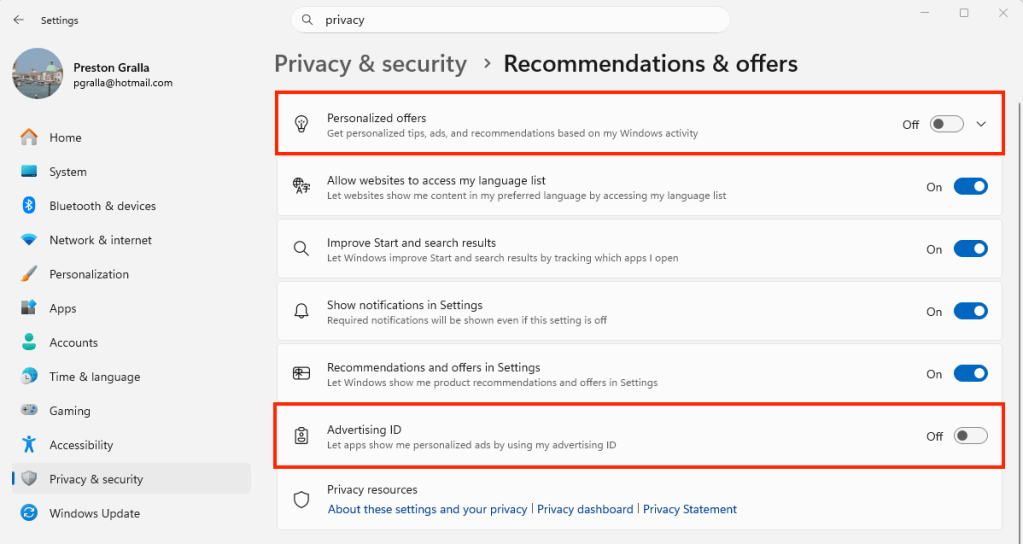
Start by turning off the Windows advertising ID that gathers information about you when you browse the web and when you use Windows 11 apps. To do it, go to Settings > Privacy & security > Recommendations & offers. Find Advertising ID near the bottom of the screen and move its slider to Off. From now on, your interests won’t be tracked. The ads you get will be generic ones rather than targeted ones.
Turn off the Windows Advertising ID and personalized offers to help protect your privacy.
Preston Gralla / Foundry
Near the top of the same screen, turn off Personalized offers. This setting lets Microsoft present you with “ads and recommendations for Microsoft and third-party products and services, features, apps, and hardware to enhance your Windows experiences” based on your Windows usage and account info. If you’re worried about your privacy, that’s the last thing you want.
Next, turn off location tracking. With location tracking, your PC uses your location to provide services such as the local weather. But having Windows constantly track your location is another privacy incursion.
To turn it off, go to Settings > Privacy & security > Location. In the “App permissions” section, click Location and move the slider from On to Off. That will turn off location tracking for every user on the PC.
You can also leave on location tracking for some apps and turn it off for others. With location tracking turned on, look at the “Let apps access your location” section on the Location screen. It lists every Windows app that can use your location. Move the slider to On for the apps you want to allow to use your location and to Off for the apps you don’t.
That doesn’t cover desktop apps, though. Scroll down to “Let desktop apps access your location.” Move the slider to On if you want them to use location information. You’ll see a list of desktop apps have that previously used your location. You can turn them on and off individually.
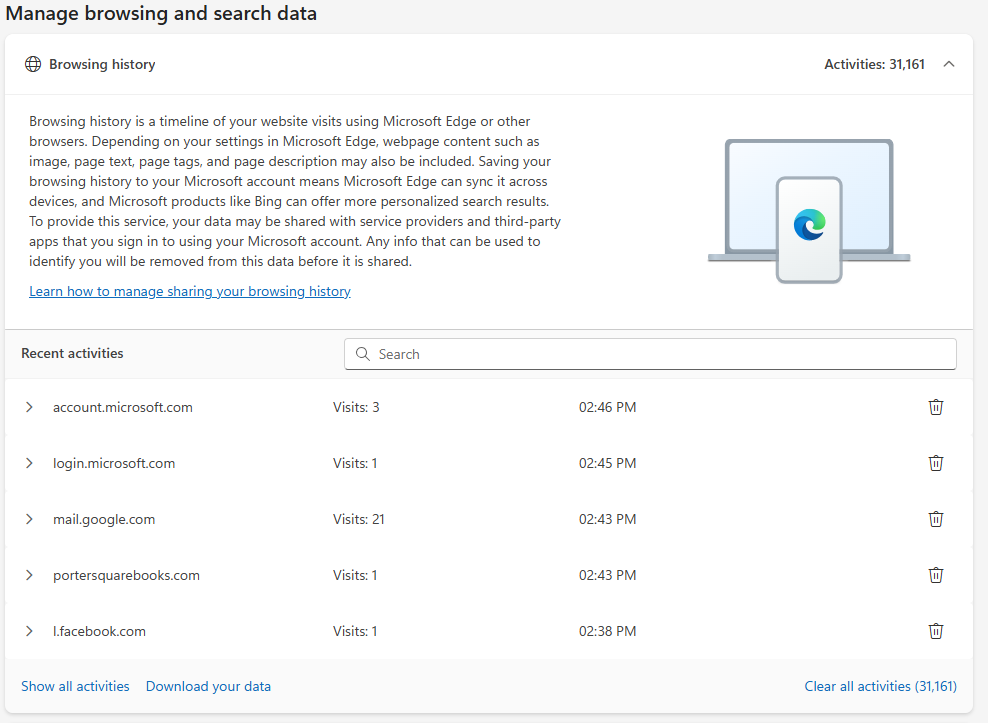
Finally, go to Microsoft’s Privacy Dashboard. This lets you track and delete a good deal of information Windows gathers about you. From here you can turn off ad targeting and view and delete your browsing history, search history, location activity, voice activity, media activity, and more.
Head to the information you want to view and delete, then click the link, such as Browsing and search. It shows a list of your activities, including websites you’ve visited, how many times you’ve visited them, when you’ve visited them, and so on. Click Show all activities to see a more comprehensive list than the one the main screen.
Microsoft’s Privacy Dashboard lets you view and delete granular activity data.
Preston Gralla / Foundry
Delete browsing items individually by clicking the trash can icon next to each one. To delete them all, click the Clear all activities link at the lower right of the list, then click Clear on the screen that appears.
You can do the same thing with many Windows activities, such as Search history, which tracks all the searches you do.
In the dashboard, you can also customize privacy settings for Microsoft products other than Windows, including Xbox, Microsoft 365, Edge, and Microsoft Teams. Scroll down to the “Find privacy settings in Microsoft products” section and click the product you’re interested in.
4. Windows makes it too $%#$!! hard to change your default apps
When you try to open certain files or take certain actions — like click a web link in an email — Windows uses its default app. For a browser, for example, that means it chooses Microsoft Edge rather than an alternate browser like Google Chrome.
It should be a simple task to change your default apps. Unfortunately, it isn’t. Here’s how to do it, using the example of changing the default browser from Edge to Chrome:
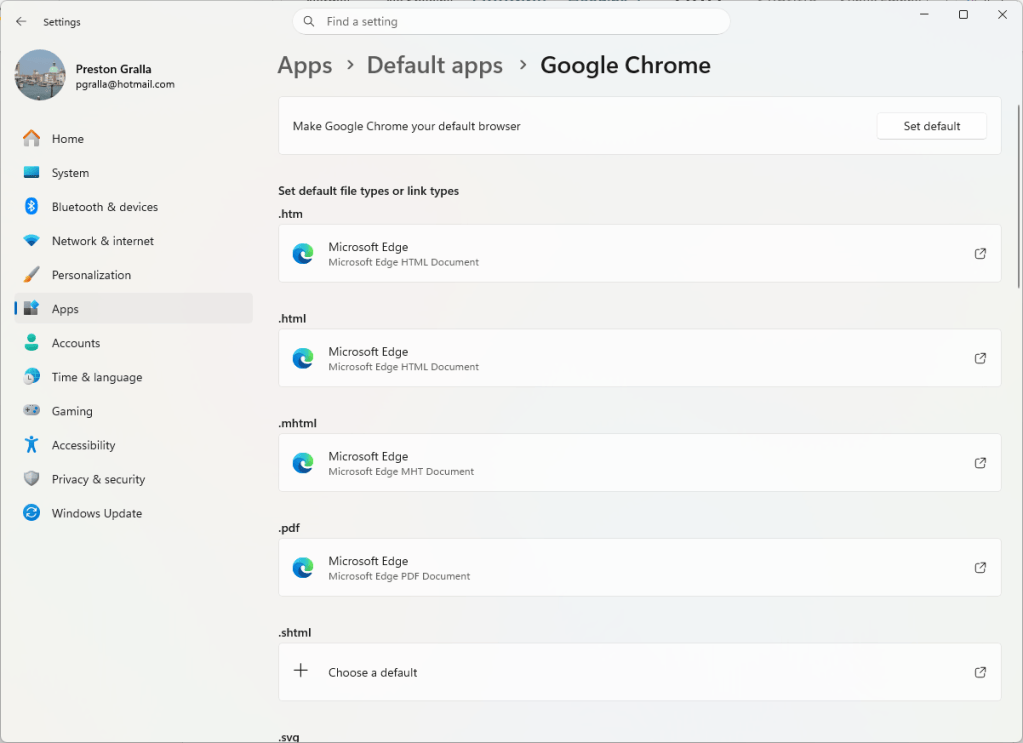
Go to Settings > Apps > Default apps, then scroll to the app you want to make your default app for a specific file or action. In our case, it’s Google Chrome.
Click the arrow next to the app, and at the top of the screen that that appears, click Set default.
Setting a new app default — in this case, Google Chrome for web browsing.
Preston Gralla / Foundry
A checkmark appears next to “Set default.”
To change the default back to Edge or another browser, scroll to the browser you want to be the default and click Set default.
Follow these same steps to change any other default app.
That may only be part of the process, though, because certain file types may still be associated with Microsoft’s default app. Even after changing the default browser to Chrome, for example, PDF files, mailto links, some graphics files such as .svg, and other file types are still associated with Edge by default. You’re going to have to hunt them down and change them one by one.
This may be true not just when you change your default browser, but for when you change any default app. You’ll have to hunt down the other associated file types as well.
Here’s how to do it with our example of Google Chrome. Follow the same directions for other apps:
Go to Settings > Apps > Default apps and click your new default browser — in our example, Google Chrome.
Scroll through all the file types and protocols, and click any still associated with the previous default (in our example, Edge).
On the pop-up screen that appears, select the app you want to handle the file type (in our example, Google Chrome), then click Set Default.
Keep in mind that you don’t have to use the new default app for every file type. You can, for example, choose another app, such as a PDF reader for .pdf files.
5. OneDrive can drive you batty
In theory, Windows’ built-in cloud storage app OneDrive is a great idea. It integrates with File Explorer to store your files on your PC, automatically backs them up to the cloud as you change them, and syncs everything with the cloud and all your devices. And you get 5GB of cloud storage for free — more if you use certain versions of Microsoft 365.
What’s not to like?
Plenty. There are so many confusing things about how it works that delving into them all is beyond the scope of this article. (In fact, we have two separate tutorials dedicated to using OneDrive in Windows and using OneDrive on the web.)
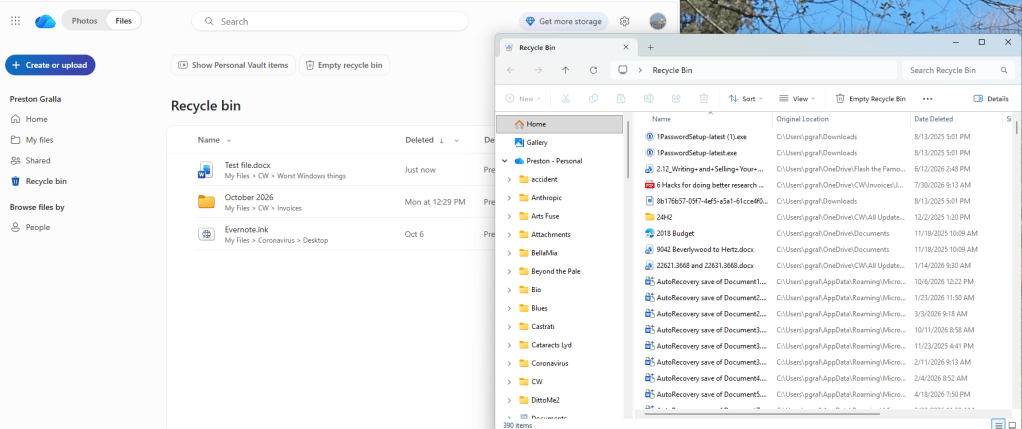
So I’ll only cover the weirdest and most baffling thing here: The strange tale of dueling Recycle Bins — one in OneDrive, and one in Windows — which contain different files depending on how the files have been deleted.
Until the advent of OneDrive, when you deleted a file in Windows, it was sent only to the Windows Recycle Bin. The deleted file stays in the Recycle Bin for some time, so that if you accidentally deleted it, you can easily go there and restore it. How long the file remains there varies according to the size of your hard disk, how much space is devoted to the Recycle Bin, and your settings.
Then OneDrive came along with its own Recycle Bin, separate from the Windows Recycle Bin. So now, depending on how you delete a file, it will go into either the Windows Recycle Bin or the OneDrive Recycle Bin, or both. If you don’t know where to look for a deleted file, you won’t find it. Most people don’t even know there’s a separate OneDrive Recycle Bin, because Microsoft has done such a good job of hiding it.
The dueling Recycle Bins in Windows and OneDrive
. (Click image to enlarge it.)
Preston Gralla / Foundry
The first thing you need to know is that the OneDrive Recycle Bin only appears on the web-based version of OneDrive. It’s nowhere to be found in Windows itself. You can get to it in two ways:
Right-click the OneDrive icon on the right side of the Windows Taskbar and select Settings > Recycle Bin. You’ll be sent to the OneDrive Recycle Bin, which is located in the web-based version OneDrive, not the local Windows OneDrive.
Go directly to OneDrive on the web and click Recycle bin in the left-hand pane.
As to which files end up in the OneDrive Recycle Bin, it’s fairly mysterious. Given that OneDrive is so well-integrated with File Explorer, you would expect that files deleted in File Explorer would end up in there. Some files do, and some files don’t. If you delete a file in File Explorer that is synced to OneDrive, that file will show up in the OneDrive Recycle Bin as well as in the Windows Recycle Bin. If the file hasn’t been synced in OneDrive, it will appear in the Windows Recycle Bin only.
That means that if you delete files from the Downloads folder, they likely won’t show up in the OneDrive Recycle Bin, because by default, Downloads aren’t synced to OneDrive. If you do sync your Downloads folder, files deleted from there will show up.
I mentioned earlier that some deleted files go only to the OneDrive Recycle Bin. That typically happens when you delete the file in the web version of OneDrive. But it also happens when you delete the file from within a Microsoft 365 app like Word, such as by going to File > Open, then right-clicking a file you see there and selecting Delete file from the menu that appears. When you delete a file in either of these ways, it shows up only in the OneDrive Recycle Bin, not the Windows Recycle Bin.
The good news is that once you know all this, you should never lose a deleted file again. Whenever possible, delete files only using File Explorer. Every file deleted that way ends up in the Windows Recycle Bin, even if it doesn’t also show up in the OneDrive Recycle Bin.
You can also check both Recycle Bins if you can’t find the deleted file. It’ll show up on one or the other. Restore it from whichever bin you find it in.
Apple is on track to sell eight million MacBook Neo systems by the end of the year, and it expects the next generation of the device to do even better when it arrives in spring. To achieve this, Apple needs to remain focused on what made the product such a success.
There is no doubt it has been a success. At one point Apple was complaining that it was unable to churn these things out fast enough. Tom Boger, Apple’s Vice President of Mac and iPad Product Marketing, recently called the introduction of the MacBook Neo “a huge momentum creator,” adding, “We’re bringing more new-to-Mac customers than we ever have in the 42 years that the Mac has been around.”
He called this “remarkable” for a product that has been around for so long.
A hit in the hard ground
It’s also remarkable given the current environment. Consumer electronic sales are taking a beating from the combined effects of war, political instability, and AI-flation. As prices climb, cash-strapped buyers, both consumer and IT purchasers, have become much more discerning when hunting for the best available deal.
Apple seems to be thriving all the same. Even at its higher-than-launch price (the $599 MacBook Neo now costs $699), Neo has stayed in the top three laptops sold on Amazon US since launch. All three of Amazon’s top selling laptops are Macs at time of writing.
Where has it excelled? Consumers have flocked to it, but it has seen particular success in the education and enterprise markets. In education, Apple recently announced a massive contract with the Philippines Department of Education for more than 170,000 Macs for teachers and students. Apple called this the largest Mac deployment in its history. It also shows the MacBook Neo as a highly credible Chromebook alternative.
In business, IT teams have already learned the ROI and TCO benefits of Macs. They know support costs fall as Mac deployment climbs, and that IT can support many more Macs per person than Windows. Price, or at least the perception of price, was the challenge — MacBook Neo lowered it, and enterprise purchasers saw the opportunity.
Telia was one of the earliest large corporations to deploy the device at scale and found it well suited to all kinds of information workers for ease of use, manageability, and comfort. Helios X also deployed the device, and UK-based IT consultancy nDuo identified that many smaller companies are replacing Windows systems with Neos. Demand for their use within low-cost hybrid fleets is so strong that at least one reseller now provisions Neos with Windows 11 VMs preinstalled. This is real momentum.
Many silver linings come shrouded in cloud, however. In this case, that cloud may be iPad sales, which fell 27.5% this year. While it is true the entire tablet industry has slumped this year, Apple purchasers might have felt that when they could buy MacBook Neo for about the same price as a midrange Apple tablet, then the Mac was the better choice. Zooming out, of course, Apple remains king of tablet hill with over a third of the market, so it may thrive despite that tradeoff.
What must happen to the MacBook Neo 2?
If we assume that Apple keeps the current $699 base price, then the Neo 2 must push at areas where the Neo 1 has already excelled. The anticipated improvements to the system should achieve that.
A19 Pro chip: While only slightly better computationally than the A18 Pro, the GPU performance of the new processor is likely to improve. Industry watcher Tim Culpan says this will be a binned A19 chip with a 5-core GPU rather than the 6 cores found in iPhones.
More memory: Current speculation suggests that Apple plans to increase memory to 12GB, up from 8GB.
Storage and Touch ID: One way Apple can justify maintaining the higher entry-level cost is to bump up base storage and put Touch ID across the range.
New colors, no fan, same Liquid Retina display: Apple intends to use new colors, turning the devices into a new kind of tech collectible. I still want the yellow one.
Otherwise, the song remains the same — a quiet, light, affordable Mac for all of us. Apple must hope these tweaks will be enough to maintain the momentum this Mac has already achieved.
What could go wrong?
Memory prices are impacting costs across the supply chain right now, and Apple will need to find some way to keep the Neo within the pricing window potential customers have become used to: every dollar higher in cost will dent momentum a little more. Analysts will want to be reassured that the 12GB of included memory doesn’t squeeze Apple’s product margins too much; contrarywise, customers want to continue their love affair with the affordable everyMac.
A Digitimes report tells us Apple has booked manufacturing for 16 million MacBook Neo 2 units, twice as many as it shifted for the MacBook Neo 1. I take that claim with a pinch of salt, but it still makes me think Apple’s management does not want to dent this momentum — which hints that next year’s Mac story may see even higher market share, albeit at the risk of some cannibalization of iPad sales.
The MacBook Neo worked because it delivered Macs at a price that education, enterprise, and first-time Mac users could easily accept. If the Neo 2 can protect and improve on that offer, then Apple has a shot at even higher market share for the Mac.
Now please subscribe to my daily, human-curated Apple-related news headline feed at The Core, or follow me on BlueSky, LinkedIn, or Mastodon.
Residential proxies are often used by bad actors to hide the true source of internet traffic — and now one of them appears to have taken up residence in the White House.
The Residential Proxy Observatory, set up by Layer3 Intel to monitor the threat of anonymized network activity, has identified proxy exit activity on one particular network, AS2650, which is registered to the executive office of the US President and operated out of the White House.
Residential proxies — so-called because they typically run on home or personal devices — mask the true source of internet traffic by rerouting it to appear to come from a different IP address. While it may be concerning that this is activity to be found in one of the protected workspaces in the US, this is in line with recent research from Infoblox, which found that residential proxies were widespread throughout enterprises.
While not illegal per se, residential proxies can be used by bad actors for activities that most definitely are illicit, for example, denial-of-service operations or distribution of malware.
The Residential Proxy Observatory has also found evidence of their activity on the island of St Helena, one of the most remote locations on the planet, so there really is no place on earth to hide from internet interference.
Meta has hit pause on new terms of service for its business customers that would have granted it the right to grab any content from their websites. Not only that, but it would also have shifted the blame for every error produced through faulty AI to its customers.
But that small delay wasn’t enough to calm customer pushback, and now Meta has posted a note on Facebook’s business help center saying that the update had now been paused indefinitely.
In a statement to Harvard’s Nieman Lab, the company said that “We’re pausing the changes as we continue to engage with stakeholders and take our time to get this right.”

 about screen with windows version highlighted" class="wp-image-4245928" width="1024" height="744" sizes="auto, (max-width: 1024px) 100vw, 1024px">
 apps > default apps google chrome screen" class="wp-image-4245924" width="1024" height="744" sizes="auto, (max-width: 1024px) 100vw, 1024px">