Month: June 2025

Microsoft offers free Windows 10 security updates, but only for consumers

Microsoft’s latest Windows 10 Extended Security Updates announcement reveals a telling double standard: while home users get multiple free pathways to maintain security beyond the October 2025 deadline, enterprises face the same expensive pay-or-migrate ultimatum.

The software giant announced in a blog post that individual consumers can secure an additional year of Windows 10 security updates for free, either through Windows Backup, or by redeeming 1,000 Microsoft Rewards points. They also have the option to access the updates by paying a $30 fee.

Meanwhile, businesses must still pay $61 per device for first-year coverage, with costs doubling annually thereafter, and there are no pathways to free access.

“ESU coverage for personal devices runs from Oct. 15, 2025, through Oct. 13, 2026,” Microsoft said in its blog post. But businesses? They’re still looking at the same three-year, escalating fee structure with no free alternatives.

Industry experts see Microsoft’s approach as strategic pressure rather than customer accommodation.

“This fee is a nudge towards Windows 11 and confirms that the vendor has a firm intention to see enterprise customers moving to Windows 11,” said Dario Maisto, senior analyst at Forrester Research.

Enterprise reality: Same expensive options, different messaging

Microsoft first launched its Windows 10 Extended Security Updates program in April 2024 with enterprise-focused pricing: $61 per device for year one, $122 for year two, and $244 for year three. Tuesday’s announcement doesn’t change those enterprise rates.

Business options remain available through the Microsoft Volume Licensing Program, with Cloud Service Provider partners able to sell commercial ESUs starting September 1. Maisto notes this timing “should ease the impact of these measures on the vendor’s cloud services revenue strategy.”

For organizations with 1,000 Windows 10 devices, Microsoft’s ESU program represents a $61,000 first-year commitment. A three-year ESU commitment totals $427,000, enough to purchase significant new hardware.

However, Maisto observes that “many organizations may rather pay the ESU subscription than make major investments in accelerating Windows 11 hardware refresh cycles,” particularly given current economic uncertainties and geopolitical volatility.

Current StatCounter data shows that Windows 10’s market share stands at 53% of the global Windows market, with Windows 11 at 43%. In enterprise environments, where hardware refresh cycles are longer, Windows 10 penetration often runs higher.

The strategic calculation and planning time

Sanchit Vir Gogia, chief analyst at Greyhound Research, warned that enterprises viewing ESU as a long-term solution are accumulating “strategic debt.” He noted that relying on ESU instead of refreshing devices may offer short-term budget relief but defers readiness for AI-era workloads.

However, Maisto pointed to a silver lining: “This additional time will give enterprises a breath to plan for Windows 11 adoption and do a proper risk assessment regarding security and compliance issues related to staying on Windows 10.”

Microsoft’s approach reflects calculated pressure: make staying on Windows 10 expensive enough to drive migration decisions, while offering consumers relief to avoid platform defection. The cloud exception for Windows 365 and Azure Virtual Desktop users proves Microsoft’s priorities — steering organizations toward higher-margin, recurring revenue streams.

Maisto noted that organizations are “trying to understand which scenario will materialize given the current geopolitical volatility,” with each organization taking “a different path depending on its risk appetite.”

Compliance gaps and enterprise risks

Extended Security Updates deliver only critical and important security patches. Even after paying $61 per device, IT departments won’t receive new features, non-security bug fixes, or technical support.

Gogia emphasized that ESU creates compliance risks beyond basic security. “Microsoft’s ESU program may keep vulnerabilities patched, but it doesn’t close the compliance gap,” he said. “Without support for evolving identity frameworks, telemetry, or zero-trust baselines, Windows 10 — even patched — is an aging platform.”

For regulated industries, the absence of advanced encryption support or newer multi-factor authentication integrations may result in failed audits. “Security updates alone do not equal a secure posture — especially in regulated sectors,” Gogia noted.

Maisto acknowledged this will “ease the pressure on organizations in these already turbulent times,” but warned each enterprise must conduct proper risk assessments when weighing ESU against immediate Windows 11 migration.

The cloud backup enterprise dilemma

Microsoft’s free consumer ESU option requires enabling cloud backup through Microsoft services — a condition that creates enterprise policy conflicts.

“Microsoft is not just offering patches — it’s offering them in exchange for cloud footprint expansion,” Gogia explained. The cloud backup requirement raises concerns for organizations managing complex data residency and encryption frameworks.

Many enterprise policies disallow external backups that bypass data loss prevention workflows. For regulated enterprises in healthcare and public infrastructure, defaulting to cloud sync may violate internal mandates.

Implementation complexity

Organizations evaluating ESU face complexity that consumer programs don’t address. Devices must run Windows 10 version 22H2, potentially requiring extensive patch management before ESU activation.

The enrollment process integrates with volume licensing systems rather than simplified consumer wizards. Enterprise IT teams must coordinate with procurement, legal, and finance departments for multi-year ESU agreements.

Most critically, Microsoft offers no technical support as part of ESU programs. Organizations paying premium prices still depend on community forums or expensive Microsoft consulting services for implementation issues.

Microsoft’s enhanced Windows 10 ESU program confirms that enterprises are expected to pay their way through the transition while consumers get multiple free options. The timing of Cloud Service Provider availability in September aligns with Microsoft’s cloud revenue strategy.

Both analysts agree the program serves Microsoft’s interests while providing enterprises limited relief. “It’s security with strings — and a subtle shift in monetization logic,” Gogia said.

For IT leaders, this represents both breathing room and continued pressure. While ESU provides time for proper Windows 11 planning and risk assessment, the escalating costs ensure that staying on Windows 10 becomes increasingly expensive each year, exactly as Microsoft intended.
10 ways to boost Windows security

With Microsoft set to stop security updates for Windows 10 in October — unless you pay extra — security is top of mind for many businesses and individual users right now. And whether you’re planning on sticking with Windows 10 or you’ve already upgraded to Windows 11, there’s almost certainly more you can do to increase your PC’s security.

Here’s a look at some of the actual software tools you can use to make your system more secure — not basic behavioral advice like “don’t run sketchy software” or broad, theoretical tips on avoiding threats online. That’s all fine advice, but we’ve all seen it before. 

Instead, we’re going to dive deep into worthwhile tweaks and critical checks in the Windows software already on your PC. They’re simple steps that’ll make an immediate impact on your system’s security and the protection of your professional and/or personal data — and they’re right there just waiting to be used.

Want more Windows PC tips? Sign up for my free Windows Intelligence newsletter. I’ll send you free Windows Field Guides as a special welcome bonus!

Windows security boost #1: Block bad apps

Windows can automatically block “potentially unwanted apps,” but it doesn’t do so by default. The phrase “potentially unwanted apps” is a euphemism for programs that aren’t technically malware or anything illegal, but they may do things you don’t want — like spy on you or show ads. Also called “potentially unwanted programs” or “PUPs,” they’ve been dubbed “malware with a legal team” — an obvious exaggeration, but not exactly wrong.

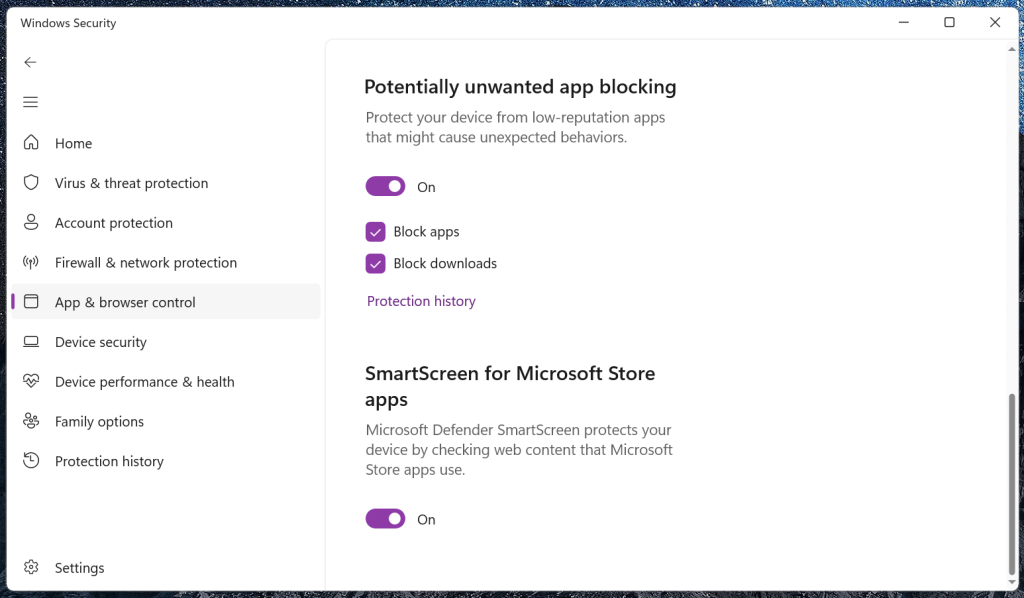
To ensure Windows is blocking these, launch the “Windows Security” app from the Start menu, select “App & browser control,” click “Reputation-based protection settings,” and ensure “Potentially unwanted app blocking” is set to “On.”

Windows potentially unwanted app blocking
Windows can block annoying apps — but the setting isn’t on by default.

Chris Hoffman, Foundry

Windows security boost #2: Check your encryption

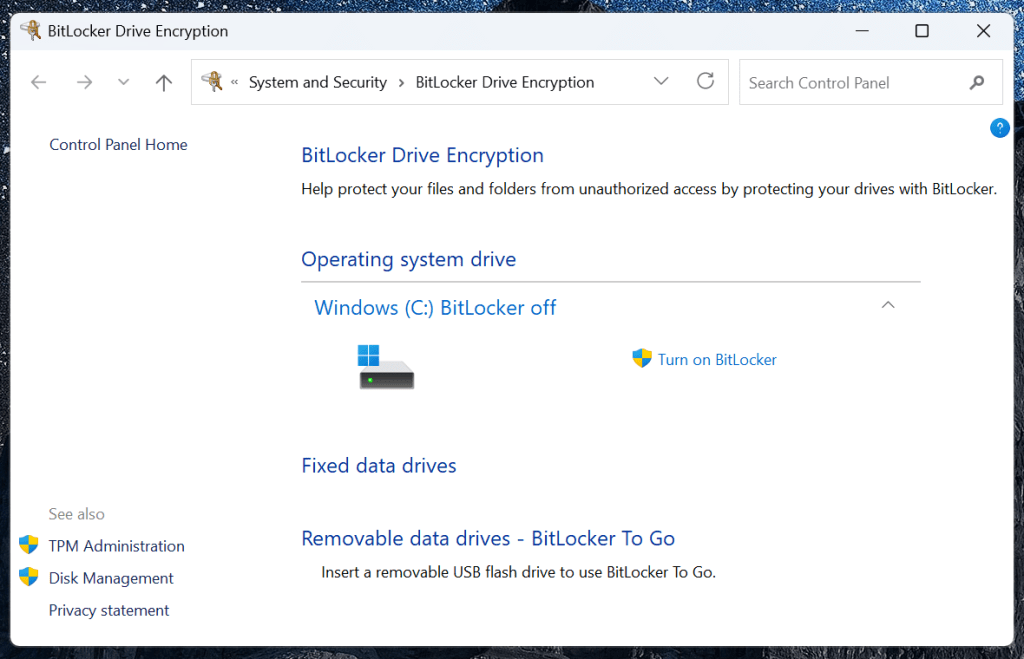
Modern Windows PCs automatically set up “Device Encryption” when you sign into them with a Microsoft account, ensuring someone who steals your laptop can’t get access to your private files. But, again, the option might not always be activated by default out of the box. To check whether your PC storage is encrypted, open the Start menu, search for “BitLocker,” and select “Manage BitLocker.”

Windows BitLocker drive encryption
The BitLocker page in the Control Panel will show if your PC’s storage is encrypted.

Chris Hoffman, Foundry

If you don‘t see that your PC’s storage is securely encrypted with either Device Encryption or BitLocker, there are two possible explanations:

  • You’ve signed in with a local account and need to sign in with a Microsoft account to activate the Device Encryption feature on your PC.
  • You’re using an older PC that doesn’t support Device Encryption, and you need to pay for an upgrade to the Professional edition of Windows to activate the BitLocker feature.

For what it’s worth, Device Encryption is more of a “BitLocker light” experience without all the features, while BitLocker is the full-featured, more customizable disk encryption software. However, they’re built on the same underlying technology, and both will securely encrypt PC files. 

Read my BitLocker encryption guide for more information.

Windows security boost #3: Consider your syncing setup

On both Windows 10 and 11, Microsoft wants OneDrive to automatically sync folders such as your Desktop, Documents, and Pictures folders. Their contents will be stored in your Microsoft account online and synced between your PCs.

That can be convenient, but depending on the data you work with, you might not want to sync it to your Microsoft account. It’s a matter of data security — especially within organizations, which often want to maintain close control over corporate data.

To control exactly what OneDrive is doing on your PC and what it’s syncing, consult my guide to taming OneDrive on Windows.

Windows security boost #4: Turn off less secure sign-ins

Windows normally lets you sign in by typing your password. If you use a Microsoft account, that same password will be your Microsoft account’s online password. If you have a PC with Windows Hello biometric sign-in support — a fingerprint reader, facial recognition, or both — you can turn off password sign-ins and opt to sign in only with those more secure biometric methods.

To do this, head to Settings > Accounts > Sign-in options. Under Additional settings, activate, “For improved security, only allow Windows Hello sign-in for Microsoft accounts on this device.”

Once that’s done, if someone else does gain access to your PC, they won’t be able to sign into it — even if they’ve captured your Microsoft account password. For optimal security, beyond that, be sure to use a long PIN and avoid typing it in public. (Your PC will enforce a limit on how often people can guess the PIN, so it doesn’t have to be uncrackable — just hard to guess.)

Windows security boost #5: Activate ransomware protection

Ransomware literally holds your files for ransom. The malware encrypts your files and prevents you from accessing them until you pay up — often with Bitcoin or another cryptocurrency.

To prevent ransomware from running roughshod over your files, Windows has a “Controlled folder access” feature that will keep questionable-looking apps from tampering with your Documents, Pictures, Music, and Video folders. It’s designed to let friendly apps through, but it might block apps you use and require you to let them through manually. However, it will still provide extra protection — if you’re willing to accept a little bit of extra configuration and the occasional extra bit of hassle.

Here’s what you need to know about Controlled folder access — and how to set it up.

Windows security boost #6: Double-check Office updates

Do you use Microsoft Office? If so, you should ensure it’s getting security updates. I’ve noticed many people end up with outdated versions of Office that aren’t still getting security updates — sometimes even because they (or someone) turned off the Office updates without realizing the implications. It’s important to protect Office from threats that could arrive via malicious downloaded documents, so that’s not an advisable move.

To confirm that your Office setup is in good shape, open an Office app (like Word), click “File,” and click “Account” at the bottom left corner of the window. Look at the Update Options button at the right side of the window and ensure it says “Updates are automatically downloaded and installed” — if not, you can click “Update options” to activate automatic updates.

Microsoft Office update settings
If you’re using an outdated version of Office, it won’t warn you — it’ll just stop downloading security updates.

Chris Hoffman, Foundry

You should also look at the name of your Office product at the top of the window in this same area. If it says you’re using “Microsoft 365,” then you’re using Microsoft’s subscription-based version of Office that will always get updates.

If it says a specific version (like Office 2021), be sure to consult the end of support table on Microsoft’s website for more information. (As of now, Office 2016 and Office 2019 are set to be phased out in October 2025, while Office 2021 has until October 2026. Office 2024 has until October 2029.)

Windows security boost #7: Check whether your apps are current

Windows apps don’t necessarily always update themselves with security updates. It’s one of the big security challenges on Windows, and it forces many organizations to roll their own software update strategies to monitor and deliver security patches. While Microsoft is finally moving toward fixing this, it’s still a problem.

First, ensure apps managed by the Store app are actively receiving updates. Launch the Store from the Start menu, click your profile picture, and click “Settings.” Ensure the “App updates” option is set to “On.” (Even if you don’t use the Store, many apps included with Windows can still be updated using it.)

Second, check to see whether you have vulnerable, out-of-date apps installed. You can use tools like the winget command built into Windows, the slick UniGetUI tool for it, or Patch My PC’s free Home Updater tool.

Windows security boost #8: Activate isolation

Windows has a variety of low-level system hardening features that will make the Windows system kernel — the core part of Windows — harder to exploit. They should work well with modern PCs, and many of them may be activated automatically, depending on how old your computer is. In general, if you aren’t using extremely old hardware drivers or other low-level software, they should just work — and boost your PC’s security.

To activate them or confirm that they’re active, open the Windows Security app from your Start menu. Click “Device security” and then “Core isolation details.” (This is available on both Windows 10 and 11, but you might not see it, or you might see different features — it depends on the specifics of your PC and what its hardware supports.)

Windows core isolation settings
The options you see on the Core isolation settings screen will depend on your PC’s hardware.

Chris Hoffman, Foundry

When you activate any one of these security features, Windows will check to see whether it will work well on your system. If it won’t — for example, if you have an old hardware driver that doesn’t work properly with one of these features — Windows will generally spot the problem and turn the feature off automatically.

Windows security boost #9: Start sandboxing

While it’s always a good idea to avoid sketchy software, let’s say you do want to run a program without giving it too much access to your system. In any such scenario, I recommend using the Windows Sandbox — a feature that requires the Professional edition of Windows 10 or 11.

The Windows Sandbox creates a temporary Windows environment within Windows, letting you run software without giving it to access the rest of your files and hardware. To activate it — assuming you have the right edition of Windows — open the “Turn Windows features on or off” tool from the Start menu and install the “Windows Sandbox” feature.

Since this does require the Professional edition of Windows, many people and organizations won’t have access to it. You can always install Windows in a virtual machine like VirtualBox, too, and run software in there as an alternative.

Windows security boost #10: Consider tighter protection settings

Many years ago, I recommended installing exploit-protection software like Microsoft’s EMET (Enhanced Mitigation Experience Toolkit) or Malwarebytes Anti-Exploit. These days, it generally isn’t necessary; Windows has integrated its own native anti-exploit protection to provide your programs with extra protection from attacks.

To see these settings, you can open the Windows Security app from the Start menu, click “App & browser control,” and click “Exploit protection settings.”

Almost everything there should be turned on by default. If you want some extra security, you could activate “Force randomization for images (Mandatory ASLR).” However, this could cause problems with some old programs, so you’ll probably want to skip it.

I recommend leaving it alone — and feeling secure that anti-exploit protection is now part of Windows and the type of thing you don’t have to hunt down separately, just like antivirus software.

Want more in-depth Windows analysis and useful PC tips? Sign up for my free Windows Intelligence newsletter today. I’ll send you three new things to try each Friday.

This is (probably) the unreleased Google Pixel Tablet Pen

Google’s Android tablet saga is a seemingly endless series of almosts, what ifs, and coulda-beens — and now, we’ve got one more chapter to add into that book.

First, a quick and very pertinent three-part power-round of context catch-up. Part one:

  • Way back in 2010, Google bought a company called BumpTop and seemed set to bring its wild three-dimensional interface concepts into the Android tablet arena — as I pieced together and recounted some years back.
  • But then, by 2011, with new leadership in place, the BumpTop concepts were mostly set aside.
  • And instead, in 2011, Google came out with an ambitious and almost completely different interface for large-screen Android tablet experiences with the Android 3.0 Honeycomb release. The software reimagined every bit of how we interact with our devices in an effort to take full advantage of the newfound screen space and create a more efficiency-optimized, productivity-minded environment.
  • But then — well, y’know: Google Googled. It failed to get developers on board with its vision, lost focus, pivoted, then flailed for a while, ultimately eliminating most of the Honeycomb concepts and making tablets look and work exactly like Android phones.

That’s the first chapter, in a sense. Then came the middle part of the story — part two, for our purposes:

  • In 2015, Google came out with an awkwardly positioned Android tablet called the Pixel C. It brought back a kinda-sorta tablet-optimized interface, but something always seemed slightly strange about the product — and certain slivers of sleuthing suggested it might’ve originally been intended to be a ChromeOS, not Android, device.
  • By 2017, the lack of any focus or momentum on Android tablets led me to declare that the Chromebook was, for all intents and purposes, the new Android tablet. It was clear by then that Google didn’t see much future in the tablet form or reason to invest in making it a good experience at the platform level.
  • And sure enough, by 2020, the company confirmed to me that it was done making its own tablets and would focus instead on laptop-style devices for its own self-made products.

You might think the fairy tale ends there — but, no siree, Bob, we’ve got another era yet. Here’s part three:

  • In 2022, I discovered and reported that one of Android’s lesser-known original co-founders had rejoined the company with the title of of “CTO, Android tablets.”
  • At the same time, word broke that Google was giving up on laptops, in a dizzying reversal from its two-years-earlier about-face.
  • And sure enough, in 2023, the flip-flop finished and Google revealed it was back in the tablet game with the Pixel Tablet and its bold but never fully realized ideas about reinventing the Android tablet as a whole new type of line-blurring device.
    • Initially, the Pixel Tablet was meant to be a smart-home control panel that you also used as a lean-back-style, more passive-use tablet. The problem is that while the device was — and still is! — an excellent tablet, the smart-home side of the experience felt weirdly half-baked and not especially exceptional.
  • Soon, the Pixel Tablet narrative shifted, and it looked like Google was gearing up to reinvent the device as more of a computer-replacing desktop system in its next iteration — with a wild new Android desktop mode at its core and, according to reports, native keyboard and stylus accessories to flesh out that picture.
  • But then the second-gen Pixel Tablet was reportedly cancelled before it ever even saw the light of day.

And that — insert massively exaggerated deep breath here… — brings us to today.

[Psst: Got a Pixel? Any Pixel? Check out my free Pixel Academy e-course to discover all sorts of advanced intelligence lurking within your phone and/or tablet!]

Your guess is as good as mine as to if Google will ever put out its own tablet again and how many more about-faces we might be facing, but for now, what we have is that aforementioned pile of almosts, what ifs, and coulda-beens. And the latest of ’em is the productivity-centric future the Pixel Tablet almost brought us but never quite had the opportunity to deliver.

And that’s where things get freshly interesting:

  1. The key software piece of that puzzle — the Android desktop mode — is, in fact, still being actively developed. It’s now a part of the latest Android 16 quarterly update beta, with the main purpose of letting you plug an Android phone into a monitor and then use it like a computer later this year.
  2. As part of that development, the feature is now available on the original Pixel Tablet, with that beta Android version installed and the appropriate developer-level option enabled.
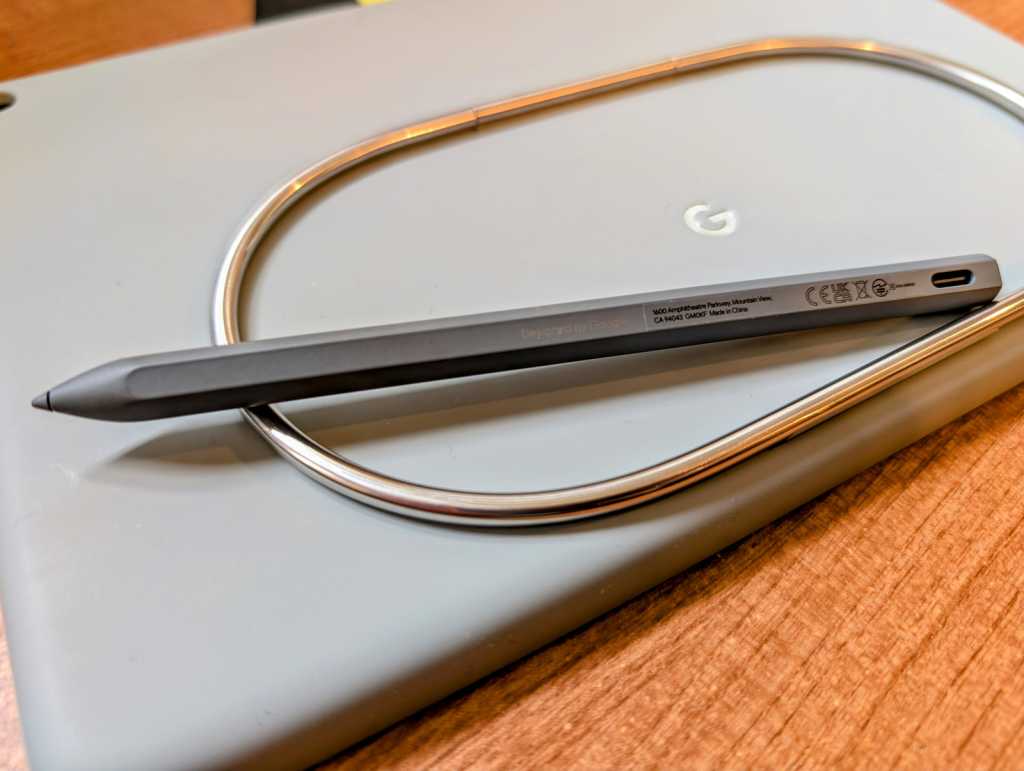
  3. And, thanks to the wild luck and generous sharing of a member of my Intelligence Insider uber-geek community, I got my grubby hands on what very much appears to be the never-released Google Pixel Tablet Pen — a.k.a. the stylus we never saw as a part of the Pixel Tablet’s unrealized future.

So without further ado, here it is:

srcset="https://b2b-contenthub.com/wp-content/uploads/2025/06/01-google-pixel-tablet-pen-stylus.jpg?quality=50&strip=all 1600w, https://b2b-contenthub.com/wp-content/uploads/2025/06/01-google-pixel-tablet-pen-stylus.jpg?resize=300%2C183&quality=50&strip=all 300w, https://b2b-contenthub.com/wp-content/uploads/2025/06/01-google-pixel-tablet-pen-stylus.jpg?resize=768%2C468&quality=50&strip=all 768w, https://b2b-contenthub.com/wp-content/uploads/2025/06/01-google-pixel-tablet-pen-stylus.jpg?resize=1024%2C623&quality=50&strip=all 1024w, https://b2b-contenthub.com/wp-content/uploads/2025/06/01-google-pixel-tablet-pen-stylus.jpg?resize=1536%2C935&quality=50&strip=all 1536w, https://b2b-contenthub.com/wp-content/uploads/2025/06/01-google-pixel-tablet-pen-stylus.jpg?resize=1145%2C697&quality=50&strip=all 1145w, https://b2b-contenthub.com/wp-content/uploads/2025/06/01-google-pixel-tablet-pen-stylus.jpg?resize=276%2C168&quality=50&strip=all 276w, https://b2b-contenthub.com/wp-content/uploads/2025/06/01-google-pixel-tablet-pen-stylus.jpg?resize=138%2C84&quality=50&strip=all 138w, https://b2b-contenthub.com/wp-content/uploads/2025/06/01-google-pixel-tablet-pen-stylus.jpg?resize=789%2C480&quality=50&strip=all 789w, https://b2b-contenthub.com/wp-content/uploads/2025/06/01-google-pixel-tablet-pen-stylus.jpg?resize=591%2C360&quality=50&strip=all 591w, https://b2b-contenthub.com/wp-content/uploads/2025/06/01-google-pixel-tablet-pen-stylus.jpg?resize=411%2C250&quality=50&strip=all 411w" width="1024" height="623" sizes="(max-width: 1024px) 100vw, 1024px">
What by all counts is the unreleased Google Pixel Tablet Pen, in the author’s suspiciously sweaty paw.

JR Raphael, Foundry

The Pen has a clear “Designed by Google” logo on its flat edge, along with the address of Google’s Mountain View campus. It also sports the code “GM0KF,” which — drumroll, please… — is the exact same code noted in a leak about the stylus’s existence last December.

Google Pixel Tablet Pen stylus (side)
A code on the stylus’s side says “GM0KF,” which matches the code on earlier materials about the product.

JR Raphael, Foundry

The Pen’s tip has a shiny silver metal button with a Google “G” logo printed atop it.

Google Pixel Tablet Pen stylus (top)
A familiar “G” logo adorns the stylus’s top.

JR Raphael, Foundry

And, yes, it is a dead ringer for the product pictured in that leak. We’re looking at the same exact thing.

Google Pixel Tablet Pen stylus (on case)
The stylus looks exactly like what’s pictured in previously leaked Pixel Tablet Pen materials.

JR Raphael, Foundry

(I’ve reached out to Google several times over the past several days to see if it could provide any context or comment at all about the product, its existence, and if or when it might ever actually be released. As of this writing, the company has yet to offer any information.)

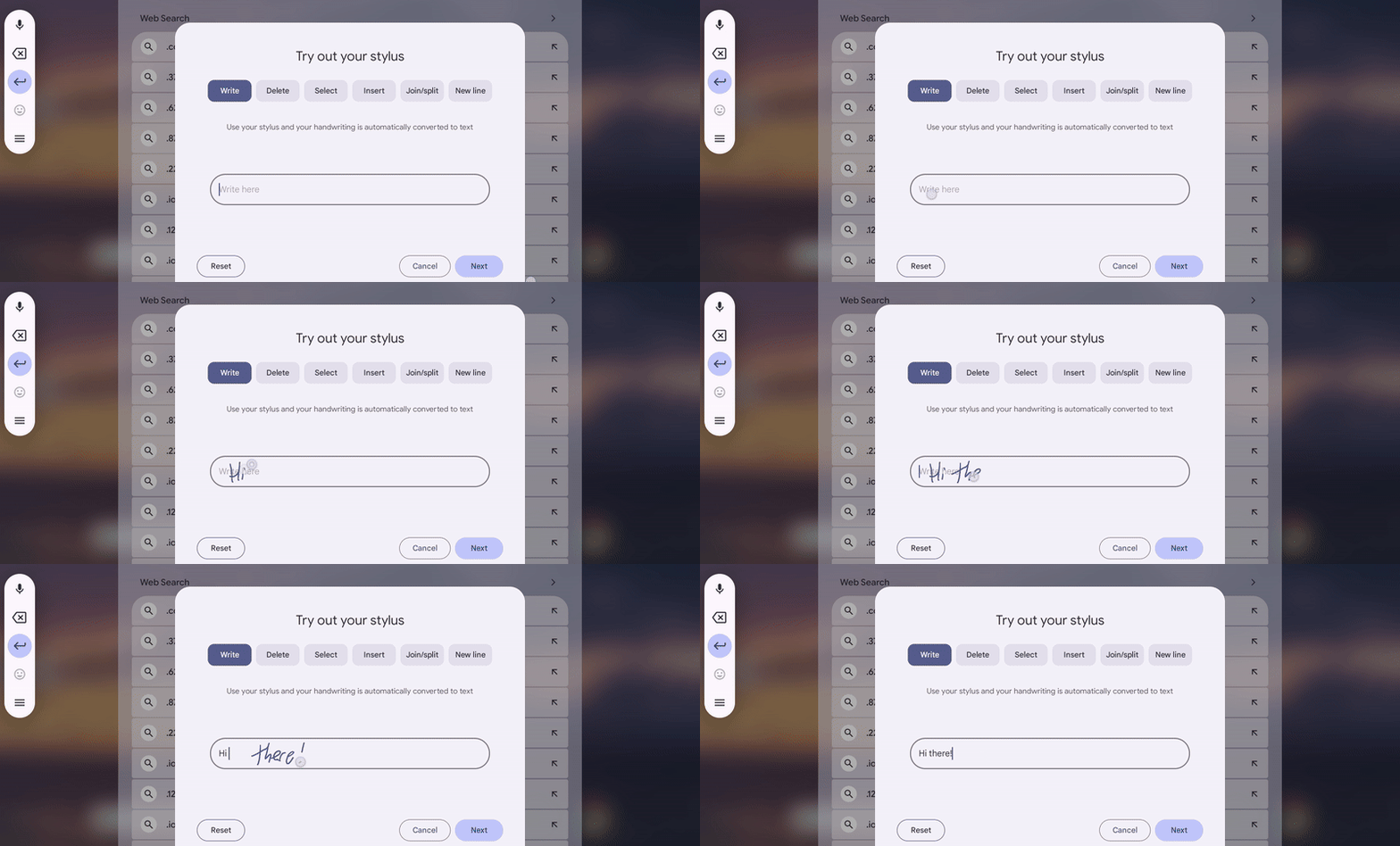
I charged the stylus via the built-in USB-C port, and it immediately started working on my Pixel Tablet. When I hold the Pen’s tip just above the Pixel Tablet’s screen, selectable elements beneath it respond and pop a bit to indicate they’re pressable. If it’s a text field — like the search box on the home screen — a cursor icon appears, and touching the Pen to the box pulls up a pop-up about how to use the stylus to write and have words automatically converted into text as well as how to perform a variety of editing operations entirely with the stylus.

Google Pixel Tablet Pen stylus demo
A demo window explains how the Pixel Tablet Pen works in terms of writing and text editing.

JR Raphael, Foundry

Once that demo window is closed, I can just write anywhere on the screen, anytime. Once I bring the Pen close to the Pixel Tablet’s display, that same cursor icon appears, and the entire screen essentially turns into an open surface for input.

Google Pixel Tablet Pen — Google Docs
You can write anywhere on the Pixel Tablet’s screen and have your words turned into text.

JR Raphael, Foundry

The writing-to-text conversion works quite well, even with my drunken-toddler-level chicken-scratch handwriting. The Pen performs great on surfaces meant for freestyle writing, too, like with the drawing feature in Google Keep. Its input is smooth and consistent, and it’s incredibly easy to use.

Google Pixel Tablet Pen — Google Keep
The Android Google Keep app is especially well-suited to input with the Pixel Tablet Pen.

JR Raphael, Foundry

Those unofficial reports from a while ago showed an animation indicating that pressing the Pen’s button would pull up a “quick note-taking app” of some sort sort, but that doesn’t seem to work for me. The button doesn’t do anything at all, as far as I can tell — which probably isn’t surprising, since any such function would presumably require a missing software update in order to work.

Beyond that, there isn’t a heck of a lot remarkable about the hardware itself. The Pen has a soft-touch finish and feels light and comfy to hold. Oh, and it even sticks magnetically to a specific spot on the back side of the tablet itself as well as the official Google Pixel Tablet case — which certainly seems like a deliberate touch.

Google Pixel Tablet Pen stylus magnet
The stylus sticks to the back of the Pixel Tablet as well as its case in a deliberate-seeming position.

JR Raphael, Foundry

Android’s still under-development desktop mode works nicely with the Pen to create a more computer-like experience, meanwhile — especially if you also hook up a keyboard accessory of some sort. The software isn’t quite there yet, though, and is certainly nowhere near the level of true desktop-caliber productivity you get with a Chromebook, in large part because of the ways the Chrome Android app differs from the native desktop version.

But Google seems determined to close that gap, so we’ll see how things progress over time. That mission, however, appears to be more about bringing Android into the desktop domain than bringing the desktop domain into Android — for the moment, at least, though as we’ve seen so many times before, you never know how Google might change its mind in the future.

For now, this is mostly just a glimpse at another Android tablet almost — as far as the Pixel Tablet and the Pen are concerned. It’s an eye-opening look at a future we’ll probably never experience, in this specific scenario. And it’s the latest in a long, ever-expanding line of Android tablet coulda-beens.

Don’t let yourself miss an ounce of Pixel magic. Start my free Pixel Academy e-course and discover tons of hidden features and time-saving tricks for whatever Googley gadget you’re carrying!

AI, cybersecurity, and quantum computing shape UK’s new 10-year economic plan

Artificial intelligence, quantum computing and cybersecurity are “frontier technologies” the UK government plans to prioritize as part of its blueprint to overhaul the nation’s economy and industries over the next decade.

That’s according to its long-awaited industrial strategy policy paper and a separate plan going into more detail on digital and other technologies.

It would perhaps have been bigger news if the government hadn’t put AI, cybersecurity and quantum computing at the heart of its plans, given that it has already trailed this heavily in a sequence of reports, including January’s AI Opportunities Action Plan.

But the hope for the tech sector expressed in the paper, titled The UK’s Modern Industrial Strategy, is still ambitious, including that by 2035 the UK should aim to be one of the world’s top three R&D superpowers and home to a tech business worth a trillion dollars.

All that has to happen in a mere decade in a country unaccustomed to talking about its future more than one four-year election cycle ahead. It’s also interventionist in tone, an idea at odds with half a century of thinking in Britain which assumed technology should be left to its own devices.

AI and quantum computing will build the companies of the future. However, because this infrastructure will be vulnerable to disruption, it will need cybersecurity innovation to ensure its operation.

“We will enable new sectors to establish themselves e.g., our rapidly growing AI sector. […] Driving investment into our internationally renowned cybersecurity sector and supporting cutting-edge innovation to address the challenges that prevent widespread technology adoption,” the government wrote in the the Digital Technologies Sector Plan.

With a combined value of £1 trillion ($1.4 trillion) the UK’s tech sector was currently the world’s third most valuable behind only the US and China, it calculated.

The Plan’s focus on AI in particular sets out ambitious uptake goals. As soon as 2030, the UK should have several AI growth zones, with 7.5 million people upskilled to use the technology while the country’s AI research capacity will grow twentyfold, the plan projects. By the same date, the CyberASAP accelerator program should be supporting 250 cybersecurity companies and 28 spinouts.

Big interventions

Some optimism is probably justified — the country is home to a good collection of AI expertise for example — but it wouldn’t be Britain if there weren’t doubts.

The first is that while the UK has a reasonable track record at creating AI, cybersecurity, and technology companies, its record of keeping them British is less positive. Two examples are Google getting its hands on AI specialist DeepMind at a bargain-basement price in 2014, and Softbank’s purchase of chip designer Arm two years later. Both are still based in the UK, but with their profits flowing elsewhere.

That’s not always an issue but, without a core of sovereign businesses, it’s debatable whether a country is really in charge of its technology ecosystem in the long run.

A second issue is the size of the government interventions necessary to fuel local technology businesses today from startup to unicorn and beyond. In a sector that thinks in the hundreds of billions, the UK Government’s budget, doled out in tens of millions in a variety of programs, remains more constrained.

There’s also doubt about whether the rest of the UK economy will be able to profit from AI developments.

“According to Cisco’s latest UK AI Readiness Index, only 10% of UK organisations are fully prepared to harness AI’s potential,” said Cico’s UK and Ireland chief executive, Sarah Walker.

Cisco collaborated with the development of the Government’s plan, but Walker pointed out that its success still depended on overcoming deeper workforce challenges:

“AI adoption and implementation is primarily a people challenge. From traditional IT roles to marketing and supply chain management, almost every job will require AI literacy in the very near future,” she said.

In some parts of the UK, this would be easier than in others. “We need to ensure up-skilling is addressed with equality, to avoid exacerbating economic gaps that already exist across demographics and regions.”

GitHub’s AI billing shift signals the end of free enterprise tools era

GitHub began enforcing monthly limits on its most powerful AI coding models this week, marking the latest example of AI companies transitioning users from free or unlimited services to paid subscription tiers once adoption takes hold.

“Monthly premium request allowances for paid GitHub Copilot users are now in effect,” the company said in its update to the Copilot consumptive billing experience, confirming that billing for additional requests now starts at $0.04 each. The enforcement represents the activation of restrictions first announced by GitHub CEO Thomas Dohmke in April.

TikTok-style bite-sized videos are invading enterprises

The TikTok-ification of the corporate world is well under way, as more companies turn to video snippets to communicate information to employees and customers. But when it comes to user- and AI-generated content, the rules are different for companies than for casual TikTok or Instagram users — and enterprises need to move cautiously when implementing video-generation tools, analysts said.

“There is a definite rise in the use of short form, digestible video in the corporate workplace,” said Forest Conner, senior director and analyst at Gartner. That’s because video is a more engaging way share corporate information with employees and a better way to manage time.

“As the storytelling axiom goes, ‘Show, don’t tell,’” Connor said. “Video provides a medium for showing in practice what may be hard to relay in writing.”

Many employees would rather view short videos that summarize a document or meeting, analysts said. As a result, employees themselves are becoming digital creators using new AI-driven video generation and editing tools.

Software from companies like Atlassian, Google, and Synthesia can dynamically create videos for use in presentations, to bolster communications with employees, or to train workers. The tools can create avatars, generate quick scripts, and draw insights using internal AI systems and can sometimes be better than email for sharing quick insights on collaborative projects. (Atlassian just last week introduced new creation tools in its own Loom software that include AI-powered script editing to make videos look better; the new feature doesn’t require re-recording a video.)

In part, the rising use of these video-creation tools is “a reaction to over-meeting,” said Will McKeon-White, senior analyst for infrastructure and operations at Forrester Research. Many employees feel meetings are a waste of time and hinder productivity. As an alternative, they can record short contextual snippets in Loom for use in workflow documents or to send to colleagues — allowing them to get up to speed on projects at their own pace.

“I’ve seen this more in developer environments where teams are building complex applications in a distributed environment without spending huge amounts of time in meetings,” McKeon-White said.

HR departments are finding Loom useful for dynamically creating personalized videos while onboarding new employees, said Sanchan Saxena, head of product for Teamwork Foundations at Atlassian. The quickly generated personalized videos — which Saxena called “Looms” — can include a welcome message with the employee’s name and position and can complement written materials such as employee handbooks and codes of conduct.

“We can all agree there is a faster, richer form of communication when the written document is also accompanied by a visual video that attaches to it,” Saxena said.

AI video generation company Synthesia made its name with a tool where users select an avatar, type in a script, add text or images and can produce a video in a few minutes. Over time, the company has expanded its offerings and is seeing more business uptake, said Alexandru Voica, head of corporate affairs and policy at Synthesia.

Its offerings now include an AI video assistant to convert documents into video summaries and an AI dubbing tool that localizes videos in more than 30 languages. “These products come together to form an AI video platform that covers the entire lifecycle of video production and distribution,” said Voica.

Voica noted how one Synthesia customer, Wise, has seen efficiency gains using the software for compliance and people training, creating “engaging learning experiences across their global workforce.”

Looking ahead, video content as a tool for corporate communications will likely be adopted at a team level, said McKeon-White. “It’s going to come down to the team or the department as for what they want to do in a given scenario,” he said.

Enterprises need to keep many things in mind when including videos in the corporate workflow. Managers, for instance, shouldn’t force videos on employees or create a blanket policy to adopt more video.

They can be useful, but videos are not for everyone, said Jeff Kagan, a technology analyst. “One big mistake companies make is following the preferences of the workers or executives…rather than considering different opinions. Not everyone is cutting edge,” he said.

Companies shouldn’t jump on the video bandwagon too soon, McKeon-White said. If they do, they run the risk of overwhelming employees.

“You don’t want to suddenly have work scrolling through 30 hours of video,” he said. “If you are throwing videos onto a shared repository and saying, ‘Hey, go look at that!’ That sucks. That’s not good for anybody.”

There are also many security and compliance issues to keep in mind.

AI can now detect sensitive information, such as license plate numbers, addresses, or confidential documentation, without manually reviewing the video, Conner said. “Organizations need to ensure that any content making it out the door is scrubbed for sensitive information in advance of publication.”

And with the rise of generative AI, the problem of deepfakes remains a major concern.

The uncanny accuracy of AI video avatars creates risks for executives, where their likeness could be cloned from their available video content and then used in damaging ways, Conner said.

“This has yet to happen in practice, but my guess is it’s only a matter of time,” Conner said.

Despite its ubiquity, RAG-enhanced AI still poses accuracy and safety risks

Retrieval-Augmented Generation (RAG) — a method used by genAI tools like Open AI’s ChatGP) to provide more accurate and informed answers — is becoming a cornerstone for generative AI (genAI) tools, “providing implementation flexibility, enhanced explainability and composability with LLMs,” according to a recent study by Gartner Research.

And by 2028, 80% of genAI business apps will be developed on existing data management platforms, with RAG a key part of future deployments.

There’s only one problem: RAG isn’t always effective. In fact, RAG, which assists genAI technologies by looking up information instead of relying only on memory, could actually be making genAI models less safe and reliable, according to recent research.

Alan Nichol, CTO at conversational AI vendor Rasa, called RAG “just a buzzword” that just means “adding a loop around large language models” and data retrieval. The hype is overblown, he said, adding that the use of “while” or “if” statements by RAG is treated like a breakthrough.

(RAG systems typically include logic that might resemble “if” or “while” conditions, such as “if” a query requires external knowledge, retrieve documents from a knowledge base, and “while” an answer might be inaccurate re-query the database or refine the result.) 

“…Top web [RAG] agents still only succeed 25% of the time, which is unacceptable in real software,” Nichol said in an earlier interview with Computerworld. “Instead, developers should focus on writing clear business logic and use LLMs to structure user input and polish search results. It’s not going to solve your problem, but it is going to feel like it is.”

Two studies, one by Bloomberg and another by The Association for Computational Linguistics (ACL) found that using RAG with large language models (LLMs) can reduce their safety, even when both the LLMs and the documents it accesses are sound. The study highlighted the need for safety research and red-teaming designed for RAG settings.

Both studies found that “unsafe” outputs such as misinformation or privacy risks increased under RAG, prompting a closer look at whether retrieved documents were to blame. The key takeaway: RAG needs strong guardrails and researchers who are actively trying to find flaws, vulnerabilities, or weaknesses in a system — often by thinking like an adversary.

How RAG works — and causes security risks

One way to think about RAG and how it works is to compare a typical genAI model to a student answering questions just from memory. The student might sometimes answer the questions from memory — but the information could also be outdated or incomplete.

A RAG system is like a student who says, “Wait, let me check my textbook or notes first,” then gives you an answer based on what they found, plus their own understanding.

Iris Zarecki, CEO of data integration services provider K2view, said most organizations now using RAG augment their genAI models with internal unstructured data such as manuals, knowledge bases, and websites. But enterprises also need to include fragmented structured data, such as customer information, to fully unlock RAG’s potential.

“For example, when customer data like customer statements, payments, and past email and call interactions with the company are retrieved by the RAG framework and fed to the LLM, it can generate a much more personalized and accurate response,” Zarecki said.

Because RAG can increase security risks involving unverified info and prompt injection, Zarecki said, enterprises should vet sources, sanitize documents, enforce retrieval limits, and validate outputs.

RAG can also create a gateway through firewalls, allowing for data leakage, according to Ram Palaniappan, CTO at TEKsystems Global Services, a tech consulting firm. “This opens a huge number of challenges in enabling secure access and ensuring the data doesn’t end up in the public domain,” Palaniappan said. “RAG poses data leakage challenges, model manipulation and poisoning challenges, securing vector DB, etc. Hence, security and data governance become very critical with RAG architecture.”

(Vector databases are commonly used in applications involving RAG, semantic search, AI agents, and recommendation systems.)

Palaniappan expects the RAG space to rapidly evolve, with improvements in security and governance through tools like the Model Context Protocol and Agent-to-Agent Protocol (A2A). “As with any emerging tech, we’ll see ongoing changes in usage, regulation, and standards,” he said. “Key areas advancing include real-time AI monitoring, threat detection, and evolving approaches to ethics and bias.”

Large Reasoning Models are also highly flawed

Apple recently published a research paper evaluating Large Reasoning Models (LRMs) such as Gemini flash thinking, Claude 3.7 Sonnet thinking and OpenAI’s o3-mini using logical puzzles of varying difficulty. Like RAG, LRMs are designed to provide better responses by incorporating a level of step-by-step reasoning in its task.

Apple’s “Illusion of Thinking” study found that as the complexity of tasks increased, both standard LLMs and LRMs saw a significant decline in accuracy — eventually reaching near-zero performance. Notably, LRMs often reduced their reasoning efforts as tasks got more difficult, indicating a tendency to “quit” rather than persist through challenges.

Even when given explicit algorithms, LRMs didn’t improve, indicating they rely on pattern recognition rather than true understanding, challenging assumptions about AI’s path to “true intelligence.”

While LRMs perform well on benchmarks, their actual reasoning abilities and limitations are not well understood. Study results show LRMs break down on complex tasks, sometimes performing worse than standard models. Their reasoning effort increases with complexity only up to a point, then unexpectedly drops.

LRMs also struggle with consistent logical reasoning and exact computation, raising questions about their true reasoning capabilities, the study found. “The fundamental benefits and limitations of LRMs remain insufficiently understood,” Apple said. “Critical questions still persist: Are these models capable of generalizable reasoning or are they leveraging different forms of pattern matching.”

Reverse RAG can improve accuracy

A newer approach, Reverse RAG (RRAG), aims to improve accuracy by adding verification and better document handling, Gartner Senior Director Analyst Prasad Pore said. Unlike typical RAG, which uses a workflow that retrieves data and then generates a response, Reverse RAG flips it to generate an answer, retrieve data to verify that answer and then regenerate that answer to be passed along to the user.

First, the model drafts potential facts or queries, then fetches supporting documents and rigorously checks each claim against those sources. Reverse RAG emphasizes fact-level verification and traceability, making outputs more reliable and auditable.

RRAG represents a significant evolution in how LLMs access, verify and generate information, Pore said. “Although traditional RAG has transformed AI reliability by connecting models to external knowledge sources and making completions contextual, RRAG offers novel approaches of verification and document handling that address challenges in genAI applications related to fact checking and truthfulness of completions.”

The bottom line is that RAG and LRM alone aren’t silver bullets, according to Zarecki. Additional methods to improve genAI output quality must include:

  • Structured grounding: Fragmented structured data, such as customer info, in RAG.
  • Fine-tuned guardrails: Zero-shot or few-shot prompts with constraints, using control tokens or instruction tuning.
  • Human-in-the-loop oversight: Especially important for high-risk domains such as healthcare, finance, or legal.
  • Multi-stage reasoning: Breaking tasks into retrieval → reasoning → generation improves factuality and reduces errors, especially when combined with tool use or function calling.

Organizations must also organize enterprise data for GenAI and RAG by ensuring privacy, real-time access, quality, scalability, and instant availability to meet chatbot latency needs.

“This means that data must address requirements like data guardrails for privacy and security, real-time integration and retrieval, data quality, and scalability at controlled costs,” Zarecki said. “Another critical requirement is the freshness of the data, and the ability of the data to be available to the LLM in split seconds, because of the conversational latency required for a chatbot.”

How to spot AI washing in vendor marketing

This agent is a robot

Agentic AI and AI agents are hotter than lava-fried chicken right now, and this week CIO defined how AI agents and agentic AI differ from each other. We said that the two related technologies can work together, but CIOs should understand the difference to protect against vendor hype and obfuscation.  

And it is vendor hype that is exercising the readers of CIO, who wanted to know from Smart Answers how to spot vendor AI washing. Smart Answers may be a AI-infused chatbot, but it’s fueled by human intelligence allowing it to know its own limitations. 

It defines AI washing as misrepresentation of basic automation or traditional algorithms as fully autonomous AI agents. Such false agents don’t possess true independent decision-making capabilities and cannot reason through multiple steps and act independently. 

Find out: What is agent washing in AI marketing? 

Windows 10: not dead yet

The imminent demise of support for Windows 10 is causing much consternation in enterprise IT. But is Microsoft really axing Windows 10? This week Computerworld reported the definitive need to know on the subject.  

This prompted readers to ask many questions of Smart Answers, all relating to the end of Windows 10. Most often queried was the future of Microsoft 365 apps on Windows 10 after support ends.  

It’s good news and bad news. While the apps will continue to function and receive security updates until October 10, 2028, users may encounter performance issues and limited support. Microsoft encourages users to upgrade to Windows 11 to avoid these potential problems. Well, it would.  

Find out: What happens using Microsoft 365 apps on Windows 10 after 2025?  

You say IT, we say OT

The convergence of IT and operational technology (OT) can improve security, optimize processes, and reduce costs. This week CIO reported on how some how large companies do it. 

Not surprisingly this prompted some readers to ask Smart Answers how IT/OT collaboration can drive digital transformation. Within the answer lies one very salient point: some leaders believe that in certain sectors rapid IT/OT convergence is critical to achieve transformation.  

Find out: How is IT/OT convergence enabling digital transformation in different industries?  

About Smart Answers 

Smart Answers is an AI-based chatbot tool designed to help you discover content, answer questions, and go deep on the topics that matter to you. Each week we send you the three most popular questions asked by our readers, and the answers Smart Answers provides. 

GenAI — friend or foe?

Generative AI (genAI) could help people live longer and healthier lives, transform education, solve climate change, help protect endangered animals, speed up disaster response, and make work more creative, all while making daily life safer and more humane for billions worldwide. 

Or the technology could lead to massive job losses, boost cybercrime, empower rogue states, arm terrorists, enable scams, spread deepfakes and election manipulation, end democracy, and possibly lead to human extinction. 

Well, humanity? What’s it going to be?

California’s dreamin’

Last year, the California State Legislature passed a bill that would have required companies based in the state to perform expensive safety tests for large genAI models and also build in “kill switches” that could stop the technology from going rogue. 

If this kind of thing doesn’t sound like a job for state government, consider that California’s genAI companies include OpenAI, Google, Meta, Apple, Nvidia, Salesforce, Oracle, Anthropic, Anduril, Tesla, and Intel. 

The biggest genAI company outside California is Amazon; it’s based in Washington state, but has its AI division in California.

Anyway, California Gov. Gavin Newsom vetoed the bill. Instead, he asked AI experts, including Fei-Fei Li of Stanford, to recommend a policy less onerous to the industry. The resulting Joint California Policy Working Group on AI Frontier Models released a 52-page report this past week. 

The report focused on transparency, rather than testing mandates, as the solution to preventing genAI harms. The recommendation also included third-party risk assessments, whistleblower protections, and flexible rules based on real-world risk, much of which was also in the original bill. 

It’s unclear whether the legislature will incorporate the recommendations into a new bill. In general, the legislators have reacted favorably to the report, but AI companies have expressed concern about the transparency part, fearing they’ll have to reveal their secrets to competitors. 

Two kinds of risk

There are three fundamental ways that emerging AI systems could create problems and even catastrophes to people: 

1. Misalignment. Some experts fear that misaligned AI, acting creatively and automatically, will operate in its own self-interest and against the interests of people. Research and media reports show that advanced AI systems can lie, cheat, and engage in deceptive behavior. GenAI models have been caught faking compliance, hiding their true intentions, and even strategically misleading their human overseers when it serves their goals; that was seen in experiments with models like Anthropic’s Claude and Meta’s CICERO, which lied and betrayed allies in the game Diplomacy despite being trained for honesty.

2. Misuse. Malicious people, organizations, and governments could use genAI tools to launch highly effective cyberattacks, create convincing deepfakes, manipulate public opinion, automate large-scale surveillance, and control autonomous weapons or vehicles for destructive purposes. These capabilities could enable mass disruption, undermine trust, destabilize societies, and threaten lives on an unprecedented scale.

3. The collective acting on bad incentives. AI risk isn’t a simple story of rogue algorithms or evil hackers. Harms could result from collective self-interest combined with incompetence or regulatory failure. For example, when genAI-driven machines replace human workers, it’s not just the tech companies chasing efficiency. It’s also the policymakers who didn’t adopt labor laws, the business leaders who made the call, and consumers demanding ever-cheaper products. 

What’s interesting about this list of ways AI could cause harm is that all are nearly certain to happen. We know that because it’s already happening at scale, and the only certain change coming in the future is the rapidly growing power of AI. 

So, how shall we proceed? 

We can all agree that genAI is a powerful tool that is becoming more capable all the time. We want to maximize its benefit to people and minimize its threat. 

So, here’s what I believe is the question of the decade: What do we do to promote this outcome? By “we,” I mean the technology professionals, buyers, leaders, and thought leaders reading this column. 

What should we be doing, advocating, supporting, or opposing? 

I asked Andrew Rogoyski, director of Innovation and Partnerships at the UK’s Surrey Institute for People-Centred Artificial Intelligence, that question. Rogoyski works full-time to maximize AI’s benefits and minimize its harms. 

One concern with genAI systems, according to Rogoyski, is that we’re entering a realm where nobody knows how they work — even when they benefit people. As AI gets more capable, “new products appear, new materials, new medicines, we cure cancer. But actually, we won’t have any idea how it’s done,” he said. 

“One of the challenges is these decisions are being made by a few companies and a few individuals within those companies,” he said. Decisions made by a few people “will have enormous impact on…global society as a whole. And that doesn’t feel right.” He pointed out that companies like Amazon, OpenAI, and Google have far more money to devote to AI than entire governments. 

Rogoyski pointed out the conundrum exposed by solutions like the one California is trying to arrive at. At the core of the California Policy Working Group’s proposal is transparency, treating AI functionality as a kind of open-source project. On the one hand, outside experts can help flag dangers. On the other, transparency opens the technology to malicious actors. He gave the example of AI designed for biotech, something designed to engineer life-saving drugs. In the wrong hands, that same tool might be used to engineer a catastrophic bio-weapon.

According to Rogoyski, the solution won’t be found solely in some grand legislation or the spontaneous emergence of ethics in the hearts of Silicon Valley billionaires. The solution will involve broad-scale collective action by just about everyone.

It’s up to us

At the grass-roots level, we need to advocate the practice of basing our purchasing, use, and investment in AI systems that are serious about and capable with ethical practices, strong safety policies, and deep concern about alignment. 

We all need to favor companies that “do the right thing in the sense of sharing information about how they trained [their AI], what measures they put in place to stop it misbehaving and so on,” said Rogoyski.

Beyond that, we need stronger regulation based more on expert input and less on Silicon Valley businesses’ trillion-dollar aspirations. We need broad cooperation between companies and universities. 

We also need to support, in any way we can, the application of AI to our most pressing problems, including medicine, energy, climate change, income inequality, and others.

Rogoyski offers general advice for anyone worried about losing their job to AI: Look to the young. 

While older professionals might look at AI and feel threatened by it, younger people often see opportunity. “If you talk to some young creative who’s just gone to college [and] come out with a [degree in] photography, graphics, whatever it is,” he said, “They’re tremendously excited about these tools because they’re now able to do things that might have taken a $10 million budget.”

In other words, look for opportunities in AI to accelerate, enhance, and empower your own work.

And that’s generally the mindset we should all embrace: We are not powerless. We are powerful. AI is here to stay, and it’s up to all of us to make it work better for ourselves, our communities, our nations, and our world. 

Apple Pay is going to get faster and more reliable

Contactless payments such as Apple Pay and sustainability in inventory control are going to get much easier with an upcoming update to the Near Field Communications (NFC) standard that will make devices connect more swiftly and support the Digital Product Passport (NDPP) specification.

The first problems the new standard solves are range and reliability. At present, standard NFC supports a range of up to 0.2 inches and the connections aren’t always robust. What that means to most of us is the need to wriggle your iPhone or Apple Watch around a little to gain connection to the payment terminal. The improved NFC increases that range to to about 3/4 of an inch for all devices and makes the connection a little more resilient; the standard is also a little faster, which means once you authorize a payment it will take place faster than it already does.

Faster connections, easier payments, and more

That range and reliability improvements aren’t just for mobile payments, of course. If you use your iPhone as a car key or have mobile transit cards in your Apple Wallet, you should get a much better experience when opening doors or catching public transit. The NFC update also comes as Apple prepares to introduce expanded support for digital IDs and in-store payments with iOS 16. The latter is interesting because while the NFC Forum didn’t say anything about it, the update does support more complex transactions over NFC — that should make it easier to use supermarket loyalty cards at the same time as Apple Pay in a single tap. The Forum calls these, “multi-purpose tap use cases where a single tap unlocks multiple functions.”

NFC Release 15 is also expected to advance new and exciting use cases, such as using your mobile phone as a payment terminal, championing sustainability and optimizing NFC use across a variety of sectors, including automotive, transit and access control. There is also support for a new feature that has been designed to meet emerging sustainability regulations: NFC Digital Product Passport (NDPP)

What is NDPP and is it safe?

Aimed at manufacturers, NDPP is a framework to allow a single NFC tag embedded in a product to store and transmit both standard and extended Digital Product Passport (DPP) data using NFC. That data includes information such as a product’s composition, origin, environmental, lifestyle, and recycling details. Most hardware manufacturers will need to begin capturing this kind of information under an incoming EU law known as the Ecodesign for Sustainable Products Regulation (ESPR). The information is meant to be made available to customers, business users and recyclers and designed to boost transparency and sustainability. It will be interesting, for example, to use DPP inside future iPhones to determine where the device and its components originate – and it might be fun to explore refurbished devices to see whether components installed to return them to use have been used in different devices previously. 

That said, this kind of unique device information does sound like the kind of data that could be abused for device fingerprinting and user tracking; is there a risk of this?

I contacted Mike McCamon, the organization’s executive director, for more background on NDPP. I was particularly curious about the NDPP specification — could it be abused for digital device fingerprinting? That’s unlikely, said McCarmon, in part because of the nature of NFC design, which has been developed from day one to require active consent from the user.

“Security and privacy are foundational aspects of our work at the NFC Forum,” he said. “The NFC Digital Product Passport (NDPP) Specification can be thought more of a container of content than being fully descriptive of what content is included.” The support should extend use of NFC in different ways, such as in supply chain management, inventory control, or effective recycling strategies, all of which may benefit from the kind of information NDPP provides.

“And of course, even with our new extended range…, NFC Forum-capable products must be in the closest of proximity to be read. This is in addition to most NFC functionality today on mobile devices and wearables, which is only accessible following a direct user action – like a double-tap for instance. For these and the reasons above, we believe NFC Forum standards will provide the most capable, intuitive, and secure data carrier of DPP data for the market.”

For the rest of us

Millions of people use NFC every day for payments, car and hotel rooms, or even travel. That means the new NFC standard will deliver measurable benefits to consumers because it should work better than it does now. And for enterprises, the extended support for Multi-Purpose Taps should make for a variety of product and service development possibilities, particularly as Apple opens up access to NFC on its devices.

The NFC Release 15 is currently available to high-level NFC Forum member companies, including Apple, Google, Sony, and Huawei, who can now implement the improvements in their own products in advance of a public release as new iPhones appear in fall.

You can follow me on social media! Join me on BlueSky,  LinkedIn, and Mastodon.